Why Appointment Scheduling Is Broken (and How Chatbots Fix It)
If your business relies on appointments — healthcare, salons, consulting, real estate, professional services, fitness — you know the pain of manual scheduling. Phone tag, double bookings, no-shows, and staff spending hours on logistics instead of serving customers. The numbers tell the story:
- 67% of customers prefer to book appointments online rather than calling (Zipwhip, 2025)
- 26% of appointments result in no-shows when there is no automated reminder system (SCI Solutions)
- Front desk staff spend 30-40% of their time on scheduling-related phone calls
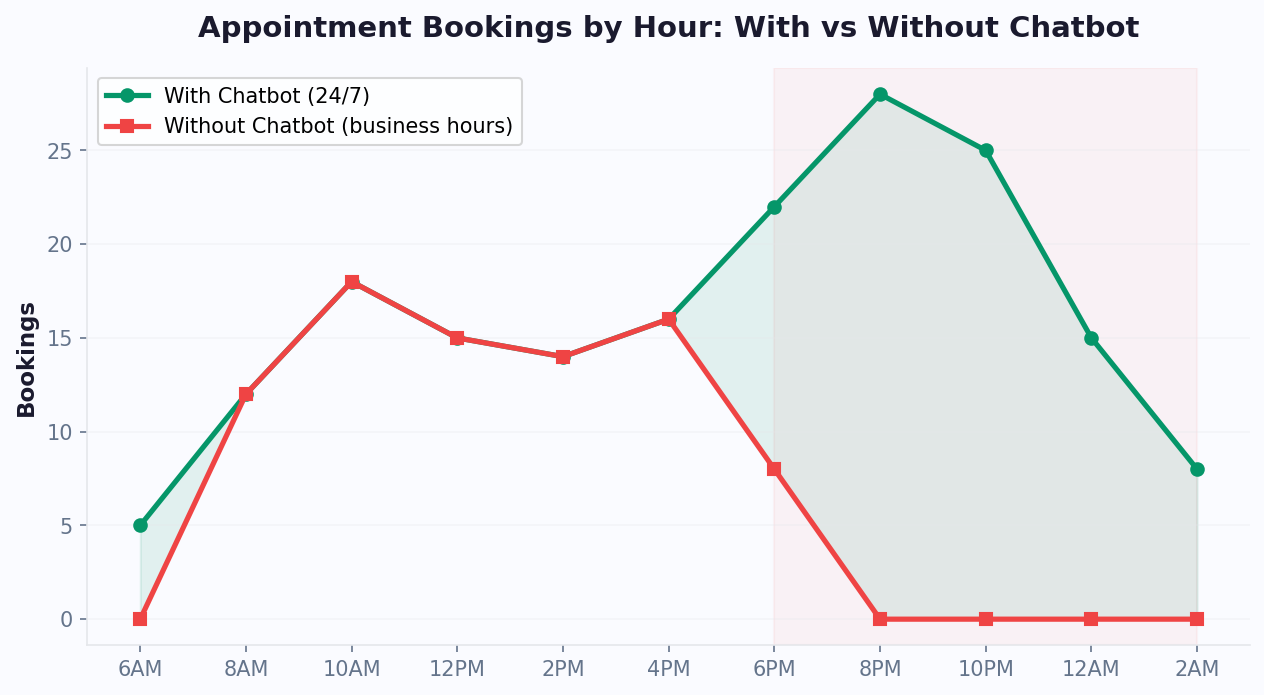
- 35% of online bookings happen outside business hours when phones are not answered
The Traditional Scheduling Stack
Most businesses handle scheduling through some combination of phone calls, email, and online booking forms. Each has problems:
Phone scheduling requires staff availability, creates hold times, and is impossible after hours. It is also expensive — each phone booking takes 4-8 minutes of staff time.
Email scheduling involves multiple back-and-forth messages over hours or days. "I am available Tuesday at 2 PM." "Sorry, that is taken. How about Wednesday at 10 AM?" "I cannot do mornings..." This ping-pong wastes time for both parties.
Online booking forms are better but feel impersonal. They lack the ability to answer questions, recommend services, or handle special requirements that fall outside the standard form fields.
How Chatbot Scheduling Works
An AI-powered appointment scheduling chatbot combines the convenience of online booking with the interactivity of a conversation. The chatbot guides the customer through the booking process conversationally while handling questions, suggesting optimal times, and collecting necessary information — all in real time, 24/7.
A typical scheduling chatbot conversation looks like this:
- Bot: "Hi! Would you like to book an appointment? I can help you find the perfect time."
- Customer: "Yes, I need a haircut next Tuesday"
- Bot: "Great! We have openings on Tuesday at 10 AM, 1 PM, and 3:30 PM. Which works best?"
- Customer: "1 PM sounds good"
- Bot: "Perfect! I have you down for Tuesday at 1 PM. Can I get your name and phone number to confirm?"
- Customer provides details
- Bot: "You are all set! I have sent a confirmation to your phone. I will also send a reminder 24 hours before. See you Tuesday!"
This entire interaction takes under 2 minutes, requires zero staff involvement, and works at any time of day. With platforms like Conferbot on WhatsApp, customers can even book appointments through the messaging app they already use daily.
Essential Features of a Scheduling Chatbot
Not all scheduling chatbots are created equal. Here are the features that separate an effective booking bot from a frustrating one.
1. Real-Time Calendar Integration
The chatbot must connect to your actual scheduling system (Google Calendar, Outlook, Calendly, custom booking software) to show real-time availability. Conferbot's calendar booking feature makes this integration seamless. Nothing destroys trust faster than a chatbot that books a time slot that is already taken. API integration ensures the chatbot always shows accurate availability.
2. Service Selection and Duration Awareness
If you offer multiple services with different durations and pricing, the chatbot should guide customers to the right service and only show time slots that accommodate the selected service duration. A 90-minute deep tissue massage cannot be booked in a 60-minute slot.
3. Staff Assignment
For businesses with multiple service providers (stylists, doctors, trainers, consultants), the chatbot should let customers choose a specific provider or automatically assign based on availability, expertise, or customer history.
4. Automated Reminders
No-show reduction is one of the biggest ROI drivers of scheduling chatbots. The bot should automatically send reminders:
- 24 hours before: Confirmation reminder with appointment details
- 2 hours before: Final reminder with directions/preparation instructions
- Rescheduling option: Include a one-click reschedule link in every reminder
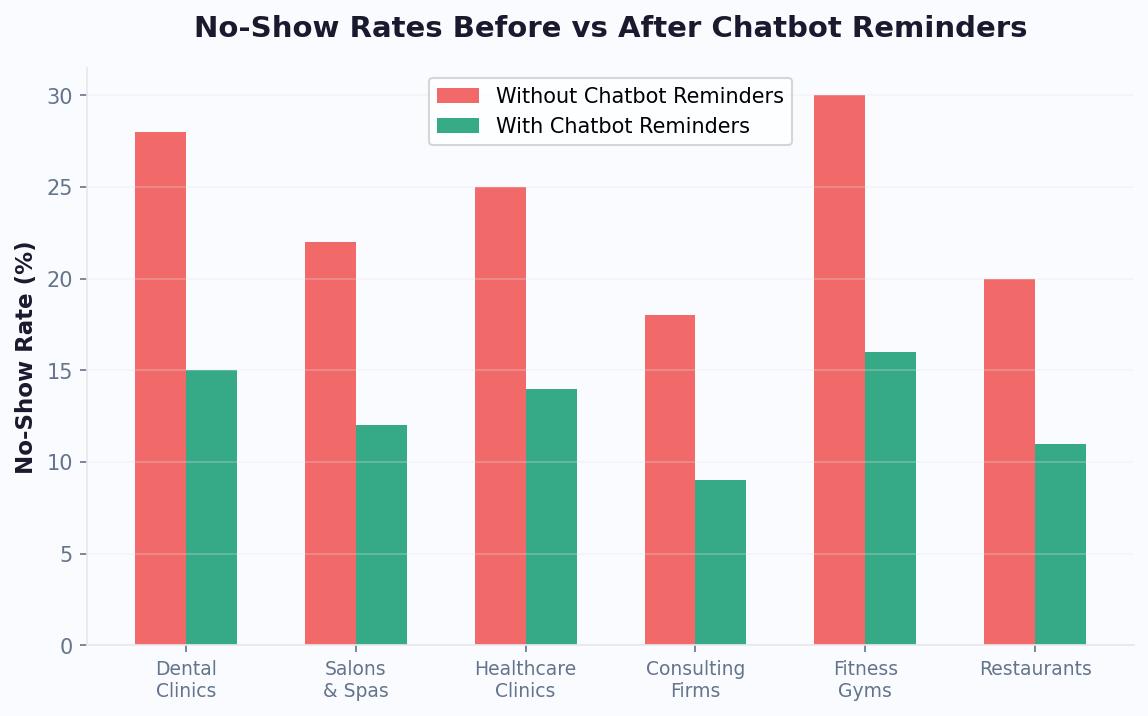
Businesses using automated reminders report 25-35% reduction in no-shows — directly translating to recovered revenue.
5. Rescheduling and Cancellation
Customers should be able to reschedule or cancel through the chatbot without calling. The chatbot should enforce your cancellation policy (e.g., "Cancellations within 24 hours may incur a fee") and immediately open up the cancelled slot for other bookings.
6. Information Collection
Beyond name and time, many appointments require additional information: insurance details for medical appointments, vehicle information for auto services, event details for venue bookings. The chatbot should collect this information conversationally rather than through a static form, making the experience feel natural.
7. Multi-Channel Booking
Customers should be able to book through whichever channel they prefer — your website, WhatsApp, or social media. All bookings should sync to the same calendar regardless of the channel used. This is where platforms with booking templates and omnichannel support shine.
8. Payment Integration
For businesses that require deposits or upfront payment, the chatbot should be able to collect payment within the conversation flow. Through the integrations hub, connecting with Stripe, PayPal, or other payment processors eliminates the need for a separate payment step.
Industry-Specific Scheduling Chatbot Use Cases
Scheduling chatbots serve different industries in different ways. Here is how the use case adapts to specific verticals, especially when deployed via an omnichannel strategy.
Healthcare and Medical Practices
Medical scheduling chatbots handle new patient intake, follow-up appointment booking, prescription refill scheduling, and specialist referral coordination. They collect insurance information, medical history forms, and reason for visit — streamlining the check-in process before the patient arrives. HIPAA compliance is essential; ensure your chatbot platform handles protected health information appropriately.
Key benefit: Reduces front desk call volume by 40-60% while maintaining 24/7 appointment availability for patients who cannot call during office hours.
Salons and Spas
Beauty businesses use scheduling chatbots to book services, match clients with specific stylists, upsell complementary services ("Would you like to add a conditioning treatment?"), and send preparation instructions ("Please arrive with clean, dry hair"). Integration with salon management software (Vagaro, Booksy, Square) ensures real-time availability.
Key benefit: 35% of salon bookings happen after 8 PM — a chatbot captures these bookings that would otherwise be lost overnight.
Professional Services (Legal, Accounting, Consulting)
Professional service firms use scheduling chatbots for initial consultation booking, qualifying prospects before the meeting (budget, timeline, project scope), and sending pre-meeting questionnaires. This ensures that the professional's time is spent on qualified prospects with relevant background information already collected.
Key benefit: Reduces meeting prep time by 50% when the chatbot has already collected client needs and basic information.
Fitness and Wellness
Gyms, yoga studios, and personal trainers use chatbots for class booking, personal training session scheduling, trial class sign-ups, and waitlist management. Integration with class management software shows real-time capacity and prevents overbooking.
Key benefit: Automated waitlist management fills cancelled spots within minutes instead of hours, maximizing class utilization.
Real Estate
Real estate agents use scheduling chatbots to book property viewings, qualify buyer interest (budget, timeline, preferences), schedule home inspections, and coordinate with sellers on showing availability. The chatbot handles the back-and-forth that traditionally takes multiple phone calls and emails.
Key benefit: Agents spend time showing properties and closing deals instead of scheduling — recovering 5-8 hours per week.
Auto Services
Auto repair shops, detailing services, and dealerships use chatbots for service appointment booking, vehicle information collection (make, model, year, mileage), service recommendation based on vehicle history, and repair estimate scheduling.
Key benefit: Collecting vehicle information before arrival reduces appointment time by 15-20 minutes, increasing daily service capacity.
How to Build an Appointment Scheduling Chatbot
Building a scheduling chatbot is one of the most straightforward chatbot projects, especially with pre-built booking and scheduling templates. Here is the practical process.
Step 1: Map Your Booking Flow
Before touching any tool, sketch your ideal booking conversation on paper. Answer these questions:
- What information do you need from the customer? (Name, contact, service type, preferred time, special requirements)
- How should availability be displayed? (Day picker, time slots, provider selection)
- What are your booking rules? (Minimum advance notice, maximum advance booking, cancellation policy)
- What confirmations should be sent? (In-chat confirmation, email, SMS, calendar invite)
Step 2: Choose Your Platform
Select a chatbot platform that supports calendar integration, multi-channel deployment, and automated reminders. Conferbot offers pre-built scheduling templates with Google Calendar and Outlook integration, deployable on website and WhatsApp simultaneously.
Step 3: Build the Flow
Using a no-code chatbot builder, create the conversation flow:
- Welcome message: Identify the customer's intent (new booking, reschedule, or cancel)
- Service selection: Present your services with descriptions and pricing
- Provider selection: If applicable, let customers choose or auto-assign
- Date selection: Show a date picker with available days
- Time selection: Display available time slots for the selected date and service
- Information collection: Collect name, contact details, and any required information
- Confirmation: Summarize the booking and ask for confirmation
- Post-booking: Send confirmation via preferred channel, schedule reminders
Step 4: Connect Your Calendar
Integrate with your scheduling system via API:
- Google Calendar: Real-time availability sync, automatic event creation
- Outlook/Office 365: Calendar integration for enterprise environments
- Industry software: Connect to Calendly, Acuity, Vagaro, Booksy, or custom systems
Step 5: Configure Reminders
Set up automated reminder sequences:
- Confirmation message immediately after booking
- Reminder 24 hours before with reschedule/cancel options
- Day-of reminder 2 hours before with location and preparation details
Step 6: Test and Deploy
Test the complete flow including edge cases:
- What happens when no slots are available on the requested day?
- What if the customer wants a time outside business hours?
- What happens if two people try to book the same slot simultaneously?
- Can customers successfully reschedule and cancel?
Deploy on your website first, then expand to WhatsApp and other channels. Most scheduling chatbots are live within 3-5 days of starting the build.
How Scheduling Chatbots Reduce No-Shows by 30%
No-shows are the silent revenue killer for appointment-based businesses. The average no-show rate across industries is 23-28%, meaning roughly one in four scheduled appointments results in lost revenue. Scheduling chatbots attack this problem through multiple mechanisms.
Automated Reminder Sequences
The most impactful no-show reduction strategy is automated reminders. Research consistently shows that multi-touch reminder sequences reduce no-shows by 25-35%. A chatbot sends these automatically through the customer's preferred channel:
- 48-hour reminder: "Your appointment is in 2 days. Reply CONFIRM to keep it or RESCHEDULE if you need to change."
- 24-hour reminder: "See you tomorrow at 2 PM! Here is what to bring: [preparation details]"
- 2-hour reminder: "Your appointment is in 2 hours. Here are directions: [link]"
The key is making each reminder actionable. Including a one-tap reschedule option converts potential no-shows into rescheduled appointments rather than lost revenue.
Frictionless Rescheduling
Many no-shows happen because cancellation is inconvenient. If a customer has to call during business hours, sit on hold, and explain why they are cancelling, they are more likely to simply not show up. A chatbot powered by natural language processing that handles rescheduling in seconds removes this friction:
- Customer replies "RESCHEDULE" to any reminder
- Chatbot immediately shows alternative available slots
- Customer selects a new time with a single tap
- Confirmation is instant
This process takes under 30 seconds versus 5-10 minutes by phone. The result: customers reschedule instead of no-showing, your slot opens up for someone else, and revenue is preserved.
Deposit and Pre-Payment
Chatbots that collect deposits during booking create financial commitment that dramatically reduces no-shows. Even a small deposit (10-20% of service cost) reduces no-shows by 40-50% because customers have skin in the game.
Waitlist Automation
When a cancellation occurs, the chatbot can immediately notify customers on the waitlist and fill the slot within minutes. This turns every cancellation into an opportunity rather than lost revenue.
No-Show Follow-Up
When a no-show does occur, the chatbot can automatically:
- Send a "We missed you" message 30 minutes after the missed appointment
- Offer easy rebooking with priority scheduling
- Apply any no-show fees per your policy
- Flag repeat no-shows for review
The Compound Effect
Each of these mechanisms reduces no-shows independently. Use chatbot analytics to measure which mechanism delivers the most impact for your business. Combined, they create a compound effect that can reduce your no-show rate from 25%+ to under 10%. For a business doing 100 appointments per week at $75 average value, reducing no-shows from 25% to 10% recovers $56,250 in annual revenue.
This no-show reduction is often the single largest financial benefit of implementing a scheduling chatbot — and it requires zero additional staff effort because everything is automated.
Waitlist Management: Filling Cancelled Slots Automatically
Cancellations are inevitable in any appointment-based business. What separates high-revenue operations from the rest is how quickly they fill those cancelled slots. Manually calling through a waitlist takes 15-30 minutes per cancellation and often fails because people do not answer their phones during business hours. A scheduling chatbot fills cancelled slots in under 60 seconds, automatically, with zero staff involvement.
How Automated Waitlist Filling Works
The system operates in four steps:
- Cancellation triggers the flow. When a customer cancels (through the chatbot, by phone, or as a no-show), the slot immediately becomes available and the waitlist engine activates.
- Waitlist contacts are notified instantly. The chatbot sends a message to every customer on the waitlist for that service type and time window: "Good news! A [service] slot just opened up on [date] at [time]. Tap to book it now — first come, first served."
- First responder gets the slot. The first customer to tap "Book" secures the appointment. The chatbot confirms immediately and sends a calendar confirmation. All other waitlist contacts receive a follow-up: "That slot was just taken, but you are still on our waitlist. We will notify you of the next opening."
- The loop continues. If nobody claims the slot within a configurable window (30 minutes to 2 hours), the chatbot can widen the notification to non-waitlisted customers with a promotional offer: "Flash opening tomorrow at 2 PM — book now and get 10% off."
Waitlist Performance by Channel
| Notification Channel | Open Rate | Avg. Response Time | Slot Fill Rate |
|---|---|---|---|
| 98% | 3-8 minutes | 78% | |
| SMS | 95% | 5-12 minutes | 65% |
| 22% | 2-6 hours | 18% | |
| Phone call (manual) | 40% | 15-30 minutes | 35% |
| App push notification | 60% | 10-20 minutes | 45% |
WhatsApp dominates waitlist effectiveness because of its near-universal open rate and the conversational nature of the booking interaction. A customer receiving a WhatsApp message can book in two taps without opening a separate app or website. This is why businesses using WhatsApp scheduling chatbots report the highest slot fill rates of any channel.
Revenue Impact of Waitlist Automation
Consider a dental practice with 40 appointments per day at an average value of $200. With a typical 15% cancellation rate, that is 6 cancelled slots per day, or roughly $1,200 in potential lost revenue. Manual phone-based waitlist management fills approximately 35% of those slots, recovering $420/day. An automated chatbot waitlist fills 70-80%, recovering $840-960/day. The difference is $420-540 per day, or $109,000-140,000 per year in recovered revenue from a single automation.
The math works across industries. A hair salon filling 3 extra cancelled slots per week at $85 average recovers $13,260/year. A consulting firm filling 2 cancelled $500 sessions per month recovers $12,000/year. A fitness studio filling 5 cancelled class spots per day at $25 each recovers $45,625/year. In every case, the chatbot platform cost ($49-149/month via Conferbot) is a fraction of the recovered revenue.
Setting Up Waitlist Automation
Implementation requires three components: a waitlist sign-up flow (added to your booking chatbot as an option when preferred slots are unavailable), a cancellation trigger connected to your calendar system, and a notification flow that messages waitlisted customers via their preferred channel. Most businesses configure this in 2-3 hours using the integrations hub to connect their calendar and messaging channels. The waitlist itself is managed as a simple queue within the chatbot's data layer, with customers ranked by sign-up time and optionally by service type or provider preference.
For businesses already running a scheduling chatbot, adding waitlist management is the single highest-ROI enhancement you can make. It turns every cancellation from a revenue loss into a revenue recovery opportunity, and it operates entirely without staff intervention.
Scheduling Chatbots on WhatsApp: Why It Works
WhatsApp has emerged as the most effective channel for appointment scheduling chatbots, outperforming website chat, email, and phone across several metrics. Here is why.
Higher Engagement Rates
WhatsApp messages have a 98% open rate compared to 20-30% for email. Appointment reminders sent via WhatsApp are read within minutes, not hours. This dramatically improves the effectiveness of reminder sequences and rescheduling prompts.
Conversational Familiarity
People are already comfortable messaging on WhatsApp. The booking conversation feels natural — like texting with a friend — rather than filling out a cold web form. This comfort translates to higher completion rates: WhatsApp booking flows see 15-25% higher completion than equivalent web forms.
Persistent Conversation Thread
Unlike live chat on a website (which resets when the page closes), WhatsApp conversations persist in the customer's message history. The booking confirmation, reminders, and rescheduling options all live in the same thread. Customers can scroll up to find their appointment details anytime without logging into a portal or searching emails.
Two-Way Reminder Channel
WhatsApp reminders invite natural responses. A customer who receives a reminder can immediately reply to ask a question ("What should I bring?"), reschedule ("Can we move to Thursday?"), or confirm ("See you then!"). This bidirectional communication reduces no-shows more effectively than one-way email or SMS reminders.
Setting Up WhatsApp Scheduling
To deploy a scheduling chatbot on WhatsApp:
- Set up a WhatsApp Business account with verified business profile
- Connect your WhatsApp number to your chatbot platform (Conferbot supports this natively)
- Build or adapt your scheduling flow for WhatsApp's interface (shorter messages, quick reply buttons, list messages for time slot selection)
- Configure reminder message templates (WhatsApp requires pre-approved templates for outbound messages)
- Test the complete booking and reminder flow end-to-end
WhatsApp Scheduling Best Practices
- Keep messages short: WhatsApp users expect concise messages. Break long information into multiple short messages rather than one wall of text.
- Use quick reply buttons: WhatsApp supports up to 3 quick reply buttons per message. Use them for common actions (Confirm, Reschedule, Cancel).
- Use list messages: For time slot selection, WhatsApp list messages show up to 10 options in a clean, tappable format — perfect for displaying available times.
- Respect messaging windows: WhatsApp has a 24-hour customer service window. For reminders sent outside this window, use approved message templates.
For appointment-based businesses, WhatsApp scheduling chatbots consistently deliver the highest booking completion rates and lowest no-show rates of any channel. If you only deploy scheduling on one channel, make it WhatsApp.
Scheduling Chatbot ROI: Industry Data and Revenue Recovery Calculations
Appointment scheduling chatbots deliver ROI through three distinct value streams: no-show reduction, after-hours booking capture, and staff time liberation. According to Gartner's service automation research, businesses that automate scheduling see average revenue increases of 15-25% within 6 months — primarily from recovered no-show revenue and previously lost after-hours bookings.
Revenue Recovery by Industry
| Industry | Avg. Appointment Value | Avg. No-Show Rate (Before) | No-Show Rate (After Chatbot) | Annual Revenue Recovered (100 appts/week) |
|---|---|---|---|---|
| Dental practice | $200 | 23% | 9% | $145,600 |
| Hair salon | $85 | 28% | 12% | $70,720 |
| Medical clinic | $175 | 25% | 10% | $136,500 |
| Legal consultation | $350 | 20% | 8% | $218,400 |
| Personal training | $75 | 30% | 13% | $66,300 |
| Auto service | $250 | 18% | 7% | $143,000 |
After-Hours Booking Value
According to HubSpot's marketing data, 35-40% of appointment searches happen outside business hours. Without a chatbot, these potential bookings are lost to competitors who offer 24/7 online booking. The math is straightforward:
- If you currently book 100 appointments per week during business hours
- And 35% of booking intent occurs after hours
- A chatbot capturing even 60% of that after-hours demand adds 21 appointments per week
- At an average value of $150/appointment, that is $163,800 in annual revenue that was previously invisible
Staff Time Liberation Calculator
According to Statista's scheduling research, the average appointment booking takes 4.5 minutes by phone (including hold time, small talk, calendar checking, and confirmation). With 100 appointments per week, that is 450 minutes — or 7.5 hours per week of staff time consumed by scheduling alone. At $22/hour, that is $8,580 per year in pure scheduling labor. A chatbot reduces this to near zero for standard bookings.
Comparison: Chatbot vs Traditional Scheduling Methods
| Capability | Phone Booking | Online Form | Scheduling Software | AI Scheduling Chatbot |
|---|---|---|---|---|
| 24/7 availability | No | Yes | Yes | Yes |
| Answers questions during booking | Yes | No | No | Yes |
| Personalized recommendations | Sometimes | No | No | Yes |
| Automated reminders | No | No | Some | Yes (multi-channel) |
| Waitlist management | Manual | No | Some | Fully automated |
| Multi-channel (Web + WhatsApp) | No | Web only | Web only | Yes |
| Upsell/cross-sell during booking | Sometimes | No | No | Yes |
| Staff time per booking | 4.5 min | 1 min (review) | 0.5 min | 0 min |
The chatbot advantage is not just automation — it is the combination of automation with conversational intelligence. A scheduling chatbot answers questions that would otherwise prevent booking ("Do you accept my insurance?", "Is there parking?", "What should I wear?"), recommends appropriate services, and upsells complementary offerings — all while requiring zero staff involvement.
For healthcare practices specifically, see our healthcare chatbot guide for HIPAA-compliant scheduling. For service businesses looking to combine scheduling with lead generation, our lead generation chatbot guide covers the conversion optimization layer. And for businesses evaluating chatbot platforms, G2's chatbot platform reviews provide comparison data on scheduling-specific features across vendors. Our appointment reminders guide dives deeper into reminder optimization strategies.
Implement quarterly reviews of your no-show data segmented by day of week, time of day, and service type to identify patterns. Many businesses discover that specific appointment slots have disproportionately high no-show rates, allowing targeted interventions like double-booking those slots or requiring deposits only for high-risk time windows.
Was this article helpful?
How to Use a Chatbot for Appointment Scheduling FAQ
Everything you need to know about chatbots for how to use a chatbot for appointment scheduling.
About the Author

Conferbot Team specializes in conversational AI, chatbot strategy, and customer engagement automation. With deep expertise in building AI-powered chatbots, they help businesses deliver exceptional customer experiences across every channel.
View all articles