The Rental Market Is Booming — But Property Managers Are Drowning in Inquiries
The rental housing market in the United States is experiencing unprecedented demand. According to the U.S. Census Bureau's Housing Vacancies Survey, rental vacancy rates have dropped to near-historic lows at around 6.4% nationwide, while renter-occupied housing units have climbed to over 44 million. In major metropolitan areas, vacancy rates sit below 3%, creating intense competition among tenants for available units and an avalanche of inquiries for property managers.
Consider the scale of the problem. A single multi-family property with 200 units in a competitive market might receive 500 to 1,000 rental inquiries per month during peak leasing season. Each inquiry involves answering questions about availability, rent pricing, pet policies, amenities, application requirements, and move-in costs. If a leasing agent spends an average of 7 minutes per inquiry — reading the message, pulling up unit details, typing a response — that is 58 to 117 hours of labor per month dedicated solely to answering repetitive questions.
The math gets worse when you factor in response time expectations. A study by Apartments.com found that 65% of renters expect a response to their inquiry within 30 minutes, and 42% will move on to the next listing if they do not hear back within an hour. Yet the average property management company takes 6 to 24 hours to respond to a rental inquiry. By then, the prospective tenant has already applied somewhere else.
This is the gap that rental property chatbots fill. A chatbot deployed on your property website, listing pages, or messaging channels answers every inquiry instantly — at 2 PM on a Tuesday or 11 PM on a Saturday. It shares unit details, confirms availability, pre-screens applicants against your criteria, schedules showings, and pushes qualified leads into your application pipeline. All without a leasing agent lifting a finger.
The result is measurable: property management companies using chatbots report 40-60% reductions in inquiry response time, 25-35% increases in showing bookings, and 15-25% faster lease-up rates compared to traditional manual processes. For properties in high-demand markets, those numbers translate directly into reduced vacancy days and tens of thousands of dollars in recovered revenue per year.
How Rental Property Chatbots Work: From Inquiry to Application
A rental property chatbot is an AI-powered conversational agent that handles the entire top-of-funnel leasing process, addressing pain points identified by the National Association of Realtors (NAR) research automatically. Think of it as a leasing assistant that never sleeps, never takes a break, and can handle 50 conversations simultaneously. Here is a step-by-step look at how a rental chatbot manages tenant interactions from first contact to application submission.
Stage 1: Instant Greeting and Intent Detection
When a prospective tenant visits your property website, lands on your listing on Zillow or Apartments.com, or messages your WhatsApp Business number, the chatbot greets them immediately. Unlike a static contact form, the chatbot opens a conversation:
- "Hi! Welcome to Parkview Apartments. Are you looking for a 1-bedroom, 2-bedroom, or 3-bedroom unit?"
- "Hello! I can help you with unit availability, pricing, amenities, or scheduling a tour. What would you like to know?"
The NLP engine detects the visitor's intent — whether they are asking about availability, pricing, pet policies, application requirements, or want to schedule a showing — and routes them into the appropriate conversation flow.
Stage 2: Unit Availability and Detail Sharing
The chatbot pulls real-time unit data from your property management system or a pre-loaded inventory database. When a prospect asks "Do you have any 2-bedroom units available?" the bot responds with:
- Available unit numbers and floor plans
- Monthly rent and any current move-in specials
- Square footage, layout descriptions, and photos
- Available move-in dates
- Included utilities and amenities
This eliminates the back-and-forth email chains that typically take 2-3 days to resolve. The prospect gets comprehensive unit information in under 60 seconds.
Stage 3: Pre-Screening Questions
Before scheduling a showing or sending an application link, the chatbot collects essential screening information. This saves both the prospect and your leasing team time by identifying disqualifying factors early:
- Desired move-in date: Confirms the timeline aligns with available units
- Number of occupants: Ensures the unit size meets occupancy requirements
- Pets: Type, breed, and size — cross-referenced against your pet policy
- Monthly income range: Confirms the prospect meets income requirements (typically 2.5-3x rent)
- Credit and background: Asks whether the applicant is comfortable with a credit and background check
- Eviction history: A simple yes/no question that filters out high-risk applicants
The chatbot handles these questions conversationally, not as a rigid form. If a prospect mentions they have two dogs, the bot can immediately confirm whether dogs are allowed and specify any breed or weight restrictions before continuing — preventing frustration later in the process.
Stage 4: Showing Scheduling
For qualified prospects, the chatbot offers available showing times pulled from your integrated calendar system. The prospect picks a time, receives an instant confirmation with the property address, parking instructions, and what to bring, and the leasing agent gets a notification with the prospect's pre-screening details.
Stage 5: Application Collection
After a showing (or for prospects ready to apply sight-unseen in competitive markets), the chatbot sends the application link, explains the process and fees, and answers questions about required documents. It can follow up 24 hours later with a reminder if the application has not been submitted.
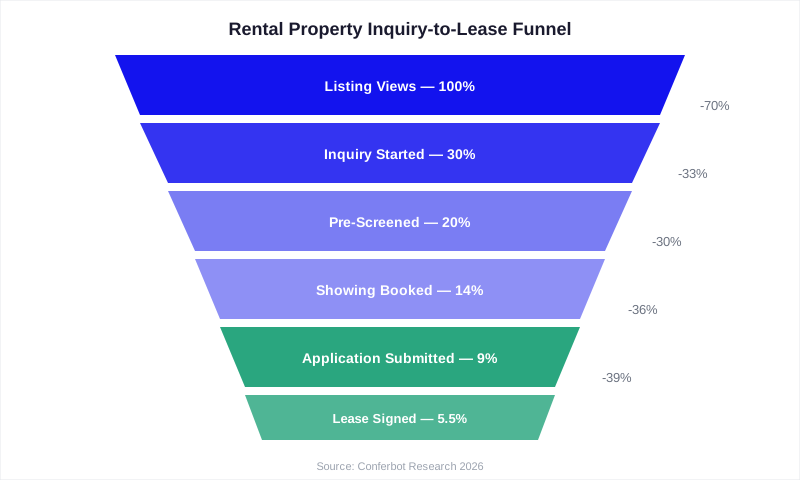
This entire funnel — from first inquiry to application — happens without human intervention for 70-80% of prospects. Leasing agents only step in for complex questions, negotiations, or in-person interactions.
7 High-Impact Use Cases for Rental Property Chatbots
1. Vacancy Marketing and Listing Inquiries
When you list a unit on your website, Zillow, Apartments.com, or Craigslist, the chatbot is the first point of contact for every inquiry. It answers the most common questions — rent amount, square footage, pet policy, parking availability, lease terms — instantly, preventing the 60-70% of prospects who abandon the process while waiting for a human response.
2. Virtual Tour Scheduling and Self-Guided Tours
Many properties now offer self-guided tours using smart lock technology. The chatbot verifies the prospect's identity, sends a unique access code, and provides instructions for the self-guided tour — all automated. For traditional in-person tours, it matches the prospect's preferred time with agent availability and confirms the booking. Properties using chatbot-scheduled tours report 30% fewer no-shows compared to manually scheduled tours, because the automated confirmation and reminder sequence keeps the appointment top of mind.
3. Tenant Pre-Screening at Scale
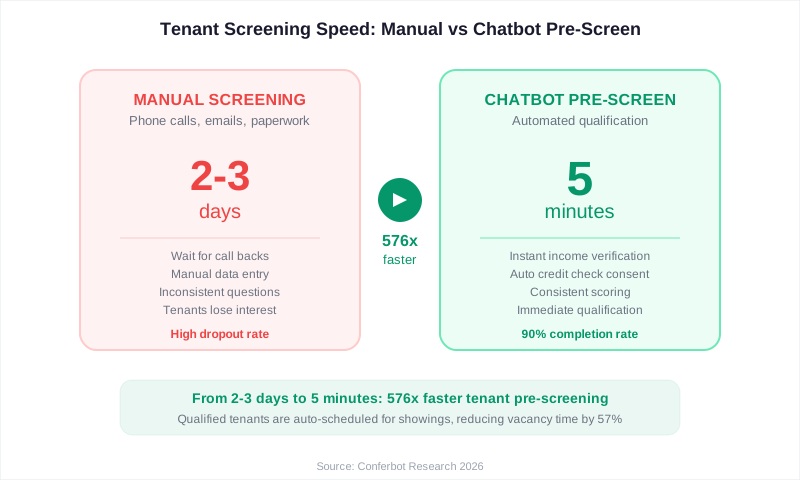
Pre-screening is where chatbots deliver the highest ROI for property managers. Instead of a leasing agent spending 10-15 minutes per phone call asking qualification questions, the chatbot handles screening for every prospect simultaneously. It collects income information, checks pet compatibility, verifies desired move-in timelines, and flags any red flags — all before a human ever gets involved. This reduces unqualified showings by 40-50%, saving leasing agents hours per week.
4. Application Status Updates
Once a tenant submits an application, the chatbot handles status inquiries: "Where is my application?" "When will I hear back?" "Do you need any additional documents?" This reduces inbound calls and emails by 30-40% during the application review period, freeing your team to focus on processing rather than answering the same status questions repeatedly.
5. Move-In Coordination
After lease signing, the chatbot guides new tenants through the move-in process: utility setup instructions, move-in inspection scheduling, parking pass requests, key and access card pickup, community rules and guidelines, and local area information. This structured onboarding reduces move-in support requests by 50% and improves the new tenant experience from day one.
6. Maintenance Request Triage
For existing tenants, the chatbot triages maintenance requests by urgency. A report of a burst pipe gets flagged as an emergency and routes to the on-call maintenance team immediately. A request to fix a squeaky cabinet door gets logged as routine and scheduled during normal business hours. This intelligent triage ensures emergencies get fast attention while routine requests are handled efficiently without overwhelming your maintenance team.
7. Lease Renewal Conversations
60-90 days before a lease expires, the chatbot initiates the renewal conversation: presenting the renewal terms, answering questions about rent adjustments, offering incentives for early renewal, and collecting the signed renewal digitally. Properties using automated lease renewal chatbots report 15-20% higher renewal rates compared to those relying on paper notices and manual follow-up, directly reducing turnover costs that average $3,000-5,000 per unit.
ROI Breakdown: What a Rental Property Chatbot Saves You
Let us run the numbers for a property management company overseeing 500 rental units across multiple properties, with an average monthly rent of $1,800 and a 7% annual turnover rate.
Current State (Without Chatbot)
| Metric | Value |
|---|---|
| Units managed | 500 |
| Annual unit turnovers | 35 (7%) |
| Average vacancy duration | 28 days |
| Lost rent per vacancy day | $60 |
| Annual vacancy cost | $58,800 |
| Monthly rental inquiries | 800 |
| Staff hours on inquiries/month | 93 hours (7 min each) |
| Inquiry response time | 6-24 hours |
| Inquiry-to-showing conversion | 18% |
| Showing-to-application conversion | 35% |
With Chatbot
| Metric | Value | Change |
|---|---|---|
| Inquiry response time | Instant | -100% |
| Inquiry-to-showing conversion | 32% | +78% |
| Showing-to-application conversion | 48% | +37% |
| Average vacancy duration | 19 days | -32% |
| Annual vacancy cost | $39,900 | -$18,900 |
| Staff hours on inquiries/month | 28 hours | -70% |
| Leasing staff cost savings/year | $31,200 | (at $40/hr loaded) |
The Bottom Line
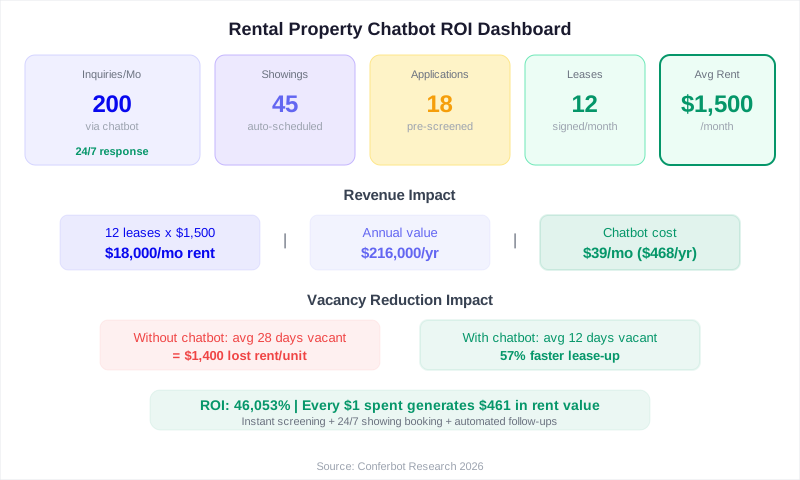
Annual savings from reduced vacancy: $18,900
Annual savings from reduced staff hours: $31,200
Total annual benefit: $50,100
Annual chatbot cost: $1,200-2,400 ($100-200/month)
ROI: 20-42x return on investment
And these numbers are conservative. They do not account for the additional revenue from higher-quality tenants (fewer evictions, fewer late payments) that result from better pre-screening, or the improved online reviews that come from instant responsiveness — which drive more organic traffic to your listings, compounding the benefit over time.
For smaller landlords managing 10-50 units, the math is proportionally similar. Even at 20 units, the chatbot pays for itself by filling one vacancy 9 days faster — saving $540 in lost rent against a $50/month chatbot cost. Use the Conferbot ROI calculator to model your specific portfolio numbers.
Rental Market Data: Why Speed Matters More Than Ever
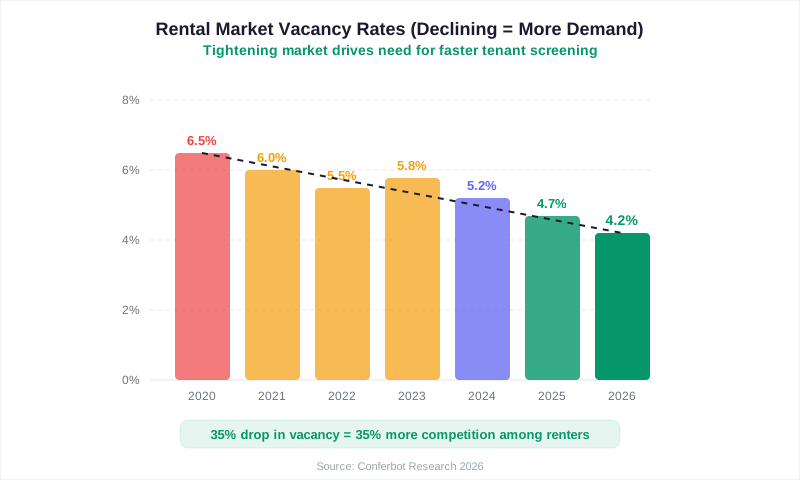
The rental market dynamics of 2025-2026 make chatbot adoption not just advantageous but essential for competitive property managers. Here are the numbers that define the current landscape.
Demand Outpacing Supply
According to the Joint Center for Housing Studies at Harvard University, renter household formation has outpaced new rental unit construction by approximately 400,000 units per year over the past five years. This supply-demand imbalance means that desirable units receive 10-30 applications within the first 48 hours of listing in competitive markets. Property managers who respond slowly simply lose applicants to faster competitors.
Tenant Expectations Have Shifted
The modern renter — particularly millennials and Gen Z who comprise over 60% of the renter population — expects digital-first interactions. A 2025 survey by the National Multifamily Housing Council found that:
- 72% of renters prefer to communicate with property management via text or chat rather than phone or email
- 58% of renters want to complete the entire application process online without visiting the office
- 81% of renters research and compare at least 5 properties online before scheduling a single tour
- 45% of renters search for apartments primarily outside of business hours (evenings and weekends)
The Cost of Every Vacant Day
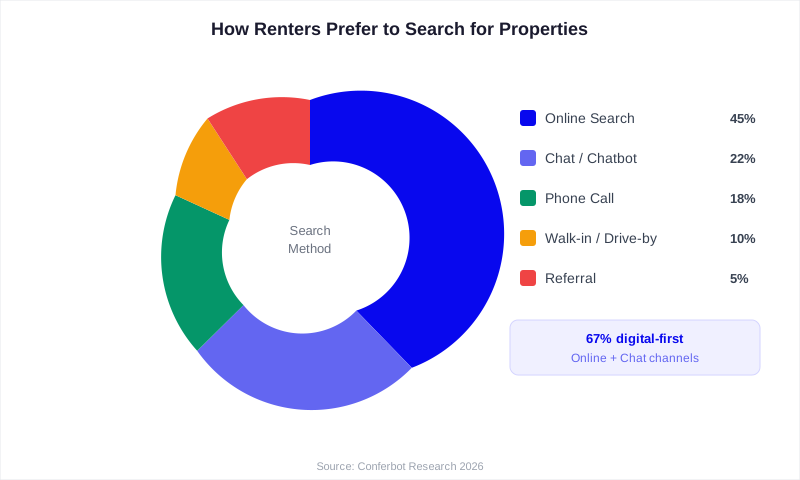
Vacancy is the single largest controllable expense in property management. For a unit renting at $2,000 per month, each vacant day costs $66.67 in lost revenue. A vacancy that lasts 30 days instead of 21 — just 9 extra days — costs $600 per unit. Across a 200-unit portfolio with 10% turnover, those 9 extra days per turnover add up to $12,000 in annual lost revenue.
Speed in responding to inquiries directly correlates with leasing velocity. Properties that respond to inquiries within 5 minutes convert at 2.5x the rate of those that respond within an hour. A chatbot makes sub-5-minute response time the default, not the exception.
Seasonal Demand Patterns
Rental demand is highly seasonal. Peak leasing season (May through August) sees 40-60% higher inquiry volumes than winter months. Property managers who rely on manual processes are overwhelmed during peak season — response times balloon, qualified applicants slip through the cracks, and vacancies linger. A chatbot scales effortlessly: whether you receive 200 inquiries per month or 2,000, the response time is instant and consistent. This is where chatbot-equipped properties pull ahead, capturing the summer rush while competitors struggle to keep up.
Tenant Pre-Screening With Chatbots: A Deep Dive
Pre-screening is the highest-value function a rental chatbot performs, reflecting fair housing compliance guidance from HUD's Fair Housing Office. It sits at the intersection of efficiency and risk management — helping you fill units faster while simultaneously filtering out applicants who are unlikely to qualify. Here is how to build an effective pre-screening chatbot flow.
The Pre-Screening Conversation Flow
An effective pre-screening chatbot collects the following data points through natural conversation rather than a rigid form:
- Move-in timeline: "When are you looking to move in?" — Filters out prospects whose timeline does not match your availability. A prospect looking to move in 4 months is a future lead, not an immediate one.
- Occupants: "How many people will be living in the unit?" — Ensures the unit size meets occupancy requirements and local housing codes.
- Pets: "Do you have any pets? If so, what type and how much do they weigh?" — Immediately checks against your pet policy. If your property has a 50-pound weight limit and the prospect has a 90-pound dog, the chatbot can redirect them to pet-friendly alternatives or inform them of the restriction before they invest time in a tour.
- Income verification: "What is your approximate monthly household income?" — Compares against your income requirement (typically 2.5-3x monthly rent). This is the single most impactful pre-screening question, filtering out 25-35% of unqualified applicants.
- Rental history: "Have you ever been evicted or broken a lease?" — Self-reported, but effective as a first filter. Honest responses save both parties significant time.
- Credit comfort: "Our application includes a credit check. Are you comfortable proceeding?" — Prospects with credit concerns often self-select out, reducing your screening costs for applications that would be denied.
Scoring and Routing Logic
Based on the pre-screening responses, the chatbot assigns a qualification score and routes the prospect accordingly:
| Score | Criteria | Action |
|---|---|---|
| Hot (80-100) | Income 3x+ rent, no pets or policy-compliant pets, moving within 30 days, no eviction history | Immediately offer showing times and send application link |
| Warm (50-79) | Income 2.5-3x rent, pets need review, moving in 30-60 days | Schedule showing, flag for leasing agent review |
| Cool (20-49) | Income borderline, timeline 60+ days, potential pet policy conflict | Collect contact info, add to future availability waitlist |
| Disqualified (0-19) | Income below 2x rent, eviction history, non-compliant pets | Politely inform of requirements, suggest alternative properties if available |
Fair Housing Compliance
This is critical. Your chatbot must comply with the Fair Housing Act and all applicable state and local fair housing laws. The pre-screening questions must focus exclusively on objective, legitimate business criteria — income, occupancy, pets, and timeline. The chatbot must never ask about or consider protected characteristics including race, color, national origin, religion, sex, familial status, or disability. Work with your legal counsel to review the chatbot's question flow before deployment, and test it regularly with conversation analytics to ensure compliance. A well-configured chatbot actually reduces fair housing risk compared to human agents because it applies the same criteria consistently to every applicant without unconscious bias.
How to Build a Rental Property Chatbot: Complete Setup Guide
You can have a fully functional rental property chatbot live on your website and messaging channels within an afternoon. Here is the complete implementation roadmap.
Step 1: Choose Your Platform (15 Minutes)
Select a chatbot builder that supports your channels and integrates with your property management stack. Key requirements for rental property chatbots:
- Multi-channel deployment: Your chatbot needs to work on your property website, WhatsApp, and web chat widget
- Conditional logic: Pre-screening flows require branching based on prospect responses
- Calendar integration: For automated showing scheduling
- CRM or PMS integration: To push qualified leads into your property management system
- Knowledge base: To train the bot on your specific property details, policies, and FAQs
The Conferbot AI chatbot builder checks all of these boxes and includes no-code configuration, meaning your leasing team can set it up without developer involvement.
Step 2: Configure Your Property Data (30 Minutes)
Upload your property information to the chatbot's knowledge base:
- Unit inventory: unit numbers, floor plans, square footage, rent prices, available dates
- Property amenities: pool, gym, laundry, parking, storage, community spaces
- Policies: pet policy (breeds, weight limits, deposits), smoking policy, guest policy, noise hours
- Application requirements: income requirements, credit score minimums, documentation needed, application fees
- Move-in costs: first month's rent, security deposit, pet deposit, admin fees
- Neighborhood information: schools, transit, shopping, dining, parks
- Utility information: what is included, average utility costs, setup instructions
Step 3: Build the Conversation Flows (45 Minutes)
Create the four core conversation flows using the no-code flow builder:
- Inquiry flow: Answers questions about availability, pricing, amenities, and policies
- Pre-screening flow: Collects qualification data (income, pets, timeline, occupants, history)
- Showing booking flow: Presents available times, confirms booking, sends reminders
- Application flow: Sends application link, explains the process, follows up on incomplete applications
Step 4: Set Up Integrations (20 Minutes)
- Calendar: Connect Google Calendar, Calendly, or your PMS scheduling module for showing bookings
- Email/SMS notifications: Alert leasing agents when a hot lead books a showing
- CRM/PMS: Push qualified leads and their pre-screening data to AppFolio, Buildium, Yardi, or your property management system
- Application platform: Link to your online application portal (RentRedi, Avail, Zillow Rental Manager)
Step 5: Deploy and Test (15 Minutes)
Install the chatbot widget on your property website, connect your WhatsApp Business number, and run 10-15 test conversations covering every scenario: qualified prospect, disqualified prospect, pet policy questions, showing booking, and application inquiry. Adjust the flows based on the test results, then go live.
Step 6: Post-Launch Optimization (Ongoing)
Review the chatbot analytics dashboard weekly during the first month. Look for:
- Drop-off points in the pre-screening flow (questions that cause prospects to abandon)
- Unanswered questions (gaps in your knowledge base)
- Showing no-show rates (adjust reminder timing if needed)
- Conversion rates at each funnel stage
Most property managers find that 2-3 rounds of optimization in the first month increases the chatbot's conversion rate by 20-30% from the initial configuration.
Scaling Across Properties: Multi-Property Chatbot Strategies
Property management companies that oversee multiple properties face unique chatbot deployment challenges. A single chatbot needs to serve prospects across different properties, each with its own pricing, availability, policies, and amenities. Here is how to structure your chatbot for multi-property operations.
Centralized Bot With Property-Specific Routing
The most effective approach is a single chatbot instance that routes conversations based on which property the prospect is interested in. The conversation starts with property selection — either automatically detected from the page URL (if the prospect is on a specific property's website page) or by asking: "Which property are you interested in?"
Once the property is identified, the chatbot pulls data from that property's knowledge base partition: unit availability, pricing, pet policies, amenities, and showing schedules. This means you maintain one chatbot but train it on data for all your properties. Updates to one property's availability or pricing do not affect other properties.
Portfolio-Wide Analytics
With a centralized chatbot, you gain portfolio-wide visibility into leasing performance. Your analytics dashboard shows:
- Which properties generate the most inquiries (and which are underperforming in marketing)
- Conversion rates by property — identifying which properties have leasing friction that needs attention
- Common objections and questions per property — informing your marketing and property improvements
- Seasonal demand patterns across your portfolio — enabling proactive staffing and marketing decisions
Transfer Between Properties
One of the most powerful multi-property chatbot features is cross-property referral. When a prospect does not qualify for their preferred property (rent too high, no pet-friendly units, no availability in their timeline), the chatbot can suggest alternative properties in your portfolio that match their criteria. "We don't have any pet-friendly 2-bedrooms at Parkview right now, but Lakeview Apartments has three available units that allow dogs under 50 pounds. Would you like to see those?"
This keeps the prospect in your portfolio instead of losing them to a competitor. Property management companies using cross-property referral chatbots report capturing an additional 12-18% of leads that would otherwise leave empty-handed.
Standardized vs. Customized Experiences
While the core pre-screening and scheduling flows should be standardized across properties for efficiency and consistency, customize the greeting, tone, and emphasis for each property's brand and target demographic. A luxury high-rise chatbot should have a different tone than a student housing chatbot, even though they follow the same underlying qualification logic. Your no-code builder allows you to customize these elements per property without duplicating the entire chatbot configuration.
Virtual Tours, Self-Guided Showings, and the Chatbot Connection
The pandemic permanently changed how renters tour properties. Virtual tours and self-guided showings are no longer pandemic workarounds — they are expected offerings. According to the National Association of Realtors, 39% of renters now make leasing decisions based on virtual tours alone, without ever visiting the property in person. A chatbot is the ideal interface for managing both virtual and in-person tour experiences.
Virtual Tour Integration
When a prospect asks to see a unit, the chatbot can offer three options:
- Virtual tour: Sends an instant link to a 3D walkthrough (Matterport, iGUIDE, or video tour) directly in the chat. The prospect views the unit immediately, then returns to the chat to ask follow-up questions or schedule an in-person visit.
- Self-guided tour: If your property uses smart lock technology (Latch, RemoteLock, Rently), the chatbot verifies the prospect's identity, schedules a self-guided tour window, and sends a one-time access code. No leasing agent required.
- Agent-guided tour: For prospects who prefer in-person tours, the chatbot checks agent availability and books the showing with calendar integration.
By offering all three options through the chatbot, you accommodate every prospect's preference. Data shows that properties offering virtual-first tours fill vacancies 8-12 days faster because prospects can view units immediately rather than waiting for a scheduled tour.
Post-Tour Follow-Up Automation
After any tour type, the chatbot initiates automated follow-up:
- 30 minutes after tour: "How did you like the apartment? Do you have any questions I can answer?"
- 24 hours after tour: "Are you ready to apply? I can send you the application link and walk you through the process."
- 72 hours after tour (if no application): "Just checking in — the unit you toured is still available. Would you like to apply or see other options?"
This automated nurture sequence converts 20-30% more tour completions into applications compared to properties that rely on manual follow-up. The chatbot handles the timing and messaging automatically, ensuring no prospect falls through the cracks — even during your busiest leasing periods.
Beyond Leasing: Chatbots for Existing Tenant Communication
While the primary ROI driver for rental chatbots is leasing automation, the technology delivers significant value for ongoing tenant communication as well. Property managers who deploy chatbots for both leasing and tenant services see the highest overall returns.
Maintenance Request Management
Maintenance requests are the number one source of tenant communication — and the number one source of tenant frustration when handled poorly. A chatbot transforms the maintenance experience:
- 24/7 submission: Tenants submit requests at any time, not just during office hours. A toilet overflow at 11 PM gets reported and triaged immediately, not the next morning.
- Intelligent triage: The chatbot asks diagnostic questions to categorize urgency. Water leaks, gas smells, and security issues are flagged as emergencies. Cosmetic issues and non-urgent repairs are scheduled during normal hours.
- Photo and video collection: The chatbot prompts tenants to upload photos or videos of the issue, giving maintenance staff better context before arriving.
- Status updates: Tenants can check request status through the chatbot instead of calling the office. "Your maintenance request for the dishwasher repair has been scheduled for Thursday between 10 AM and 12 PM."
Properties using chatbot-managed maintenance reporting see 40% fewer phone calls to the office and 25% faster resolution times because requests include better information upfront.
Rent Payment Reminders
Late rent payments cost time and money — both in lost revenue and in the administrative overhead of chasing payments. The chatbot sends automated reminders:
- 5 days before rent is due: Friendly reminder with payment portal link
- 1 day before: "Your rent payment of $1,800 is due tomorrow. Click here to pay online."
- 1 day late: "Your rent payment was due yesterday. Please submit payment to avoid late fees."
- 5 days late: Escalation to property manager with conversation history
Properties using automated rent reminders through chatbots report a 15-22% reduction in late payments — a direct bottom-line impact.
Community Announcements and Policy Updates
Instead of posting paper notices or sending emails that go unread, use the chatbot to deliver important announcements with confirmation of receipt. Pool closures, pest control schedules, emergency notifications, policy changes, and community events can all be communicated through the chatbot with read receipts and the ability for tenants to ask follow-up questions.
This two-way communication channel builds stronger tenant relationships than one-way email blasts, contributing to higher satisfaction scores and longer tenancy durations. Given that tenant turnover costs $3,000-5,000 per unit, even a modest improvement in retention has significant financial impact across a portfolio.
Compliance, Fair Housing, and Legal Considerations
Deploying a chatbot in the rental housing context requires careful attention to legal and compliance requirements, as outlined by the U.S. Department of Justice Fair Housing Act guidelines. The good news is that a properly configured chatbot can actually reduce your legal risk compared to human-only processes by ensuring consistent, documented, and unbiased interactions with every prospect.
Fair Housing Act Compliance
The Fair Housing Act prohibits discrimination based on race, color, national origin, religion, sex, familial status, and disability. Many state and local laws add additional protected classes such as sexual orientation, gender identity, source of income, and veteran status. Your chatbot must:
- Ask only legitimate screening questions: Income, employment, rental history, credit, and timeline are acceptable. Questions about family composition (beyond occupancy count), nationality, religion, or disability are prohibited.
- Apply criteria consistently: The same income, pet, and occupancy standards must apply to every prospect. A chatbot does this by default — it follows the same flow for everyone.
- Provide reasonable accommodations: If a prospect mentions a disability-related need (service animal, accessibility requirements), the chatbot should route the conversation to a human agent who can handle the reasonable accommodation process.
- Maintain documentation: Every chatbot conversation is logged, creating an audit trail that demonstrates consistent, non-discriminatory treatment of all prospects.
Data Privacy and Security
Rental chatbots collect sensitive personal information — income, employment status, household composition, and contact details. Ensure your chatbot platform complies with applicable data privacy laws:
- Data encryption: All conversations and stored data must be encrypted in transit and at rest
- Retention policies: Define how long prospect data is retained and implement automatic deletion schedules
- Consent disclosure: Inform prospects that they are interacting with an automated system and that their responses will be stored and used for application processing
- State-specific laws: California (CCPA/CPRA), Colorado (CPA), Virginia (VCDPA), and other states have specific consumer data protection requirements
Application Fee Transparency
If your chatbot collects or directs prospects to pay application fees, disclose the fee amount upfront and comply with state regulations on application fee limits (many states cap application fees at $30-50). The chatbot should clearly state what the fee covers and whether it is refundable.
Accessibility Requirements
Under the ADA and Section 508, your chatbot should be accessible to people with disabilities. This includes keyboard navigation support, screen reader compatibility, sufficient color contrast, and the ability to increase text size. Most modern chatbot platforms, including Conferbot, meet these accessibility standards by default.
Getting Started: Your Rental Property Chatbot This Week
Here is your action plan to go from zero to a lead-generating rental property chatbot in five business days.
Day 1: Preparation
- Audit your current inquiry volume and response times. Check your email inbox, voicemail, and listing portal messages to quantify the problem.
- Document your screening criteria: income requirements, pet policy, occupancy limits, and any other qualification factors.
- Compile your property data: unit inventory, pricing, amenities, policies, and FAQ content.
Day 2: Platform Setup and Configuration
- Sign up for Conferbot and select a property management template or start from scratch.
- Upload your property data to the knowledge base.
- Build the four core flows: inquiry, pre-screening, showing booking, and application.
Day 3: Integration and Testing
- Connect your calendar system for showing scheduling.
- Set up lead notifications (email and SMS to your leasing team).
- Run 15-20 test conversations covering every scenario: qualified prospect, disqualified prospect, pet questions, after-hours inquiry, maintenance request.
Day 4: Deployment
- Install the chatbot widget on your property website.
- Add the chatbot link to your listing descriptions on Zillow, Apartments.com, and other platforms.
- Connect WhatsApp if applicable for your market.
- Brief your leasing team on how the chatbot works, what leads look like, and how to review chatbot conversations.
Day 5: Monitor and Optimize
- Review the first day's conversations in the analytics dashboard.
- Identify any unanswered questions and add them to the knowledge base.
- Adjust the pre-screening flow if completion rates are below 60%.
- Celebrate your first chatbot-booked showing.
Expected Results After 30 Days
Based on rental property chatbot deployments across portfolios of various sizes:
- 50-70% of inquiries handled entirely by the chatbot without human involvement
- 25-35% increase in showing bookings from the same inquiry volume
- 30-40% reduction in time-to-lease for vacant units
- 60-70% decrease in leasing staff time spent on initial inquiries
- 15-20% improvement in tenant screening quality (fewer unqualified showings)
The rental property chatbot is not a futuristic technology — it is a practical tool that property managers are deploying right now to solve real operational problems. Every day you rely on manual inquiry responses, you are losing qualified tenants to faster competitors. The setup takes a single afternoon. The ROI starts on day one. Visit the Conferbot templates page to explore property management chatbot templates and get started.
Was this article helpful?
About the Author

The Conferbot team specializes in conversational AI, chatbot strategy, and customer engagement automation. With deep expertise in building AI-powered chatbots, they help businesses deliver exceptional customer experiences across every channel.
View all articles