
How Modern AI Chatbots Learn: RAG Explained Simply
The days of manually programming every possible question-and-answer pair into a chatbot are long gone. Modern AI chatbots use a technique called Retrieval-Augmented Generation (RAG), first described in research by Facebook AI and now the standard approach documented across OpenAI's platform documentation that combines the vast language understanding of large language models with your specific business knowledge. Understanding how this works helps you prepare better training data and troubleshoot accuracy issues.
Here is how RAG works in plain terms:
- You upload your business data: Documents, FAQ pages, product catalogs, policy documents, help center articles, and any other knowledge your chatbot needs.
- The system processes and indexes your data: Your documents are broken into small chunks (typically 200-500 words each) and converted into mathematical representations called embeddings. These embeddings capture the meaning of each chunk, not just the keywords.
- A customer asks a question: The chatbot converts their question into an embedding using the same process.
- The system retrieves relevant chunks: It compares the question embedding against all your data chunk embeddings and retrieves the 3-5 most relevant chunks.
- The AI generates a response: The large language model receives the customer's question along with the retrieved chunks and generates a natural, conversational response grounded in your actual business data.
This approach has several advantages over older chatbot methods. The AI does not hallucinate answers because it is constrained to your provided data. It understands paraphrasing and synonyms, so customers do not need to use exact keywords. And it generates natural conversational responses rather than robotic canned answers.
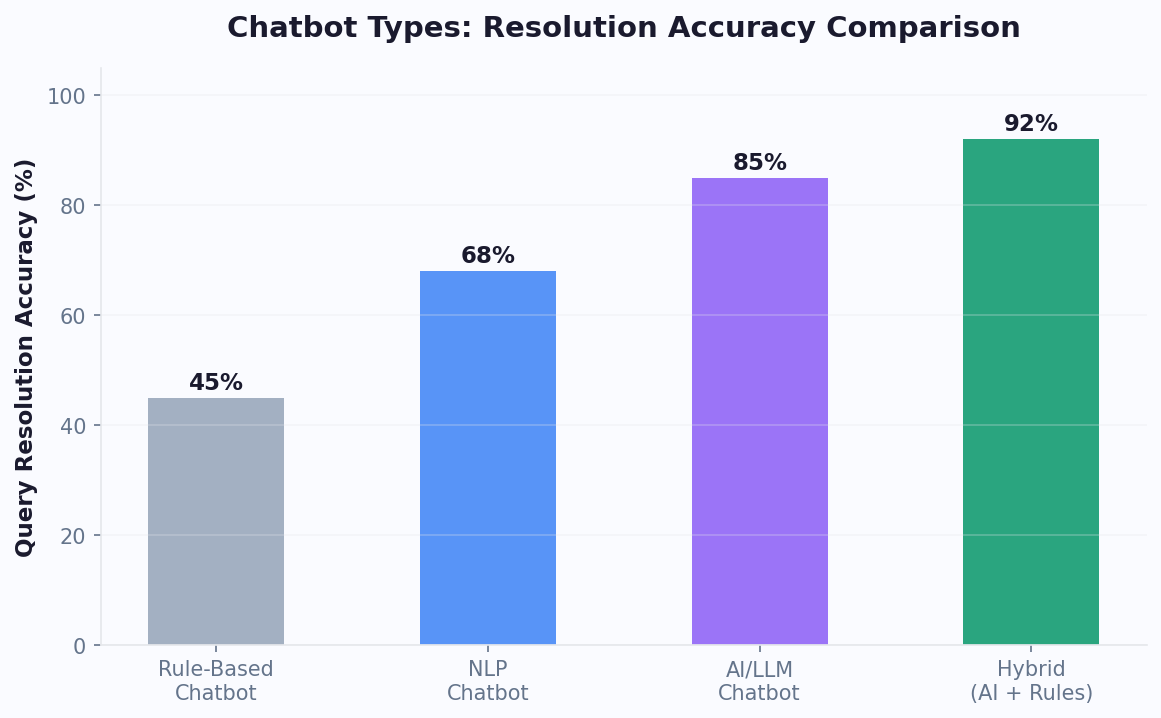
The quality of your chatbot's responses depends directly on the quality of your input data. Studies show that chatbots achieve 90% or higher accuracy with well-prepared data, but 60% of chatbot failures trace back to poor training data according to Gartner's research on RAG implementation, not to AI limitations. For a broader comparison of AI versus rule-based approaches, see our AI chatbot vs. rule-based guide. This is why data preparation is the most important step in the entire process, and why this guide devotes significant attention to getting it right.
Platforms like Conferbot use advanced AI and NLP to handle the technical RAG infrastructure automatically. Your job is to provide comprehensive, well-structured business data, and the platform handles the rest.
Preparing Your Data: The Foundation of Chatbot Accuracy
Data preparation is where most businesses either set themselves up for success — a principle reinforced by AWS Bedrock's knowledge base best practices or unknowingly create the conditions for chatbot failure. Investing time here pays off exponentially in chatbot accuracy and customer satisfaction.
Audit Your Existing Knowledge
Start by inventorying every source of customer-facing information in your organization:
- Help center and FAQ pages: These are your highest-value data sources because they directly answer common customer questions.
- Product documentation: Manuals, spec sheets, comparison guides, and feature descriptions.
- Policy documents: Return policies, shipping policies, warranty terms, privacy policies, and terms of service.
- Training materials: Internal guides you use to train customer support agents contain valuable knowledge about common issues and resolutions.
- Email templates: Responses your team sends repeatedly often contain well-crafted answers to frequent questions.
- Call and chat transcripts: Past support conversations reveal the exact language customers use and the answers that resolved their issues.
Clean and Structure Your Data
Raw documents often contain information that confuses rather than helps a chatbot. Follow these cleanup guidelines:
- Remove outdated information: Old pricing, discontinued products, expired promotions, and obsolete policies will generate wrong answers. This is the single most common data quality issue.
- Eliminate contradictions: If your FAQ says returns are accepted within 30 days but your policy page says 14 days, the chatbot cannot know which is correct. Resolve all contradictions before uploading.
- Add context to standalone facts: A document that says "Price: $49.99" is less useful than "The Professional Plan costs $49.99 per month when billed annually, or $59.99 month-to-month."
- Use clear headers and sections: Well-structured documents with descriptive headings improve retrieval accuracy because the system can match questions to specific sections more precisely.
- Write in the language your customers use: If your customers say "cancel my account" but your documentation says "terminate subscription," add both phrasings.
Create a Data Quality Checklist
Before uploading any document, verify: Is this information current as of today? Does it contain only accurate, verified facts? Is it written clearly enough that a new employee could understand it? Does it cover both the common case and important edge cases? Answering yes to all four questions means the document is ready for your chatbot's knowledge base.
Uploading Documents and FAQs to Your Chatbot
With your data prepared, the upload process is straightforward on modern no-code platforms. Here is how to structure your uploads for maximum chatbot effectiveness.
Supported Data Formats
Most chatbot platforms accept a wide range of formats. Conferbot supports:
- Documents: PDF, DOCX, TXT, and Markdown files. PDFs with text content (not scanned images) work best.
- Web pages: Paste URLs and the platform crawls the page content automatically. You can import entire help centers by providing the sitemap URL.
- Structured data: CSV and JSON files for product catalogs, pricing tables, and structured FAQ databases.
- Plain text: Direct text input for quick additions like individual FAQ pairs or policy snippets.
Organizing Your Knowledge Base
Do not dump everything into a single upload. As HubSpot's knowledge base best practices recommend, organize your knowledge into logical categories that mirror how your business is structured:
- Products and services: Descriptions, features, pricing, and specifications for everything you sell.
- Policies: Returns, shipping, warranty, privacy, and terms of service.
- How-to guides: Step-by-step instructions for common tasks like account setup, product usage, and troubleshooting.
- Company information: Business hours, locations, contact methods, and company background.
- Troubleshooting: Known issues, common error messages, and their solutions.
This categorization helps with two things: the retrieval system can prioritize the right category based on the customer's question, and you can update individual categories without re-uploading everything.
Writing Effective FAQ Pairs
FAQ pairs are the most direct form of chatbot training data. Write them from the customer's perspective, not your internal perspective:
Less effective: Q: "What is our SLA?" A: "Our SLA guarantees 99.9% uptime."
More effective: Q: "How reliable is your service? What happens if it goes down?" A: "We guarantee 99.9% uptime, which means less than 9 hours of downtime per year. If you experience any service disruption, our team is alerted automatically and you can check real-time status at status.example.com. We also provide service credits for any downtime exceeding our SLA commitment."
Include multiple question variations for each answer. Customers ask the same thing in dozens of different ways. The more variations you provide, the better the AI matches future questions to the right answer. Use rich media capabilities to supplement text answers with images, videos, and interactive elements where appropriate.
Testing Your Chatbot's Accuracy Before Going Live
Uploading data and assuming it works is a recipe for customer complaints. Rigorous testing before launch — following methodologies similar to those outlined in Google Cloud's Vertex AI evaluation framework — and after every knowledge base update ensures your chatbot delivers accurate, helpful responses consistently.
Build a Test Question Bank
Create a comprehensive set of test questions organized by category and difficulty:
- Direct questions (50 questions): Questions that map directly to information in your knowledge base. "What is your return policy?" when you have a return policy document uploaded. The bot should answer these with 95%+ accuracy.
- Paraphrased questions (30 questions): The same questions asked in different ways. "Can I send this back?" "How do refunds work?" "What if I don't like the product?" These test the AI's language understanding.
- Edge case questions (20 questions): Questions that sit at the boundary of your knowledge base. "Can I return a gift someone bought me?" "What about items bought on sale?" These reveal gaps in your data.
- Out-of-scope questions (15 questions): Questions the bot should not attempt to answer. "What's the weather today?" "Can you help me with my taxes?" The bot should politely redirect or acknowledge it cannot help.
- Multi-intent questions (10 questions): Complex questions that combine multiple topics. "I want to return one item and exchange another from the same order." These test the bot's ability to handle compound requests.
Scoring and Benchmarks
Score each test response on three dimensions:
- Accuracy (1-5): Is the information factually correct? Does it match your actual policies and product details?
- Completeness (1-5): Does the response fully address the question, or does it leave important details out?
- Tone (1-5): Does the response sound natural, helpful, and aligned with your brand voice?
Your overall accuracy target should be 90% or higher on the combined test bank. If you score below 85%, go back to your training data and address the gaps before launching. The most common issues are incomplete policy information, missing product details, and contradictions between documents.
Automated Testing Workflows
Set up automated test runs that execute your full test question bank after every knowledge base update. Conferbot's analytics platform can track accuracy trends over time, alerting you immediately if an update degrades performance. This prevents the scenario where a well-intentioned knowledge base edit accidentally breaks responses for an entire topic area.
Handling Knowledge Gaps Gracefully
No matter how thoroughly you prepare your data, your chatbot will encounter questions it cannot answer. How it handles these moments defines whether customers perceive it as helpful or useless. A well-designed knowledge gap strategy turns potential failures into positive interactions.
Detecting Knowledge Gaps in Real Time
Your chatbot should recognize when it does not have sufficient information to answer confidently. Signs of a knowledge gap include:
- Low confidence score: The AI's internal confidence that the retrieved data chunks are relevant to the question falls below a threshold (typically 60-70%).
- No relevant chunks retrieved: The question does not match any content in your knowledge base closely enough to generate a grounded response.
- Ambiguous matches: Multiple conflicting data chunks are retrieved with similar relevance scores, making it unclear which is correct.
Graceful Fallback Responses
When a knowledge gap is detected, the chatbot should never guess or make up information. Instead, configure a cascading fallback strategy:
- First attempt: Ask a clarifying question. "I want to make sure I give you the right answer. Could you tell me a bit more about [specific aspect]?" Sometimes the customer's rephrased response matches existing knowledge better.
- Second attempt: Offer related information. "I don't have specific information about that, but here's what I can tell you about [related topic]. Would that help?"
- Third attempt: Offer human assistance. "This is a great question that I want to make sure gets answered correctly. Let me connect you with a team member who can help." Link this to your WhatsApp or Messenger support channel if the customer prefers.
Turning Gaps Into Training Data
Every knowledge gap is a gift: it tells you exactly what your training data is missing. Configure your chatbot to log every instance where it falls back to a gap response, including the customer's original question and the context of the conversation. Review these logs weekly and add the missing information to your knowledge base.
Over time, this feedback loop dramatically reduces the frequency of knowledge gaps. Most businesses find that 80% of knowledge gap questions cluster around 15-20 missing topics. Addressing those topics in your first month of operation typically reduces fallback responses by 60-70%. Use analytics to track your fallback rate trend and set monthly reduction targets.
Keeping Your Chatbot's Data Current: Maintenance Best Practices
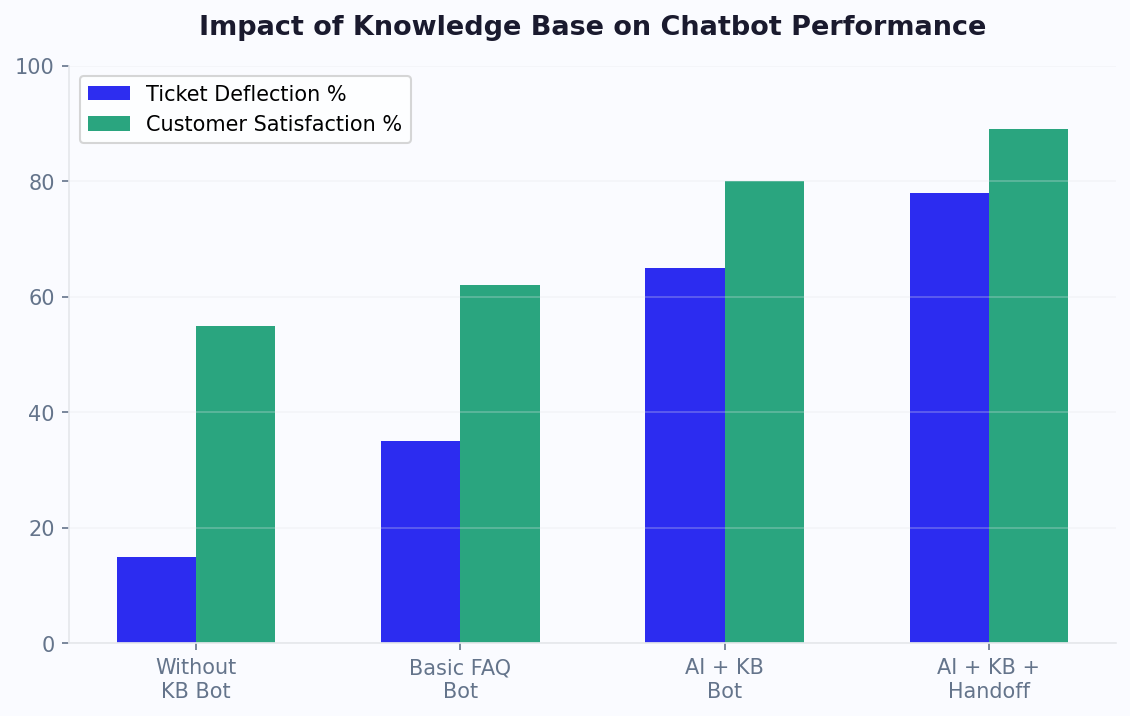
A chatbot trained on outdated data is worse than no chatbot at all. When customers receive incorrect information about pricing, policies, or product availability, it erodes trust and creates costly support issues downstream. Establishing a maintenance routine is essential for long-term chatbot success.
Triggers for Knowledge Base Updates
Update your chatbot's training data whenever any of these events occur:
- Product changes: New product launches, price changes, feature updates, or product discontinuations.
- Policy changes: Updated return policies, shipping rates, warranty terms, or privacy policies.
- Seasonal updates: Holiday hours, seasonal promotions, limited-time offers, and event-specific information.
- Process changes: New checkout flows, updated account management procedures, or changed contact methods.
- Bug fixes and known issues: New software bugs, workarounds, and resolutions should be added immediately.
Scheduled Review Cadence
Beyond reactive updates, establish a proactive review schedule:
- Weekly: Review chatbot analytics for new knowledge gaps (questions the bot could not answer). Add missing information for the top 5 gaps.
- Monthly: Audit one category of your knowledge base for accuracy. Rotate through categories so that every category gets a full review quarterly.
- Quarterly: Conduct a comprehensive accuracy test using your full test question bank. Compare scores to previous quarters to track improvement trends.
- Annually: Do a complete knowledge base overhaul. Remove obsolete content, consolidate redundant information, and restructure categories based on actual usage patterns.
Automating Updates Where Possible
Reduce manual maintenance by connecting your chatbot to live data sources (for the full integration approach, see our chatbot analytics metrics guide on measuring knowledge base effectiveness):
- Product catalog sync: Connect to your ecommerce platform (Shopify, WooCommerce, etc.) so product information updates automatically when you change it in your store admin.
- CMS integration: If your help center is on a CMS like Zendesk Guide or Notion, set up automatic re-crawling on a daily schedule so knowledge base articles are always current.
- API connections: For dynamic data like business hours, pricing, and inventory, use API connections through the integrations hub so the chatbot queries live data rather than relying on static training documents.
The goal is to minimize the gap between when information changes in your business and when your chatbot knows about it. For critical information like pricing and availability, real-time sync is ideal. For less time-sensitive content like help articles and how-to guides, daily or weekly sync is sufficient.
Industry-Specific Training Data Sources and Strategies
Different industries have different knowledge structures, customer vocabularies, and compliance requirements. Here is how to approach chatbot training data preparation for the most common business types.
E-Commerce and Retail
E-commerce chatbots need product knowledge that updates frequently. The most effective training data sources include:
- Product catalog with descriptions: Export your full catalog including titles, descriptions, specifications, pricing, and availability. Update weekly or connect via API for real-time sync.
- Shipping and returns FAQ: The #1 question category. Include every shipping method, timeline, cost, tracking process, return window, and exception case.
- Customer reviews and Q&A sections: These contain the exact language customers use when describing products. Mining your Amazon or Shopify reviews provides valuable training vocabulary.
- Size and fit guides: For fashion and apparel, detailed sizing information reduces returns by 15-25% when delivered through the chatbot.
SaaS and Technology
SaaS chatbots handle technical support and feature questions. Key data sources:
- Help center documentation: Your primary knowledge source. Ensure every article is current — outdated help docs are the leading cause of chatbot inaccuracy in SaaS.
- API documentation: Technical users ask specific API questions. Include endpoint references, authentication guides, and common error codes.
- Changelog and release notes: Customers ask about new features and recent changes. Keep the last 6-12 months of release notes in your knowledge base.
- Known issues and workarounds: A living document of active bugs and their workarounds prevents frustration and reduces support tickets by 20-30%.
Healthcare and Professional Services
These industries require careful attention to compliance and accuracy:
- Service descriptions with scope boundaries: Clearly define what the chatbot can and cannot answer. Medical chatbots must never diagnose — only inform and route to professionals.
- Appointment types and preparation instructions: Patients need to know what to expect and how to prepare. Pre-visit instructions delivered via chatbot improve appointment efficiency.
- Insurance and billing FAQ: The most common (and most frustrating) questions. Include accepted insurers, payment plans, billing cycle explanations, and co-pay information.
- Provider credentials and specialties: Patients often ask about doctor qualifications, experience, and areas of focus.
Training Data Volume Guidelines
| Business Type | Minimum Documents | Minimum FAQ Pairs | Expected Accuracy |
|---|---|---|---|
| Small service business | 5-10 | 30-50 | 85-90% |
| Mid-size e-commerce | 15-30 | 75-150 | 88-93% |
| SaaS company | 20-50 | 100-200 | 90-95% |
| Healthcare practice | 10-20 | 50-100 | 92-96% |
| Enterprise (multi-product) | 50-200 | 200-500 | 90-94% |
These are starting points. The iterative improvement cycle (launch, monitor gaps, add data, retest) continuously increases accuracy beyond these initial benchmarks. Most businesses reach 95%+ accuracy within 90 days of active optimization. For a more advanced look at knowledge base training, including vector databases and embedding optimization, see our companion guide on training a chatbot on your knowledge base. If you are in e-commerce, our chatbot for e-commerce guide covers industry-specific training data strategies.
Advanced RAG Optimization: Chunking, Embedding Models, and Retrieval Tuning
For businesses that have mastered the basics and want to push chatbot accuracy from 90% to 97%+, understanding the technical levers behind RAG optimization is valuable — even if you are using a no-code platform that handles these details automatically.
Chunking Strategy Matters
How your documents are split into chunks directly affects retrieval accuracy. Three approaches yield different results:
- Fixed-size chunks (200-500 words): The simplest approach. Works well for uniform content like FAQ pages. Fails when important context spans across chunk boundaries.
- Semantic chunking: Splits documents at natural topic boundaries (headings, paragraph breaks, topic shifts). Better preserves context and retrieves more relevant results. Most modern platforms use this approach by default.
- Hierarchical chunking: Maintains parent-child relationships between document sections. When a child chunk is retrieved, the parent context is included. Best for complex documentation with nested sections.
If your chatbot consistently gives partially correct answers (right topic but missing key details), your chunks may be too small. If it retrieves irrelevant information alongside correct answers, your chunks may be too large or poorly bounded.
When to Use Multiple Knowledge Bases
For businesses with diverse content types, separating knowledge into multiple bases with routing logic improves accuracy:
- Product knowledge base: Catalog, specs, pricing, comparisons
- Support knowledge base: Troubleshooting, how-to guides, known issues
- Policy knowledge base: Returns, shipping, warranties, compliance
- Sales knowledge base: Competitor comparisons, ROI data, case studies
The chatbot first classifies the user's intent, then queries only the relevant knowledge base. This reduces noise and improves retrieval precision by 15-25% compared to a single combined knowledge base.
Continuous Learning Loops
The most sophisticated chatbot deployments implement continuous learning through feedback signals:
- Thumbs up/down on responses: When users rate responses, negative ratings flag the source chunks for review. Over time, poorly-performing chunks are rewritten or replaced.
- Human agent corrections: When a human agent takes over and provides a different answer than the chatbot attempted, this divergence is logged as training signal. The correct answer is added to the knowledge base.
- Search query analysis: Queries that consistently retrieve low-confidence chunks indicate knowledge gaps. Weekly review of these queries reveals exactly what content needs to be created.
- A/B testing responses: For common questions, test multiple answer formulations and measure which produces higher satisfaction scores.
This feedback loop — deployed automatically on platforms like Conferbot through conversation analytics — turns every customer interaction into a training signal that improves future accuracy. Businesses running active learning loops see accuracy improvements of 2-5 percentage points per quarter without manual intervention. To understand how this translates to financial outcomes, explore our chatbot cost savings case studies.
Common Mistakes to Avoid When Training Your Chatbot
After helping thousands of businesses train their chatbots, and drawing on best practices from the Hugging Face documentation on model fine-tuning, we have identified the most common mistakes that undermine accuracy and customer experience. Avoid these pitfalls and you will be ahead of 90% of chatbot deployments.
Mistake 1: Uploading Too Much Irrelevant Data
More data is not always better. Uploading your entire company wiki, including internal meeting notes, draft documents, and employee handbooks, dilutes the relevant content and increases the chance of the AI retrieving irrelevant information. Only upload content that you would want a customer-facing agent to reference. If you would not want an agent quoting a document to a customer, do not feed it to your chatbot.
Mistake 2: Ignoring Contradictions in Source Data
When your website says one thing and your PDF policy document says another, the chatbot has no way to know which is correct. It may alternate between both answers depending on which chunk it retrieves, creating an inconsistent and untrustworthy experience. Audit all sources for contradictions before uploading and designate a single source of truth for each topic.
Mistake 3: Set-and-Forget Mentality
Launching your chatbot and never updating its training data is the fastest path to customer frustration. Business information changes constantly. A chatbot trained in January that is still serving January's pricing in April will generate complaints and support tickets that cost more than the time saved. Commit to a regular update cadence as described in the previous section.
Mistake 4: Not Testing with Real Customer Language
Internal teams write FAQs in business jargon. Customers ask questions in everyday language. If your FAQ says "initiate a return merchandise authorization" but customers type "how do I send this back," the bot may fail to connect the two. Test your chatbot using actual customer messages from your support history, not internally-written test questions.
Mistake 5: Overcomplicating Responses
Training your chatbot with lengthy, comprehensive answers for every question leads to wall-of-text responses that customers do not read. Structure your training data with concise primary answers followed by expandable detail. The bot should give the essential answer first, then offer to elaborate if the customer wants more information.
Mistake 6: Not Setting Scope Boundaries
Without clear scope boundaries, chatbots try to answer everything, including topics they know nothing about. Define what your chatbot should and should not answer. Configure explicit out-of-scope responses for topics outside your business domain. A chatbot that says "That is outside what I can help with, but here is how to reach our team" is more trustworthy than one that confidently generates incorrect information. For those starting from scratch, our build a chatbot without coding guide covers the full process. Use Conferbot's AI and NLP settings to configure scope boundaries and confidence thresholds that prevent your bot from overreaching.
Was this article helpful?
How to Train Your AI Chatbot on Your Own Business Data FAQ
Everything you need to know about chatbots for how to train your ai chatbot on your own business data.
About the Author

Conferbot Team specializes in conversational AI, chatbot strategy, and customer engagement automation. With deep expertise in building AI-powered chatbots, they help businesses deliver exceptional customer experiences across every channel.
View all articles

