
Why E-Commerce Businesses Need AI Chatbots in 2026
The e-commerce landscape in 2026 is defined by one brutal reality: customer expectations have never been higher, and the cost of failing to meet them has never been steeper. According to Statista's online shopping research and Baymard Institute, the average cart abandonment rate across all e-commerce still hovers near 70%, representing trillions of dollars in lost revenue globally. Meanwhile, consumers increasingly expect instant, personalized interactions that mirror the attentiveness of an in-store shopping assistant.
AI chatbots have emerged as the most effective tool to bridge this gap. Unlike static FAQ pages or email-based support, chatbots engage customers in real time, at the exact moment they need help - whether that is choosing between two products at 11 PM on a Sunday or tracking a delayed shipment during a holiday rush.
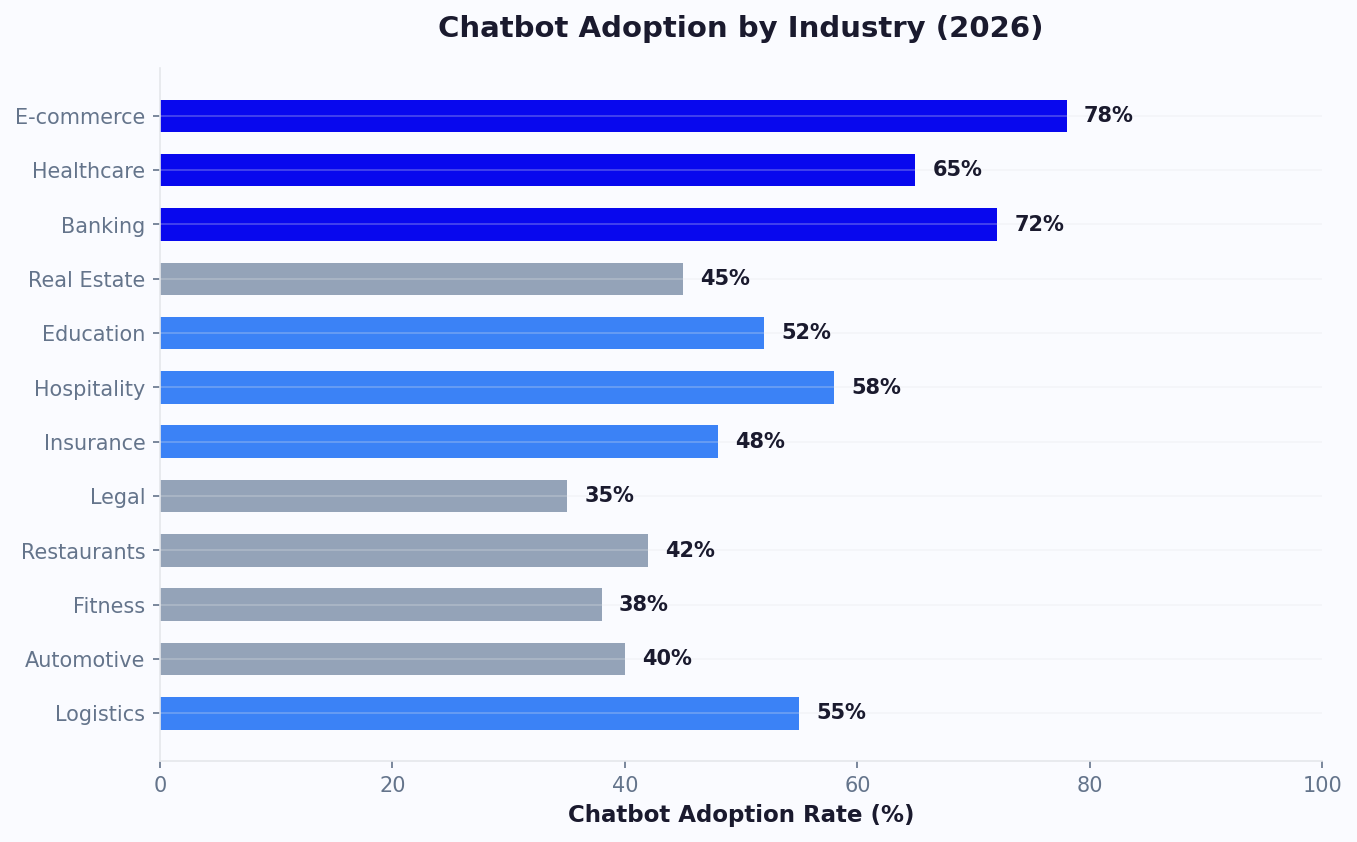
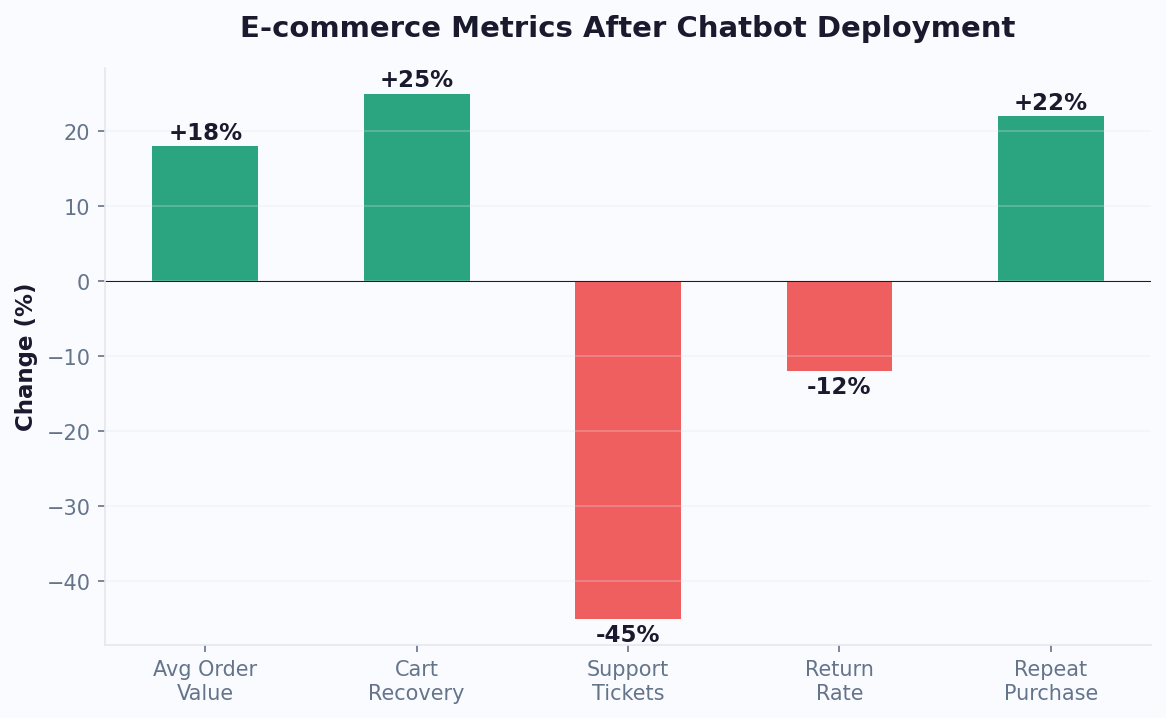
The numbers speak for themselves. As reported by Digital Commerce 360 and Juniper Research, e-commerce chatbots drove over $142 billion in retail spending globally, a figure projected to exceed $200 billion by 2027. Stores using conversational AI reported 15-35% increases in conversion rates and 25-40% reductions in support ticket volume.
But the opportunity extends far beyond basic customer service. Modern e-commerce chatbots serve as virtual shopping assistants, cart recovery agents, upselling engines, and post-purchase support specialists - all operating 24/7 without breaks, sick days, or inconsistent service quality.
For online stores of every size - from Shopify solopreneurs to enterprise D2C brands - chatbots are no longer a nice-to-have. They are a competitive necessity. Stores without conversational AI are effectively leaving money on the table with every abandoned cart, every unanswered product question, and every support ticket that takes hours instead of seconds to resolve.
In this guide, we will walk through every major use case for e-commerce chatbots, provide actionable implementation strategies, and show you how to measure the ROI of your chatbot investment. Whether you are deploying your first bot or optimizing an existing one, this guide will help you maximize its impact on your bottom line.
Platform-specific install paths, if you already know where your store lives: BigCommerce chatbot, Shopify and WooCommerce.
Cart Abandonment Recovery: Turning Lost Sales into Revenue
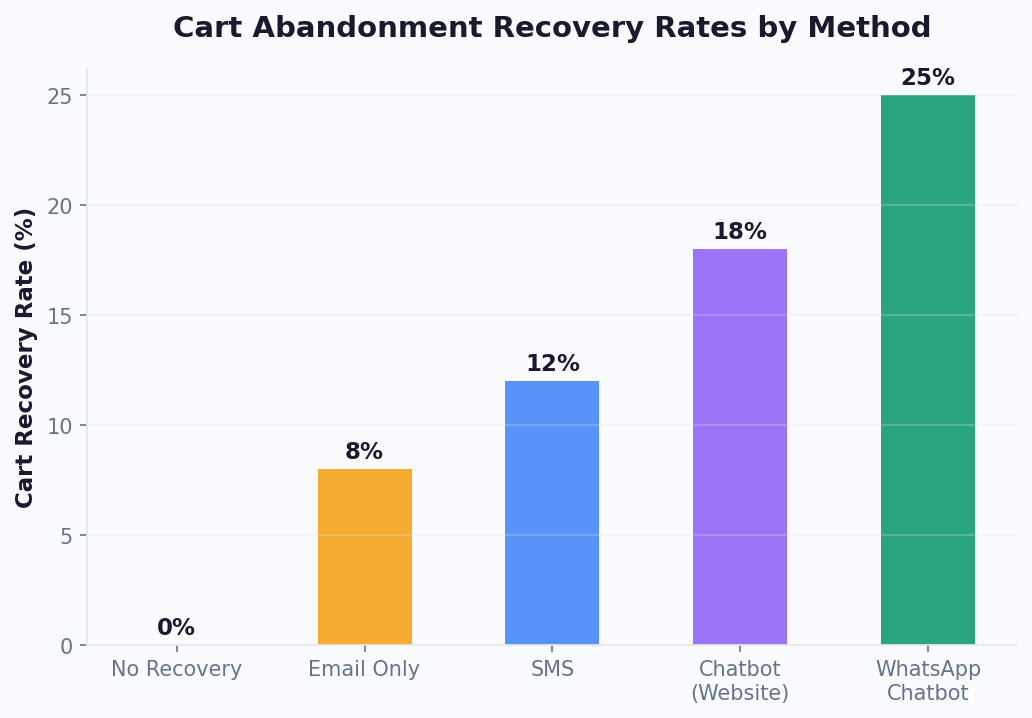
Cart abandonment is the single largest source of lost revenue for online stores. When a customer adds items to their cart but leaves without purchasing, a well-timed chatbot intervention can recover 10-25% of those abandoned carts - far outperforming email-only recovery strategies, which typically see 5-10% recovery rates.
Why Customers Abandon Carts
Understanding the reasons behind abandonment is critical to designing effective chatbot recovery flows. The top reasons include:
- Unexpected costs (shipping, taxes, fees) - 48% of abandonments
- Required account creation - 26%
- Complicated checkout process - 22%
- Concerns about payment security - 18%
- Could not find a discount code - 15%
A chatbot can address each of these in real time. When a customer shows exit intent or has been idle on the cart page for 30+ seconds, the bot can proactively engage with a tailored message.
Effective Cart Recovery Chatbot Strategies
On-site intervention: Deploy your website chatbot to detect cart abandonment signals and proactively offer help. A message like "I noticed you have items in your cart. Can I help with sizing, shipping questions, or anything else?" opens a conversation that often reveals the true objection.
WhatsApp follow-up: For customers who have opted in, a WhatsApp chatbot message sent 1-2 hours after abandonment achieves 3-5x higher open rates than email. Include a direct link back to their cart with a time-limited incentive.
Personalized incentives: Rather than blanket discounts that erode margins, use your chatbot to offer targeted incentives based on cart value and customer history. First-time buyers might receive free shipping, while returning customers might get early access to a sale.
Implementation Tips
Start by integrating your chatbot with your e-commerce platform's cart data via the integrations hub (including Stripe for payments) and analytics and tracking. Set up triggers based on time-on-page, exit intent, and cart value thresholds. Test different message timings and incentive levels to find your optimal recovery rate. Most stores find that a 60-90 second delay before the first proactive message performs best - early enough to catch the customer, but not so aggressive that it feels intrusive.
Personalized Product Recommendations That Actually Convert
Generic "You might also like" carousels have trained customers to ignore them. AI-powered chatbot recommendations, on the other hand, feel personal because they are based on a real-time conversation about the customer's actual needs. Conversational product recommendations tend to convert meaningfully better than static recommendation widgets, since the chatbot can ask clarifying questions instead of guessing from browsing history alone.
How Chatbot Recommendations Work
A recommendation chatbot acts like a knowledgeable sales associate. It asks questions about the customer's needs, preferences, budget, and use case, then suggests products that genuinely match. This works especially well for stores with large catalogs where product discovery is a challenge.
Consider a cosmetics store. Instead of showing every foundation, the chatbot asks about skin type, coverage preference, finish type, and budget. Within 30 seconds, it narrows 200 options down to 3 perfect matches. The customer feels understood, and the store sees higher conversion rates and lower return rates.
Building Effective Recommendation Flows
Start by identifying your product categories that benefit most from guided selling - typically products with multiple variants, technical specifications, or use-case-dependent value. Map out the decision tree a knowledgeable salesperson would use, then translate that into chatbot conversation flows.
Use conditional logic to branch based on responses. Each answer should narrow the product set while making the customer feel their preferences matter. End each recommendation with social proof: ratings, review snippets, or "X customers bought this" counters.
For stores on Shopify, WooCommerce, or similar platforms (see Shopify's merchant resources for e-commerce best practices), integrate your chatbot with your product catalog API so recommendations are always based on current inventory and pricing. Nothing kills trust faster than recommending an out-of-stock product.
Cross-Selling and Upselling
After the initial recommendation, your chatbot can suggest complementary products. "Great choice on the running shoes! Most runners also grab our moisture-wicking socks - would you like to add a pair for 20% off?" This type of contextual upselling increases average order value by 10-30% without feeling pushy. Use your website chatbot to test different cross-sell offers and let the analytics tell you which combinations perform best.
Pre-built flows in Conferbot's e-commerce templates include recommendation engines that you can customize with your product data in minutes, no coding required.
Automated Order Tracking and Post-Purchase Support
"Where is my order?" is the single most common customer support question for e-commerce businesses, often accounting for 30-50% of all support tickets. Automating order tracking through a chatbot eliminates this volume overnight, freeing your support team to handle complex issues that actually require human attention.
How Order Tracking Chatbots Work
The customer provides their order number or email address, and the chatbot instantly retrieves the order status from your e-commerce platform or shipping carrier API. The response includes the current status, estimated delivery date, and a tracking link - all delivered in seconds, 24 hours a day.
Beyond basic tracking, sophisticated chatbots can proactively notify customers about shipping milestones: order confirmed, shipped, out for delivery, and delivered. This proactive communication reduces "where is my order" inquiries by up to 70% and significantly improves the post-purchase experience.
Handling Delivery Issues
Order tracking chatbots should also handle common post-purchase scenarios:
- Delayed shipments: Automatically detect delays from carrier data and proactively notify customers with updated timelines and, if warranted, compensation offers.
- Wrong or damaged items: Guide customers through a return or exchange process, collecting photos and details before creating a support ticket or initiating the return.
- Missing packages: Walk customers through checking with neighbors, building management, or initiating a carrier investigation - escalating to a human agent when necessary.
Returns and Exchanges
Returns are expensive and time-consuming for both customers and businesses. A chatbot can streamline the process by confirming return eligibility, generating return labels, and providing drop-off instructions - all without human intervention. This reduces return processing time by 40-60% and improves customer satisfaction during what is typically a negative experience.
For stores using Shopify, WooCommerce, BigCommerce, or similar platforms, Conferbot offers direct integrations that pull order data in real time. Combined with WhatsApp or website deployment, your customers can check their order status from wherever they are most comfortable communicating. Track resolution rates and customer satisfaction through your analytics dashboard to continuously improve the post-purchase experience.
Automating E-Commerce Customer Support Without Losing the Human Touch
The fear of losing the "human touch" is the most common objection e-commerce businesses raise when considering chatbot automation. It is a valid concern - poorly implemented chatbots can frustrate customers and damage brand perception. But the data overwhelmingly shows that well-designed chatbots actually improve customer satisfaction scores because they eliminate the two things customers hate most: waiting and repeating themselves.
What to Automate (and What Not To)
The key to maintaining quality is knowing where to draw the line. Automate these high-volume, low-complexity interactions:
- Shipping costs and delivery timeframes
- Return and exchange policies
- Product availability and sizing information
- Payment methods and security questions
- Store hours, contact information, and location details
- Loyalty program information and point balances
Keep these interactions human (or human-assisted):
- Complaints from high-value or VIP customers
- Complex multi-order issues
- Escalated disputes or fraud concerns
- Sensitive situations requiring empathy and judgment
Building a Seamless Handoff
The transition from bot to human should be invisible to the customer. When a handoff is triggered, the human agent should receive the full conversation history, customer profile, and order details so the customer never has to repeat information. This is where many chatbot implementations fail - and where the right platform makes all the difference.
Configure your chatbot to detect escalation signals: negative sentiment, repeated questions, explicit requests for a human, or interactions involving orders above a certain value threshold. When these triggers fire, the bot should acknowledge the situation ("I want to make sure you get the best help possible. Let me connect you with a team member who can assist.") and transfer seamlessly.
Multilingual Support
For e-commerce stores selling internationally, language barriers add another layer of complexity. AI chatbots with multilingual capabilities can serve customers in their preferred language, expanding your addressable market without hiring multilingual support staff. A single website chatbot can handle English, Spanish, French, German, and dozens of other languages simultaneously, ensuring every customer receives the same quality of service regardless of their location or language.
WhatsApp Commerce: Selling Through Conversational Channels
WhatsApp has evolved from a messaging app into a full-fledged commerce platform, with over 2 billion active users and business-friendly features like catalogs, payments, and automated messaging. For e-commerce businesses, a WhatsApp chatbot opens a direct, high-engagement sales channel that operates where your customers already spend their time.
Why WhatsApp Outperforms Email and SMS
The engagement metrics tell the story:
| Metric | SMS | ||
|---|---|---|---|
| Open rate | 20-25% | 85-95% | 95-99% |
| Click-through rate | 2-5% | 10-15% | 15-25% |
| Response rate | 1-3% | 5-10% | 30-50% |
| Average response time | Hours | Minutes | Minutes |
These numbers make WhatsApp the most effective channel for time-sensitive e-commerce communications: flash sales, back-in-stock alerts, shipping updates, and cart recovery messages.
WhatsApp Commerce Use Cases
Catalog browsing: Customers can browse your product catalog directly within WhatsApp, ask questions about specific items, and add products to a cart - all without leaving the app. The chatbot handles product search, filtering, and detailed product information.
Order placement: In markets like India, Brazil, and Southeast Asia, WhatsApp ordering is already mainstream. Customers send a message to place an order, the chatbot confirms details and processes payment through integrated payment solutions.
Personalized promotions: Unlike broadcast emails that feel generic, WhatsApp messages from your chatbot can be deeply personalized based on purchase history, browsing behavior, and stated preferences. "Hi Sarah, the skincare set you looked at last week is now 20% off - want me to add it to your cart?"
Post-purchase engagement: Delivery updates, review requests, reorder reminders, and loyalty program updates all perform significantly better through WhatsApp than email. A well-timed reorder reminder via WhatsApp can drive 20-40% repeat purchase rates for consumable products.
Getting Started with WhatsApp Commerce
Setting up a WhatsApp Business API account requires approval from Meta, but platforms like Conferbot simplify the process by handling the technical integration. You can also use calendar booking to schedule product demos or consultation calls directly through WhatsApp. Once connected, you can design conversation flows using the same no-code builder you use for your website chatbot, ensuring a consistent brand experience across channels. Start with order tracking and cart recovery - these deliver the fastest ROI - then expand into catalog browsing and promotional messaging as you build your subscriber list.
Measuring E-Commerce Chatbot ROI: Metrics That Matter
Deploying a chatbot without measuring its impact is like running ads without tracking conversions - you are flying blind. E-commerce chatbots generate value across multiple dimensions, and tracking the right metrics ensures you can optimize performance and justify continued investment.
Revenue Metrics
These metrics directly measure the chatbot's contribution to your top line:
- Chatbot-assisted revenue: Total revenue from orders where the chatbot was involved in the customer journey. Track this by assigning attribution to conversations that preceded a purchase within a defined window (typically 24-72 hours).
- Cart recovery revenue: Revenue specifically from orders recovered through chatbot intervention after cart abandonment. This is usually the single largest revenue driver.
- Upsell/cross-sell revenue: Additional revenue generated from chatbot product recommendations beyond the customer's original intent.
- Average order value (AOV) lift: Compare AOV for customers who interacted with the chatbot versus those who did not. Well-implemented recommendation chatbots typically increase AOV by 10-30%.
Efficiency Metrics
These metrics measure cost savings and operational improvements:
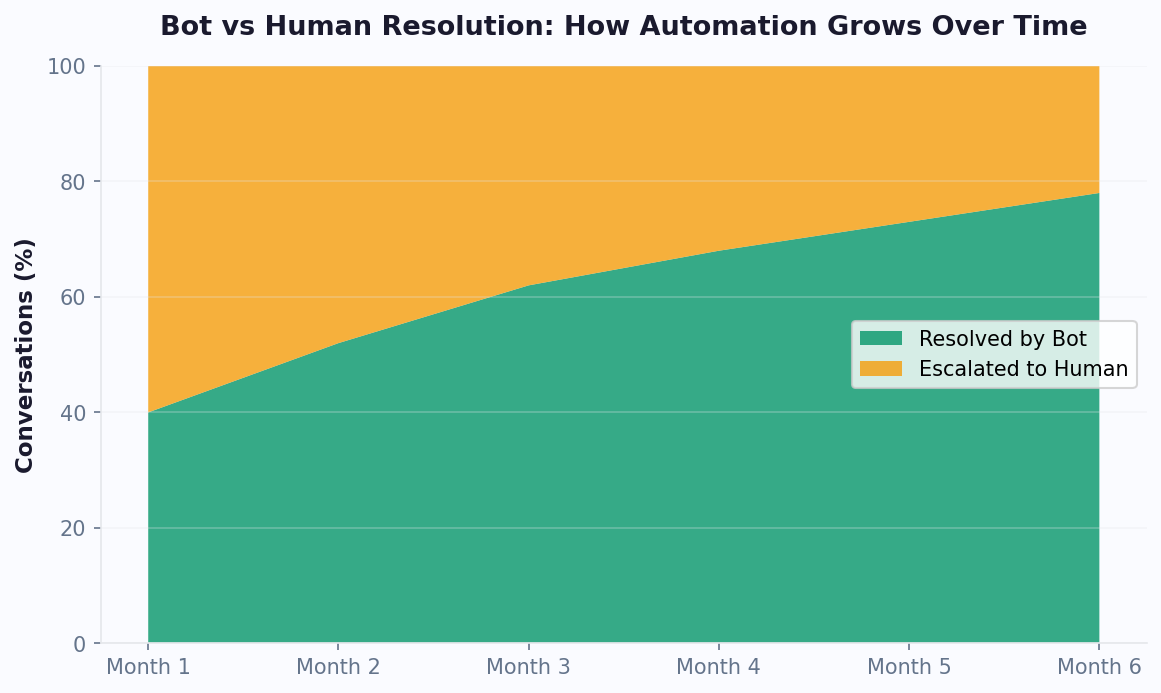
- Ticket deflection rate: Percentage of customer inquiries fully resolved by the chatbot without human intervention. Target 40-65% for a well-trained e-commerce bot.
- Average resolution time: Time from first customer message to issue resolution. Chatbots typically resolve queries in under 2 minutes vs. 4-24 hours for email support.
- Cost per resolution: Divide total chatbot costs by the number of resolutions. Compare against your human agent cost per resolution (typically $5-15) to quantify savings.
- Agent productivity: With the chatbot handling routine queries, human agents can handle more complex cases per shift. Track the volume and complexity mix of tickets reaching human agents.
Customer Experience Metrics
- CSAT (Customer Satisfaction Score): Post-interaction survey ratings. Aim for 4.0+/5.0 for chatbot interactions.
- NPS impact: Track whether chatbot deployment correlates with changes in your Net Promoter Score.
- Engagement rate: Percentage of website visitors who interact with the chatbot. Industry average is 2-8%; optimized implementations reach 10-15%.
Use your Conferbot analytics dashboard to track all of these metrics in real time. Set up weekly reporting to identify trends and monthly reviews to make strategic adjustments. The most successful e-commerce chatbot implementations treat optimization as an ongoing process, continuously testing message timing, content, and flows to maximize performance across all three metric categories.
Getting Started: Your E-Commerce Chatbot Implementation Roadmap
Implementing an e-commerce chatbot does not need to be overwhelming. This phased roadmap will take you from zero to a fully optimized chatbot in 30 days, with each phase building on the last.
Week 1: Foundation
- Audit your support data. Export the last 90 days of customer inquiries from email, live chat, and social media. Categorize them by topic and identify the top 10 most frequent questions. These become your chatbot's initial knowledge base.
- Choose your deployment channels. Start with your website - it is where the highest-intent traffic lives. Plan to add WhatsApp in Week 3 once your core flows are validated.
- Set up your Conferbot account and connect your e-commerce platform (Shopify, WooCommerce, etc.) so the chatbot can access product and order data.
Week 2: Build and Test
- Build your core flows: Start with the three highest-impact use cases - order tracking, FAQ automation, and cart recovery. Use Conferbot's e-commerce templates as a starting point and customize to match your brand voice and policies.
- Configure product recommendations: Set up guided selling flows for your top product categories. Connect to your product catalog so recommendations reflect real-time inventory and pricing.
- Internal testing: Have your entire team test the chatbot, including edge cases like out-of-stock products, international shipping questions, and unusual return scenarios. Document and fix gaps.
Week 3: Launch and Expand
- Soft launch on your highest-traffic pages. Monitor conversations in real time for the first 48 hours. Pay close attention to queries the chatbot cannot answer and add new content to fill gaps.
- Deploy on WhatsApp. Set up your WhatsApp Business API integration and launch with order tracking and cart recovery flows.
- Enable proactive engagement. Configure triggers to engage visitors who have been on product pages for 30+ seconds or show exit intent on the cart page.
Week 4: Optimize
- Review analytics. Analyze your first two weeks of data. Which flows have the highest completion rates? Where do customers drop off? Which product recommendations drive the most conversions?
- A/B test messages. Try different welcome messages, cart recovery offers, and recommendation approaches. Small changes in wording can drive significant improvements in engagement and conversion.
- Expand coverage. Add flows for your next tier of common questions. Set up automated review collection and reorder reminders for post-purchase engagement.
By the end of 30 days, you should have a chatbot handling 40-60% of customer inquiries automatically, recovering abandoned carts, and driving measurable increases in average order value. From there, it is a continuous cycle of monitoring analytics, expanding content, and optimizing flows to push those numbers higher every month.
Advanced Personalization: Using Customer Data to Drive E-Commerce Chatbot Revenue
The difference between a chatbot that generates incremental revenue and one that transforms your e-commerce business lies in personalization. Generic chatbot interactions convert at 3-5%, while deeply personalized interactions convert at 15-25%. Here is how to leverage your existing customer data to build personalized chatbot experiences that drive serious revenue. For cart recovery specifically, our e-commerce sales chatbot guide covers additional personalization strategies.
Data Sources for Personalization
Your e-commerce platform already collects the data needed for powerful chatbot personalization. The challenge is connecting it to your chatbot in real-time:
| Data Source | What It Tells You | How Your Chatbot Uses It |
|---|---|---|
| Purchase history | Product preferences, price sensitivity, purchase frequency | Recommend complementary products, time reorder reminders |
| Browse behavior | Current interests, consideration stage, product comparisons | Proactive recommendations, targeted exit-intent messages |
| Cart contents | Purchase intent, price point, product category | Cross-sell relevant items, offer bundle discounts |
| Customer segment | VIP status, new vs returning, high vs low spender | Customize tone, offer level, and escalation priority |
| Support history | Past issues, satisfaction level, communication preferences | Skip repeated troubleshooting, acknowledge past issues |
| Geographic data | Location, timezone, local shipping options | Local inventory, shipping estimates, currency display |
Personalization Strategies by Customer Segment
New Visitors (First Session):
- Focus on product discovery and education
- Offer guided selling: "What are you looking for today?"
- Provide social proof (reviews, bestseller labels)
- Capture email early with a lead magnet (guide, discount code)
Returning Visitors (No Purchase Yet):
- Reference their previous browsing: "Still thinking about the [product they viewed]?"
- Address likely objections based on pages visited (returns page = trust concern)
- Offer limited-time incentive to convert hesitation into action
First-Time Buyers (Post-Purchase):
- Proactive shipping updates via their preferred channel
- Ask for feedback 3-5 days after delivery
- Suggest complementary products with a "welcome back" discount
- Introduce loyalty program if applicable
Repeat Customers (2+ Purchases):
- Personalize greetings: "Welcome back, [Name]!"
- Skip basic qualification - they already know your brand
- Offer VIP perks: early access, exclusive bundles, priority support
- Send reorder reminders for consumable products at predicted intervals
Revenue Impact of Personalization Tiers
| Personalization Level | Examples | Conversion Lift | Implementation Effort |
|---|---|---|---|
| None (generic) | Same greeting and flow for everyone | Baseline | Low |
| Basic (segment) | Different flows for new vs returning | +25-40% | Medium |
| Advanced (behavioral) | Recommendations based on browse history | +60-100% | Medium-High |
| Deep (predictive) | AI-predicted next purchase, proactive outreach | +100-200% | High |
Implementation Priority Order
Don't try to implement all personalization at once. Follow this order for maximum impact with minimum effort, using your cart recovery system as the first personalization touchpoint:
- Week 1-2: Segment by new vs returning visitor. Different welcome messages alone improve engagement by 20%.
- Week 3-4: Add product-page-specific recommendations. If someone is viewing running shoes, the chatbot should discuss running shoes - not handbags.
- Month 2: Connect purchase history. Returning customers see recommendations based on what they've bought before.
- Month 3: Enable predictive reorder reminders. For consumable products, the chatbot messages customers when they're likely running low.
Each tier builds on the previous one. Start simple, measure the impact, and advance to deeper personalization as you see returns. Track everything through your ROI framework and platform-specific analytics like those available in WooCommerce and Shopify chatbot integrations.
Personalization Data Hygiene and Maintenance
Advanced personalization only works when the underlying data is accurate and current. Establish a monthly data hygiene routine: verify that product catalog integrations reflect current inventory and pricing, audit customer segment definitions to ensure they still align with actual purchasing patterns, and review recommendation accuracy by sampling 20-30 chatbot-assisted purchases to confirm the suggestions matched customer intent. Stale data creates a worse experience than no personalization at all - recommending discontinued products or referencing outdated pricing erodes trust faster than a generic greeting. Allocate 2-3 hours monthly to this maintenance, and your personalization engine will consistently outperform competitors who deploy and forget their data integrations. This ongoing discipline is what separates stores achieving 15-25% chatbot-attributed revenue from those stuck below 5% - consistent data maintenance is the unsexy foundation that makes advanced personalization actually deliver on its promise of dramatically higher conversion rates.
Was this article helpful?
Build and deploy in 10 minutes. No coding needed.
AI Chatbots for E-Commerce FAQ
Everything you need to know about chatbots for ai chatbots for e-commerce.
About the Author
The Conferbot team writes about building, deploying, and improving AI chatbots.
View all articles

