
Why 51% of Customer Conversations Happen After Hours
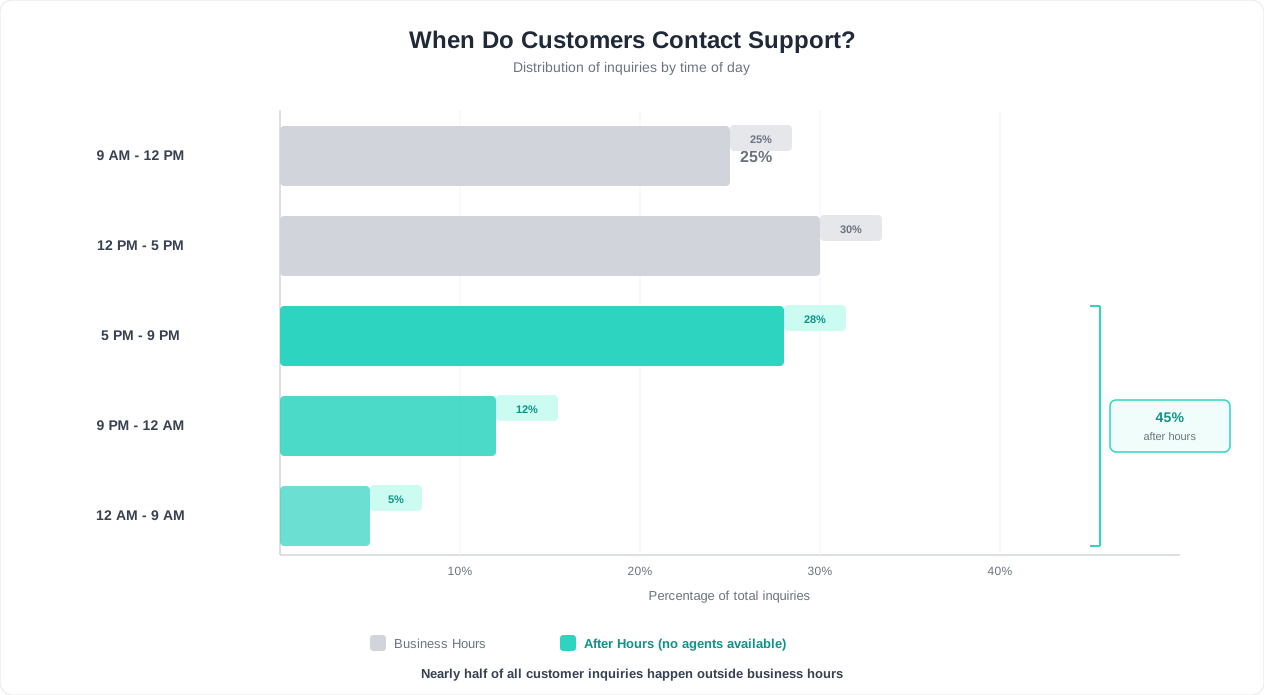
Your support team clocks out at 5 PM. Your customers do not. According to the HubSpot State of Service report, 51% of customer interactions now occur outside the traditional 9-to-5 window. That figure rises to 63% for businesses with a global customer base spanning multiple time zones. (source: Salesforce State of the Connected Customer). (source: Zendesk on 24/7 support strategies).
This shift is not accidental. It reflects three structural changes in how consumers engage with brands.
The Convenience Economy Is Always On
The rise of on-demand services -- from same-day delivery to streaming entertainment -- has rewired expectations. A customer browsing your pricing page at 10 PM expects the same level of responsiveness as someone reaching out at 10 AM. The Salesforce State of the Connected Customer report found that 74% of customers now expect companies to provide 24/7 service, regardless of industry or company size. (source: McKinsey on AI-powered customer service).
When After-Hours Inquiries Actually Peak
| Time Window | Share of Total Inquiries | Most Common Inquiry Types |
|---|---|---|
| 5 PM - 8 PM | 18% | Product questions, pricing, account issues |
| 8 PM - 11 PM | 15% | Order status, troubleshooting, comparisons |
| 11 PM - 6 AM | 11% | Urgent issues, international customers, lead inquiries |
| 6 AM - 9 AM (pre-open) | 7% | Appointment requests, follow-ups, billing |
The Work-From-Home Effect
Remote and hybrid work has blurred the line between personal and professional time. Consumers now shop, research, and make purchasing decisions throughout the evening. A B2B buyer might evaluate your SaaS platform after putting their kids to bed. A homeowner might request a quote from a contractor on a Sunday morning. These are not edge cases -- they represent the new normal.
The Zendesk CX Trends report confirms that businesses offering round-the-clock support see 22% higher customer satisfaction scores and 18% better retention rates compared to those limited to business hours.
After-Hours Demand by Industry
| Industry | After-Hours Share | Primary Driver |
|---|---|---|
| E-commerce | 58% | Evening browsing and purchasing |
| Healthcare | 47% | Patient concerns outside clinic hours |
| SaaS / Technology | 53% | Global user base across time zones |
| Real Estate | 44% | Property research after work |
| Financial Services | 41% | Tax season, market events |
| Travel / Hospitality | 61% | Trip planning evenings and weekends |
| Education | 49% | Students and parents researching programs |
The data is unambiguous: if your customer support only operates during business hours, you are unavailable for more than half of your customer interactions. An AI chatbot bridges that gap without requiring night shifts or offshore teams. (source: Gartner on chatbot adoption rates).
The Real Cost of Missed After-Hours Inquiries
Every unanswered after-hours message carries a cost. Some costs are visible -- a lost sale, a churned customer. Others are invisible but compounding -- the word-of-mouth damage from a frustrated prospect who never returns. Let us quantify what silence actually costs.
Revenue Lost to Slow Response
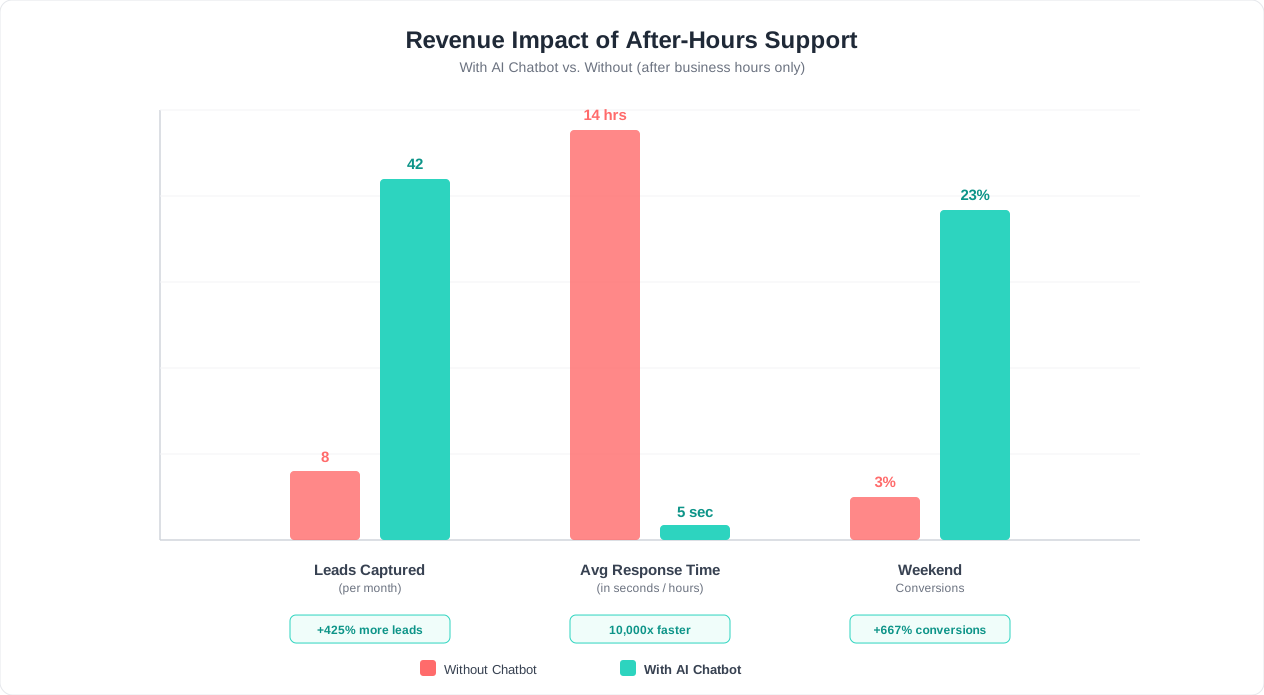
Research from Harvard Business Review found that companies responding to leads within five minutes are 21 times more likely to qualify that lead than those responding after 30 minutes. After five hours, the odds drop to near zero. When a lead arrives at 9 PM and your team responds at 9 AM the next morning -- 12 hours later -- that lead has likely moved on to a competitor who answered immediately.
For a business receiving 200 after-hours inquiries per month with a 10% conversion rate and $500 average deal value, the math is sobering:
| Scenario | Response Time | Conversion Rate | Monthly Revenue |
|---|---|---|---|
| No after-hours support | 12+ hours (next morning) | 2% | $2,000 |
| Basic auto-reply | Instant (but no engagement) | 4% | $4,000 |
| After-hours chatbot | Instant + qualification | 12% | $12,000 |
That is a $10,000 monthly difference -- $120,000 annually -- between having no after-hours support and having a chatbot that engages and qualifies leads in real time.
Customer Churn from Delayed Support
Existing customers who hit a problem after hours face a different but equally damaging scenario. If a customer cannot reset their password, resolve a billing error, or troubleshoot an integration at 8 PM, they stew in frustration overnight. By morning, the problem feels bigger. Some will open a ticket. Others will begin searching for alternatives.
The Salesforce State of the Connected Customer found that 48% of consumers have switched brands due to poor customer service, with unavailability being cited as one of the top three triggers.
Support Backlog and Morning Overload
Without after-hours automation, every unanswered message from the previous evening lands in your team's queue at 9 AM. This creates a cascading problem:
- Ticket backlog: Agents start every morning underwater, triaging overnight messages instead of handling real-time issues
- Slower response times: Daytime customers now wait longer because agents are clearing the backlog
- Agent burnout: Starting every shift with a full queue is demoralizing and increases turnover
- Quality degradation: Rushed responses to clear the backlog produce lower resolution rates
A well-configured after-hours chatbot resolves 40-60% of overnight inquiries automatically and collects full context for the rest. Your team arrives to a queue of pre-triaged, context-rich tickets instead of raw, unprocessed messages. Use chatbot analytics to track how much morning backlog the bot eliminates each week.
Competitive Disadvantage
If your competitor has 24/7 chat support and you do not, the prospect comparing both of you at 10 PM will get an answer from them and a "We'll get back to you during business hours" from you. The evaluation is over before your team even knows it started.
The Hidden Cost of Negative Reviews
Frustrated customers who cannot reach support after hours do not simply wait quietly. Many turn to public channels -- Google reviews, social media, industry forums -- to voice their frustration. A single one-star review mentioning "no one available after 5 PM" or "waited 14 hours for a response" damages your brand credibility with every prospect who reads it. According to the HubSpot State of Service report, 89% of consumers read reviews before making a purchase decision, and response time is consistently cited among the top factors in customer satisfaction ratings.
The compound effect is significant. Each unaddressed after-hours complaint has the potential to deter dozens of future prospects. Meanwhile, businesses that respond instantly via chatbot -- even outside business hours -- regularly receive positive feedback about their responsiveness, turning a potential vulnerability into a competitive strength.
Related: Chatbot vs Phone Support: A Complete Cost and Performance Comparison
What Your Chatbot Should Handle While You Sleep
Not every after-hours interaction requires the same treatment. The key to effective overnight automation is categorizing inquiries by type and assigning the right response strategy to each. Here is a comprehensive breakdown of what your chatbot should own after hours, organized by priority. (source: HubSpot research on response time expectations).
Category 1: Fully Resolve (No Human Needed)
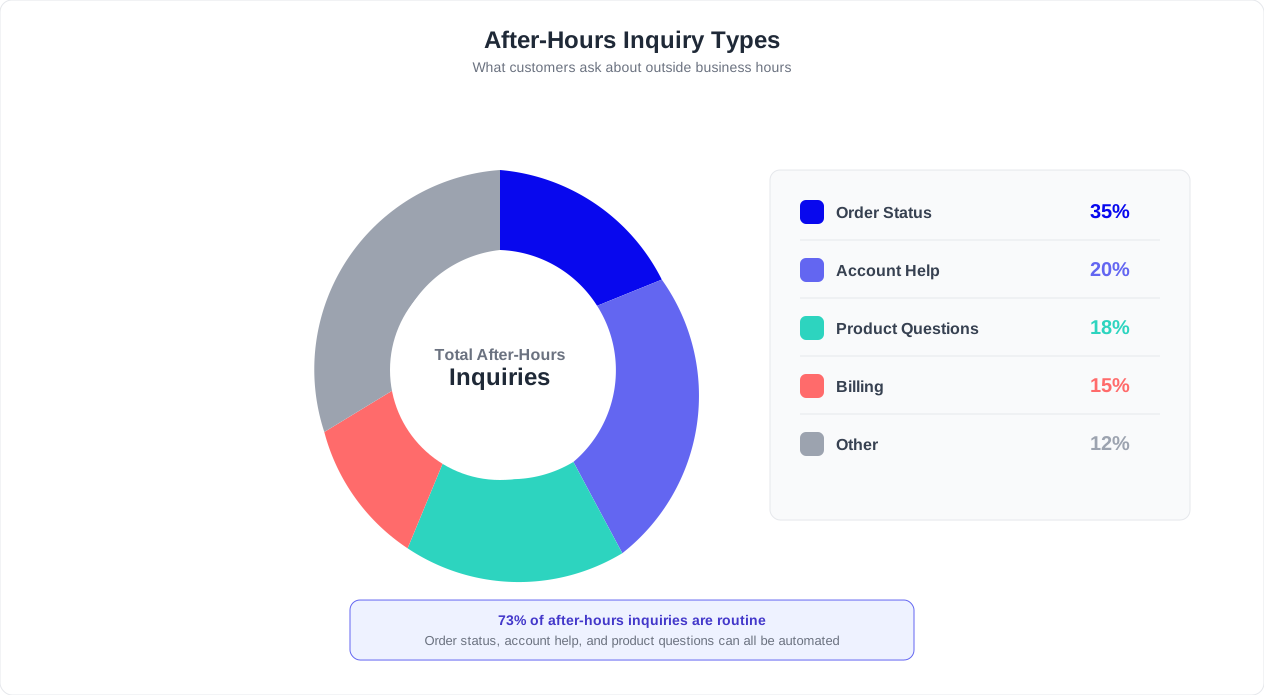
These are inquiries the chatbot can handle end-to-end using your AI knowledge base. They represent the bulk of after-hours volume -- typically 50-65% of all overnight messages.
- FAQ answers: Pricing, features, shipping policies, return policies, operating hours, location information
- Order status and tracking: Pulling tracking numbers, estimated delivery dates, order confirmation details
- Account self-service: Password resets, email address changes, subscription plan details, invoice downloads
- Product information: Specifications, comparisons, compatibility, availability
- How-to guidance: Step-by-step instructions pulled from your documentation or help center
- Appointment scheduling: Booking, rescheduling, or canceling appointments using calendar integration
Category 2: Capture and Queue (Human Follows Up)
These require human judgment but benefit from the chatbot collecting structured information upfront. The chatbot gathers details and creates a prioritized ticket for your morning team.
- Sales inquiries: Budget, timeline, requirements, company size -- qualified and scored for your sales team
- Technical troubleshooting: Error messages, screenshots, steps to reproduce -- collected and categorized
- Feature requests: Documented with context and use case
- Billing disputes: Invoice numbers, charge details, dispute reason -- prepared for finance review
- Custom quotes: Requirements gathered, expectations set for response timeline
Category 3: Escalate Immediately (Urgent)
Some issues cannot wait until morning. The chatbot must detect these and trigger immediate notification to on-call staff.
- Service outages: Customer reports that the product is down or critical features are broken
- Security incidents: Unauthorized access, data concerns, account compromise reports
- Payment failures: Failed transactions blocking time-sensitive purchases
- Safety concerns: Any interaction involving health, safety, or emergency situations
- Enterprise/VIP customers: High-value accounts with SLA guarantees
Setting Customer Expectations by Category
| Category | Chatbot Response | Expected Resolution |
|---|---|---|
| Fully Resolve | Complete answer delivered immediately | Resolved in the conversation |
| Capture and Queue | "I have collected all the details. Our team will follow up by [time]." | Next business day, first priority |
| Escalate Immediately | "This is urgent -- I am connecting you to our on-call team now." | Within 15-30 minutes |
The critical mistake is treating all after-hours interactions the same. A customer asking about your return policy and a customer reporting a security breach require fundamentally different responses. Configure your chatbot builder to classify incoming messages into these three categories using intent detection, and route accordingly.
Building the Decision Tree
Your after-hours chatbot should follow a clear decision path for every incoming message. First, determine whether the inquiry matches a known question in the knowledge base. If it does, deliver the answer and confirm resolution. If it does not, classify the urgency. Low-urgency unknowns get captured with context and queued. Medium-urgency issues receive a priority flag. High-urgency issues trigger the escalation chain. This layered approach ensures that no message falls through the cracks, whether it arrives at 6 PM or 3 AM.
Related: Chatbot to Human Handoff: Setup Guide, Best Practices, and Message Templates
Setting Up Escalation Rules for Urgent After-Hours Issues
The difference between a well-configured after-hours chatbot and a liability is the quality of its escalation logic. When your team is offline, the chatbot is the gatekeeper -- it must know when to handle, when to capture, and when to wake someone up.
The Three-Tier Urgency Framework
Every after-hours inquiry should be routed through a decision tree that assigns one of three urgency tiers.
| Tier | Urgency Level | Action | Notification Method | Response Target |
|---|---|---|---|---|
| Tier 1 | Low -- informational | Resolve immediately or queue | None (handled or morning queue) | Instant or next business day |
| Tier 2 | Medium -- time-sensitive | Queue with priority flag | Email to team lead + Slack alert | Within 2-4 hours |
| Tier 3 | Critical -- cannot wait | Escalate to on-call immediately | SMS + phone call to on-call | Within 15 minutes |
Configuring Tier Detection
Your chatbot needs clear rules for classifying urgency. Here is how to configure each detection method:
Keyword and phrase detection:
- Tier 3 triggers: "down", "outage", "hacked", "unauthorized access", "can't process payment", "emergency", "data breach", "security issue", "system not working"
- Tier 2 triggers: "urgent", "deadline", "time-sensitive", "happening right now", "need this before morning", "event tomorrow"
- Tier 1 (default): Everything that does not match Tier 2 or 3 keywords
Customer value detection:
- If integrated with your CRM, the chatbot can identify VIP or enterprise customers by email domain or account ID
- Enterprise customers with SLA agreements should automatically receive Tier 2 or Tier 3 treatment
- High-LTV customers (top 10%) can be flagged for priority morning follow-up
Sentiment and frustration detection:
- If the customer expresses strong negative sentiment (anger, desperation, repeated capitalized text), escalate by one tier
- If the customer explicitly asks for a human more than once, escalate to Tier 2 at minimum
- Conferbot's live chat module includes sentiment scoring that feeds directly into escalation logic
On-Call Rotation Setup
For Tier 3 escalations, you need a reliable on-call system. Here is a practical setup:
- Rotation schedule: Assign team members to on-call shifts (e.g., one week on, three weeks off for a four-person team)
- Primary and backup: Always have a backup contact if the primary does not acknowledge within 5 minutes
- Notification chain: Chatbot triggers webhook to your alerting tool (PagerDuty, Opsgenie, or even a simple Twilio SMS flow), which calls the on-call agent
- Acknowledgment requirement: The on-call agent must acknowledge the alert within 5 minutes. If not, the backup is notified automatically.
What the Customer Sees During Escalation
Transparency matters. When the chatbot escalates, the customer should receive clear communication:
- Tier 2: "I have flagged this as a priority issue. A team member will reach out to you within the next few hours. In the meantime, here is what I can help with..."
- Tier 3: "I understand this is urgent. I am alerting our on-call team right now, and someone will be in touch within 15 minutes. Please stay on this chat or provide a phone number where we can reach you."
Never leave the customer in limbo. Even if the chatbot cannot solve the problem, it should always communicate what happens next, when they can expect a response, and how to provide additional context. You can configure these escalation flows visually using the chatbot builder with drag-and-drop routing nodes.
Avoiding Escalation Pitfalls
Two common mistakes undermine after-hours escalation. The first is over-escalation, where overly broad keyword matching sends non-urgent issues to on-call staff at 2 AM. For example, a customer saying "my payment didn't go through" might be reporting a stale charge from three days ago, not a live payment failure. Context matters. Train your chatbot to ask a clarifying question -- "Is this happening right now?" -- before triggering a Tier 3 alert.
The second mistake is under-escalation, where the chatbot fails to recognize urgency because the customer did not use the exact trigger words. A customer saying "I think someone else is in my account" is reporting a security incident even though they did not say "hacked" or "data breach." Use intent classification, not just keyword matching, to catch these cases. Review your escalation logs weekly and add any missed patterns to the detection rules.
Related: Chatbot Analytics: 10 Metrics You Must Track to Prove ROI in 2026
Capturing Leads That Come In at 2 AM
The highest-intent leads often arrive at the worst times. A business owner researching solutions after their team goes home. A decision-maker comparing vendors on a red-eye flight. A prospect in a different time zone where it is the middle of their workday. If your chatbot only says "Leave a message and we will get back to you," you are throwing away qualified pipeline.
Why After-Hours Leads Convert Better
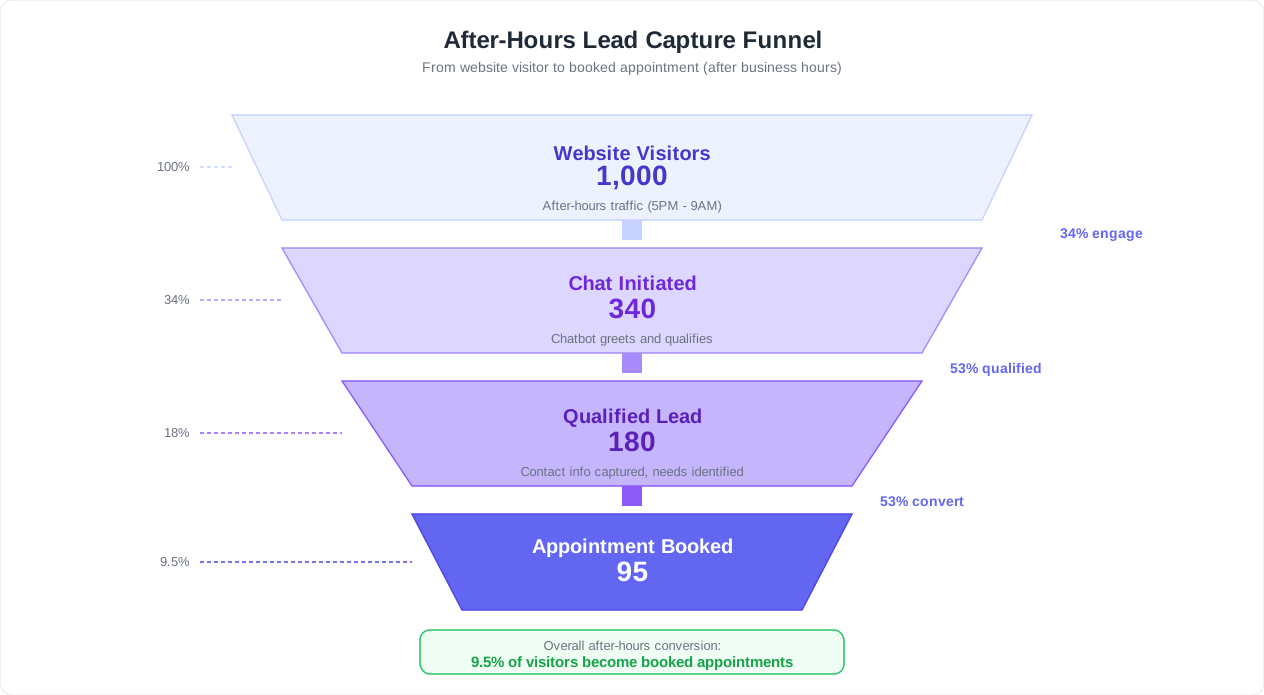
Counterintuitively, after-hours leads often have higher intent than daytime leads. Research suggests that visitors who engage with a website outside business hours have already done preliminary research and are further along the buying journey. They are not casually browsing -- they are actively evaluating.
The problem is not lead quality. The problem is that without a chatbot, these leads hit a contact form and receive no engagement until the next morning. By then, they have moved on. A chatbot that qualifies and engages these leads in real time captures revenue that would otherwise evaporate.
The After-Hours Lead Capture Flow
Here is the conversation flow your chatbot should execute when it detects a sales-intent visitor after hours:
Step 1: Identify intent
- Detect that the visitor is asking about pricing, demos, capabilities, or comparisons
- Alternatively, trigger on high-intent pages: pricing page, features page, case studies page
Step 2: Qualify with conversational questions
- "What kind of business are you looking to add a chatbot to?" (industry)
- "How many customer conversations do you handle per month?" (volume / plan fit)
- "What is your timeline for getting started?" (urgency)
- "Are you evaluating other solutions?" (competitive context)
Step 3: Deliver immediate value
- Based on their answers, recommend the most relevant chatbot template
- Share a relevant case study or ROI estimate
- Offer to walk them through a demo recording or feature overview
Step 4: Book the meeting
- "Based on what you have shared, I think a quick demo with our team would be the fastest way to get you set up. Want me to find a time that works?"
- Show available calendar slots for the next 2-3 business days
- Send calendar invite automatically upon booking
Step 5: Capture contact information
- Collect name, email, company, and phone number
- Send confirmation via email and WhatsApp if the prospect opts in
- Push lead data to your CRM with full conversation context and qualification score
Lead Scoring for After-Hours Inquiries
| Signal | Score | Rationale |
|---|---|---|
| Visited pricing page | +20 | High purchase intent |
| Asked about specific features | +15 | Active evaluation |
| Provided company email (not gmail/yahoo) | +15 | B2B buyer indicator |
| Mentioned competitor by name | +10 | Comparison shopping, ready to switch |
| Booked a demo | +25 | Highest intent action |
| Responded to all qualification questions | +10 | Engaged and serious |
| Returned visitor (cookie/session detected) | +10 | Repeat interest signals commitment |
Leads scoring 50+ should be flagged as hot leads for immediate morning follow-up. Leads scoring 70+ with a booked demo should trigger an email notification to your sales team so the assigned rep can prepare before the meeting. Track all of this through chatbot analytics to optimize your qualification flow over time.
Businesses using Conferbot's lead capture flows report that after-hours leads account for 25-40% of total qualified pipeline once the chatbot is properly configured. That is revenue that previously did not exist.
Related: AI Receptionist for Small Business: Website Chatbot, Voice Bot, or Both?
Connecting After-Hours Chat to Your Morning Workflow
A chatbot that captures information overnight but does not deliver it effectively to your morning team creates a different kind of problem: data sitting in a dashboard that nobody checks. The handoff from bot to human must be seamless, structured, and actionable.
The Morning Briefing: What Your Team Needs at 9 AM
When your support team, sales team, or account managers start their day, they should have a clear picture of everything that happened overnight. Here is the information structure that works:
Priority Queue (action required):
- Tier 2 escalations awaiting human response -- sorted by time waiting
- Hot leads (score 50+) with full qualification data and booked meetings
- Unresolved conversations where the customer is expecting follow-up
- Failed chatbot interactions (customer expressed dissatisfaction with the bot)
Resolved Summary (awareness only):
- Total conversations handled overnight
- Resolution rate (percentage fully resolved by chatbot)
- Common topics and any emerging patterns (e.g., spike in questions about a specific feature)
- New FAQ gaps identified (questions the bot could not answer)
Automated Morning Notifications
Do not rely on your team remembering to check the dashboard. Push the briefing to them through the channels they already use:
- Slack/Teams digest: Post a summary to your support channel at 8:45 AM with counts, priority items, and direct links to unresolved conversations
- Email summary: Send to team leads with overnight metrics and any flagged issues
- CRM updates: Automatically create or update contact records with overnight conversation data -- no manual data entry
- Ticket creation: For every unresolved after-hours conversation, create a pre-populated support ticket with the full chatbot transcript, customer details, and suggested category
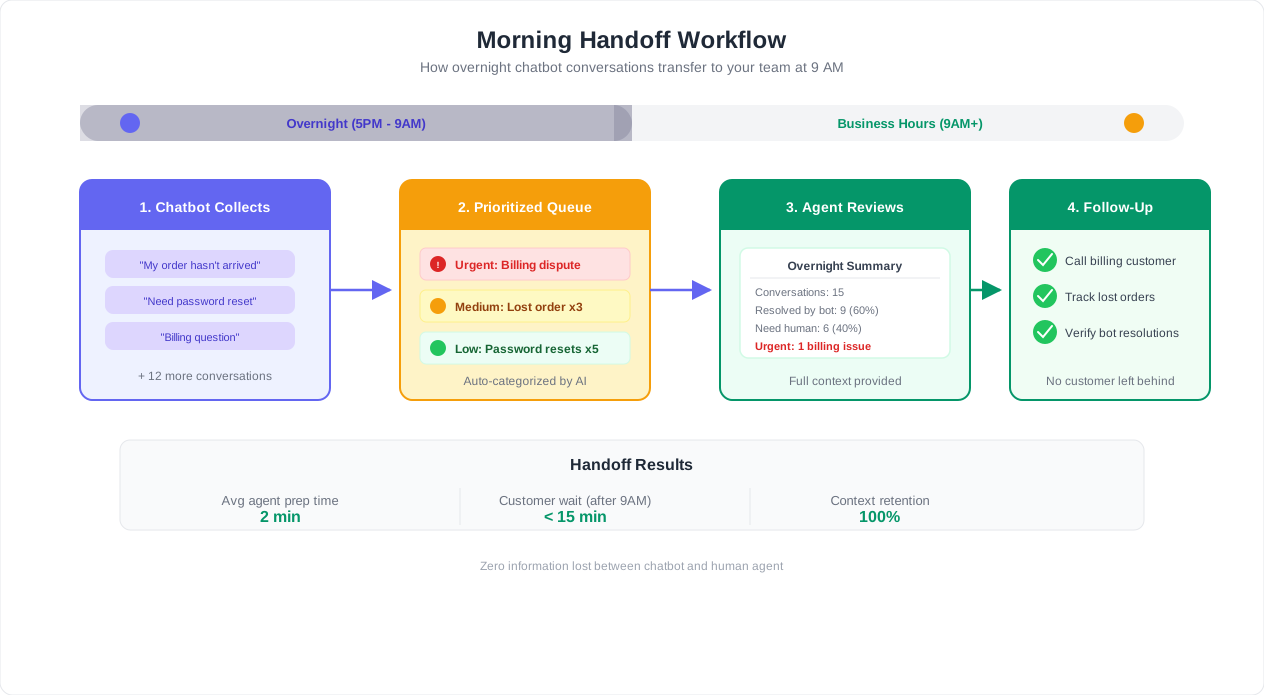
Context Preservation: The Warm Handoff
The worst customer experience is repeating everything they already told the chatbot. When a human agent picks up an after-hours conversation, they must have:
- The complete conversation transcript
- Customer identification (name, email, account ID if applicable)
- The chatbot's classification of the issue
- Any solutions the chatbot already attempted
- The customer's stated urgency and emotional tone
Conferbot's live chat handoff preserves all of this context automatically. The agent sees the full conversation history in their interface and can pick up exactly where the chatbot left off. The customer does not repeat a single detail.
Workflow Integration Examples
| Team | Overnight Data Delivered | Integration Method |
|---|---|---|
| Sales | Qualified leads with scores, booked demos | CRM records + Slack notification |
| Support | Unresolved tickets with transcripts, priority flags | Helpdesk tickets + email digest |
| Product | Feature requests, bug reports with steps to reproduce | Jira/Linear tickets via webhook |
| Marketing | Common questions indicating content gaps | Weekly summary report |
| Management | Volume trends, resolution rates, escalation patterns | Weekly dashboard review |
Closing the Loop with the Customer
The handoff is not complete until the customer receives a response. For every after-hours conversation that was captured and queued, your team should follow up within the committed timeline -- typically before noon on the next business day. The follow-up message should reference the overnight conversation directly: "Hi [name], following up on your chat with us last night about [topic]. I have reviewed the details you shared and here is what I can do for you..." This creates continuity, demonstrates that the chatbot captured everything correctly, and builds trust in your after-hours support system.
Track your follow-up compliance rate as a metric. If your team committed to a "by 10 AM" response and only follows through 60% of the time, customers lose trust in the chatbot's promises. The target should be 95%+ follow-up within the stated timeframe. The analytics dashboard can flag overdue follow-ups automatically so nothing slips through.
Step-by-Step: Configure After-Hours Mode in Conferbot
Here is the complete implementation walkthrough to set up after-hours customer support in Conferbot. This process takes 2-3 hours for a basic setup and up to a full day for advanced configurations with CRM integrations and escalation chains.
Step 1: Define Your Business Hours
Navigate to your bot's Settings panel and configure your operating schedule:
- Set your primary business hours (e.g., Monday-Friday, 9:00 AM - 5:00 PM)
- Add any extended hours for specific days (e.g., Saturday 10:00 AM - 2:00 PM)
- Set your timezone -- this determines when after-hours mode activates
- Mark holidays and office closures where full after-hours mode should apply all day
The chatbot will automatically switch between "business hours" and "after-hours" modes based on this schedule. During business hours, it can offer immediate handoff to live agents. After hours, it shifts to autonomous resolution, lead capture, and escalation-only handoff.
Step 2: Build Your After-Hours Knowledge Base
Your chatbot is only as good as its training data. For after-hours operation, focus on the content most commonly requested outside business hours:
- Upload your FAQ documents, help center articles, and product documentation to the AI knowledge base
- Add your return, refund, and cancellation policies -- these are among the most common after-hours queries
- Include pricing details and plan comparisons
- Add troubleshooting guides for your most frequently reported issues
- Include contact information, office hours, and location details
Test the knowledge base by asking 30-50 real customer questions pulled from your historical support data. Target 80%+ accurate responses before enabling after-hours mode.
Step 3: Create After-Hours Conversation Flows
Using the chatbot builder, create dedicated flows for after-hours interactions:
Greeting flow:
- Welcome message acknowledging the after-hours context: "Hi there! Our team is currently offline, but I can help with most questions right now. What can I assist you with?"
- Quick-reply buttons for the most common categories: "Product questions", "Order status", "Technical help", "Talk to sales", "Report an issue"
Resolution flow:
- The AI processes the customer's question against the knowledge base
- Delivers the answer with a follow-up: "Did that answer your question?"
- If yes, offers further help or closes the conversation with a satisfaction rating
- If no, collects additional context and either tries a different answer or transitions to the capture flow
Lead capture flow:
- Triggered when the visitor's intent is sales-related or when they visit high-intent pages
- Collects qualification data (company, use case, volume, timeline)
- Offers to book a demo using calendar integration
- Sends confirmation and pushes data to your CRM
Escalation flow:
- Triggered by Tier 2 and Tier 3 urgency detection
- For Tier 2: Creates a priority ticket and confirms follow-up timeline
- For Tier 3: Sends webhook to your alerting system (PagerDuty, Opsgenie, Twilio) and keeps the customer engaged while waiting
Step 4: Configure Integrations
Connect your chatbot to the tools your team uses so overnight data flows automatically:
- CRM integration: Push lead data, conversation transcripts, and qualification scores to HubSpot, Salesforce, or your CRM of choice
- Helpdesk integration: Create tickets in Zendesk, Freshdesk, or Intercom for unresolved conversations
- Calendar integration: Enable demo booking through Google Calendar or Calendly
- Communication integration: Send Slack/Teams notifications for escalations and morning digests
- Alerting integration: Connect to PagerDuty or Twilio for Tier 3 on-call notifications
Step 5: Deploy Across Channels
After-hours support should be available wherever your customers reach out:
- Website widget: Your primary channel -- deploy the Conferbot widget on all pages
- WhatsApp Business: Enable auto-responses and the full after-hours flow for WhatsApp inquiries
- Social channels: Connect Messenger and Instagram DMs to the same after-hours logic
- Email auto-response: Configure an auto-reply that directs customers to the chatbot for immediate help: "For instant assistance, chat with us at [your website URL]"
Step 6: Test Before Going Live
Run through these test scenarios before enabling after-hours mode in production:
- Ask the top 20 most common customer questions -- verify accurate answers
- Simulate a Tier 3 escalation -- verify the on-call notification is received
- Complete the lead capture flow end-to-end -- verify the CRM record is created
- Request a human agent -- verify the chatbot handles the after-hours handoff gracefully
- Express frustration -- verify sentiment detection escalates appropriately
- Test from each deployed channel (website, WhatsApp, Messenger) to confirm consistency
Once testing is complete, enable after-hours mode. Monitor the first week closely using the analytics dashboard, reviewing every escalated and unresolved conversation to fine-tune detection rules and knowledge base gaps.
Measuring After-Hours Chatbot Performance
An after-hours chatbot requires its own measurement framework. The metrics that matter during business hours (when humans are available as a safety net) differ from the metrics that matter when the chatbot is operating autonomously. Here is how to track, benchmark, and optimize your after-hours performance.
The 6 Core After-Hours Metrics
1. After-Hours Resolution Rate
- What it measures: Percentage of after-hours conversations fully resolved by the chatbot without requiring human follow-up
- Target: 55-70% after 60 days of optimization
- How to improve: Review every unresolved conversation weekly. If the chatbot should have been able to answer, add the missing content to the knowledge base. Track the top 10 unanswered questions each week and address them.
2. After-Hours Lead Capture Rate
- What it measures: Percentage of after-hours visitors with sales intent who provide contact information
- Target: 25-40% of sales-intent visitors
- How to improve: Reduce friction in the capture flow. Offer value before asking for information. Test different qualification question sequences.
3. Escalation Accuracy
- What it measures: Percentage of escalations that were correctly classified (true positives) versus false escalations (issues the bot could have handled) or missed escalations (urgent issues that were not flagged)
- Target: Over 90% accuracy. Err on the side of over-escalating rather than under-escalating.
- How to improve: Review every Tier 3 escalation. Adjust keyword triggers and sentiment thresholds based on real data.
4. Morning Queue Reduction
- What it measures: Reduction in unresolved tickets waiting when the team arrives, compared to pre-chatbot baseline
- Target: 40-60% reduction in morning queue size
- How to improve: Expand the chatbot's knowledge base to cover more inquiry types. Add self-service options for common after-hours tasks (order tracking, password resets, appointment management).
5. After-Hours CSAT
- What it measures: Customer satisfaction rating for chatbot-handled after-hours conversations
- Target: 3.8+ out of 5. Remember that customers often rate after-hours bots more favorably than daytime bots because the alternative is no response at all.
- How to improve: Focus on conversations rated 1-2 stars. Common causes: incorrect answers, inability to escalate, and repetitive loops.
6. After-Hours Revenue Attribution
- What it measures: Revenue directly attributable to after-hours chatbot interactions (leads captured, demos booked, sales closed)
- Target: Varies by business. Track from day one to build a baseline.
- How to improve: Optimize the lead capture and qualification flow. A/B test different conversation approaches.
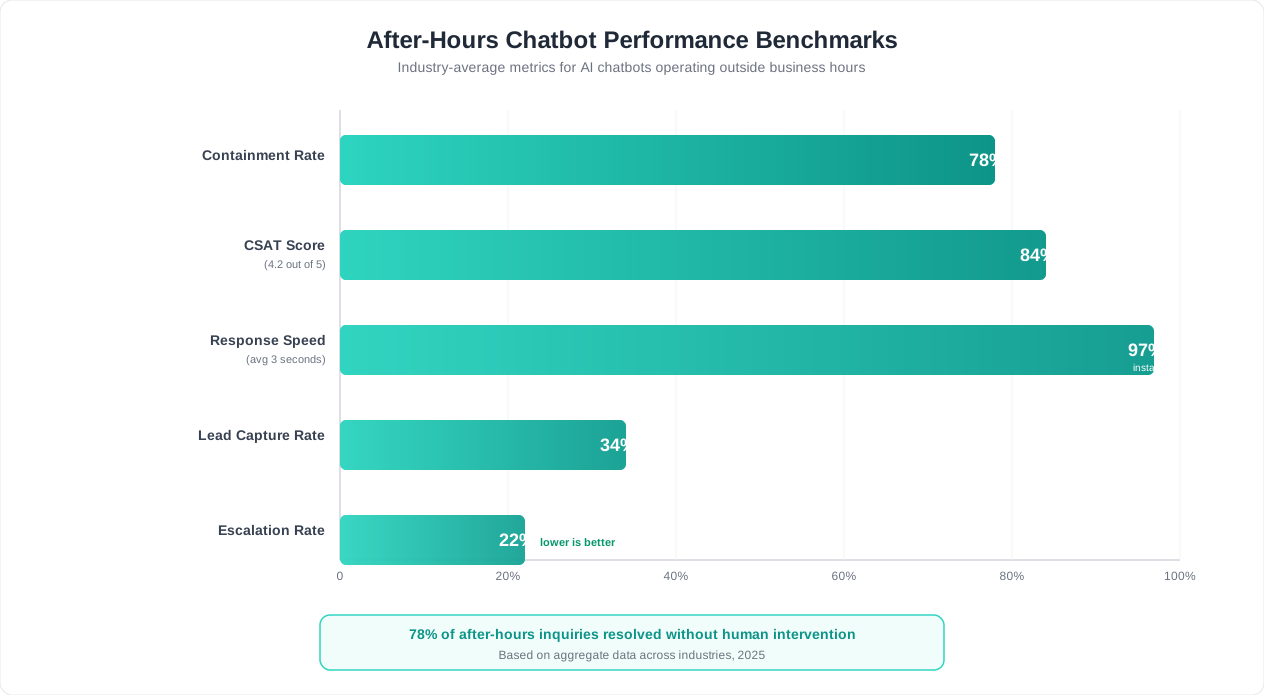
After-Hours vs. Business Hours Performance Comparison
| Metric | Business Hours (bot + human) | After Hours (bot only) | Notes |
|---|---|---|---|
| Resolution rate | 85-95% | 55-70% | Lower is expected without human backup |
| First response time | Under 10 seconds | Under 5 seconds | Faster after hours (no routing delay) |
| CSAT | 4.0-4.5 | 3.8-4.2 | Slightly lower but still strong |
| Lead conversion | 12-18% | 8-15% | Lower but represents net-new pipeline |
| Average handle time | 3-5 minutes | 2-4 minutes | Bot resolves faster when it can resolve |
| Escalation rate | 15-25% | 30-45% | Higher is expected without human backup |
Weekly Optimization Cadence
Schedule a 30-minute weekly review of after-hours performance. Use this checklist:
- Review top 10 unresolved after-hours conversations: Can any of these be resolved by adding knowledge base content? If so, add it immediately.
- Check escalation log: Were all Tier 3 escalations true emergencies? Were there any missed escalations? Adjust triggers accordingly.
- Review lead capture conversions: Where in the qualification flow do prospects drop off? Simplify or reorder questions to reduce friction.
- Monitor CSAT trends: Is after-hours CSAT improving, stable, or declining? Investigate any downward trends immediately.
- Check for new FAQ gaps: What questions are customers asking that the bot cannot answer? Prioritize the top 3-5 for knowledge base updates.
90-Day Performance Trajectory
Expect a clear improvement curve as you optimize. Here is a typical timeline for after-hours chatbot maturation:
| Metric | Week 1 | Month 1 | Month 3 |
|---|---|---|---|
| Resolution rate | 35-45% | 50-60% | 60-70% |
| Lead capture rate | 15-20% | 20-30% | 30-40% |
| Escalation accuracy | 75-80% | 85-90% | 92-96% |
| Morning queue reduction | 20-30% | 35-45% | 50-60% |
| CSAT | 3.4-3.7 | 3.6-4.0 | 3.9-4.2 |
The first two weeks are about identifying gaps. Months one through three are about systematic optimization. After 90 days, performance improvements plateau and the focus shifts to maintaining quality and adapting to new products, policies, or customer needs.
Over 90 days of consistent optimization, most businesses see their after-hours resolution rate improve from 40-50% (initial deployment) to 60-70% (optimized). Each percentage point improvement represents fewer morning tickets, more captured leads, and better customer experience. Use the Conferbot analytics dashboard to track all of these metrics in a single view, with filters for time-of-day segmentation so you can isolate after-hours performance precisely.
Ready to stop losing customers and revenue while your team sleeps? Start with a free Conferbot plan and have your after-hours chatbot live within a day. For a complete overview of chatbot ROI across all use cases, see our guide on how to calculate chatbot ROI.
Was this article helpful?
After-Hours Customer Support FAQ
Everything you need to know about chatbots for after-hours customer support.
About the Author

Conferbot Team specializes in conversational AI, chatbot strategy, and customer engagement automation. With deep expertise in building AI-powered chatbots, they help businesses deliver exceptional customer experiences across every channel.
View all articles

