
Why Bad Handoffs Destroy Customer Trust
A chatbot that resolves 80% of inquiries autonomously is impressive. But the 20% that need a human agent represent your highest-stakes interactions: frustrated customers, complex complaints, high-value deals, and edge cases that demand nuance. How you manage the transition from bot to human in those moments determines whether the customer stays loyal or walks away.
The numbers paint a bleak picture of the current state of handoffs across the industry. According to Gartner's customer service research, 68% of customers report being frustrated by having to repeat information they already provided to a chatbot when connected to a human agent. That single failure -- asking the customer to start over -- erases every efficiency gain the chatbot created in the first place.
The damage compounds quickly. A Forrester CX report found that customers who experience a poor handoff are 2.4 times more likely to churn within 90 days compared to customers whose issues are resolved entirely by either a bot or a human without a transition. The handoff itself introduces risk that neither pure-bot nor pure-human support carries.
What Customers Actually Expect During a Transfer
Customer expectations during a handoff are not complicated, but they are non-negotiable:
- No repetition: The agent should already know what the customer said, what the bot tried, and what failed. Starting with "How can I help you?" after a five-minute chatbot conversation signals that the business does not value the customer's time.
- Transparency: The customer wants to know they are being transferred, why, and how long the wait will be. Silence during a transfer -- even for 15 seconds -- feels like abandonment.
- Competence on the other side: The human agent must be equipped to solve the problem, not just acknowledge it. A context-rich handoff where the agent still cannot help is arguably worse than no handoff at all.
- Speed: According to Zendesk's CX benchmark data, the average acceptable wait time during a live handoff is 45 seconds. After 90 seconds, abandonment rates spike to 40%.
The Business Impact of Getting Handoffs Wrong
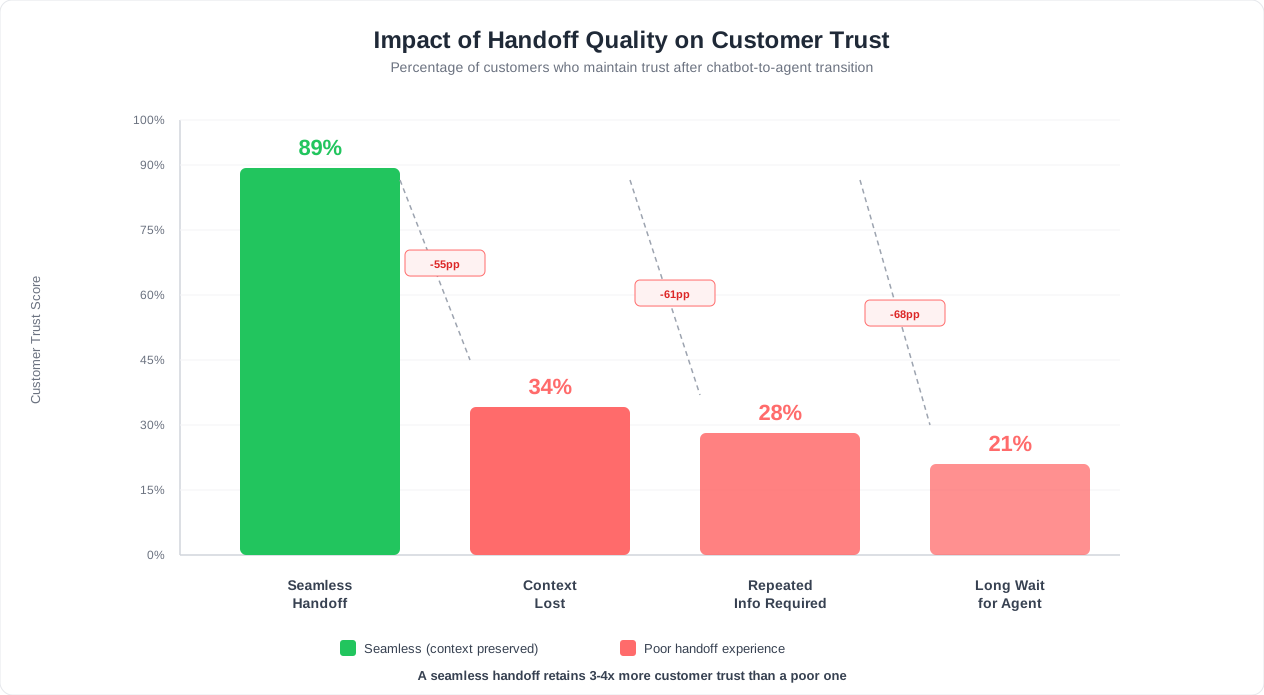
Beyond churn, bad handoffs inflate operational costs. When agents lack context, average handle time increases by 35-50%. Agents ask questions the bot already asked, customers re-explain their situation, and the conversation takes twice as long as it should. For a team handling 500 escalations per month at an average agent cost of $25/hour, poor context transfer can waste over $6,000 per month in redundant handle time alone.
Then there is the reputational damage. Customers who experience friction during a handoff are 3 times more likely to leave a negative review mentioning "bot" or "automated system." Those reviews deter future prospects who read them, creating a compounding loss that is difficult to quantify but impossible to ignore.
The good news: context-rich handoffs resolve 40% faster than handoffs where the agent starts from scratch. According to HubSpot's State of Service report, 90% of customers rate an immediate response as essential when they have a support question. The rest of this guide shows you exactly how to build that seamless experience using Conferbot's chatbot builder and live chat integration. For the full comparison of automated versus human support channels, see our chatbot vs live chat analysis.
Three Types of Escalation Triggers
Not every handoff should be triggered the same way. The best escalation systems use a layered approach that combines three distinct trigger types: explicit requests from the customer, implicit signals detected by the AI, and policy-based rules defined by your business. Each type catches different scenarios, and together they form a safety net that ensures no customer falls through the cracks.
Type 1: Explicit Triggers (Customer Asks for a Human)
The most straightforward escalation happens when the customer directly requests a human agent. These requests come in many forms:
- "I want to talk to a real person"
- "Connect me with an agent"
- "Can I speak to a human?"
- "This bot is not helping"
- "Transfer me to support"
- "Let me talk to your manager"
Your chatbot must recognize all common variations of this request and act on them immediately. Do not attempt to deflect or re-engage the customer with another bot response once they have explicitly asked for a human. Deflection at this point is the single fastest way to destroy trust. Research shows that 73% of customers who are denied a human agent after requesting one will not return to the brand.
Best practice: always include a visible "Talk to a Human" button or quick-reply option in your chatbot interface, especially after the bot has failed to resolve a question. Making the escape hatch visible actually reduces usage -- customers feel less trapped and are more willing to try the bot first when they know a human is available.
Type 2: Implicit Triggers (Sentiment and Frustration Detection)
Many customers do not explicitly ask for a human. Instead, they signal frustration through their language, behavior, and engagement patterns. Modern AI chatbot builders can detect these signals in real time and proactively offer escalation before the customer reaches a breaking point.
Sentiment signals to monitor:
- Escalating negativity: The customer's messages shift from neutral to negative over the course of the conversation ("ok" then "this doesn't help" then "this is terrible")
- Repeated rephrasing: The customer asks the same question three or more times using different words. This is a strong indicator that the bot is not understanding their need.
- Short, curt responses: Single-word replies like "no," "wrong," or "nope" after a bot response indicate dissatisfaction without explicit escalation.
- Message length collapse: If the customer's messages go from detailed explanations to one-word replies, they are losing patience.
- Profanity or capitalized text: Strong language and all-caps indicate emotional escalation that warrants human intervention.
- Long pauses followed by re-engagement: If a customer goes silent for 3+ minutes and then returns with a negative message, the frustration has been building.
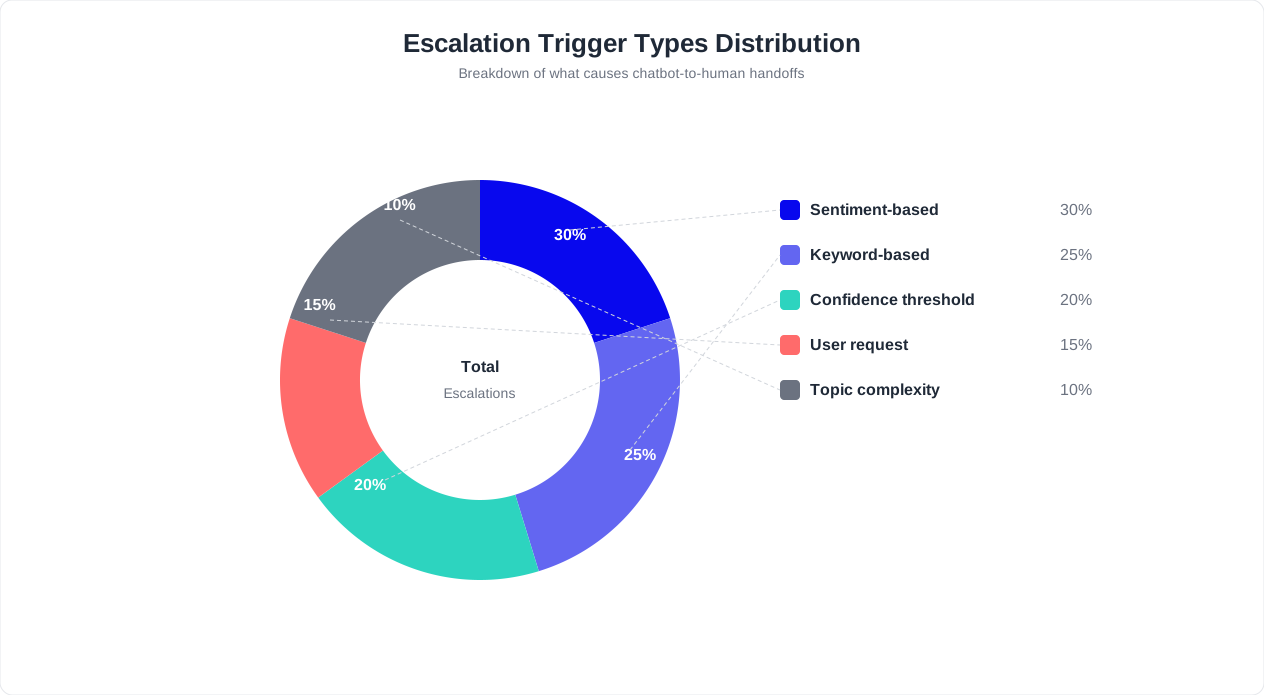
Configure your chatbot to assign a frustration score that increments with each negative signal. When the score crosses a threshold (typically after 2-3 negative signals in a single conversation), the bot should proactively offer: "I can see this is not quite hitting the mark. Would you like me to connect you with a specialist who can help?"
Type 3: Policy-Based Triggers (Business Rules)
Some conversations should always route to a human regardless of sentiment or explicit requests. These are defined by your business policies and the nature of the inquiry:
| Topic Category | Why It Requires a Human | Priority Level |
|---|---|---|
| Refund or chargeback requests over $100 | Financial authorization required | High |
| Legal or compliance inquiries | Liability risk from incorrect bot responses | High |
| Account security (suspected breach, unauthorized access) | Requires verification steps that bots should not handle | Critical |
| Contract negotiations or custom pricing | Requires human judgment and authority | Medium |
| Medical, health, or safety-related questions | Duty-of-care requirements | Critical |
| Complaints about a specific employee | HR/legal sensitivity | High |
| Enterprise or VIP account requests | SLA commitments and relationship management | High |
| Cancellation requests from long-term customers | Retention opportunity requiring human empathy | Medium |
Policy-based triggers are the easiest to implement because they are rule-based, not probabilistic. Configure them in your chatbot's flow builder by adding routing conditions: if the detected intent matches any policy-based category, bypass the bot's resolution flow and route directly to the appropriate human team. Use chatbot analytics to track how often each policy category triggers to ensure your rules are calibrated correctly.
Combining All Three Trigger Types
The strongest handoff systems layer all three trigger types. Explicit triggers fire instantly. Implicit triggers build up over the conversation and fire when a threshold is crossed. Policy-based triggers override everything else for defined topic categories. This layered approach catches the customer who politely asks for help, the customer who is silently fuming, and the customer whose question is too sensitive for any bot to handle -- ensuring that no critical conversation stays stuck in an automated loop. (source: Gartner on customer service automation).
Related: Chatbot Analytics: 10 Metrics You Must Track to Prove ROI in 2026
Confidence Score Thresholds: When AI Should Stop Trying
Every AI chatbot generates a confidence score for each response -- a numerical value representing how certain the model is that its answer is correct. Most platforms express this as a percentage between 0 and 100. The question every support team must answer is: at what confidence level should the bot stop trying to answer and hand off to a human?
Setting this threshold too high means the bot escalates constantly, defeating the purpose of automation. Setting it too low means the bot delivers wrong answers, damaging trust and creating more work for agents who must clean up the mess. The right threshold depends on your use case, industry, and risk tolerance.
The Confidence Threshold Framework
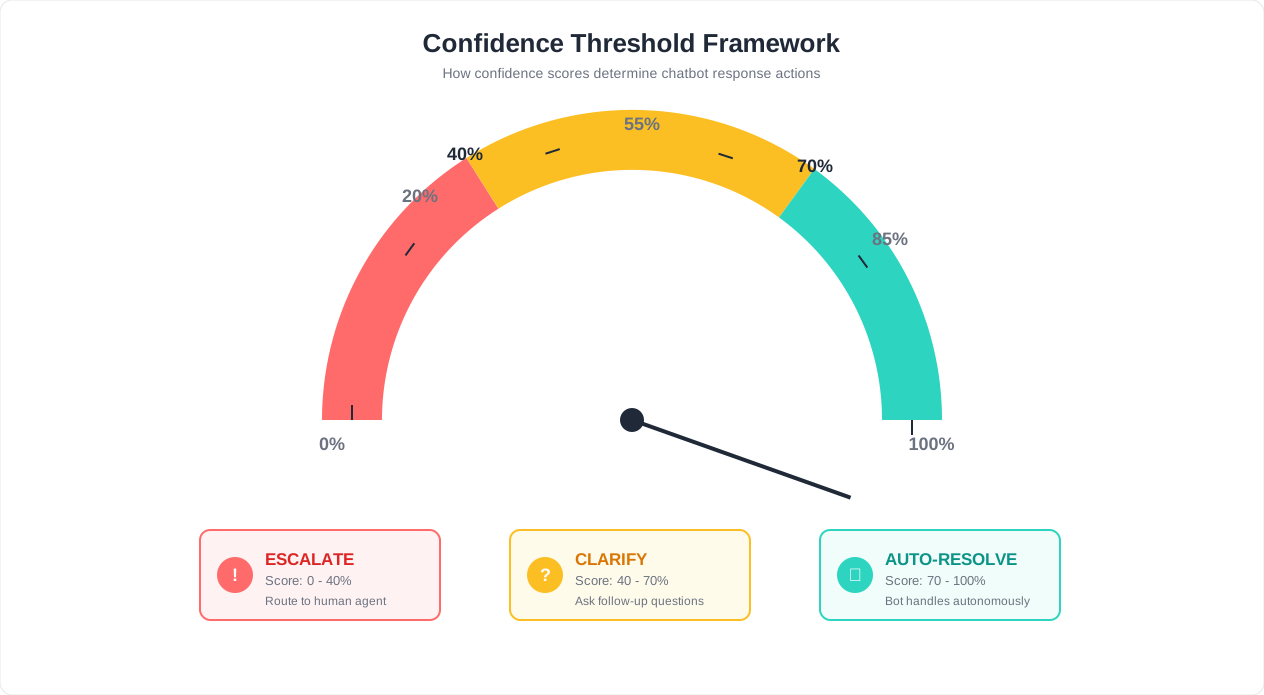
Rather than using a single threshold, implement a three-tier confidence framework that triggers different behaviors at different levels:
| Confidence Range | Bot Behavior | Customer Experience | Use Case Example |
|---|---|---|---|
| 85-100% (High confidence) | Deliver the answer directly | Fast, definitive response | "What are your business hours?" -- answer pulled from knowledge base with 98% confidence |
| 60-84% (Medium confidence) | Deliver the answer with a qualifier and offer escalation | Helpful but transparent about uncertainty | "Based on your description, this sounds like [X]. Does that match your situation? If not, I can connect you with a specialist." |
| Below 60% (Low confidence) | Do not attempt to answer. Offer escalation immediately. | Honest acknowledgment that the bot cannot help | "I want to make sure you get the right answer on this. Let me connect you with a team member who can help." |
Industry-Specific Threshold Adjustments
Not all industries can tolerate the same margin of error. Adjust your thresholds based on the consequences of a wrong answer:
- E-commerce (standard thresholds): A wrong answer about product compatibility is inconvenient but rarely dangerous. The 85/60 framework works well.
- Healthcare and insurance (strict thresholds): Raise the "high confidence" floor to 92% and the escalation trigger to 70%. Incorrect information about coverage, dosage, or eligibility can have serious consequences.
- Financial services (strict thresholds): Similar to healthcare. Wrong information about account balances, interest rates, or transaction disputes creates regulatory and legal risk. Use 90/65 thresholds.
- Internal IT support (relaxed thresholds): An incorrect suggestion for "how to reset my VPN" is easily corrected and low risk. You can lower thresholds to 80/50 to maximize bot resolution.
Consecutive Low-Confidence Detection
A single medium-confidence response is acceptable. But if the bot produces two or more medium-confidence responses in a row within the same conversation, the pattern indicates a systemic gap -- the bot simply does not have the knowledge to help this customer. Configure an automatic escalation after two consecutive responses below 80% confidence, regardless of whether any individual response fell below the hard escalation threshold.
This rule catches a subtle but common failure mode: the bot produces responses that are individually "good enough" but collectively do not resolve the customer's issue. Without this rule, the customer experiences a frustrating loop of partially helpful answers that never quite get to a resolution.
Monitoring Confidence Score Distributions
Use your analytics dashboard to monitor the distribution of confidence scores across all conversations. A healthy distribution looks like this:
- 70-80% of responses should fall in the high-confidence range (85%+). If this percentage is lower, your knowledge base has significant gaps that need to be filled.
- 15-20% of responses should fall in the medium-confidence range (60-84%). These represent edge cases and variations that the bot handles cautiously.
- 5-10% of responses should fall below 60%. These are the conversations that genuinely need a human. If this percentage is higher than 15%, the bot is undertrained for your use case.
Track these distributions weekly and investigate any shifts. A sudden increase in low-confidence responses might indicate a product change that was not reflected in the knowledge base, a new customer segment asking unfamiliar questions, or a technical issue with the AI model. Early detection prevents a wave of poor customer experiences.
The goal is not to eliminate low-confidence responses -- some questions genuinely require human judgment. The goal is to ensure that every low-confidence moment results in a smooth, context-rich transition to a human who is prepared to help.
Related: Chatbot vs Phone Support: A Complete Cost and Performance Comparison
Passing Full Context So Customers Never Repeat Themselves
Context loss during handoff is the root cause of the statistic that opened this guide: 68% of customers frustrated by repeating information. The fix is architectural. Your chatbot must package every relevant data point collected during the conversation and deliver it to the human agent in a structured, scannable format before the agent connects with the customer.
The Complete Context Package
Every handoff should transfer these six categories of data to the receiving agent:
1. Conversation Transcript
- The full, timestamped chat history between the customer and the bot
- Formatted for quick scanning -- agent messages, customer messages, and bot actions should be visually distinct
- Key exchanges highlighted (the original question, any points of confusion, the customer's stated desired outcome)
2. Identified Intent and Issue Summary
- A one-sentence AI-generated summary of what the customer is trying to accomplish
- Example: "Customer purchased a wireless keyboard 8 days ago. It stopped connecting via Bluetooth after a firmware update. Customer wants a replacement, not a refund."
- This summary should be generated by the AI from the conversation context, not just the customer's first message
3. Customer Profile Data
- Name, email, phone number (if provided)
- Account ID, subscription tier, customer-since date
- Purchase history and order details relevant to the current inquiry
- Lifetime value and loyalty tier (so agents can calibrate their response appropriately)
- Previous support interactions and their outcomes
4. Sentiment and Emotional State
- Current sentiment score: calm, mildly frustrated, frustrated, very frustrated, or angry
- Trajectory: is the customer getting more frustrated over the conversation or calming down?
- This allows the agent to calibrate their opening tone -- a calm customer gets a professional greeting, while a frustrated customer gets immediate empathy and acknowledgment
5. Actions Already Taken by the Bot
- Every resolution attempt the bot made, with the outcome
- Example: "Provided return policy link (customer said it did not apply). Offered exchange for same product (customer declined, wants newer model). Offered store credit (customer declined, wants exchange only)."
- This prevents the agent from suggesting the same solutions the bot already tried and the customer already rejected
6. Suggested Next Steps
- Based on the conversation, the AI recommends what the agent should try
- Example: "Customer has been offered and rejected refund, exchange for same product, and store credit. Consider offering exchange for the newer model (SKU KBX-200) or escalating to a supervisor for a custom resolution."
- These suggestions save the agent time and prevent dead-end approaches
How Context-Rich Handoffs Change the Numbers
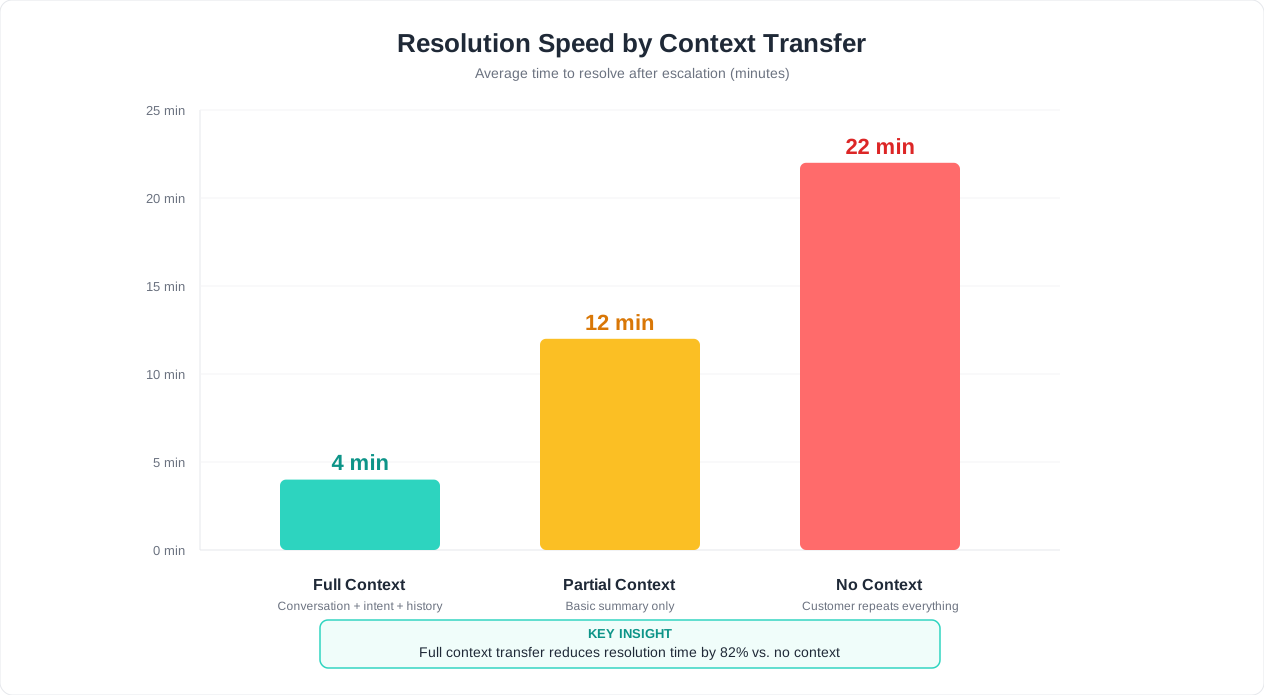
The impact of comprehensive context transfer is measurable across every support metric:
| Metric | Without Context | With Full Context | Improvement |
|---|---|---|---|
| Average handle time | 9.2 minutes | 5.5 minutes | 40% faster |
| First-contact resolution rate | 62% | 84% | +22 percentage points |
| Customer satisfaction (CSAT) | 3.1 / 5 | 4.3 / 5 | +1.2 points |
| Repeat contact rate (same issue within 7 days) | 28% | 9% | -19 percentage points |
| Agent effort score | High | Low | Reduced burnout |
These are not theoretical projections. Zendesk's handoff benchmark data confirms that context-rich handoffs resolve 40% faster and produce significantly higher satisfaction scores. The logic is straightforward: when the agent already knows the issue, the history, and the customer's emotional state, the first thing they say can be substantive rather than diagnostic.
Structuring the Agent View
Raw data is useless if the agent has to dig through it. Structure the context as a card that appears in the agent's interface the moment they accept the conversation:
Top section (glanceable in 3 seconds): One-sentence issue summary, customer name, sentiment indicator (color-coded: green/yellow/orange/red).
Middle section (scan in 10 seconds): Customer profile, relevant order or account details, bot actions attempted with outcomes.
Bottom section (reference as needed): Full conversation transcript, suggested next steps, links to relevant knowledge base articles.
The agent should be able to start the conversation after reading only the top section. The middle section provides depth if they need it. The bottom section is a reference they can consult during the conversation. This layered structure respects the agent's time while ensuring nothing is lost.
Conferbot's live chat module displays this exact card layout automatically. The context card is generated in real time as the bot conversation progresses, so by the time the handoff triggers, the agent view is already populated and ready. For teams using external helpdesk tools, the integrations hub pushes the same context package into Zendesk, Freshdesk, Intercom, or HubSpot Service Hub as a structured ticket note.
Related: How to Train a Chatbot on Your Knowledge Base: Step-by-Step Guide for 2026
Agent Readiness: Queue Management and SLA Setup
Context preservation solves half of the handoff problem. The other half is ensuring that a qualified agent is actually available to receive the conversation. The best context package in the world is worthless if the customer waits 10 minutes in a queue or gets routed to an agent who cannot help with their specific issue.
Skill-Based Routing
Not every agent can handle every escalation. Route conversations to the right agent based on the nature of the inquiry:
| Conversation Category | Route To | Required Skills |
|---|---|---|
| Billing disputes and refunds | Billing specialists | Financial authorization, refund processing |
| Technical troubleshooting | Technical support team | Product knowledge, debugging, API familiarity |
| Sales inquiries and demos | Sales representatives | Product expertise, pricing authority, CRM access |
| Account security issues | Security team or senior agents | Identity verification, account lockdown procedures |
| Cancellation requests | Retention specialists | Retention offers, empathy training, authority to discount |
| Non-English conversations | Multilingual agents | Language fluency, cultural context |
Skill-based routing requires tagging each agent with their capabilities in your system and having the chatbot classify the conversation category before initiating the handoff. This classification happens automatically based on the detected intent and conversation content. The result: the customer connects with someone who can actually solve their problem on the first try.
Agent Availability and Load Balancing
Even with the right skill match, routing to an agent who is already handling four conversations creates a poor experience. Implement load-based routing that considers:
- Current active conversations: Route to the agent with the fewest active chats, within the skill-matched pool
- Agent status: Respect agent status settings (available, busy, break, offline). Never route to an agent who is on break or in a meeting.
- Handle time patterns: If an agent's current conversations have been active for 10+ minutes, they are likely deep in resolution. Route new conversations to agents who recently closed tickets and have fresh capacity.
- Round-robin fallback: If multiple agents have equal capacity, distribute conversations evenly using round-robin to prevent one agent from being overloaded
SLA Tiers for Escalated Conversations
Not all escalations carry the same urgency. Define SLA tiers that set response time expectations based on priority:
| SLA Tier | Trigger Criteria | First Response Target | Resolution Target | Queue Priority |
|---|---|---|---|---|
| Critical | Security breach, service outage, VIP account, health/safety | Under 30 seconds | Under 15 minutes | Jumps to front of queue |
| High | Billing dispute, angry customer (high frustration score), legal inquiry | Under 60 seconds | Under 30 minutes | Priority position in queue |
| Standard | General escalation, customer preference for human, medium complexity | Under 90 seconds | Within same session | Normal queue position |
| Low | Information request that the bot could partially answer, customer curiosity | Under 2 minutes | Within same session or callback | Normal queue position |
Map each escalation trigger (from Section 2) to an SLA tier. Policy-based triggers for security and legal get Critical or High. Implicit sentiment triggers get High or Standard based on the frustration score. Explicit requests with no frustration signals get Standard. This ensures that the most urgent conversations receive the fastest attention.
Queue Transparency and Wait-Time Messaging
When a customer enters the queue, communicate three things immediately:
- Their position: "You are number 3 in the queue."
- Estimated wait time: "Estimated wait: approximately 2 minutes."
- Alternatives: "If you prefer, I can have an agent call you back within the hour or send a detailed response via email."
Update the customer every 30 seconds if the wait exceeds one minute. Silence during a queue wait is the most common cause of handoff abandonment. A simple "Still connecting you -- you are next in line" message at regular intervals reassures the customer that the process is working.
Warm Transfer Protocol
The ideal handoff is a warm transfer where the agent has time to review the context before the customer is connected. Here is the sequence:
- Handoff triggers. The chatbot sends the context package to the agent queue.
- An available, skill-matched agent receives the assignment with the context card visible.
- The agent has 10-15 seconds to read the summary and review key details.
- The agent accepts the conversation.
- The customer sees: "You are now connected with [Agent Name] from our [Department] team."
- The agent opens with a context-aware greeting that references the issue directly (see Section 6 for templates).
This warm transfer flow means the agent's first message demonstrates competence and awareness, not ignorance. The customer immediately feels that the transition was purposeful and well-coordinated, not a random hand-toss to whoever happened to be available. Configure this flow in your chatbot builder using Conferbot's warm transfer nodes. When chat alone is not enough for the handoff - a screen the customer cannot describe, a problem that needs a voice - our escalation guide covers when to step up to voice, video and co-browse and how to keep the context intact.
What to Say During the Handoff: Message Templates
The exact words your chatbot and agents use during a handoff shape the customer's perception of the entire interaction. Generic messages ("Please hold while I transfer you") waste an opportunity to build trust. The templates below are ready to copy, paste, and customize for your brand voice. Each template is designed for a specific handoff scenario.
Template 1: Standard Escalation (Customer Requests a Human)
Bot message:
"Absolutely -- let me connect you with a team member right now. I am sharing our conversation so they will have all the details you have already provided. You will not need to repeat anything. Estimated wait: [X] minutes."
Why it works: Acknowledges the request without resistance. Explicitly promises no repetition (addressing the #1 customer fear). Sets a time expectation.
Template 2: Proactive Escalation (Bot Detects Frustration)
Bot message:
"I want to make sure you get the best help on this. Let me bring in a specialist from our [billing/technical/support] team who can take a closer look. They will have the full details of our conversation. Would you like me to connect you now?"
Why it works: Frames the handoff as the bot advocating for the customer, not admitting failure. Uses "specialist" rather than "agent" to imply expertise. Asks permission, giving the customer control.
Template 3: Policy-Based Escalation (Sensitive Topic)
Bot message:
"For [refund requests above $100 / account security concerns / legal inquiries], I want to make sure a specialist handles this personally. I am transferring you now with the full details of our conversation. This is our highest priority -- someone will be with you shortly."
Why it works: Explains why the transfer is happening (policy, not bot inability). Signals that this category receives special attention. "Highest priority" reassures the customer that their issue is being taken seriously.
Template 4: Low-Confidence Escalation (Bot Is Unsure)
Bot message:
"I want to give you a confident answer on this, and I think a team member can help more effectively. Let me connect you with someone who has deeper expertise in this area. I am sending them everything we have discussed so you can pick up right where we left off."
Why it works: Honest about limitations without sounding incompetent. Positions the human as "deeper expertise" rather than "someone to fix the bot's mistakes." Reinforces the context transfer promise.
Template 5: Agent's Opening Message (After Warm Transfer)
Agent message:
"Hi [Customer Name], I am [Agent Name] from our [department] team. I have reviewed your conversation and I understand you are looking to [one-sentence issue summary]. I can see we have already tried [actions attempted]. Here is what I would like to try next: [proposed solution]. Does that sound good to you?"
Why it works: Uses the customer's name immediately (personal touch). Demonstrates full awareness of the situation in the first message. References what was already tried (proving the context was read). Proposes a next step immediately (no wasted time). Asks for confirmation (keeps the customer in control).
Template 6: Queue Wait Update Messages
After 30 seconds:
"Still finding the right person for you -- you are next in line. While you wait, is there anything else about your situation I should pass along to the agent?"
After 60 seconds:
"Thank you for your patience. A team member will be with you in about [X] more seconds. All the details of our conversation are ready for them."
After 2 minutes:
"I apologize for the longer wait. Would you prefer to continue waiting, or would you like me to have an agent [call you back / email you] within [timeframe]?"
Why it works: Each message serves a purpose: the 30-second message gathers additional context (productive use of wait time). The 60-second message reassures. The 2-minute message offers an escape valve before frustration peaks.
Template 7: After-Hours Escalation (No Agents Available)
Bot message:
"Our team is currently offline, but I want to make sure this gets handled first thing tomorrow. I have saved all the details of our conversation. Here are your options: (1) I can create a priority ticket and have someone reach out by [specific time] tomorrow. (2) I can schedule a callback at a time that works for you. (3) If this is urgent, I can alert our on-call team now. Which would you prefer?"
Why it works: Transparent about availability. Offers three concrete options (not just "try again later"). The on-call option ensures truly urgent issues are not left unattended. Giving the customer a choice reduces the frustration of the unavailability.
Template 8: Handoff Closing (Agent Wraps Up)
Agent message:
"I am glad we could get that resolved, [Customer Name]. Just to confirm: [summary of resolution and any next steps]. If anything comes up related to this, you can reference ticket number [#XXXX] and any agent will have the full history. Is there anything else I can help with today?"
Why it works: Summarizes the resolution (prevents misunderstanding). Provides a ticket reference for future continuity. Signals that the context is permanently stored -- if the customer returns, they will never have to start over.
After-Hours Handoff: When No Agent Is Available
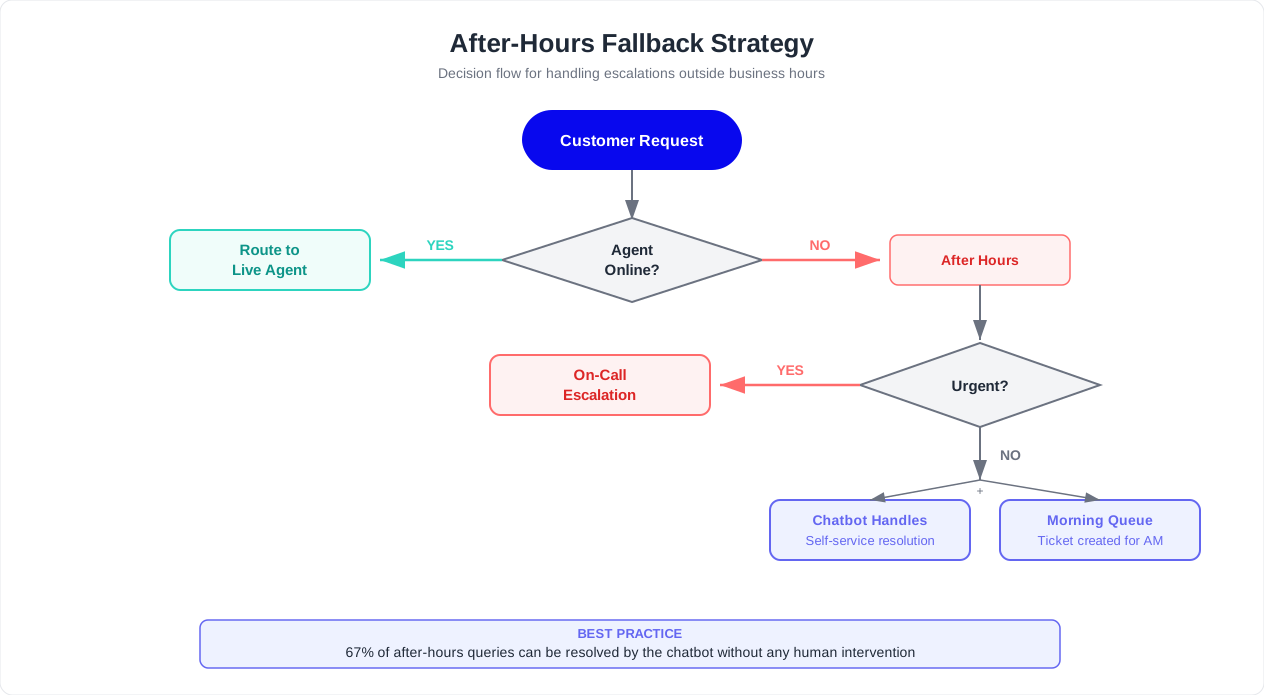
The handoff challenge does not disappear at 5 PM. According to industry data, 51% of customer conversations occur outside business hours. When a customer triggers an escalation and no human agent is available, the chatbot's fallback strategy determines whether the customer feels supported or abandoned.
The worst possible response is a dead end: "Our agents are currently unavailable. Please try again during business hours." This message tells the customer that their problem does not matter outside of a fixed window and offers no path forward. It is the digital equivalent of a locked door with no note.
Fallback Strategy 1: Structured Ticket Creation
The most common and reliable fallback. When no agent is available, the chatbot:
- Acknowledges the unavailability transparently
- Collects any additional information that would help the agent resolve the issue faster
- Creates a support ticket pre-populated with the full conversation context
- Commits to a specific follow-up time ("Our team will respond by 10 AM tomorrow")
- Sends a confirmation to the customer via email or WhatsApp with the ticket number and promised response time
The key differentiator: a specific, committed time, not a vague "as soon as possible." Customers can plan around "by 10 AM tomorrow." They cannot plan around "soon." Track your follow-up compliance rate as a metric -- if your team commits to 10 AM and delivers at 2 PM, you have broken a promise and the trust damage is worse than if you had said "by end of day" in the first place.
Fallback Strategy 2: Scheduled Callback
For customers who prefer a phone conversation or whose issue is complex enough to warrant one:
- The chatbot offers to schedule a callback at a time that works for the customer
- Integrates with the team's calendar to show available slots for the next business day
- Books the callback and sends a calendar invite to both the customer and the assigned agent
- The agent receives the full context package before the callback so they are prepared
Scheduled callbacks convert the frustration of unavailability into a premium experience. The customer gets a dedicated time slot rather than competing with other incoming inquiries. Many customers actually prefer this to an immediate connection because it guarantees undivided attention.
Fallback Strategy 3: Escalation to On-Call Staff
For truly critical issues that cannot wait until the next business day (see the policy-based triggers in Section 2), maintain an on-call rotation:
- The chatbot identifies the issue as critical based on topic, urgency keywords, or customer tier
- Triggers an alert to the on-call agent via SMS, phone call, or PagerDuty webhook
- Keeps the customer engaged in the chat: "I have alerted our on-call team. Someone will join this conversation within 15 minutes."
- If the on-call agent does not acknowledge within 5 minutes, the system alerts the backup contact automatically
Reserve this strategy for genuine emergencies. Over-triggering on-call alerts leads to alert fatigue, which leads to slower response times when real emergencies occur.
Fallback Strategy 4: Self-Service with Context Preservation
Sometimes the bot can partially resolve the issue even without a human. Offer self-service options that address the most common after-hours needs:
- Order tracking: Pull real-time tracking data so the customer does not need to wait for a human
- Password resets: Automated and immediate, no human required
- Appointment rescheduling: Calendar integration handles this autonomously
- FAQ and documentation: Link to relevant help articles and knowledge base entries
- Account information: Display subscription details, billing history, or plan features
After providing self-service options, the bot should still ask: "Did that resolve your issue, or would you like me to arrange a follow-up with our team?" This ensures that customers who need more than self-service are not left hanging.
Continuity When the Customer Returns
If the customer leaves the chat during the after-hours period, they should be able to pick up exactly where they left off when they return -- whether that is later that night, the next morning, or a week later. Persistent conversation history means the customer (or the agent handling the callback) does not start from zero.
Conferbot maintains conversation continuity across sessions by default. If a customer returns to the chat widget and has an open ticket from a previous conversation, the bot greets them with: "Welcome back, [Name]. I see you were chatting with us about [issue]. An agent is scheduled to follow up with you by [committed time]. Would you like to add any details to your request, or is there something else I can help with?"
This continuity is what separates a professional after-hours experience from the "try again later" dead end. For a deeper dive on building complete after-hours flows, see our guide on after-hours customer support chatbot setup.
Monitoring and Improving Your Handoff Rate Over Time
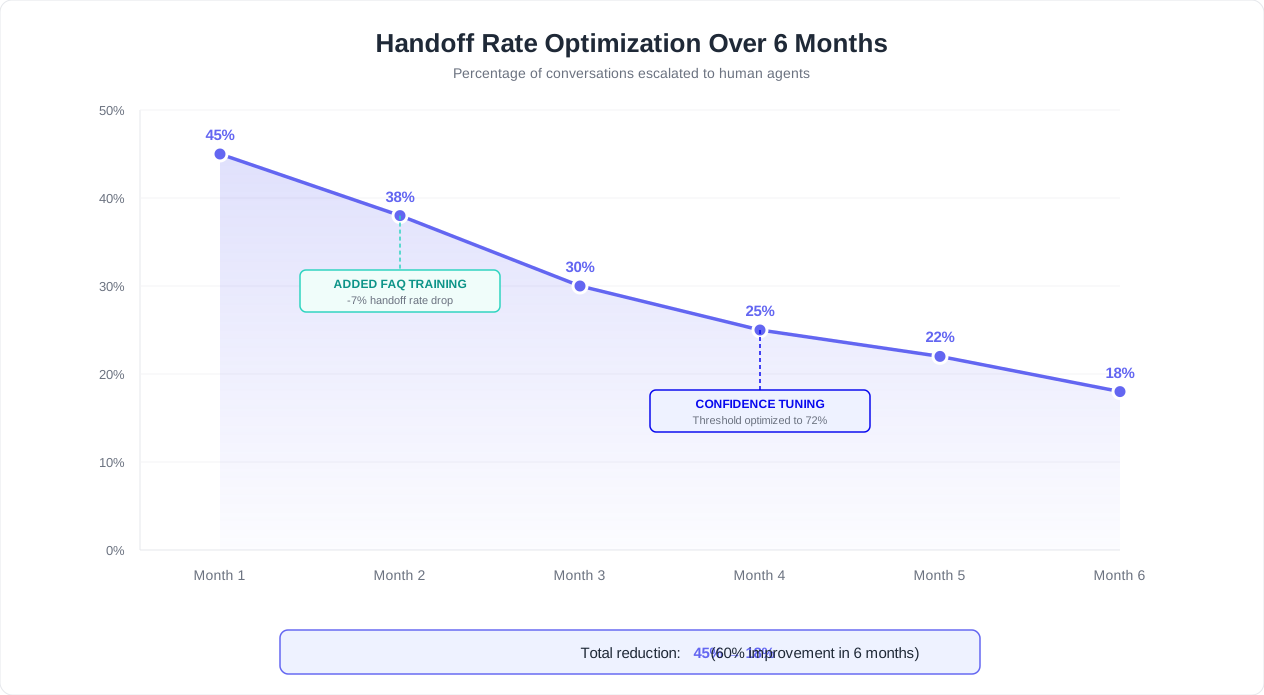
A handoff rate of 15-25% is the industry benchmark for a well-tuned chatbot. Below 10% may mean customers cannot find the escalation option or are being deflected when they need help. Above 30% indicates the bot is undertrained, the confidence thresholds are too strict, or customers do not trust the automated responses. But the number alone does not tell the full story -- you need to track why handoffs happen and systematically reduce the preventable ones while maintaining easy access for legitimate escalations.
The Handoff Quality Dashboard
Build a monitoring view in your Conferbot analytics dashboard that tracks these metrics in real time:
| Metric | Target | Alert Threshold | What It Tells You |
|---|---|---|---|
| Overall handoff rate | 15-25% | Above 30% or below 10% | Whether the bot-to-human balance is healthy |
| Handoff abandonment rate | Below 12% | Above 20% | Customers leaving during the transfer process |
| Context utilization rate | Above 90% | Below 75% | Whether agents are using the provided context |
| Post-handoff CSAT | 4.0+ / 5 | Below 3.5 | Customer satisfaction after the transition |
| Time to agent connection | Under 60 seconds | Above 90 seconds | Queue efficiency and agent availability |
| Post-handoff resolution rate | 85-95% | Below 80% | Whether agents resolve escalated issues successfully |
| Repeat escalation rate | Below 8% | Above 15% | Whether the same customer escalates again for the same issue |
Categorizing Handoff Reasons
Every handoff should be tagged with a reason category. This taxonomy turns raw data into actionable intelligence:
- Knowledge gap (preventable): The bot lacked information to answer. Solution: add the missing content to the knowledge base.
- Phrasing gap (preventable): The customer used language the bot did not recognize. Solution: add these phrasings as training examples.
- Trust gap (partially preventable): The customer did not trust the bot's answer. Solution: add citations, policy links, or confirmation mechanisms.
- Complexity (appropriate): The issue genuinely required human judgment. These handoffs should not be reduced.
- Customer preference (appropriate): The customer simply preferred a human. Respect this preference.
- Policy-triggered (appropriate): Business rules mandated escalation. These are working as intended.
Focus your optimization energy on the first three categories. The last three represent healthy handoff behavior that should be preserved.
The Weekly Optimization Cycle
Dedicate 60-90 minutes per week to handoff optimization using this repeatable process:
- Export escalated conversations: Pull all handoffs from the past 7 days. Sort by reason category.
- Identify top 5 preventable handoff topics: Which knowledge gaps or phrasing gaps caused the most escalations?
- Update the knowledge base: Add missing information, expand training phrases, and create new FAQ entries for the identified gaps.
- Review confidence threshold performance: Are medium-confidence responses leading to unnecessary handoffs? Or are low-confidence responses being delivered instead of escalated? Adjust thresholds by 5% increments based on the data.
- Check agent context utilization: Are agents reading and using the context cards? If not, investigate whether the format needs improvement or agents need training on the workflow.
- Set next week's target: After addressing the top 5 gaps, set a specific target (e.g., reduce handoff rate from 24% to 22%).
A/B Testing Handoff Flows
Run controlled tests on your handoff experience to find what works best for your customers:
- Test different transition messages: Does "Let me connect you with a specialist" perform better than "I will transfer you to our team"? Measure handoff satisfaction for each variant.
- Test proactive vs. reactive escalation: For medium-confidence responses, compare offering escalation proactively ("Would you like me to connect you with a specialist?") versus only escalating when the customer asks. Track resolution rates and CSAT for both approaches.
- Test queue transparency: Compare showing estimated wait times versus not showing them. In most cases, transparency wins, but the optimal update frequency varies by audience.
- Test callback vs. queue: For wait times above 2 minutes, compare offering an immediate callback versus asking the customer to stay in the queue. Track which option produces higher resolution rates.
Long-Term Handoff Rate Trajectory
With consistent weekly optimization, expect this trajectory:
| Timeline | Expected Handoff Rate | Primary Improvement Lever |
|---|---|---|
| Month 1 | 28-35% | Addressing obvious knowledge base gaps |
| Month 2 | 22-28% | Expanding phrasing coverage and refining intent detection |
| Month 3 | 18-24% | Confidence threshold tuning and trust-building mechanisms |
| Month 4-6 | 15-20% | Edge case coverage, advanced sentiment detection, flow optimization |
| Month 6+ | 14-18% (steady state) | Maintenance: new product updates, policy changes, seasonal variations |
The goal is not zero handoffs. A handoff rate of 15-18% with high context quality and fast connection times represents an optimal balance: the bot resolves everything it can, and the humans handle the rest seamlessly. The customers who are transferred feel that the transition was purposeful and well-executed, not a sign of failure.
Track all of these metrics through Conferbot's analytics dashboard, which provides time-series views, reason categorization, and automated alerts out of the box. For teams using the Professional or Enterprise plans, custom handoff quality dashboards can be configured to match your specific SLAs and reporting requirements. For a comprehensive view of which metrics matter most, see our chatbot analytics metrics guide, and for after-hours scenarios where no agents are available, our after-hours customer support chatbot guide covers the full fallback strategy in detail.
Was this article helpful?
Build and deploy in 10 minutes. No coding needed.
Chatbot to Human Handoff FAQ
Everything you need to know about chatbots for chatbot to human handoff.
About the Author
The Conferbot team writes about building, deploying, and improving AI chatbots.
View all articles

