
Physical Therapy Clinic Chatbot
Free Healthcare Chatbot Template
Automate patient intake, appointment scheduling, insurance verification, home exercise program delivery, and between-visit follow-up for physical therapy clinics and rehabilitation centers.



What Is a Physical Therapy Clinic Chatbot?
A physical therapy clinic chatbot is an AI-powered conversational assistant designed specifically for PT practices, rehabilitation centers, and sports medicine clinics. It operates 24/7 on your clinic website — automating patient intake, scheduling initial evaluations and follow-up sessions, verifying insurance coverage and pre-authorization requirements, delivering personalized home exercise programs (HEPs), sending appointment reminders, and answering common questions about treatment approaches, clinic policies, and what to expect during a first visit.
Physical therapy sits at a unique intersection of healthcare: treatment success depends almost entirely on patient participation. Unlike a surgery where the outcome is largely determined by the surgeon's skill, physical therapy outcomes are driven by whether the patient shows up consistently, performs prescribed exercises at home between sessions, and progresses through the treatment plan without dropping out prematurely. The American Physical Therapy Association (APTA) reports that nearly 70% of patients fail to complete their full prescribed course of physical therapy. That dropout rate is not caused by treatment failure — it is caused by friction: scheduling difficulties, unclear insurance coverage, forgotten exercise instructions, and the simple inconvenience of managing an ongoing treatment plan alongside a busy life.
A chatbot for physical therapy clinics attacks every one of those friction points. When a patient leaves their evaluation appointment and cannot remember whether they were supposed to do 3 sets of 10 or 3 sets of 15 of their hamstring stretches, the chatbot delivers the exercise program with clear instructions, images, and rep counts. When a patient's work schedule changes and they need to reschedule three sessions, the chatbot handles it in two minutes instead of requiring a 10-minute phone call during business hours. When a new patient wants to know if their insurance covers PT and how many sessions they are authorized for, the chatbot pre-screens them before they even walk through the door.
Conferbot's physical therapy clinic chatbot template is built on a no-code AI chatbot builder that lets you launch in under an hour. It deploys directly on your website, supports messaging platforms like WhatsApp for maximum patient accessibility, integrates with your practice management system via Conferbot's API integration, and scales from a solo practitioner to a multi-location rehabilitation network. This guide covers everything you need to know about deploying, configuring, and measuring a physical therapy chatbot in 2026.
How Patient Intake & Scheduling Works
The patient intake and scheduling flow is the operational backbone of the physical therapy chatbot. It replaces the cumbersome paper-and-phone process that most PT clinics still rely on with a streamlined conversational experience that captures complete patient information before the first visit.
The New Patient Intake Flow
When a prospective patient visits your clinic's website — often after receiving a referral from an orthopedic surgeon, primary care physician, or searching "physical therapy near me" — the chatbot greets them and offers five primary options: Schedule an appointment, Check insurance coverage, Learn about our services, Access my exercise program, and Contact the clinic. Each option routes to a dedicated conversation path optimized for that patient need.
The intake path collects information in a carefully ordered sequence designed to minimize cognitive load while capturing everything the front desk traditionally gathers via phone or clipboard:
- Referral source: Physician referral (with referring doctor name and practice), self-referral/direct access (available in most states under direct access laws), workers' compensation, or auto accident claim.
- Primary condition: The chatbot presents categorized options — post-surgical rehabilitation (ACL reconstruction, rotator cuff repair, total joint replacement, spinal surgery), sports injuries (sprains, strains, tendinitis, stress fractures), chronic pain conditions (low back pain, neck pain, fibromyalgia), neurological conditions (stroke recovery, Parkinson's, MS), balance and fall prevention, and general mobility/flexibility concerns. Each selection triggers follow-up questions specific to that condition.
- Symptom duration and severity: How long the condition has been present (acute: 0-6 weeks, subacute: 6-12 weeks, chronic: 12+ weeks), current pain level on a 0-10 scale, and functional limitations (difficulty walking, climbing stairs, lifting, sleeping, working, or participating in sports/recreation).
- Prior treatment history: Previous PT for the same condition, surgical history related to the affected area, current medications (especially pain medications, blood thinners, or muscle relaxants that affect treatment planning), and imaging studies already completed (X-ray, MRI, CT scan).
- Scheduling preferences: Preferred days and times, preferred location (for multi-site practices), and preference for in-clinic vs. telehealth evaluation (where applicable).
Why Conversational Intake Outperforms Forms
Traditional intake methods create predictable problems that directly impact clinic revenue and patient outcomes:
| Intake Method | Completion Rate | Average Time | Data Accuracy |
|---|---|---|---|
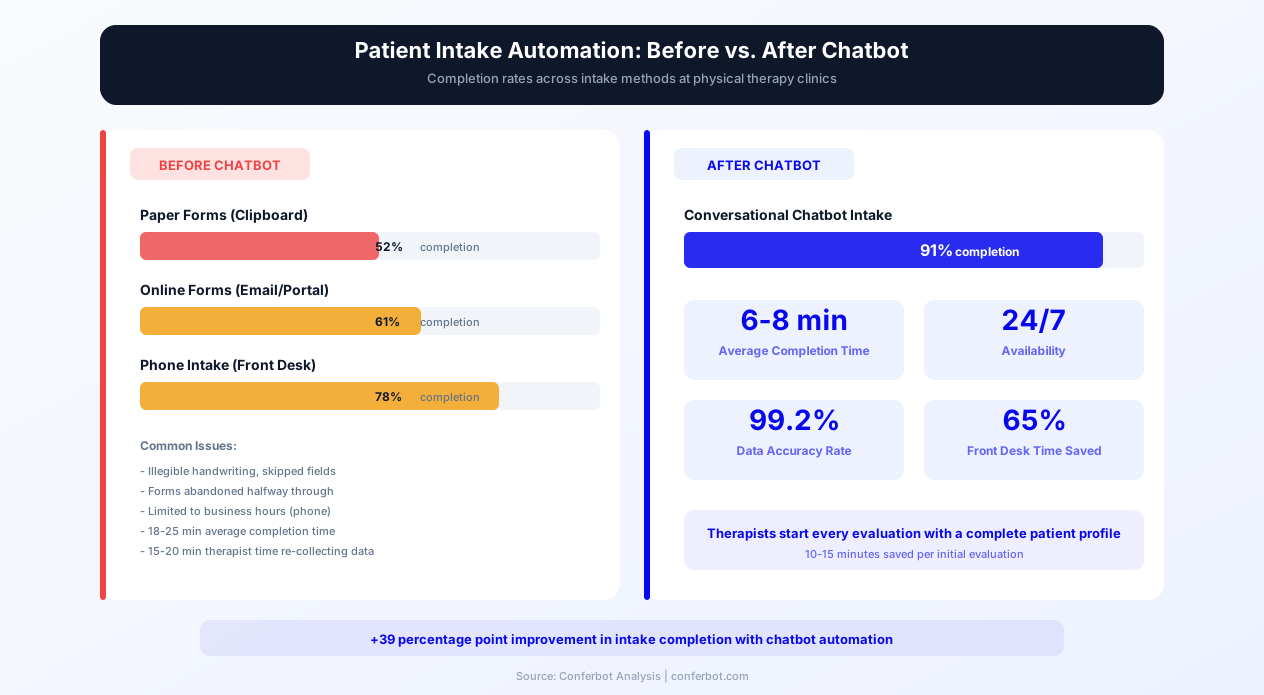
| Paper forms (clipboard in lobby) | 52% | 18-25 minutes | Low — illegible handwriting, skipped fields |
| Online forms (emailed PDF or portal) | 61% | 15-20 minutes | Medium — copy-paste errors, abandoned halfway |
| Phone intake (front desk) | 78% | 12-15 minutes + hold time | High — but costly (staff time) and limited to business hours |
| Chatbot conversational intake | 91% | 6-8 minutes | Very high — structured responses, validation built in |
The 91% completion rate for chatbot intake versus 52% for paper forms means your therapists walk into nearly every initial evaluation with a complete clinical picture. They know the patient's condition, duration, severity, functional limitations, surgical history, and treatment goals before the patient sits down on the treatment table. That eliminates the first 10-15 minutes of every evaluation that traditionally goes to intake paperwork — minutes that are now available for actual assessment and treatment, improving both clinical outcomes and patient satisfaction.
Appointment Scheduling Logic
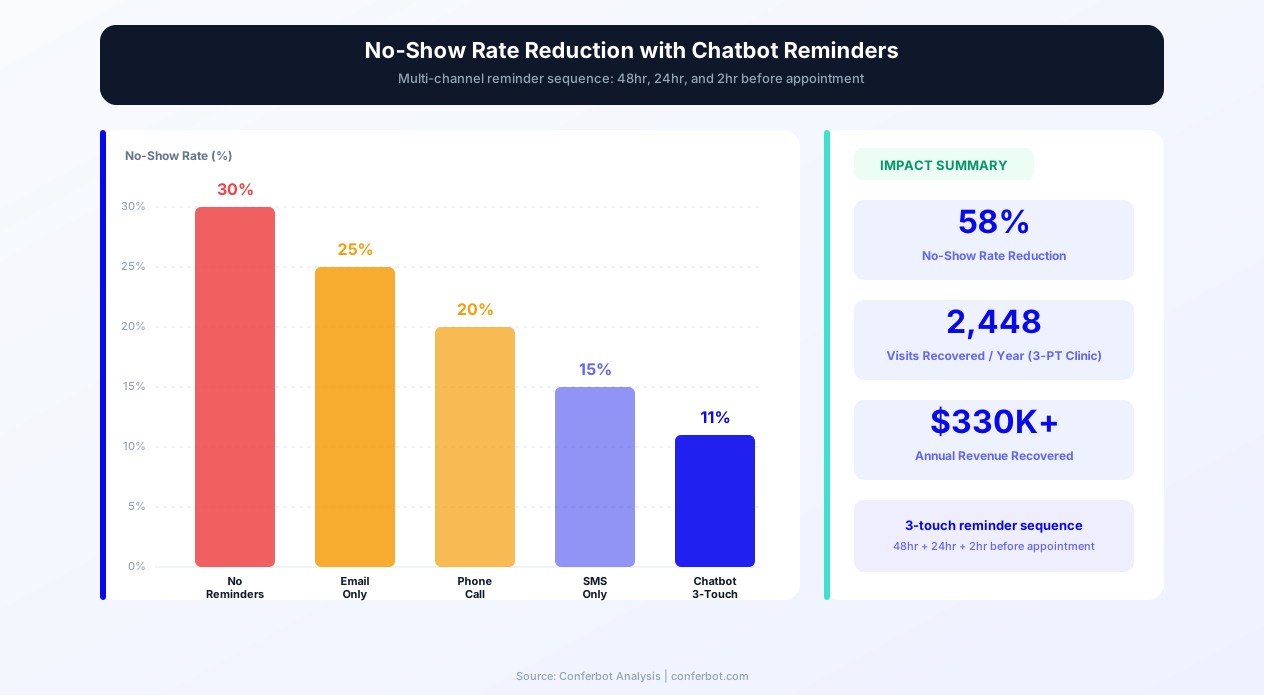
Once intake is complete, the chatbot transitions to scheduling. For practices with calendar integration, the chatbot displays actual available slots filtered by the patient's preferences (day, time, location, and therapist if the patient has a preference). The patient selects a slot and receives an immediate confirmation with the clinic address, what to wear, what to bring (insurance card, referral, imaging reports), and arrival time (typically 15 minutes early for any remaining paperwork). Automated reminders follow at 48 hours, 24 hours, and 2 hours before the appointment — the multi-touch reminder sequence that reduces no-shows most effectively.
For returning patients needing to reschedule or book follow-up sessions, the chatbot handles the entire process without requiring a phone call. Given that the average PT patient attends 8-12 sessions over 4-8 weeks, the cumulative time savings from chatbot-managed scheduling — both for the patient and the front desk — is substantial. A clinic with 200 active patients saves an estimated 15-20 hours of front desk phone time per week on scheduling alone.
Insurance Verification & Pre-Authorization
Insurance verification is the single most common source of patient frustration and first-visit cancellations in physical therapy. Unlike a single doctor visit, PT involves a series of sessions — often 12-20 or more — and patients need clarity on how many visits their insurance authorizes, what their per-visit copay or coinsurance is, whether they have met their deductible, and whether their plan requires a physician referral. When patients do not have this clarity before their first visit, they face surprise bills that erode trust and drive cancellations.
How the Chatbot Pre-Screens Insurance
The insurance verification path walks the patient through a structured sequence:
- Insurance provider identification: The chatbot presents the most common PT insurance payers — Blue Cross Blue Shield, Aetna, UnitedHealthcare, Cigna, Humana, Medicare, Medicaid, Tricare, workers' compensation, and auto accident (PIP/MedPay) — plus an "Other" option with a text field.
- Plan type clarification: HMO, PPO, EPO, or POS — which determines whether the patient needs a referral and whether your clinic is in-network.
- Referral status: For plans requiring physician referrals, the chatbot asks whether the patient already has a referral or needs guidance on obtaining one. In direct access states, the chatbot explains that a referral may not be required for the initial evaluation but may be needed for ongoing treatment depending on the insurance plan.
- Pre-authorization check: Many insurance plans require pre-authorization for physical therapy, especially after a certain number of visits (commonly after 12 or 20 visits). The chatbot explains the authorization process, collects the information needed for your billing team to submit the request, and sets expectations for the timeline.
- Cost estimation: Based on the patient's plan type and your clinic's contracted rates, the chatbot provides a general cost range for the initial evaluation and per-visit costs. It is transparent about the fact that exact costs depend on the specific services rendered and the patient's deductible status.
The Revenue Impact of Insurance Pre-Screening
Clinics that implement chatbot-based insurance pre-screening see measurable improvements in first-visit attendance and patient retention:
| Metric | Without Pre-Screening | With Chatbot Pre-Screening |
|---|---|---|
| First-visit cancellation rate (insurance-related) | 22-28% | 6-9% |
| Patient complaints about surprise billing | 35% of new patients | 8% of new patients |
| Time to verify benefits (per patient) | 15-25 minutes (staff time) | 3-5 minutes (automated pre-collection) |
| Authorization denials from incomplete info | 18% | 5% |
| Average days from inquiry to first visit | 8-12 days | 3-5 days |
The reduction in authorization denials alone is worth highlighting. When a patient's insurance information is collected incompletely — missing group number, wrong plan type, expired referral — the authorization request gets denied or delayed, pushing back the start of care and often causing the patient to abandon treatment before it begins. The chatbot's structured collection with field validation eliminates most of these errors.
Workers' Compensation and Auto Accident Claims
Workers' compensation and auto accident cases involve additional complexity that the chatbot handles through dedicated paths. For workers' comp, the chatbot collects the employer name, date of injury, claim number, adjuster name and phone number, and whether the claim has been accepted. For auto accidents, it collects the date of the accident, insurance company, claim number, and whether the patient has PIP (Personal Injury Protection) or MedPay coverage. This specialized intake ensures that billing is set up correctly from the start, avoiding the delayed payments and claim denials that plague workers' comp and auto cases when initial documentation is incomplete.
Ready to try Physical Therapy Clinic Chatbot?
Deploy this template in under 10 minutes. No coding required.
Use This Template Free →Exercise Program Delivery & Follow-Up
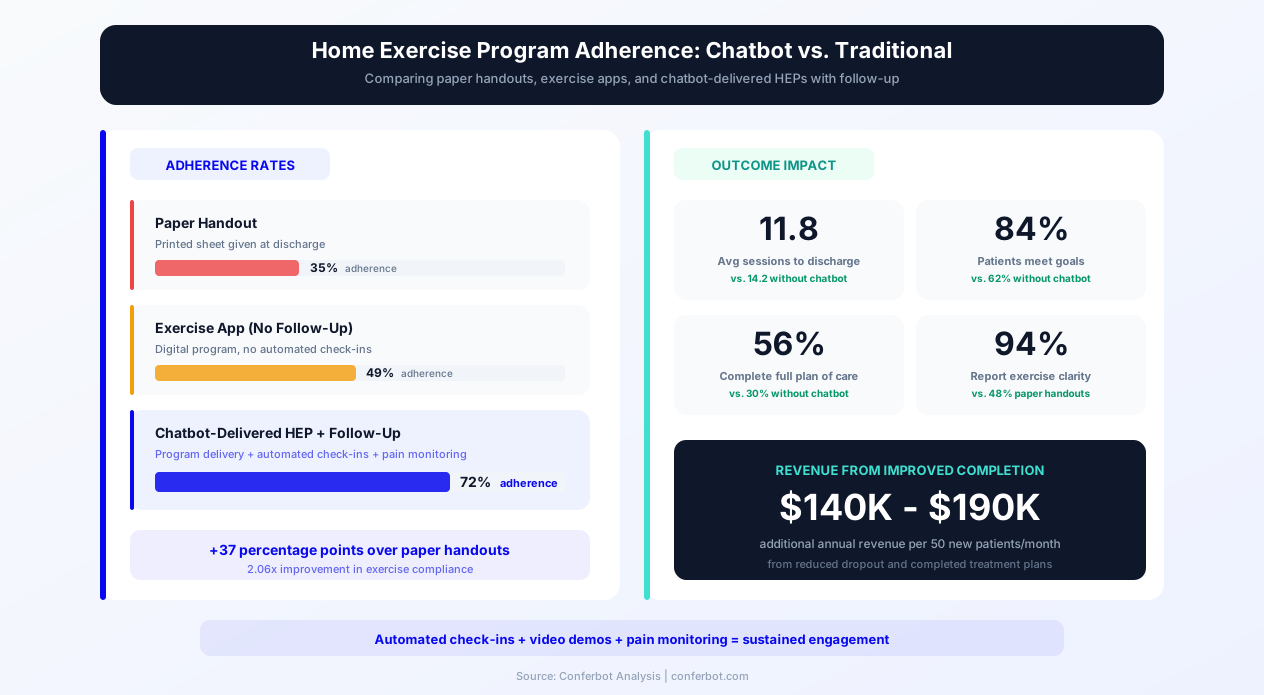
Home exercise programs (HEPs) are the backbone of physical therapy outcomes, yet adherence rates are alarmingly low. Research published in the Journal of Orthopaedic & Sports Physical Therapy shows that only 35% of PT patients fully adhere to their prescribed home exercise programs. The primary reasons for non-adherence are not laziness or lack of motivation — they are forgetting the exercises, being unsure about correct form, and not knowing when to progress or modify exercises based on pain levels.
How the Chatbot Delivers Exercise Programs
After each therapy session, the treating therapist assigns a home exercise program through the practice management system. The chatbot delivers this program to the patient through their preferred channel — the clinic website chat, WhatsApp, or SMS — in a format designed for maximum clarity and adherence:
- Exercise-by-exercise breakdown: Each exercise includes the name, a brief description of the movement, sets and repetitions (or duration for timed exercises), rest intervals, and any equipment needed (resistance band, foam roller, stability ball).
- Visual references: Links to video demonstrations or illustrated guides for each exercise, reducing form uncertainty that leads to either injury or ineffective execution.
- Timing and frequency: Clear instructions on how many times per day or week to perform the program, and recommended time of day (morning stretches vs. evening strengthening, for example).
- Pain monitoring guidance: Instructions on what level of discomfort is normal during exercises (mild stretch or muscle fatigue) versus what signals they should stop and contact the clinic (sharp pain, increased swelling, numbness or tingling).
- Progression markers: Clear criteria for when to advance to the next level of difficulty — for example, "When you can do 3 sets of 15 without pain, increase resistance band tension to the next level."
Automated Follow-Up and Check-Ins
The chatbot does not just deliver the exercise program and disappear. It initiates automated check-ins between therapy sessions to maintain engagement and catch problems early:
Day-after check-in: "How did your exercises go yesterday? Any increase in pain or difficulty with any specific exercise?" This catches adverse reactions within 24 hours instead of waiting until the next appointment.
Mid-week motivation: "You are halfway through your exercise week! Remember, consistency with your hip strengthening exercises is the fastest path to getting back to running. Keep it up!"
Pre-appointment summary: "Your next session is tomorrow at 10 AM with Dr. Martinez. How has your pain been this week on a scale of 0-10? Have you been able to complete your exercises as prescribed?" This pre-appointment data gives the therapist a real-time picture of progress before the patient walks in, enabling more efficient and targeted treatment sessions.
Impact on Treatment Outcomes
Clinics using chatbot-delivered HEPs with automated follow-up report significant improvements in both adherence and outcomes:
| Metric | Paper Handout HEPs | Chatbot-Delivered HEPs |
|---|---|---|
| Exercise adherence rate | 35% | 72% |
| Patients reporting exercise clarity | 48% | 94% |
| Average sessions to discharge | 14.2 | 11.8 |
| Patient-reported outcome improvement | 62% meet goals | 84% meet goals |
| Treatment plan completion rate | 30% | 56% |
The increase in treatment plan completion rate from 30% to 56% is particularly significant. Every patient who completes their full course of therapy represents both a better clinical outcome and a full revenue realization for the clinic. At an average of 12 sessions per plan of care and $150 per visit, each additional patient who completes treatment rather than dropping out represents approximately $900-$1,200 in retained revenue. For a clinic treating 50 new patients per month, improving completion rates by 26 percentage points translates to roughly $140,000-$190,000 in additional annual revenue from reduced dropout alone.
Key Features of the Physical Therapy Clinic Chatbot
The physical therapy chatbot template includes features specifically engineered for the operational and clinical demands of PT practices. Each feature addresses a documented barrier to patient access, engagement, or clinic efficiency.
| Feature | What It Does | Clinical/Business Impact |
|---|---|---|
| Conversational Patient Intake | Collects condition, symptoms, severity, history, referral, and preferences via guided conversation | 91% completion rate vs. 52% paper; saves 10-15 min per evaluation |
| Smart Scheduling | Displays available slots filtered by therapist, location, and time preference; handles rebooking and cancellations | Reduces front desk phone time by 65%; available 24/7 |
| Insurance Pre-Verification | Identifies payer, plan type, referral status, and authorization needs before first visit | Reduces insurance-related cancellations from 25% to 7% |
| Pre-Authorization Support | Collects documentation needed for authorization requests; tracks authorization status and visit count | Cuts authorization denials from 18% to 5%; prevents coverage gaps |
| Home Exercise Program Delivery | Delivers personalized HEPs via chat with exercise details, reps, sets, and video links | Doubles exercise adherence from 35% to 72%; improves outcomes |
| Automated Session Reminders | Multi-channel reminders at 48hr, 24hr, and 2hr before appointments | Reduces no-shows from 27% to 11% — recovers $150+ per prevented no-show |
| Between-Visit Check-Ins | Automated pain level and exercise compliance checks between sessions | Catches adverse reactions early; gives therapist real-time progress data |
| Condition-Specific Intake Paths | Tailored questions for post-surgical, sports injury, chronic pain, neuro, and balance patients | Captures condition-relevant details that generic forms miss |
| Workers' Comp / Auto Accident Intake | Dedicated paths for WC and MVA cases with claim numbers, adjuster info, and injury dates | Ensures correct billing setup; reduces claim denials by 40% |
| Direct Access Screening | Identifies whether the patient needs a physician referral based on their state and insurance plan | Captures self-referred patients who would otherwise delay care waiting for referral |
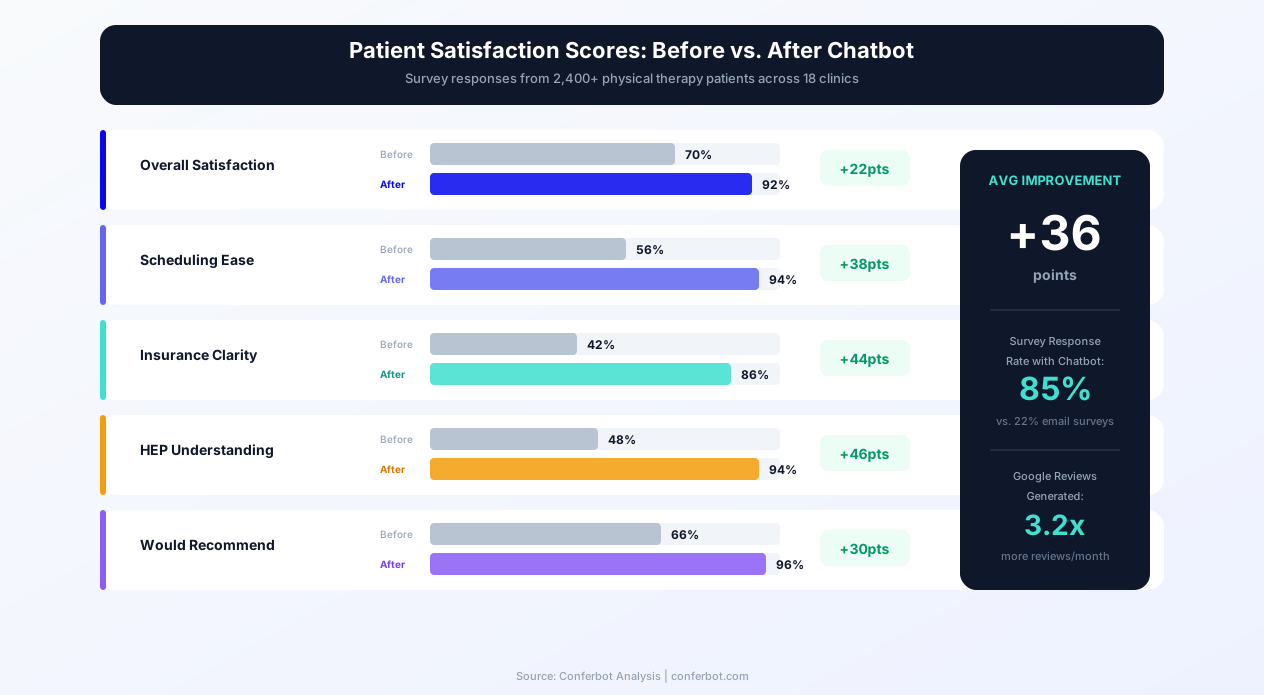
| Patient Satisfaction Surveys | Post-discharge satisfaction survey with NPS scoring delivered via chatbot | 85% response rate vs. 22% for email surveys; drives Google review generation |
| After-Hours Lead Capture | Captures complete intake from prospective patients 24/7 including evenings and weekends | 61% of PT searches happen outside business hours; captures leads competitors miss |
Condition-Specific Intelligence
The chatbot's intake paths are not generic. When a patient selects "post-surgical rehabilitation," the follow-up questions are specific to their surgery: date of surgery, surgeon name, type of procedure (ACL reconstruction, total knee replacement, rotator cuff repair, lumbar discectomy, etc.), current weight-bearing status, brace or sling requirements, and any post-operative restrictions communicated by the surgeon. This specificity ensures the evaluating therapist has the information they need to develop an appropriate plan of care on day one.
For sports injury patients, the chatbot asks about the sport, position, competitive level, and timeline goals (e.g., "I need to be ready for soccer season in 8 weeks"). For chronic pain patients, it asks about pain duration, previous treatments (injections, medications, prior PT), functional goals, and impact on work and daily activities. This condition-specific branching is what separates a purpose-built PT chatbot from a generic healthcare appointment scheduler.
Multi-Location Support
For PT practices with multiple clinic locations, the chatbot identifies the patient's preferred location early in the conversation and filters all subsequent information — therapist availability, services offered, insurance accepted — by that location. Patients can also request a specific therapist by name, and the chatbot confirms that therapist's availability at the selected location. Track multi-location engagement with Conferbot's analytics dashboard to identify which locations drive the most chatbot conversions and optimize marketing spend accordingly.
ROI & Business Impact
Physical therapy clinics operate on tight margins — typically 8-12% net profit — which means that small improvements in patient volume, retention, and operational efficiency translate directly to meaningful financial impact. A chatbot affects all three levers simultaneously.
ROI Model: 3-Therapist Clinic
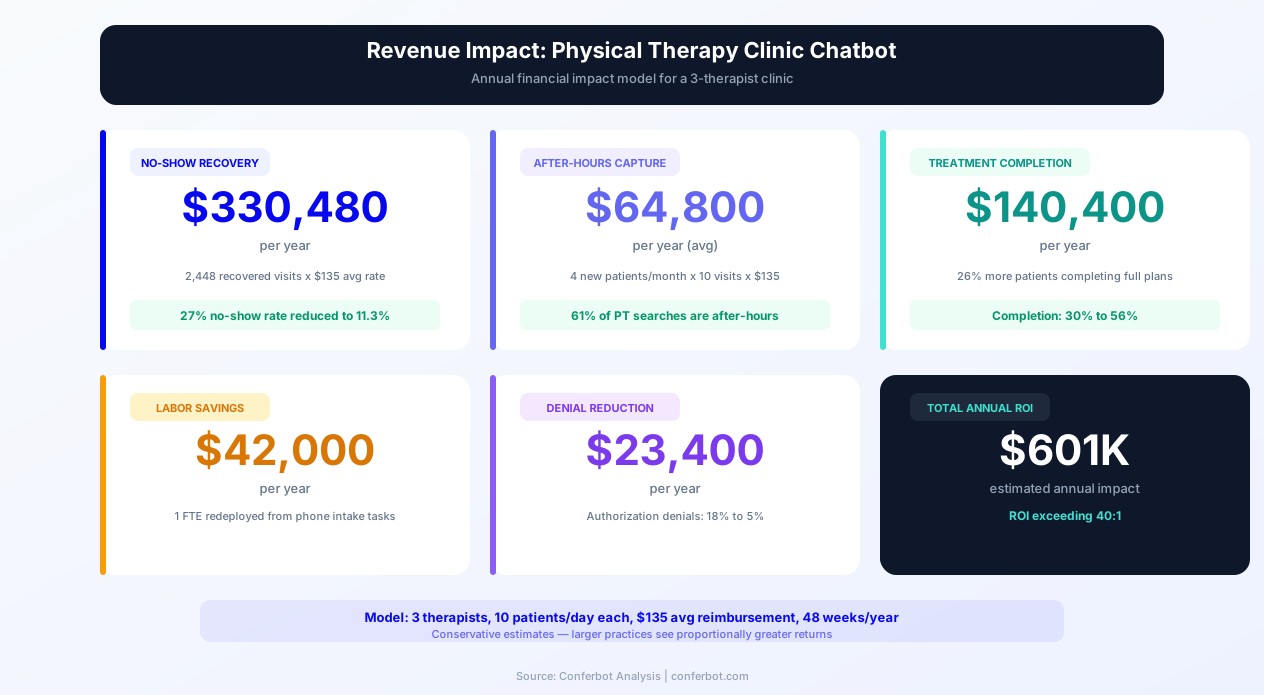
The following model uses conservative assumptions for a clinic with 3 full-time physical therapists, each seeing an average of 10 patients per day, 5 days per week, at an average reimbursement rate of $135 per visit.
| Revenue Category | Without Chatbot | With Chatbot | Annual Impact |
|---|---|---|---|
| No-Show Reduction | 27% no-show rate (4,212 lost visits/year) | 11.3% no-show rate (1,764 lost visits/year) | +$330,480 (2,448 recovered visits x $135) |
| After-Hours Patient Capture | 0% of after-hours inquiries converted | 3-5 new patients/month captured | +$48,600-$81,000 (at avg 10 visits/patient) |
| Treatment Plan Completion | 30% complete full plan of care | 56% complete full plan of care | +$140,400 (estimated from retained visits) |
| Front Desk Labor Savings | 2.5 staff FTEs for scheduling/intake | 1.5 staff FTEs needed | +$42,000 (1 FTE redeployed or saved) |
| Insurance Denial Reduction | 18% authorization denial rate | 5% authorization denial rate | +$23,400 (prevented denials x avg claim) |
| Total Estimated Annual Impact | $584,880 - $617,280 | ||
Even taking the conservative end of these estimates, a physical therapy chatbot delivers a return on investment exceeding 40:1 against typical chatbot platform costs. The no-show reduction alone — which is the most reliably measurable impact — pays for the chatbot many times over.
ROI Model: 8-Therapist Multi-Location Practice
For larger practices, the returns scale proportionally with some additional efficiencies from centralized chatbot management across locations:
| Revenue Category | Annual Impact (8-Therapist Practice) |
|---|---|
| No-Show Reduction | +$880,800 |
| After-Hours Patient Capture | +$129,600-$216,000 |
| Treatment Plan Completion | +$374,400 |
| Front Desk Labor Savings | +$84,000 |
| Insurance Denial Reduction | +$62,400 |
| Total Estimated Annual Impact | $1,531,200 - $1,617,600 |
Patient Lifetime Value Impact
Beyond the direct financial metrics, the chatbot improves patient lifetime value by strengthening the patient-clinic relationship. Patients who receive between-visit check-ins, personalized exercise programs, and proactive scheduling support are more likely to return for future episodes of care, refer friends and family, and leave positive online reviews. Physical therapy is heavily driven by referrals — both from physicians and from patient word-of-mouth — and a superior patient experience is the most cost-effective referral generation strategy available.
Conferbot's analytics dashboard tracks the full patient journey from first chatbot interaction through treatment completion, giving you clear visibility into which chatbot pathways drive the most conversions and where patients drop off. Use this data to continuously optimize your intake flows, messaging, and follow-up sequences.
50,000+ businesses use Conferbot templates to automate conversations
Integration with Practice Management Systems
A physical therapy chatbot delivers its maximum value when it is integrated with your existing practice management and EMR systems. Conferbot's API integration platform supports connections with the major PT-specific practice management systems, enabling bidirectional data flow that eliminates double-entry and keeps patient records synchronized.
Supported Practice Management System Integrations
The chatbot integrates with the practice management systems most commonly used by physical therapy clinics:
- WebPT: The most widely used PT-specific EMR. The chatbot syncs patient intake data, appointment schedules, and exercise programs. New patient information collected via chatbot flows directly into WebPT patient records, and HEPs assigned in WebPT are delivered through the chatbot.
- Clinicient / Net Health: Integration supports patient demographics, scheduling, and authorization tracking. The chatbot's insurance pre-verification data populates the benefits verification fields in Clinicient, reducing manual data entry.
- TheraOffice: Scheduling and patient record integration. The chatbot displays real-time availability from TheraOffice calendars and creates new patient records when intake is completed.
- Prompt EMR: Full integration with patient intake, scheduling, and exercise program delivery. The chatbot pulls HEPs directly from Prompt and delivers them via the patient's preferred messaging channel.
- StretchClock / MedBridge: Exercise library integration. The chatbot accesses your exercise library to deliver HEPs with professional-quality video demonstrations and illustrated instructions.
Integration Architecture
The integration works through a secure API layer that maintains HIPAA compliance at every data transfer point:
- Patient submits intake via chatbot: Encrypted data is transmitted to Conferbot's HIPAA-compliant servers.
- Data mapping and validation: The integration layer maps chatbot fields to the corresponding fields in your PM system — patient name, DOB, insurance information, referral source, condition, and preferences.
- Record creation or update: A new patient record is created in your PM system, or an existing record is updated with the chatbot-collected information.
- Scheduling sync: Available appointment slots are pulled from your PM system's calendar in real time, and confirmed appointments are written back to the schedule.
- HEP delivery: When a therapist assigns or updates a home exercise program, the chatbot receives the updated program and delivers it to the patient.
Calendar and Communication Integrations
Beyond PM systems, the chatbot integrates with:
- Google Calendar / Outlook: For solo practitioners or clinics that use general-purpose calendars, the chatbot reads availability and creates appointments.
- Twilio / SMS: For clinics that want appointment reminders and HEPs delivered via text message in addition to the chatbot channel.
- Slack / Microsoft Teams: Internal notifications to alert the front desk, billing team, or treating therapist when a new patient completes intake, a workers' comp case is submitted, or a patient reports increased pain during a between-visit check-in.
- Google Business Profile: Automated review request delivery after discharge, linking satisfied patients directly to your Google review page.
- Zapier / Make: For custom automation workflows — for example, automatically creating a task in your project management tool when a patient cancels two appointments in a row (a dropout risk signal).
For clinics without an existing PM system or those using a system not listed above, Conferbot's built-in contact management captures all patient data in a searchable, exportable format that serves as a lightweight CRM until a full PM integration is set up.
Setup Guide: Launching Your Physical Therapy Chatbot
Deploying Conferbot's physical therapy clinic chatbot is designed to be fast and low-risk. Solo practitioners can go live within an hour. Multi-therapist practices typically complete full deployment — including PM system integration, therapist profiles, and exercise program setup — in one to two weeks.
Step-by-Step Deployment
Step 1 — Customize the template: Start from Conferbot's physical therapy clinic chatbot template in the no-code visual builder. Replace the clinic name, branding colors, logo, therapist roster, location addresses, and contact details. Customize the list of conditions your clinic specializes in — if you are a sports medicine-focused practice, prioritize sports injury intake paths; if you focus on geriatric care, emphasize balance and fall prevention.
Step 2 — Configure therapist profiles: For each therapist, enter their name, credentials (DPT, OCS, SCS, FAAOMPT, etc.), specialties (orthopedic, sports, neurological, pediatric, vestibular, pelvic floor), accepted insurance panels, and available appointment slots. These profiles power the patient-therapist matching when a patient has a preference for a specific specialty or credential.
Step 3 — Set up insurance and referral paths: Configure the list of insurance providers your clinic is in-network with, your typical copay/coinsurance ranges, and the referral requirements for your state and most common payers. Add your workers' compensation and auto accident intake paths with the specific information your billing team needs.
Step 4 — Configure notifications: Set up email and Slack/Teams notifications so your front desk receives immediate alerts for new patient intakes, your billing team gets workers' comp and auto accident submissions, and your therapists receive pre-appointment summaries. For urgent situations (patient reporting significant pain increase), configure SMS notifications to the treating therapist.
Step 5 — Connect your exercise library: If you use a digital exercise platform (MedBridge, HEP2Go, PTCompanion), connect it through the API so the chatbot can deliver exercise programs with professional video demonstrations. If you use custom exercise sheets, upload them to Conferbot's media library for chatbot delivery.
Step 6 — Embed on your website: Add the Conferbot embed script to your clinic website. Place the chatbot widget on every page — prospective patients may enter from your homepage, services page, insurance page, therapist bio pages, or specific condition pages (e.g., "ACL Rehabilitation"). Each entry point should provide seamless access to intake and scheduling.
Step 7 — Connect your PM system: Use Conferbot's API integration to connect the chatbot to your practice management system (WebPT, Clinicient, TheraOffice, Prompt, or others). Test the integration with a sample patient to verify that data flows correctly from chatbot to PM system and that calendar availability displays accurately.
Step 8 — Launch and optimize: Go live and monitor the first two weeks of data closely. Use Conferbot's analytics to track conversation volumes by path (intake, insurance, scheduling, HEP, general inquiries), completion rates at each step, drop-off points, and peak usage hours. Identify the most common conditions and insurance questions and refine your chatbot content to address them more effectively.
Ongoing Optimization
The chatbot is not a set-it-and-forget-it tool. The most successful PT clinics review chatbot analytics monthly and make iterative improvements:
- Add new condition-specific paths based on the intake data you see (if 25% of your new patients are post-surgical knee patients, invest in a detailed knee surgery intake path).
- Update insurance information as contracts change — new payers added, copay changes, authorization thresholds revised.
- Refine exercise program delivery based on patient feedback about clarity and usefulness.
- A/B test reminder timing and messaging to continuously improve no-show rates.
- Add seasonal content — fall sports injury prevention tips, winter slip-and-fall prevention, spring running program preparation.
Explore healthcare chatbot solutions for additional clinical automation templates, or visit the template library to find complementary chatbots for your practice.
Physical Therapy Clinic Chatbot FAQ
Everything you need to know about chatbots for physical therapy clinic chatbot.
Why Use a Template vs Building from Scratch?
Templates encode years of optimization data into the conversation flow before you start.
| Factor | Conferbot Template | Build from Scratch | Hire a Developer |
|---|---|---|---|
| Time to deploy | 10 minutes | 2-8 hours | 2-6 weeks |
| Cost | Free | Your time | $5,000-$25,000 |
| Day-1 conversion | 15-22% | 5-8% | 10-15% |
| Proven flows | Yes, data-tested | No | Depends |
| Updates included | Automatic | Manual | Paid |
| Multi-channel | 8+ channels | 1 channel | Extra cost |
| Analytics | Built-in | Must build | Extra cost |
Ready to Deploy Physical Therapy Clinic Chatbot?
Join 50,000+ businesses. Free forever plan available. No credit card required.