
After Hours Answering Chatbot
24/7 after-hours bot with message taking, urgency routing, and emergency escalation
0uses
0likes

Get free, ready-to-use support and faq chatbot templates that help boost conversions and automate customer interactions. Start building in 2 minutes with no coding required.
Browse templates, learn about the category, or find answers to common questions
Choose from our collection of proven support and faq chatbot templates
24/7 after-hours bot with message taking, urgency routing, and emergency escalation

A complete exhibitor engagement and lead capture bot chatbot template - deploy in minutes to automate conversations, capture leads, and provide 24/7 assistance.
An AI feedback chatbot that collects customer reviews, NPS scores, and detailed feedback through engaging conversations. Analyzes sentiment, categorizes feedback themes, and generates actionable insights. Achieves 3x higher response rates than email surveys. Perfect for businesses looking to improve products and customer experience.

Compassionate memorial planning assistant for funeral homes

Package tracking, delivery management, and shipping quotes
An AI multilingual support chatbot that auto-detects customer language and provides seamless support in 50+ languages. Handles inquiries, routes complex issues to language-matched agents, and maintains brand voice across all languages. Perfect for global businesses, e-commerce platforms, and SaaS companies serving international markets.

A no-code online consumer complaint bot that guides visitors through a conversation and captures what you need.

A complete product recall information bot chatbot template - deploy in minutes to automate conversations, capture leads, and provide 24/7 assistance.

An AI returns chatbot that handles the entire return and exchange process -- eligibility checks, return label generation, refund tracking, and exchange processing. Reduces return-related support tickets by 70% while improving customer satisfaction. Perfect for e-commerce, retail, and DTC brands.
An AI social media support chatbot that handles customer inquiries via DMs on Instagram, Facebook, Twitter, and WhatsApp. Detects sentiment, responds with your brand voice, and escalates negative experiences to human agents. Perfect for brands managing high-volume social media customer interactions.

An AI technical support triage chatbot that classifies incoming issues by type and severity, searches your knowledge base for solutions, and routes unresolved cases to the right team. Deflects 50% of support tickets automatically while ensuring high-severity issues reach engineers without delay. Perfect for SaaS companies, IT helpdesks, and tech product support teams.

Complete Telegram business bot with services, support, and booking

A complete virtual conference scheduler bot chatbot template - deploy in minutes to automate conversations, capture leads, and provide 24/7 assistance.

Multi-purpose WhatsApp business bot with ordering, support, and bookings

Explore how the Exhibitor Engagement and Lead Capture Bot transforms lead management with 24/7 availability and AI intelligence, driving more conversions and better customer service.

Discover how the Feedback Collection and Analysis Bot by Conferbot transforms customer feedback into actionable insights, enhancing response times and boosting satisfaction.

Discover the power of the Virtual Conference Scheduler Bot by Conferbot, designed to transform how businesses manage their virtual events with 24/7 automated scheduling and intelligent lead capture.

Keep your customers informed and safe with Conferbot’s Product Recall Information Bot! Effortlessly notify users of product recalls, safety alerts, and important updates in real-time, ensuring customer safety and brand trust.
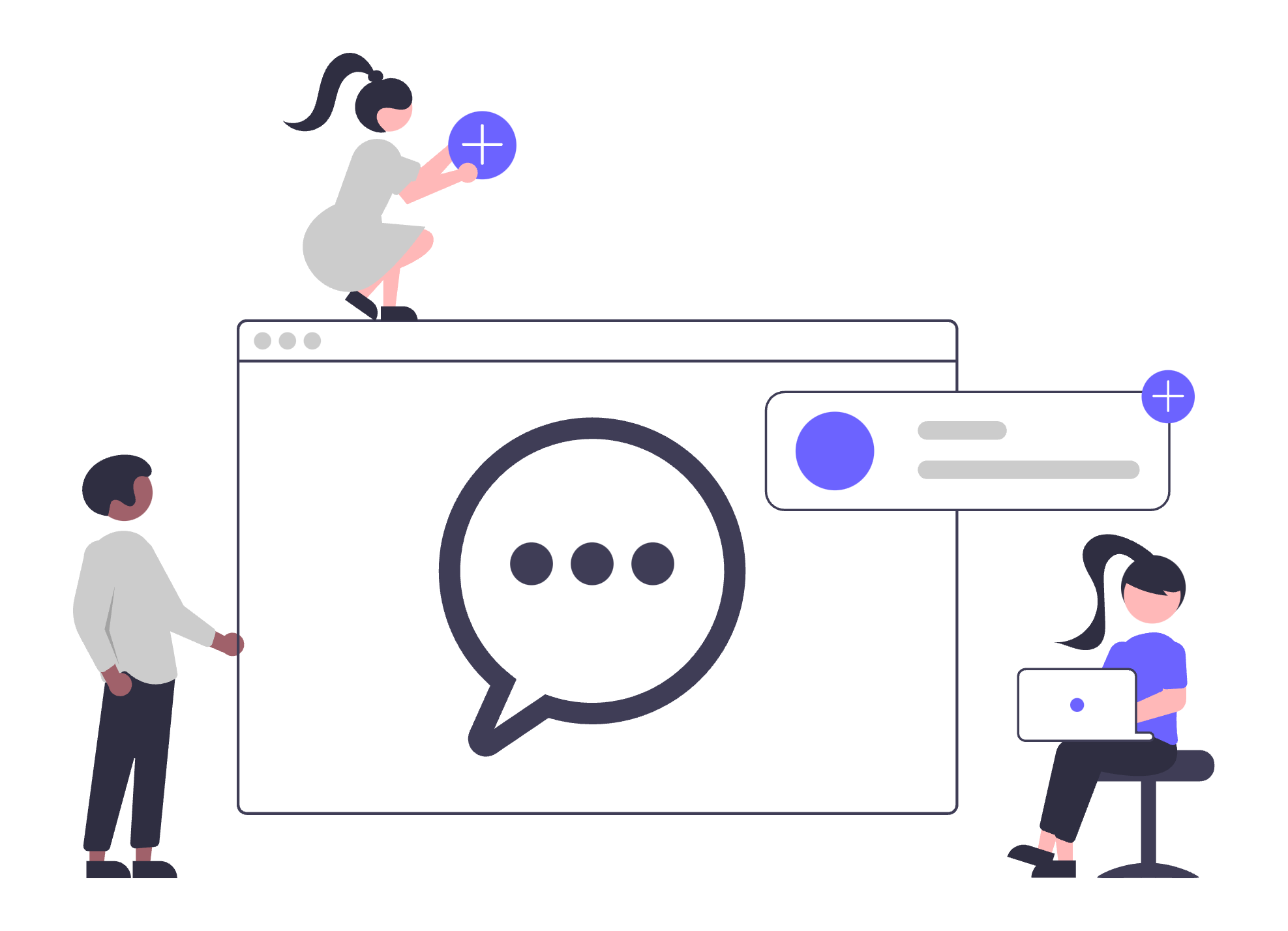
Seamlessly bridge the gap between automated and human support with Conferbot’s Chatbot-Human Handoff System! Provide a smooth transition from chatbot to live agents for complex queries, ensuring exceptional customer service.
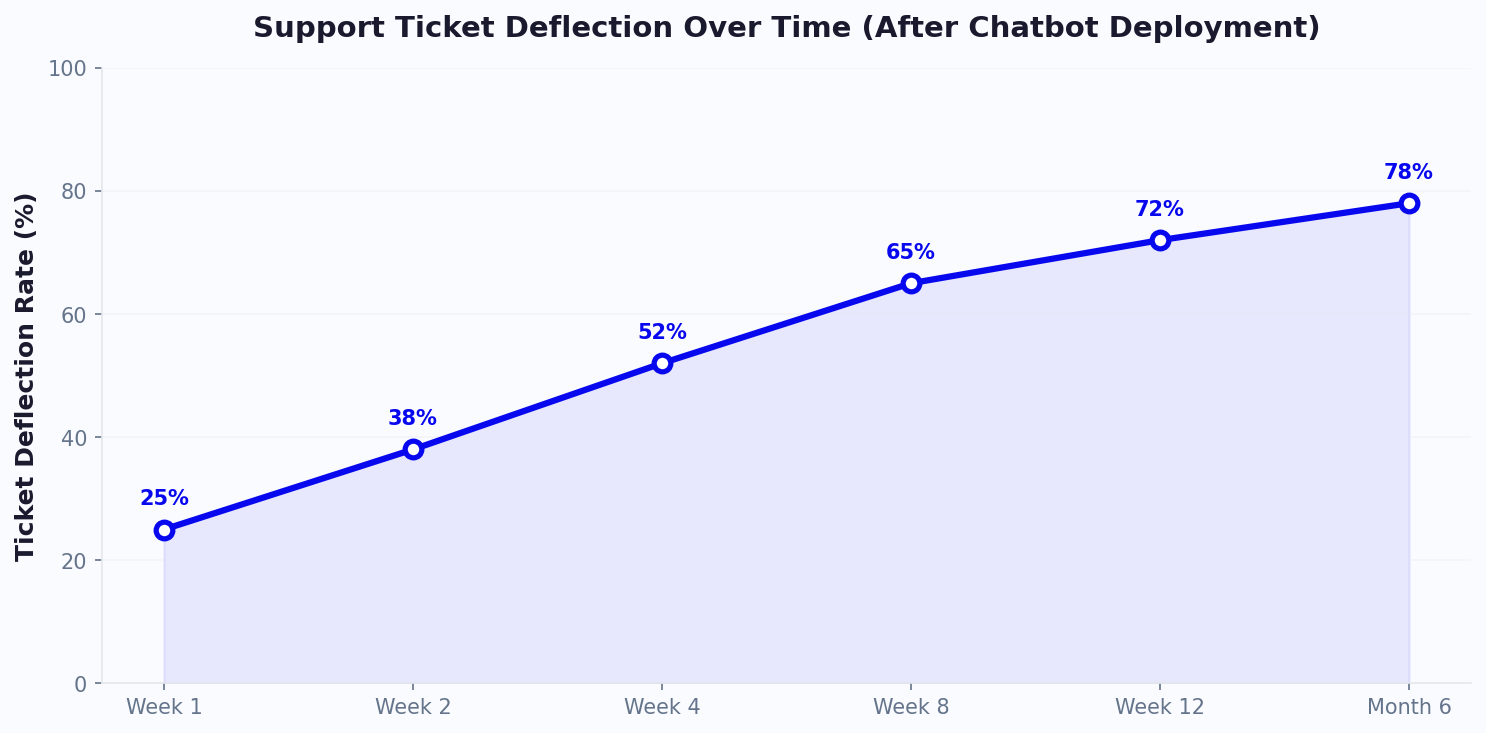
Every support team has a handful of questions that consume a disproportionate share of their time. "What are your hours?" "How do I reset my password?" "What's your return policy?" "Do you offer free shipping?" These frequently asked questions are perfectly suited for chatbot automation -- and the deflection rates are remarkable. Well-configured FAQ chatbots deflect 60% to 85% of repetitive inquiries, freeing agents for complex issues that genuinely require human expertise. For organizations processing thousands of tickets monthly, this translates to hundreds of hours of agent time reclaimed and tens of thousands of dollars in operational savings.
The economics are straightforward: if your support team handles 5,000 tickets per month at an average cost of $8 per ticket, that is $40,000 monthly in support costs. A customer support chatbot deflecting 65% of those tickets reduces human-handled volume to 1,750 tickets, saving $26,000 per month -- $312,000 annually. The chatbot itself costs a fraction of that, delivering ROI within the first month of deployment. These numbers explain why helpdesk automation adoption has accelerated across every industry, from SaaS startups to Fortune 500 enterprises.
📊 Performance Insight
AI chatbots can resolve up to 80% of routine customer queries without human intervention, letting support teams focus on complex issues that genuinely require expertise. Organizations deploying FAQ chatbots see average cost-per-resolution drop from $8-12 to under $1.
Not all question types deflect equally. Password resets and order tracking queries have near-perfect automation rates because they follow predictable patterns. Technical troubleshooting deflects at lower rates because symptoms vary and diagnostic paths branch unpredictably. Understanding these category-level differences helps you prioritize which FAQs to automate first for maximum impact.
| FAQ Category | % of Total Volume | Bot Deflection Rate | Tickets Eliminated/Month (5,000 baseline) | Monthly Savings ($8/ticket) |
|---|---|---|---|---|
| Account / password issues | 22% | 90% | 990 | $7,920 |
| Order status / tracking | 18% | 95% | 855 | $6,840 |
| Pricing / plan questions | 15% | 85% | 638 | $5,100 |
| Return / refund policy | 12% | 80% | 480 | $3,840 |
| Product features / compatibility | 10% | 75% | 375 | $3,000 |
| Shipping / delivery info | 8% | 92% | 368 | $2,944 |
| Technical troubleshooting | 15% | 55% | 413 | $3,300 |
| Total | 100% | 82% weighted | 4,119 | $32,944 |
The key to high deflection rates is not just loading answers into a database -- it is understanding how customers actually phrase their questions. Customers do not ask "What is your refund policy?" They ask "Can I get my money back?" or "I want to return this" or "This didn't work, now what?" Your FAQ chatbot must handle all natural variations. Conferbot's AI engine uses advanced NLU to understand intent regardless of phrasing, but seeding it with real customer language accelerates accuracy from day one.
Get started with our FAQ chatbot templates that come pre-loaded with common question structures across 15+ industries, or explore the full support and FAQ template library.
Understanding the true cost of customer support requires looking beyond agent salaries. Every support interaction carries hidden costs: management overhead, technology infrastructure, training, quality assurance, and the opportunity cost of agents spending time on repetitive questions instead of high-value problem-solving. A comprehensive cost-per-resolution analysis reveals why AI support bot deployment is not just a convenience -- it is an economic imperative for any organization handling more than a few hundred tickets per month.
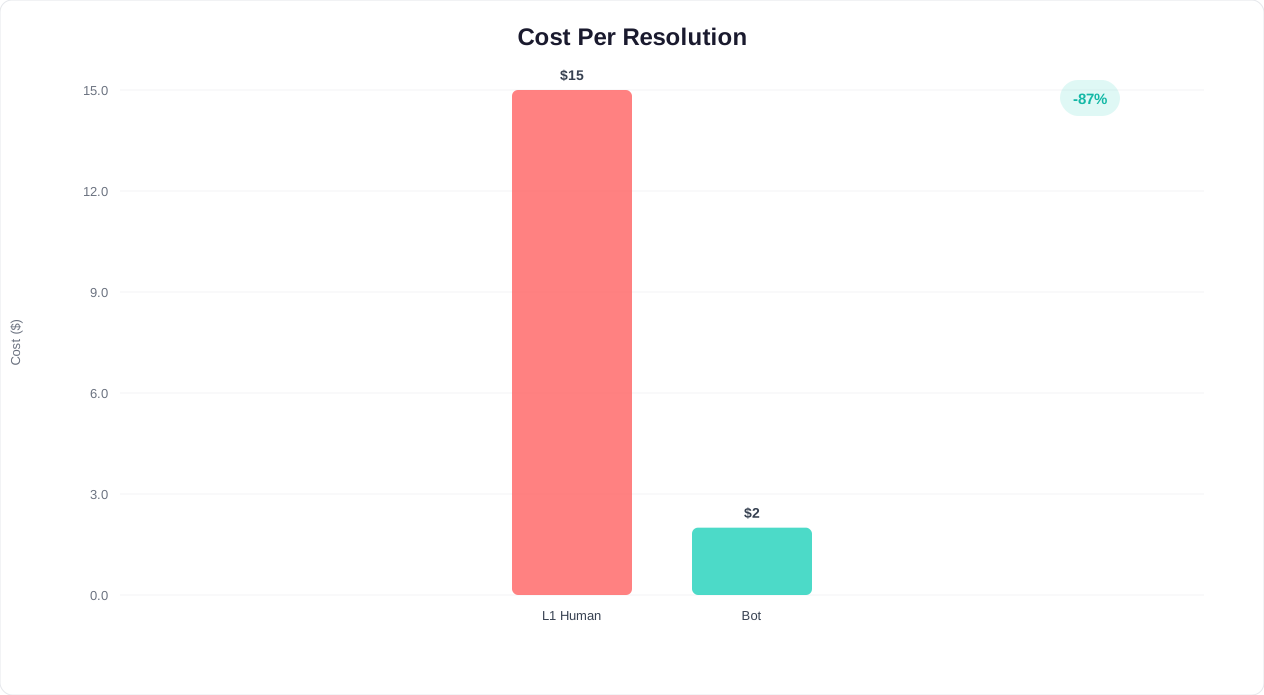
The average fully-loaded cost of a human-handled support ticket ranges from $6 to $25 depending on complexity, channel, and region. This includes not just the agent's time, but their share of management costs, software licenses, office space, benefits, and training. A chatbot-resolved interaction costs $0.25 to $1.50 -- a 90-95% reduction. Even accounting for chatbot implementation costs, training data preparation, and ongoing optimization, the ROI is overwhelmingly positive.
| Support Channel | Avg. Handle Time | Cost Per Resolution | First-Contact Resolution | CSAT Score | 24/7 Availability |
|---|---|---|---|---|---|
| Phone support | 8-12 min | $12-$25 | 70-75% | 72% | Expensive (3 shifts) |
| Email support | 15-30 min (multi-touch) | $6-$15 | 55-65% | 65% | Response delay (hours) |
| Live chat (human) | 6-10 min | $5-$12 | 68-78% | 78% | Limited hours |
| Social media support | 5-15 min | $4-$10 | 50-60% | 62% | Depends on team |
| AI chatbot | 30-90 sec | $0.25-$1.50 | 80-88% | 82% | Always on |
💡 Key Insight
A support team handling 10,000 tickets/month at $8 average cost spends $960,000 annually. Deploying a customer support chatbot that deflects 65% of tickets saves $624,000 per year -- a 15-20x return on chatbot investment.
Use this formula to calculate your own projected savings from helpdesk automation:
For a personalized calculation based on your team's specific metrics, use our customer service cost savings calculator. You can also explore how Conferbot's analytics dashboard tracks cost-per-resolution in real time across all channels.
| Hidden Cost Category | Annual Cost (10-person team) | Chatbot Impact | Annual Savings |
|---|---|---|---|
| Agent training and onboarding | $25,000-$40,000 | Fewer agents needed; reduced turnover | $10,000-$20,000 |
| Quality assurance overhead | $15,000-$25,000 | Bot answers are 100% consistent | $8,000-$15,000 |
| After-hours staffing premium | $30,000-$60,000 | Bot handles 100% of after-hours | $25,000-$50,000 |
| Agent burnout and turnover | $20,000-$35,000 | Agents handle interesting cases only | $12,000-$25,000 |
| Peak volume overflow outsourcing | $15,000-$30,000 | Bot scales infinitely at no extra cost | $15,000-$30,000 |
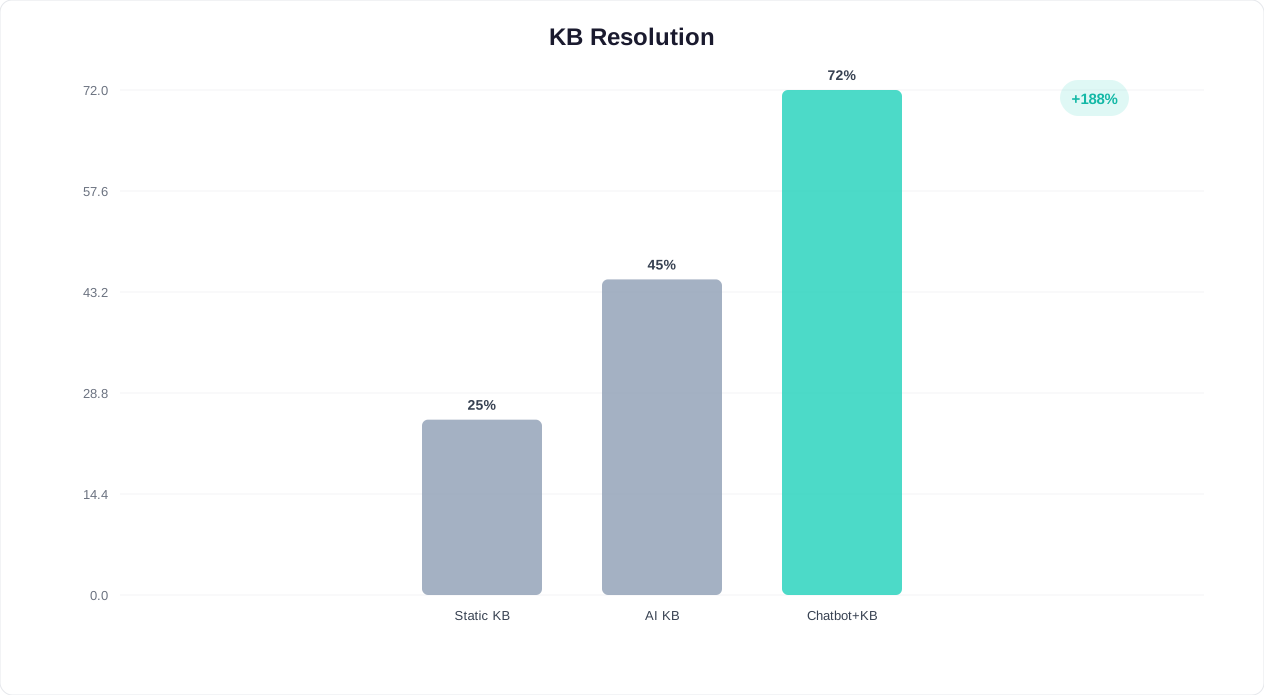
A chatbot without a knowledge base is like a new hire on their first day -- eager but uninformed. The knowledge base is the foundation that enables accurate, consistent, and comprehensive answers. Integrating your existing knowledge base with a customer support chatbot transforms static articles into interactive, conversational experiences that customers actually use -- and the usage numbers tell the story. Organizations that deploy chatbot-powered knowledge bases see self-service resolution rates nearly triple, while time-to-resolution drops by 79%.
The problem with traditional knowledge bases is well-documented: customers must navigate category trees, guess the right search terms, scan long articles for the relevant paragraph, and determine whether the information applies to their specific situation. Most give up and submit a ticket. A FAQ chatbot eliminates these friction points by understanding the customer's question in natural language and delivering the precise answer -- not a full article, but the exact paragraph or step they need. The result is dramatically higher self-service adoption and significantly lower support costs.
| Metric | Static Knowledge Base | Chatbot-Powered KB | Improvement |
|---|---|---|---|
| Self-service resolution rate | 22% | 58% | +164% |
| Average articles viewed before resolution | 3.8 | 1.2 | -68% |
| Time to resolution | 8.5 min | 1.8 min | -79% |
| Customer satisfaction with self-service | 52% | 78% | +50% |
| Escalation to human agent | 78% | 42% | -46% |
| Content utilization rate | 15-20% | 65-80% | +300% |
| Knowledge base maintenance effort | 10-15 hrs/week | 3-5 hrs/week | -67% |
Conferbot connects to your knowledge base in three powerful ways, each suited to different content management approaches:
⚡ Efficiency Insight
Chatbot-powered knowledge bases achieve 65-80% content utilization compared to just 15-20% for static help centers. Your existing documentation becomes 3-4x more valuable when delivered conversationally.
Content that works in a help center article does not always work in a chatbot response. Optimize your knowledge base for conversational delivery with these principles:
The result is a chatbot that knows everything your help center knows -- but delivers it in a friendly, conversational format that customers actually prefer. Set up your knowledge base connection through Conferbot's integration hub, or learn more about optimizing your self-service content in our knowledge base integration guide.
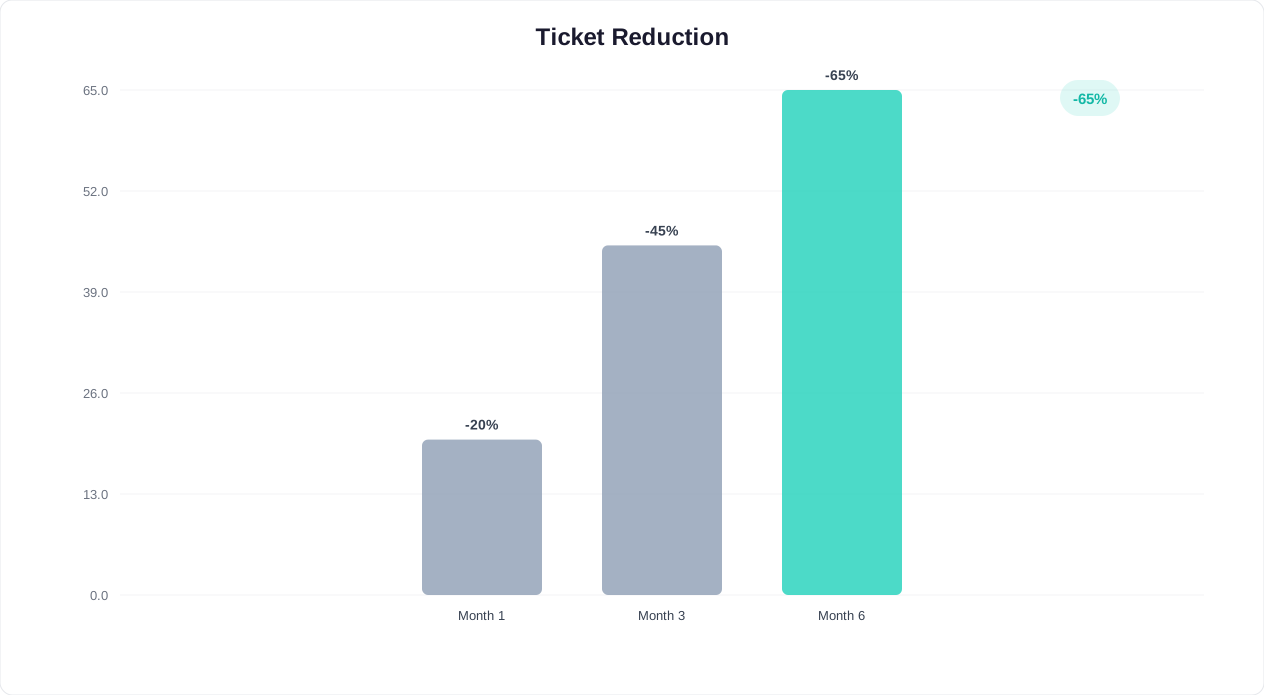
Ticket reduction is the most tangible metric for measuring FAQ chatbot success. Unlike soft metrics like "customer engagement," ticket reduction directly translates to cost savings, faster response times for remaining tickets, and improved agent satisfaction. Here is how to measure it accurately, what benchmarks to target, and how organizations across different industries are achieving transformative results with helpdesk automation.
The measurement challenge is real: how do you count tickets that never happened? The chatbot intercepted a question that would have been a ticket, but there is no ticket record to prove it. Accurate measurement requires a disciplined methodology that controls for external variables and establishes clear baselines. Organizations that invest in proper measurement are better positioned to optimize their chatbot continuously and justify expansion into additional use cases.
⚡ Efficiency Insight
Companies deploying FAQ chatbots achieve up to 60% ticket reduction within the first 90 days, freeing agents to handle complex issues that drive customer loyalty. By month 6, mature deployments reach 65-75% reduction.
| Phase | Timeline | Ticket Reduction | Key Actions | Cumulative Savings (5K tickets/mo) |
|---|---|---|---|---|
| Phase 1: Launch | Week 1-2 | 10-15% | Deploy with top 20 FAQs; monitor unmatched queries | $4,000-$6,000/mo |
| Phase 2: Expand | Week 3-6 | 25-35% | Add 30-50 more intents; enable account lookups | $10,000-$14,000/mo |
| Phase 3: Optimize | Month 2-3 | 40-50% | Tune AI confidence; add complex workflows | $16,000-$20,000/mo |
| Phase 4: Mature | Month 4-6 | 50-65% | Continuous learning; edge case handling | $20,000-$26,000/mo |
| Phase 5: Advanced | Month 6+ | 60-75% | Predictive support; proactive notifications | $24,000-$30,000/mo |
Accurate measurement requires controlling for external variables. Use this methodology:
| Industry | Avg. Monthly Tickets | Deflection Rate (90 days) | Annual Savings | Top Deflected Categories |
|---|---|---|---|---|
| SaaS / Technology | 8,000-15,000 | 55-70% | $320,000-$750,000 | Account, billing, how-to |
| E-commerce | 5,000-20,000 | 60-75% | $240,000-$960,000 | Order tracking, returns, shipping |
| Financial services | 10,000-25,000 | 45-60% | $400,000-$1,200,000 | Balance, transactions, policies |
| Healthcare | 3,000-8,000 | 40-55% | $120,000-$400,000 | Scheduling, insurance, directions |
| Education | 2,000-6,000 | 50-65% | $80,000-$280,000 | Enrollment, schedules, policies |
Ticket reduction does not just save money on deflected tickets -- it improves the handling of every remaining ticket. When agents handle 50% fewer tickets, they can spend more time on each one. Average handle time for complex issues drops as agents are less rushed, first-contact resolution improves, and CSAT for agent-handled interactions rises. Conferbot's analytics dashboard tracks all of these metrics in real time, giving you a complete picture of chatbot impact across your entire support operation.
For a financial projection based on your team's specific metrics, use our support cost savings calculator. To see how other companies in your industry have achieved these results, explore our support chatbot case studies.
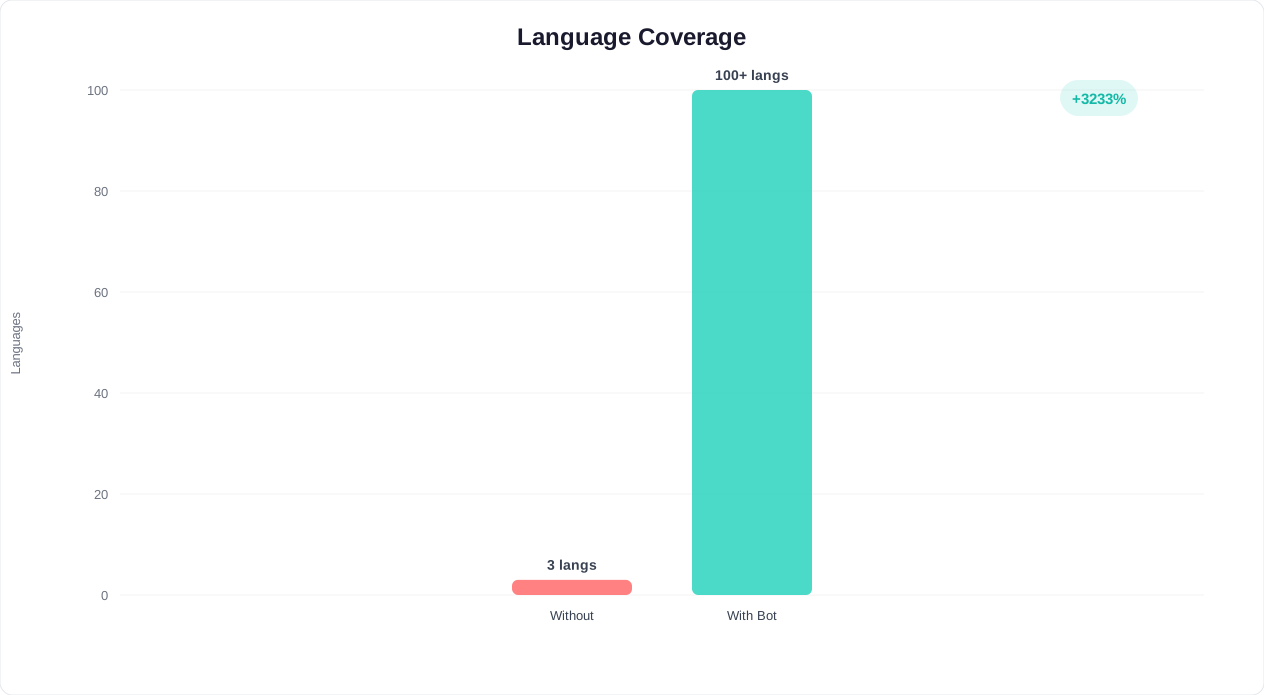
Language barriers are one of the most expensive problems in customer support. Hiring native-speaking agents for every market your business serves is prohibitively costly -- a single multilingual agent costs 20-40% more than a monolingual counterpart, and finding agents who speak less common languages can take months. A multilingual customer support chatbot eliminates this constraint entirely, providing instant support in 50+ languages without additional staffing costs. For global businesses, this capability alone justifies chatbot deployment.
The numbers are compelling: 72% of consumers are more likely to buy a product with information in their own language, and 56% say the ability to get information in their native language is more important than price. Yet most support teams only cover 2-3 languages effectively, leaving a significant portion of their customer base underserved. A multilingual FAQ chatbot closes this gap instantly.
📊 Performance Insight
72% of consumers prefer to buy products with information in their own language. A multilingual AI support bot covers 50+ languages simultaneously -- equivalent to hiring dozens of native-speaking agents at a fraction of the cost.
| Language Coverage | Human Agent Cost (Annual) | Chatbot Cost (Annual) | Quality Level | Availability |
|---|---|---|---|---|
| English only | $45,000-$65,000 per agent | Included in base plan | Native | Business hours vs 24/7 |
| +Spanish | +$50,000-$70,000 | $0 additional | Near-native | 24/7 |
| +French, German | +$120,000-$160,000 | $0 additional | Near-native | 24/7 |
| +Japanese, Korean, Chinese | +$200,000-$300,000 | $0 additional | High quality | 24/7 |
| +10 more languages | +$500,000-$800,000 | $0 additional | High quality | 24/7 |
Conferbot's multilingual capabilities work through two complementary approaches:
Deploy multilingual support instantly with Conferbot's multilingual chatbot templates, or configure language settings through the no-code builder.
Modern customers do not think in channels -- they think in conversations. A customer might start asking a question on your website chatbot, switch to WhatsApp while commuting, and follow up via Messenger the next day. If each channel operates as a silo, the customer must repeat their issue every time they switch -- a frustration that 72% of consumers cite as their biggest complaint about customer service. Omnichannel support routing eliminates this frustration by maintaining a unified conversation across every touchpoint.
The challenge for support teams is not just being present on multiple channels -- it is maintaining context continuity. When a customer moves from your website to WhatsApp, the customer support chatbot must carry the full conversation history, including any information already collected, troubleshooting steps already attempted, and the customer's emotional state. Conferbot's omnichannel architecture treats all channels as windows into a single conversation, not separate interaction streams.
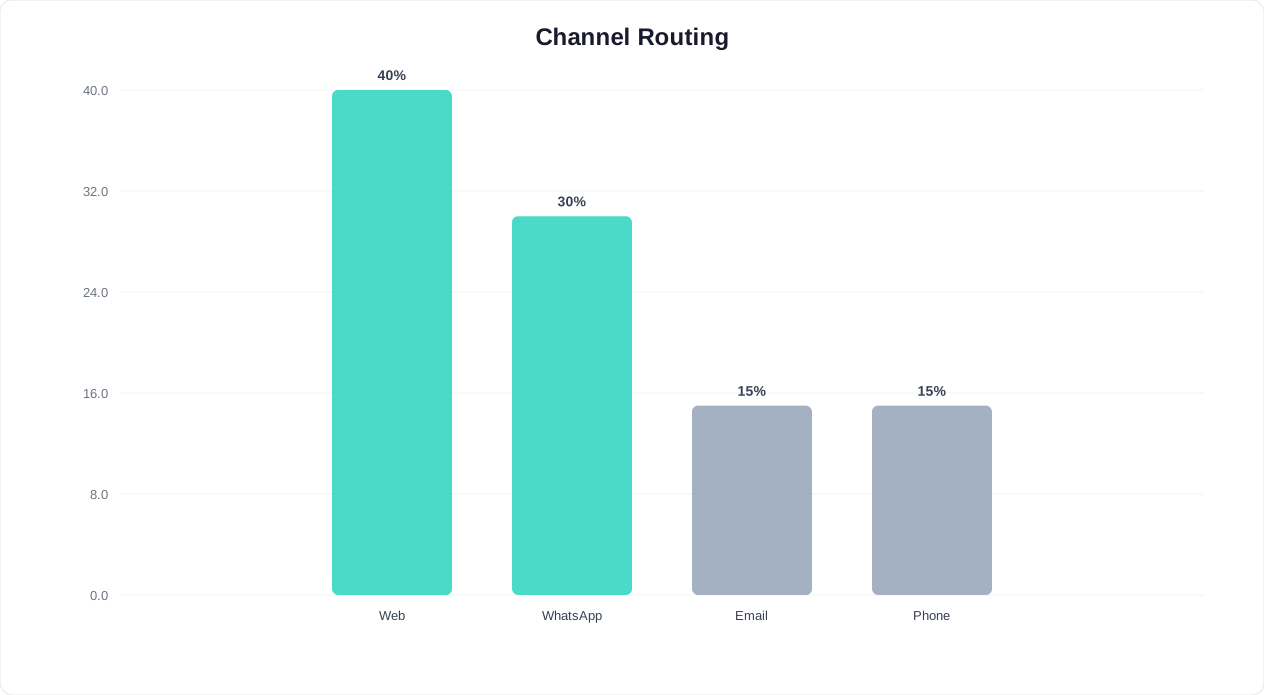
| Channel | Best For | Avg. Resolution Time | Customer Preference | % of Support Volume |
|---|---|---|---|---|
| Website chatbot | Browsing-context issues, pre-sale questions | 45 seconds | Desktop users, business hours | 35-40% |
| Async conversations, order updates | 2 minutes | Mobile users, global markets | 20-28% | |
| Facebook Messenger | Social commerce, community support | 2.5 minutes | Younger demographics | 10-15% |
| Instagram DM | Product inquiries, visual support | 3 minutes | Gen Z, lifestyle brands | 8-12% |
| Telegram | Tech-savvy users, crypto/fintech | 1.5 minutes | Privacy-conscious users | 5-8% |
| SMS | Urgent notifications, time-sensitive | 3 minutes | Older demographics, urgency | 5-8% |
💡 Key Insight
Customers who receive consistent omnichannel support show 23% higher satisfaction scores and 30% higher retention rates than those experiencing channel-siloed service. A unified chatbot ensures no context is ever lost, regardless of how many channels a customer uses.
Omnichannel routing is not just about being present everywhere -- it is about routing each inquiry to the optimal resolution path. The chatbot evaluates multiple factors in real time:
Every interaction -- regardless of channel -- feeds into a single customer timeline. When a customer contacts support on WhatsApp, the agent sees their previous website chatbot conversations, Messenger interactions, and any tickets from other channels. This unified history eliminates the need for customers to repeat themselves and gives agents complete context for faster resolution. Deploy omnichannel support through Conferbot's integration hub, which connects to all major messaging platforms through a single configuration.
The most effective support organizations in 2026 operate a hybrid model: chatbot-first for every incoming inquiry, with seamless escalation to human agents when the situation demands it. This is not about replacing humans -- it is about deploying each resource where it creates the most value. The bot handles volume; humans handle nuance. Together, they deliver faster, cheaper, and higher-quality support than either could alone. Organizations that implement a well-designed hybrid model see 35-50% cost reduction while simultaneously improving customer satisfaction scores.
Every customer interaction follows a structured path through four tiers, each optimized for cost and quality:
💡 Key Insight
Chatbot self-service costs just $0.50 per interaction, compared to $6-12 for a human-handled support ticket. That is a 92-96% cost reduction per resolved inquiry, with equal or higher customer satisfaction for routine questions.
| Support Tier | Handler | % of Inquiries | Avg. Resolution Time | Cost Per Resolution | Example Issues |
|---|---|---|---|---|---|
| Tier 0 -- Self-service | Chatbot | 60-75% | Under 60 sec | $0.25-$1.00 | FAQs, password resets, order tracking |
| Tier 1 -- Bot-assisted | Chatbot + API | 10-15% | 2-3 min | $1.00-$2.00 | Address changes, subscription mods, credits |
| Tier 2 -- Human agent | Support agent | 15-20% | 8-12 min | $5.00-$8.00 | Complex issues, emotional customers |
| Tier 3 -- Specialist | Senior specialist | 2-5% | 15-30 min | $15.00-$25.00 | Technical escalations, legal, VIP |
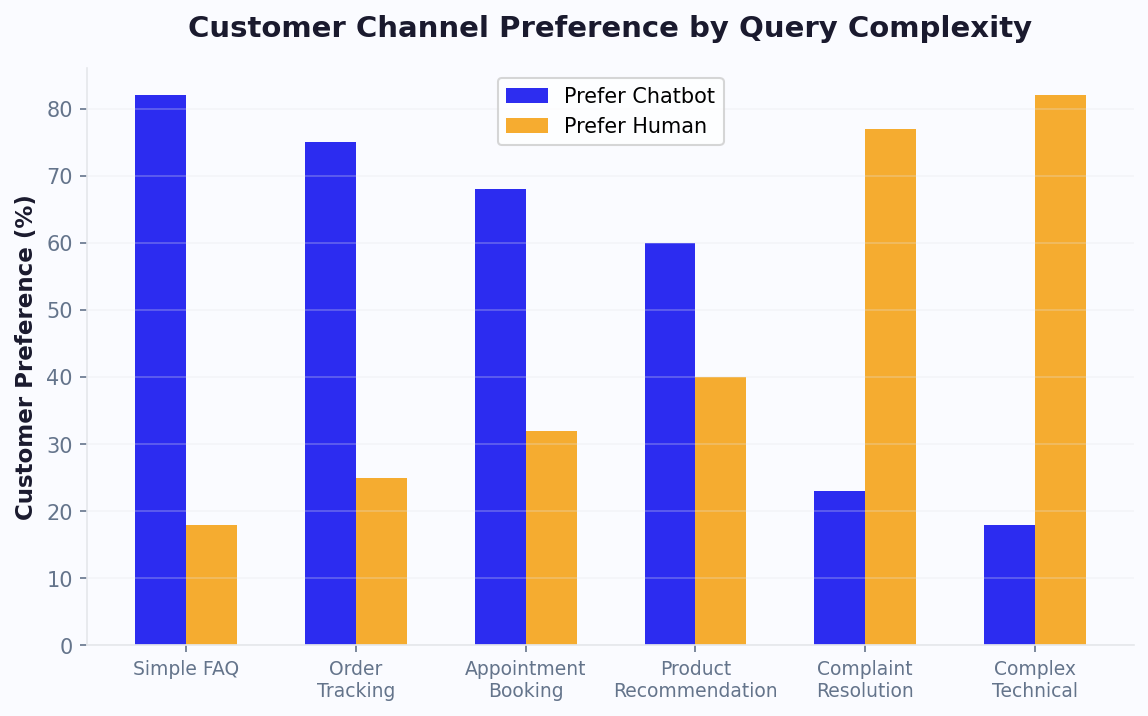
The chart above reveals that customers actually prefer bot support for simple queries -- they value speed over human interaction when the question is straightforward. For complex issues, preference shifts strongly toward human agents. The hybrid model respects these preferences, routing each inquiry to the channel the customer would choose anyway. This alignment between operational efficiency and customer preference is what makes the hybrid model so powerful.
The quality of escalation determines whether the hybrid model succeeds or fails. Poor escalation -- where the customer must repeat everything to the human agent -- destroys the trust built during the bot interaction. Conferbot's live chat handoff transfers the complete conversation context: every question asked, every answer provided, the customer's emotional tone, and the specific point where the bot reached its confidence threshold. Agents see this context before accepting the conversation, allowing them to pick up seamlessly.
Escalation triggers include:
| Phase | Duration | Focus | Success Metric |
|---|---|---|---|
| Pilot | 2 weeks | Deploy bot on FAQ page only; agents monitor all conversations | 90%+ answer accuracy |
| Expand | 4 weeks | Enable bot on all pages; activate account actions; tune escalation | 30%+ ticket deflection |
| Scale | 4 weeks | Add WhatsApp, Messenger channels; connect knowledge base | 50%+ deflection; omnichannel |
| Optimize | Ongoing | Weekly intent review; monthly flow refinement; quarterly strategy | 65%+ deflection; CSAT parity |
Learn how to set up the hybrid model step-by-step with Conferbot's live chat handoff feature and our support chatbot templates.
Service Level Agreements define the promises you make to customers about response times, resolution times, and service quality. Missing SLAs damages customer relationships, triggers contractual penalties, and signals operational dysfunction. Yet manual SLA management is error-prone -- agents lose track of ticket ages, priority classifications get misapplied, and escalation paths are followed inconsistently. A customer support chatbot with SLA automation ensures that every ticket is classified, prioritized, and escalated correctly, eliminating human error from SLA management entirely.
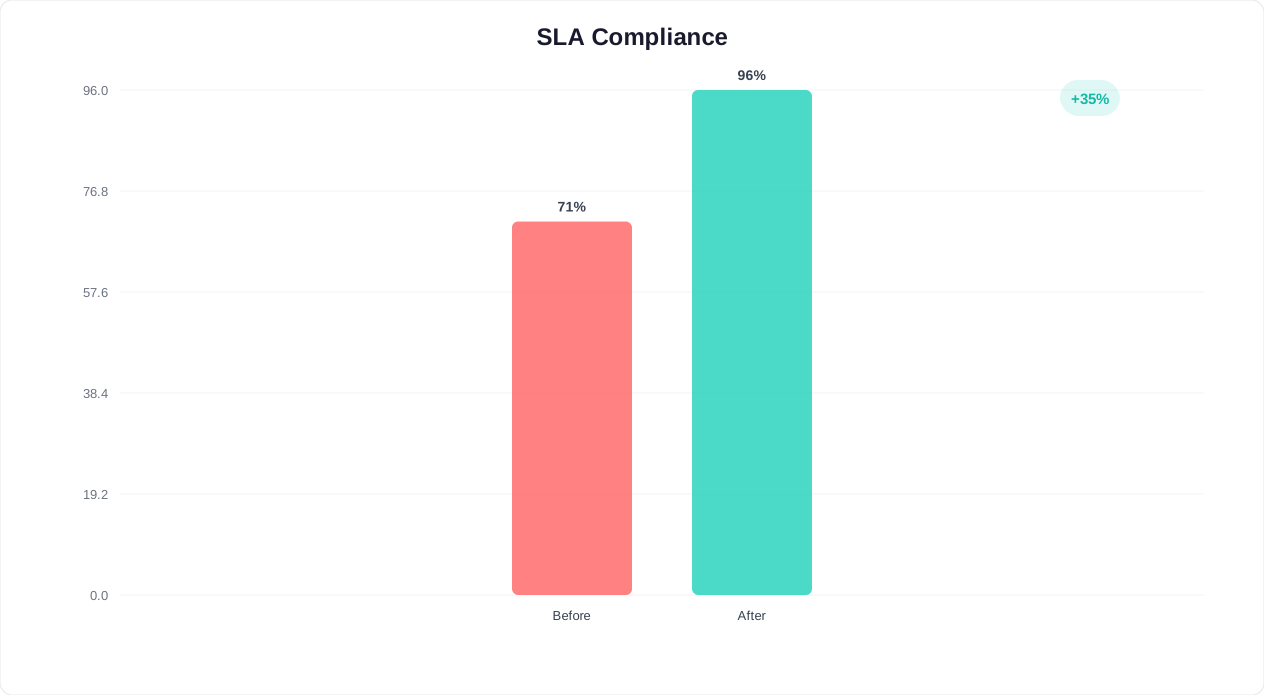
The impact is measurable: organizations using chatbot-driven SLA automation report 95-99% SLA compliance rates, compared to 75-85% for teams relying on manual tracking. This improvement directly affects customer retention -- every 1% improvement in SLA compliance correlates with a 0.5-1% improvement in annual retention rate for B2B businesses.
⚡ Efficiency Insight
Chatbot-driven SLA automation achieves 95-99% SLA compliance rates compared to 75-85% for manual tracking. Every 1% improvement in SLA compliance correlates with 0.5-1% improvement in annual customer retention.
| Priority Level | Response SLA | Resolution SLA | Chatbot Action | Escalation Path |
|---|---|---|---|---|
| P1 -- Critical | 15 minutes | 4 hours | Instant acknowledgment; immediate agent page | Senior agent + manager alert |
| P2 -- High | 1 hour | 8 hours | Instant acknowledgment; agent queue priority | Agent + team lead at 50% SLA |
| P3 -- Medium | 4 hours | 24 hours | Attempt self-service; queue if unresolved | Agent at 75% SLA |
| P4 -- Low | 24 hours | 72 hours | Self-service resolution; queue only if needed | Standard queue |
The chatbot provides instant first response to every inquiry, regardless of priority level. This alone satisfies the "response time" component of most SLAs, since chatbot response is measured in seconds rather than minutes or hours. For resolution, the chatbot attempts to resolve the issue through self-service. If it cannot, it creates a properly classified, prioritized ticket with all context attached, ensuring the human agent can resolve efficiently within the SLA window.
Configure SLA automation through Conferbot's conditional logic builder and connect to your ticketing system via the integration hub. Track SLA performance in real time through the analytics dashboard.
Deploying a FAQ chatbot without tracking the right metrics is like driving without a dashboard -- you are moving, but you have no idea if you are heading in the right direction. The following KPIs provide a complete picture of your self-service chatbot's performance and guide optimization decisions. Tracking these metrics consistently is what separates organizations that achieve 70%+ deflection from those that plateau at 30-40%.
The key to effective measurement is not just tracking individual metrics but understanding how they relate to each other. A high self-service rate means nothing if accuracy is low -- the bot is answering questions but getting them wrong, which erodes trust faster than having no bot at all. Similarly, a low fallback rate combined with low resolution rate suggests the bot understands questions but cannot act on them. Reading metrics in combination reveals optimization opportunities that individual metrics miss.
📊 Performance Insight
With 24/7 chatbot coverage, businesses eliminate the after-hours support gap entirely. Over 40% of customer inquiries arrive outside business hours -- every one of those is now handled instantly instead of waiting 12-16 hours for a response.
| KPI | Definition | Target | Measurement Method |
|---|---|---|---|
| Self-service rate | % of inquiries resolved without human intervention | 60-75% | Bot-resolved / total conversations |
| Containment rate | % of conversations that stay within the bot | 70-85% | 1 - (escalations / total conversations) |
| Resolution accuracy | % of bot answers marked correct by users | 90%+ | Thumbs up/down feedback on bot responses |
| First-contact resolution (bot) | % resolved in single conversation | 80%+ | Single-session resolutions / total bot resolutions |
| Average resolution time | Time from first message to resolution | <90 seconds | Timestamp analysis |
| Customer effort score | How easy it was to get help (1-7 scale) | 6.0+ | Post-conversation survey |
| Fallback rate | % of messages the bot could not understand | <15% | Unmatched intent count / total messages |
| Repeat contact rate | % of customers who return with same issue | <10% | Same-user, same-topic conversations within 7 days |
No single metric tells the full story. Here is how to interpret them in combination for actionable insights:
| Cadence | Review Focus | Actions | Owner |
|---|---|---|---|
| Daily | Unmatched queries, failed resolutions | Add new intents, fix broken flows | Support ops / bot manager |
| Weekly | KPI dashboard, accuracy trends, top fallback queries | Batch intent updates, response refinement | Support lead |
| Monthly | Deflection rate, cost savings, CSAT impact | Strategic expansion, new use cases, integration adds | Support manager |
| Quarterly | ROI report, competitive benchmark, roadmap | Executive presentation, budget justification | VP of Support / CX |
Compare your metrics against industry benchmarks to understand where you stand. If your self-service rate is 45% and the target is 60-75%, you have clear room for improvement. If your resolution accuracy is 93% and the target is 90%, you are performing well and can focus on expanding coverage rather than tuning accuracy. For a comprehensive analytics overview, explore our analytics and reporting features and use the cost savings calculator to project your ROI based on current metrics.
Everything you need to know about chatbots for support and faq templates.
Our proven templates help businesses like yours achieve better results with automation
Automatically qualify prospects while you sleep
Increase conversions with smart, always-on chatbots
Engage visitors within seconds of landing on your site
Lower acquisition costs through automation
Join the businesses already using Conferbot templates to automate conversations and boost conversions. Start free in 2 minutes.
Follow these simple steps to get your support and faq chatbot up and running in minutes
Select from high-converting lead generation templates designed for your industry and use case.
Modify questions to match your ideal customer profile and lead scoring criteria.
Configure automatic lead distribution to your sales team based on qualification scores.
Connect to HubSpot, Salesforce, or your preferred CRM for seamless lead management.
Launch your chatbot and track conversion rates, lead quality, and ROI through our analytics dashboard.
Compare the benefits of using professional templates vs. building from scratch
Join thousands of businesses using our support and faq templates to automate conversations and boost results
🚀 Build your first bot free - no credit card requiredBrowse every free support and faq chatbot template below. Each one is fully customizable and deploys in minutes with no code.
New to chatbots? These in-depth guides explain how support and faq chatbots work and how to choose the right builder.