
Why Chatbot Analytics Matter More Than You Think
Most businesses deploy a chatbot and then forget about it. They check conversation volume once a month, glance at a few transcripts, and assume everything is fine. This is like launching a website and never looking at Google Analytics — you are flying blind.
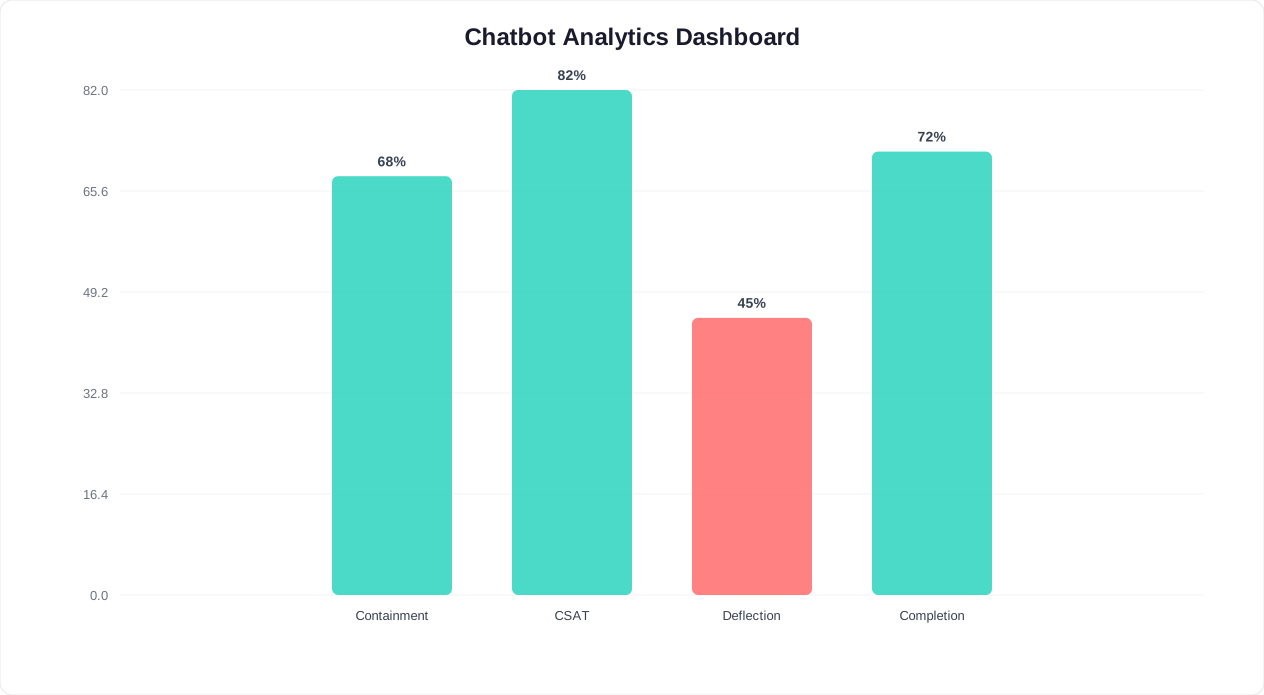
Here is the reality: according to Gartner's customer service research, 68% of chatbots underperform because their owners never optimize them after launch. The chatbot answers questions, sure, but it misroutes conversations, frustrates users with dead ends, fails to capture leads, and loses people at critical points in the flow. Without analytics, you will never know.
💡 Key Insight
68% of chatbots underperform because their owners never optimize after launch. Analytics turns your chatbot from a guessing game into a data-driven conversion engine.
The Cost of Ignoring Chatbot Analytics
Consider what unmeasured chatbot failures actually cost:
- Missed leads: If your chatbot's lead capture form has a 30% drop-off rate and you do not know about it, you are losing 3 out of every 10 potential leads. At $50 per lead, that is $150 lost per 10 conversations — every single day.
- Unnecessary escalations: If 60% of conversations that get escalated to a human agent could have been resolved by the bot (but the bot's responses were unclear), you are paying agents to handle work the chatbot should be doing. At $15/agent interaction, that adds up fast.
- Silent churn: Frustrated users do not complain — they leave. If 25% of chatbot users abandon the conversation without resolution and 10% of those were ready to purchase, you are losing revenue you never even knew existed.
What Good Chatbot Analytics Give You
A proper analytics dashboard transforms your chatbot from a "set and forget" widget into a continuously improving conversion engine. Forrester Research found that companies systematically acting on chatbot analytics achieve 2.5x better outcomes than those using a set-and-forget approach. With the right metrics, you can:
- Identify exactly where users drop off and fix those friction points
- Discover which questions your chatbot cannot answer and train it to handle them
- Measure ROI precisely — not "the chatbot seems helpful" but "the chatbot generated $14,300 in qualified leads this month" (see our chatbot ROI calculator guide for the formula)
- Compare performance across channels (website, WhatsApp, Messenger) and optimize each one
- Justify budget for chatbot improvements with hard data
Let us walk through the 12 metrics that actually matter, with benchmarks and specific strategies to improve each one.
Metric 1: Containment Rate — The Single Most Important Chatbot KPI
What It Is
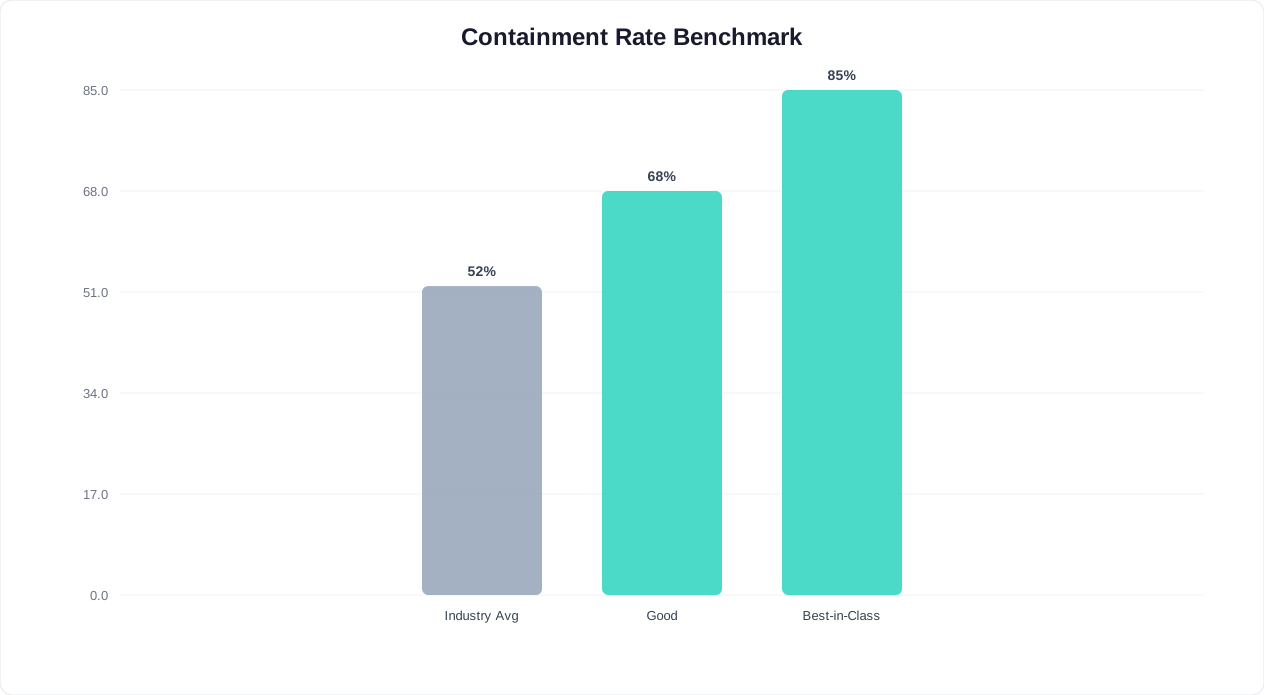
Containment rate measures the percentage of conversations the chatbot resolves without any human intervention. A contained conversation is one where the user gets their answer, completes their action (booking, purchase, information retrieval), and leaves satisfied — all through the bot.
Formula: Containment Rate = (Conversations resolved by bot alone / Total conversations) × 100
Benchmarks
| Chatbot Type | Poor | Average | Good | Excellent |
|---|---|---|---|---|
| Rule-based (button flows) | <50% | 50-65% | 65-80% | 80%+ |
| AI-powered (NLU) | <60% | 60-75% | 75-85% | 85%+ |
| Hybrid (AI + human fallback) | <55% | 55-70% | 70-82% | 82%+ |
📊 Benchmark
An 80%+ containment rate is the gold standard for AI-powered chatbots. Each 1% improvement means fewer escalations, lower costs, and happier customers.
How to Improve It
1. Analyze uncontained conversations: Export conversations that were escalated to a human agent. Categorize the reasons: Was it a question the bot could not answer? A flow that hit a dead end? A user preference for human help? Focus on the first two categories — those are fixable. For proven flow structures that maximize containment, see our chatbot conversation flow templates.
2. Expand your knowledge base: The #1 reason for low containment is missing content. If 15% of escalations are about return policies and your bot does not cover returns, adding return policy content immediately lifts containment by up to 15 percentage points. Use your AI chatbot's training tools to add answers for the most common unhandled questions.
3. Add fallback responses that redirect: Instead of a generic "I don't understand," offer specific alternatives: "I'm not sure about that, but I can help you with: (1) Product info (2) Pricing (3) Book a demo." This keeps users in the bot flow instead of escalating.
4. Use conditional logic: Implement branching flows that handle edge cases. If a user selects "Other" in a menu, do not just say "Contact us" — ask a follow-up question that narrows down their need.
Metric 2: Customer Satisfaction Score (CSAT)
What It Is
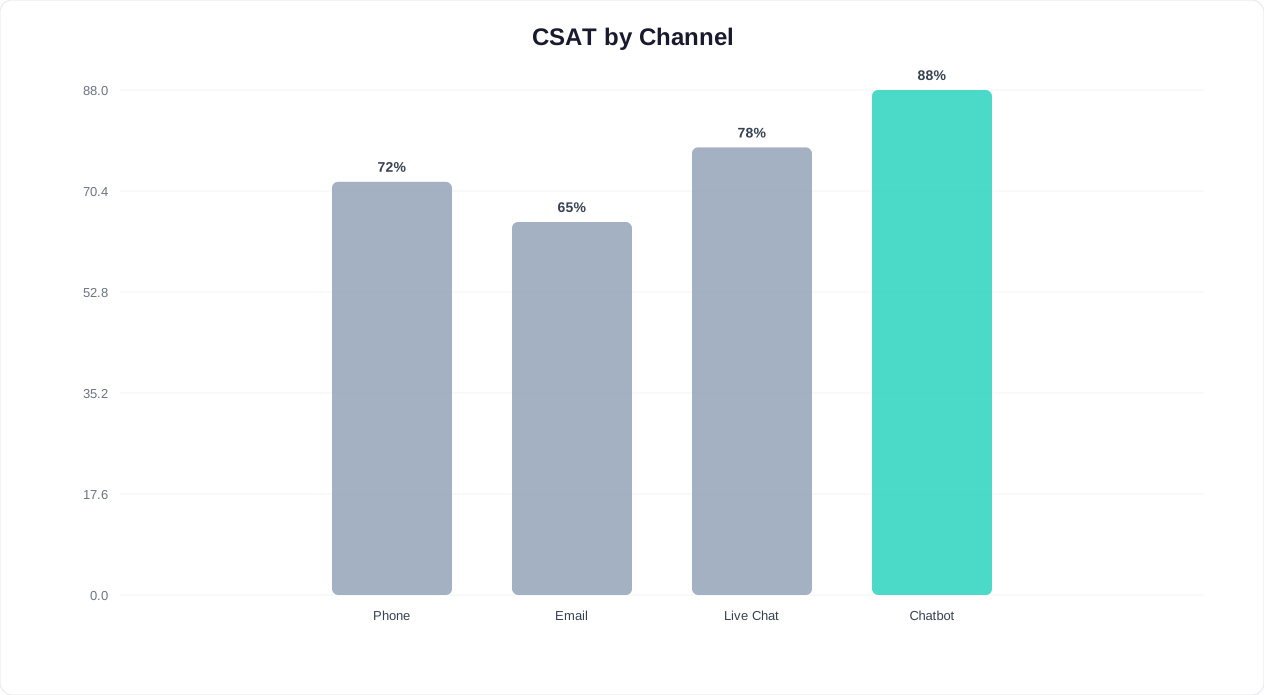
CSAT measures how satisfied users are with their chatbot experience, typically collected through a post-conversation rating (thumbs up/down, 1-5 stars, or a smiley-face scale). It is the most direct measure of user experience quality.
Formula: CSAT = (Positive ratings / Total ratings) × 100
Benchmarks
| Rating Scale | Poor | Average | Good | Excellent |
|---|---|---|---|---|
| Thumbs up/down | <60% | 60-72% | 72-85% | 85%+ |
| 5-star scale (4-5 stars) | <55% | 55-68% | 68-80% | 80%+ |
🎯 Did You Know?
Post-conversation surveys achieve 54% completion rates when triggered immediately after resolution — nearly 3x higher than email surveys sent hours later.
How to Improve It
1. Reduce time to resolution: The faster users get their answer, the higher they rate the experience. Analyze your average conversation length — if users need 8+ messages to complete a simple task, streamline the flow. Use quick-reply buttons instead of open-text questions to speed things up.
2. Improve language quality: Robotic, stilted language kills CSAT. Rewrite your chatbot's responses to be conversational, empathetic, and concise. Compare: "Your request has been processed. The reference number is 4521." vs "Done! Your booking is confirmed — reference #4521. You'll get a reminder 24 hours before." The second version scores 20-30% higher on CSAT.
3. Handle failures gracefully: When the bot cannot help, do not leave users stranded. Offer a clear handoff path: "I want to make sure you get the right answer. Let me connect you with our team — they typically respond in under 2 minutes." A smooth handoff via live chat can actually result in a higher CSAT than a bot-only resolution.
4. Ask for feedback at the right moment: Trigger the satisfaction survey immediately after the conversation resolves, not mid-conversation. Users who are still trying to get help will rate negatively out of frustration, skewing your data.
Metric 3: Deflection Rate — How Many Support Tickets Your Bot Prevents
What It Is
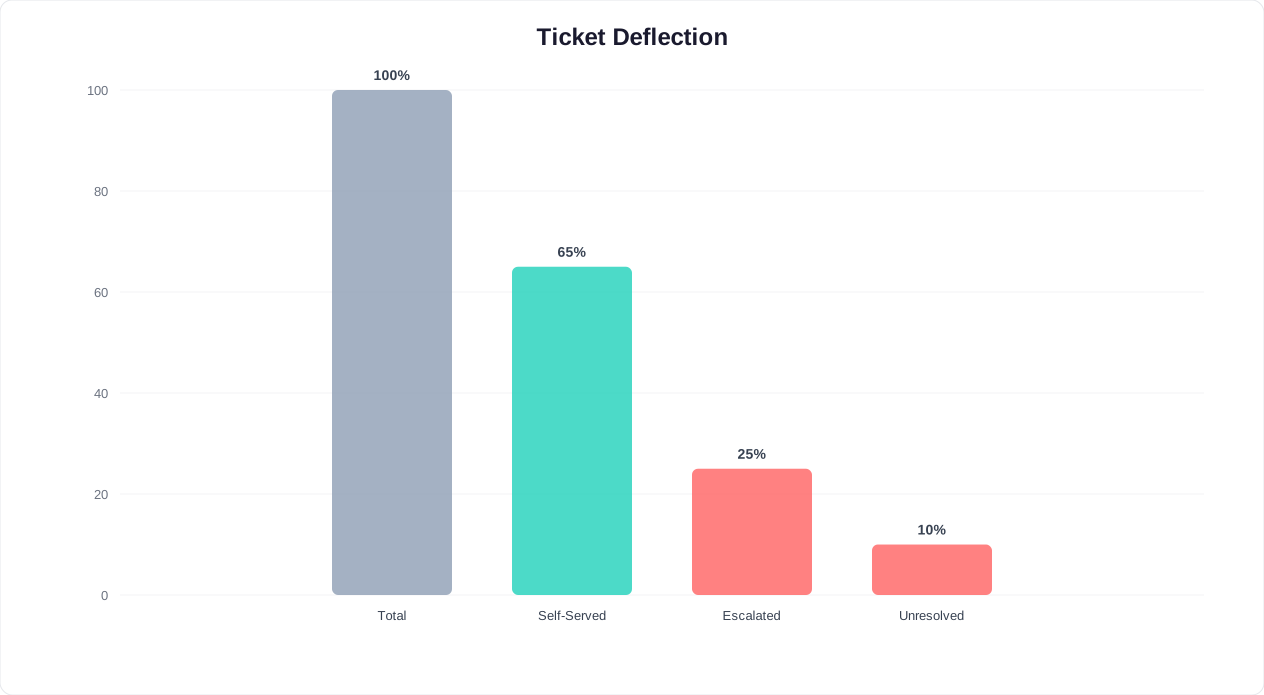
Deflection rate measures the percentage of potential support tickets that the chatbot handles instead of a human agent. Unlike containment rate (which measures all conversations), deflection rate specifically measures conversations that would have been support tickets if the chatbot did not exist.
Formula: Deflection Rate = (Support queries resolved by bot / (Support queries resolved by bot + Tickets created)) × 100
Benchmarks
| Industry | Average Deflection | Top Performers |
|---|---|---|
| E-commerce | 40-55% | 65-75% |
| SaaS | 35-50% | 60-70% |
| Financial services | 30-45% | 55-65% |
| Healthcare | 25-40% | 50-60% |
💰 Cost Savings
Each chatbot-deflected support ticket saves $0.50 vs $12 for a human agent interaction — a 24x cost reduction per resolved conversation.
How to Improve It
1. Map your top 20 ticket reasons: Pull your last 500 support tickets and categorize them. The top 20 reasons usually account for 80% of volume. Build chatbot flows that handle each one. Common high-deflection topics: order status, password reset, return policy, pricing questions, business hours, and feature availability.
2. Add self-service actions: A chatbot that only provides information deflects fewer tickets than one that actually performs actions. Let users check order status, reset passwords, update account info, and cancel subscriptions through the bot. Each action added can lift deflection by 5-10 points.
3. Train on real ticket data: Feed your chatbot actual support ticket conversations so it learns the exact language customers use. A customer says "where's my stuff?" not "What is the status of my order?" Your bot needs to understand both.
4. Add proactive messaging: If you know a common issue is coming (planned downtime, shipping delays, policy changes), have the chatbot proactively inform users before they ask. Proactive deflection is 3x more effective than reactive deflection.
How to measure it: According to HubSpot's State of Service report, the average cost of a human-handled support interaction is $12 versus $0.50 for a chatbot-deflected one — a 24x difference. Track the number of support tickets before and after chatbot deployment, controlling for traffic volume. The difference is your deflection. In Conferbot, the analytics dashboard tracks deflection automatically by monitoring conversations tagged as support queries vs those that result in human handoff.
Metrics 4-6: Conversation Completion, Handoff Rate, and First-Response Time
Metric 4: Conversation Completion Rate
What it is: The percentage of users who complete the intended chatbot flow from start to finish. If your chatbot is a lead capture bot with 5 questions, completion rate measures how many users answer all 5 and submit their information.
Formula: Completion Rate = (Users who complete the flow / Users who start the flow) × 100
Benchmarks: Average completion rates range from 35-50% for complex flows (7+ steps) to 65-80% for simple flows (3-4 steps). Top performers achieve 80%+ by keeping flows short and using progressive disclosure.
How to improve it:
- Shorten your flows: Every additional step loses 10-15% of users. If your flow has 8 steps, cut it to 5 by combining questions or removing non-essential ones.
- Use progress indicators: "Question 2 of 4" reassures users that the end is near. Flows with progress indicators have 18% higher completion rates.
- Save partial progress: If a user drops off at step 3 and returns later, resume from step 3 instead of starting over. This alone can lift completion by 12-20%.
- Optimize the hardest step: Identify which step has the highest drop-off (your analytics dashboard shows this). If step 3 asks for a phone number and 40% of users bail, try making it optional or moving it to the end.
Metric 5: Handoff Rate (Bot-to-Human Transfer Rate)
What it is: The percentage of conversations where the chatbot transfers the user to a human agent. This is related to containment rate (handoff rate = 100% - containment rate) but worth tracking separately because it directly measures your live chat team's workload.
Benchmarks: A healthy handoff rate for most businesses is 15-30%. Below 15% might mean you are not offering human help when users need it (which hurts CSAT). Above 30% means your bot is not handling enough on its own (which wastes agent time).
How to improve it:
- Analyze handoff triggers: Are users requesting handoff, or is the bot auto-escalating? If the bot escalates too eagerly (after one "I don't understand"), increase its retry logic to 2-3 attempts with rephrased responses before escalating.
- Add intent detection: If users type "talk to a human" but their question is actually easy to answer, the bot can try: "I might be able to help with that! Are you asking about [topic]?" This recaptures 15-25% of premature handoff requests.
- Segment by reason: Track why handoffs happen. If 40% are for billing issues the bot could handle with better training, prioritize that training. If 40% are for complex complaints that genuinely need a human, your handoff rate for those is appropriate.
Metric 6: First-Response Time
What it is: The time between a user sending their first message and the chatbot responding. For chatbots, this should be near-instant, but slow API calls, complex NLU processing, or server issues can create delays.
Benchmarks: Users expect chatbot responses in under 3 seconds. Anything above 5 seconds feels broken. Rule-based bots should respond in under 1 second. AI-powered bots typically respond in 1-3 seconds depending on the AI model used.
How to improve it:
- Optimize AI model selection: If you are using GPT-4 for every response (including "Hello!"), you are paying for latency you do not need. Use a fast model for simple responses and reserve powerful models for complex queries.
- Add typing indicators: Show a "typing..." animation while the response loads. This makes even 3-second delays feel natural because users see the bot is "thinking."
- Pre-load common responses: Cache responses for your top 20 FAQs so they are served instantly without an API call.
- Monitor uptime: Set up alerts for response times exceeding 5 seconds. Spikes often indicate server issues or API rate limiting that need immediate attention.
Metrics 7-9: Resolution Rate, Engagement Rate, and Drop-Off Points
Metric 7: Resolution Rate
What it is: The percentage of user issues or questions that the chatbot successfully resolves. This differs from containment rate because a "contained" conversation is not always "resolved" — the user might have given up without getting their answer, but also without requesting a human.
Formula: Resolution Rate = (Issues successfully resolved / Total issues raised) × 100
Benchmarks: A good resolution rate is 70-80% for AI-powered bots and 55-70% for rule-based bots. Measure this through post-conversation surveys ("Did this answer your question?") combined with behavioral signals (user did not return with the same question within 24 hours).
How to improve it:
- Implement confirmation steps: After providing an answer, ask "Did that help?" with Yes/No buttons. If "No," offer alternative solutions or escalate. This catches unresolved conversations that would otherwise look "contained."
- Track repeat visitors: If a user asks the same question twice within 24 hours, the first interaction did not resolve their issue. Flag these in your analytics and investigate.
- Provide actionable answers: "Our return policy is 30 days" resolves the question. "Please see our return policy page" does not — it creates more work for the user. Always give the complete answer, not just a link.
Metric 8: Engagement Rate
What it is: The percentage of website visitors (or channel users) who interact with the chatbot. This measures how effectively your chatbot attracts attention and encourages first interaction.
Formula: Engagement Rate = (Visitors who start a conversation / Total visitors) × 100
Benchmarks:
| Trigger Type | Average Engagement | Top Performers |
|---|---|---|
| Passive (bubble only, no proactive message) | 1-3% | 4-6% |
| Proactive (auto-open with greeting after delay) | 5-10% | 12-18% |
| Page-specific (targeted message on pricing/product page) | 8-15% | 18-25% |
| Exit-intent trigger | 10-20% | 22-30% |
How to improve it:
- Use proactive messages: A chatbot that sits silently in the corner gets 3% engagement. One that says "Hey! Need help comparing plans?" after 15 seconds on the pricing page gets 15%+ engagement. The message must be relevant to the page — generic greetings perform poorly.
- Optimize bubble design: Test different bubble colors, sizes, positions, and animations. A pulsing bubble with a notification badge ("1") attracts 2x more clicks than a static bubble.
- A/B test welcome messages: Run A/B tests on your proactive greeting. "Got questions?" vs "I can help you find the right plan in 60 seconds" — the specific, benefit-driven message consistently wins by 30-50%.
Metric 9: Drop-Off Points (Funnel Analysis)
What it is: The specific steps in your chatbot flow where users abandon the conversation. This is arguably the most actionable metric because it tells you exactly where to focus optimization efforts.
How to identify drop-off points: Your chatbot's flow analytics should show a funnel view: Step 1 → Step 2 → Step 3 → completion. The step with the largest percentage drop from the previous step is your biggest optimization opportunity.
Common drop-off patterns and fixes:
- Drop-off at greeting (60%+ leave immediately): Your greeting is generic, the chatbot pops up too aggressively, or users do not understand what the bot can do. Fix: Write a specific, benefit-driven greeting with clear options.
- Drop-off at personal info request (name, email, phone): Users are not ready to share info. Fix: Provide value first (answer their question), then ask for info. Or make fields optional with "Skip" buttons.
- Drop-off after the bot says "I don't understand": The bot hit a dead end. Fix: Improve the fallback response with suggested topics, and add training data for the unrecognized intent.
- Drop-off at long text responses: The bot sent a 300-word answer and the user lost interest. Fix: Break long answers into shorter messages with "Want to learn more?" continuation buttons.
Metrics 10-12: Lead Conversion, Session Duration, and User Satisfaction Score
Metric 10: Lead Conversion Rate
What it is: The percentage of chatbot conversations that result in a qualified lead — meaning the user provided contact information (email, phone) and expressed purchase intent or interest in your product/service.
Formula: Lead Conversion Rate = (Leads captured / Total conversations) × 100
Benchmarks:
| Chatbot Use Case | Average | Good | Excellent |
|---|---|---|---|
| General website chatbot | 5-10% | 10-18% | 18-28% |
| Landing page chatbot | 12-20% | 20-30% | 30-45% |
| Product/pricing page chatbot | 8-15% | 15-25% | 25-35% |
| WhatsApp/Messenger chatbot | 15-25% | 25-40% | 40-55% |
How to improve it:
- Lead with value, not forms: Answer the user's question first, then ask for their email. "Great question! Here's how our pricing works: [info]. Want me to send you a detailed comparison by email?" converts 3x better than opening with "Enter your email to get started."
- Use progressive profiling: Do not ask for name, email, phone, company, and job title all at once. Ask for email first. Collect the rest over subsequent interactions or via a follow-up email.
- Offer a lead magnet: "I can email you our free pricing calculator — what's the best email?" converts far better than "Subscribe to our newsletter." Use your lead generation features to deliver the asset automatically.
- Segment by intent: Not every conversation is a lead opportunity. Track conversion rate only for conversations where the user showed purchase intent (visited pricing, asked about features, compared plans). This gives you a cleaner metric and better benchmarks.
Metric 11: Average Session Duration
What it is: The average time users spend interacting with the chatbot per session. This metric requires careful interpretation — longer is not always better.
Benchmarks: For support bots, shorter sessions (1-3 minutes) indicate efficient resolution. For sales/lead-gen bots, moderate sessions (3-6 minutes) indicate engagement. Sessions over 8 minutes often indicate the user is stuck or frustrated.
How to interpret and improve it:
- Correlate with outcome: Compare session duration for successful outcomes (lead captured, issue resolved) vs unsuccessful ones (abandoned, escalated). If successful outcomes average 3 minutes and unsuccessful ones average 7 minutes, your long conversations are a problem — users are going in circles.
- Set duration alerts: Flag conversations exceeding 10 minutes for review. These are almost always cases where the bot failed and the user kept trying. Each one is a learning opportunity for improving your flows.
- Optimize for speed to value: Reduce the number of messages needed to reach the first useful outcome. If your lead-gen bot takes 8 messages to get to the scheduling link, find ways to get there in 4-5 messages.
Metric 12: User Satisfaction Score (Net Promoter Variant)
What it is: A broader satisfaction measure than CSAT, asking users whether they would recommend the chatbot experience to others, or whether they found the overall experience valuable. While CSAT measures satisfaction with a single interaction, this metric measures overall sentiment toward your chatbot as a channel.
How to measure it: At the end of a resolved conversation, ask: "How would you rate your overall experience?" with a 1-5 scale, or "Would you use this chatbot again?" with Yes/Maybe/No options.
Benchmarks: "Would use again" responses above 70% indicate a well-received chatbot. Below 50% signals serious UX issues. Compare this to your other channels — if your chatbot's satisfaction trails email or phone support by more than 15 points, there is significant room for improvement.
How to improve it:
- Personalization: Use the visitor's name (if known), remember past interactions, and tailor responses based on their history. Personalized chatbot experiences score 25% higher on satisfaction than generic ones.
- Consistent tone: Your chatbot should have a consistent personality across all flows — friendly, professional, and helpful. Inconsistent tone (formal in one flow, casual in another) reduces trust.
- Fast resolution path: Always provide a clear, visible option to reach a human agent. Users feel trapped without one, even if they never use it. The presence of the option alone improves satisfaction by 15%.
- Follow up: After resolving an issue, the chatbot can check back: "Is everything working well now?" This small gesture significantly lifts satisfaction scores.
How to Set Up Chatbot Analytics Tracking: A Practical Guide
Knowing which metrics to track is useless without a system to capture, store, and visualize them. Here is how to set up comprehensive chatbot analytics in practice.
Step 1: Define Your Measurement Framework
Before configuring any dashboard, decide which metrics matter most for your chatbot's primary goal:
| Primary Chatbot Goal | Primary Metrics | Secondary Metrics |
|---|---|---|
| Customer support | Containment rate, CSAT, deflection rate | Resolution rate, handoff rate, first-response time |
| Lead generation | Lead conversion rate, engagement rate, completion rate | Drop-off points, session duration, CSAT |
| E-commerce sales | Conversion rate, revenue per conversation, engagement rate | Product recommendation CTR, cart addition rate |
| Appointment booking | Booking completion rate, no-show rate, engagement rate | Reschedule rate, reminder response rate |
📋 Pro Tip
Start with 3-4 primary metrics aligned to your chatbot's main goal. Tracking all 12 metrics from day one creates data overload — focus first, expand later.
Step 2: Configure Event Tracking
Most chatbot platforms (including Conferbot) track basic metrics automatically. But to capture the full picture, configure these custom events:
- Conversation started: Fires when a user sends their first message or clicks the chat bubble
- Flow step reached: Fires at each step of your chatbot flow (for funnel analysis)
- Lead captured: Fires when a user submits their email or phone number
- Goal completed: Fires when the user reaches the desired outcome (booking made, issue resolved, purchase completed)
- Handoff requested: Fires when the conversation transfers to a human agent
- Feedback submitted: Fires when the user rates the experience
Step 3: Connect to Your Analytics Stack
For a complete picture, connect your chatbot analytics to your broader analytics tools:
- Google Analytics 4: Push chatbot events (conversation started, lead captured, goal completed) as GA4 events. This lets you see chatbot performance alongside your website analytics — which pages drive the most chatbot engagement, which traffic sources convert best through the chatbot, and chatbot's contribution to your overall conversion funnel.
- CRM (HubSpot, Salesforce): Send captured leads directly to your CRM via the integrations hub. This lets you track the chatbot lead through your full sales pipeline and measure closed revenue attributed to the chatbot.
- BI tools (Looker, Tableau, Google Data Studio): For advanced analysis, export chatbot data to your BI tool and combine it with other business data for cross-channel performance comparisons.
Step 4: Set Up Automated Alerts
Do not wait for monthly reviews to catch problems. Set up real-time alerts for:
- Containment rate dropping below 60% (something is broken)
- CSAT dropping below 65% (user experience issue)
- First-response time exceeding 5 seconds (performance issue)
- Unusual spike in handoff rate (new question type the bot cannot handle)
- Zero conversations in a 4-hour window during business hours (widget may be down)
Conferbot's Analytics Dashboard: All 12 Metrics in One Place
Conferbot's built-in analytics dashboard tracks all 12 metrics covered in this guide — out of the box, with no additional setup required. Here is what you get:
Real-Time Overview
The dashboard's main screen shows live data: active conversations right now, today's conversation count, today's containment rate, and today's CSAT. This gives you an instant pulse check on chatbot health without drilling into reports.
Conversation Analytics
- Volume trends: Daily, weekly, and monthly conversation counts with trend lines. Spot seasonal patterns and measure the impact of marketing campaigns on chatbot traffic.
- Channel breakdown: See conversations by source — website widget, WhatsApp, Messenger, Telegram, Instagram, and more. Identify which channels drive the most (and best quality) engagement.
- Peak hours: Heatmap showing conversation volume by hour and day of week. Use this to staff human agents during peak handoff hours and run proactive campaigns during high-traffic periods.
Performance Metrics
- Containment rate: Tracked daily with trend line and 30-day moving average. Filter by conversation topic to identify which categories have the lowest containment.
- CSAT and satisfaction: Post-conversation ratings with trend analysis. Drill into low-rated conversations to understand what went wrong.
- Resolution rate: Combines survey responses with behavioral signals (no repeat visit within 24 hours) for a composite resolution score.
- Response times: Average first-response time, average time between messages, and total conversation duration. Broken down by bot vs human-assisted conversations.
Funnel and Flow Analytics
- Step-by-step funnel: Visual funnel showing user progression through each chatbot step, with exact drop-off percentages at each transition. Click any drop-off to see the conversations where users left.
- Completion rates: Per-flow completion rates so you can compare the performance of your lead-gen flow vs your support flow vs your booking flow.
- A/B test results: If you are running A/B tests on messages, buttons, or flows, see statistically significant winners with confidence intervals.
Lead and Revenue Attribution
- Leads captured: Daily lead count with email and phone numbers collected. Export to CSV or push to your CRM automatically.
- Lead quality score: Based on engagement depth, questions asked, and time spent. Helps your sales team prioritize chatbot-generated leads.
- Revenue attribution: For e-commerce bots, track revenue directly influenced by chatbot interactions — products recommended, coupons distributed, and purchases completed within 24 hours of a conversation.
Exportable Reports
Generate PDF or CSV reports for any date range with all 12 metrics, conversation transcripts, and trend analysis. Schedule weekly or monthly reports delivered to your inbox. Share with stakeholders who do not have dashboard access.
Use the ROI calculator alongside your analytics dashboard to translate these metrics into dollar values and build the business case for continued chatbot investment.
Building a Chatbot Analytics Culture: From Data to Action
The difference between teams that get 3x ROI from their chatbot and teams that get 30x ROI comes down to one thing: how consistently they act on analytics data. Here is a framework for turning chatbot metrics into continuous improvement.
Weekly Review Cadence (15 Minutes)
Every week, review these five numbers:
- Containment rate trend: Up, down, or flat? If down, investigate which new question types are causing escalations.
- Top 5 unhandled queries: What are users asking that the bot cannot answer? Add answers for at least 2-3 of these per week.
- Biggest drop-off point: Which step lost the most users this week? Test one change to that step.
- CSAT score: Read the 3 lowest-rated conversations to understand pain points.
- Lead conversion rate: Stable, growing, or declining? If declining, check if a flow change caused it.
Monthly Deep Dive (1 Hour)
Once a month, do a thorough analysis:
- Compare all 12 metrics against the previous month and against your benchmarks
- Analyze conversations that resulted in human handoff — could any be automated?
- Review the full funnel for each chatbot flow and identify the weakest step
- Check channel performance — is WhatsApp outperforming website? Should you invest more in that channel?
- Calculate the chatbot's dollar impact: leads generated × lead value + tickets deflected × cost per ticket + bookings made × booking value
Quarterly Strategy Review (2 Hours)
Every quarter, step back and ask bigger questions:
- Is the chatbot aligned with current business priorities? (If the company shifted focus from support to sales, should the bot's primary goal shift too?)
- Are there new use cases to add based on user behavior patterns?
- How does chatbot performance compare to other channels (email, phone, social)?
- What new features or integrations would unlock the next level of performance?
The Compound Effect of Consistent Optimization
Teams that follow this cadence see remarkable compounding results. A 2% improvement in containment rate per week translates to a 100%+ improvement over a year. A 1% improvement in lead conversion per month means 12 more leads per 100 conversations by year-end. These small, data-driven improvements compound into transformative business results.
The chatbot analytics tools exist. The benchmarks are clear. The improvement strategies are proven. The only question is whether your team will build the habit of looking at the data and acting on it — every single week. For real-world examples of what consistent optimization achieves, see our chatbot case studies with ROI data, and for cost-reduction benchmarks, read our chatbot cost savings case studies.
Was this article helpful?
Chatbot Analytics FAQ
Everything you need to know about chatbots for chatbot analytics.
About the Author

Conferbot Team specializes in conversational AI, chatbot strategy, and customer engagement automation. With deep expertise in building AI-powered chatbots, they help businesses deliver exceptional customer experiences across every channel.
View all articles