Why New Hires Ask the Same 50 Questions
Every Monday morning in HR departments around the world, the same scene plays out. A new hire opens their laptop for the first time and immediately has questions: Where do I find the employee handbook? How do I enroll in benefits? What is the PTO policy? Where is the VPN setup guide? Who do I contact about my parking pass? Within the first week, a single new employee generates between 40 and 75 questions for the HR team -- and the vast majority of those questions have been asked and answered hundreds of times before.
This is not a failure of the new hire's preparation. It is a structural problem with how organizations handle information transfer during onboarding. Company policies live in scattered documents across SharePoint, Google Drive, Confluence, and outdated PDFs. Benefits details are buried in 60-page plan summaries. IT setup instructions assume prior knowledge of internal systems. The result is that every new employee must navigate the same confusing maze, and every HR professional must guide them through it -- again and again.
The Scale of the Repetition Problem
According to SHRM research on onboarding effectiveness, organizations with a standardized onboarding process experience 50% greater new-hire productivity. Yet most HR teams are too buried in repetitive questions to build or maintain those standardized processes. Consider the math:
- An average HR generalist spends 40% of their time answering repetitive employee questions -- policy clarifications, benefits inquiries, process walkthroughs
- Each new hire generates 50-75 questions in their first 90 days, with 80% of those questions being identical across all new hires
- A company hiring 20 people per month faces roughly 1,000-1,500 onboarding questions monthly, of which 800-1,200 are duplicates
- The average HR response time for an onboarding question is 4-8 hours -- leaving the new hire stuck or guessing in the meantime
The cost is not just HR's time. It is the new hire's experience and productivity. A new employee waiting 6 hours for an answer to "How do I set up my email signature?" is a new employee sitting idle, feeling unsupported, and forming a negative first impression of the organization.
What New Hires Actually Ask
When you categorize the questions new hires ask in their first 90 days, clear patterns emerge. The table below shows the most common categories and their frequency, based on aggregated data from HR teams across mid-market companies:
| Question Category | % of All Onboarding Questions | Example Questions |
|---|---|---|
| Benefits and compensation | 22% | When does health insurance start? How do I add dependents? What is the 401(k) match? |
| IT and systems access | 18% | How do I connect to VPN? Where do I get my laptop configured? What is my SSO login? |
| Company policies | 16% | What is the PTO policy? Can I work remotely on Fridays? What is the dress code? |
| Payroll and time tracking | 12% | When is payday? How do I submit hours? Where do I find my pay stub? |
| Org structure and contacts | 10% | Who is my skip-level manager? Who handles facilities requests? Who is on my team? |
| Training and compliance | 9% | Which trainings are mandatory? When is the compliance deadline? Where do I find training modules? |
| Office logistics | 8% | Where is the parking garage? How do I book a conference room? Where is the kitchen? |
| Role-specific processes | 5% | How do I submit a purchase order? What CRM do we use? Where is the style guide? |
The critical insight, supported by data from G2's employee onboarding software research: over 75% of these questions can be answered with a lookup against existing company documentation. No subjective judgment is required. No personalized advice is needed. The new hire needs a fact, and that fact already exists somewhere in the organization's knowledge base. This is exactly the type of task an AI chatbot handles with near-perfect accuracy.
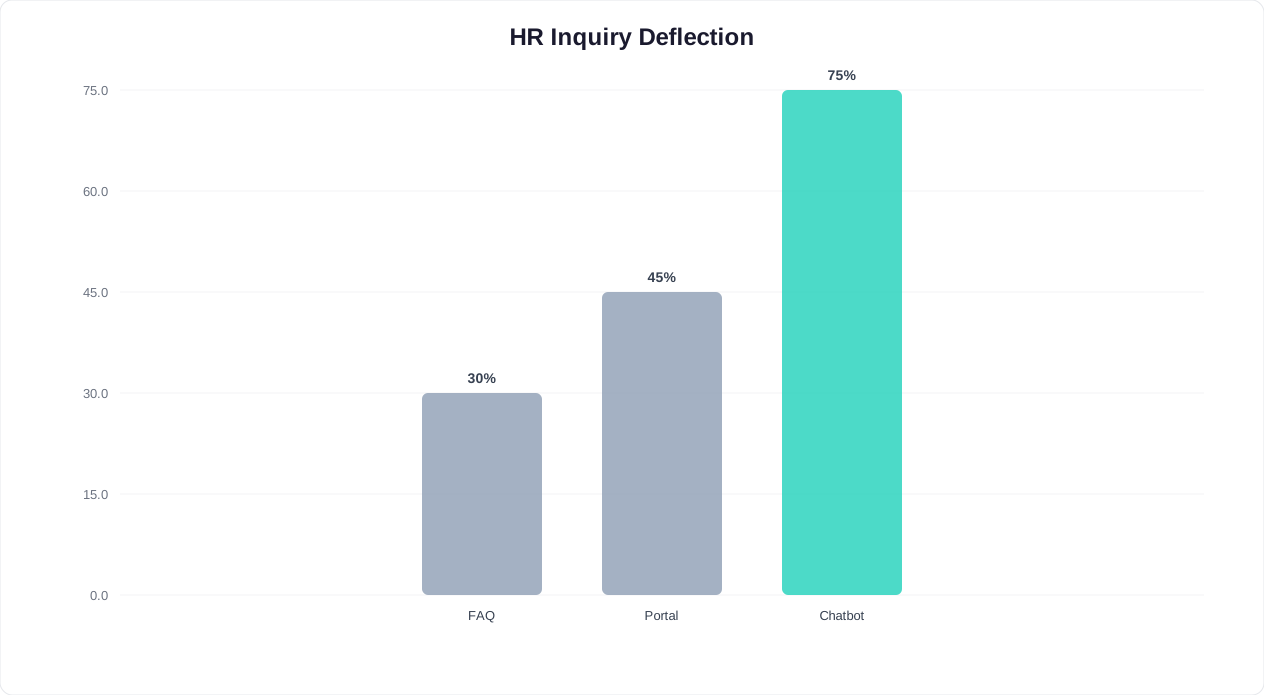
The onboarding problem is not a lack of information -- it is a distribution and accessibility problem. An AI-powered chatbot solves it by making every piece of onboarding knowledge instantly accessible, 24/7, through a conversational interface that new hires already know how to use.
What an Onboarding Chatbot Actually Does
An employee onboarding chatbot is not a simple FAQ page wrapped in a chat bubble. It is an intelligent, context-aware assistant that understands natural language, pulls answers from your company's knowledge base, guides new hires through multi-step processes, and escalates to a human when the situation requires it. Think of it as a tireless HR coordinator who has memorized every policy document, every process workflow, and every answer your HR team has ever given -- and who is available to every new hire simultaneously, at any hour.
Core Capabilities
Instant policy and benefits lookup. When a new hire asks "What is the parental leave policy?" the chatbot retrieves the relevant policy from your knowledge base, presents the key details (duration, eligibility, pay continuation), and offers to share the full policy document. It handles follow-up questions in context: "Does that apply to adoptive parents too?" gets a direct answer without the new hire needing to re-explain what they are asking about.
Guided process completion. Onboarding involves dozens of forms, enrollments, and setup steps. The chatbot walks new hires through each one conversationally: "Let us get your benefits enrollment done. First, are you enrolling just yourself, or do you have dependents to add?" It collects information step by step, validates inputs, and either submits directly to your HRIS or generates a pre-filled form for the employee to review and sign.
Proactive task reminders. Instead of waiting for new hires to remember their compliance training deadline, the chatbot sends proactive messages: "Reminder: your anti-harassment training module is due by Friday. It takes about 25 minutes. Want me to send you the link now?" This eliminates the HR burden of chasing compliance completions.
IT troubleshooting and setup guidance. The first-week IT experience is often the most frustrating part of onboarding. The chatbot handles common IT questions -- VPN setup, printer configuration, software installation, password resets -- with step-by-step instructions tailored to the employee's operating system and role. For issues beyond its scope, it creates a help desk ticket with all relevant details pre-filled.
Culture and social integration. Beyond logistics, the chatbot introduces new hires to company culture: team traditions, communication norms, Slack channel recommendations, and upcoming social events. "Your team usually grabs lunch together on Wednesdays at noon in the second-floor cafe. Want me to remind you this Wednesday?"
How It Differs From a Static FAQ
| Capability | Static FAQ / Wiki | AI Onboarding Chatbot |
|---|---|---|
| Finding answers | Employee must search, browse, and read | Employee asks a question in plain language and gets a direct answer |
| Follow-up questions | Start a new search for each question | Maintains conversational context across questions |
| Process guidance | Read instructions and follow them alone | Interactive step-by-step walkthrough with validation |
| Proactive outreach | None -- employee must visit the page | Sends reminders, deadlines, and suggestions on schedule |
| Personalization | Same content for everyone | Tailored to role, department, location, and start date |
| Availability | Available when employee remembers to check | Available 24/7 across Slack, Teams, web, and mobile |
| Escalation | Employee must find and contact HR manually | Seamless handoff to a live HR representative with full context |
| Analytics | Page views only | Question patterns, knowledge gaps, satisfaction scores |
According to Gallup's research on employee engagement, only 12% of employees strongly agree their organization does a great job onboarding new hires. The organizations that invest in structured, accessible, and responsive onboarding -- the kind a chatbot enables at scale -- see dramatically higher engagement and retention in the first year.
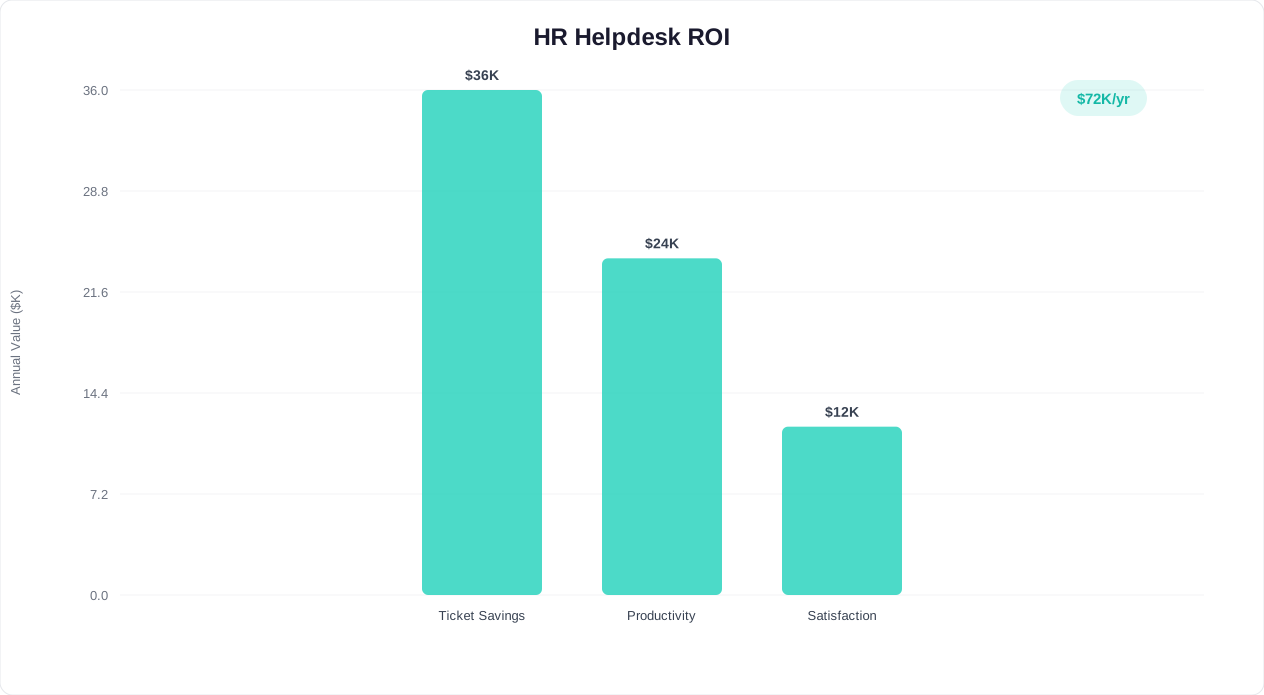
The onboarding chatbot transforms HR from a reactive help desk into a proactive, scalable onboarding engine. Instead of answering the same 50 questions every time someone new joins, HR teams can focus on the strategic work that actually moves the needle: improving the onboarding program, building manager training, and creating culture-building initiatives.
Related: Chatbot for SaaS Onboarding: How to Reduce Churn in the First 7 Days (2026)
Building Your Onboarding Knowledge Base
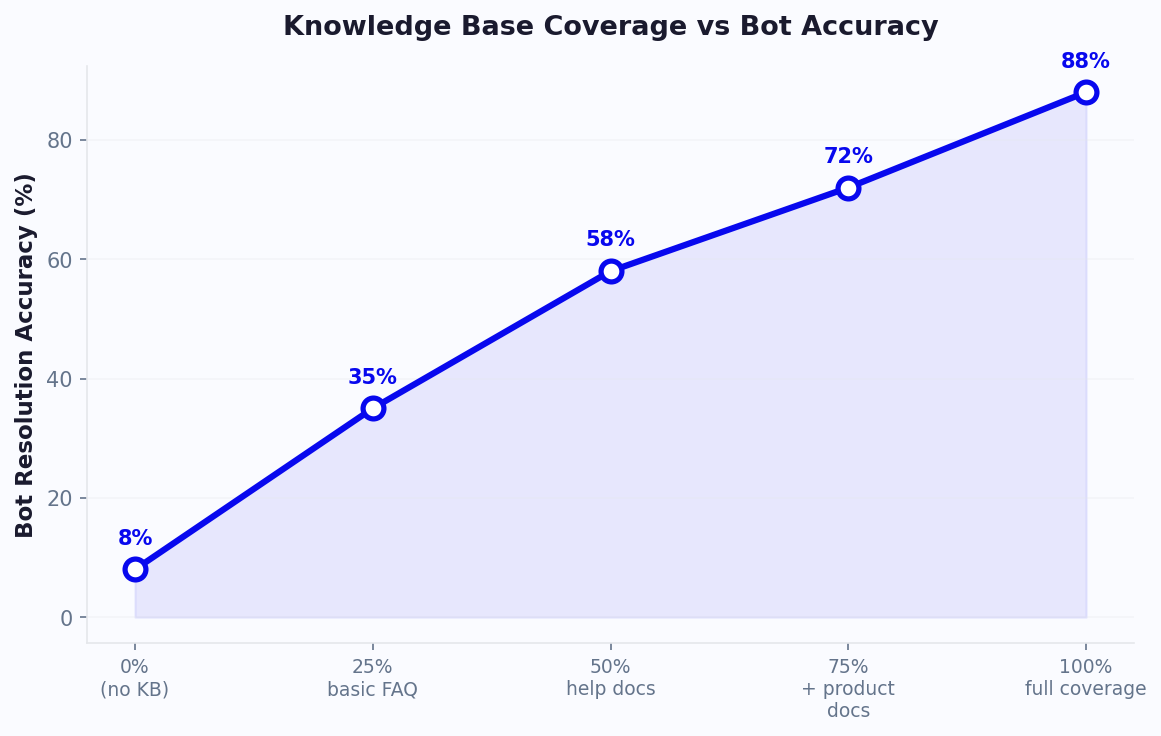
An onboarding chatbot is only as good as the knowledge base behind it. Feed it incomplete, outdated, or poorly organized information and you get an assistant that frustrates new hires with wrong answers. Build a comprehensive, well-structured knowledge base and you get an assistant that resolves 80%+ of onboarding questions instantly and accurately.
The Content Audit: What to Include
Start by auditing every piece of content a new hire might need in their first 90 days. Work through these categories systematically:
1. Company policies and handbook content. Every policy in your employee handbook should be in the knowledge base -- not as a single monolithic PDF, but broken into discrete, searchable topics. Each policy should be a separate knowledge article: PTO policy, remote work policy, expense reimbursement policy, code of conduct, social media policy, and so on. Include the policy text, eligibility criteria, exceptions, and the process for requesting approvals or exceptions.
2. Benefits documentation. Health insurance plan summaries (medical, dental, vision), 401(k) or pension details, HSA/FSA information, life insurance, disability coverage, employee assistance programs, tuition reimbursement, commuter benefits, and wellness programs. For each benefit, include: what it covers, eligibility and enrollment dates, how to enroll, how to make changes, and where to find the full plan documents.
3. IT and systems setup. Step-by-step guides for every system a new hire needs to access: email setup, VPN configuration, software installations (by role), SSO login instructions, password management, printer setup, phone system setup, and security protocols. Include screenshots and platform-specific instructions (Mac vs. Windows vs. Linux).
4. Payroll and compensation. Pay schedule, direct deposit setup, time tracking system instructions, overtime policies, bonus structures, equity vesting schedules, and how to read a pay stub. Include tax form information (W-4 updates, state tax forms) and the process for reporting payroll discrepancies.
5. Organizational information. Org charts, department descriptions, key contacts for each function (HR, IT, facilities, finance), office maps, conference room booking procedures, parking and transit information, cafeteria hours and options, and emergency procedures.
6. Role-specific content. This is where the knowledge base becomes personalized. Create content collections for each department or role type: sales processes, engineering development workflows, marketing tools and templates, customer success playbooks, and so on. The chatbot serves the relevant collection based on the new hire's role.
Structuring Content for AI Retrieval
How you structure your knowledge base content directly affects how accurately the chatbot retrieves and presents answers. Follow these principles:
- One topic per article. Do not combine PTO policy and sick leave policy in one article. The chatbot needs discrete topics to match against user questions accurately.
- Lead with the answer. The first sentence of every article should contain the core fact. "Employees accrue 15 days of PTO per year, starting from their hire date." Supporting details, exceptions, and process steps follow.
- Use natural language headings. Instead of "Section 4.2.1 -- Paid Time Off Accrual Schedule," use "How much PTO do I get and when does it start accruing?" This matches how employees actually phrase their questions.
- Include common variations. Tag each article with alternate phrasings: "PTO," "vacation days," "time off," "leave," "days off." This improves natural language processing matching accuracy.
- Mark content with metadata. Every article should have: department relevance (all, engineering, sales, etc.), location relevance (all offices, NYC office, remote), employment type (full-time, part-time, contractor), and last-updated date.
Keeping the Knowledge Base Current
Stale content is the fastest way to destroy trust in your onboarding chatbot. Implement these maintenance practices:
| Maintenance Activity | Frequency | Responsible Party |
|---|---|---|
| Review and update benefits content | Annually (open enrollment) + as changes occur | Benefits administrator |
| Review company policies | Quarterly | HR manager |
| Update IT setup guides | Monthly + after any tool change | IT support lead |
| Refresh org charts and contacts | Monthly | HR coordinator |
| Review chatbot analytics for unanswered questions | Weekly | HR operations / chatbot admin |
| Add new content for new policies or tools | As needed | Subject matter expert + HR |
The weekly review of unanswered questions is especially important. When the chatbot cannot answer a question, it logs it. Those logs are a goldmine: they tell you exactly what content is missing from your knowledge base. A healthy onboarding chatbot should have a knowledge coverage rate of 85%+ within 90 days of deployment, meaning it can answer 85% or more of incoming questions without escalation.
Conferbot's knowledge base feature lets you upload documents in bulk -- PDFs, Word files, web pages, spreadsheets -- and the AI automatically chunks, indexes, and makes them searchable through the chatbot. You do not need to manually rewrite every policy into a chat-friendly format. The AI handles the extraction and presents answers in conversational language, citing the source document so employees can verify the information.
Related: How to Train a Chatbot on Your Knowledge Base: Step-by-Step Guide for 2026
Day 1, Week 1, Month 1: Automated Onboarding Sequences
Effective onboarding is not a one-day event -- it is a structured journey that unfolds over the first 90 days of employment. The chatbot serves as the new hire's constant companion throughout this journey, delivering the right information and tasks at the right time. Here is the detailed sequence framework.
Pre-Day 1: Before the Start Date
The onboarding experience should begin before the new hire's first day. Once an offer is accepted, the chatbot can reach the incoming employee via WhatsApp or email:
- Welcome message (offer acceptance + 1 day): "Welcome to [Company], [Name]! We are excited to have you join us on [start date]. I am your onboarding assistant and I will help you get set up and answer any questions along the way. To get started, here are a few things you can take care of before your first day."
- Pre-boarding tasks (1-2 weeks before start): Background check authorization, tax forms (W-4, I-9), direct deposit setup, emergency contact information, equipment preferences (Mac or PC, monitor size), parking pass application, and building access badge photo upload.
- Logistics confirmation (3 days before start): "Your first day is this Monday. Here is what to expect: arrive at [location] by [time], ask for [contact] at reception, bring [documents]. Your laptop will be ready at your desk. Any questions before Monday?"
Day 1: First Day Experience
Day 1 is information overload. The chatbot's role is to be the calm, always-available guide through the chaos:
Morning (first 2 hours):
- "Good morning, [Name]! Welcome to your first day. Let me help you get set up. First, let us make sure your laptop is working. Can you connect to the WiFi? The network name is [network] and the password is [password]."
- Walk through email setup, Slack/Teams login, calendar access, and key system access verification
- Share the day's schedule: orientation sessions, team lunch, manager 1:1 time
Midday:
- "How is your morning going? By now you should have access to email and Slack. A few things to do before end of day: complete your benefits enrollment (I can walk you through it now), review the employee handbook, and set up your profile photo in [HR system]."
- Offer benefits enrollment walkthrough -- the most time-sensitive first-day task
End of day:
- "Great first day! Here is a recap of what you completed today: [checklist with checkmarks]. Tomorrow, we will tackle: [next day's priorities]. One last thing -- here is a list of Slack channels to join for your role: [channel list]. See you tomorrow!"
Week 1: Getting Productive
The chatbot shifts from logistics to productivity enablement:
| Day | Chatbot Focus | Key Actions |
|---|---|---|
| Day 2 | Tools and systems | Complete remaining software setup, security training, tool-specific tutorials for role |
| Day 3 | Team integration | Introduce team norms, communication preferences, standing meetings, shared documents |
| Day 4 | Process workflows | Role-specific processes: how to submit work, approval chains, collaboration tools |
| Day 5 | Week 1 checkpoint | Satisfaction survey, outstanding questions, preview of Week 2 goals |
Each day, the chatbot sends a morning briefing ("Here is what is on your plate today") and an end-of-day recap ("Here is what you accomplished and what is next"). This structure eliminates the anxiety of not knowing what you are supposed to be doing -- a leading cause of early-tenure disengagement.
Weeks 2-4: Building Competence
The chatbot's cadence shifts from daily to every-few-days, focusing on deeper knowledge and early performance:
- Week 2: Advanced tool training, introduction to cross-functional teams, first project or assignment briefing, compliance training modules (harassment prevention, data security, workplace safety)
- Week 3: 30-day goal setting with manager (chatbot sends preparation prompts: "Your 30-day check-in with [Manager] is Thursday. Here are conversation starters: What is going well? Where do you need more support? What resources would help?"), department-specific deep dives
- Week 4: 30-day satisfaction survey, knowledge assessment (the chatbot quizzes the new hire on key policies and processes to identify gaps), peer feedback collection
Month 2-3: Independence and Integration
By month two, the chatbot moves to a support role rather than a guide role:
- Month 2: Performance review process orientation, professional development resources (tuition reimbursement, conference budget, learning platforms), introduction to employee resource groups and committees, mid-probation checkpoint survey
- Month 3: 90-day comprehensive review preparation, transition from "new hire" status, final onboarding survey with detailed feedback collection, invitation to become a peer mentor for future new hires
The 90-day onboarding survey is critical for continuous improvement. The chatbot collects structured feedback: "On a scale of 1-10, how prepared did you feel after your first week? What was the most helpful resource during onboarding? What information was hardest to find? What would you change about the onboarding experience?" This data feeds directly into analytics dashboards that HR uses to refine the program.
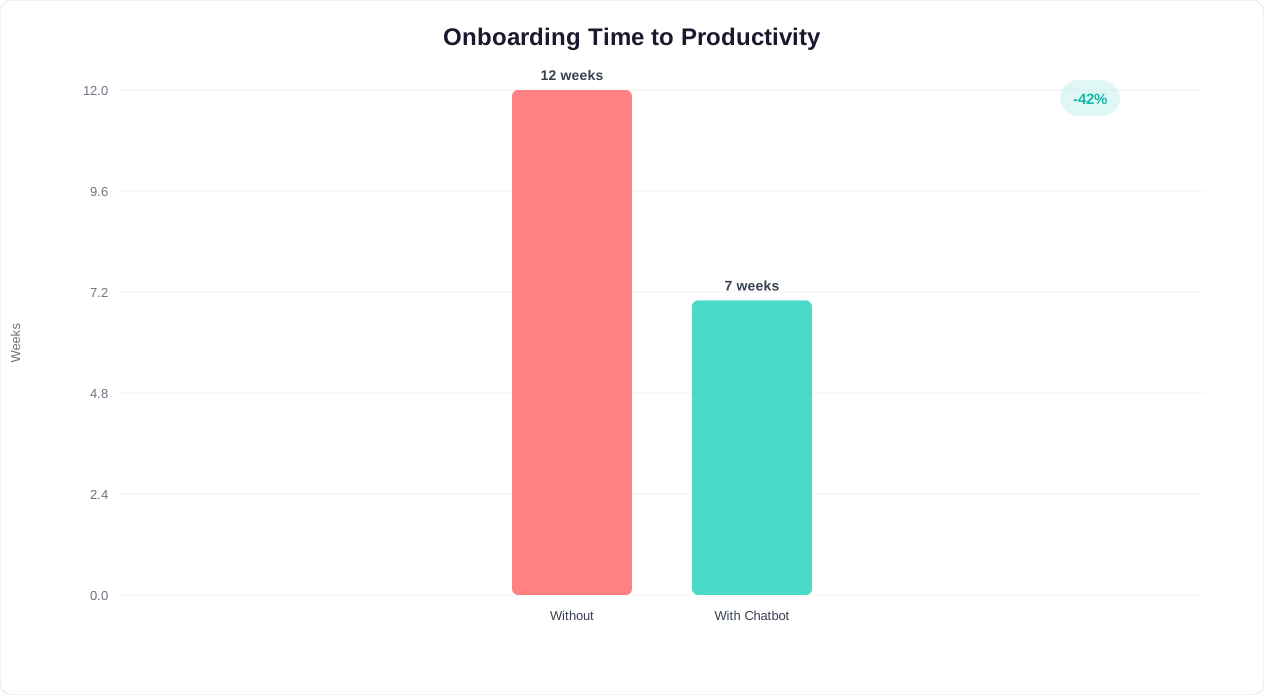
The retention impact of this structured approach is massive. SHRM reports that 69% of employees are more likely to stay with a company for three years if they experience great onboarding. The chatbot makes great onboarding repeatable, consistent, and scalable -- whether you are onboarding 5 people a month or 500.
Related: Chatbot Analytics: 10 Metrics You Must Track to Prove ROI in 2026
Integrating With Slack, Teams, and Your Company Wiki
An onboarding chatbot is only effective if new hires actually use it. That means deploying the chatbot where employees already spend their time -- not on a standalone website they have to remember to visit. For most organizations, that means Slack, Microsoft Teams, and potentially the company intranet or wiki.
Slack Deployment
Slack is the default communication platform for technology companies, startups, and an increasing number of enterprises. Deploying your onboarding chatbot as a Slack app provides several advantages:
- Zero adoption friction. New hires are already in Slack from Day 1. They do not need to download another app, create another account, or remember another URL. The chatbot is simply there, ready to DM.
- Contextual help. The chatbot can be added to onboarding-specific Slack channels (#new-hires, #onboarding-2026-q2) where it monitors conversations and proactively offers answers when it detects questions it can resolve.
- Threaded responses. When a new hire asks a question in a public channel and the chatbot answers, the entire team benefits. Other new hires see the Q&A, and experienced employees can correct or supplement the chatbot's response.
- Slash commands. New hires can use commands like
/onboard benefits,/onboard pto, or/onboard it-helpfor quick lookups without leaving their current conversation.
The Conferbot integrations hub provides a native Slack integration that takes less than 15 minutes to configure. Connect your Slack workspace, select the channels where the chatbot should be active, and map your knowledge base to the bot's response library.
Microsoft Teams Deployment
For organizations on the Microsoft 365 ecosystem, Teams is the natural deployment channel. The Teams integration offers:
- Personal chat with the bot. Each new hire gets a private chat with the onboarding bot in their Teams sidebar, functioning like a personal HR assistant.
- Tab integration. Embed the chatbot as a tab within the onboarding Team, putting it alongside shared documents, training schedules, and team resources.
- Adaptive cards. Teams supports rich interactive cards that the chatbot uses to present forms, checklists, and multi-step workflows directly in the chat interface -- no need to redirect to external pages.
- Calendar integration. The chatbot can schedule and send Teams meeting invites for orientation sessions, manager check-ins, and training sessions directly through the chat.
Company Wiki and Intranet Integration
Many organizations maintain a Confluence, Notion, or SharePoint-based knowledge base. Rather than duplicating all that content into the chatbot, integrate directly:
- Live content sync. The chatbot pulls answers from your existing wiki in real time, ensuring that when a wiki page is updated, the chatbot's responses update automatically. No duplicate maintenance.
- Source attribution. When the chatbot answers a question using wiki content, it cites the source page with a direct link: "Based on the IT Setup Guide (last updated May 12, 2026): [answer]. View the full guide here: [link]." This builds trust and gives employees a path to deeper information.
- Gap detection. When the chatbot cannot find an answer in the wiki, it flags the question as a content gap. Over time, this creates a prioritized list of wiki pages that need to be created or updated.
Multi-Channel Deployment Strategy
Most organizations benefit from deploying the onboarding chatbot across multiple channels simultaneously. Here is the recommended approach:
| Channel | Use Case | When to Deploy |
|---|---|---|
| Slack or Teams | Primary daily interaction channel for all employees | Always -- this is your core deployment |
| Pre-boarding communication before the new hire has corporate system access | Between offer acceptance and Day 1 | |
| Company intranet widget | Embedded on the HR portal or onboarding hub page | Always -- catches employees browsing the intranet for answers |
| Messenger | Alternative pre-boarding channel for employees who prefer Messenger | Between offer acceptance and Day 1 |
| Proactive onboarding sequences and reminders | Supplement to primary channel, especially for compliance deadlines | |
| Website widget | For contractors, temporary workers, or candidates in the offer stage | As needed based on workforce composition |
The key principle is meet employees where they are. A new hire in their first week should never have to think about how to reach the onboarding assistant. It should be present in whatever tool they are already using.
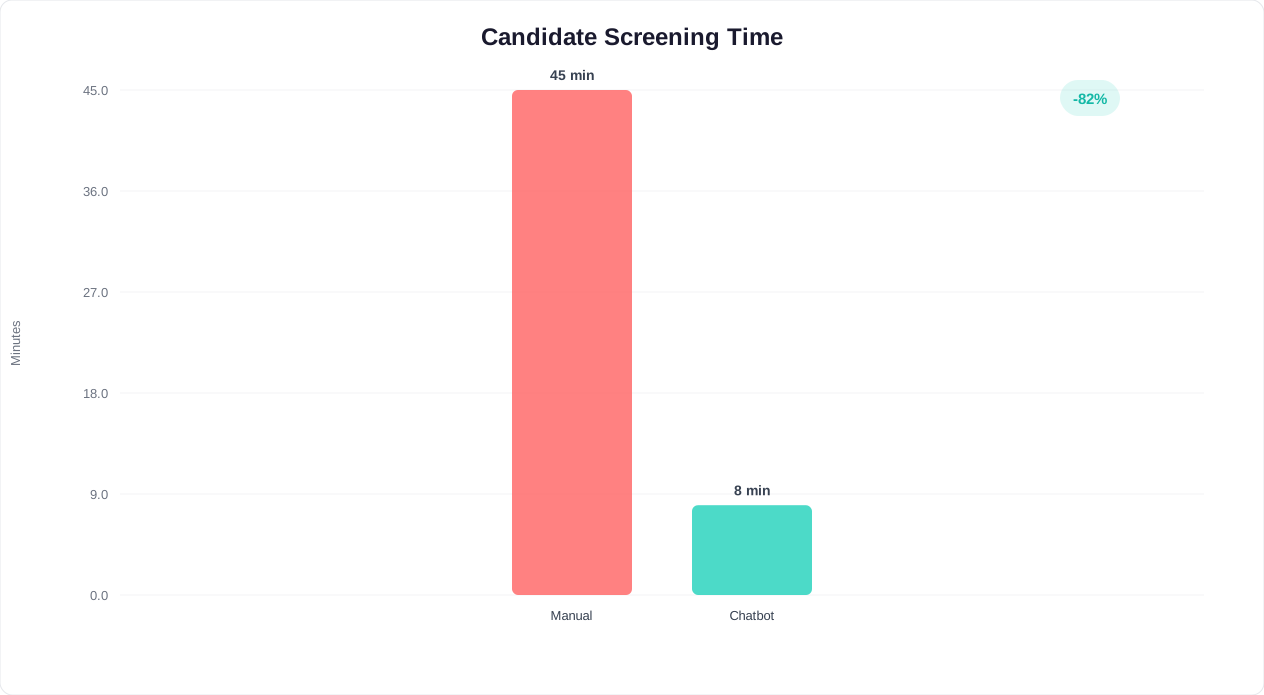
With Conferbot's integrations, you configure the chatbot once and deploy it to every channel from a single dashboard. The knowledge base, conversation flows, and analytics are unified -- regardless of which channel the employee uses to interact.
Related: How to Calculate Chatbot ROI: Formula, Benchmarks, and Free Calculator | AI Chatbots for HR and Recruiting
Privacy and Data Handling for Internal Chatbots
Internal chatbots handle sensitive employee data -- personal identification information, salary details, benefits elections, medical disclosures, and performance information. Privacy and compliance are not optional features; they are foundational requirements. Getting this wrong exposes the organization to legal liability, regulatory penalties, and a catastrophic loss of employee trust.
Data Classification Framework
Before deploying an internal onboarding chatbot, classify the types of data it will encounter:
| Data Classification | Examples | Handling Requirements |
|---|---|---|
| Public internal | Company policies, office hours, org chart, holiday calendar | No special restrictions -- chatbot can surface freely |
| Role-restricted | Department-specific processes, project details, client information | Chatbot verifies employee's department/role before sharing |
| Personally identifiable (PII) | Employee ID, home address, date of birth, SSN (partial), bank details | Encrypted at rest and in transit, access logged, minimal retention |
| Sensitive personal | Medical information (benefits elections), disability accommodations, salary | Strict access controls, audit trails, no logging of conversation content |
| Confidential HR | Performance reviews, disciplinary records, investigation details | Never surfaced through chatbot -- escalate to HR immediately |
The chatbot must be configured with clear boundaries around what it can and cannot share. For example, the chatbot can explain the health insurance plan options, but it should never display or confirm an employee's specific plan election in an unverified conversation. For sensitive data retrieval, the chatbot should require re-authentication: "I can look up your benefits election. For security, please verify your employee ID and date of birth."
Compliance Considerations by Jurisdiction
GDPR (EU and UK employees). If your organization has employees in Europe, your onboarding chatbot must comply with GDPR requirements:
- Provide a clear privacy notice before the chatbot collects any personal data, explaining what data is collected, why, and how long it is retained
- Implement the right to access: employees can request a copy of all data the chatbot has collected about them
- Implement the right to erasure: employees can request deletion of their chatbot interaction history
- Conduct a Data Protection Impact Assessment (DPIA) before deploying the chatbot
- Ensure data processing agreements are in place with the chatbot vendor
CCPA/CPRA (California employees). Similar requirements for California-based employees: notice at collection, right to know, right to delete, and opt-out rights for data sharing.
HIPAA (if benefits data includes health information). If the chatbot handles any health-related information -- even benefits enrollment questions about health plan options -- ensure that the chatbot platform is HIPAA-compliant or that health data is segregated from the chatbot's data store entirely.
SOC 2 and ISO 27001. Enterprise organizations should verify that the chatbot platform holds SOC 2 Type II and/or ISO 27001 certifications, ensuring that organizational and technical controls meet enterprise security standards.
Technical Security Requirements
- Encryption: All data in transit must use TLS 1.2+ encryption. All data at rest must use AES-256 encryption.
- Authentication: The chatbot must authenticate employees through your organization's SSO (SAML, OAuth 2.0) before providing access to any non-public information.
- Access logging: Every chatbot interaction that involves sensitive data must be logged with timestamp, employee ID, query type, and data accessed. Logs must be retained per your organization's retention policy.
- Data residency: For multinational organizations, ensure that employee data is stored in the appropriate geographic region per local regulations.
- Conversation retention: Define clear retention policies for chatbot conversations. General onboarding Q&A might be retained for 90 days for analytics; conversations involving PII should be retained only as long as necessary and then purged.
- Vendor security: Evaluate the chatbot vendor's security practices, including penetration testing, vulnerability management, incident response procedures, and sub-processor agreements.
Building Employee Trust
Technical compliance alone is not enough. Employees need to feel comfortable asking the chatbot questions -- including sensitive ones about benefits, accommodations, or workplace concerns. Build trust through transparency:
- Clearly state in the chatbot's welcome message what data it collects and what it does not: "I am here to help with onboarding questions. I do not store your personal conversations, and I will never share your questions with your manager."
- When the chatbot encounters a topic outside its scope (e.g., a harassment complaint), it should acknowledge the sensitivity and route appropriately: "This is an important concern that needs human attention. I am connecting you directly with [HR contact] through a private, confidential channel."
- Provide an easy way for employees to view and delete their chatbot interaction history
- Publish an internal FAQ about the chatbot itself: what data it accesses, who can see the conversations, and how to report concerns
A well-implemented privacy framework does not just protect the organization -- it increases chatbot adoption. When employees trust that the chatbot is confidential and secure, they are more likely to use it for questions they might otherwise be embarrassed to ask a human HR representative, leading to better information access and a better onboarding experience.
Template: Employee Onboarding Chatbot Flow
Below is a ready-to-implement chatbot flow template designed for a mid-market company (100-2,000 employees) onboarding new full-time employees. You can adapt this template directly in Conferbot's drag-and-drop builder or use it as a blueprint for your own design.
Flow Overview
The flow consists of five interconnected modules, each triggered by the onboarding stage:
- Module 1: Pre-boarding (offer acceptance to Day 1) -- administrative setup and logistics
- Module 2: Day 1 orientation -- systems access, benefits enrollment, team introductions
- Module 3: Week 1 foundation -- tool training, process orientation, compliance modules
- Module 4: Month 1 integration -- deeper learning, goal setting, first performance check-in
- Module 5: 90-day graduation -- final assessment, feedback collection, mentor transition
Module 1: Pre-boarding Flow
Trigger: Offer accepted (HR marks new hire in HRIS)
Channel: WhatsApp or personal email (employee does not have corporate access yet)
Bot: Welcome to [Company], [Name]! I am your onboarding assistant.
     I will guide you through everything you need before your
     start date on [date]. Let us start with a few quick items.

Bot: First, we need to complete some paperwork. I will walk you
     through each form. Ready to begin?
     [Start paperwork] [I have questions first]

--- If "Start paperwork" ---
Bot: Great. Let us begin with your tax forms.
     [Walks through W-4, I-9, state tax forms step by step]
     [Collects direct deposit information]
     [Collects emergency contact details]

Bot: Paperwork complete! Next, let us get your equipment sorted.
     What type of computer do you prefer?
     [Mac] [Windows] [No preference]

Bot: Got it. And would you like a standing desk or standard desk?
     [Standing desk] [Standard desk]

Bot: Perfect. Everything is ordered and will be ready at your desk
     on [start date]. Three days before your start date, I will
     send you arrival details. Any questions in the meantime?
     Just message me here anytime.
Module 2: Day 1 Orientation Flow
Trigger: Start date, 8:00 AM
Channel: Slack or Microsoft Teams (now on corporate systems)
Bot: Good morning, [Name]! Day 1 -- here we go.
     Here is your schedule for today:
     - 9:00 AM: Team welcome in [room/link]
     - 10:30 AM: IT setup session
     - 12:00 PM: Lunch with your team at [location]
     - 2:00 PM: HR orientation
     - 3:30 PM: 1:1 with [Manager name]

Bot: Before your first meeting, let us get your systems running.
     Can you open [email system] and confirm you can log in?
     [Yes, I am in] [I need help logging in]

--- If "I need help" ---
Bot: No problem. Try these steps:
     1. Go to [URL]
     2. Click "Sign in with SSO"
     3. Enter your email: [their email]
     4. Use the temporary password from the email titled
        "Your [Company] Account"
     Still not working?
     [Retry] [Connect me to IT support]

--- After systems confirmed ---
Bot: You are all set on systems. Now, the most time-sensitive
     task today: benefits enrollment. Your enrollment window
     closes in 30 days, but starting early means your coverage
     begins on [date]. Want to walk through it now?
     [Yes, let us do benefits] [I will do it later today]
     [I have questions about the plans first]
Module 3: Week 1 Foundation Flow
Trigger: Daily at 9:00 AM, Days 2-5
Channel: Slack or Teams
--- Day 2 Morning ---
Bot: Morning, [Name]! Day 2 focus: getting your tools set up.
     Based on your role in [Department], you will need access to:
     - [Tool 1] -- [what it is used for]
     - [Tool 2] -- [what it is used for]
     - [Tool 3] -- [what it is used for]
     Let us set them up one at a time. Ready?
     [Let us go] [I already have some set up]

--- Day 5 End of Week ---
Bot: You made it through Week 1! Here is what you accomplished:
     [Checklist of completed items with checkmarks]

     Quick check-in: How are you feeling about your first week?
     [Great -- I feel supported]
     [Good, but I have some unanswered questions]
     [Honestly, a bit overwhelmed]

--- If "overwhelmed" ---
Bot: That is completely normal -- there is a lot to absorb in
     Week 1. Here is what I recommend:
     1. Focus only on [top priority for their role] next week
     2. Save questions and bring them to your [Manager] 1:1
     3. Remember: I am here 24/7 for any question, no matter
        how small
     Want me to schedule a 15-minute call with [HR buddy]
     to talk through what is on your mind?
     [Yes, schedule a call] [No, I think I will be okay]
Module 4: Month 1 Integration Flow
Trigger: Weekly on Monday mornings, Weeks 2-4
--- Week 3 ---
Bot: You are three weeks in! Time to start thinking about goals.
     Your 30-day check-in with [Manager] is on [date].
     Here is a template to prepare:
     - 3 things that are going well
     - 2 areas where you need more support
     - 1 question about team expectations
     Want me to help you think through any of these?
     [Help me prepare] [I will prep on my own] [Remind me later]

--- Week 4 ---
Bot: One month in -- congratulations! Let us do a quick pulse check.
     On a scale of 1-10:
     1. How clear are you on your role expectations? [1-10 scale]
     2. How supported do you feel by your manager? [1-10 scale]
     3. How would you rate your onboarding experience? [1-10 scale]

     [Collects responses, flags any score below 7 to HR]
Module 5: 90-Day Graduation Flow
Trigger: Day 85
Bot: [Name], you are approaching your 90-day milestone!
     I have a few final items before you "graduate" from
     onboarding:
     1. 90-day review prep (your review is on [date])
     2. Final onboarding survey (takes 5 minutes)
     3. Optional: sign up to be a peer buddy for future
        new hires
     Which would you like to tackle first?
     [Review prep] [Survey] [Buddy signup]

--- After survey completion ---
Bot: Thank you for the feedback! Your responses help us improve
     onboarding for future team members.

     Going forward, I am still here for any HR, benefits, or
     policy questions -- just message me anytime. Welcome to
     the team, [Name]. You are no longer the new person!
This entire flow can be configured in Conferbot using conditional logic to branch based on employee responses, rich media blocks for document sharing and video walkthroughs, and calendar booking for scheduling check-ins. The flow template handles the structure; your HR team customizes the content to match your organization's specific policies, tools, and culture.
Measuring Onboarding Chatbot Success
Deploying an onboarding chatbot without measuring its impact is like hiring a new employee without ever reviewing their performance. You need clear metrics, consistent tracking, and a feedback loop that drives continuous improvement. Here is the measurement framework that connects chatbot performance to business outcomes.
Tier 1: Chatbot Performance Metrics
These metrics tell you whether the chatbot itself is working correctly -- answering questions accurately, engaging new hires, and resolving issues without human intervention.
| Metric | Definition | Target Benchmark | How to Measure |
|---|---|---|---|
| Resolution rate | Percentage of questions the chatbot answers without escalating to a human | 75-85% | Track escalation events vs. total conversations |
| First-response accuracy | Percentage of first responses rated as helpful or correct by the employee | 90%+ | Post-answer thumbs up/down feedback widget |
| Engagement rate | Percentage of new hires who interact with the chatbot at least once in their first week | 85-95% | Unique users / total new hires per cohort |
| Average interactions per new hire | Number of chatbot conversations per new hire in their first 90 days | 25-40 | Total interactions / total new hires |
| Unresolved query rate | Percentage of questions the chatbot cannot answer at all | Below 15% | Track "I do not know" responses and fallback triggers |
| Satisfaction score (CSAT) | New hire satisfaction with chatbot interactions | 4.2+ out of 5 | End-of-conversation rating prompt |
Tier 2: Onboarding Process Metrics
These metrics measure whether the chatbot is actually improving the onboarding experience and accelerating new hire productivity.
Time to productivity. The number of days from start date until a new hire is performing at a defined productivity benchmark (completing their first project, handling their first customer ticket, closing their first deal). This is the metric that connects onboarding directly to business value.
- Industry average without chatbot: 30-45 days
- With structured chatbot-guided onboarding: 15-25 days
- This represents a 30-50% reduction in ramp-up time
Task completion rate. Percentage of onboarding tasks (benefits enrollment, compliance training, system setup, document submission) completed on time.
- Without chatbot reminders: 60-70% on-time completion
- With chatbot proactive reminders: 90-95% on-time completion
HR time saved. Hours per week that HR staff spend answering routine onboarding questions, before and after chatbot deployment.
- Before chatbot: 15-25 hours per week for a team onboarding 20 new hires per month
- After chatbot: 4-8 hours per week (only complex and sensitive issues)
New hire satisfaction (30-day NPS). Net Promoter Score collected from new hires at the 30-day mark, specifically about their onboarding experience.
- Industry average: NPS 20-30
- With chatbot-assisted onboarding: NPS 45-65
Tier 3: Business Impact Metrics
These are the metrics that justify the chatbot investment to executive leadership.
90-day retention rate. Percentage of new hires still employed after 90 days. Early turnover (within 90 days) is almost always an onboarding failure, and it is extremely expensive -- McKinsey estimates that replacing an employee costs 50-200% of their annual salary.
- Average 90-day retention without structured onboarding: 80-85%
- With chatbot-guided structured onboarding: 93-97%
- For a company with 200 hires per year and an average salary of $75,000, improving 90-day retention by 10 percentage points saves $750,000-$1,500,000 annually in replacement costs
3-year retention rate. The long game. SHRM's widely cited finding that 69% of employees are more likely to stay with a company for three years if they experienced great onboarding makes this the ultimate proof point. Track retention rates by onboarding cohort and compare pre-chatbot and post-chatbot cohorts at the 1-year and 3-year marks.
Cost per onboard. Total cost of onboarding a single new hire, including HR staff time, technology costs, training materials, and lost productivity during ramp-up. The chatbot should reduce this by 30-50%.
Building Your Measurement Dashboard
Use Conferbot's analytics as the foundation, supplemented by data from your HRIS and engagement surveys:
| Dashboard Section | Metrics Displayed | Update Frequency | Audience |
|---|---|---|---|
| Chatbot health | Resolution rate, accuracy, CSAT, unresolved queries | Real-time | HR operations / chatbot admin |
| Onboarding efficiency | Task completion rates, time to productivity, HR time saved | Weekly | HR leadership |
| Knowledge gaps | Top unanswered questions, new topics trending, content staleness | Weekly | Knowledge base maintainers |
| Business impact | Retention rates, cost per onboard, new hire NPS | Monthly / quarterly | CHRO / executive team |
The Continuous Improvement Loop
Measurement without action is vanity metrics. Establish a monthly review cycle:
- Week 1: Pull chatbot analytics -- identify the top 10 unanswered questions and the 5 lowest-rated responses
- Week 2: Update the knowledge base to address unanswered questions; rewrite low-rated responses based on employee feedback
- Week 3: Review onboarding process metrics -- identify any stage where task completion drops below 85% and investigate root causes
- Week 4: Implement chatbot flow improvements, A/B test new message variants, and document changes for the next cycle
Organizations that run this improvement cycle consistently see chatbot resolution rates climb from 65-70% in month one to 85-90% by month six. The chatbot literally gets better with every cohort of new hires, because each cohort's questions and feedback refine the knowledge base and conversation flows.
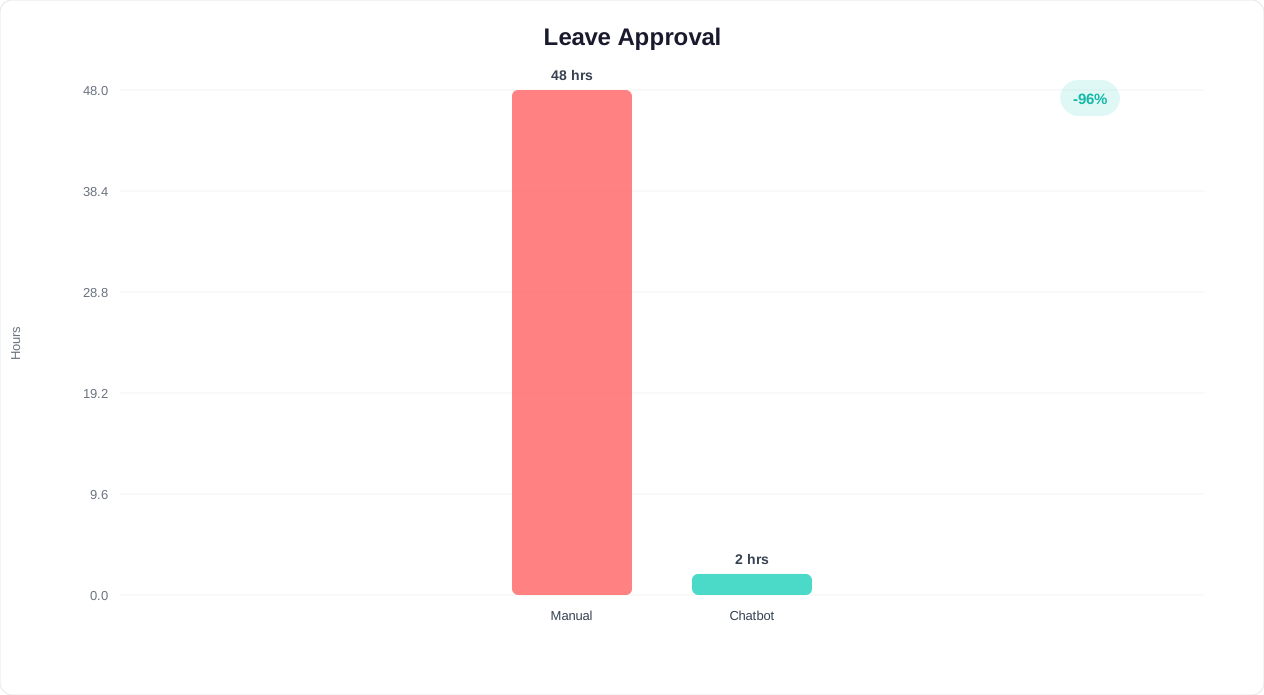
As BambooHR's onboarding research confirms, employees who rate their onboarding highly are 18x more committed to their employer. The bottom line: a well-measured onboarding chatbot is not just an HR tool -- it is a cost savings engine that pays for itself within the first quarter of deployment. By reducing early turnover, accelerating productivity, and freeing HR from repetitive work, the chatbot delivers ROI that compounds with every new hire who passes through your doors.
Was this article helpful?
AI Chatbot for Employee Onboarding FAQ
Everything you need to know about chatbots for ai chatbot for employee onboarding.
About the Author

Conferbot Team specializes in conversational AI, chatbot strategy, and customer engagement automation. With deep expertise in building AI-powered chatbots, they help businesses deliver exceptional customer experiences across every channel.
View all articles