
The Onboarding Drop-Off Problem in SaaS
SaaS onboarding is a leaking bucket. You spend thousands of dollars acquiring each trial user through paid ads, content marketing, and outbound sales -- only to watch the majority of them vanish before they ever experience your product's value. The numbers are stark and well-documented: 40-60% of free trial users never return after their first session. They sign up, poke around for a few minutes, and disappear forever. (source: Gainsight on Time to Value).
This is not a marginal problem. It is the single largest source of revenue leakage in most SaaS businesses. A company spending $50,000 per month on customer acquisition that loses 50% of signups during onboarding is effectively burning $25,000 every month on users who never had a chance to become customers.
Why Trial Users Abandon
The reasons for this dramatic falloff follow a consistent pattern across industries and product categories:
| Drop-Off Reason | Frequency | What the User Experiences |
|---|---|---|
| No clear first step | 34% | Lands on dashboard, sees empty state, does not know what to do |
| Value unclear within first session | 28% | Clicks around features but never reaches the aha moment |
| Setup too complex | 18% | Integration, import, or configuration feels overwhelming |
| Distracted / deprioritized | 12% | Intended to return but forgot, moved on to other priorities |
| Found alternative solution | 8% | Competitor's onboarding was faster or clearer |
Notice that 80% of abandonment is caused by onboarding failures, not product failures. Users leave because they did not get to the value fast enough -- not because the value does not exist. This is the critical distinction. Your product may be exceptional, but if the path to experiencing that exceptionality is unclear, confusing, or slow, users will never discover it.
The Shrinking Attention Window
Research from Pendo's State of Product-Led Growth report shows that the average first session in a SaaS trial lasts just 3-5 minutes. That is the entire window you have to demonstrate value, orient the user, and create enough momentum to bring them back for a second session. Miss that window and recovery rates are dismal: if a user does not return within 48 hours of signup, there is a 75% probability they never will.
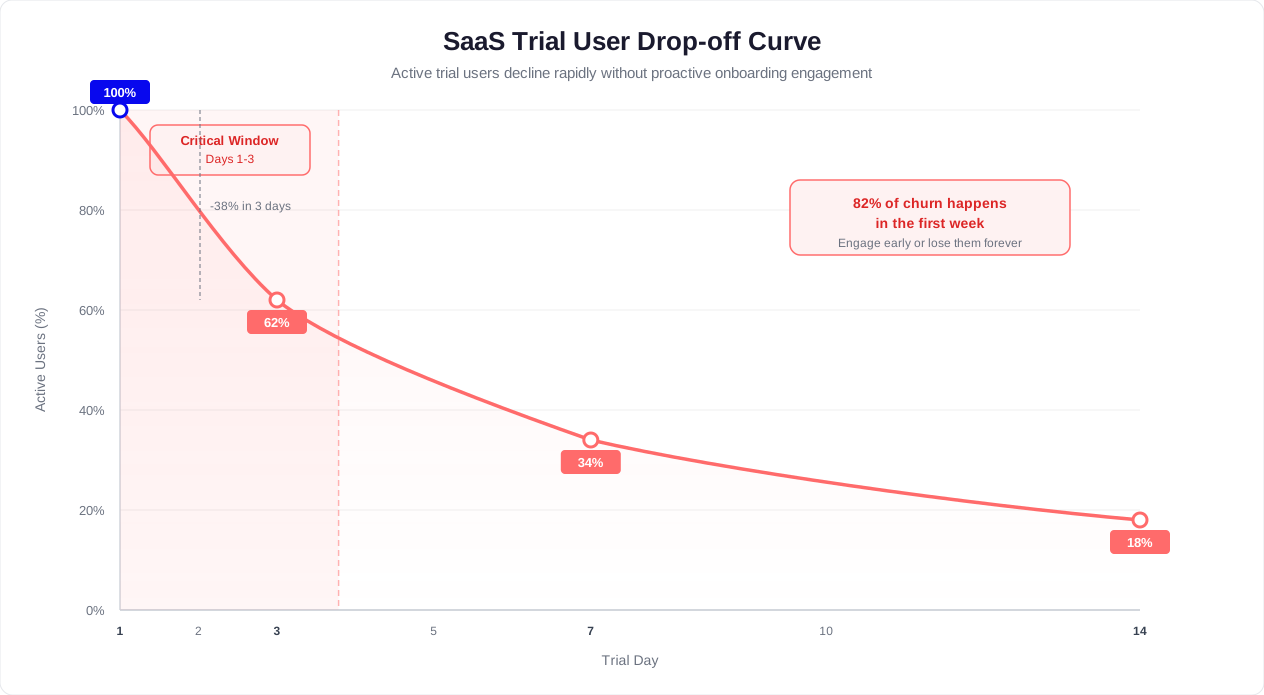
Traditional onboarding methods were not designed for this reality. Email drip sequences have 20-30% open rates and 2-4% click-through rates -- meaning 70-80% of your onboarding content never reaches the user. Static product tours are skipped of users. Knowledge bases are visited by fewer than 1% of trial users in their first session. Human CSM calls scale to perhaps 5% of new signups.
This is where an AI-powered onboarding chatbot fundamentally changes the equation. Unlike emails that arrive hours later or product tours that users dismiss, a chatbot is present inside the product during the critical first session, responding in real time to user behavior and questions. Companies that deploy onboarding chatbots report 40% reductions in first-month churn and 2-3x improvements in activation rates, because the chatbot closes the gap between signup and value realization before the user loses interest. (source: Harvard Business Review on customer retention). G2's customer success software category shows that the top-performing SaaS companies all prioritize automated onboarding as a key driver of net revenue retention.
How a Chatbot Reduces Time-to-Value for New Users
Time-to-value (TTV) is the single most important metric in SaaS onboarding. It measures how long it takes a new user to experience the product's core value for the first time -- the moment they think, "This is useful. I need this." Every hour added to TTV reduces the probability of conversion. Every hour removed increases it. An onboarding chatbot is the most effective tool for compressing TTV because it delivers personalized, real-time guidance that adapts to each user's pace, goals, and stumbling points. (source: Mixpanel on user onboarding metrics).
Defining the Aha Moment
Before a chatbot can accelerate time-to-value, you need to define what "value" means for your product. This is the activation milestone -- the specific action most correlated with long-term retention and conversion. Examples:
- Project management tool: Create a project, add 3 tasks, and invite a team member
- CRM: Import contacts and log the first interaction
- Analytics platform: Connect a data source and view the first report
- Chatbot platform: Build a bot, add 5 responses, and deploy to a website
- Email marketing tool: Import a list and send the first campaign
The chatbot's entire onboarding flow should be reverse-engineered from this activation milestone. Every message, every prompt, every interaction moves the user one step closer to that moment.
The Activation Acceleration Framework
An onboarding chatbot compresses TTV through four mechanisms:
1. Immediate goal identification. Within the first two messages, the chatbot identifies the user's primary intent: "What brings you to [Product] today?" with 3-4 quick-select options mapped to your core use cases. This eliminates the wandering phase where users explore aimlessly. Instead of clicking through menus trying to figure out where to start, the user is immediately routed to the fastest path to their specific goal.
2. Step-by-step guided completion. Once the goal is identified, the chatbot walks the user through each step conversationally. Not a list of instructions -- a dialogue. "Great, let us set up your first project. What should we name it?" The chatbot collects inputs, triggers actions in the product, validates completion, and bridges to the next step. Users never face a blank page wondering what to type or click.
3. Contextual obstacle removal. When a user stalls -- spends more than 90 seconds on a step, clicks back and forth, or explicitly asks a question -- the chatbot intervenes with targeted help. "Having trouble with the CSV import? The most common issue is date formatting. Here is how to fix it in 30 seconds." This prevents the silent frustration that causes users to close the tab and never return.
4. Progress reinforcement. After each completed step, the chatbot reinforces momentum: "Done! You are 3 of 4 steps from having your first [output] ready. Most users who reach this point become long-term customers. Ready for the next step?" This social proof and progress framing creates psychological commitment to completing the journey.
Before and After: TTV Comparison
| Metric | Without Chatbot | With Onboarding Chatbot | Improvement |
|---|---|---|---|
| Median time to activation | 3-5 days | 4-12 hours | 60-85% faster |
| Users reaching activation in first session | 8-12% | 30-45% | a substantial increase |
| Activation rate (total, within trial period) | 15-25% | 40-65% | a substantial increase |
| Steps completed per first session | 1.5 average | 4.2 average | far more |
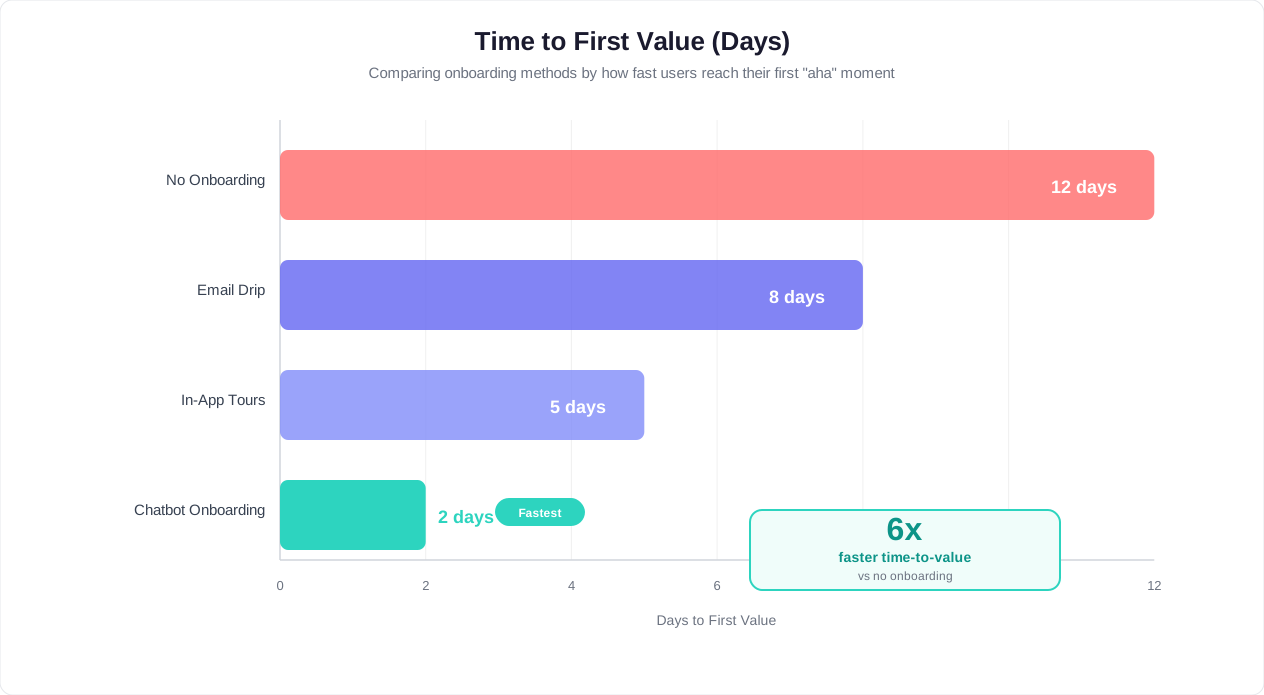
The compounding effect is significant. Users who activate faster are far more likely to convert to a paid plan because they have experienced real value before the trial period ends. They are not converting on faith -- they are converting because they already depend on the product. A chatbot that shaves 3 days off your median TTV does not just improve onboarding metrics; it directly increases monthly recurring revenue.
With Conferbot's conditional logic, you can build branching activation flows that adapt in real time. If a user selects "I am a marketer" in the welcome message, the chatbot routes them through marketing-specific setup steps. If they select "I am evaluating for my team," the chatbot shifts to a value demonstration flow with sample data. Every user gets a personalized fast track to their specific aha moment.
Related: AI Chatbot for Employee Onboarding: Automate HR Questions and Speed Up Day One
Proactive vs Reactive: Triggering Help at the Right Moment
The difference between a chatbot that reduces churn and a chatbot that users ignore comes down to timing. A reactive chatbot sits in the corner waiting for users to ask questions -- and since fewer than 5% of struggling users proactively seek help, it misses the vast majority of opportunities to prevent abandonment. A proactive chatbot monitors user behavior and intervenes at precisely the moments when help will have the greatest impact on activation and retention.
The Trigger Framework
Proactive chatbot triggers fall into four categories, each mapped to a different onboarding risk signal:
1. Inactivity triggers. These fire when a user stops progressing, signaling confusion, distraction, or loss of interest.
- Session stall (2+ minutes idle on an action page): "Need a hand with [current page feature]? Most users complete this step in about 90 seconds. Want a quick walkthrough?"
- Day 1 no-return (24 hours since signup, no second session): Message via WhatsApp or email: "Hey [Name], you started setting up [Product] yesterday. You are just 2 steps away from [specific value]. Want to pick up where you left off?" [Resume setup] [Remind me tomorrow]
- Mid-trial absence (3+ days inactive): "We noticed you have not been back in a few days. A lot has improved since your last visit, including [new feature or tip]. Want to take a fresh look?"
2. Confusion triggers. These fire when user behavior patterns indicate the user is lost or struggling.
- Repeated page visits (same page visited 3+ times without action): "Looks like you are spending time on [Feature]. Would you like a quick walkthrough? It takes about 90 seconds."
- Error encounters (form validation failure, import error, API error): "That error usually means [explanation]. Here is how to fix it: [steps]. Want me to walk you through it?"
- Back-and-forth navigation (user clicks through settings, returns to dashboard, clicks settings again): "Looking for a specific setting? Tell me what you are trying to configure and I will take you right there."
3. Milestone triggers. These fire when a user completes a meaningful action, reinforcing positive behavior and bridging to the next step.
- First action completed: "Nice -- you just created your first [item]! You are ahead of many users who take 2 days to reach this step. Ready for the next step that unlocks [specific value]?"
- Activation milestone reached: "You did it! Your first [output] is live. Users who reach this point are far more likely to become long-term customers. Here is what power users do next: [advanced feature teaser]."
- Usage threshold crossed: "You have processed 50 [items] this week -- impressive! At this rate, you will want the Pro plan features. Want a preview?"
4. Time-based triggers. These fire at strategic points in the trial timeline, independent of behavior.
- Trial midpoint: "You are halfway through your trial. Here is your progress report: [completed steps]. Here is what is left to explore: [unused features]. Which one interests you most?"
- 72 hours before trial expiration: "Your trial ends in 3 days. Here is everything you have built: [summary]. Upgrade now to keep all your data and configurations."
- Day of expiration: "Today is the last day of your trial. Your workspace, data, and settings will be preserved if you upgrade. Use code KEEPGOING for 20% off your first quarter."
Trigger Prioritization Matrix
Not all triggers should fire simultaneously. When multiple triggers are eligible, prioritize based on impact and urgency:
| Priority | Trigger Type | Rationale |
|---|---|---|
| 1 (highest) | Error / blocker resolution | User is stuck right now and will leave if unhelped |
| 2 | Confusion signal | User is struggling but has not hit a hard block yet |
| 3 | Milestone celebration + next step | User is engaged and receptive to guidance |
| 4 | Inactivity re-engagement | User has disengaged; lower probability of response |
| 5 (lowest) | Time-based informational | Not tied to immediate user behavior |
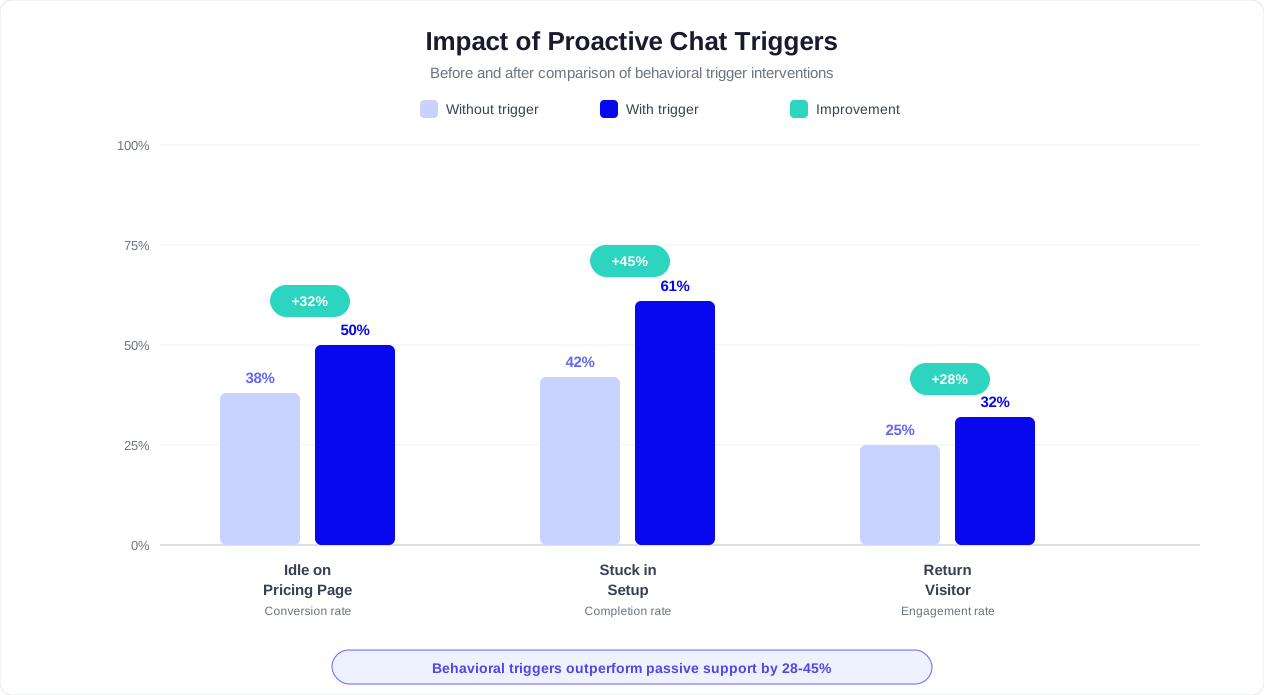
Implement rate limiting to prevent trigger fatigue. A good rule: no more than 3 proactive messages per session, with at least 5 minutes between messages. If a user dismisses a proactive message, reduce trigger sensitivity for the remainder of that session. The goal is to be helpful, not intrusive. Onboarding research consistently shows that well-timed proactive messages substantially improve activation, while over-messaging can decrease engagement.
Conferbot's analytics dashboard tracks trigger performance -- which triggers fire most frequently, which have the highest engagement rate, and which correlate most strongly with activation. Use this data to continuously refine your trigger rules and messaging.
Related: Chatbot Analytics: 10 Metrics You Must Track to Prove ROI in 2026
Replacing Static Product Tours With Conversational Guidance
The static product tour has been the default onboarding tool for a decade -- and it has been underperforming for just as long. Tooltip-based walkthroughs that highlight features one by one suffer from a fundamental design flaw: they present information in the product's logical order rather than the user's logical order. The user wants to accomplish a goal. The product tour wants to showcase features. These are different objectives, and the mismatch explains why many users skip or abandon product tours before completion.
Why Product Tours Fail
Static product tours have several structural weaknesses that conversational chatbot guidance solves:
| Product Tour Limitation | Chatbot Solution |
|---|---|
| Linear, fixed sequence -- every user sees the same steps | Dynamic, branching flow that adapts to user's stated goal and behavior |
| Shows features the user may not need or care about | Focuses only on features relevant to the user's specific use case |
| Overwhelming -- presents 10-15 tooltips in rapid succession | Introduces one concept at a time, only when contextually relevant |
| No interaction -- user passively clicks "Next" through the tour | Conversational -- user actively participates, asks questions, makes choices |
| Disappears after completion -- no way to revisit specific steps | Persistent and re-accessible -- user can ask questions at any point |
| No data on comprehension -- only tracks completion vs. skip | Tracks understanding through responses, identifies confusion points |
| Cannot handle follow-up questions | Natural language processing handles any question in context |
The Conversational Onboarding Model
A chatbot-driven onboarding replaces the monologue of a product tour with a dialogue. Instead of telling the user "Here is the dashboard, here is the sidebar, here is the settings page," the chatbot asks: "What would you like to accomplish first?" and then guides the user through only the features needed to reach that goal.
Example: Project management tool onboarding
Product tour approach (linear): Step 1: This is your dashboard. Step 2: Click here to create a project. Step 3: This is the task view. Step 4: Here is how to add team members. Step 5: This is the calendar view. Step 6: Here are integrations... (User clicks "Skip Tour" at Step 3.)
Chatbot approach (conversational):
- "What is the first project you want to manage with [Product]?" [A marketing campaign] [A software sprint] [A client project] [Something else]
- User selects "A marketing campaign."
- "Great choice. Let us create your first marketing campaign project. What should we call it?" (User types a name.)
- "Perfect. Marketing campaigns usually need tasks for content creation, design, approvals, and publishing. Want me to create a starter template with those categories, or do you prefer to start from scratch?" [Use the template] [Start from scratch]
- User selects the template. Chatbot creates the project with pre-populated task categories.
- "Your campaign project is ready with 4 task categories. The next step that makes this really powerful: invite your team so they can own specific tasks. Want to add team members now?" [Add team members] [I will do that later]
In this flow, the user has accomplished something real -- created a project that mirrors their actual work -- in under 3 minutes. They were never shown the calendar view, the integrations page, or any feature they did not need in that moment. Those features will be introduced later through conditional triggers when the user's behavior indicates readiness.
Hybrid Approach: Chatbot + Contextual Tooltips
The most effective onboarding systems combine conversational chatbot guidance with minimal, context-triggered tooltips. The chatbot handles the strategic flow -- goal identification, step-by-step guidance, obstacle resolution. Tooltips handle micro-interactions -- explaining a specific icon, showing a keyboard shortcut, or clarifying a label. This hybrid approach delivers far higher completion rates than either approach alone.
The key principle: tooltips should appear only after the chatbot has guided the user to the relevant feature. When a user reaches the task editor through chatbot guidance, a single tooltip saying "Pro tip: use @mentions to notify team members" adds value without interrupting flow. That same tooltip appearing during an unsolicited product tour would be noise.
With Conferbot's rich media support, your chatbot can embed inline screenshots, short video clips, and interactive demos directly within the conversation. A user asking "How do I set up the Zapier integration?" gets a 30-second video walkthrough right in the chat window -- no need to navigate to a help center or YouTube tutorial. This keeps the user in flow while providing the visual guidance that text alone cannot deliver.
Related: Collect Customer Feedback With a Chatbot: NPS, CSAT, and Survey Guide
Feature Discovery: Surfacing What Users Don't Know About
The paradox of feature-rich SaaS products is that the features driving the most value are often the ones users never discover. Pendo's product analytics data shows that the average SaaS user engages with only 20-30% of available features -- and the features they miss are frequently the ones that would make them stickiest. An onboarding chatbot systematically closes this discovery gap by introducing the right features at the right moment based on what the user has already done, not what the product team thinks they should do.
The Progressive Feature Discovery Model
Organize your product features into three adoption tiers, each mapped to a stage of the user journey:
Tier 1 -- Foundation Features (Day 1-2): The 2-3 features that deliver the core value proposition. These are the features that made the user sign up. Every user should reach these within their first session.
Tier 2 -- Multiplier Features (Day 3-7): Features that amplify the value of Tier 1. They are not required for the initial aha moment, but they make the product significantly more useful. Examples: automation rules, team collaboration, templates, integrations.
Tier 3 -- Power Features (Week 2+): Advanced capabilities for mature users. API access, custom workflows, advanced analytics, white-labeling, webhook configurations. Introducing these too early overwhelms beginners; introducing them at the right time transforms casual users into power users.
Behavior-Triggered Feature Introduction
The chatbot introduces features based on behavioral signals that indicate readiness, not arbitrary timelines:
Completion-based triggers (user completed a prerequisite):
- User creates 3 projects manually --> Chatbot: "You are creating projects like a pro. Want to save time? You can create project templates so new projects come pre-loaded with your standard tasks and settings. Takes 2 minutes to set up. [Create a template] [Show me how templates work]"
- User adds 5 team members --> Chatbot: "Your team is growing! With 5 members, you might want to set up role-based permissions so everyone sees only what is relevant to them. [Set up permissions] [Tell me more]"
- User exports their first report --> Chatbot: "Nice report! Did you know you can schedule automatic report delivery? Your reports can land in stakeholders' inboxes every Monday morning without you lifting a finger. [Set up automated reports] [Maybe later]"
Friction-based triggers (user is struggling with a workaround):
- User manually copies data between two features --> Chatbot: "I noticed you are moving data from [Feature A] to [Feature B] manually. There is a built-in sync that does this automatically in real time. Want me to turn it on? [Yes, set it up] [How does it work?]"
- User creates the same type of entry repeatedly --> Chatbot: "You have created 5 similar [items] today. Save time with bulk creation -- upload a CSV or use our duplicator to create multiple entries at once. [Show me bulk creation] [I prefer doing it one at a time]"
Interest-based triggers (user explores but does not engage):
- User visits the integrations page but does not connect anything --> Chatbot: "Interested in connecting your other tools? The most popular integration for [user's use case] is [specific integration]. Most users set it up in under 5 minutes. [Connect now] [See all integrations]"
- User opens an advanced feature page and leaves within 10 seconds --> Chatbot: "[Feature] is powerful but can look complex at first. Here is the simple version: it does [one-line explanation]. Teams like yours typically start using it in week 2. Want a quick demo? [Show me a demo] [Remind me next week]"
Feature Adoption Funnel
Track feature adoption as a funnel to measure how effectively the chatbot is driving discovery:
| Funnel Stage | Definition | Benchmark Without Chatbot | Benchmark With Chatbot |
|---|---|---|---|
| Awareness | User has seen the feature exists | 40-60% | 80-95% |
| Exploration | User clicked into the feature page | 15-25% | 40-60% |
| Activation | User completed the feature's core action | 5-10% | 20-35% |
| Adoption | User uses the feature regularly (weekly+) | 3-7% | 12-25% |
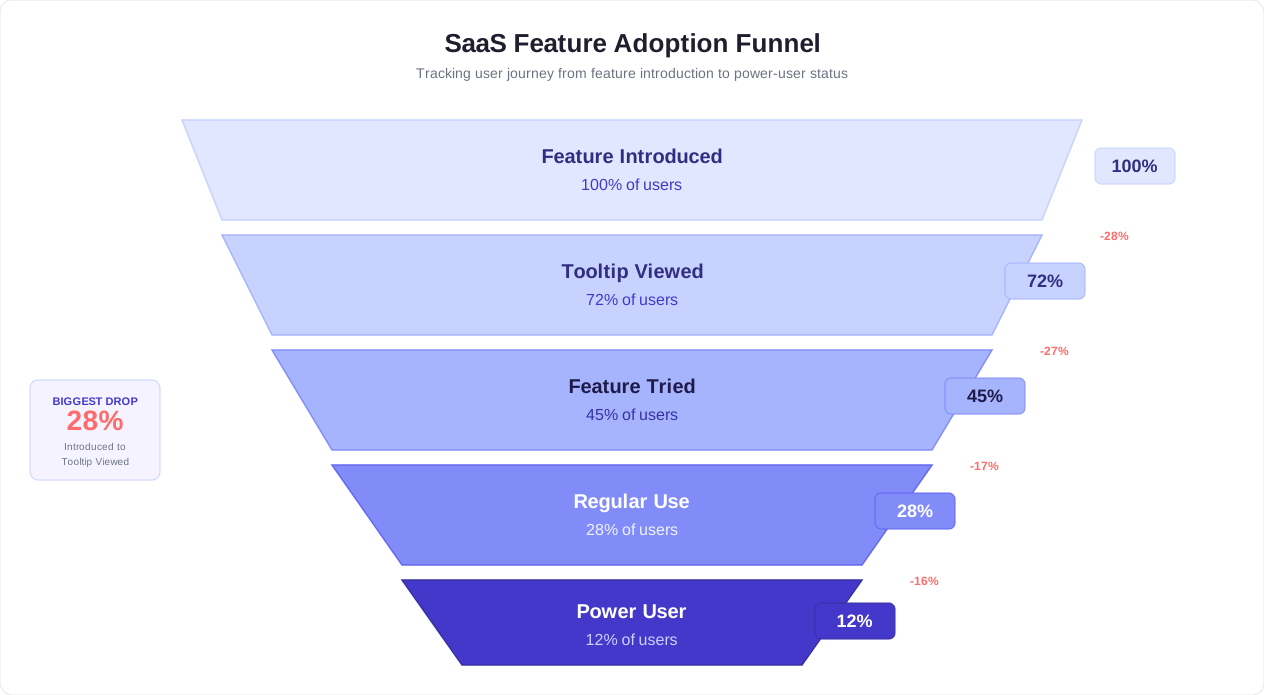
The chatbot's impact is most dramatic at the awareness-to-exploration transition. Features that users never knew existed suddenly have 40-60% exploration rates because the chatbot introduces them at a moment when the user has a relevant need. This is the difference between a feature announcement email (3% click-through) and a contextual chatbot suggestion (35-45% engagement). It is not better copywriting -- it is better timing.
Conferbot's knowledge base integration ensures that every feature introduction is backed by accurate, up-to-date documentation. When the chatbot suggests a feature, it can immediately answer follow-up questions, share tutorial content, and guide the user through first-time setup -- all within the same conversation thread.
Related: How to Calculate Chatbot ROI: Formula, Benchmarks, and Free Calculator
Identifying At-Risk Users Through Chatbot Interaction Patterns
Every churned user sends warning signals before they leave. The problem is that most SaaS companies detect these signals too late -- or not at all. An onboarding chatbot creates a continuous stream of behavioral data that reveals churn risk in real time, often days before traditional analytics would flag the user. By analyzing how users interact with the chatbot (and, critically, how they stop interacting), you can identify at-risk users while there is still time to intervene.
Early Churn Signals From Chatbot Data
Chatbot interaction patterns provide signals that product analytics alone cannot capture:
Signal 1: Declining engagement velocity. A healthy onboarding pattern shows increasing chatbot interaction density in days 1-3 as the user sets up, learns, and explores. When a user's interaction rate drops sharply -- say, from 8 messages on day 1 to 2 on day 2 to zero on day 3 -- it signals disengagement regardless of whether they are still logging in. The user may be present in the product but has stopped progressing.
Signal 2: Negative sentiment in responses. When a user's chatbot responses shift from engaged ("Yes, show me how") to disengaged ("Maybe later," "Not now," "I will figure it out"), the language itself reveals declining intent. Advanced NLP analysis can detect frustration patterns: short responses, dismissive language, repeated use of "no" or "skip." A user who has dismissed 3 consecutive chatbot suggestions is signaling that the onboarding experience is not meeting their needs.
Signal 3: Question patterns that indicate confusion vs. exploration. Healthy users ask forward-looking questions: "How do I set up automation?" or "Can I integrate with Salesforce?" At-risk users ask backward-looking or fundamental questions late in the trial: "What does this product actually do?" or "I still don't understand how to get started" on day 5. Questions about basic functionality after several days of access indicate a user who never activated.
Signal 4: Help-seeking without follow-through. A user who asks the chatbot how to complete a setup step but never actually completes it is exhibiting a dangerous pattern: they have the intent but not the motivation or confidence to execute. This pattern -- asking about a feature, getting instructions, but not following through -- repeated 2-3 times is a strong churn predictor.
Signal 5: Absence of chatbot interaction entirely. Paradoxically, users who never engage with the chatbot at all are among the highest-risk cohort. They are navigating the product alone, likely encountering friction they are not reporting, and building no relationship with the product's support system. If a user has not interacted with the chatbot by day 3, they should be flagged for a targeted re-engagement attempt.
Building a Churn Risk Score
Combine chatbot interaction data with product usage data to create a composite churn risk score:
| Risk Factor | Weight | Scoring |
|---|---|---|
| Days since last chatbot interaction | 25% | 0 days = 0 risk, 1-2 days = low, 3-5 days = medium, 5+ days = high |
| Activation milestone progress | 25% | Completed = 0 risk, 75%+ = low, 50-74% = medium, under 50% = high |
| Chatbot suggestion dismissal rate | 20% | Under 30% = low, 30-60% = medium, over 60% = high |
| Sentiment trend (last 5 interactions) | 15% | Positive/neutral = low, declining = medium, negative = high |
| Session frequency trend | 15% | Increasing/stable = low, declining = medium, absent = high |
Users with a composite score above 70 should be flagged for immediate intervention -- either an automated high-priority chatbot re-engagement sequence or a manual CSM outreach. Users scoring 40-70 enter a watchlist with increased chatbot touchpoints and more aggressive feature discovery prompts.
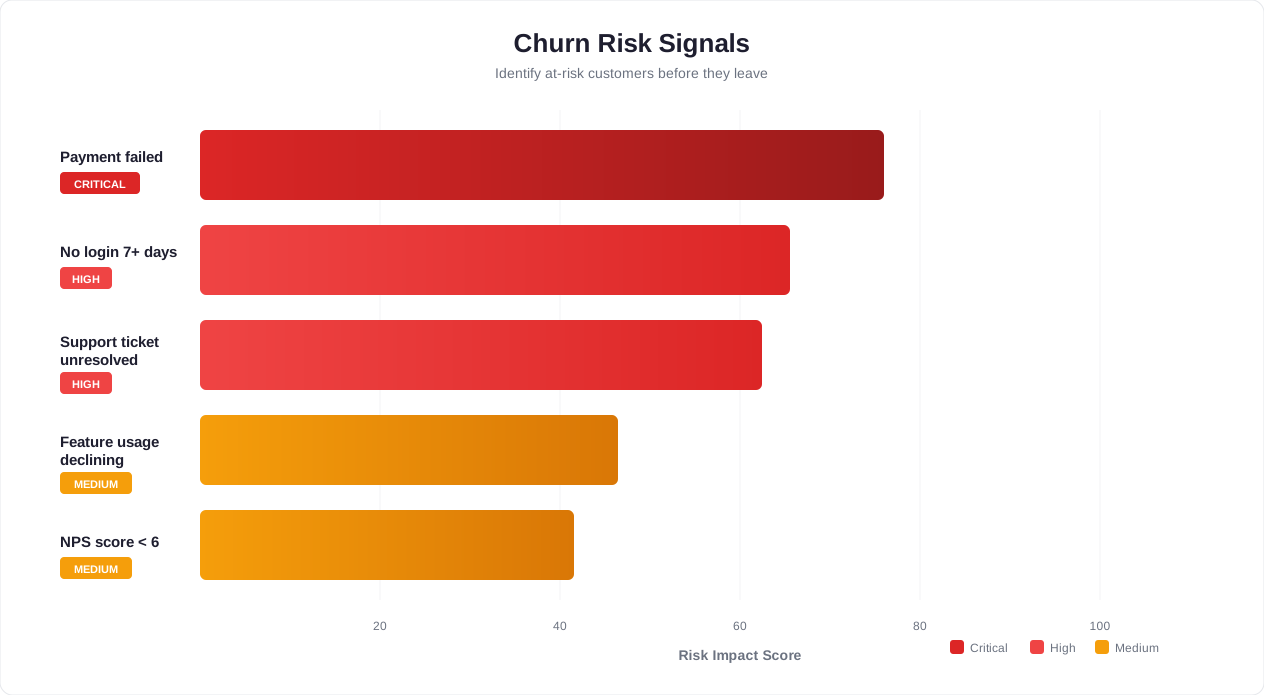
The intervention playbook for high-risk users should be qualitatively different from standard onboarding. Instead of feature suggestions, the chatbot should ask direct questions: "Hey [Name], I want to make sure [Product] is working for you. What were you hoping to accomplish when you signed up?" This resets the conversation to the user's original intent, which may have gotten lost in the onboarding complexity. From there, the chatbot can offer a simplified path or escalate to a live human conversation with a CSM who has full context from the chatbot interaction history.
This proactive identification capability is what makes chatbot-driven onboarding fundamentally different from passive analytics. You are not waiting for the user to churn and then analyzing what went wrong. You are detecting risk in real time and acting on it while the user is still reachable. Organizations that implement chatbot-based churn risk scoring report 40% reductions in trial-period churn compared to those relying solely on product usage analytics.
Integration With Your Product Analytics Stack
An onboarding chatbot operating in isolation delivers significant value. An onboarding chatbot integrated with your product analytics stack -- Mixpanel, Amplitude, Segment, Heap, or similar tools -- delivers transformative value. Integration creates a closed loop where user behavior data informs chatbot triggers, and chatbot interaction data enriches your analytics, giving you a complete picture of the onboarding journey that neither system provides alone.
What Integration Enables
Behavioral event-driven triggers. Instead of the chatbot relying solely on page visits and time-on-page (client-side signals), analytics integration gives the chatbot access to deep behavioral events: feature usage frequency, conversion funnel position, cohort membership, and historical engagement patterns. A chatbot that knows a user has viewed the pricing page 3 times in the last hour delivers a fundamentally different -- and more effective -- message than one that only knows the user has been on the dashboard for 5 minutes.
Segment-based personalization. Your analytics tool segments users by company size, industry, referral source, plan type, and usage patterns. Feeding these segments to the chatbot enables dramatically different onboarding experiences for different user types. A user who signed up from a "Best CRM for Real Estate" blog post should get a real estate-specific onboarding flow, not a generic one. A user from a Product Hunt launch should get a flow optimized for explorers and evaluators, not committed buyers.
Funnel position awareness. When the chatbot knows exactly where a user sits in your activation funnel -- and which step they are stuck on -- it can deliver surgical interventions. "You have completed data import and team invitation but have not created your first report yet. Reports are where most users see the biggest value. Want to create one now using your imported data?"
Integration Architecture
The recommended architecture connects your chatbot platform to your analytics stack through a combination of direct integrations and a customer data platform (CDP) like Segment:
| Data Flow | Source | Destination | Purpose |
|---|---|---|---|
| User events (feature usage, page views) | Product / Analytics (Mixpanel, Amplitude) | Chatbot platform | Power behavioral triggers and personalization |
| User properties (plan, company, role) | CRM / CDP (Segment, HubSpot) | Chatbot platform | Segment-based onboarding flows |
| Chatbot interactions (messages, responses, sentiment) | Chatbot platform | Analytics / CDP | Enrich user profiles with engagement data |
| Churn risk scores | Chatbot platform | CRM / Customer Success platform | Prioritize CSM outreach to at-risk users |
| Conversion events (upgrade, feature activation) | Product | Chatbot platform + Analytics | Attribute conversions to chatbot interactions |
Implementation With Popular Tools
Mixpanel integration. Send Mixpanel user properties and event counts to the chatbot via webhooks or the Mixpanel API. The chatbot accesses data like "events_last_7_days," "activation_step_completed," and "plan_type" to personalize messages. In return, the chatbot sends interaction events back to Mixpanel -- "chatbot_message_sent," "chatbot_suggestion_accepted," "chatbot_escalated_to_human" -- enabling you to build funnels that include chatbot touchpoints.
Amplitude integration. Amplitude's behavioral cohorts are particularly powerful for chatbot personalization. Define cohorts like "Signed up 3+ days ago AND has not completed activation AND has logged in at least twice" and trigger a specific chatbot re-engagement flow for that cohort automatically.
Segment integration. Use Segment as the data bus between all systems. Product events flow through Segment to both your analytics tool and your chatbot platform simultaneously. This ensures the chatbot always has real-time data without requiring direct point-to-point integrations with every tool in your stack.
HubSpot / Salesforce CRM integration. Chatbot interaction summaries and churn risk scores flow to the CRM, appearing on the contact record. When a CSM opens an account, they see the full chatbot interaction history: which onboarding steps the user completed, which they skipped, what questions they asked, and what their current risk level is. This eliminates the cold outreach problem where CSMs contact trial users with no context.
Measuring Integration ROI
Track these metrics to validate that your analytics integration is delivering incremental value beyond the standalone chatbot:
- Trigger precision rate: Percentage of proactive chatbot messages that receive a response (indicating relevance). Behavior-informed triggers should achieve high response rates vs. 15-20% for time-based triggers.
- Personalization uplift: Compare activation rates for users receiving segment-personalized onboarding vs. generic onboarding. Target: 20-30% higher activation for personalized flows.
- Attribution accuracy: Percentage of conversions you can attribute to specific chatbot interactions, enabling ROI calculation at the message level.
Conferbot's integrations hub provides pre-built connectors for Segment, HubSpot, Salesforce, Zapier, and dozens of other tools. The bidirectional data flow means your chatbot gets smarter as your analytics stack evolves, and your analytics get richer with every chatbot conversation. For teams using product-led growth strategies, this integration loop is the infrastructure that makes self-serve onboarding scalable without sacrificing personalization.
Template: SaaS Onboarding Chatbot Flow
Below is a complete, ready-to-implement chatbot flow template designed for a B2B SaaS product with a 14-day free trial. This template is built in five modules that you can configure directly in Conferbot's drag-and-drop builder or adapt as a blueprint for your own implementation.
Flow Architecture Overview
- Module 1: Welcome and Goal Identification -- first 60 seconds after signup
- Module 2: Guided Activation -- first session, goal-specific setup
- Module 3: Day 2-3 Re-engagement -- bring users back and deepen usage
- Module 4: Feature Discovery -- days 4-10, behavior-triggered introductions
- Module 5: Conversion -- days 11-14, upgrade path and trial closure
Module 1: Welcome and Goal Identification
Trigger: User completes signup and lands on dashboard for the first time
Channel: In-app chat widget
Bot: Hey [Name]! Welcome to [Product]. I am your setup assistant
     and I will help you get rolling in just a few minutes.

     What is the main thing you want to accomplish today?
     [Set up my workspace]
     [Import data from another tool]
     [Explore what [Product] can do]
     [I have a specific question]

--- If "Set up my workspace" ---
Bot: Great choice. Let us get your workspace configured.
     First, what should we name it? (Most teams use their
     company or project name.)

     [User types workspace name]

Bot: Perfect -- "[Workspace Name]" is live. Next, let us
     set up the basics that matter for your use case.
     What best describes your role?
     [Marketing] [Sales] [Product / Engineering]
     [Customer Success] [Operations] [Other]

--- If "Import data from another tool" ---
Bot: Smart move -- everything is more useful with your data in it.
     Which tool are you coming from?
     [Competitor A] [Competitor B] [Spreadsheet / CSV] [API]

     [Guides through import flow specific to the selected source]

--- If "I have a specific question" ---
Bot: Of course! Ask me anything about [Product] and I will get
     you an answer right away.

     [Free-text input, handled by NLP / knowledge base lookup]
Module 2: Guided Activation
Trigger: Immediately after Module 1 goal selection
--- For "Marketing" role, workspace setup path ---
Bot: Since you are in marketing, here is the fastest path
     to value: create your first campaign tracker.

     It takes about 3 minutes and you will see exactly how
     [Product] organizes your work. Ready?
     [Let us do it] [Show me an example first]

--- If "Let us do it" ---
Bot: Step 1: Name your first campaign.
     [User types name]

Bot: Step 2: Add your key deliverables. I have pre-loaded
     common marketing tasks -- check the ones that apply:
     [ ] Blog content
     [ ] Social media posts
     [ ] Email campaign
     [ ] Landing page
     [ ] Paid ads
     [Confirm selections]

Bot: Step 3: Set a target launch date.
     [Date picker]

Bot: Done! Your "[Campaign Name]" project is live with
     [X] tasks organized by deliverable type.

     You just completed the step that separates users who
     succeed long-term from those who do not. Seriously --
     users who create their first project in session one
     convert at well above the rate of those who wait.

     Ready for the step that makes this far more useful?
     [Yes -- what is next?] [I want to explore on my own]

--- If "Yes" ---
Bot: Invite a team member. Collaboration is where [Product]
     really shines. Enter their email and I will send them
     an invite with their own guided setup.
     [Enter email] [Skip for now]

--- After activation complete ---
Bot: You are all set! Here is what you accomplished:
     - Created your workspace
     - Built your first campaign project
     - [Invited a team member / Set up your workflow]

     I will be here in the corner whenever you need help.
     Tomorrow, I will show you a feature that saves our
     marketing users an average of 4 hours per week.

     Happy building!
Module 3: Day 2-3 Re-engagement
Trigger: 24 hours since last session (no return) OR second login
--- If user has NOT returned (via WhatsApp or email) ---
Bot: Hey [Name], you set up [Workspace Name] yesterday and
     created your first project -- great start.

     You are just one step away from the feature that saves
     teams 4+ hours per week: automated task assignments.

     Pick up where you left off?
     [Resume in [Product]] [Remind me tomorrow]
     [I have a question]

--- If user HAS returned (in-app) ---
Bot: Welcome back! I remember you were working on
     [Campaign Name]. Since yesterday, here is what
     is new and what is next:

     What you built: [summary]
     Recommended next step: Set up automated notifications
     so your team stays in sync without manual check-ins.

     [Set up notifications] [Show me something else]
     [I am good, just exploring]
Module 4: Feature Discovery (Days 4-10)
Trigger: Behavior-based (see trigger framework in Section 3)
--- User has created 3+ projects but never used templates ---
Bot: You have created [X] projects -- nice productivity!
     Quick tip: you can save any project as a template
     so new projects come pre-loaded with your standard
     setup. Most teams save 15 minutes per project.
     [Create a template from [Project Name]]
     [Tell me more about templates]
     [Not interested right now]

--- User has never visited the integrations page ---
Bot: Quick question -- do you use [Slack / Google Calendar /
     Salesforce]? Connecting it to [Product] means updates
     flow automatically between tools. Our [most popular
     integration] takes about 3 minutes to set up.
     [Connect [Integration]] [See all integrations]
     [I prefer to keep things separate]

--- User has not tried the reporting feature ---
Bot: You have been active for [X] days and have solid data
     building up. Want to see it visualized? Your first
     report takes about 60 seconds to generate.
     [Generate my first report] [What kind of reports?]
     [Maybe later]
Module 5: Conversion (Days 11-14)
Trigger: Trial day 11 (time-based) + trial day 13 + trial day 14
--- Day 11 ---
Bot: Your trial has 3 days left. Here is your impact summary:

     Projects created: [X]
     Tasks completed: [X]
     Team members active: [X]
     Time saved (estimated): [X] hours

     Upgrade to keep everything and unlock:
     - Unlimited projects (you are at [X] of [limit])
     - Advanced reporting and analytics
     - Priority support

     [See pricing] [Compare plans] [I have questions]

--- Day 13 ---
Bot: Tomorrow is your last day on the trial. Just so you
     know: your workspace, projects, and all configurations
     will be preserved when you upgrade. Nothing is lost.

     Teams similar to yours -- [industry], [size] --
     typically see [specific ROI metric] in the first month.

     [Upgrade now] [Talk to our team] [I need more time]

--- If "I need more time" ---
Bot: I understand. Let me extend your trial by 7 days so
     you can make the right decision. In the meantime,
     is there anything specific holding you back?
     [Pricing concerns] [Need to evaluate with my team]
     [Missing a feature I need] [Just need more time]

--- Day 14 (final day) ---
Bot: Today is the last day of your trial. Here is what
     you will lose access to at midnight:
     - [Workspace Name] with [X] projects
     - [X] configured integrations
     - All team member access

     Upgrade now to keep everything intact.
     Use code KEEPBUILDING for 20% off your first quarter.
     [Upgrade now] [Download my data] [Talk to sales]
Customization Notes
This template handles the core flow, but you should customize it for your specific product by:
- Replacing generic activation steps with your product's specific aha moment actions
- Adding role-specific branches for your top 3-4 user personas
- Configuring trigger thresholds (idle time, return frequency) based on your product's baseline usage patterns
- Integrating with your analytics stack so triggers fire based on real behavioral events, not just page visits
- Setting up calendar booking for the "Talk to sales" and "Talk to our team" options so users can schedule calls directly from the chatbot
The entire flow is configurable in Conferbot using conditional logic for branching, rich media for inline tutorials and screenshots, and integrations for connecting to your analytics and CRM tools. Start with this template, measure performance for 30 days, and then optimize based on the data from Conferbot analytics. For additional context on building knowledge-driven bots, see our guide on training a chatbot on your knowledge base, and for measuring the complete financial picture, visit the chatbot ROI calculator guide.
Was this article helpful?
Build and deploy in 10 minutes. No coding needed.
AI Chatbot for SaaS Onboarding FAQ
Everything you need to know about chatbots for ai chatbot for saas onboarding.
About the Author
The Conferbot team writes about building, deploying, and improving AI chatbots.
View all articles
