
The Support Ticket Problem: Costs, Burnout, and Wait Times
Customer support is expensive, and it's getting more expensive every year. The average cost to resolve a single support ticket in 2026 is $12-25 for tier-1 issues and $40-100+ for complex escalations. For a company handling 10,000 tickets per month, that's $120,000 to $250,000 in monthly support costs — and that's before accounting for infrastructure, management overhead, and quality assurance.
But cost is only part of the problem. The support ticket crisis has three dimensions:
1. Financial Drain
- Average support agent salary: $35,000-55,000/year (higher in major metros and for specialized roles)
- Fully loaded cost per agent (salary + benefits + tools + management): $55,000-85,000/year
- Cost per ticket has risen 18% since 2023 due to wage inflation and tool costs
- Support is typically the largest operational expense after engineering for SaaS companies
2. Agent Burnout
- Support agent turnover rate: 30-45% annually (one of the highest across all roles)
- 74% of support agents report feeling burned out at least once a month (Zendesk CX Trends 2025)
- The primary cause: answering the same repetitive questions over and over. Agents estimate 60-70% of tickets are questions they've answered hundreds of times.
- Each departing agent costs $10,000-15,000 in recruiting, onboarding, and productivity ramp-up
3. Customer Wait Times
- Average first response time for email tickets: 12-24 hours
- Average first response time for live chat: 1-5 minutes (during business hours; infinite outside them)
- 90% of customers consider an "immediate" response important when they have a support question (HubSpot Research)
- 60% of customers define "immediate" as under 10 minutes
The math is straightforward: most support tickets shouldn't exist in the first place. If 60-70% of inquiries are repetitive, answerable questions, then the right automation strategy can eliminate them — saving money, reducing burnout, and giving customers instant answers. That's exactly what AI chatbots are built to do.
How AI Chatbots Reduce Support Tickets
AI chatbots reduce ticket volume through three primary mechanisms: FAQ automation, self-service enablement, and smart routing. Each addresses a different slice of the ticket pie.
1. FAQ Automation (Deflects 30-40% of Tickets)
The single biggest source of support tickets is questions that already have documented answers. Shipping policies, return windows, pricing details, account setup steps, password resets — these questions flood inboxes daily despite being covered in help docs that nobody reads.
An AI chatbot intercepts these questions before they become tickets:
- Customer types: "What's your return policy?"
- Chatbot instantly responds with the policy, including specific timelines, conditions, and a link to start a return
- Customer gets their answer in 3 seconds. No ticket created. No agent time consumed.
NLP-powered chatbots handle this even when customers phrase questions differently. "How do I send something back?" "Can I get a refund?" "What if the product is damaged?" — all map to the same intent and get the right answer.
2. Self-Service Enablement (Deflects 15-25% of Tickets)
Beyond simple FAQ answers, chatbots enable customers to complete actions that would otherwise require agent assistance:
- Order tracking: Bot connects to your order management system via API, pulls real-time status, and presents tracking info with a link — no ticket needed
- Account changes: Update email, change password, update payment method — guided step-by-step by the bot
- Appointment management: Reschedule or cancel bookings directly through the chat interface
- Troubleshooting: Step-by-step diagnostic flows that resolve common technical issues ("Have you tried clearing your cache? Here's how...")
3. Smart Routing (Reduces Resolution Time by 40%)
For tickets that do need a human, the chatbot pre-qualifies and routes intelligently:
- Collects issue details, account info, and context before creating the ticket
- Categorizes the issue and assigns it to the right team (billing, technical, shipping, etc.)
- Sets priority based on sentiment, customer tier, and issue severity
- Agents receive tickets with full context, reducing handle time by 35-45%
The combined effect: 60% fewer tickets reaching human agents, and the tickets that do arrive are pre-qualified, properly routed, and faster to resolve. This is the power of combining Conferbot's no-code builder with AI agent capabilities and AI-powered responses.
Identifying Your Top Ticket Categories to Automate
Not all tickets are equally automatable. The key to a successful deflection strategy is identifying which categories will give you the highest ROI when automated. Here's a systematic approach:
Step 1: Export and Categorize Your Last 1,000 Tickets
Pull your most recent 1,000 support tickets and categorize them. If your helpdesk doesn't auto-categorize, manually tag a random sample of 200-300 tickets. You'll typically find a distribution like this:
| Category | % of Tickets | Automation Potential | Priority |
|---|---|---|---|
| Order status / tracking | 15-20% | Very High (API-based) | 1 |
| Return / refund requests | 10-15% | High (flow-based) | 2 |
| Product questions (pre-sale) | 10-15% | High (knowledge base) | 3 |
| Account / login issues | 8-12% | High (self-service flows) | 4 |
| Shipping / delivery questions | 8-10% | Very High (FAQ + API) | 5 |
| Pricing / billing questions | 5-8% | High (FAQ-based) | 6 |
| Technical troubleshooting | 8-12% | Medium (guided flows for common issues) | 7 |
| Complaints / escalations | 5-8% | Low (needs human empathy) | 8 |
| Feature requests / feedback | 3-5% | Medium (collection bot) | 9 |
| Other / complex | 10-15% | Low | 10 |
Step 2: Prioritize by Volume x Automation Potential
Focus on categories that are both high volume and highly automatable. The top 5 categories in the table above typically account for 50-70% of all tickets and are all excellent candidates for chatbot automation.
Step 3: Document the "Golden Answers"
For each high-priority category, document the ideal response:
- What information does the customer need?
- What actions can be automated (tracking lookup, return initiation, password reset)?
- What are the common follow-up questions?
- Under what conditions should the issue escalate to a human?
Step 4: Build in Phases
Don't try to automate everything at once. A phased approach delivers faster results:
- Phase 1 (Week 1-2): Automate the top 3 FAQ categories (order tracking, shipping, returns)
- Phase 2 (Week 3-4): Add self-service flows (account management, appointment booking)
- Phase 3 (Month 2): Build guided troubleshooting flows for common technical issues
- Phase 4 (Month 3+): Deploy AI-powered responses for long-tail questions using your knowledge base
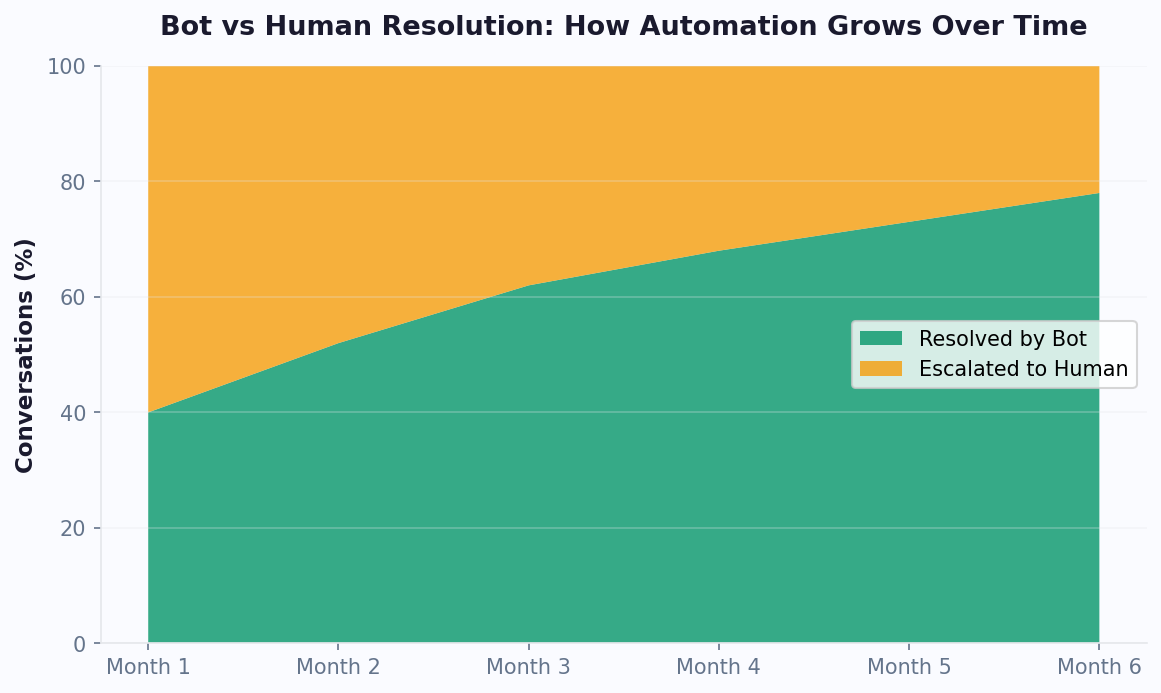
Each phase delivers incremental ticket deflection. By the end of Phase 2, most businesses see a 35-45% reduction in ticket volume. By Phase 4, you're at 55-65%.
Setting Up Your Ticket Deflection Strategy
A deflection strategy isn't just about building a chatbot — it's about inserting the chatbot at every point where customers currently create tickets. Here's the tactical playbook:
Intercept Point 1: Before the Ticket Form
The highest-impact placement is directly on your support page or help center, before customers reach the ticket submission form:
- Replace the prominent "Submit a Ticket" button with a chatbot conversation
- The chatbot attempts to resolve the issue first
- If the bot can't resolve it, then it creates a ticket through the built-in ticket system with all collected context pre-filled
- This single change deflects 25-35% of tickets on day one
Intercept Point 2: On Product and Help Pages
Deploy a proactive website chatbot on pages where customers commonly get stuck:
- Product pages: Answer sizing, compatibility, and availability questions
- Pricing page: Clarify plan differences, billing cycles, and upgrade paths
- Help center articles: Offer follow-up assistance at the bottom of every article
- Checkout flow: Address payment issues, coupon problems, and shipping questions in real time
Intercept Point 3: In-App Support
Embed the chatbot inside your product or app for contextual support:
- Trigger based on user behavior (e.g., user has been on the settings page for 3 minutes)
- Pre-populate context (user's plan, account age, recent actions) so the bot can provide relevant help immediately
- Offer guided walkthroughs for complex features
Intercept Point 4: Email Auto-Responders
When a customer emails your support address, send an instant auto-reply with a link to the chatbot:
- "Thanks for reaching out! For the fastest resolution, chat with our AI assistant here: [link]. It can resolve most questions instantly. Our team will also review your email and respond within 4 hours."
- This diverts 15-20% of email ticket volume to the chatbot where it's resolved immediately
Intercept Point 5: Social Media & Messaging Channels
Customers increasingly reach out via WhatsApp, Facebook Messenger, and Instagram DMs. Deploy your chatbot across these channels to resolve issues before they become formal tickets. Conferbot supports omnichannel deployment — the same knowledge base and flows work across every channel.
The "Warm Handoff" Protocol
Critical: when the chatbot cannot resolve an issue, the handoff to a human must be seamless. The customer should never have to repeat information. Conferbot's live chat integration passes the full conversation transcript and collected data to the agent, ensuring continuity.
Building the Knowledge Base That Powers Your Chatbot
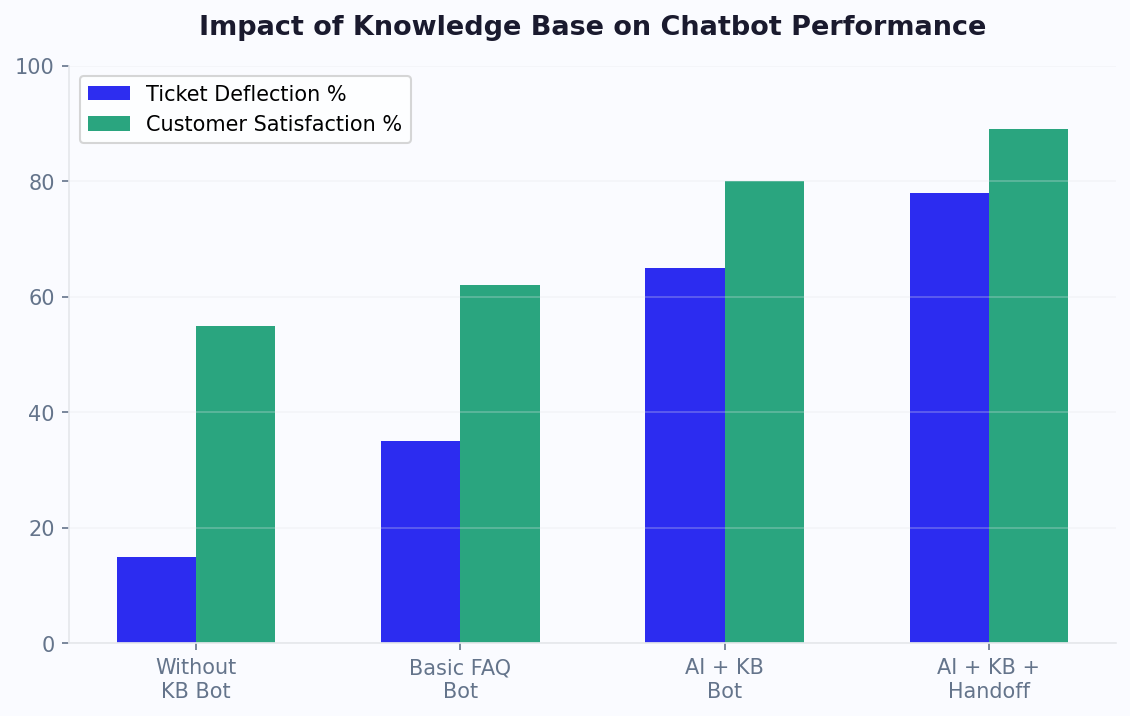
An AI chatbot is only as good as the knowledge it draws from. A well-structured knowledge base — powered by an AI knowledge base — is the foundation of effective ticket deflection. Here's how to build one that makes your chatbot genuinely helpful:
Knowledge Base Architecture
Organize your knowledge base into three layers:
- FAQ Layer (structured Q&A): Direct question-answer pairs covering your top 50-100 customer questions. These are the fastest to build and the most impactful for deflection.
- Document Layer (unstructured content): Help articles, product guides, policy documents, and troubleshooting manuals. AI processes these to answer nuanced questions that don't fit neat Q&A format.
- Data Layer (API-connected): Real-time data from your systems — order status, account info, inventory levels, appointment availability. This enables action-oriented self-service.
Writing Effective FAQ Content
Each FAQ entry should follow this format for maximum chatbot effectiveness:
- Question (include variations): List 3-5 ways customers actually ask this question (pulled from real ticket data)
- Short answer: 1-2 sentences that directly answer the question
- Detailed answer: Full explanation with steps, conditions, and exceptions
- Related actions: Links or flows the customer might need next (e.g., "Start a return" button after explaining the return policy)
- Escalation trigger: When this question should go to a human (e.g., return request for an order over $500)
Mining Your Tickets for Knowledge
Your existing support tickets are a goldmine of content. Use this process:
- Export your top 50 ticket categories from your helpdesk
- For each category, find the best agent response — the one that resolved the issue in a single reply
- Generalize it into a knowledge base article, removing customer-specific details
- Add to Conferbot's knowledge base using the content manager
Keeping the Knowledge Base Fresh
Stale knowledge bases erode trust. Implement these maintenance practices:
- Weekly review: Check the chatbot's "unanswered questions" report and add new FAQ entries for recurring gaps
- Policy change alerts: Whenever a policy changes (pricing, shipping, returns), update the knowledge base immediately
- Seasonal updates: Update content for holidays, sale periods, and seasonal products
- Accuracy audits: Monthly spot-check 20 random chatbot answers against current policies
With Conferbot's OpenAI integration, the AI can also generate answers from your document layer when specific FAQ entries don't exist. This means even edge-case questions get reasonable answers, with the AI clearly stating when it's less confident and offering to connect the customer with a human. Use analytics to track which AI-generated answers need to be formalized into proper FAQ entries.
Measuring Ticket Deflection Rate (The Right Way)
"Ticket deflection rate" is the North Star metric for any chatbot-driven support strategy. But it's commonly miscalculated. Here's how to measure it correctly and set realistic targets:
The Deflection Rate Formula
Deflection Rate = (Chatbot-Resolved Conversations / Total Support Requests) x 100
Where:
- Chatbot-Resolved Conversations: Interactions where the customer received an answer AND did not subsequently create a ticket about the same issue within 24 hours
- Total Support Requests: All chatbot conversations + all tickets created (to account for customers who bypass the chatbot)
The 24-hour follow-up window is critical. Without it, you'll overcount deflections — a customer who chats with the bot, doesn't get their answer, and then emails support an hour later was not successfully deflected.
Benchmarks by Industry
| Industry | Month 1 Deflection | Month 3 Deflection | Month 6+ Deflection |
|---|---|---|---|
| Ecommerce | 30-40% | 50-60% | 60-70% |
| SaaS | 25-35% | 45-55% | 55-65% |
| Financial Services | 20-30% | 35-45% | 45-55% |
| Healthcare | 20-25% | 30-40% | 40-50% |
| Travel & Hospitality | 25-35% | 45-55% | 55-65% |
| Telecom | 30-40% | 50-60% | 60-70% |
Supporting Metrics to Track
Deflection rate alone doesn't tell the full story. Monitor these alongside it:
- Bot Resolution Confidence Score: How confident was the AI in its answer? Low-confidence resolutions may not actually be deflections.
- Customer Satisfaction (CSAT) for Bot Conversations: A high deflection rate with low CSAT means the bot is frustrating customers, not helping them.
- Repeat Contact Rate: Are deflected customers coming back with the same issue? If so, the deflection was superficial, not genuine.
- Ticket Volume Trend: Total ticket count over time. This is the ultimate validation — if your chatbot is working, total tickets should decline month over month even as your customer base grows.
- Agent Handle Time: The tickets that do reach agents should be resolved faster (because easy ones are deflected). Track average handle time to confirm.
Setting Targets
Be realistic. A brand-new chatbot won't deflect 60% on day one. Set progressive targets:
- Week 1: 15-20% deflection (FAQ layer only)
- Month 1: 30-40% deflection (FAQ + self-service flows)
- Month 3: 50-60% deflection (+ AI-powered responses + optimization)
- Month 6: 60-70% deflection (mature, continuously improved)
Track all of these metrics in Conferbot's analytics dashboard, which provides dedicated deflection reporting with the 24-hour follow-up validation built in.
Advanced AI for Complex Queries
FAQ automation handles the easy 60-70% of tickets. But what about the other 30-40%? This is where advanced AI — specifically large language models (LLMs) integrated into your chatbot — pushes deflection rates even higher.
How LLM-Powered Support Works
Traditional chatbots match user queries to predefined FAQ entries. If there's no match, they fail. LLM-powered chatbots (like Conferbot with OpenAI integration) work differently:
- They understand context: An LLM can process a paragraph-long customer message, identify the core issue, and respond appropriately — even if the exact phrasing has never been seen before
- They synthesize from multiple sources: Instead of returning a single FAQ answer, the AI can combine information from multiple help articles to construct a comprehensive response
- They handle follow-up questions: Multi-turn conversations where the customer asks clarifying questions are handled naturally, with the AI maintaining context across messages
- They explain complex topics: Technical troubleshooting, policy nuances, and product comparisons are explained in clear, conversational language
Grounding AI in Your Knowledge Base
The key to reliable AI-powered support is grounding — ensuring the AI only answers based on your actual documentation, not its general training data. Conferbot's implementation uses Retrieval-Augmented Generation (RAG):
- Customer question is received
- System searches your knowledge base for the most relevant documents
- Relevant content is fed to the LLM as context
- LLM generates a response based only on your content
- If no relevant content is found, the bot says so and offers human escalation
This approach achieves 92-96% accuracy on answerable questions while avoiding hallucinations (made-up answers) that plague ungrounded AI systems.
Use Cases for Advanced AI in Support
- Product comparisons: "What's the difference between Plan A and Plan B for a team of 50?" — AI synthesizes from pricing docs, feature matrices, and team guidelines
- Troubleshooting: "My integration stopped working after the latest update" — AI pulls from release notes, known issues, and troubleshooting guides
- Policy interpretation: "I'm 2 days past the return window but the product arrived damaged" — AI understands the exception policy and guides the customer accordingly
- How-to guidance: "How do I set up SSO with Okta?" — AI provides step-by-step instructions from your integration docs
Safety Rails
Even with grounding, set safety rails for AI-powered responses:
- Confidence threshold: If the AI's confidence is below 70%, route to a human instead of risking a wrong answer
- Sensitive topic detection: Billing disputes, legal questions, and security incidents should always go to humans
- Action restrictions: The AI can inform but shouldn't execute high-risk actions (refunds over $X, account deletions) without human approval
Real Results: Case Studies With Numbers
Theory is useful, but results are what matter. Here are four documented case studies from businesses that implemented AI chatbot ticket deflection strategies:
Case Study 1: Mid-Size Ecommerce Brand
| Metric | Before Chatbot | After 90 Days | Change |
|---|---|---|---|
| Monthly tickets | 8,500 | 3,200 | -62% |
| Avg. first response time | 4.2 hours | 8 seconds (bot) / 12 min (human) | -97% (bot) |
| Monthly support cost | $42,000 | $18,500 | -56% |
| CSAT score | 78% | 89% | +11 points |
| Support team size | 8 agents | 4 agents | 4 agents redeployed to proactive CX roles |
Key tactic: Deployed chatbot on product pages, help center, and order tracking page. Automated top 5 ticket categories: order status, returns, shipping times, sizing, and discount codes. The 4 agents who were freed from ticket duty now handle VIP customers and proactive outreach.
Case Study 2: SaaS Company (B2B, 2,000 Customers)
| Metric | Before Chatbot | After 6 Months | Change |
|---|---|---|---|
| Monthly tickets | 3,200 | 1,400 | -56% |
| Agent handle time | 18 minutes | 11 minutes | -39% |
| Monthly support cost | $28,000 | $14,200 | -49% |
| Time to first response | 45 minutes | 3 seconds (bot) / 8 min (human) | -99% (bot) |
| Customer effort score | 3.8/5 | 4.4/5 | +16% |
Key tactic: Built an AI chatbot grounded in their 200+ help center articles using OpenAI integration. The bot handles technical "how-to" questions that previously required tier-2 agent responses. Agent handle time dropped because remaining tickets are pre-qualified with context.
Case Study 3: Healthcare Appointment Platform
| Metric | Before Chatbot | After 4 Months | Change |
|---|---|---|---|
| Monthly tickets | 5,800 | 2,600 | -55% |
| Appointment no-shows | 22% | 9% | -59% |
| Self-service reschedules | 5% (most called in) | 68% | +1,260% |
| After-hours resolution | 0% (voicemail) | 72% of after-hours queries | New capability |
Key tactic: WhatsApp chatbot for appointment management. Patients reschedule, cancel, and confirm appointments via chat. Automated reminders 24h and 1h before appointments cut no-shows dramatically. After-hours queries (which previously went to voicemail) are now resolved by the bot.
Case Study 4: Financial Services (Lending Platform)
| Metric | Before Chatbot | After 6 Months | Change |
|---|---|---|---|
| Monthly tickets | 12,000 | 4,800 | -60% |
| Application status queries | 4,500/month (all agent-handled) | 200/month (95% self-served) | -96% |
| Compliance issues | 12/quarter (agent errors) | 2/quarter (bot is consistent) | -83% |
| Annual support savings | — | $580,000 | — |
Key tactic: API-connected chatbot that pulls real-time application status, payment schedules, and document requirements. The bot provides consistent, compliance-approved responses — eliminating the agent errors that previously led to regulatory issues. The annual savings funded the company's entire product development budget for a new feature.
These results are achievable for any business with a reasonable volume of repetitive support requests. The investment is minimal (starting at $29/month with Conferbot), and the payback period is typically under 30 days.
Continuous Optimization: Pushing Deflection From 60% to 75%
Reaching 50-60% deflection is achievable for most businesses within 90 days. Pushing beyond 60% requires more sophisticated optimization techniques that target the remaining ticket categories with advanced AI, predictive interventions, and systematic knowledge gap elimination. According to Gartner's AI in customer service research, organizations that implement continuous optimization cadences achieve deflection rates 15-20 percentage points higher than those that deploy and maintain passively.
The Diminishing Returns Curve and How to Beat It
Deflection improvement follows a predictable curve. The first 40% is easy (FAQ automation). The next 20% is moderate (self-service flows + AI). The final 15% is hard (requires predictive and proactive strategies). Here is the optimization stack for each tier:
| Deflection Tier | Strategy Required | Investment Level | Timeline |
|---|---|---|---|
| 0-40% | FAQ automation + basic self-service | Low ($99-199/mo platform) | 1-3 weeks |
| 40-60% | AI responses + guided flows + knowledge expansion | Medium ($199-499/mo) | 1-3 months |
| 60-70% | Proactive support + predictive triggers + deep integrations | High ($499-999/mo) | 3-6 months |
| 70-75%+ | Full AI assistant + behavioral prediction + custom training | Enterprise | 6-12 months |
Advanced Technique 1: Predictive Ticket Prevention
Instead of waiting for customers to create tickets, predict when issues will arise and address them proactively. According to HubSpot's service research, proactive support reduces ticket volume by 20-30% independently of reactive deflection:
- Shipping delay detection: Monitor carrier data and proactively message customers when delays are detected — before they contact you
- Usage-based triggers: If a SaaS customer's usage drops 50% week-over-week, send a proactive "need help?" message before they submit a churn-related ticket
- Post-purchase preemption: Send setup guides, FAQs, and common troubleshooting tips immediately after purchase — answering questions before they're asked
- Billing cycle alerts: Proactively notify customers before charge failures, payment method expirations, or plan changes take effect
Advanced Technique 2: Contextual Knowledge Delivery
Standard chatbots wait for users to ask questions. Advanced deployments deliver knowledge contextually based on user behavior:
- Customer browsing the returns page for more than 60 seconds? Chatbot proactively offers return assistance.
- Customer repeatedly visiting the same help article? Chatbot offers additional context or escalation.
- Customer just completed a purchase? Chatbot delivers onboarding tips for that specific product.
Advanced Technique 3: Community-Powered Deflection
Integrate your chatbot with community forums and peer support. When a customer asks a question, the chatbot can surface relevant community discussions where similar issues were resolved — providing social proof alongside the answer. Research from Statista shows that community-augmented support reduces escalation rates by an additional 12-18%.
Monthly Optimization Checklist
Follow this checklist monthly to maintain upward trajectory on deflection rate:
- Review top 20 unanswered questions and add to knowledge base
- Analyze 10 lowest-CSAT conversations and identify root causes
- Check fallback rate trend (should decrease month-over-month)
- Review escalation reasons and identify newly automatable categories
- Update seasonal content (promotions, policies, hours)
- Test 1-2 proactive intervention experiments
- Benchmark your metrics against the industry tables in Section 6
For a complete guide to the analytics that drive this optimization, see our chatbot analytics metrics guide. For the knowledge base strategies that fuel higher deflection, explore our train chatbot on knowledge base guide. And for businesses considering whether to build or buy their chatbot solution, G2's chatbot platform comparison provides peer reviews and feature matrices. See also our chatbot vs live chat comparison for guidance on when to deploy each approach.
Was this article helpful?
How to Reduce Customer Support Tickets by 60% With AI Chatbots (2026 Playbook) FAQ
Everything you need to know about chatbots for how to reduce customer support tickets by 60% with ai chatbots (2026 playbook).
About the Author

Conferbot Team specializes in conversational AI, chatbot strategy, and customer engagement automation. With deep expertise in building AI-powered chatbots, they help businesses deliver exceptional customer experiences across every channel.
View all articles

