
Why Traditional Surveys Are Failing (And What to Do Instead)
Customer feedback is the lifeblood of business improvement. But the way most businesses collect it — email surveys, pop-up forms, and post-call questionnaires — is fundamentally broken. The numbers paint a clear picture:
- Email survey response rates have dropped to 5-15% in 2026, down from 20-30% a decade ago (SurveyMonkey research)
- Survey fatigue is at an all-time high: the average consumer receives 5-7 survey requests per week
- 70% of customers who start a survey abandon it before completion (Qualtrics research)
- Post-purchase email surveys reach inboxes 24-48 hours later, when the experience is no longer fresh
Why Surveys Fail
1. Wrong timing. Email surveys arrive hours or days after the experience. By then, the emotional context is lost. Customers either forget the details or cannot be bothered to recall them. The most valuable feedback is captured in the moment, not the next day.
2. Wrong format. Static forms with radio buttons and text boxes feel like homework, not conversation. Customers are asked to translate their experience into rigid categories ("Rate 1-5") that do not capture nuance. The format discourages honest, detailed feedback.
3. Wrong channel. Email surveys compete with hundreds of other messages in crowded inboxes. Pop-up forms interrupt the browsing experience and trigger instant dismissal. Neither meets customers where they already are and where engagement is natural.
4. No reciprocity. Surveys ask customers for their time and input without offering anything in return — no immediate acknowledgment, no visible action, no sense that their feedback matters. The one-directional nature of surveys makes customers feel like data points, not valued voices.
The Chatbot Alternative
Chatbot-driven feedback collection addresses every failure point of traditional surveys. Instead of a static form sent via email, a chatbot on your website or messaging channel engages customers in real-time conversation about their experience. The conversational format feels natural, the timing is immediate, the channel is contextual, and the two-way interaction makes customers feel heard.
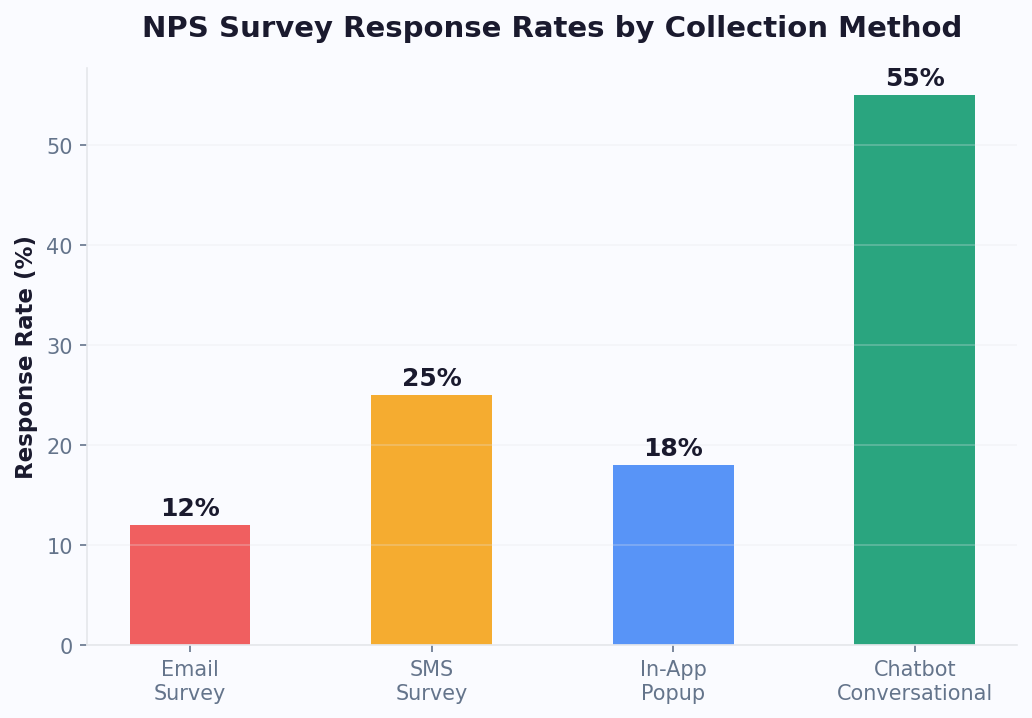
The results speak for themselves: businesses using chatbot-based feedback collection report 40-60% response rates — three to four times higher than email surveys. And the feedback quality is richer: conversational prompts elicit more detailed, honest responses than checkbox forms.
With platforms like Conferbot, building a feedback collection chatbot takes hours, not weeks, and deploys across multiple channels from a single build thanks to omnichannel deployment. All collected feedback is stored in your knowledge base for easy reference and analysis.
How Feedback Collection Chatbots Work
A feedback chatbot — easily built with a no-code chatbot builder — turns a static survey into a dynamic conversation. Instead of presenting all questions at once on a form, the chatbot asks questions one at a time, adapts follow-up questions based on responses, and provides immediate acknowledgment — creating an experience that feels like talking to a helpful team member.
The Conversational Flow
Here is what a feedback chatbot conversation looks like in practice:
- Trigger: After a purchase, support interaction, or at a strategic moment, the chatbot initiates: "Hi! Thanks for your recent purchase. Would you mind sharing a quick thought about your experience? It takes about 60 seconds."
- Quantitative question: "On a scale of 1-10, how likely are you to recommend us to a friend?" [NPS scale with tappable numbers]
- Conditional follow-up: If score is 9-10: "Wonderful! What did we do well?" If 7-8: "Thanks! What could we do to earn a 10?" If 1-6: "We are sorry to hear that. What went wrong?"
- Specific feedback: "Which aspect of your experience would you like to comment on?" [Product Quality] [Delivery] [Customer Service] [Website Experience]
- Open-ended prompt: "Any additional thoughts you would like to share? Every detail helps us improve."
- Closing: "Thank you for your feedback! We take every response seriously and use it to improve. Here is a 10% off code for your next purchase as a thank you: FEEDBACK10"
What Makes This Better Than a Form
- One question at a time reduces cognitive load and prevents overwhelm
- Conditional branching means unhappy customers get empathetic follow-up while happy customers are asked for testimonials
- Conversational tone feels personal rather than bureaucratic
- Immediate acknowledgment after each answer makes customers feel heard
- Incentive at completion rewards participation and drives repeat business
- Real-time timing captures feedback while the experience is fresh
AI-Enhanced Feedback
With NLP-powered chatbots, the feedback experience goes further. AI can:
- Detect sentiment in open-ended responses and adjust the conversation tone accordingly
- Ask intelligent follow-up questions based on what the customer mentions ("You mentioned slow delivery — was this for a specific order?")
- Summarize and categorize feedback automatically, eliminating manual analysis
- Identify trends across conversations without manual tagging
The combination of structured questions (for quantitative data) and AI-driven conversation (for qualitative depth) produces feedback that is both measurable and actionable — the holy grail of customer insight programs.
Types of Feedback to Collect With Chatbots
Different types of feedback serve different business purposes. Here is how to use chatbots for each major feedback category.
Net Promoter Score (NPS)
NPS measures customer loyalty with a single question: "How likely are you to recommend us to a friend?" (0-10 scale). A chatbot makes NPS collection conversational and adds qualitative depth through follow-up questions that explain the score.
Chatbot advantage: Traditional NPS surveys get 10-20% response rates. Chatbot NPS achieves 45-65% because the single-question entry point is low-commitment, and the conversational follow-up feels natural rather than obligatory.
When to trigger: 24-48 hours after purchase, after support resolution, quarterly for ongoing relationships
Customer Satisfaction (CSAT)
CSAT measures satisfaction with a specific interaction: "How satisfied were you with your experience today?" (1-5 scale). It is best deployed immediately after a support conversation, purchase, or service delivery.
Chatbot advantage: Triggering CSAT within the same chat conversation where support was provided captures feedback at the highest-context moment. The customer does not need to open a separate email or form.
When to trigger: Immediately after support resolution, at end of service delivery, post-checkout
Product Feedback
Product feedback helps you understand what features customers love, what frustrates them, and what they wish existed. Chatbots excel here because they can ask specific questions about features the customer has actually used.
Chatbot advantage: AI can personalize product feedback questions based on the customer's usage data: "We noticed you have been using our analytics dashboard. How useful is the funnel analysis feature for your work?"
When to trigger: After 30 days of product use, after feature launch, quarterly for active users
Customer Effort Score (CES)
CES measures how easy it was to accomplish a specific task: "How easy was it to resolve your issue today?" (Very Easy to Very Difficult). Low effort correlates with higher loyalty and retention.
Chatbot advantage: CES is most meaningful when captured immediately after the effort-requiring task. A chatbot can ask this at the exact moment of completion — right after checkout, after a support resolution, or after account setup.
When to trigger: Immediately after task completion (checkout, setup, support resolution)
Open-Ended Feedback
Sometimes the most valuable feedback comes from unstructured conversations. Chatbots can prompt: "Is there anything you wish we did differently?" and use NLP to analyze and categorize responses automatically.
Chatbot advantage: The conversational format encourages more detailed responses than text boxes on forms. Customers write more in chat (average 2-3 sentences) than in survey text fields (average 5-8 words).
The most effective feedback programs combine multiple types. Use NPS for overall loyalty tracking, CSAT for interaction-level quality, CES for process optimization, and open-ended prompts for discovery. A single chatbot flow can incorporate 2-3 feedback types in a conversation that takes under 2 minutes. For a detailed look at implementing NPS via chatbot, see our NPS survey chatbot guide.
How to Build a Feedback Collection Chatbot
Building a feedback chatbot with an AI chatbot builder is one of the simplest chatbot projects with one of the highest returns. Here is the step-by-step process.
Step 1: Define Your Feedback Goals
Before building, clarify what you want to learn:
- Are you measuring overall satisfaction (NPS/CSAT) or gathering specific improvement ideas?
- What decisions will the feedback inform? (Product roadmap, support training, marketing messaging)
- How will you act on the feedback? (If you will not act, do not collect — it erodes trust)
- What is your target response rate and sample size?
Step 2: Design Your Question Flow
Keep it short. The ideal feedback chatbot asks 3-5 questions maximum:
- Quantitative metric (NPS, CSAT, or CES — one number)
- Conditional follow-up (why did you give that score?)
- Specific area (which aspect are you commenting on?)
- Open-ended prompt (anything else you would like to share?)
- Close with thanks and incentive
Five questions take 60-90 seconds. Adding a sixth question drops completion rates by 15-20%. Resist the temptation to ask everything — focused feedback is more actionable than exhaustive feedback.
Step 3: Build on Your Platform
Using Conferbot or your chosen platform:
- Create the feedback flow using the visual builder
- Add conditional branching based on satisfaction scores (different follow-ups for promoters vs. detractors)
- Configure the incentive delivery (discount code, loyalty points, donation to charity)
- Set up data storage: where feedback responses are saved (CRM, spreadsheet, analytics dashboard)
- Configure trigger conditions: when and where the chatbot initiates the feedback conversation
Step 4: Set Up Analytics and Reporting
Connect your feedback chatbot to analytics to track:
- Response rate (percentage of customers who complete the feedback flow)
- Average scores over time (NPS, CSAT trends)
- Common themes in open-ended responses
- Score distribution (how many promoters, passives, detractors)
- Channel performance (which channel gets the highest response rate)
Step 5: Configure Triggers and Timing
The trigger determines when the feedback chatbot activates. Common trigger strategies:
- Post-purchase: Trigger 24-48 hours after order delivery
- Post-support: Trigger immediately after a support conversation closes
- In-app: Trigger after the user completes a key action (onboarding, first project, milestone)
- Proactive: Trigger after a set period of inactivity to understand why engagement dropped
- Exit intent: Trigger when a user shows signs of leaving your website
Step 6: Test and Iterate
Test the flow yourself, with your team, and with a small customer segment before full deployment. After launch, review completion rates and feedback quality weekly for the first month. Adjust question wording, flow length, and trigger timing based on performance data.
Maximizing Feedback Response Rates: Proven Tactics
Even with a chatbot's inherent advantages over email surveys, response rates can vary dramatically based on execution. Here are the tactics that consistently produce the highest feedback participation.
1. Timing Is Everything
The closer to the experience you ask for feedback, the higher the response rate and quality:
- Immediately after support resolution: 55-70% response rate
- Within 1 hour of purchase: 45-60% response rate
- Same day as experience: 35-50% response rate
- Next day: 20-35% response rate
- 3+ days later: 10-20% response rate
For post-support feedback, trigger the chatbot within the same conversation — before the customer closes the chat. For post-purchase, trigger within the first hour while excitement about the purchase is high.
2. Set Expectations on Length
"Quick question" is the most powerful phrase in feedback collection. Telling customers upfront that it takes 60 seconds increases start rates by 30-40%. Be specific: "3 quick questions, takes about a minute" is more compelling than "We would love your feedback."
3. Make the First Question Easy
Start with a single-tap question (NPS scale, star rating, emoji reaction). A question that requires typing as the first step halves your start rate. Once customers have tapped once, they are psychologically committed to completing the flow.
4. Use the Right Channel
Deploy feedback collection on the channel where the interaction happened. If the customer contacted you via WhatsApp, ask for feedback on WhatsApp. If they purchased on your website, use the website chatbot. Channel consistency increases response rates by 20-25% compared to cross-channel requests (like emailing feedback requests after a chat interaction).
5. Offer Meaningful Incentives
Incentives increase response rates by 15-30% depending on value and relevance:
- Discount codes (10-15% off): Most effective for e-commerce, increases response rate and drives repeat purchases
- Loyalty points: Effective for businesses with loyalty programs
- Charity donations: "We will donate $1 to [cause] for every completed survey" — effective for value-driven brands
- Early access: Access to new features or products — effective for engaged communities
Avoid cash incentives or gift cards for short surveys — they attract low-quality responses from people motivated only by the reward.
6. Close the Loop
The single most impactful thing you can do for long-term feedback participation is to show customers that their feedback leads to action. Follow up: "Thanks to customer feedback like yours, we have improved our delivery times by 2 days this quarter." Customers who see their feedback create change are 4x more likely to provide feedback again.
Analyzing and Acting on Chatbot-Collected Feedback
Collecting feedback is only valuable if you analyze it and act on it. Here is how to turn chatbot-collected feedback into business improvements.
Quantitative Analysis
Your structured metrics (NPS, CSAT, CES) should be tracked on dashboards with trend lines:
- NPS trend: Track monthly NPS and segment by customer type, product, and channel
- CSAT by interaction type: Compare satisfaction for different support topics, agents, or processes
- CES by task: Identify which customer tasks are high-effort and need simplification
- Score distribution: Monitor the percentage of detractors, passives, and promoters over time
Set alerts for significant changes: a 10+ point NPS drop, CSAT falling below threshold, or CES spiking for a specific task all signal urgent investigation.
Qualitative Analysis
Open-ended responses contain the richest insights but require analysis to be actionable. With Conferbot's analytics, AI can assist with:
- Sentiment analysis: Automatically classify responses as positive, neutral, or negative
- Theme extraction: Identify the most common topics mentioned across responses
- Keyword frequency: Track how often specific terms appear ("slow", "confusing", "love", "easy")
- Trend detection: Surface emerging themes that were not present in previous periods
The Feedback Action Framework
Not all feedback requires the same action. Use this framework to prioritize:
| Feedback Type | Frequency | Action | Timeline |
|---|---|---|---|
| Critical issue (security, billing error) | Any | Immediate fix | 24-48 hours |
| High-frequency complaint | 10+ mentions/month | Root cause analysis | 1-2 weeks |
| Feature request | 20+ mentions | Add to roadmap | Next quarter |
| Process improvement | 5+ mentions/month | Process review | 2-4 weeks |
| Positive feedback | Any | Share with team, use in marketing | Ongoing |
Closing the Loop at Scale
The most impactful thing you can do with feedback is tell customers what you did with it. Use your chatbot to close the loop:
- Whether feedback came via live chat or automated flows, when a frequently reported issue is fixed, send a message to customers who reported it: "You told us our checkout process was confusing. We have redesigned it based on your feedback. Thank you for helping us improve!"
- Publish a quarterly "You spoke, we listened" update highlighting changes driven by customer feedback
- When a customer gives positive feedback, ask permission to use it as a testimonial
This feedback loop creates a virtuous cycle: customers see their input creating change, which increases willingness to provide future feedback, which gives you more data to improve, which creates more positive experiences to feedback on. The chatbot automates the entire cycle — collection, analysis, action tracking, and loop-closing communication.
Deploying Feedback Chatbots Across Channels
Different channels suit different feedback scenarios. Here is how to optimize your feedback collection across the channels your customers use.
Website Chat — Post-Interaction Feedback
Deploy feedback prompts on your website immediately after key interactions: post-purchase, post-support chat, or after completing onboarding. Website chatbots can also trigger on specific pages — for example, asking for product feedback on the product detail page after a customer has viewed it for 60+ seconds.
Best for: Post-purchase CSAT, product feedback, website experience feedback
WhatsApp — Relationship Feedback
WhatsApp is ideal for periodic relationship feedback (quarterly NPS) because of its 98% open rate. Customers are more likely to engage with a WhatsApp feedback request than an email survey. The persistent conversation thread also makes it easy for customers to refer back to their previous feedback.
Best for: NPS surveys, post-delivery feedback, service quality feedback
In-App Chat — Product Feedback
For SaaS products and mobile apps, in-app feedback chatbots capture context-rich product feedback while the user is actively using the product. Trigger feedback prompts after specific feature usage, milestone completion, or session length.
Best for: Feature feedback, usability insights, onboarding experience
Email + Chatbot Hybrid
Instead of sending a traditional survey link by email, send a link that opens a chatbot conversation. The email gets the customer's attention, and the chatbot provides the engaging experience that achieves higher completion rates.
Best for: Reaching customers who are not currently on your website or messaging channels
Unified Analysis
The power of multi-channel feedback collection is the unified dataset. When all feedback — regardless of channel — flows into the same analytics dashboard, you can:
- Compare satisfaction scores across channels (are WhatsApp customers happier than website customers?)
- Identify channel-specific issues (checkout problems on mobile website, delivery complaints on WhatsApp)
- Track overall trends without channel fragmentation
- Segment feedback by customer journey stage and touchpoint
Platforms like Conferbot that support omnichannel deployment with unified analytics make this seamless — one chatbot flow, multiple channels, one analytics view. Connect feedback data to your CRM, helpdesk, or spreadsheets through the integrations hub for automated reporting.
The recommended approach: start with your highest-traffic channel (usually website), deploy and optimize, then expand to WhatsApp, Messenger, and other channels. Within a month, you will have a multi-channel feedback system capturing 3-4x more responses than email surveys alone. According to Gartner's Voice of the Customer research, companies with real-time feedback loops outperform peers on customer retention by 25-40%. For more on unifying channels, see our omnichannel strategy guide.
Channel Performance Benchmarks
Based on aggregated data from businesses deploying feedback chatbots across multiple channels, here are the response rate benchmarks you should target:
| Channel | Average Response Rate | Average Completion Rate | Best Trigger Timing |
|---|---|---|---|
| In-conversation (same chat session) | 60-70% | 85% | Immediately after resolution |
| WhatsApp (post-interaction) | 45-55% | 78% | Within 1 hour of event |
| Website widget (proactive) | 35-45% | 72% | After 30+ seconds on page |
| Messenger (outbound) | 30-40% | 70% | Same day as interaction |
| Email-to-chatbot link | 15-25% | 65% | Within 24 hours of event |
The gap between response rate and completion rate reveals an important insight: once customers start a feedback conversation, the conversational format keeps them engaged through to the end. The primary challenge is getting the first interaction, not maintaining it. This is why trigger timing and channel selection matter so much. Optimize for the initial engagement and the chatbot format handles the rest.
Feedback Chatbot Templates: Copy-Paste Scripts for Common Scenarios
Rather than building feedback flows from scratch, use these proven templates as starting points. Each has been tested across hundreds of deployments and optimized for maximum completion rates.
Template 1: Post-Purchase CSAT (E-commerce)
Trigger: 24-48 hours after delivery confirmation
Script:
- Bot: "Hi [Name]! Your [product] should have arrived. How would you rate your overall experience? [5 stars | 4 stars | 3 stars | 2 stars | 1 star]"
- If 4-5 stars: "Wonderful! Would you mind leaving a quick review? It helps other shoppers. [Leave a review] [Maybe later]"
- If 1-3 stars: "I am sorry to hear that. What went wrong? [Product quality] [Shipping was slow] [Wrong item] [Other]"
- Bot (after selection): "Thank you for telling us. I have flagged this for our team and someone will follow up within 24 hours. Here is 15% off your next order as an apology: SORRY15"
Expected completion rate: 55-65%
Template 2: Post-Support NPS
Trigger: Immediately after support ticket resolution (in same chat window)
Script:
- Bot: "Before you go — one quick question. How likely are you to recommend us to a friend? [0-10 scale buttons]"
- If 9-10: "Thank you! You made our day. Is there anything specific we did well?"
- If 7-8: "Thanks! What is the one thing that would have made this a 10?"
- If 0-6: "We appreciate your honesty. What could we improve? Your feedback goes directly to our team lead."
Expected completion rate: 60-70% (highest because it is in-context)
Template 3: Quarterly Relationship NPS (WhatsApp)
Trigger: Every 90 days for active customers, sent via WhatsApp
Script:
- Bot: "Hi [Name], it is [Company]. Quick 30-second check-in: on a scale of 0-10, how likely are you to recommend us?"
- After score: "Thanks! One more: what is the single biggest thing we could improve for you?"
- Bot (closing): "Really helpful — your feedback shapes what we build next. Have a great week!"
Expected completion rate: 45-55% (WhatsApp's high open rate compensates for unsolicited outreach)
Template 4: Feature Feedback (SaaS In-App)
Trigger: After user uses a specific feature 5+ times
Script:
- Bot: "You have been using [Feature] regularly. Quick question: how useful is it for your workflow? [Essential] [Helpful] [Okay] [Not useful]"
- If Essential/Helpful: "Great! Anything we could add to make it even better?"
- If Okay/Not useful: "Thanks for the honesty. What were you hoping it would do differently?"
Expected completion rate: 50-60%
Choosing the Right Template
| Your Goal | Use Template | Best Channel | Timing |
|---|---|---|---|
| Measure product satisfaction | Post-Purchase CSAT | Website or WhatsApp | 24-48h after delivery |
| Measure support quality | Post-Support NPS | Same channel as support | Immediately after resolution |
| Track overall loyalty | Quarterly Relationship NPS | Every 90 days | |
| Improve product features | Feature Feedback | In-app chat | After repeated feature use |
All templates are available pre-built in the Conferbot template gallery. Customize the copy, connect your channels, and deploy in under 30 minutes. For more ready-to-use conversation flows, explore our 7 copy-paste chatbot flow templates.
Was this article helpful?
Automate Customer Feedback Collection With Chatbots FAQ
Everything you need to know about chatbots for automate customer feedback collection with chatbots.
About the Author

Conferbot Team specializes in conversational AI, chatbot strategy, and customer engagement automation. With deep expertise in building AI-powered chatbots, they help businesses deliver exceptional customer experiences across every channel.
View all articles

