
Telegram Bot Pembuat Chatbot
Bangun dan deploy bot Telegram dalam hitungan menit. Sempurna untuk komunitas yang paham teknologi, audiens internasional, dan bisnis yang membutuhkan saluran pesan yang cepat dan andal. Platform termudah untuk di-setup!
To build a Telegram Bot chatbot with Conferbot, sign up free, design your flow in the no-code visual builder, connect your Telegram Bot account, and publish — typically live in a few minutes with no coding. The free plan needs no credit card, and the same bot can also run on your website and other messaging channels.
Telegram Fitur Chatbot
Semua yang Anda butuhkan untuk membangun percakapan otomatis yang kuat
Setup bot token sekali klik
Tombol inline keyboard tanpa batas
Perintah bot kustom (/start, /help, dll.)
Dukungan group chat
Editing pesan setelah dikirim
Indikator mengetik
Berbagi file (semua tipe)
Peralihan ke manusia yang mulus
Apa yang Bisa Anda Bangun?
Mulai dalam 8 Langkah Sederhana
Ikuti panduan ini untuk menghubungkan chatbot Telegram Anda
Buka Telegram dan cari @BotFather
Kirim perintah /newbot untuk membuat bot baru
Pilih nama dan username untuk bot Anda
Salin Bot Token yang diberikan oleh BotFather
Di Conferbot, buka Channels → Telegram → Connect
Tempel Bot Token Anda dan pilih chatbot
Klik Connect - webhook terdaftar otomatis!
Kirim /start ke bot Anda untuk mengujinya
Why Telegram Is the Fastest-Growing Bot Platform
Telegram has exploded to over 800 million monthly active users worldwide, making it one of the most popular messaging platforms on the planet. But what truly sets Telegram apart is its bot-first philosophy. Unlike other messaging apps that added bot support as an afterthought, Telegram was designed from the ground up to be a platform where bots are first-class citizens - capable of doing virtually everything a human user can do and more.
Telegram's Bot API is free, unrestricted, and extraordinarily powerful. Bots can send and receive messages, manage groups, process payments, host mini-games, deliver content, run inline queries across any chat, and even power entire web applications through Telegram's Web App feature. There are no approval processes, no restrictive policies, and no per-message fees. This openness has made Telegram the platform of choice for bot developers and businesses looking to automate communication at scale.
For businesses, Telegram bots offer a unique opportunity to reach a tech-savvy, global audience. Telegram is especially popular in regions like Southeast Asia, the Middle East, Eastern Europe, Central Asia, and Latin America - markets where WhatsApp alternatives are actively sought. A Telegram bot can serve as your 24/7 customer support agent, content distribution engine, community manager, and lead generation tool, all within an app your audience already uses daily.
With Conferbot's no-code chatbot builder, you do not need to write a single line of code to create a sophisticated Telegram bot. Design your conversational flows visually, train the bot with AI and OpenAI integration, and deploy to Telegram in under 5 minutes. This guide covers everything you need to know about building, deploying, and scaling a Telegram chatbot in 2026.
New to chatbot building? Start with our complete guide to building a chatbot without coding. Already running bots on other channels? Deploy the same bot on Telegram alongside WhatsApp, Messenger, and your website using Conferbot's omnichannel platform. Browse our template library for ready-to-deploy Telegram bot flows.
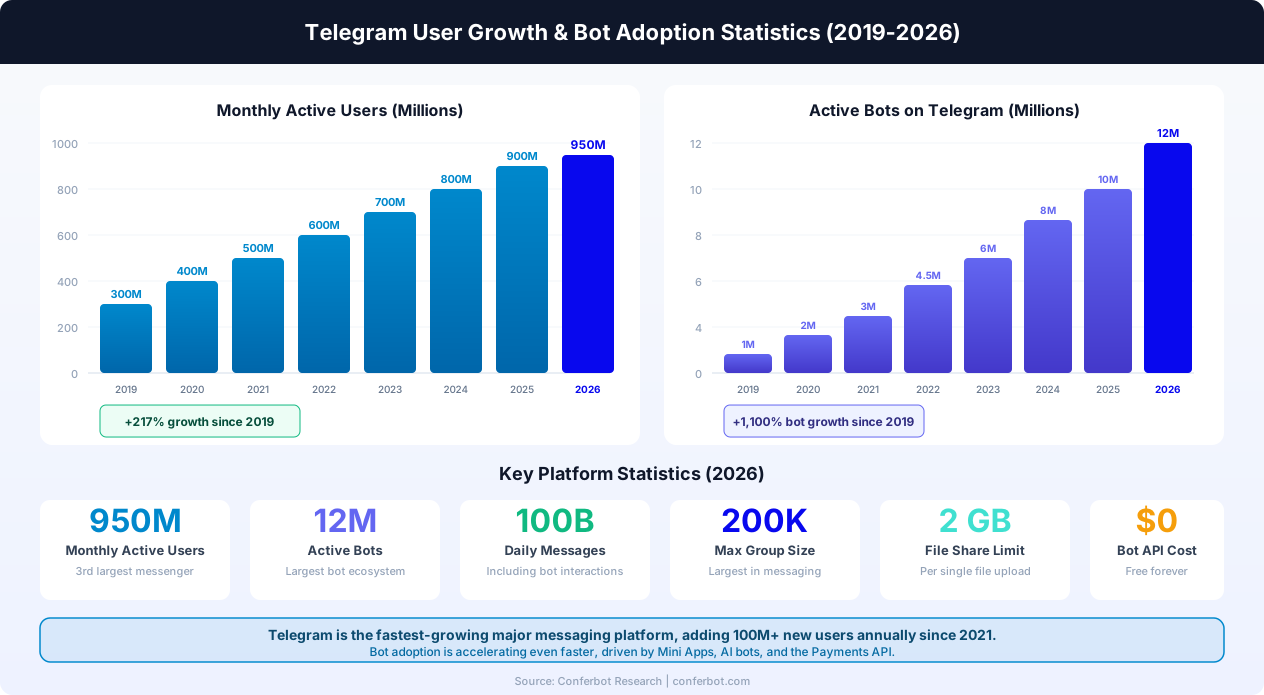
What Can a Telegram Bot Do?
Telegram bots are among the most capable in the messaging ecosystem. The Bot API supports an extensive range of interactions that go far beyond simple question-and-answer exchanges. Here is what you can build:
Group and Channel Management
Telegram bots can be added to groups (up to 200,000 members) and channels (unlimited subscribers) to automate moderation, answer FAQs, greet new members, and manage community interactions. A well-configured group bot can handle spam filtering, welcome messages, rule enforcement, and automatic responses to common questions - saving community managers hours of manual work every day.
Inline Bots
One of Telegram's most unique features, inline bots let users invoke your bot from any chat by typing @yourbotname followed by a query. The bot returns results as a popup that the user can share directly in the current conversation. This is powerful for search tools, content bots, GIF bots, and product catalogs - your bot becomes accessible everywhere without being added to the chat.
Payments and Commerce
Telegram bots have native support for in-chat payments via Stripe, YooMoney, and other payment providers. You can build a full e-commerce experience within Telegram - browsing products, adding to cart, processing payments, and sending order confirmations - without the user ever leaving the app.
Customer Support
Deploy an intelligent support bot that handles inquiries 24/7, provides instant answers from your knowledge base, collects customer information, and escalates complex issues to human agents. With Conferbot's NLP capabilities, your bot understands natural language and can handle nuanced customer queries rather than relying on rigid keyword matching.
Content Delivery and Notifications
Telegram bots are excellent for automated content distribution: daily news digests, price alerts, weather updates, blog post notifications, scheduled reminders, and more. Channels combined with bots create a powerful one-to-many broadcasting system that reaches subscribers instantly with open rates of 70-80% - far exceeding email marketing.
Mini Apps and Games
Through Telegram's Web App platform, bots can launch full interactive web applications within the Telegram interface. This enables everything from interactive quizzes and educational tools to reservation systems and productivity apps - all accessible through a simple bot button. Telegram Mini Apps have become a major trend, with apps like Hamster Kombat reaching over 300 million users through the platform. For businesses, Mini Apps offer a way to build rich, interactive experiences -- product catalogs, booking systems, loyalty programs, and more -- without requiring users to download a separate app.
Group vs Channel Automation
Understanding the difference between Telegram groups and channels is critical for bot deployment. Groups are interactive spaces where members can all send messages -- ideal for communities, support forums, and team collaboration. Bots in groups respond to commands, answer questions, and moderate content. Channels are one-to-many broadcast tools where only admins (and bots) can post -- perfect for news, announcements, and content delivery. A bot can post to a channel on a schedule, delivering daily digests, price alerts, or content updates to unlimited subscribers. Many businesses use both: a channel for announcements and a linked group for discussion, with the bot active in both.
Telegram Payments API
Telegram's built-in Payments API lets bots process transactions directly within the chat. The bot sends an invoice message with product details, price, and a "Pay" button. Users tap to pay using supported providers (Stripe, YooMoney, and others), and the payment confirmation flows back through the bot. This enables full in-chat commerce: browsing products, adding to cart, and completing payment without leaving Telegram. There are no platform fees from Telegram -- you only pay the payment processor's standard transaction fee. For businesses in regions like Southeast Asia, the Middle East, and Eastern Europe where Telegram has massive adoption, this is a powerful e-commerce channel.
Inline Bots Deep Dive
Inline bots deserve special attention because they are unique to Telegram. When a user types @yourbotname query in any chat (even chats your bot is not a member of), the bot receives the query and returns up to 50 results as a popup. The user selects a result, and it is sent as a message in that chat. Use cases include: product search (users search your catalog from any conversation), content sharing (find and share articles, GIFs, or media), utility tools (currency conversion, translation, weather lookups), and collaborative tools (share templates, code snippets, or documents). Inline bots dramatically increase your bot's reach because they are accessible everywhere, not just in direct conversations. Enabling inline mode requires a simple /setinline command to BotFather.
Telegram Bot API: Complete Technical Guide
The Telegram Bot API is one of the most comprehensive messaging APIs available, offering developers fine-grained control over every aspect of bot behavior. Whether you are building directly on the API or using a no-code platform like Conferbot (which handles the technical complexity for you), understanding the API's capabilities helps you design better bots. Here is a deep technical walkthrough of the most important features.
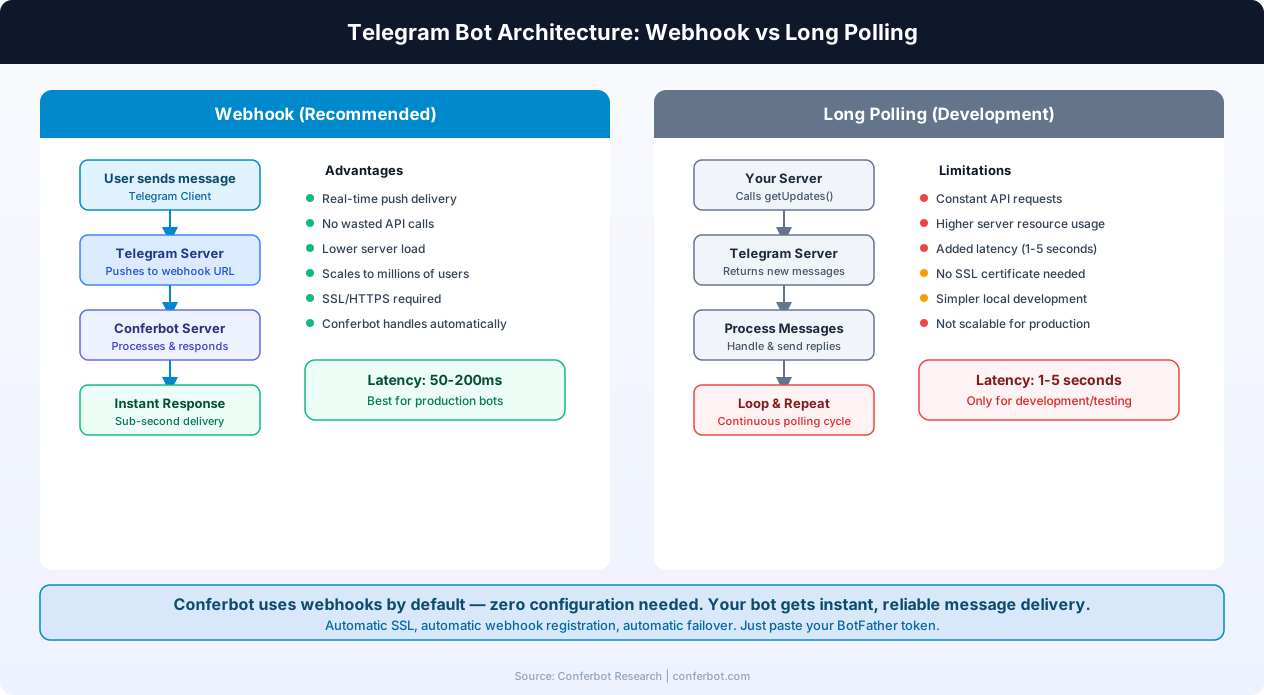
Webhook vs Long Polling: Message Delivery
Telegram offers two methods for your bot to receive messages from users:
Webhooks (recommended for production): You register an HTTPS URL with Telegram. When a user sends a message, Telegram pushes it to your server instantly via an HTTP POST request. This is the fastest and most efficient approach - latency is typically 50-200 milliseconds, and there are no wasted API calls. Webhooks require an SSL certificate and a publicly accessible server. Conferbot handles all of this automatically - when you paste your BotFather token, the webhook is registered, SSL is configured, and your bot starts receiving messages in real time.
Long polling (for development): Your server repeatedly calls the getUpdates endpoint to check for new messages. Telegram holds the connection open until a message arrives or a timeout is reached. This is simpler to set up (no SSL needed) and works behind firewalls, but it adds 1-5 seconds of latency and requires your server to run a continuous polling loop. Long polling is acceptable for prototyping but should not be used for production bots serving real users.
Keyboard Types: Reply Keyboard vs Inline Keyboard
Telegram bots have two distinct keyboard systems, each suited to different interaction patterns:
Reply Keyboard (ReplyKeyboardMarkup): This replaces the user's standard keyboard with a custom set of buttons at the bottom of the chat. When the user taps a button, the button's text is sent as a regular message. Reply keyboards are ideal for simple, single-choice interactions - selecting a language, choosing a menu category, or confirming an action. You can make buttons request the user's phone number or location with a single tap. Use ReplyKeyboardRemove to restore the normal keyboard when done.
Inline Keyboard (InlineKeyboardMarkup): These buttons appear directly below a specific bot message. When tapped, they can trigger a callback query (sending data to your bot without posting a visible message), open a URL, switch to inline mode, or launch a web app. Inline keyboards are far more versatile - they enable multi-step workflows, paginated lists, dynamic menus, and interactive forms without cluttering the chat with text messages. The bot can edit the message above the keyboard to update its content dynamically, creating a responsive app-like experience.
Inline Mode: Your Bot Everywhere
When inline mode is enabled (via /setinline in BotFather), users can invoke your bot from any chat by typing @yourbotname query. The bot processes the query and returns up to 50 results as rich preview cards. The user selects one, and it appears as a message in the current conversation. Inline mode dramatically expands your bot's reach because it works in group chats, channels, and private conversations the bot has never been added to. Popular inline bot use cases include product search, media sharing, quick translations, and utility lookups. You can track inline usage separately and even show personalized results based on the requesting user.
Bot Commands and the Command Menu
Bot commands start with a forward slash (e.g., /start, /help, /settings) and appear in Telegram's native command menu, accessible by tapping the "/" button. You register commands with BotFather using /setcommands. Well-designed commands are the backbone of bot discoverability - users can see everything the bot offers at a glance. Best practice is to keep command names short, lowercase, and descriptive. The /start command is special: it is sent automatically when a user opens your bot for the first time, and it can include a deep-linking parameter (/start payload) for tracking referral sources, campaign attribution, or initiating specific flows.
Telegram Bot Payments API
The Telegram Payments API enables bots to accept payments natively within the chat interface. The flow is: (1) bot sends an invoice via sendInvoice(), (2) user taps "Pay" and enters payment details in Telegram's secure checkout UI, (3) Telegram sends a pre_checkout_query to your bot for validation - you have 10 seconds to confirm, (4) payment is processed through the configured payment provider, and (5) Telegram sends a successful_payment message confirming the transaction. Supported providers include Stripe (135+ countries), YooMoney, LiqPay, and 10+ others. Critically, Telegram charges zero platform fees - you only pay the payment processor's standard transaction rate (typically 2.9% for Stripe). This makes Telegram one of the most cost-effective in-chat commerce platforms available.
Telegram Login Widget
The Telegram Login Widget lets users log into your website or web app using their Telegram account. After authorization, you receive the user's Telegram ID, first name, last name, username, and profile photo - pre-verified by Telegram. This enables seamless cross-platform experiences: a user interacting with your Telegram bot can log into your website without creating a separate account, and their conversation history follows them. For e-commerce bots, this means the user's cart, order history, and preferences sync between Telegram and your web store. The widget works on any website and requires no Telegram-specific backend - just verify the authentication hash with your bot token.
Rate Limits and API Best Practices
While the Telegram Bot API is free and generous, it does have rate limits to prevent abuse. Bots can send up to 30 messages per second globally, and no more than 20 messages per minute to a single chat. Group messages are limited to 20 per minute per group. For broadcast scenarios (sending to many users), you should implement a message queue that respects these limits. Conferbot handles all rate limiting automatically - when you broadcast to thousands of subscribers, messages are queued and delivered at the optimal rate to avoid hitting limits while maintaining fast delivery.
Telegram Mini Apps & Web Apps
Telegram Mini Apps (formerly called Web Apps) are one of the platform's most transformative features and the fastest-growing area of the Telegram ecosystem. Mini Apps let you build full-featured web applications that run inside the Telegram client, giving users rich interactive experiences without ever leaving the messaging app. In 2026, Mini Apps have become a primary reason businesses choose Telegram over competing platforms.
What Are Telegram Mini Apps?
A Mini App is essentially a web page (HTML/CSS/JavaScript) that opens inside a Telegram bot's chat window. When a user taps a special button, Telegram opens a web view overlay where your application runs. The app has access to user data (name, ID, language), theme colors (matching the user's Telegram theme), and a communication bridge back to the bot. Mini Apps can be as simple as a contact form or as complex as a full e-commerce store with shopping cart, product filtering, and checkout. The user experience feels native - there is no browser chrome, no address bar, just your application running inside Telegram.
How Mini Apps Integrate with Bot Flows
There are several ways to launch a Mini App from your bot:
- KeyboardButton.web_app: A reply keyboard button that opens the Mini App. This is ideal for persistent actions like "Open Shop" or "Book Appointment" that should always be available.
- InlineKeyboardButton.web_app: An inline keyboard button attached to a specific message. Use this for contextual actions like "Customize this product" or "Fill out this form."
- Bot Menu Button: A persistent button next to the text input field. Set via BotFather with
/setmenubutton. This replaces the default command menu and gives your Mini App maximum visibility. - Direct Link: A
t.me/botname/appnameURL that opens the Mini App directly. Shareable in any chat, social media, or website.
When the Mini App needs to send data back to the bot, it calls Telegram.WebApp.sendData(). The bot receives this data as a special message type and can respond accordingly - confirming an order, sending a receipt, or continuing the conversation. For more complex scenarios, the Mini App can communicate with your backend server directly via standard HTTPS requests, using the initData parameter for user verification.
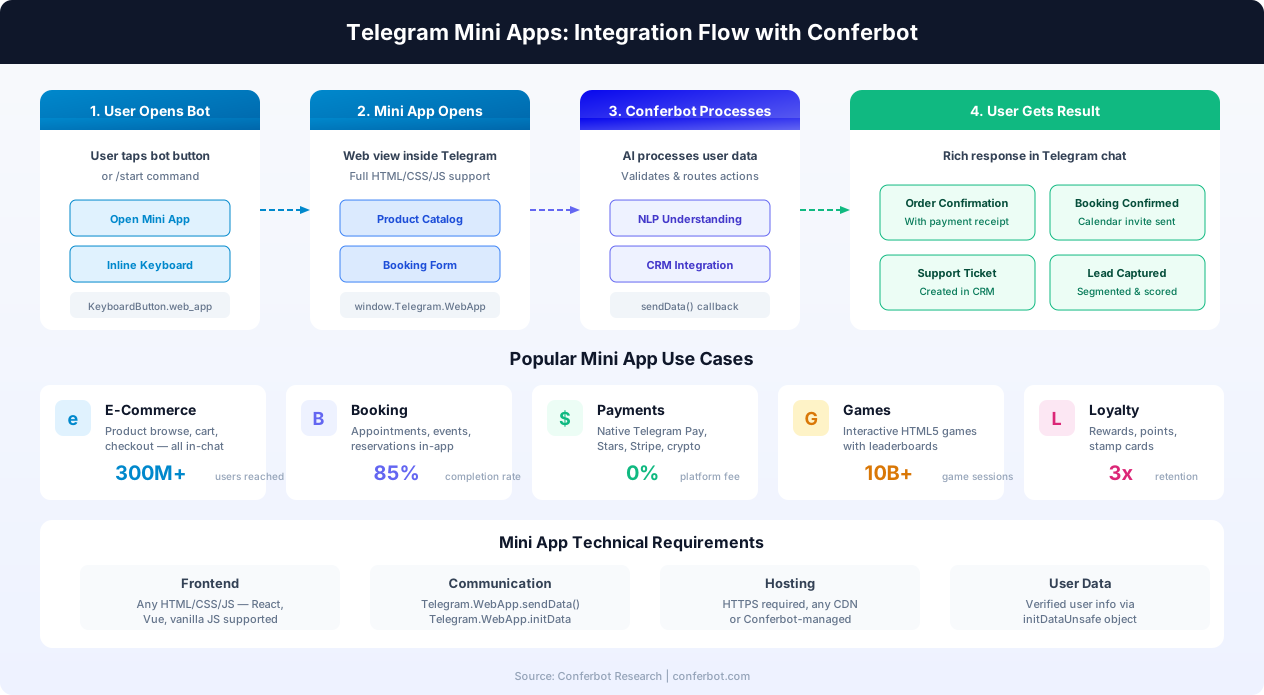
Business Use Cases for Mini Apps
Mini Apps have unlocked use cases that were previously impossible within a messaging app:
- E-Commerce Stores: Full product catalogs with search, filtering, image galleries, size selectors, shopping carts, and checkout - all within Telegram. Users browse, select, and pay without ever opening a browser. Combined with Telegram's Payments API, the entire purchase flow happens in-app.
- Appointment Booking: Calendar-based booking systems where users select dates, times, and services visually. Integrate with Conferbot's calendar booking to sync with Google Calendar, Calendly, or your custom scheduling system.
- Interactive Forms and Surveys: Rich forms with conditional logic, file uploads, image selection, and multi-step flows. Far more engaging than traditional text-based bot questionnaires. Connect results to your CRM via the integrations hub.
- Loyalty and Rewards Programs: Stamp cards, points tracking, tier status displays, and reward redemption - all in a branded Mini App. Users check their status, earn points, and redeem rewards without a separate loyalty app.
- Restaurant Ordering: Visual menus with food photos, customization options (toppings, sides, sizes), cart management, and in-app payment. Replace third-party delivery apps and their 30% commission with your own Telegram-based ordering system.
- Event Management: Ticket selection, seating charts, QR code generation, and event check-in - all within the Telegram Mini App. Pair with a group bot that sends event reminders and updates to attendees.
Technical Requirements
Building a Mini App requires standard web development skills. The app is hosted on your own server (HTTPS required) or on Conferbot's managed infrastructure. Telegram provides a JavaScript SDK (telegram-web-app.js) that handles communication with the Telegram client. The SDK gives you access to:
Telegram.WebApp.initDataUnsafe- verified user information (ID, name, username, language)Telegram.WebApp.themeParams- the user's current Telegram theme colors for seamless visual integrationTelegram.WebApp.MainButton- a prominent action button at the bottom of the Mini AppTelegram.WebApp.BackButton- navigation support for multi-page appsTelegram.WebApp.HapticFeedback- native vibration feedback for touch interactionsTelegram.WebApp.CloudStorage- persistent key-value storage for user preferences
Conferbot simplifies Mini App deployment by providing pre-built templates for common use cases - e-commerce, booking, lead capture, and more. You configure the Mini App through the visual builder, and Conferbot handles hosting, user authentication, and data routing. No separate web development project needed.
Mini App Performance and Reach
Mini Apps have demonstrated remarkable engagement metrics. Telegram reported that Mini Apps launched in 2023 collectively reached over 500 million users within the first year. Individual apps like Hamster Kombat attracted 300+ million users, demonstrating the viral potential of the format. For businesses, the key metric is conversion rate: Mini Apps consistently outperform traditional web flows because there is zero friction - no app downloads, no account creation, no browser redirects. The user is already authenticated via their Telegram account, and the entire experience happens within a familiar interface.
Telegram Group & Channel Bot Automation
"Telegram group bot" is one of the highest-volume search queries related to Telegram automation, and for good reason. Managing large Telegram communities manually is unsustainable - groups can have up to 200,000 members, and channels can have unlimited subscribers. Bots are not just helpful for group management; they are essential. Here is a complete guide to automating Telegram groups and channels with Conferbot.
Admin Bots for Groups
A group admin bot acts as an always-on moderator that handles the tasks human admins cannot manage at scale:
- New Member Verification: When a new user joins, the bot can require a CAPTCHA, quiz, or button click to verify they are human before granting posting permissions. This alone blocks the vast majority of spam bots that plague unprotected groups. Conferbot supports customizable verification flows - from simple button clicks to knowledge-based questions about your community rules.
- Welcome Messages: Automatically greet new members with a personalized welcome message that includes group rules, useful links, and a quick-start guide. Dynamic variables let you include the user's name and the current member count. Use inline keyboards to let new members self-select their interests or role (e.g., "I'm a customer" vs "I'm a developer").
- Spam and Flood Protection: AI-powered filtering that detects and removes spam messages, excessive link posting, repetitive content, and message flooding in real time. Configure sensitivity levels from light (only obvious spam) to strict (any promotional content). The bot can warn, mute, or ban offenders automatically based on your rules.
- Profanity and Content Filtering: Automatically detect and remove messages containing offensive language, hate speech, or prohibited content. Customize the filter with your own word lists and exclusions. The bot can be configured to delete the offending message, warn the user, or escalate to human admins.
- Command Handling: Built-in responses for standard commands like
/help,/rules,/faq,/report, and/admin. Each command triggers a structured response with inline keyboards for follow-up actions. Members can report issues, access resources, and get support without waiting for a human admin. - Scheduled Messages: Post recurring messages at set times - daily discussion topics, weekly roundups, event reminders, or periodic rule reinforcements. Conferbot's scheduling engine handles timezone management and ensures messages are delivered at the optimal time for your audience.
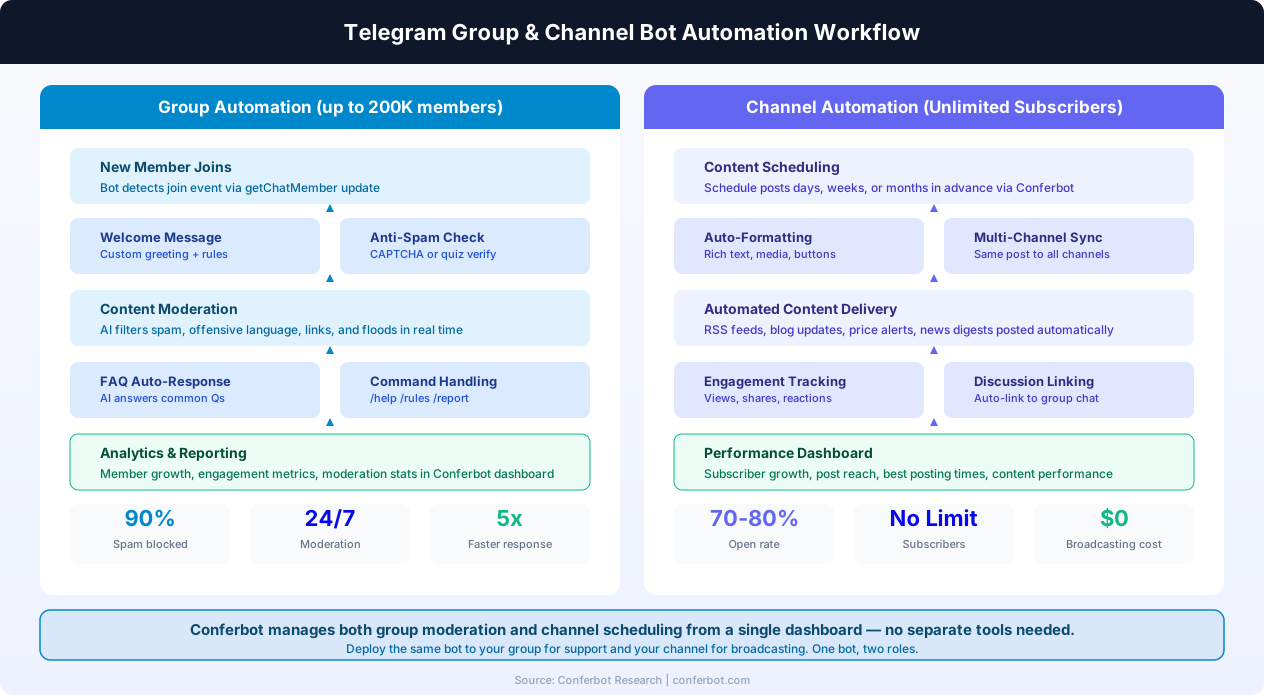
Channel Automation
Telegram channels are broadcast-only - only admins and bots can post. This makes them perfect for automated content delivery at scale:
- Content Scheduling: Plan and schedule posts days, weeks, or months in advance. The bot publishes at the scheduled time with full rich media support - formatted text, images, videos, documents, and inline keyboards. Batch-schedule a week's worth of content in one session.
- RSS and API Integration: Automatically pull content from RSS feeds, blog APIs, news sources, or your CMS and post it to your channel. Configure formatting templates so each post matches your channel's style. New blog post? Price update? Product launch? The bot posts it automatically.
- Cross-Posting: Publish the same content to multiple Telegram channels and groups simultaneously. Useful for businesses managing regional channels, topic-specific channels, or channels in different languages. Conferbot can also cross-post to WhatsApp, Slack, and Discord from the same dashboard.
- Discussion Group Linking: Telegram lets you link a discussion group to a channel. Every channel post automatically creates a discussion thread in the linked group. Your bot can monitor these discussions, answer questions about the posted content, and moderate the conversation - creating a feedback loop between your broadcast content and community engagement.
- Engagement Analytics: Track post reach, view counts, forward counts, and reaction distributions. Identify which content types perform best, what posting times generate the most engagement, and how your subscriber base is growing. Conferbot's analytics dashboard aggregates these metrics alongside data from all your other channels.
Group + Channel Strategy
The most effective Telegram strategy combines both groups and channels with a single bot managing both:
- Channel for one-to-many announcements, content delivery, and broadcasts (70-80% open rates)
- Linked Group for community discussion, support, and engagement
- Bot manages both: auto-posts to the channel on schedule, moderates the group, answers questions in both, and routes support requests to human agents via live chat handoff
This pattern - used by thousands of businesses and communities on Telegram - creates a self-sustaining ecosystem where content drives community engagement, and community engagement generates content ideas. The bot is the glue that makes it work 24/7 without human intervention.
Permissions and Privacy Mode
Understanding Telegram's bot permissions is critical for group deployment. By default, bots run in privacy mode - they only receive messages that are commands (/command), direct replies to the bot's messages, or messages that mention the bot's username. This is the recommended setting for most use cases because it respects user privacy and reduces processing load. Disable privacy mode only when the bot genuinely needs to see every message, such as for comprehensive content moderation or keyword-triggered responses. You can also grant bots specific admin permissions: delete messages, ban users, pin messages, manage topics, and invite users - each permission can be toggled independently for fine-grained access control.
Telegram Payments & Commerce Bot
Telegram's native payment infrastructure sets it apart from every other messaging platform. While WhatsApp has limited payments (only in India and Brazil) and Messenger has largely deprecated its payment features, Telegram offers a full-featured, global payment system with zero platform fees. For businesses looking to sell products or services through a messaging app, Telegram is the clear leader.
How Telegram Payments Work
The payment flow in Telegram is seamless and secure. Here is the step-by-step process:
- Product Display: Your bot sends a message with product details - title, description, photo, and price - along with a "Pay" button. This can be triggered by the user browsing a catalog, selecting an item from an inline keyboard menu, or interacting with a Mini App.
- Invoice Generation: The bot calls the
sendInvoice()method, which creates a native Telegram invoice. The invoice includes the product name, description, price (in the local currency), and optional fields like shipping options, tips, and tax. - Checkout: When the user taps "Pay," Telegram opens its built-in checkout interface. The user enters their payment details (card number, billing address) or uses a saved payment method. This UI is provided by Telegram and is consistent across all bots - users trust it because it looks and feels like a native Telegram feature.
- Pre-Checkout Validation: Before charging the user, Telegram sends a
pre_checkout_queryto your bot. You have 10 seconds to validate the order (check inventory, verify pricing, confirm shipping availability) and respond with approval or rejection. Conferbot handles this validation automatically based on your product configuration. - Payment Processing: The payment provider (Stripe, YooMoney, etc.) processes the transaction. On success, Telegram sends a
successful_paymentmessage to both the bot and the user, confirming the purchase with a receipt. - Order Fulfillment: Your bot sends a confirmation message with order details, tracking information, or digital product delivery. For physical products, integrate with your fulfillment system via Conferbot's API integrations.
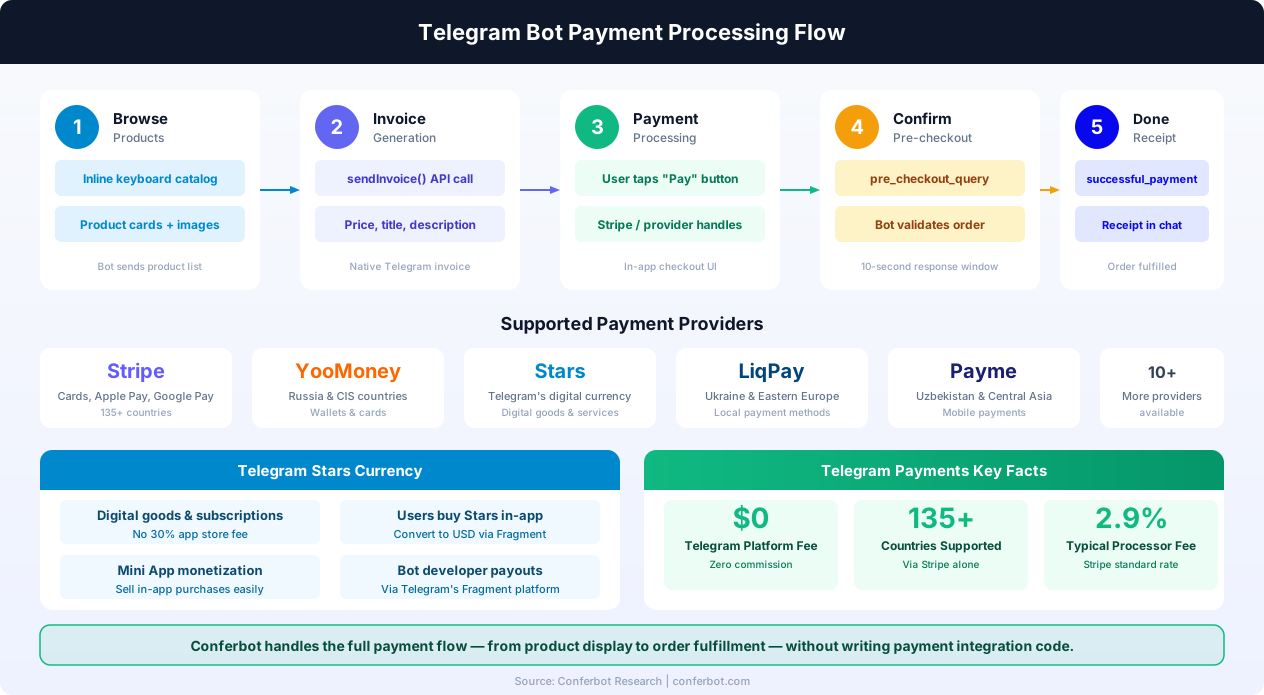
Telegram Stars: The Digital Currency
In 2024, Telegram introduced Stars - a digital currency that users can purchase within the Telegram app and spend on digital goods, bot subscriptions, and Mini App purchases. Stars solve a critical problem: they allow bots to monetize digital content without dealing with payment processors directly, and they bypass the 30% commission charged by Apple and Google on in-app purchases.
- Purchasing Stars: Users buy Stars through Telegram using their local payment methods (credit card, Google Pay, Apple Pay). Prices are set by Telegram and vary by region.
- Spending Stars: Users spend Stars on digital goods (premium content, stickers, subscriptions), Mini App purchases (in-game items, premium features), and bot services (AI credits, file conversions).
- Developer Payouts: Bot developers accumulate Stars from user purchases and can convert them to USD (or local currency) through Telegram's Fragment platform. The conversion rate is transparent and published publicly.
- Use Cases: Stars are ideal for subscription-based bots (pay 100 Stars/month for premium features), content monetization (unlock articles or courses for Stars), in-app purchases (virtual goods in Telegram games), and tipping (users reward helpful bots or content creators).
Payment Providers and Global Reach
Telegram supports over 10 payment providers, ensuring broad global coverage:
| Provider | Coverage | Payment Methods | Typical Fee |
|---|---|---|---|
| Stripe | 135+ countries | Cards, Apple Pay, Google Pay | 2.9% + $0.30 |
| YooMoney | Russia, CIS | Cards, wallets, bank transfers | 3.5% |
| LiqPay | Ukraine, EU | Cards, local methods | 2.75% |
| Payme | Uzbekistan, Central Asia | Cards, mobile payments | 1.5% |
| Click | Uzbekistan | Mobile wallets | 1% |
| Stars | Global (all Telegram users) | In-app purchase | Telegram's rate |
Importantly, Telegram charges zero platform commission on payments processed through its Bot API. You only pay the payment provider's standard transaction fee. This is a massive advantage over platforms like Shopify (which adds platform fees on top of payment processing) or mobile app stores (which take 15-30%). For a business processing $10,000/month through a Telegram bot with Stripe, the total cost is approximately $320 - compared to $1,500-3,000 through an app store.
Building a Commerce Bot with Conferbot
Conferbot makes it easy to build a full commerce bot without writing payment integration code:
- Product Catalog: Upload products with images, descriptions, prices, and variants through the Conferbot dashboard. The bot automatically generates browsable menus with inline keyboards.
- Cart Management: Users add items to a cart, adjust quantities, and review their order - all through inline keyboard interactions. The bot maintains cart state across conversations.
- Payment Processing: Connect your Stripe (or other provider) account in the Conferbot dashboard. Payments flow through Telegram's native checkout - Conferbot handles the invoice generation, pre-checkout validation, and confirmation messaging.
- Order Notifications: Both the buyer and your team receive instant notifications. Integrate with Shopify, WooCommerce, or your custom backend for order management and fulfillment tracking.
- Multi-Currency Support: Accept payments in 100+ currencies. Prices display in the user's local currency based on their Telegram settings.
For businesses already selling on their website or through WhatsApp, adding a Telegram commerce bot with Conferbot creates an additional sales channel with zero marginal cost and access to Telegram's 950 million users. The same product catalog and payment configuration works across all channels.
Telegram Bot API vs Bot Platforms
You can build a Telegram bot by coding directly against the Bot API or by using a no-code platform like Conferbot. Here is how the two approaches compare:
| Factor | Direct Bot API (Code) | Conferbot (No-Code) |
|---|---|---|
| Setup Time | Days to weeks | 5-10 minutes |
| Coding Required | Python, Node.js, or similar | None - visual builder |
| AI Integration | Build your own pipeline | Built-in OpenAI / GPT |
| Hosting | You manage servers | Fully managed by Conferbot |
| Uptime | Depends on your infra | 99.9% managed uptime |
| Analytics | Build your own | Built-in dashboard |
| Live Chat Handoff | Custom development | One-click setup |
| Multi-Channel | Telegram only | Telegram + 10 other channels |
| Maintenance | Ongoing developer effort | Zero maintenance |
| Cost | $500-5,000+ dev time + hosting | Starts at $0/month |
Coding directly against the Telegram Bot API gives you maximum control and is ideal for highly custom applications like games, payment bots, or complex integrations. However, for the vast majority of business use cases - customer support, FAQ automation, lead generation, community management - a no-code platform delivers the same results in a fraction of the time and cost.
Conferbot bridges the gap by offering the ease of a visual builder with the intelligence of AI. Your bot can understand natural language, maintain conversation context, and provide human-like responses - all without writing code. And when you need to extend functionality, Conferbot's API integrations let you connect to any external system.
For businesses that need both the flexibility of custom code and the speed of no-code, Conferbot offers a hybrid approach. Build your core conversation flows visually, add AI knowledge base integration for intelligent Q&A, connect calendar booking for appointment scheduling, and use the integrations hub to connect to CRMs, e-commerce platforms, and payment processors. The result is a Telegram bot that rivals custom-coded solutions at a fraction of the cost and timeline.
How to Create a Telegram Chatbot with Conferbot
Creating a Telegram bot is famously easy - Telegram calls the process "the simplest bot setup in the messaging world." With Conferbot, the entire process takes about 5 minutes. Here is the step-by-step guide:
Step 1: Create Your Bot with BotFather
Open Telegram and search for @BotFather - this is Telegram's official bot for creating and managing bots. Send the /newbot command and follow the prompts:
- Choose a display name for your bot (e.g., "Acme Support Bot")
- Choose a username that ends in "bot" (e.g., "acme_support_bot")
- BotFather will generate a Bot Token - a long string like
123456:ABC-DEF1234ghIkl-zyx57W2v1u123ew11 - Copy this token and keep it secure. Anyone with this token can control your bot.
Step 2: Customize Your Bot (Optional)
While still chatting with BotFather, you can configure your bot's profile:
/setdescription- Set the text users see when they open your bot for the first time/setabouttext- Set the bio that appears on your bot's profile/setuserpic- Upload a profile picture for your bot/setcommands- Define the command menu (e.g., /start, /help, /contact)/setinline- Enable inline mode with a placeholder query hint/setjoingroups- Control whether the bot can be added to groups/setprivacy- Toggle privacy mode for group message access
BotFather is also where you manage bot tokens (regenerate if compromised), set bot domain for Web Apps, and configure payment provider tokens for commerce. Keep your bot token confidential -- anyone with access to it can control your bot. If you suspect a token has been exposed, use /revoke in BotFather immediately to generate a new one.
Step 3: Build Your Chatbot on Conferbot
Sign up for a free Conferbot account and use the visual chatbot builder to design your conversational flows. Start from a pre-built template or build from scratch. Add AI-powered responses with OpenAI integration, upload your FAQ documents, and test everything in the preview panel.
Step 4: Connect Telegram to Conferbot
In your Conferbot dashboard, go to Channels → Telegram → Connect. Paste the Bot Token from BotFather and select the chatbot you want to deploy. Click "Connect" - Conferbot automatically registers the webhook with Telegram. There are no URLs to copy, no manual configuration needed.
Step 5: Test Your Bot
Open Telegram, search for your bot's username, and send /start. Your Conferbot-powered Telegram bot is now live and ready to serve users. Monitor all conversations from the Conferbot analytics dashboard and refine the experience based on real user interactions.
Key Features of Telegram Chatbots
Telegram's Bot API is one of the most feature-rich in the messaging industry. Here are the key capabilities you can leverage with a Conferbot-powered Telegram bot:
Inline Keyboards
Telegram bots can attach inline keyboard buttons directly below messages. These buttons can trigger callback actions, open URLs, switch to inline mode, or request user data like location and phone number. Inline keyboards make conversations interactive and guide users through structured flows - perfect for product selection, survey responses, support ticket categorization, and multi-step workflows.
Callback Queries
When a user taps an inline keyboard button, the bot receives a callback query containing the button's data payload. This enables dynamic, stateful conversations where the bot updates its messages in real time based on user selections. You can create multi-page menus, paginated product lists, and interactive decision trees that feel smooth and responsive.
Rich Media Support
Telegram bots can send and receive photos, videos, audio files, documents, voice messages, stickers, animations, and location pins. Messages can include formatted text with bold, italic, code blocks, and hyperlinks. This rich media support enables engaging experiences like product catalogs with images, tutorial videos, downloadable resources, and interactive media galleries.
Group and Supergroup Support
Bots can operate in groups with up to 200,000 members. In groups, bots can be configured with privacy mode (only responding to commands and direct mentions) or full access to all messages. This flexibility lets you deploy community management bots that moderate content, answer frequently asked questions, welcome new members, and manage group rules without overwhelming the chat.
Bot Commands Menu
Telegram displays a native command menu (accessible via the "/" button) that lists your bot's available commands with descriptions. This built-in discoverability feature helps users understand what the bot can do without needing a tutorial. Well-structured commands like /help, /support, /pricing, and /contact make the bot feel professional and easy to navigate.
Webhook-Based Real-Time Responses
Conferbot uses Telegram's webhook system to deliver messages to your bot in real time. When a user sends a message, Telegram pushes it to Conferbot instantly, and the response comes back within milliseconds. There is no polling, no delays, and no messages lost. Combined with real-time analytics, you have full visibility into every conversation as it happens.
Telegram Chatbot Pricing
Telegram is one of the most cost-effective platforms for deploying a chatbot. Here is a complete breakdown of costs in 2026:
Telegram Platform Costs
The Telegram Bot API is completely free - with no per-message charges, no monthly fees, and no limits on the number of bots you can create. Unlike WhatsApp Business API, which charges per conversation, Telegram imposes zero costs on bot developers. You can send unlimited messages, handle unlimited users, and create unlimited bots at no charge. This makes Telegram the most affordable messaging channel for chatbot deployment.
Conferbot Plans
While the Telegram side is free, you will need a chatbot platform to power the intelligence behind your bot. Conferbot offers plans for every stage:
| Feature | Free Plan | Pro Plan | Business Plan |
|---|---|---|---|
| Telegram Integration | Included | Included | Included |
| Monthly Conversations | 100 | 5,000 | Unlimited |
| AI Responses (OpenAI) | 50 | 2,000 | Unlimited |
| Chatbot Flows | 3 | Unlimited | Unlimited |
| Group Bot Support | Yes | Yes | Yes |
| Analytics | Basic | Advanced | Advanced + Export |
| Live Chat Handoff | No | Yes | Yes |
The Free plan is perfect for testing your bot concept and serving small communities. As your bot gains traction, upgrade to Pro or Business for higher conversation limits and advanced features. See the pricing page for full details.
Cost Comparison
Building a Telegram bot from scratch typically costs $2,000-$10,000 in developer time, plus ongoing hosting and maintenance expenses. With Conferbot, you can launch a production-quality bot for $0 upfront and scale affordably as your audience grows. The combination of Telegram's free API and Conferbot's free tier makes this one of the most accessible chatbot deployments available.
Telegram Chatbot Use Cases
Telegram's unique features and global user base create opportunities that other messaging platforms simply cannot match. Here are the highest-impact use cases:
Community Management
Telegram is the platform of choice for large online communities - from crypto projects and tech communities to fan clubs and educational groups. A community management bot can welcome new members, enforce rules, answer FAQs, moderate content, manage polls, and track engagement. For groups with thousands or tens of thousands of members, automation is not a luxury - it is a necessity. Your bot becomes the always-on community manager that never sleeps. See our real estate industry page for how property management groups use Telegram bots to coordinate with tenants.
Content Delivery and Broadcasting
Telegram channels combined with bots create a powerful content distribution system. Use your bot to automate daily news digests, blog post notifications, product updates, price alerts, event reminders, and scheduled messages. With far higher open rates than email, Telegram channels outperform email newsletters by a wide margin. Bots can also personalize content delivery based on user preferences and interaction history. Learn how education providers use channel bots to deliver course content and assignments.
Customer Support
Deploy an AI-powered support bot that handles customer inquiries around the clock. The bot can answer product questions, troubleshoot issues, process returns, track orders, and collect feedback. When a query requires human intervention, the bot seamlessly hands off to a live agent through Conferbot's handoff feature. Telegram's rich media support means the bot can share tutorial videos, product images, and documentation files directly in the conversation. For multi-language support, pair with Conferbot's NLP capabilities to handle queries in any language.
Education and E-Learning
Telegram bots are increasingly used for educational purposes - delivering course content, running quizzes, tracking progress, answering student questions, and sending study reminders. The interactive nature of bot conversations makes learning more engaging than static content. Language learning bots, coding tutorial bots, and exam preparation bots are among the most popular educational applications on Telegram. Visit our education industry page for specialized templates.
Lead Generation and Sales
Use a Telegram bot to qualify leads through conversational flows, collect contact information, schedule demos, share product catalogs, and even process orders. Telegram's inline keyboard buttons make it easy to guide prospects through a structured sales funnel. The bot can segment leads based on their responses and route high-value prospects to your sales team automatically. Integrate with your CRM via the integrations hub for automated lead scoring and follow-up sequences.
Healthcare and Wellness
Telegram bots can handle appointment scheduling, symptom triage, medication reminders, and patient intake forms. The privacy-focused nature of Telegram (end-to-end encryption in secret chats, no data sharing with advertisers) makes it suitable for healthcare communication. Build a healthcare chatbot that connects patients to providers 24/7 while keeping sensitive data secure.
E-Commerce and Retail
From product browsing to checkout, Telegram bots can power a complete e-commerce experience. Display product catalogs with images and descriptions, let users add items to a cart, process payments natively, and send order confirmations and tracking updates. For e-commerce businesses, Telegram's zero platform fees on payments make it one of the most profitable sales channels available.
Telegram Bot Security & Privacy
Security and privacy are critical considerations when deploying any chatbot, and Telegram's approach to both is distinctive. Telegram positions itself as a privacy-focused platform, but bot developers and businesses must understand exactly what protections exist and what responsibilities they carry. Here is a comprehensive guide to Telegram bot security, privacy compliance, and best practices.
Telegram's Encryption Model
Telegram uses a two-tier encryption system:
- Cloud Chats (including bot conversations): Messages between users and bots are encrypted in transit (client-to-server and server-to-client) using Telegram's MTProto 2.0 protocol. Messages are stored encrypted on Telegram's servers, distributed across multiple data centers in different jurisdictions. Telegram holds the encryption keys, which means Telegram can technically access the content - but the company states it has never disclosed bot messages to any third party.
- Secret Chats (not available for bots): End-to-end encrypted conversations where only the participants hold the decryption keys. Secret chats are only available between human users, not with bots, because bot servers need to read messages to process them.
For businesses handling sensitive data (healthcare, finance, legal), it is important to note that bot conversations are not end-to-end encrypted. This is inherent to how bots work on any platform - the bot server must be able to read and process messages. Conferbot mitigates this with additional security layers: all data at rest is encrypted using AES-256, data in transit uses TLS 1.3, and access controls ensure only authorized team members can view conversation data.
Bot Data Access Scope
Telegram bots have carefully limited access to user data. Here is exactly what your bot can and cannot see:
| Data Type | Bot Access | Notes |
|---|---|---|
| User ID | Always available | Unique numeric identifier |
| First Name | Always available | User's Telegram display name |
| Last Name | If set by user | Optional field |
| Username | If set by user | Optional @username |
| Phone Number | Only if user shares | Via contact sharing button |
| Profile Photo | Via API call | Only if user's privacy settings allow |
| Group Messages | Depends on privacy mode | Commands only (default) or all messages |
| Message History | Not available | Bots cannot read message history before they joined |
| Contact List | Not available | Bots cannot access user's contacts |
| Location | Only if user shares | Via location sharing button |
This limited scope means Telegram bots are inherently privacy-friendly. Unlike web trackers or mobile app SDKs, a Telegram bot cannot fingerprint users, access browsing history, or harvest contact lists. Users explicitly choose what to share, and the bot cannot access anything beyond what the user deliberately sends.
GDPR Compliance for Telegram Bots
If your Telegram bot serves users in the European Union, you must comply with GDPR. Here are the key requirements and how to meet them:
- Lawful Basis: Identify your lawful basis for processing user data. For most bots, this is either consent (the user voluntarily interacts with the bot) or legitimate interest (providing the service the user requested). Document this in your privacy policy.
- Data Minimization: Only collect and store the data you genuinely need. If your bot does not need the user's phone number, do not request it. Conferbot lets you configure exactly which data fields are collected and stored.
- Right to Access: Users can request a copy of all data your bot holds about them. Conferbot provides data export functionality in the dashboard - you can generate a complete data report for any user.
- Right to Erasure: Users can request deletion of their data. Conferbot supports one-click user data deletion that removes all conversation history, collected information, and analytics data for that user.
- Privacy Policy: Display a clear privacy policy that explains what data you collect, why, how long you keep it, and how users can exercise their rights. Link to this policy in your bot's
/startmessage and BotFather description. - Data Processing Agreement: If using Conferbot as your data processor, ensure a DPA is in place. Conferbot provides a standard DPA that covers GDPR requirements for all plans.
Anti-Spam Compliance
Telegram has strict rules against spam bots. Bots that send unsolicited messages to users who have not interacted with them will be reported and banned by Telegram. Best practices include:
- Only send messages to users who have started a conversation with your bot (sent
/start) - Provide a clear
/stopor unsubscribe option in every broadcast message - Respect users who block your bot - Telegram returns a "Forbidden" error for blocked bots, and you must stop sending immediately
- Do not scrape user IDs from groups to send direct messages - this violates Telegram's Terms of Service and will result in your bot being permanently banned
- For broadcast bots, implement rate limiting to stay within Telegram's API limits (30 messages/second globally, 20 messages/minute per chat)
Bot Token Security
Your BotFather token is the single most sensitive piece of data in your Telegram bot setup. Anyone who obtains this token can read all messages sent to your bot, send messages as your bot, modify your bot's settings, and access payment data. Security best practices:
- Never commit your bot token to a public code repository (GitHub, GitLab, etc.)
- Never share your token in public Telegram groups or channels
- Use environment variables or secrets management systems to store the token
- If you suspect your token has been compromised, revoke it immediately via
/revokein BotFather - a new token is generated instantly - When using Conferbot, your token is stored encrypted and never exposed in client-side code or API responses
For organizations with strict security requirements, Conferbot offers enterprise plans with custom data residency options, SSO authentication, audit logging, and dedicated infrastructure. Contact our team through the pricing page for enterprise security details.
Telegram Bot: Conferbot vs BotFather vs Custom Development
When building a Telegram bot, you face three main approaches: using BotFather's native tools alone, coding a custom bot from scratch, or using a platform like Conferbot. Each approach serves different needs, budgets, and skill levels. Here is an honest, detailed comparison to help you choose the right path.
Option 1: BotFather Only (Basic Bots)
BotFather is Telegram's official tool for creating bots. It generates a bot token and lets you configure basic settings (name, description, commands, profile picture). However, BotFather alone does not give you any bot logic - it only creates the bot identity. To make the bot actually do something, you need either code or a platform.
What BotFather provides:
- Bot creation and token generation
- Bot profile configuration (name, photo, description)
- Command menu setup
- Inline mode, group settings, and privacy mode toggles
- Payment provider token configuration
What BotFather does not provide:
- Any conversation logic or automated responses
- AI or NLP capabilities
- Analytics or conversation tracking
- Live chat handoff to human agents
- CRM or third-party integrations
- Multi-channel deployment
BotFather is always the starting point (you need it to create the bot token), but it is never the complete solution.
Option 2: Custom Development (Full Control)
Building a Telegram bot from scratch gives you maximum flexibility but requires significant technical investment:
| Aspect | Details |
|---|---|
| Languages | Python (python-telegram-bot, Aiogram), Node.js (node-telegram-bot-api, Telegraf), Go, Java, PHP, Ruby |
| Development Time | 2-12 weeks for a production-quality bot |
| Developer Cost | $2,000-$15,000+ depending on complexity |
| Hosting | $10-$200/month (VPS, cloud, or serverless) |
| Maintenance | Ongoing: API updates, bug fixes, security patches, library updates |
| AI Integration | Must build your own pipeline (OpenAI API, embedding models, RAG setup) |
| Analytics | Must build your own dashboard or integrate third-party tools |
| Scaling | Must handle load balancing, database scaling, queue management |
Custom development is the right choice for unique applications that no platform can handle - complex games, custom payment flows, specialized AI pipelines, or bots that integrate deeply with proprietary systems. However, for standard business use cases (support, FAQ, lead generation, content delivery), custom development is overkill and introduces unnecessary risk and cost.
Option 3: Conferbot (No-Code Platform)
Conferbot provides a complete Telegram bot solution without writing code:
| Aspect | Details |
|---|---|
| Setup Time | 5-10 minutes |
| Cost | $0/month (free tier) to $59/month (business) |
| AI | Built-in OpenAI/GPT with knowledge base |
| Analytics | Full dashboard with metrics, funnels, and exports |
| Live Chat | One-click handoff to human agents |
| Multi-Channel | Telegram + WhatsApp + Messenger + Slack + Discord + Teams + Instagram + website + LINE |
| Hosting | Fully managed, 99.9% uptime |
| Maintenance | Zero - Conferbot handles updates and scaling |
| Integrations | CRM, e-commerce, calendar, payments via pre-built connectors |
Decision Framework
Choose your approach based on these criteria:
- Choose Conferbot if: You want a working Telegram bot today, your use case is customer support, FAQ, lead generation, community management, or content delivery, you do not have a dedicated development team, or you need multi-channel deployment.
- Choose Custom Development if: You are building a game or complex interactive experience, you need deep integration with proprietary systems that no API connector supports, you have a dedicated development team with Telegram Bot API experience, or your use case is genuinely unique and cannot be achieved with a visual builder.
- Choose Hybrid (Conferbot + custom code): Use Conferbot for your core conversational flows, AI, and analytics, and extend with custom code via Conferbot's API for specialized features. This gives you the speed of no-code with the flexibility of code where you need it.
Time-to-Value Comparison
| Milestone | Custom Development | Conferbot |
|---|---|---|
| Bot responding to /start | 1-2 hours | 5 minutes |
| Full FAQ automation | 1-2 weeks | 30 minutes |
| AI-powered responses | 2-4 weeks | 1 hour (upload docs) |
| Live chat handoff | 3-5 weeks | Included out-of-box |
| Analytics dashboard | 4-8 weeks | Included out-of-box |
| Multi-channel (WhatsApp + Telegram) | 8-16 weeks | 10 minutes |
For most businesses, the math is clear: Conferbot delivers a production-quality Telegram bot in the time it takes to write the first function of a custom bot. Start with Conferbot's free tier, validate your use case, and scale from there. If you outgrow the platform's capabilities (which is rare), you can always migrate to custom code later - but most businesses never need to. Start building your Telegram bot for free.
Telegram Bot vs Other Messaging Channels
Telegram competes with several messaging platforms for bot deployments. Here is how it stacks up:
| Feature | Telegram | Discord | |
|---|---|---|---|
| Monthly Active Users | 800M+ | 2.7B+ | 200M+ |
| Bot API Cost | Free (unlimited) | Per-conversation fees | Free |
| Setup Complexity | Very easy (5 min) | Moderate (requires Meta approval) | Easy (10 min) |
| Group Size Limit | 200,000 members | 1,024 members | Unlimited (server) |
| Inline Bots | Yes (unique feature) | No | No |
| Payments API | Built-in | Limited (India, Brazil) | No |
| Rich Media | Excellent | Good | Good |
| Message Editing | Yes (after send) | Yes | Yes |
| File Sharing Limit | 2 GB per file | 100 MB | 25-100 MB |
| Best For | Communities, tech audiences | Customer communication | Gaming communities |
When to choose Telegram: Telegram is the best choice when you need a free, unrestricted bot platform for community management, content delivery, or tech-savvy audiences. Its unmatched group size limits, free API, inline bot capabilities, and 2 GB file sharing make it ideal for large communities and content-heavy use cases. Telegram is particularly strong in markets where WhatsApp faces competition.
When to go multi-channel: Most businesses benefit from being present on multiple platforms. With Conferbot, you can build your bot once and deploy it to Telegram for community engagement, WhatsApp for customer support, Slack for internal automation, and your website for lead generation. All conversations funnel into a single dashboard, so your team manages everything from one place.
Telegram's standout features: No other messaging platform matches Telegram's combination of free unlimited API, 200,000-member groups, inline bots accessible from any chat, 2 GB file sharing, built-in payments, and Web App support. For communities, content creators, and businesses serving tech-forward audiences, Telegram provides capabilities that would require multiple tools on other platforms. The zero-cost API is especially significant for startups and growing businesses -- there are no per-message fees, no conversation charges, and no monthly API costs, making Telegram the most economical channel for high-volume bot deployments. Compare this to WhatsApp where conversation-based fees apply, and the cost advantage becomes clear. See how Conferbot compares to other platforms for Telegram bot building.
Also consider how Telegram stacks up against mobile-native approaches: if your audience is primarily on mobile, explore our Android chatbot and iOS chatbot integrations, or use React Native and Flutter to embed Conferbot in your own app. For business communication, compare Telegram bots with Microsoft Teams bots for internal use cases.
Best Practices for Telegram Chatbots
Telegram's flexibility is both a strength and a challenge. Follow these best practices to build a bot that users love and keep coming back to:
Design Clear Bot Commands
Define a well-structured command menu using BotFather's /setcommands feature. Include essential commands like /start, /help, /menu, and domain-specific commands relevant to your use case. Each command should have a clear, concise description. The command menu is the first thing users see, so make it intuitive and comprehensive.
Use Privacy Mode in Groups
By default, Telegram bots in groups only receive messages that are commands or direct mentions (privacy mode enabled). This is the recommended setting for most use cases - your bot only responds when explicitly asked, keeping group conversations natural. Only disable privacy mode if your bot genuinely needs to process every message in the group, such as for content moderation or spam filtering.
Optimize Group Behavior
When your bot operates in groups, design it to be helpful but unobtrusive. Respond to direct commands quickly, keep messages concise, and avoid flooding the group with long responses. Use inline keyboards instead of text menus to reduce message clutter. If the bot needs to send detailed information, consider replying privately via direct message instead of posting in the group.
Handle /start Properly
The /start command is the first interaction most users will have with your bot. Design it to make a strong first impression: introduce what the bot does, show the main options as inline keyboard buttons, and guide the user toward their first successful interaction. A well-designed /start flow can double your user retention rate.
Leverage Message Editing
Unlike most platforms, Telegram lets bots edit their own sent messages. Use this to create dynamic, updating interfaces - loading indicators that transform into results, menus that update based on selections, and real-time status updates. This makes the conversation feel responsive and modern without sending multiple messages.
Use Deep Linking for Marketing
Telegram supports deep links in the format t.me/yourbotname?start=payload. When a user clicks this link, they are taken directly to your bot with the payload passed as a parameter. Use this for campaign tracking (each marketing channel gets a unique payload), personalized onboarding (the payload determines the welcome flow), and referral programs (the payload identifies who referred the new user). Track deep link performance in Conferbot's analytics to measure which channels drive the most bot engagement.
Implement Graceful Error Handling
When the bot encounters an input it cannot handle, respond gracefully rather than ignoring the message or showing a generic error. Offer suggestions ("Did you mean...?"), present the main menu, or offer to connect with a human agent. Users who receive helpful error responses are much more likely to continue using the bot compared to those who hit a dead end.
Monitor and Iterate
Use Conferbot's analytics to track which commands are used most, where users drop off, and what questions the bot fails to answer. Review these metrics weekly and update your bot's responses accordingly. The most successful Telegram bots are the ones that evolve continuously based on real user behavior. Check out our blog for ongoing optimization tips and chatbot design best practices.
Get Started with Your Telegram Chatbot Today
Telegram makes it incredibly easy to create a bot, and Conferbot makes it incredibly easy to make that bot intelligent. In under 5 minutes, you can have a fully functional, AI-powered Telegram bot ready to serve your audience - no coding, no servers, no ongoing maintenance.
Here is how to get started right now:
- Step 1: Open Telegram and message @BotFather to create your bot and get a token
- Step 2: Create a free Conferbot account - no credit card required
- Step 3: Build your conversational flows using the visual builder or start from a pre-built template
- Step 4: Connect your Telegram bot token in the Conferbot dashboard - webhook is set up automatically
- Step 5: Send
/startto your bot and watch it come alive
Within the first week, you will see how users interact with your bot, which questions are most popular, and where improvements are needed. Use those insights to refine the experience. Many Telegram bots see strong user retention when the content is relevant and the responses are fast.
Ready to reach Telegram's 800 million users? Start building your Telegram chatbot for free or explore our plans for advanced features. Want to deploy across multiple platforms? Check out our integrations for WhatsApp, Slack, and Discord to create a true omnichannel presence.
Why Conferbot for Telegram
- No code required - Build sophisticated Telegram bots with our visual AI chatbot builder
- AI-powered intelligence - AI knowledge base answers questions from your documentation automatically
- Group and channel support - Deploy in groups of up to 200,000 members and broadcast channels
- Instant setup - Paste your BotFather token and your bot is live in under 5 minutes
- Calendar booking - Let users book appointments directly in chat with calendar integration
- Rich integrations - Connect CRMs, e-commerce platforms, and more via the integrations hub
- Omnichannel reach - Same bot works on Telegram, WhatsApp, Messenger, Instagram, and your website
- Real-time analytics - Track every conversation metric with built-in analytics
- Enterprise security - encrypted data storage, GDPR-ready data handling
- Telegram Business - Full support for Telegram Business features including business hours, location, and quick replies
How Conferbot Compares for Telegram
Most platforms charge per message, per seat, or limit channels by tier. Here's how Conferbot is different.
| Feature | Conferbot | Typical Competitor |
|---|---|---|
| Channels included | 8 (all plans) | 3-6 (varies by tier) |
| Pricing model | Flat rate from $19/mo | Per-seat or per-message |
| AI chatbot builder | Yes (plain English) | No or limited |
| Native mobile SDKs | 4 (Android, iOS, Flutter, RN) | None (WebView only) |
| Knowledge base AI | Included | Add-on ($30-99/mo) |
| Live chat handoff | Included | Higher tiers only |
| Calendar booking | Built-in | Third-party required |
| Setup time | Under 10 minutes | Hours to days |
Telegram FAQ
Everything you need to know about chatbots for telegram.
Continue Exploring
Explore features, connect third-party tools, and browse ready-made templates.
Deep-dive pillar guides, real use cases, and the chatbot & AI glossary.