Why Law Firms Need AI Chatbots in 2026
Law firms face a costly paradox: they invest heavily in marketing to generate leads — $500-2,000 per month on website SEO, Google Ads, and directory listings — but then lose a significant percentage of those leads due to slow response times. Research from the legal industry consistently shows that the first firm to respond to an inquiry wins the client 78% of the time, yet the average law firm takes over 8 hours to respond to a web form submission, and many never respond at all.
The problem is structural. Attorneys are in court, in depositions, or in client meetings for much of the day. Paralegals and legal assistants handle intake alongside a dozen other tasks. Phone calls go to voicemail during busy periods, and web form submissions sit in an inbox until someone has time to review them. Meanwhile, the potential client — often in a moment of urgency (just arrested, just served with papers, just injured) — moves on to the next firm on the list.
The financial impact is staggering. For a personal injury firm, a single missed lead could represent $10,000-100,000+ in potential fees. For family law firms, each missed consultation represents $300-500 in immediate revenue and potentially $5,000-15,000 in case value. Across a month of missed calls and slow follow-ups, the lost revenue far exceeds what most firms spend on marketing.
AI chatbots solve this by providing instant, 24/7 response to every inquiry. The chatbot engages potential clients the moment they visit your website or message your firm on WhatsApp, qualifies their case through a structured intake conversation, collects essential information, and routes qualified leads to the appropriate attorney — all within minutes, not hours. Firms implementing chatbots report saving 12+ hours per week on intake tasks and capturing 30-40% more qualified leads from their existing marketing spend.
But law firms operate under strict ethical rules that do not apply to other industries. A law firm chatbot must be designed with ABA Model Rules of Professional Conduct in mind — specifically rules around advertising, solicitation, unauthorized practice of law, confidentiality, and the formation of attorney-client relationships. This guide covers both the practical implementation and the ethical guardrails you need.
Client Intake Automation: From First Click to Qualified Lead
The intake process is the gateway to every client relationship, and for most law firms, it is painfully inefficient. A potential client fills out a web form (or worse, calls and reaches voicemail), waits hours or days for a response, then repeats all their information during the initial consultation. A chatbot compresses this timeline to minutes and captures far more detail upfront.
The Conversational Intake Flow
A well-designed legal intake chatbot guides potential clients through a structured conversation:
- Initial engagement: "Welcome to Smith & Associates. I can help you understand your legal options and connect you with the right attorney. What type of legal matter are you dealing with?" Options: Personal Injury, Family Law, Criminal Defense, Immigration, Business/Corporate, Estate Planning, Employment, Other.
- Case qualification: Based on the selected practice area, the chatbot asks targeted qualifying questions. For personal injury: "When did the injury occur? What type of incident was it (car accident, slip and fall, medical malpractice, workplace injury)? Have you received medical treatment? Have you spoken with the other party's insurance company?"
- Contact information: Name, phone, email, and preferred contact method and time. The chatbot explains why this information is needed: "An attorney will review your case details and reach out personally. What's the best number to reach you?"
- Urgency assessment: "Is there a deadline or court date coming up?" Statute of limitations awareness, pending hearings, or emergency situations (custody issues, arrest) are flagged for immediate attorney attention.
- Conflict check data: The chatbot collects the names of all parties involved so the firm can run a conflict check before engaging further.
Lead Scoring and Prioritization
Not all leads are equal. The chatbot automatically scores and prioritizes leads based on the information collected:
- High priority: Cases with clear liability, significant damages, approaching statute of limitations, or time-sensitive matters (criminal charges, emergency custody). These trigger immediate attorney notification.
- Standard priority: Viable cases without urgent timelines. Routed to the appropriate attorney's intake queue for next-business-day follow-up.
- Low priority/screen out: Cases outside the firm's practice areas, matters with clear conflicts, or inquiries that do not meet the firm's case criteria. The chatbot politely explains and, where appropriate, suggests alternative resources (legal aid, bar referral services).
After-Hours Lead Capture
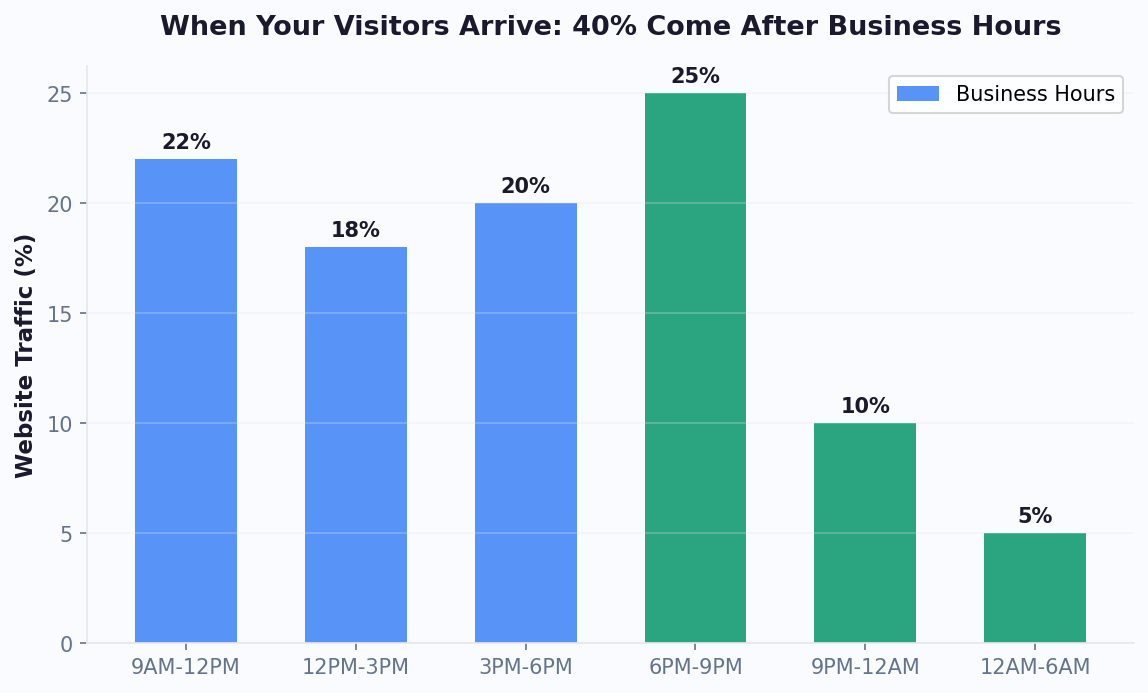
Legal problems do not follow business hours. Arrests happen at night, accidents occur on weekends, and people lie awake at 2 AM worrying about their legal situations. Over 40% of legal inquiries come in outside of business hours. A chatbot captures these leads with full intake information, ready for attorney review first thing in the morning — or immediately, with push notifications for urgent matters. Through WhatsApp and your website chat, the chatbot ensures that no lead is ever lost to a voicemail box that may not be checked until the next day.
ABA Ethics Compliance: Chatbots That Follow the Rules
Unlike chatbots for retail or hospitality, law firm chatbots must navigate a complex ethical landscape. The ABA Model Rules of Professional Conduct — and their state-specific variations — impose requirements that directly affect how a chatbot can communicate with potential and existing clients. Getting this wrong can result in disciplinary action, malpractice exposure, or bar complaints. Getting it right is straightforward with proper design.
Rule 7.1: Communications Concerning a Lawyer's Services
All communications about a lawyer's services must be truthful and not misleading. For chatbots, this means:
- No guarantees of outcomes: The chatbot must never state or imply that a particular result is guaranteed. Instead of "We'll win your case," use "We'll review your case and explain your legal options."
- Accurate descriptions of services: The chatbot accurately describes the firm's practice areas, fee structures (if discussed), and experience without exaggeration.
- Clear identification: The chatbot must identify itself as an automated tool, not a lawyer. "I'm an AI assistant for Smith & Associates. I can help gather your case information so an attorney can review it, but I'm not an attorney and this is not legal advice."
Rule 1.6: Confidentiality
Even before an attorney-client relationship is formed, information shared by a prospective client during intake is subject to confidentiality obligations. Your chatbot must:
- Encrypt all data: All information transmitted through the chatbot must be encrypted in transit and at rest. This is non-negotiable for legal chatbots.
- Limit data access: Only authorized firm personnel should have access to chatbot intake data. Role-based access controls prevent unauthorized staff from viewing sensitive case information.
- Secure storage: Intake data must be stored on secure servers with appropriate retention and deletion policies aligned with your firm's data governance standards.
- Privacy disclosure: The chatbot should inform users about how their information will be used and stored: "The information you share here is confidential and will only be reviewed by attorneys at our firm to evaluate your case."
Rule 5.5: Unauthorized Practice of Law
This is the most critical rule for legal chatbots. The chatbot must never provide legal advice. It can:
- Provide general legal information ("The statute of limitations for personal injury in California is generally 2 years")
- Ask intake questions to gather case facts
- Explain the firm's services and process
- Schedule consultations
It must not:
- Advise a prospective client on what legal action to take
- Interpret laws as applied to specific facts
- Predict case outcomes
- Recommend whether to accept a settlement
Attorney-Client Relationship Disclaimers
The chatbot must clearly state that interacting with it does not create an attorney-client relationship. This disclaimer should appear at the beginning of the conversation and be reiterated before collecting detailed case information: "Please note: This conversation does not create an attorney-client relationship. An attorney-client relationship is only formed when you sign a formal engagement agreement with our firm." These disclaimers protect the firm and set appropriate expectations for the prospective client. Work with your firm's ethics counsel to customize these disclaimers for your specific state's rules.
Practice Area Routing: PI, Family, Immigration, and Beyond
Multi-practice law firms face a routing challenge that solo practitioners do not: ensuring each lead reaches the right attorney quickly. A chatbot with intelligent practice area routing qualifies leads, asks practice-area-specific intake questions, and routes completed intakes to the appropriate attorney or team — eliminating the bottleneck of a receptionist or intake coordinator manually triaging every inquiry.
Personal Injury Intake
Personal injury is one of the highest-volume and highest-value practice areas for chatbot intake. The chatbot collects:
- Incident details: Type of accident (auto, truck, motorcycle, pedestrian, slip and fall, dog bite, medical malpractice, product liability), date and location of incident, police report number if applicable.
- Injury information: Type and severity of injuries, medical treatment received, ongoing treatment needs, impact on daily activities and work.
- Insurance status: Whether the client has filed an insurance claim, received contact from the other party's insurer, or been offered a settlement.
- Liability indicators: Who was at fault, any witnesses, photographic evidence, dashcam footage availability.
High-value PI cases (significant injuries, clear liability, commercial vehicle involvement) are flagged for immediate attorney review.
Family Law Intake
Family law inquiries are emotionally charged and time-sensitive. The chatbot handles intake with appropriate sensitivity:
- Matter type: Divorce, child custody, child support modification, spousal support, domestic violence protective orders, adoption, paternity.
- Urgency indicators: Domestic violence situations, emergency custody needs, and upcoming court dates trigger immediate routing.
- Household information: Children (ages, current custody arrangement), marital property, income disparity, and duration of marriage — all collected conversationally rather than through a cold form.
Immigration Intake
Immigration cases have unique intake requirements:
- Immigration status: Current visa type, expiration dates, pending applications, and any removal or deportation proceedings.
- Service needed: Family-based petitions, employment visas (H-1B, L-1, O-1), naturalization, asylum, DACA renewals, deportation defense.
- Timeline urgency: Visa expiration dates, filing deadlines, upcoming USCIS interviews or court hearings.
- Language preferences: The chatbot operates in multiple languages, critical for immigration practices serving diverse communities. WhatsApp is particularly effective for immigration intake, as many clients communicate primarily through this channel.
Criminal Defense Intake
Criminal defense inquiries often come during moments of crisis:
- Charge information: Type of charges (DUI, drug offenses, theft, assault, white collar), whether charges have been filed, next court date.
- Custody status: Is the potential client currently in custody? If so, the chatbot escalates immediately for potential bond hearing representation.
- Case urgency: Arraignment dates, bail hearings, and warrant situations all trigger immediate notification.
Routing Logic
Once the practice area is identified and intake information collected, the chatbot routes using firm-specific rules: by attorney specialization, current caseload, geographic jurisdiction, case value thresholds, or round-robin assignment. Notifications are delivered through the integrations hub — email alerts, CRM entries (Clio, MyCase, PracticePanther), Slack messages, or SMS to the assigned attorney's phone. The goal is to get a qualified lead from first contact to attorney follow-up in under 30 minutes during business hours and first thing the next morning for after-hours inquiries.
Conflict Check Integration and CRM Workflow
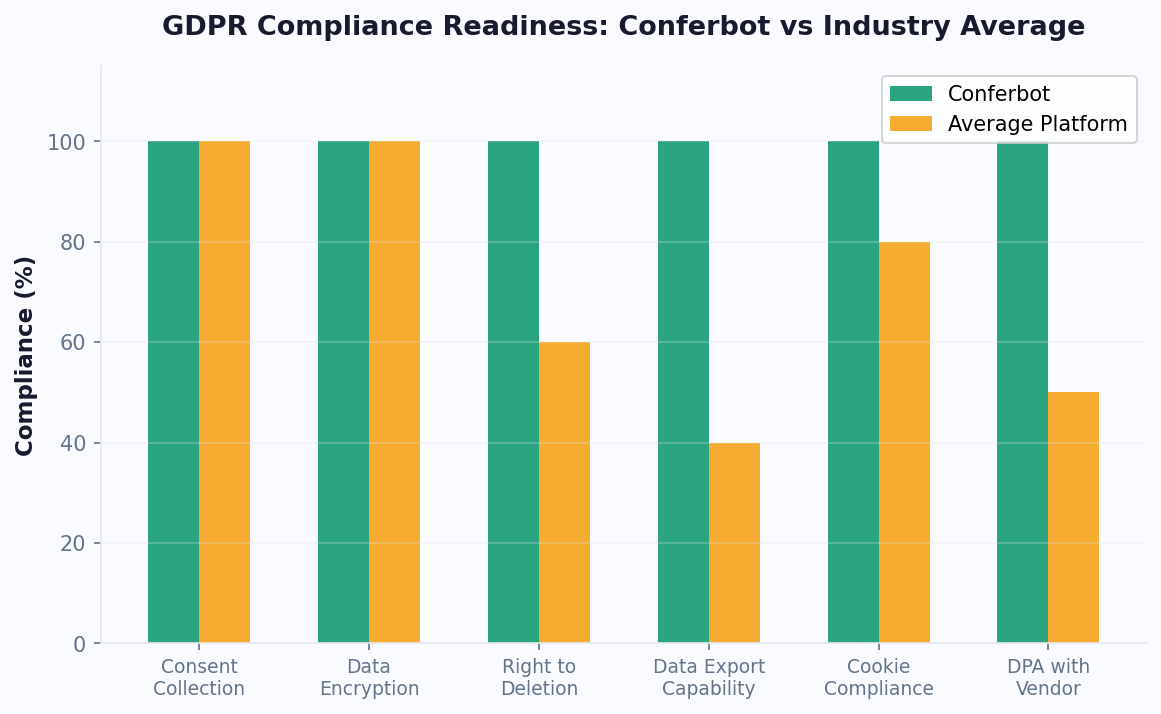
Before a law firm can engage a new client, it must run a conflict of interest check against all current and former clients, opposing parties, and related entities. This is not optional — it is an ethical obligation under ABA Model Rule 1.7 (current client conflicts) and Rule 1.9 (former client conflicts). A chatbot that collects conflict check data during intake dramatically accelerates this process.
Collecting Conflict Check Data During Intake
The chatbot gathers all names needed for a thorough conflict check as a natural part of the intake conversation:
- Client's full legal name (including maiden name, aliases, and business names)
- Opposing party names: In personal injury, the at-fault driver and their insurance company. In family law, the spouse's name. In business disputes, the opposing company and principals.
- Related parties: Co-defendants, co-plaintiffs, witnesses, insurance companies, employers, and any other entities involved in the matter.
- Previous attorneys: If the client has previously been represented in this matter, the former attorney's name (to avoid conflicts with firms that may have represented the opposing party).
This information flows directly into your case management system, where the conflict check can be run before the attorney follow-up call — saving time and preventing the awkward situation of engaging in a detailed consultation only to discover a conflict exists.
CRM and Case Management Integration
A law firm chatbot is only as valuable as its integration with your existing workflow. Through the integrations hub, connect the chatbot to your legal CRM and case management platform:
- Clio: New leads create contacts and matters in Clio automatically, with all intake data populated in the appropriate fields. Task assignments route to the assigned attorney.
- MyCase: Intake data flows into MyCase lead management, with automatic status tracking from initial inquiry through engagement.
- PracticePanther: Leads are created with practice area tags, conflict check data, and priority scores, enabling attorneys to review and act quickly.
- Lawmatics: For firms using dedicated legal CRM tools, the chatbot feeds leads directly into the intake pipeline with complete data.
Automated Follow-Up Sequences
Not every lead converts on the first interaction. The chatbot manages follow-up sequences for leads that do not immediately schedule a consultation:
- Same-day follow-up: "Thank you for sharing your case details earlier. Attorney Johnson has reviewed your information and would like to discuss your case. Would you prefer a call tomorrow morning or afternoon?"
- 3-day follow-up: "We want to make sure your legal needs are addressed. Your case information is still on file and an attorney is ready to speak with you. Schedule a free consultation here."
- 7-day follow-up: A final touchpoint before the lead is marked as unresponsive, with information about the firm's services and an easy scheduling link.
These automated follow-ups recover 15-25% of leads that would otherwise be lost. The key is persistence without being pushy — the chatbot provides value (reminding the lead that their case has been reviewed) rather than just asking for a response.
Retainer and Engagement Agreement Workflow
Once a lead converts to a client, the chatbot can facilitate the engagement process: delivering the retainer agreement for electronic signature, collecting initial retainer payment information, providing client portal access instructions, and sending onboarding documents. This end-to-end automation means a potential client can go from first website visit to signed engagement in under 24 hours without the firm's staff manually managing each step. Track your intake pipeline through the analytics dashboard to identify bottlenecks and optimize conversion rates at every stage.
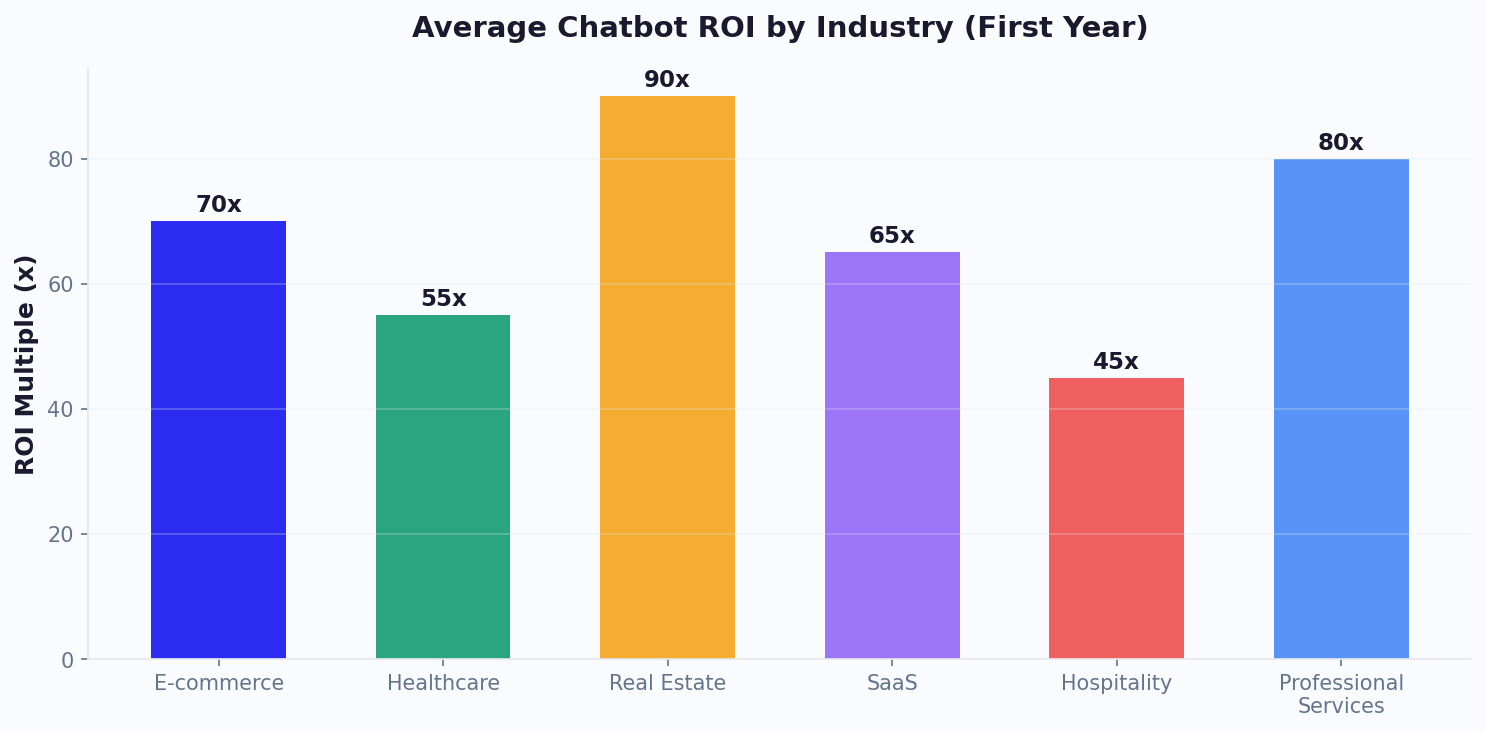
ROI Benchmarks: What Law Firms Actually Earn From Chatbot Automation
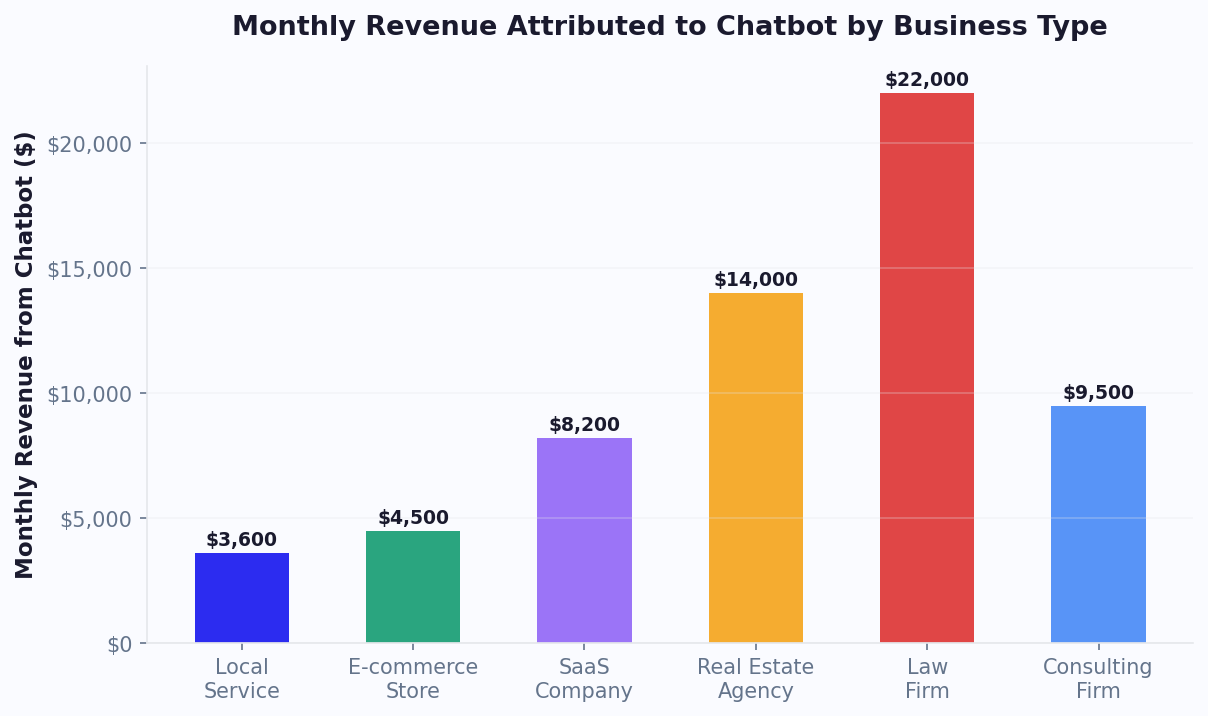
Law firms operate on billable hours, which means every minute staff spends on non-billable administrative tasks has a quantifiable cost. According to Clio's 2025 Legal Trends Report, the average lawyer spends only 2.5 hours per day on billable work. Intake administration is a major contributor to that lost productivity. Here is how chatbot automation changes the math for firms of different sizes.
ROI by Firm Size
| Firm Size | Monthly Intake Volume | Staff Hours Saved/Month | Value of Saved Hours | Additional Leads Captured | Estimated Monthly Revenue Impact |
|---|---|---|---|---|---|
| Solo practitioner | 30-60 inquiries | 8-12 hours | $2,400-$3,600 | 8-15 leads | $4,000-$12,000 |
| Small firm (2-5 attorneys) | 80-200 inquiries | 20-35 hours | $6,000-$10,500 | 20-50 leads | $15,000-$40,000 |
| Mid-size firm (6-20 attorneys) | 300-800 inquiries | 50-80 hours | $15,000-$24,000 | 60-150 leads | $50,000-$120,000 |
| Large firm (20+ attorneys) | 1,000+ inquiries | 100+ hours | $30,000+ | 200+ leads | $150,000+ |
These figures account for both cost savings (staff time redirected to billable work) and revenue growth (leads captured outside business hours or from faster response times). According to G2's legal practice management reviews, firms using intake automation report 28% faster time-to-engagement with new clients.
Cost of Delayed Response: The Data
The legal industry's response time problem is well-documented. Research from HubSpot shows that 78% of customers buy from the company that responds first. For law firms, where the average case value ranges from $3,000 (simple family law) to $100,000+ (personal injury), slow response represents massive lost revenue. A chatbot eliminates response delay entirely — every inquiry receives an immediate, structured response regardless of time or day.
Practice Area ROI Comparison
| Practice Area | Avg. Case Value | Conversion Rate Without Bot | Conversion Rate With Bot | Monthly Revenue Lift (100 inquiries) |
|---|---|---|---|---|
| Personal Injury | $15,000-$50,000 | 8% | 14% | $90,000-$300,000 |
| Family Law | $5,000-$15,000 | 12% | 20% | $40,000-$120,000 |
| Criminal Defense | $3,000-$10,000 | 15% | 25% | $30,000-$100,000 |
| Immigration | $4,000-$12,000 | 10% | 18% | $32,000-$96,000 |
| Estate Planning | $2,000-$5,000 | 20% | 30% | $20,000-$50,000 |
Personal injury firms see the highest absolute ROI because case values are large and response speed is critical — injured clients often call multiple firms and hire the first to respond. For detailed ROI modeling, use the chatbot ROI calculator guide or explore our case studies with real ROI data.
Implementing a Law Firm Chatbot: Ethical and Practical Guide
Implementing a chatbot for a law firm requires attention to both technical setup and ethical compliance. Here is a step-by-step plan that addresses both.
Phase 1: Ethics and Compliance Setup (Week 1)
- Review state-specific rules. While the ABA Model Rules provide the framework, your state bar may have additional or different requirements for lawyer advertising, solicitation, and technology use. Consult your firm's ethics counsel or your state bar's ethics hotline.
- Draft required disclaimers. Create the specific disclaimer language for your jurisdiction: no attorney-client relationship formation, not legal advice, confidentiality notice, and advertising disclosures required by your state.
- Security assessment. Confirm that the chatbot platform provides end-to-end encryption, secure data storage, access controls, and data retention policies that meet your firm's security standards and any applicable state data protection requirements.
Phase 2: Intake Flow Design (Week 2)
- Map your practice areas. For each practice area your firm handles, define the qualifying questions, priority indicators, and routing rules. Work with attorneys in each practice area to identify the critical intake questions and red flags.
- Build the intake conversation. Design the chatbot flow to feel like a conversation with a knowledgeable intake coordinator, not a cold form. Use empathetic language: "I understand this is a stressful situation" rather than "Enter your case details."
- Configure conflict check data collection. Ensure the chatbot collects all party names needed for your firm's conflict check process.
- Set up routing rules. Define how leads are assigned — by practice area, attorney availability, case value, geographic jurisdiction, or round-robin rotation.
Phase 3: Integration and Launch (Week 3)
- Connect your case management system. Integrate with Clio, MyCase, PracticePanther, or your firm's CRM through the integrations hub so intake data flows directly into your existing workflow.
- Set up notifications. Configure immediate notifications for high-priority leads (criminal arrests, emergency custody, approaching statute of limitations) and standard notifications for routine intake.
- Deploy on channels. Launch on your website first, then add WhatsApp for client communication. Use calendar booking to allow leads to schedule consultations directly.
- Test thoroughly. Have attorneys and staff test intake flows for each practice area, verifying that disclaimers display correctly, data routes properly, and the experience feels professional.
Measuring ROI
Track these metrics to demonstrate chatbot value to firm partners:
- Lead response time: From first contact to human follow-up — target under 30 minutes during business hours
- Lead capture rate: Percentage of website visitors who engage with the chatbot and complete intake — target 15-25%
- After-hours leads captured: Leads that would have been lost to voicemail without the chatbot
- Intake time savings: Hours per week saved on manual intake processing — target 12+ hours
- Lead-to-client conversion: Percentage of chatbot-qualified leads that become paying clients
- Cost per acquisition: Total marketing + chatbot cost divided by new clients acquired — should decrease as chatbot captures more leads from existing marketing
Most law firms see a significant improvement in lead capture within the first week, with full ROI realized within 30-60 days as the time savings accumulate and the after-hours lead capture demonstrates its value. The firms that see the highest ROI are those that combine fast chatbot intake with fast attorney follow-up — the chatbot captures and qualifies the lead, but the attorney must close the deal within hours, not days. For guidance on building your first chatbot without any coding knowledge, see our no-code chatbot building guide. Firms looking at broader automation strategies should also read our small business chatbot guide for foundational best practices.
Ongoing Optimization for Law Firms
After the initial deployment, the firms that extract the most value treat their chatbot as a living system. Schedule a monthly review of conversation transcripts to identify new qualifying questions emerging from real intake interactions — client language evolves, and new practice area inquiries may surface that your original flows did not anticipate. Track conversion rates by practice area to identify which intake flows perform best and which need refinement. High-volume areas like personal injury and family law typically see the fastest optimization because more data accelerates learning. Lower-volume areas like IP litigation or corporate M&A may require manual flow adjustments based on attorney feedback rather than statistical patterns. The firms achieving the strongest ROI also connect their chatbot analytics to their case management reporting — correlating chatbot-captured leads with eventual case outcomes and fee revenue to calculate true lifetime value per chatbot lead by practice area and referral source. This data-driven approach transforms the chatbot from a simple intake tool into a strategic asset that informs marketing budget allocation, practice area expansion decisions, and attorney hiring priorities based on actual client demand patterns rather than assumptions about market opportunity.
Was this article helpful?
AI Chatbots for Law Firms FAQ
Everything you need to know about chatbots for ai chatbots for law firms.
About the Author

Conferbot Team specializes in conversational AI, chatbot strategy, and customer engagement automation. With deep expertise in building AI-powered chatbots, they help businesses deliver exceptional customer experiences across every channel.
View all articles