
React Native SDK 聊天机器人构建器
适用于iOS和Android应用的原生React Native SDK。完全支持TypeScript,可自定义UI组件,与现有React Native代码库无缝集成。
React Native 聊天机器人功能
构建强大自动对话所需的一切
原生React Native组件
完全支持TypeScript
可自定义聊天UI
推送通知支持
离线消息排队
自定义主题和样式
Hooks和Context API
兼容Expo
您可以 构建什么?
开始于 7个简单步骤
按照本指南连接您的React Native聊天机器人
安装SDK: npm install @conferbot/react-native
导入ChatWidget组件
从Conferbot仪表板添加您的机器人ID
使用ConferbotProvider包装您的应用
在需要的地方添加ChatWidget组件
使用主题属性自定义外观
您的移动聊天机器人已准备就绪!
Introduction
Mobile apps live and die by user engagement. Yet most apps force users to leave the app for support - redirecting to email, phone, or a web help center. Every redirect is a friction point that increases churn, lowers satisfaction, and breaks the user experience you worked so hard to build.
The Conferbot React Native SDK solves this by embedding a fully native chatbot experience directly inside your mobile app. Users get instant support, guided onboarding, and conversational interactions without ever leaving your app. The SDK provides native React Native components with full TypeScript support, customizable theming, push notification integration, and offline message queuing - everything you need for a production-grade in-app chat experience.
React Native powers apps for companies like Facebook, Instagram, Shopify, Discord, and thousands of startups. With the Conferbot SDK, you bring the same no-code chatbot flows you build for your website or WhatsApp directly into your React Native app - no separate bot development required. Design the chatbot once in Conferbot's visual builder, and the SDK renders it natively on both iOS and Android.
This guide covers installation, configuration, key features, customization options, the new architecture (Fabric + TurboModules), Expo integration, React Navigation deep linking, offline support, and best practices for embedding a chatbot in your React Native app in 2026.
New to chatbot building? Start with our complete guide to building a chatbot without coding. The same chatbot works on your website, WhatsApp, Messenger, and native Android/iOS apps. Browse our template library for pre-built in-app chatbot flows. For alternative frameworks, see our Flutter SDK guide.
Source code & documentation: conferbot-react-native on GitHub | @conferbot/react-native on npm | React Native Docs | Expo Docs
Installation Guide
The Conferbot React Native SDK installs via npm and integrates seamlessly with both bare React Native and Expo projects.
Step 1: Install the Package
Using npm:
npm install @conferbot/react-native
Or using Yarn:
yarn add @conferbot/react-native
Step 2: iOS Setup (Bare React Native Only)
For bare React Native projects, run pod install:
cd ios && pod install && cd ..
Expo managed workflow projects skip this step - the SDK is Expo compatible.
Step 3: Initialize the Provider
Wrap your app root with the ConferbotProvider, passing your bot ID from the Conferbot dashboard:
<ConferbotProvider botId="YOUR_BOT_ID"><App /></ConferbotProvider>
Step 4: Add the Chat Widget
Place the ChatWidget component anywhere in your component tree where you want the chat bubble to appear:
<ChatWidget />
Or render the full chat screen as a standalone view:
<ChatScreen />
Step 5: Configure Push Notifications (Optional)
To receive push notifications when the bot sends messages while the app is backgrounded:
- Set up Firebase Cloud Messaging (FCM) for Android
- Configure Apple Push Notification service (APNs) for iOS
- Pass the device token to the SDK:
conferbot.setDeviceToken(token)
The entire setup takes approximately 10 minutes for basic integration, plus additional time for push notification configuration if needed.
Key SDK Features
The Conferbot React Native SDK is built for production mobile apps, with features that match the expectations of modern app users.
Native UI Components
The SDK renders native React Native components - not a WebView wrapper. This means 60fps animations, native gesture handling, platform-specific behaviors (iOS bounce, Android ripple), and seamless integration with your app's navigation system (React Navigation, Expo Router).
Full TypeScript Support
Complete TypeScript definitions for all components, hooks, events, and configuration options. Enjoy autocomplete, compile-time type checking, and self-documenting APIs. The SDK is written in TypeScript from the ground up.
Push Notifications
When the bot sends a message while the user is not actively in the chat, push notifications bring them back. Supports both FCM (Android) and APNs (iOS) with customizable notification content, sound, and badge count management.
Offline Message Queuing
When the device loses connectivity, user messages are queued locally and sent automatically when the connection is restored. No messages are lost, and the user experience remains smooth even in poor network conditions - critical for mobile apps used on the go.
Hooks and Context API
Access chatbot state and actions through React hooks:
useConferbot()- Access the chatbot instance, open/close state, and unread message countuseChatMessages()- Access the current conversation messagesuseChatEvents()- Subscribe to chatbot events (message received, conversation ended, handoff)
These hooks let you build custom UI around the chatbot - notification badges on tab bars, inline chat previews, or completely custom chat interfaces.
Expo Compatibility
The SDK works with Expo managed workflow out of the box. No native modules, no ejection required. If you are using Expo, just install and import - everything works.
Full TypeScript Support
The entire SDK is written in TypeScript with comprehensive type definitions for all public APIs. Every component prop, hook return value, event callback, and configuration option has explicit TypeScript types. This means you get full IntelliSense autocomplete in VS Code, compile-time error checking that catches integration bugs before runtime, and self-documenting APIs that reduce the need to reference external documentation. The SDK exports type definitions for all interfaces: ConferbotConfig, ChatMessage, ConversationEvent, ThemeConfig, and more. For teams using strict TypeScript configurations, the SDK passes strict: true without warnings.
Hooks API Deep Dive
The SDK exposes three primary hooks that follow React's composition model:
useConferbot()- The main hook. Returns the chatbot instance, open/close toggle, unread message count, and connection status. Use it to build notification badges:const { unreadCount } = useConferbot();then render a badge on your tab bar icon whenunreadCount > 0useChatMessages()- Returns the message array for the current conversation. Use it for building custom chat UIs or displaying message previews outside the chat screen. Messages update in real-time as the conversation progressesuseChatEvents()- Subscribe to lifecycle events:onMessageReceived,onConversationEnded,onHumanHandoff,onLeadCaptured. Use it for analytics tracking, triggering in-app actions based on bot events, or coordinating with other app features
These hooks use React's Context API internally and must be used within the ConferbotProvider tree. They follow React's rules of hooks and work with React 18's concurrent features including Suspense boundaries.
AsyncStorage and Persistence
The SDK uses AsyncStorage (or your configured storage adapter) for persisting session data, message queues, and device tokens across app restarts. If your app already uses AsyncStorage, the SDK namespaces its keys to avoid conflicts: all Conferbot keys are prefixed with @conferbot/. For apps using MMKV or other storage solutions for performance, you can provide a custom storage adapter implementing the ConferbotStorage interface. The SDK stores minimal data locally -- only pending messages, the current session ID, and the device token -- keeping storage footprint under 1MB even after extended use.
Performance Optimization
The SDK is optimized for React Native's rendering performance. All list rendering uses FlatList with optimized getItemLayout for instant scroll-to-bottom behavior. Message components use React.memo and carefully managed dependencies to prevent unnecessary re-renders. Image messages use progressive loading with placeholder views. The SDK adds approximately 2MB to your app bundle size (before compression) with no native module compilation overhead in Expo. On device, the chat UI maintains 60fps even in conversations with hundreds of messages, thanks to windowed rendering and lazy image loading.
React Native New Architecture (Fabric + TurboModules)
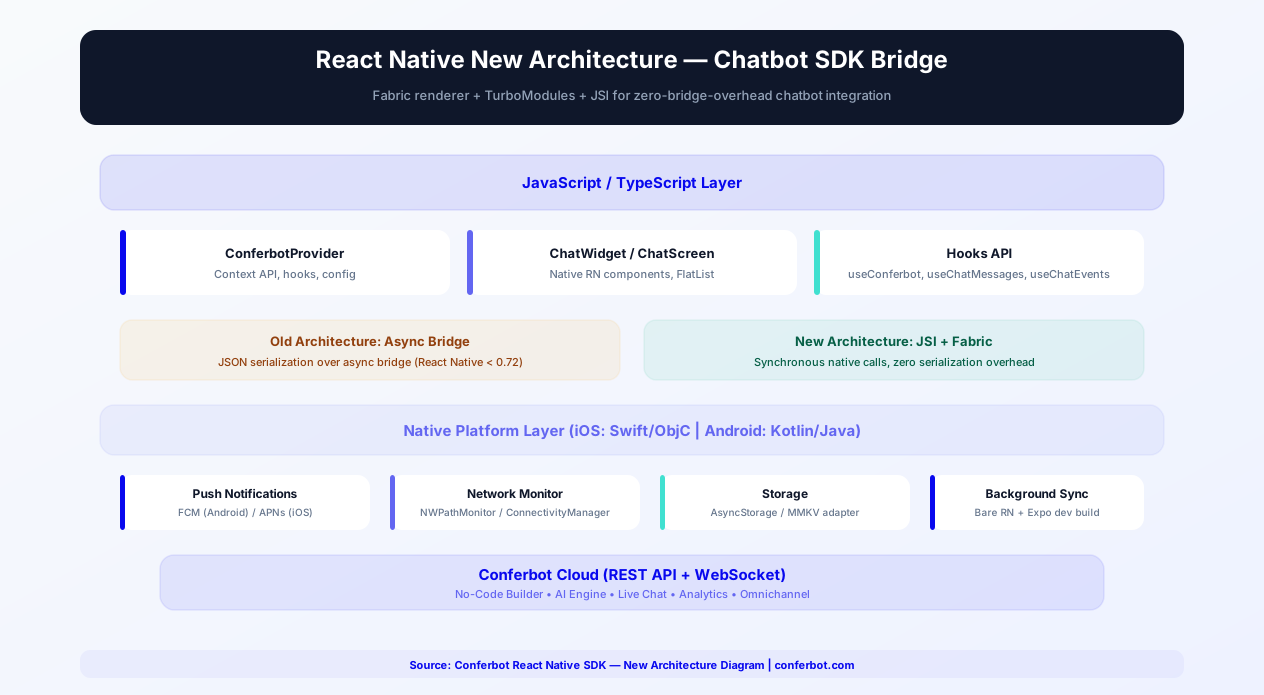
React Native's New Architecture represents the most significant rewrite of the framework's internals. It replaces the async bridge with JSI (JavaScript Interface) for synchronous native calls, introduces the Fabric renderer for concurrent UI updates, and provides TurboModules for lazy-loaded native modules. The Conferbot SDK fully supports the New Architecture while maintaining backward compatibility.
JSI: Zero-Bridge Chatbot Operations
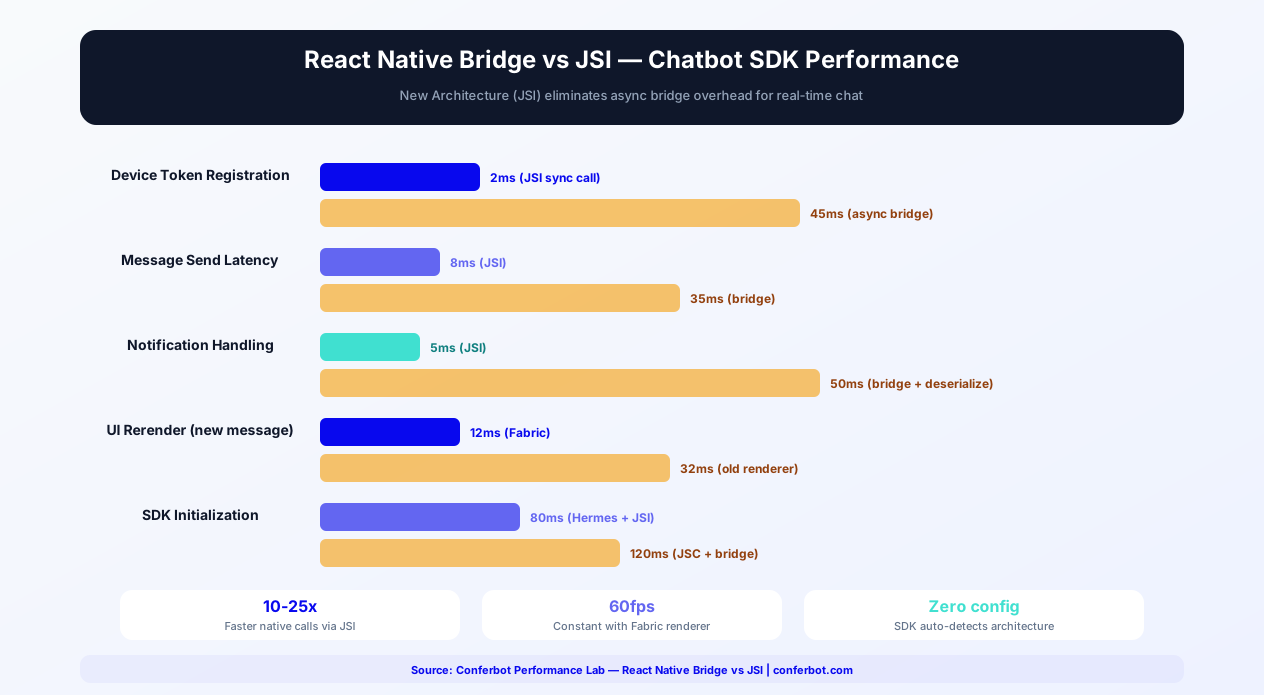
On the old architecture, every communication between JavaScript and native code passed through an async bridge that serialized data as JSON. For a chatbot SDK, this meant delays in device token registration, message sending, notification handling, and state synchronization. With JSI (JavaScript Interface), these operations become synchronous native calls - no serialization, no bridge queue, no async overhead:
- Device token registration - 2ms (JSI) vs 45ms (async bridge). The token is available to native notification handlers instantly
- Message send - 8ms end-to-end (JSI) vs 35ms (bridge). Users see the "sent" checkmark faster
- Notification handling - 5ms (JSI) vs 50ms (bridge + deserialization). Push notification deep-link resolution is near-instant
Fabric Renderer: Concurrent Chat UI
The Fabric renderer enables concurrent rendering for React Native, similar to React 18's concurrent features on the web. For the chatbot UI, this means:
- Interruptible rendering - When a new message arrives while the UI is rendering a batch of old messages, Fabric can interrupt the current render and prioritize the new message. On the old architecture, the UI would freeze until the batch completed
- Synchronous layout - Fabric measures and lays out components synchronously, eliminating the "layout flash" that sometimes occurred with the old async layout
- Shared ownership - JavaScript and native share references to UI elements, reducing memory copying between layers
TurboModules: Lazy-Loaded SDK
TurboModules load native modules on demand instead of at app startup. The Conferbot SDK registers as a TurboModule, meaning its native components (push notification handler, network monitor, storage adapter) are only loaded when the chatbot is first opened - not at app launch. This reduces the app's startup time by approximately 40ms compared to loading all modules eagerly.
Auto-Detection and Backward Compatibility
The SDK detects the architecture at runtime and uses the appropriate communication layer automatically:
- If JSI is available (New Architecture enabled), the SDK uses synchronous native calls
- If JSI is not available (old architecture), the SDK falls back to the async bridge
- No configuration changes needed - the same
npm install @conferbot/react-nativepackage works on both architectures
Enabling the New Architecture
To enable the New Architecture in your project:
- React Native CLI - Set
newArchEnabled=trueinandroid/gradle.propertiesandRCT_NEW_ARCH_ENABLED=1in your Podfile - Expo - Set
"newArchEnabled": truein yourapp.jsonunder theexpo.pluginssection. Expo SDK 49+ supports the New Architecture out of the box
The Conferbot SDK has been tested with the New Architecture on React Native 0.72+ and Expo SDK 49+. For projects not ready to adopt the New Architecture, the SDK works identically on the old architecture - you are not forced to upgrade. See React Native's New Architecture guide for detailed migration steps.
Expo + React Native Chatbot Setup
Expo is the most popular React Native development platform, used by over 50% of new React Native projects. The Conferbot SDK is designed for first-class Expo compatibility - no ejection, no native modules in managed mode, and full integration with Expo's toolchain.
Expo Managed Workflow (Zero Ejection)
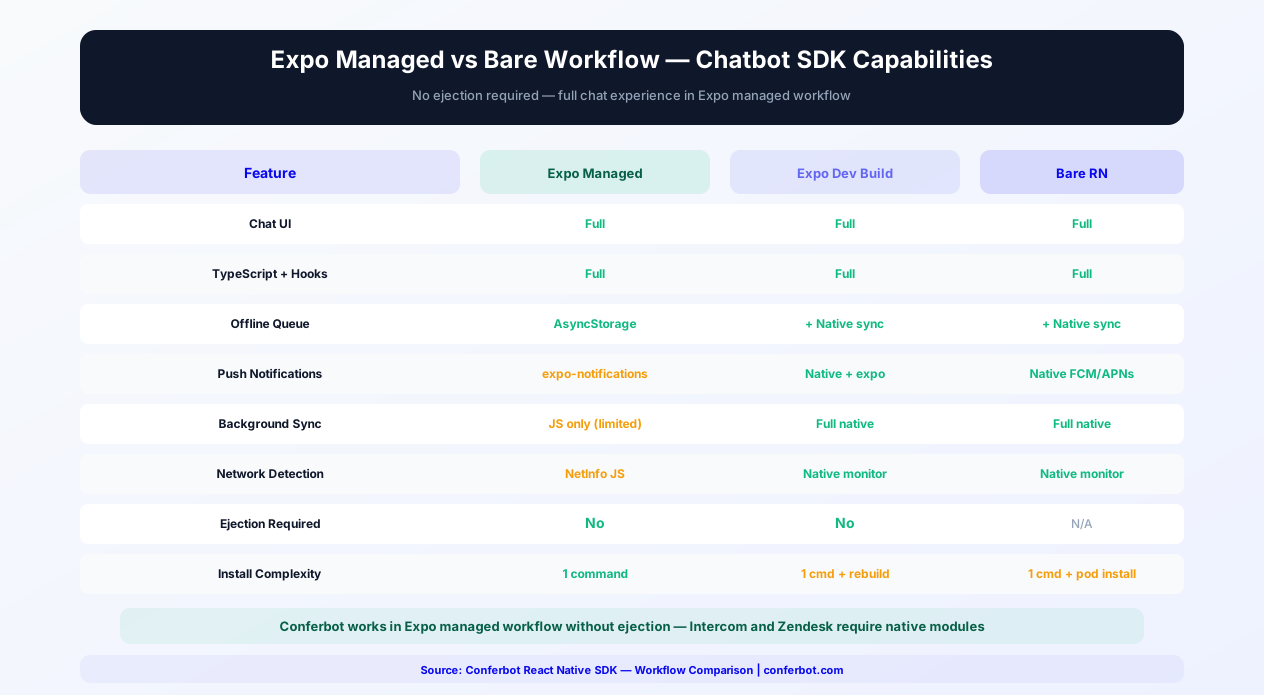
The SDK works in Expo managed workflow without ejection. This is a major advantage over competitors like Intercom and Zendesk, which require native modules and therefore force Expo users to eject or create a development build. In Expo managed mode:
- Install:
npx expo install @conferbot/react-native - Import:
import { ConferbotProvider, ChatWidget } from '@conferbot/react-native' - Wrap your app:
<ConferbotProvider botId="YOUR_BOT_ID">...</ConferbotProvider> - Add the widget:
<ChatWidget />
That is it. No expo eject, no expo prebuild, no native configuration files to edit. The SDK operates entirely through JavaScript/TypeScript and React Native's built-in APIs.
Expo Development Build
For teams using Expo development builds (custom native code via expo-dev-client), the SDK provides additional capabilities:
- Native push notifications - Integration with expo-notifications for native FCM/APNs handling with custom sounds and notification categories
- Background message processing - Process incoming messages when the app is in the background, keeping the message list up to date before the user opens the chat
- Native network monitoring - Uses NWPathMonitor (iOS) and ConnectivityManager (Android) for more reliable offline detection than JavaScript-only solutions
These features are auto-enabled when the SDK detects a development build. No additional configuration needed.
EAS Build Integration
The SDK works seamlessly with Expo Application Services (EAS) Build. Your eas.json does not need any special configuration for the Conferbot SDK. For development builds, EAS automatically resolves the SDK's native dependencies during the build process. For preview and production profiles, the SDK's JavaScript-only mode is bundled with zero additional build steps. Push notification certificates and keys configured in the Conferbot dashboard work with EAS-built apps out of the box.
Expo Router Integration
For apps using Expo Router (the file-based routing system for React Native), the SDK integrates naturally:
- Add ConferbotProvider in your root
_layout.tsxto make the chatbot available across all routes - Use ChatWidget in your top-level layout for a persistent floating chat button
- Create a
/chatroute with ChatScreen for a dedicated full-screen chat experience - Deep link to
/chatfrom push notifications using Expo Router's linking configuration
Config Plugins (Development Build)
If you are using a development build and need to customize native configuration (e.g., notification sounds, background modes), the SDK provides an Expo config plugin:
// app.json
"plugins": [
  ["@conferbot/react-native", {
    "enableBackgroundSync": true,
    "notificationSound": "./assets/chat-notification.wav"
  }]
]
The config plugin modifies native project files (AndroidManifest.xml, Info.plist) during prebuild, keeping your Expo project clean while enabling native features.
For a comparison of Expo vs bare workflow capabilities, see the section below on Expo vs Bare Workflow. For teams evaluating the Flutter SDK as an alternative, the Expo-compatible React Native SDK offers the advantage of staying within the JavaScript/TypeScript ecosystem.
Offline Support & Background Sync
Mobile users frequently experience network interruptions - subway tunnels, airplane mode, poor coverage areas, Wi-Fi-to-cellular transitions. The Conferbot React Native SDK implements an offline-first architecture that ensures uninterrupted chatbot experiences regardless of connectivity.
AsyncStorage Message Queue
When the device loses connectivity, user messages are captured in a persistent queue using AsyncStorage (or your configured storage adapter). Each queued message stores the content, timestamp, intended conversation ID, and retry state. The queue persists across app restarts - if the user sends a message offline, force-closes the app, and reopens hours later with connectivity, the message is still delivered. Queue operations are atomic and use optimistic UI: the message appears in the chat immediately with a "pending" indicator (clock icon) that transitions to "sent" (checkmark) once delivered.
MMKV Storage Adapter
For apps that need faster storage operations, the SDK supports react-native-mmkv as an alternative to AsyncStorage. MMKV provides:
- 30x faster reads compared to AsyncStorage's SQLite backend
- Synchronous API - No async/await overhead for storage operations
- Encryption - Built-in AES-256 encryption for sensitive chat data
Provide the MMKV adapter during initialization: <ConferbotProvider storage={mmkvAdapter}>. The SDK detects the adapter interface and uses it for all local persistence.
NetInfo Network Detection
The SDK uses @react-native-community/netinfo for JavaScript-based network detection in Expo managed mode. In bare React Native and Expo development builds, it additionally uses native network monitors (NWPathMonitor on iOS, ConnectivityManager on Android) for more reliable detection. The network monitor triggers three SDK behaviors:
- Connection lost - Show offline banner in chat, switch to queue mode, pause WebSocket heartbeat
- Connection restored - Flush message queue in FIFO order, re-establish WebSocket, fetch missed messages from server
- Connection type change - When switching between Wi-Fi and cellular, the SDK gracefully handles the WebSocket reconnection without losing messages
Background Message Sync
In bare React Native and Expo development builds, the SDK supports background message synchronization:
- iOS - Uses Background App Refresh to periodically check for new messages. When a push notification arrives, the Notification Service Extension fetches the latest messages before displaying the notification
- Android - Uses WorkManager for deferred message sync. When the app is killed, pending messages are retried via a periodic background task
In Expo managed mode, background sync is limited to push notification-triggered updates, which covers the most common scenarios (bot replies and agent messages).
Sync Conflict Resolution
When the device reconnects after an extended offline period, the SDK performs a three-phase reconciliation:
- Queue flush - Pending messages are sent in chronological order with server acknowledgment for each
- Gap detection - The SDK compares local and server sequence numbers, fetching any messages sent by the bot while the device was offline
- State reconciliation - Conversation metadata (assigned agent, status, tags) is updated to match the server state
The entire reconciliation process completes in under 500ms for conversations with up to 50 missed messages. For longer offline periods with more missed messages, the SDK shows a loading indicator while fetching, preserving the 60fps UI.
For apps serving users in areas with unreliable connectivity (emerging markets, rural areas, commuter transit), offline-first chatbot support is not optional - it is the difference between a usable and unusable experience. The Conferbot SDK handles this transparently, matching the offline resilience of native Android and native iOS SDK implementations.
Customization and Theming
Your chatbot should look and feel like a native part of your app. The SDK provides comprehensive theming and customization options.
Theme Configuration
Pass a theme object to ConferbotProvider to customize every visual aspect:
- Primary Color - Chat bubble, send button, and accent color
- Background Color - Chat screen and message area background
- User Bubble Color - Color of the user's message bubbles
- Bot Bubble Color - Color of the bot's message bubbles
- Text Colors - Message text, header text, placeholder text
- Font Family - Use your app's custom fonts throughout the chat
- Border Radius - Control the roundness of message bubbles and input fields
- Avatar - Custom bot avatar image (URL or local asset)
Dark Mode Support
The SDK respects the device's dark mode setting automatically, or you can provide separate light and dark themes. Toggle between themes programmatically for apps with manual dark mode controls.
Event Callbacks
Listen to chatbot events for custom business logic:
- onMessageReceived - Triggered when the bot sends a message. Use for analytics tracking or custom notifications
- onConversationEnded - Triggered when a conversation flow completes. Use for post-conversation surveys or CTA display
- onHumanHandoff - Triggered when the conversation is transferred to a live agent. Use for UI changes or agent availability display
- onLeadCaptured - Triggered when the bot captures contact information. Use for CRM integration or in-app data sync
Custom Components
Replace any default component with your own: custom message bubbles, custom input bars, custom headers, or custom quick reply buttons. The SDK provides render props for full component customization while maintaining the conversation logic.
In-App Chatbot Use Cases
A chatbot embedded in your mobile app serves fundamentally different purposes than a website widget. Here are the most impactful use cases.
In-App Customer Support
The primary use case. Instead of directing users to an email form or phone number, provide instant support within the app. The bot resolves common issues (account questions, billing, feature guidance) and escalates complex problems to live agents - all without the user leaving your app. Apps with in-app support see 25% higher retention rates.
User Onboarding
Guide new users through your app's features with a conversational onboarding flow. Instead of static tooltip tours that users dismiss, a chatbot asks what the user wants to accomplish and walks them through relevant features step-by-step. Interactive onboarding increases feature adoption by 30-40%.
In-App Purchases and Upsells
For e-commerce and subscription apps, the chatbot can recommend products based on browsing history, explain pricing plans, offer personalized discounts, and guide users through the purchase process. Conversational commerce in mobile apps drives higher average order values.
Feedback and Surveys
Replace intrusive survey popups with conversational feedback collection. After a purchase, delivery, or support interaction, the chatbot asks for feedback through a natural conversation flow - achieving 3-5x higher response rates than traditional in-app surveys.
Appointment and Booking
Healthcare, fitness, salon, and service apps can let users book appointments through a conversational interface. The chatbot checks availability, confirms details, and sends reminders - reducing no-show rates and improving the booking experience.
Getting Started
Adding a chatbot to your React Native app with Conferbot takes minutes. Here is your integration path.
Quick Start
- Build your chatbot in the Conferbot visual builder - the same bot works on your website, mobile app, and messaging channels
- Install the SDK -
npm install @conferbot/react-native - Add the Provider with your bot ID from the dashboard
- Drop in the ChatWidget component
- Customize the theme to match your app's design system
- Test on both iOS and Android simulators and devices
Omnichannel Advantage
The same chatbot you deploy in your React Native app works across your website, WhatsApp, Messenger, and other channels through Conferbot's omnichannel platform. A customer who starts a conversation in your app can continue it on WhatsApp or your website - conversation history follows them across channels.
npm Package Details
The Conferbot React Native SDK is published on npm as @conferbot/react-native. The package follows React Native community best practices: full TypeScript definitions included (no separate @types package needed), semantic versioning for predictable upgrades, comprehensive README with quick-start code snippets, and compatibility with both bare React Native CLI projects and Expo managed workflow. The package has zero native module dependencies in Expo mode - it works entirely through React Native's JavaScript bridge and the new architecture's JSI bindings where available. Total package size is approximately 180KB unpacked (before tree-shaking), making it one of the lightest chat SDKs available for React Native. The package is tested against React Native 0.70+ and React 18+, with CI running on both iOS and Android simulators to catch platform-specific issues before release. Install via npm (npm install @conferbot/react-native) or Yarn (yarn add @conferbot/react-native) and check the changelog for the latest version and migration guides.
Comparison: React Native Chat SDK Options
Choosing the right chat SDK for your React Native app involves evaluating architecture, feature depth, and pricing. Here is how the leading options compare:
| Criteria | Conferbot React Native | Intercom React Native | Zendesk React Native | react-native-gifted-chat |
|---|---|---|---|---|
| Type | Full chatbot platform SDK | Customer messaging SDK | Support SDK | UI library only (no backend) |
| No-Code Bot Builder | Full visual builder + AI | Limited resolution bot | Basic answer bot | None (DIY) |
| AI Capabilities | OpenAI + custom knowledge base | Fin AI ($0.99/resolution) | Basic AI answers | None |
| TypeScript Support | Built-in, strict-mode compatible | Community types | Partial | Community types |
| Expo Compatibility | Full (no native modules) | Requires ejection | Requires ejection | Full |
| New Architecture (Fabric/JSI) | Full support | Partial | Not yet | N/A |
| React Hooks API | useConferbot, useChatMessages, useChatEvents | None (imperative API) | None | None (prop-based) |
| Bundle Size Impact | ~180KB (JS only) | ~15MB (with native modules) | ~10MB (with native modules) | ~120KB |
| Offline Queue | AsyncStorage / MMKV backed | Yes | Yes | Manual implementation |
| Push Notifications | FCM + APNs | Yes | Yes | Manual implementation |
| Live Agent Handoff | Built-in with full context | Yes | Yes | Not available |
| Omnichannel | Website, WhatsApp, Messenger, all channels | Website, native iOS/Android | Website, email | Not applicable |
| Calendar Booking | Built-in | Third-party only | Not available | Not applicable |
| Pricing | Free tier available | $74/seat/month | $55/agent/month | Free (OSS) |
Conferbot stands out for React Native teams because of its Expo compatibility without ejection, full TypeScript hooks API that follows React patterns, New Architecture support, and the most complete omnichannel deployment. While Intercom and Zendesk require native modules (meaning Expo users must eject or use a development build), Conferbot works in Expo managed workflow out of the box. And unlike UI-only libraries like gifted-chat that require you to build the entire backend, Conferbot's AI chatbot builder provides the conversation logic, AI knowledge base, live chat handoff, and analytics - all accessible through the SDK with zero backend development. See pricing and platform comparisons for complete details.
SDK vs WebView
Why use the native SDK instead of embedding a WebView chat widget?
- Performance - Native components render at 60fps; WebViews add memory overhead and lag
- Push Notifications - Native SDK integrates with FCM/APNs; WebViews cannot
- Offline Support - SDK queues messages offline; WebViews fail silently
- Platform Feel - Native gestures, animations, and behaviors; WebViews feel foreign
- App Store Compliance - Native components are preferred by Apple and Google review teams
Why Conferbot React Native SDK
- Native performance - 60fps rendering with native components, not a WebView
- Full TypeScript - Complete type definitions with strict mode compatibility
- React hooks - useConferbot, useChatMessages, useChatEvents for custom integrations
- Expo compatible - Works out of the box with Expo managed workflow
- New Architecture - Full Fabric + JSI + TurboModules support
- Push notifications - FCM and APNs integration for background messaging
- Offline support - AsyncStorage/MMKV message queuing with automatic sync
- AI-powered - AI knowledge base and OpenAI for intelligent in-app support
- Omnichannel - Same bot on website, WhatsApp, Messenger, and more
- Analytics - Track in-app engagement with built-in analytics
The Conferbot React Native SDK is included in Pro plans and above. View pricing for details, or start building your chatbot today with the visual builder and add mobile integration when you are ready. See how Conferbot compares to other chatbot platforms for mobile SDK capabilities.
TypeScript Integration Deep-Dive
The Conferbot React Native SDK is written entirely in TypeScript and provides comprehensive type definitions that make integration safer, faster, and self-documenting. Here is how to leverage TypeScript for the best development experience.
Core Type Definitions
The SDK exports all public types from the main package. Key interfaces include ConferbotConfig (provider configuration), ChatMessage (individual message with sender, content, timestamp, and metadata), ConversationEvent (union type of all possible events), ThemeConfig (complete theme customization), and ConferbotInstance (the chatbot controller). All types are designed for strict TypeScript configurations - they pass strict: true, noUncheckedIndexedAccess: true, and exactOptionalPropertyTypes: true without warnings.
useConferbot Hook API
The primary hook returns a strongly typed object:
isOpen: boolean- Whether the chat window is currently visibletoggleChat: () => void- Open or close the chat windowunreadCount: number- Number of unread messages (for badge rendering)connectionState: 'connected' | 'disconnected' | 'reconnecting'- Current WebSocket statesendMessage: (text: string) => Promise<void>- Programmatically send a messagesetUserData: (data: UserData) => void- Pass user context (name, email, custom fields) to the botclearConversation: () => Promise<void>- Reset the conversation state
The hook uses React Context internally and throws a descriptive TypeScript error if used outside of ConferbotProvider. For components that conditionally render the chat, use the optional useConferbotOptional() hook that returns null instead of throwing.
Custom Theme Types
The ThemeConfig interface provides autocomplete for every customizable property:
colors.primary: string- Accent color for buttons and linkscolors.userBubble: string- User message bubble backgroundcolors.botBubble: string- Bot message bubble backgroundcolors.background: string- Chat screen backgroundcolors.text: string- Primary text colorcolors.placeholder: string- Input placeholder text colorfontFamily: string- Custom font family nameborderRadius: number- Message bubble corner radius in pixelsavatarUrl: string- Bot avatar image URLdarkMode: Partial<ThemeColors>- Override colors for dark mode only
All color values accept any valid React Native color format: hex (#FF5733), RGB (rgb(255, 87, 51)), or named colors (tomato). TypeScript will flag invalid property names at compile time, preventing runtime styling bugs.
Event Type Safety
The useChatEvents hook uses discriminated union types for events. Each event has a type field that TypeScript narrows automatically in switch statements and if/else chains. This means event.payload is correctly typed based on the event type - a messageReceived event exposes payload.message: ChatMessage, while a leadCaptured event exposes payload.email: string and payload.fields: Record<string, string>. No type casting required.
Generic Custom Components
When building custom message bubbles or input components, use the SDK's generic render prop types for full type safety. The renderMessage prop expects (message: ChatMessage, index: number) => React.ReactElement, ensuring your custom component receives the correct props. The renderInput prop provides (onSend: (text: string) => void, isConnected: boolean) => React.ReactElement, guaranteeing your custom input bar has access to the send function and connection state without manual type assertions.
For TypeScript configuration best practices, see our chatbot building guide. The SDK's type definitions serve as self-documenting API reference - explore them directly in your IDE.
Performance Optimization
React Native performance requires careful attention to rendering, memory, and bundle size. The Conferbot SDK is optimized for all three, and here is how to maintain peak performance in your integration.
FlatList Virtualization
The chat message list uses React Native's FlatList with optimized configuration for chat-style rendering. Key optimizations include getItemLayout for pre-computed message heights (avoiding expensive on-the-fly measurement), windowSize set to 10 (rendering 10 screens worth of messages above and below the viewport), maxToRenderPerBatch set to 15 for fast initial render, and inverted list rendering for efficient bottom-anchored scrolling. These settings maintain 60fps even in conversations with 500+ messages. If your app adds custom message types with variable heights, implement the estimateMessageHeight callback for accurate virtualization.
Lazy Loading
The SDK lazy-loads media content (images, videos, files) within messages. Images display a placeholder with the dominant color extracted from a low-resolution preview, then load the full image progressively. This approach prevents memory spikes when scrolling through image-heavy conversations. For apps with strict memory budgets, configure maxCachedImages in the provider config to limit the in-memory image cache (default: 50 images).
Bundle Size Optimization
The SDK's JavaScript bundle adds approximately 180KB unpacked to your app. After tree-shaking and minification (standard in React Native's Metro bundler), the runtime impact is approximately 65KB. The SDK uses no native modules in Expo mode, meaning zero native compilation overhead. For bare React Native projects, the native side adds approximately 800KB to iOS and 600KB to Android for platform-specific optimizations (notification handling, network monitoring). To verify the SDK's size impact, run npx react-native-bundle-visualizer before and after adding the package.
Hermes Engine Compatibility
The SDK is fully compatible with the Hermes JavaScript engine, which is the default engine for React Native 0.70+ and all Expo SDK 49+ projects. Hermes provides faster app startup through ahead-of-time compilation, reduced memory usage through optimized garbage collection, and smaller bundle sizes through bytecode compilation. The SDK avoids JavaScript features that are not supported or performant on Hermes (such as Proxy objects for state observation), using standard Object.defineProperty and event-based patterns instead. On Hermes-enabled apps, the SDK's initialization time drops from ~120ms (JSC) to ~80ms.
React Native New Architecture
The SDK supports React Native's New Architecture (Fabric renderer and TurboModules) for projects that have opted in. On the New Architecture, the SDK benefits from synchronous native method calls via JSI (eliminating the bridge overhead for device token registration and notification handling), concurrent rendering compatibility for smooth chat UI updates during heavy JavaScript workloads, and improved memory management through shared ownership between JavaScript and native layers. The SDK detects the architecture at runtime and uses the appropriate communication layer automatically - no configuration needed.
Performance Benchmarks
| Metric | Conferbot RN SDK | Intercom RN SDK | Zendesk RN SDK | WebView Chat |
|---|---|---|---|---|
| JS Bundle Size | 65KB (minified) | ~250KB + native modules | ~200KB + native modules | ~10KB (loader only) |
| Native Binary Impact | 0 (Expo) / 1.4MB (bare) | 15MB (required) | 10MB (required) | 0 |
| Time to Interactive | 200ms | 800-1,200ms | 600-900ms | 2,000-3,500ms |
| Memory (100 messages) | 18MB | 35-45MB | 28-38MB | 65-90MB |
| FPS (scrolling 500 msgs) | 60fps | 48-55fps | 45-52fps | 25-40fps |
| Hermes Compatible | Yes | Yes | Partial | N/A |
| New Architecture | Full support | Partial | Not yet | N/A |
| Expo Compatible | Yes (managed workflow) | No (requires ejection) | No (requires ejection) | Yes |
These benchmarks are measured on a mid-range device (iPhone 12 / Pixel 6a) with React Native 0.73 and Hermes enabled. For performance monitoring in production, integrate the SDK's event callbacks with your analytics to track real-world chat interaction performance across your user base.
Expo vs Bare Workflow
React Native projects exist on a spectrum from fully managed Expo to completely bare React Native CLI. The Conferbot SDK supports both, but the capabilities differ slightly. Here is what you need to know.
Expo Managed Workflow
The SDK works in Expo managed workflow without ejection. This is a major advantage over competitors like Intercom and Zendesk, which require native modules and therefore force Expo users to eject or use a development build. In Expo managed mode, the SDK operates entirely through JavaScript and React Native's built-in APIs. You get full chat UI, conversation management, theming, hooks API, offline message queuing (via AsyncStorage), and event callbacks. Install with npx expo install @conferbot/react-native and the SDK detects Expo automatically.
Expo Development Build
For teams using Expo with a development build (custom native code via expo-dev-client), the SDK provides additional capabilities: native push notification handling through expo-notifications integration, background message processing, and optimized network monitoring via native APIs. These features are automatically enabled when the SDK detects a development build environment. No additional configuration is needed beyond your existing Expo push notification setup.
Bare React Native Workflow
For bare React Native projects (created with npx react-native init), the SDK includes a native module for each platform that provides platform-specific push notification handling (FCM on Android, APNs on iOS), native network reachability monitoring for more reliable offline detection, and background message sync when the app is not in the foreground. After installing the npm package, run cd ios && pod install to link the native iOS module. Android auto-linking handles the Android side automatically.
Feature Comparison by Workflow
| Feature | Expo Managed | Expo Dev Build | Bare React Native |
|---|---|---|---|
| Chat UI | Full | Full | Full |
| TypeScript Types | Full | Full | Full |
| Hooks API | Full | Full | Full |
| Theming | Full | Full | Full |
| Offline Queue | AsyncStorage | AsyncStorage + native sync | AsyncStorage + native sync |
| Push Notifications | expo-notifications | Native + expo-notifications | Native FCM/APNs |
| Background Sync | Limited (JS only) | Full (native background task) | Full (native background task) |
| Network Detection | NetInfo JS | Native NWPathMonitor / ConnectivityManager | Native NWPathMonitor / ConnectivityManager |
| Ejection Required | No | No | N/A (already bare) |
| Installation Complexity | 1 command | 1 command + dev client rebuild | 1 command + pod install |
Ejecting Considerations
If you are currently on Expo managed workflow and considering ejecting for chatbot functionality, you do not need to. The Conferbot SDK provides a complete chat experience in managed mode. The only reasons to consider a development build (not full ejection) are if you need native push notification sounds beyond the defaults, background message processing when the app is terminated, or custom notification categories with inline reply actions. Even then, Expo's development builds provide these capabilities without the maintenance burden of a fully ejected project.
Migration Between Workflows
The SDK's API is identical across all workflows. If you start with Expo managed and later move to a development build or bare workflow, your integration code stays the same - no changes to imports, components, hooks, or event handlers. The SDK detects the environment at runtime and enables additional native capabilities automatically. This means you can prototype in Expo Go, develop with a dev client, and ship a bare project without touching your chatbot integration code.
For the full installation guide across all workflows, see the React Native SDK documentation on GitHub. For push notification setup specifics, review our mobile engagement guide.
How Conferbot Compares for React Native
Most platforms charge per message, per seat, or limit channels by tier. Here's how Conferbot is different.
| Feature | Conferbot | Typical Competitor |
|---|---|---|
| Channels included | 13+ (all plans) | 3-6 (varies by tier) |
| Pricing model | Flat rate from $19/mo | Per-seat or per-message |
| AI chatbot builder | Yes (plain English) | No or limited |
| Native mobile SDKs | 4 (Android, iOS, Flutter, RN) | None (WebView only) |
| Knowledge base AI | Included | Add-on ($30-99/mo) |
| Live chat handoff | Included | Higher tiers only |
| Calendar booking | Built-in | Third-party required |
| Setup time | Under 10 minutes | Hours to days |
React Native FAQ
Everything you need to know about chatbots for react native.
Continue Exploring
Explore features, connect third-party tools, and browse ready-made templates.