Why WhatsApp Chatbots Matter in 2026
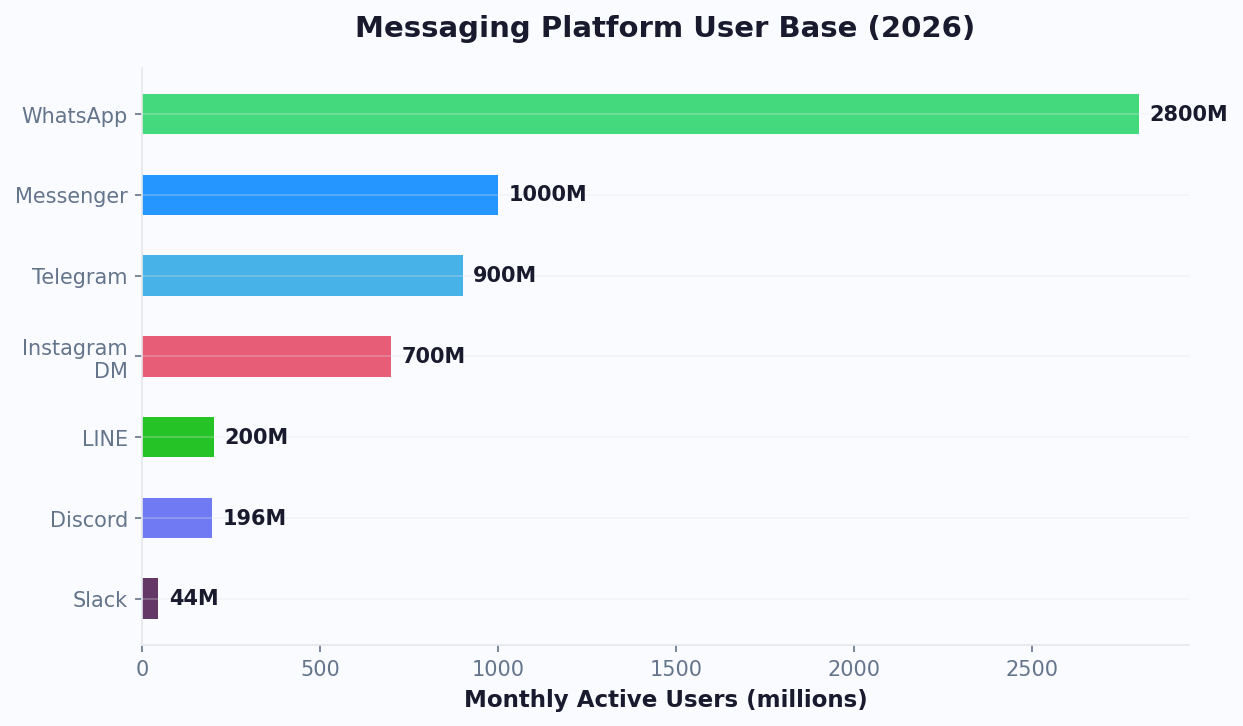
WhatsApp isn't just another messaging app — it's the world's most dominant communication channel with over 2.78 billion monthly active users across 180+ countries. For businesses, that reach translates into an unprecedented opportunity to connect with customers where they already spend their time.
Consider these numbers:
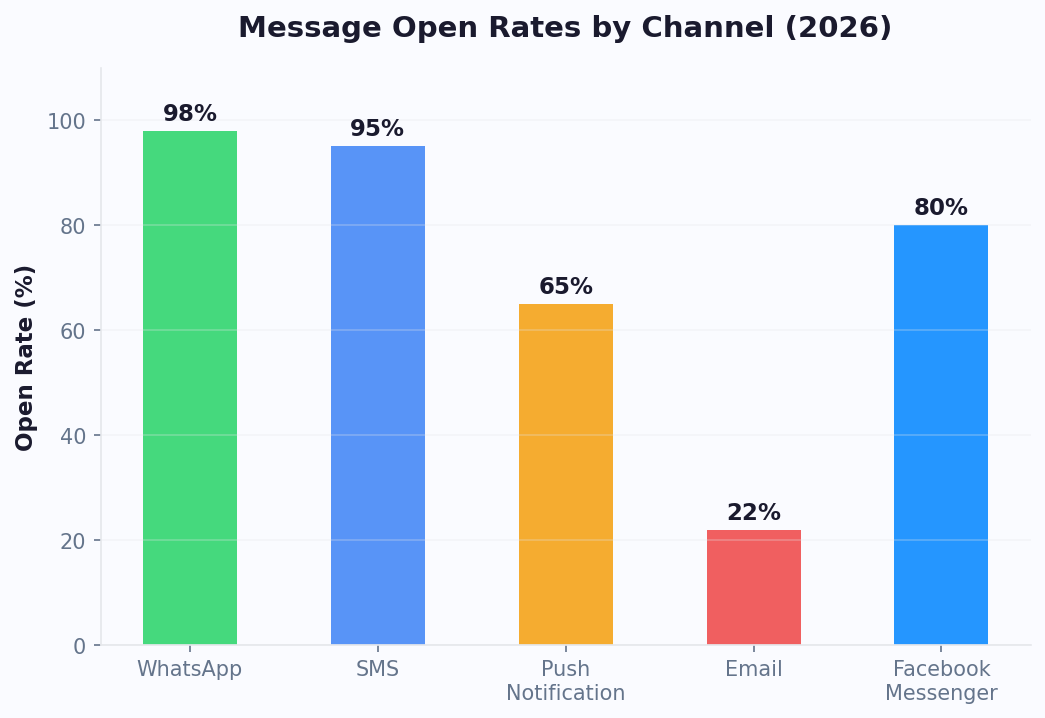
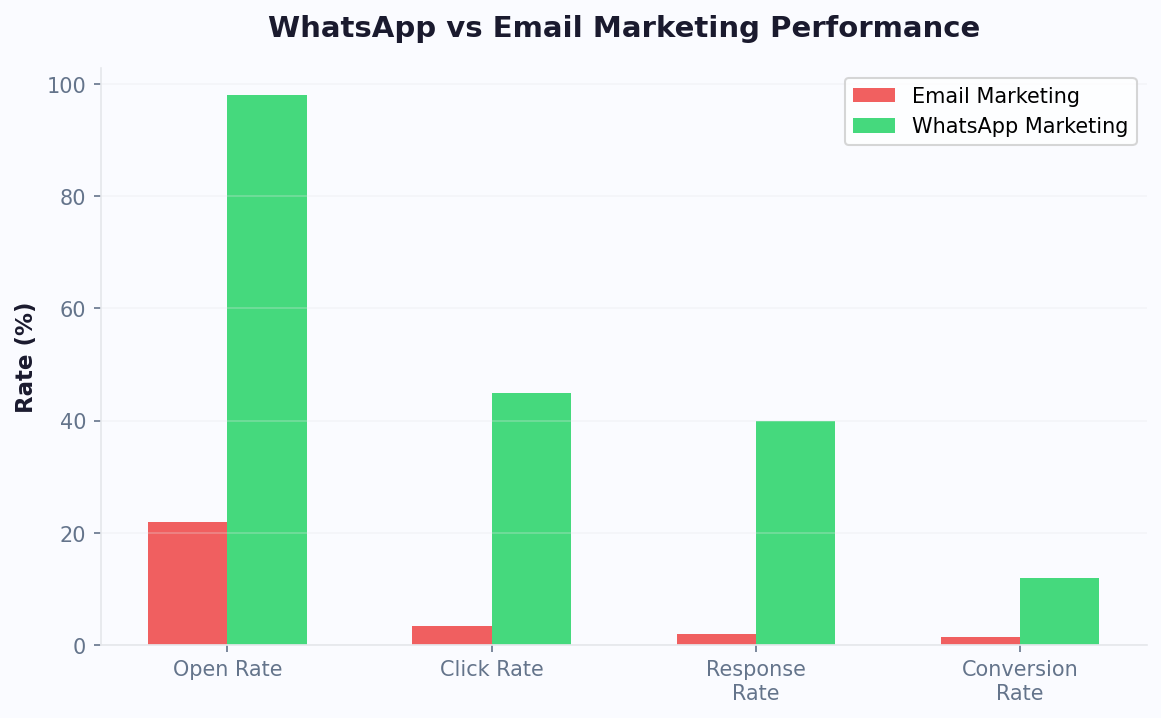
- 98% open rate on WhatsApp messages, compared to 20-25% for email
- 45-60% click-through rate on WhatsApp messages versus 2-5% for email campaigns
- 80% of consumers prefer messaging a business over calling or emailing (Meta Business Survey, 2025)
- According to Statista, WhatsApp is the #1 messaging app in 63 countries including India, Brazil, Germany, and the UK
WhatsApp chatbots take this channel a step further. Instead of staffing agents around the clock, a chatbot handles routine queries instantly — answering FAQs, booking appointments via calendar booking, sending order updates, and even processing payments — all inside the chat window customers already know.
The business impact is measurable. Companies using WhatsApp chatbots report an average 40% reduction in support costs and a 25% increase in customer satisfaction scores within the first 90 days. For ecommerce brands, WhatsApp chatbots recover up to 35% of abandoned carts through timely nudges — a metric that outperforms both email and SMS retargeting.
The trend is accelerating. Meta's 2025 Conversational Commerce Report found that businesses using WhatsApp automation grew revenue 2.3x faster than those relying solely on traditional channels. Whether you're a solo entrepreneur or an enterprise, the question in 2026 isn't whether to use WhatsApp chatbots — it's how quickly you can get one live.
WhatsApp Business API: What You Need to Know
Before building a chatbot, you need to understand the WhatsApp ecosystem. Meta offers three tiers for businesses:
| Feature | WhatsApp App | WhatsApp Business App | WhatsApp Business API |
|---|---|---|---|
| Target audience | Personal use | Small businesses | Medium & large businesses |
| Automation | None | Quick replies, greeting | Full chatbot automation |
| Broadcast limit | N/A | 256 contacts | Unlimited (opt-in) |
| Multi-agent support | No | Up to 5 devices | Unlimited agents |
| CRM integration | No | No | Yes, via API |
| Chatbot support | No | Limited | Full NLP & flow-based bots |
| Monthly cost | Free | Free | Per-conversation pricing |
For chatbot automation, you need the WhatsApp Business API. This is not a standalone app — it's a programmatic interface built on the WhatsApp Cloud API that you access through a Business Solution Provider (BSP) like Conferbot, which handles hosting, compliance, and message routing on your behalf.
Key API Concepts
- Business Verification: Meta requires Facebook Business Manager verification. This typically takes 2-7 business days and involves submitting legal business documents through Meta Business Suite.
- Phone Number: You need a dedicated phone number not already registered on WhatsApp. A fresh number or a landline works best.
- Message Templates: Outbound messages (business-initiated) require pre-approved templates. This prevents spam and ensures quality.
- Conversation Window: When a user messages you first, a 24-hour service window opens. During this window, you can send free-form messages without templates. After it closes, you must use approved templates.
- Conversation-Based Pricing: Meta charges per conversation (not per message). In 2026, service conversations (user-initiated) cost roughly $0.005-0.08 depending on region, while marketing conversations cost $0.02-0.15.
For a detailed walkthrough of the API setup process, see our WhatsApp Business API setup guide. The good news: platforms like Conferbot's WhatsApp integration abstract away the API complexity. You don't need to manage webhooks, handle token refreshes, or write server-side code. The platform handles all of that while you focus on designing your chatbot's conversation logic.
Step-by-Step Setup With Conferbot (No Code Required)
Setting up a WhatsApp chatbot with Conferbot's AI chatbot builder takes about 30 minutes. Here's the complete walkthrough:
Step 1: Create Your Conferbot Account
Sign up at Conferbot.com and choose a plan that includes WhatsApp integration. The Professional plan ($49/mo) includes full WhatsApp API access with 1,000 conversations per month.
Step 2: Connect Your WhatsApp Business Account
- Navigate to Channels > WhatsApp in your Conferbot dashboard
- Click "Connect WhatsApp Business"
- You'll be redirected to Meta's embedded signup flow — sign in with your Facebook Business Manager
- Select or create a WhatsApp Business Account
- Register your phone number (you'll receive a verification code via SMS or voice call)
- Once verified, your number appears as connected in the dashboard
Step 3: Design Your Chatbot Flow
Use Conferbot's visual drag-and-drop builder to create your conversation flow:
- Go to Bots > Create New Bot and choose the WhatsApp channel
- Start with a Welcome Message — this greets users when they first message your number
- Add Menu Options using WhatsApp's interactive buttons (up to 3) or list menus (up to 10 items)
- Build branching paths for each menu option (e.g., "Track Order," "Talk to Agent," "Browse Products")
- Add Input Collection nodes to gather names, emails, or order numbers
- Set up Conditional Logic — route users based on their responses
Step 4: Set Up Message Templates
For outbound notifications (order confirmations, appointment reminders, follow-ups), create message templates:
- Go to Templates > Create Template
- Choose a category: Marketing, Utility, or Authentication
- Write your template with placeholders: "Hi {{1}}, your order #{{2}} has shipped! Track it here: {{3}}"
- Submit for Meta approval (usually 1-24 hours)
Step 5: Test and Launch
Use Conferbot's built-in WhatsApp Simulator to test every conversation path before going live. Once satisfied, toggle your bot to Live status. Your WhatsApp chatbot is now active and ready to handle real conversations 24/7.
The entire process requires zero coding knowledge. If you want to explore free options first, see our guide on how to build a WhatsApp chatbot for free. Conferbot's visual builder handles the technical integration while you focus on crafting the right customer experience.
Designing Effective Conversation Flows
A WhatsApp chatbot is only as good as its conversation design. Unlike websites where users navigate visually, chatbot interactions are linear and sequential. Every message must guide users toward a clear outcome. Here's how to design flows that convert:
The 3-Message Rule
Users should reach their goal — or at least understand how to reach it — within 3 messages. If your chatbot requires more than 3 exchanges before delivering value, you'll see significant drop-off. Map every flow to hit the "aha moment" fast.
Use WhatsApp-Native UI Elements
WhatsApp supports rich interactive elements. Use them instead of asking users to type free-text responses:
- Reply Buttons: Up to 3 buttons per message. Use for binary choices or short menus (e.g., "Yes / No / Maybe Later").
- List Messages: Up to 10 selectable items grouped into sections. Perfect for product catalogs, service categories, or FAQ topics.
- Quick Replies: Pre-set text responses users tap to send. Useful for feedback collection ("Great / Good / Poor").
- Location Sharing: Ask users to share their location for store locators or delivery estimates.
- Document & Media Sharing: Send PDFs (invoices, tickets), images (product photos), or videos (tutorials).
Conversation Flow Architecture
Structure your bot around intents, not pages. Common intents for business bots include:
- Greeting Intent: Welcome + main menu
- Product/Service Inquiry: Catalog browsing, pricing, availability
- Order Management: Track, modify, cancel, return
- Support: FAQ answers, troubleshooting, ticket creation
- Booking/Scheduling: Appointment selection, confirmation, rescheduling
- Human Handoff: Seamless transfer to a live agent when the bot can't help
Error Handling Is Critical
Users will type unexpected inputs. Plan for it:
- Use a fallback message that rephrases the question with clearer options
- After 2 failed attempts, offer a human handoff option via live chat transfer
- Never dead-end a conversation — always provide a way forward
Great conversation design feels like talking to a helpful human, not navigating an IVR menu. Keep messages under 200 characters when possible, use emojis sparingly for warmth, and always give users an exit path.
Top WhatsApp Chatbot Use Cases
1. Ecommerce & Retail
Ecommerce brands are the biggest adopters of WhatsApp chatbots — and for good reason. A well-built bot can handle the entire purchase journey:
- Product Discovery: Share catalog images, descriptions, and pricing via WhatsApp's product messages
- Cart Recovery: Send personalized nudges to users who abandoned checkout — conversion rates hit 35% on WhatsApp vs. 5-10% via email
- Order Tracking: Automated shipping updates with tracking links, reducing "where's my order" queries by 70%
- Returns & Exchanges: Guide customers through the return process without agent intervention
2. Customer Support
Support is where chatbots deliver the most immediate ROI:
- FAQ Automation: Answer the top 50 questions instantly (hours, locations, policies, pricing)
- Ticket Creation: Collect issue details and create support tickets automatically
- Status Updates: Let customers check ticket status without calling
- Agent Routing: Transfer complex issues to the right department based on the conversation context
3. Appointment Booking
Healthcare clinics, salons, consultancies, and service providers use WhatsApp bots to fill their calendars:
- Show available time slots in an interactive list
- Confirm bookings with automatic calendar invites via integrated tools
- Send reminders 24 hours and 1 hour before appointments
- Handle rescheduling and cancellations without staff involvement
Businesses report a 45% reduction in no-shows after implementing WhatsApp appointment reminders.
4. Lead Generation & Qualification
WhatsApp chatbots capture leads at a much higher rate than web forms because the friction is near zero:
- Run click-to-WhatsApp ads on Facebook and Instagram — users land directly in a chat
- Ask qualifying questions (budget, timeline, company size) conversationally
- Score leads and route hot prospects to sales reps in real time
- Follow up automatically if a lead goes cold
Companies using WhatsApp for lead generation report 3-5x higher conversion rates compared to landing page forms. The conversational format feels natural and builds trust faster than a static form ever could.
5. Notifications & Alerts
Use approved message templates to send transactional notifications:
- Payment confirmations and invoices
- Delivery updates and ETAs
- Account alerts (password resets, login notifications)
- Event reminders and ticket delivery
With rich media support, these notifications can include images, PDFs, and interactive buttons for a complete self-service experience.
WhatsApp Chatbot Best Practices
Building a chatbot is straightforward; building one that users love requires attention to detail. Here are the best practices we've distilled from analyzing thousands of WhatsApp bot deployments:
1. Get Opt-In Right
WhatsApp has strict anti-spam policies that are updated frequently — see our complete WhatsApp chatbot rules for 2026 guide. You must obtain explicit opt-in before sending marketing messages. Best practices:
- Use a clear checkbox on your website: "I agree to receive updates via WhatsApp"
- Send a confirmation message with an easy opt-out option
- Never buy or scrape phone number lists — Meta will ban your account
- Maintain an opt-out rate below 1% to keep your quality rating high
2. Personalize Every Interaction
Generic chatbots feel robotic. Use data to personalize:
- Greet returning users by name: "Welcome back, Sarah!"
- Reference past purchases: "Need more of the running shoes you ordered last month?"
- Adjust language and tone based on user segment
- Use NLP capabilities to understand intent even when users phrase things differently
3. Keep Messages Concise
WhatsApp is a mobile-first channel. Long paragraphs get ignored. Rules of thumb:
- Keep individual messages under 200 characters
- Break complex information into multiple short messages with a 1-second delay between them
- Use bullet points and line breaks liberally
- Send media (images, videos) instead of describing things in text
4. Always Offer a Human Handoff
No chatbot can handle 100% of queries. Make the escalation path obvious:
- Include a "Talk to a Person" button in every menu
- Auto-escalate when the bot detects frustration (repeated failed inputs, negative sentiment)
- Provide estimated wait times when transferring to a live agent
5. Monitor and Iterate
Use chatbot analytics to continuously improve:
- Track completion rates for each flow — where do users drop off?
- Monitor fallback rates — what questions is your bot failing to answer?
- Measure CSAT scores with post-conversation surveys
- A/B test message copy, button labels, and flow structures
6. Respect Time Zones and Availability
Even though your bot runs 24/7, be mindful of notification timing. Schedule marketing messages during business hours in the recipient's time zone. A promotional message at 3 AM doesn't just get ignored — it generates opt-outs and complaints.
WhatsApp Chatbot Pricing & Plans
Understanding the cost structure is essential for budgeting your WhatsApp chatbot. There are two cost components: Meta's conversation fees and platform fees from your chatbot provider.
Meta's Conversation-Based Pricing (2026)
| Conversation Type | Who Initiates | Cost Range (per conversation) | Example |
|---|---|---|---|
| Service | User | $0.005 - $0.08 | Customer asks about order status |
| Utility | Business | $0.01 - $0.10 | Order confirmation, shipping update |
| Marketing | Business | $0.02 - $0.15 | Promotional offer, product launch |
| Authentication | Business | $0.01 - $0.07 | OTP, password reset |
Costs vary by country. India and Southeast Asia are at the low end; North America and Western Europe at the high end.
Each conversation includes a 24-hour window of unlimited messages. So whether you exchange 2 messages or 50 within that window, the cost is the same.
Conferbot Platform Pricing
| Plan | Monthly Cost | Included Conversations | Key Features |
|---|---|---|---|
| Starter | $29/mo | 500 | Basic flows, 1 WhatsApp number |
| Professional | $49/mo | 1,000 | NLP, rich media, analytics |
| Business | $99/mo | 5,000 | Multi-agent, API integrations, priority support |
| Enterprise | Custom | Unlimited | Custom SLAs, dedicated account manager |
For a detailed breakdown, visit our pricing page.
Total Cost Example
Let's calculate the monthly cost for a mid-size ecommerce brand handling 3,000 conversations/month (60% service, 30% utility, 10% marketing) in the US:
- Service conversations: 1,800 x $0.06 = $108
- Utility conversations: 900 x $0.08 = $72
- Marketing conversations: 300 x $0.12 = $36
- Meta total: $216/mo
- Conferbot Business plan: $99/mo
- Total: $315/mo
Compare that to a live chat team handling 3,000 conversations monthly — you'd need at least 2-3 agents at $2,500-3,500/mo each. The chatbot delivers 90%+ cost savings while maintaining instant response times.
Industry-Specific WhatsApp Chatbot Implementations
While the core WhatsApp chatbot setup is universal, the highest-performing implementations are tailored to industry-specific workflows. Here is how different sectors leverage WhatsApp chatbots for maximum impact in 2026.
Healthcare and Dental Practices
Healthcare providers use WhatsApp chatbots to manage appointment scheduling, send prescription refill reminders, deliver test results notifications, and handle pre-visit intake forms. The WhatsApp Business Platform's end-to-end encryption makes it suitable for sharing health information in many jurisdictions. Clinics report 40-50% reductions in phone call volume and 30% decreases in no-show rates through interactive WhatsApp appointment reminders. Patient satisfaction scores improve because they can message their provider at their convenience rather than being restricted to phone hours.
E-commerce and Retail
E-commerce brands use WhatsApp chatbots as full-funnel commerce channels. The journey starts with click-to-WhatsApp ads that drop shoppers directly into product discovery conversations. The chatbot showcases products with images and pricing, handles sizing questions, processes orders, sends shipping updates, and manages returns. Cart abandonment recovery via WhatsApp achieves 35% recovery rates — dramatically higher than the 5-10% typical of email. Brands report 20-30% of total revenue originating from WhatsApp conversations within 6 months of deployment.
Real Estate
Real estate agents use WhatsApp chatbots to handle the high volume of property inquiries that come from listing portals. When a prospect sends a message about a property, the chatbot instantly responds with property details, available showing times, and pre-qualification questions. This instant response captures leads that would otherwise go to the first agent who calls back — and WhatsApp Cloud API enables managing hundreds of simultaneous conversations without missing any. Agents using WhatsApp chatbots report 3x more showings booked compared to manual follow-up.
Education and Training
Educational institutions use WhatsApp chatbots for enrollment inquiries, course information delivery, assignment submission reminders, and student support. The conversational format is particularly effective for reaching younger demographics who prefer messaging over email or phone. Universities report 45% higher application completion rates when using WhatsApp-guided enrollment compared to traditional web forms. The chatbot guides prospective students through requirements, deadlines, and financial aid options step by step.
Financial Services
Banks and fintech companies leverage WhatsApp for transaction alerts, account balance inquiries, loan application status updates, and fraud notifications. WhatsApp's encryption and Meta's compliance frameworks make it suitable for financial communications in regulated markets. The instant two-way nature of WhatsApp is particularly valuable for fraud alerts — customers can confirm or deny suspicious transactions in seconds rather than the minutes required for phone-based verification.
Key Performance Metrics for WhatsApp Chatbots
Measuring WhatsApp chatbot performance requires tracking metrics specific to the messaging channel. Unlike website chatbots where you measure page engagement, WhatsApp metrics focus on conversation quality, resolution efficiency, and business impact.
Essential WhatsApp Chatbot KPIs
| Metric | Good Benchmark | Excellent Benchmark | Why It Matters |
|---|---|---|---|
| Message open rate | 90%+ | 97%+ | Confirms channel effectiveness |
| Response rate (user replies) | 35-45% | 55%+ | Measures engagement quality |
| Conversation completion rate | 60-70% | 80%+ | Indicates flow design quality |
| Bot resolution rate | 55-65% | 75%+ | Automation effectiveness |
| Average resolution time | Under 3 minutes | Under 90 seconds | Customer experience quality |
| Human handoff rate | 25-35% | Under 20% | Bot capability coverage |
| Customer satisfaction (CSAT) | 4.0/5 | 4.5+/5 | Overall experience quality |
| Cost per conversation | Under $2.00 | Under $0.75 | Operational efficiency |
Revenue Attribution Metrics
Beyond operational metrics, track the revenue your WhatsApp chatbot directly generates:
- Leads captured via WhatsApp: New contact information collected through chatbot conversations, segmented by source (organic, ads, QR codes)
- Appointments booked: Meetings, demos, or consultations scheduled through the WhatsApp chatbot
- Orders processed: Direct sales completed within WhatsApp conversations
- Cart recovery revenue: Revenue from abandoned carts recovered through WhatsApp follow-up messages
- Upsell revenue: Additional purchases generated through chatbot product recommendations
Quality Rating Management
Meta assigns a quality rating (Green, Yellow, Red) to your WhatsApp Business number based on customer interactions. This rating directly impacts your messaging tier and ability to scale. Monitor these factors that influence your quality rating:
- Block rate: Keep below 2%. If customers frequently block your number, Meta downgrades your rating.
- Report rate: Keep below 0.1%. Customer reports trigger immediate review from Meta.
- Template message engagement: High open rates and low opt-out rates signal quality to Meta's algorithm.
If your quality rating drops to Yellow, immediately reduce marketing message frequency and review which messages are generating negative signals. A Red rating can result in temporary messaging restrictions. According to Statista's messaging research, businesses maintaining Green quality ratings grow their messaging tiers 3x faster than those fluctuating between Green and Yellow.
Optimization Cadence
Review WhatsApp chatbot metrics weekly for the first month, then bi-weekly once performance stabilizes. Focus optimization efforts on the lowest-performing flow (highest drop-off), the most common unresolved queries (knowledge gaps), and the messages generating the highest block rates (content quality issues). For the complete list of metrics to track, see our chatbot analytics metrics guide. Continuous improvement based on data — not assumptions — is what separates WhatsApp chatbots that deliver 10x ROI from those that plateau at 2-3x.
Advanced Features: NLP, Rich Media & Analytics
Once your basic WhatsApp chatbot is running, it's time to unlock advanced capabilities that separate good bots from great ones.
Natural Language Processing (NLP)
Instead of relying solely on button taps, NLP-powered chatbots understand free-text messages. This means users can type naturally:
- "Where's my order?" — triggers order tracking flow
- "I want to return the blue shoes" — identifies product and intent, starts return process
- "Do you have anything under $50?" — extracts price filter, shows relevant products
Conferbot's NLP engine supports 95+ languages and learns from every conversation. Accuracy improves over time as the model sees more examples of how your specific customers phrase their requests.
Rich Media Messages
WhatsApp supports a variety of rich media formats that make conversations more engaging:
- Product Carousels: Swipeable product cards with images, descriptions, and "Add to Cart" buttons
- Documents: Send PDFs (invoices, receipts, brochures) directly in chat
- Videos: Embed tutorial or product demo videos
- Location Pins: Share store locations with map integration
- Stickers & GIFs: Add personality to your brand's bot
Analytics & Optimization
Data-driven optimization is what turns a chatbot into a revenue engine. Conferbot's analytics dashboard tracks:
- Conversation Volume: Total conversations, peak hours, busiest days
- Flow Completion Rate: Percentage of users who complete each flow from start to finish
- Drop-off Points: Exactly where users abandon conversations — pinpoint and fix bottlenecks
- Response Time: Average bot response latency (target: under 2 seconds)
- Agent Handoff Rate: Percentage of conversations escalated to humans — lower is better
- Revenue Attribution: Track sales and bookings directly generated by the chatbot
- CSAT Score: Customer satisfaction from post-conversation surveys
AI-Powered Responses With OpenAI
For complex queries that go beyond scripted flows, Conferbot integrates with OpenAI's GPT models. This enables your WhatsApp bot to:
- Answer nuanced product questions using your knowledge base
- Generate personalized product recommendations
- Handle multi-turn conversations that require context retention
- Summarize long documents or policy pages on demand
The combination of structured flows for common tasks and AI for edge cases creates a WhatsApp chatbot experience that feels remarkably human — while running entirely on autopilot.
WhatsApp Chatbot ROI Framework: Calculating Your Return
Before investing in a WhatsApp chatbot, you need a clear ROI framework to justify the spend and measure success. According to Gartner's 2025 Customer Service Report, organizations using conversational AI for customer engagement see an average 30% reduction in cost-per-interaction within 12 months. Here is a practical framework for calculating your WhatsApp chatbot ROI based on real deployment data.
The ROI Formula
WhatsApp Chatbot ROI = (Cost Savings + Revenue Generated - Total Investment) / Total Investment x 100
Cost Savings Calculation
| Metric | Before Chatbot | After Chatbot | Monthly Savings |
|---|---|---|---|
| Average support tickets handled by agents | 3,000/month | 900/month (70% deflection) | 2,100 tickets x $5 avg cost = $10,500 |
| After-hours missed inquiries | 400/month (lost) | 0 (bot handles 24/7) | 400 x $25 avg lifetime value = $10,000 |
| Average first response time | 4.2 hours | Under 5 seconds | Reduced churn: ~$3,000 |
| Agent overtime for peak hours | $2,800/month | $400/month | $2,400 |
Total monthly cost savings: $25,900
Revenue Generation Calculation
| Revenue Source | Monthly Volume | Conversion Rate | Avg Order Value | Monthly Revenue |
|---|---|---|---|---|
| Cart abandonment recovery | 800 abandoned carts | 35% | $65 | $18,200 |
| Lead qualification to sales | 200 qualified leads | 12% | $500 | $12,000 |
| Upsell recommendations | 1,500 conversations | 8% | $30 | $3,600 |
| Appointment booking (reduced no-shows) | 150 bookings | 45% fewer cancellations | $120 | $8,100 |
Total monthly revenue generated: $41,900
Investment Breakdown
- Platform fee (Conferbot Business plan): $99/month
- Meta conversation fees (3,000 conversations): ~$200/month
- Initial setup time (one-time): 8 hours at $50/hr = $400 amortized over 12 months = $33/month
- Monthly optimization time: 4 hours at $50/hr = $200/month
- Total monthly investment: $532
ROI Result
Monthly ROI = ($25,900 + $41,900 - $532) / $532 x 100 = 12,636% ROI
Even being conservative and halving these figures for a smaller business, WhatsApp chatbot deployments consistently deliver 500-2,000% ROI within the first quarter. The key drivers are support cost deflection and cart recovery revenue, which according to HubSpot's State of Marketing 2025, are the two highest-impact automation use cases across all messaging channels.
Break-Even Timeline
Most businesses achieve ROI breakeven within 14-21 days of launching their WhatsApp chatbot. The initial investment is low (under $500 for setup plus first month's platform fees), and the savings begin immediately once the bot starts deflecting support tickets and recovering abandoned carts. For step-by-step guidance on measuring these metrics, see our chatbot ROI calculator guide.
Benchmarks by Company Size
| Company Size | Monthly Conversations | Expected Monthly Savings | Expected Monthly Revenue Lift | Typical ROI |
|---|---|---|---|---|
| Solo/Micro (1-5 employees) | 200-500 | $1,500-3,000 | $2,000-5,000 | 800-1,500% |
| Small (6-25 employees) | 500-2,000 | $5,000-15,000 | $8,000-25,000 | 1,200-3,000% |
| Mid-Market (26-200 employees) | 2,000-10,000 | $15,000-50,000 | $25,000-100,000 | 2,000-5,000% |
| Enterprise (200+ employees) | 10,000+ | $50,000+ | $100,000+ | 3,000-10,000%+ |
These benchmarks align with findings from real chatbot case studies across industries. The consistent pattern is that businesses investing in WhatsApp chatbot optimization during the first 90 days see compounding returns as the bot learns from conversations and conversion flows are refined based on analytics data.
Was this article helpful?
Build and deploy in 10 minutes. No coding needed.
How to Create a WhatsApp Chatbot in 2026 FAQ
Everything you need to know about chatbots for how to create a whatsapp chatbot in 2026.
About the Author
Deepak is the founder of Conferbot and writes about building, deploying, and improving AI chatbots.
View all articles