Why Every Small Business Needs a WhatsApp Chatbot in 2026
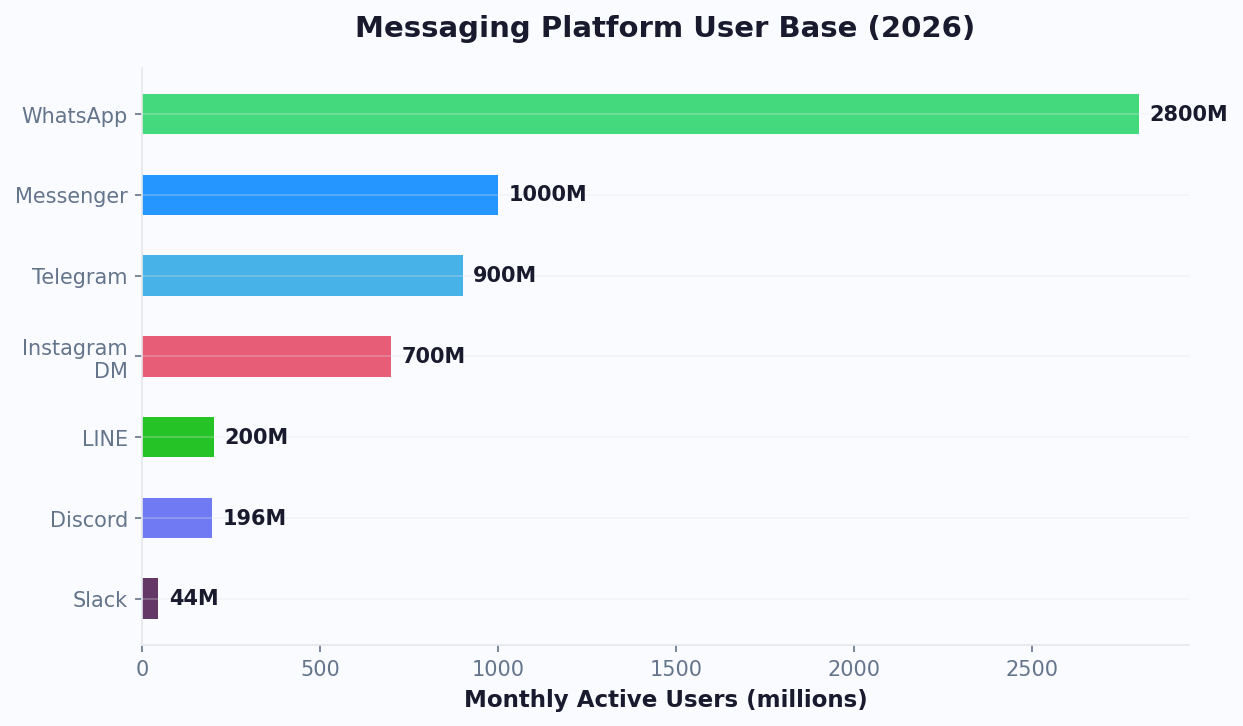
WhatsApp crossed 3 billion monthly active users in early 2026, according to Meta's official WhatsApp Business documentation, and more than 200 million businesses now use WhatsApp Business to talk to customers. It is no longer a messaging side-channel - in markets like India, Brazil, Mexico, and Indonesia, WhatsApp is the primary way customers contact businesses, beating email and phone calls combined.
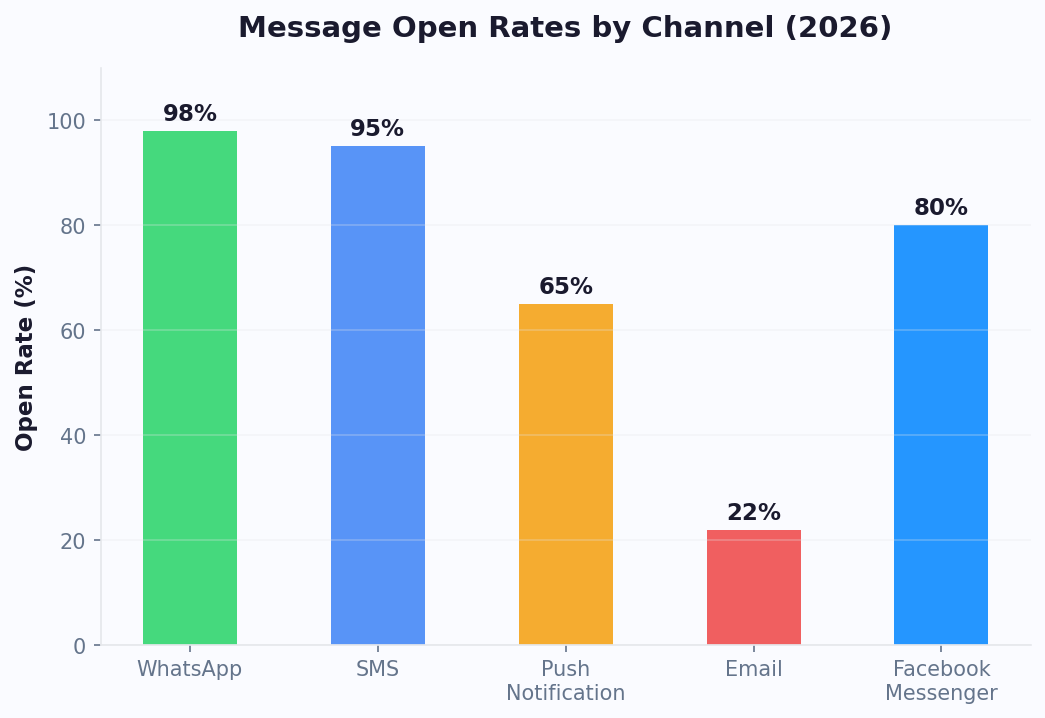
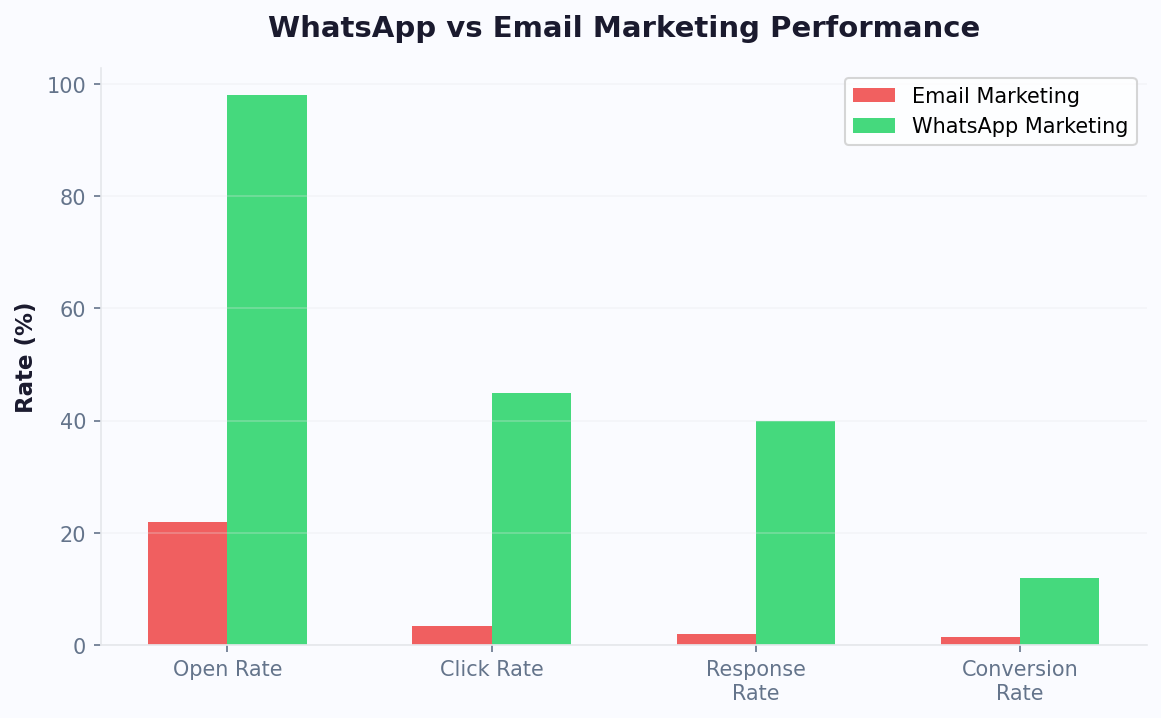
Here is the reality: customers who reach out on WhatsApp expect a reply within minutes, not hours. And the businesses that answer fastest win. A 2026 Meta study found that WhatsApp messages sent through business accounts see an 85% open rate and a 45-60% response rate, compared to 18-25% for email. A chatbot that replies instantly - at 3 AM, on Sundays, during lunch - captures leads and closes sales that would otherwise walk away.
What a WhatsApp Chatbot Actually Does
Modern WhatsApp chatbots handle four high-value jobs without any human involvement:
- Instant FAQ answers: Shipping times, return policies, pricing, hours - the questions your team answers 50 times a day.
- Appointment booking: Customers pick a time from a menu and the bot confirms, syncs to your calendar, and sends reminders.
- Lead qualification: The bot asks 3-5 qualifying questions and routes hot leads to a human, filtering out tire-kickers.
- Order tracking and support: "Where is my order?" answered in 5 seconds, pulling live data from your store or CRM.
Do You Really Need to Pay for This?
No - and that is the entire point of this guide. You can build a production WhatsApp chatbot for $0 using a combination of WhatsApp's official free tier (1,000 service conversations per month as of 2026), free-tier chatbot builders, and no-code logic flows. The only thing you need is a phone number, a verified business, and about 30 minutes of setup time.
If you already have the API set up, check our WhatsApp Business API setup guide for advanced configuration. Let us walk through exactly how to do it - no corners cut, no "free trial" bait-and-switch, no coding required.
Understanding the WhatsApp Business API (Free Tier Explained)
Before touching a chatbot builder, you need to understand how WhatsApp's messaging infrastructure actually works in 2026. This is where most tutorials mislead people - there are three different products with the word "WhatsApp Business" in the name, and only one of them supports a real chatbot.
The Three Versions of WhatsApp for Business
| Product | Chatbot Support | Free? | Best For |
|---|---|---|---|
| WhatsApp Business App | No (basic auto-replies only) | Yes | Solo founders answering messages manually |
| WhatsApp Business Platform (Cloud API) | Yes (full chatbot support) | Yes, up to 1,000 conversations/mo | Any business building a real chatbot |
| WhatsApp Business Premium (On-Premises) | Yes | No (enterprise pricing) | Very large organizations |
You want the WhatsApp Business Platform, specifically the Cloud API hosted by Meta directly. This is the version that supports chatbots, has a permanent free tier, and does not require you to host any servers.
The 2026 Free Tier Breakdown
Meta's free tier works on a conversation-based model, not per-message. A "conversation" is a 24-hour session that begins when a user messages you (or you send a template message they accept). Inside that window, you can exchange unlimited messages. The current free tier includes:
- 1,000 service conversations per month, permanently free. Service conversations are ones the customer initiated.
- Unlimited conversations from users who click a WhatsApp ad or Facebook Click-to-WhatsApp button. These are counted separately and are always free.
- Marketing, utility, and authentication conversations are paid (prices vary by country, typically $0.01-0.09 per conversation).
For a small business receiving 20-30 customer messages per day, the free tier is more than enough - you will use roughly 600-900 conversations per month and pay nothing to Meta.
What You Need to Qualify
- A Facebook Business Manager account (free).
- A dedicated phone number that is NOT currently registered with the regular WhatsApp app. Services like Twilio's WhatsApp API can provide virtual numbers if you prefer a cloud-based approach. You can use a landline, a VoIP number, or a fresh SIM card.
- A verified business - this is a Meta identity check that takes 1-3 days and requires a business document (registration certificate, utility bill, or tax ID).
- A display name and business category.
For a deeper dive into the API configuration and webhook setup, see our complete WhatsApp chatbot guide. Once you are verified, Meta issues you a permanent access token and a phone_number_id. These two values are all you need to connect a chatbot builder. Keep them safe - they are effectively the keys to your WhatsApp account.
Free No-Code Chatbot Platforms: Which One to Use
Once you have WhatsApp Business Platform access, you need a chatbot builder to design the conversation flows. You do not need to write any code. Several platforms offer permanent free tiers generous enough to run a real business chatbot without ever upgrading.
The Honest Comparison (2026)
| Platform | Free Tier | Visual Builder | WhatsApp Native | Best For |
|---|---|---|---|---|
| Conferbot | Unlimited bots, 500 chats/mo free | Yes | Yes | Multi-channel from day 1 |
| Wati (free trial only) | 7-day trial, then paid | Yes | Yes | Power users who will upgrade |
| Landbot | 100 chats/mo | Yes | Yes (paid add-on) | Website bots that extend to WhatsApp |
| Chatfuel | 50 conversations/mo | Yes | Yes | Very small pilot projects |
| BotPress (self-hosted) | Unlimited (you host) | Yes | Yes | Developers willing to host |
Platforms like MessageBird also offer WhatsApp connectivity but with more limited free tiers. For most small businesses, Conferbot's free tier is the best starting point because it is multi-channel from day one (add Messenger, Instagram, and website widget later with zero migration) and the 500-chat free tier covers real usage, not just a demo.
What to Look For in a Free Plan
Beware of "free" plans that are really 7-day trials in disguise. A real free tier should have:
- No expiration. Free forever, not free for a week.
- Enough monthly conversations to handle real traffic (at least 300).
- No "powered by" branding in the customer-facing widget, or at least an option to remove it on a cheap paid plan.
- Visual flow builder - you will be building and editing flows constantly.
- Direct WhatsApp Business Platform integration (not a reseller markup).
What You Can Skip
Free plans usually lack AI-generated responses (GPT-style free-form chat), deep analytics, and team collaboration. For a starter bot focused on FAQs, appointments, and lead capture, you do not need any of these. Add them later when you have proof of ROI.
Step-by-Step: Build Your First Free WhatsApp Chatbot
Here is the exact sequence to take you from zero to a live WhatsApp chatbot. Budget 30 minutes for a simple version, 2 hours for a polished one.
Step 1: Create Your Facebook Business Manager (5 Minutes)
Go to business.facebook.com and create a Business Manager if you do not already have one. Add your business name, the admin email, and your business website. This is free and instant.
Step 2: Set Up the WhatsApp Business Platform (10 Minutes)
Inside Business Manager, open WhatsApp Accounts and click Create Account. Enter:
- A display name (shown to customers - use your brand name).
- A business category.
- The dedicated phone number you prepared. You will receive a verification code via SMS or voice call.
Once verified, Meta issues you a temporary access token (valid 24 hours) and your phone_number_id. Copy both. You will exchange the temporary token for a permanent one in Step 4.
Step 3: Sign Up for Your Chatbot Builder (2 Minutes)
Create a free account on your chosen platform. In the onboarding wizard, select WhatsApp as your primary channel. The platform will ask for your Meta access token and phone_number_id.
Step 4: Generate a Permanent Access Token (5 Minutes)
Temporary tokens expire in 24 hours, so you need a permanent one. In Business Manager, go to System Users → Add New User. Create an admin-level system user, grant it access to your WhatsApp Business Account, and generate a token with the whatsapp_business_messaging and whatsapp_business_management scopes. This token is permanent and is what you paste into your chatbot platform.
Step 5: Design Your First Flow (10 Minutes)
Open the visual flow builder and drag your first blocks. A minimum viable flow for a service business looks like this:
- Welcome message: "Hi! Thanks for messaging [Business Name]. How can I help?"
- Menu buttons: [Book Appointment] [Pricing] [Hours & Location] [Talk to a Human]
- Branch logic: Each button triggers its own mini-flow.
- Appointment branch: Collect name → collect preferred date → show available times → confirm.
- Pricing branch: Show a rich-media card with your key packages and a link to your full pricing page.
- Human handoff: Log the conversation and notify a team member via email or Slack.
Step 6: Test With Your Own Number
Before going live, message your chatbot from your personal WhatsApp and walk through every path. Test the menu buttons, the appointment flow, the fallback for unrecognized messages, and the handoff. Fix anything that feels clunky.
Step 7: Publish and Share
Flip the bot to live mode and generate your wa.me link (wa.me/YOUR_NUMBER). Drop this link everywhere: website header, email signature, Google Business Profile, Instagram bio, business cards. Every click starts a conversation and triggers your bot.
Essential Templates You Can Steal (and Why They Convert)
Starting with a template saves hours and - more importantly - encodes proven conversation patterns. Here are four battle-tested templates you can copy into any free chatbot builder in under 10 minutes each.
Template 1: Appointment Booking Bot
Best for: clinics, salons, consultants, repair services.
Start → "Hi! Want to book an appointment?"
  Yes → "What service?" (menu: [Consultation] [Follow-up] [Other])
    → "What day works?" (menu: [Today] [Tomorrow] [This Week])
      → "Here are the available slots: [list]"
        → Confirm → Send calendar link + reminder 2h before
  No → "No problem. Type 'menu' anytime."
Conversion rate: 35-50% of conversations that start this flow complete a booking. That is higher than most website booking forms, because the buttons remove typing friction.
Template 2: Lead Qualification Bot
Best for: service businesses, B2B, agencies.
Start → "Interested in working with us? Answer 3 quick questions."
  → "What's your budget range?" (menu: [Under $500] [$500-2K] [$2K+])
  → "When do you need this?" (menu: [This week] [This month] [Just exploring])
  → "What's your name and email?"
  → If budget >=$500 AND timing <=this month → Tag HOT → Notify human immediately
  → Else → Tag NURTURE → Send case studies via automated follow-up
This filters out 60-70% of low-intent leads before a human ever sees them.
Template 3: 24/7 FAQ Bot
Best for: e-commerce, small retailers, restaurants.
Build a menu of your top 10 most-asked questions (shipping time, return policy, hours, location, wholesale inquiries, etc.) with a button for each. Inside each branch, answer in 1-3 short messages. Add a "still need help?" escape hatch that creates a support ticket.
Template 4: Abandoned Cart Recovery (E-commerce)
Requires a Meta Click-to-WhatsApp ad or a website opt-in. When a customer adds items but does not check out, trigger an outbound message within 1 hour: "Hey [Name], saw you were looking at [Product]. Still interested? I saved your cart for 24 hours." Recovery rates on WhatsApp are 3-5x higher than email because open rates hit 85%+.
For developers who prefer API-level control, tools like ChatAPI provide programmatic WhatsApp integration, though they require coding knowledge. All four templates work on the free tier with zero paid messages, as long as the customer initiates the conversation (or you trigger the message within the 24-hour window after a customer first messages you).
Compliance, Pitfalls, and the Three Ways to Get Your Number Banned
WhatsApp is strict about automation, and Meta bans numbers permanently for violations. Here is exactly what you need to know to stay inside the rules and keep your free tier intact.
The 24-Hour Messaging Window
Once a customer messages you, you have a 24-hour window to send free, unrestricted replies. After 24 hours, you can only send pre-approved template messages - and these count as paid conversations. Design your flows to drive action quickly inside the 24-hour window.
Template Message Approval
Any outbound message sent outside the 24-hour window must use a Meta-approved template. Templates are reusable text blocks with variables (e.g., Hi {{name}}, your order {{order_id}} has shipped!). Meta reviews each template within 1-24 hours, and approval is generally easy as long as the message is transactional and not promotional. Reject reasons are usually: too promotional language, all-caps "BUY NOW" urgency, or missing unsubscribe option.
The Three Ways to Get Banned
- High block rate. If more than 5-10% of users who receive your messages tap "Block" or "Report Spam," Meta flags your number. Always send messages only to people who explicitly opted in.
- Sending marketing messages without consent. Cold outbound to scraped numbers = ban. Only message people who started the conversation or who ticked an opt-in checkbox on your website.
- Impersonation or misleading display name. Your display name must match your legal or trading business name. Do not use generic names like "Customer Support" or names of brands you do not own.
Opt-In Best Practices
A legitimate opt-in looks like a clear checkbox at checkout, a "Message us on WhatsApp" button on your site, or a QR code on physical receipts. Never pre-check the opt-in box. Never import contact lists from email tools into WhatsApp - those people did not consent to WhatsApp messages.
The Compliance Checklist
- Display name matches your real business name.
- Privacy policy link in your first message to new users.
- Clear "reply STOP to unsubscribe" language in all marketing templates.
- No cold outreach to numbers that did not opt in.
- Human handoff available within 2-3 bot responses for any complex issue.
- Regular review of block rate and feedback in your Meta Business dashboard.
Follow these and your number stays in good standing indefinitely. For the full compliance rulebook, read our guide on WhatsApp chatbot rules in 2026. A well-run bot on the free tier can serve thousands of customers a month without paying anything or risking a ban.
Measuring WhatsApp Chatbot ROI: Key Metrics and Benchmarks
Building a free WhatsApp chatbot is only worthwhile if it delivers measurable business results. Before you launch, establish baseline metrics so you can prove ROI to yourself (or your boss) within the first 30 days.
The Five Metrics That Matter
Track these from day one using your chatbot platform's analytics dashboard:
- Conversation completion rate: What percentage of users who start a conversation complete the intended action (booking, inquiry submission, purchase)? A healthy chatbot achieves 35-55% completion. Below 25% means your flow is too long or confusing.
- Response time: Your chatbot should respond in under 3 seconds. WhatsApp users expect instant replies - anything over 10 seconds feels broken and increases drop-off by 40%.
- Lead qualification rate: Of all conversations started, how many produce a qualified lead (budget confirmed, timeline confirmed, contact info captured)? Benchmark: 15-25% of total conversations.
- Appointment booking rate: For service businesses, this is the money metric. A well-designed booking flow converts 30-50% of conversations into confirmed appointments.
- Human handoff rate: What percentage of conversations require a human agent? Start-up benchmark: 30-40%. After 3 months of optimization: 15-25%. If handoff stays above 40%, your bot lacks answers for common questions.
Calculating Dollar Value
Here is a simple ROI formula for a free WhatsApp chatbot:
Monthly chatbot value = (Leads captured x Lead-to-customer rate x Average customer value) + (Support hours saved x Hourly staff cost)
Example for a small dental clinic:
- Chatbot captures 45 appointment requests per month
- 80% show up (36 appointments)
- Average appointment value: $150
- Monthly revenue from chatbot: $5,400
- Plus: 20 hours of phone time saved at $18/hour = $360
- Total monthly value: $5,760 - from a free chatbot
Industry Benchmarks for WhatsApp Chatbots (2026)
| Industry | Avg. Conversations/Month | Completion Rate | Avg. Monthly Revenue Impact |
|---|---|---|---|
| Real estate | 200-400 | 38% | $8,000-15,000 |
| Healthcare/dental | 150-300 | 45% | $4,500-9,000 |
| E-commerce | 500-2,000 | 28% | $3,000-12,000 |
| Education | 100-250 | 52% | $2,000-6,000 |
| Local services | 80-200 | 42% | $2,400-7,200 |
These benchmarks are achievable on the free tier for businesses in the early stages. As conversation volume grows beyond 1,000 per month, the paid tier (still under $50/month on most platforms) unlocks additional value through AI-powered responses and advanced analytics.
7 Common Mistakes That Kill Free WhatsApp Chatbot Performance
After analyzing thousands of WhatsApp chatbot deployments, these are the mistakes that consistently prevent free bots from delivering results - and how to fix each one.
Mistake 1: Too Many Menu Options
WhatsApp limits interactive message buttons to 3 options per message (with list messages supporting up to 10). Beginners cram everything into one menu, overwhelming users. Fix: Limit your main menu to 3-4 top actions. Use nested menus for secondary options. The 80/20 rule applies - 80% of users need only 2-3 paths.
Mistake 2: No Fallback for Unrecognized Messages
Users will type free-form messages even when given buttons. If your bot ignores anything that is not a button tap, you lose those users. Fix: Add a fallback handler that says: "I did not quite catch that. Here are the things I can help with:" and re-presents the menu. On platforms with AI, enable natural language understanding for common variations.
Mistake 3: Ignoring the 24-Hour Window
Businesses build elaborate bots but forget that after 24 hours without a customer message, they cannot send free-form replies - only approved templates. Fix: Design your flows to resolve within a single session. For multi-day processes (like appointment prep), use approved template messages for follow-ups and budget a small amount for those conversations.
Mistake 4: No Human Handoff Path
A chatbot that cannot escalate to a real person frustrates customers with complex issues. On the free tier, you may not have a fancy team inbox, but you still need a path. Fix: Add a "Talk to a human" option that either forwards the conversation to a designated WhatsApp number, sends an email alert to your team, or creates a callback request.
Mistake 5: Generic Welcome Messages
"Hi! How can I help you today?" converts poorly because it puts all the cognitive load on the user. Fix: Lead with specific, action-oriented options: "Hi! I can help you book an appointment, check our pricing, or answer questions about our services. What would you like to do?"
Mistake 6: Not Testing on Mobile
You build the bot on a desktop dashboard but 98% of WhatsApp usage is mobile. Message formatting, button text length, and image sizing all look different on a phone screen. Fix: Test every flow on an actual mobile device. Keep button text under 20 characters. Keep messages under 4 lines before the "Read more" truncation.
Mistake 7: No Analytics Review
You launch the bot and never check the data. Drop-off points, unanswered questions, and abandonment patterns go unnoticed for months. Fix: Schedule a 15-minute weekly review of your chatbot analytics. Look at: where do users drop off? What do they type in the fallback handler? Which paths have the lowest completion? Fix the top issue each week and your bot improves continuously.
Avoiding these seven mistakes puts your free WhatsApp chatbot in the top 20% of deployments. The difference between a bot that sits idle and one that generates real business value is almost always in execution details, not in paid features.
When (and How) to Scale Beyond the Free Tier
The free tier is enough to prove your WhatsApp chatbot works. But at some point, usage or features will push you to upgrade. Here is how to decide when, and what to actually pay for.
Signals That You Have Outgrown Free
- You are consistently hitting the 1,000 service conversation limit before month-end.
- Customers are asking for features the bot cannot handle - and a smarter AI (GPT-style free-form replies) would solve it.
- You want to run outbound marketing campaigns (newsletters, promos, re-engagement).
- You need team inbox features so multiple agents can handle handoffs.
- You want analytics dashboards for conversation quality, drop-off points, and revenue attribution.
What to Upgrade First
- More conversation volume. Most paid plans scale linearly - $0.01-0.05 per service conversation above the free tier. Budget $20-100/month for modest growth.
- AI-powered replies. Adding GPT or Claude to handle free-form questions typically costs $20-50/month. ROI is huge if your FAQs are non-trivial.
- Team inbox. Shared inbox plans start at $30-80/month and are worth it the moment you have 2+ people handling handoffs.
- Marketing templates. Pay Meta per marketing conversation (about $0.01-0.09 depending on country) - only worth it once you have a list of opted-in customers and a clear promo calendar.
Common Monetization Paths
WhatsApp chatbots generate measurable revenue through three main patterns:
- Recovered revenue: Abandoned cart bots and re-engagement templates typically return 8-15x their cost in the first month.
- Saved support cost: A bot that resolves 60% of FAQ inquiries saves 15-25 hours of human support time per week - easily worth hundreds of dollars.
- New leads: Qualified lead flows convert WhatsApp traffic at 2-3x the rate of web forms, so every paid WhatsApp ad dollar works harder.
Track these metrics from day one in your chatbot platform's analytics, and you will know exactly when paying $50/month unlocks $500/month in new value. Until then, free is the right answer.
For broader chatbot strategies across different platforms, see our chatbot for small business guide. Ready to build your free WhatsApp chatbot? Start with Conferbot's WhatsApp integration and use the templates in this guide. You can be live in under an hour.
Monitor your monthly conversation count through the Meta dashboard to avoid unexpected charges as your bot usage grows beyond the free tier threshold.
Was this article helpful?
Build and deploy in 10 minutes. No coding needed.
How to Build a WhatsApp Chatbot for Free in 2026 (No Code, Step by Step) FAQ
Everything you need to know about chatbots for how to build a whatsapp chatbot for free in 2026 (no code, step by step).
About the Author
The Conferbot team writes about building, deploying, and improving AI chatbots.
View all articles