Free template library

Free Chatbot Templates: 265+ Ready-to-Use Bots

Ready-made conversation flows for lead capture, support, booking and e-commerce. Pick the one that matches the job you need done, change the wording, and publish it to your website or any messaging channel - no code, no credit card.

265+templates
27categories
8deploy channels

Free plan, no credit card required · Last updated August 2026 · Reviewed by the Conferbot team

Browse Chatbot Templates by Industry

Every category below is a folder of complete flows - greeting, qualifying questions, capture step and handoff - written for one kind of business. Open the category closest to yours and the vocabulary is already right; the structure is the same everywhere, so nothing is lost by starting in a neighbouring one.

B2B Services
🤖

B2B Services

Professional chatbot templates designed for your specific industry needs

2 templatesExplore
🤖
🤖

Beauty And Salon

Professional chatbot templates designed for your specific industry needs

9 templatesExplore
Booking and Scheduling
🤖

Booking and Scheduling

Professional chatbot templates designed for your specific industry needs

14 templatesExplore
🤖
🤖

Cannabis And Dispensary

Professional chatbot templates designed for your specific industry needs

2 templatesExplore
🤖
🤖

Construction

Professional chatbot templates designed for your specific industry needs

2 templatesExplore
Ecommerce and Retail
🤖

Ecommerce and Retail

Professional chatbot templates designed for your specific industry needs

15 templatesExplore
Education and Training
🤖

Education and Training

Professional chatbot templates designed for your specific industry needs

16 templatesExplore
🤖
🤖

Events And Conferences

Professional chatbot templates designed for your specific industry needs

7 templatesExplore
Finance and Banking
🤖

Finance and Banking

Professional chatbot templates designed for your specific industry needs

17 templatesExplore
Fitness and Sports
🤖

Fitness and Sports

Professional chatbot templates designed for your specific industry needs

10 templatesExplore
Food and Beverage
🤖

Food and Beverage

Professional chatbot templates designed for your specific industry needs

10 templatesExplore
Government and Public Services
🤖

Government and Public Services

Professional chatbot templates designed for your specific industry needs

10 templatesExplore
Healthcare and Wellness
🤖

Healthcare and Wellness

Professional chatbot templates designed for your specific industry needs

15 templatesExplore
Home Services
🤖

Home Services

Professional chatbot templates designed for your specific industry needs

10 templatesExplore
HR and Recruiting
🤖

HR and Recruiting

Professional chatbot templates designed for your specific industry needs

10 templatesExplore
Lead Generation
🎯

Lead Generation

Capture and qualify high-quality leads with intelligent conversation flows designed to increase conversion rates by up to 67%

20 templatesExplore
Legal and Compliance
🤖

Legal and Compliance

Professional chatbot templates designed for your specific industry needs

10 templatesExplore
🤖
🤖

Moving And Relocation

Professional chatbot templates designed for your specific industry needs

2 templatesExplore
Non-Profit and Charity
🤖

Non-Profit and Charity

Professional chatbot templates designed for your specific industry needs

10 templatesExplore
Real Estate and Property Management
🤖

Real Estate and Property Management

Professional chatbot templates designed for your specific industry needs

11 templatesExplore
Sales
🤖

Sales

Professional chatbot templates designed for your specific industry needs

7 templatesExplore
🤖
🤖

Senior Care

Professional chatbot templates designed for your specific industry needs

2 templatesExplore
🤖
🤖

Solar And Energy

Professional chatbot templates designed for your specific industry needs

2 templatesExplore
Support and FAQ
🤖

Support and FAQ

Professional chatbot templates designed for your specific industry needs

20 templatesExplore
Surveys
🤖

Surveys

Professional chatbot templates designed for your specific industry needs

16 templatesExplore
Technology and IT
🤖

Technology and IT

Professional chatbot templates designed for your specific industry needs

2 templatesExplore
Travel and Hospitality
🤖

Travel and Hospitality

Professional chatbot templates designed for your specific industry needs

14 templatesExplore

How to choose a template

  1. Pick by the job, not the industry. Ask what the bot has to produce in its first month. Contacts your sales team can call means lead generation; fewer repeat questions in the inbox means support and FAQ; qualified conversations for a rep to close means sales. Industry categories mainly swap the vocabulary and the qualifying questions - the shape of the flow barely changes - so the job is the decision that actually matters.
  2. Customize the first three messages, then stop. The greeting, the first question and the capture step carry almost all of the outcome. Say who you are, ask something the visitor can answer in one tap, and ask for contact details only after they have got something useful back. Leave the rest of the flow alone until you have real transcripts to edit against - guessing at branch four before anyone has walked branch one is how a good template turns into a maze.
  3. Deploy where the audience already is. The same flow runs on your site and on messaging apps, so publish it once and add channels as you learn which ones your customers use. The free plan covers the website widget with no card, which is enough to prove the flow before you connect anything else.

Browse by platform

The same template behaves differently depending on where it runs: WhatsApp allows three buttons and needs approved message templates outside the 24-hour window, Discord allows twenty-five and adds slash commands, a website widget can trigger on a pricing page. These platform pages collect the templates that suit each one, with the setup requirements spelled out.

Where the library is deepest

Ranked by how many templates each category holds today, straight from the library. A deeper category means more variants of the same job to compare before you commit to one flow.

  1. 1Lead Generation20 templates
  2. 2Support and FAQ20 templates
  3. 3Finance and Banking17 templates
  4. 4Education and Training16 templates
  5. 5Surveys16 templates
  6. 6Ecommerce and Retail15 templates

One template from every category

A single flow lifted out of each of the first eight categories, so you can open one and see what a finished template looks like before browsing a whole folder.

Deploy on 8 channels

Every template is channel-agnostic: build the flow once and connect it to any of these. Buttons, media and formatting are adapted to each platform automatically. The channels hub covers setup time, cost and platform requirements for each one.

Chatbot guides & resources

Worth ten minutes before you publish: how chatbots work, what they can realistically automate, and how the builders differ.

Pick a template. Go live in 10 min

250+ templates. Free plan. No credit card.

What is a chatbot template?

A chatbot template is a pre-built conversation flow that ships in 10 minutes - not 10 weeks.

A chatbot template is a ready-to-deploy conversation flow with the questions, branching logic, integrations, and goal-tracking already built in. You pick a template that matches a business outcome - lead capture, appointment booking, support deflection, cart recovery - swap in your branding and product details, then publish to your website, WhatsApp, Messenger, Instagram, Telegram, or Slack.

Conferbot's library of 265+ free chatbot templates is designed around proven conversation patterns for each use case, with the branching, integrations, and goal-tracking already in place. Conversational flows tend to capture and qualify leads more effectively than static contact forms, because they engage a visitor in dialogue instead of waiting for a form fill - and support templates can deflect a large share of repetitive tier-1 questions before they ever reach an agent.

Templates are not training wheels. They are the production starting point professional teams use to avoid rebuilding flows that have already been solved. Every Conferbot template is fully editable in the visual no-code builder - modify a question, add a branch, swap an integration, and you have a custom chatbot in minutes.

Template vs build from scratch vs hire a developer

Three ways to ship a chatbot. The math nearly always favors templates - here is the honest comparison for a typical business chatbot covering lead capture, FAQ deflection, and basic appointment booking.

DimensionConferbot templateBuild from scratchHire a developer
Time to live10 minutes2-4 weeks6-12 weeks
Upfront cost$00-$200 (tooling)$8k-$30k
Monthly cost$0 free / $19+ pro$50-$200 hosting$200+ hosting + retainer
Conversion rateOptimized guided flowBaseline form-levelVaries - depends on build quality
Integrations200+ includedHand-coded eachHand-coded each
Visual editorYesBuild your ownBuild your own
Analytics built-inYesNoCosts extra
Multi-channel8 channels nativeOne at a timeEach channel = extra build
Maintenance burdenManaged by ConferbotYouYou + your developer
Realistic ROIPositive within 30 daysPositive in 90+ daysPositive in 6+ months

Numbers based on 2024-2026 industry benchmarks from Drift, Tidio, and Intercom published deployment data.

Pick a chatbot template by team

Conferbot's library is organized by industry, but most teams shop by their actual job to be done. Here is the right starting point for each department.

Chatbot templates by category

Every category, what it solves, which template to pick first

Conferbot's 265+ chatbot templates are organized into 20+ categories. Below is the in-depth guide to the eight categories that drive the most traction - what each solves, who uses it, the realistic conversion metrics, and the top templates to start with. Use this to skip past evaluation and go straight to deployment.

Category · Lead generation

Lead-generation chatbot templates: turn anonymous visitors into pipeline

A lead-generation chatbot template replaces the static contact form on your site with a conversation that qualifies, captures, and routes leads in real time. Static contact forms tend to convert poorly - the visitor either fills them out or doesn't. A chatbot starts by asking a friendly question, qualifies budget or use case as it goes, and offers a downloadable resource, demo, or calendar booking based on what the person actually needs.

Conferbot's lead-generation library is the most-used category on the platform. The Basic Lead Generation template handles top-of-funnel capture for any website. Advanced Lead Qualification scores prospects against your ICP and routes only high-fit conversations to your AEs. Industry-specific variants - Real Estate, Marketing Agency, Mortgage Application, Loan Application, Investment Products - start with the right questions for their vertical so you skip most of the customization work.

Teams using these templates tend to capture a meaningfully higher share of engaged sessions as qualified leads versus form-only baselines. The Webinar Registration template specifically reduces signup friction, which tends to lift registration rates. The Consulting Service Recommendation template is purpose-built for professional services - it qualifies by industry, company size, and engagement type before scheduling a call.

Pick lead-generation templates when your primary goal is pipeline. If you want to deflect support tickets first and capture leads second, the Support & FAQ category is a better starting point. If you sell physical products, the E-commerce category's product recommendation flows convert better than generic lead capture.

Top templates in this category
  • Basic Lead Generation - drop-in replacement for any contact form
  • Advanced Lead Qualification - ICP scoring with branching logic
  • Lead Generation for Real Estate - buyer/seller intent + budget routing
  • Webinar Registration - pre-qualification + calendar invite in one flow
  • Consulting Service Recommendation - engagement-type triage for B2B services
Category · Support & FAQ

Customer-support chatbot templates: deflect repetitive tickets without agents

A customer-support chatbot template handles repetitive tier-1 questions - order status, password resets, returns, warranty, business hours - before they ever land in your inbox. Support teams using a Basic FAQ template alongside a human handoff fallback can remove a large share of low-complexity tickets from the queue, freeing agents for the conversations that actually need them.

The library covers every shape of support automation. Basic FAQ and Advanced FAQ handle question-and-answer at increasing levels of sophistication - the advanced version pulls answers from your knowledge base and can run multi-turn clarification before responding. Customer Feedback Collector runs lightweight CSAT/CES surveys after every conversation so you have continuous data, not quarterly snapshots. Human Handoff System and the newer Chatbot-Human Handoff System sit between the two - letting the bot try first, escalating with full context when needed.

Specialized templates handle the operational edges most support teams overlook. Order Status Tracker integrates with Shopify, WooCommerce, or any order system to give customers live tracking without an agent typing it out. Warranty Information Provider answers product-specific warranty questions with the right policy excerpt. Product Recall Information lets you stand up a rapid-response flow during a recall event without rebuilding from scratch.

Pick a support template when ticket volume is your bottleneck. If you primarily need lead capture, start with the Lead Generation category. If your support is mostly about appointments, the Booking & Scheduling category will get you to launch faster.

Top templates in this category
  • Basic FAQ - most-loved template for first-time chatbot deployments
  • Advanced Support Automation - multi-step troubleshooting + smart escalation
  • Customer Feedback Collector - CSAT and NPS without a separate tool
  • Order Status Tracker - live order lookup with channel-aware responses
  • Human Handoff System - bot triage with agent escalation and full context
Category · E-commerce

E-commerce chatbot templates: recover carts, recommend products, answer sizing

E-commerce chatbot templates target the four conversion leaks that bleed online retail revenue: cart abandonment (which runs high industry-wide), product discovery (visitors who can't find what they want), sizing and fit doubts (the #1 reason for clothing returns), and post-purchase questions (order tracking and returns). Each template addresses one of these failure modes with a conversation flow that has been tested against real shopper interactions.

Abandoned Cart Recovery is one of the highest-ROI templates on the platform. It can recover a meaningful share of previously lost carts, especially when paired with a discount code branch. Product Recommendation Engine guides shoppers through guided discovery - input style, occasion, budget - and outputs a curated product set, lifting conversion from browsing visitors. The Gift Finder template runs the same play for gift-buying intent and over-indexes during November and December.

Size and Fit Guide template reduces returns on apparel by collecting measurements, recommending sizes, and showing fit photos before the purchase. Inventory Checker handles 'is this in stock at my local store?' questions across multiple SKUs. Flash Sale Notifier converts price-sensitive shoppers into list subscribers and primes them for time-limited offers. Product Customization Guide walks shoppers through configurator flows that would otherwise abandon at the third dropdown.

Pick e-commerce templates when GMV is the metric you're optimizing. If your business is service-driven (consulting, agencies, healthcare), the Lead Generation or vertical templates target your funnel better. If you sell B2B physical products, the B2B Services category includes templates for distributor and quote-based selling motions.

Top templates in this category
  • Abandoned Cart Recovery - recover a share of previously lost carts
  • Product Recommendation Engine - guided discovery with curated outputs
  • Size and Fit Guide - measurement intake and size suggestion to cut returns
  • Gift Finder - November/December seasonal template
  • Order Tracking Assistant - multi-carrier live status across channels
Category · Booking & scheduling

Booking chatbot templates: replace calendar links and intake forms

Booking chatbot templates condense three steps - qualifying questions, calendar selection, intake form - into a single conversation. The result tends to be a substantially higher appointment-booking conversion rate on engaged visitors than an embedded calendar widget. Every template integrates with Google Calendar, Outlook, Calendly, and direct booking APIs.

Restaurant Reservation handles party size, time slot, dietary restrictions, and special-occasion notes in one flow. Salon Appointment Scheduler routes by stylist preference and service type, then sends a deposit-collection branch for high-value services. Fitness Class Reservation manages class capacity, recurring bookings, and waitlist logic - replacing the booking widget most studios staple onto their site. Car Rental Booking captures vehicle class, pickup/drop-off locations, and add-on insurance in a conversational sequence that converts better than the legacy car-rental form.

Specialized templates fill the niches. Spa Treatment Reservation handles multi-service packages. Movie Theater Ticket Booking integrates with showtime APIs to surface live seat availability. Sports Event Ticket Reservation handles section-based pricing and group discounts. For internal use, the Team Building Activity Planner runs the same booking flow but for office events.

Pick a booking template when appointment flow is your primary KPI. If you also need to qualify prospects before booking, the Lead Generation templates feed into your calendar at the right moment. Healthcare bookings have HIPAA-aware variants in the Healthcare & Wellness category.

Top templates in this category
  • Restaurant Reservation - party size, slot, special-occasion notes
  • Salon Appointment Scheduler - stylist routing with deposit branches
  • Fitness Class Reservation - capacity, recurring, waitlist
  • Car Rental Booking - class, locations, add-on insurance
  • Spa Treatment Reservation - multi-service package handling
Category · Healthcare

Healthcare chatbot templates: triage, intake, reminders - HIPAA-aware

Healthcare chatbot templates handle the operational layer most clinics, hospitals, and digital-health products struggle to automate without bespoke development: symptom triage before a patient sees a provider, intake form collection that survives the appointment, medication reminders that actually drive adherence, and benefits/coverage explanations that don't require a call to the front desk.

Symptom Checker Chatbot runs a guided triage that routes patients to the right level of care - self-care, telehealth, in-person, ER - based on symptom acuity. Mental Health Support runs a structured check-in flow with crisis-line handoffs built in. Vaccination Scheduler integrates with appointment systems and handles eligibility logic. Medication Reminder is the highest-engagement template in the category - adherence tends to improve versus SMS-only reminders when patients can ask follow-up questions in the flow.

Personalized Workout Planner, Fitness Goal Tracker, and Sleep Habit Analyzer cover the wellness side. Health Insurance Explainer translates plan documents into plain answers - 'is this procedure covered?' - without the call wait. Chronic Disease Management runs structured weekly check-ins for hypertension, diabetes, and weight-loss programs. Medical Bill Explainer reduces billing-question call volume in practices that deploy it.

Pick healthcare templates when your audience is patients or healthcare consumers. For provider-facing internal tools, the HR & Recruiting category has scheduling and review templates. For pharma or medical device sales, the B2B Services and Lead Generation templates fit better.

Top templates in this category
  • Symptom Checker Chatbot - acuity-based triage with care-level routing
  • Mental Health Support - structured check-in with crisis-line handoff
  • Medication Reminder - adherence flow with patient follow-up
  • Vaccination Scheduler - eligibility logic + appointment booking
  • Health Insurance Explainer - plain-language coverage answers
Category · Real estate

Real-estate chatbot templates: qualify buyers, schedule showings, capture seller leads

Real-estate chatbot templates handle the always-on lead capture that agents physically can't - calls outside business hours, after-show inquiries, weekend portal visits. They qualify by budget, timeline, and area in conversation, schedule showings against the agent's calendar, and route hot leads to phones immediately. The templates work across single-agent sites, brokerage portals, and property-listing platforms.

Lead Generation for Real Estate is the workhorse. It distinguishes buyer from seller intent in the first turn, qualifies by city, price range, bedrooms, and timeline, and offers either a property-matching email follow-up or an immediate showing booking. Brokerages report meaningful increases in after-hours lead capture relative to forms-only sites. The HOA & Community Association template handles homeowner-association inquiries - fee schedules, meeting times, document requests - that otherwise consume property-manager hours.

The Home Inspection Scheduler template routes inspection bookings against an inspector's calendar and collects property details upfront so the inspector arrives prepared. Lease Agreement Explainer reduces tenant questions by walking through common lease clauses in plain language. Property listing pages benefit from the Lead Qualification template (in Lead Generation) layered over them - qualifying serious shoppers without dropping casual browsers.

Pick real-estate templates for residential or commercial listing sites, agent portals, and brokerage marketing pages. For property management operations (work orders, rent collection, maintenance), the Home Services category covers the operational layer better.

Top templates in this category
  • Lead Generation for Real Estate - buyer/seller intent + qualification + showing
  • HOA & Community Association - fee/meeting/document inquiry handling
  • Home Inspection Scheduler - calendar-aware booking with property intake
  • Lease Agreement Explainer - plain-language clause walkthrough
  • Tenant Pre-Screening - applicant qualification before showing
Category · Education

Education chatbot templates: admissions, course discovery, tutoring

Education chatbot templates serve four distinct audiences: prospective students researching programs, current students who need help navigating courses, K-12 parents looking for school information, and EdTech products that need a learning companion. Each template is tuned to its audience's intent profile and the realistic conversion path.

On the admissions side, Course Recommendation Engine handles 'which program is right for me?' inquiries with a qualifying flow that maps interest, prior experience, and time commitment to a shortlist. Online Course Enrollment converts the qualified shortlist into a paid registration. Student Loan Application captures financial-aid inquiries with the right document checklist for the application. Scholarship Finder lifts engagement on financial-aid pages with personalized matches.

For active learners, Homework Helper, Academic Writing Tutor, and Skill Assessment Quiz behave like always-on tutoring companions - appropriate for K-12 and undergraduate audiences, with subject-specific branches. Personalized Learning Path Creator builds a study plan based on the learner's goal and timeline. Study Schedule Planner converts that plan into a calendar. Exam Preparation Guide walks through subject-specific prep checklists.

Internal-facing templates serve school operations. Student Interaction Facilitator handles common admin questions ('when do grades post?'). Parent-Teacher Conference Scheduler integrates with school calendars. Language Learning Assistant supports language-program enrollment and ongoing practice.

Pick education templates when your audience is students, parents, or educators. For corporate training and L&D, the HR & Recruiting category has onboarding and review templates that fit better.

Top templates in this category
  • Course Recommendation Engine - program matching with qualifying flow
  • Online Course Enrollment - qualified shortlist to paid registration
  • Homework Helper - always-on tutoring with subject branches
  • Scholarship Finder - personalized aid matching
  • Student Loan Application - financial-aid intake with document checklist
Category · Finance & banking

Finance chatbot templates: applications, fraud reporting, financial education

Finance chatbot templates handle three operational layers that traditional banking and fintech UX struggles with: long-form applications that bleed completion rate in a static form, fraud and dispute reporting that needs to capture incident details accurately, and financial literacy / education that builds trust at the top of the funnel.

Application-flow templates are the highest-converting in the category. Home Loan, Mortgage Broker, Credit Card Application, Loan Application, and Vehicle Financing each handle their respective application as a conversation - pre-qualifying upfront, collecting documents in a checked sequence, and routing complete applications to the underwriting team with a higher completion rate than a multi-step form. Mortgage Broker pre-qualifies on income, credit estimate, and property type before booking the broker call. Investment Products Lead Generation captures qualified investor intent with regulatory-aware disclosure prompts.

Fraud Detection and Reporting is purpose-built for incident capture - it walks the customer through fraud-type identification, transaction details, and escalation while the case is fresh, producing better case files than a generic ticket. Audit and Consulting Service template qualifies finance/accounting consulting inquiries with engagement scope upfront. Currency Trading Application handles trading-platform onboarding flows where regulatory questions gate access.

Financial-literacy templates target the top of funnel. Financial Literacy Educator runs a guided learning conversation that builds trust before product mention. Budgeting and Expense Tracker is the most-engaged 'free tool' in the category and feeds qualified prospects into product flows.

Pick finance templates when your audience is consumer or small-business banking, lending, insurance, or fintech product onboarding. For B2B fintech sales, the Lead Generation templates layered with Advanced Lead Qualification fit better.

Top templates in this category
  • Home Loan - conversational mortgage pre-qualification + application
  • Credit Card Application - pre-qual + application + document checklist
  • Fraud Detection and Reporting - incident capture with escalation routing
  • Mortgage Broker - broker-call booking with income/credit/property pre-qual
  • Financial Literacy Educator - trust-building education with product crossover

Looking for a category we didn't list? We have templates for HR & Recruiting, Travel & Hospitality, Food & Beverage, Home Services, B2B Services, Beauty & Salon, Non-Profit, Government, Construction, Senior Care, Legal, Automotive, and more.

Browse all 265+ chatbot templates →

Why start from a template

Launch in minutes

Pre-built conversation flows get your chatbot live much faster than starting from scratch.

Proven to convert

Industry-tested templates with optimized question sequences and conversion paths.

Fully customizable

Modify everything - questions, branding, logic - using the visual no-code builder.

Get live in 3 steps

1

Choose a template

Browse and select the template that matches your industry.

2

Customize & brand

Modify flows, add branding, and tailor responses.

3

Deploy & convert

Publish to your website or messaging channels instantly.

How chatbot templates help businesses convert more visitors

A static contact form sits passively, waiting for a visitor to fill it out - and most visitors never do. A chatbot template built with a proven conversation flow tends to capture and qualify substantially more of that same traffic, because it proactively starts a conversation, reads intent through natural dialogue, and routes each visitor to the right outcome in real time. For lead capture, support, and booking, that shift from a passive form to an active conversation is where the gains come from.

Our template library is shaped by real usage patterns across businesses using Conferbot. Every template reflects a conversation structure refined for its use case, informed by analytics data and optimized for specific industries. When you deploy a lead-generation template, you start from a proven flow rather than a blank canvas.

Templates by use case: which one should you start with?

Your goalBest template categoryWhat it helps withSetup time
Capture more leadsLead GenerationHigher form completion10 min
Reduce support ticketsCustomer SupportDeflect repetitive tickets15 min
Recover abandoned cartsE-commerceRecover more carts10 min
Book more appointmentsBooking & SchedulingMore booked slots10 min
Qualify prospectsSalesPre-qualified leads12 min
Automate onboardingHR & RecruitingLess manual back-and-forth15 min
Collect patient infoHealthcareSmoother intake12 min
Generate property leadsReal EstateMore captured inquiries10 min
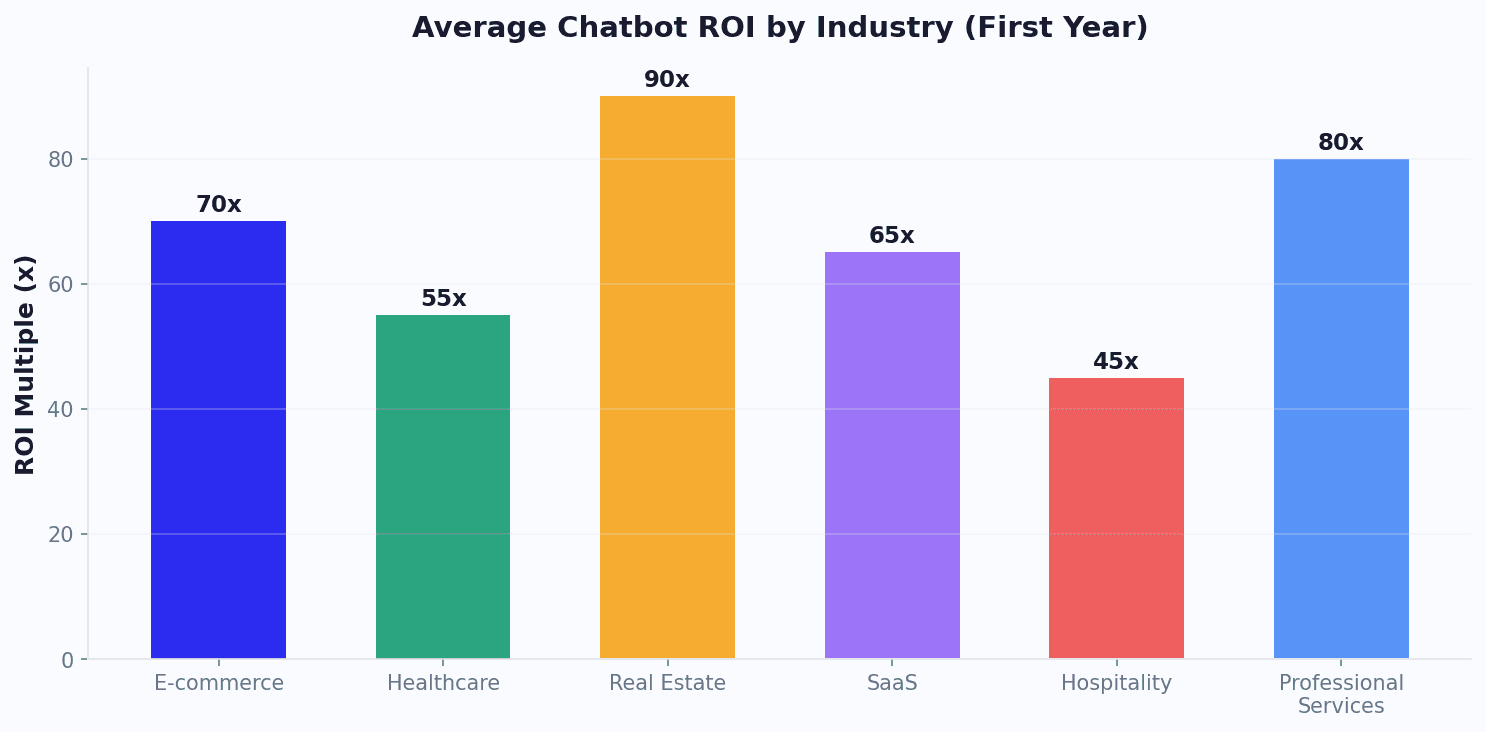
Chatbot template ROI varies by industry: Real Estate 90x, Professional Services 80x, E-commerce 70x

Templates vs building from scratch

Building a chatbot from scratch takes hours and requires understanding conversation design patterns, conditional logic, and user experience principles. Templates eliminate that learning curve: instead of a blank canvas, you start from a complete, proven conversation flow and customize it to your business. That means you can launch a working bot the same day rather than spending weeks iterating to get the structure right.

FactorFrom templateFrom scratch
Time to deploy10-15 minutes2-8 hours
Iteration neededMinor tweaks2-3 weeks of testing
Conversation design skillNot requiredRequired
Best practices built-inYesMust learn/apply
CostFree (included)Developer time
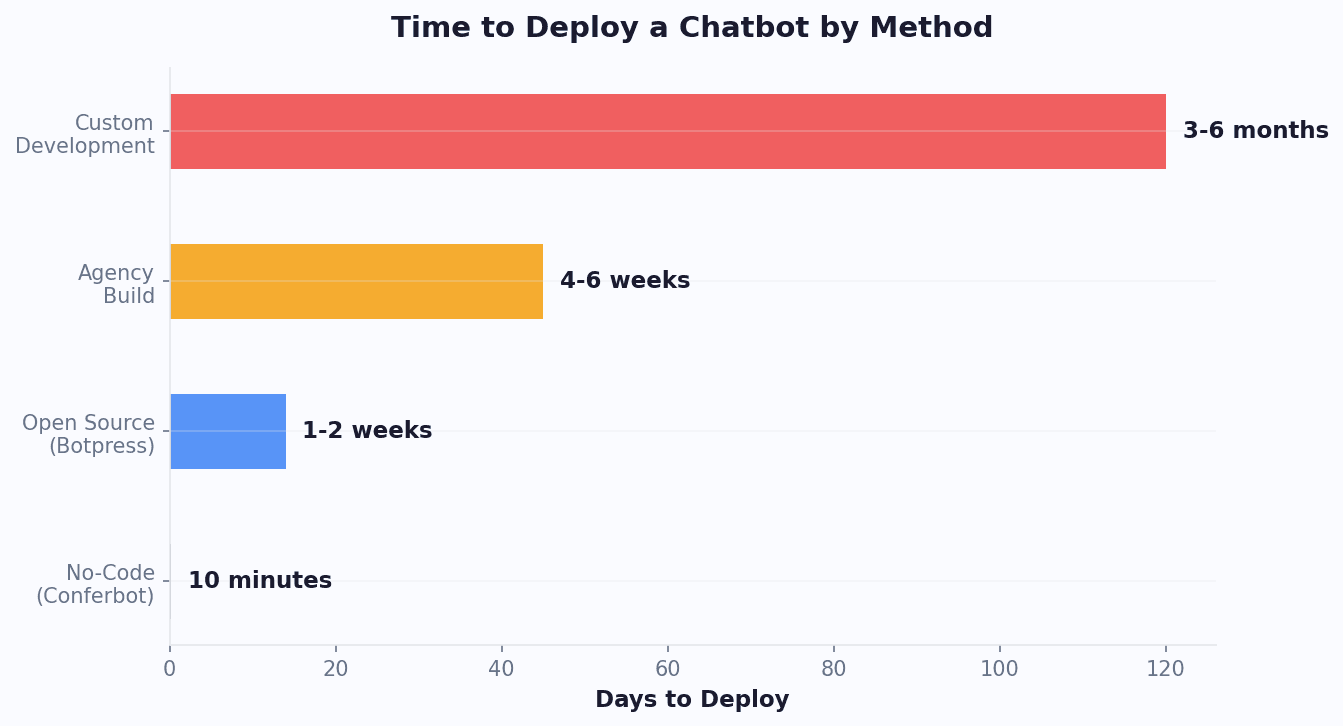
No-code template deploys in 10 minutes vs custom development taking 3-6 months

How to get the most from your template

  1. Match the template to your #1 goal. Don't try to combine lead gen + support + booking in one bot. Pick the template that matches your primary objective, master it, then add flows.
  2. Customize the first message. The default greeting works, but a personalized one usually converts better. Reference your industry, mention a specific benefit, or ask a qualifying question.
  3. Connect your tools. Templates become far more useful when connected to your CRM (integrations hub), calendar, and email. Leads flow directly into your pipeline instead of sitting in a dashboard.
  4. Deploy on WhatsApp too. Every template works on WhatsApp, Messenger, and Instagram - not just your website. Meeting customers on the channels they already use helps you capture more leads.
  5. Review analytics weekly. Use built-in analytics to find drop-off points, test different question sequences, and optimize conversion rates. Regular review is the simplest way to keep improving performance over time.
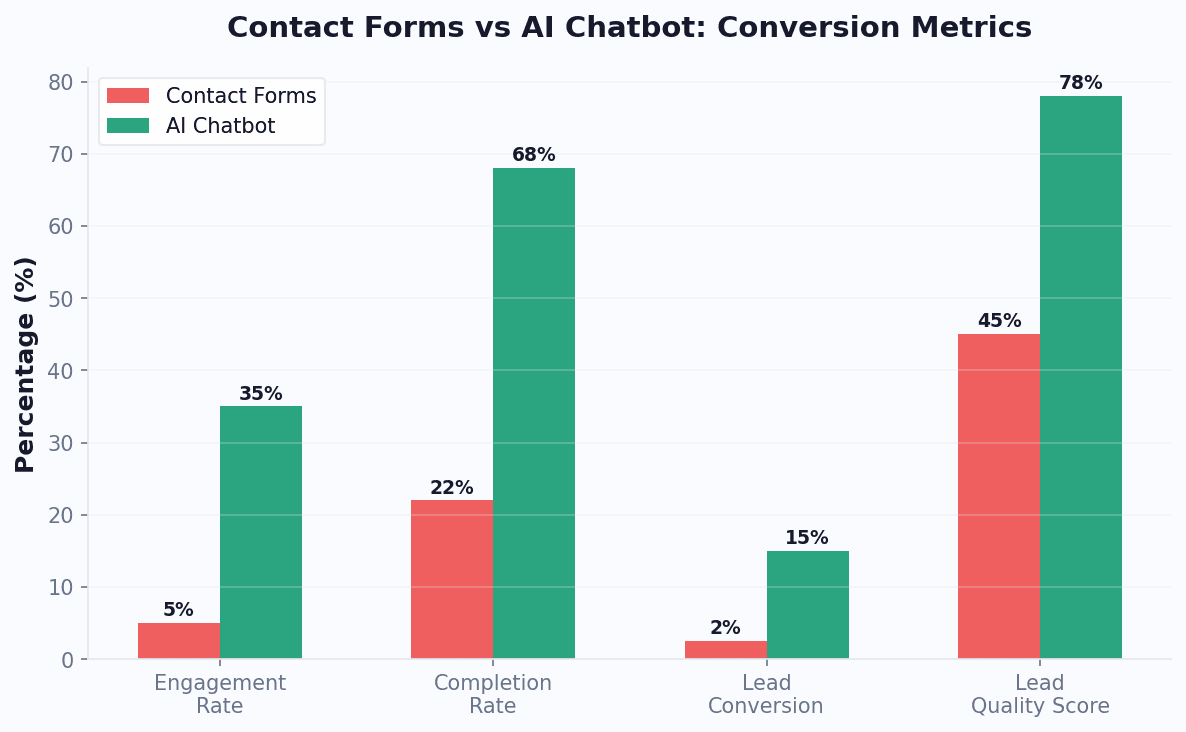
Chatbot templates achieve 68% completion rate and 15% lead conversion vs 22% and 2.5% for forms

Ready to see it in action? Browse the categories above, pick any template, and customize it with our AI builder in under 10 minutes. Or use the ROI calculator to see what a chatbot template is worth to your business. All templates are free - paid plans start at $19/month when you are ready to go live.

What are chatbot templates?

Chatbot templates are pre-built conversation flows with proven question sequences, smart responses, and automation logic designed for specific business use cases. Instead of building a chatbot from scratch, templates let you launch a professional AI-powered chatbot in minutes - with no coding required.

Conferbot offers 265+ free templates across 20+ industries including lead generation, customer support, e-commerce, healthcare, real estate, finance, and HR. Each template is fully customizable using our visual no-code builder.

How chatbot templates work

Each chatbot template comes with a complete conversation structure - from the initial greeting to lead capture, qualification questions, and follow-up responses. Templates are built on Conferbot's NLP engine and can be enhanced with OpenAI GPT integration for intelligent, context-aware responses that feel natural.

Once you select a template, customize it with your brand colors, logo, and messaging using the drag-and-drop builder. Then deploy it instantly across 8+ channels - your website, WhatsApp, Facebook Messenger, Instagram, Telegram, Slack, and Discord.

Templates for every industry

Whether you're in healthcare needing patient intake automation, e-commerce looking for cart recovery and product recommendations, or real estate wanting to qualify property leads 24/7 - there's a template ready to go. Our sales templates help teams capture and qualify more leads, while support templates automate common customer queries.

Every template integrates with your existing tools via Zapier, direct API integrations, and native connectors for CRMs like HubSpot and Salesforce. Monitor performance with built-in analytics, and hand off complex conversations to human agents via live chat when needed. When a channel starts returning errors, the error code directory and the platform limits reference cover what the platform is actually telling you.

What you get with every template

Save 80% setup time

Skip building from scratch. Templates include tested conversation flows that convert.

No-code builder

Deploy on 8+ channels

Every template works on your website, WhatsApp, Messenger, Instagram, Telegram, and more.

Omnichannel deployment

AI-powered responses

Combine templates with OpenAI GPT for intelligent, context-aware conversations.

AI integration

Track performance

Built-in analytics track conversations, conversions, and ROI for every deployed template.

Analytics dashboard

24/7 lead capture

Templates capture and qualify leads automatically, even when your team is offline.

AI agents

Live chat handoff

Seamlessly transfer complex conversations from bot to human agent when needed.

Live chat

Choosing and launching a template

Two categories both fit my business - which template do I start with?

Pick by the job you want done first, not by the industry label. If the bot's first month has to produce contacts, start in Lead Generation; if it has to take work off a support inbox, start in Support and FAQ; if it has to fill a calendar, start in Booking and Scheduling. Industry categories mostly change the vocabulary and the qualifying questions, not the shape of the flow, so the job-to-be-done is the decision that matters. Launch one, read the drop-off report after a week, then add the second flow.

How does a template actually get onto my website?

Customize the flow in the builder, publish it, then paste the one-line embed script before the closing body tag of your site. It is the same snippet whether you run WordPress, Shopify, Wix, Squarespace, Webflow or hand-written HTML, and it loads asynchronously so it does not block your page. Most site builders have a place to paste custom code without touching a theme file.

Do templates work on WhatsApp, and what does Meta require?

Yes, the same flow runs on WhatsApp, but Meta adds two requirements that the website widget does not have: a Meta Business Account with a verified phone number, and approved message templates for anything you send outside the 24-hour customer service window. Replies inside that window are free-form. Budget 10-15 minutes for the connection itself, and expect the message-template review to be the part that takes longest the first time.

How do I tell whether the template is working after launch?

Watch completion rate and drop-off node, not conversation count. A template that starts 400 conversations and loses 300 people at the same question has a copy problem at that question, and the analytics view names it. The usual fixes are cutting a question that is not needed to act on the lead, replacing free text with buttons, and moving the contact-detail request to after the visitor has got something useful.

What if none of the templates match what I need?

Start from the closest one and delete rather than start from a blank canvas - the greeting, the qualifying pattern and the handoff are the same in every good flow, and those are what take time to get right. If the use case genuinely has no neighbour in the library, the no-code builder starts you from an empty flow with the same node types. Either way the deployment, integrations and analytics are identical.

A channel started rejecting my messages - where do I look?

Take the numeric error code out of the raw API response and look it up in the error code directory, which documents WhatsApp, Telegram, Discord, Messenger, Instagram, Slack, LINE and Teams codes one at a time with causes and an ordered fix. If sends are being throttled rather than rejected, the platform limits reference lists each platform's rate limits, messaging tiers and size caps with sources.

Keep exploring

Can't find the template you need?

Start from the closest flow and delete what you don't need, or open a blank canvas in the same no-code builder. Both go live on the free plan without a card.

FAQ

Chatbot Templates FAQ

Everything you need to know about chatbots for chatbot templates.

🔍
Popular:

Chatbot templates are pre-built conversation flows with proven question sequences, intelligent responses, and logic designed for specific business use cases. They let you launch a professional chatbot in minutes without coding.

Yes. All chatbot templates on Conferbot are 100% free to use. Choose any template, customize it with our no-code builder, and deploy instantly. No credit card required.

We offer templates for 20+ industries including healthcare, e-commerce, real estate, education, lead generation, customer support, HR, finance, hospitality, automotive, insurance, legal, and more.

Absolutely. Every template is fully customizable using our visual drag-and-drop builder. Modify questions, responses, branding, conversation logic, and integrations to match your business needs.

Most users deploy their first chatbot in under 10 minutes. Choose a template, customize the branding and responses, then publish to your website or messaging channels with one click.

Yes. Every template works across 8+ channels including your website, WhatsApp, Facebook Messenger, Instagram, Telegram, Slack, Discord, and Microsoft Teams. Build once, deploy everywhere.

Yes. Conferbot templates support OpenAI GPT integration, natural language processing, and AI-powered responses. Combine template flows with AI for intelligent, context-aware conversations.

Templates give you a proven conversation structure for your industry that you can customize. Building from scratch means starting with a blank canvas. Templates save 80% of setup time while delivering better conversion rates based on tested flows.

Yes. You can combine templates across categories - for example, a lead generation template with a customer support template - to create a comprehensive chatbot that handles multiple use cases.

Yes. All deployed templates come with built-in analytics including conversation metrics, conversion rates, drop-off points, and visitor insights. Track ROI and optimize your chatbot performance.

Omnichannel Platform

One Chatbot,
Every Channel

Your chatbot works seamlessly across WhatsApp, Messenger, Slack, and 6 more platforms. Build once, deploy everywhere.

View All Channels
Conferbot
online
Hi! How can I help you today?
I need pricing info
Conferbot
Active now
Welcome! What are you looking for?
Book a demo
Sure! Pick a time slot:
#support
Conferbot
New ticket from Sarah: "Can't access dashboard"
Auto-resolved. Password reset link sent.

Design better conversations

A template is a starting point. These cover the craft of turning one into a flow that actually converts.