
Why Instagram DM Automation Matters in 2026
Instagram has evolved from a photo-sharing app into one of the world's most important commerce and customer engagement platforms. As Instagram for Business reports, brands using messaging features see 40% higher retention rates than those relying on feed-only engagement. With over 2 billion monthly active users and 200 million business accounts, the platform is where consumers discover, research, and purchase products. And increasingly, those interactions happen in Direct Messages.
Consider the scale of Instagram DM activity:
- 375 million+ people message businesses on Instagram daily (Meta, 2025)
- 150 million conversations start from Instagram Stories every month
- 70% of shopping enthusiasts turn to Instagram for product discovery
- 44% of Instagram users shop on the platform weekly
But here's the challenge: most businesses can't keep up with the volume. When a potential customer DMs your brand and doesn't get a response within minutes, they move on to a competitor. Manual DM management simply doesn't scale.
Instagram DM automation solves this by deploying intelligent chatbots that respond instantly to every message, comment, and Story reply. These bots don't just send canned responses — they qualify leads, recommend products, answer FAQs, and even close sales, all within the Instagram app.
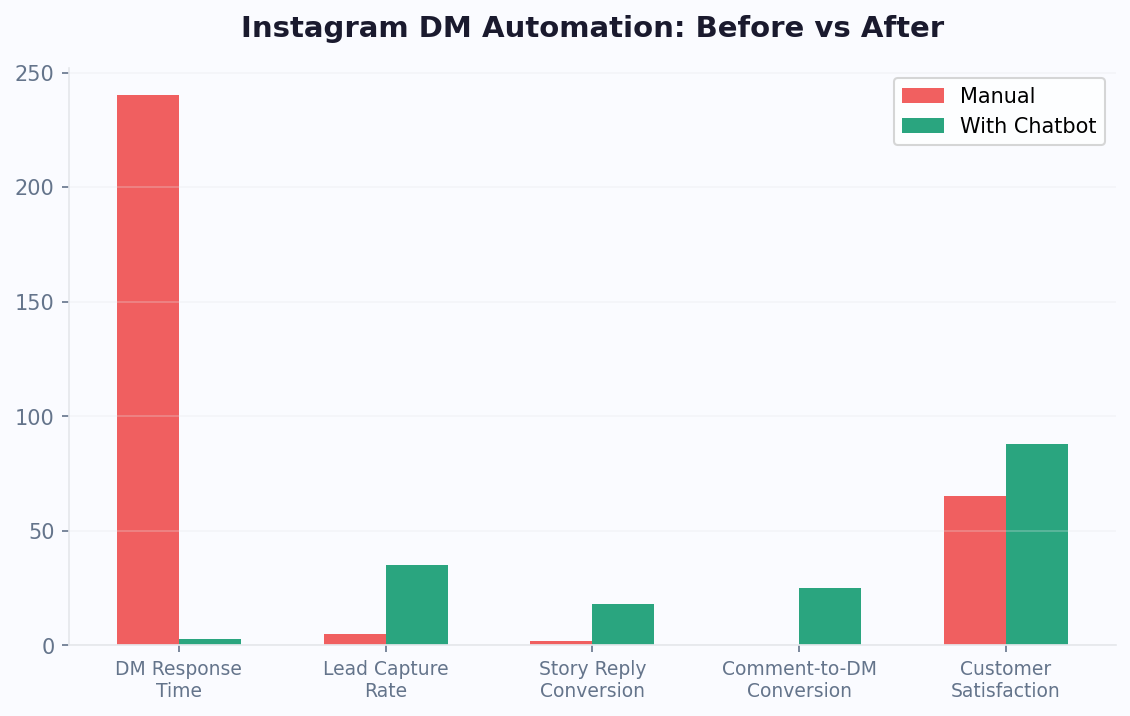
The results are dramatic. Brands using Instagram DM automation report 40% higher engagement rates, 3x more qualified leads, and 60% faster response times. For ecommerce brands, automated DMs recover an average of 25% of lost sales from interested but undecided shoppers.
In 2026, Instagram DM automation isn't just for large brands with big budgets. No-code platforms — including AI-powered chatbot builders and no-code chatbot builders — make it accessible to businesses of every size, from solo creators to enterprise retailers.
Understanding the Instagram Messaging API
Instagram's Messaging API, released as part of Meta's unified business messaging platform, enables businesses to automate DM conversations programmatically. Here's what you need to know about its capabilities and limitations.
API Requirements
The full technical documentation is available on the Meta Messenger Platform developer docs, which cover both Messenger and Instagram messaging APIs:
- Business or Creator Account: Your Instagram account must be a Business or Creator account (not personal)
- Facebook Page Connection: Your Instagram account must be linked to a Facebook Business Page
- App Review: Your chatbot platform (like Conferbot) must have Instagram Messaging permissions approved by Meta
Supported Message Types
| Message Type | Description | Use Case |
|---|---|---|
| Text | Plain text responses | FAQs, confirmations |
| Images | Send product images, infographics | Product showcase |
| Quick Replies | Tappable buttons (up to 13) | Multiple-choice menus |
| Generic Templates | Structured cards with image and buttons | Product listings |
| Ice Breakers | Conversation starters shown to new users | Guide first interactions |
| Story Replies | Automated responses to Story mentions/replies | Engagement, contests |
Key Limitations
Instagram's messaging API has stricter rules than Messenger and other omnichannel platforms:
- 24-Hour Window: You can only respond to user-initiated messages within 24 hours. After that, you cannot message the user.
- No Broadcast Messaging: Unlike Messenger, you cannot send proactive messages to users. All conversations must be user-initiated.
- No Recurring Notifications: There's no opt-in mechanism for recurring messaging outside the 24-hour window.
- Human Agent Tag: You can extend the 24-hour window to 7 days if a human agent needs to follow up, but automated messages must stay within 24 hours.
Entry Points for DM Conversations
Since you can't message users first, driving users to initiate conversations is critical. Instagram provides several entry points:
- Story Replies: Users reply to your Story, triggering the bot
- Post Comments: Bot sends a DM when users comment with a keyword
- Bio Link: Direct users to "Message Us" via your bio
- Click-to-Instagram DM Ads: Paid ads that open a DM conversation
- DM Button on Profile: The "Message" button on your business profile
Understanding these entry points is essential for designing effective rich media automation flows that start naturally and feel native to the Instagram experience.
Setting Up Instagram DM Automation With Conferbot
Setting up Instagram DM automation is straightforward with the right platform. Here's a complete walkthrough using Conferbot's Instagram integration.
Prerequisites
- An Instagram Business or Creator account
- A Facebook Page linked to your Instagram account
- Admin access to both the Instagram account and Facebook Page
- A Conferbot account (Professional plan or higher)
Step 1: Connect Instagram to Conferbot
- Log into your Conferbot dashboard
- Navigate to Channels > Instagram
- Click "Connect Instagram Account"
- Log in with your Facebook credentials and authorize access
- Select the Instagram account you want to connect
- Grant the required permissions (instagram_manage_messages, pages_messaging)
Step 2: Set Up Ice Breakers
Ice breakers appear as tappable prompts when a user opens a DM with your business for the first time. Configure 1-4 ice breakers that represent your most common user intents:
- "Browse Our Collection"
- "Track My Order"
- "Get Styling Advice"
- "Talk to Our Team"
Step 3: Build Conversation Flows
Create automated flows for each ice breaker and common user scenario:
- Design a Welcome Flow that greets users and presents options
- Build Product Discovery Flows using quick replies and image messages
- Set up Support Flows for FAQs, order tracking, and returns
- Create Lead Capture Flows that collect contact information conversationally
- Configure Handoff Rules to route complex queries to your team
Step 4: Configure Keyword Triggers
Set up automated DM responses triggered by specific keywords in post comments or Story replies:
- Keyword: "PRICE" → Send product pricing via DM
- Keyword: "LINK" → Send direct purchase link via DM
- Keyword: "DEAL" → Send exclusive discount code via DM
Step 5: Test and Go Live
Use Conferbot's built-in simulator to test all flows. Send test DMs from a personal Instagram account to verify that ice breakers appear correctly, quick replies trigger the right flows, and media messages render properly on mobile. Once satisfied, activate your bot. Every new DM to your Instagram account will now be handled automatically.
The entire setup process takes approximately 30-45 minutes, requires zero coding, and your automation starts working immediately. Start even faster with pre-built Instagram chatbot templates designed for common business scenarios.
Lead Generation and Sales Through Instagram DMs
Instagram DMs have become one of the most effective lead generation and sales channels available to businesses. The combination of visual content discovery and private messaging creates a natural purchase journey that converts at rates traditional channels can't match.
Building a DM Sales Funnel
An effective Instagram DM sales funnel has four stages:
- Attraction: Use posts, Stories, Reels, and ads to drive users into DMs
- Qualification: Ask 3-5 questions via quick replies to understand needs and budget
- Presentation: Share personalized product recommendations with images and descriptions
- Conversion: Provide a purchase link or hand off to a sales rep for high-value deals
Qualification Framework
Use your chatbot to qualify leads conversationally. Here's a framework that works across industries:
- Need: "What are you looking for?" (quick replies with product categories)
- Budget: "What's your budget range?" (quick replies with price ranges)
- Timeline: "When do you need this?" (quick replies: immediately, this week, this month, just browsing)
- Contact: "Want us to send you a personalized recommendation? Drop your email."
Based on responses, score the lead and route accordingly:
| Lead Score | Criteria | Action |
|---|---|---|
| Hot | Immediate need + budget confirmed | Live agent handoff or direct purchase link |
| Warm | Interest shown + timeline within 30 days | Follow-up sequence with case studies |
| Cold | Just browsing + no timeline | Add to email list, retarget with ads |
Product Recommendation Engine
Build dynamic product recommendation flows that adapt based on user preferences:
- Ask about style preferences, sizing, or use case via quick replies
- Show curated product images with pricing and "Buy Now" buttons
- Offer comparison between 2-3 options to help decision-making
- Include social proof: "This is our best-seller with 2,000+ five-star reviews"
Abandoned Conversation Recovery
Not every DM conversation ends in a sale. For users who engage but don't convert, use these tactics within the 24-hour window:
- Send a follow-up message 2-4 hours after the last interaction: "Still thinking about [product]? Here's 10% off to help you decide."
- Share a customer testimonial or UGC photo to build social proof
- Offer to answer any remaining questions
Brands using automated DM sales funnels on Instagram report 5-8x higher conversion rates compared to traditional website funnels. Social media management platforms like Sprout Social have documented these performance gains across thousands of business accounts. The conversational format builds trust rapidly, especially when powered by API integrations that pull real-time product data, and the rich media capabilities let you showcase products in a visually compelling way that static web pages can't match.
Customer Support and FAQ Automation on Instagram
As Instagram becomes a primary discovery and shopping channel, customers naturally expect support through the same platform. Instagram DM automation ensures every customer query gets an instant, helpful response.
Common Support Queries on Instagram
Based on data from thousands of Instagram business accounts, these are the most frequent DM categories:
- Product Inquiries (35%): Pricing, availability, sizing, colors, materials
- Order Status (25%): Shipping updates, delivery estimates, tracking info
- Purchase Assistance (15%): How to buy, payment options, discount codes
- Returns and Exchanges (12%): Return policy, process, refund timelines
- General Information (8%): Store hours, locations, contact methods
- Complaints (5%): Product issues, service problems, escalations
Building an Instagram Support Bot
Structure your support automation around these high-volume categories:
- Ice Breakers: "Product Questions," "Order Help," "Returns & Exchanges," "Talk to Us"
- Product FAQ Flow: Use quick replies to narrow down the product, then provide information via image + text
- Order Tracking Flow: Collect order number, query your ecommerce platform via API, return real-time status
- Returns Flow: Walk through eligibility check, provide return instructions, generate return labels
Handling Sensitive Issues
Not every conversation should be automated. Configure smart escalation rules:
- Complaints: Auto-detect negative sentiment and route immediately to a human agent
- Billing Issues: Collect details via bot, then hand off to finance team
- Urgent Issues: Keywords like "urgent," "emergency," or "broken" trigger priority escalation
Response Time Impact
| Response Time | Customer Satisfaction | Likelihood of Purchase |
|---|---|---|
| Under 5 minutes | 92% | High |
| 5-30 minutes | 78% | Moderate |
| 30 min - 2 hours | 55% | Low |
| Over 2 hours | 32% | Very Low |
With DM automation, your response time drops to under 3 seconds for every message, 24 hours a day. This alone can transform your Instagram customer experience. Customers who receive instant responses are 4.5x more likely to make a purchase than those who wait even 30 minutes.
Combine support automation with Messenger chatbots and a website chatbot for a unified cross-platform support experience, managing all channels from a single Conferbot dashboard.
Measuring and Optimizing Instagram DM Performance
Data-driven optimization is what separates good Instagram DM automation from great. Without analytics, you're guessing. With the right metrics, you can continuously improve conversion rates, customer satisfaction, and revenue per conversation.
Key Performance Metrics
| Metric | What It Measures | Benchmark |
|---|---|---|
| Response Rate | % of DMs that receive a response | 99%+ with automation |
| Avg Response Time | Time between user message and bot reply | Under 3 seconds |
| Conversation Completion | % of users who finish a flow | 60-75% |
| Lead Capture Rate | % of conversations that generate a lead | 25-40% |
| Conversion Rate | % of DM conversations that result in a sale | 8-15% |
| Escalation Rate | % of conversations handed to humans | 15-25% |
| CSAT Score | Customer satisfaction (1-5) | 4.2+ |
Identifying Drop-Off Points
The most actionable insight from analytics is where users abandon conversations. Common drop-off patterns include:
- After the welcome message: Ice breakers aren't relevant or compelling enough
- During qualification: Too many questions, or questions feel too personal too early
- At the purchase link: Price shock, lack of trust signals, or friction in the checkout process
- After a failed input: Bot didn't understand the user and the fallback wasn't helpful
A/B Testing Framework
Systematically test and improve your DM flows:
- Welcome Message: Test different greetings, value propositions, and CTA buttons
- Quick Reply Labels: Test different wording for menu options (e.g., "Shop Now" vs. "Browse Products")
- Flow Length: Test shorter vs. longer qualification sequences
- Media Types: Test text-only vs. image + text vs. video responses
- CTA Placement: Test when to present the purchase/signup link in the conversation
Attribution and ROI Tracking
Connect your Instagram DM automation to revenue by tracking:
- UTM Parameters: Add UTM tags to all links shared via DMs so you can track traffic and conversions in Google Analytics
- Coupon Codes: Use unique discount codes per DM campaign to attribute sales directly
- CRM Integration: Sync DM leads to your CRM with source tagging via the integrations hub
- Revenue per Conversation: Calculate total DM-attributed revenue divided by total DM conversations
Use Conferbot's analytics dashboard to access all these metrics in real time. Scheduling and analytics platforms like Later complement chatbot analytics by providing broader Instagram content performance data that informs your DM automation strategy. Set up automated weekly reports to track trends and identify optimization opportunities. The brands that treat Instagram DM automation as a data-driven channel consistently outperform those that "set it and forget it." Check our pricing plans to find the analytics tier that matches your business needs.
Instagram DM Automation Best Practices
Instagram DM automation is powerful, but it must be executed thoughtfully to maintain authenticity and comply with platform guidelines. Here are the best practices that ensure long-term success.
1. Stay Authentic to the Platform
Instagram is a visual, personal platform. Your DM automation should reflect this:
- Use a conversational tone that matches your brand's Instagram voice
- Include images and visual content in your DM flows — text-only bots feel out of place on Instagram
- Keep messages short and scannable — Instagram users expect quick interactions
- Avoid corporate language that feels disconnected from the Instagram experience
2. Respect the 24-Hour Window
Instagram's messaging policy is strict about the 24-hour response window:
- Make the most of the window by delivering value upfront
- Capture email addresses early in the conversation for follow-up outside Instagram
- Don't send multiple messages after a user has gone silent — one thoughtful follow-up within the window is appropriate
- Never try to circumvent the policy with workarounds; it will get your account restricted
3. Use Comment Automation Responsibly
Comment-to-DM automation is effective but can feel spammy if overused:
- Only trigger DMs when users explicitly comment a specific keyword (don't DM everyone who comments)
- Clearly state the keyword prompt in your post caption so users know what to expect
- Deliver real value in the DM (a guide, discount, exclusive content) — not just a sales pitch
- Limit keyword campaigns to 2-3 per week to avoid overwhelming your followers
4. Design for the Instagram User Journey
Instagram users typically follow this path: Discover → Follow → Engage → DM → Purchase. Design your automation to match:
- New Followers: Warm welcome via Story mention or first-time DM ice breakers
- Engaged Users: Content-driven DMs from comment/Story automation
- Purchase Intent: Product recommendation and checkout flows
- Post-Purchase: Order updates, review requests, loyalty offers
5. Combine Automation with Human Touch
The best Instagram DM strategies blend automation with personal interaction:
- Let the bot handle initial qualification and FAQ responses
- Have human agents step in for high-value prospects and complex questions
- Personalize automated responses using data from the user's Instagram profile and interaction history
- Review bot conversations weekly and add new flows for frequently asked questions
6. Comply with Meta's Policies
Violations can result in messaging restrictions or account suspension:
- Never purchase follower lists or scrape DM contacts
- Always identify your bot as automated when required by local regulations
- Don't use DM automation for prohibited content (political, discriminatory, misleading)
- Maintain high response quality to keep your account in good standing
By following these best practices, your Instagram DM automation will feel like a natural extension of your brand's Instagram presence — not a robotic interruption. The goal is to make every DM interaction feel personal, valuable, and effortless for the user.
Calculating Instagram DM Automation ROI: Revenue Attribution and Benchmarks
Understanding the financial impact of Instagram DM automation requires proper attribution. Unlike traditional Instagram marketing where you measure likes and impressions, DM automation delivers measurable business outcomes — leads, sales, and support deflection. For businesses also running broader Instagram chatbot strategies, these metrics compound across all automated touchpoints.
Revenue Attribution Framework
Track these revenue streams separately to understand where your DM automation delivers the most value:
| Revenue Stream | How to Track | Typical Monthly Revenue (10K followers) |
|---|---|---|
| Comment-to-DM sales | Unique coupon codes per campaign | $2,000-8,000 |
| Story reply conversions | UTM links in DM responses | $1,500-5,000 |
| Click-to-DM ad conversions | Facebook Ads attribution + DM tracking | $3,000-12,000 |
| Support-to-sale conversions | Post-support purchase tracking | $500-2,000 |
| Lead capture value | Leads x close rate x average deal | $1,000-6,000 |
Monthly ROI Calculation Example
For a DTC fashion brand with 25,000 Instagram followers:
- Monthly DM conversations: 3,000 (automated)
- Platform cost: $149/month
- Content creation time: 4 hours/month ($200 value)
- Total investment: $349/month
Revenue generated:
- Comment-to-DM campaigns (3/month): $4,500
- Story automation conversions: $2,200
- Support-driven purchases: $800
- Lead nurture conversions: $1,500
- Total monthly revenue: $9,000
- ROI: 2,479%
Performance Benchmarks by Industry
| Industry | Avg Conversation Rate | Avg DM Conversion Rate | Avg Revenue per DM Conversation |
|---|---|---|---|
| Fashion/Apparel | 12-18% | 8-12% | $3.50-7.00 |
| Beauty/Cosmetics | 15-22% | 10-15% | $4.00-8.50 |
| Food/Restaurant | 8-14% | 12-18% | $2.00-5.00 |
| Fitness/Wellness | 10-16% | 6-10% | $5.00-15.00 |
| Education/Coaching | 6-12% | 4-8% | $10.00-40.00 |
| Real Estate | 5-10% | 3-6% | $50.00-200.00 |
Optimization Levers That Move Revenue
Once you have established baseline metrics, focus optimization efforts on these high-impact levers. For businesses extending automation to other channels, our Messenger marketing guide covers complementary strategies:
- Increase trigger rate: More posts with comment-to-DM CTAs = more conversations initiated. Aim for 2-3 keyword-triggered posts per week.
- Reduce flow drop-off: Every step in your DM flow where users stop responding is lost revenue. Shorten flows, make buttons more compelling, and move the purchase CTA earlier.
- Improve qualification accuracy: Better qualifying questions in your lead qualification flows mean less time wasted on low-intent users and more agent time spent on high-value prospects.
- Test message timing: For abandoned DM conversations (user stops replying), test follow-up timing. A 2-hour follow-up within the 24-hour window often recovers 15-20% of stalled conversations.
- Leverage analytics data: Identify which product categories convert best through DMs and create more content driving traffic to those specific recommendation flows.
The businesses generating the highest ROI from Instagram DM automation share one trait: they treat it as a revenue channel with the same rigor they apply to email marketing or paid ads — with weekly metrics reviews, regular A/B testing, and continuous optimization.
Scaling Beyond 10,000 Monthly Conversations
As your Instagram DM automation matures past the initial growth phase, the optimization focus shifts from basic flow design to scale-related challenges: maintaining response quality at high volume, segmenting your subscriber base for personalized campaigns, and managing the handoff workload for your human agents. At the 10,000+ monthly conversation level, invest in advanced segmentation that routes users into distinct journeys based on their purchase history, engagement recency, and product interests. Implement conversation scoring that prioritizes high-value prospects for human follow-up while the bot handles routine interactions autonomously. The most advanced operators at this scale also create seasonal campaign calendars — planning their keyword triggers, story engagement prompts, and product launch sequences months in advance to maximize revenue during peak shopping periods while maintaining consistent engagement during slower months. Tracking subscriber lifetime value by acquisition source helps allocate content budgets effectively, as DM subscribers acquired through Reels typically show 20-30% higher purchase frequency than those acquired through static post comments.
Was this article helpful?
Instagram DM Automation FAQ
Everything you need to know about chatbots for instagram dm automation.
About the Author

Conferbot Team specializes in conversational AI, chatbot strategy, and customer engagement automation. With deep expertise in building AI-powered chatbots, they help businesses deliver exceptional customer experiences across every channel.
View all articles

Comment and Story Automation Strategies
The most powerful Instagram DM automation strategies don't start in the DMs — they start with your content. By connecting your posts, Stories, and Reels to automated DM flows, you turn every piece of content into a lead generation machine.
Comment-to-DM Automation
This strategy has become one of the highest-converting tactics on Instagram. Here's how it works:
Why it works:
Story Reply Automation
Instagram Stories generate massive engagement. Automate your Story replies to capitalize on that attention:
Reel Engagement Flows
Reels are Instagram's fastest-growing format. Connect them to DM automation:
Content Calendar Integration
Plan your Instagram content and DM automation as a unified strategy:
This integrated approach transforms Instagram from a broadcasting platform into a two-way sales channel. Every post becomes a conversation starter, and every conversation is an opportunity to qualify, nurture, and convert. Use NLP-powered chatbots to handle the variety of responses users send, ensuring no lead falls through the cracks. You can extend the same automation strategy to WhatsApp for audiences who prefer messaging outside Instagram.