
The Messenger Marketing Opportunity in 2026
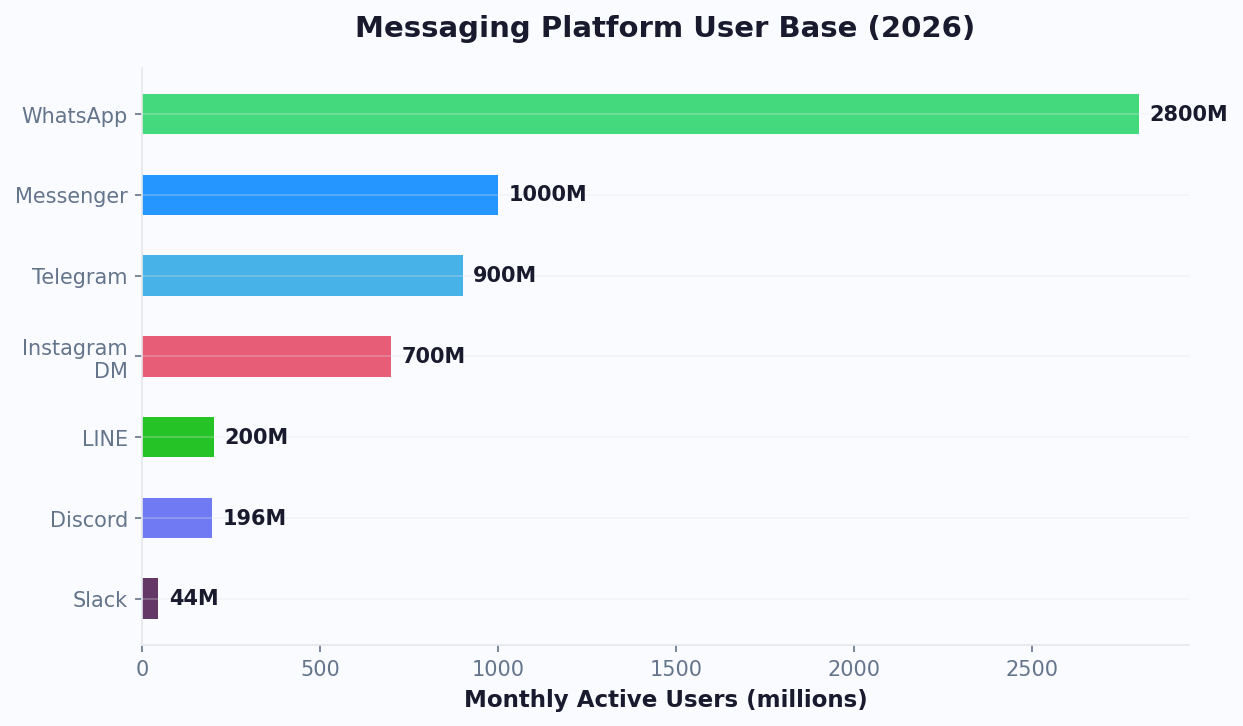
Facebook Messenger reaches 1.3 billion monthly active users, and it remains the dominant messaging channel in North America, Western Europe, and Australia. For businesses advertising on Facebook and Instagram, Messenger is the highest-converting destination you can send paid traffic to.
Why Messenger Outperforms Landing Pages
The data is clear:
- Messenger open rates: 80-90%, compared to 20-25% for email
- Click-through rates: 15-30% on Messenger messages, compared to 2-5% for email
- Cost per lead from click-to-Messenger ads: lower than landing page lead gen ads (Meta internal data, 2026)
- Response time: Instant chatbot response vs. hours or days for form follow-up
- Conversation rate: Many users who open a Messenger conversation engage with the bot, compared to 2-5% form completion rate
The Messenger Marketing Flywheel
Messenger marketing is not a single tactic. It is a flywheel that compounds over time:
- Acquire: Click-to-Messenger ads bring users into your bot at lower cost per lead than landing pages
- Engage: The chatbot qualifies leads, delivers personalized content, and answers questions in real time
- Convert: Qualified leads book meetings, receive offers, or make purchases within the conversation
- Retain: Recurring notifications keep subscribers engaged with new content, offers, and updates
- Refer: Satisfied customers share your bot or branded content with their network, starting the cycle again
Messenger vs. Other Channels
| Channel | Avg. Open Rate | Avg. CTR | Avg. CPL | Response Time |
|---|---|---|---|---|
| 20-25% | 2-5% | $15-40 | Hours to days | |
| SMS | 90-95% | 15-25% | $8-20 | Minutes |
| Messenger | 80-90% | 15-30% | $5-15 | Instant (bot) |
| 85-95% | 20-35% | $7-18 | Instant (bot) | |
| Web push | 5-15% | 1-3% | N/A | Instant |
Messenger's combination of high engagement, low cost, and instant automation makes it the most efficient marketing channel for businesses already investing in Facebook and Instagram advertising.
Click-to-Messenger Ads: The Complete Strategy
Click-to-Messenger ads are the primary acquisition engine for Messenger marketing. Instead of sending paid traffic to a landing page with a form, you send users directly into a Messenger conversation with your chatbot. The results are transformative.
How Click-to-Messenger Ads Work
- User sees your Facebook or Instagram ad
- They tap the "Send Message" CTA button
- Messenger opens with your chatbot's welcome message (the "icebreaker" flow)
- The chatbot engages, qualifies, and converts the user in real time
The key difference from traditional ads: the user is already in a conversation from the first click. There is no landing page loading, no form to fill, no friction. Engagement starts immediately.
Setting Up Click-to-Messenger Ads
Step 1: Create Your Ad in Meta Ads Manager
- Campaign objective: Choose "Engagement" or "Leads" (both support Messenger destination)
- Ad set: Select "Messenger" as the messaging app destination
- Audience: Target your ideal customer profile with Facebook's targeting options
- Creative: Use images or video that clearly communicate what the user will get in the conversation
Step 2: Design the Conversation Entry Point
- Configure the Greeting Text: The message shown before the user taps "Get Started." Make it clear what value they receive: "Get your free consultation in 2 minutes" or "Find the perfect plan for your business."
- Set up Ice Breakers: 1-3 suggested conversation starters that guide the user into specific flows. Example: "Get a quote," "Browse products," "Talk to support."
Step 3: Connect to Your Conferbot Flow
In Conferbot's builder, create a dedicated flow for each ad campaign. When a user arrives via a click-to-Messenger ad, the bot should:
- Deliver the promised value immediately (free assessment, product recommendation, quote)
- Collect qualifying information naturally through conversation
- Present a clear next step (book a call, receive a coupon code, view products)
Click-to-Messenger Ad Performance Benchmarks
| Metric | Landing Page Ads | Click-to-Messenger Ads |
|---|---|---|
| Cost per click | $1.50-3.00 | $0.50-1.50 |
| Conversion rate | 2-8% | 30-60% |
| Cost per lead | $15-40 | $3-12 |
| Lead quality score | Varies | Higher (pre-qualified) |
| Time to first engagement | 24-48 hours | Instant |
Ad Creative Best Practices
- Lead with value, not the ask: "Get your personalized recommendation in 60 seconds" outperforms "Contact us for more information"
- Use social proof: "Join 10,000+ businesses using our chatbot" increases click rates
- Match ad to conversation: The chatbot's first message must directly relate to the ad creative. Mismatches cause immediate drop-off.
- Test carousel vs. single image: Carousel ads showing multiple products or benefits often outperform single-image ads for click-to-Messenger by 20-30%
Messenger Marketing Sequences That Convert
Once a user enters your Messenger bot, the real marketing begins. Well-designed sequences nurture leads through awareness to purchase, all within the chat interface.
Sequence 1: Welcome and Qualification
Triggered immediately when a new user starts a conversation:
- Welcome message (instant): Personalized greeting using the user's first name (available from Facebook profile). State the value proposition and offer 2-3 paths via quick reply buttons.
- Qualification questions (2-4 questions): Use quick replies and buttons to make responses easy. Each question should both qualify the lead and provide value: "What's your biggest challenge right now?" followed by a relevant tip based on their answer.
- Personalized recommendation (based on answers): "Based on your needs, I'd recommend [product/plan/service]. Here's why..."
- Call to action: Book a demo, get a coupon code, start a free trial, or view a product page.
This sequence converts many users to the CTA, compared to 2-5% for equivalent form-based sequences.
Sequence 2: Abandoned Conversation Recovery
For users who start the qualification flow but drop off mid-conversation (allowed within the 24-hour window):
- Gentle reminder (30 minutes after drop-off): "Hey [name], I noticed we didn't finish. Want to pick up where we left off? I have your recommendation ready."
- Value add (4 hours later): Share a relevant piece of content (case study, tip, testimonial) related to their initial responses.
- Final nudge (20 hours later, before the 24-hour window closes): "Last chance to grab your personalized recommendation. Tap below to continue."
Recovery sequences recapture 15-25% of abandoned conversations.
Sequence 3: Post-Purchase Follow-Up
After a customer makes a purchase (triggered by CRM or e-commerce integration via Conferbot's integrations):
- Thank you + order confirmation (immediate): Confirm details and set expectations for delivery.
- Onboarding tips (1-3 days after purchase): Proactive tips for getting the most out of their purchase.
- Review request (7-10 days): "How's everything going with [product]? Would you mind leaving a quick review?" with direct link.
- Cross-sell recommendation (14-21 days): "Customers who bought [product] also love [complementary product]."
Sequence 4: Re-Engagement Campaign
For subscribers who have not interacted in 30+ days (requires Recurring Notification opt-in):
- Exclusive offer: "We missed you! Here's a 15% discount just for returning."
- New feature or product announcement: "We've added [feature] since your last visit. Check it out."
- Preference update: "Want to hear from us about [topic A], [topic B], or [topic C]? Update your preferences."
Re-engagement sequences reactivate 10-20% of dormant subscribers.
Sequence Design Rules
- Always provide value before asking for information. Give a tip, insight, or recommendation before requesting an email or phone number.
- Use rich media: Messenger supports images, carousels, videos, and GIFs. Visual messages get higher engagement than text-only.
- Keep messages short: Under 80 words per message. Break long content into multiple messages with a 1-2 second delay between them.
- Include escape routes: Every sequence should offer a way to talk to a human (live chat handoff) or unsubscribe from messages.
Messenger Support Automation: Deflect Tickets, Delight Customers
Beyond marketing, Messenger is a powerful customer support channel. With many consumers preferring to message a business rather than call (Meta, 2026), automating Messenger support is essential for meeting customer expectations.
Support Architecture
Build a three-tier support system in your Messenger chatbot:
Tier 1: AI Self-Service (handles 60-75% of inquiries)
- FAQ automation powered by Conferbot's AI knowledge base
- Order tracking via API integration
- Account information lookup
- Product information and comparisons
- Policy questions (returns, shipping, warranty)
Tier 2: Guided Resolution (handles 15-25% of inquiries)
- Troubleshooting flows that walk customers through step-by-step solutions
- Return/exchange initiation with automated form collection
- Billing inquiries with account lookup
- Complaint handling with sentiment detection and priority routing
Tier 3: Human Handoff (handles 10-20% of inquiries)
- Live agent takeover with full conversation context passed to the agent
- Priority queue for VIP customers and escalated complaints
- Specialist routing based on issue type (technical, billing, sales)
Implementing the Handover Protocol
Meta's Handover Protocol is the official mechanism for transferring conversations between bots and human agents. Here is how it works with Conferbot:
- Customer requests human help (or sentiment analysis detects frustration)
- Conferbot uses the Handover Protocol to pass the conversation to the "inbox" (your live agent interface)
- The agent sees the full conversation history, customer profile, and issue classification
- Agent resolves the issue and passes the conversation back to the bot for post-resolution follow-up
Support Performance Benchmarks
| Metric | Without Bot | With Messenger Bot |
|---|---|---|
| First response time | 2-8 hours | Under 5 seconds |
| Resolution time (simple queries) | 4-24 hours | Under 2 minutes |
| Ticket volume to human agents | 100% | 25-40% |
| Customer satisfaction (CSAT) | 72-78% | 78-85% |
| Cost per resolution | $5-12 | $0.20-0.50 |
| Support availability | Business hours | 24/7 |
Smart Routing Logic
Configure your bot to route conversations intelligently:
- By intent: Sales questions go to the sales team; technical issues go to support; billing goes to finance
- By customer value: VIP customers (identified via CRM integration) get instant human routing with shorter wait times
- By sentiment: Angry or frustrated customers (detected by Conferbot's AI engine) get prioritized escalation
- By complexity: Simple, structured queries stay with the bot; open-ended or multi-issue conversations route to humans
The combination of AI self-service and intelligent routing creates a support experience that is faster, cheaper, and often more satisfying than fully human-staffed support. The chatbot vs. live chat guide explains when each approach works best.
Meta Compliance: Messaging Rules Every Business Must Follow
Meta enforces strict messaging policies for Messenger bots. Violating these rules can result in your bot being disabled or your Facebook page being restricted. Understanding and complying with these rules is non-negotiable.
The 24-Hour Messaging Window
The most important rule: you can only send promotional messages within 24 hours of the user's last interaction. After the 24-hour window closes, you can only send messages using approved categories:
| Message Type | Allowed After 24 Hours? | Requirements |
|---|---|---|
| Promotional messages | No | Must be within 24-hour window |
| One-Time Notifications | Yes (one time) | User must opt in per notification |
| Recurring Notifications | Yes | User must explicitly opt in; can be daily, weekly, or monthly |
| Customer service replies | Yes | Must be directly related to the user's prior inquiry |
| Post-purchase updates | Yes | Order confirmations, shipping updates, delivery notifications |
| Account updates | Yes | Payment confirmations, security alerts, policy changes |
Recurring Notifications: The Key to Long-Term Engagement
Recurring Notifications are the primary way to maintain ongoing marketing communication on Messenger:
- Your bot asks the user: "Would you like to receive weekly deals and updates from us?"
- User taps the opt-in button (Meta requires an explicit UI element, not just a text reply)
- User selects frequency: daily, weekly, or monthly
- After opt-in, you can send messages on that schedule until the user opts out
Important rules for Recurring Notifications:
- You must provide a clear opt-out mechanism in every notification
- Content must match what the user signed up for (do not send sales pitches if they opted into "product tips")
- Meta monitors engagement rates; if too many users ignore or report your messages, you may lose notification privileges
- Re-engagement of lapsed subscribers requires a new opt-in
Content Policy for Messenger Bots
Your bot must comply with Meta's Community Standards and Commerce Policies:
- No discriminatory content in automated messages
- No misleading claims (false scarcity, fake reviews, exaggerated results)
- Financial services disclaimers required for investment, insurance, or loan-related bots
- Health claims must not replace professional medical advice
- Alcohol, gambling, and pharmaceuticals require age verification and geographic restrictions
Data Privacy Requirements
- Privacy policy: Your Facebook Page must have a linked privacy policy that covers Messenger bot interactions
- Data collection disclosure: If you collect personal data through the bot, disclose it and explain how it is used
- GDPR compliance: For EU users, implement consent mechanisms, data access requests, and deletion capabilities. See our GDPR chatbot guide for details.
- Data retention: Do not store Messenger data longer than necessary. Define and enforce a retention policy.
Avoiding Common Compliance Mistakes
- Do not spam. Sending frequent unprompted messages is the fastest way to get your bot flagged. Even with Recurring Notification permission, keep frequency reasonable.
- Do not use fake urgency. "Last chance! Buy now!" messages when there is no genuine time limit violate Meta's policies.
- Do not harvest data. Collecting personal information without a clear business purpose and disclosure violates both Meta's policies and GDPR.
- Do not impersonate humans. If a chatbot is responding, it should be clear that the user is talking to a bot, not a person. Human handoff should be transparent.
When a send is refused with (#10) This message is sent outside of allowed window, that is the 24-hour rule above being enforced; our guide to a Messenger bot not responding explains that error and the message tags that legitimately get around it.
Advanced Messenger Chatbot Strategies for 2026
Once your basic Messenger marketing and support flows are running, these advanced strategies can significantly amplify your results.
1. Messenger + Instagram DM Unified Bot
Meta allows you to connect a single chatbot to both Messenger and Instagram DMs through the same API. This means:
- One conversation flow serves both channels
- Users on Instagram ads can message your bot on Messenger (or vice versa)
- Cross-channel customer context: if a customer talks to you on Instagram and then on Messenger, the bot has the full history
Unified Messenger + Instagram bots increase total reach and reduce the cost of managing two separate bot experiences. Deploy both through Conferbot's multi-channel platform.
2. Sponsored Messages for Re-Engagement
Sponsored Messages are a paid ad format that delivers your message directly into existing Messenger conversations. Unlike standard ads, Sponsored Messages appear as chat messages, achieving:
- 80%+ open rates (users see them as messages, not ads)
- 20-35% engagement rates
- Cost per engagement: $0.05-0.30 per open
Best uses: re-engaging dormant subscribers, promoting flash sales, announcing new products, and driving event registrations. Target Sponsored Messages to users who have previously interacted with your bot for the highest conversion rates.
3. Comment-to-Messenger Automation
Automate responses to Facebook post comments by sending a Messenger message to the commenter:
- User comments on your Facebook post (e.g., a product launch announcement)
- Your bot automatically sends a Messenger message: "Thanks for your interest in [product]! Want me to show you the options?"
- The user engages with the bot, gets qualified, and converts
This turns organic social engagement into direct conversations. Businesses using comment-to-Messenger automation see a clear increase in lead capture from organic Facebook posts.
4. Messenger Commerce Flows
Build full e-commerce experiences inside Messenger:
- Product browsing: Use carousel templates to display products with images, prices, and "Buy" buttons
- Personalized recommendations: Based on browsing history and stated preferences, recommend products conversationally
- Cart management: Users can add items, modify quantities, and review their cart in chat
- Checkout: Use Messenger's Webview to embed your checkout page directly in the conversation
- Post-purchase: Automated order confirmation, shipping updates, and cart recovery for abandoned checkouts
Messenger commerce flows are particularly effective for impulse purchases, limited-edition drops, and products requiring guidance (e.g., skincare routines, tech accessories).
5. Messenger as a Retargeting Channel
Use Messenger as a retargeting destination instead of (or in addition to) display ads:
- Website visitor views a product but does not purchase
- Retarget them with a click-to-Messenger ad: "Still thinking about [product]? I can answer any questions."
- The bot addresses common objections, offers social proof, and provides an incentive to convert
Messenger retargeting outperforms display retargeting by 2-4x on conversion rate because it starts a dialogue rather than showing a static banner. Combined with Conferbot analytics, you can optimize every step of the retargeting funnel.
Measuring Messenger Chatbot ROI: Metrics and Dashboards
Messenger marketing generates massive amounts of data. Here is how to measure and optimize your ROI systematically.
Marketing Metrics
| Metric | What It Measures | Target |
|---|---|---|
| Cost per Messenger lead | Ad spend / new bot subscribers | $3-12 (50% less than form CPL) |
| Bot engagement rate | Users who interact beyond welcome / total new users | 55-70% |
| Sequence completion rate | Users who complete the full nurture sequence | 35-55% |
| Opt-in rate (Recurring Notifications) | Users who opt into ongoing messaging | 25-40% |
| Subscriber churn rate | Monthly opt-outs / total subscribers | Under 8% |
| Revenue per subscriber | Total Messenger-attributed revenue / subscribers | Track monthly trend |
Support Metrics
| Metric | What It Measures | Target |
|---|---|---|
| Self-service resolution rate | Issues resolved by bot / total support conversations | 55-70% |
| First response time | Time from user message to first bot reply | Under 5 seconds |
| Handoff quality score | Agent satisfaction with context from bot | 90%+ |
| CSAT (post-interaction) | Customer satisfaction rating | 78-85% |
| Cost per resolution | Total support cost / resolutions | $0.20-0.50 (bot) vs. $5-12 (human) |
Attribution and Revenue Tracking
To properly attribute revenue to Messenger marketing:
- Tag all Messenger leads in your CRM with source = "messenger" and campaign name
- Track the conversion path: Messenger conversation to website visit to purchase. Use UTM parameters in any links your bot sends.
- Compare cohorts: Messenger-acquired leads vs. form-acquired leads on conversion rate, average order value, and customer lifetime value
- Calculate blended ROI: (Messenger-attributed revenue - (Ad spend + Platform cost)) / (Ad spend + Platform cost) x 100
Dashboard Setup in Conferbot
Conferbot's analytics provides Messenger-specific dashboards:
- Channel performance: Messenger metrics alongside your other channels (WhatsApp, Telegram, website) for comparison
- Flow analytics: Step-by-step performance for every marketing and support flow
- User journey: Visualize how users move through your bot from entry to conversion or handoff
- Revenue attribution: With CRM integration, see which flows and campaigns generate the most revenue
Optimization Cadence
- Daily: Monitor ad spend, CPL, and any compliance alerts from Meta
- Weekly: Review flow completion rates, drop-off points, and A/B test results
- Monthly: Full ROI analysis, subscriber growth, and strategic adjustments
- Quarterly: Audit compliance, refresh creative, and plan new sequences based on seasonal trends
The businesses that win with Messenger marketing treat it as a core channel with dedicated measurement and optimization, not a side experiment. Use the ROI calculator to project your potential returns before investing heavily in paid acquisition.
Common Messenger Marketing Mistakes and How to Avoid Them
After analyzing hundreds of Messenger chatbot deployments, patterns emerge around the mistakes that undermine ROI and the best practices that maximize it. Chatbot projects commonly fail to meet engagement targets due to design and strategy errors rather than technology limitations. Avoid these pitfalls to ensure your Messenger investment pays off.
Mistake 1: Ignoring the 24-Hour Window Design
Many businesses build their Messenger bot as if they can message subscribers anytime. They design flows that assume re-engagement is free and unlimited. When reality hits - and they cannot reach users after 24 hours without Recurring Notification opt-in - their entire funnel breaks. Design your flows with the 24-hour window as the primary constraint from day one. Every first conversation should include a Recurring Notification opt-in prompt.
Mistake 2: Over-Automation Without Human Escalation
Messenger is inherently personal. Users treat it like texting a friend. When your bot responds robotically to a genuine complaint or emotional request, the disconnect damages your brand. Many consumers abandon a brand interaction if they cannot reach a human when needed. Always include live chat handoff. For more on balancing automation with human touch, see our guide on chatbot human handoff best practices.
Mistake 3: Generic Welcome Messages
Sending the same welcome message regardless of how the user arrived (organic, paid ad, comment trigger, QR code) wastes the context you already have. Users who clicked an ad about pricing should get a pricing-focused flow. Users who commented on a product post should see that product. Segment your entry points and personalize from the first message. This approach aligns with the broader principles of conversational marketing.
Mistake 4: No Clear Value Proposition in the First 3 Messages
Users decide within the first 3 messages whether to engage or ignore your bot forever. If those messages are branding fluff or generic greetings, you have lost them. Lead with value: a quiz result, a personalized recommendation, a discount code, or an instant answer to their implied question.
Mistake 5: Not Measuring Beyond Open Rates
Messenger's high open rates create a false sense of success. The real metrics are sequence completion rate, CTA conversion rate, and revenue per subscriber. A 90% open rate means nothing if only 2% convert. Build a full-funnel measurement system as outlined in the ROI section above.
Implementation Timeline and Budgeting
For businesses planning their Messenger chatbot investment, here is a realistic timeline and budget framework based on common industry patterns:
| Phase | Timeline | Budget Range | Expected Outcome |
|---|---|---|---|
| Strategy and flow mapping | Week 1 | $0 (internal time) | Documented flows for 3-5 entry points |
| Bot build and testing | Week 2-3 | $49-199/mo platform | Working bot with welcome, qualification, and CTA flows |
| Click-to-Messenger ads launch | Week 3-4 | $500-2,000/mo ad spend | First 200-500 subscribers |
| Optimization and scaling | Month 2-3 | $1,000-5,000/mo ad spend | 1,000-5,000 subscribers, positive ROI |
| Advanced sequences and retargeting | Month 3-6 | $2,000-10,000/mo total | 5,000-20,000 subscribers, 3-5x ROAS |
The key insight: Messenger marketing reaches positive ROI faster than almost any other digital channel because of the low cost per lead and high engagement rates. According to G2's chatbot platform reviews, businesses using Messenger bots report average payback periods of 14-30 days. Most businesses that follow this playbook achieve their first profitable month within 60 days of launching their first click-to-Messenger campaign. For a deeper exploration of lead generation through chat, read our lead generation chatbot guide, and for analytics setup see the chatbot analytics metrics guide.
Review compliance requirements quarterly as Meta updates its platform policies frequently. If the bot also runs on the Page's connected Instagram account and has gone quiet there, our guide to the Instagram messaging API not working covers the consumer-app toggle and Page subscription that most often break it.
Was this article helpful?
Build and deploy in 10 minutes. No coding needed.
Facebook Messenger Chatbot FAQ
Everything you need to know about chatbots for facebook messenger chatbot.
About the Author
The Conferbot team writes about building, deploying, and improving AI chatbots.
View all articlesRelated Articles


From the reference shelf
Fact-checked reference pages and free tools for the platform this article covers.