
Why Small Businesses Need AI Chatbots in 2026
Small businesses face a paradox that gets sharper every year: customers expect instant, always-on service, but hiring enough staff to deliver it is financially impossible. A 2025 Salesforce survey found that 73% of customers expect companies to understand their unique needs, while a separate Zendesk report showed that 60% of consumers will switch to a competitor after just one bad support experience.
AI chatbots solve this equation. They provide 24/7 availability, instant responses, and consistent quality — at a fraction of the cost of a single full-time support agent. But the benefits extend far beyond customer service:
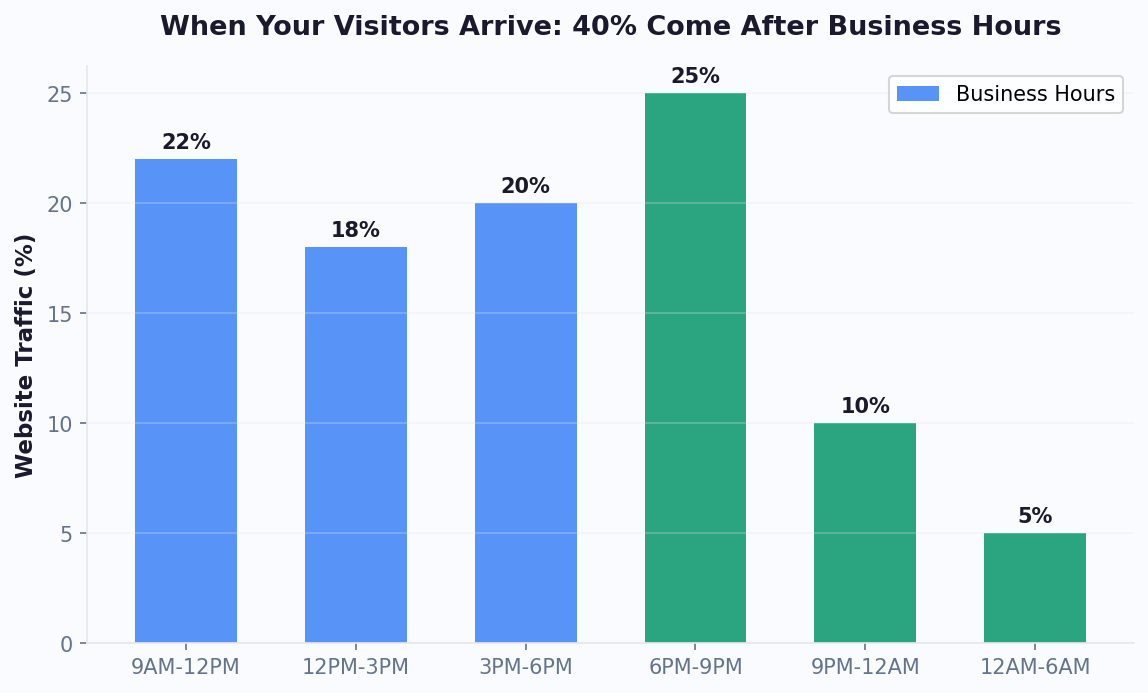
- Lead capture and qualification: A chatbot on your website can greet visitors, ask qualifying questions, and route hot leads to your sales team — even at 2 AM.
- Appointment scheduling: Service businesses (salons, clinics, consultants) can let customers book directly through chat using calendar booking integration, eliminating phone tag.
- Order tracking and FAQs: E-commerce businesses can deflect 40-60% of repetitive support tickets with automated answers powered by a knowledge base.
- Internal operations: Even with a small team, chatbots can handle HR FAQs, IT troubleshooting, and onboarding checklists.
The numbers tell a compelling story. The U.S. Small Business Administration reports that small businesses with automated customer service see 23% higher customer retention rates. According to Juniper Research, chatbots saved businesses an estimated $11 billion in 2023, and that figure is projected to exceed $18 billion by 2026. For small businesses specifically, the impact is proportionally larger — a single chatbot can handle the workload equivalent of 2-3 support agents for routine queries.
Organizations like SCORE — the nation's largest volunteer small business mentoring network — now include chatbot adoption in their digital readiness recommendations for small businesses. Perhaps most importantly, the barrier to entry has collapsed. Five years ago, deploying a chatbot required developers, NLP engineers, and a five-figure budget. Today, platforms like Conferbot's AI-powered builder let you create a fully functional AI chatbot in under an hour, with plans starting well under $100/month. If you have been putting off exploring chatbots because they seemed too complex or expensive, 2026 is the year that excuse disappears.
Types of Chatbots: Which One Is Right for Your Business?
Not all chatbots are created equal. Understanding the different types will help you avoid overpaying for features you do not need — or under-investing in capabilities that would transform your business.
1. Rule-Based (Decision Tree) Chatbots
These chatbots follow predefined conversation flows. Users click buttons or select options, and the bot responds with scripted answers. Think of them as interactive FAQs.
- Best for: Simple FAQ deflection, appointment booking, order status checks
- Pros: Easy to build, predictable responses, low cost
- Cons: Cannot handle unexpected questions, feels robotic at scale
- Typical cost: $0-50/month
2. AI-Powered (NLP) Chatbots
These chatbots use Natural Language Processing to understand what users mean, not just what they type. They can handle free-text input, understand synonyms, and improve over time. NLP chatbots are the sweet spot for most small businesses in 2026.
- Best for: Customer support, lead qualification, product recommendations
- Pros: Natural conversations, handles variations, learns from interactions
- Cons: Requires training data, occasional misunderstandings
- Typical cost: $30-200/month
3. Generative AI Chatbots (LLM-Powered)
Built on large language models like GPT-4 or Claude, these chatbots can generate original responses, summarize documents, and handle complex multi-turn conversations. Conferbot's OpenAI integration gives you access to this technology without building from scratch.
- Best for: Knowledge-heavy industries, technical support, content-rich businesses
- Pros: Extremely flexible, can reason about complex queries, impressive user experience
- Cons: Higher cost per conversation, needs guardrails to prevent hallucination
- Typical cost: $50-500/month depending on volume
4. Hybrid Chatbots
The most practical approach for most SMBs: use rule-based flows for common, predictable queries (order tracking, hours, pricing) and AI for everything else. This minimizes cost while maximizing coverage. Most modern platforms, including Conferbot, support this hybrid model natively.
| Feature | Rule-Based | AI/NLP | Generative AI | Hybrid |
|---|---|---|---|---|
| Setup time | 1-2 hours | 2-4 hours | 4-8 hours | 3-6 hours |
| Handles unexpected questions | No | Partially | Yes | Yes |
| Monthly cost (typical) | $0-50 | $30-200 | $50-500 | $30-300 |
| Best for team size | 1-5 | 5-25 | 10-100 | Any |
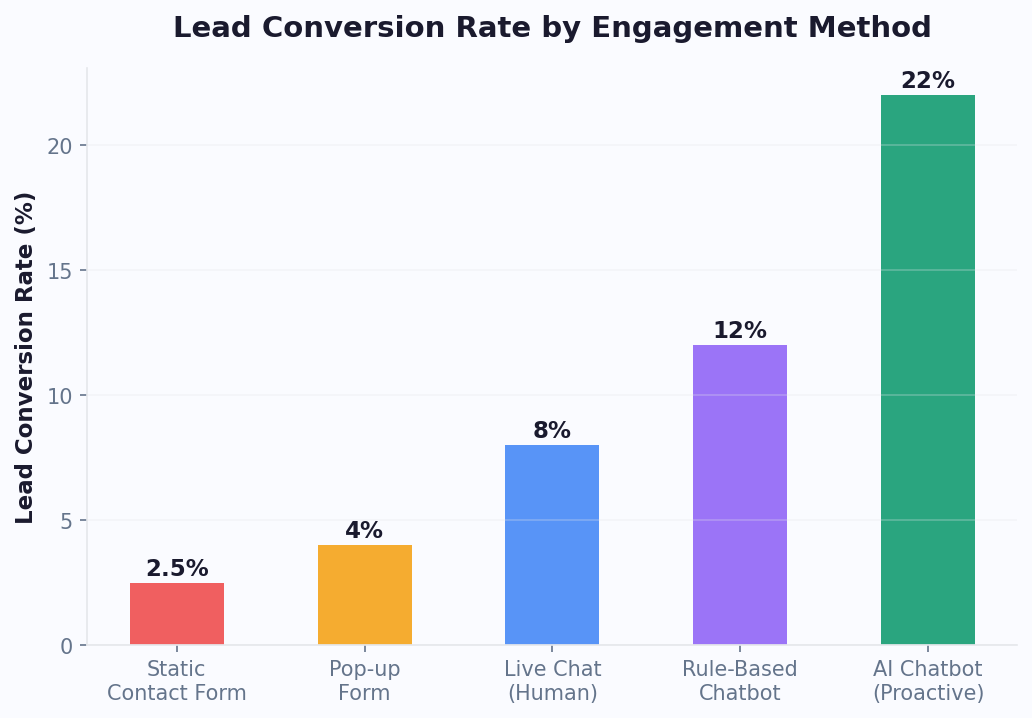
How to Choose the Right Chatbot Platform
With dozens of chatbot platforms on the market, choosing the right one can feel overwhelming. Here is a structured framework to cut through the noise and find the platform that actually fits your business.
Step 1: Define Your Primary Use Case
Start by identifying the single biggest problem you want the chatbot to solve. Do not try to do everything at once. Common starting points for small businesses:
- Reduce support ticket volume — You are drowning in repetitive questions
- Capture more leads — Website visitors leave without converting
- Provide after-hours service — You lose business when you are closed
- Streamline bookings — Phone-based scheduling is inefficient
Step 2: Evaluate These 8 Critical Features
- No-code builder: Can non-technical staff create and edit chatbot flows? This is non-negotiable for SMBs. Visual builders save thousands in development costs.
- Channel support: Where do your customers reach you? Ensure the platform supports your website, plus any messaging apps you use (WhatsApp, Messenger, etc.).
- AI/NLP capabilities: Can the bot understand natural language, or only button clicks?
- Live chat handoff: When the bot cannot answer, can it seamlessly transfer to a human agent? Look for integrated live chat.
- Analytics: Can you see conversation logs, resolution rates, and drop-off points? Good analytics are essential for improvement.
- Integrations: Does it connect with your CRM, email marketing, helpdesk, or e-commerce platform? Look for platforms with a robust integrations hub supporting tools like HubSpot, Zoho, and Stripe.
- Customization: Can you match the chatbot's appearance to your brand?
- Pricing transparency: Watch for hidden costs — per-conversation charges, API fees, and premium feature gates.
Step 3: Run a 14-Day Pilot
Never commit to an annual plan without testing first. Deploy the chatbot on your highest-traffic page, monitor the analytics dashboard, and measure against your baseline metrics. Most platforms, including Conferbot, offer free trials or free tiers that let you validate before committing.
Red Flags to Watch For
- No free trial or demo available
- Pricing that scales aggressively with conversations (you will pay more as you succeed)
- Requires developers to make basic changes
- No conversation export — your data should be portable
- Limited or no analytics on chatbot performance
Step-by-Step: Setting Up Your First Business Chatbot
Here is a practical, platform-agnostic guide to getting your first chatbot live. We will use Conferbot's no-code builder as the reference, but the principles apply to any platform.
Phase 1: Preparation (Day 1)
- Audit your support inbox. Export the last 90 days of customer emails, chat logs, or support tickets. Categorize them by topic. You will typically find that 5-10 topics account for 60-80% of all inquiries.
- Write your FAQ document. For each top category, write a clear, concise answer. Include links to relevant pages on your website. This document becomes your chatbot's knowledge base.
- Define your escalation path. Decide what happens when the bot cannot answer: transfer to live chat, create a support ticket via a ticket system, or collect contact info for callback.
Phase 2: Build (Day 2-3)
- Create your welcome message. Keep it short and set expectations: "Hi! I'm [Business Name]'s assistant. I can help with orders, returns, pricing, and scheduling. What can I help you with?"
- Build your core flows. Start with your top 5 FAQ topics. For each, create a conversation flow that gathers necessary information and provides the answer.
- Add lead capture. If a visitor asks about pricing or services, have the bot collect their name and email before providing detailed information.
- Configure live chat handoff. Set triggers for when the bot should escalate: negative sentiment, repeated "talk to human" requests, or specific high-value topics.
- Customize appearance. Match your brand colors, add your logo, and choose a chat widget position that does not overlap with other page elements.
Phase 3: Test (Day 4)
- Test every flow yourself, including edge cases
- Have 3-5 team members or friends test it without instructions
- Check mobile responsiveness — over 60% of chat interactions happen on mobile
- Verify that live chat handoff works correctly
- Test with misspellings and unusual phrasing if using NLP
Phase 4: Launch (Day 5)
- Soft launch on one page. Deploy the chatbot on your most-visited page (usually the homepage or a product page).
- Monitor conversations in real time for the first 24-48 hours. Look for patterns in unanswered questions.
- Iterate daily. Add answers for questions the bot could not handle. Most businesses see significant improvement in the first two weeks.
- Expand to all pages once you are confident in the bot's performance.
The entire process should take less than a week. With pre-built templates, you can often cut this timeline to 1-2 days.
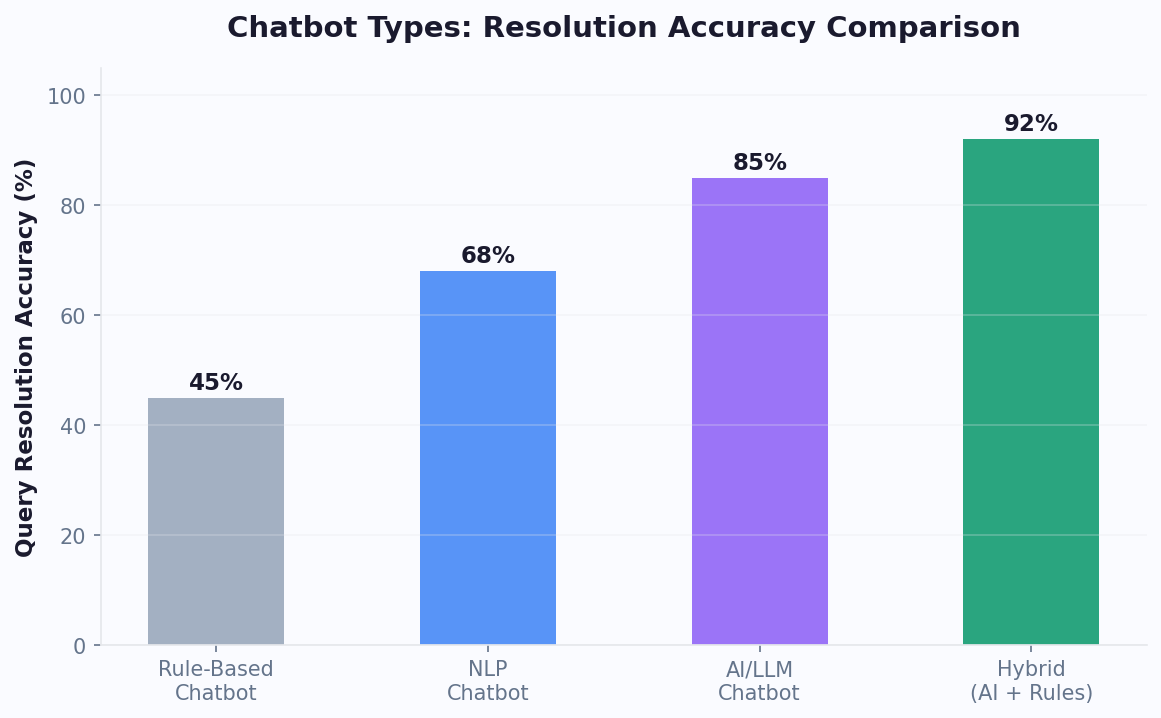
Chatbot Costs for Small Business: A Realistic Breakdown
One of the most common questions small business owners ask is "How much does a chatbot cost?" The answer depends on your approach, volume, and chosen platform. Here is a realistic breakdown for 2026.
Option 1: No-Code Platform (Recommended for Most SMBs)
| Cost Component | Monthly Range | Notes |
|---|---|---|
| Platform subscription | $0-199 | Free tiers available; paid plans for more features |
| AI/LLM usage (if applicable) | $0-50 | Some platforms include this; others charge per query |
| Setup and training time | 4-20 hours (one-time) | Your time or a team member's |
| Ongoing maintenance | 2-4 hours/month | Reviewing logs, updating answers |
Total estimated cost: $30-250/month for a fully functional AI chatbot handling 500-5,000 conversations per month. Check Conferbot's pricing page for current plan details.
Option 2: Custom Development
| Cost Component | Range | Notes |
|---|---|---|
| Initial development | $5,000-50,000 | Depends on complexity and developer rates |
| Hosting and infrastructure | $50-500/month | Servers, databases, API costs |
| Ongoing maintenance | $500-2,000/month | Bug fixes, updates, new features |
| AI/API costs | $50-500/month | OpenAI, Google, or other LLM APIs |
Total estimated cost: $6,000-53,000 in year one. Custom development only makes sense for businesses with very specific requirements that no platform can meet — which is rare in 2026.
Option 3: Chatbot Agency
Some businesses hire agencies to build and manage their chatbot. Expect to pay $1,000-5,000 for initial setup plus $300-1,500/month for management. This can make sense if you have zero technical capacity and a healthy marketing budget, but for most SMBs, a no-code platform offers far better economics.
Hidden Costs to Watch For
- Per-conversation pricing: Some platforms charge $0.01-0.10 per chat. At 5,000 conversations/month, that is $50-500 on top of your subscription.
- Integration fees: CRM or helpdesk integrations sometimes require higher-tier plans.
- Overage charges: Understand what happens when you exceed your plan limits.
- Annual lock-in discounts: Annual plans are cheaper, but test monthly first to ensure the platform works for you.
For the vast majority of small businesses, a no-code platform in the $30-100/month range provides everything needed to meaningfully improve customer experience and reduce support costs.
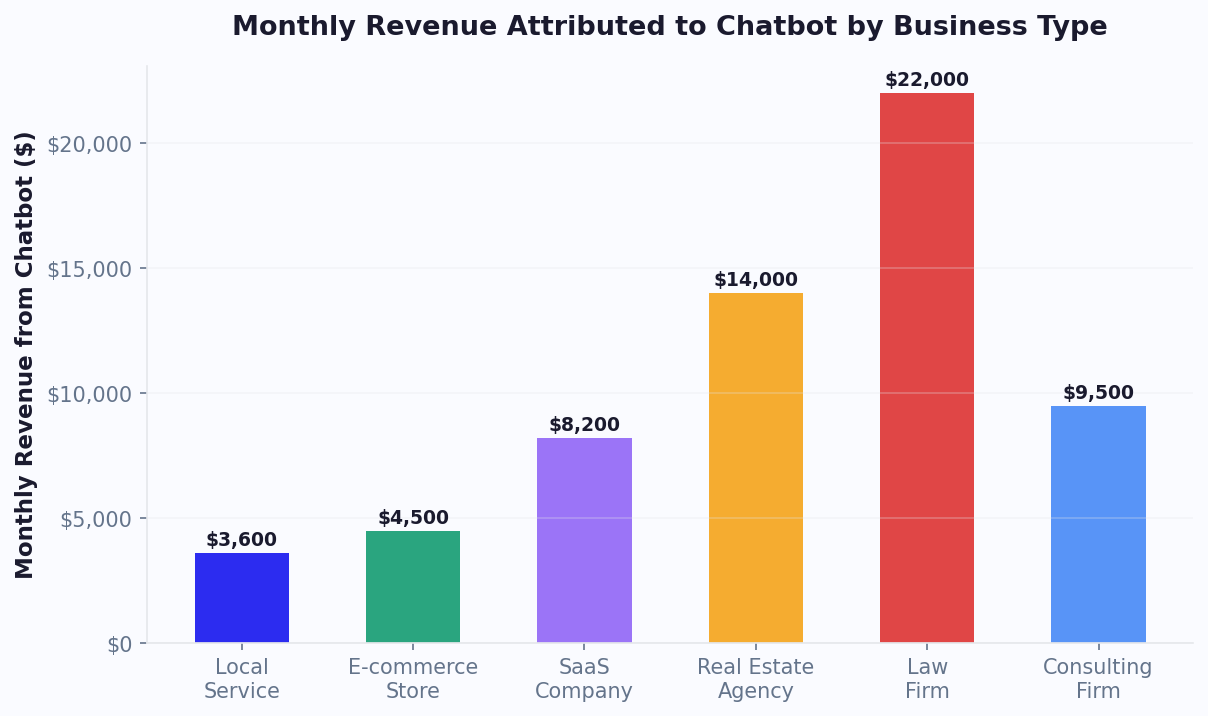
Calculating Chatbot ROI for Your Business
Investing in a chatbot should be a business decision backed by numbers, not a leap of faith. Here is how to calculate your expected ROI before you commit, and how to measure it after deployment.
The ROI Formula
Chatbot ROI = (Value Generated - Total Cost) / Total Cost x 100
Value generated comes from three main sources:
- Support cost savings: Each support ticket costs $5-15 to resolve when handled by a human agent (including salary, tools, and overhead). If your chatbot resolves 500 tickets/month that would have otherwise required an agent, that is $2,500-7,500 in monthly savings.
- Revenue from leads captured: If your chatbot captures 50 additional leads per month and your close rate is 10% with an average deal value of $500, that is $2,500/month in new revenue attributable to the chatbot.
- Customer retention value: Faster response times reduce churn. Studies show that reducing response time from 10 minutes to under 1 minute increases customer satisfaction scores by 30-50%. If this prevents even 2-3 customer cancellations per month, the savings can be substantial.
Example ROI Calculation
| Metric | Value |
|---|---|
| Monthly chatbot cost | $99 |
| Support tickets deflected/month | 400 |
| Cost per human-handled ticket | $8 |
| Monthly support savings | $3,200 |
| Additional leads captured/month | 30 |
| Lead-to-customer conversion rate | 8% |
| Average customer value | $600 |
| Monthly revenue from leads | $1,440 |
| Total monthly value | $4,640 |
| Monthly ROI | 4,586% |
Even if you cut these estimates in half to be conservative, the ROI is overwhelmingly positive. This is why chatbot adoption among SMBs grew by 67% between 2023 and 2025 according to Grand View Research. HubSpot's annual marketing report confirms that small businesses using chatbots see 35% faster lead response times, and Gartner projects that 75% of all businesses will employ conversational AI by 2028.
How to Track ROI After Launch
Use your chatbot analytics dashboard to monitor these KPIs weekly:
- Deflection rate: Percentage of conversations resolved without human intervention (target: 40-70%)
- Lead capture rate: Percentage of conversations that result in a collected email/phone (target: 10-25%)
- Customer satisfaction (CSAT): Post-chat survey scores (target: 4.0+/5.0)
- Average resolution time: How quickly the bot resolves issues (target: under 2 minutes)
- Escalation rate: How often the bot transfers to a human (target: under 30%)
Review these metrics monthly, and do not forget to compare against your pre-chatbot baseline. The Conferbot analytics suite tracks all of these automatically.
7 Common Chatbot Mistakes Small Businesses Make
After helping thousands of small businesses deploy chatbots, we have seen the same mistakes repeated. Avoid these pitfalls to ensure your chatbot actually delivers value.
Mistake 1: Trying to Automate Everything on Day One
The most common failure mode is building an over-ambitious chatbot that tries to handle every possible scenario. The result is a bot that does nothing well. Start with 5-10 high-volume topics and expand from there. You can always add more flows later.
Mistake 2: No Escalation Path to Humans
A chatbot that cannot transfer to a human agent is a dead end. Customers who feel trapped in a bot loop will leave and never come back. Always configure live chat handoff and make it easy for users to request a human — even if your "human" response is an email callback within 24 hours.
Mistake 3: Ignoring the Conversation Logs
Your chatbot's conversation logs are a goldmine. They reveal exactly what customers are asking, where the bot fails, and what new content you need. Set a calendar reminder to review logs weekly. Analytics tools can help you spot patterns without reading every transcript.
Mistake 4: Writing Like a Robot
Just because it is a bot does not mean it should sound like one. Avoid corporate jargon, keep messages short (under 3 lines when possible), and use a friendly, conversational tone that matches your brand. Break long answers into multiple messages. Use emojis sparingly if they fit your brand.
Mistake 5: Hiding the Chatbot
Some businesses deploy a chatbot but make it nearly invisible — a tiny icon in the corner that does not proactively engage visitors. Data consistently shows that proactive chat invitations increase engagement by 2-4x. Configure your chatbot to greet visitors after 5-10 seconds with a relevant, page-specific message.
Mistake 6: Not Setting Expectations
Users need to know they are talking to a bot and what the bot can help with. A good welcome message sets these expectations clearly: "I'm an AI assistant and I can help with orders, returns, and product questions. For other topics, I can connect you with our team." This reduces frustration and increases satisfaction.
Mistake 7: Set-and-Forget Mentality
A chatbot is not a one-time project. Your business evolves, products change, and customer questions shift. Plan to spend 2-4 hours per month updating your chatbot's knowledge base, adding new flows, and optimizing based on analytics data. The businesses that see the best ROI treat their chatbot as a living system, not a finished product.
Small Business Chatbot Success Stories
Theory is useful, but real-world results are what matter. Here are representative success stories that illustrate what small businesses can achieve with chatbots in 2026.
Case Study 1: Local Dental Practice
Business: A 3-dentist practice with 2 front-desk staff handling 80+ calls per day.
Problem: 40% of calls were for appointment scheduling, confirmations, or rescheduling. Front-desk staff could not keep up, leading to missed calls and lost patients.
Solution: Deployed a website chatbot with appointment scheduling integration. The bot handled booking, rescheduling, and appointment reminders.
Results after 6 months:
- Phone call volume reduced by 35%
- Online bookings increased by 60%
- Zero missed appointment requests (the bot never goes on lunch break)
- Front-desk staff reallocated to higher-value patient care tasks
- Monthly cost: $79 (vs. $3,200/month for an additional receptionist)
Case Study 2: E-Commerce Store (Handmade Jewelry)
Business: A Shopify store with $30K/month revenue and a single owner-operator.
Problem: Spending 3+ hours daily answering repetitive questions about shipping, sizing, returns, and custom orders.
Solution: Implemented an AI chatbot trained on product catalog and policies. Integrated with Shopify for real-time order tracking.
Results after 3 months:
- Support emails reduced by 55%
- Average response time dropped from 4 hours to 8 seconds
- Chatbot captured 120 new email subscribers in the first month
- Conversion rate on product pages with active chatbot increased by 18%
- Owner reclaimed 15+ hours per week for product creation and marketing
Case Study 3: B2B Consulting Firm
Business: A 5-person marketing consultancy with a $5K average project value.
Problem: Website generated traffic but few leads. Contact form conversion rate was 1.2%.
Solution: Deployed a lead qualification chatbot that engaged visitors, asked about their business size, budget, and goals, then booked discovery calls directly on the calendar.
Results after 4 months:
- Lead capture rate increased from 1.2% to 4.8% (4x improvement)
- Qualified leads per month grew from 8 to 34
- Two additional retainer clients acquired directly through chatbot leads ($10K/month in new recurring revenue)
- ROI in the first quarter alone: over 5,000%
These stories are not outliers — they represent the typical range of outcomes for small businesses that implement chatbots thoughtfully. The common thread is starting focused, measuring results, and iterating based on data. Visit our template gallery to see pre-built chatbot flows designed for these exact use cases.
Small Business Chatbot Implementation Timeline: Week-by-Week Plan
Many small business owners stall on chatbot adoption because the project feels undefined. This week-by-week implementation timeline removes ambiguity and gives you a clear path from decision to live chatbot in 30 days. For a comparison of platforms suited to small businesses, see our chatbot builder for small business guide.
Week 1: Research and Decision
Day 1-2: Define your primary use case. Pick one specific problem to solve first. For most small businesses, this is either lead capture (if you sell services) or FAQ deflection (if you sell products). Do not try to solve both simultaneously on day one.
Day 3-4: Choose your platform. Sign up for free tiers on your top 2 platforms. Spend 30 minutes on each building a simple 3-question flow. Choose the one that feels more intuitive. If both feel equally good, choose the one with better channel support for your future needs.
Day 5-7: Gather your content. Export your last 90 days of customer emails, social media DMs, and any chat logs. Categorize the top 10 questions customers ask. Write clear, concise answers for each one. This document becomes your chatbot's brain.
Week 2: Build Your Core Chatbot
Day 8-9: Build the welcome flow. Create a greeting message that sets expectations and offers 3-4 clear menu options. Keep it under 2 sentences — customers scan, they don't read paragraphs in chat.
Day 10-11: Build your primary use case flow. Whether it's lead capture, FAQ handling, or appointment booking, build it end-to-end. Test it yourself 5 times. Fix any awkward transitions.
Day 12-14: Add your knowledge base and AI. Upload your FAQ document, product information, and policy pages. Enable AI responses for questions that fall outside your scripted flows. This catches the 30-40% of questions you didn't anticipate.
Week 3: Test, Integrate, and Soft Launch
Day 15-16: Integration setup. Connect your CRM (HubSpot, Salesforce, or whatever you use), email marketing tool, and calendar. This ensures captured leads don't require manual data entry — for a deeper dive on implementation costs, see our chatbot implementation cost breakdown.
Day 17-18: Team testing. Have 3-5 people (team members, friends, or family) test the chatbot without instructions. Watch over their shoulder or ask for feedback. Common findings: confusing button labels, missing edge cases, and flows that dead-end.
Day 19-21: Soft launch on one page. Deploy the chatbot on your highest-traffic page only. Monitor conversations in real-time for the first 24-48 hours. Take notes on what works and what doesn't.
Week 4: Optimize and Expand
Day 22-24: Fix issues from soft launch. Address any gaps discovered — unanswered questions, confusing flows, and missed integrations. Add content to your knowledge base for questions the AI couldn't handle.
Day 25-26: Expand to all pages. Deploy across your full website. Configure page-specific greetings for your highest-value pages (pricing, contact, product pages).
Day 27-28: Set up analytics tracking. Configure weekly reports tracking engagement rate, lead capture rate, and resolution rate. Set calendar reminders for weekly reviews, and learn to calculate your chatbot's actual ROI.
Day 29-30: Plan your next phase. Review first-week data and plan Month 2 priorities: adding channels (WhatsApp, Messenger), building new flows, or improving existing ones based on analytics.
Expected Milestones
| Milestone | Expected Timeline | Success Indicator |
|---|---|---|
| First chatbot conversation | Day 19-21 | Bot responds correctly to test messages |
| First lead captured | Day 21-25 | Contact info collected and synced to CRM |
| 50 conversations completed | Day 25-30 | Proves engagement and basic flow quality |
| First resolution without human help | Day 22-28 | Customer query fully handled by bot |
| Positive ROI achieved | Day 28-45 | Value generated exceeds platform cost |
This timeline is conservative. Many small businesses are live in under a week using templates and achieve positive ROI within the first month. The key is starting — imperfect action beats perfect planning. For more guidance on avoiding pitfalls, see our complete chatbot benefits guide. You can always refine and improve after launch.
Was this article helpful?
The Complete Guide to AI Chatbots for Small Business (2026) FAQ
Everything you need to know about chatbots for the complete guide to ai chatbots for small business (2026).
About the Author

Conferbot Team specializes in conversational AI, chatbot strategy, and customer engagement automation. With deep expertise in building AI-powered chatbots, they help businesses deliver exceptional customer experiences across every channel.
View all articles
