
Chatbot Pricing Models Explained: Per-Seat, Per-Resolution, and Flat-Rate
Gartner projects the conversational AI market will reach $18.4 billion by 2027, with pricing models evolving rapidly. Before comparing specific platforms, you need to understand the four main pricing models used by chatbot platforms in 2026. Each model has different implications for your total cost as usage and team size grow.
1. Per-Seat (Per-Agent) Pricing
You pay a monthly fee for each team member who needs access to the platform. This is the most common model for live chat tools that include chatbot features.
How it works: $20-115 per agent per month. A team of 5 agents at $55/agent = $275/month.
Pros: Simple to understand and budget for at small scale.
Cons: Costs scale linearly with team growth. Adding seasonal agents is expensive. Organizations often restrict access to save money, reducing platform utility.
Platforms using this model: Zendesk ($55-115/agent), Intercom ($39-99/seat), LiveChat ($20-59/agent), Olark ($29/seat)
2. Per-Resolution (Per-AI-Conversation) Pricing
You pay a base subscription plus a fee for each conversation the AI chatbot successfully resolves without human intervention. This is increasingly common as platforms add AI capabilities.
How it works: Base subscription ($39-115/month) + $0.50-1.00 per AI resolution. At 500 resolutions/month: base + $250-500 = $289-615/month.
Pros: You only pay for AI when it works. No charge for failed resolutions or human-handled chats.
Cons: Costs are unpredictable and increase as AI improves (perverse incentive — success costs more). Budgeting is difficult when resolution volume varies monthly.
Platforms using this model: Intercom Fin ($0.99/resolution), Zendesk AI ($1/resolution)
3. Tier-Based (Flat-Rate) Pricing
You pay a fixed monthly rate based on a feature tier, regardless of team size or conversation volume (within plan limits).
How it works: $29-149/month for a plan that includes a set number of chatbots, conversations, and team members. AI is typically included.
Pros: Predictable costs. No surprises as team grows or AI usage increases. Best value at scale.
Cons: May pay for more than you need at small scale. Plan limits may require upgrading.
Platforms using this model: Conferbot (free to $149/month), Crisp ($95/month flat), ChatBot.com ($52-142/month)
4. Usage-Based (Per-Conversation) Pricing
You pay based on the total number of conversations or messages processed, regardless of whether AI or humans handle them.
How it works: Free or low base + $0.01-0.10 per message or $0.50-2.00 per conversation. Costs scale directly with usage.
Pros: Low entry cost. Pay only for what you use.
Cons: Costs can spike unexpectedly with traffic surges. Difficult to budget for growing businesses.
Platforms using this model: Some self-hosted solutions, certain API-based platforms
Which Model Is Best?
For most businesses, tier-based flat-rate pricing provides the best combination of predictability, value, and scalability. You know exactly what you will pay each month, your costs do not increase as your AI chatbot handles more conversations, and adding team members does not inflate your bill. This is why Conferbot's pricing model resonates with businesses that have been burned by unpredictable per-seat or per-resolution costs.
2026 Chatbot Platform Pricing Comparison Table
Here is the most comprehensive chatbot pricing comparison available, compiled from published pricing pages, G2 chatbot category reviews, and hands-on testing, updated for 2026. All prices reflect published rates as of March 2026.
| Platform | Free Tier | Starter Plan | Mid Plan | AI Cost | Pricing Model |
|---|---|---|---|---|---|
| Conferbot | Yes | $49/mo | $149/mo | Included | Tier-based |
| Intercom | No | $39/seat/mo | $99/seat/mo | $0.99/resolution | Per-seat + usage |
| Zendesk Suite | No | $55/agent/mo | $115/agent/mo | $1/resolution | Per-agent + usage |
| Tidio | Yes | $29/mo | $59/mo | $39/mo add-on | Tier + per-seat |
| Drift | No | $2,500/mo | Custom | Premium only | Tier-based |
| Crisp | Yes | $25/mo | $95/mo | Included (paid) | Flat-rate |
| LiveChat | No | $20/agent/mo | $49/agent/mo | Separate product | Per-agent |
| ChatBot.com | No | $52/mo | $142/mo | Included | Tier-based |
| Freshdesk | Yes (10 agents) | $15/agent/mo | $49/agent/mo | Freddy AI extra | Per-agent |
| HubSpot | Yes | $0 (basic) | $800/mo (Pro) | Basic only | Tier-based |
| Tawk.to | Yes (full) | Free | Free | $29/mo add-on | Free + add-ons |
| ManyChat | Yes | $15/mo | $45/mo | Add-on | Tier + usage |
| BotPenguin | Yes | $5/mo | $49/mo | Included (basic) | Tier-based |
| Botpress | Yes | Free | $495/mo | Included | Tier-based |
| Help Scout | No | $20/user/mo | $40/user/mo | Included | Per-user |
What the Table Does Not Show
Published pricing only tells part of the story. The real cost includes several factors that are not listed on pricing pages:
- Channel fees: WhatsApp conversations incur Meta fees ($0.02-0.08/conversation) regardless of platform. Some platforms pass these through at cost, others mark them up.
- Integration costs: Premium integrations (Salesforce, advanced CRM) may require higher-tier plans. Conferbot's integrations hub includes most popular integrations in standard plans.
- Overage charges: Exceeding plan limits (conversations, contacts, chatbots) triggers automatic upgrades or per-unit overages.
- Support costs: Priority support and dedicated account managers are typically reserved for top-tier plans.
- Onboarding fees: Enterprise platforms (Drift, Intercom Pro) may charge $1,000-5,000 for onboarding and setup.
Total Cost of Ownership: Real-World Scenarios
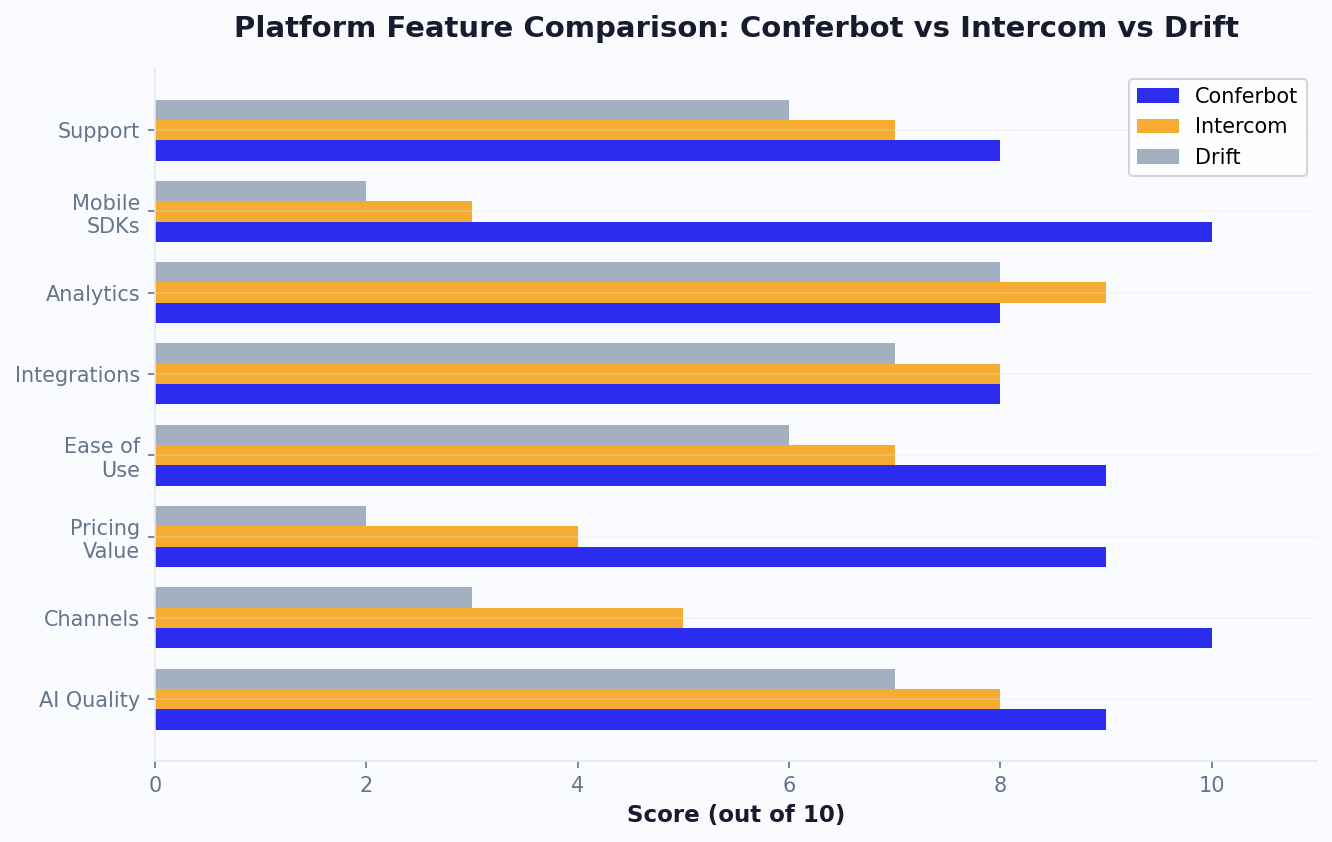
Published pricing does not equal total cost. Here is what three different businesses would actually pay on each platform, including AI costs, channel fees, and necessary plan tiers.
Scenario 1: Small Business (3 Agents, 500 Conversations/Month)
| Platform | Monthly Cost | Annual Cost |
|---|---|---|
| Conferbot | $49 | $588 |
| Tidio + Lyro | $68-98 | $816-1,176 |
| Crisp | $95 | $1,140 |
| Intercom | $117-297 + AI | $1,404-3,564+ |
| Zendesk | $165-345 + AI | $1,980-4,140+ |
Verdict: Conferbot saves $228-3,552/year versus alternatives for a small business. The savings come primarily from included AI (versus per-resolution charges) and non-per-seat pricing.
Scenario 2: Growing Business (8 Agents, 2,000 Conversations/Month, 800 AI Resolutions)
| Platform | Monthly Cost | Annual Cost |
|---|---|---|
| Conferbot | $149 | $1,788 |
| Tidio + Lyro | $198-338 | $2,376-4,056 |
| Intercom | $312-792 + $792 AI | $13,248-19,008 |
| Zendesk | $440-920 + $800 AI | $14,880-20,640 |
| Drift | $2,500+ | $30,000+ |
Verdict: At 8 agents with significant AI usage, the cost gap is dramatic. Conferbot saves $11,460-28,212/year versus enterprise platforms. The per-resolution AI charges at Intercom and Zendesk ($792-800/month) alone exceed Conferbot's entire subscription.
Scenario 3: Enterprise (20 Agents, 10,000 Conversations/Month, 5,000 AI Resolutions)
| Platform | Monthly Cost | Annual Cost |
|---|---|---|
| Conferbot | Custom pricing | Varies |
| Intercom | $780-1,980 + $4,950 AI | $68,760-83,160 |
| Zendesk | $1,100-2,300 + $5,000 AI | $73,200-87,600 |
| Drift | $2,500-5,000+ | $30,000-60,000+ |
Verdict: At enterprise scale, per-resolution AI pricing creates eye-watering costs. Intercom's AI alone costs $4,950/month at 5,000 resolutions. Platforms with included AI pricing have an enormous advantage at this scale.
The Scaling Problem
For a detailed breakdown of implementation costs beyond subscription fees, see our chatbot implementation cost guide. The most important insight from these scenarios: per-seat and per-resolution pricing models become increasingly expensive as your business grows. The same platforms that seem affordable for a 3-person team become cost-prohibitive for a 20-person team with high AI usage. Tier-based platforms like Conferbot maintain relatively stable costs regardless of growth, making them better long-term investments.
Free Chatbot Platforms vs. Paid: What You Actually Get
Several chatbot platforms offer free tiers. But "free" comes with limitations that may cost you more in the long run. Here is an honest assessment of what free plans deliver versus what you need to pay for.
What Free Tiers Typically Include
- Basic chatbot builder: Create simple rule-based flows with limited nodes
- Limited conversations: 50-500 conversations per month (sufficient for testing, not production)
- 1-2 channels: Usually website only, sometimes Messenger
- Basic analytics: Total conversations and basic metrics
- Conferbot branding: "Powered by [Platform]" displayed on the chat widget
- 1-3 team members: Limited agent seats
What Free Tiers Typically Exclude
- AI/NLP capabilities: Most free tiers limit or exclude AI-powered responses
- WhatsApp and advanced channels: Multi-channel deployment usually requires paid plans
- Integrations: CRM, e-commerce, and API integrations are often paid features
- Advanced analytics: Funnel analysis, drop-off tracking, and custom reports
- Remove branding: White-labeling requires paid plans
- Priority support: Free users get community support or delayed response times
Free Plan Comparison
| Platform | Free Conversations | Free AI | Free Channels | Free Agents |
|---|---|---|---|---|
| Conferbot | 100/mo | Basic AI included | Website | 1 |
| Tidio | 50/mo | No | Website | 1 |
| Tawk.to | Unlimited | No ($29 add-on) | Website | Unlimited |
| Freshdesk | Unlimited | No | Email, web | 10 |
| HubSpot | Unlimited | Basic only | Website | Unlimited |
| BotPenguin | 100/mo | Basic | Website | 1 |
| Crisp | Unlimited | No | Website | 2 |
When Free Is Enough
Free plans work well for:
- Testing and evaluation before committing to a paid plan
- Very small businesses with under 50 conversations per month
- Personal projects and side projects
- Proof of concept for internal proposals
When to Upgrade to Paid
Upgrade when you need:
- AI-powered responses (the biggest quality leap between free and paid)
- Multi-channel deployment (WhatsApp, Messenger, Telegram, etc.)
- Integration with your CRM, e-commerce platform, or other business tools
- Removal of platform branding for a professional appearance
- Advanced analytics to optimize chatbot performance
- More than 100-500 conversations per month
For businesses evaluating whether a free chatbot delivers enough value, our free chatbot for website guide covers what to expect. The best approach: start with a free tier to learn the platform and validate your chatbot strategy, then upgrade to a paid plan when you are ready to deploy at scale. Conferbot's free tier includes basic AI capabilities, giving you a meaningful preview of the platform's full potential before you invest.
How to Choose the Right Chatbot Plan for Your Business
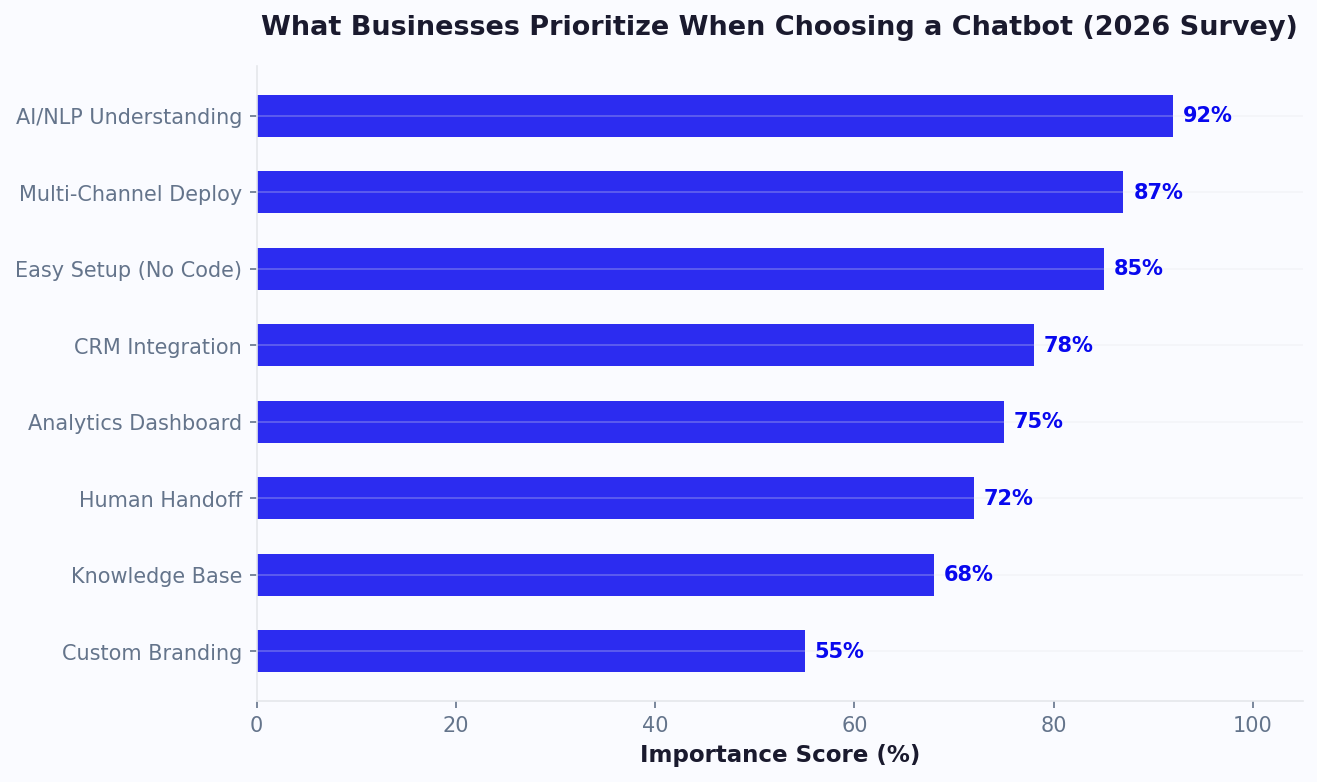
Research from Forrester shows that businesses choosing chatbot platforms based on total cost of ownership (not sticker price) achieve 3.2x higher ROI. With pricing models and platforms analyzed, here is a practical framework for selecting the right chatbot plan based on your specific business situation.
Step 1: Calculate Your Conversation Volume
Estimate your monthly chatbot conversation volume:
- Website traffic x 2-5% engagement rate = estimated chatbot conversations
- Example: 10,000 monthly visitors x 3% = 300 conversations/month
- Add expected volume from other channels (WhatsApp, Messenger)
- Account for growth: calculate for 2x your current volume to ensure your plan scales
Step 2: Determine Your AI Needs
What percentage of conversations should AI handle?
- Low AI (20-30%): Mostly rule-based flows with AI for specific queries. Budget plan sufficient.
- Medium AI (40-60%): AI handles common questions, humans handle complex ones. Mid-tier plan with AI included.
- High AI (70-90%): AI handles most conversations, humans handle escalations only. Ensure AI is included in flat-rate pricing (not per-resolution).
Step 3: Count Your Team Members
How many people need platform access?
- 1-3 people: Per-seat pricing is manageable. Any model works.
- 4-10 people: Per-seat costs accumulate. Flat-rate or tier-based pricing saves money.
- 10+ people: Per-seat pricing becomes prohibitive. Strongly prefer flat-rate models.
Step 4: List Required Channels
Which channels do you need?
- Website only: Most plans support this. No additional channel costs.
- Website + 1-2 messaging channels: Verify channels are included in your plan tier, not add-ons.
- Full omnichannel (5+ channels): Choose a platform with broad channel support included like Conferbot.
Step 5: Project Your 12-Month Cost
Calculate total cost including:
- Monthly subscription x 12
- AI usage charges (if per-resolution) x 12
- Channel fees (WhatsApp, etc.) x 12
- One-time costs (onboarding, setup, migration)
- Projected cost at 2x volume (month 12 assumption)
Compare the 12-month total across your shortlisted platforms. Our chatbot ROI calculator guide provides the formulas to model expected returns against these costs, and the interactive ROI calculator automates the math. The cheapest monthly rate is not always the cheapest annual cost when AI charges, channel fees, and growth are factored in.
Recommended Plans by Business Size
| Business Size | Recommended Approach | Monthly Budget |
|---|---|---|
| Solo / Startup | Free tier (Conferbot or Tidio) | $0 |
| Small (2-5 people) | Conferbot Starter | $49 |
| Growing (5-15 people) | Conferbot Pro or Crisp | $95-149 |
| Mid-Market (15-50 people) | Conferbot Business or Intercom | $149-500 |
| Enterprise (50+ people) | Custom pricing (Conferbot, Zendesk) | $500+ |
Chatbot Pricing Trends in 2026: Where the Market Is Heading
The chatbot pricing landscape is shifting rapidly as AI capabilities become commoditized and competition intensifies. Understanding these trends helps you negotiate better deals today and choose platforms that will remain cost-effective as the market evolves.
Trend 1: Per-Resolution Pricing Is Losing Ground
In 2024-2025, per-resolution pricing emerged as the dominant model for AI chatbot features. Intercom, Zendesk, and others adopted it to monetize AI separately from base subscriptions. But by mid-2026, the market is pushing back. Businesses are discovering that per-resolution costs scale uncomfortably with success — the better your AI performs, the more you pay. Newer platforms and recent plan updates increasingly bundle AI into flat-rate pricing, signaling that per-resolution will become a legacy model within 2-3 years.
Trend 2: Unlimited Seat Models Are Growing
Per-seat pricing makes less sense when AI handles 60-80% of conversations. If humans only handle escalations, charging per-human-seat penalizes businesses for having adequate backup coverage. The trend toward unlimited seats (or generous seat allowances) on mid-tier plans reflects this reality. Expect more platforms to offer team-size-independent pricing by 2027.
Trend 3: Channel Fees Are Disappearing
Two years ago, WhatsApp, SMS, and other channels were premium add-ons costing $50-200/month extra. Today, most platforms include multi-channel deployment in standard plans. The remaining channel costs are Meta/carrier pass-through fees that no platform can avoid — but the platform-side surcharges are vanishing under competitive pressure.
Trend 4: Usage-Based AI Pricing Is Getting Cheaper
Underlying AI model costs (GPT-4, Claude, Gemini) have dropped 60-80% since 2024. Platforms that charge per-resolution have not passed these savings to customers proportionally, creating margin expansion for vendors and frustration for buyers. This gap is an opportunity for negotiation — ask your vendor about updated AI pricing that reflects their actual costs.
What This Means for Your Decision
- Avoid long-term contracts on per-resolution platforms. The pricing model is likely to change within 12-18 months. Monthly billing preserves flexibility.
- Favor flat-rate AI pricing today. You get predictability now and avoid being locked into an outdated model as the market shifts.
- Negotiate using trend data. When vendors push per-resolution pricing, reference the market trend toward included AI and ask for caps or flat-rate alternatives.
- Plan for multi-channel from day one. Choosing a platform that includes channels today avoids migration costs when channel expansion becomes necessary.
The ROI Framework: Justifying Chatbot Spend to Your Team or Boss
The most common reason chatbot purchases stall is not budget — it is inability to articulate ROI clearly. Here is the framework that gets approvals.
The Four Revenue Levers
A chatbot generates financial value through four measurable channels:
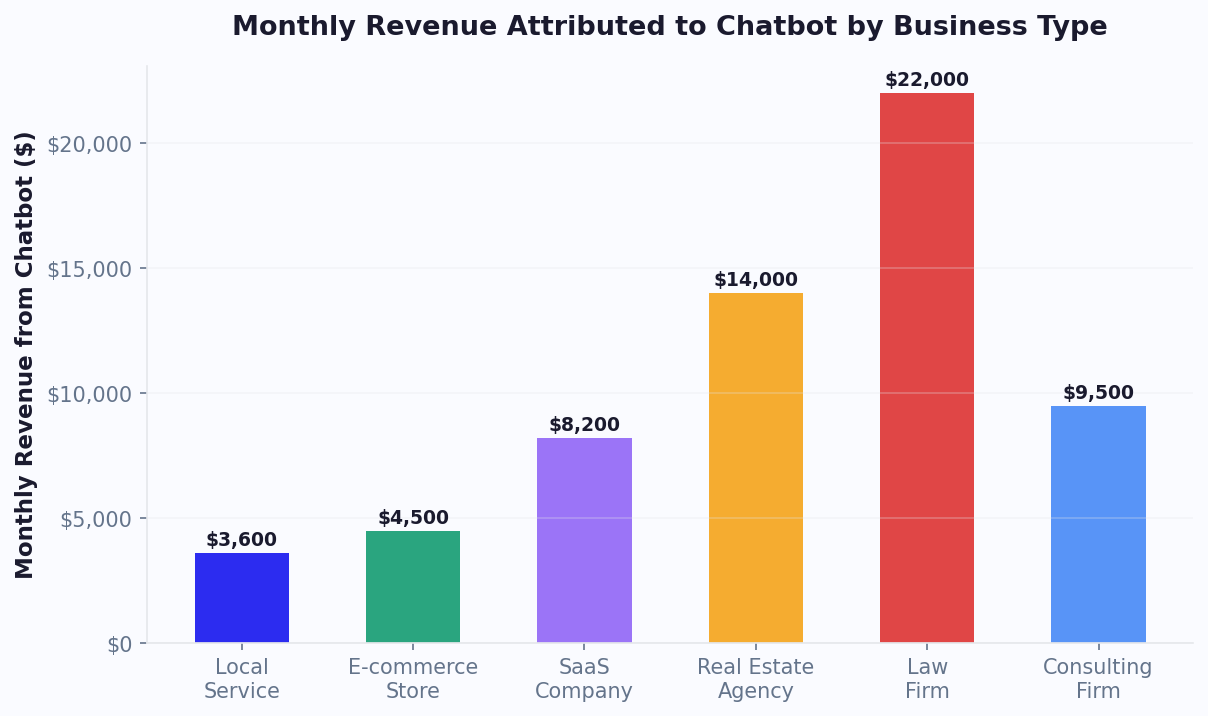
- Support cost deflection: Each conversation handled by the chatbot instead of a human agent saves $5-15 (average agent cost per conversation including salary, tools, and overhead). At 500 deflected conversations/month, that is $2,500-7,500/month in savings.
- Lead conversion increase: Chatbots engage visitors who would otherwise leave without converting. A 1-3% improvement in lead capture rate on 10,000 monthly visitors = 100-300 additional leads. At $50 average lead value, that is $5,000-15,000/month.
- Revenue from after-hours engagement: 40% of website traffic arrives outside business hours. Without a chatbot, those visitors get no response. Capturing even 5% of after-hours visitors as leads adds meaningful pipeline.
- Reduced churn through faster resolution: Customers who wait more than 5 minutes for support are 3x more likely to churn. Instant chatbot responses improve retention by 10-20% for support-driven churn.
The 30-Day ROI Calculation
| Metric | Your Number | Example |
|---|---|---|
| Monthly website visitors | [Fill in] | 15,000 |
| Current lead conversion rate | [Fill in] | 2.5% |
| Expected improvement with chatbot | +1-2% | +1.5% |
| Additional monthly leads | — | 225 |
| Average lead value | [Fill in] | $40 |
| Monthly lead value increase | — | $9,000 |
| Support conversations deflected/mo | [Fill in] | 300 |
| Cost per human conversation | [Fill in] | $8 |
| Monthly support savings | — | $2,400 |
| Total monthly chatbot value | — | $11,400 |
| Monthly chatbot cost | — | $149 |
| Monthly ROI | — | 76x |
Presenting to Stakeholders
When presenting chatbot ROI to decision-makers, use this structure:
- State the problem with dollar signs: "We lose an estimated $X/month in missed leads and $Y/month in support costs that could be automated."
- Show the conservative case: Even at 50% of projected value, the chatbot pays for itself within the first week.
- Reference competitors: "Our top 3 competitors all use chatbots. We are losing deals to faster responders."
- Propose a pilot: "Let us test for 30 days on the free tier. If we do not see X improvement, we stop. If we do, we upgrade."
The free tier removes financial risk from the decision entirely. Frame the conversation as: "Can we afford NOT to test this?" rather than "Can we afford this?" — because the data consistently shows that the cost of not having a chatbot exceeds the cost of any chatbot platform on the market.
How to Negotiate Better Chatbot Pricing
Chatbot platform pricing is often negotiable, especially for annual commitments and larger teams. Here are strategies to reduce your costs.
1. Ask for Annual Discount
Most platforms offer 15-30% discount for annual billing versus monthly. This is the easiest savings to capture. A platform charging $149/month may offer $119/month ($1,428/year) for annual commitment — saving $360/year.
2. Negotiate at Renewal
Your leverage is highest at renewal time. Before your contract renews, research competitor pricing and prepare to present alternatives. Stating that you are evaluating alternatives to your current platform often triggers retention offers: extended trials, grandfathered pricing, or feature upgrades.
3. Bundle for Savings
If you need multiple products from the same vendor (e.g., chat + CRM + email marketing), negotiate a bundle discount. Vendors prefer to expand account value over losing you to a competitor.
4. Start Small, Negotiate at Scale
Start with a lower-tier plan or free tier. Once you have usage data showing the platform's value to your business, use that data to negotiate a better rate when upgrading. "We want to expand to your Pro plan, but our budget is $X — can you match that?"
5. Ask About Startup/SMB Programs
Many platforms offer discounted programs for startups (typically 50-90% off for the first year) and small businesses. These are not always advertised — ask directly.
6. Negotiate AI Pricing Caps
If you are on a per-resolution platform and cannot switch, negotiate a monthly cap on AI charges. "We will commit annually if you cap our AI costs at $500/month regardless of resolution volume." This protects you from unpredictable scaling costs.
7. Remove What You Do Not Need
Enterprise plans often bundle features you do not use (product tours, advanced reporting modules, dedicated support). Ask for a custom plan that includes only the features you need at a lower price. Many platforms are willing to create custom packages for annual commitments.
The Best Negotiation Tactic
The most effective negotiation tactic is having a genuine alternative. Sign up for Conferbot's free tier, build a test chatbot, and demonstrate to your current vendor that you have a viable, lower-cost option ready to deploy. This is not a bluff — it is informed decision-making with a real backup plan. Vendors respond to customers who have done their homework.
Remember: the goal is not to get the absolute lowest price but to get the best value for your specific needs. Sometimes a slightly higher-priced platform that includes AI in base pricing is cheaper in total cost than a lower-priced platform that charges per resolution. Calculate total cost of ownership, not just the sticker price.
Was this article helpful?
Build and deploy in 10 minutes. No coding needed.
Chatbot Pricing Comparison 2026 FAQ
Everything you need to know about chatbots for chatbot pricing comparison 2026.
About the Author
Deepak is the founder of Conferbot and writes about building, deploying, and improving AI chatbots.
View all articles
