
What 'Free Chatbot' Really Means in 2026 (And What to Watch Out For)
Every chatbot platform claims to be free. Very few actually are. (A disclosure before we start: Conferbot is our own product, and its free plan is ranked first below. It is held to exactly the same tests as the other ten, and where its free tier is worse than a rival's - it is, on volume, against Tawk.to and BotPenguin - the table says so.) According to G2's chatbot category, there are over 200 chatbot platforms listed - but fewer than 20 offer a genuinely free tier with meaningful functionality. Before you invest time setting up a chatbot, you need to understand the three types of "free" in the chatbot market - because picking the wrong one wastes hours of setup time when you hit a wall.
Type 1: Genuine Free Tier (Best Option)
These platforms offer a permanently free plan with real functionality. You get a working chatbot with reasonable limits (typically 100-1,000 conversations per month). No credit card required, no trial expiration. The trade-off is usually a small "Powered by" badge and limited advanced features.
Type 2: Free Trial (Time-Limited)
These give you full access for 7-30 days, then require payment. Great for testing, terrible for businesses that need a long-term free solution. Your chatbot stops working when the trial ends unless you upgrade.
Type 3: Free-in-Name-Only
These advertise as free but gate essential features behind paywalls. You can build a bot for free, but deployment, AI responses, or more than 10 conversations per month requires payment. Avoid these unless you plan to upgrade.
The Real Costs of "Free" Chatbots
| Hidden Cost | What It Means | Impact |
|---|---|---|
| Message limits | Bot stops responding after X messages/month | Visitors see errors during peak traffic |
| No AI / basic AI only | Rule-based responses, no natural language | Poor user experience, low satisfaction |
| Branding watermark | "Powered by X" on every message | Looks unprofessional to some users |
| Single channel only | Website only, no WhatsApp/Messenger | Misses 60%+ of customer touchpoints |
| No integrations | Can't connect to CRM, email, calendar | Manual data entry, lost leads |
| No analytics | Can't see what's working | Impossible to improve performance |
The best free chatbot is one that does what you need today and grows with you affordably tomorrow. Let's compare the top options.
Try one before you compare them: type your address into the website chatbot preview and chat with an assistant built from your own pages in seconds - free, no signup, and every answer shows the page it came from.
11 free chatbots compared - verified 4 September 2026
Every figure below was checked against the vendor's own pricing page on 4 September 2026, not copied from another comparison post. That matters more than it sounds: free tiers move constantly, and several widely repeated numbers are simply wrong. Where a vendor does not publish something, this table says so rather than inventing a figure.
| Platform | Free plan or trial? | Monthly limit | Bots | Seats | AI on free? | Remove branding? | First paid tier |
|---|---|---|---|---|---|---|---|
| Conferbot | Free plan | 600 conversations/mo | 1 | 2 | Yes | No | $19/mo |
| Tawk.to | Free plan | Unlimited | n/a | Unlimited | No - AI is a $29/mo add-on | No - $29/mo add-on | No plans, add-ons only |
| BotPenguin | Free plan | 1,000 messages/mo | 1 | Not published | Yes - from the same 1,000 pool | No | $29/mo |
| ArtiBot | Free plan | Unlimited leads | Unlimited | 3 | No - rule-based only | No | $19/mo |
| Tidio | Free plan | 50 conversations/mo | n/a | 10 | 50 Lyro AI chats lifetime, not monthly | No | $24.17/mo |
| Chatling | Free plan | 200 AI credits/mo | 1 | 1 | Yes - all 34 models | No | $25/mo |
| Crisp | Free plan | Not published | n/a | 2 | No - "no AI credits included" | Not published | $45/mo per workspace |
| Chatbase | Free plan* | 50 message credits/mo | 1 | 1 | Yes - limited models | No | $40/mo |
| HubSpot | Free plan | Not published | Not published | Not published | No - rule-based; Breeze AI is paid | No - needs Professional | From $7/mo/seat |
| ChatbotGen | Free plan (implied) | 30 messages/mo | 1 | Not published | Yes | Not published | $29/mo |
| Denser | Free plan | 20 queries/mo | 1 | 1 | Yes | Not published | $39/mo |
* Chatbase deletes AI agents after 14 days of inactivity on the free plan, which makes it behave more like a trial than a free tier.
The single most useful column is the last one, because the free tier is only interesting until you outgrow it. The gap between a $19 and a $45 first paid tier is the real cost of the decision you are making today.
Five things other comparison posts get wrong
While verifying the table above, the same handful of errors appeared on nearly every competing page. If you are comparing these tools elsewhere, check these specifically.
- Tidio's free AI is 50 conversations total, not 50 per month. The Lyro allowance is a one-off, and the same one-off structure repeats on the Starter plan. Posts that list it as a monthly figure overstate the free tier by an enormous margin.
- HubSpot's branding cannot be removed on a cheap plan. Removal requires Professional, not the $7/month Starter that comparison posts point at. This is the most expensive mistake on the list.
- Chatbase's free agents are deleted after 14 days of inactivity. Build a bot, get busy for a fortnight, and it is gone. Most posts still describe a far more generous Chatbase free tier that no longer exists.
- Crisp's entry plan is $45 per workspace, not per seat - which makes it cheaper than it looks for a team and more expensive than it looks for a solo user. Its free tier also includes no AI at all; the pricing page states plainly that there are no AI credits.
- ArtiBot is not an AI chatbot. It is a rule-based conversational form for lead capture. It is genuinely good at that, and it ranks near the top for this search, but if you arrived wanting something that answers questions from your own content, it does not do that.
None of these are small print. Each one changes which tool a reasonable person would pick.
Which of these is right for you
The free tiers are not comparable on a single axis, so the honest way to choose is by the constraint that will bite you first.
You want unlimited volume and can live without AI. Tawk.to, comfortably. Unlimited chats, unlimited agents and unlimited history for nothing is unmatched here - the trade is that the core product is live chat with rule-based triggers, and AI is a $29/month add-on. If your problem is staffing a chat widget rather than automating answers, stop reading here.
You want AI answering from your own content. Chatling gives you all its models on the free tier but meters you at 200 AI credits a month; Denser is stricter at 20 queries; Chatbase is tightest at 50 credits plus the 14-day deletion rule. For evaluation these are fine. For a live site, all three run out quickly.
You want it actually running on a real site without babysitting the meter. This is where the volume-oriented free tiers matter: BotPenguin at 1,000 messages a month and Conferbot at 600 conversations a month are the two that survive contact with real traffic. Be aware that BotPenguin's AI answers draw from the same 1,000-message pool rather than being additional.
You are already in a CRM. HubSpot's free chatbot is rule-based and carries branding you cannot remove without Professional, but if your contacts already live there, the integration is worth more than the feature gap.
You want lead capture, not answers. ArtiBot, and it is free with unlimited bots and leads.
Our own bias is on the record: Conferbot's free plan is 600 conversations a month, one bot, two seats, no card and no expiry, and it is a plan rather than a trial. We think that is the most usable free tier for a live website among the AI options, and the table above is there so you can disagree with us using the same numbers we used.
1. Conferbot Free Tier - Best All-Around Free Chatbot
Conferbot's free chatbot plan stands out because it doesn't cripple the AI to push you toward paid plans. You get the same GPT-4-level natural language processing on the free tier as on paid plans - just with lower volume limits.
What You Get Free
- 600 conversations/month - enough for most small businesses and startups
- AI-powered responses using large language models (not keyword matching)
- Multi-channel: Deploy as a website chatbot, WhatsApp, and Facebook Messenger
- Knowledge base training: Upload your website or documents and the AI learns your business
- 50+ templates: Pre-built bots for lead gen, support, booking, and more
- Basic analytics: Conversation counts, completion rates, popular questions
- CRM and calendar integrations: Connect HubSpot, Google Calendar, Zapier
- Live chat handoff: Escalate to a human via built-in live chat
Free Plan Limitations
- 600 conversations/month cap (conversations, not messages - one conversation can have unlimited messages)
- "Powered by Conferbot" badge on the widget
- 1 chatbot (paid plans allow multiple bots)
- Basic analytics only (advanced reports on paid plans)
Why It's Our Top Pick
Most free chatbot plans force you to choose: AI quality OR multi-channel OR integrations. Conferbot's free plan includes all three. The 500-conversation limit is measured per conversation (not per message), so a 20-message conversation counts as one. For context, a website with 5,000 monthly visitors and a 10% chatbot engagement rate generates about 500 conversations - comfortably inside the 600 the free plan allows, so it covers most small business websites.
The upgrade path is also reasonable. When you outgrow the free tier, paid plans start at an affordable rate with flat-rate pricing (no per-message billing that punishes growth). You can use the ROI calculator to see when upgrading makes financial sense.
Best For
Small businesses, startups, freelancers, and agencies who want a fully functional AI chatbot across web and messaging channels without paying anything upfront.
Try it: see everything the free plan includes, or create a free account. There is no card step, so the whole thing takes about a minute.
How to Choose: Decision Framework by Business Type
Instead of analyzing all 7 options, use this decision framework to narrow down to 1-2 platforms worth testing.
Choose by Business Type
| Business Type | Primary Need | Best Free Chatbot | Runner-Up |
|---|---|---|---|
| Small business / startup | Lead capture + support | Conferbot | HubSpot (if using HubSpot CRM) |
| E-commerce (Shopify) | Product Q&A + orders | Conferbot | Tidio |
| Service business | Booking + qualification | Conferbot | HubSpot |
| Social media brand | DM automation | ManyChat | Chatfuel |
| B2B / SaaS | Demo booking + support | Conferbot | Botpress |
| Budget-zero, need live chat | Human-staffed chat | Tawk.to | Tidio |
| Developer team | Custom AI bot | Botpress | Conferbot |
Choose by Must-Have Feature
| Must-Have Feature | Best Free Option | Why |
|---|---|---|
| AI-powered responses | Conferbot or Botpress | Both use GPT-4-level AI on free tier |
| WhatsApp support | Conferbot | Only free plan with WhatsApp included |
| Unlimited conversations | Tawk.to | No caps (but no AI, live chat only) |
| Shopify integration | Tidio or Conferbot | Both have native Shopify plugins |
| Instagram DM automation | ManyChat | Most robust Instagram features |
| CRM integration | HubSpot or Conferbot | HubSpot if already in ecosystem |
| Knowledge base training | Conferbot or Botpress | Upload docs and the AI learns your business |
The Multi-Platform Test Strategy
Since all these platforms are free, consider this approach: spend 30 minutes setting up your top 2 choices with the same basic bot. Run both for a week (you can embed one on your site and test the other in preview mode). Compare AI response quality, ease of use, and analytics. Then commit to the winner.
This takes 2 hours total but saves months of frustration from choosing the wrong platform. Many businesses that end up on Conferbot tell us they tested 2-3 others first - and the difference in AI quality and ease of setup was what convinced them.
When to Upgrade: Free vs. Paid - The Break-Even Point
A free chatbot plan is the right starting point for any business. But at some point, upgrading to a paid plan becomes not just worthwhile - it becomes the cheaper option when you factor in what the free plan costs you in missed leads and limited functionality.
Signs You've Outgrown the Free Plan
- You're hitting conversation limits before month-end: If your chatbot runs out of conversations on the 15th, half your monthly visitors get no bot service. That's lost leads and frustrated customers.
- You need WhatsApp or more channels: If customers reach out on WhatsApp, Instagram, or Telegram, and your free plan only covers web, you're leaving conversations on the table.
- You can't see what's working: Basic analytics show conversation counts. Advanced analytics show drop-off points, conversion funnels, and ROI - the data you need to improve performance.
- You want to remove the branding badge: For businesses where professional appearance matters (law firms, financial services, luxury brands), the "Powered by" badge undermines trust.
- You need team collaboration: If multiple team members need access, or you want to use team management features for routing and permissions, free plans typically restrict to 1-2 users.
The ROI Math
Here's a simple calculation any business can run:
Monthly chatbot cost (paid plan): ~$30-100/month for most small businesses
Value of one additional lead: Varies by industry, but consider:
- Real estate: one lead = $500-5,000 commission potential
- SaaS: one trial signup = $50-500 lifetime value
- E-commerce: one recovered cart = $75 average order
- Services: one booked consultation = $200-2,000 project value
If a paid chatbot captures even one extra lead per month that the free plan misses (due to conversation limits, lack of channels, or missing integrations), the upgrade pays for itself 5-50x over.
Use the customer service cost savings calculator to model your specific numbers. Most businesses find the break-even point is reached with 1,000-3,000 monthly visitors - below that, free plans work fine; above that, you're leaving money on the table.
Upgrade Checklist
Before upgrading, make sure you've maximized your free plan:
- Optimized your conversation flows (shorter flows = higher completion = fewer wasted conversations)
- Trained the AI on your actual business content
- Set up proper triggers so the bot only engages likely buyers (not every visitor)
- Connected your CRM or email to capture leads automatically
If you've done all this and you're still hitting limits, upgrading isn't an expense - it's an investment with measurable returns. Check current pricing to see what fits your budget.
Quick-Start: Set Up Your Free Chatbot in 10 Minutes
Ready to get started? Here's the fastest path from zero to a working free chatbot on your website.
Step 1: Sign Up (1 Minute)
Create a free account on your chosen platform. No credit card required for genuine free tiers. If a platform asks for payment info upfront, it's a trial - not a free plan. On Conferbot, sign up here and you land in the builder; the free plan page lists exactly what is included.
Step 2: Choose a Template or Build from Scratch (3 Minutes)
For most businesses, starting from a pre-built template is faster than building from scratch. Pick a template matching your primary use case:
- Lead generation: Qualifying questions + email capture + CTA
- Customer support: FAQ handling + knowledge base + live chat escalation
- Appointment booking: Qualification + calendar integration + confirmation
- E-commerce: Product recommendations + order tracking + returns
Customize the template with your business name, questions, and tone of voice. The AI builder can generate the entire flow from a plain English description if you prefer.
Step 3: Train on Your Content (3 Minutes)
Upload your website URL or key documents to the AI knowledge base. The bot crawls your content and learns how to answer business-specific questions. This step is what separates a generic chatbot from one that actually sounds like it knows your business.
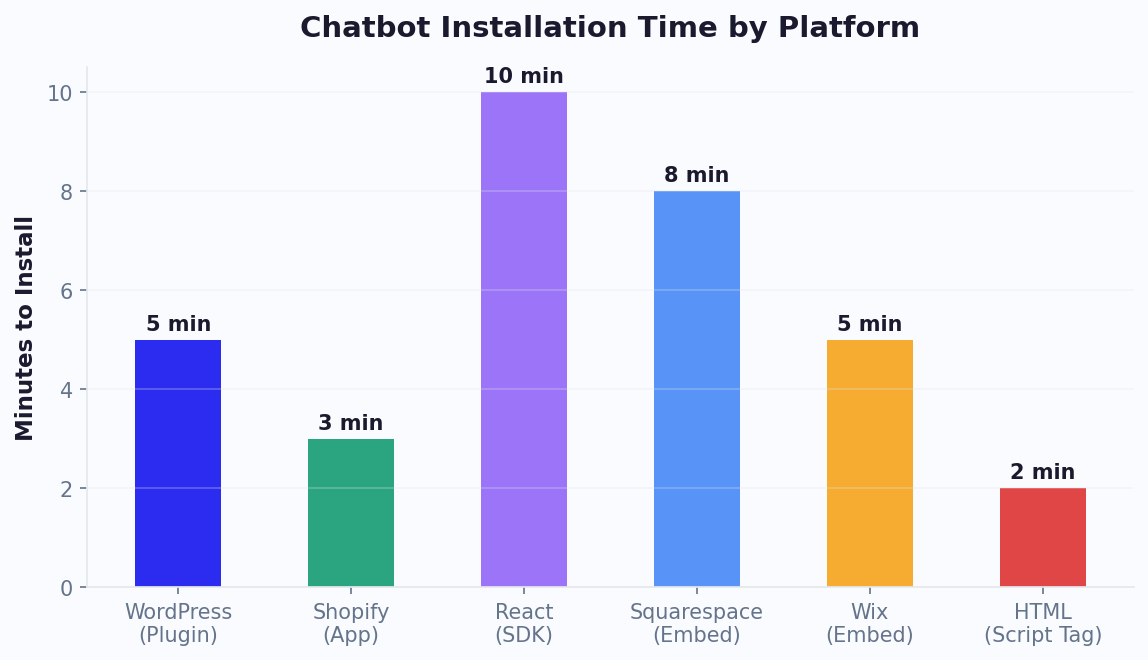
Step 4: Install on Your Site (2 Minutes)
Copy the embed code and paste it into your website:
- HTML: Add before
</body> - WordPress: Use plugin or paste in theme footer - full WordPress guide
- Shopify: Use app or paste in theme.liquid - full Shopify guide
- React/Next.js: Install npm package - full React guide
Step 5: Test and Go Live (1 Minute)
Open your site in an incognito browser window. Verify the widget appears, click it, and run through the conversation flow. Test both expected paths (answering questions correctly) and edge cases (typing random text, asking off-topic questions). Make sure the live chat handoff works if the bot can't answer.
Your free chatbot is now live, handling visitors 24/7. Review analytics after one week to see engagement patterns and optimize. For more on building effective chatbot flows, see our complete no-code chatbot guide.
Maximizing Performance on a Free Chatbot Plan: Expert Strategies
Getting the most value from a free chatbot plan requires strategic thinking. Free tiers have limits, but smart optimization ensures those limits rarely constrain you. Here are battle-tested strategies to extract maximum ROI from $0/month.
Conversation Efficiency: Do More With Less
When your plan caps conversations at 100-500 per month, every conversation needs to count. The key is reducing wasted conversations - interactions that don't lead to value for either party.
Trigger targeting: Don't show the chatbot to every visitor. Configure it to appear only on high-intent pages - pricing pages, product pages, and contact pages. A visitor reading a blog post rarely needs chat assistance, but a visitor on your pricing page is actively considering a purchase. This alone can reduce conversation waste.
Time-based triggers: Instead of popping up immediately (which annoys visitors), set a 15-30 second delay. Visitors who stay that long are genuinely engaged. This reduces drive-by conversations from accidental clicks.
Page-specific greetings: A generic "How can I help?" generates curiosity clicks. A specific "Need help choosing between our Standard and Pro plan?" on the pricing page attracts only genuinely interested visitors.
Knowledge Base Optimization for Free AI Plans
If your free plan includes AI responses (as with Conferbot and Botpress), the quality of your knowledge base determines whether the AI resolves queries or frustrates users. For businesses comparing AI-powered options, our pricing comparison guide breaks down what you get at each tier.
- Start with your top 20 FAQs: Analyze your inbox, social media DMs, and any existing chat logs. The 20 most common questions account for 70-80% of all inquiries. Write clear, concise answers for these first.
- Use structured format: AI performs better with well-structured content. Use clear headings, bulleted lists, and explicit Q&A pairs in your knowledge base rather than long narrative paragraphs.
- Include context triggers: Add common phrasings for each question. Customers don't always ask "What is your return policy?" - they might say "Can I send this back?" or "I changed my mind" or "How do refunds work?"
- Update monthly: Track which questions the bot fails to answer and add those to your knowledge base. A 30-minute monthly update keeps the AI sharp.
Measuring Whether Your Free Plan Is Working
Even on a free plan, you should track these metrics to know whether the chatbot is delivering value:
| Metric | How to Measure | Target |
|---|---|---|
| Engagement rate | Conversations / total visitors | 5-15% |
| Resolution rate | Conversations resolved without human help | 60-75% |
| Lead capture rate | Emails collected / conversations | 15-30% |
| Conversation quality | Conversations leading to meaningful action | 40%+ |
If your engagement rate is below 5%, your chatbot is not visible or compelling enough. If resolution rate is below 50%, your knowledge base needs work. If lead capture rate is below 10%, your conversation flow is not optimized for conversion. These issues are fixable without upgrading - they require better configuration, not a bigger plan.
When Free Is Costing You Money
The free plan becomes expensive when the limitations cost you more than an upgrade would. Here are the signals that indicate you should consider upgrading from a free chatbot to a paid tier - especially relevant if you're a small business owner weighing the investment:
- You hit the conversation limit before the 20th of the month: That means 10+ days of visitors get no chatbot service at all
- You're losing leads to lack of WhatsApp support: If customers message you on WhatsApp and get no response, they find someone who does respond
- You're spending 5+ hours per week on manual chat: A paid plan with better AI could reclaim that time
- Your competitors have chatbots without branding badges: In professional services, perception matters
Run this calculation: if your average customer value is $200 and your chatbot could capture just 2 additional leads per month by upgrading, a $49/month plan delivers a positive ROI. Tools like our website installation guide ensure you get maximum performance from whichever plan you choose.
When to Upgrade: Signs You Have Outgrown Your Free Plan
Free plans serve an important purpose, but staying on them too long can actually cost your business more than upgrading. Watch for these signals that indicate it is time to move to a paid tier:
- Conversation limits hit before month-end: If you consistently exhaust your free conversation quota in the first two weeks, you are turning away potential customers during the second half of every month. The lost leads likely exceed the cost of upgrading.
- Multiple staff need access: Free plans typically restrict you to a single operator. If multiple team members need to monitor conversations or handle handoffs, you need team collaboration features only available on paid plans.
- Integration requirements grow: Once you need CRM sync, calendar booking, or e-commerce product feeds, the manual workarounds on free plans become unsustainable. Native integrations on paid plans save 5-10 hours per week in manual data entry.
- Analytics demands increase: Basic message counts are insufficient once you need conversion tracking, drop-off analysis, or ROI reporting. Advanced analytics on paid tiers provide the data needed to continuously optimize chatbot performance and justify the investment to stakeholders.
Was this article helpful?
Build and deploy in 10 minutes. No coding needed.
11 Best Free Chatbots for Websites in 2026 FAQ
Everything you need to know about chatbots for 11 best free chatbots for websites in 2026.
About the Author
The Conferbot team writes about building, deploying, and improving AI chatbots.
View all articles

