
Директ Instagram Конструктор чат-ботов
Превратите ваш бизнес-аккаунт Instagram в канал обслуживания клиентов 24/7. Мгновенно отвечайте на директ-сообщения, квалифицируйте лиды и никогда не пропускайте запросы.
Instagram Функции чат-бота
Все необходимое для создания мощных автоматизированных разговоров
Интеграция с бизнес/креаторским аккаунтом Instagram
Автоматические ответы в директ
Быстрые ответы
Ответы на упоминания в сторис
Обмен медиафайлами (изображения, видео)
Вопросы для начала разговора
Бесшовная передача живому оператору
Персонализация на основе профиля
Что вы можете создать?
Начните за 10 простых шагов
Следуйте этому руководству, чтобы подключить своего чат-бота Instagram
Переключитесь на профессиональный аккаунт Instagram (Бизнес или Креатор)
Подключите ваш Instagram к странице Facebook
Создайте приложение на портале Meta для разработчиков с Instagram Messaging
Сгенерируйте Page Access Token с разрешением instagram_manage_messages
В Conferbot перейдите в Каналы → Instagram → Подключить
Введите ваш Facebook Page ID и Page Access Token
Скопируйте Webhook URL и Verify Token из Conferbot
Настройте webhook на портале Meta для разработчиков
Подпишитесь на поля webhook для сообщений Instagram
Ваш Instagram бот работает!
Introduction
Instagram has evolved from a photo-sharing app into a $2 trillion commerce ecosystem with over 2 billion monthly active users. For brands, creators, and businesses, Instagram is not just a marketing channel - it is where customers discover products, ask questions, and make purchasing decisions. And the DM inbox is where those conversations happen.
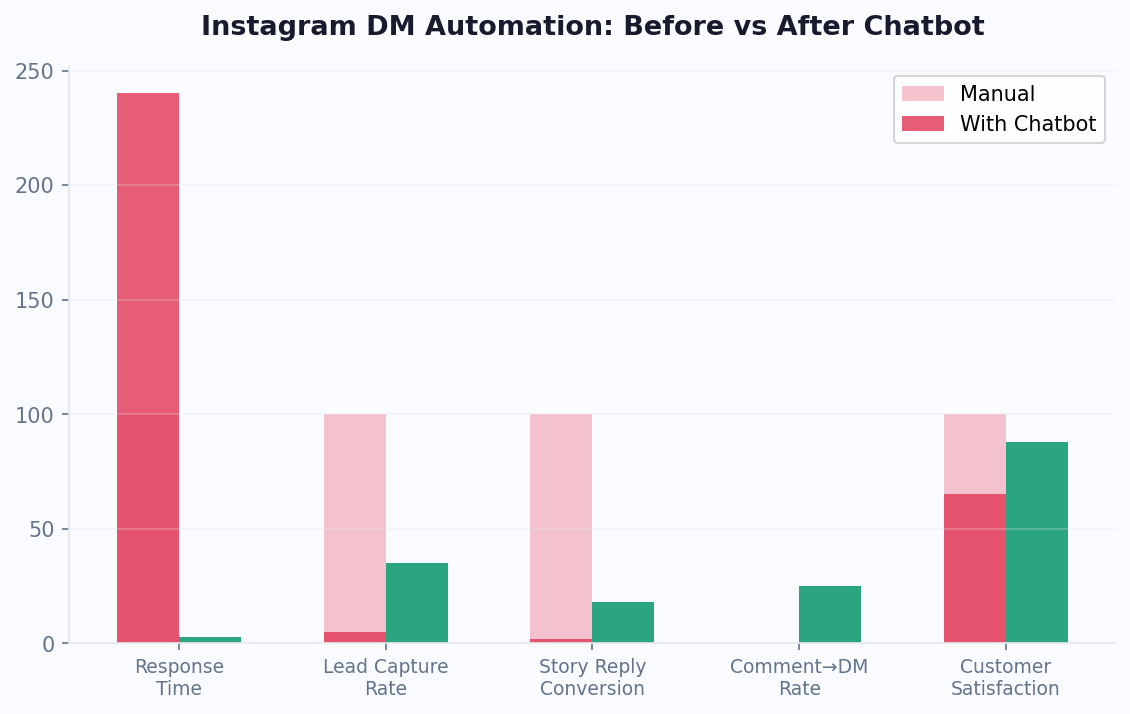
The problem? Instagram DMs are overwhelming. A mid-size brand can receive hundreds to thousands of DMs daily - product inquiries, pricing questions, collaboration requests, story replies, and support issues. Manual responses simply cannot keep up. Research shows that 60% of Instagram users have messaged a business, yet the average business response time on social media exceeds 10 hours. Every hour of delay costs potential sales.
An Instagram chatbot changes this dynamic entirely. With Conferbot, you can automate DM responses, reply to story mentions instantly, qualify leads through conversational flows, and hand off complex issues to your team - all without leaving the Instagram app your customers already love. No coding required, no disruption to the user experience.
Instagram's Messaging API, available for Business and Creator accounts, enables chatbots to interact with users through text, quick replies, media, and ice breakers. Combined with Conferbot's visual chatbot builder and AI capabilities, you can create DM experiences that feel personal, responsive, and on-brand. This guide covers everything from platform capabilities to advanced strategies for Instagram chatbot success in 2026.
According to Statista's social media research, Instagram remains the top platform for brand engagement among 18-34 year olds, with DM interactions growing 25% year-over-year. Businesses that deploy chatbot automation on Instagram see an average 3.2x increase in qualified leads and a 65% reduction in first-response time.
New to chatbot building? Read our complete guide to building a chatbot without coding. Already running bots on other channels? See how Instagram compares to Messenger and WhatsApp, or deploy on all three with Conferbot's omnichannel platform. Browse our template library for ready-to-use Instagram DM flows, or explore our AI chatbot lead generation playbook for proven strategies that work across e-commerce, real estate, and service businesses.
Instagram Chatbot Capabilities
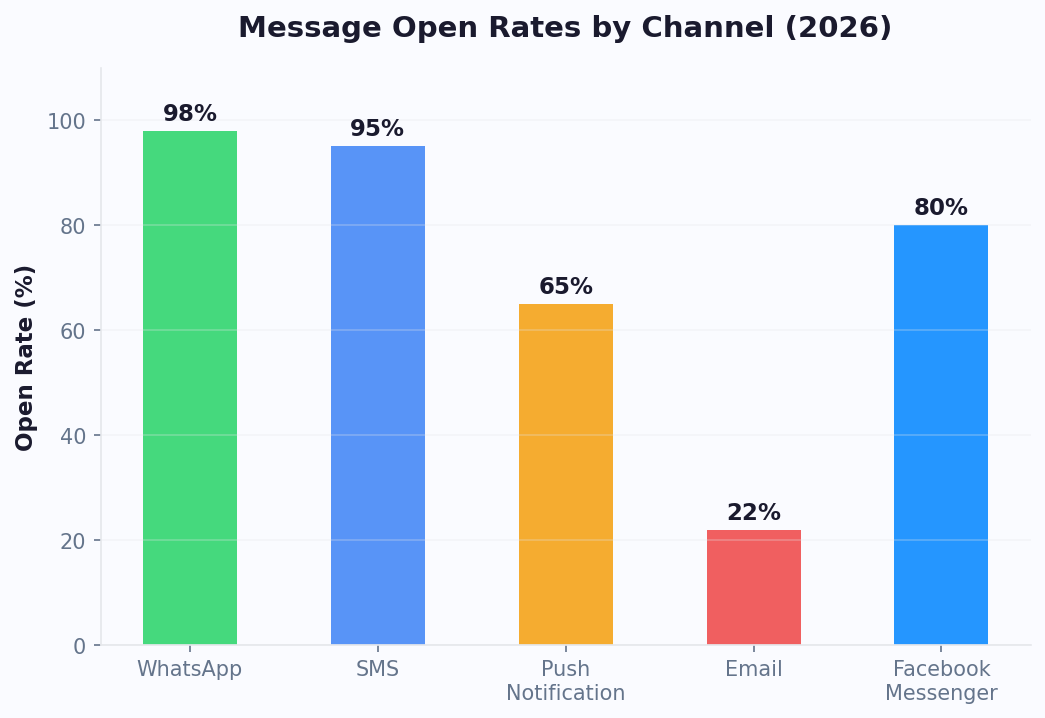
Instagram's Messaging API provides a focused but powerful set of tools for automated conversations. Here is what you can build with an Instagram chatbot on Conferbot.
Message Types
- Text Messages - Standard text responses with support for links and formatting. Keep messages concise and conversational to match the Instagram tone
- Quick Replies - Tappable response options displayed below a message. Users tap instead of type, reducing friction and guiding conversations efficiently
- Media Messages - Send images, videos, and other media directly in the conversation. Share product photos, tutorials, or branded content
- Ice Breakers - Pre-defined conversation starters shown when a user opens a DM thread with your account for the first time. Set up to 4 ice breakers to showcase your bot's capabilities
Trigger Events
- Direct Messages - Any message sent to your Instagram DM inbox triggers the chatbot. This is the primary interaction mode
- Story Mentions - When someone mentions your account in their story, the bot can automatically send a thank-you DM, offer a discount code, or start a conversation. This is a powerful engagement driver
- Story Replies - When users reply to your stories, the bot engages them in real time while your content is still top of mind
Profile Context
With user permission, your bot can access the user's Instagram name, username, and profile picture. This enables personalized greetings and helps your team identify users during live chat handoffs.
While Instagram's message types are simpler than Messenger's carousels and templates, the platform's visual-first audience and high engagement rates make it exceptionally effective for commerce and brand engagement.
Comment-to-DM Funnels
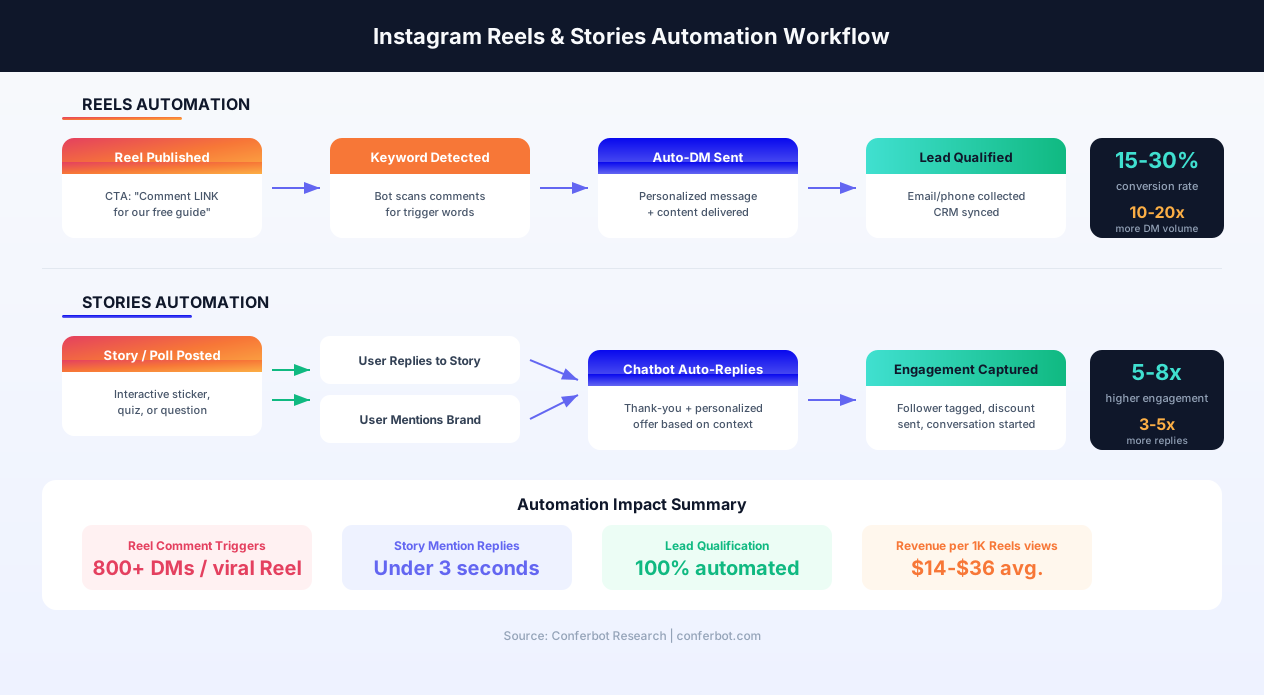
One of the most powerful Instagram automation strategies is the comment-to-DM funnel. Here is how it works: you publish a post or Reel with a call-to-action like "Comment GUIDE to get our free sizing guide" or "Drop DEAL to receive an exclusive discount code." When a user comments the trigger keyword, your chatbot automatically sends them a DM with the promised content, starting a conversation that can qualify leads and drive sales. This strategy leverages Instagram's algorithm (comments boost post visibility) while simultaneously building your DM subscriber list. Brands using comment-to-DM funnels report 10-20x more DM conversations compared to organic DM volume, and conversion rates of 15-30% from DM to purchase.
Story Reply Triggers
When you post Instagram Stories with interactive elements -- polls, questions, quizzes, or sliders -- users who respond or reply create an engagement signal that your chatbot can act on. Configure your bot to detect Story replies and immediately follow up with a personalized DM. For example, if you run a poll about product preferences, the bot can DM users who voted with a tailored product recommendation. Story reply automation turns passive Story viewers into active conversations, with brands reporting 5-8x higher engagement compared to standard Story views alone.
Instagram Shop Integration
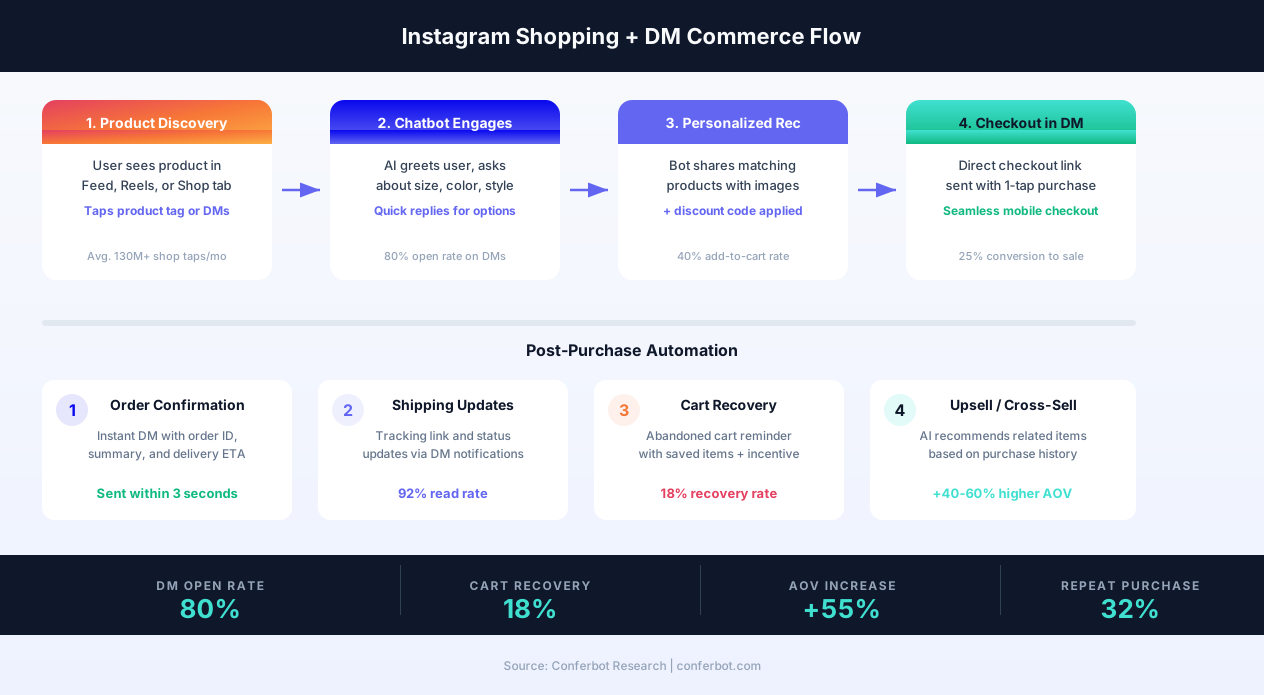
For businesses with an Instagram Shop, chatbot automation creates a seamless discovery-to-purchase journey. When customers browse your product tags in posts, Reels, or the Shop tab and then DM you with questions, the chatbot provides instant answers about sizing, availability, shipping, and returns. The bot can share direct product links that take users straight to checkout, apply discount codes, and collect shipping details -- all within the DM thread. Businesses combining Instagram Shopping with DM automation see 40-60% higher average order values compared to self-service shopping alone because the conversational guidance reduces purchase anxiety and enables personalized upselling.
DM Automation Rules and Compliance
Instagram enforces specific rules for DM automation that differ from Messenger. The key constraints: your bot can only send messages within a 24-hour window after the user's last interaction, there are no message tags or sponsored messages (unlike Messenger), and automated messages must comply with Instagram's Community Guidelines and Meta's Platform Policy. Your bot must not send unsolicited promotional content, must provide a way for users to stop receiving messages, and cannot impersonate human agents without disclosure. Conferbot's platform is designed with these guardrails built in, automatically respecting the 24-hour window and providing opt-out mechanisms in every flow. To maintain compliance, always collect the user's email or phone number early in the conversation so you can continue engagement through other channels like WhatsApp or email after the DM window closes.
Reels & Stories Chatbot Integration
Instagram Reels and Stories are the two highest-engagement content formats on the platform, and they represent a massive untapped opportunity for chatbot automation. While most businesses focus DM automation only on direct messages, the real growth comes from automating responses to Reels comments, Story replies, and Story mentions - turning every piece of content into a conversation starter.
Reels Chatbot Automation
Instagram Reels reach audiences far beyond your follower base through the Explore page and Reels tab. When a Reel goes viral, you can receive hundreds or thousands of comments in hours. Without automation, those comments represent lost opportunities - users who expressed interest but never received a response. With Conferbot's Reels automation:
- Comment trigger funnels - Set keyword triggers on any Reel to auto-DM commenters with content, offers, or qualification flows
- Engagement-based DMs - Automatically DM users who comment more than once or who use specific phrases indicating purchase intent (e.g., "how much", "where to buy", "link please")
- Reel-specific flows - Create different chatbot flows for different Reels. A product demo Reel triggers a product info flow; a behind-the-scenes Reel triggers a brand story flow
- Viral response scaling - Unlike manual responses, the chatbot handles 100 or 100,000 comments identically, ensuring no lead slips through during viral moments
Stories Automation Deep Dive
Instagram Stories generate over 500 million daily viewers, and interactive Stories (polls, quizzes, questions, sliders) produce direct engagement signals that your chatbot can act on:
- Story mention auto-reply - When a customer mentions your brand in their Story, the bot instantly DMs them with a thank-you message, discount code, or conversation starter. This is the single highest-ROI automation on Instagram - brands report 3-5x engagement rates compared to manual mention responses
- Story reply sequences - When users reply to your Story via DM, the chatbot picks up the conversation in context. If your Story featured a new product, the bot knows to share product details, pricing, and a checkout link
- Poll-based segmentation - Run a Story poll ("Which style do you prefer: A or B?") and configure the bot to DM voters with personalized recommendations based on their choice. This creates a natural segmentation funnel driven by user preference
- Quiz-to-offer flows - Post a Story quiz about your product category, then DM participants with results and a tailored offer based on their answers
- Countdown sticker follow-up - When users interact with a countdown sticker for a product launch or sale, the bot DMs them a reminder when the countdown expires
Auto-Engagement Strategies for Viral Content
When your content gains traction organically or through paid amplification, automated engagement strategies maximize the return:
- First-comment triggers - Set up your chatbot to respond to comments within the first hour of posting, when Instagram's algorithm weighs engagement most heavily
- Multi-post campaigns - Run coordinated campaigns across Feed posts, Reels, and Stories simultaneously, with each format feeding leads into the same DM funnel
- UGC amplification - When users create content featuring your product, Story mention automation thanks them and asks permission to reshare, building a content flywheel
- Influencer collaboration triggers - When an influencer partner tags your brand, the bot can DM their followers who engage with the tagged content, extending your reach to new audiences
Combine Reels and Stories automation with your website chatbot and omnichannel strategy to create a seamless journey from Instagram discovery to conversion on any channel.
Step-by-Step Instagram Bot Setup
Connecting an Instagram chatbot requires linking your Instagram Professional account through Meta's platform. Here is the complete walkthrough.
Prerequisites
- An Instagram Professional Account (Business or Creator) - you can convert any personal account in Settings
- A Facebook Page connected to your Instagram account (required by Meta's API)
- Admin access to both the Instagram account and the Facebook Page
- A Conferbot account
Step 1: Design Your Chatbot
In the Conferbot dashboard, create your chatbot using the visual builder. For Instagram, we recommend starting with a lead generation template or FAQ template and customizing for your brand voice. Keep flows short and mobile-friendly - Instagram users expect quick, snappy interactions.
Step 2: Create a Meta App with Instagram Messaging
- Log in to developers.facebook.com
- Create a new App and select "Business" type
- On your App Dashboard, find "Instagram" in the product list and click "Set Up"
- Navigate to Instagram → Messaging settings
Step 3: Generate Access Token
- In the App Dashboard, go to Messenger → Settings → Access Tokens
- Add your Facebook Page (which is connected to your Instagram account)
- Generate a Page Access Token with the instagram_manage_messages permission
- Copy the Page Access Token and your Facebook Page ID
Step 4: Connect to Conferbot
- In Conferbot, go to Channels → Instagram → Connect
- Enter your Facebook Page ID and Page Access Token
- Conferbot generates a Webhook URL and Verify Token
Step 5: Configure the Webhook
- In Meta Developer Portal, navigate to your App's Webhook configuration
- Enter the Callback URL and Verify Token from Conferbot
- Subscribe to Instagram messaging webhook events
- Click Verify and Save
Test by sending a DM to your Instagram account. The bot should respond within seconds. Total setup time: 10-15 minutes.
Common Setup Troubleshooting
If your Instagram bot does not respond: verify your Instagram account is a Professional Account (Business or Creator), confirm the Facebook Page is properly linked to your Instagram account in Instagram Settings, ensure the Meta App has the instagram_manage_messages permission, and check that the webhook subscription is active. Also note that Instagram Messaging API is only available to accounts with at least 1,000 followers (this requirement was added by Meta for API access). If your account is under this threshold, you can still prepare your chatbot flows and connect once you reach the follower count. For advanced integrations like CRM syncing and e-commerce connections, configure these in the Conferbot dashboard after the basic setup is complete. Refer to the official Instagram Messaging API documentation for the latest API specifications and rate limits.
Key Instagram Bot Features
Conferbot enhances Instagram's native messaging with intelligent automation, making your DM inbox a revenue-generating machine.
Story Mention Automation
This is Instagram's secret weapon for engagement. When a customer, fan, or influencer mentions your brand in their story, your bot can instantly DM them with a personalized thank-you, a discount code, or an invitation to engage further. Brands using story mention automation report 3-5x higher engagement rates compared to manual responses.
AI-Powered Intent Recognition
With OpenAI integration, your Instagram bot understands the intent behind messages - whether someone is asking about pricing, product availability, shipping times, or return policies. The bot matches intent to the right response or flow, even when users phrase things differently.
Conversational Commerce
Guide users from product discovery to purchase entirely within DMs. Share product images, answer sizing questions, provide discount codes, and send direct links to checkout. Instagram users who engage with brands via DM are 40% more likely to purchase than those who browse passively.
Lead Qualification Flows
Use quick replies to qualify leads based on budget, timeline, location, or specific needs. Qualified leads are automatically tagged and can be routed to the right team member or synced to your CRM. Check out our lead generation templates for ready-to-use qualification flows.
Seamless Agent Handoff
When a conversation needs human attention - high-value prospects, complaints, or complex questions - Conferbot's live chat seamlessly transfers the conversation to your team. Agents see the full DM history and user profile for context.
Analytics and Reporting
Track DM volume, bot response accuracy, conversation completion rates, popular topics, and conversion metrics through the analytics dashboard. Identify your most asked questions and optimize flows accordingly.
AI Knowledge Base for Instagram
Connect your product catalog, FAQ documents, and brand guidelines to Conferbot's AI knowledge base. The bot draws from this knowledge to answer product questions accurately, provide sizing information, explain shipping policies, and share return instructions -- all without requiring you to build individual flows for every possible question. This is especially valuable for brands with large product catalogs where building a manual flow for each item would be impractical.
Calendar Booking via DMs
Service businesses, consultants, fitness trainers, and healthcare providers can integrate calendar booking directly into Instagram DM conversations. When a potential client asks about availability, the bot presents open time slots, confirms the booking, and syncs with Google Calendar or Outlook. This turns Instagram DMs into a direct revenue channel for appointment-based businesses, with studies showing that conversational booking achieves 40% higher completion rates than sending users to an external booking page.
Instagram Shopping + Chatbot Integration
Instagram's commerce ecosystem - including Product Tags, the Shop tab, and in-app checkout - has turned the platform into a $37 billion shopping channel. When you layer chatbot automation on top of Instagram Shopping, you create a conversational commerce experience that dramatically outperforms passive browsing. Here is how to build a complete Instagram DM commerce engine with Conferbot.
Product Catalog in DMs
When a customer messages your Instagram account asking about a product they saw in your feed, Reels, or Shop tab, your chatbot can instantly pull up relevant product details from your connected catalog:
- Product images and descriptions - Share high-quality photos with pricing, sizes, colors, and material details directly in the DM thread
- Real-time inventory checks - Integration with your e-commerce platform (Shopify, WooCommerce, BigCommerce) lets the bot confirm availability before the customer gets excited about an out-of-stock item
- Size and fit guidance - AI-powered recommendations based on the customer's measurements, past purchases, or comparison to similar items they have bought
- Cross-sell suggestions - "Customers who bought this jacket also loved these boots" - personalized recommendations that increase average order value by 40-60%
Checkout Flows via DM
The fastest path from interest to purchase is keeping the entire journey inside the DM conversation. With Conferbot's commerce integrations:
- Product selection - Customer browses options via quick reply buttons or types what they are looking for
- Customization - Bot asks about size, color, quantity, and any personalization options
- Cart building - Multiple items can be added to a virtual cart within the conversation
- Discount application - Automatic coupon codes applied based on the campaign that triggered the conversation (e.g., comment-to-DM discount)
- Checkout link - A pre-filled checkout link with selected items and discount is sent directly, requiring just one tap to complete the purchase
Order Tracking via DM
Post-purchase support through Instagram DMs keeps customers engaged and reduces support tickets on other channels:
- Order confirmation - Instant DM with order number, items summary, and expected delivery date
- Shipping notifications - Automated updates when the order ships, with tracking link and carrier details
- Delivery confirmation - A follow-up message confirming delivery, with a request for a photo review or Story mention
- Returns and exchanges - Guided return flow with label generation and status updates, all within the DM thread
Cart Recovery in Instagram DMs
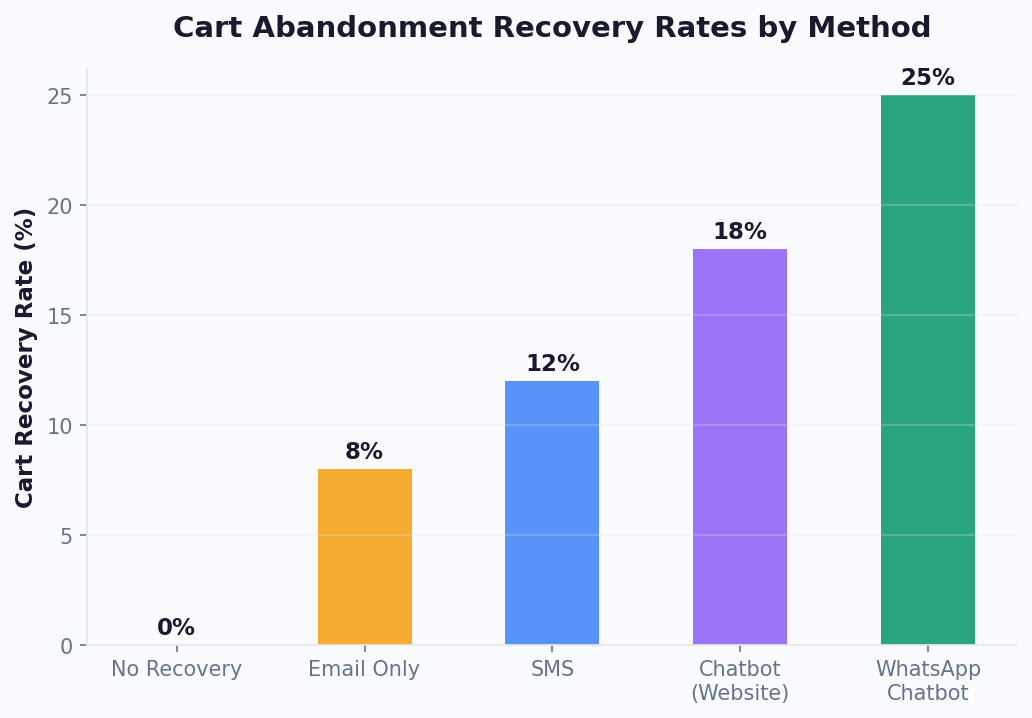
Cart abandonment is a massive revenue leak - the average e-commerce cart abandonment rate is 70%. Instagram DM cart recovery messages achieve an 18% recovery rate, far outperforming email (which averages 3-5% recovery). When a customer starts a product conversation in DMs but does not complete checkout, the bot can follow up within the 24-hour window with:
- A reminder of the items they were interested in
- An additional incentive (free shipping, extra discount) to complete the purchase
- Social proof - "This item has been viewed 200 times today" or customer review snippets
- Alternative recommendations if their preferred item is now out of stock
Explore more e-commerce chatbot strategies and see how Instagram commerce integrates with Messenger and WhatsApp for a true omnichannel shopping experience.
Instagram Chatbot Use Cases by Industry
Instagram chatbots are particularly effective in visual, consumer-facing industries. Here are the highest-impact use cases.
Fashion and Beauty
Instagram is the dominant platform for fashion and beauty brands. Use your chatbot to help users find the right size, recommend products based on skin type or style preferences, share lookbook images, and send personalized discount codes. Brands in this space report 25-40% higher conversion rates when using DM chatbots compared to website-only interactions.
Food and Restaurants
Share daily menus, handle reservation requests, process takeout orders, and collect feedback - all through DMs. Story mention automation is especially powerful here: when customers tag your restaurant in their food photos, your bot instantly thanks them and offers a loyalty reward.
Fitness and Wellness
Handle class bookings, share workout schedules, provide membership information, and offer free trial sign-ups. Fitness studios using Instagram chatbots see 60% faster lead response times and higher trial-to-membership conversion rates.
Real Estate
When prospects inquire about a property they saw on your Instagram feed, the bot qualifies them by asking about budget, preferred location, and timeline, then schedules viewings and connects them with the right agent. Learn more about real estate chatbot solutions.
E-Commerce
Product recommendations, order tracking, return processing, and size guides. With Instagram Shopping integration, users discover products in your feed and get instant support through DM chatbots, creating a seamless discovery-to-purchase journey. Explore e-commerce chatbot solutions for more.
Agencies and Freelancers
Automate responses to collaboration inquiries, share rate cards, collect project briefs, and schedule discovery calls. Creators and agencies save 10-15 hours per week by automating repetitive DM conversations.
Instagram Chatbot Pricing & Plans
One of the most common questions when evaluating Instagram chatbot solutions is: how much does it cost? The pricing landscape has two components - Meta's API costs and the chatbot platform costs. Here is a transparent breakdown of both.
Meta's Instagram Messaging API: Is It Free?
Good news: Meta does not charge per-message fees for the Instagram Messaging API. Unlike WhatsApp Business API (which has per-conversation pricing), Instagram's API is free to use for sending and receiving messages. The only costs are your chatbot platform subscription and any Meta Business verification fees (which are minimal). This makes Instagram one of the most cost-effective channels for DM automation.
However, there are important requirements and limitations:
- Professional Account required - Free to convert from personal
- Facebook Page connection required - Free to set up
- 1,000 follower minimum - Required for Messaging API access (Meta policy)
- Meta App review - Required for production access, free but takes 1-3 business days
- Rate limits - API rate limits apply, though Conferbot manages these automatically to prevent issues. See the Instagram Business Messaging API reference for current limits
Conferbot Pricing for Instagram
Conferbot offers tiered pricing designed for businesses at every stage:
- Free Plan - Get started with basic Instagram DM automation. Includes up to 100 conversations/month, the visual builder, and standard templates. Perfect for testing the waters or solo creators
- Starter Plan ($19/month) - Unlimited conversations, comment-to-DM automation, Story mention replies, analytics, and email support. Ideal for small businesses and growing creators
- Pro Plan ($49/month) - Everything in Starter plus AI-powered responses, AI knowledge base, live chat handoff, CRM integrations, and priority support. Best for mid-size brands and agencies
- Business Plan ($99/month) - Full omnichannel deployment (Instagram + Messenger + WhatsApp + Website), advanced analytics, calendar booking, unlimited team seats, and dedicated support
View detailed pricing and feature comparison.
Instagram Chatbot Cost vs ROI
The ROI math for Instagram chatbot automation is compelling. Consider a typical scenario for a D2C brand:
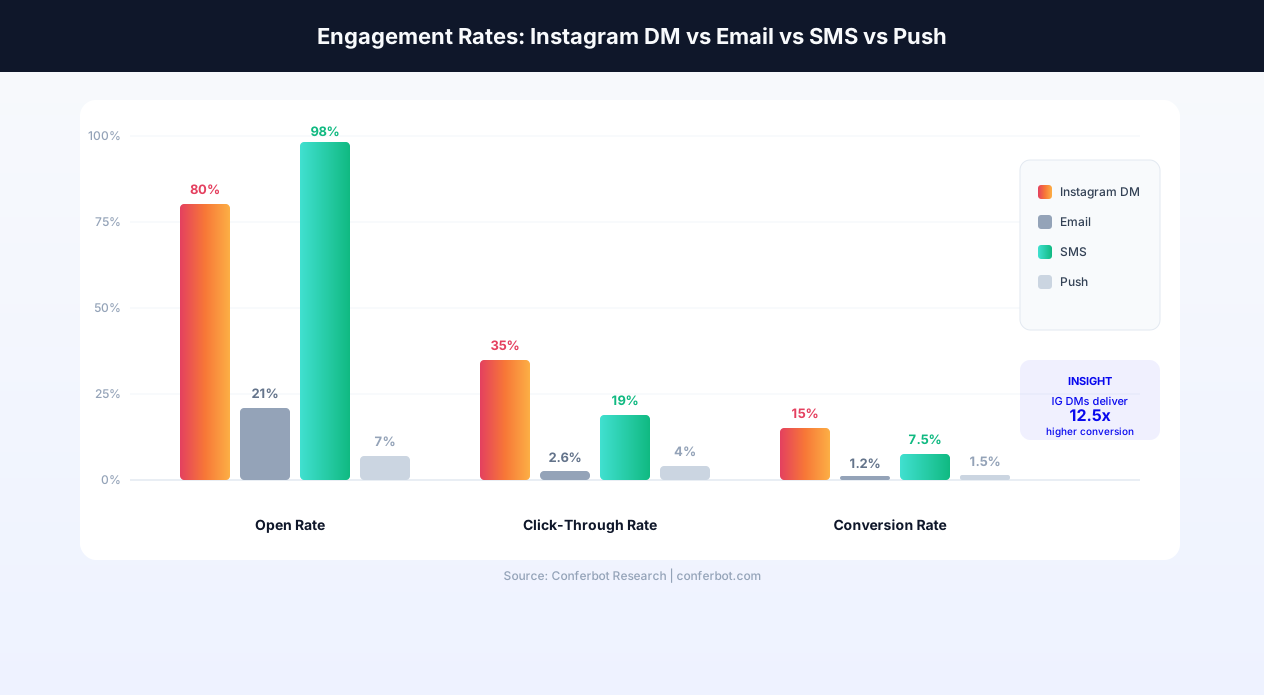
- Without chatbot: 200 DMs/day, 10-hour average response time, 2% conversion rate, manual cost of $2,000/month (part-time social media manager)
- With Conferbot: 200 DMs/day, 3-second response time, 15% conversion rate, platform cost of $49/month
- Monthly impact: 7.5x more conversions, $1,951/month cost savings, plus incremental revenue from comment-to-DM funnels generating 500+ additional leads/month
For small businesses comparing costs across platforms, Conferbot's $19/month Starter plan is 20% less expensive than Chatfuel's entry tier and includes features like AI integration and calendar booking that competitors charge extra for. Brands with multi-channel needs save significantly by consolidating Instagram, Messenger, and WhatsApp on Conferbot's Business plan rather than paying separately on platform-specific tools.
Instagram DMs vs Other Social Channels
Understanding where Instagram fits in your channel strategy helps you allocate resources effectively.
| Feature | Instagram DMs | Messenger | Discord | |
|---|---|---|---|---|
| Monthly Active Users | 2B+ | 1B+ | 2.7B+ | 150M+ |
| Primary Audience | 18-34 visual consumers | Broad demographics | Global, all ages | Gaming, tech, creators |
| Commerce Strength | Excellent (Shopping + DMs) | Good (Carousels, Receipts) | Good (Catalogs) | Limited |
| Story Mention Triggers | Yes | No | No | No |
| Rich Templates | Basic (quick replies) | Advanced (carousels) | Buttons, lists | Embeds, buttons |
| Proactive Messaging | 24-hour window | 24h + templates | Templates (paid) | Unlimited |
| Visual Content | Native strength | Good | Good | Good |
| Ad Integration | Click-to-DM Ads | Click-to-Messenger | Click-to-WhatsApp | None |
| Best For | D2C brands, creators | Lead gen, e-commerce | Support, notifications | Communities |
When to prioritize Instagram: If your target audience is aged 18-34, your product is visually driven, or you run Instagram ads, then Instagram DM automation should be a top priority. For comprehensive coverage, use Conferbot's omnichannel platform to combine Instagram with Messenger and WhatsApp for maximum reach.
Instagram's unique strengths: Instagram is the only major messaging channel that offers Story mention triggers and comment-to-DM funnels -- features that create organic conversation starters at scale. The platform's visual-first nature also makes it ideal for product discovery, where users find items through photos and Reels and then DM for details. Unlike Telegram or Discord, Instagram's audience skews toward consumers making purchasing decisions, making it the strongest channel for direct-to-consumer brands, fashion, beauty, food, fitness, and lifestyle businesses. See how Conferbot compares to other chatbot platforms for Instagram automation.
Instagram Chatbot: Conferbot vs ManyChat vs Chatfuel
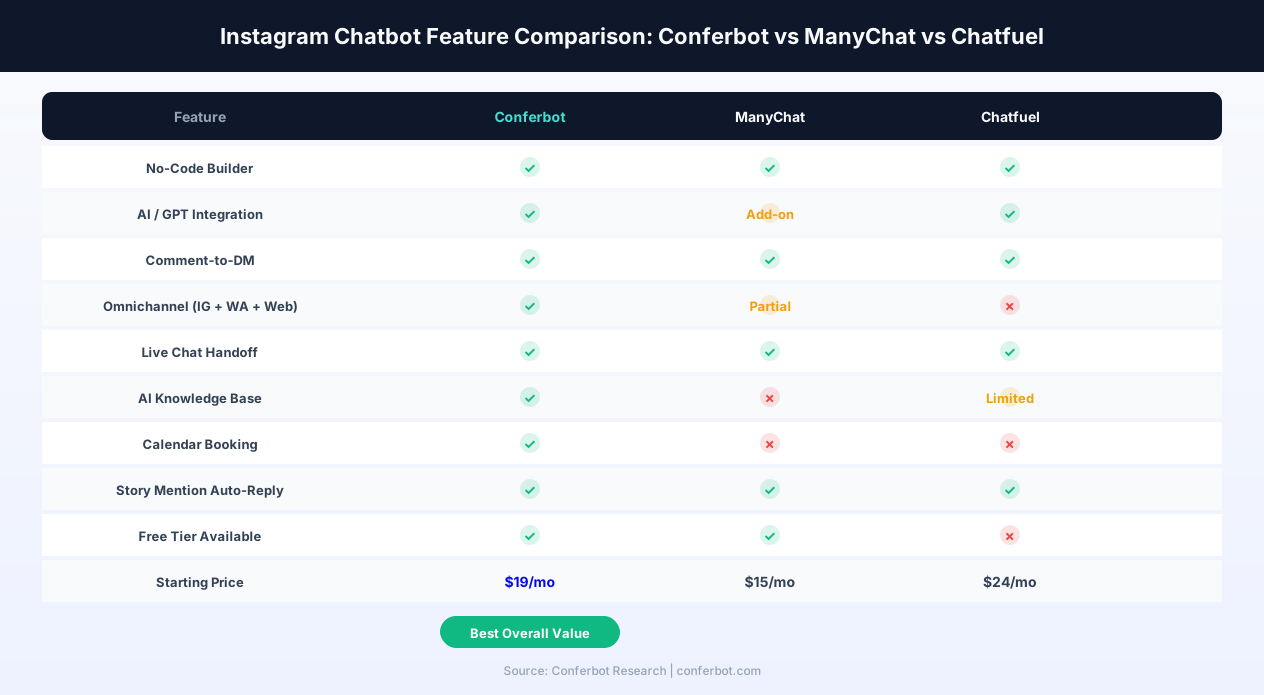
Choosing the right Instagram chatbot platform is a critical decision. The three leading platforms - Conferbot, ManyChat, and Chatfuel - each have distinct strengths. Here is an honest, feature-by-feature comparison to help you make the best choice for your business in 2026.
Feature Comparison Overview
| Feature | Conferbot | ManyChat | Chatfuel |
|---|---|---|---|
| No-Code Builder | Yes - visual drag-and-drop | Yes - flow builder | Yes - block-based |
| AI / GPT Integration | Built-in (OpenAI) | Add-on ($) | Built-in |
| Comment-to-DM Automation | Yes | Yes | Yes |
| Story Mention Auto-Reply | Yes | Yes | Yes |
| Omnichannel (IG + WA + Web) | Yes - unified dashboard | Partial (IG + Messenger + email) | Instagram + Messenger only |
| Live Chat Handoff | Yes | Yes | Yes |
| AI Knowledge Base | Yes - upload docs, auto-answers | No | Limited |
| Calendar Booking | Yes - native integration | No (requires Zapier) | No |
| E-Commerce Integration | Shopify, WooCommerce, BigCommerce | Shopify | Shopify |
| Free Plan | Yes - 100 conversations/mo | Yes - 1,000 contacts | No - 7-day trial only |
| Starting Price | $19/month | $15/month | $24/month |
| Best For | AI-first brands, omnichannel | Instagram-focused marketers | Simple IG automation |
Where Conferbot Wins
- True omnichannel - Deploy the same bot on Instagram, Messenger, WhatsApp, Website, Telegram, Slack, and Microsoft Teams from one dashboard. ManyChat is limited to Instagram, Messenger, and email. Chatfuel covers only Instagram and Messenger
- AI knowledge base - Upload your product documentation, FAQs, and brand guidelines. The AI knowledge base lets the bot answer questions it has never been explicitly trained on. Neither ManyChat nor Chatfuel offers a comparable feature at any price tier
- Calendar booking - Native calendar integration with Google Calendar and Outlook, directly in DMs. Competitors require third-party tools like Calendly or Zapier
- E-commerce breadth - Integrations with Shopify, WooCommerce, and BigCommerce vs. competitors' Shopify-only approach
- Cost at scale - At the Business tier ($99/month), Conferbot includes all channels and unlimited team seats. Comparable coverage on ManyChat requires their $65/month Pro plan plus separate WhatsApp fees. Chatfuel's multi-channel setup is even more fragmented
Where ManyChat Shines
ManyChat has been in the Instagram automation space longer and has a larger community of marketers sharing templates and strategies. Their $15/month entry price is the lowest in the market, and their Instagram-specific features like advanced comment automation rules are well-refined. If Instagram is your only channel and you do not need AI knowledge base or calendar booking, ManyChat is a solid choice.
Where Chatfuel Shines
Chatfuel's block-based builder is the simplest to learn. Their AI integration has improved significantly in 2026. However, the lack of a free tier and higher starting price ($24/month) makes it a harder sell for small businesses or testing purposes.
The Verdict
For businesses that want AI-powered Instagram automation with omnichannel expansion capability, Conferbot offers the best value. For Instagram-only marketers on a tight budget, ManyChat is a strong alternative. For maximum simplicity with AI, Chatfuel works but at a higher cost. Start with Conferbot's free plan to test the platform risk-free.
Instagram Bot Compliance & Best Practices
One of the biggest concerns businesses have about Instagram automation is: will my bot get my account suspended? The short answer is no - as long as you follow Meta's rules. Instagram chatbots built on the official Messaging API (which Conferbot uses) are fully authorized by Meta. The accounts that get banned are those using unofficial, scraping-based tools that violate Instagram's Terms of Service. Here is what you need to know about compliance in 2026.
Meta's Automation Policy for Instagram
Meta has a clear distinction between authorized automation (via the official API) and unauthorized automation (bots that scrape, mass-follow, or send unsolicited messages). Conferbot operates exclusively through the official Instagram Messaging API, which means:
- Your account will not be flagged or suspended for using Conferbot's Instagram chatbot
- All messages go through Meta's servers with their approval and monitoring
- API access requires Meta Business verification, ensuring only legitimate businesses operate chatbots
- Rate limits are enforced by Meta, and Conferbot automatically manages them to keep your account safe
The 24-Hour Messaging Window
Instagram's most important automation rule is the 24-hour messaging window:
- Your bot can send messages to a user only within 24 hours of their last message to your account
- After the window closes, you cannot initiate new messages - unlike Messenger (which allows message tags) or WhatsApp (which allows template messages)
- Each new user message resets the 24-hour clock
- There are no exceptions, no paid templates, and no sponsored messages for Instagram DMs (as of 2026)
This means your chatbot flows must be designed to capture value within that first 24-hour window. Best practices include collecting the user's email address or phone number early in the conversation, delivering the most important content immediately (not dripped over days), and offering a clear next action (purchase, book, sign up) within the first few messages.
Opt-In and Opt-Out Requirements
While Instagram DMs do not have the same explicit opt-in requirements as WhatsApp (where users must initiate conversations with template approval), there are important guidelines:
- User-initiated conversations - The user must send the first message or interact with your content (comment keyword, Story mention/reply) to open a conversation. You cannot cold-DM users
- Opt-out mechanism - Every chatbot flow must include a way for users to stop receiving automated messages. Conferbot includes a "Stop" or "Unsubscribe" option in every flow by default
- Disclosure - If your bot is fully automated (no human in the loop), Meta recommends disclosing this to users. A simple "I'm Conferbot, [Brand]'s assistant" in the greeting is sufficient
- Content restrictions - Automated messages cannot contain sexual content, hate speech, misinformation, or anything violating Instagram's Community Guidelines
Comment Automation Compliance
Comment-to-DM automation is fully compliant when the user opts in by commenting a trigger keyword. The key compliance points:
- The trigger keyword must be clearly communicated in the post caption or Reel
- The DM must deliver what was promised (if you said "Comment DEAL for a discount," the DM must include the discount)
- Subsequent messages beyond the promised content should be opt-in (e.g., "Want to see more deals? Reply YES")
- Do not spam users who commented non-trigger words with promotional DMs
Avoiding Account Suspension
To keep your Instagram account safe while running chatbot automation:
- Only use official API platforms like Conferbot - never use tools that ask for your Instagram password or use browser automation
- Do not exceed rate limits - Conferbot handles this automatically, but be aware that sending too many messages too quickly can trigger temporary restrictions
- Keep message quality high - Low engagement, high block rates, or frequent user reports can trigger Meta's review of your account
- Do not use automation for mass following, liking, or commenting - These are separate from the Messaging API and are strictly prohibited
- Respond to user complaints promptly - If a user expresses frustration with your bot, ensure a live agent handoff is available
Conferbot's platform is designed with all these compliance guardrails built in. Every chatbot flow includes opt-out mechanisms, 24-hour window management, disclosure options, and rate limit handling - so you can focus on growing your business while we handle the compliance details.
Instagram Chatbot Best Practices
Instagram has its own culture and communication norms. Your chatbot must feel native to the platform to succeed.
1. Match the Instagram Tone
Instagram conversations are casual, visual, and fast-paced. Your bot should sound like a friendly brand ambassador, not a corporate FAQ system. Use conversational language, keep messages under 2-3 short sentences, and let your brand personality shine through.
2. Leverage Ice Breakers Effectively
Set up 3-4 ice breaker questions that address your most common DM topics. Examples: "What's your return policy?", "Do you ship internationally?", "I need help with my order." These pre-set questions guide users to instant answers and reduce the burden on your team.
3. Automate Story Mentions Immediately
Story mention automation is the highest-ROI feature for Instagram chatbots. When someone mentions your brand, respond within seconds with a genuine thank-you and a relevant offer. This turns passive mentions into active conversations and builds brand loyalty at scale.
4. Design for the 24-Hour Window
Instagram's messaging window allows bot responses only within 24 hours of the user's last message. Design your flows to capture key information (email, phone) early in the conversation, so you can continue engagement through other channels if the window closes.
5. Use Quick Replies for Every Decision Point
Typing on mobile is tedious. Offer quick reply buttons at every step so users can tap through your flows effortlessly. This improves completion rates by 40-60% compared to open-ended text prompts.
6. Integrate with Your Content Strategy
Align your chatbot responses with your Instagram content. If you post about a new product, your bot should be ready to answer questions about it. If you run a contest, your bot should handle entries and rules inquiries.
7. Monitor and Optimize with Analytics
Use Conferbot analytics to track which flows convert best, where users drop off, and what questions the bot cannot answer. Update your bot weekly based on real conversation data.
8. Combine Comment Funnels with Paid Ads
Running Click-to-DM ads alongside organic comment-to-DM funnels creates a dual-channel lead generation machine. Use proven lead generation playbooks to maximize ROI from both organic and paid Instagram traffic.
9. Build Multi-Channel Follow-Up Sequences
Since Instagram's 24-hour window limits re-engagement, always capture an email or phone number and set up follow-up sequences through WhatsApp, Messenger, or email. Conferbot's omnichannel platform makes this seamless.
Getting Started with Instagram DM Automation
Your Instagram audience is already messaging you. The question is whether you respond in seconds with a chatbot or in hours with manual effort. Here is how to get started.
Quick Start Path
- Sign up for Conferbot and choose a template that matches your use case - customer support, lead generation, or e-commerce
- Customize the flows for your brand: update the welcome message, add your products or services, set up FAQ responses
- Connect your Instagram following the setup guide above - it takes 10-15 minutes
- Enable story mention automation - this alone can justify the entire setup
- Set up comment-to-DM funnels - Create your first keyword trigger campaign on a post or Reel
- Test thoroughly by sending DMs and story mentions from a second account
- Go live and monitor performance through the analytics dashboard
Pro Tips for Launch
- Announce your chatbot in an Instagram Story - tell followers they can now get instant responses by DM
- Add a "Message" CTA button to your Instagram profile
- Run a Click-to-DM ad campaign to drive traffic directly into your bot
- Set up live chat as a fallback so no message goes unanswered
- Connect your CRM through Conferbot's integrations hub so every lead is captured
Instagram DM automation is one of the fastest-growing channels for customer engagement in 2026. With 2 billion active users and a built-in commerce ecosystem, the opportunity is massive. Check our pricing plans and start building your Instagram chatbot today.
Why Conferbot for Instagram
- No code required - Build DM automation with our visual AI chatbot builder
- Story mention automation - Instantly respond to brand mentions with personalized DMs
- Comment-to-DM funnels - Turn post engagement into DM conversations at scale
- Reels and Stories automation - Auto-engage on the highest-reach content formats
- AI-powered answers - AI knowledge base handles product questions from your documentation
- Instagram Shopping integration - Product catalog, checkout flows, and cart recovery in DMs
- Calendar booking - Let clients book appointments directly in DMs with calendar integration
- Omnichannel reach - Same bot works on Instagram, Messenger, WhatsApp, and your website
- Competitor-beating value - More features at lower cost than ManyChat and Chatfuel
- 100% Meta-compliant - Official API, 24-hour window management, and built-in opt-out
- Real-time analytics - Track every DM metric with built-in analytics
- Seamless handoff - Transfer to live agents when human touch is needed
How Conferbot Compares for Instagram
Most platforms charge per message, per seat, or limit channels by tier. Here's how Conferbot is different.
| Feature | Conferbot | Typical Competitor |
|---|---|---|
| Channels included | 13+ (all plans) | 3-6 (varies by tier) |
| Pricing model | Flat rate from $19/mo | Per-seat or per-message |
| AI chatbot builder | Yes (plain English) | No or limited |
| Native mobile SDKs | 4 (Android, iOS, Flutter, RN) | None (WebView only) |
| Knowledge base AI | Included | Add-on ($30-99/mo) |
| Live chat handoff | Included | Higher tiers only |
| Calendar booking | Built-in | Third-party required |
| Setup time | Under 10 minutes | Hours to days |
Instagram FAQ
Everything you need to know about chatbots for instagram.
Continue Exploring
Explore features, connect third-party tools, and browse ready-made templates.
Instagram Comment-to-DM Automation
Comment-to-DM automation is the single most impactful feature driving Instagram chatbot adoption in 2026. It transforms every post and Reel into a lead generation engine by converting public engagement into private, high-converting DM conversations. Brands, creators, and agencies that master this strategy consistently report it as their number-one revenue driver on Instagram.
How Comment-to-DM Funnels Work
The mechanics are straightforward: you publish a post, Reel, or carousel with a clear call-to-action prompting users to comment a specific keyword. Examples include "Comment LINK to get the tutorial," "Drop PRICE for our rate card," or "Type DEAL for an exclusive 20% discount." When the chatbot detects that keyword in the comments, it automatically sends the commenter a DM with the promised content, kicking off a conversational flow that can qualify leads, collect emails, and drive purchases.
This strategy works because it leverages a double benefit: every comment boosts your post's algorithmic reach (Instagram rewards engagement), while simultaneously funneling high-intent users into a private conversation where conversion rates are dramatically higher than public interactions.
Keyword Detection and Matching
Conferbot's comment automation supports flexible keyword matching to capture every possible variation:
Auto-DM Sequence Design
The initial DM is just the beginning. Effective comment-to-DM funnels use multi-step sequences to maximize conversion:
Reel Comment Automation
Instagram Reels are the highest-reach content format on the platform, with Reels receiving 22% more engagement than standard image posts. Comment automation on Reels is especially powerful because a single viral Reel can generate thousands of keyword comments, each triggering an automated DM conversation. Brands using Reel comment funnels report capturing 500-2,000 new DM leads per viral Reel, with an average conversion rate of 18-25% from DM to purchase or email signup.
Comment Automation Analytics
Track your comment-to-DM funnel performance with Conferbot analytics:
Top-performing brands run 3-5 comment-to-DM campaigns simultaneously across different posts and Reels, each targeting a different audience segment or product line. Combined with Conferbot's CRM integrations, every captured lead is automatically synced to your sales pipeline for follow-up through WhatsApp, email, or Messenger.