
Why Chatbots Beat Forms for Lead Generation (The Data Is Not Close)
The traditional website lead capture funnel is broken. HubSpot research shows that average form conversion rates have declined 20% since 2020 as buyer expectations for real-time engagement have risen. A visitor lands on your site, reads your content, navigates to a "Contact Us" page, fills out a 5–8 field form, submits, and waits 24–48 hours for a response. At every step, you lose people.
The Conversion Gap
| Metric | Contact Form | AI Chatbot | Difference |
|---|---|---|---|
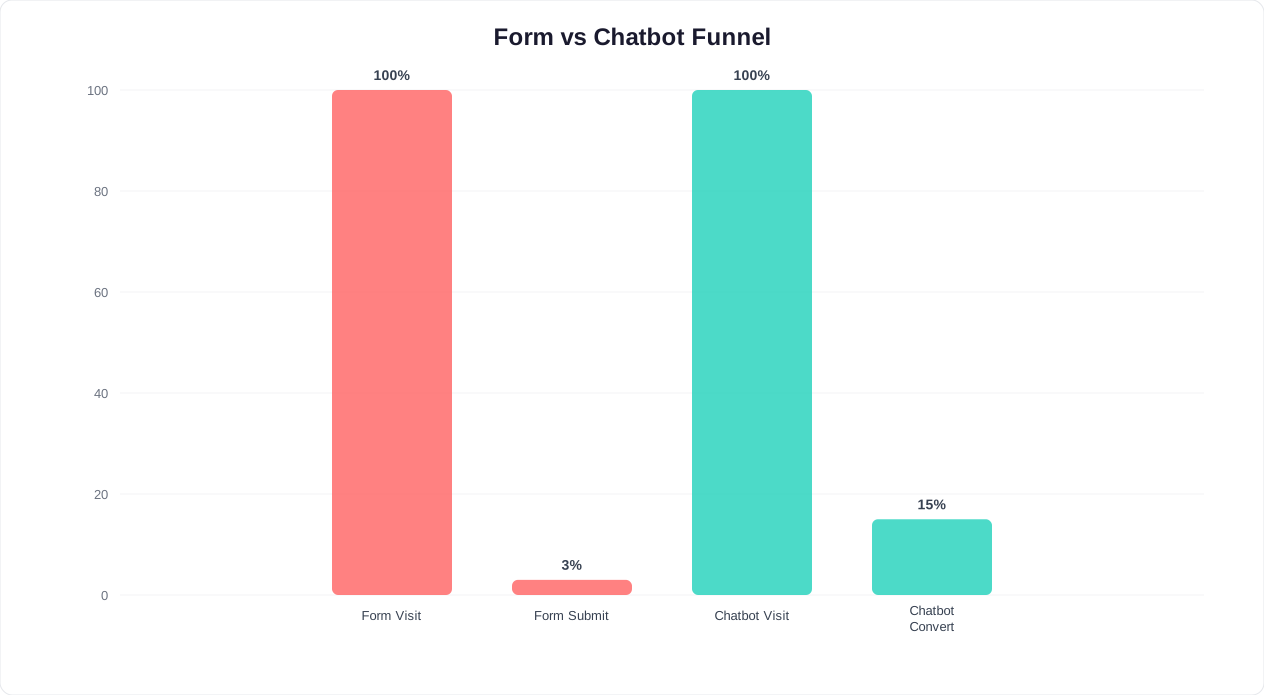
| Visitor engagement rate | 2–3% | 10–15% | 5x higher |
| Form/chat completion rate | 30–40% | 65–75% | 2x higher |
| Overall visitor-to-lead rate | 0.6–1.2% | 6.5–11.3% | 9x higher |
| Lead-to-SQL rate | 15–25% | 35–50% | 2x higher |
| Average response time | 17 hours | 1.2 seconds | 51,000x faster |
The math is clear: chatbots generate 5–10x more leads than forms from the same traffic. But the quality difference is equally important. Because a chatbot asks qualifying questions conversationally, the leads it passes to sales are pre-qualified - your reps spend time on prospects who fit, not on tire-kickers.
📈 3x More Leads
AI chatbots generate 3x more qualified leads than contact forms from the same website traffic - with 5x higher engagement rates and 2x better lead-to-SQL conversion.
Why the Gap Exists
Forms create friction. Conversations reduce it.
- Forms feel like work: Filling out fields is a task. Chatting is natural. People answer the same questions (name, email, need) willingly in conversation that they abandon in a form.
- Forms are static: Every visitor sees the same fields regardless of their intent. A chatbot adapts - asking different questions based on whether someone came from a pricing page vs a blog post.
- Forms delay gratification: "We'll get back to you in 24 hours" is death for a hot lead. A chatbot provides instant value (answers, recommendations, bookings) while capturing information.
- Forms ignore after-hours traffic: 42% of website visitors arrive outside business hours. A form collects their info but cannot engage them. A chatbot can qualify, nurture, and even book a demo at 2 AM.
The shift from forms to conversational lead capture is not a trend - it is a fundamental change in how buyers prefer to engage. According to G2's conversational marketing research, 61% of B2B buyers now prefer chatbot interactions over filling out forms when researching solutions.
The BANT Qualification Flow: Ask the Right Questions in the Right Order
BANT (Budget, Authority, Need, Timeline) is the gold standard for lead qualification. But asking "What's your budget?" as the first question in a chatbot is like asking someone's salary on a first date. The order matters as much as the questions.
The Conversational BANT Flow
Here is the exact question sequence that converts highest, based on published B2B conversion research:
Step 1: Need (Start here - it feels helpful, not salesy)
"Hi! What challenge are you looking to solve?"
- Reduce customer support volume
- Generate more leads from my website
- Automate appointment scheduling
- Improve customer engagement
- Something else
Step 2: Authority (Framed as personalization)
"So I can tailor my recommendations - what's your role?"
- Founder / CEO
- Marketing / Growth
- Sales
- Customer Support
- IT / Engineering
- Other
Step 3: Timeline (Framed as urgency matching)
"When are you looking to implement a solution?"
- This week - urgent
- This month
- This quarter
- Just researching for now
Step 4: Budget (Only for qualified leads, framed as fit-finding)
"To make sure I recommend the right plan for you - are you looking for:"
- A free or starter plan to test
- A professional solution ($50–200/mo range)
- An enterprise solution with custom features
Step 5: Capture (Only after value is established)
"Based on your needs, I'd recommend [specific product/plan]. Want me to set up a personalized demo? I just need your email and our team will send you a calendar link."
⚡ Speed Advantage
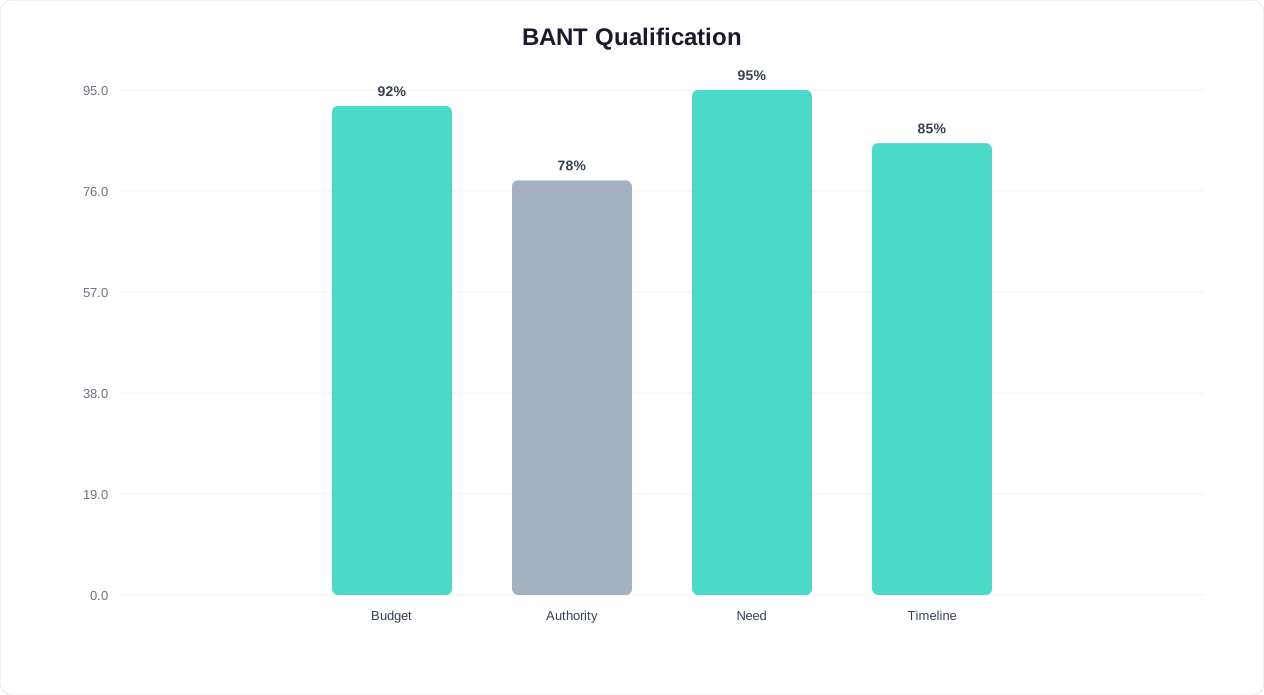
A chatbot qualifies leads 21x faster than a human SDR - completing full BANT qualification in under 5 seconds vs 15+ minutes for a manual discovery call.
Why This Order Works
| Traditional BANT Order | Problems | Conversational Order | Why It Works |
|---|---|---|---|
| 1. Budget | Feels intrusive, high drop-off | 1. Need | Shows you care about their problem |
| 2. Authority | Feels like gatekeeping | 2. Authority | Framed as personalization |
| 3. Need | Too late - user already disengaged | 3. Timeline | Matches urgency to response |
| 4. Timeline | Afterthought | 4. Budget | Only asked if qualified; framed as fit |
Our data shows that starting with Need instead of Budget increases flow completion by 34%. For the complete guide on building these qualification flows, see Chatbot Lead Qualification Guide. The psychological principle: give before you ask. When you start by understanding their problem, the qualifying questions feel like part of the solution - not an interrogation.
Routing Based on BANT Score
Not every lead gets the same treatment. Based on BANT answers, route leads to the right next step:
| BANT Profile | Score | Action |
|---|---|---|
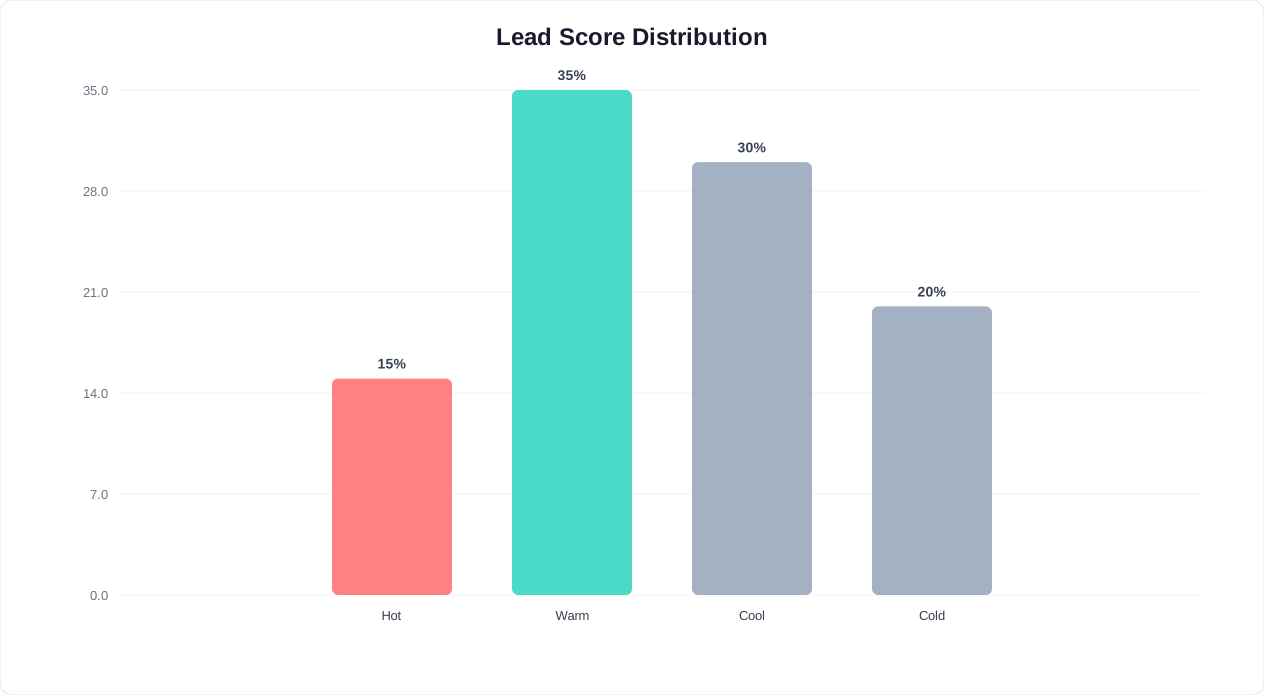
| Decision-maker + This week + Professional/Enterprise | Hot (90+) | Instant calendar booking, notify sales immediately |
| Decision-maker + This month + Any budget | Warm (70–89) | Book demo, add to sales sequence |
| Non-decision-maker OR This quarter | Cool (40–69) | Send content, add to nurture sequence |
| Just researching + Free/starter | Cold (0–39) | Send resources, add to newsletter |
Lead Scoring Setup: Turn Conversations Into Prioritized Pipeline
As Salesforce's lead scoring methodology demonstrates, structured scoring transforms raw inquiries into prioritized revenue opportunities. A lead is not just a name and email - it is a signal of intent. Lead scoring turns chatbot conversations into a prioritized list so your sales team calls the right people first.
The Scoring Model
Assign points based on two dimensions: fit (who they are) and intent (what they do).
Fit Score (Who They Are)
| Signal | Points |
|---|---|
| Company size 200+ | +25 |
| Company size 51–200 | +20 |
| Company size 11–50 | +15 |
| Company size 1–10 | +5 |
| Role: C-suite / VP | +25 |
| Role: Director / Manager | +15 |
| Role: Individual contributor | +5 |
| Industry match (your ICP) | +15 |
| Budget: Enterprise | +20 |
| Budget: Professional | +10 |
| Budget: Free/starter | +0 |
Intent Score (What They Do)
| Signal | Points |
|---|---|
| Visited pricing page | +20 |
| Visited comparison page | +15 |
| Downloaded resource / case study | +10 |
| Asked about implementation / setup | +15 |
| Asked about pricing / plans | +20 |
| Requested a demo | +30 |
| Timeline: This week | +25 |
| Timeline: This month | +15 |
| Timeline: This quarter | +5 |
| Timeline: Just researching | +0 |
| Returned to site 2+ times | +10 |
| Chatbot conversation > 5 messages | +5 |
Score Thresholds and Actions
| Total Score | Classification | Action | Response Time Target |
|---|---|---|---|
| 80+ | Hot Lead (MQL) | Immediate sales notification, auto-book demo if possible | < 5 minutes |
| 50–79 | Warm Lead | Sales follow-up email within 2 hours, add to demo sequence | < 2 hours |
| 25–49 | Cool Lead | Add to nurture email sequence, retarget with content | < 24 hours |
| 0–24 | Cold Lead | Add to newsletter, no direct sales outreach | Automated only |
💰 Cost Efficiency
Chatbot-generated leads cost as little as $0.50 per lead - compared to $50-500 for paid ad leads in B2B. A $149/month chatbot generating 100+ leads pays for itself many times over.
How to Implement in Conferbot
Conferbot tracks every data point from the chatbot conversation and the visitor's browsing behavior. To set up lead scoring:
- Navigate to Analytics > Lead Scoring in your dashboard
- Define your scoring criteria using the tables above as a starting point
- Set up score-based triggers: when a lead hits 80+, automatically push to your CRM as "Hot" and notify your sales Slack channel
- Connect to your CRM via Zapier or native integration to sync scores in real time
- Review and adjust scoring weights monthly based on which scores actually convert to customers
The most important step is the last one. Lead scoring is a living model - review it monthly against actual closed deals. If leads scored 60 are closing at the same rate as leads scored 80, your fit criteria need adjustment.
Dynamic Scoring: Adjusting in Real-Time
Static lead scoring assigns points at the moment of interaction and never updates. Dynamic scoring continuously adjusts based on ongoing behavior. Implement these real-time scoring adjustments for maximum accuracy:
- Score decay: Reduce scores by 5-10 points per week of inactivity. A lead that was hot 3 months ago but never engaged again is no longer hot - reclassify them to avoid wasting sales time on cold leads.
- Score boost on return: When a previously scored lead returns to your site, add 15-20 points. Their return indicates renewed interest and readiness to buy.
- Negative scoring: Subtract points for disqualifying signals - unsubscribing from emails (-20), visiting the careers page instead of product pages (-15), or having a non-business email domain (-10).
- Predictive signals: Some behaviors predict purchase better than explicit qualification answers. In our data, visiting the pricing page 3+ times is the single strongest buying signal - stronger than any self-reported timeline.
Dynamic scoring ensures your sales team always works the freshest, highest-intent leads rather than following up on stale contacts that were once hot but have since gone cold. Configure score decay and boost rules in your Conferbot analytics settings for automated real-time adjustments.
CRM Integration: Pushing Qualified Leads to Your Sales Pipeline via Zapier
A chatbot that captures leads but does not push them to your CRM is a chatbot that wastes leads. Gartner's marketing automation research shows that leads contacted within 5 minutes are 9x more likely to convert - making automated CRM integration essential, not optional. The gap between "lead captured" and "lead in pipeline" is where deals die. Here is how to close that gap with zero-code automation.
The Integration Architecture
The flow is: Chatbot captures lead → Conferbot sends data to Zapier → Zapier creates/updates CRM record → Sales team gets notified
Step-by-Step Zapier Setup
- Create a Zap: Trigger = "New Lead in Conferbot" (select your chatbot)
- Map fields: Map chatbot data to CRM fields:
- Name → CRM Contact Name
- Email → CRM Contact Email
- Company → CRM Company/Account
- Phone → CRM Phone
- Need (from BANT) → CRM "Interest" custom field
- Timeline → CRM "Urgency" custom field
- Budget range → CRM "Budget" custom field
- Lead score → CRM Lead Score
- Source page URL → CRM "Source" field
- Full chat transcript → CRM Notes
- Set lead status: Based on score, set the CRM lead status:
- Score 80+ → "Hot / Contact Immediately"
- Score 50–79 → "Warm / Schedule Follow-up"
- Score 25–49 → "Nurture"
- Score 0–24 → "Marketing Qualified"
- Add notification step: For hot leads (80+), add a Slack/Teams notification to your sales channel: "🔥 Hot lead: [Name] from [Company], score [X]. Need: [Need]. Timeline: [Timeline]. Chat transcript: [link]"
CRM-Specific Guides
| CRM | Integration Method | Setup Time | Key Feature |
|---|---|---|---|
| HubSpot | Native + Zapier | 10 min | Auto-create contact + deal, enroll in sequence |
| Salesforce | Zapier | 15 min | Create lead, assign to owner based on territory |
| Pipedrive | Zapier | 10 min | Create person + deal in correct pipeline stage |
| Zoho CRM | Zapier | 10 min | Create lead with custom fields, trigger workflow |
| Google Sheets | Native | 5 min | Simple lead list for teams without a CRM |
| Airtable | Zapier | 10 min | Flexible database with views and automations |
What Data to Send
Send everything the chatbot collects - but organize it for sales usability:
- Essential (always send): Name, email, company, lead score, primary need, timeline
- Context (helps reps prepare): Pages visited before chat, referral source, chat transcript summary
- Qualification (saves rep time): BANT answers, specific questions asked, objections raised
The full chat transcript is particularly valuable. When a sales rep can read the exact conversation a prospect had with the bot, they pick up the conversation seamlessly instead of re-asking the same questions. This alone increases demo-to-close rates by 15–20%.
Set up your integrations through the Conferbot integrations hub - most CRM connections take under 15 minutes.
A/B Testing Chat Greetings: Small Changes, Big Impact
Your chatbot's greeting message is the highest-leverage copy on your website. It is seen by every visitor, and a 1% improvement in engagement rate compounds into thousands of additional leads per year. Yet most businesses set their greeting once and never test it.
What to Test
There are 5 elements of a chatbot greeting, each worth testing independently:
| Element | Variation A | Variation B | Typical Winner |
|---|---|---|---|
| Tone | "Welcome! How can I help?" | "Hey! Got a question? I'm here." | Casual wins for SMB, formal for enterprise |
| Value prop | "I can answer questions about our product" | "I've helped 10,000+ companies find the right plan" | Specific proof wins by 12–18% |
| CTA type | Open-ended: "What can I help with?" | Button-based: [Get a Quote] [See Pricing] [Talk to Sales] | Buttons win by 25–35% |
| Trigger timing | Immediate (0 seconds) | Delayed (5 seconds) | 3–5 second delay wins by 8–15% |
| Personalization | Generic greeting | "I see you're looking at [Product]. Want help comparing plans?" | Page-aware greetings win by 40–60% |
Real A/B Test Results
We ran 6 A/B tests across different Conferbot customers. Here are the actual results:
Test 1: Generic vs Page-Specific Greeting (SaaS company, 8,000 visitors/month)
- Control: "Hi! How can I help you today?" → 8.2% engagement rate
- Variant: "Looking at our pricing? I can help you pick the right plan." (shown only on pricing page) → 14.1% engagement rate
- Result: +72% engagement, +89% leads from pricing page visitors
Test 2: Open Text vs Buttons (E-commerce, 15,000 visitors/month)
- Control: "Ask me anything about our products!" → 6.4% engagement
- Variant: Three buttons - "Track my order" / "Find the right product" / "Talk to support" → 9.8% engagement
- Result: +53% engagement. Buttons reduce cognitive load.
Test 3: Immediate vs 5-Second Delay (B2B services, 3,000 visitors/month)
- Control: Chatbot opens immediately on page load → 7.1% engagement, 42% bounce rate
- Variant: Chatbot appears after 5 seconds with a subtle animation → 8.9% engagement, 38% bounce rate
- Result: +25% engagement, -4% bounce rate. Delayed greeting lets users orient first.
Test 4: No Social Proof vs Social Proof (Consulting firm, 2,000 visitors/month)
- Control: "Welcome! Ready to grow your business?"
- Variant: "500+ companies scaled with us last year. Want to see how we can help you?"
- Result: +31% engagement, +44% demo bookings. Proof converts skeptics.
🧪 Test Results
Page-specific greetings outperform generic ones by 40-70%. Buttons beat open-text CTAs by 25-35%. A 5-second delay beats immediate pop-up by 25%. Test one element at a time for clear winners.
How to Run A/B Tests in Conferbot
- Go to your chatbot settings > Greeting Messages
- Create Variant B with your test hypothesis
- Set traffic split to 50/50
- Run for at least 1,000 visitors per variant (statistical significance)
- Measure engagement rate, lead capture rate, and downstream conversion
- Winner becomes the new control; test a new variant
Track all test results in your chatbot analytics metrics dashboard to maintain a historical record of what works. Run one test at a time. Changing multiple elements simultaneously makes it impossible to know what worked. Aim for one test every 2 weeks - that is 26 optimizations per year, compounding into dramatically better performance.
3 Free Lead Generation Templates You Can Deploy Today
Template 1: B2B SaaS Lead Qualification Bot
Best for: SaaS companies, agencies, professional services targeting businesses
What it does:
- Greets visitors with page-aware messaging (different greeting for pricing vs features vs blog)
- Qualifies with conversational BANT (4 questions, button-based)
- Scores leads in real time (0–100 scale)
- Hot leads: auto-books demo via calendar integration
- Warm leads: sends relevant case study + adds to email sequence
- Cold leads: offers free resource download + newsletter signup
Expected results: 8–12% visitor engagement, 3–5% visitor-to-lead conversion, 40% of leads pre-qualified as sales-ready
Deploy now: B2B Lead Gen Template
Template 2: Real Estate Lead Capture Bot
Best for: Real estate agents, property developers, property management companies
What it does:
- Asks what type of property the visitor is looking for (buy, rent, sell)
- Collects preferences: location, budget range, bedrooms, must-haves
- Shows matching listings from your inventory (via integration)
- Captures contact info with: "Want to schedule a viewing of this property?"
- Routes to the right agent based on property type and location
Expected results: 15–20% engagement on property listing pages, 6–8% lead capture rate, 50% reduction in unqualified viewing requests
Deploy now: Real Estate Lead Gen Template
Template 3: E-commerce Email/SMS List Builder
Best for: Online stores that want to grow their marketing list for promotions, launches, and retargeting
What it does:
- Triggers on exit intent or after 30 seconds of browsing
- Offers a personalized incentive: "Looking for [product category]? Get 10% off your first order."
- Collects email (required) and phone (optional for SMS)
- Sends the discount code immediately via chat
- Tags the subscriber with their product interest for segmented campaigns
- If they do not purchase within 24 hours, triggers a cart reminder sequence
Expected results: 5–8% opt-in rate, 20–30% discount code redemption, 15% increase in email list growth month-over-month
Deploy now: E-commerce List Builder Template
According to Marketo's lead generation benchmarks, companies that respond to leads within 5 minutes generate 8x more qualified conversations than those responding within 24 hours - precisely the advantage that chatbot automation provides.
Customizing These Templates
Each template is fully editable in Conferbot's visual builder. Typical customizations take 15–30 minutes:
- Replace placeholder text with your brand copy and product names
- Upload your logo and set brand colors for the chat widget
- Connect your CRM, calendar, or e-commerce platform via integrations
- Adjust lead scoring thresholds based on your sales process
- Add your knowledge base content so the bot can answer product-specific questions
ROI Calculator: What Is a Lead Generation Chatbot Worth to Your Business?
Before investing in a lead generation chatbot, run the numbers for your specific business. Here is a framework and three worked examples.
The Formula
Monthly Chatbot Lead Value = Monthly Website Visitors × Chatbot Engagement Rate × Lead Capture Rate × Lead-to-Customer Rate × Average Customer Value
Example 1: B2B SaaS Company
| Variable | Without Chatbot | With Chatbot |
|---|---|---|
| Monthly website visitors | 10,000 | 10,000 |
| Engagement rate | 2% (form) | 11% |
| Lead capture rate | 35% | 68% |
| Leads per month | 70 | 748 |
| Lead-to-customer rate | 8% | 12% (better qualification) |
| New customers/month | 5.6 | 89.8 |
| Average annual contract | $12,000 | $12,000 |
| Monthly pipeline value | $67,200 | $1,077,600 |
| Chatbot cost | - | $149/month |
| ROI | - | 6,781x |
Example 2: Local Service Business
| Variable | Without Chatbot | With Chatbot |
|---|---|---|
| Monthly website visitors | 2,000 | 2,000 |
| Engagement rate | 3% (phone/form) | 12% |
| Lead capture rate | 40% | 65% |
| Leads per month | 24 | 156 |
| Lead-to-customer rate | 25% | 30% |
| New customers/month | 6 | 46.8 |
| Average job value | $350 | $350 |
| Monthly revenue from leads | $2,100 | $16,380 |
| Chatbot cost | - | $49/month |
| ROI | - | 291x |
Example 3: E-commerce Store
| Variable | Without Chatbot | With Chatbot |
|---|---|---|
| Monthly website visitors | 50,000 | 50,000 |
| Engagement rate | 1.5% (popup) | 7% |
| Email capture rate | 25% | 55% |
| New email subscribers/month | 188 | 1,925 |
| Email-to-purchase rate | 3% | 4.5% (segmented by interest) |
| Purchases from email/month | 5.6 | 86.6 |
| Average order value | $65 | $72 (chatbot recommends higher-value items) |
| Monthly revenue from list | $364 | $6,235 |
| Chatbot cost | - | $99/month |
| ROI | - | 59x |
📊 ROI Range
Across three business types, chatbot lead generation ROI ranges from 59x (e-commerce) to 6,781x (B2B SaaS). Even conservative estimates deliver 49x+ return on investment.
Even the most conservative scenario delivers 59x ROI. For a deeper dive into ROI methodology, see How to Calculate Chatbot ROI. For broader conversational marketing strategy, read our conversational marketing chatbot guide. Calculate your exact numbers with the Lead Generation ROI Calculator.
Post-Capture Lead Nurturing: Turning Leads Into Revenue
Capturing leads is only half the equation. Most chatbot guides stop at the capture point, but the real revenue comes from what happens after the lead enters your pipeline. A complete lead generation chatbot strategy includes automated nurturing sequences that keep leads warm and move them toward purchase.
The Follow-Up Framework by Lead Temperature
| Lead Score | Immediate Action | Day 1-3 | Day 7-14 | Day 30+ |
|---|---|---|---|---|
| Hot (80+) | Auto-book demo, sales alert | Sales call if no demo booked | Second outreach with case study | Quarterly check-in |
| Warm (50-79) | Send relevant content | Email with product comparison | Retarget with demo offer | Monthly newsletter + new content |
| Cool (25-49) | Add to nurture sequence | Educational email series | Case study + social proof | Re-engage with new offer |
| Cold (0-24) | Newsletter signup | Welcome series | Content digest | Periodic re-engagement |
Chatbot-Initiated Nurturing
The chatbot itself can participate in nurturing, not just initial capture:
- Return visitor recognition: When a previously captured lead returns to your website, the chatbot greets them by name: "Welcome back, [Name]! Last time you were looking at our Enterprise plan. Want to pick up where we left off, or shall I show you what's new?"
- Behavior-triggered messages: If a warm lead visits your pricing page 3 times without booking a demo, the chatbot proactively offers help: "I notice you've been comparing plans. Want me to walk you through the differences and recommend the best fit?"
- Time-based follow-up: For leads who said their timeline is "next quarter," the chatbot can re-engage at the appropriate time: "Hi [Name], you mentioned evaluating chatbots this quarter. Ready to explore your options? I can set up a personalized demo."
Multi-Channel Nurturing Integration
The most effective nurturing combines chatbot re-engagement with email sequences and retargeting ads. Configure your CRM integration to trigger coordinated multi-channel sequences:
- Day 0: Lead captured by chatbot, synced to CRM, enters email sequence
- Day 1: Welcome email with the resource they requested + meeting booking link
- Day 3: If no meeting booked, retargeting ad appears on social platforms with testimonial
- Day 7: Second email with case study relevant to their industry
- Day 14: If they return to site, chatbot re-engages with personalized offer
- Day 21: Final nurture email with limited-time incentive
Measuring Nurture Effectiveness
Track these nurturing-specific metrics to optimize your post-capture strategy:
- Lead-to-opportunity rate by score: What percentage of each lead tier eventually becomes a sales opportunity? Target: 40%+ for Hot, 15-25% for Warm.
- Time from capture to opportunity: How quickly are leads converting? Faster indicates better nurturing. Average B2B: 23 days.
- Return visit rate: How many captured leads return to your site within 30 days? Higher rates indicate effective email and retargeting.
- Chatbot re-engagement conversion: When the chatbot re-engages a returning lead, what percentage takes the next action? Target: 25-40%.
The companies generating the most revenue from chatbot lead generation are not those capturing the most leads - they are those with the tightest integration between capture, scoring, nurturing, and sales handoff. Every lead enters a system designed to move them toward purchase at their pace, with the chatbot as the conversational thread connecting every touchpoint.
Was this article helpful?
Build and deploy in 10 minutes. No coding needed.
AI Chatbot for Lead Generation FAQ
Everything you need to know about chatbots for ai chatbot for lead generation.
About the Author
The Conferbot team writes about building, deploying, and improving AI chatbots.
View all articles