
Virtual Event Registration
Free Booking And Scheduling Chatbot Template
A complete virtual event registration chatbot template - deploy in minutes to automate conversations, capture leads, and provide 24/7 assistance.


What Is a Virtual Event Registration Chatbot?
A virtual event registration chatbot is a conversational AI tool that automates the complete attendee journey for virtual, hybrid, and in-person events -- from initial registration and session selection through access link delivery, live event support, speaker Q&A facilitation, networking matching, post-event surveys, and certificate distribution. It replaces the static registration forms, disconnected email sequences, and manual administrative workflows that create friction in event management and reduce attendance rates.
The virtual and hybrid events industry has grown exponentially since 2020 and shows no signs of contracting. In 2026, organizations host more virtual events than ever -- webinars, virtual conferences, online workshops, hybrid summits, and digital product launches. Yet the operational challenges remain significant: registration-to-attendance drop-off is a well-known problem for email-only registration workflows, with a large share of registrants never showing up. The revenue, sponsorship, and engagement implications of this drop-off are severe.
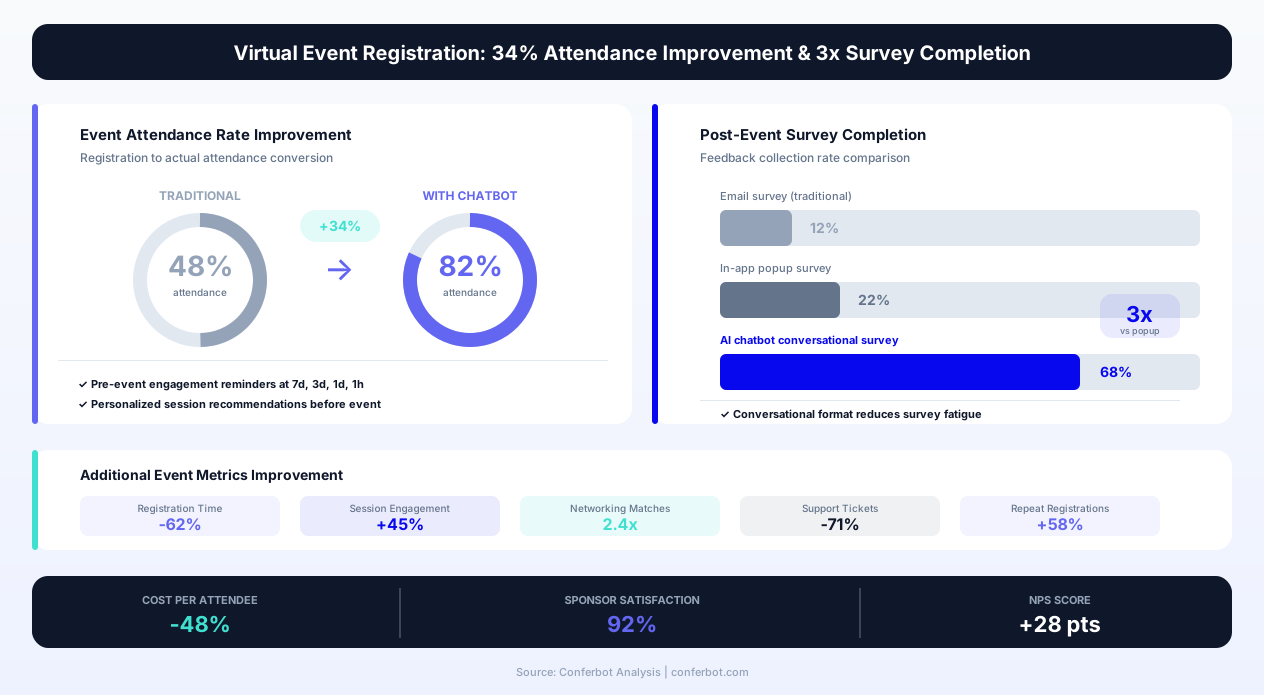
Virtual events with chatbot-driven registration see meaningfully higher attendance rates compared to email-only registration workflows. This improvement comes from three mechanisms: conversational registration creates stronger commitment than form-fills, personalized session recommendations increase perceived event value, and multi-channel reminder sequences through high-engagement channels (WhatsApp, SMS) maintain awareness and intent through the days or weeks between registration and event day.
This template is built on Conferbot's AI chatbot builder and integrates with leading event platforms including Zoom Events, Hopin, Eventbrite, Cvent, and Microsoft Teams. It deploys across your event website, WhatsApp, Messenger, and within the event platform itself -- providing attendees with a single intelligent assistant from discovery through post-event follow-up.
Whether you are organizing a 50-person webinar, a 5,000-person virtual conference, or a hybrid event with both in-person and remote attendees, this chatbot template scales to your event complexity, handles multi-track scheduling, manages speaker coordination, and delivers the personalized attendee experience that drives engagement, satisfaction, and return attendance at future events.
How It Works: Registration, Personalization, and Engagement
The virtual event registration chatbot manages the complete attendee lifecycle -- from first touchpoint through post-event actions. The conversational approach transforms registration from a transactional form-fill into an engaging interaction that builds event anticipation and commitment.
Step 1: Conversational Registration
Rather than presenting a static form with 8-12 fields, the chatbot conducts registration as a brief conversation. It collects essential information step by step: name, email, organization/company, role/title, and any custom fields relevant to your event (dietary requirements for hybrid events, timezone for global events, accessibility needs). The conversational format achieves two things: it feels lighter than a long form (even though the same information is collected), and it allows conditional logic -- questions that only appear based on previous answers. A registrant who identifies as a speaker sees different follow-up questions than a general attendee. A hybrid event registrant who selects "attending in-person" gets venue and travel questions that virtual attendees skip.
Step 2: Session and Track Selection
For multi-track events, the chatbot presents the event agenda conversationally and helps attendees build their personalized schedule. Rather than presenting a dense agenda grid, it asks about interests and goals first: "What topics are you most interested in? AI/ML, Product Management, or Leadership?" Based on responses, it recommends specific sessions with descriptions, speaker bios, and time slots. Attendees confirm their selections, and the chatbot builds their personalized agenda. This recommendation approach -- presenting curated suggestions rather than overwhelming choice -- meaningfully increases average session selections compared to attendees browsing an agenda independently. More session selections correlates directly with higher attendance rates and longer event engagement.
Step 3: Pre-Event Engagement Sequence
Between registration and event day, the chatbot maintains engagement through a calibrated communication sequence. For events 1-2 weeks away: a confirmation message immediately after registration, a "your personalized agenda" summary 3-5 days before, a day-before reminder with access links and technical preparation (test your audio/video, download the app), and a morning-of reminder with direct session links. Each message is actionable -- not just informational -- giving attendees something to do (add to calendar, test their setup, review speaker bios) that reinforces commitment. This sequence drives the attendance improvement over email-only communication.
Step 4: Event-Day Support
During the live event, the chatbot serves as an attendee's personal assistant. It provides: session start reminders 5 minutes before each selected session, direct access links to sessions (eliminating platform navigation), speaker Q&A submission (attendees send questions to the chatbot which aggregates and delivers them to session moderators), networking suggestions ("Based on your interests, you might want to connect with these attendees"), and real-time help with technical issues (audio not working, video buffering, how to access recordings). This live support reduces attendee frustration, increases session-to-session retention, and captures engagement data that informs post-event follow-up.
Step 5: Post-Event Actions
After the event concludes, the chatbot manages: session recording delivery (personalized to each attendee's selected sessions), post-event surveys with completion incentives, speaker presentation/slide distribution, certificate of attendance or continuing education credit delivery, networking follow-up facilitation, and early-bird registration for future events. Post-event engagement within 24 hours captures feedback while the experience is fresh and establishes the relationship pipeline for future event promotion.
Key Features of the Virtual Event Registration Chatbot
The virtual event registration chatbot includes features designed for the complete event lifecycle -- not just registration but ongoing engagement before, during, and after the event. These features address the specific challenges of virtual event management where physical presence does not create natural accountability for attendance.
| Feature | Description | Operational Benefit | Customer Benefit |
|---|---|---|---|
| Conversational registration | Step-by-step registration through chat instead of static forms | Meaningfully higher completion rates than long forms | Quick, engaging registration without form fatigue |
| Personalized agenda builder | Interest-based session recommendations with schedule construction | Increases average session attendance | Curated schedule matching your specific interests |
| Multi-channel reminders | Automated reminder sequence via WhatsApp, SMS, and email with access links | Meaningfully higher attendance rate vs. email-only | Never forget your event; links ready when you need them |
| Access link delivery | Personalized session links delivered at the right moment (5 min before start) | Sharply reduces "I can't find the link" support requests | One-tap access to each session without platform navigation |
| Speaker Q&A aggregation | Attendees submit questions via chatbot; moderators receive curated queue | Higher quality Q&A; broader participation; organized delivery | Ask questions privately without unmuting or typing in public chat |
| Networking matching | AI-powered attendee matching based on role, interests, and goals | Increases perceived event value; drives repeat attendance | Connect with relevant people without random networking anxiety |
| Live technical support | Instant troubleshooting for audio, video, access, and platform issues | Meaningfully reduces support team ticket volume | Fix technical issues immediately without missing content |
| Post-event surveys | Conversational feedback collection with conditional follow-up questions | Meaningfully higher survey completion rates vs. email surveys | Quick feedback that actually influences future events |
| Certificate generation | Automated attendance verification and certificate/CE credit delivery | Eliminates manual certificate processing for hundreds/thousands of attendees | Instant proof of attendance for professional development |
| Waitlist and capacity management | Capacity-limited session waitlists with automated notification | Manages popular session overflow without manual intervention | Get notified if a spot opens in a full session |
AI-Powered Networking Matching
Networking is consistently rated as the top value driver for event attendance -- yet virtual events struggle to replicate the serendipitous connections that happen at in-person coffee breaks and receptions. The chatbot's networking feature addresses this by collecting attendee goals ("I'm looking to connect with product managers working on AI tools" or "I want to find potential partners for my SaaS startup") and matching attendees with complementary interests, roles, or goals. Matched pairs or small groups receive a chatbot introduction with shared context: "You both work in healthcare AI and expressed interest in data privacy. Here's a link to a 15-minute video meeting." This facilitated introduction eliminates the awkwardness of cold outreach and creates higher-quality connections than random networking rooms.
Speaker Q&A Management
Live Q&A during virtual sessions suffers from multiple problems: attendees are shy about unmuting or typing in public chat, questions pile up faster than speakers can answer, and duplicate questions waste time. The chatbot collects questions from attendees privately during the session, deduplicates similar questions, upvotes popular topics, and delivers a curated queue to the session moderator. Speakers see the most-asked questions prioritized rather than a chronological list. Attendees who asked questions that were not addressed during the live session receive answers asynchronously after the event -- ensuring no question goes unanswered, even when time runs out.
Attendance Verification and Certificates
For events offering continuing education credits, professional development hours, or attendance certificates, the chatbot provides automated verification. It tracks: which sessions each attendee actually joined (not just registered for), duration of attendance per session, engagement indicators (Q&A participation, poll responses), and final certification eligibility. Certificates are generated and delivered automatically to qualifying attendees within 24 hours of event conclusion, eliminating the manual processing that can take weeks for large events with hundreds of attendees requiring individual certificates.
Ready to try Virtual Event Registration?
Deploy this template in under 10 minutes. No coding required.
Use This Template Free →Before and After: Event Operations Transformation
The operational transformation from deploying a virtual event registration chatbot impacts registration rates, attendance, engagement, and post-event outcomes. Below is a comprehensive comparison based on events ranging from 100-person webinars to 10,000-person virtual conferences.
Registration and Attendance Metrics
| Metric | Before Chatbot | After Chatbot |
|---|---|---|
| Registration form completion rate | Meaningful form abandonment | Noticeably higher, conversational |
| Registration-to-attendance rate | Lower, with email reminders only | Higher, with multi-channel + personalization |
| Average sessions attended per registrant | Baseline | Meaningfully more sessions |
| Day-of technical support requests | Meaningful share of attendees need help | Lower, with most resolved by chatbot |
| Post-event survey completion rate | Low, with email survey | Substantially higher, conversational survey |
| Networking participation rate | Low, with random networking rooms | Substantially higher, with matched introductions |
| Certificate/CE credit delivery time | Days, manual processing | Instant, automated verification |
| Repeat event registration rate | Baseline | Meaningfully higher |
Revenue Impact for Paid Events
For paid virtual events and conferences, the chatbot's attendance improvement translates directly to revenue protection and growth. Every additional registrant who actually attends is one fewer paid-but-absent ticket -- lost engagement that hurts satisfaction and refund risk. The math scales with your own ticket price and registrant count: a meaningful lift in attendance rate translates into real additional engagement with sponsored content, exhibition halls, and networking, which directly impacts sponsor satisfaction and renewal rates.
For events with tiered pricing (early bird, standard, VIP), the chatbot's urgency and personalization capabilities improve early-bird conversion, improving revenue forecasting and cash flow. VIP upsell during the registration conversation (presenting VIP benefits contextually rather than as a separate page) converts at a meaningfully higher rate than typical website upsell pages.
Sponsor Value Improvement
Event sponsors care about attendee engagement, not just registrant numbers. The chatbot's impact on actual attendance, session participation, and networking engagement directly increases the value sponsors receive. Chatbot-facilitated sponsor booth visits ("Based on your interest in data analytics, you might want to visit the Tableau booth") drive targeted traffic to sponsor content. Events using chatbot-driven sponsor engagement report meaningfully higher sponsor satisfaction scores and higher sponsor renewal rates -- protecting a revenue stream that represents a large share of total event revenue for many conference organizers.
Event Team Workload Reduction
The operational efficiency gains free event teams from administrative tasks to focus on content quality and strategic growth. Specific workload reductions: registration processing (fully automated), reminder campaigns (automated multi-channel sequences replace manual email creation), day-of support (largely resolved by chatbot), certificate processing (automated), and survey analysis (structured data from chatbot surveys vs. free-text email responses). For a large virtual conference, the chatbot typically eliminates a substantial number of hours of administrative work across the event lifecycle -- freeing up real event-team capacity.
AI-Powered Networking and Attendee Matching
Networking is the number one reason professionals attend events -- yet virtual events consistently underdeliver on networking compared to in-person experiences. The gap is not technological (video calls work fine) but structural: virtual events lack the organic social cues and physical proximity that drive in-person connections. The chatbot's networking feature bridges this gap with intelligent matching that creates higher-quality connections than even in-person events typically produce.
How Matching Works
The chatbot collects networking preferences during registration or in a pre-event interaction: professional role and seniority level, industry and company type, specific topics of interest, networking goals (finding partners, seeking mentors, hiring, selling, learning), and preferred networking format (1:1 video, small group discussion, async text chat). The matching algorithm considers: complementary goals (a buyer matched with a relevant seller; a mentee matched with a potential mentor), shared interests with different perspectives (same topic, different industry), organizational fit (startup founder matched with enterprise innovation lead), and explicit preferences (language, timezone availability for async events).
Facilitated Introduction Format
When matches are identified, the chatbot facilitates introductions rather than simply sharing contact information. The introduction message includes: why the match was made (shared interest, complementary goals), brief context about each person (role, company, stated goals), and an actionable next step (a video meeting link, a scheduled 15-minute chat slot, or a shared discussion channel). This facilitated format achieves substantially higher acceptance rates compared to random networking room assignments. The quality of facilitation -- making the connection feel intentional rather than random -- overcomes the social friction that prevents most attendees from engaging with virtual networking features.
Group Networking Sessions
Beyond 1:1 matching, the chatbot organizes interest-based small group discussions. Attendees with overlapping interests are grouped into 4-6 person roundtable discussions with a shared topic and optional discussion prompts. The chatbot manages: topic selection (based on attendee-expressed interests), scheduling (finding mutual availability across time zones for global events), group composition (mixing seniority levels and backgrounds for diverse perspectives), and post-session follow-up (sharing contact information among group members who opt in). These facilitated small groups replicate the "hallway conversation" experience of in-person conferences where the best connections often happen outside formal sessions.
Post-Event Connection Nurturing
Networking value diminishes rapidly if connections are not nurtured after the event. The chatbot supports post-event relationship building by: sending connection summaries to attendees (everyone they met, conversation context), suggesting follow-up actions ("You discussed a potential pilot project with Sarah -- would you like me to suggest a follow-up meeting?"), and creating attendee communities organized by topic or region that persist beyond the event. This ongoing engagement transforms an event from a point-in-time experience into a community platform, dramatically increasing the lifetime value of event participation and creating a natural audience for future events.
Privacy and Consent
All networking features operate on explicit opt-in consent. Attendees choose whether to participate in networking, what information is shared with matches, and what format of introduction they prefer. The chatbot respects these preferences absolutely -- an attendee who declines networking is never matched or contacted with networking suggestions. For events governed by GDPR or similar data protection regulations, the chatbot's consent architecture ensures compliant handling of attendee personal information shared for networking purposes.
Integration with Event Platforms and Tools
The virtual event registration chatbot integrates with the event technology platforms that organizers use to host and manage their events. This integration ensures registration data, session schedules, and attendee engagement flow seamlessly between the chatbot and your event infrastructure.
Zoom Events Integration
Zoom Events is widely adopted for virtual conferences, webinars, and hybrid events. The Conferbot integration connects through Zoom's API to: create and manage event registrations, generate personalized access links for each registrant, track attendance and session participation in real-time, and retrieve recording links for post-event distribution. The chatbot can deliver Zoom join links directly to attendees via WhatsApp or SMS minutes before each session starts -- eliminating the common problem of attendees searching through emails for their unique access link. For Zoom Webinars, the chatbot handles the Q&A function externally, collecting and prioritizing questions for the moderator.
Hopin Integration
Hopin provides a comprehensive virtual event platform with stages, sessions, networking, and expo areas. The integration allows the chatbot to: register attendees directly into Hopin events, deliver personalized magic links for seamless access, track which areas attendees visit (stages, sessions, expo booths, networking), and facilitate navigation within the platform. For attendees unfamiliar with Hopin's interface, the chatbot serves as a guide: "Your next session 'AI in Healthcare' starts in 5 minutes in the Keynote Stage. Click here to go directly there." This guidance reduces platform learning-curve friction that causes attendees to disengage.
Eventbrite Integration
Eventbrite is the dominant platform for event ticketing and registration, particularly for free and low-cost events. The Conferbot integration creates and manages Eventbrite registrations, handles ticket-type selection (general admission, VIP, speaker, sponsor), processes payments for paid events, and syncs attendee data bidirectionally. For organizers using Eventbrite's marketing features, chatbot-captured registrant data flows into Eventbrite's email marketing tools for supplementary communication.
Cvent Integration
Cvent is the enterprise standard for large corporate events and conferences. The integration handles complex registration workflows including: multi-session events with track selection, speaker and sponsor registration portals, group registration for corporate attendees, and complex pricing (early bird, member/non-member, group discounts). The chatbot simplifies Cvent's powerful but complex registration process by presenting options conversationally rather than through Cvent's form-heavy interface.
| Platform | Integration Method | Key Capabilities | Best For |
|---|---|---|---|
| Zoom Events/Webinar | Zoom API | Registration, access links, attendance tracking, Q&A | Webinars, virtual conferences, training events |
| Hopin | Hopin API | Registration, magic links, area tracking, navigation | Large virtual/hybrid conferences with multiple areas |
| Eventbrite | Eventbrite API | Ticketing, registration, payments, attendee management | Free/paid events, community events, workshops |
| Cvent | Cvent API | Complex registration, multi-track, group, pricing tiers | Enterprise conferences, association events |
| Microsoft Teams | Graph API | Meeting creation, access links, attendance, chat integration | Corporate internal events, training programs |
| Webex Events | Webex API | Registration, session management, polling, Q&A | Enterprise webinars and virtual events |
CRM and Marketing Automation Integration
Beyond event platforms, the chatbot integrates with CRM (Salesforce, HubSpot) and marketing automation (Marketo, Pardot, Mailchimp) systems to: sync registrant data as leads/contacts, trigger post-event nurture campaigns, score engagement for sales follow-up, and attribute event participation to revenue outcomes. This integration is critical for B2B events where the event is a lead generation vehicle -- the chatbot captures registration data enriched with interest and engagement signals that inform post-event sales outreach. Integration with your existing technology stack ensures event data flows into your broader customer engagement infrastructure.
businesses worldwide use Conferbot templates to automate conversations
Use Cases: Conferences, Webinars, and Hybrid Events
The virtual event registration chatbot adapts to the distinct requirements, scales, and attendee expectations of different event types. Configuration reflects the specific workflow, engagement, and communication needs of each event format.
Virtual Conferences (500-10,000+ attendees)
Large virtual conferences have the most complex requirements: multi-track agendas with dozens of sessions, multiple speaker tracks, expo/sponsor areas, networking events, and multi-day schedules. The chatbot manages this complexity by personalizing each attendee's experience rather than overwhelming them with the full event scope. Registration captures interest areas to power session recommendations. Pre-event communication builds anticipation with speaker spotlights and session previews matching expressed interests. Day-of support provides personalized schedules, just-in-time session links, and navigation assistance. Post-event delivers curated recordings (only sessions in their interest areas, not the full 50-session library).
Webinars and Workshops (50-500 attendees)
Webinars have simpler logistics but higher attendance pressure -- a webinar where only a fraction of registrants actually attend underdelivers for both the audience and the presenter. The chatbot for webinars focuses on maximizing attendance through: friction-free one-minute registration, aggressive reminder sequence (the shorter the event, the more critical reminders are), incentive delivery for attendance (access to recording, bonus materials), and Q&A collection that starts before the webinar (pre-submitted questions inform the presenter and give attendees a reason to attend for their answer). For workshop-format events with interactive components, the chatbot also handles: pre-work distribution, material access, and breakout group assignment.
Hybrid Events (In-Person + Virtual)
Hybrid events require managing two distinct attendee experiences with equitable engagement. The chatbot handles: registration with attendance-mode selection (in-person vs. virtual), mode-specific logistics (venue directions and parking for in-person; tech requirements and access links for virtual), unified networking across both groups, and mode-specific day-of support. The critical challenge for hybrid events -- making virtual attendees feel equally engaged rather than like an afterthought -- is addressed through active chatbot engagement: pushing content, facilitating cross-mode networking ("Virtual attendee Sarah and in-person attendee Mike share your interest in fintech -- here's a link to connect"), and providing the personalization that physical presence delivers naturally.
Corporate Training Events
Corporate training events (all-hands meetings, onboarding programs, skills training) use the chatbot for: mandatory attendance tracking, compliance documentation, pre-training material distribution, quizzing and knowledge verification, and completion certification. Integration with learning management systems (LMS) ensures training event completion records feed into employee development tracking. The chatbot's multilingual capabilities through Conferbot's language support are particularly valuable for global organizations running training across multiple time zones and languages.
Product Launch Events
Product launch events -- whether for SaaS companies unveiling new features, consumer brands launching products, or entertainment industry premieres -- use the chatbot to build anticipation and manage the reveal experience. Registration captures which product features/aspects interest each registrant, enabling personalized demo scheduling and follow-up. During the event, the chatbot can manage: exclusive access rollouts (early access for registrants who complete certain actions), live demo sign-up queues, and purchase/upgrade prompts at the moment of highest engagement. Post-event, it connects interested registrants with sales representatives, schedules personalized demos, and delivers exclusive offers.
Association and Community Events
Professional associations and online communities run events regularly -- monthly meetups, quarterly conferences, annual conventions. The chatbot manages: member vs. non-member registration and pricing, continuing education credit tracking across multiple events, membership renewal prompts integrated with event registration, and community building through persistent chat channels that extend beyond individual events. For associations where events are a primary membership benefit and revenue source, the chatbot's ability to increase attendance (protecting membership value perception) and streamline administration (reducing volunteer workload) addresses both retention and operational sustainability.
Deployment, Configuration, and Event-Day Execution
Deploying a virtual event registration chatbot follows a timeline aligned with your event planning process. For a first event, allow 5-7 days before registration opens. For subsequent events, configuration templates from previous events allow setup in 1-2 days.
Phase 1: Event Configuration (Days 1-3)
Define your event within the chatbot builder: event name and branding, date/time (including timezone handling for global events), session/track schedule with descriptions, speaker profiles, registration fields (standard and custom), ticket types and pricing (if applicable), capacity limits by session and overall, and communication sequence timing. The Conferbot no-code builder provides event-specific templates with pre-built flows for registration, session selection, reminders, and post-event surveys that you customize to your event rather than building from scratch.
Phase 2: Integration Setup (Days 2-4)
Connect the chatbot to your event platform (Zoom, Hopin, Eventbrite, or others) and any supporting systems (CRM, marketing automation, payment processing). Integration enables: automatic registration sync, personalized access link generation, real-time attendance tracking, and post-event data flow. For paid events, payment processing integration (Stripe, PayPal) handles ticket purchases within the chatbot conversation. Test the complete flow: register through chatbot, verify registration appears in event platform, confirm access link delivery, and validate attendance tracking.
Phase 3: Communication Sequence Configuration (Days 3-5)
Define the pre-event, event-day, and post-event communication sequences. Pre-event: confirmation message, agenda preview, speaker spotlights, technical preparation guide, and progressive reminders. Event-day: morning welcome with day agenda, session start reminders, break-time networking prompts, and session transition notifications. Post-event: thank-you with survey, recording delivery, certificate distribution, and future event promotion. Each message is configured with: timing, channel (WhatsApp, SMS, email, or in-app), content, and conditional logic (different messages for VIP vs. general attendees, different sessions highlighted based on expressed interests).
Phase 4: Pre-Event Testing and Soft Launch (Days 5-7)
Run the complete attendee journey end-to-end: register, receive communications, access event-day features, complete post-event actions. Verify: personalization works correctly (right sessions recommended based on interests), access links deliver properly, reminder timing is appropriate for your event timezone(s), and fallback to human support works when the chatbot cannot resolve an issue. Soft launch registration to a small group (internal team, beta testers) before full public launch to identify any issues with the live flow.
Event-Day Operations
On event day, the chatbot operates autonomously for the large majority of attendee interactions. The event team monitors a real-time dashboard showing: registration and attendance numbers, session participation levels, chatbot conversation volume, escalated issues requiring human attention, and engagement metrics (Q&A submissions, networking matches, poll participation). The team intervenes only for edge cases the chatbot cannot handle -- speaker technical failures, platform outages, or unusual attendee requests. Post-event, analytics provide complete data for stakeholder reporting, sponsor value documentation, and improvement planning for future events.
Post-Event Optimization for Future Events
Each event generates data that improves the next one. Analytics reveal: which communication sequence timings drove highest engagement, which session recommendations were most accurate (attended vs. skipped), which networking matches were accepted vs. declined, which Q&A topics were most popular, and which registration fields caused abandonment. This data informs: better session curation for future events, improved matching algorithms, optimized communication timing, and streamlined registration flows. Event organizers who run recurring events see steady improvement in key metrics with each iteration as the chatbot's configuration is optimized based on accumulated data.
Virtual Event Registration FAQ
Everything you need to know about chatbots for virtual event registration.
Why Use a Template vs Building from Scratch?
Templates give you a proven starting structure instead of a blank canvas.
| Factor | Conferbot Template | Build from Scratch | Hire a Developer |
|---|---|---|---|
| Time to deploy | 10 minutes | 2-8 hours | 2-6 weeks |
| Cost | Free | Your time | Custom dev quote |
| Proven flows | Yes, pre-built | No | Depends |
| Updates included | Automatic | Manual | Paid |
| Multi-channel | 8+ channels | 1 channel | Extra cost |
| Analytics | Built-in | Must build | Extra cost |
Learn More About Chatbots
Go deeper on how booking and scheduling chatbots work and how to pick the right builder.
Ready to Deploy Virtual Event Registration?
Start with a free-forever plan. No credit card required.