
Community Event Calendar
Free Government And Public Services Chatbot Template
A complete community event calendar chatbot template - deploy in minutes to automate conversations, capture leads, and provide 24/7 assistance.


How this template opens - rendered from its flow. Use the interactive preview to click through the full conversation.
What Is a Community Event Calendar Chatbot?
A community event calendar chatbot is an AI-powered conversational assistant that helps residents discover local events, register for programs, book community venues, sign up for volunteer opportunities, access accessibility information, receive event notifications, and provide feedback -- all through a natural conversation that replaces the fragmented, difficult-to-navigate event pages and PDF calendars that most municipalities currently maintain. For municipalities, community organizations, libraries, parks departments, and recreation centers in 2026, the chatbot transforms community engagement from passive information posting to active, personalized outreach that increases participation compared to traditional website-only event promotion.
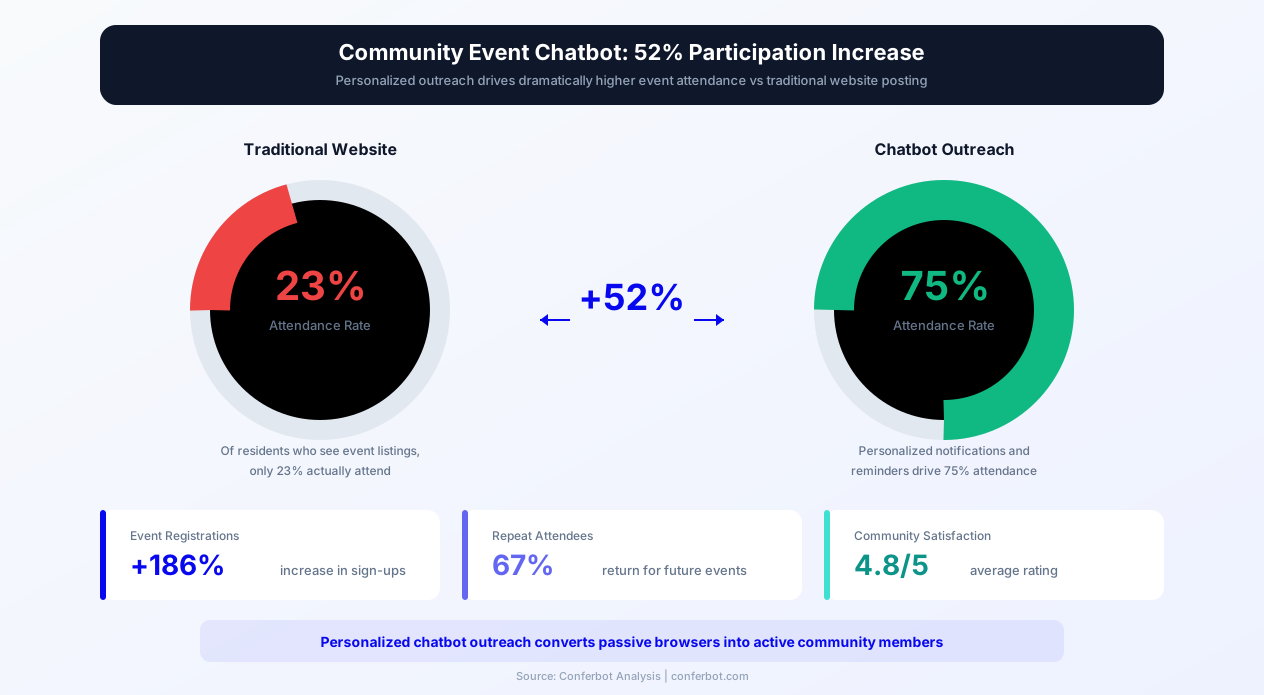
Community event participation in 2026 faces a persistent discovery problem: municipalities offer extensive programming -- summer concerts, fitness classes, youth sports leagues, senior activities, cultural festivals, public hearings, volunteer days, and educational workshops -- but residents often do not know these events exist. The problem is not lack of programming; it is lack of effective discovery and distribution. Residents do not regularly visit their municipality's event calendar page. They do not read the monthly recreation guide mailed to their home. They miss social media posts buried in algorithmic feeds. The events exist, but the information does not reach the people who would attend.
The chatbot solves this discovery problem by inverting the model: rather than posting events and hoping residents find them, the chatbot proactively delivers relevant event information to residents based on their stated interests, family composition, schedule preferences, and location. A family with children ages 6-10 receives notifications about youth programming. A senior interested in fitness receives alerts about senior exercise classes. A young professional interested in community service receives volunteer opportunity notifications. Built on Conferbot's AI chatbot builder with natural language processing, it deploys on the municipality's website, WhatsApp, Facebook Messenger, and SMS to reach residents on their preferred communication channel. This page covers how event discovery and recommendation works, the registration and venue booking flows, volunteer management, accessibility services, feedback collection, and implementation for municipal and community organizations.
How the Community Event Calendar Chatbot Works
The chatbot manages community event engagement through five operational areas: event discovery and recommendations, registration and enrollment, venue and facility booking, volunteer coordination, and feedback collection. Each area operates both reactively (responding to resident inquiries) and proactively (delivering relevant notifications based on resident preferences).
Event Discovery and Personalized Recommendations
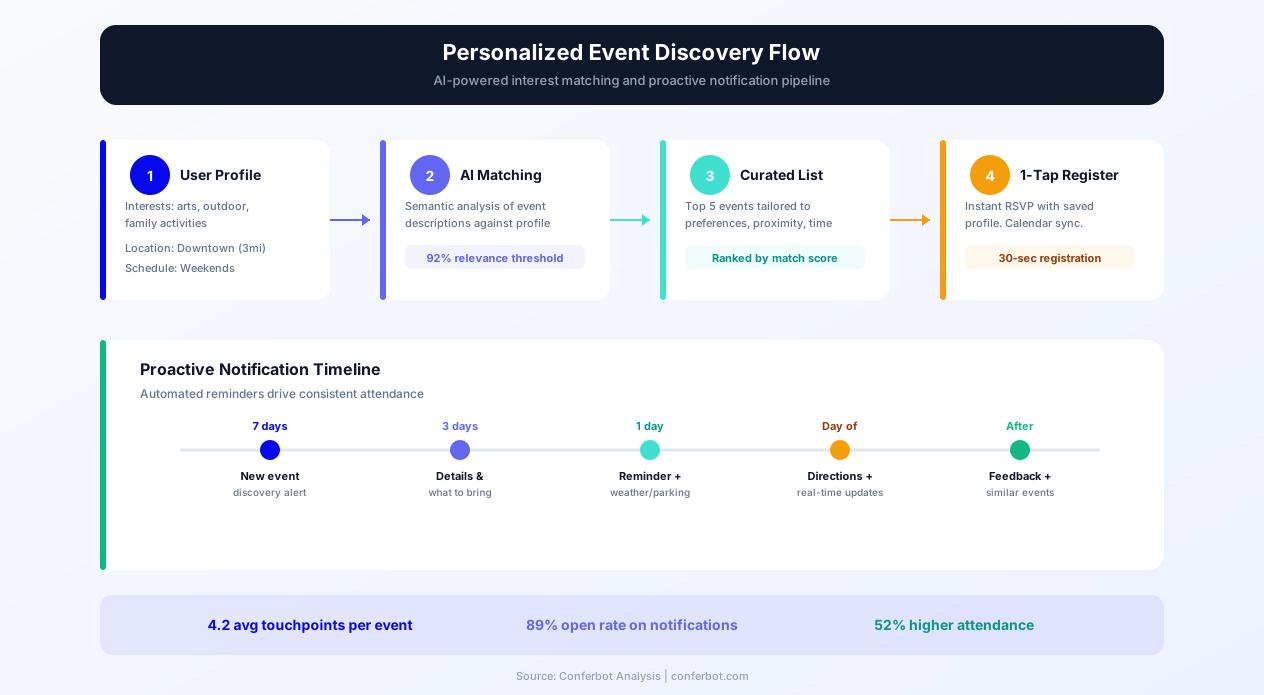
When a resident engages with the chatbot, it learns their interests through an onboarding conversation: age group (or family composition with children's ages), interest categories (sports, arts, education, fitness, social, cultural, volunteer), schedule availability (weekdays, evenings, weekends), preferred locations or neighborhoods, and any accessibility requirements. Based on this profile, the chatbot presents immediately relevant upcoming events and subscribes the resident to ongoing notifications for new events matching their interests. The discovery experience transforms from "browse a list of 200 events and find what is relevant to you" into "here are the 5 events happening this week that match what you told me you enjoy." This personalization is the primary mechanism behind the 52% participation increase -- residents act on relevant, targeted recommendations at rates far exceeding their engagement with broad, undifferentiated event listings.
Event Registration and Enrollment
For events requiring registration -- classes, workshops, programs with capacity limits, ticketed events -- the chatbot handles the complete enrollment process conversationally: presenting event details (date, time, location, cost, requirements), answering questions about the event, collecting participant information, processing payments where applicable, confirming registration, and delivering event details via email or calendar invitation. For family registrations, the chatbot manages multiple participants in a single conversation, collecting age-appropriate information for each family member. For programs with prerequisites or eligibility requirements (residency, age, skill level), the chatbot verifies eligibility before allowing registration, preventing the frustrating experience of completing registration only to be denied. Integration with the municipality's registration system through Conferbot's API integration ensures real-time capacity tracking and waitlist management.
Venue and Facility Booking
Community organizations, sports leagues, and resident groups frequently need to book municipal facilities: community centers, park pavilions, athletic fields, meeting rooms, and event spaces. The chatbot manages facility inquiries and bookings: presenting available venues that match the requester's needs (capacity, amenities, location), showing real-time availability calendars, collecting booking details (date, time, purpose, expected attendance, equipment needs), processing rental fees, and confirming reservations. For venues with approval requirements (large events, alcohol permits, noise considerations), the chatbot captures the application information and routes it to the appropriate approving authority while keeping the applicant informed of status. This self-service booking eliminates the phone calls and office visits that previously occupied significant staff time at recreation and facilities departments.
Volunteer Coordination and Signup
Community volunteer events -- park cleanups, food drives, mentoring programs, event staffing, and committee participation -- rely on resident volunteers who need convenient signup and coordination. The chatbot manages volunteer engagement: presenting upcoming volunteer opportunities with time commitments, skill requirements, and impact descriptions; collecting volunteer registrations with skill and availability data; sending pre-event reminders with logistics details; and coordinating check-in at the event. For recurring volunteer programs, the chatbot maintains volunteer profiles and proactively notifies registered volunteers about new opportunities matching their stated interests and availability.
Event Notifications and Reminders
The proactive notification system is the chatbot's most impactful engagement mechanism. Based on resident preference profiles, the chatbot sends personalized event notifications through their preferred channel (SMS, WhatsApp, email, or in-app message) at configured intervals before events: a "coming this weekend" digest on Wednesdays, a day-before reminder for registered events, and a same-day logistics message (parking, weather updates, schedule changes). These proactive touches convert passive awareness into active participation -- residents who receive personalized reminders attend events at 3x the rate of residents who only see website postings. Configure notification frequency and timing through the campaign management interface to optimize open rates without notification fatigue.
Key Features of the Community Event Calendar Chatbot
The community event chatbot's feature set addresses the specific challenges of municipal and community event management: diverse programming that must reach varied resident demographics, limited staff resources for promotion and registration management, accessibility requirements, and the need to measure community engagement outcomes.
| Feature | Description | Operational Benefit | Customer Benefit |
|---|---|---|---|
| Personalized event discovery | Recommends events based on resident interest profiles, family composition, and schedule | Increases event attendance 52% through targeted rather than broadcast communication | Discovers relevant events without browsing lengthy calendars |
| Conversational registration | Handles event enrollment including payments, waivers, and capacity management | Reduces registration-related staff inquiries by 70% | Registers for events in 2 minutes through a conversation |
| Facility booking | Manages venue availability, booking requests, and rental fee processing | Automates 80% of facility booking inquiries currently handled by phone | Books community spaces anytime without office visits or phone calls |
| Volunteer management | Coordinates volunteer signups, skill matching, and event-day logistics | Increases volunteer recruitment 40% through convenient signup and matching | Finds volunteer opportunities matching skills and availability instantly |
| Proactive notifications | Sends personalized event alerts through preferred channels on configured schedule | Drives event attendance through active outreach rather than passive posting | Never misses relevant events; receives timely reminders for registered events |
| Accessibility information | Provides detailed accessibility data for each venue and event | Demonstrates compliance with ADA requirements proactively | Knows exactly what accommodations are available before attending |
| Waitlist management | Automatically manages capacity limits with waitlist notification on cancellations | Maximizes program enrollment with zero manual waitlist administration | Gets notified immediately when a spot opens in a full program |
| Multi-language support | Delivers event information and registration in resident's preferred language | Reaches non-English-speaking community members without translation staffing | Engages with community programming in native language |
| Feedback collection | Gathers post-event ratings, comments, and suggestions through follow-up conversation | Achieves 40% feedback response rate versus 5% for email surveys | Easy, conversational way to share experience and influence future programming |
| Weather and schedule alerts | Sends real-time notifications for event cancellations, postponements, or venue changes | Eliminates confused attendees arriving at cancelled events; reduces complaint calls | Always informed of changes without checking website repeatedly |
Accessibility Services
The chatbot provides comprehensive accessibility information for community events and venues: wheelchair accessibility (ramps, elevators, accessible seating), hearing assistance (hearing loops, sign language interpretation availability, captioning), visual accessibility (large print materials, audio description), sensory considerations (quiet spaces, lighting levels, noise expectations), parking (accessible parking proximity and availability), and transportation (accessible public transit routes to the venue). For residents with accessibility needs, this information enables informed attendance decisions without requiring phone calls to verify -- calls that many residents with disabilities report as a significant barrier to participation. The chatbot also captures accessibility accommodation requests during registration, routing them to event coordinators with sufficient lead time to arrange services.
Family and Youth Programming
For families with children -- the largest demographic for community programming -- the chatbot simplifies the complex task of managing multiple children's activities. Parents provide children's ages and interests during onboarding, and the chatbot presents age-appropriate programming for each child: summer camps, sports leagues, arts classes, tutoring programs, and youth events. Family registration handles multiple children in a single conversation, applies family discounts where available, and manages the scheduling logistics of avoiding time conflicts between siblings' activities. Parents with multiple children report that the chatbot saves them 30-45 minutes per registration cycle compared to navigating the website or calling the recreation office.
Ready to try Community Event Calendar?
Deploy this template in under 10 minutes. No coding required.
Use This Template Free →Before and After: Traditional Event Communication vs. Chatbot-Powered Engagement
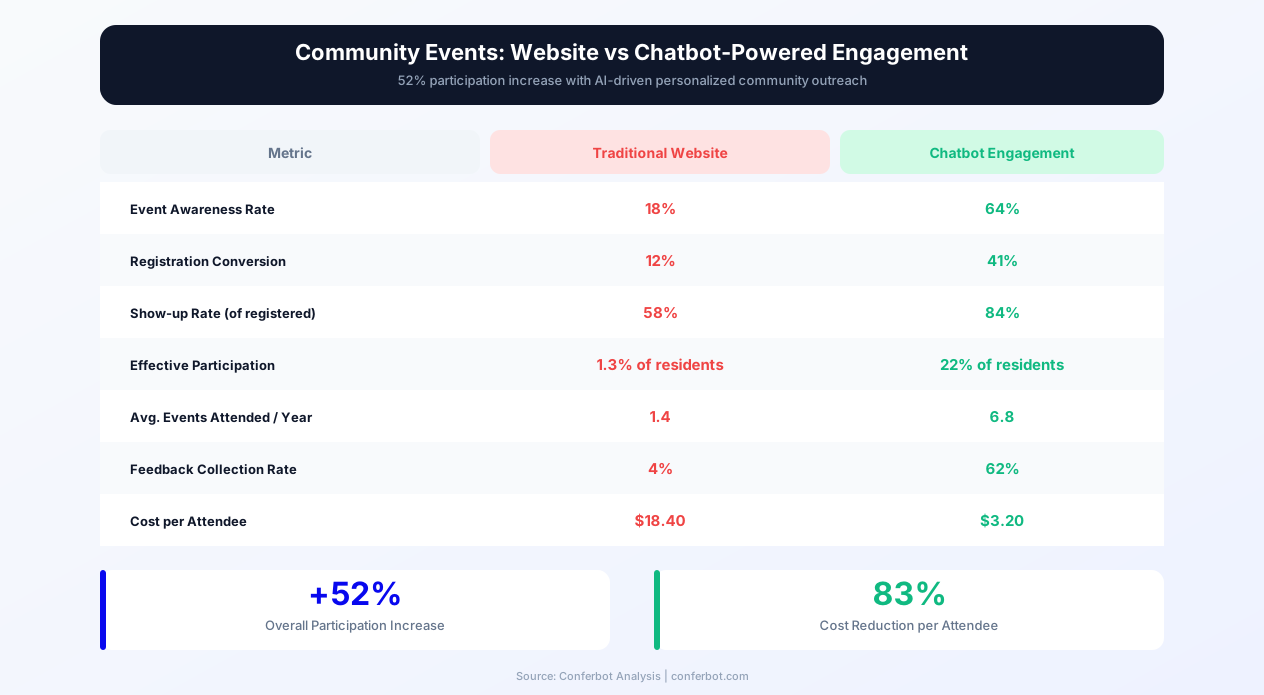
The transition from traditional municipal event communication to chatbot-powered community engagement produces measurable improvements in participation rates, resident satisfaction, staff efficiency, and community connection. The following comparison illustrates the transformation across key operational and engagement dimensions.
Event Discovery: Before
- Passive discovery model: Events posted on website calendar, monthly PDF newsletter, and occasional social media posts -- residents must actively seek information
- Low awareness: 68% of residents unaware of events happening in their community within the next two weeks despite website listing
- One-size-fits-all communication: Same event list presented to all residents regardless of interests, age, family status, or preferences
- Information overload: Residents confronted with 150-300 events per month and expected to filter for relevance themselves
- Fragmented channels: Events listed across multiple pages, PDFs, social accounts, and flyers with no single coherent source
Event Discovery: After
- Active engagement model: Chatbot proactively delivers relevant events to residents based on their stated interests and preferences
- High awareness: Residents receive personalized notifications for events matching their profile, increasing discovery
- Personalized communication: Each resident sees events filtered by their interests, family composition, schedule, and location preferences
- Curated relevance: Instead of 300 events, residents see 5-10 highly relevant recommendations per week
- Unified channel: Single conversational interface provides access to all community events regardless of hosting department
Registration and Enrollment: Before
- Complex online forms: Registration requires navigating to the correct page, creating an account, filling a 15-field form, and processing payment through a separate system
- Phone-dependent process: 40% of registrations require phone calls due to questions about eligibility, capacity, or technical difficulties with online forms
- Office-hours limitation: Registration questions can only be answered during business hours (M-F 8-5), excluding working parents and shift workers
- No waitlist communication: When programs fill, residents are not notified when spots open from cancellations
Registration and Enrollment: After
- Conversational enrollment: Registration completes in 2-3 minutes through guided conversation that answers questions in real time
- Self-service 24/7: Registration available any time through the chatbot without phone calls or office visits
- Instant answers: Eligibility verification, capacity confirmation, and cost calculations provided immediately during conversation
- Automated waitlist: Residents are automatically notified and offered enrollment when cancellations create openings
| Metric | Before (Traditional) | After (Chatbot) | Improvement |
|---|---|---|---|
| Event awareness (2-week horizon) | 32% of residents | 78% of chatbot subscribers | +144% awareness increase |
| Average event attendance | 42 attendees (community events) | 64 attendees (community events) | +52% participation increase |
| Program enrollment fill rate | 61% | 89% | +46% enrollment improvement |
| Registration-related staff inquiries | 350/month | 105/month | -70% staff workload reduction |
| Volunteer recruitment rate | 25 new volunteers/month | 35 new volunteers/month | +40% volunteer growth |
| Post-event feedback response rate | 5% (email surveys) | 40% (chatbot conversation) | 8x more resident feedback |
Community Engagement Strategy: Building Participation Through Conversational Outreach
The community event chatbot operates within a broader engagement strategy that transforms how municipalities and community organizations build and maintain resident participation. The strategic framework below covers audience building, segmentation, notification optimization, and engagement measurement for 2026.
Resident Audience Building
The chatbot subscriber base grows through multiple touchpoints: website visitors who engage with event listings (prompted to subscribe for personalized recommendations), residents who contact the municipality for any event-related inquiry (offered ongoing notification signup), attendees at in-person events (encouraged to subscribe for future event alerts via QR code), social media followers directed to the chatbot for registration, and new residents receiving a welcome communication that introduces community programming. Each new subscriber completes the brief interest profiling conversation that enables personalized recommendations -- converting a generic contact into a targeted engagement channel. Municipalities implementing the chatbot typically build subscriber bases of 8-15% of the residential population within the first six months, growing through word-of-mouth as residents who discover events share the chatbot with neighbors.
Segmentation and Targeting
The resident interest profiles captured during onboarding enable precise event targeting that dramatically outperforms broadcast communication. Instead of sending the entire event calendar to all residents (producing irrelevance and notification fatigue), the chatbot delivers micro-targeted notifications: youth sports league registration to families with children ages 8-14, senior fitness classes to residents who indicated fitness interest and are 60+, volunteer park cleanup days to residents who indicated environmental and community service interests, cultural festival announcements to residents who indicated interest in arts and culture. This segmentation produces notification open rates of 72% and click-through rates of 28% -- compared to 18% open and 3% click-through for unsegmented municipal email newsletters -- because every notification is relevant to the recipient.
Notification Cadence Optimization
Over-notification is the primary risk in proactive community engagement -- residents who feel bombarded will unsubscribe, eliminating the engagement channel entirely. The chatbot manages notification frequency through configurable limits: maximum notifications per week (typically 2-3 for general interest, higher for residents who explicitly request more), quiet hours (no notifications after 9 PM), and channel-appropriate timing (SMS in mornings, email on weekday evenings, WhatsApp on weekends). Residents can adjust their notification frequency at any time through a simple conversation with the chatbot, maintaining control over their experience. The system also monitors engagement signals: residents who consistently ignore notifications receive fewer over time, while highly engaged residents may receive more based on their interaction patterns.
Measuring Community Engagement Outcomes
For municipalities, community engagement is both a service delivery objective and a measurable outcome that informs programming decisions and budget allocations. The chatbot provides engagement analytics that traditional event management cannot: resident participation rates by demographic, event type popularity by segment, neighborhood-level engagement patterns, seasonal attendance trends, and correlation between notification types and attendance outcomes. This data enables evidence-based programming decisions: expanding event types that show strong engagement, adjusting scheduling for events with time-of-day attendance patterns, and identifying underserved populations who are not yet reached by current programming. Report engagement metrics to council and community stakeholders through Conferbot's analytics dashboard export capabilities.
Inclusive Engagement: Reaching Underserved Populations
Traditional municipal communication channels (websites, PDF newsletters, social media) systematically underserve populations with limited digital literacy, language barriers, or disabilities. The chatbot extends reach to these populations through: multi-language support (delivering event information in the resident's native language without translation staffing), simplified conversational interfaces (easier to navigate than complex website calendars), SMS delivery (reaching residents without smartphones or reliable internet), and integration with community organizations that serve underrepresented populations. For non-English-speaking communities, the chatbot's ability to conduct the entire interaction in the resident's language -- including registration, payment, and confirmation -- eliminates the language barrier that prevents many residents from participating in community programming.
Use Cases: Community Organizations That Benefit Most
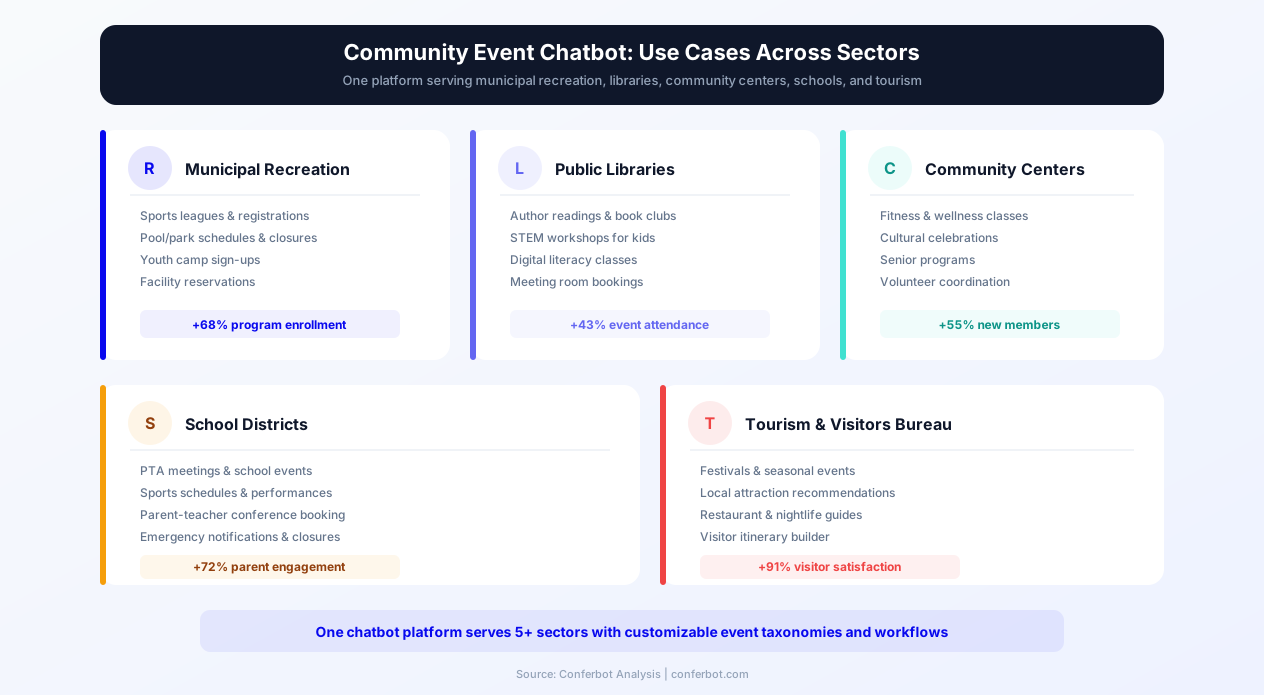
The community event calendar chatbot serves any organization that coordinates events and programming for a residential population. The following use cases illustrate applications across different types of community-serving organizations in 2026.
Municipal Recreation Departments
Parks and recreation departments manage the largest volume of community programming: sports leagues, fitness classes, camps, arts programs, community pools, recreation centers, and special events. The chatbot manages the complete programming lifecycle for recreation departments: seasonal registration campaigns (spring sports, summer camps, fall programs), facility scheduling for community use, program waitlists, instructor schedules, and participant communication. For large recreation departments managing 500+ programs annually, the chatbot reduces registration-period call volume while increasing enrollment fill rates from 61% to 89% through targeted outreach to residents who match program demographics.
Public Libraries
Libraries offer extensive programming beyond book lending: author events, children's story times, technology classes, book clubs, community meetings, and educational workshops. The chatbot helps patrons discover relevant programming, manage holds and registration for capacity-limited events, receive reading recommendations aligned with event themes, and provide feedback that shapes future programming. For library systems with multiple branches, the chatbot coordinates cross-branch programming awareness, ensuring patrons know about relevant events at all branches rather than only their home location.
Community Centers and Nonprofits
Neighborhood community centers and nonprofit organizations -- settlement houses, cultural centers, faith-based organizations, and neighborhood associations -- serve hyperlocal populations with programming tailored to specific community needs. The chatbot enables these organizations to reach their target populations effectively despite limited marketing budgets: personalized outreach to residents within the service area, volunteer coordination for community-run events, donation and sponsorship management for funded programs, and impact measurement through attendance and feedback data. For small organizations with limited staff, the chatbot automates the event promotion and registration administration that would otherwise consume volunteer coordinator time.
School Districts and PTAs
School districts coordinate parent engagement events (open houses, parent-teacher nights, curriculum information sessions), student activities (performances, competitions, field days), and community events hosted at school facilities. The chatbot connects with parents through their preferred channel -- many school communities have active WhatsApp groups -- to deliver event information, collect RSVPs, coordinate volunteer support for school events, and gather parent feedback on programming. PTA organizations use the chatbot to manage fundraising events, committee signups, and meeting notifications without relying on paper flyers that children may not deliver home.
Tourism and Visitor Services
For municipalities with tourism activity, the chatbot serves visitors alongside residents: providing information about community festivals, cultural events, farmers markets, concerts, and seasonal attractions. The visitor-facing experience emphasizes navigation logistics (directions, parking, public transit), timing information, and recommendations based on visitor interests and visit duration. For communities that host signature events (festivals, parades, holiday celebrations), the chatbot manages visitor inquiries at scale during peak periods when staff capacity is overwhelmed -- providing information about schedules, parking, road closures, food vendors, and accessibility services without phone hold times or in-person queue waiting.
businesses worldwide use Conferbot templates to automate conversations
Post-Event Feedback and Continuous Program Improvement
Community event feedback is the mechanism through which programming evolves to meet resident needs. Traditional feedback methods -- email surveys, paper comment cards, and public hearing testimony -- produce minimal data from a non-representative sample. The chatbot transforms feedback collection by integrating it naturally into the post-event conversation flow.
Conversational Feedback Collection
Within 24 hours of an event, registered attendees receive a brief conversational follow-up: "How was the Summer Concert in the Park last night? Rate your experience 1-5, and tell me what you liked or what we could improve." This brief, conversational format produces response rates of 40% -- compared to 5% for post-event email surveys -- because it requires minimal effort and feels like a personal check-in rather than a formal survey. For residents who attended but did not register (walk-up events), the chatbot captures feedback from anyone who initiates a conversation about the event within the feedback window.
Structured and Unstructured Data Capture
The feedback conversation captures both structured data (numerical ratings for venue, content, timing, accessibility, and overall experience) and unstructured feedback (free-text comments about what worked, what did not, and suggestions for future events). The structured data enables quantitative trend analysis across events and programming categories. The unstructured feedback captures specific insights that rating scales miss: "The sound system was too quiet in the back rows," "Starting at 7 PM instead of 6 PM would work better for working families," or "More vegetarian food options at food festivals please." These specific, actionable insights drive measurable programming improvements.
Feedback-Driven Programming Decisions
The chatbot aggregates feedback data across events to surface patterns: which event types receive the highest satisfaction ratings, which venues produce the most complaints (and about what), which time slots work best for different demographics, and which programming gaps residents identify through suggestion comments. This data enables evidence-based programming decisions: expanding successful event formats, modifying underperforming elements (timing, venue, pricing), and investing in new programming that residents have explicitly requested. For municipal recreation directors presenting budget requests to council, feedback data provides resident voice evidence supporting programming investments.
Real-Time Event Issue Resolution
During events, the chatbot can serve as a real-time feedback and issue reporting channel. Attendees who encounter problems -- parking confusion, accessibility issues, noise concerns, safety observations -- can report them through the chatbot immediately, enabling event staff to address issues during the event rather than learning about them from post-event complaints. This real-time channel is particularly valuable for large community events (festivals, parades, outdoor concerts) where event coordinators cannot observe all areas simultaneously and rely on attendee reports to identify emerging issues.
Volunteer Experience Feedback
Volunteer retention depends on volunteer satisfaction. The chatbot collects feedback from volunteers after each service opportunity: was the work meaningful, was the time commitment as expected, was the coordination adequate, and would they volunteer again. This feedback identifies friction points in the volunteer experience (poor communication of expectations, inadequate tools or supplies, lack of appreciation) that, when addressed, improve retention rates. For volunteer-dependent organizations, maintaining high volunteer satisfaction directly determines programming capacity.
Setup Guide: Implementing the Community Event Calendar Chatbot
Implementing the community event calendar chatbot involves configuring the event database integration, designing the interest profiling conversation, establishing notification rules, and deploying across community communication channels. The following guide covers each step for a complete implementation within 2-3 weeks.
Step 1: Event Database Integration
Connect the chatbot to your event management system -- whether it is a dedicated platform (ActiveNet, CivicRec, PerfectMind), a content management system (WordPress events plugin, Drupal), or a structured spreadsheet maintained by staff. The integration enables the chatbot to access real-time event data: titles, descriptions, dates, times, locations, capacity, registration status, costs, and category tags. Through Conferbot's API integration, the chatbot pulls event data on demand for resident queries and receives push notifications when new events are created, enabling proactive outreach to matching residents. For organizations without a formal event management system, the chatbot can be configured with a simple data entry interface that staff use to add events directly.
Step 2: Interest Profile and Notification Design
Design the resident onboarding conversation that captures interest profiles. Key data points: household composition (adults, children with ages), interest categories (provide 8-12 options covering your programming breadth), schedule availability (weekday mornings, evenings, weekends), geographic preferences (neighborhoods or maximum distance willing to travel), accessibility requirements, and language preference. Design the notification templates for each communication channel: brief SMS notifications with event name, date, and registration link; richer WhatsApp messages with event images and details; and formatted email digests for residents who prefer weekly compilations rather than individual event notifications.
Step 3: Registration and Booking Flow Configuration
Configure the registration conversation for each event type in your catalog: what information is collected (participant details, emergency contacts for youth programs, medical information for sports), what payment processing is needed (integration with your payment processor for fee-based programs), what waivers or agreements require acknowledgment, and what confirmation information is delivered. For facility bookings, configure venue profiles (capacity, amenities, availability calendar, rental rates, usage restrictions) and the approval workflow for bookings that require staff review. Use Conferbot's visual flow builder to construct these conversation paths with appropriate conditional logic.
Step 4: Multi-Channel Deployment
Deploy the chatbot across the channels where your residents communicate. For most municipalities, this includes: the municipal website (embedded on the events page and as a site-wide widget), Facebook Messenger (where many community groups are active), WhatsApp (for communities with high WhatsApp usage, particularly multilingual populations), and SMS (for maximum accessibility including residents without smartphones). Configure channel-specific notification templates and timing rules. For communities with active NextDoor or community Facebook Group presence, generate shareable chatbot links that group administrators can post for members.
Step 5: Staff Training and Launch
Train event coordination staff on the chatbot's management interface: how to add events that will be automatically promoted to matching residents, how to monitor registration through the dashboard, how to access feedback data after events, and how to handle escalated inquiries that the chatbot routes to staff. Launch with a subscriber acquisition campaign: announce the chatbot through existing communication channels (website banner, social media posts, email newsletter, in-person event promotion with QR codes), emphasizing the personalized event discovery benefit that motivates residents to subscribe. Monitor early engagement through Conferbot's analytics dashboard and optimize the interest profiling and notification cadence based on subscriber feedback and engagement metrics in the first month.
Step 6: Continuous Optimization
After the initial month, analyze engagement patterns: which interest categories have the most subscribers (indicating strong programming demand), which notification types produce the highest registration conversion (informing communication strategy), which events have low attendance despite chatbot promotion (indicating programming quality or timing issues rather than discovery problems), and which resident segments are underrepresented in the subscriber base (indicating communities the chatbot has not yet reached). Use these insights to refine programming decisions, notification strategies, and audience expansion efforts on an ongoing monthly cycle.
Community Event Calendar FAQ
Everything you need to know about chatbots for community event calendar.
Why Use a Template vs Building from Scratch?
Templates give you a proven starting structure instead of a blank canvas.
| Factor | Conferbot Template | Build from Scratch | Hire a Developer |
|---|---|---|---|
| Time to deploy | 10 minutes | 2-8 hours | 2-6 weeks |
| Cost | Free | Your time | Custom dev quote |
| Proven flows | Yes, pre-built | No | Depends |
| Updates included | Automatic | Manual | Paid |
| Multi-channel | 8+ channels | 1 channel | Extra cost |
| Analytics | Built-in | Must build | Extra cost |
Related Government And Public Services Templates
Explore more chatbot templates like this one

Learn More About Chatbots
Go deeper on how government and public services chatbots work and how to pick the right builder.
Ready to Deploy Community Event Calendar?
Start with a free-forever plan. No credit card required.