
Website User Experience Survey
Free B2B Services Chatbot Template
A complete website user experience survey chatbot template - deploy in minutes to automate conversations, capture leads, and provide 24/7 assistance.



How this template opens - rendered from its flow. Use the interactive preview to click through the full conversation.
What Is a Website UX Survey Chatbot?
A website UX survey chatbot is a conversational feedback tool that collects user experience data directly within the website interface -- capturing insights about navigation quality, task completion difficulty, content clarity, and overall satisfaction at the exact moment users encounter friction or delight. Unlike post-visit email surveys that rely on fading memory, or intrusive pop-up modals that disrupt the user journey, a chatbot survey engages visitors in a natural, low-friction dialogue that feels like asking a helpful assistant for feedback rather than filling out a form.
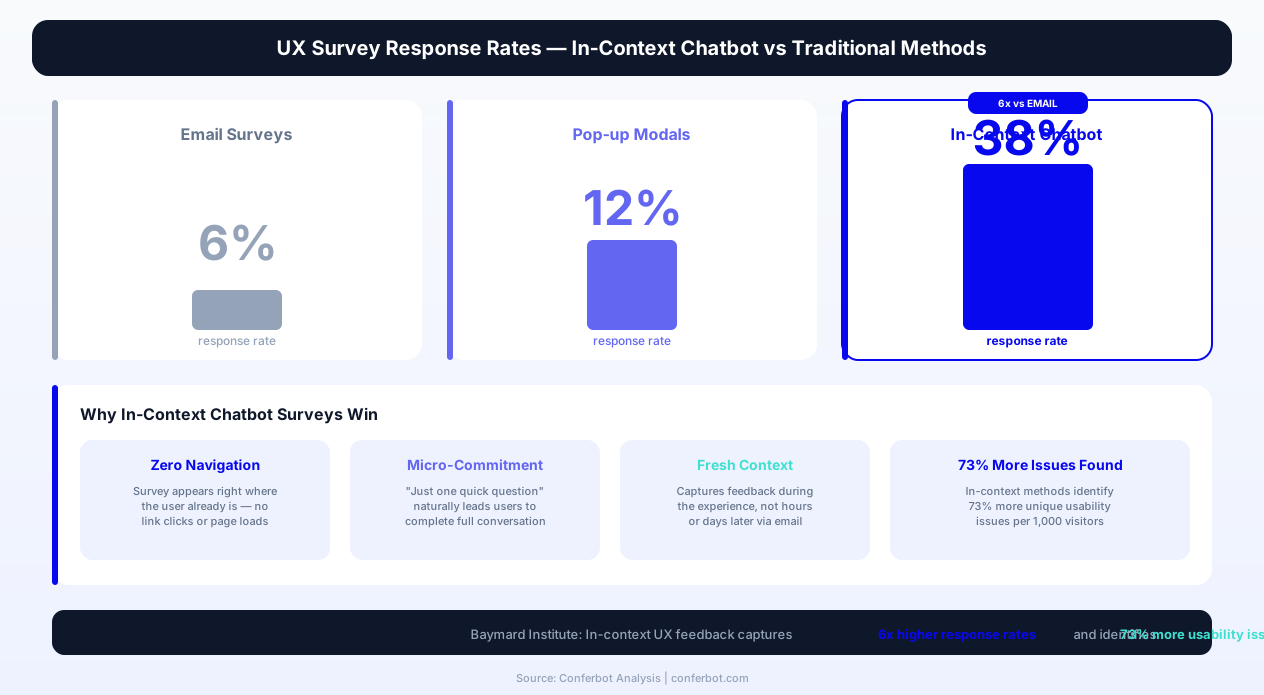
The fundamental challenge of UX research in 2026 is capturing feedback from real users in real contexts without contaminating the very experience you are trying to measure. Traditional UX research methods -- lab studies, moderated sessions, unmoderated testing platforms -- are excellent for deep exploration but reach only a tiny fraction of your actual user base. Email surveys cast a wider net but suffer from 4-8% response rates, recall bias (users answering about an experience that happened hours or days ago), and self-selection bias (only strongly satisfied or dissatisfied users respond). In-context chatbot surveys solve all three problems simultaneously.
Research from the Baymard Institute shows that in-context UX feedback methods capture 6x higher response rates than email-delivered surveys and identify 73% more unique usability issues per 1,000 visitors exposed to the survey. The chatbot format specifically outperforms static in-page surveys because conversational interaction reduces perceived effort and enables adaptive follow-up questions that probe deeper into initial responses.
Conferbot's AI chatbot builder provides a pre-built website UX survey template that covers all core UX feedback scenarios: page-specific feedback, task completion assessment, navigation difficulty reporting, feature request capture, and usability testing recruitment. The template deploys as a website widget with intelligent triggering that displays the survey at optimal moments -- after task completion, upon exit intent, after time-on-page thresholds, or on specific URL patterns -- without disrupting the user journey.
This page covers the complete approach to chatbot-driven UX feedback: trigger strategy optimization, question architecture for different UX research goals, integration with design tools and analytics platforms, conversion from raw feedback to prioritized UX improvements, and deployment best practices that maximize response rates while minimizing user experience interference.
Why In-Context UX Feedback Outperforms Traditional Methods
Understanding the cognitive and methodological advantages of in-context feedback is essential for justifying investment in a chatbot UX survey system and configuring it for maximum research value.
The Context Decay Problem
When a user encounters a confusing navigation pattern on your website at 2:00 PM and receives an email survey about their experience at 6:00 PM, the specificity of their feedback has already degraded significantly. They may remember that "the website was confusing" but cannot recall which page, which interaction, or which specific element caused the confusion. In-context chatbot feedback captures the experience while it is happening -- the user is still on the page, still experiencing the friction, and can articulate exactly what is not working with high specificity.
A 2026 study by the Nielsen Norman Group found that user feedback collected within 30 seconds of an experience contains 3.4x more actionable detail than feedback collected 4+ hours later. The chatbot's ability to trigger immediately after a detected friction signal (rage click, navigation reversal, prolonged inactivity on a form field) captures feedback at peak specificity.
The Effort Perception Gap
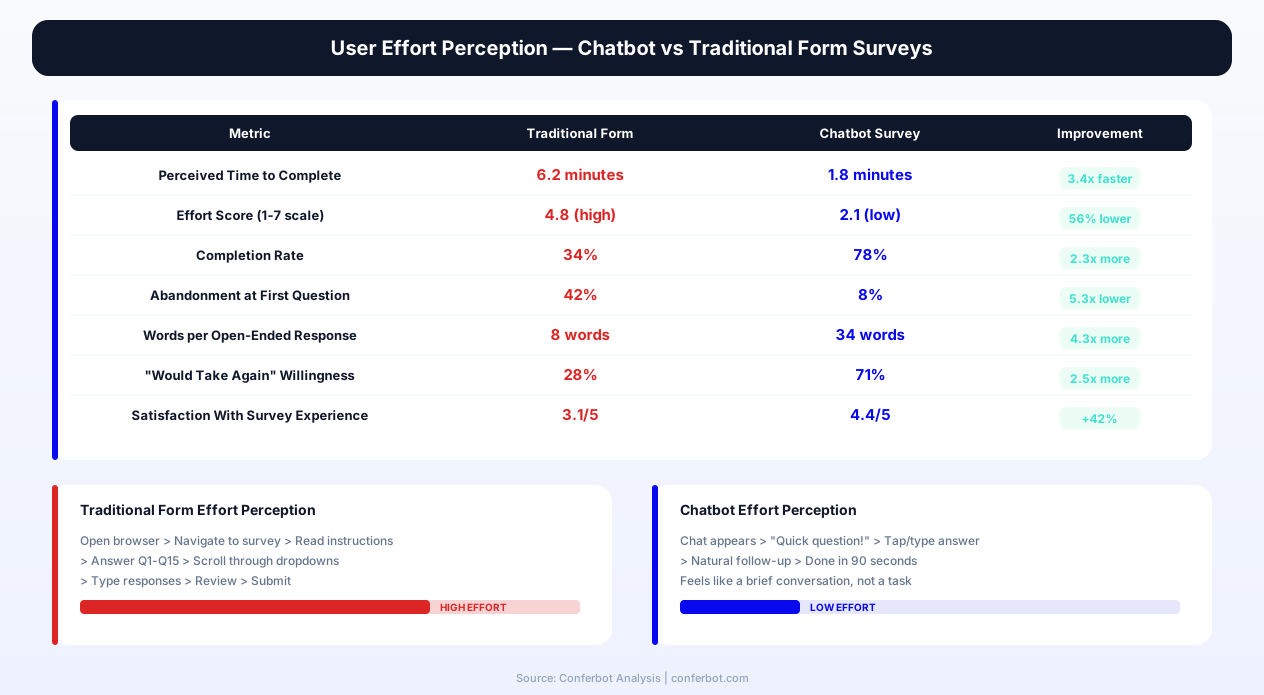
Users perceive chatbot interactions as requiring less effort than form submissions, even when the actual information transferred is equivalent or greater. This perception difference is driven by three factors:
- Progressive disclosure -- The chatbot presents one question at a time rather than an intimidating multi-field form
- Conversational framing -- Responding to a question feels like helping rather than performing a task
- Micro-commitment escalation -- Users commit to answering "just one quick question" and naturally continue through the conversation
The Self-Selection Bias Reduction
Email UX surveys disproportionately attract responses from users at the extremes of satisfaction -- very happy users and very frustrated users. The moderate middle -- users who found the experience acceptable but imperfect -- rarely responds to email surveys. Yet this moderate middle represents 60-70% of your user base and contains the most valuable optimization signals: the small friction points that, if resolved, would move acceptable experiences to delightful ones. In-context chatbot surveys reach this moderate middle because the trigger is behavioral (they completed a task, they spent time on a page) rather than motivational (they felt strongly enough to click an email link).
| UX Feedback Method | Response Rate | Specificity of Feedback | Audience Bias | Cost Per Response |
|---|---|---|---|---|
| In-context chatbot survey | 28-42% | Very high (real-time context) | Low (behavioral trigger) | $0.15-$0.40 |
| Email post-visit survey | 4-8% | Low (memory decay) | High (extreme sentiment) | $2.50-$8.00 |
| Pop-up modal survey | 10-15% | Medium (in-context but disruptive) | Medium (interruption bias) | $0.80-$1.50 |
| Feedback widget (passive) | 0.5-2% | Variable | Very high (only motivated users) | $5.00-$15.00 |
| Moderated user testing | N/A (recruited) | Very high | Recruiting bias | $150-$400/session |
| Unmoderated user testing | N/A (recruited) | High | Panel bias | $30-$80/session |
| Session recording analysis | N/A (passive) | Behavioral only (no "why") | None | $0.02-$0.10/session |
| Heatmap/click tracking | N/A (passive) | Pattern-level only | None | $0.01-$0.05/session |
Complementing Quantitative Analytics
Session recording tools (Hotjar, FullStory, LogRocket) tell you what users do; chatbot surveys tell you why they do it. Heatmaps show you where users click; chatbot surveys reveal what they expected to happen when they clicked. The combination of quantitative behavioral data and qualitative conversational feedback creates a complete picture that neither method provides alone. Conferbot's template is designed to work alongside your existing analytics stack, not replace it -- triggered by behavioral signals that your analytics tools detect and generating qualitative context for the patterns they surface.
Key Features of Conferbot's Website UX Survey Template
Conferbot's UX survey chatbot template is built specifically for product and UX teams that need continuous, in-context user feedback without dedicated research operations headcount. Every feature is configurable through the no-code builder and deployable via the website widget.
| Feature | What It Does | UX Research Impact | Configuration |
|---|---|---|---|
| Behavioral trigger engine | Activates surveys based on user behavior signals: rage clicks, navigation reversals, scroll depth, time on page, exit intent, form abandonment | Captures feedback at the exact moment of friction or satisfaction | Visual trigger builder |
| Page-specific question routing | Serves different question sets based on the page or section the user is viewing | Generates page-level UX insight maps without generic catch-all questions | URL pattern matching |
| Task completion assessment | Detects task completion (form submission, purchase, signup) and asks about the experience quality | Measures task ease scores and identifies post-completion sentiment | Event-based triggers |
| Screenshot and annotation capture | Allows users to take a screenshot and annotate the specific element they are providing feedback about | Eliminates ambiguity about which element the feedback references | One-click enable |
| Usability testing recruitment | Identifies engaged users willing to participate in deeper research sessions and captures contact information | Builds a research participant pool from actual users rather than panels | Qualification criteria |
| Feature request categorization | Captures feature requests in structured format with use case, priority, and willingness-to-pay data | Feeds directly into product roadmap prioritization with user context | Category taxonomy |
| Sentiment-adaptive follow-up | Detects positive or negative sentiment in responses and adapts follow-up questions accordingly | Probes deeper into negative experiences without fatiguing satisfied users | Automatic |
| Session context capture | Automatically records page URL, device type, browser, referral source, and session duration alongside feedback | Enables segmentation of feedback by user context without asking | Automatic |
| A/B test feedback collection | Triggers different survey variants for users in different A/B test cohorts | Provides qualitative "why" data to complement quantitative A/B test metrics | Test ID integration |
| Accessibility feedback module | Specialized questions for users with assistive technologies about accessibility barriers | Identifies accessibility issues from actual assistive technology users | Optional module |
Intelligent Trigger Timing
The most critical configuration decision for a UX survey chatbot is when to trigger. Too early disrupts the user journey; too late misses the context window. Conferbot's trigger engine uses a combination of behavioral signals and timing rules to activate at optimal moments:
- Post-task triggers -- Fire after detected task completion (form submission, purchase, account creation) with a 3-5 second delay for the user to settle
- Friction triggers -- Fire when behavioral signals indicate confusion: rage clicking (3+ rapid clicks on non-interactive elements), navigation reversals (back button followed by same navigation path), or extended inactivity on interactive elements
- Engagement triggers -- Fire after positive engagement signals: scroll depth exceeding 80%, time on page exceeding 3 minutes, or interaction with 3+ page elements
- Exit intent triggers -- Fire when mouse movement patterns indicate the user is about to leave, capturing departure context before they navigate away
Each trigger type can be combined with frequency capping (maximum once per session, once per week per user, or once per user lifetime) to prevent survey fatigue. The system also respects a global cooldown -- if a user has responded to any Conferbot survey in the past 7 days, no additional surveys will trigger regardless of individual trigger conditions.
Progressive Depth Architecture
The chatbot uses a progressive depth model: it starts with a single, low-commitment question and only proceeds deeper if the user engages. The opening question is always quick to answer -- a satisfaction rating, a yes/no task completion confirmation, or a single-choice difficulty assessment. If the user responds, the chatbot asks one follow-up question for context. If they continue engaging, it may ask a third question for specificity. This model keeps average interaction time under 45 seconds while offering motivated users the opportunity to share more detailed feedback without forcing depth on those who prefer brevity.
Ready to try Website User Experience Survey?
Deploy this template in under 10 minutes. No coding required.
Use This Template Free →Trigger Strategies for Different UX Research Goals
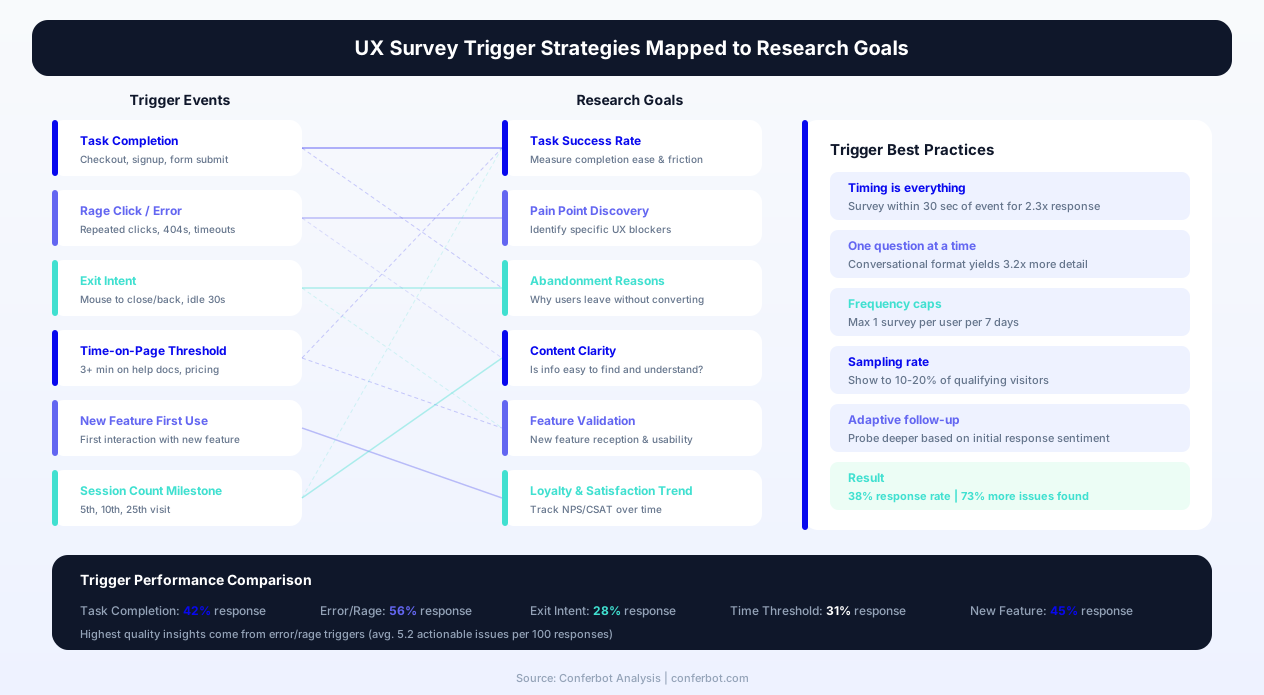
The trigger configuration determines what kind of UX intelligence you collect. Different research questions require different trigger strategies, and Conferbot's template supports all of them simultaneously through a multi-trigger architecture.
Strategy 1: Task Ease Measurement (CES-Style)
If your primary UX research goal is measuring task ease across key user journeys, configure triggers that fire after task completion events. The chatbot asks a Customer Effort Score question ("How easy was it to [complete task]?") on a 1-7 scale, followed by a conditional probe for low scores ("What made it difficult?"). This strategy requires event-based trigger configuration tied to your analytics platform's goal completions via API integration.
Key tasks to measure typically include:
- Account creation -- Triggered after successful signup confirmation page load
- First purchase -- Triggered after order confirmation for new customers
- Support article resolution -- Triggered after a user views a help article and does not immediately navigate to another help article (indicating resolution)
- Form completion -- Triggered after multi-step form submission (applications, registrations, configurations)
- Search success -- Triggered after a user clicks a search result and stays on the destination page for 30+ seconds
Strategy 2: Navigation and Information Architecture Assessment
For teams redesigning navigation or evaluating information architecture, configure triggers based on navigation behavior patterns that indicate findability issues:
- Navigation reversal trigger -- Fire when a user navigates to a page, immediately returns (within 5 seconds), and navigates to a different page. Ask: "Were you looking for something specific? Did you find it?"
- Search after navigation trigger -- Fire when a user navigates through menu items and then resorts to site search. Ask: "What were you looking for? Where did you expect to find it?"
- Deep navigation trigger -- Fire when a user clicks through 4+ levels of navigation hierarchy. Ask: "Was it easy to find what you were looking for?"
Strategy 3: Page-Level Content Quality Assessment
For content teams evaluating page effectiveness, configure page-specific surveys that measure whether content meets user expectations and needs:
- Engagement-based trigger -- After 2+ minutes on a content page, ask: "Did this page answer your question?" with yes/no branching into specifics
- Bounce-intent trigger -- On exit intent from a landing page, ask: "What were you hoping to find on this page?"
- Scroll-depth trigger -- After scrolling past 75% of a long-form page, ask: "How helpful was this content?" on a scale
Strategy 4: Continuous Discovery for Product Teams
Product teams practicing continuous discovery need a steady stream of user feedback about needs, pain points, and desired outcomes. Configure the chatbot as a persistent but unobtrusive feedback channel:
- Feature page engagement trigger -- After interaction with specific product features, ask: "How well does [feature] work for your needs?"
- Post-session trigger -- After 10+ minutes of active product usage, ask: "Is there anything that would make [product] work better for you?"
- New feature feedback trigger -- For users experiencing a recently launched feature for the first time, ask: "You just used [new feature] -- how was the experience?"
Strategy 5: Usability Testing Recruitment
The most cost-effective way to recruit usability testing participants is from your own user base. Configure a recruitment trigger that identifies highly engaged users (multiple sessions, feature interaction breadth, time-on-site above average) and invites them to participate in upcoming research sessions. The chatbot captures their email, preferred session format (moderated video, unmoderated task, diary study), available time slots via calendar booking integration, and any specific areas of the product they would like to provide feedback on. This builds a research participant pool that is representative of your actual user base rather than recruited from external panels.
UX Survey Question Architecture and Conversation Design
The conversational design of a UX survey chatbot must balance three competing objectives: minimizing disruption to the user's primary task, maximizing the specificity and actionability of feedback collected, and maintaining a conversational tone that encourages continued engagement. Conferbot's template achieves this balance through a modular question architecture with intelligent depth control.
The Opening Question: The Critical First Interaction
The opening question determines whether the user engages or dismisses the chatbot. Effective opening questions share three characteristics:
- Answerable in under 3 seconds -- A rating scale, a yes/no, or a single-tap multiple choice
- Clearly relevant to the user's current context -- Referencing their specific page, task, or behavior
- Non-intrusive in tone -- Feeling like a quick check-in rather than a formal survey request
Examples of high-performing opening questions by trigger type:
- Post-task: "Quick question -- how easy was that process?" [1-5 scale with emoji labels]
- Friction-detected: "It looks like you might be having trouble -- can I help?" [Yes / No thanks / Just browsing]
- Engagement-based: "Enjoying the content? One quick question about your experience." [Sure / Not now]
- Exit-intent: "Before you go -- was there something you couldn't find?" [Yes / No, all good]
Follow-Up Questions: Depth Without Fatigue
Each opening response triggers a single follow-up question that adds qualitative context to the quantitative signal:
- Low rating (1-2) follow-up: "What specifically made it difficult?" [Open text with suggested themes]
- Mid rating (3) follow-up: "What would have made it better?" [Open text]
- High rating (4-5) follow-up: "Great to hear! What worked best for you?" [Open text, optional]
- Friction-confirmed follow-up: "What were you trying to do? I can pass that to our team." [Open text]
The Optional Third Question: For Motivated Respondents
Users who provide detailed open-text responses (20+ words) receive one final optional question that captures context for prioritization:
- "How important is fixing this for you?" [Critical / Would be nice / Minor annoyance]
- "Would you be open to a 10-minute call to tell us more about this?" [Yes + email / No thanks]
- "Is there anything else about the experience you want to share?" [Open text / No, that's it]
Conversation Tone Calibration
The chatbot's tone should match your product's voice while remaining casual enough to feel like a quick aside rather than a formal research instrument. Conferbot's template includes three tone presets:
- Professional casual -- "Quick question about your experience" (suitable for B2B SaaS, financial services, healthcare)
- Friendly informal -- "Hey! Mind sharing a quick thought?" (suitable for consumer apps, e-commerce, media)
- Minimal neutral -- "How was that?" (suitable for high-frequency interactions where brevity is paramount)
All tone presets are fully customizable -- you can adjust the chatbot's greeting, question phrasing, acknowledgment responses, and closing message to match your specific brand voice and user expectations.
Integration with Analytics and Design Tools
UX survey feedback becomes exponentially more valuable when connected to the behavioral data in your analytics stack and the design workflows where improvements are planned and executed. Conferbot's template integrates bidirectionally with the tools UX and product teams already use.
Analytics Platform Integration
The chatbot's API integration layer connects with major analytics platforms to both receive trigger signals and send feedback data:
- Google Analytics 4 -- Receives custom events as trigger signals; sends survey responses as events for funnel correlation analysis
- Mixpanel -- Bi-directional sync enables triggering surveys based on user properties and sending feedback as user profile attributes
- Amplitude -- Behavioral cohort triggers and feedback segmentation by user journey stage
- Hotjar / FullStory -- Links survey responses to specific session recordings for qualitative-quantitative pairing
- Heap -- Auto-captures survey interactions as events within the user's full session context
The most powerful integration pattern is linking chatbot survey responses to session recordings. When a user reports navigation difficulty and the response links to their FullStory or Hotjar session, the UX team can watch exactly what happened before, during, and after the friction moment -- combining the user's qualitative "why" with the behavioral "what" in a single research artifact.
Design and Project Management Integration
Feedback should flow directly into the tools where UX improvements are designed and tracked:
- Figma -- Annotated screenshots from chatbot surveys can be pushed as comments on specific Figma frames, connecting user feedback to design components
- Linear / Jira / Asana -- Feedback that meets configurable severity thresholds automatically creates UX improvement tickets with full context (page URL, device, feedback text, screenshot)
- Notion / Confluence -- Aggregated weekly UX feedback summaries are pushed to a designated page for team review
- Productboard / Canny -- Feature requests captured by the chatbot sync as feature insights with user context and frequency data
Automated UX Insight Reporting
Conferbot's analytics dashboard provides real-time UX feedback dashboards purpose-built for product and design teams:
- Page-level UX scores -- Average satisfaction, task ease, and findability scores for every page receiving feedback
- Issue theme tracking -- Automated clustering of open-text feedback into issue themes with frequency and severity trends
- Device and browser segmentation -- Identifies whether UX issues are universal or platform-specific
- Response volume trends -- Tracks feedback volume over time to detect sudden spikes indicating new issues (often correlated with deployments)
- Comparative benchmarking -- Compare UX scores across pages, user segments, and time periods
The dashboard exports to CSV for deeper analysis and supports scheduled email digests that deliver weekly UX feedback summaries to the design team lead, product manager, or engineering lead without requiring them to log into the dashboard.
businesses worldwide use Conferbot templates to automate conversations
Website UX Survey Use Cases by Industry
While the mechanics of UX feedback collection are universal, the specific trigger strategies, question sets, and integration priorities vary by industry and website type.
E-Commerce and Retail
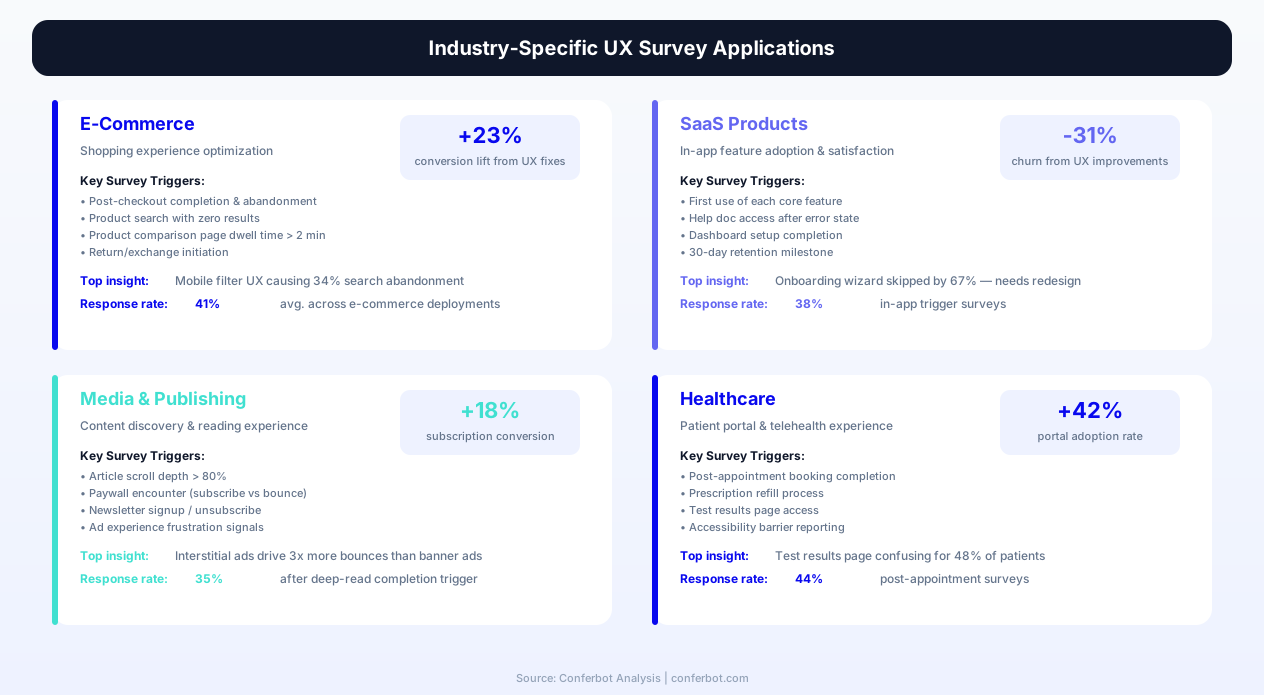
E-commerce UX surveys focus on purchase journey friction, product discovery effectiveness, and checkout experience quality. Key configurations for e-commerce:
- Product page engagement survey -- After 60+ seconds on a product page without adding to cart, ask: "Is there something about this product you'd like to know more about?"
- Cart abandonment feedback -- On exit intent from cart page, ask: "What's stopping you from completing your purchase today?"
- Post-purchase experience survey -- After order confirmation, ask: "How was your shopping experience today?" with follow-up on specific journey stages
- Search results quality -- After a search with no clicks, ask: "Did you find what you were looking for in these results?"
E-commerce brands using Conferbot's UX survey template report identifying an average of 12 unique checkout friction points per quarter that were invisible in analytics data alone, leading to average conversion rate improvements of 8-15% over 6 months of iterative optimization.
SaaS and B2B Platforms
SaaS UX surveys focus on feature discoverability, workflow efficiency, and the gap between user needs and current capabilities:
- Onboarding completion survey -- After new users complete onboarding steps, assess which parts were confusing or unnecessary
- Feature first-use feedback -- When a user interacts with a feature for the first time, capture immediate impressions
- Settings/configuration feedback -- On settings pages where users spend excess time, ask about difficulty finding specific controls
- Help article effectiveness -- After viewing support documentation, assess whether it resolved the user's question
Media and Content Publishers
Content websites need UX feedback focused on content discoverability, reading experience quality, and subscription or engagement friction:
- Content quality assessment -- After article completion (scroll depth > 90%), ask about content helpfulness and topics they want covered
- Paywall experience feedback -- When users hit a paywall and do not convert, capture their reason and willingness-to-pay threshold
- Navigation satisfaction -- After users browse 5+ pages in a session, assess whether they found the topics they wanted
Healthcare and Financial Services
Regulated industries need UX feedback that is especially sensitive to trust, clarity, and accessibility:
- Form comprehension assessment -- After completing complex application forms, assess whether instructions and terminology were clear
- Information trust measurement -- For health or financial content, ask whether the information felt trustworthy and authoritative
- Accessibility barrier reporting -- Specialized module for users with assistive technologies to report specific access issues
Before and After: Measuring UX Survey Impact on Product Quality
Organizations implementing Conferbot's UX survey chatbot consistently report measurable improvements in both UX research efficiency and product quality metrics. The following comparison represents aggregated data from Conferbot customers who deployed the UX survey template and tracked outcomes over 6 months.
| UX Research Metric | Before Chatbot Survey | After Chatbot Survey | Improvement |
|---|---|---|---|
| Monthly UX feedback volume | 15-30 responses (email survey) | 400-800 responses (in-context) | +2,500% |
| Unique usability issues identified/quarter | 8-12 | 35-55 | +350% |
| Time from issue identification to fix | 6-8 weeks | 2-3 weeks | -65% |
| UX research cost per insight | $450-$800 (lab testing) | $12-$35 (chatbot feedback) | -96% |
| Percentage of users providing feedback | 0.3% (passive feedback widget) | 4.2% (triggered chatbot) | +1,300% |
| Task completion rate (after 6 months of fixes) | 72% | 89% | +24% |
| Average satisfaction score (key pages) | 3.4/5 | 4.1/5 | +21% |
| Support tickets from UX confusion | 180/month | 95/month | -47% |
How UX Survey Feedback Translates to Product Improvement
The feedback-to-improvement pipeline works most effectively when it follows a structured cadence:
- Weekly triage -- UX team reviews the week's feedback, tags issues by page/feature and severity, and identifies recurring themes
- Bi-weekly prioritization -- Product and design leads review the top-5 issues by frequency and severity, assigning them to upcoming sprints
- Sprint-level fixes -- Engineering implements UX improvements identified through chatbot feedback alongside feature work
- Post-fix validation -- After deploying fixes, the chatbot continues collecting feedback on the affected pages to validate that the issue is resolved
This continuous loop -- detect, prioritize, fix, validate -- accelerates UX improvement cycles from quarterly research-driven redesigns to weekly incremental optimizations. In 2026, product teams that maintain this cadence report shipping UX improvements 4x faster than teams relying solely on periodic research sprints.
Connecting UX Feedback to Business Metrics
The ultimate value of UX survey data is its connection to business outcomes. When the chatbot identifies that 23% of users report difficulty finding pricing information, and you fix the navigation to make pricing more prominent, the resulting improvement is measurable in both UX metrics (satisfaction score increase, task ease improvement) and business metrics (pricing page views up 34%, demo request conversion up 12%). Conferbot's analytics enable this connection by tracking page-level UX scores alongside conversion events, allowing teams to correlate UX improvements with revenue impact for executive reporting and budget justification.
Step-by-Step Deployment Guide for UX Teams
Deploying Conferbot's website UX survey chatbot requires minimal technical effort but benefits from thoughtful strategic configuration. This guide covers both the technical deployment and the strategic decisions that maximize feedback quality.
Phase 1: Technical Deployment (20 Minutes)
- Create your Conferbot account and select the Website UX Survey template from the Surveys category
- Install the website widget -- Add a single JavaScript snippet to your website's head tag or deploy via Google Tag Manager. The widget is lightweight (under 40KB gzipped) and loads asynchronously to avoid any impact on page performance
- Configure brand styling -- Set your chatbot's colors, avatar, and position (bottom-right, bottom-left, or custom) to match your website design language
- Verify installation -- Visit your website and confirm the chatbot widget loads correctly across desktop and mobile viewports
Phase 2: Strategic Configuration (1-2 Hours)
- Define your primary research question -- What UX intelligence do you most need right now? Task ease measurement, navigation assessment, content quality, or general satisfaction?
- Configure triggers -- Set up 2-3 trigger conditions aligned with your primary research question using the visual trigger builder. Start conservative (fewer triggers, stricter conditions) and expand once you validate response quality
- Set page targeting -- Define which pages or URL patterns the survey should appear on. For initial deployment, start with 3-5 high-traffic pages where UX feedback is most needed
- Configure frequency capping -- Set maximum survey frequency per user (recommended starting point: once per 7-day period) and per session (maximum once)
- Customize question copy -- Adjust the chatbot's greeting, question phrasing, and tone to match your brand voice
- Set up notification recipients -- Add team members who should receive real-time alerts for low satisfaction scores or high-severity feedback
- Connect integrations -- Link to your project management tool (Linear, Jira) for automatic ticket creation and your analytics platform for trigger signals
Phase 3: Pilot and Optimization (2 Weeks)
- Run for 5-7 days at low trigger frequency -- Collect initial responses and review quality, relevance, and user engagement metrics
- Review response quality -- Are open-text responses specific and actionable? If responses are vague, your trigger timing or question wording may need adjustment
- Check completion rates -- Target 60%+ completion for users who engage with the opening question. If lower, simplify the follow-up or reduce depth
- Verify no negative UX impact -- Check bounce rate and time-on-page metrics for surveyed pages to confirm the chatbot is not causing friction
- Expand scope -- Add additional pages, triggers, and question modules based on pilot performance
Ongoing Best Practices
- Rotate questions quarterly -- Prevent survey fatigue by varying question phrasing and focus areas over time
- Close the loop visibly -- When you fix an issue identified by user feedback, consider a brief in-app notification ("You told us X was hard -- we fixed it") to reinforce feedback value
- Share insights broadly -- Send weekly UX feedback digests to engineering, design, and product leadership to maintain organizational awareness of user experience
- Track feedback-to-fix velocity -- Measure how quickly identified issues move from feedback to deployed fix; target under 3 weeks for high-severity items
For teams wanting to accelerate deployment, Conferbot's customer success team offers a complimentary UX survey setup workshop that covers trigger strategy, question design, and integration architecture tailored to your specific website type and research goals.
Website User Experience Survey FAQ
Everything you need to know about chatbots for website user experience survey.
Why Use a Template vs Building from Scratch?
Templates give you a proven starting structure instead of a blank canvas.
| Factor | Conferbot Template | Build from Scratch | Hire a Developer |
|---|---|---|---|
| Time to deploy | 10 minutes | 2-8 hours | 2-6 weeks |
| Cost | Free | Your time | Custom dev quote |
| Proven flows | Yes, pre-built | No | Depends |
| Updates included | Automatic | Manual | Paid |
| Multi-channel | 8+ channels | 1 channel | Extra cost |
| Analytics | Built-in | Must build | Extra cost |
Related B2B Services Templates
Explore more chatbot templates like this one






Learn More About Chatbots
Go deeper on how b2b services chatbots work and how to pick the right builder.
Ready to Deploy Website User Experience Survey?
Start with a free-forever plan. No credit card required.