Why Slack Chatbots Are Transforming Internal Support
Slack has become the operating system of the modern workplace. Slack's API platform enables deep integration with enterprise chatbots, making it the ideal channel for internal support automation. With over 65 million daily active users across 750,000+ organizations, it's where teams communicate, collaborate, and get work done. It's also where employees naturally turn when they need help — making it the ideal channel for IT and HR support automation.
The problem with traditional internal support is well-documented:
- IT teams spend 40-60% of their time on repetitive tier-1 issues (password resets, software access, VPN troubleshooting)
- HR departments answer the same policy questions hundreds of times per month (PTO balance, benefits enrollment, expense policies)
- Employees wait an average of 24.2 hours for IT ticket resolution (HDI Benchmark Report, 2025)
- Context switching between Slack, email, and ticketing systems costs the average knowledge worker 23 minutes per interruption
A Slack chatbot eliminates these inefficiencies by meeting employees where they already work. Instead of submitting a ticket via email or navigating to a portal, employees simply message the bot in Slack. The bot resolves common issues instantly and creates tickets for complex ones — all without leaving the Slack workspace.
The impact is significant. Organizations deploying Slack support bots report:
| Metric | Before Bot | After Bot | Improvement |
|---|---|---|---|
| Avg IT ticket resolution time | 24.2 hours | 4.1 hours | 83% faster |
| HR inquiry response time | 8 hours | Instant | 99% faster |
| Tier-1 ticket volume | 100% | 35% | 65% reduction |
| Employee satisfaction (support) | 3.2/5 | 4.4/5 | 38% increase |
| IT agent productivity | Baseline | +45% | Freed for complex work with team management |
In 2026, Slack chatbots aren't a nice-to-have — they're a critical component of any organization's IT and HR service delivery strategy. For the Microsoft ecosystem equivalent, see our Microsoft Teams chatbot for HR guide. Learn how chatbots streamline the new hire experience in our chatbot for employee onboarding deep dive.
IT Support Use Cases for Slack Bots
IT help desks handle a predictable set of recurring issues. A well-configured Slack chatbot can automate the vast majority of these, freeing IT professionals for strategic work.
1. Password Reset and Account Unlock
Password-related requests account for 20-30% of all IT tickets. With a ticket system in place, your Slack bot can:
- Verify the user's identity through Slack authentication (already logged in = verified)
- Trigger an automated password reset via Active Directory or Okta integration
- Send the user a secure reset link directly in Slack DM
- Confirm the reset was successful and close the interaction
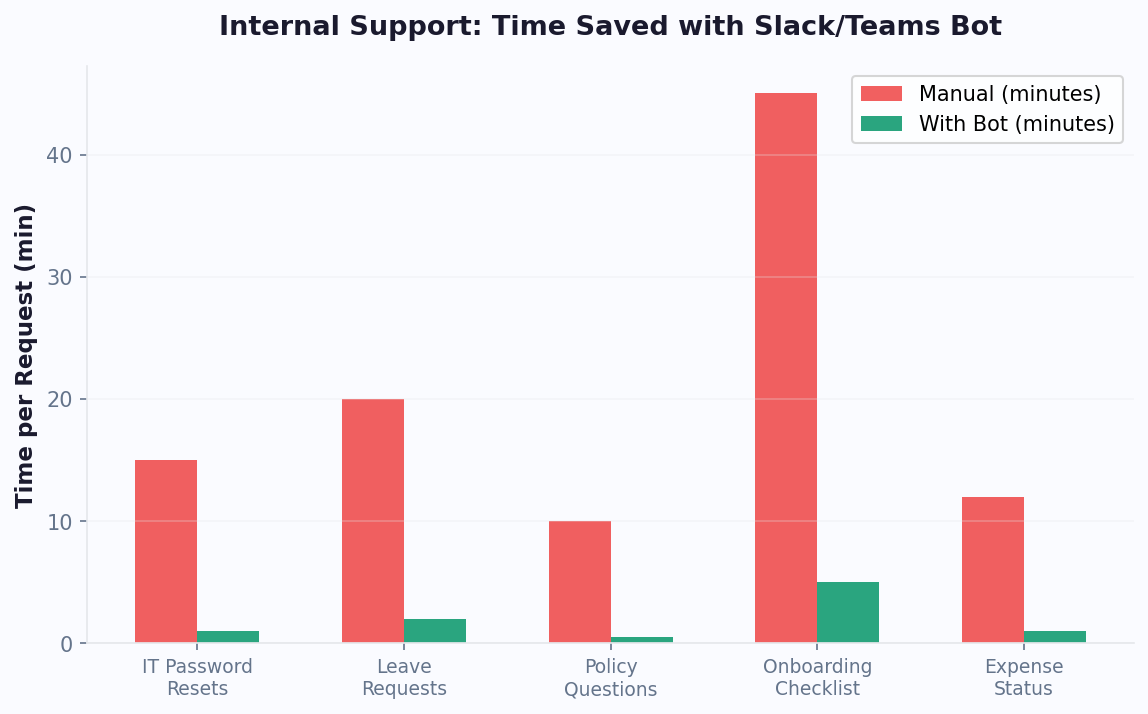
This single automation can save your IT team 10-20 hours per week.
2. Software Access Requests
Instead of email chains and approval forms:
- Employee messages the bot: "I need access to Salesforce"
- Bot identifies the request and pulls the approval workflow
- Bot sends an approval request to the employee's manager via Slack DM
- Manager taps "Approve" or "Deny" on an inline button
- Bot provisions access automatically via API integration with your identity provider
- Employee receives confirmation in Slack
3. VPN and Connectivity Troubleshooting
Guide employees through common connectivity issues with interactive troubleshooting flows:
- Step-by-step VPN configuration guides with screenshots
- Wi-Fi troubleshooting decision trees
- Known outage notifications pulled from your status page
- Automatic ticket creation if the guided troubleshooting doesn't resolve the issue
4. Hardware and Equipment Requests
Streamline equipment procurement through conversational workflows:
| Request Type | Bot Action |
|---|---|
| New laptop | Collect specs preference, route to procurement for approval |
| Monitor/peripherals | Show available inventory, create requisition |
| Broken equipment | Collect details + photo, create repair ticket |
| Return equipment | Generate return label, schedule pickup |
5. Onboarding IT Setup
New employee onboarding often involves 15-20 IT setup steps. Your Slack bot can:
- Send a personalized onboarding checklist to the new hire on their first day
- Walk them through each setup step (email, VPN, security training, tool access)
- Track completion and notify IT if any steps stall
- Answer common new-hire questions: "How do I set up 2FA?", "Where do I find the Wi-Fi password?"
Automated onboarding reduces IT's per-employee setup time from 4-6 hours to under 30 minutes of hands-on work.
6. IT Asset Management and Inventory Queries
IT teams maintain inventories of hardware, software licenses, and digital assets. A Slack bot enables self-service asset queries and management:
- License checks: "How many Figma seats do we have available?" — Bot queries license management system and returns: "12 of 50 seats are available. Want me to assign one to you?"
- Asset assignment history: "What equipment is assigned to Sarah Chen?" — Returns list of devices, serial numbers, and assignment dates for IT audit purposes
- Software recommendation: "I need a tool for screen recording" — Bot searches approved software catalog and returns options with pricing and approval status
- License renewal alerts: Proactive notifications 30 and 7 days before license renewals, with approval request for renewal sent to the budget owner
Asset management through Slack reduces IT admin time on inventory queries by 70-80% and improves license utilization by ensuring unused seats are reclaimed and reassigned promptly.
HR Support Use Cases for Slack Bots
HR teams field hundreds of repetitive questions every month. A Slack HR bot powered by a comprehensive knowledge base provides instant, accurate answers 24/7, freeing HR professionals to focus on strategic initiatives like talent development and culture building.
1. PTO and Leave Management
The most common HR inquiry, handled entirely by bot:
- Balance Check: "How many vacation days do I have left?" — Bot queries HRIS and returns the balance
- Request Submission: "I want to take off Dec 20-24" — Bot creates a PTO request and sends it to the manager for approval
- Status Check: "Did my PTO get approved?" — Bot checks the request status and responds
- Policy Questions: "How many sick days do I get?" — Bot returns the relevant policy excerpt
2. Benefits and Enrollment
Benefits questions surge during open enrollment. Your Slack bot handles the load:
- Compare health plan options with a side-by-side table
- Explain coverage details for specific scenarios
- Provide enrollment deadlines and step-by-step enrollment guides
- Direct employees to benefits portal for plan changes
3. Expense Reporting
Simplify expense management through Slack:
- "What's the per diem for New York?" — Returns current rate
- "Submit an expense" — Bot collects amount, category, receipt photo, and submits to your expense system
- "When will I get reimbursed?" — Checks processing status
- Policy reminders: "Expense reports must be submitted within 30 days of incurrence"
4. Company Policy FAQ
Build a comprehensive policy knowledge base accessible via natural language:
| Employee Question | Bot Response |
|---|---|
| "What's the remote work policy?" | Summary + link to full policy document |
| "Can I work from another country?" | International remote work policy + tax implications |
| "What's the dress code?" | Dress code by office location |
| "How do I report harassment?" | Confidential reporting process + hotline number |
| "What are the company holidays?" | Holiday calendar for the current year |
5. Employee Onboarding
Create a comprehensive onboarding companion that guides new hires through their first 90 days:
- Day 1: Welcome message, team introductions, office tour schedule, benefits enrollment reminder
- Week 1: Check-in survey, training schedule, manager intro meeting prep
- Day 30: First month check-in, feedback survey, career development resources
- Day 90: Probation review prep, goal-setting framework, ongoing support resources
This structured onboarding reduces new-hire ramp time by 30-40% and significantly improves retention rates. Combine HR automation with OpenAI-powered responses to handle nuanced policy questions that go beyond simple FAQ matching.
Building Your Slack Chatbot With Conferbot
Setting up a Slack chatbot with Conferbot is a straightforward process that doesn't require any coding. Here's a complete walkthrough.
Step 1: Create a Slack App
- Go to api.slack.com/apps and click "Create New App"
- Choose "From scratch" and name your app (e.g., "IT Support Bot")
- Select your Slack workspace
- Navigate to OAuth & Permissions and add the required bot scopes:
chat:write,im:history,im:read,im:write,users:read
Step 2: Connect to Conferbot
- In your Conferbot dashboard, navigate to Channels > Slack
- Click "Connect Slack Workspace"
- Authorize Conferbot to access your Slack workspace via OAuth
- Select which channels the bot should monitor (DMs, specific channels, or all channels)
Step 3: Design Conversation Flows
Build your support flows using the visual editor:
- IT Support Flow: Main menu → Password reset, Software access, Hardware request, Connectivity help, Other
- HR Support Flow: Main menu → PTO, Benefits, Expenses, Policies, Other
- Onboarding Flow: Day-by-day guided onboarding sequence
- Escalation Flow: Collect details, create ticket, notify on-call agent
Step 4: Configure Channel Behavior
Customize how the bot behaves in different Slack contexts:
- DMs: Full interactive experience with Block Kit components
- Public Channels: Respond only to @mentions or specific trigger phrases
- Private Channels: Dedicated support channels with automatic ticket creation
- Threads: Keep conversations in threads to avoid cluttering channels
Step 5: Set Up Integrations
Connect to your internal systems:
- Active Directory / Okta: For password resets and access provisioning
- Jira / ServiceNow: For IT ticket creation and tracking
- BambooHR / Workday: For PTO balances and HR data
- Google Calendar: For meeting room bookings and schedule management
Step 6: Test and Deploy
Test the bot in a private Slack channel with your team before rolling it out organization-wide. Verify that every flow works correctly, integrations return accurate data, and escalation procedures notify the right people. Once testing is complete, announce the bot in your #general channel and pin a quick-start guide so employees know how to use it.
Designing Rich Interactions With Slack Block Kit
Slack's Block Kit is a powerful UI framework that lets your chatbot create visually rich, interactive messages. Mastering Block Kit is key to building a support bot that employees actually enjoy using.
Essential Block Kit Components
| Component | Description | Support Use Case |
|---|---|---|
| Section Block | Text with optional accessory (image, button, overflow) | Displaying information with actions |
| Actions Block | Group of interactive elements (buttons, selects, date pickers) | Multi-choice menus, form inputs |
| Input Block | Form fields for user input | Ticket details, expense amounts |
| Divider Block | Visual separator | Organizing long messages |
| Header Block | Large bold text | Section titles |
| Context Block | Small text and images for additional context | Timestamps, status indicators |
Interactive Components
- Buttons: Primary, danger, and default styles for clear visual hierarchy. Use primary for the recommended action, danger for destructive actions.
- Select Menus: Static options, user selects, channel selects, and external data sources. Perfect for choosing ticket categories, assigning team members, or selecting time slots.
- Date/Time Pickers: Native date and time selection for scheduling meetings, setting deadlines, or selecting PTO dates.
- Overflow Menus: Compact menus for secondary actions (edit, delete, share, archive).
- Checkboxes: Multi-select for onboarding checklists, training acknowledgments, and task completion.
Modal Dialogs
For complex interactions that require multiple inputs, use Slack modals:
- IT ticket submission with category, priority, description, and attachments
- Expense report entry with amount, category, date, and receipt upload
- PTO request with start date, end date, and type of leave
- Employee feedback forms with rating scales and free-text comments
Message Updates
One of Slack's most powerful features is the ability to update existing messages:
- Show an approval request with "Approve" and "Deny" buttons
- When clicked, update the message to show the decision and who made it
- This keeps channels clean and provides a clear audit trail
Design Principles for Block Kit
- Progressive Disclosure: Don't overwhelm users with all options at once. Start with high-level categories and drill down.
- Visual Hierarchy: Use headers, dividers, and context blocks to create clear visual structure.
- Actionable Messages: Every message should have a clear next step — don't leave users wondering what to do.
- Consistent Patterns: Use the same layout patterns across all flows so users develop muscle memory.
Conferbot's visual builder generates Block Kit JSON automatically, so you get these rich interactions without writing code. Preview how messages will look in Slack before deploying them.
Enterprise Deployment and Security Considerations
Gartner's ITSM tools reviews highlight that the most effective IT service management deployments combine traditional ticketing with conversational interfaces. Deploying a Slack chatbot in an enterprise environment requires careful attention to security, compliance, and scalability. Here's what you need to consider.
Security Requirements
| Requirement | Implementation |
|---|---|
| Data Encryption | All data encrypted in transit (TLS 1.3) and at rest (AES-256) |
| SSO Integration | SAML 2.0 / OAuth 2.0 with your identity provider |
| Audit Logging | Complete audit trail of all bot interactions and admin actions |
| Data Residency | Choose data storage region (US, EU, APAC) for compliance |
| Role-Based Access | Admin, manager, and user roles with granular permissions |
| PII Handling | Automatic PII detection and masking in conversation logs |
Compliance Considerations
- SOC 2 Type II: Ensure your chatbot platform maintains SOC 2 compliance for data security
- GDPR: Implement data subject access requests (DSAR) handling, consent management, and right-to-deletion
- HIPAA: For healthcare organizations, ensure BAA agreements and PHI handling protocols
- Data Retention: Configure conversation log retention periods that match your compliance requirements
Scalability Planning
Enterprise deployments need to handle scale reliably:
- User Volume: Size your plan based on total employees who will interact with the bot (not total workspace members)
- Peak Load: Monday mornings and the first day back from holidays typically see 3-5x normal volume
- Integration Throughput: Ensure API integrations (Active Directory, HRIS, ticketing) can handle concurrent requests
- Multi-Workspace: For organizations with multiple Slack workspaces, deploy the bot across all of them from a single Conferbot account
Change Management
Technology adoption requires change management. Best practices for rolling out a Slack support bot:
- Pilot Phase: Deploy to one team or department first. Collect feedback and iterate.
- Training: Create a short video or guide showing employees how to interact with the bot.
- Communication: Announce the bot in #general with a clear explanation of what it can do and how it saves time.
- Feedback Loop: Add a "Give Feedback" option in the bot's menu and review submissions weekly.
- Metrics Reporting: Share monthly metrics (tickets resolved, time saved) to demonstrate value to leadership.
Integration with Existing ITSM
Your Slack bot should complement, not replace, your existing IT Service Management (ITSM) tools:
- Tickets created by the bot flow into ServiceNow, Jira Service Management, or Freshdesk
- Agents can respond from their preferred tool — the bot relays responses back to Slack
- SLA tracking and escalation rules remain in your ITSM platform
- The bot provides a conversational front end to your existing infrastructure
This integration approach via Conferbot's API layer ensures the Slack bot enhances your support ecosystem rather than creating a siloed experience. For a detailed comparison of IT service management platforms and how chatbots complement them, G2's ITSM tool rankings provide useful context for platform selection.
Building the Business Case for Leadership
When presenting the Slack chatbot investment to leadership, structure your business case around three pillars:
Pillar 1: Hard Cost Savings — Quantify ticket deflection savings using your actual ticket volume and cost-per-ticket data. For a 1,000-employee company, $11,400/month in savings is $136,800 annually against a platform cost of $1,200/year — a clear financial win.
Pillar 2: Employee Productivity — Calculate time saved per employee per month. If each employee saves 30 minutes monthly on support interactions (faster resolutions, no waiting), that is 500 hours of productivity recovered per month across 1,000 employees. At a loaded cost of $50/hour, that is $25,000/month in productivity gains.
Pillar 3: Employee Experience — Present satisfaction data showing that employees prefer instant chatbot responses over waiting 24 hours for ticket resolution. Frame this in the context of talent retention: companies with better internal tools and faster support have measurably lower turnover rates. Even a 1% reduction in turnover saves 5-10x the chatbot platform cost in reduced recruiting and onboarding expenses.
The combined annual value — $136,800 in cost savings + $300,000 in productivity gains + retention impact — makes the Slack chatbot one of the highest-ROI IT investments available. Most organizations approve the project within one executive presentation when the data is presented this clearly.
Measuring the ROI of Your Slack Support Bot
Justifying a Slack chatbot to leadership requires clear ROI metrics. Here's how to measure and present the business impact of your internal support bot.
Cost Savings Calculation
The primary ROI driver is ticket deflection — queries resolved by the bot that would otherwise require human agent time:
- Identify baseline: How many IT/HR tickets do you handle monthly? What's the average cost per ticket?
- Measure deflection: Track how many conversations the bot resolves without escalation
- Calculate savings: Deflected tickets x cost per ticket = monthly savings
Example for a 1,000-employee company:
| Metric | Value |
|---|---|
| Monthly IT tickets (before bot) | 800 |
| Bot deflection rate | 65% |
| Tickets deflected | 520 |
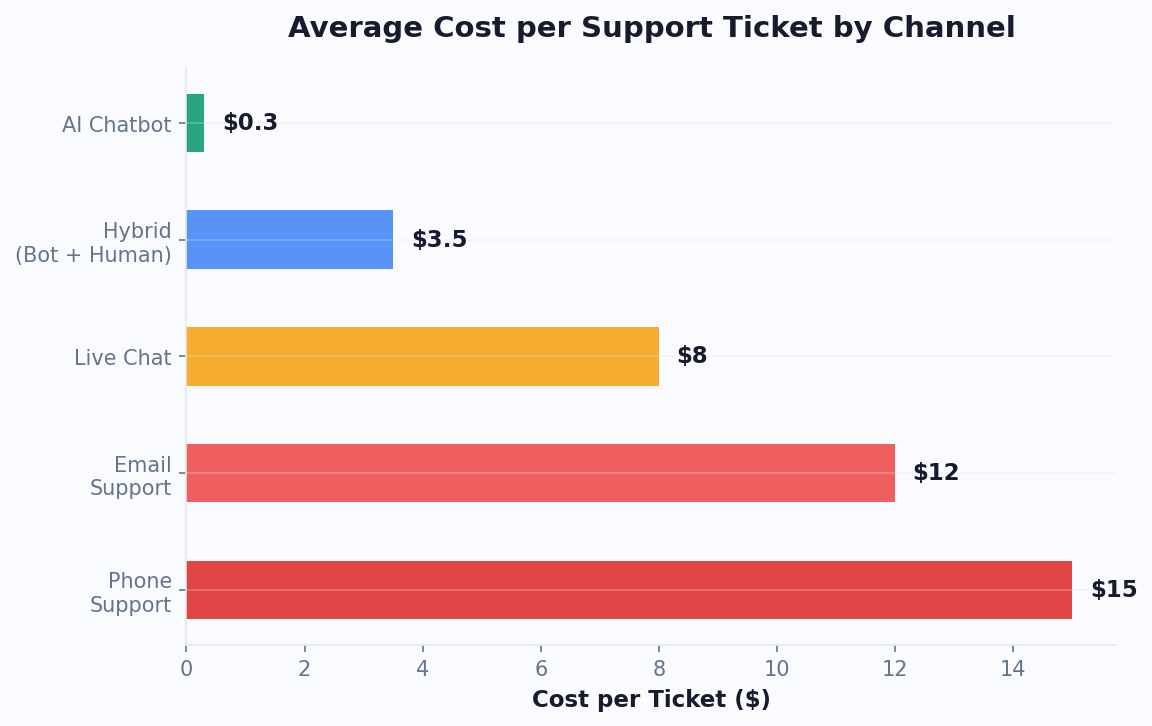
| Cost per human-handled ticket | $15 |
| Monthly IT cost savings | $7,800 |
| Monthly HR tickets (before bot) | 400 |
| Bot deflection rate | 75% |
| Tickets deflected | 300 |
| Cost per HR inquiry | $12 |
| Monthly HR cost savings | $3,600 |
| Total monthly savings | $11,400 |
| Conferbot subscription | $99/month |
| Net monthly ROI | $11,301 |
Productivity Gains
Beyond direct cost savings, measure the productivity impact:
- Employee time saved: If the average employee spends 15 minutes on a support request (writing ticket, waiting, following up), and the bot resolves it in 2 minutes, that's 13 minutes saved per interaction. At 520 bot-resolved tickets, that's 112 hours of employee productivity recovered monthly.
- IT/HR team capacity: With 65-75% fewer tier-1 tickets, your support team can focus on strategic projects, proactive improvements, and complex issue resolution.
Employee Satisfaction Impact
Track employee satisfaction before and after bot deployment:
- Run quarterly internal support satisfaction surveys (1-5 scale)
- Measure the bot's CSAT with post-interaction thumbs up/down
- Track the reduction in support-related complaints in engagement surveys
- Monitor Slack adoption metrics — how many employees actively use the bot
Reporting Dashboard
Create a monthly leadership report with these key metrics:
- Total conversations handled by the bot
- Resolution rate (% resolved without human)
- Average response time (bot vs. pre-bot baseline)
- Cost savings (monthly and cumulative)
- Employee satisfaction score
- Top unhandled queries (showing continuous improvement opportunities)
For deeper guidance on when to escalate to humans, read chatbot human handoff best practices. Track all performance indicators using chatbot analytics metrics to track. Use Conferbot's built-in analytics to generate these reports automatically. The data makes the case clear: a Slack support bot pays for itself many times over while delivering faster, more consistent internal support that employees genuinely prefer over traditional ticketing systems.
Advanced Slack Automation: Beyond FAQ and Ticketing
Once your basic IT and HR support chatbot is operational, advanced automation patterns can dramatically expand its value. These advanced use cases transform the Slack bot from a support tool into a productivity multiplier for the entire organization.
Automated Approval Workflows
Many internal processes require manager or department head approval: software purchases, access requests, time-off approvals, expense reports, and vendor onboarding. A Slack bot can automate the entire approval chain:
- Employee submits request via bot: "I need a Figma Pro license for my team"
- Bot identifies the approval path (manager + IT budget holder)
- Bot sends interactive approval message to manager's DM with context (employee, request, cost, justification)
- Manager taps "Approve" or "Deny" with optional comment
- If multi-level approval needed, routes to next approver automatically
- Upon final approval, bot provisions the resource and notifies the employee
- All approvals logged for audit trail
This automation reduces approval cycle time from 2-5 business days to under 4 hours (often under 30 minutes during working hours). The bottleneck shifts from "waiting for someone to check email" to "waiting for someone to glance at Slack" — which happens 10-20x more frequently per day.
Incident Management and War Room Coordination
During IT incidents (outages, security events, system degradation), the Slack bot becomes the incident commander's assistant:
- Incident declaration: Anyone can tell the bot "Declare incident — website is down" and it creates a dedicated incident channel, pages the on-call team, and starts the incident timer
- Status page updates: Bot pushes updates to your public status page directly from commands in the incident channel
- Stakeholder communication: Automated updates to leadership and affected teams at configurable intervals
- Post-incident: Bot generates a timeline from channel messages, collects action items, and schedules the post-mortem meeting
| Incident Phase | Bot Action | Time Saved |
|---|---|---|
| Detection | Auto-notify on-call from monitoring alerts | 5-15 minutes |
| Response | Create incident channel, assemble team | 10-20 minutes |
| Communication | Automated stakeholder updates every 30 min | 30+ minutes per incident |
| Resolution | Log resolution steps, update status page | 15-30 minutes |
| Post-mortem | Generate timeline, schedule meeting, track action items | 1-2 hours |
Knowledge Discovery and Self-Service
Transform your internal documentation (Confluence, Notion, Google Docs, SharePoint) into a conversational knowledge base accessible via Slack:
- Employee asks: "How do I set up our dev environment on a new Mac?"
- Bot searches your internal docs, finds the relevant guide, and provides a summarized answer with link to full documentation
- If no document exists, bot logs the question as a documentation gap and creates a ticket for the knowledge team
This turns static documentation (which most employees never read) into an on-demand knowledge assistant. Organizations report 60% higher utilization of internal documentation when it is accessible through conversational search in Slack versus traditional wiki navigation.
Automated Onboarding Orchestration
New employee onboarding involves coordination across IT, HR, Facilities, and the hiring manager. The bot orchestrates the entire process:
- Day -7 (before start): Bot notifies IT to prepare laptop and accounts, HR to prepare paperwork, Facilities to arrange desk/badge
- Day 1 morning: Bot sends the new hire a welcome message with first-day checklist, WiFi credentials, and building map
- Day 1 afternoon: Bot checks that all accounts are provisioned and follows up with IT on any missing access
- Week 1: Daily check-in messages: "How is your first week going? Need help with anything?" with quick-reply options for common new-hire requests
- Day 30: Bot triggers 30-day check-in survey and routes feedback to HR and manager
Automated onboarding orchestration via Slack reduces HR administrative time per new hire from 8-12 hours to under 2 hours while providing a more consistent and welcoming experience for every new employee regardless of team or location.
Implementation Timeline and Success Metrics for Slack IT Chatbots
Deploying a Slack IT chatbot follows a predictable timeline when planned correctly. According to Forrester Research, organizations that follow a structured deployment methodology achieve full adoption 60% faster than those that take an ad-hoc approach. Here is the implementation timeline based on successful enterprise deployments.
Phase-by-Phase Deployment Timeline
| Phase | Duration | Key Activities | Success Criteria |
|---|---|---|---|
| Discovery and Planning | Week 1 | Audit existing ticket data, identify top 30 repetitive issues, map integration requirements | Clear scope document with prioritized use cases |
| Platform Setup | Week 2 | Create Slack app, connect Conferbot, configure basic flows and knowledge base | Bot responds to test queries in a private channel |
| Integration Build | Weeks 2-3 | Connect Active Directory, HRIS, help desk system, and calendar tools | All integrations return real data in test environment |
| Content Loading | Week 3 | Upload IT documentation, troubleshooting guides, policy documents to AI knowledge base | Bot answers 80%+ of top 30 questions correctly |
| Pilot Testing | Weeks 3-4 | Deploy to IT team and 1-2 friendly departments, collect feedback daily | 70%+ resolution rate, positive user feedback |
| Organization Rollout | Week 5 | Launch to full organization with announcement, training materials, and feedback loop | 50%+ awareness, 30%+ adoption in first week |
| Optimization | Weeks 6-12 | Monitor analytics, fill knowledge gaps, refine flows, expand capabilities | 65%+ deflection rate, 4.0+ CSAT score |
30-60-90 Day Success Metrics
Track these KPIs at each milestone to ensure the deployment is on track:
Day 30:
- Ticket deflection rate: Target 50-60% (will improve as knowledge base expands)
- Employee adoption: 40%+ of workforce has interacted with the bot at least once
- Average resolution time for bot-handled issues: Under 3 minutes
- Unhandled query rate: Track the top 10 questions the bot cannot answer and add content for them weekly
Day 60:
- Ticket deflection rate: Target 60-70%
- Employee adoption: 60%+ regular users (used bot more than 3 times)
- IT team time recovered: Measurable reduction in routine ticket handling hours
- CSAT for bot interactions: 4.0+ out of 5
Day 90:
- Ticket deflection rate: Target 65-75% (steady state)
- Employee adoption: 70-80% regular users
- Cost per bot interaction: Under $0.50 (vs $15-25 for human-handled tickets)
- Knowledge base coverage: 90%+ of common questions have accurate answers
Common Implementation Failures and How to Avoid Them
Based on data from HubSpot's State of AI report, 34% of chatbot implementations fail to meet expectations. The top reasons and their solutions:
- Insufficient knowledge base (42% of failures): Solution: Audit 3 months of IT ticket data before launch. Extract the top 50 questions and ensure every one has a complete answer in the knowledge base.
- Poor integration reliability (28% of failures): Solution: Test integrations under load. A password reset that works in testing but times out under real usage destroys trust instantly.
- Lack of executive sponsorship (18% of failures): Solution: Get the CTO or VP of IT to announce the bot personally and visibly use it in the first week.
- No feedback loop (12% of failures): Solution: Review unanswered queries daily for the first 30 days. Every gap is an opportunity to improve.
Organizations that follow this structured approach consistently achieve full ROI within 60-90 days. The key is treating the chatbot as a living system that improves weekly, not a one-time deployment that runs on autopilot. Track all metrics through Conferbot's analytics dashboard and review weekly with your IT leadership team. For a broader look at measuring chatbot success, see our guide to chatbot analytics metrics to track.
Was this article helpful?
Slack Chatbot for IT and HR Support FAQ
Everything you need to know about chatbots for slack chatbot for it and hr support.
About the Author

Conferbot Team specializes in conversational AI, chatbot strategy, and customer engagement automation. With deep expertise in building AI-powered chatbots, they help businesses deliver exceptional customer experiences across every channel.
View all articles