
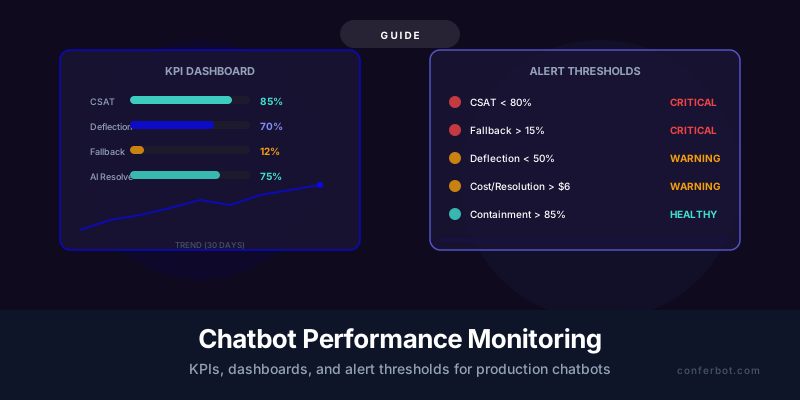
Why Most Chatbot Teams Fail at Monitoring (and Why It Costs Them)
Here is a pattern that repeats across thousands of chatbot deployments every year: a team spends weeks building a chatbot, launches it with fanfare, watches the first day of traffic with excitement, and then never looks at the data again. Six months later, someone asks "how is the chatbot doing?" and nobody has an answer beyond vague anecdotes. The chatbot may be deflecting 70% of tickets beautifully, or it may be silently frustrating customers with a 25% fallback rate that nobody noticed because no alert was set. Without monitoring, you are flying blind.
The cost of unmonitored chatbots is measurable and significant. Research from Gartner's customer service research division found that organizations with active chatbot monitoring programs achieve 34% higher customer satisfaction scores and 28% better deflection rates than those that deploy and forget. A separate analysis by McKinsey's operations practice showed that the difference between a monitored chatbot and an unmonitored one compounds over time: monitored bots improve by 2-4% per month on key metrics, while unmonitored bots degrade by 1-2% per month as knowledge bases go stale and conversation patterns shift.
The degradation happens silently. A product update changes pricing that the chatbot still quotes incorrectly. A new FAQ topic emerges that the knowledge base does not cover, pushing fallback rates up. Seasonal traffic patterns shift the query distribution, and what worked in January fails in June. Without dashboards showing these trends and alerts triggering when thresholds are breached, these problems accumulate until a customer complaint reaches the executive team and someone finally investigates.

This guide provides the complete monitoring framework: which KPIs to track, how to build dashboards that surface actionable insights (not vanity metrics), and what alert thresholds to set so your team catches problems within hours rather than months. Whether you are using Conferbot's built-in analytics or building a custom monitoring stack, the principles and thresholds are the same.
The framework is organized into three tiers: engagement metrics (is the chatbot being used?), performance metrics (is the chatbot performing well?), and business impact metrics (is the chatbot delivering ROI?). Most teams only track Tier 1 and miss the metrics that actually matter. By the end of this guide, you will have a complete monitoring system that covers all three tiers.
The Monitoring Maturity Model
| Level | Description | What Gets Tracked | % of Chatbot Teams |
|---|---|---|---|
| Level 0: Blind | No monitoring at all | Nothing beyond "it's live" | 25% |
| Level 1: Basic | Vanity metrics only | Total conversations, messages sent | 35% |
| Level 2: Functional | Performance metrics with manual review | Deflection, CSAT, fallback rate | 25% |
| Level 3: Proactive | Real-time dashboards with automated alerts | All 12 KPIs with threshold-based alerts | 12% |
| Level 4: Predictive | Anomaly detection and trend forecasting | ML-based anomaly detection, predictive capacity planning | 3% |
This guide will take you from wherever you are today to Level 3, with a clear roadmap to Level 4 for teams that need it. Level 3 is where the ROI of monitoring becomes undeniable: your chatbot continuously improves, problems get caught before they escalate, and you can demonstrate concrete business value to stakeholders with real data.
The 12 Chatbot KPIs That Actually Matter (Definitions and Benchmarks)
Not all chatbot metrics are created equal. Total conversations and messages sent are vanity metrics -- they tell you the chatbot is being used, but nothing about whether it is performing well or delivering business value. The 12 KPIs below are organized by the question they answer, with clear definitions, formulas, and industry benchmarks for each.
Tier 1: Engagement Metrics (Is the Chatbot Being Used?)
1. Conversation Volume
Total number of distinct conversations initiated per period (day, week, month). A conversation begins when a user sends the first message and ends after a configurable period of inactivity (typically 30 minutes). This is your baseline traffic metric. Track it primarily to identify trends: rising volume means adoption is growing; dropping volume may indicate the chatbot is hard to find or users have given up on it.
Benchmark: Varies entirely by traffic. Focus on trend, not absolute number.
2. Engagement Rate
Percentage of website visitors (or app users) who initiate a conversation with the chatbot. Formula: (conversations initiated / total visitors) x 100. This metric tells you whether your chatbot placement, greeting message, and trigger timing are effective. If your chatbot sits on a page with 10,000 monthly visitors and only 200 start a conversation, your 2% engagement rate has significant room for improvement through better conversation design.
Benchmark: 2-5% passive (always visible), 8-15% proactive (triggered greeting).
3. Average Conversation Length
Mean number of user messages per conversation. This metric requires context to interpret: for a support chatbot, shorter is generally better (the user got their answer quickly). For a lead qualification chatbot, moderate length (5-8 messages) indicates thorough qualification. Extremely long conversations (15+ messages) almost always indicate the chatbot is failing to resolve the issue.
Benchmark: 3-5 messages for support; 5-8 messages for lead qualification; 4-6 for e-commerce.
Tier 2: Performance Metrics (Is the Chatbot Performing Well?)
4. Deflection Rate
Percentage of conversations fully resolved by the chatbot without any human agent involvement. This is the single most important metric for support chatbots. Formula: (conversations resolved by bot / total conversations) x 100. A conversation counts as "resolved by bot" if the user does not request a human, does not receive a handoff, and does not submit a follow-up ticket within 24 hours on the same topic.
Benchmark: 40-60% for general support; 60-80% for FAQ-heavy use cases. Conferbot customers with well-maintained knowledge bases average 65% deflection.

5. AI Resolution Rate
Percentage of conversations where the AI provided a substantive, accurate answer (regardless of whether the user then chose to escalate). This differs from deflection rate because it measures the AI's capability independent of user behavior. A user might get a perfect AI answer but still request a human for reassurance -- the AI resolution rate captures that the AI did its job, even though deflection did not occur.
Benchmark: 70-85% for well-tuned RAG chatbots. Track the gap between AI resolution rate and deflection rate: a large gap (e.g., AI resolves 80% but only deflects 55%) suggests users do not trust the bot enough, which is a UX and trust-building problem rather than an accuracy problem.
6. Fallback Rate
Percentage of conversations where the chatbot could not understand the user's intent or could not find relevant information in the knowledge base, triggering a fallback response ("I'm sorry, I don't have information about that"). Formula: (fallback responses / total bot responses) x 100. This is your primary signal for knowledge gaps and retrieval failures.
Benchmark: Below 10% is excellent; 10-15% is acceptable; above 15% requires immediate attention. See our guide on preventing chatbot hallucinations for strategies to reduce fallback through better RAG grounding.
7. CSAT Score (Customer Satisfaction)
Direct satisfaction rating collected from users after a chatbot conversation, typically on a 1-5 scale or thumbs up/down. CSAT is the most direct measure of user experience quality. The challenge is response bias: users who had extreme experiences (very good or very bad) are more likely to rate, so your CSAT sample may not represent the average experience. Mitigate this by targeting a response rate above 15%.
Benchmark: 4.0+/5.0 (or 80%+) is good; 4.3+/5.0 (86%+) is excellent. Below 3.5/5.0 (70%) warrants a deep investigation.
8. Containment Rate
Percentage of conversations that stay within the chatbot channel without the user abandoning to call, email, or open a separate ticket. This is broader than deflection rate because it also captures users who silently leave the chat and contact support through another channel. Formula: 1 - (multi-channel follow-ups within 24 hours / total chatbot conversations) x 100. Tracking this requires connecting chatbot data with your ticketing and phone system data.
Benchmark: 75-85% for mature chatbot deployments.
Tier 3: Business Impact Metrics (Is the Chatbot Delivering ROI?)
9. Cost Per Resolution
Average cost to resolve a customer issue through the chatbot, including AI API costs, platform costs, and a share of maintenance labor. Formula: (total monthly chatbot costs / conversations resolved by bot). Compare this against your human agent cost per resolution to quantify savings. Most businesses find chatbot cost per resolution is $0.50-$2.00 compared to $8-$25 for human agents.
Benchmark: Below $1.50 for simple queries; below $3.00 for complex multi-turn resolutions. Refer to the chatbot ROI calculator framework for full cost modeling.
10. First Contact Resolution (FCR)
Percentage of issues resolved in the user's first chatbot conversation without requiring a follow-up. Formula: 1 - (repeat contacts within 72 hours on same topic / total chatbot conversations). Low FCR means the chatbot is giving incomplete or incorrect answers that force users to return. This metric directly predicts CSAT: every 5% improvement in FCR correlates with a 3-4% improvement in CSAT according to Forrester's CX research.
Benchmark: 70-80% for support chatbots; 85%+ is excellent.
11. Conversion Rate (for Sales/Lead Bots)
Percentage of chatbot conversations that result in a desired business outcome: lead captured, appointment booked, purchase completed, or trial started. This is the bottom-line metric for revenue-generating chatbots. Track it by conversation source to identify which pages and triggers produce the highest-converting conversations.
Benchmark: Varies wildly by industry. See our chatbot marketing strategy guide for conversion benchmarks by channel and industry.
12. Revenue Attribution
Total revenue directly or assisted by chatbot interactions. Direct attribution counts sales where the chatbot was the primary conversion channel. Assisted attribution counts sales where the user interacted with the chatbot within the conversion window (typically 7-30 days). This is the ultimate justification metric for chatbot investment and should be presented in executive dashboards.
Benchmark: $3-$10 in revenue attributed per chatbot conversation for e-commerce; varies for B2B lead generation.
Deep Dive: Deflection Rate vs. AI Resolution Rate vs. Containment Rate
Three of the twelve KPIs above -- deflection rate, AI resolution rate, and containment rate -- are often confused or used interchangeably. They measure different things, and understanding the distinctions is essential for accurate performance assessment. Conflating them leads to overstated or understated performance claims and misguided optimization efforts.
The Relationship Between the Three Metrics
Think of these three metrics as concentric circles. AI resolution rate is the innermost circle: did the AI produce a correct answer? Deflection rate is the middle circle: did the correct answer prevent a human agent from being needed? Containment rate is the outermost circle: did the user stay in the chatbot channel entirely, without reaching out through any other support channel?
In mathematical terms: Containment Rate >= Deflection Rate >= AI Resolution Rate is not always true. Each measures a different dimension:
| Metric | Measures | Can Be Higher Than Deflection? | Example Gap Scenario |
|---|---|---|---|
| AI Resolution Rate | AI's ability to produce accurate answers | Yes (AI answered correctly but user escalated anyway) | AI: 80%, Deflection: 60% -- users do not trust bot |
| Deflection Rate | Conversations that avoid human agents | N/A (baseline comparison metric) | Deflection: 60% is the anchor metric |
| Containment Rate | Users who stay in the chat channel | Should be higher (includes abandoned but unescalated) | Containment: 78%, Deflection: 60% -- 18% abandon without escalating |
Diagnosing Problems Using the Gaps
Gap 1: AI Resolution Rate significantly higher than Deflection Rate
When your AI answers correctly 80% of the time but only deflects 60% of conversations, 20% of users are receiving good answers but escalating to humans anyway. This is a trust problem, not an accuracy problem. Solutions include: adding source citations to build credibility, showing confidence indicators ("Based on our return policy, updated March 2026..."), and improving the chatbot's conversation design to feel more authoritative.
Gap 2: Deflection Rate significantly higher than Containment Rate
When your chatbot deflects 60% of conversations (no human needed) but containment is only 50%, it means 10% of users are leaving the chatbot and contacting support through another channel (phone, email, social media) about the same issue. This indicates the chatbot gave an answer the user did not find satisfactory, but the user did not request escalation -- they just left and called instead. Solutions include: better handoff prompts ("Would you like me to connect you with a specialist?"), proactive satisfaction checks mid-conversation, and improving answer completeness.
Gap 3: All three metrics are low
When AI resolution, deflection, and containment are all below 50%, the fundamental problem is chatbot capability -- the knowledge base is insufficient, the RAG pipeline is underperforming, or the chatbot is being deployed for use cases it was not designed for. Go back to basics: audit your knowledge base coverage, review the top 50 unresolved queries, and close the gaps before optimizing anything else.

How to Accurately Measure Each Metric
Accurate measurement requires connecting data sources that most teams keep separate:
- AI Resolution Rate: Requires a human evaluation component. Sample 100+ conversations weekly and have a human reviewer judge whether the AI's answer was correct. Automated proxy: conversations where the user sends a positive signal ("thanks," "that helps," thumbs up) after the bot's answer.
- Deflection Rate: Requires tracking whether a human agent touched the conversation at any point. Most chatbot platforms including Conferbot analytics track this natively.
- Containment Rate: Requires cross-channel data. Connect your chatbot data with your CRM, helpdesk (Zendesk, Freshdesk, etc.), and phone system. Look for the same customer contacting support through another channel within 24 hours of a chatbot conversation.
If cross-channel tracking is not feasible, use deflection rate as your primary metric and supplement with periodic manual containment audits (review a sample of 50 deflected conversations and check whether those users submitted tickets through other channels).
Building Your Chatbot Monitoring Dashboard (Templates and Layout)
A dashboard is only useful if the right people look at it regularly and can extract actionable insights within 30 seconds. The most common dashboard failure is information overload: showing 30 charts on one screen so that nothing stands out. The second most common failure is showing data without context: a number like "4,231 conversations" is meaningless without a comparison to last week, last month, or a target benchmark.
Dashboard Design Principles
- Hierarchy: Lead with the 3-4 most critical metrics at the top (CSAT, deflection rate, fallback rate, cost per resolution). Everything else goes below the fold.
- Comparison: Every metric should show a comparison -- vs. previous period, vs. target, or vs. benchmark. A CSAT of 82% means nothing in isolation; "82% (up from 78% last month, target: 85%)" tells a story.
- Color coding: Use red/yellow/green to make threshold breaches immediately visible. If CSAT drops below 80%, the metric should turn red before anyone reads the number.
- Drill-down: Summary metrics link to detailed views. Clicking on "Fallback Rate: 14%" should show the specific topics causing fallbacks, the trend over time, and the individual conversations.
Recommended Dashboard Layout
Structure your dashboard in four rows, each targeting a different audience and refresh cadence:
| Row | Audience | Metrics | Refresh |
|---|---|---|---|
| Row 1: Executive Summary | Leadership, stakeholders | CSAT score, deflection rate, cost savings ($ this month), revenue attributed | Daily |
| Row 2: Performance Health | Chatbot manager, CX team | Fallback rate, AI resolution rate, containment rate, FCR | Real-time |
| Row 3: Operational Detail | Content team, KB managers | Top fallback topics, lowest-CSAT topics, knowledge gap queue | Real-time |
| Row 4: Trends and Forecasts | All stakeholders | 30-day trend lines for all Tier 2 metrics, volume forecast, anomaly flags | Weekly |
If you are using Conferbot's analytics dashboard, Rows 1 and 2 are available out of the box. For custom dashboards, tools like Grafana (open source), Datadog, or Looker can connect to your chatbot's event stream and build these views. The key data pipeline is: chatbot platform emits events (conversation started, message sent, fallback triggered, handoff initiated, CSAT collected) to a data warehouse or time-series database, and the dashboard queries that data.
The Real-Time Operational View
In addition to the daily/weekly dashboard, build a real-time operational view for your support team that shows:
- Active conversations right now (count and trend)
- Current handoff queue depth (how many conversations are waiting for a human)
- Last-hour fallback rate (real-time spike detection)
- Last-hour CSAT (real-time quality detection)
- System health: API latency, error rate, uptime
This operational view is what your team watches during business hours. It catches acute issues (a spike in fallbacks because a product page changed, a drop in CSAT because the LLM provider had a quality regression) within minutes rather than days. The monitoring approach here follows similar principles to those outlined in Google's Site Reliability Engineering (SRE) book on monitoring distributed systems.

Common Dashboard Mistakes
- Tracking total messages instead of conversations: A user sending 20 messages in one frustrating conversation inflates message count without indicating success.
- Not segmenting by channel: Your chatbot on WhatsApp may perform very differently from your website widget. Segment all metrics by channel to identify channel-specific issues.
- No baseline period: Start tracking metrics for at least 2 weeks before setting targets. Your initial data establishes the baseline from which improvements (or regressions) are measured.
- Confusing containment with deflection: As discussed in the previous section, these measure different things. Show them separately on the dashboard.
Setting Alert Thresholds: When to Sound the Alarm
Alerts are the difference between reactive and proactive chatbot management. Without alerts, you discover problems when customers complain or when someone happens to check the dashboard. With properly configured alerts, your team is notified within minutes of a threshold breach, often before any customer is significantly impacted.
The challenge with alerts is calibration: too sensitive and you get alert fatigue (the team starts ignoring alerts); too lenient and real problems slip through. The thresholds below are starting points based on industry data and Forrester's customer experience benchmarks. Calibrate them to your specific context after 2-4 weeks of data collection.
Critical Alerts (Immediate Action Required)
| Metric | Threshold | Time Window | Action |
|---|---|---|---|
| CSAT Score | Drops below 80% (4.0/5.0) | Rolling 24 hours | Review last 20 negative-rated conversations. Check for knowledge base errors, LLM quality regression, or new unhandled topics. |
| Fallback Rate | Exceeds 15% | Rolling 4 hours | Identify the specific queries triggering fallbacks. Prioritize the top 5 fallback topics for immediate KB content creation. |
| Error Rate | Exceeds 2% | Rolling 1 hour | Check LLM API status, platform health, integration connectivity. This is a systems issue, not a content issue. |
| Handoff Queue Depth | Exceeds 20 waiting | Real-time | Add human agents to the queue or enable overflow messaging ("We're experiencing high volume, expected wait: X minutes"). |
Warning Alerts (Investigate Within 24 Hours)
| Metric | Threshold | Time Window | Action |
|---|---|---|---|
| Deflection Rate | Drops below 50% | Rolling 7 days | Analyze which conversation types are being escalated. Check for seasonal query pattern shifts. |
| Cost Per Resolution | Exceeds $6.00 | Rolling 7 days | Audit token usage. Check for prompt bloat, excessive context, or inefficient RAG retrieval. See our caching strategies guide for cost reduction. |
| Average Conversation Length | Increases 30%+ week-over-week | Rolling 7 days | Longer conversations often mean the chatbot is struggling. Review the longest conversations for quality issues. |
| FCR (First Contact Resolution) | Drops below 65% | Rolling 7 days | Users are coming back for the same issue. Audit repeat conversations to identify incomplete or incorrect initial answers. |
Informational Alerts (Monthly Review)
| Metric | Threshold | Time Window | Action |
|---|---|---|---|
| Engagement Rate | Drops below 3% | Rolling 30 days | Review chatbot placement, greeting message, and trigger rules. A/B test new greetings per our A/B testing guide. |
| Revenue Attribution | Below monthly target | Rolling 30 days | Review conversion funnels, CTA placement, and qualification flows. |
| Conversation Volume | Deviates 25%+ from forecast | Rolling 7 days | Investigate traffic source changes, marketing campaign impact, or seasonal effects. |
Implementing Alerts in Practice
Alert delivery channels matter as much as the thresholds themselves. Route critical alerts to a dedicated Slack/Teams channel and SMS for on-call team members. Route warning alerts to email and Slack. Route informational alerts to a weekly digest email.
For teams using Conferbot, many of these alerts can be configured directly in the analytics dashboard. For custom setups, the typical architecture is: chatbot events stream to a data pipeline (e.g., Kafka, AWS Kinesis, or a simpler webhook-based approach), metrics are computed in a time-series database (e.g., InfluxDB, TimescaleDB, or Prometheus), and alerts are managed through PagerDuty, Opsgenie, or custom Slack integrations.
Start with the four critical alerts only. Add warning alerts after your team has processed critical alerts reliably for two weeks. Add informational alerts last. This progressive rollout prevents alert fatigue during the initial setup period.
Optimizing the Two Most Important Metrics: CSAT and Fallback Rate
If you could only monitor two chatbot metrics, choose CSAT and fallback rate. CSAT tells you whether users are satisfied with the chatbot experience. Fallback rate tells you how often the chatbot fails to understand or answer the user. Together, they capture both the outcome (satisfaction) and the primary cause of poor outcomes (knowledge/understanding failures). This section provides detailed optimization playbooks for each.
CSAT Optimization Playbook
CSAT scores in chatbot interactions are influenced by five factors, ranked by impact:
- Answer accuracy (40% of CSAT variance): The single biggest driver. A wrong answer tanks satisfaction regardless of how friendly the bot is. Improve accuracy through better hallucination prevention and RAG optimization.
- Response time (20% of CSAT variance): Users expect chatbot responses in under 3 seconds. Responses taking 5+ seconds reduce CSAT by an average of 12%. Implement caching strategies and optimize your inference pipeline to maintain sub-second response times.
- Conversation flow quality (15% of CSAT variance): Does the chatbot ask the right clarifying questions? Does it avoid making the user repeat themselves? Good conversation design directly improves CSAT.
- Escalation experience (15% of CSAT variance): When the chatbot cannot help, does it hand off smoothly to a human? A seamless handoff via Conferbot's live chat integration with full context transfer can actually produce high CSAT even on conversations the bot could not resolve.
- Tone and personality (10% of CSAT variance): A chatbot that sounds robotic or overly casual for the context loses points. Match the tone to your brand and audience.
Action plan for CSAT below 80%:
- Pull the 20 lowest-rated conversations from the past 7 days
- Categorize each by the primary CSAT driver that failed (accuracy, speed, flow, escalation, tone)
- You will likely find 2-3 root causes account for 70% of low scores
- Address the top root cause first; recheck CSAT after 7 days
- Repeat weekly until CSAT exceeds 80%, then shift to bi-weekly reviews
Fallback Rate Optimization Playbook
Fallback responses are the chatbot equivalent of a shrug -- "I don't know." Some fallbacks are appropriate (the user asked something genuinely outside the chatbot's scope), but most indicate fixable knowledge gaps or retrieval failures.
Step 1: Categorize your fallbacks. Pull all fallback conversations from the past 30 days and tag each with a reason:
| Fallback Reason | Typical % of Total | Fix | Effort |
|---|---|---|---|
| Knowledge gap: topic not in KB | 40-50% | Create content for the missing topic | 1-2 hours per topic |
| Retrieval failure: content exists but was not found | 20-30% | Improve document titles, add synonyms, re-chunk content | 30 min per document |
| Ambiguous query: user's intent unclear | 10-15% | Add clarifying question flows for ambiguous intents | 1 hour per flow |
| Out of scope: user asked something the bot should not answer | 10-15% | These are acceptable fallbacks. Improve the fallback message to redirect helpfully. | 30 min |
| Language/format: user wrote in a language or format the bot cannot handle | 5-10% | Add multilingual support or format handling | Varies |
Step 2: Prioritize by volume. Fix the top 5 fallback topics first. These typically account for 30-40% of all fallbacks. After fixing them, re-measure: you should see a meaningful drop in overall fallback rate.
Step 3: Automate the pipeline. Set up a weekly report that surfaces the top 10 fallback queries automatically. Route this report to your content team with a clear expectation: close 3-5 knowledge gaps per week. At this pace, your fallback rate will drop below 10% within 60-90 days and stay there as long as the pipeline keeps running.
Conferbot's analytics dashboard surfaces fallback topics automatically, ranked by frequency, making Step 2 and Step 3 straightforward without custom data engineering.
Tracking and Reducing Cost Per Resolution
Cost per resolution is the metric that makes the business case for your chatbot undeniable. When you can show that your chatbot resolves issues for $1.20 each while human agents cost $12.50, the ROI conversation is over. But calculating it accurately requires understanding all the cost inputs, not just the obvious ones.
The Complete Cost Per Resolution Formula
Cost Per Resolution (CPR) = Total Monthly Chatbot Costs / Conversations Successfully Resolved
Total Monthly Chatbot Costs includes:
| Cost Component | Typical Range | How to Track |
|---|---|---|
| AI/LLM API costs | $200-$3,000/mo | Direct from your OpenAI/Anthropic/etc. billing dashboard |
| Platform subscription | $50-$500/mo | Your Conferbot plan or equivalent platform cost |
| Vector database / hosting | $20-$200/mo | Infrastructure costs for RAG, embeddings, and storage |
| Maintenance labor | $500-$3,000/mo | Hours spent on KB updates, prompt tuning, monitoring (at loaded labor rate) |
| Integration maintenance | $100-$500/mo | Time spent maintaining CRM, helpdesk, and API integrations |
For a typical mid-size deployment (5,000 resolved conversations per month, $1,500 total cost), the CPR is $0.30. Compare this against the human agent benchmark of $8-$25 per resolution (depending on agent salary, overhead, and average handle time in your market), and the savings are immediately clear.
Reducing Cost Per Resolution
The biggest lever for reducing CPR is reducing LLM API costs, which typically account for 40-60% of total chatbot costs. Strategies include:
- Semantic caching: Cache responses to similar (not just identical) questions. This can reduce LLM API calls by 40-60%. See our dedicated caching strategies guide for implementation details.
- Prompt optimization: Shorter prompts cost less. Audit your system prompt for unnecessary instructions, redundant context, and verbose examples. A 30% reduction in prompt tokens directly reduces per-query cost by 30%.
- Model tiering: Use a smaller, cheaper model (e.g., GPT-4o-mini, Claude Haiku) for simple queries and reserve the larger model for complex ones. A well-designed router sends 70% of queries to the cheap model, reducing average cost per query by 50%+.
- Rate limiting: Prevent abuse and excessive usage that inflates costs. Our rate limiting guide covers implementation in detail.
Cost Per Resolution Benchmarks by Complexity
| Query Complexity | Example | Target CPR | Human Agent CPR |
|---|---|---|---|
| Simple FAQ | "What are your hours?" | $0.05-$0.15 | $5-$8 |
| Moderate lookup | "What's the status of my order?" | $0.20-$0.60 | $8-$12 |
| Complex multi-step | "I need to change my plan and update my billing" | $0.80-$2.00 | $12-$20 |
| Escalation-required | Complaint, billing dispute | N/A (human handles) | $15-$25 |
The key insight is that your blended CPR depends heavily on your query mix. If 60% of your queries are simple FAQs, your blended CPR should be well under $1.00. If your chatbot is handling mostly complex queries, a CPR of $1.50-$2.50 is still excellent relative to the human alternative.
Track CPR monthly and report it alongside total cost savings: "This month, the chatbot resolved 5,200 conversations at $0.85 each, saving $52,000 compared to human agent handling." This framing resonates with stakeholders because it translates a technical metric into business language that directly connects to the ROI framework.
Advanced: Anomaly Detection and Predictive Monitoring
Static thresholds catch known problems. Anomaly detection catches unknown problems -- patterns that deviate from historical norms in ways you could not have predicted or configured a threshold for. For teams operating chatbots at scale (10,000+ conversations per month), anomaly detection is the difference between Level 3 (proactive) and Level 4 (predictive) monitoring maturity.
What Anomaly Detection Catches That Thresholds Miss
- Gradual drift: A metric that slowly degrades over weeks may never breach a static threshold but still represents a significant problem. CSAT dropping from 87% to 82% over 8 weeks is a 5-point decline that a "below 80%" threshold would never catch.
- Correlated anomalies: Individually, a 3% rise in fallback rate and a 5% rise in conversation length may not breach any threshold. Together, they signal a systemic issue that static thresholds evaluate independently.
- Seasonal and temporal patterns: Your chatbot may naturally see lower CSAT on Mondays (support backlog from the weekend) and higher volume on paydays. Anomaly detection learns these patterns and only alerts on deviations from the expected seasonal norm.
- New topic emergence: A sudden cluster of queries about a topic that did not exist last week (e.g., a product recall, a news event, a competitor campaign) may not trigger any metric threshold but represents a critical knowledge gap that needs immediate content creation.
Implementing Basic Anomaly Detection
You do not need a machine learning team to implement useful anomaly detection. Start with statistical methods that any data-literate team member can set up:
Method 1: Rolling Z-Score
Calculate the mean and standard deviation of each metric over a 30-day rolling window. Flag any data point that deviates more than 2 standard deviations from the mean. This is simple to implement in any spreadsheet, BI tool, or time-series database and catches approximately 80% of meaningful anomalies.
Method 2: Week-over-Week Comparison
Compare each metric to the same day of the previous week. Flag deviations greater than 20% for investigation. This naturally accounts for day-of-week seasonality (Monday volumes are compared to last Monday, not last Sunday).
Method 3: Exponential Moving Average (EMA)
Calculate an EMA with a 7-day span and alert when the current value deviates more than 15% from the EMA. EMA is more responsive to recent changes than a simple moving average, making it better at catching emerging trends. The approach aligns with monitoring best practices documented by the Datadog engineering team's monitoring guides.

Predictive Monitoring: What Comes Next
Beyond anomaly detection, predictive monitoring uses historical patterns to forecast future metric values and alert on predicted breaches before they happen. For example:
- Volume forecasting: Predict next week's conversation volume based on historical patterns, marketing calendar events, and seasonal trends. Alert if predicted volume exceeds current staffing capacity.
- Knowledge base decay prediction: Track how often knowledge base articles are updated and correlate with fallback rate trends. Predict when stale content will push fallback rate above the threshold and alert the content team proactively.
- CSAT trend projection: If CSAT has been declining at 0.5 points per week for 3 weeks, project when it will breach the 80% threshold and alert with an estimated "time to breach" metric.
These predictive capabilities require more data infrastructure (typically a time-series database with at least 90 days of history and a forecasting model like Prophet, ARIMA, or a simple linear regression). For most teams, basic anomaly detection (Methods 1-3 above) provides 80% of the value at 20% of the effort. Add predictive monitoring when your chatbot operation matures and the marginal value of earlier detection justifies the infrastructure investment.
Reporting to Stakeholders: Monthly Performance Reviews
Monitoring data is only valuable if it drives decisions. A monthly performance review translates raw metrics into a narrative that stakeholders can act on. The format below is designed to take 15 minutes to prepare and 10 minutes to present, ensuring that chatbot performance review becomes a sustainable practice rather than an occasional effort.
The Monthly Report Template
Section 1: Executive Summary (1 slide / 3 bullets)
- One sentence on overall chatbot health: "The chatbot performed within target on all critical metrics this month" or "Fallback rate exceeded the 15% threshold for 3 days, requiring knowledge base updates."
- One key business impact number: "$47,000 in support cost savings this month (5,200 conversations resolved at $0.85 CPR vs. $9.90 human CPR)" or "312 qualified leads captured through chatbot conversations, a 14% increase over last month."
- One forward-looking priority: "Next month's focus: reducing fallback rate on shipping-related queries (currently 22% of all fallbacks) by creating 8 new KB articles."
Section 2: KPI Scorecard (1 table)
| KPI | This Month | Last Month | Change | Target | Status |
|---|---|---|---|---|---|
| CSAT | 83% | 81% | +2% | 85% | On track |
| Deflection Rate | 62% | 60% | +2% | 65% | On track |
| Fallback Rate | 12% | 14% | -2% | Below 10% | Improving |
| AI Resolution Rate | 76% | 74% | +2% | 80% | On track |
| Cost Per Resolution | $0.85 | $0.92 | -8% | Below $1.50 | Exceeding |
| FCR | 74% | 72% | +2% | 75% | On track |
Section 3: Incidents and Actions (Bullet list)
List any threshold breaches during the month, what caused them, and what was done:
- "June 8: CSAT dropped to 76% for 6 hours after a product update changed pricing that the KB still reflected. Fixed within 4 hours of alert. Impact: approximately 45 users received incorrect pricing information. Corrective emails sent."
- "June 15-17: Fallback rate spiked to 18% due to a marketing campaign driving traffic with questions about a new feature not yet in the KB. Three articles created by June 18; fallback rate returned to 11%."
Section 4: Next Month Priorities (3-5 action items)
Concrete, measurable actions for the upcoming month. Example:
- Create KB content for top 5 fallback topics (target: reduce fallback rate to 10%)
- Implement semantic caching to reduce LLM costs by 30% (target: CPR below $0.70)
- A/B test new greeting message to improve engagement rate from 4% to 6%
Who Should Receive the Report
| Stakeholder | What They Care About | Format |
|---|---|---|
| VP/Director of Support | Deflection, CSAT, cost savings, agent workload reduction | Full report |
| VP of Sales/Marketing | Conversion rate, lead volume, revenue attribution | Section 1 + sales-specific metrics |
| CFO / Finance | Cost per resolution, total savings, ROI | Section 1 + cost section only |
| CTO / Engineering | System health, error rates, API performance | Technical addendum with uptime and latency data |
Tailor the report to the audience. The VP of Support does not need API latency data; the CTO does not need CSAT breakdowns by topic. A single comprehensive report with audience-specific executive summaries is the most efficient approach.
Implementation Checklist: From Zero to Full Monitoring in 14 Days
This checklist takes you from no monitoring to a complete, alerting, dashboard-driven monitoring system in two weeks. Each day's tasks take 1-2 hours, making this achievable alongside your regular workload.
Week 1: Foundation
Day 1-2: Baseline Data Collection
- Verify your chatbot platform is logging all required events: conversation start, each message, fallback triggers, handoff events, CSAT ratings
- If using Conferbot, confirm analytics is enabled and data is flowing (check the analytics tab for last 24 hours of data)
- If using a custom setup, verify your event pipeline is capturing events to your data store
- Enable CSAT collection if not already active (post-conversation rating prompt)
Day 3-4: Define Your KPIs and Targets
- Select which of the 12 KPIs are relevant to your chatbot's purpose (support bots need all 12; lead bots may skip containment rate and FCR)
- Set initial targets based on the benchmarks in this guide, adjusted for your domain
- Document the exact formula and data source for each KPI so measurement is consistent
Day 5: Build the Dashboard
- Set up your dashboard using Conferbot analytics, Grafana, Looker, or your preferred tool
- Follow the four-row layout described in the dashboard section
- Add comparison data (vs. previous period) for each metric
- Apply color coding: green (at or above target), yellow (within 10% of target), red (below target)
Week 2: Alerts and Process
Day 6-7: Configure Critical Alerts
- Set up the four critical alerts: CSAT below 80%, fallback rate above 15%, error rate above 2%, handoff queue above 20
- Route alerts to Slack/Teams and SMS for the on-call person
- Test each alert by temporarily lowering the threshold to trigger it, verifying delivery
Day 8-9: Configure Warning Alerts
- Set up the four warning alerts: deflection below 50%, CPR above $6, conversation length +30%, FCR below 65%
- Route to email and Slack (not SMS -- these are not urgent)
- Document the investigation procedure for each alert type
Day 10: Establish the Review Process
- Schedule a weekly 30-minute chatbot review meeting with the content team and chatbot manager
- Agenda: review dashboard, discuss any alerts from the past week, assign 3-5 knowledge gap closures
- Schedule a monthly stakeholder report (template from Section 8)
Day 11-14: Calibrate and Iterate
- Review the first full week of dashboard data
- Adjust any thresholds that are too sensitive (generating noise) or too lenient (missing issues)
- Identify the top 5 fallback topics and create a backlog for content creation
- Run your first CSAT analysis: pull the 10 lowest-rated conversations and categorize root causes
Ongoing Maintenance Schedule
| Frequency | Task | Time |
|---|---|---|
| Daily | Glance at real-time operational dashboard (during business hours) | 5 min |
| Weekly | Review all metrics, close 3-5 knowledge gaps, address any alerts | 1-2 hours |
| Monthly | Prepare and present stakeholder report | 1-2 hours |
| Monthly | Recalibrate alert thresholds based on trends | 30 min |
| Quarterly | Full KPI benchmark review: compare against industry standards, adjust targets | 2-3 hours |
Teams that follow this monitoring discipline consistently see 2-4% monthly improvement in their primary KPIs. Over 12 months, that compounds into a chatbot that performs 25-50% better than one that was deployed and forgotten. The investment is modest -- roughly 3-5 hours per week of total team effort -- but the return in customer satisfaction, cost savings, and stakeholder confidence is substantial.
Ready to deploy a chatbot with built-in monitoring? Conferbot's AI chatbot builder includes real-time analytics, CSAT tracking, and fallback analysis out of the box. Explore the analytics features or check pricing plans to get started.
Was this article helpful?
Chatbot Performance Monitoring FAQ
Everything you need to know about chatbots for chatbot performance monitoring.
About the Author

Conferbot Team specializes in conversational AI, chatbot strategy, and customer engagement automation. With deep expertise in building AI-powered chatbots, they help businesses deliver exceptional customer experiences across every channel.
View all articles
