
Why Businesses Are Switching From Zendesk Chat in 2026
Zendesk has been the gold standard for customer support software — earning a 4.3/5 rating on G2 from thousands of reviews for over a decade. Its comprehensive suite covers ticketing, live chat, knowledge base, community forums, and more. But comprehensive does not always mean right for everyone. Here is why a growing number of businesses are exploring alternatives to Zendesk's chat and chatbot offerings.
1. Pricing Is Per-Agent and Adds Up Fast
According to Gartner Peer Insights, pricing is the most-cited reason mid-market businesses seek Zendesk alternatives. Zendesk's Suite plans start at $55 per agent per month (Suite Team), with the more feature-complete Suite Professional at $115 per agent per month. For a team of 5 agents on the Professional plan, you are looking at $575/month or $6,900/year. And that is before adding AI capabilities.
Zendesk's AI agent charges $1 per automated resolution. If your chatbot handles 500 conversations per month, that is an additional $500/month. Combined, a 5-agent team with AI can easily spend $1,000+ per month on Zendesk — a significant investment that many small and mid-size businesses cannot justify.
2. Complexity Requires Dedicated Administration
Zendesk is built for enterprise-scale operations with complex routing, SLAs, custom ticket fields, automations, and triggers. This power comes at the cost of complexity. Many businesses report needing a dedicated Zendesk administrator to manage the platform effectively. For small teams, this overhead is impractical and expensive.
3. Chat and Chatbot Are Secondary Features
Zendesk was built as a ticketing system. Chat and chatbot capabilities were added later (partly through the acquisition of Zopim). While they have improved significantly, they are not the core product. Dedicated chat and chatbot platforms like Conferbot offer more refined, purpose-built experiences for businesses whose primary channel is real-time chat.
4. AI Costs Are Usage-Based
Following the industry trend of charging per AI resolution, Zendesk's approach means your AI costs are unpredictable and grow linearly with volume. For businesses investing in automation to reduce costs, paying more as automation succeeds feels counterintuitive. Alternatives that include AI in flat-rate pricing offer better cost predictability and ROI.
5. Overkill for Chat-First Businesses
If your support model is chat-centric (not ticket-centric), you are paying for an entire helpdesk suite you may not need. Ticketing, SLA management, community forums, and advanced workforce management are valuable features — but only if you use them. Chat-first businesses find better value in platforms designed around real-time conversation. For a detailed look at how Intercom compares, see our Intercom alternative guide.
Zendesk remains the right choice for large enterprises with complex, multi-channel support operations and dedicated administration resources. But for small to mid-size businesses focused on chat and chatbot-driven support, the alternatives below offer simpler, more affordable, and often more capable solutions.
Zendesk vs. Alternatives: 2026 Pricing Breakdown
Understanding the true cost of Zendesk versus alternatives requires looking beyond the sticker price. Here is a comprehensive comparison including AI costs, which significantly impact total cost of ownership.
| Platform | 5-Agent Monthly Cost | AI Chatbot Cost | Total (with AI) | Free Tier? |
|---|---|---|---|---|
| Zendesk Suite | $275-575 | $1/resolution | $775-1,075+ | Trial only |
| Conferbot | $49-149 | Included | $49-149 | Yes |
| Intercom | $195-495 | $0.99/resolution | $690-990+ | Trial only |
| Freshdesk | $0-395 | Freddy AI extra | $200-600+ | Yes |
| Help Scout | $100-200 | AI drafts included | $100-200 | Trial only |
| Crisp | $95 (flat) | Included | $95 | Yes |
| Tidio | $99-199 | $39/mo add-on | $138-238 | Yes |
| Tawk.to | Free | $29/mo | $29 | Yes |
Critical insight: When AI costs are factored in, Zendesk becomes one of the most expensive options on the market. A team handling 500 AI-resolved conversations monthly pays $500 in AI fees alone — on top of the per-agent subscription. Conferbot includes equivalent AI capabilities in plans starting at $49/month, making the total cost 85-90% lower.
The per-resolution pricing model also creates a perverse incentive: the more successful your AI chatbot becomes at resolving issues, the more you pay. With flat-rate AI pricing, success reduces costs instead of increasing them. This alignment of incentives matters significantly as you scale your automation strategy.
For businesses currently on Zendesk's Suite Team plan ($55/agent) with minimal AI usage, the cost difference may not seem dramatic. But as you grow your team and increase automation, the gap widens exponentially. Planning for your costs at 2x and 5x your current scale reveals whether your current platform remains viable long-term.
The Best Zendesk Chat Alternatives Ranked
1. Conferbot — Best Overall Zendesk Chat Alternative
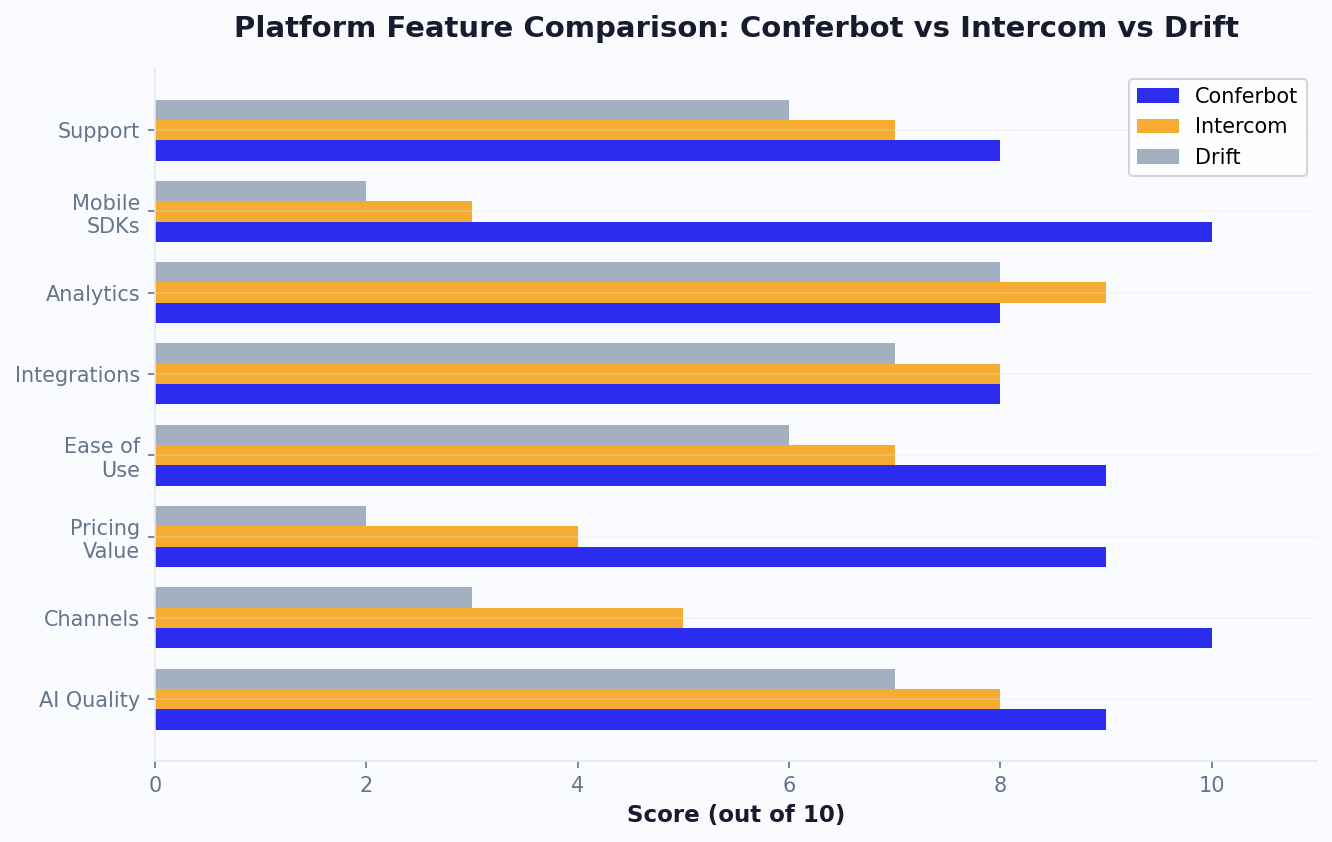
Conferbot is purpose-built for businesses that want chat and chatbot as their primary customer engagement channels. Unlike Zendesk's chat-as-an-add-on approach, Conferbot puts real-time conversation at the center, with AI chatbot capabilities, live chat, and omnichannel deployment included in every plan.
Why it is the top alternative:
- AI included, not extra: GPT-powered chatbot responses are part of every paid plan — no per-resolution fees
- Purpose-built for chat: The entire platform — including a built-in ticket system — is designed around real-time conversation, not retrofitted from a ticketing system
- 13+ channels: Deploy on website, WhatsApp, Messenger, Slack, Telegram, and more from a single dashboard
- Minutes to set up: No Zendesk administrator needed — go live in hours, not weeks, with team management built in
- Built-in analytics with conversation flow analysis and performance tracking
Best for: Businesses that want powerful chat and chatbot capabilities without paying for a full helpdesk suite
See the full Conferbot vs. Zendesk comparison. For other alternatives in this space, check our Drift alternative and Tidio alternative guides
2. Freshdesk — Best Zendesk-Like Experience for Less
If you want a platform that feels like Zendesk but costs less, Freshdesk is the closest match. Independent review platforms like TrustRadius confirm that Freshdesk consistently ranks as the top Zendesk alternative for mid-market businesses. It offers ticketing, live chat, knowledge base, and AI (Freddy) in a similar structure but at lower price points, with a genuinely useful free tier for up to 10 agents.
Pros: Similar feature set to Zendesk, generous free tier, strong ticketing
Cons: AI (Freddy) costs extra, interface can feel cluttered, less mature than Zendesk
Best for: Teams wanting Zendesk-like functionality at a lower price point
3. Help Scout — Best for Human-Centered Support
Help Scout prioritizes the human support experience with a clean, email-first interface that agents love. Its Beacon widget provides live chat and self-service, and AI features help agents draft responses faster.
Pros: Best-in-class agent experience, clean UI, AI drafts included, excellent knowledge base
Cons: Chatbot capabilities are limited, less automation than Zendesk, smaller integration set
Best for: Teams that prioritize agent experience and human-touch support
4. Intercom — Best for B2B Product Companies
Intercom offers sophisticated messaging for B2B product companies with in-app messaging, product tours, and conversational AI. It is more expensive than most alternatives but less than Zendesk at scale when ticketing is not needed.
Pros: Excellent in-app messaging, strong AI (Fin), good for product-led growth
Cons: Expensive, AI charges per resolution, complex for simple use cases
Best for: B2B SaaS companies with in-app support needs
5. Crisp — Best Flat-Rate Alternative
Crisp charges a flat monthly rate regardless of team size, including live chat, chatbot, CRM, and knowledge base. For growing teams tired of per-agent pricing, the cost predictability is refreshing.
Pros: No per-agent pricing, all-in-one platform, clean interface, affordable
Cons: Less mature AI, smaller integration ecosystem, limited for complex support workflows
Best for: Growing teams wanting predictable pricing without per-seat surprises
More Zendesk Alternatives for Specific Needs
6. Tidio — Best for E-Commerce Support
Tidio combines live chat and chatbots with deep e-commerce integrations. If your support team primarily handles order inquiries, product questions, and shipping issues for an online store, Tidio's Shopify and WooCommerce plugins streamline the workflow significantly.
Pros: Excellent e-commerce integrations, affordable, user-friendly chatbot builder
Cons: AI (Lyro) costs extra, limited beyond e-commerce, basic analytics
Best for: E-commerce stores needing integrated chat and order management
7. LiveChat — Best Pure Live Chat
LiveChat focuses exclusively on delivering the best possible live chat experience. Its agent interface is fast, polished, and designed for efficiency. Chatbot capabilities require a separate ChatBot.com subscription.
Pros: Best live chat agent interface, excellent canned responses, fast and reliable
Cons: No built-in chatbot, per-agent pricing, limited to live human chat
Best for: Teams that prioritize live human chat quality over chatbot automation
8. Tawk.to — Best Free Alternative
Tawk.to offers unlimited free live chat with unlimited agents. AI assist is available as a $29/month add-on. For businesses with minimal budget, Tawk.to provides a functional starting point.
Pros: Completely free live chat, unlimited agents, decent feature set
Cons: AI is basic and paid, monetized through upselling services, less polished interface
Best for: Businesses with zero budget for chat software
When choosing a Zendesk alternative, the most important question is: do you need a full helpdesk suite, or do you primarily need chat and chatbot capabilities?
If you need ticketing, SLAs, workforce management, and complex routing alongside chat, Freshdesk is the most direct Zendesk replacement at a lower cost. If your primary need is chat and chatbot-driven customer engagement, Conferbot delivers a purpose-built experience that outperforms Zendesk's chat features while costing 85-90% less.
The honest truth: Zendesk is not a bad product. It is an excellent enterprise helpdesk. But for businesses whose primary customer engagement channel is real-time chat, paying for a full helpdesk suite is like buying a Swiss Army knife when you need a scalpel. Purpose-built chat platforms deliver better experiences at lower costs for chat-centric operations.
Feature-by-Feature Comparison: Chat and Chatbot Capabilities
While Zendesk excels as a comprehensive helpdesk, its chat and chatbot features can lag behind dedicated platforms. Here is a focused comparison of chat-specific capabilities, informed by user reviews on Capterra and hands-on testing.
| Chat Feature | Zendesk | Conferbot | Freshdesk | Crisp | Tidio |
|---|---|---|---|---|---|
| Chat widget customization | Good | Excellent | Good | Good | Good |
| No-code chatbot builder | Basic | Excellent | Basic | Good | Good |
| AI-powered responses | $1/resolution | Included | Extra cost | Included | $39/mo extra |
| Omnichannel support | 8 channels | 13+ channels | 6 channels | 6 channels | 5 channels |
| Proactive messaging | Yes | Yes | Yes | Yes | Yes |
| Visitor tracking | Good | Good | Basic | Good | Basic |
| Chat routing | Advanced | Good | Good | Basic | Basic |
| Canned responses | Yes | Yes | Yes | Yes | Yes |
| Chat transcripts | Yes | Yes | Yes | Yes | Yes |
| File sharing in chat | Yes | Yes | Yes | Yes | Yes |
Where Zendesk Wins
Zendesk's strengths in chat are its advanced routing capabilities and integration with the broader helpdesk suite. If a chat conversation needs to become a ticket with SLA tracking, multi-department escalation, and compliance documentation, Zendesk handles this seamlessly. No dedicated chat platform matches this depth of ticket management.
Where Alternatives Win
AI value: Conferbot and Crisp include AI in base pricing, while Zendesk and others charge per resolution. At 500 AI resolutions per month, Zendesk charges $500 extra — Conferbot charges $0 extra. Over a year, that is $6,000 in savings on AI alone.
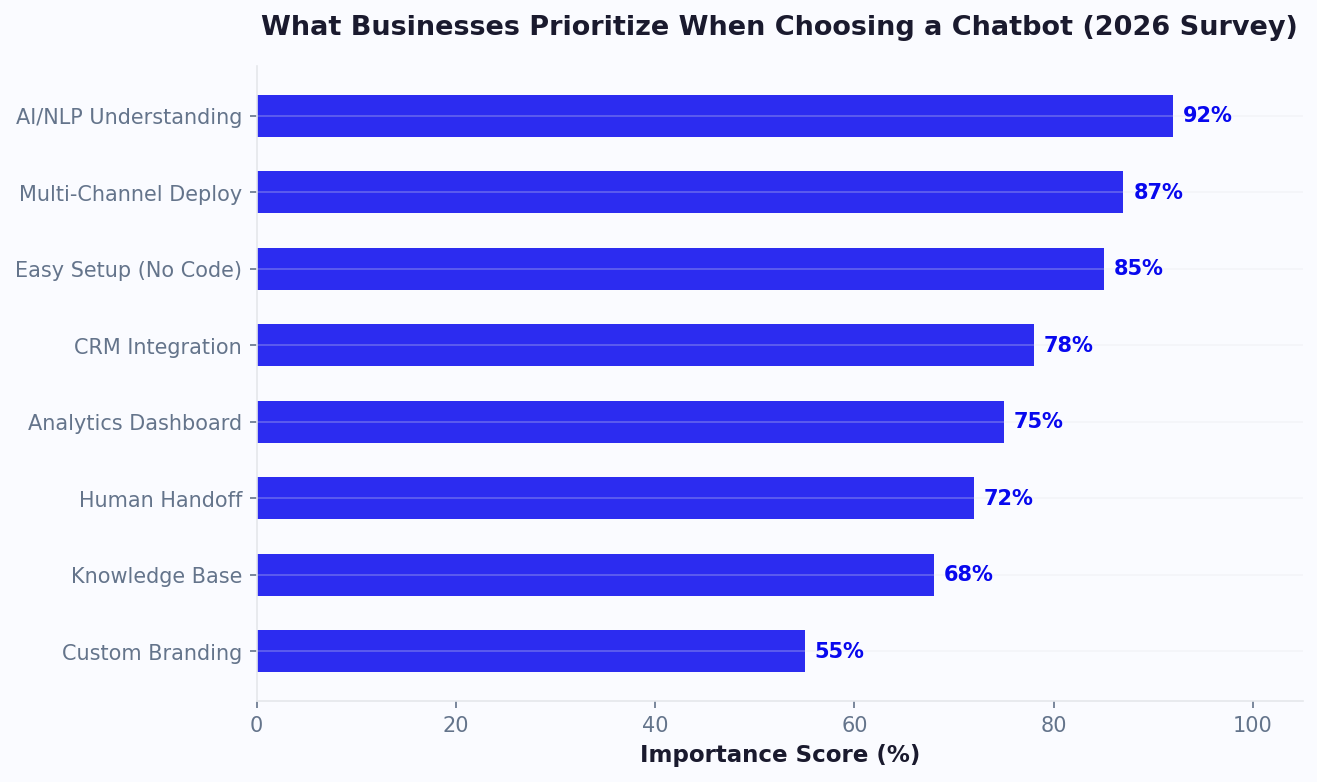
Chatbot building: Zendesk's chatbot builder (Flow Builder) is functional but basic compared to dedicated platforms. Conferbot's no-code builder supports conditional logic, API integrations, dynamic variables, and complex branching that Zendesk's builder cannot match.
Channel coverage: Conferbot supports 13+ channels from a unified dashboard. While Zendesk supports multiple channels, the chat experience across channels is not as consistent as purpose-built omnichannel platforms.
Ease of use: This is where the difference is most pronounced. Zendesk requires significant configuration before it is useful. Conferbot can be set up and live in under an hour. For small teams without dedicated administrators, this matters enormously.
When to Stay With Zendesk (and When to Switch)
Switching platforms is a significant decision. Here is an honest assessment of when Zendesk is still the right choice and when it is time to move on.
Stay With Zendesk If:
- You have 15+ support agents with complex routing, scheduling, and SLA requirements. Zendesk's workforce management and advanced routing are genuinely superior at this scale.
- Ticketing is your primary workflow. If most support interactions start or end as tickets (not chat), Zendesk's ticketing system is best-in-class and tightly integrated with chat.
- Compliance is critical. Zendesk holds SOC 2 Type II, HIPAA eligibility, FedRAMP authorization, and other enterprise compliance certifications that smaller platforms may not have achieved yet.
- You are deeply integrated. If Zendesk is connected to 10+ other tools in your stack and data flows depend on those integrations, the migration cost (time and risk) may outweigh savings.
- You have a dedicated Zendesk administrator. If you are already paying someone to manage Zendesk and they have optimized it well, you are getting significant value from the platform's advanced capabilities.
Switch From Zendesk If:
- You have fewer than 10 agents and find yourself paying for enterprise features you do not use. The per-agent cost at Zendesk's professional tier ($115/agent) is hard to justify for small teams.
- Chat and chatbot are your primary channels. If most customer interactions happen via live chat or chatbot (not email tickets), a purpose-built chat platform like Conferbot provides a better experience at lower cost.
- AI costs are becoming significant. If your AI resolution volume is growing and Zendesk's per-resolution pricing is eating into your savings from automation, switching to a flat-rate AI platform dramatically improves ROI.
- Setup complexity is slowing you down. If making changes to your chatbot flows, routing rules, or automations requires your administrator (or a Zendesk consultant), you need a more agile platform.
- You need more channels. If your customers are on WhatsApp, Telegram, or other channels that Zendesk does not support natively, an omnichannel platform expands your reach.
The Hybrid Approach
Some businesses successfully run Zendesk for ticketing and a dedicated platform like Conferbot for chat and chatbot. This gives you Zendesk's ticketing strength without paying for its chat limitations. The two platforms can be integrated so that chat conversations that need escalation automatically create Zendesk tickets.
For a broader comparison of platforms including no-code options, see our best no-code chatbot builders roundup. This hybrid approach is especially effective for mid-size companies that have invested heavily in Zendesk's ticketing workflows but want better, more affordable chat and AI capabilities.
The True Cost of Staying on Zendesk: A 3-Year Projection
Many businesses delay switching from Zendesk because the immediate migration effort feels daunting. But the cost of inaction compounds significantly over time. Here is what staying on Zendesk actually costs versus switching to a purpose-built alternative.
3-Year Cost Comparison (5-Agent Team, Growing to 10)
| Cost Factor | Zendesk (3 Years) | Conferbot (3 Years) | Savings |
|---|---|---|---|
| Base subscription | $41,400-82,800 | $5,364 | $36,036-77,436 |
| AI resolution fees (500/mo growing to 2,000/mo) | $54,000 | $0 (included) | $54,000 |
| Additional agent seats (Year 2-3) | $13,800-27,600 | $0 (unlimited) | $13,800-27,600 |
| Admin salary allocation (20% of FTE) | $36,000 | $0 (self-service) | $36,000 |
| Training new agents on platform | $3,000-5,000 | $500 | $2,500-4,500 |
| 3-Year Total | $148,200-205,400 | $5,864 | $142,336-199,536 |
The dedicated Zendesk administrator cost is often overlooked. Research from Statista's enterprise software data shows that companies with 5+ agents on Zendesk spend approximately 15-25% of one full-time employee's time managing the platform — configuring triggers, building macros, maintaining routing rules, troubleshooting integration issues, and training new agents. At an average salary of $60,000, that is $12,000/year in hidden platform management cost.
The AI Cost Escalation Problem
Zendesk's per-resolution AI pricing creates a paradox: the better your chatbot performs (resolving more conversations), the more you pay. For a growing business, AI costs escalate predictably:
- Month 1-6: 500 AI resolutions/month = $500/month
- Month 7-12: 1,000 AI resolutions/month = $1,000/month
- Year 2: 1,500 AI resolutions/month = $1,500/month
- Year 3: 2,000 AI resolutions/month = $2,000/month
Over three years, AI fees alone total $54,000 on Zendesk. On a flat-rate platform, the same AI capability costs $0 extra regardless of volume growth. This single line item often exceeds the entire cost of an alternative platform over the same period.
Migration ROI Timeline
Most businesses recover their migration effort within 45-60 days. The math is straightforward: if switching saves $800/month (conservative for a 5-agent team), and migration takes 40 hours of effort valued at $50/hour ($2,000 total), you break even in under 3 months — and save $26,000+ over the following three years.
Implementation Checklist: Switching from Zendesk Without Disruption
The fear of migration disrupting customer service keeps many businesses on Zendesk longer than financially rational. Here is the exact checklist that minimizes risk and ensures zero customer-facing downtime.
Pre-Migration Audit (Days 1-3)
- Feature usage audit: Log into Zendesk admin and check which features your team actually uses daily. Common finding: teams use 15-20% of available features while paying for 100%.
- Integration inventory: List every Zendesk integration (API connections, Zapier automations, data syncs). Verify each can be replicated on the new platform or is no longer needed.
- Data export: Export chat transcripts (last 12 months for context), customer contact list, knowledge base articles, canned responses, and chatbot flow configurations.
- Volume baseline: Record your current metrics — average daily conversations, resolution time, CSAT score, AI resolution rate — so you can measure post-migration performance.
Platform Setup (Days 4-7)
- Account configuration: Set up your new platform with brand colors, widget styling, team member accounts, and role permissions.
- Knowledge base migration: Upload your exported knowledge base content to the new platform's AI knowledge base.
- Chatbot flow recreation: Rebuild your essential chatbot flows. Most teams find they can simplify significantly — Zendesk's complexity often results in over-engineered flows that a modern AI builder handles in fewer steps.
- Integration reconnection: Connect CRM, e-commerce, and communication tools through the integrations hub.
Parallel Running (Days 8-14)
- Deploy on a test page: Install the new chatbot widget on a low-traffic page or staging environment.
- Internal testing: Have every agent run through test conversations covering all major scenarios.
- A/B deployment: Route 10-20% of live traffic to the new platform while keeping Zendesk active for the remainder. Compare metrics side by side.
- Agent training: Hold a 30-minute team walkthrough. Most modern platforms require minimal training — agents typically become proficient within a single shift.
Cutover and Optimization (Days 14-21)
- Full switch: Replace Zendesk's widget code with the new platform's embed code across all pages.
- Monitor closely: Track response times, resolution rates, and customer satisfaction hourly for the first 48 hours.
- Address gaps immediately: If specific scenarios are not handled well, add responses to the knowledge base same-day.
- Cancel Zendesk: Downgrade or cancel your Zendesk subscription per contract terms. Keep data exports for records.
Common Migration Concerns (Debunked)
| Concern | Reality |
|---|---|
| "We will lose chat history" | Export before migrating. Most businesses find they rarely reference chat history beyond 90 days. |
| "Customers will notice the change" | Customers notice faster responses and better AI — the widget change itself goes unnoticed by 99% of users. |
| "Our integrations will break" | Modern platforms support the same integrations. Parallel running catches any gaps before full cutover. |
| "It will take months" | Average migration: 2-3 weeks. Some teams complete it in under a week. |
Migrating From Zendesk Chat: A Practical Guide
If you have decided to switch, here is how to migrate from Zendesk chat to a new platform with minimal disruption to your customers and team.
Phase 1: Preparation (1-2 Weeks)
- Audit your current Zendesk setup. Document which Zendesk features your team actually uses daily versus which you are paying for but ignoring. Common findings: teams use live chat, basic chatbot flows, and canned responses, but not triggers, automations, SLAs, or advanced reporting.
- Export your data. Zendesk allows data export via API and CSV. Export chat transcripts, customer profiles, knowledge base articles, and chatbot flow configurations.
- Identify integration dependencies. List every tool connected to Zendesk and verify your new platform supports those integrations. Common integrations: CRM (Salesforce, HubSpot), e-commerce (Shopify), communication (Slack), and analytics (Google Analytics).
Phase 2: Setup (1 Week)
- Configure your new platform. Set up your account, customize the chat widget to match your brand, and configure team access with appropriate roles and permissions.
- Rebuild chatbot flows. Recreate your Zendesk chatbot flows in the new platform. Use this as an opportunity to improve: simplify over-engineered flows, add AI-powered responses where you previously used static FAQ answers, and address known gaps.
- Import knowledge base content. If your chatbot relies on knowledge base articles for answers, import or connect your content to the new platform's knowledge base and AI engine.
- Set up integrations. Connect CRM, e-commerce, and other tools. Test data flow in both directions.
Phase 3: Testing (3-5 Days)
- Deploy the new platform on a test page or low-traffic section of your site
- Have every agent handle test conversations as both agent and customer
- Verify chatbot flows work correctly across all scenarios
- Test on mobile devices and multiple browsers
- Confirm integrations are syncing data correctly
Phase 4: Cutover and Monitoring
- Replace Zendesk's chat widget code with the new platform's code across your site
- Update any direct links to Zendesk chat (email signatures, in-app links)
- Monitor key metrics (response time, resolution rate, customer satisfaction) daily for the first two weeks
- Gather agent feedback after the first week and address pain points immediately
- Cancel Zendesk chat (or downgrade to a ticketing-only plan if keeping for tickets) according to your contract terms
Most businesses complete the migration in 2-3 weeks. For teams evaluating broader chatbot options during migration, our chatbot pricing comparison covers the full market landscape. The most common surprise is how much simpler the new platform feels compared to Zendesk — teams often report that tasks that required Zendesk administrator involvement can now be handled by any team member, significantly increasing agility.
Before committing to any migration, request a free trial from your top two alternatives and run them on a low-traffic page for one week to validate performance claims against real customer interactions.
Was this article helpful?
Best Zendesk Chat Alternatives in 2026 FAQ
Everything you need to know about chatbots for best zendesk chat alternatives in 2026.
About the Author

Conferbot Team specializes in conversational AI, chatbot strategy, and customer engagement automation. With deep expertise in building AI-powered chatbots, they help businesses deliver exceptional customer experiences across every channel.
View all articles