Drift is being sunset: the timeline that matters
On 6 March 2026, Clari and Salesloft announced they were sunsetting the standalone Drift conversational marketing platform and named 1mind as its designated AI successor. No hard end-of-life date has been published. Your instance still runs and invoices still arrive, but active development has stopped - and a wind-down without a deadline is the worst shape a vendor exit can take, because there is no date to plan a migration around.
If you are shopping as a new buyer, the whole evaluation collapses to one sentence: do not start on a platform whose own owner has announced its wind-down. If you are an existing customer, the useful questions are narrower than "what is cheaper" - how long does your contract run, what can you actually export, and is 1mind the successor you would have picked in an open evaluation? It is built for inbound qualification and AI demos, and it does not replicate everything Drift did; visitor de-anonymisation and outbound automation have no direct equivalent.
The breach that preceded it
Between 8 and 18 August 2025, a threat cluster tracked as UNC6395 used stolen OAuth tokens from Drift's Salesforce integration to systematically export records from more than 700 organisations, including Cloudflare, Google, PagerDuty, Palo Alto Networks, Proofpoint, SpyCloud, Tanium and Zscaler. Salesloft disclosed the incident on 20 August 2025; Salesloft and Salesforce revoked every Drift OAuth token, Salesforce pulled the app from AppExchange, and Drift was taken offline. The data taken was Salesforce Account, Contact, Case and Opportunity records - support case text included, which is exactly where customers paste API keys and tokens. See Unit 42's threat brief for the technical detail.
The breach is not why the product is being wound down, and it would be dishonest to claim a clean line between the two. But it matters to a migration decision for a practical reason: if your Drift integration was live in that window, the incident-response work - rotating anything that ever appeared in a support case, auditing what left your Salesforce org - belongs on the same project plan as the move.
Getting your data out: what exports, what does not
This is the part most alternatives pages skip, and it is the part that actually costs you time. Drift has no one-click bulk export for conversations. Work in this order:
1. Playbooks and routing rules - screenshot them today
These cannot be exported in any format, at all. There is no API that returns a playbook's logic and no CSV that captures routing. If your contract lapses before you have documented them, that design work is simply gone. Screenshot every playbook branch, every routing rule and every booking sequence now, before you are inside a notice period. Teams consistently report this as the step that decides whether the migration takes days or weeks.
2. Conversation history - via the API
Two routes, per Drift's own developer docs. For anything ongoing, subscribe to the Conversation_Push webhook, which fires with the conversation ID each time a conversation closes - this is Drift's recommended path at volume. For the back catalogue, page the Conversation List endpoint for historical IDs, then fetch each transcript. It is slower and less reliable on large archives, so start it early and expect to re-run the gaps.
One trap: the API returns numeric IDs for playbooks and users, not names. Resolve them through the Playbook and User APIs as you go, or you will finish with an archive nobody can read. Conversation statistics - length, message counts, tags - export separately as CSV from the Chats section.
3. Contacts - the easy one
Visitors, then All Contacts, filter to what you need, save it as a static segment, then Export CSV from the top right. Note that anything Drift already synced to your CRM does not need migrating at all: connect the new platform to the same CRM and those records are already where they need to be.
4. Then rebuild, do not transplant
Every platform models conversation flow differently, so a literal reconstruction of your Drift playbooks usually reproduces their compromises too. Most teams find the forced migration is the first honest audit of which playbooks ever booked a meeting - and the answer is normally a small fraction of what is running.
Drift vs. Alternatives: What You Will Actually Pay
Industry analysts at Forrester have noted that conversational marketing tools are becoming increasingly commoditized at the feature level, making pricing the primary differentiator. The price differential between Drift and its alternatives is dramatic. Here is a realistic comparison based on 2026 pricing for a sales and marketing team of 3-5 users.
| Platform | Starting Price | AI Chatbot | Live Chat | Sales Features | Free Tier? |
|---|---|---|---|---|---|
| Drift | $2,500/mo | Premium only | Yes | Excellent | No |
| Conferbot | Free tier | Included | Yes | Good | Yes |
| Intercom | $39/seat/mo | $0.99/resolution | Yes | Good | Trial only |
| HubSpot | Free tier | Basic | Yes | Excellent | Yes |
| Tidio | Free tier | $39/mo add-on | Yes | Basic | Yes |
| Crisp | Free tier | Included | Yes | Basic | Yes |
| Qualified | $3,500/mo | Yes | Yes | Excellent | No |
| ChatBot.com | $52/mo | Yes | Via LiveChat | Good | Trial only |
The math is stark: Drift costs $30,000/year at minimum. Conferbot delivers AI chatbots, live chat, and lead qualification for under $1,800/year. That is a 94% cost reduction with comparable core functionality. Even Intercom, often considered expensive, costs 80-90% less than Drift for most team sizes.
The question is not whether alternatives are cheaper - they all are, dramatically. The question is whether the alternatives deliver enough of Drift's unique value (conversational sales automation, ABM integration, revenue intelligence) to justify switching. For most businesses, the answer is yes.
Here is why: Drift's most valuable feature for most users is the ability to engage website visitors in real-time conversation and convert them into meetings or leads. Every platform on this list does that. The advanced sales features that justify Drift's premium pricing - intent signals, pipeline intelligence, Salesforce-native integration - are only relevant for enterprise sales teams running complex, multi-touch campaigns. If that describes your team and you are closing deals worth $50,000+, Drift may still be worth it. For everyone else, the alternatives deliver more value per dollar.
The Best Drift Alternatives for Conversational Marketing
1. Conferbot - Best Overall Drift Alternative
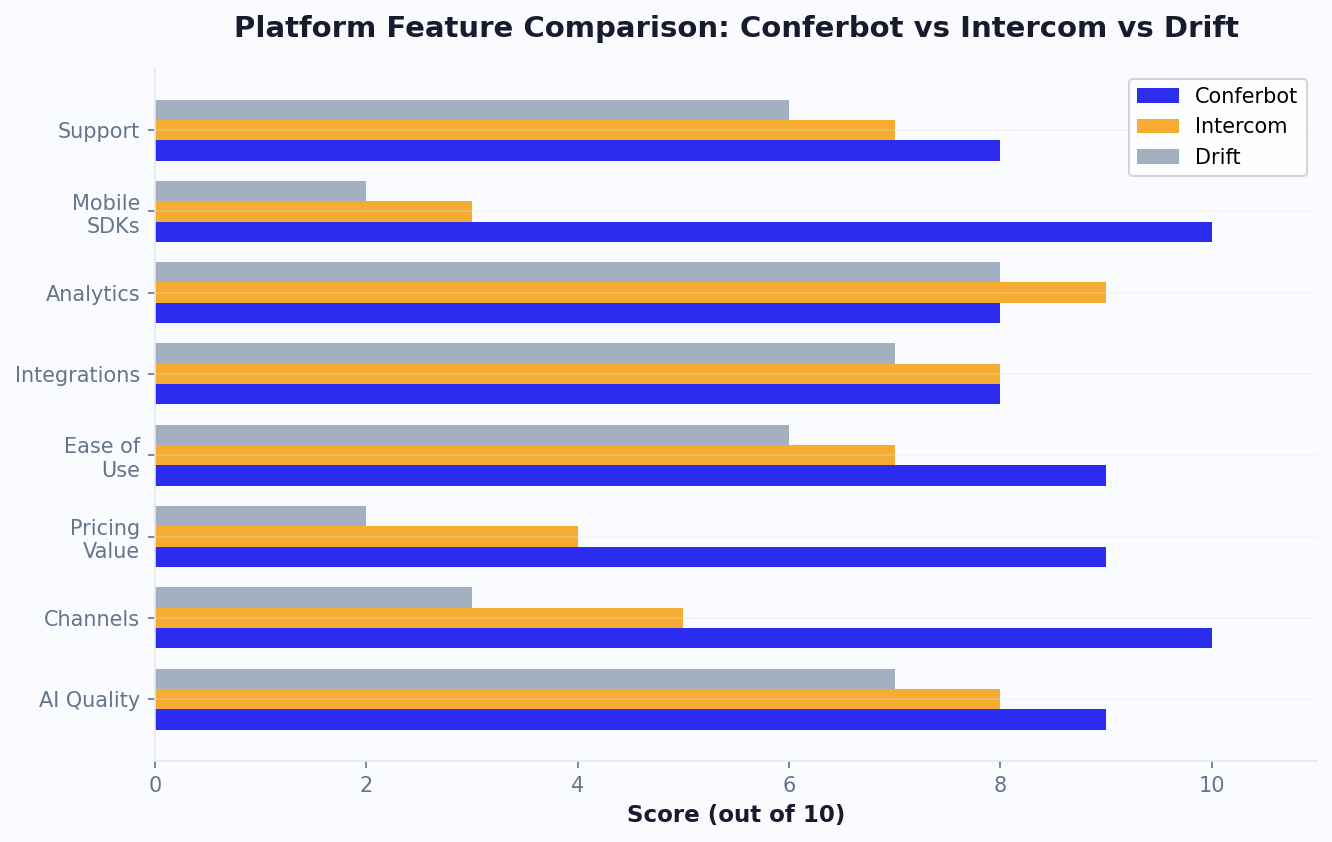
Conferbot combines everything most businesses actually need from Drift - AI chatbots, live chat, lead qualification, and visitor engagement - at a fraction of the cost. Its AI-powered conversations can qualify leads, answer product questions, and book meetings, all without per-conversation charges.
Key advantages over Drift:
- 98% cheaper: Full AI chatbot and live chat capabilities for under $150/month vs. Drift's $2,500+
- 13+ channels: Engage prospects on website, WhatsApp, Messenger, and more - Drift is website-only
- AI included: GPT-powered responses are part of the base plan, not a premium add-on
- AI-powered builder: The AI chatbot builder lets marketing teams create lead qualification flows without developers
- Fast setup: Go live in hours, not weeks
Best for: SMBs and mid-market companies wanting Drift-like conversational marketing without enterprise pricing
See the full Conferbot vs. Drift comparison
2. Intercom - Best Premium Alternative
Intercom is the closest to Drift in terms of feature depth for B2B companies. It offers conversational marketing, product tours, in-app messaging, and Fin AI - but at a much lower price point than Drift (though still not cheap).
Pros: Strong B2B features, product tours, good AI, established platform
Cons: Still expensive ($39+/seat plus AI charges), complex to configure
Best for: SaaS companies wanting Drift-level features at a lower (but still premium) price
3. HubSpot - Best for CRM-Centric Teams
HubSpot's free CRM includes basic live chat and chatbot functionality. For teams that want conversational marketing integrated with their entire sales and marketing stack, HubSpot offers the most comprehensive ecosystem - though advanced features require significant investment.
Pros: Free CRM with basic chat, seamless marketing integration, excellent reporting
Cons: Advanced chatbot features need $800+/mo plans, chatbot builder is basic
Best for: Teams already using or willing to adopt HubSpot's full ecosystem
4. Tidio - Best for E-Commerce Lead Capture
While not a direct Drift competitor, Tidio's chatbot + live chat combination works well for e-commerce lead capture and product recommendation. Its Lyro AI can handle initial conversations before handing off to sales.
Pros: Affordable, great e-commerce integrations, easy to use
Cons: Limited B2B sales features, AI costs extra, not designed for complex lead routing
Best for: Online stores wanting automated lead capture at low cost
5. Qualified - Best Enterprise Drift Replacement
Qualified is the only platform on this list that matches Drift's enterprise sales focus. It is Salesforce-native, provides real-time buyer intent signals, and offers AI-powered sales development reps (SDRs). However, it is also enterprise-priced ($3,500+/month).
Pros: Salesforce-native, excellent intent signals, comparable enterprise features
Cons: Expensive ($3,500+/mo), only for Salesforce users, complex setup
Best for: Enterprise Salesforce users who need Drift-level capabilities
More Drift Alternatives Worth Considering
6. Crisp - Best Budget All-in-One
Crisp offers live chat, chatbot, CRM, and knowledge base at a flat monthly rate with no per-seat charges. While it lacks Drift's sales-specific features, it provides everything a small marketing team needs for website visitor engagement.
Pros: Flat-rate pricing, built-in CRM, no per-agent charges, clean interface
Cons: Limited sales automation, basic reporting compared to Drift, smaller integration ecosystem
Best for: Small teams wanting affordable visitor engagement without complexity
7. ChatBot.com - Best Pure Chatbot Builder
ChatBot.com from the LiveChat family offers a powerful visual chatbot builder with AI capabilities. For businesses that want to build sophisticated lead qualification bots without live chat overhead, it is an excellent option.
Pros: Excellent visual builder, strong template library, good AI, reasonable pricing
Cons: Live chat requires separate LiveChat subscription, limited sales-specific features
Best for: Teams focused on automated lead qualification without human chat
8. Freshdesk/Freshsales - Best Freshworks Ecosystem
Freshworks offers both support (Freshdesk) and sales (Freshsales) products with chat and chatbot capabilities. The unified platform lets you handle both sales and support conversations in one ecosystem with Freddy AI assistance.
Pros: Unified sales+support platform, affordable, generous free tiers, AI capabilities
Cons: Chatbot features are secondary, less polished than purpose-built platforms
Best for: Teams wanting combined sales and support chat in one affordable ecosystem
When evaluating these alternatives, remember that Drift's core value proposition is real-time conversational engagement with website visitors. Every platform on this list delivers that. The question is which additional capabilities matter to your team and whether those capabilities justify the price difference.
If you are also evaluating other platforms, check our comparisons of Intercom alternatives, Zendesk alternatives, and Tidio alternatives. For a broader perspective on chatbot builder options, see our best no-code chatbot builders guide and our chatbot pricing comparison. For 90% of businesses exploring Drift alternatives, Conferbot delivers the best value: AI-powered conversations, multi-channel deployment, visual chatbot building, and live chat at a price point that is accessible to businesses of any size. The savings versus Drift - typically $25,000-50,000 per year - can be redirected to actual marketing spend that drives the pipeline Drift's chatbot would have qualified.
If you are an enterprise B2B team with Salesforce as your system of record, Qualified is the closest Drift replacement. And if you want a middle ground between Drift's premium features and budget options, Intercom offers sophisticated B2B messaging at a more reasonable (if still significant) investment.
Essential Conversational Marketing Features to Look For
When replacing Drift, you need to ensure your new platform can handle the conversational marketing workflows your team relies on. Here are the features to prioritize during evaluation.
1. Intelligent Lead Qualification
The ability to ask qualifying questions (company size, budget, timeline, role) and route leads based on responses is foundational. Look for chatbots that can evaluate multiple criteria simultaneously and assign lead scores, not just follow linear question paths. Conferbot's no-code builder supports complex conditional logic that enables sophisticated qualification without developer involvement.
2. Calendar Integration for Meeting Booking
Drift's meeting booking feature is one of its most-used capabilities. Your replacement must integrate with Google Calendar, Outlook, and scheduling tools like Calendly. Conferbot's calendar booking feature handles this natively. The chatbot should show available time slots, let visitors book immediately, and send confirmation emails automatically.
3. Live Chat With Smart Routing
When a chatbot cannot handle a conversation or when a high-value prospect is identified, seamless handoff to a human agent is critical. Look for platforms that route conversations based on agent availability, expertise, territory, or deal size. Conferbot's live chat includes intelligent routing that ensures the right agent handles the right conversation.
4. Visitor Intelligence
Drift provides company identification and visitor tracking. While not all alternatives match this depth, look for platforms that show you where visitors came from, what pages they viewed, how long they have been on site, and any previous interactions. This context helps agents have more relevant conversations.
5. AI-Powered Conversations
Modern AI chatbots can handle nuanced product questions, not just scripted FAQ responses. Look for platforms that use large language models to understand visitor intent, provide accurate product information, and handle objections - essentially acting as a first-line sales development representative. Conferbot's OpenAI integration enables natural, context-aware conversations that feel human.
6. Multi-Channel Engagement
Drift focuses almost exclusively on website chat. But your prospects are on WhatsApp, Messenger, LinkedIn, and other platforms. An alternative that lets you run the same conversational marketing playbooks across multiple channels - from a single dashboard - multiplies your reach without multiplying your workload.
7. Analytics and Attribution
Measuring the ROI of conversational marketing requires tracking the full funnel: how many conversations started, how many leads qualified, how many meetings booked, and how many deals closed. Ensure your new platform provides this visibility so you can prove value and optimize over time.
Not every business needs all seven capabilities at enterprise scale. Identify which features drive the most value for your team and weight your evaluation accordingly. Our best no-code chatbot builders guide covers platforms that deliver these capabilities without development resources.
ROI Analysis: Drift vs. Affordable Alternatives
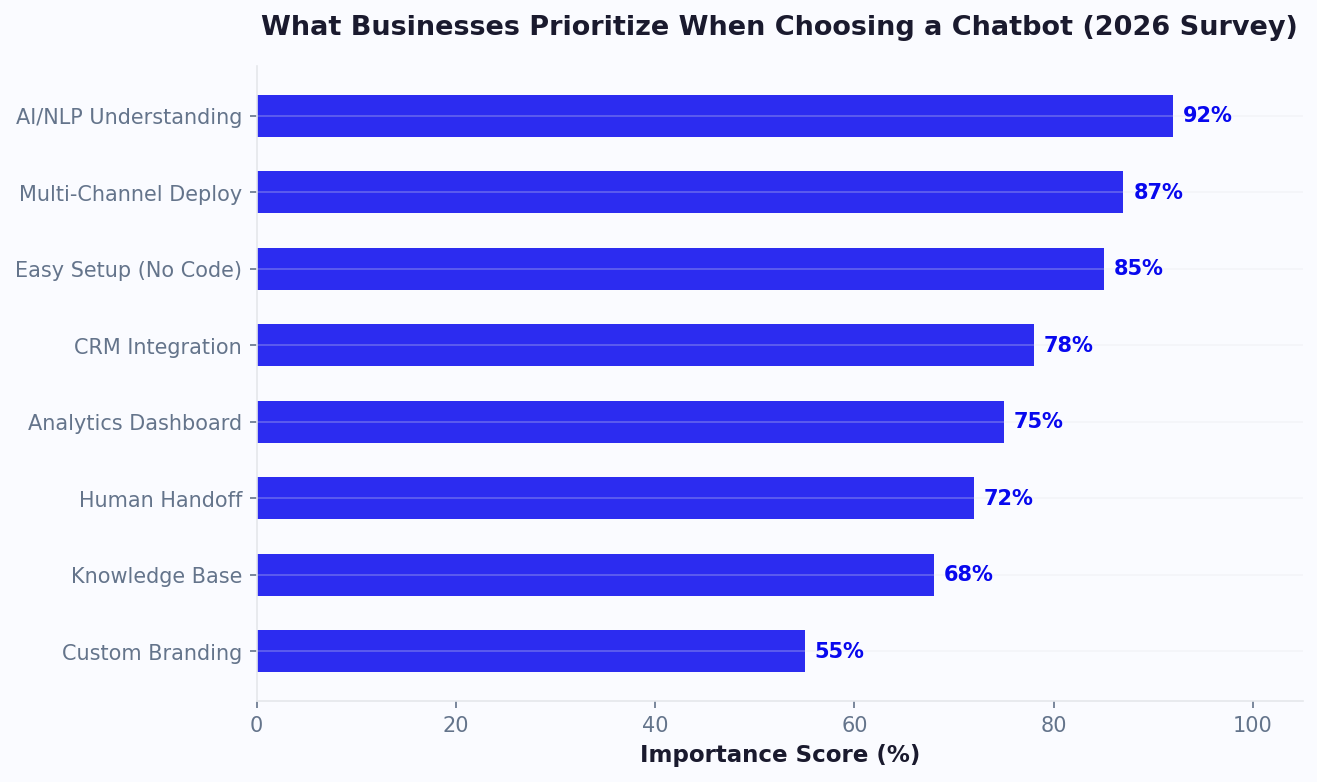
The most important question when evaluating Drift alternatives is not "Which is cheapest?" but "Which delivers the best return on investment?" Let us run the numbers for a typical mid-market business.
Scenario: Mid-Size B2B Company
Assume a B2B company with 5 sales reps, 10,000 monthly website visitors, and an average deal size of $5,000. They currently use Drift and are considering switching to Conferbot.
| Metric | Drift | Conferbot |
|---|---|---|
| Annual platform cost | $30,000-60,000 | $1,788 |
| Conversations/month | 500-1,000 | 500-1,000 |
| Lead qualification rate | 15-20% | 12-18% |
| Meeting booking rate | 5-8% | 4-7% |
| Setup time | 4-8 weeks | 1-3 days |
| Training time | 2-4 weeks | 1-3 days |
| Channels supported | Website | 13+ channels |
The Numbers
Drift may deliver slightly higher conversion rates (2-3% higher) due to its enterprise-grade sales features. But the cost difference is $28,000-58,000 per year. To justify Drift's premium, those extra conversions need to generate at least $28,000 in additional revenue - which requires 5-11 additional closed deals at $5,000 average deal size.
Meanwhile, the time saved on setup and training (6-10 weeks with Drift vs. 1 week with Conferbot) means faster time-to-value. Your team starts generating ROI from day one rather than spending two months in configuration.
The Channel Advantage
Here is where alternatives often outperform Drift in practice: multi-channel reach. Drift only engages visitors on your website. Conferbot's omnichannel deployment lets you run the same lead qualification flows on WhatsApp, Messenger, and other channels where your prospects already spend time. This expanded reach often compensates for (and exceeds) any marginal conversion rate advantage Drift might have on website alone.
Bottom Line
For enterprise B2B sales teams closing high-value deals ($50,000+) with complex multi-touch campaigns, Drift's premium features may justify the cost. For everyone else - SMBs, mid-market companies, teams with deal sizes under $25,000 - the ROI math overwhelmingly favors affordable alternatives. Reinvesting the $28,000+ annual savings into marketing channels that drive website traffic will generate far more pipeline than Drift's incremental conversion improvements.
How to Make the Switch From Drift
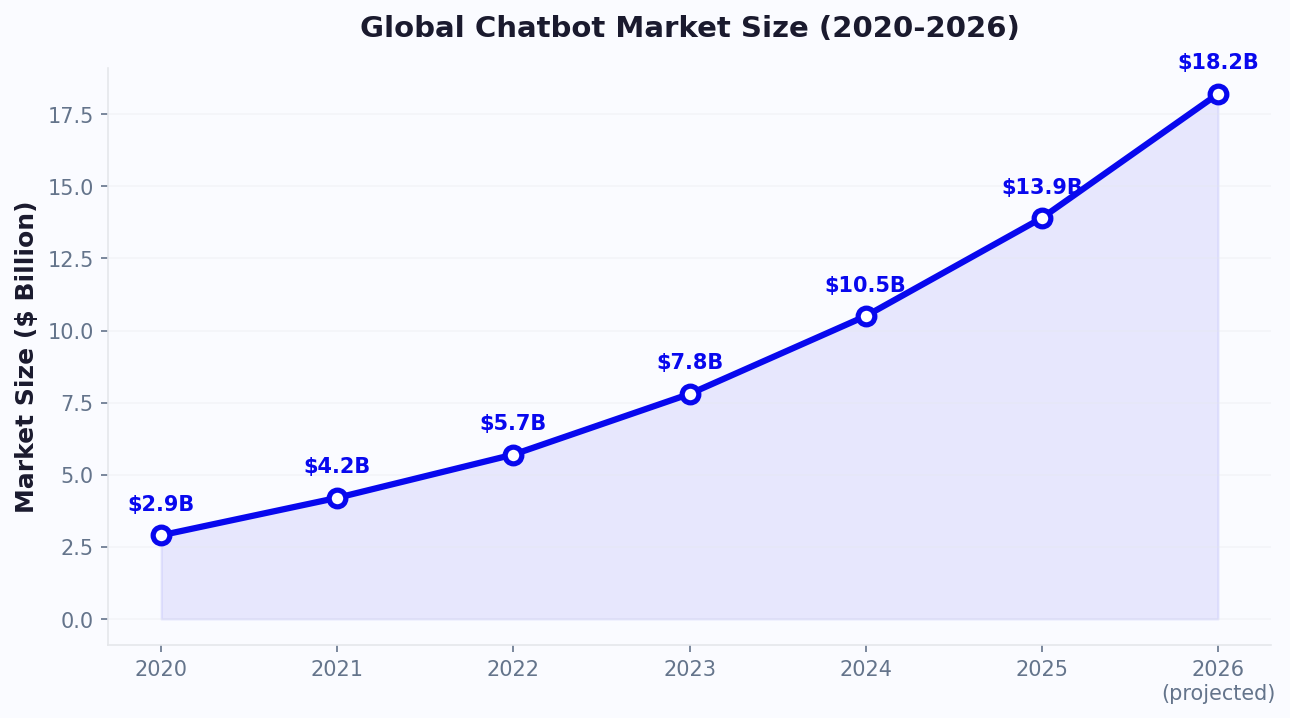
Migrating from Drift to a new conversational marketing platform requires careful planning, especially if your sales team relies on it daily. Here is a practical migration roadmap.
Week 1: Audit and Plan
- Document every Drift playbook. Export or screenshot every conversational playbook, routing rule, and bot flow in Drift. Note which playbooks drive the most meetings and conversions - these are your priority for recreation.
- Export your data. Download conversation history, lead data, and performance reports from Drift. You will need this to benchmark your new platform's performance.
- Map your integrations. Document Drift's connections to your CRM (Salesforce, HubSpot), calendar tools, and other systems. Verify your new platform supports each integration.
- Get team buy-in. Present the cost analysis and feature comparison to your sales leadership. Frame the switch as a cost optimization that redirects budget to revenue-generating activities.
Week 2: Build and Configure
- Set up your new platform. Create your account, customize branding, and configure team access and permissions.
- Recreate priority playbooks. Start with the 3-5 playbooks that drive the most value. Use the migration as an opportunity to simplify - Drift's complexity often leads to over-engineered flows that can be streamlined.
- Configure integrations. Connect your CRM, calendar, and email tools. Test that data flows correctly in both directions.
- Set up routing rules. Configure how conversations are assigned to agents based on availability, territory, deal size, or other criteria.
Week 3: Test and Validate
- Internal testing. Have every sales rep test the new platform as both an agent and a prospect. Identify friction points before going live.
- Parallel running. Deploy the new platform on a low-traffic page or specific landing page while keeping Drift on your main site. Compare performance metrics over 5-7 days.
- Sales team training. Conduct a 30-minute training session covering the new interface, conversation handling, and any workflow changes. Focus on what is different, not everything.
Week 4: Go Live
- Switch your main site. Replace Drift's JavaScript snippet with the new platform's code across your entire site.
- Monitor actively. Watch conversation quality, lead qualification accuracy, and meeting booking rates for the first two weeks. Address issues immediately.
- Cancel Drift. Review your contract terms (Drift typically requires annual commitments) and initiate cancellation at the appropriate time.
For a step-by-step chatbot installation walkthrough, see our how to add a chatbot to any website guide. The entire migration can be completed in under a month. Most businesses report that after the initial adjustment period (1-2 weeks), their team is equally or more productive with the new platform - and significantly happier about the budget implications.
5 Common Mistakes When Switching From Drift (and How to Avoid Them)
Switching from an enterprise platform like Drift to a more affordable alternative is a smart financial move, but it can go wrong if you do not plan carefully. These are the five most common mistakes teams make during the transition.
Mistake 1: Migrating Every Playbook Verbatim
Teams often try to recreate every single Drift playbook in the new platform, including ones that never performed well. Use the migration as an opportunity to audit your conversational marketing flows. Review each playbook's performance data before recreating it. The typical Drift workspace has 40-60% of playbooks generating less than 5% of total meetings. Cut the dead weight and focus on the flows that actually drive revenue.
Mistake 2: Not Benchmarking Before the Switch
If you do not document your current performance metrics - meetings booked, leads qualified, conversations started, response time - you have no way to evaluate whether the new platform is performing better or worse. Export at least 90 days of Drift analytics before canceling. Key metrics to capture: conversation volume, lead capture rate, meeting booking rate, and pipeline attributed to chat.
Mistake 3: Forgetting About Existing Integrations
Drift likely connects to your CRM, calendar, email marketing, and possibly ABM platforms. Mapping every integration before migration ensures nothing breaks. Pay special attention to Salesforce custom objects and HubSpot workflows that depend on Drift data - these may need reconfiguration.
Mistake 4: Switching Without Testing on a Live Page
Never replace Drift site-wide on day one. Run your new platform on a single landing page or low-traffic section for 7-10 days. Compare engagement rate, lead capture rate, and conversation quality against Drift's performance on similar pages. Only switch site-wide when you have confidence in the new platform's performance.
Mistake 5: Ignoring Multi-Channel Opportunities
Most Drift users only use website chat because that is all Drift supports natively. Our conversational marketing chatbot guide explains how multi-channel coverage impacts pipeline generation. When switching to a multi-channel platform like Conferbot, do not just replicate the website-only setup. Immediately deploy on WhatsApp and Messenger to capture leads Drift was never reaching. This multi-channel expansion often produces more incremental leads than the original website chat - making the switch revenue-positive from day one.
Real-World Cost Savings: What Companies Actually Save After Leaving Drift
The theoretical cost savings from switching away from Drift are compelling, but what do real businesses actually experience? Here are composite scenarios based on publicly available data from review sites and business case studies.
Scenario 1: SaaS Startup (Series A, 12 Employees)
A B2B SaaS company with $2M ARR was paying $2,500/month for Drift Premium. Their 3 sales reps used it primarily for meeting booking and basic lead qualification on the website. After switching to Conferbot:
- Annual savings: $27,000 (from $30,000 to $3,000/year)
- Meeting booking rate: Dropped by 2% initially, recovered within 6 weeks after flow optimization
- New channel leads: Added WhatsApp and captured 35 additional leads/month that Drift never reached
- Net impact: Positive ROI within 30 days, with ongoing savings reinvested into paid acquisition
Scenario 2: Marketing Agency (45 Employees)
A digital marketing agency was on Drift Advanced at $4,200/month, using conversational marketing for both their own lead generation and as a service offering for clients. After migration:
- Annual savings: $48,000+ across internal use and client accounts
- Feature gap: Lost Drift's account-based marketing features, but found they were only using ABM targeting for 3 accounts - not worth $4,200/month
- Client offering: Now resells chatbot services to clients at higher margins using affordable platform pricing
Scenario 3: E-Commerce Brand (200+ Employees)
A mid-market e-commerce company was using Drift for customer support and pre-sales chat at $5,000/month. Their primary need was answering product questions and routing to sales for high-value inquiries:
- Annual savings: $54,000
- Support resolution rate: Improved by 15% because the AI chatbot handled knowledge base queries that Drift's rule-based flows could not
- Omnichannel impact: Deployed on Instagram and WhatsApp, capturing 20% of customer inquiries that previously required email back-and-forth
The Pattern Across All Scenarios
In every case, the savings from switching away from Drift far exceeded any marginal performance advantage Drift offered. The common thread: businesses overestimate how much of Drift's enterprise feature set they actually use. Most teams use Drift for website chat, meeting booking, and basic qualification - capabilities that every modern chatbot platform provides at a fraction of the cost.
Long-Term Platform Risk Considerations
Beyond immediate cost savings, consider the platform risk of remaining on Drift post-acquisition. When enterprise tools merge into larger suites, standalone features often get deprecated, pricing models shift, and customer support quality declines for non-enterprise accounts. Businesses that migrated early from Drift to independent platforms report greater stability in their feature roadmap, more responsive support teams, and predictable pricing that does not increase annually by 15-25% without added value.
If you are weighing Drift against the platform it was most often compared with, our Intercom vs Drift head-to-head covers pricing, features and the sunset timeline side by side.
Was this article helpful?
Build and deploy in 10 minutes. No coding needed.
Drift Alternatives After the Sunset (2026) FAQ
Everything you need to know about chatbots for drift alternatives after the sunset (2026).
About the Author
The Conferbot team writes about building, deploying, and improving AI chatbots.
View all articles