
What Phone Support Actually Costs in 2026
Phone support is the oldest and most trusted customer service channel, but it is also the most expensive by a wide margin. Most companies dramatically underestimate the true cost of maintaining a phone support operation because they focus on agent salaries while ignoring the constellation of overhead costs that make each phone interaction so expensive. (source: IBM report on conversational AI costs).
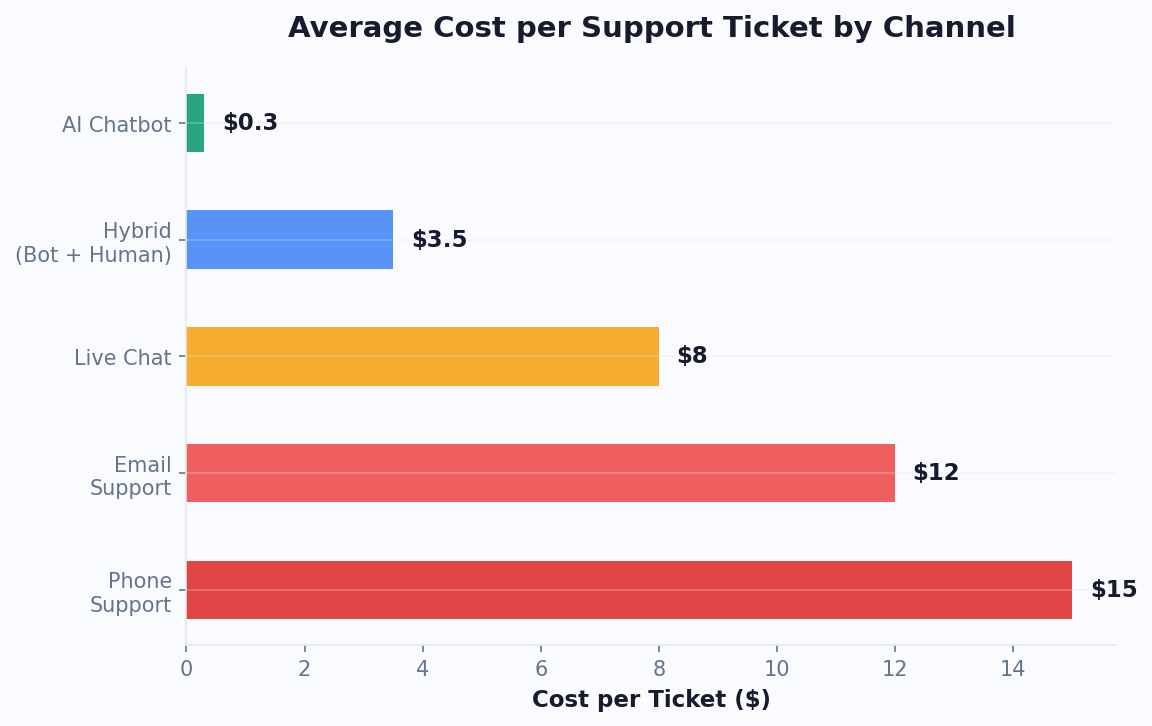
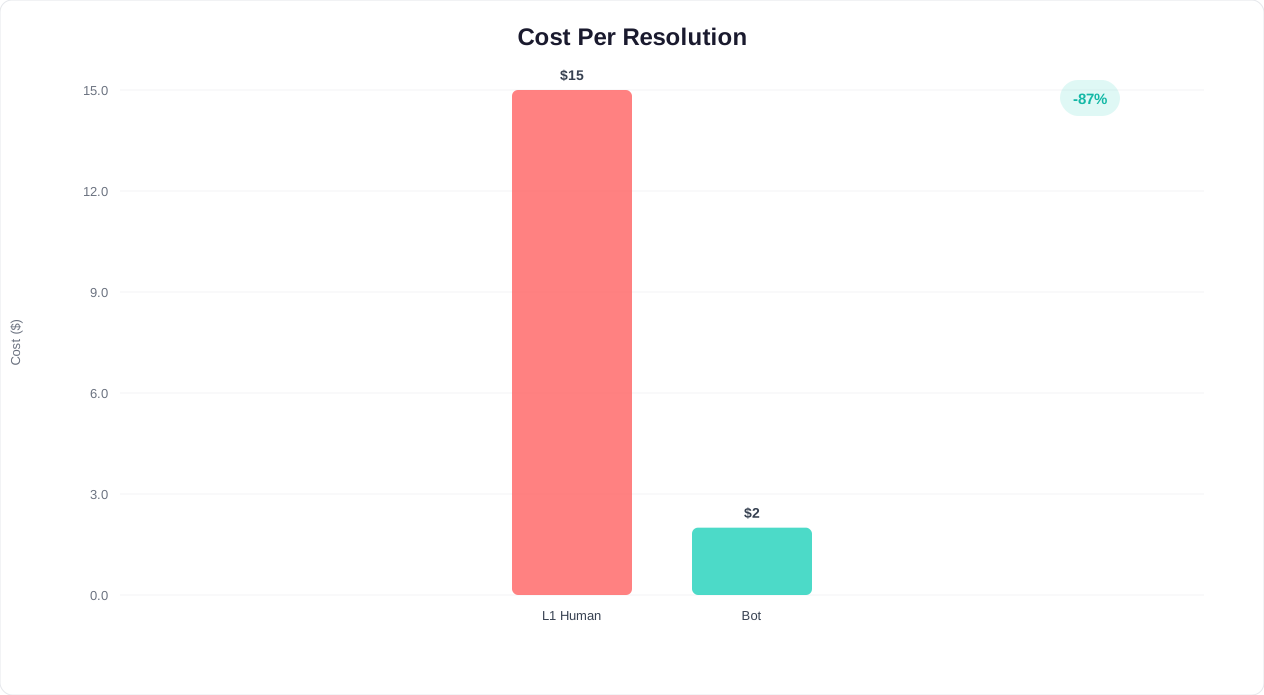
The commonly cited figure is $17 per phone support interaction, according to IBM's customer service cost benchmarks. But that number, widely referenced across the industry, is actually a floor, not a ceiling. When you account for all cost components, the true figure for most mid-market companies falls between $20 and $35 per resolved phone interaction.
Let us break down where the money goes.
Agent Compensation: The Visible Cost
The average US-based phone support agent earns $38,000-$45,000 per year in base salary (Bureau of Labor Statistics, 2025). Add benefits, payroll taxes, and paid time off, and the fully loaded cost per agent reaches $52,000-$62,000 annually. A single agent handles roughly 40-50 calls per day, or about 10,000-12,500 calls per year. That puts the labor cost alone at $4.16-$6.20 per call.
But agents are not on the phone every minute of their shift. Industry data from ContactBabel's US Contact Center Decision-Makers Guide shows that the average agent utilization rate (time spent actively handling calls vs. total paid time) is just 65-75%. Factor in idle time, breaks, team meetings, and administrative tasks, and the effective labor cost per call rises to $5.55-$9.54.
Infrastructure and Technology
Phone support requires a substantial technology stack that has no equivalent in chat-based support: (source: Gartner on customer service technology).
| Infrastructure Component | Annual Cost (50-agent center) | Per-Call Cost |
|---|---|---|
| Cloud PBX / contact center platform | $60,000-$120,000 | $0.10-$0.20 |
| IVR system licensing | $18,000-$36,000 | $0.03-$0.06 |
| Call recording and QA tools | $12,000-$24,000 | $0.02-$0.04 |
| CRM integration and telephony APIs | $15,000-$30,000 | $0.03-$0.05 |
| Telecom charges (toll-free, long distance) | $36,000-$72,000 | $0.06-$0.12 |
| Physical or remote workstation setup | $50,000-$75,000 | $0.08-$0.13 |
| Total infrastructure | $191,000-$357,000 | $0.32-$0.60 |
Training and Turnover: The Hidden Multiplier
Phone support has a turnover problem that silently inflates costs. According to the Deloitte Global Contact Center Survey, the average annual turnover rate for contact center agents is 30-45%. For a 50-agent center, that means replacing 15-23 agents every year.
Each replacement costs:
- Recruiting: $3,000-$5,000 per hire (job postings, recruiter time, background checks)
- Training: 4-8 weeks at $1,500-$3,000 per week in trainer time and reduced productivity
- Ramp-up: 2-3 months of below-average performance, costing $2,000-$4,000 in efficiency loss
- Total per replacement: $11,000-$21,000
Across 15-23 annual replacements, turnover alone adds $165,000-$483,000 per year to a 50-agent call center, or $0.28-$0.81 per call.
Supervision and Quality Assurance
Phone agents require team leads (1:8-12 ratio) and quality assurance specialists who listen to recorded calls. For a 50-agent center, this adds 4-6 supervisors and 1-2 QA specialists, totaling $350,000-$520,000 in annual management overhead, or $0.58-$0.87 per call.
The Full Picture
| Cost Category | Per-Call Cost | Percentage of Total |
|---|---|---|
| Agent labor (loaded, adjusted for utilization) | $5.55-$9.54 | 38-42% |
| Infrastructure and technology | $0.32-$0.60 | 3-4% |
| Training and turnover | $0.28-$0.81 | 3-5% |
| Supervision and QA | $0.58-$0.87 | 4-6% |
| Facilities and overhead allocation | $0.40-$0.80 | 3-5% |
| Hold time and abandoned calls (wasted capacity) | $2.50-$5.00 | 18-25% |
| After-hours and overflow staffing | $2.00-$4.50 | 14-20% |
| Escalation and callback costs | $1.20-$2.50 | 8-12% |
| Total cost per resolved phone interaction | $12.83-$24.62 | 100% |
The IBM benchmark of $17+ per interaction is accurate as a median. For companies with high turnover, complex products, or significant after-hours demand, the true cost pushes well above $20. For offshore operations, costs drop to $6-$10 per interaction, but customer satisfaction often drops with them.
Every one of these cost lines scales linearly with call volume. Twice the calls means roughly twice the agents, twice the supervisors, twice the infrastructure. There are no meaningful economies of scale in phone support. This linear scaling is the fundamental economic problem that chatbots solve.
Chatbot Cost Per Interaction: The Real Numbers
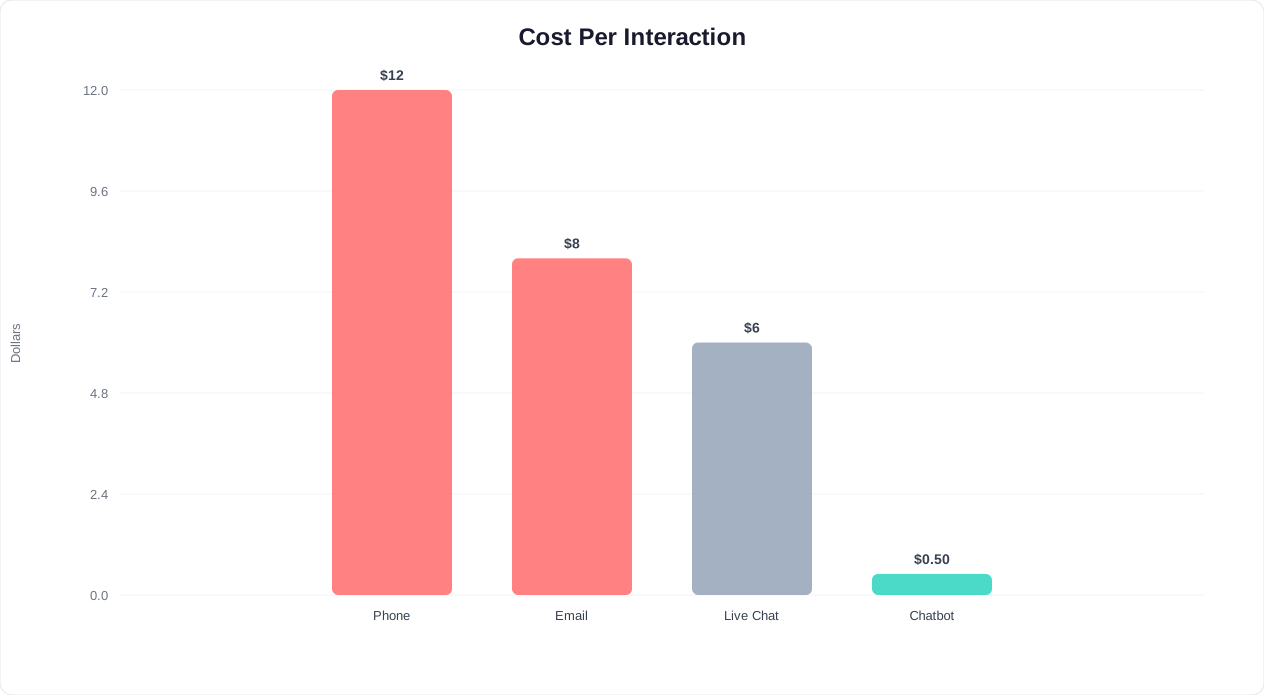
If phone support costs $17+ per interaction, what does a chatbot interaction actually cost? The short answer is $0.30-$0.50 for a modern AI chatbot, but the composition of that cost is fundamentally different from phone support in ways that matter for scaling.
Platform and AI Costs
Chatbot costs break into two categories: fixed platform costs and variable per-conversation costs. The fixed costs (hosting, platform subscription, maintenance) are distributed across all conversations, so they decrease per interaction as volume grows. The variable costs (AI model inference, API calls) are small and predictable.
| Cost Component | Monthly Cost | Per-Conversation Cost (at 5,000/mo) |
|---|---|---|
| AI chatbot platform subscription | $99-$499 | $0.02-$0.10 |
| AI model inference (GPT/Claude API) | Variable | $0.05-$0.15 |
| Knowledge base hosting and indexing | $20-$50 | $0.004-$0.01 |
| Integration middleware (CRM, helpdesk) | $50-$100 | $0.01-$0.02 |
| Analytics and reporting | Included in platform | $0.00 |
| Ongoing optimization (internal staff time) | $500-$1,500 | $0.10-$0.30 |
| Total | $769-$2,249 | $0.18-$0.58 |
The median cost is approximately $0.35 per chatbot conversation for a mid-market company handling 5,000+ conversations per month. At 20,000+ monthly conversations, the per-unit cost drops below $0.20 because fixed costs are spread further and volume discounts on AI inference kick in.
What About Setup Costs?
Phone support has ongoing costs that dwarf setup costs. Chatbots have meaningful setup costs that are quickly amortized:
- Initial configuration: 10-40 hours of internal time for knowledge base creation, flow design, and testing. With a no-code platform like Conferbot's AI chatbot builder, this is on the lower end.
- Integration setup: 2-8 hours to connect CRM, helpdesk, and other systems via the integrations hub.
- Training data preparation: 5-15 hours to compile FAQs, product documentation, and policy information.
- Total setup investment: 17-63 hours of internal time, or $1,700-$9,450 at $100/hour blended rate.
At 5,000 conversations per month and $0.35 per conversation, the chatbot costs $1,750 monthly. Compare that to phone support for the same 5,000 conversations at $17 each: $85,000 monthly. The chatbot setup cost is recovered in the first 2-3 days of operation.
The Scaling Economics Are What Matter
The critical difference is not the per-unit cost but how costs scale. Phone support scales linearly: 2x volume requires approximately 2x agents, 2x supervisors, 2x infrastructure. Chatbot support scales logarithmically: 2x volume requires essentially the same platform with marginal increases in AI inference costs.
Consider a company that experiences a 3x seasonal spike in support inquiries:
| Scenario | Phone Support Cost | Chatbot Cost |
|---|---|---|
| Normal month (5,000 contacts) | $85,000 | $1,750 |
| Peak month (15,000 contacts) | $255,000 (or massive hold times) | $3,250 |
| Peak cost increase | 200% increase | 86% increase |
The phone support team either staffs up dramatically for peak periods (expensive) or lets hold times balloon (damaging to satisfaction). The chatbot handles triple volume without any performance degradation and only a modest cost increase. For businesses with seasonal demand, product launches, or viral moments, this elastic scalability is worth more than the per-interaction savings alone.
Conferbot's analytics dashboard tracks cost per conversation in real time, so you always know your actual per-interaction cost and can benchmark it against phone support spend. For a detailed ROI model tailored to your business, see our guide on how to calculate chatbot ROI.
Related: Chatbot vs Email Support: Which Wins on Cost, Speed, and Satisfaction?
Speed: Average Handle Time vs Instant Resolution
Speed is the dimension where the chatbot advantage is most visceral. Phone support involves waiting; chatbots do not. But the full speed comparison involves more than just response time.
The Phone Support Time Budget
When a customer calls your support line, the total time commitment includes far more than the conversation itself:
| Phone Support Time Component | Average Duration |
|---|---|
| Navigating IVR menu | 1.5-3 minutes |
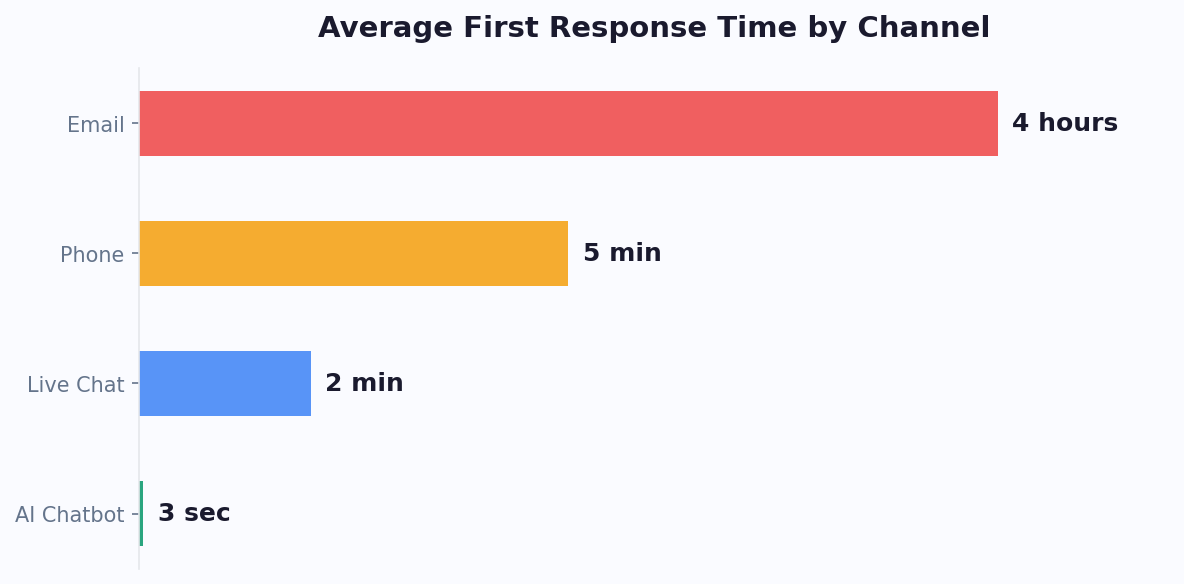
| Hold time (waiting for agent) | 5-15 minutes (industry average: 11.5 min) |
| Agent greeting and identity verification | 1-2 minutes |
| Issue description (customer explains problem) | 2-4 minutes |
| Agent research and resolution | 3-8 minutes |
| Wrap-up and confirmation | 1-2 minutes |
| Total customer time investment | 13.5-34 minutes |
The industry average handle time (AHT) for phone support is 6 minutes and 10 seconds according to ContactBabel, but that measures only the agent conversation time. The customer's total time investment, including hold time, IVR navigation, and transfers, averages 18-23 minutes per resolved issue.
Research from ElevenLabs' call center statistics analysis confirms that 75% of consumers say the most frustrating part of customer service is waiting on hold. Hold time is not just a cost problem; it is the single largest driver of customer dissatisfaction with phone support. (source: ContactBabel US Contact Centre Decision-Makers Guide).
The Chatbot Time Budget
A chatbot interaction has a radically different time profile:
| Chatbot Time Component | Average Duration |
|---|---|
| Widget load and greeting | 1-3 seconds |
| Customer describes issue (typed or selected) | 15-45 seconds |
| Bot processes and responds | 2-5 seconds |
| Follow-up exchange (1-3 turns) | 30-90 seconds |
| Resolution confirmation | 5-10 seconds |
| Total customer time investment | 1-3 minutes |
For simple queries (order status, password reset, store hours, policy questions), chatbot resolution time is under 60 seconds. For moderately complex queries requiring knowledge base lookup and multi-turn conversation, resolution takes 2-4 minutes. Only the most complex issues requiring human handoff approach phone-equivalent times.
First Contact Resolution Rates
Speed only matters if the issue actually gets resolved. Here is how the two channels compare on first contact resolution (FCR):
| Issue Type | Phone FCR Rate | Chatbot FCR Rate | Winner |
|---|---|---|---|
| Account inquiries (balance, status) | 92% | 97% | Chatbot |
| Order tracking and shipping | 95% | 98% | Chatbot |
| FAQ and policy questions | 88% | 95% | Chatbot |
| Password reset / account access | 90% | 99% | Chatbot |
| Product recommendations | 85% | 88% | Chatbot |
| Technical troubleshooting (moderate) | 78% | 65% | Phone |
| Billing disputes | 82% | 45% | Phone |
| Complex complaints with emotional context | 75% | 30% | Phone |
Chatbots achieve higher FCR for the majority of support queries -- the routine, repeatable, information-retrieval tasks that make up 60-70% of total support volume. Phone support maintains its advantage for emotionally complex, dispute-resolution, and multi-system troubleshooting scenarios. A well-designed chatbot-to-human handoff ensures these complex cases reach a phone agent quickly, without the customer repeating their issue.
24/7 Availability: The Overnight Advantage
Phone support hours create a coverage gap that chatbots eliminate entirely. Unless you run a 24/7 call center (which roughly doubles staffing costs), customers calling outside business hours hit voicemail. Data from Conferbot's analytics platform shows that 38% of customer support inquiries arrive outside standard 9-5 business hours. These after-hours customers face a stark choice: wait until morning or find another solution (often a competitor).
Chatbots serve these customers identically at 2 AM and 2 PM. For global businesses spanning multiple time zones, this is not a nice-to-have but a fundamental service requirement.
Related: After-Hours Customer Support: How to Set Up a Chatbot That Works While You Sleep
Related: Chatbot Analytics: 10 Metrics You Must Track to Prove ROI in 2026
Customer Satisfaction: Do People Actually Prefer Chatbots?
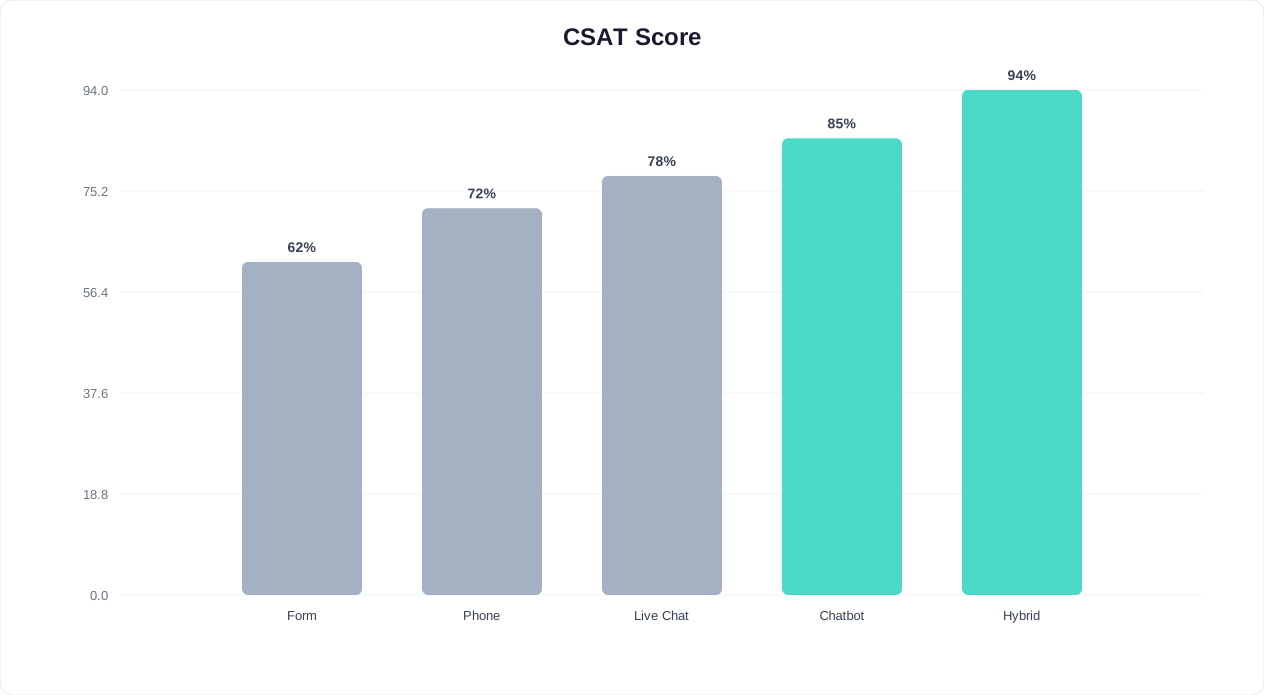
This is where the chatbot vs phone support debate gets genuinely nuanced. The satisfaction data does not tell a simple story of one channel dominating the other. Instead, it reveals that satisfaction depends heavily on issue type, resolution outcome, and customer demographics.
The Headline Numbers
Overall CSAT scores by channel, compiled from multiple industry surveys including the Deloitte Global Contact Center Survey and Zendesk's CX Trends Report 2026:
| Metric | Phone Support | AI Chatbot | Live Chat |
|---|---|---|---|
| Overall CSAT score | 78-82% | 72-78% | 80-85% |
| CSAT for simple queries | 80% | 88% | 84% |
| CSAT for complex queries | 85% | 52% | 82% |
| CSAT when resolved on first contact | 92% | 90% | 93% |
| CSAT when issue requires escalation | 68% | 55% | 65% |
| Net Promoter Score impact | +5 to +12 | +3 to +8 | +8 to +15 |
At first glance, phone support appears to win on overall satisfaction. But that aggregate number masks the real story.
The Satisfaction Paradox: Resolved Fast vs Resolved by a Human
When a chatbot resolves an issue quickly and accurately, satisfaction scores match or exceed phone support. Gartner's 2025 customer service research found that customers who had their issue resolved by a chatbot in under 2 minutes rated their experience 4.2 out of 5, compared to 4.0 for phone resolution of the same issue type that took 15+ minutes.
The dissatisfaction with chatbots comes almost entirely from two scenarios:
- The chatbot fails to understand the issue and enters a frustrating loop. This drives CSAT below 40% and is the primary source of chatbot-negative sentiment.
- The customer wanted human empathy for an emotionally charged issue (complaint, dispute, cancellation) and felt dismissed by an automated response.
Modern AI chatbots have dramatically reduced scenario 1. Compared to rule-based chatbots of 2020-2022, today's AI-powered bots understand natural language accurately 85-92% of the time (up from 60-70%). The remaining 8-15% of misunderstood queries should trigger an immediate escalation to a human agent.
Generational and Demographic Preferences
Customer channel preferences vary significantly by age group:
| Age Group | Prefers Phone | Prefers Chatbot/Chat | No Preference (wants resolution) |
|---|---|---|---|
| 18-29 (Gen Z) | 12% | 58% | 30% |
| 30-44 (Millennials) | 22% | 48% | 30% |
| 45-59 (Gen X) | 38% | 28% | 34% |
| 60+ (Boomers) | 55% | 12% | 33% |
Source: Salesforce State of the Connected Customer, 6th Edition
The trend line is clear. The customer base of 2030 will have even stronger digital-first preferences than today. But the most important column is the last one: across all age groups, 30-34% of customers do not care about the channel at all. They want their problem solved, and whichever channel does that fastest wins their satisfaction. (source: Deloitte digital transformation survey). (source: McKinsey on customer care transformation).
The Frustration Factor: Hold Times Destroy Phone CSAT
Phone support's satisfaction numbers are propped up by the subset of calls with short hold times and competent agents. For the substantial percentage of calls with long holds, transfers, or unresolved outcomes, satisfaction craters. Industry data shows:
- 75% of consumers say long hold times are the most frustrating aspect of customer service (Harris Interactive)
- 67% of customers have hung up in frustration after being unable to reach a live agent (Glance)
- CSAT drops 15 percentage points for every 5 minutes of hold time beyond 2 minutes (Forrester)
- 33% of customers who abandon a call due to hold time never call back and may churn (Zendesk)
A chatbot never puts a customer on hold. This alone neutralizes a significant portion of phone support's satisfaction advantage. When you combine instant availability with accurate resolution for routine queries, chatbots can match or exceed phone CSAT for the majority of support interactions.
The takeaway is not that chatbots are universally better for satisfaction. It is that the right channel for the right issue type maximizes satisfaction. Conferbot's AI chatbot builder allows you to design flows that resolve routine queries instantly and route complex or emotional issues to phone agents seamlessly, giving each customer the experience that works best for their specific need.
Related: Chatbot Lead Qualification: Score, Route, and Convert Leads Automatically
The 35x Cost Advantage: Detailed Savings Calculation
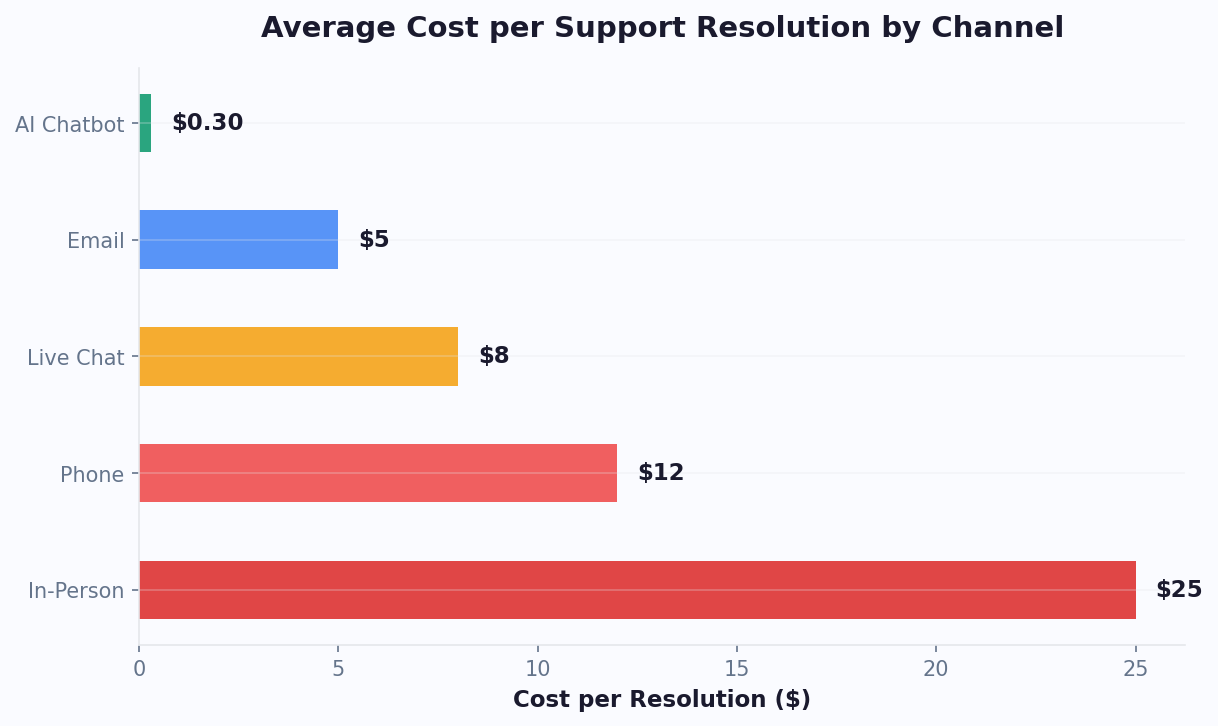
The headline number -- chatbots cost roughly 35x less per interaction than phone support -- deserves a rigorous worked example. Let us model a real mid-market company and calculate the savings with precision.
The Scenario
Company profile:
- Industry: B2B SaaS with 2,500 active customers
- Monthly support contacts: 8,000 (3.2 contacts per customer per month)
- Current channel mix: 100% phone support
- Average handle time: 6.5 minutes
- Current phone support cost: $18.50 per interaction (slightly above industry median due to technical product)
Current State: Full Phone Support
| Line Item | Monthly Cost |
|---|---|
| 8,000 interactions x $18.50 | $148,000 |
| After-hours overflow to answering service (12% of calls) | $14,400 |
| Abandoned call re-contact (8% of calls, 40% callback) | $4,736 |
| Total monthly phone support cost | $167,136 |
| Annual phone support cost | $2,005,632 |
Proposed State: Chatbot-First Hybrid Model
Based on industry benchmarks and Conferbot platform data, an AI chatbot handles 65-75% of incoming support queries without human intervention. The remaining 25-35% escalate to phone agents. We use a conservative 65% containment rate:
| Line Item | Monthly Cost |
|---|---|
| 5,200 chatbot interactions (65%) x $0.40 | $2,080 |
| 2,800 phone interactions (35%) x $18.50 | $51,800 |
| Chatbot platform (Conferbot Business plan) | $399 |
| After-hours overflow (eliminated -- chatbot covers 24/7) | $0 |
| Abandoned call re-contact (reduced 70% -- chatbot absorbs queue) | $1,421 |
| Monthly optimization time (5 hours x $100/hr) | $500 |
| Total monthly hybrid support cost | $56,200 |
| Annual hybrid support cost | $674,400 |
The Savings
| Metric | Phone Only | Chatbot-First Hybrid | Difference |
|---|---|---|---|
| Annual cost | $2,005,632 | $674,400 | $1,331,232 saved (66%) |
| Blended cost per interaction | $20.89 | $7.03 | $13.86 lower (66%) |
| Cost of chatbot-resolved interactions | N/A | $0.40 each | 46x cheaper than phone |
| FTE agents required | 18-22 | 6-8 | 10-14 fewer agents |
| After-hours coverage cost | $172,800/yr | $0 | $172,800 saved |
The 35x cost advantage compares the per-interaction cost of a chatbot ($0.40) to phone support ($14-$18.50, depending on the benchmark). In the blended hybrid model, where the chatbot handles the easy queries and phone handles the complex ones, the overall savings are 60-70%.
Payback Period
Using conservative numbers:
- Chatbot setup cost: $5,000-$8,000 (internal time for configuration, knowledge base, testing)
- Monthly savings: $110,936
- Payback period: Less than 3 days of operation
Even if the chatbot only contained 40% of calls instead of 65%, the annual savings would be $788,528. The business case for deploying a chatbot alongside phone support is overwhelming at any reasonable containment rate above 20%.
For a personalized savings calculation based on your specific call volume, handle time, and cost structure, use the Conferbot ROI calculator. Our chatbot ROI guide walks through the methodology in detail.
The Hybrid Model: Chatbot First, Phone When Needed
The smartest companies in 2026 are not choosing between chatbot and phone support. They are building chatbot-first hybrid models that use each channel where it excels and create seamless transitions between them.
Why Hybrid Wins Over Either Pure Approach
A 100% chatbot strategy fails because some issues genuinely require human judgment, empathy, or authority. A 100% phone strategy fails because it is prohibitively expensive and frustratingly slow for simple queries. The hybrid model eliminates both failure modes:
- Simple queries (60-70% of volume): Chatbot resolves instantly. No hold time, no agent needed. Customer gets their answer in seconds.
- Moderate queries (15-25% of volume): Chatbot attempts resolution, and if successful, the customer is served. If the chatbot detects uncertainty, it offers a warm transfer to an agent with full conversation context forwarded.
- Complex/emotional queries (10-15% of volume): Chatbot triages, collects initial information, and routes directly to a specialized phone agent. The customer never repeats their issue.
The Chatbot-First Routing Architecture
An effective hybrid model follows this decision flow:
- Greeting and intent detection: The chatbot identifies the customer's issue within the first 1-2 exchanges.
- Confidence assessment: The AI evaluates whether it can resolve the issue with high confidence. If confidence is above 85%, it proceeds to resolution. If below, it flags for potential escalation.
- Resolution attempt: The chatbot provides the answer or completes the action (order lookup, account update, FAQ response).
- Resolution confirmation: The chatbot asks if the issue is resolved. If yes, the interaction ends. If no, it escalates.
- Warm handoff: When escalating, the chatbot transfers the complete conversation transcript, customer account details, and its preliminary diagnosis to the phone agent. The agent picks up exactly where the bot left off.
This architecture is detailed in our chatbot-to-human handoff best practices guide, which covers the technical implementation and UX considerations for seamless transitions.
Real-World Hybrid Model Results
Companies running chatbot-first hybrid models report consistent results:
| Metric | Before (Phone Only) | After (Chatbot-First Hybrid) | Change |
|---|---|---|---|
| Average wait time | 11.5 minutes | 8 seconds (chatbot) / 3.2 min (phone queue) | -97% (chatbot) / -72% (phone) |
| First contact resolution rate | 74% | 82% | +8 points |
| Overall CSAT | 78% | 84% | +6 points |
| Cost per resolved contact | $18.50 | $7.03 | -62% |
| Agent handle time (for escalated calls) | 6.5 min | 4.8 min | -26% |
| After-hours resolution rate | 0% | 65% | +65 points |
Notice the improvement in phone agent handle time. When agents only handle the queries the chatbot could not resolve, and they receive the full chatbot transcript with preliminary diagnosis, they resolve issues 26% faster. The chatbot does the intake and triage work that previously consumed 1.5-2 minutes of every phone call.
The Emotional Escalation Trigger
One of the most sophisticated aspects of modern hybrid models is sentiment-based escalation. The chatbot monitors the customer's language for signals of frustration, anger, or distress. Phrases like "this is unacceptable," "I want to cancel," or "let me speak to someone" trigger immediate escalation to a phone agent, bypassing the standard resolution flow.
This ensures that customers who need human empathy get it quickly, without being forced through a bot flow that would only increase their frustration. The chatbot's role in these scenarios is to acknowledge the customer's frustration, collect the essential information, and connect them with a human as fast as possible.
Conferbot's AI chatbot platform includes built-in sentiment detection and configurable escalation triggers, making it straightforward to build a hybrid model that routes each customer to the right channel automatically.
Implementation Timeline
A typical chatbot-first hybrid deployment follows this timeline:
- Weeks 1-2: Deploy chatbot to handle top 10 query types (usually 40-50% of volume). Phone handles everything else.
- Weeks 3-4: Expand chatbot coverage to top 25 query types (60-65% of volume). Begin reducing phone staffing levels.
- Months 2-3: Optimize escalation triggers, refine knowledge base, and add edge case handling. Chatbot containment stabilizes at 65-75%.
- Month 4+: Ongoing optimization. Each 1% improvement in containment saves significant recurring cost.
This phased approach lets you validate the chatbot's performance on simple queries before trusting it with more complex scenarios. It also gives your phone agents time to transition into new roles as escalation specialists, quality reviewers, or chatbot trainers.
Industries Where Phone-to-Chatbot Migration Saves Most
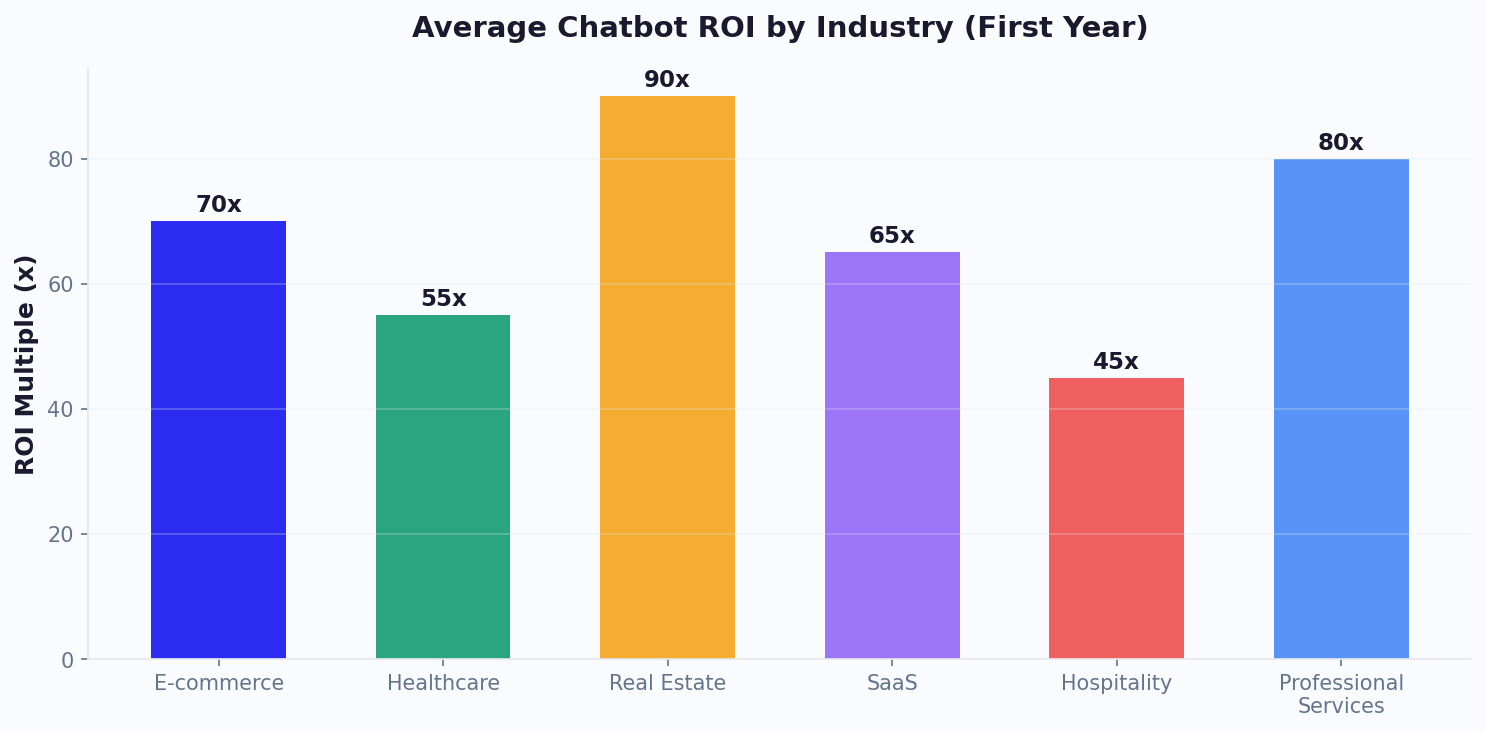
The savings from shifting support volume from phone to chatbot vary dramatically by industry. Industries with high call volumes, repetitive query types, and expensive phone infrastructure benefit most. Here is a comprehensive breakdown.
Industry Savings Comparison
| Industry | Avg Phone Cost/Interaction | Chatbot Containment Rate | Annual Savings (10K contacts/mo) | Savings % |
|---|---|---|---|---|
| Telecom | $12.50 | 75% | $1,012,500 | 68% |
| Banking and Financial Services | $22.00 | 60% | $1,425,600 | 54% |
| Insurance | $19.50 | 65% | $1,365,000 | 58% |
| Ecommerce / Retail | $14.00 | 78% | $1,176,000 | 70% |
| Healthcare | $25.00 | 55% | $1,485,000 | 50% |
| Travel and Hospitality | $16.00 | 72% | $1,244,160 | 65% |
| SaaS / Technology | $18.50 | 68% | $1,356,600 | 61% |
| Utilities | $11.00 | 80% | $950,400 | 72% |
| Education | $15.00 | 70% | $1,134,000 | 63% |
| Government | $20.00 | 58% | $1,252,800 | 52% |
Note: Annual savings assume 10,000 monthly contacts, chatbot cost of $0.40/interaction, and remaining contacts handled by phone at industry average cost. Actual savings vary by company size, query complexity, and chatbot sophistication.
Why Some Industries Save More
Utilities and ecommerce lead in savings percentage (70-72%) because their query types are highly repetitive and data-driven. Utility customers call about billing, outages, and meter readings -- all perfectly suited for chatbot automation. Ecommerce queries about order status, returns, and product availability are similarly automatable. Both industries achieve containment rates of 75-80%.
Banking and healthcare lead in absolute savings ($1.4-$1.5 million) despite lower containment rates because their per-interaction phone costs are the highest. Healthcare phone support is expensive due to compliance requirements (HIPAA-trained agents, call recording, identity verification), and banking phone support requires licensed, bonded agents for financial transactions. Even a 55-60% containment rate generates massive savings when the phone cost per interaction exceeds $20.
Government agencies represent an emerging opportunity. Citizen service call centers handle high volumes of repetitive queries (permit status, tax filing help, benefit eligibility) but have been slower to adopt chatbot technology. The agencies that have deployed chatbots report containment rates of 55-65% and significant improvements in citizen satisfaction due to eliminated hold times.
Industry-Specific Chatbot Capabilities
The chatbot's ability to resolve queries without phone escalation depends on integration depth:
- Ecommerce: Integration with order management systems allows the chatbot to provide real-time order status, process returns, and issue refunds. See our ecommerce chatbot solutions.
- Banking: Secure API integration with core banking systems enables balance inquiries, transaction history, and card management without agent involvement.
- Healthcare: Healthcare chatbots handle appointment scheduling, prescription refills, and symptom pre-assessment while maintaining HIPAA compliance.
- Telecom: Network status APIs let chatbots report outages, check data usage, and guide plan changes in real time.
- Insurance: Claims status lookup, policy document retrieval, and premium payment processing automate the highest-volume call reasons.
The deeper the chatbot integrates with backend systems, the higher the containment rate and the greater the savings. Conferbot's integrations hub provides pre-built connectors for major platforms across each of these industries, reducing integration time from months to days.
How to Keep the Personal Touch Without the Phone Bill
The strongest argument for phone support has always been the personal touch. Hearing a human voice, having someone empathize with your frustration, feeling like a person and not a ticket number -- these are real advantages that matter to real customers. The goal is not to eliminate the personal touch but to deliver it more efficiently and to more customers.
Personalization Through Data, Not Channel
Phone support feels personal because the agent can adapt in real time. But most of that adaptation is based on information the agent reads from a screen: the customer's name, account history, purchase history, and previous interactions. A chatbot has access to all the same data and can use it just as effectively.
Personalization tactics that chatbots handle well:
- Greeting by name: "Welcome back, Sarah. How can I help you today?"
- Proactive context: "I see you placed an order on Tuesday. Are you checking on that?"
- Personalized recommendations: "Based on your purchase history, you might be interested in..."
- Remembering preferences: "Last time you preferred email confirmation. Should I do the same this time?"
- Acknowledging history: "I see you contacted us about this last week. Let me check the current status."
These interactions feel personal because they demonstrate that the company knows the customer and values their history. The channel delivering this personalization (human voice or text) matters less than the personalization itself.
Conversational Design That Feels Human
The difference between a chatbot that feels robotic and one that feels natural is conversational design. Key principles:
1. Use natural language, not corporate-speak. Instead of "Your request has been processed and a confirmation will be dispatched to your registered email address," say "Done! I have sent a confirmation to your email." Modern AI chatbots built with platforms like Conferbot generate natural, conversational responses automatically based on your brand voice settings.
2. Acknowledge the customer's situation before solving it. Instead of jumping straight to the answer, acknowledge: "I understand that tracking delays can be frustrating. Let me check on your order right now." This mirrors what good phone agents do instinctively.
3. Offer choices, not dead ends. When the chatbot cannot fully resolve an issue, provide clear options: "I can help you with X and Y, or I can connect you with a specialist who handles Z. What would you prefer?" This gives the customer agency, which is a core component of feeling valued.
4. Use the customer's language. If a customer describes their issue in casual language, the chatbot should respond casually. If they use formal language, match it. AI-powered chatbots do this naturally through contextual language modeling.
Strategic Use of Phone for High-Impact Moments
When phone support is reserved for the interactions that truly need it, the quality of those phone interactions improves dramatically. With a chatbot handling routine queries:
- Phone agents handle fewer calls per day, reducing burnout and increasing engagement.
- Agents spend more time per call without pressure to rush, improving resolution quality.
- Complex issues get full attention because agents are not context-switching from simple password resets to billing disputes.
- Training focuses on empathy and problem-solving rather than repetitive procedures, producing more skilled agents.
The result is a phone experience that is significantly better than what most call centers deliver today. When a customer reaches a phone agent in the hybrid model, that agent is less stressed, more focused, and has full context from the chatbot transcript. The personal touch is not diminished; it is concentrated where it matters most.
Implementation Playbook
Here is how to transition from phone-heavy support to a chatbot-first model while maintaining (and improving) the personal touch:
Phase 1: Deploy and Deflect (Week 1-2)
- Set up the chatbot using Conferbot's AI builder with your knowledge base, FAQs, and product documentation.
- Configure the bot to handle the top 10 query types by volume (typically: order status, hours/location, pricing, returns, password reset, account questions, shipping info, product availability, basic troubleshooting, contact information).
- Add the chatbot to your website and support pages. Keep phone support fully staffed as a safety net.
- Monitor containment rate and CSAT daily via analytics.
Phase 2: Optimize and Expand (Week 3-6)
- Review chatbot transcripts for common failure points. Add missing knowledge base entries.
- Expand chatbot coverage to 20-30 query types.
- Implement warm handoff for queries the bot cannot resolve, ensuring conversation context transfers to the agent.
- Begin reducing phone staffing as chatbot containment stabilizes above 50%.
Phase 3: Refine and Scale (Month 2-4)
- Connect the chatbot to backend systems (order management, CRM, billing) via the integrations hub for deeper self-service capabilities.
- Implement proactive chatbot triggers based on user behavior (e.g., lingering on the pricing page, revisiting the cancellation page).
- Retrain phone agents as escalation specialists focused on complex issues, retention, and high-value customer interactions.
- Target 65-75% chatbot containment with 80%+ CSAT on bot-resolved interactions.
Phase 4: Continuous Improvement (Ongoing)
- Use conversation analytics to identify new automation opportunities every month.
- A/B test chatbot responses to optimize resolution rates and satisfaction scores.
- Review escalation transcripts to find patterns the chatbot could handle with additional training.
- Each 5% improvement in containment rate reduces annual costs by $55,000-$110,000 for a mid-market company.
The Bottom Line
Phone support is not going away. For complex issues, emotional situations, and high-value interactions, a trained human agent remains the best option. But phone support as the default channel for all customer queries is an expensive anachronism in 2026. The data is clear: a chatbot-first hybrid model delivers faster resolution, higher satisfaction on routine queries, and 60-70% cost reduction compared to phone-only support.
The companies that thrive will not be those that eliminate the personal touch. They will be those that deploy it strategically -- using AI chatbots for the 65-75% of interactions that benefit from speed and automation, and reserving human agents for the 25-35% where empathy, judgment, and complex reasoning make the difference. That is not a compromise. It is better support for everyone.
Ready to see what a chatbot-first model could save your business? Start building your AI chatbot with Conferbot, or use our ROI calculator to model your specific savings.
Was this article helpful?
Build and deploy in 10 minutes. No coding needed.
Chatbot vs Phone Support FAQ
Everything you need to know about chatbots for chatbot vs phone support.
About the Author
Deepak is the founder of Conferbot and writes about building, deploying, and improving AI chatbots.
View all articles

