
Why Email Support Is Falling Behind in 2026
Email support was the backbone of customer service for two decades. It was asynchronous, scalable, and universally understood. But in 2026, the channel is buckling under the weight of customer expectations that have fundamentally shifted. The era of "we'll get back to you within 24-48 hours" is no longer acceptable to the majority of consumers, and the data makes this painfully clear. (source: SuperOffice research on email response times).
A SuperOffice study on response times found that the average company takes 12 hours and 10 minutes to respond to a customer email. The slowest 10% of companies take longer than 48 hours. Meanwhile, 88% of customers now expect a response within 60 minutes, according to Toister Solutions' research on consumer response time expectations. The gap between what customers expect and what email delivers has become a chasm.
The decline is not just about speed. Email suffers from structural problems that no amount of staffing can fully solve:
- Low open rates: Only 20-25% of support email replies are opened by the customer, according to Campaign Monitor's 2025 email benchmarks. That means 75-80% of the effort your support team puts into crafting responses may never be seen.
- Threading chaos: Complex issues generate long email threads that are difficult for both agents and customers to follow. Critical information gets buried in reply chains.
- No real-time feedback loop: When an agent sends an email response, they have no idea if it solved the problem until the customer replies (or doesn't). This creates a multi-day resolution cycle for issues that could be handled in minutes.
- Mobile friction: Composing a detailed support email on a mobile device is cumbersome. 68% of web traffic now comes from mobile, but email support was designed for desktop workflows.
- Backlog compounding: Every unanswered email creates pressure on the next shift. During peak periods (product launches, holidays, outages), email queues can grow exponentially, and each delayed response increases the likelihood of a follow-up "just checking in" email that doubles the queue.
Meanwhile, customer expectations have been reshaped by instant messaging. WhatsApp, iMessage, and social media DMs have trained consumers to expect conversational, real-time interactions with businesses. Industry surveys consistently find that customers under age 40 rank email as their least preferred support channel, behind live chat, chatbots, social messaging, and even phone.
None of this means email is dead. It still plays a role, and we will examine where it makes sense later in this article. But the data is unambiguous: as a primary support channel, email is falling behind, and businesses that rely on it exclusively are paying the price in customer satisfaction, retention, and operational costs.
The question is no longer whether to add a chatbot to your support mix, but how quickly you can deploy one to absorb the volume that email handles poorly. If you have been evaluating alternatives, our AI chatbot builder is designed to address every weakness outlined above, from instant response times to mobile-native conversations.
Head-to-Head: Chatbot vs Email on 8 Key Metrics
Before diving into the details of each dimension, here is the full comparison across every metric that matters for customer support operations. This table draws on data from SuperOffice, Zendesk, Forrester, and Conferbot's own platform analytics across 40,000+ deployments.
| Metric | Email Support | AI Chatbot | Winner |
|---|---|---|---|
| First Response Time | 12-24 hours (average) | Under 30 seconds | Chatbot (1,400x faster) |
| Resolution Time | 24-72 hours (multi-reply threads) | 2-5 minutes (single session) | Chatbot (90%+ faster) |
| Availability | Business hours only (8-10 hrs/day) | 24/7/365, no downtime | Chatbot (3x coverage) |
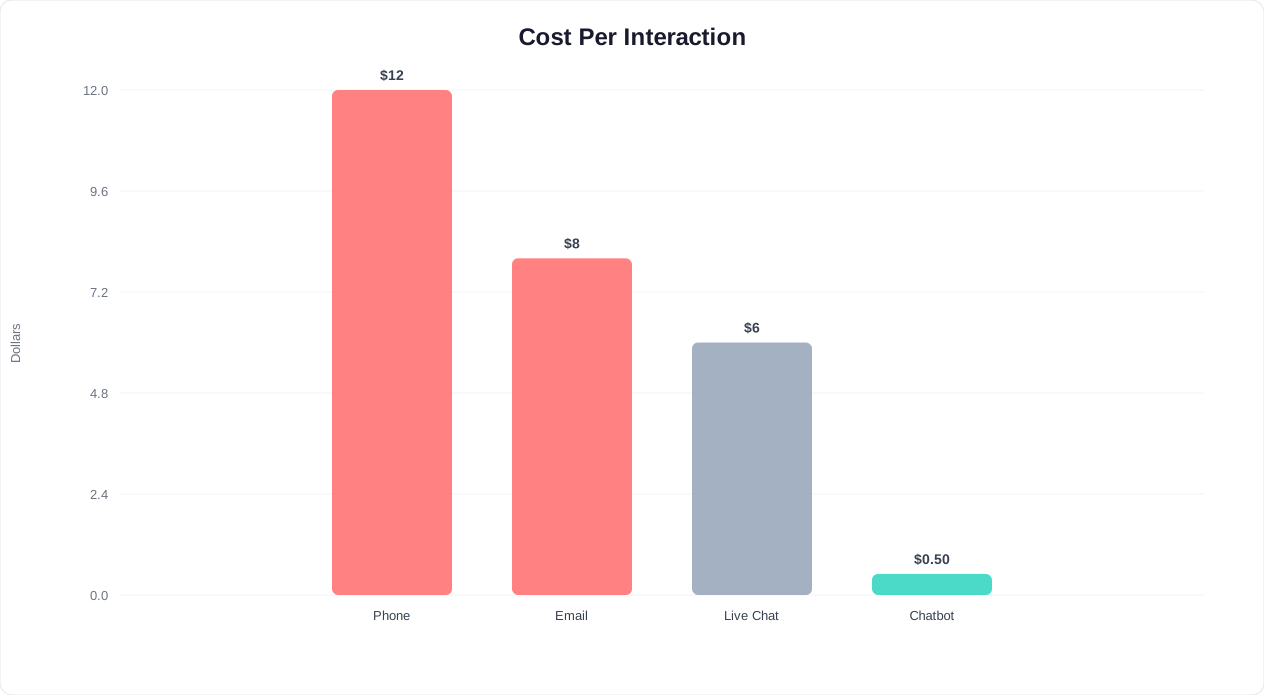
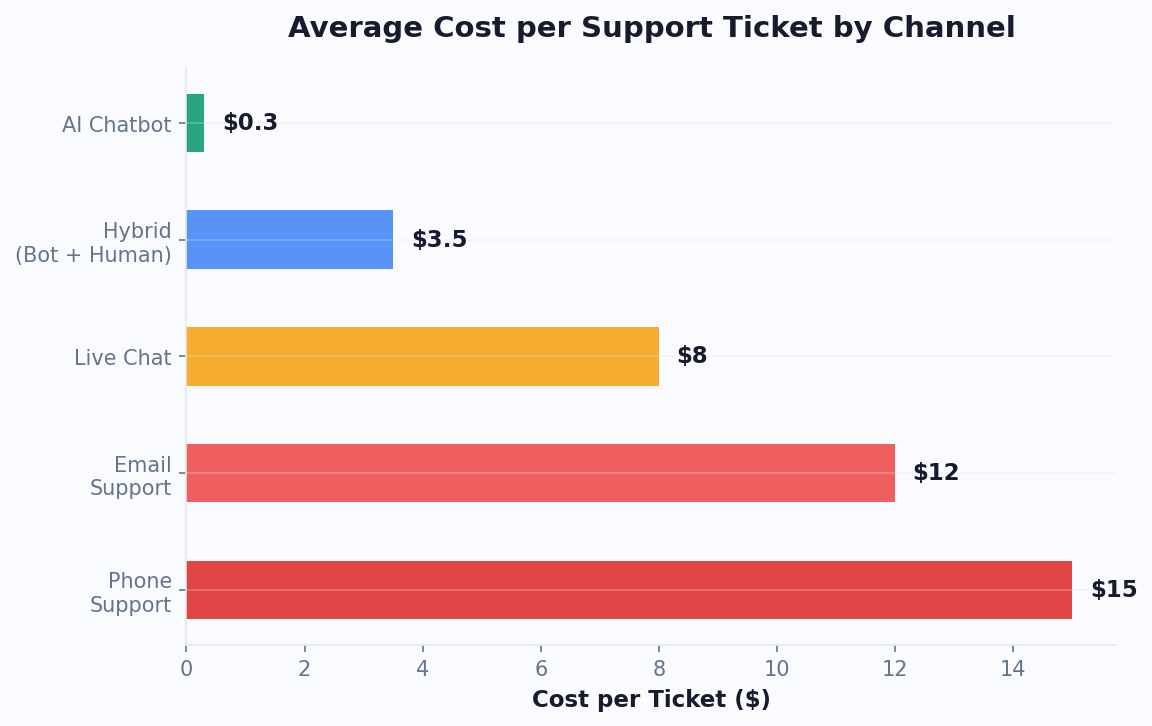
| Cost Per Resolution | $6-15 per ticket | $0.10-0.75 per conversation | Chatbot (90-98% cheaper) |
| Customer Satisfaction (CSAT) | 60-70% | 78-88% (well-designed) | Chatbot (+15-25 points) |
| Scalability | Linear (more volume = more agents) | Near-infinite (handles traffic spikes) | Chatbot |
| Complex Issue Handling | Good (detailed, asynchronous) | Moderate (improving with AI) | Email (for now) |
| Documentation / Audit Trail | Excellent (built-in) | Good (conversation logs) | Email (slight edge) |
| Personalization | Manual (agent-dependent) | Automated (data-driven) | Chatbot at scale |
| Multilingual Support | Requires multilingual staff | 95+ languages instantly | Chatbot |
| Agent Burnout Risk | High (repetitive replies) | None (automated) | Chatbot |
Sources: SuperOffice Response Time Study, Zendesk CX Trends 2026, Forrester CX Index 2025, Conferbot Platform Analytics 2025-2026
The chatbot wins decisively on 8 out of 11 metrics. Email retains an edge on complex issue handling and documentation, both of which matter for regulated industries and multi-step problem resolution. But for the 60-80% of support volume that consists of routine questions, status checks, and simple troubleshooting, the chatbot is superior on every meaningful dimension.
How to Read This Comparison
It is important to understand that this is not an argument for eliminating email entirely. Rather, it demonstrates that email is being asked to do a job it was never designed for: real-time, high-volume, routine customer interactions. Email excels as a channel for considered, asynchronous communication. The problem is that most support interactions are not considered or asynchronous by nature. They are quick questions that deserve quick answers.
When a customer asks "What are your shipping rates?" or "Where is my order?" they do not need a thoughtful, personalized email response crafted over 20 minutes. They need the answer immediately. Making them wait 12 hours for information that could have been retrieved in 3 seconds is a failure of channel strategy, not agent performance. Your support agents are not slow; they are working in the wrong medium for the majority of the questions they handle.
The following sections break down the most impactful metrics in detail, with actionable data you can use to build the business case for your organization.
Related: Chatbot vs Phone Support: A Complete Cost and Performance Comparison
Response Time: Seconds vs Hours
Response time is the single most important predictor of customer satisfaction in support, and it is where the gap between chatbots and email is most dramatic.
The Email Response Time Problem
The data on email response times is consistently poor across industries. SuperOffice's benchmark study of 1,000 companies found:
- Average first response time: 12 hours 10 minutes
- Fastest 10% of companies: Under 1 hour
- Slowest 10% of companies: Over 48 hours
- 62% of companies do not respond to customer service emails at all
These numbers have barely improved over the past five years, despite significant investment in helpdesk software. The bottleneck is not technology; it is the fundamental nature of the channel. Email is asynchronous, queue-based, and agent-dependent. Every message must be read, categorized, researched, and answered by a human, and that process takes time regardless of tooling.
The Chatbot Response Time Advantage
An AI chatbot responds in under 30 seconds, typically within 3-8 seconds. This is not dependent on queue length, time of day, or staffing levels. Whether one customer or one thousand customers initiate a conversation simultaneously, every single one receives an instant reply.
| Time Period | Email Response Time | Chatbot Response Time | Customer Impact |
|---|---|---|---|
| Business hours (peak) | 4-8 hours | 3-8 seconds | Chatbot resolves before email is opened |
| Business hours (off-peak) | 1-4 hours | 3-8 seconds | Same-minute vs same-day resolution |
| Evenings (6 PM - 10 PM) | Next business day (12-16 hrs) | 3-8 seconds | Chatbot captures 35% of daily traffic |
| Weekends | Monday morning (24-60 hrs) | 3-8 seconds | Chatbot prevents weekend churn |
| Holidays | Next working day (24-96 hrs) | 3-8 seconds | Chatbot maintains service continuity |
| Traffic spikes (launch/outage) | 24-72 hours (backlog) | 3-8 seconds | Chatbot absorbs 10x volume instantly |
Why Speed Matters More Than You Think
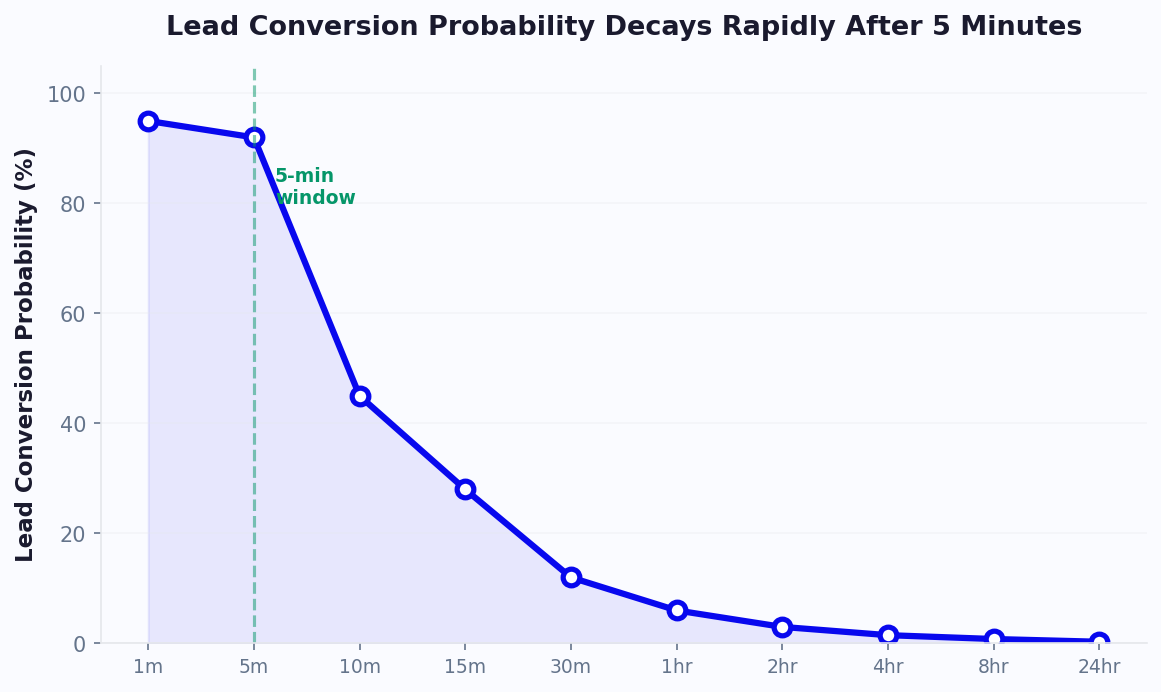
Harvard Business Review's lead response study found that the odds of qualifying a lead drop by 400% when response time increases from 5 minutes to 10 minutes. While that study focused on sales, the principle applies equally to support: delayed responses erode trust, increase frustration, and drive customers toward competitors.
Forrester's 2025 CX Impact Report quantified the relationship between support response time and retention:
- Customers who receive a response in under 1 minute have a 92% satisfaction rate and 95% retention rate
- Customers who wait 1-4 hours have a 72% satisfaction rate and 80% retention rate
- Customers who wait over 12 hours have a 55% satisfaction rate and 60% retention rate
That 35-percentage-point drop in retention between instant and 12-hour responses represents real revenue. For a business with 10,000 support interactions per month and $500 average customer lifetime value, the difference between instant and 12-hour response times translates to roughly $175,000 per month in at-risk revenue.
The after-hours dimension deserves special emphasis. Data from Conferbot analytics shows that 41% of customer support requests arrive outside standard business hours. With email-only support, these customers wait until the next business day. With a chatbot, they receive instant help. For businesses considering 24/7 coverage, our after-hours support chatbot guide details the implementation approach.
Related: Chatbot vs FAQ Page: Which Actually Reduces Support Tickets?
Related: Chatbot to Human Handoff: Setup Guide, Best Practices, and Message Templates
Cost Per Resolution: The Numbers Don't Lie
Cost is where the chatbot vs email comparison becomes most compelling for decision-makers. Email support is labor-intensive by design, and labor costs only move in one direction.
Email Support: True Cost Anatomy
The fully loaded cost of handling a support email goes far beyond agent salary. Here is the breakdown for a typical mid-market business handling 5,000 email tickets per month:
| Cost Component | Monthly Cost | Per-Ticket Cost |
|---|---|---|
| Agent salaries (4 agents at $3,800/mo) | $15,200 | $3.04 |
| Benefits and overhead (30%) | $4,560 | $0.91 |
| Helpdesk software (Zendesk, Freshdesk) | $400-800 | $0.08-0.16 |
| Training and QA (ongoing) | $800 | $0.16 |
| Management overhead | $1,500 | $0.30 |
| Re-work (follow-up emails, escalations) | $3,000 | $0.60 |
| Infrastructure (email server, security) | $200 | $0.04 |
| Total | $25,660-$26,060 | $5.13-$5.21 |
This baseline of $5-6 per ticket assumes efficient operations. Many companies operate at $8-15 per ticket when factoring in higher salaries (Tier 2/3 agents), complex issues requiring multiple replies, and the hidden cost of context-switching between tickets.
Chatbot Support: True Cost Anatomy
| Cost Component | Monthly Cost | Per-Conversation Cost |
|---|---|---|
| Chatbot platform (Conferbot Business) | $99-199 | $0.02-0.04 |
| AI/NLP processing | $50-150 | $0.01-0.03 |
| Setup (amortized over 12 months) | $50 | $0.01 |
| Ongoing optimization (3 hrs/month) | $200 | $0.04 |
| Human escalation (20% of volume) | $2,000-4,000 | $0.40-0.80 |
| Total | $2,399-$4,599 | $0.48-$0.92 |
Side-by-Side Cost Comparison
At 5,000 monthly support interactions:
- Email-only: $25,660/month ($5.13/ticket)
- Chatbot with human escalation: $3,500/month average ($0.70/conversation)
- Monthly savings: $22,160
- Annual savings: $265,920
- Cost reduction: 86%
At 20,000 monthly interactions (larger operation), the savings become even more dramatic because chatbot costs scale sub-linearly while email costs scale linearly with volume:
- Email-only: $102,000/month (16 agents needed)
- Chatbot with human escalation: $11,000/month
- Annual savings: $1,092,000
The Hidden Cost: Agent Turnover
One cost that rarely appears in support budgets is agent turnover. Support agent attrition rates average 30-40% per year, and each replacement costs approximately 50-75% of the agent's annual salary when you account for recruiting, hiring, onboarding, and the productivity ramp-up period. For a 4-agent team with $45,600 average annual salary and 35% turnover, that is roughly $31,920-$47,880 per year in hidden turnover costs. A chatbot that absorbs routine queries reduces agent burnout, which directly lowers turnover. Businesses using chatbot-first support models report 20-30% lower agent turnover rates compared to email-only operations.
The financial case is overwhelming. Even the most conservative modeling shows a minimum 70% cost reduction by shifting the majority of email support volume to a chatbot. For a detailed model customized to your business, see our guide on how to calculate chatbot ROI.
For businesses watching their support budget closely, our pricing page breaks down exactly what each tier includes, so you can model the cost against your current email support spend with precision.
Customer Satisfaction: What Users Actually Prefer
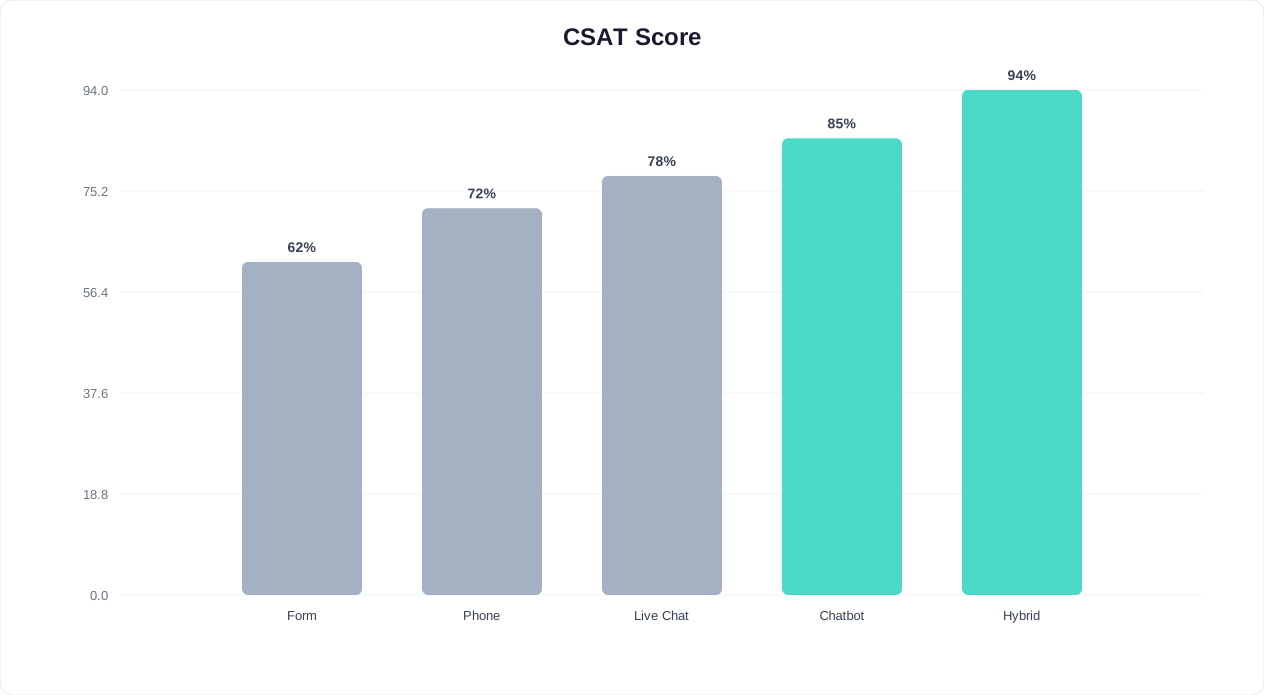
The assumption that customers prefer email because it is familiar is increasingly contradicted by the data. In 2026, satisfaction scores for email support have stagnated while chatbot satisfaction has climbed steadily, driven by improvements in AI understanding and conversational design.
CSAT Scores by Support Channel (2026 Benchmarks)
| Channel | Average CSAT | Key Satisfaction Driver | Key Frustration Driver |
|---|---|---|---|
| AI Chatbot (well-designed) | 78-88% | Instant resolution, 24/7 availability | Inability to handle complex/emotional issues |
| Live Chat (human) | 85-92% | Empathy, creative problem-solving | Wait times, inconsistency between agents |
| Email Support | 60-70% | Asynchronous (no waiting on hold) | Slow response, lost context, no real-time feedback |
| Phone Support | 70-78% | Human connection, immediate back-and-forth | Hold times, IVR menus, repeating information |
| Hybrid (Chatbot + Human Escalation) | 90-95% | Speed + empathy when needed | Clunky handoff (if poorly implemented) |
Sources: Zendesk CX Trends 2026, Forrester CX Index 2025, Salesforce State of Service 2025
Why Email CSAT Is Declining
Email support CSAT has dropped approximately 8 points since 2020 (from 72-78% to 60-70%), while chatbot CSAT has risen roughly 20 points in the same period (from 55-65% to 78-88%). Three factors drive the divergence:
1. Expectation inflation. As consumers experience instant responses from chatbots, social media, and messaging apps, their tolerance for email delays has decreased. A 12-hour email response that felt acceptable in 2020 now feels unreasonably slow. The benchmark has shifted from "within 24 hours" to "within minutes."
2. Resolution confidence. When a customer sends an email, they have no idea when they will hear back, whether their email was received, or if the agent understood their question. This uncertainty generates anxiety. A chatbot provides immediate acknowledgment, real-time status, and visible progress toward resolution, all of which reduce customer stress regardless of issue complexity.
3. Effort score. The Customer Effort Score (CES) for email support is consistently the highest of any channel. Customers must compose a detailed message, wait for a response, read the response, reply if it did not solve the issue, and repeat. A chatbot interaction requires minimal effort: short messages, guided options, and immediate answers. Lower effort directly correlates with higher satisfaction. (source: Harvard Business Review on customer effort).
Satisfaction by Issue Type
The picture becomes more nuanced when you segment by issue complexity:
| Issue Type | Email CSAT | Chatbot CSAT | Preferred Channel |
|---|---|---|---|
| Simple FAQ (hours, pricing, policies) | 55% | 92% | Chatbot (overwhelmingly) |
| Order/account status check | 58% | 90% | Chatbot |
| Basic troubleshooting | 62% | 82% | Chatbot |
| Product recommendations | 65% | 85% | Chatbot |
| Billing inquiry (straightforward) | 68% | 80% | Chatbot (slight) |
| Complex technical issue | 75% | 60% | Email / Human |
| Complaint / escalation | 70% | 45% | Human (strongly) |
| Contract / legal matter | 78% | 40% | Email / Human |
The pattern is clear. For the top five issue types, which represent 65-75% of total support volume for most businesses, customers are more satisfied with chatbot resolution. For the bottom three, which represent 25-35% of volume, email and human agents still deliver a better experience. This segmentation is the foundation of a smart channel strategy, and it is exactly what the Conferbot live chat feature enables by routing complex issues from the bot to a human agent seamlessly.
When Email Support Still Makes Sense
A fair comparison must acknowledge where email remains the better channel. Chatbots have dramatically expanded their capabilities, but there are legitimate use cases where email's characteristics are genuinely advantageous.
1. Complex, Multi-Step Issue Resolution
Some customer issues require investigation: checking logs, consulting with engineering, coordinating across departments, or reviewing account history spanning months. These issues cannot be resolved in a single real-time conversation. Email's asynchronous nature is actually a feature here, not a bug. The agent can take the time needed to research thoroughly and provide a comprehensive, well-considered response rather than rushing to reply in a chat window.
Examples: data migration requests, enterprise billing reconciliation, multi-product technical investigations, warranty claims requiring documentation review.
2. Formal Documentation Requirements
Certain interactions need a formal written record: contract modifications, legal notices, compliance-related communications, and dispute resolutions. Email provides a timestamped, universally accepted documentation trail that is recognized in legal and regulatory contexts. While chatbot transcripts serve as records, email carries more formal weight in business and legal settings.
3. Detailed Attachments and Rich Content
When customers need to share screenshots, log files, invoices, contracts, or other documents as part of their support request, email handles this natively. While modern chatbots support file uploads, the experience of attaching multiple files and providing detailed written context is still smoother in email for many users, particularly in B2B contexts where issues are documented in spreadsheets or PDFs.
4. Non-Urgent, Low-Priority Requests
Feature requests, general feedback, partnership inquiries, and other communications that do not require immediate attention are well-suited to email. The asynchronous nature means neither party expects an instant response, and the format allows for thoughtful, detailed communication. Routing these through a chatbot would add unnecessary real-time pressure to interactions that benefit from reflection.
5. Customer Preference in Specific Demographics
While overall preference is shifting toward instant messaging, certain customer segments still prefer email. B2B buyers in enterprise procurement, customers over 55, and users in industries with established email-centric workflows (legal, government, healthcare administration) may actively prefer email. Forcing these users through a chatbot when they want to write an email is counterproductive.
The Smart Approach: Channel Routing
The insight from this analysis is not "chatbot or email" but "chatbot and email, each handling what it does best." A well-designed support system routes interactions to the optimal channel based on issue type, complexity, and customer preference. The chatbot serves as the intelligent front door, resolving straightforward queries instantly and routing complex, documentation-heavy, or preference-driven interactions to email or human agents.
This is exactly the architecture that the Conferbot AI knowledge base supports: the chatbot draws on your documentation to answer common questions in real time, and when a query exceeds its confidence threshold, it creates a structured email ticket (via the live chat escalation system) with full conversation context so the agent can pick up without asking the customer to repeat anything.
How to Transition From Email to Chatbot Support
Migrating from email-first to chatbot-first support is not a switch you flip overnight. It is a phased transition that takes 8-12 weeks to execute properly and 3-6 months to fully optimize. Here is the roadmap that Conferbot has refined across hundreds of successful migrations.
Phase 1: Audit and Categorize (Week 1-2)
Before building anything, you need to understand what your email queue actually contains.
- Export the last 90 days of email support tickets. Pull every ticket from your helpdesk (Zendesk, Freshdesk, Help Scout, Gmail, or wherever you manage email support).
- Categorize every ticket by type. Group them into buckets: FAQ/information requests, order/account status, basic troubleshooting, billing inquiries, complaints, complex technical issues, and other. Most businesses discover that 55-70% of email tickets fall into the first four categories, all of which are chatbot-automatable.
- Identify the top 30 questions by volume. These are your chatbot's initial training data. Export the actual customer phrasing (not just your internal category labels) so the chatbot learns to recognize how real customers articulate these questions.
- Tag tickets by required resolution action. Mark each ticket as "information only" (no system action required), "lookup" (requires API query to order system, CRM, etc.), or "action" (requires human judgment, system modification, or escalation). Information and lookup tickets are immediately automatable.
Phase 2: Build the Chatbot Foundation (Week 3-4)
- Set up your chatbot on Conferbot's platform. Use the no-code builder to create conversational flows for your top 30 questions. Each flow should mirror the best response your email team currently provides, but in a conversational format.
- Train the AI knowledge base. Upload your existing help documentation, FAQ pages, and product guides to the AI knowledge base. This allows the chatbot to answer variations of your top questions that you did not explicitly program, handling the long tail of customer phrasing.
- Configure integrations. Connect the chatbot to your order management system, CRM, and ticketing platform so it can perform lookups (order status, account details) in real time. This eliminates the most time-consuming category of email tickets, the ones where an agent's entire job was to look something up and paste it into a reply.
- Set up escalation flows. Define clear criteria for when the chatbot should escalate to a human: confidence score below threshold, negative sentiment detection, explicit customer request, or issue types flagged in Phase 1 as requiring human judgment.
Phase 3: Parallel Running (Week 5-8)
- Deploy the chatbot alongside email. Add the chatbot widget to your website while keeping email support fully operational. Do not remove or hide email as a contact option yet.
- Route new conversations through the chatbot first. Update your contact page and support links to present the chatbot as the primary channel, with email as a secondary option: "Chat with us for instant help, or email [email protected] for complex issues."
- Monitor chatbot performance daily. Use Conferbot analytics to track resolution rate, escalation rate, CSAT, and the specific questions the chatbot fails to answer. Feed failures back into the training data weekly.
- Compare metrics. After 2-3 weeks of parallel operation, compare chatbot CSAT, resolution rate, and cost per interaction against email benchmarks. In nearly every case, the chatbot outperforms on all three for routine queries, which gives you the data to justify Phase 4.
Phase 4: Shift the Default (Week 9-12)
- Make the chatbot the primary support channel. Remove the email address from prominent positions on your website. Replace it with the chatbot widget. Email remains available but is positioned as a fallback: "For complex issues requiring documentation, email us at..."
- Redirect email auto-responders to the chatbot. Update your email auto-reply to say: "Thank you for contacting us. For the fastest response, chat with us at [link to chatbot]. We will respond to this email within [SLA], but most questions are resolved instantly through our chat."
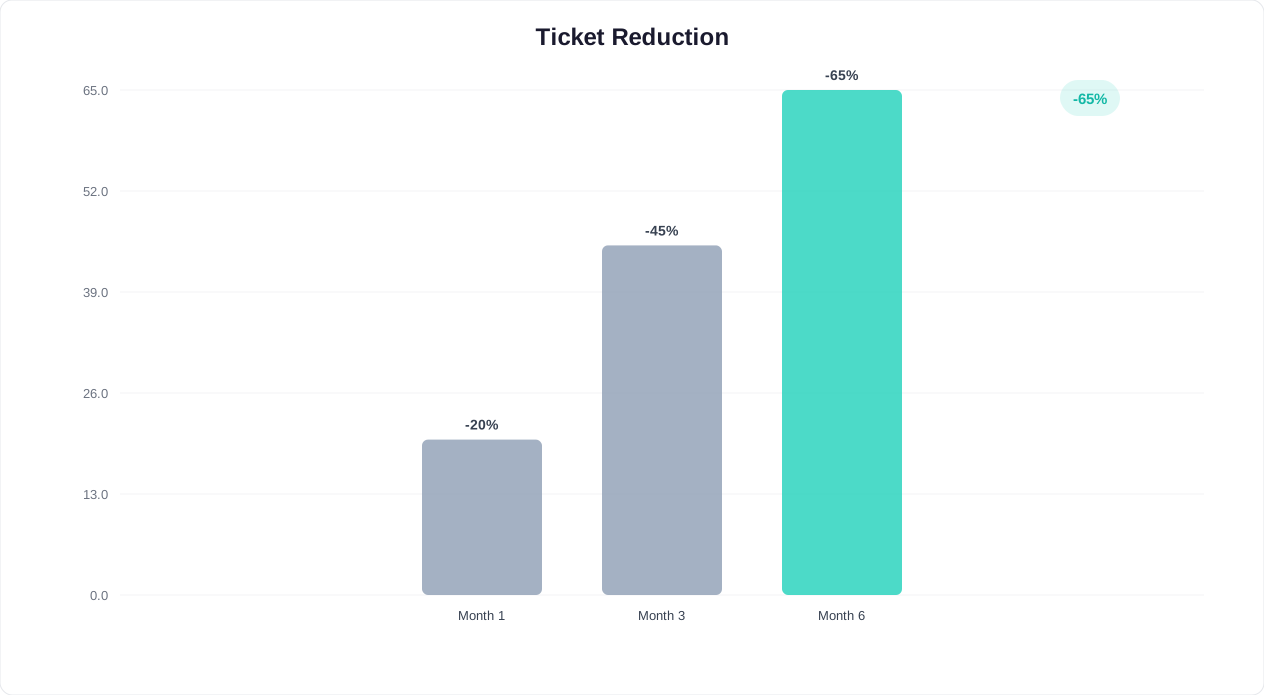
- Reduce email staffing gradually. As email volume drops (expect 40-60% reduction in the first month), reallocate agents to handle chatbot escalations and complex tickets. Do not cut headcount immediately; repurpose agents into higher-value roles like VIP support, proactive outreach, or knowledge base curation.
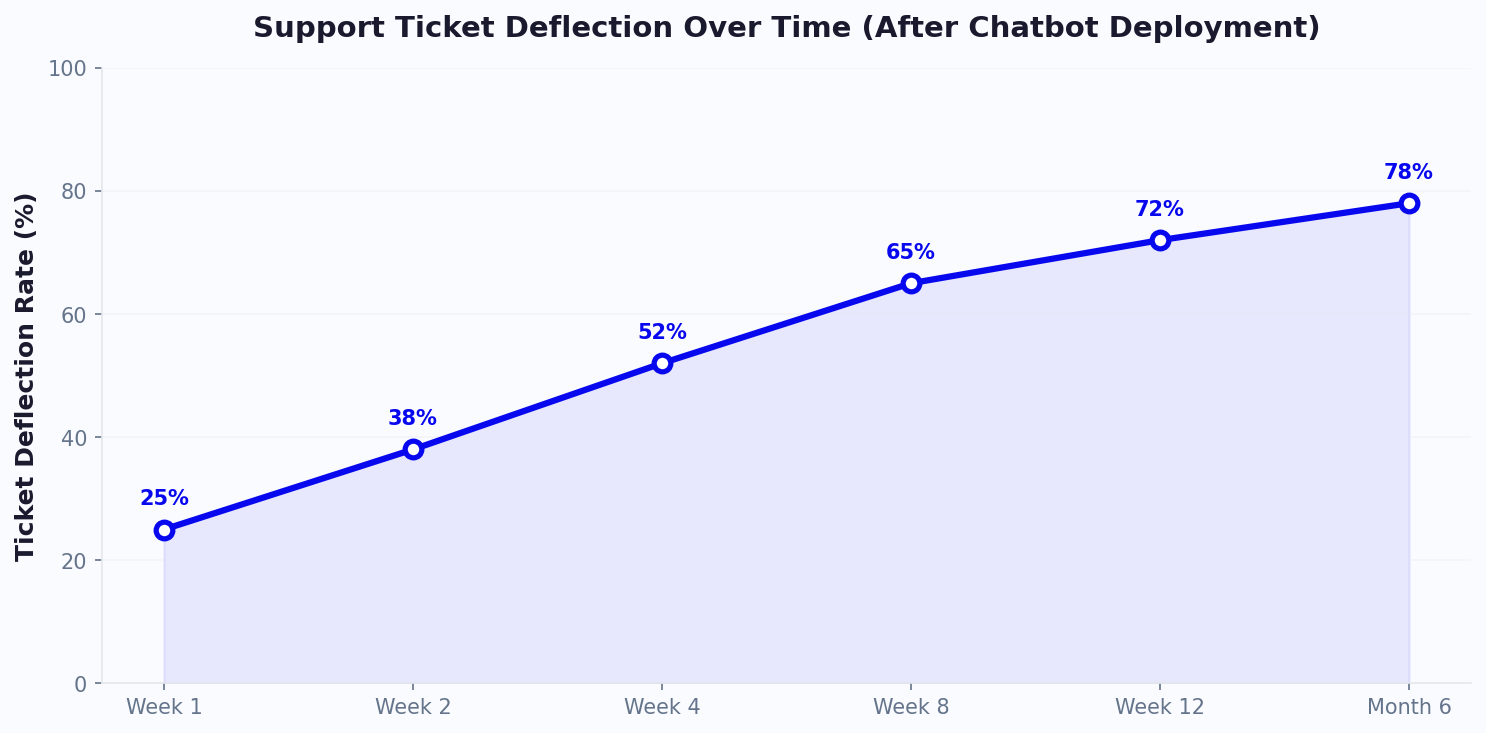
- Optimize continuously. The chatbot improves over time as it handles more conversations and you feed it better training data. Target a 70-80% bot resolution rate by month 3 and 80-85% by month 6.
Migration Timeline Summary
| Phase | Timeline | Key Milestone | Expected Email Volume Reduction |
|---|---|---|---|
| Audit and Categorize | Week 1-2 | Top 30 questions identified | 0% (baseline) |
| Build Foundation | Week 3-4 | Chatbot live with core flows | 0% (not yet deployed) |
| Parallel Running | Week 5-8 | Chatbot resolving 50-60% of queries | 20-30% |
| Shift the Default | Week 9-12 | Chatbot is primary channel | 40-60% |
| Optimization | Month 4-6 | 80%+ bot resolution rate | 60-75% |
For businesses operating on WhatsApp or other messaging channels, the same migration framework applies. The chatbot can be deployed across all channels simultaneously, consolidating what may currently be separate email, chat, and messaging workflows into a single automated system. (source: IBM study on AI in customer service).
Setting Up a Chatbot to Handle 60% of Your Email Volume
This section provides a concrete, step-by-step implementation guide for deploying an AI chatbot that absorbs the majority of your email support volume. The target is 60% deflection within 60 days, which is achievable for most businesses following this playbook.
Step 1: Map Your Email Categories to Chatbot Capabilities (Day 1-3)
Using the audit from the migration roadmap, map each email category to a chatbot resolution strategy:
| Email Category | % of Volume | Chatbot Strategy | Integration Required |
|---|---|---|---|
| FAQ / information requests | 25-30% | AI knowledge base answers | None (content-based) |
| Order / account status | 15-20% | API lookup and display | Order management system |
| Basic troubleshooting | 10-15% | Guided troubleshooting flows | None (flow-based) |
| Booking / scheduling | 5-10% | Calendar integration | Booking system / calendar |
| Billing inquiry (simple) | 8-12% | Invoice lookup + explanation | Billing system |
| Returns / exchanges | 5-8% | Policy display + initiation | Order management system |
| Complex technical issues | 10-15% | Triage + escalate to human | Ticketing system |
| Complaints / escalations | 5-10% | Acknowledge + escalate to human | Ticketing system + CRM |
The first six categories (representing 68-95% of volume) can be partially or fully automated. The last two are escalation candidates where the chatbot's role is triage, not resolution.
Step 2: Build Your Knowledge Base (Day 4-7)
The Conferbot AI knowledge base is the engine behind FAQ resolution. Populate it with:
- All existing help center articles. Upload or connect your help documentation. The AI indexes and uses it to answer questions conversationally.
- Best email responses from your team. Export your highest-rated email replies and use them as training data. This ensures the chatbot mirrors the quality of your best agents, not your average.
- Product documentation. Upload user guides, spec sheets, and pricing documents. The AI extracts relevant passages to answer specific questions.
- Internal FAQs. Any document your agents reference when answering emails should be in the knowledge base.
Step 3: Build Transactional Flows (Day 8-14)
For categories requiring system lookups or actions (order status, booking, billing), build dedicated flows in the chatbot builder:
- Order status flow: Customer provides order number or email, chatbot queries order system API, displays current status (processing, shipped, delivered) with tracking link.
- Booking flow: Chatbot shows available time slots from your calendar, customer selects one, confirmation is sent automatically.
- Billing inquiry flow: Customer authenticates (email + last 4 digits of payment method), chatbot retrieves recent invoices and explains line items.
- Return/exchange flow: Chatbot confirms order eligibility, displays return policy, generates return label or initiates exchange process.
Step 4: Configure Smart Escalation (Day 15-17)
Build escalation paths that preserve context and minimize customer friction:
- Live agent handoff: During business hours, the chatbot transfers the conversation to a human agent via live chat. The agent sees the full chatbot conversation, so the customer never repeats themselves.
- Ticket creation: Outside business hours or when no agents are available, the chatbot creates a support ticket with full conversation context, customer information, and issue classification. The agent starts their shift with pre-triaged, context-rich tickets instead of raw emails.
- Priority routing: Use sentiment analysis and issue type to route escalations. Negative sentiment or billing complaints go to senior agents. Technical issues go to the appropriate product team.
Step 5: Deploy and Monitor (Day 18-21)
- Install the chatbot widget. A single JavaScript snippet added to your website, or use the native integrations for WordPress, Shopify, and other platforms.
- Set up the analytics dashboard. Configure Conferbot analytics to track: conversations started, resolved by bot, escalated to human, CSAT score, and top unresolved queries.
- Create a weekly review cadence. Every week, review the top 10 unresolved queries and add them to the knowledge base or build new flows to handle them. This continuous improvement loop is what drives resolution rates from 50% to 80%+ over 3-6 months.
Step 6: Scale and Optimize (Day 22-60)
- Expand to additional channels. Deploy the same chatbot on WhatsApp, Facebook Messenger, and other channels where customers currently send you messages or emails.
- A/B test chatbot greetings. Test different opening messages (proactive vs. passive, question-based vs. offer-based) to optimize engagement rates.
- Refine escalation thresholds. If the bot is escalating too many conversations, lower the confidence threshold. If customers are complaining about bot limitations, raise it. The sweet spot is usually a 15-25% escalation rate.
- Build proactive triggers. Configure the chatbot to proactively offer help on high-exit-rate pages, pricing pages, and checkout pages. Proactive chatbot engagement resolves issues before they become email tickets.
Expected Results at 60 Days
| Metric | Before (Email Only) | After 60 Days (Chatbot + Email) | Improvement |
|---|---|---|---|
| Email ticket volume | 5,000/month | 2,000/month | 60% reduction |
| Average first response time | 12 hours | Under 30 seconds (chatbot) / 4 hours (remaining email) | 99%+ faster for 60% of queries |
| Cost per resolution | $5.13 | $1.85 (blended) | 64% reduction |
| Overall CSAT | 65% | 82% | +17 points |
| After-hours resolution rate | 0% (wait until morning) | 70% (chatbot resolves) | Entirely new capability |
| Agent workload | 100% routine + complex | Complex only (40% of prior volume) | 60% reduction |
The 60-day mark is the inflection point where most businesses see clear, measurable ROI. By this point, the chatbot has absorbed the majority of repetitive email volume, agents are focused on meaningful work, customers are getting faster resolution, and the cost savings are flowing to the bottom line. For a more detailed financial model, our chatbot ROI calculator guide walks through the math step by step.
If you are ready to start, the Conferbot AI chatbot builder includes pre-built support templates that cover the most common email ticket categories out of the box. Most businesses have their first chatbot live within a day and see measurable email reduction within the first week.
Was this article helpful?
Build and deploy in 10 minutes. No coding needed.
Chatbot vs Email Support FAQ
Everything you need to know about chatbots for chatbot vs email support.
About the Author
The Conferbot team writes about building, deploying, and improving AI chatbots.
View all articles

