
Why Automating Customer Support Is No Longer Optional
Customer support costs are rising, customer expectations are higher than ever, and the talent shortage in support roles shows no signs of easing. In 2026, automation is not a competitive advantage — it is table stakes.
Consider the numbers:
- 89% of customers expect a response within 10 minutes for support inquiries (HubSpot, 2025)
- The average cost per support ticket handled by a human agent is $8-15, compared to $0.10-0.50 for a chatbot-resolved interaction
- Support teams report spending 60-70% of their time on repetitive, low-complexity questions that could be automated
- Companies with automated support see 3.5x higher customer satisfaction scores compared to those relying solely on email-based support
Automation does not mean replacing your support team. It means freeing them from the mundane so they can focus on complex, high-value interactions where human empathy and judgment matter. Think of it as building a first line of defense: the chatbot handles the predictable, repetitive queries (password resets, order tracking, return policies), and your human agents handle the exceptions, complaints, and relationship-building conversations.
The businesses that get this right see a virtuous cycle: faster response times lead to higher satisfaction, which leads to lower churn, which leads to higher lifetime value. Meanwhile, support costs per ticket drop dramatically. A 2025 McKinsey study found that companies implementing AI-powered support automation reduced their cost-to-serve by 30-45% while simultaneously improving customer satisfaction by 15-25%.
The question is no longer "Should we automate support?" but "How do we automate it well?" This playbook gives you the complete answer.
What to Automate First: The Ticket Analysis Framework
The biggest mistake in support automation is trying to automate everything at once. Instead, use a data-driven approach to identify the highest-impact opportunities first.
Step 1: Export and Categorize Your Tickets
Pull the last 90 days of support tickets from your helpdesk. If you do not use a helpdesk, export your support emails. Categorize every ticket into topics. Most businesses find 8-15 distinct categories cover 90%+ of all inquiries.
Step 2: Score Each Category
For each category, score it on three dimensions:
| Dimension | 1 (Low) | 3 (Medium) | 5 (High) |
|---|---|---|---|
| Volume | <5 tickets/week | 5-20 tickets/week | 20+ tickets/week |
| Complexity | Requires investigation, judgment calls | Some variation, mostly standard | Identical answer every time |
| Automation feasibility | Needs system access, exceptions common | Partially automatable | Fully automatable with current data |
Priority score = Volume x Complexity (inverted) x Feasibility. Categories with high volume, low complexity, and high feasibility are your automation goldmine.
Step 3: Map to Automation Tiers
- Tier 1 — Full automation (launch week): FAQ-style questions with static answers. Examples: business hours, return policy, shipping times, pricing. These can be automated with simple rule-based flows.
- Tier 2 — Guided automation (month 1): Questions requiring some user input. Examples: order tracking (needs order number), account changes (needs verification), appointment scheduling (needs date/time preferences).
- Tier 3 — AI-assisted automation (month 2-3): Questions with variable answers requiring AI reasoning. Examples: product recommendations, troubleshooting steps, policy edge cases. NLP-powered chatbots handle these well.
- Tier 4 — Human-only (ongoing): Billing disputes, complaints, emotionally charged situations, complex technical issues. These should always route to human agents via live chat handoff.
Typical Results From This Framework
When businesses follow this tiered approach, they typically automate 40-60% of total ticket volume within 90 days. The remaining human-handled tickets are higher quality interactions where agents can actually make a difference, leading to improved agent satisfaction and reduced turnover.
Setting Up Your Support Chatbot: Configuration Guide
With your automation priorities defined, it is time to build. Here is how to configure a support chatbot that actually works, step by step.
1. Choose Your Deployment Channel
Start where your customers already are. For most businesses, that means your website. If you have significant traffic on messaging platforms, consider deploying simultaneously on WhatsApp or Facebook Messenger. Conferbot supports all major channels from a single dashboard.
2. Configure the Welcome Experience
Your chatbot's first impression matters enormously. The welcome message should:
- Identify the bot as automated (transparency builds trust)
- List 3-5 specific things the bot can help with
- Offer a clear path to a human agent
Example: "Hi! I'm [Company]'s support assistant. I can help with: order tracking, returns and exchanges, product questions, and account settings. Need something else? I can connect you with our team."
3. Build Your Tier 1 Flows (Static FAQs)
Create a flow for each Tier 1 topic identified in your ticket analysis. Each flow should:
- Recognize the intent (via buttons, keywords, or NLP)
- Deliver the answer in 1-3 short messages (not walls of text)
- Ask "Did this answer your question?" with Yes/No buttons
- If No, offer to connect with a human or rephrase the question
4. Build Your Tier 2 Flows (Guided Interactions)
These require gathering information before providing an answer. For example, an order tracking flow:
- Bot: "I can help you track your order. What's your order number?"
- User provides order number
- Bot queries your order system via API or webhook
- Bot returns status: "Your order #12345 shipped on March 25 via FedEx. Tracking number: XYZ. Expected delivery: March 28."
For Tier 2 flows, invest time in error handling. What if the user provides an invalid order number? What if the API is down? Always have a graceful fallback that does not leave the user stranded.
5. Configure AI Responses for Tier 3
For complex queries, enable AI-powered responses. Upload your product documentation, help articles, and policy documents as the AI's knowledge base. The AI will use this content to generate accurate, contextual answers. Set guardrails to prevent the AI from making promises or providing information outside its knowledge base.
6. Set Up Routing Rules
Configure rules for when to escalate to human agents. At minimum, escalate when:
- The user explicitly asks for a human (detect phrases like "speak to agent", "talk to someone", "human please")
- The bot fails to resolve after 2-3 attempts
- Sentiment analysis detects frustration or anger
- The topic is billing, complaints, or cancellation
Writing a Chatbot Knowledge Base That Actually Works
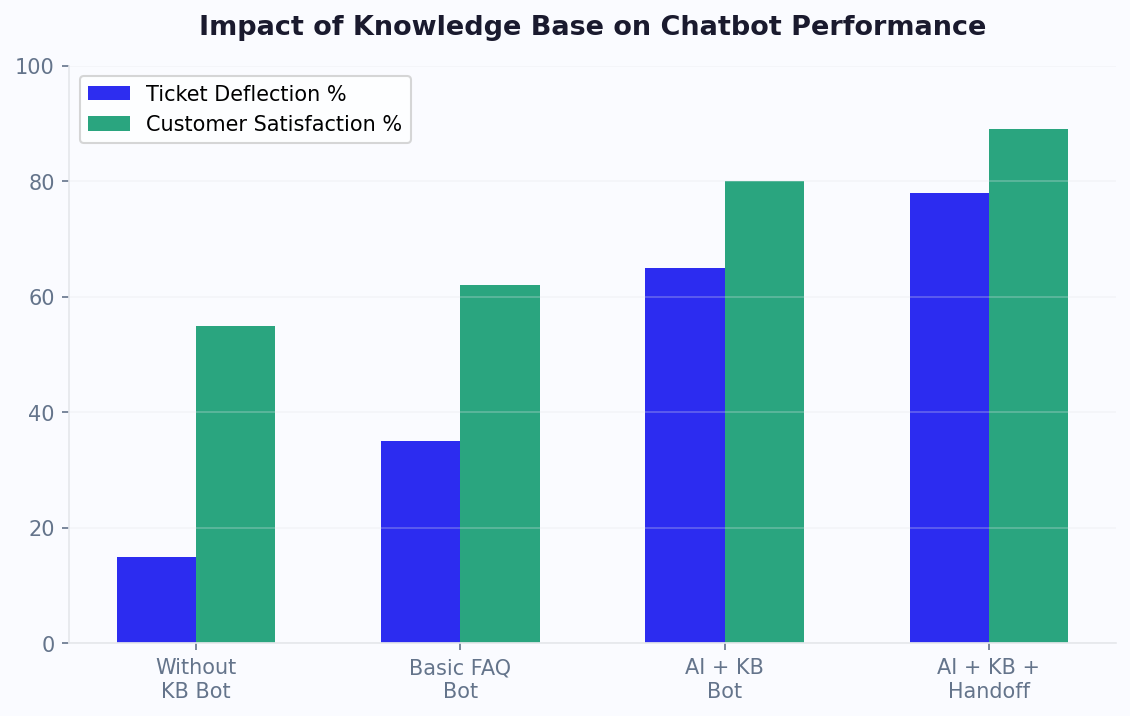
Your chatbot is only as good as the knowledge base behind it. A poorly written knowledge base leads to irrelevant answers, frustrated customers, and a bot that makes your brand look incompetent. Here is how to write knowledge base content that works.
The Inverted Pyramid Principle
Borrow from journalism: put the most important information first. Customers chatting with a bot want the answer immediately, not after three paragraphs of context. Structure every knowledge base article like this:
- Direct answer (first sentence)
- Key details (next 2-3 sentences)
- Additional context or edge cases (if needed)
Bad example: "At [Company], we understand that sometimes purchases don't work out. Our return policy is designed to be fair to both our customers and our business. We accept returns within certain timeframes depending on the product category..."
Good example: "You can return most items within 30 days of delivery for a full refund. Electronics have a 15-day return window. Sale items are final sale. To start a return, go to Orders > Return Item in your account."
Writing for Chatbot Consumption
Chatbot knowledge bases have different requirements than help center articles:
- Keep answers under 100 words when possible. Long answers in chat feel overwhelming. If an answer needs to be longer, break it into sequential messages or offer a "Tell me more" option.
- Use plain language. Avoid jargon, acronyms, and legal language. Write at an 8th-grade reading level.
- Include specific numbers. "Returns take 5-7 business days to process" is better than "Returns are processed promptly."
- Anticipate follow-ups. After explaining the return policy, the next question is almost always "How do I ship it back?" Include that proactively.
- Cover edge cases explicitly. What about international orders? Items without a receipt? Gifts? The more edge cases you document, the fewer escalations you will see.
Knowledge Base Structure
Organize your knowledge base into clear categories that mirror your ticket analysis:
| Category | Example Topics | Typical Article Count |
|---|---|---|
| Orders & Shipping | Tracking, delivery times, shipping costs, international | 8-12 |
| Returns & Refunds | Policy, process, timelines, exceptions | 5-8 |
| Account & Billing | Password reset, payment methods, invoices, cancellation | 6-10 |
| Product Information | Specs, compatibility, usage guides, troubleshooting | 10-20+ |
| General | Business hours, contact info, about us | 3-5 |
Maintaining Your Knowledge Base
Schedule a monthly review. Check your chatbot analytics for unanswered questions and low-satisfaction conversations. Each unanswered question is a signal to add or improve a knowledge base article. Over time, your chatbot becomes smarter — not because the AI improved, but because your knowledge base became more comprehensive.
Configuring Escalation Rules: When the Bot Should Step Aside
The line between a helpful chatbot and a frustrating one is often the escalation experience. Get this wrong, and customers feel trapped. Get it right, and even complex issues feel seamless.
The Escalation Framework
Think of escalation as a spectrum, not a binary switch. Here are the five levels:
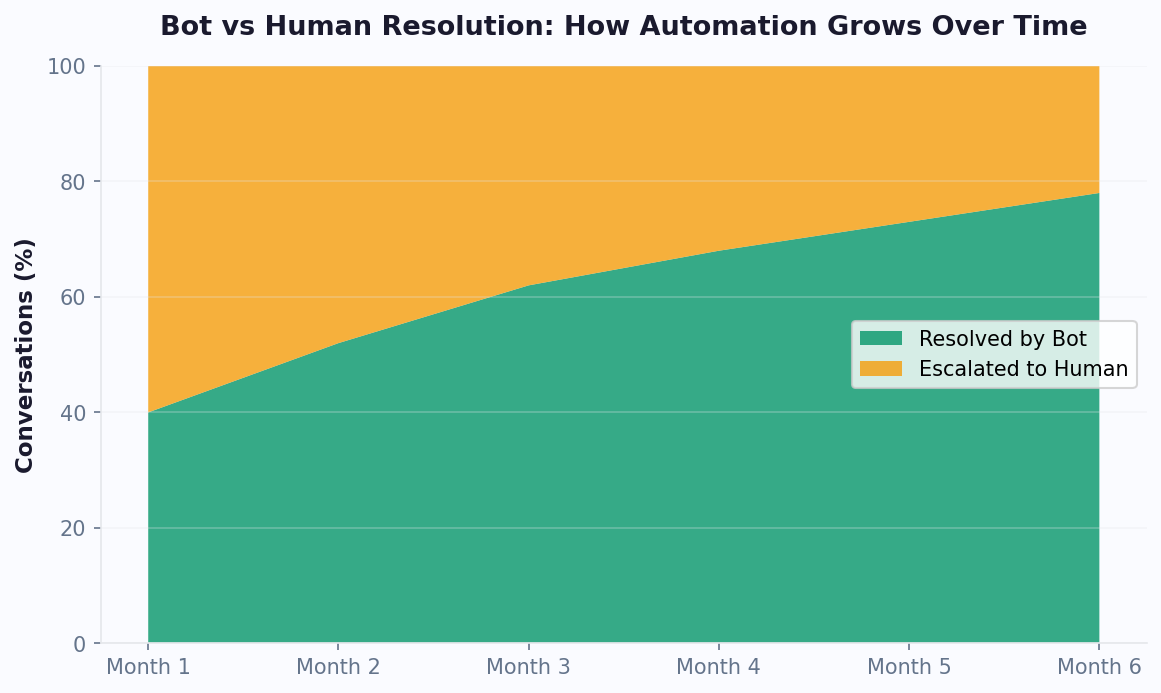
- Self-service resolution: The bot fully resolves the issue. No escalation needed. This should be the outcome for 40-60% of conversations.
- Assisted self-service: The bot provides the answer but the customer needs to take action (reset password, fill a form, check a page). The bot guides them through it.
- Warm handoff: The bot transfers to a live agent via AI agent handover with full conversation context. The customer does not have to repeat themselves. This is the gold standard for escalation.
- Scheduled callback: No agents are available, so the bot collects the customer's details and schedules a callback. Critical for businesses without 24/7 human coverage.
- Ticket creation: The bot creates a support ticket using a built-in ticket system and provides a reference number. Use this as a last resort when immediate resolution is not possible.
When to Trigger Escalation
Configure your chatbot to escalate based on these signals:
- Explicit request: User types "talk to human", "agent", "representative", or similar phrases. This should always be honored immediately.
- Repeated failure: The bot fails to understand or answer after 2 consecutive attempts. Do not make customers ask three, four, five times.
- Negative sentiment: The user expresses frustration, anger, or uses profanity. Sentiment detection is built into most modern platforms.
- High-value topics: Billing disputes, cancellation requests, legal inquiries, and complaints should always route to humans regardless of complexity.
- VIP customers: If your platform supports it, automatically route high-value customers (based on account data) to priority human support.
The Warm Handoff Best Practice
When transferring to live chat, the handoff message should:
- Inform the customer they are being connected to a human
- Provide estimated wait time
- Pass the full conversation transcript to the agent (so the customer never repeats information)
- Include any account data the bot has collected (order number, email, issue category)
Example handoff message: "I'm connecting you with a support specialist who can help with this. Estimated wait: 2 minutes. They'll have our full conversation history, so you won't need to repeat anything."
After-Hours Escalation
When no human agents are available, provide clear alternatives:
- "Our team is available Monday-Friday, 9 AM-6 PM EST. I can schedule a callback for you — when works best?"
- "I've created a support ticket (#45678). Our team will respond within 4 business hours. You'll get an email confirmation shortly."
Never leave a customer in a dead end. Every conversation should conclude with either a resolution, a handoff, or a clear next step.
Measuring Success: The KPIs That Actually Matter
You cannot improve what you do not measure. Here are the essential KPIs for support automation, how to calculate them, and what targets to aim for.
Primary KPIs
| KPI | Formula | Target (Month 1) | Target (Month 6) |
|---|---|---|---|
| Deflection Rate | Bot-resolved / Total conversations x 100 | 30-40% | 50-65% |
| First Contact Resolution (FCR) | Resolved on first try / Total conversations x 100 | 60-70% | 75-85% |
| Avg. Resolution Time | Total resolution time / Resolved conversations | <5 min | <2 min |
| Customer Satisfaction (CSAT) | Positive ratings / Total ratings x 100 | 70-75% | 80-90% |
| Escalation Rate | Escalated to human / Total conversations x 100 | 40-50% | 25-35% |
Secondary KPIs
- Containment rate: Percentage of conversations where the user does not abandon mid-flow. Target: 75%+. Low containment means your flows are confusing or too long.
- Fallback rate: How often the bot responds with "I don't understand." Target: under 15%. High fallback rates indicate gaps in your knowledge base or NLP training.
- Time to escalation: How long before a conversation gets handed to a human. Target: under 90 seconds. If users are stuck in bot loops for 5+ minutes before reaching a human, your escalation triggers need adjustment.
- Agent handling time post-escalation: How long human agents spend on escalated tickets. This should decrease over time as the bot handles the easy stuff and passes better context to agents.
Building Your Dashboard
Use your chatbot analytics platform to create a weekly dashboard covering:
- Total conversations (trending up = more engagement)
- Deflection rate (trending up = better automation)
- CSAT score (stable or trending up = quality maintained)
- Top unanswered questions (action items for knowledge base)
- Escalation reasons (identify patterns to automate)
The Monthly Review Process
Every month, sit down with your team and review:
- Top 10 unanswered questions: Add these to your knowledge base.
- Lowest-CSAT conversations: Read the transcripts. Identify what went wrong.
- Escalation patterns: Are the same topics being escalated repeatedly? Can any be automated?
- Drop-off points: Where in the conversation flow do users abandon? Simplify those steps.
This continuous improvement cycle is what separates mediocre chatbot deployments from exceptional ones. The bot you launch is never the final version — it is the starting point.
Advanced Automation: AI, NLP, and Intelligent Routing
Once you have nailed the basics — Tier 1 and Tier 2 automation, solid knowledge base, clean escalation — it is time to level up. Here are the advanced techniques that push deflection rates above 60% and CSAT above 85%.
Natural Language Processing (NLP) for Intent Detection
NLP-powered chatbots understand what customers mean, not just what they type. Instead of relying on keyword matching ("return" triggers the return flow), NLP understands that "I want to send this back", "this isn't what I ordered", and "how do I get a refund" all map to the same intent.
To train effective NLP:
- Provide 10-20 example phrases per intent. Include variations in phrasing, formality, and specificity.
- Use real customer messages from your conversation logs, not hypothetical examples.
- Test with misspellings and shorthand. Real customers type "wheres my ordr" not "Where is my order?"
- Review and retrain monthly as new patterns emerge.
Generative AI for Complex Queries
LLM-powered responses are transformative for Tier 3 automation. Instead of building explicit flows for every possible question, you upload your documentation and let the AI generate accurate answers on the fly.
Best practices for generative AI in support:
- Define boundaries: Tell the AI what it should NOT do (make promises, discuss competitors, provide legal advice).
- Source attribution: Configure the AI to reference specific help articles so customers can verify answers.
- Confidence thresholds: If the AI is not confident in its answer (below 80% confidence), escalate to a human rather than risk a wrong answer.
- Regular auditing: Review AI-generated responses weekly to catch any inaccuracies or off-brand messaging.
Intelligent Routing
Move beyond simple "bot or human" routing. Advanced routing considers:
- Issue complexity: Route simple billing questions to junior agents, complex technical issues to specialists. Team management tools help you organize agent roles and expertise.
- Customer value: Enterprise customers get priority routing to senior agents.
- Agent expertise: Match tickets to agents who have the best resolution rate for that topic.
- Language: Route to agents who speak the customer's language.
- Channel preference: Some agents perform better on chat vs. email vs. phone.
Proactive Support Automation
Do not wait for problems — anticipate them. Advanced chatbot deployments include:
- Shipping delay notifications: If an order is delayed, proactively message the customer before they ask.
- Onboarding sequences: New customers receive automated check-in messages at Day 1, 7, and 30.
- Usage-based triggers: If a SaaS customer's usage drops significantly, trigger a "need help?" chatbot message.
These proactive touches reduce inbound ticket volume while simultaneously improving customer satisfaction — the holy grail of support automation.
Case Studies: Real Results From Support Automation
Let us look at three real-world examples of businesses that transformed their support operations with chatbot automation.
Case Study 1: SaaS Company (Project Management Tool)
Company profile: B2B SaaS, 5,000 customers, 8-person support team handling 2,000+ tickets/month.
Challenge: Average first response time was 4.2 hours. CSAT had dropped to 68%. The team was burning out, and hiring was not keeping pace with ticket growth (25% YoY increase).
Implementation:
- Deployed chatbot on website and in-app
- Automated Tier 1 (FAQs, password resets, billing questions) and Tier 2 (subscription changes, feature requests, bug reports)
- Integrated with their helpdesk to auto-create tickets for complex issues
- Enabled AI-powered responses trained on 200+ help articles
Results (6 months):
| Metric | Before | After | Change |
|---|---|---|---|
| First response time | 4.2 hours | 8 seconds (bot) / 12 min (human) | -95% / -95% |
| Ticket volume to humans | 2,000/month | 850/month | -57% |
| CSAT score | 68% | 87% | +19 points |
| Support team size | 8 | 6 (2 moved to customer success) | Reallocated |
| Monthly support cost | $38,000 | $24,500 | -35% |
Case Study 2: E-Commerce (Fashion Brand)
Company profile: D2C fashion brand, 15,000 orders/month, 3-person support team.
Challenge: Black Friday and holiday peaks overwhelmed the team. During sales events, response times exceeded 24 hours. Estimated lost revenue from abandoned carts due to unanswered product questions: $40,000/month.
Implementation:
- Chatbot on website with product catalog integration
- Automated: order tracking, return initiation, sizing recommendations, shipping inquiries
- AI product advisor trained on product descriptions and customer reviews
- Proactive cart abandonment messages offering help
Results (holiday season):
- Handled 12,000 conversations during Black Friday week (impossible for a 3-person team)
- Cart abandonment rate dropped from 72% to 58% (chatbot intervened on product pages)
- Return rate decreased by 15% due to better pre-purchase sizing advice
- Support team reported zero burnout during peak season for the first time
Case Study 3: Healthcare Provider (Telehealth Platform)
Company profile: Telehealth platform, 8,000 patients, 5 support staff.
Challenge: Patients had questions about insurance coverage, appointment scheduling, and medication refills. HIPAA compliance requirements made automation seem risky.
Implementation:
- HIPAA-compliant chatbot deployment with encrypted conversations
- Automated appointment scheduling and rescheduling
- Insurance eligibility pre-check (rule-based, no PHI in chat)
- Medication refill request collection (bot gathers info, human reviews and approves)
- Strict escalation rules for any clinical questions
Results (4 months):
- 50% reduction in phone call volume
- Appointment no-show rate dropped from 18% to 9% (automated reminders)
- Patient satisfaction with scheduling improved from 3.2 to 4.6 out of 5
- Zero compliance incidents
These case studies share a common lesson: start focused, measure obsessively, and expand based on data. Visit Conferbot's pricing page to find the plan that fits your support volume and automation goals.
Common Support Automation Pitfalls and How to Avoid Them
Even well-intentioned chatbot deployments can fail if they fall into predictable traps. According to Gartner's customer service technology research, 35% of chatbot projects are abandoned or significantly scaled back within 12 months — not because the technology failed, but because implementation strategy was flawed. Here are the most common pitfalls and how to avoid them.
Pitfall 1: Launching Without a Knowledge Base Strategy
The single most common failure: deploying a chatbot without sufficient content to answer customer questions. A bot that responds "I don't understand" more than 20% of the time will frustrate users and damage your brand perception faster than having no bot at all. According to HubSpot's customer service research, 72% of customers who have a negative chatbot experience will not try the chatbot again.
Solution: Build your knowledge base to cover at least 80% of your ticket volume before launching. Use the ticket analysis framework from Section 2 of this guide to prioritize content creation. Start with a smaller scope (top 30 FAQs) and expand weekly.
Pitfall 2: Making Human Escalation Difficult
Users should be able to reach a human in 2 clicks or fewer from any point in the conversation. Burying the escalation option behind multiple menu layers or requiring users to repeat information is the fastest path to one-star reviews. Research from Statista's customer service data shows that 40% of customers rate their chatbot experience as negative specifically because of difficulty reaching a human agent.
Solution: Place "Talk to a human" as a persistent option in every interaction. Honor it immediately without forcing users through additional qualification. For implementation details, see our human handoff best practices guide.
Pitfall 3: Set-and-Forget Mentality
A chatbot is not a project — it is a living product. Companies that deploy once and never iterate see declining performance over time as products change, policies update, and new question patterns emerge. According to G2's chatbot platform satisfaction data, the top-rated chatbot deployments share one trait: they have a dedicated owner who reviews analytics weekly.
Solution: Assign a chatbot owner (even if it is a part-time responsibility). Implement a weekly 30-minute review cadence: check unanswered questions, review low-CSAT conversations, and update 2-3 knowledge base articles per week.
Pitfall 4: Ignoring Channel Expectations
Users expect different experiences on different channels. A verbose, multi-paragraph response may work on your help center chatbot but feels overwhelming on WhatsApp. A formal tone works on your corporate website but feels out of place on Instagram.
Solution: Adapt message length, tone, and interaction patterns to each channel's norms. WhatsApp messages should be shorter and more conversational. Website chat can be slightly more detailed. For guidance on channel-specific deployment, see our omnichannel chatbot guide.
Pitfall 5: Over-Automating Sensitive Topics
Some conversations require human empathy regardless of how good your AI is: billing disputes, service cancellations, customer complaints, and emotionally charged situations. Forcing these through chatbot flows creates anger and churn.
Solution: Create a "sensitive topics" list and route these immediately to human agents. Include: cancellation requests, payment disputes, complaints (detected via sentiment), any mention of legal action, and topics involving personal hardship. Our ticket reduction playbook explains how to configure these routing rules.
Support Automation ROI Timeline
| Month | Expected Deflection Rate | Typical Actions | Cumulative Investment |
|---|---|---|---|
| Month 1 | 20-35% | Launch FAQ + top 3 self-service flows | $500-2,000 (platform + setup time) |
| Month 2 | 35-45% | Add guided troubleshooting, refine based on data | $1,000-3,500 |
| Month 3 | 45-55% | Enable AI responses, expand knowledge base | $1,500-5,000 |
| Month 6 | 55-65% | Proactive support, advanced routing, multi-channel | $3,000-8,000 |
| Month 12 | 60-70% | Mature optimization, predictive support | $6,000-15,000 |
Against typical savings of $3,000-15,000 per month from deflection, payback is consistently achieved within 30-45 days for businesses with 2,000+ monthly support interactions. For a deeper exploration of cost savings, see our chatbot cost savings case studies and 24/7 customer service chatbot guide.
Was this article helpful?
How to Automate Customer Support With a Chatbot FAQ
Everything you need to know about chatbots for how to automate customer support with a chatbot.
About the Author

Conferbot Team specializes in conversational AI, chatbot strategy, and customer engagement automation. With deep expertise in building AI-powered chatbots, they help businesses deliver exceptional customer experiences across every channel.
View all articles

