
React Native SDK Chatbot Builder
Native React Native SDK for iOS and Android apps. Full TypeScript support, customizable UI components, and seamless integration with your existing React Native codebase.
To build a React Native SDK chatbot with Conferbot, sign up free, design your flow in the no-code visual builder, connect your React Native SDK account, and publish - typically live in a few minutes with no coding. The free plan needs no credit card, and the same bot can also run on your website and other messaging channels.
React Native Chatbot Features
Everything you need to build powerful automated conversations
Native Components
Built with real React Native primitives - not a WebView wrapper - for smooth 60fps scrolling and native feel.
Full TypeScript Support
Every prop, hook, and callback is fully typed for autocomplete, refactoring, and compile-time safety.
Customizable Chat UI
Override any part of the chat interface - message bubbles, input bar, headers - with your own components.
Push Notifications
Notify users of new bot messages even when the app is backgrounded, driving re-engagement.
Offline Message Queue
Messages are queued locally and synced when connectivity returns - users never lose a conversation.
Custom Themes
Apply your brand's colors, fonts, and spacing through a simple theme object prop.
Hooks & Context API
Access chat state, send messages programmatically, and react to events using familiar React patterns.
Expo Compatible
Works with Expo managed workflow out of the box - no native module linking required.
Offline Message Queue
Queue messages when the device is offline and automatically sync conversations when connectivity returns.
What Can You Build?
Get Started in 7 Simple Steps
Follow this guide to connect your React Native chatbot
Install the SDK: npm install @conferbot/react-native
Import the ChatWidget component
Add your bot ID from Conferbot dashboard
Wrap your app with ConferbotProvider
Add the ChatWidget component where needed
Customize appearance using theme props
Your mobile chatbot is ready!
Introduction
Mobile apps live and die by user engagement. Yet most apps force users to leave the app for support - redirecting to email, phone, or a web help center. Every redirect is a friction point that increases churn, lowers satisfaction, and breaks the user experience you worked so hard to build.
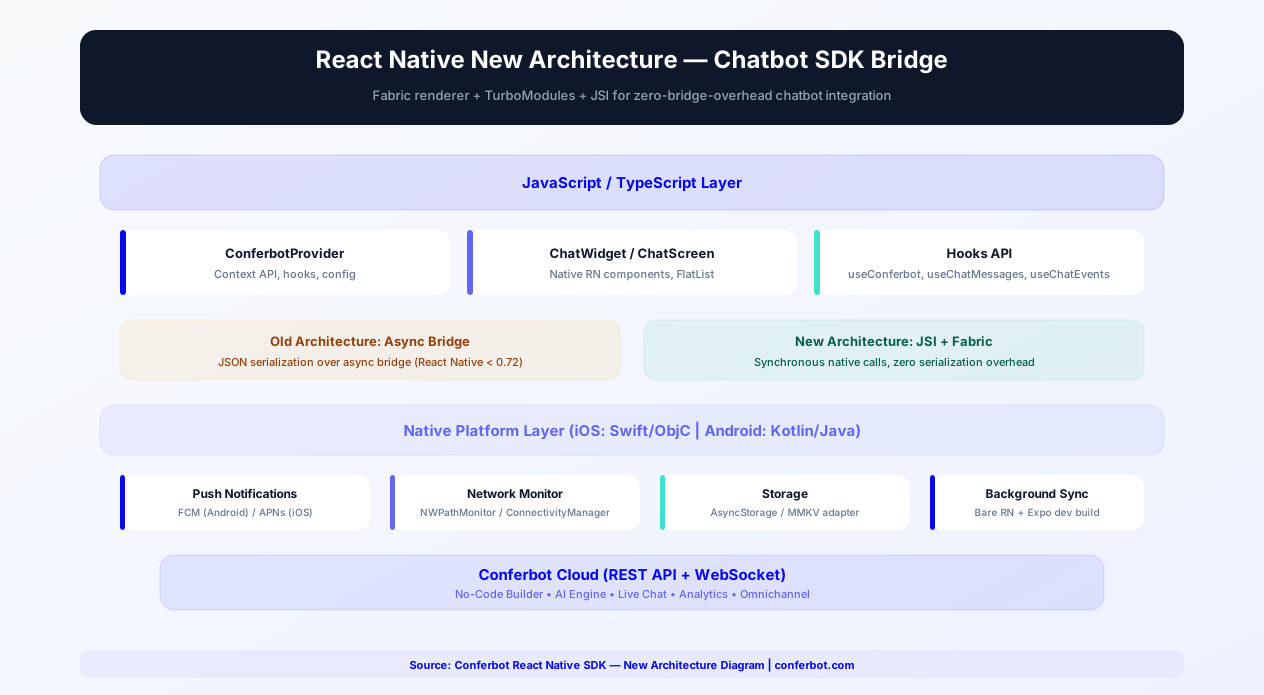
The Conferbot React Native SDK solves this by embedding a fully native chatbot experience directly inside your mobile app - no WebView. The SDK provides native React Native components with full TypeScript support, a floating chat bubble (ConferBotWidget) with web widget parity, server-driven theming, live agent handover, message reactions, read receipts, offline message queuing, and session persistence - everything you need for a production-grade in-app chat experience.
React Native powers apps for companies like Facebook, Instagram, Shopify, Discord, and thousands of startups. With the Conferbot SDK, you bring the same no-code chatbot flows you build for your website or WhatsApp directly into your React Native app - no separate bot development required. Design the chatbot once in Conferbot's visual builder, and the SDK renders it natively on both iOS and Android.
This guide covers installation, configuration, key features, customization options, how the pure-TypeScript SDK relates to the New Architecture (Fabric + JSI), Expo integration, React Navigation patterns, offline support, and best practices for embedding a chatbot in your React Native app in 2026.
New to chatbot building? Start with our complete guide to building a chatbot without coding. The same chatbot works on your website, WhatsApp, Messenger, and native Android/iOS apps. Browse our template library for pre-built in-app chatbot flows. For alternative frameworks, see our Flutter SDK guide.
Source code & documentation: react-native-sdk on GitHub | @conferbot/react-native on npm | Developer Portal Guide | React Native Docs
Installation Guide
The Conferbot React Native SDK installs via npm and integrates seamlessly with both bare React Native and Expo projects. The SDK itself is pure TypeScript with no native code, so there is no linking step for the SDK package.
Step 1: Install the Package
Using npm:
npm install @conferbot/react-native
Or using Yarn:
yarn add @conferbot/react-native
Its runtime dependencies (axios, socket.io-client) are installed automatically.
Step 2: Optional Native Peer Dependencies
Two peer dependencies are optional but unlock features:
npm install @react-native-async-storage/async-storage - session persistence + offline message queue
npm install react-native-svg - crisper vector icons in some components
Both are native modules, so after installing them run cd ios && pod install && cd .. in bare projects. Without AsyncStorage the SDK still works - persistence and the offline queue are simply disabled.
Step 3: Initialize the Provider
Wrap your app root with ConferBotProvider. The bot ID is the operative credential; the apiKey accepts any placeholder (e.g. conf_test_key):
<ConferBotProvider apiKey="conf_test_key" botId="YOUR_BOT_ID"><App /></ConferBotProvider>
No account yet? The public demo bot ID 691c970890527a0468f9b2c9 works without one.
Step 4: Add the Chat UI
Floating chat bubble (recommended - like the web widget): overlay it on your screen; it positions itself absolutely in the bottom corner:
<ConferBotWidget />
Or render the full chat modal directly (auto-opens on first mount, controllable with visible/onClose):
<ChatWidget />
Step 5: Configure Push Notifications (Optional)
To reach users while the app is backgrounded:
- Obtain a device token from your push provider (Firebase, APNs, or Expo) - the SDK detects the platform automatically
- Register it with Conferbot:
const { registerPushToken } = useConferBot(); await registerPushToken(deviceToken); - Displaying notifications and handling taps stays in your app; the SDK only registers the token
The entire setup takes approximately 10 minutes for basic integration. Requirements: React 17+, React Native 0.70+, iOS 12+, Android API 21+. For a full walkthrough, see the React Native SDK guide on the developer portal.
Key SDK Features
The Conferbot React Native SDK is built for production mobile apps, with features that match the expectations of modern app users.
Floating Chat Bubble (FAB)
The flagship integration pattern: ConferBotWidget renders the same bottom-corner chat bubble as the Conferbot web widget, with zero styling code. Tapping it opens the full chat modal. The bubble reads your dashboard settings automatically - FAB color (a gradient theme falls back to the solid color, since React Native cannot render CSS gradients), icon, size, left/right position, offsets, border radius, and the CTA tooltip text shown next to the bubble. Every setting can also be overridden locally through widgetConfig, and local props win over server values for the bubble.
Native UI Components
The SDK renders native React Native components - not a WebView wrapper. This means 60fps animations, native gesture handling, platform-specific behaviors (iOS bounce, Android ripple), and seamless integration with your app's navigation system (React Navigation, Expo Router).
Node Flow Engine
ChatWidget is the drop-in full-screen chat modal with the complete node flow engine: it renders the interactive flows you build in the Conferbot flow builder - choices, inputs, cards, GIFs, and more - with answers typed through the unified bottom input bar and answered choice pills kept in the transcript, exactly like the web widget.
Server-Driven Theming
Everything you configure in the dashboard is fetched at connect time and applied to the built-in chat UI without any code: header background/text, bot bubble, user bubble, option bubble, chat background, base font size, bot name (which wins over the local title prop), avatar, and tagline - plus all the floating bubble settings above.
Live Agent Handover, Reactions, and Read Receipts
Conversations transition seamlessly between bot and human agents with agent typing indicators (currentAgent, agentTyping, isLiveChatMode). Users can react to messages with the built-in emoji set, synced in real time over the socket (addReaction, removeReaction, useReactions()), and sent/delivered/read receipts update live (getMessageStatus, markVisibleMessagesAsRead, tunable via readReceiptConfig).
Offline Message Queuing and Session Persistence
With enableOfflineMode and an AsyncStorage instance, outbound messages are queued locally, persisted, and retried with exponential backoff once connectivity returns. Sessions survive app restarts (enablePersistence, persistenceConfig with maxMessages, keyPrefix, and sessionExpiryMs), so returning visitors resume where they left off.
Hooks and Context API
Access chatbot state and actions through React hooks:
useConferBot()- The main headless API: state (record,isConnected,isOpen,unreadCount,currentAgent,currentUIState,isOnline,pendingMessageCount, ...) plus actions (sendMessage,submitNodeResponse,openChat/closeChat,registerPushToken,on/off, reactions, read receipts, queue retries)useTheme()/useNetworkStatus()/useOfflineQueue()/useReactions()/useReadReceipts()- Focused hooks for theming, connectivity, queue control, and message metadatauseAnalytics()-trackEvent,trackUserAction,trackNodeVisitand more, when wrapped inConferBotWithAnalyticsProvider
These hooks use React's Context API internally and must be used within the ConferBotProvider tree. They let you build notification badges on tab bars, inline chat previews, or completely custom chat interfaces.
Full TypeScript Support
The entire SDK is written in TypeScript with comprehensive type definitions for every export - component props, hook return values, socket event names (SocketEvents enum), message types (RecordItem), configuration (ConferBotConfig), and theme tokens (ConferBotTheme, ConferBotThemeOverride). You get full IntelliSense autocomplete, compile-time error checking, and self-documenting APIs with no separate @types package.
AsyncStorage and Persistence
The SDK persists sessions, the identified user, and the offline queue through any storage implementing its AsyncStorageInterface - pass the instance as config.asyncStorage. Keys are namespaced with a configurable keyPrefix (via persistenceConfig) to avoid conflicts with your app's storage, and maxMessages caps how much history is kept. Without a storage instance, persistence and the offline queue are disabled by design and everything else keeps working.
Performance Optimization
The SDK is optimized for React Native's rendering performance: the MessageList is a virtualized list with inline node rendering and an onEndReached hook for history loading, and message components avoid unnecessary re-renders. Because the package is pure TypeScript, it adds no native module compilation overhead - in Expo or bare projects alike - and works with Hermes and both React Native architectures.
React Native New Architecture (Fabric + TurboModules)
React Native's New Architecture represents the most significant rewrite of the framework's internals. It replaces the async bridge with JSI (JavaScript Interface) for synchronous native calls, introduces the Fabric renderer for concurrent UI updates, and provides TurboModules for lazy-loaded native modules. The Conferbot SDK's position is simple and robust: it is pure TypeScript with no native code of its own, so it runs unchanged on both the old and the New Architecture.
Why Pure JS Wins the Migration
Most New Architecture pain comes from third-party native modules that need TurboModule/Fabric migrations, codegen configs, or interop layers. The Conferbot SDK sidesteps that entire class of problems:
- No custom native modules - Nothing to migrate, no codegen, no interop flags for the SDK itself
- Standard views only - The chat UI is built from core React Native components, which Fabric renders natively
- Dependencies that keep pace - The optional peer dependencies (AsyncStorage, react-native-svg) are among the most widely used community modules and track New Architecture support closely
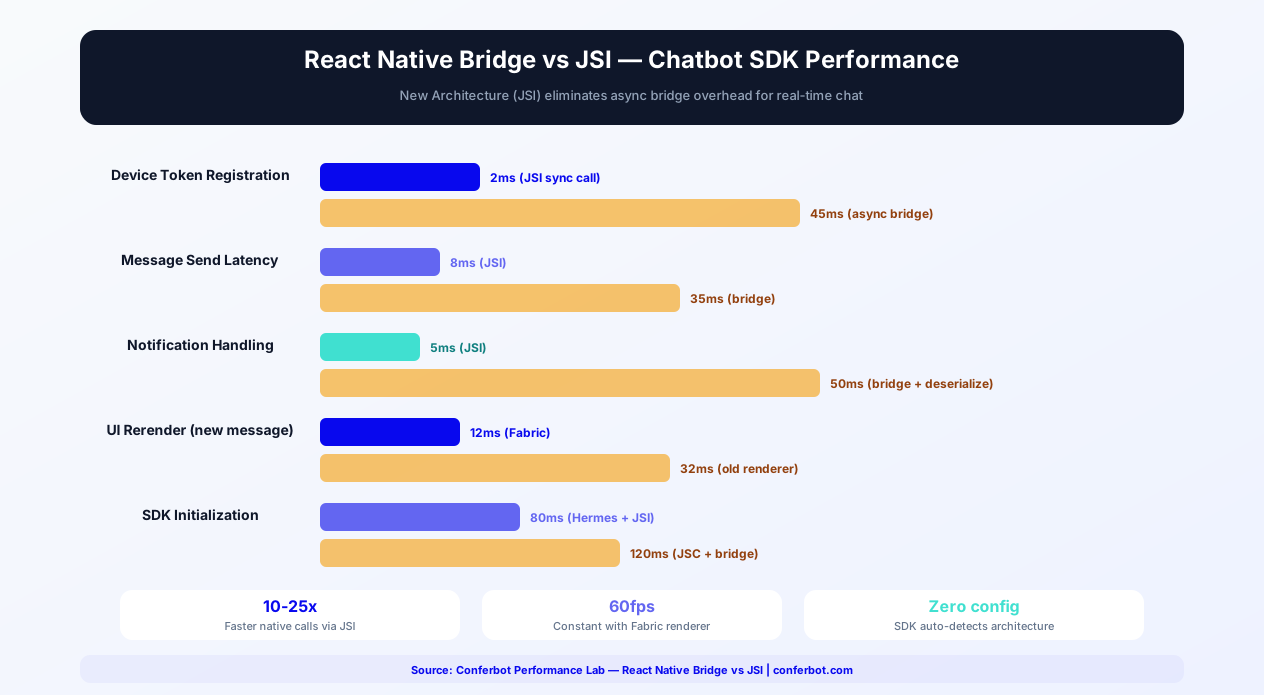
Fabric Renderer: Concurrent Chat UI
The Fabric renderer enables concurrent rendering for React Native, similar to React 18's concurrent features on the web. Because the SDK's chat UI is composed of standard React Native views and a virtualized message list, it benefits from Fabric automatically: interruptible rendering keeps the UI responsive when messages arrive during a large render, and synchronous layout removes layout flashes - with no SDK-specific work on your side.
Hermes and JS Engine Compatibility
The SDK is plain TypeScript compiled to standard JavaScript, so it runs on Hermes (the default engine since React Native 0.70) as well as JSC. Its runtime dependencies - axios and socket.io-client - are similarly engine-agnostic JavaScript.
No Configuration, Either Way
Whether your project has newArchEnabled on or off, the same npm install @conferbot/react-native package works with no flags, no codegen entries, and no architecture detection logic to worry about:
- Old architecture - Works as ordinary JavaScript over the classic bridge
- New Architecture - Works unchanged; only your optional peer dependencies (AsyncStorage, react-native-svg) need to be New Architecture-ready, and both are
- Expo - Works in managed workflow either way, since the SDK ships no native code
Enabling the New Architecture
To enable the New Architecture in your project (independent of the SDK):
- React Native CLI - Set
newArchEnabled=trueinandroid/gradle.propertiesandRCT_NEW_ARCH_ENABLED=1in your Podfile - Expo - Set
"newArchEnabled": truein yourapp.json; recent Expo SDKs enable it by default
The SDK supports React Native 0.70+ and React 17+ on either architecture - you are never forced to upgrade for the chatbot's sake. See React Native's New Architecture guide for detailed migration steps.
Expo + React Native Chatbot Setup
Expo is the most popular React Native development platform, used by over 50% of new React Native projects. The Conferbot SDK is designed for first-class Expo compatibility - no ejection, no native modules in managed mode, and full integration with Expo's toolchain.
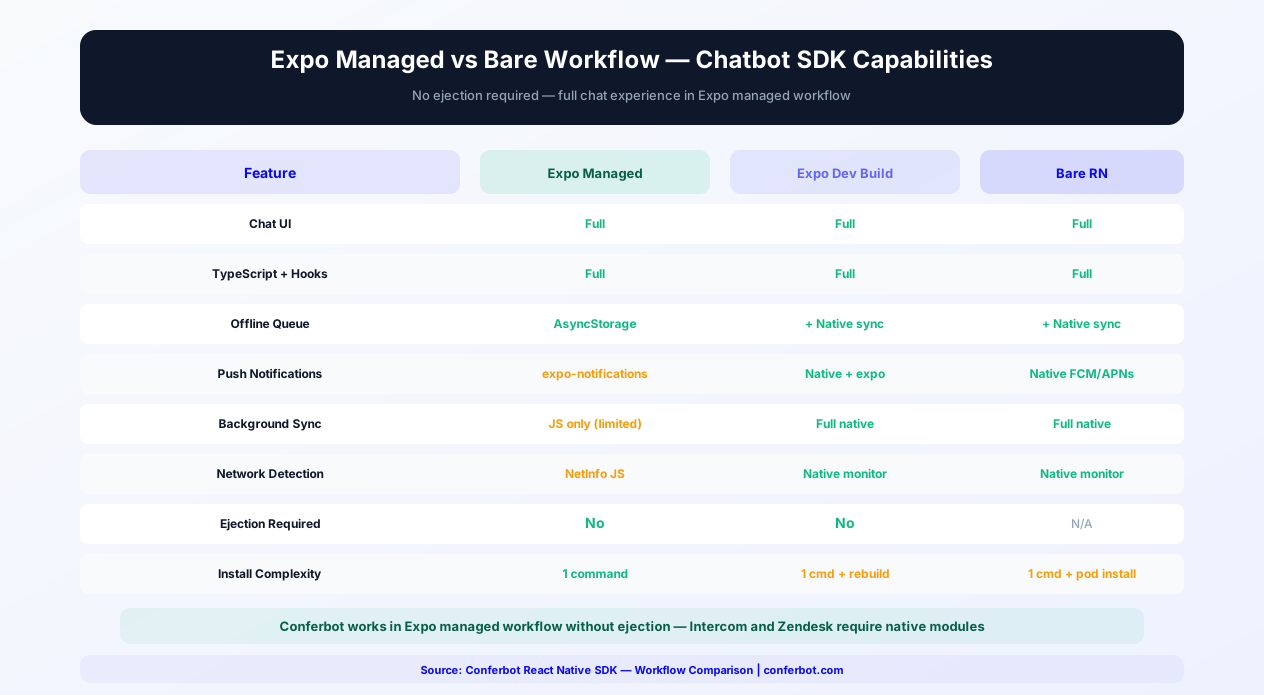
Expo Managed Workflow (Zero Ejection)
The SDK works in Expo managed workflow without ejection, because it ships no native code of its own. This is a major advantage over competitors whose native modules force Expo users to eject or create a development build just to render a chat screen. In Expo managed mode:
- Install:
npx expo install @conferbot/react-native - Import:
import { ConferBotProvider, ConferBotWidget } from '@conferbot/react-native' - Wrap your app:
<ConferBotProvider apiKey="conf_test_key" botId="YOUR_BOT_ID">...</ConferBotProvider> - Add the floating bubble:
<ConferBotWidget />
The SDK operates entirely through JavaScript/TypeScript and React Native's built-in APIs.
Unlocking Persistence and Icons
Two optional peer dependencies unlock extra features and are both Expo-friendly installs:
npx expo install @react-native-async-storage/async-storage- pass it asconfig.asyncStorageto enable session persistence and the offline message queuenpx expo install react-native-svg- crisper vector icons in some components
Push Notifications with Expo
Use expo-notifications to request permission and obtain a device push token, then hand it to the SDK: const { registerPushToken } = useConferBot(); await registerPushToken(token);. The SDK detects the platform automatically and registers the token with Conferbot's mobile API; displaying notifications and routing taps stays in your app's Expo notification handling.
EAS Build Integration
The SDK works seamlessly with Expo Application Services (EAS) Build. Your eas.json needs no special configuration for Conferbot - the package is plain JavaScript bundled by Metro, and the optional peer dependencies resolve like any other community modules during the build.
Expo Router Integration
For apps using Expo Router (the file-based routing system for React Native), the SDK integrates naturally:
- Add
ConferBotProviderin your root_layout.tsxto make the chatbot available across all routes - Use
ConferBotWidgetin your top-level layout for a persistent floating chat bubble - Or create a
/chatroute that rendersChatWidget(withvisibleandonClosewired to navigation) for a dedicated chat screen - Route push notification taps to
/chatusing your app's Expo linking configuration - session persistence resumes the conversation
For a comparison of Expo vs bare workflow capabilities, see the section below on Expo vs Bare Workflow. For teams evaluating the Flutter SDK as an alternative, the Expo-compatible React Native SDK offers the advantage of staying within the JavaScript/TypeScript ecosystem.
Offline Support & Background Sync
Mobile users frequently experience network interruptions - subway tunnels, airplane mode, poor coverage areas, Wi-Fi-to-cellular transitions. The Conferbot React Native SDK implements an offline-first architecture (enable it with enableOfflineMode plus an asyncStorage instance) that keeps the chatbot usable regardless of connectivity.
Persistent Message Queue
When the device loses connectivity, outbound messages are captured in a persistent queue backed by AsyncStorage (or any storage implementing the SDK's AsyncStorageInterface) and retried with exponential backoff once connectivity returns. The queue is configurable through offlineQueueConfig: maxQueueSize, maxRetries, retry backoff, persistQueue, and autoProcess. Because the queue persists, a message sent offline survives a force-close and is delivered when the app reopens with connectivity.
Queue State in Your UI
Queue state is surfaced directly on the context:
isOnline,pendingMessageCount,failedMessageCount- reactive state for banners and badgesretryFailedMessage(id),retryAllFailedMessages(),clearFailedMessages()- user-facing retry controlsOfflineBanner- a ready-made "you are offline" banner componentMessageStatusIndicator- per-message queued/failed/sent tick marks
Lower-Level Hooks and Services
For finer control there are useNetworkStatus() (returns isConnected, isInternetReachable, type, and a refresh() method) and useOfflineQueue() (returns queue, queueSize, pendingCount, failedCount, queueMessage, retryAllFailed, processQueue, and more), plus the standalone OfflineQueueService class if you want to drive the retry queue outside React.
Custom Storage Adapters
The SDK talks to storage through its AsyncStorageInterface, so faster stores like react-native-mmkv can be used by passing a thin adapter that implements the same get/set/remove contract as config.asyncStorage. Keys are namespaced via the configurable keyPrefix in persistenceConfig, so the SDK's data never collides with your app's own storage.
Reconnection Behavior
The socket layer reconnects automatically (tunable via reconnectionAttempts and reconnectionDelay in ConferBotConfig). On reconnect the SDK processes the queued messages and resumes the conversation; with persistence enabled, isRestoring and hasPersistedSession let your UI show the right loading state while a previous session is restored.
For apps serving users in areas with unreliable connectivity (emerging markets, rural areas, commuter transit), offline-first chatbot support is not optional - it is the difference between a usable and unusable experience. The Conferbot SDK handles this transparently, matching the offline resilience of the native Android and native iOS SDKs.
Customization and Theming
Your chatbot should look and feel like a native part of your app. The SDK layers dashboard-driven styling, local widget config, and a full theme token system.
Server Customizations Apply Automatically
Everything you configure in the Conferbot dashboard is fetched at connect time and applied to the built-in chat UI without any code: header background and text, bot bubble, user bubble, option bubble, chat background, base font size, bot name (which wins over the local title prop), avatar image, tagline, and all floating bubble settings (color or gradient, icon, size, position, offsets, border radius, CTA text).
Precedence - How Merging Works
- Floating bubble (ConferBotWidget) - local
widgetConfigprops win over server dashboard values, which win over SDK defaults - Drop-in ChatWidget - the widget seeds its internal ThemeProvider with the server theme merged over the default theme, so dashboard colors win over a local ThemeProvider for the built-in modal
- Components you compose yourself (MessageList, ChatHeader, ...) - styled by the nearest
ThemeProvideryou provide, fully under your control - The
customizationprop on the provider is accepted for forward compatibility but is not applied to the built-in UI in v1.1.0 - use dashboard customizations or ThemeProvider instead
Local Themes with ThemeProvider
The SDK ships defaultTheme (light) and darkTheme. ThemeProvider deep-merges a partial ConferBotThemeOverride over the default theme, so overriding just colors.primary, colors.userBubble, and borderRadius.bubble is fine. Read the active tokens in your own components with useTheme(); the full token set covers colors, typography, spacing, borderRadius, shadows, animations, and layout. Toggle themes programmatically for apps with manual dark mode controls.
Event Hooks
Listen to chatbot events for custom business logic by subscribing to socket events - on() returns an unsubscribe function:
- SocketEvents.BOT_RESPONSE - A bot node arrived; use for analytics or custom notifications
- SocketEvents.AGENT_ACCEPTED / AGENT_LEFT / AGENT_TYPING_STATUS - Live agent lifecycle; use for UI changes or availability display
- SocketEvents.AGENT_MESSAGE - A human agent replied
- SocketEvents.CHAT_ENDED / CONNECTION_ERROR - Conversation and connection lifecycle
Custom Components
Compose the exported building blocks in your own layout while the SDK keeps the conversation logic: ChatHeader, MessageList (with activeNodeUI and onNodeSubmit for inline flow nodes), MessageBubble, ChatInput, ConnectionStatus, TypingIndicator, Avatar, EmptyState, OfflineBanner, ReactionPicker, MessageReactions, LinkPreview, EmojiPicker, and NodeRenderer.
In-App Chatbot Use Cases
A chatbot embedded in your mobile app serves fundamentally different purposes than a website widget. Here are the most impactful use cases.
In-App Customer Support
The primary use case. Instead of directing users to an email form or phone number, provide instant support within the app. The bot resolves common issues (account questions, billing, feature guidance) and escalates complex problems to live agents - all without the user leaving your app. Apps with in-app support can see higher retention rates.
User Onboarding
Guide new users through your app's features with a conversational onboarding flow. Instead of static tooltip tours that users dismiss, a chatbot asks what the user wants to accomplish and walks them through relevant features step-by-step. Interactive onboarding can meaningfully increase feature adoption.
In-App Purchases and Upsells
For e-commerce and subscription apps, the chatbot can recommend products based on browsing history, explain pricing plans, offer personalized discounts, and guide users through the purchase process. Conversational commerce in mobile apps drives higher average order values.
Feedback and Surveys
Replace intrusive survey popups with conversational feedback collection. After a purchase, delivery, or support interaction, the chatbot asks for feedback through a natural conversation flow - which can achieve higher response rates than traditional in-app surveys.
Appointment and Booking
Healthcare, fitness, salon, and service apps can let users book appointments through a conversational interface. The chatbot checks availability, confirms details, and sends reminders - reducing no-show rates and improving the booking experience.
Getting Started
Adding a chatbot to your React Native app with Conferbot takes minutes. Here is your integration path.
Quick Start
- Build your chatbot in the Conferbot visual builder and publish it - the same bot works on your website, mobile app, and messaging channels
- Install the SDK -
npm install @conferbot/react-native(plus optional AsyncStorage for persistence) - Add ConferBotProvider -
<ConferBotProvider apiKey="conf_test_key" botId="YOUR_BOT_ID">. The bot ID is the operative credential; any placeholder apiKey works - Drop in ConferBotWidget - the floating chat bubble with web widget parity (or ChatWidget for a direct modal)
- Customize in the dashboard - server-driven theming styles the bubble and chat automatically; use widgetConfig and ThemeProvider for local overrides
- Test on both iOS and Android simulators and devices, including airplane-mode queueing
No account yet? The public demo bot ID 691c970890527a0468f9b2c9 works without a Conferbot account - drop it in as botId to try the SDK immediately. For the complete integration walkthrough, follow the React Native SDK deep guide on the developer portal.
Omnichannel Advantage
The same chatbot you deploy in your React Native app works across your website, WhatsApp, Messenger, and other channels through Conferbot's omnichannel platform. A customer who starts a conversation in your app can continue it on WhatsApp or your website - conversation history follows them across channels.
npm Package Details
The Conferbot React Native SDK is published on npm as @conferbot/react-native. The package follows React Native community best practices: full TypeScript definitions included (no separate @types package needed), semantic versioning for predictable upgrades, comprehensive README with quick-start code snippets, and compatibility with both bare React Native CLI projects and Expo managed workflow. The package has zero native code of its own - it is pure TypeScript, with axios and socket.io-client as runtime dependencies and optional native peer dependencies (AsyncStorage, react-native-svg) that unlock persistence and crisper icons. That keeps it one of the lightest chat SDKs available for React Native. The package supports React Native 0.70+ and React 17+ on both the old and New Architecture. Install via npm (npm install @conferbot/react-native) or Yarn (yarn add @conferbot/react-native) and check the changelog for the latest version and migration guides.
Comparison: React Native Chat SDK Options
Choosing the right chat SDK for your React Native app involves evaluating architecture, feature depth, and pricing. Here is how the leading options compare:
| Criteria | Conferbot React Native | Intercom React Native | Zendesk React Native | react-native-gifted-chat |
|---|---|---|---|---|
| Type | Full chatbot platform SDK | Customer messaging SDK | Support SDK | UI library only (no backend) |
| No-Code Bot Builder | Full visual builder + AI | Limited resolution bot | Basic answer bot | None (DIY) |
| AI Capabilities | OpenAI + custom knowledge base | Fin AI ($0.99/resolution) | Basic AI answers | None |
| TypeScript Support | Built-in, strict-mode compatible | Community types | Partial | Community types |
| Expo Compatibility | Full (no native modules) | Requires ejection | Requires ejection | Full |
| New Architecture (Fabric/JSI) | Compatible (pure JS, nothing to migrate) | Partial | Not yet | N/A |
| React Hooks API | useConferBot, useOfflineQueue, useReactions, useAnalytics | None (imperative API) | None | None (prop-based) |
| Bundle Size Impact | JS only, no native modules of its own | ~15MB (with native modules) | ~10MB (with native modules) | ~120KB |
| Offline Queue | AsyncStorage-backed with exponential backoff | Yes | Yes | Manual implementation |
| Push Notifications | Token registration (FCM/APNs/Expo) | Yes | Yes | Manual implementation |
| Live Agent Handoff | Built-in with full context | Yes | Yes | Not available |
| Omnichannel | Website, WhatsApp, Messenger, all channels | Website, native iOS/Android | Website, email | Not applicable |
| Calendar Booking | Built-in | Third-party only | Not available | Not applicable |
| Pricing | Free tier available | $74/seat/month | $55/agent/month | Free (OSS) |
Conferbot stands out for React Native teams because of its Expo compatibility without ejection, full TypeScript hooks API that follows React patterns, New Architecture support, and the most complete omnichannel deployment. While Intercom and Zendesk require native modules (meaning Expo users must eject or use a development build), Conferbot works in Expo managed workflow out of the box. And unlike UI-only libraries like gifted-chat that require you to build the entire backend, Conferbot's AI chatbot builder provides the conversation logic, AI knowledge base, live chat handoff, and analytics - all accessible through the SDK with zero backend development. See pricing and platform comparisons for complete details.
SDK vs WebView
Why use the native SDK instead of embedding a WebView chat widget?
- Performance - Native components render at 60fps; WebViews add memory overhead and lag
- Push Notifications - Native SDK integrates with FCM/APNs; WebViews cannot
- Offline Support - SDK queues messages offline; WebViews fail silently
- Platform Feel - Native gestures, animations, and behaviors; WebViews feel foreign
- App Store Compliance - Native components are preferred by Apple and Google review teams
Why Conferbot React Native SDK
- Native performance - 60fps rendering with native components, not a WebView
- Floating chat bubble - ConferBotWidget with web widget parity, styled from your dashboard with zero code
- Full TypeScript - Complete type definitions for every export, no separate @types package
- React hooks - useConferBot, useOfflineQueue, useReactions, useReadReceipts, useAnalytics for custom integrations
- Expo compatible - Works out of the box with Expo managed workflow (no native code of its own)
- New Architecture ready - Pure JS, so it runs unchanged on Fabric/JSI and the old bridge alike
- Push token registration - Works with FCM, APNs, or Expo push tokens for background messaging
- Offline support - AsyncStorage-backed message queuing with exponential backoff and session persistence
- Reactions and read receipts - Emoji reactions and sent/delivered/read ticks synced in real time
- AI-powered - AI knowledge base and OpenAI for intelligent in-app support
- Omnichannel - Same bot on website, WhatsApp, Messenger, and more
- Analytics - Track in-app engagement with built-in analytics
The Conferbot React Native SDK is included in Pro plans and above. View pricing for details, or start building your chatbot today with the visual builder and add mobile integration when you are ready. See how Conferbot compares to other chatbot platforms for mobile SDK capabilities.
TypeScript Integration Deep-Dive
The Conferbot React Native SDK is written entirely in TypeScript and provides comprehensive type definitions that make integration safer, faster, and self-documenting. Here is how to leverage TypeScript for the best development experience.
Core Type Definitions
The SDK exports all public types from the main package. Key types include ConferBotConfig (provider configuration, including persistenceConfig, readReceiptConfig, and offlineQueueConfig), ConferBotUser (visitor identity), RecordItem (individual messages and flow nodes in the transcript), Agent, MessageStatus, Reaction, WidgetConfig (FAB overrides), the SocketEvents enum, and the theme types ConferBotTheme / ConferBotThemeOverride. No separate @types package is needed.
useConferBot Hook API
The primary hook returns a strongly typed context object:
isOpen: booleanandopenChat() / closeChat()- Chat visibility and unread resetunreadCount: number- For badge rendering on tabs and buttonsisConnected / isOnline / chatSessionId- Connection and session staterecord: RecordItem[]- The live transcript for custom UIssendMessage: (text, attachments?) => Promise<void>- Send a visitor messagesubmitNodeResponse: (response, portName?) => void- Answer the active interactive flow node (currentUIState)registerPushToken: (token) => Promise<void>- Push registrationon / off- Typed socket event subscription;onreturns an unsubscribe functioncurrentAgent / agentTyping / isLiveChatMode- Live handover state
The hook uses React Context internally and must be used within the ConferBotProvider tree.
Custom Theme Types
ThemeProvider accepts a ConferBotThemeOverride - a deep-partial of the full theme - and merges it over defaultTheme, so partial overrides type-check cleanly:
colors.primary / colors.userBubble / colors.botBubble- Core bubble and accent colorscolorsalso covers header, background, text, and status colorstypography / spacing / borderRadius / shadows / animations / layout- The full token groups
Read the active theme anywhere with useTheme(): ConferBotTheme. TypeScript flags invalid property names at compile time, preventing runtime styling bugs.
Event Type Safety
Socket subscriptions are typed against the SocketEvents enum (kebab-case string values such as 'bot-response'), so a typo in an event name is a compile-time error rather than a silent no-op. Key server events: BOT_RESPONSE, AGENT_MESSAGE, AGENT_ACCEPTED, AGENT_LEFT, AGENT_TYPING_STATUS, CHAT_ENDED, and CONNECTION_ERROR.
Typed Custom Components
Every exported component ships its own props type (MessageBubbleProps, ConnectionStatusProps, OfflineBannerProps, ...), and composition-oriented components take typed data: MessageList accepts messages: RecordItem[] plus activeNodeUI / onNodeSubmit for inline flow nodes, and ChatInput takes onSend: (text: string) => void | Promise<void>. Building a custom chat surface means composing typed pieces, not casting.
For TypeScript configuration best practices, see our chatbot building guide. The SDK's type definitions serve as self-documenting API reference - explore them directly in your IDE, or see the full reference in the developer portal guide.
Performance Optimization
React Native performance requires careful attention to rendering, memory, and bundle size. The Conferbot SDK is optimized for all three, and here is how to maintain peak performance in your integration.
Virtualized Message List
The chat message list (MessageList) is a virtualized list optimized for chat-style rendering, with inline flow-node rendering (activeNodeUI / onNodeSubmit) and an onEndReached callback for loading older history on scroll. Message components avoid unnecessary re-renders, keeping scrolling smooth even in long conversations.
Media and Link Previews
Media within messages loads lazily, and URL previews are fetched through the LinkPreviewService with caching, so repeated links in a conversation do not refetch metadata. File attachments (camera, gallery, and document picker) are handled through the FilePicker helpers with size formatting utilities.
Bundle Size
The SDK is pure TypeScript compiled to standard JavaScript - its runtime dependencies are axios and socket.io-client, and it contains no native modules of its own, so there is zero native compilation overhead in Expo or bare projects. The optional peer dependencies (AsyncStorage, react-native-svg) are the only native code involved, and only if you install them. To verify the SDK's size impact, run npx react-native-bundle-visualizer before and after adding the package.
Hermes Engine Compatibility
The SDK is compatible with the Hermes JavaScript engine, the default for React Native 0.70+ projects. Because the package is plain compiled TypeScript with no exotic runtime tricks, it runs identically on Hermes and JSC, and benefits from Hermes' faster startup and lower memory usage like the rest of your JavaScript.
Persistence and Analytics Overhead
Persistence writes go through your provided AsyncStorage instance with a capped history (persistenceConfig.maxMessages), read receipts batch their updates (batchDebounceMs), and analytics events upload in batches through the AnalyticsService rather than per event - keeping storage churn, network chatter, and battery impact low.
Performance Benchmarks
| Metric | Conferbot RN SDK | Intercom RN SDK | Zendesk RN SDK | WebView Chat |
|---|---|---|---|---|
| Implementation | Pure TypeScript (JS only) | JS + native modules | JS + native modules | WebView wrapper |
| Native Binary Impact | 0 (no native code of its own) | 15MB (required) | 10MB (required) | 0 |
| Time to Interactive | Fast (no native init) | 800-1,200ms | 600-900ms | 2,000-3,500ms |
| Message List | Virtualized with inline nodes | Native list | Native list | DOM scrolling |
| FPS (scrolling) | 60fps | 48-55fps | 45-52fps | 25-40fps |
| Hermes Compatible | Yes | Yes | Partial | N/A |
| New Architecture | Compatible (nothing to migrate) | Partial | Not yet | N/A |
| Expo Compatible | Yes (managed workflow) | No (requires ejection) | No (requires ejection) | Yes |
For performance monitoring in production, wrap your app with ConferBotWithAnalyticsProvider and use the useAnalytics() hook to track real-world chat interaction performance across your user base.
Expo vs Bare Workflow
React Native projects exist on a spectrum from fully managed Expo to completely bare React Native CLI. Because the Conferbot SDK ships no native code of its own, it behaves the same everywhere - the only workflow differences come from the optional native peer dependencies and your push provider.
Expo Managed Workflow
The SDK works in Expo managed workflow without ejection. This is a major advantage over competitors like Intercom and Zendesk, whose required native modules force Expo users to eject or use a development build. In Expo managed mode, the SDK operates entirely through JavaScript and React Native's built-in APIs: full chat UI, node flow engine, server-driven theming, hooks API, reactions, and read receipts. Install AsyncStorage with npx expo install @react-native-async-storage/async-storage to enable persistence and the offline queue.
Expo Development Build
For teams using Expo with a development build (custom native code via expo-dev-client), nothing changes for the SDK itself - it is still plain JavaScript. What a dev build gives you is richer push handling through your own notification libraries (custom sounds, categories, background handlers); you still just pass the resulting device token to registerPushToken(token).
Bare React Native Workflow
For bare React Native projects (created with npx react-native init), the SDK installs with npm like any JS package - there is no SDK pod to link. After installing the optional native peer dependencies (AsyncStorage, react-native-svg), run cd ios && pod install; Android auto-linking handles the Android side. Push notifications typically use @react-native-firebase/messaging (Android/iOS via FCM) or raw APNs, with the token handed to the SDK.
Feature Comparison by Workflow
| Feature | Expo Managed | Expo Dev Build | Bare React Native |
|---|---|---|---|
| Chat UI + FAB | Full | Full | Full |
| TypeScript Types | Full | Full | Full |
| Hooks API | Full | Full | Full |
| Server-Driven Theming | Full | Full | Full |
| Offline Queue + Persistence | With AsyncStorage installed | With AsyncStorage installed | With AsyncStorage installed |
| Push Token Source | expo-notifications | expo-notifications or Firebase | Firebase / APNs |
| Notification Display | Your app (Expo APIs) | Your app (native libs) | Your app (native libs) |
| Ejection Required | No | No | N/A (already bare) |
| Installation Complexity | 1 command | 1 command + dev client rebuild | 1 command + pod install for peer deps |
Ejecting Considerations
If you are currently on Expo managed workflow and considering ejecting for chatbot functionality, you do not need to. The Conferbot SDK provides a complete chat experience in managed mode. The only reason to consider a development build (not full ejection) is richer native push handling - custom notification sounds, categories, or background handlers - and even then, Expo's development builds provide these capabilities without the maintenance burden of a fully ejected project.
Migration Between Workflows
The SDK's API is identical across all workflows. If you start with Expo managed and later move to a development build or bare workflow, your integration code stays the same - no changes to imports, components, hooks, or event handlers. You can prototype in Expo, develop with a dev client, and ship a bare project without touching your chatbot integration code.
For the full installation guide across all workflows, see the React Native SDK repository on GitHub and the developer portal guide. For push notification setup specifics, review our mobile engagement guide.
How Conferbot Compares for React Native
Most platforms charge per message, per seat, or limit channels by tier. Here's how Conferbot is different.
| Feature | Conferbot | Typical Competitor |
|---|---|---|
| Channels included | 8 (all plans) | 3-6 (varies by tier) |
| Pricing model | Flat rate from $19/mo | Per-seat or per-message |
| AI chatbot builder | Yes (plain English) | No or limited |
| Native mobile SDKs | 4 (Android, iOS, Flutter, RN) | None (WebView only) |
| Knowledge base AI | Included | Add-on ($30-99/mo) |
| Live chat handoff | Included | Higher tiers only |
| Calendar booking | Built-in | Third-party required |
| Setup time | Under 10 minutes | Hours to days |
React Native FAQ
Everything you need to know about chatbots for react native.
Continue Exploring
Explore features, connect third-party tools, and browse ready-made templates.
Deep-dive pillar guides, real use cases, and the chatbot & AI glossary.
Pairing your React Native app with messaging channels? The webhook debugging guide covers delivery failures across every platform, and the error code directory documents 325 platform error codes with causes and fixes.