
The Hidden Cost of Invoice Disputes: Why B2B Collections Are Broken
Invoice disputes are the silent killer of B2B cash flow. According to Atradius Payment Practices Barometer, 48 percent of all B2B invoices in North America are paid late, and invoice disputes are the leading cause of payment delays exceeding 15 days. For mid-market companies with $10 million to $100 million in annual revenue, these delays translate to $1.2 million to $8.4 million in outstanding receivables at any given time -- capital that is trapped in dispute limbo instead of fueling operations, payroll, and growth.
The dispute cycle is remarkably consistent across industries. A buyer receives an invoice, identifies a discrepancy (wrong quantity, incorrect pricing, missing purchase order reference, duplicate charge, or unrecognized line item), and contacts the seller's accounts receivable team. The AR team then manually reviews the invoice, pulls the purchase order, checks delivery records, and either issues a credit memo or provides documentation justifying the charge. This back-and-forth typically takes 12 to 18 business days -- during which the entire invoice amount sits unpaid, not just the disputed portion.
The math is punishing. A company processing 2,000 invoices per month with a 12 percent dispute rate handles 240 disputes monthly. At an average AR specialist cost of $28 per hour and 45 minutes per dispute, that is $5,040 per month in direct labor -- $60,480 annually -- just on dispute handling. Add the opportunity cost of delayed payments (estimated at 1.5 percent of outstanding AR per month using a cost-of-capital model), and a company with $4 million in disputed receivables bleeds $60,000 per month in financing costs alone.
AI chatbots fundamentally restructure this workflow. Instead of a buyer emailing a vague complaint that an AR specialist must decode, the chatbot guides the buyer through a structured dispute intake in 3 to 5 minutes, capturing the exact invoice number, line items in question, claimed discrepancy type, and supporting documentation. The chatbot then queries the ERP or billing system in real time, compares the dispute details against the original invoice, purchase order, and delivery records, and either auto-resolves simple discrepancies (pricing differences under a threshold, duplicate charge confirmations, PO reference corrections) or escalates complex disputes to a human specialist with full context already assembled.
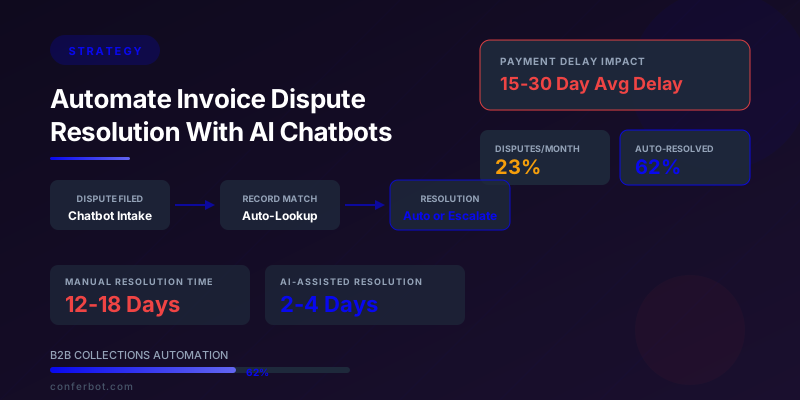
The result: dispute resolution time drops from 15 to 30 days to 2 to 4 days. Auto-resolution handles 55 to 65 percent of disputes without human involvement. AR specialist time per remaining dispute drops from 45 minutes to 12 minutes because the chatbot has already gathered all relevant information and matched it against billing records. For companies serious about cash flow optimization, this is one of the highest-ROI chatbot implementations available.
This guide covers the complete strategy for deploying invoice dispute chatbots: the dispute taxonomy that determines what can be automated, the intake flow design that captures structured data, the ERP integration architecture that enables real-time record matching, the auto-resolution logic for simple discrepancies, the escalation framework for complex disputes, ROI modeling, and implementation planning. Whether you use Conferbot, build custom, or evaluate other platforms, the strategic framework applies universally to B2B collections automation.
Invoice Dispute Taxonomy: Categorizing Disputes for Automation Eligibility
Not all invoice disputes are equally automatable. A structured taxonomy helps you identify which disputes the chatbot can resolve autonomously, which require partial automation with human review, and which need full human handling. According to McKinsey's analysis of accounts receivable transformation, companies that categorize disputes before automating achieve 40 percent higher automation rates than those that apply a one-size-fits-all approach.
Category 1: Simple Discrepancies (55 to 65 Percent Auto-Resolution)
These disputes involve verifiable, objective mismatches between what the buyer expected and what was invoiced. The chatbot can resolve them by querying the billing system and applying predefined business rules.
- Duplicate invoice: The buyer claims they received the same invoice twice. The chatbot queries the invoice history, identifies matching invoice numbers or identical line items within a 30-day window, and either confirms the duplicate (issuing an automatic void) or provides documentation that the invoices are for separate deliveries.
- Incorrect pricing: The buyer's agreed contract price differs from the invoiced price. The chatbot pulls the active contract or price agreement, compares unit prices, and either issues a credit for the difference (within an auto-approval threshold) or confirms the invoiced price matches the contract.
- Wrong quantity: The invoiced quantity does not match the received quantity. The chatbot cross-references the delivery confirmation or shipping record against the invoice line items and identifies the discrepancy.
- Missing purchase order reference: The invoice lacks the buyer's PO number, preventing their AP system from processing. The chatbot looks up the PO reference from the original order record and provides it, or asks the buyer for the PO number to append.
- Tax calculation error: Sales tax or VAT was applied incorrectly based on the buyer's tax-exempt status or jurisdiction. The chatbot verifies the tax exemption certificate on file and recalculates.
Category 2: Medium Complexity (Partial Automation, Human Review)
These disputes require the chatbot to gather information and perform initial analysis, but a human must make the final resolution decision.
- Goods not received: The buyer claims they never received the goods or services invoiced. The chatbot gathers the specific line items disputed, pulls the shipping tracking information and delivery confirmation, and presents both to a specialist for review. If the carrier confirms delivery with signature, the chatbot can present this evidence to the buyer conversationally.
- Quality or specification mismatch: The buyer received goods but claims they do not match specifications. The chatbot collects detailed descriptions of the discrepancy, photographs if available, the original specification document reference, and routes to the quality or account management team.
- Partial delivery disputes: Some items were received, others were not. The chatbot itemizes the invoice, asks the buyer to confirm receipt for each line item, and flags unconfirmed items for shipping team verification.
Category 3: Complex Disputes (Full Human Handling)
These disputes involve subjective judgment, relationship management, or legal considerations that exceed chatbot capabilities.
- Contract interpretation disputes: Disagreements about contract terms, scope of service, or payment conditions. These require account manager or legal involvement.
- Credit worthiness or payment plan negotiations: The buyer cannot pay due to financial difficulties. These require senior AR or finance team involvement.
- Multi-invoice disputes: Systemic issues spanning multiple invoices and periods. These require pattern analysis and potentially contract renegotiation.

Automation Eligibility Assessment
| Dispute Category | Frequency | Avg Resolution Time (Manual) | Automation Level | Chatbot-Assisted Resolution Time |
|---|---|---|---|---|
| Duplicate invoice | 15% of disputes | 2-3 days | Full auto | Under 5 minutes |
| Incorrect pricing | 22% of disputes | 5-8 days | Full auto (within threshold) | Under 10 minutes |
| Wrong quantity | 12% of disputes | 4-6 days | Full auto with shipping data | Under 15 minutes |
| Missing PO reference | 9% of disputes | 1-2 days | Full auto | Under 3 minutes |
| Tax calculation error | 6% of disputes | 3-5 days | Full auto | Under 5 minutes |
| Goods not received | 14% of disputes | 8-12 days | Partial (evidence gathering) | 2-4 days |
| Quality mismatch | 10% of disputes | 10-18 days | Partial (intake + routing) | 5-8 days |
| Complex / multi-invoice | 12% of disputes | 15-30 days | Intake only | 10-15 days |
The key insight: 64 percent of disputes by volume fall into Category 1 (fully automatable), and these disputes account for only 38 percent of total resolution labor because they are simpler. Automating them frees AR specialists to focus 100 percent of their time on the complex 36 percent of disputes that actually require human judgment. For more on how chatbots handle repetitive operational workflows, see our guide on warranty claims automation.
Designing the Dispute Intake Flow: Structured Data Collection in Under 5 Minutes
The dispute intake flow is the foundation of automation. A well-designed flow collects all information needed for resolution (or escalation) in a single conversational session, eliminating the back-and-forth emails that typically stretch dispute timelines from days to weeks.
Intake Flow Architecture
The optimal dispute intake flow follows a progressive disclosure pattern: start with identifying information (who and what), narrow to the specific dispute (which invoice and line items), collect the discrepancy details (what is wrong), gather supporting evidence (proof), and confirm next steps (resolution path). This mirrors the methodology described in Gartner's accounts receivable best practices framework.
Step 1: Customer Identification (30 seconds)
The chatbot identifies the buyer through account number, company name, or email domain match. For authenticated portals (the buyer is already logged into their customer portal), this step is automatic.
Step 2: Invoice Selection (45 seconds)
The chatbot pulls the buyer's recent invoices from the billing system and presents them as selectable options: invoice number, date, amount, and status. The buyer taps or clicks the disputed invoice. For buyers with many invoices, the chatbot offers search by invoice number, date range, or amount.
Step 3: Line-Item Identification (60 seconds)
Once the invoice is selected, the chatbot displays all line items and asks the buyer to select which specific items are disputed. This granularity is critical -- it prevents the common problem of the entire invoice being held up over a single line-item discrepancy. With line-item specificity, the chatbot can release undisputed amounts for payment while resolving the disputed items.
Step 4: Dispute Type Classification (30 seconds)
The chatbot presents the dispute categories as quick-reply buttons based on the taxonomy from Section 2: "Wrong price," "Wrong quantity," "Duplicate charge," "Never received," "Quality issue," "Missing PO," or "Other." This classification determines the subsequent questions and the resolution path.
Step 5: Discrepancy Details (60 seconds)
Based on the dispute type, the chatbot asks targeted follow-up questions:
- Wrong price: "What price were you expecting? Do you have a contract or quote reference?"
- Wrong quantity: "How many units did you receive? Do you have a delivery receipt?"
- Duplicate charge: "Can you provide the original invoice number you believe this duplicates?"
- Never received: "Was the entire order not received, or specific items? What was the expected delivery date?"
Step 6: Supporting Documentation (30 to 60 seconds)
The chatbot offers a file upload for supporting evidence: purchase orders, delivery receipts, contract excerpts, or photographs of damaged goods. This is optional but accelerates resolution when provided.
Step 7: Confirmation and Resolution Path (30 seconds)
The chatbot summarizes the dispute, confirms all details with the buyer, and communicates the next step: either instant resolution (for auto-resolvable disputes) or an estimated timeline with a case reference number (for disputes requiring review).

Conversational UX Best Practices for B2B Dispute Intake
B2B dispute interactions require a different conversational tone than consumer chatbots. The buyer is typically an accounts payable professional or procurement manager -- someone who handles disputes as part of their job and values efficiency over friendliness.
- Professional, concise tone: Skip the casual greetings and emojis. Open with: "I can help resolve your invoice dispute. Let me pull up your account." Not: "Hey there! How can I help you today?"
- Progress indicators: Show "Step 3 of 7" or a progress bar. AP professionals handle disputes in batch, and knowing the time commitment helps them plan their workflow.
- Data pre-population: Wherever possible, present data for selection rather than asking for manual input. Show the invoice list, the line items, the contract prices. Reduce typing to the absolute minimum.
- Immediate value signals: After the buyer selects the disputed invoice, the chatbot can say: "I see invoice #INV-2026-4421 for $12,340.00. I have already matched this against your PO #7819 and delivery records. Let me check the specific items you are concerned about." This signals competence and builds confidence that the chatbot can actually resolve the issue.
For more on designing professional conversational flows, see our conversation design masterclass. For specific B2B qualification patterns that apply to intake flows, review our lead qualification guide.
ERP and Billing System Integration: Real-Time Record Matching Architecture
The chatbot's ability to resolve disputes autonomously depends entirely on its access to authoritative billing data. Without real-time integration with your ERP, accounting system, or billing platform, the chatbot can only collect information -- it cannot verify claims, match records, or auto-resolve discrepancies.
Integration Architecture Options
There are three primary patterns for connecting an invoice dispute chatbot to billing systems, each with different tradeoffs in complexity, latency, and data freshness.
Pattern 1: Direct API Integration (Recommended)
The chatbot queries the ERP or billing system's API directly during the conversation. When the buyer selects an invoice, the chatbot makes a real-time API call to pull the invoice details, associated purchase order, delivery records, and contract pricing. This provides the freshest data and the fastest resolution, but requires API availability and proper authentication. Most modern ERPs (NetSuite, SAP S/4HANA, Microsoft Dynamics 365, QuickBooks Online, Xero) expose REST APIs that support these queries.
Pattern 2: Middleware Sync (For Legacy Systems)
For ERPs without modern APIs (older SAP ECC, AS/400-based systems, custom legacy databases), a middleware layer (MuleSoft, Boomi, Workato, or custom ETL) syncs relevant data to a staging database that the chatbot queries. Data freshness depends on sync frequency -- hourly syncs are typical, meaning the chatbot works with data that may be up to 60 minutes old. This is acceptable for most dispute scenarios where invoices and deliveries do not change minute-to-minute.
Pattern 3: Pre-Computed Dispute-Ready Cache
A nightly batch process pre-computes dispute-relevant data for every open invoice: the invoice details, matching PO, delivery confirmation, contract pricing, and tax calculations. This data is stored in a fast-access cache (Redis, DynamoDB) that the chatbot queries with sub-100ms latency. This pattern works well at scale (10,000-plus invoices) where real-time API calls to the ERP for every interaction would create performance concerns.
Required Data Points for Auto-Resolution
| Data Point | Source System | Used For |
|---|---|---|
| Invoice header (number, date, amount, status) | ERP / Billing | Invoice identification |
| Invoice line items (SKU, description, qty, price) | ERP / Billing | Line-item dispute matching |
| Purchase order (PO number, line items, agreed prices) | ERP / Procurement | Price and quantity verification |
| Delivery / shipping confirmation | WMS / Shipping platform | Goods-received disputes |
| Contract pricing / price agreements | CRM / Contract management | Pricing dispute resolution |
| Tax exemption certificates | Tax compliance system | Tax calculation disputes |
| Credit memo history | ERP / Billing | Duplicate dispute detection |
| Payment history | ERP / Treasury | Payment status verification |
Security and Access Control
Invoice data is sensitive financial information. The integration architecture must enforce strict access controls as recommended by NIST's Cybersecurity Framework.
- Buyer-scoped queries: The chatbot should only return data for the authenticated buyer's account. Never expose one customer's invoice data to another.
- Read-only for queries, write-only for resolutions: The chatbot's API access to the ERP should be read-only for data retrieval and limited-write for credit memo creation or invoice adjustments. It should never have delete or broad-write access.
- Approval thresholds: Auto-resolution should have configurable dollar thresholds. A $50 pricing discrepancy might be auto-credited, but a $5,000 discrepancy requires human approval even if the contract data confirms the buyer's claim.
- Audit trail: Every chatbot action (data query, auto-resolution, credit issuance) must be logged with timestamps, the specific data accessed, the resolution applied, and the business rule that triggered it. This is essential for financial auditing and SOX compliance.
Conferbot's integration framework supports all three patterns through its API connector, webhook system, and custom function capabilities. The no-code builder includes pre-built connectors for QuickBooks, Xero, and Stripe, with custom API connectors for NetSuite, SAP, and Dynamics 365.
Auto-Resolution Engine: Business Rules for Autonomous Dispute Settlement
The auto-resolution engine is the intelligence layer that transforms the chatbot from an intake tool into a resolution tool. It evaluates the dispute against billing records and applies predefined business rules to determine whether the dispute can be settled without human involvement.
Rule 1: Duplicate Invoice Detection
When a buyer selects "Duplicate charge" as the dispute type, the chatbot searches for invoices matching the disputed invoice's criteria within a configurable window (typically 60 days): same customer, same line items (by SKU or description), same or similar amount (within 2 percent tolerance for rounding differences). If a match is found, the chatbot presents both invoices to the buyer for confirmation and, upon confirmation, voids the duplicate and notifies the AR team. If no duplicate is found, the chatbot presents the evidence and asks the buyer if they would like to proceed with a manual review.
Rule 2: Contract Price Matching
For pricing disputes, the chatbot pulls the active price agreement or contract and compares unit prices line by line against the invoice. Three outcomes are possible:
- Invoice matches contract: The chatbot presents the contract pricing alongside the invoiced pricing and shows they match. Many pricing disputes arise from buyers referencing outdated price lists -- the chatbot resolves this by showing the current effective agreement.
- Invoice exceeds contract price (within auto-approve threshold): If the difference is within the auto-approval dollar limit (e.g., under $500 per line item and $2,000 per invoice), the chatbot issues a credit memo for the difference automatically.
- Invoice exceeds contract price (above threshold): The chatbot flags the discrepancy, prepares a draft credit memo, and routes it to an AR specialist for approval.
Rule 3: Quantity Reconciliation
For quantity disputes, the chatbot compares the invoiced quantity against the delivery confirmation or proof of delivery. If the shipping system confirms that the invoiced quantity was delivered and signed for, the chatbot presents the delivery evidence. If the shipping system shows a short shipment (delivered quantity less than invoiced quantity), the chatbot calculates the credit amount and applies auto-resolution rules.
Rule 4: PO Reference Correction
Missing or incorrect PO references are the simplest dispute to auto-resolve. The chatbot queries the order management system for the buyer's PO associated with the invoice date range and line items. If a unique match is found, the PO reference is appended to the invoice record, the buyer is notified, and the invoice is reissued with the correct reference. If multiple potential POs match, the chatbot presents the options for the buyer to select.
Rule 5: Tax Recalculation
For tax disputes, the chatbot verifies the buyer's tax exemption status against the tax compliance system, confirms the ship-to jurisdiction for sales tax calculation, and recalculates the tax. If the recalculated amount differs from the invoiced amount, a credit or debit adjustment is generated automatically.

Configurable Thresholds and Guardrails
Auto-resolution must operate within guardrails that protect the business from excessive credits or fraudulent claims.
| Guardrail | Recommended Default | Purpose |
|---|---|---|
| Per-line-item auto-credit limit | $500 | Prevents large credits without review |
| Per-invoice auto-credit limit | $2,000 | Caps total auto-approved credit per invoice |
| Monthly auto-credit limit per customer | $5,000 | Detects pattern of excessive disputes |
| Dispute frequency threshold | 3 disputes per customer per 30 days | Flags suspicious dispute patterns |
| Duplicate detection window | 60 days | Balances detection accuracy with false positives |
| Auto-void confirmation required | Always (buyer must confirm) | Prevents accidental invoice voids |
These thresholds should be reviewed quarterly based on dispute patterns, credit memo volume, and any instances where auto-resolution produced incorrect results. The goal is to maximize automation while maintaining financial controls that would satisfy both internal audit and external auditors.
For a broader view of how chatbots handle automated decision-making with approval workflows, see our guide on return and refund automation, which applies similar threshold-based auto-resolution logic to consumer returns.
Escalation Framework: Routing Complex Disputes With Full Context
The 35 to 45 percent of disputes that cannot be auto-resolved still benefit enormously from chatbot involvement. The chatbot's structured intake means that when a dispute reaches a human specialist, it arrives with complete context -- eliminating the 15 to 20 minutes of information gathering that typically starts every manual dispute review.
Context Package for Escalated Disputes
When the chatbot escalates a dispute, it generates a structured context package that includes the following information, formatted for the AR specialist's workflow tool (typically delivered as a case in the CRM or helpdesk system).
- Customer information: Account name, number, AR contact, account standing, payment history summary (average days to pay, current aging)
- Disputed invoice: Invoice number, date, total amount, disputed amount, undisputed amount
- Disputed line items: Specific SKUs, quantities, and prices in dispute with the buyer's claimed discrepancy for each
- Dispute classification: Category from the taxonomy (e.g., "Quality mismatch -- specification deviation")
- Buyer's stated issue: Free-text description and any uploaded documentation
- System verification results: What the chatbot already checked -- PO match status, delivery confirmation status, contract price comparison, previous dispute history for this customer
- Recommended resolution: The chatbot's suggested resolution based on available data (e.g., "Delivery confirmed via FedEx signature on June 1. Recommend presenting proof of delivery to buyer.")
- Conversation transcript: The full chatbot conversation for reference
Escalation Routing Logic
Different dispute types route to different specialists based on the expertise required, following the tiered support model documented by the CFO.com collections best practices framework.
| Dispute Type | Escalation Target | SLA |
|---|---|---|
| Goods not received (with delivery confirmation) | AR Specialist + Shipping Team | 2 business days |
| Quality / specification mismatch | Account Manager + Quality Team | 3 business days |
| Complex pricing (above threshold) | Senior AR Specialist | 2 business days |
| Contract interpretation | Account Manager + Legal | 5 business days |
| Multi-invoice systemic issue | AR Manager + Account Manager | 5 business days |
| Credit worthiness / payment plan | Credit Manager | 3 business days |
Buyer Communication During Escalation
The chatbot maintains communication with the buyer during the escalation period, preventing the "black hole" experience where a dispute is filed and nothing happens for weeks.
- Immediate acknowledgment: "Your dispute for Invoice #INV-2026-4421, Line 3 ($2,840 quantity discrepancy) has been assigned to our specialist team. Reference: DISP-2026-08842."
- Proactive status updates: The chatbot sends status updates at configurable intervals (e.g., every 2 business days) or when the case status changes: "Update on DISP-2026-08842: Our shipping team has requested tracking details from the carrier. We expect a response within 24 hours."
- Resolution notification: When the specialist resolves the dispute, the chatbot notifies the buyer with the outcome, any credit memo issued, and the updated invoice status.
This proactive communication transforms the buyer's experience from adversarial ("I filed a dispute and heard nothing for three weeks") to collaborative ("They acknowledged my dispute in minutes and kept me updated throughout"). The relationship impact is significant -- Bain research shows that effective dispute resolution actually increases customer loyalty, with 70 percent of buyers reporting higher satisfaction with a vendor that resolves disputes quickly and transparently than with a vendor they never had a dispute with.
For more on how proactive chatbot communication reduces churn, see our customer retention strategy guide.
ROI Model: Calculating the Financial Impact of Dispute Automation
The ROI of invoice dispute automation combines direct cost savings (reduced AR specialist labor), indirect savings (accelerated cash collection), and strategic benefits (improved buyer relationships and reduced bad debt). Here is a detailed model for a mid-market B2B company.
Baseline Assumptions
| Metric | Value |
|---|---|
| Monthly invoices processed | 2,000 |
| Dispute rate | 12% (240 disputes/month) |
| Average invoice amount | $8,500 |
| Average disputed amount per dispute | $3,200 |
| Total monthly disputed receivables | $768,000 |
| Average dispute resolution time (manual) | 18 business days |
| AR specialist fully loaded cost | $65,000/year ($31.25/hour) |
| Average specialist time per dispute (manual) | 45 minutes |
| Company cost of capital | 8% annually (0.67% monthly) |
Direct Labor Savings
With chatbot automation resolving 62 percent of disputes autonomously and reducing specialist time on escalated disputes from 45 to 12 minutes:
- Auto-resolved disputes: 240 x 62% = 149 disputes/month require zero specialist time (was 149 x 45 min = 6,705 min/month = 111.75 hours)
- Escalated disputes (faster): 240 x 38% = 91 disputes/month x 12 min = 1,092 min/month = 18.2 hours (was 91 x 45 min = 4,095 min = 68.25 hours)
- Total specialist hours saved: (111.75 + 68.25) - 18.2 = 161.8 hours/month
- Monthly labor savings: 161.8 x $31.25 = $5,056
- Annual labor savings: $60,675
Cash Flow Acceleration
Reducing dispute resolution time from 18 days to an average of 3.5 days (blended across auto-resolved and escalated) accelerates cash collection by 14.5 days on disputed invoices.
- Average disputed receivables outstanding: $768,000
- Days accelerated: 14.5 days
- Annualized cash flow improvement: $768,000 x (14.5/30) x 12 months x 0.67% monthly cost of capital = $29,865
- Working capital freed: $768,000 x (14.5/30) = $371,200 in receivables collected 14.5 days sooner, continuously

Bad Debt Reduction
Faster dispute resolution reduces the likelihood that disputes escalate into write-offs. Industry data from CFA Institute research shows that invoices disputed for more than 30 days have a 12 percent write-off rate, compared to 2 percent for disputes resolved within 7 days.
- Current bad debt from disputes: $768,000/month x 12% write-off rate for late resolutions = $92,160/year
- Projected bad debt with automation: $768,000/month x (62% at 2% write-off + 38% at 5% write-off) = $768,000 x 3.14% = $24,115/year
- Annual bad debt reduction: $92,160 - $24,115 = $68,045
- Conservative estimate (50% attribution): $34,023
Total ROI Summary
| Benefit Category | Annual Value |
|---|---|
| Direct labor savings | $60,675 |
| Cash flow improvement | $29,865 |
| Bad debt reduction (conservative) | $34,023 |
| Total annual benefit | $124,563 |
| Chatbot platform cost (Conferbot Business) | $3,588 |
| Integration development (one-time, amortized over 3 years) | $8,333 |
| Net annual ROI | $112,642 |
| ROI multiple | 10.5x |
A 10.5x annual return on investment makes invoice dispute automation one of the highest-ROI chatbot applications in B2B operations. For a broader framework on calculating chatbot ROI across different use cases, see our chatbot ROI calculator guide.
Implementation Playbook: From Concept to Live Dispute Chatbot in 6 Weeks
Deploying an invoice dispute chatbot requires coordination between AR, IT, and customer-facing teams. This six-week playbook provides a practical timeline that balances speed with thoroughness.
Week 1: Discovery and Data Mapping
- Audit current disputes: Analyze the last 6 months of disputes by type, resolution time, resolution outcome, and dollar value. This validates the taxonomy from Section 2 against your actual data.
- Map data sources: Identify every system that holds dispute-relevant data (ERP, CRM, shipping, contracts) and document API availability, data formats, and access credentials.
- Define auto-resolution thresholds: Work with the AR manager and finance leadership to set dollar thresholds, frequency limits, and approval workflows for auto-credits.
- Select platform: If not already decided, evaluate platforms based on integration capabilities, conversational AI quality, and security features. Conferbot's free tier allows proof-of-concept testing before commitment.
Week 2: Integration Development
- Build ERP/billing integration: Implement the API connection (Pattern 1 from Section 4) or middleware sync (Pattern 2). Start with read-only access to invoice and PO data.
- Build shipping/delivery integration: Connect to your shipping platform or WMS for delivery confirmation data.
- Implement authentication: Set up buyer authentication (customer portal SSO, email verification, or account-number-based identification).
- Test data retrieval: Verify that the chatbot can pull accurate invoice data for 50 test accounts spanning different scenarios (single invoices, multiple line items, various dispute types).
Week 3: Conversation Flow Build
- Build the intake flow: Implement the 7-step intake process from Section 3 in your chatbot builder.
- Build auto-resolution logic: Implement the 5 business rules from Section 5 with configurable thresholds.
- Build escalation routing: Configure case creation in your CRM or helpdesk with the context package from Section 6.
- Build buyer notification flows: Implement acknowledgment, status update, and resolution notification messages.
Week 4: Internal Testing
- AR team testing: Have AR specialists test the chatbot with real historical disputes (anonymized if needed). They should file disputes for each Category 1 type and verify auto-resolution accuracy.
- Edge case testing: Test with invalid invoice numbers, expired accounts, disputes exceeding thresholds, rapid-fire disputes from the same account, and incomplete information submissions.
- Security review: Verify that buyer-scoped access controls prevent cross-account data exposure. Test authentication edge cases.
Week 5: Pilot Launch
- Select 10 to 20 buyer accounts: Choose accounts with active invoices and historically higher dispute rates. These accounts generate enough volume to validate the system.
- Deploy chatbot on customer portal: Make the dispute chatbot available alongside existing dispute channels (email, phone). Do not remove existing channels yet.
- Monitor daily: Review every chatbot interaction, every auto-resolution, and every escalation for the first week. Flag any incorrect resolutions or data retrieval errors for immediate correction.
Week 6: Full Rollout and Optimization
- Expand to all accounts: Enable the dispute chatbot for all buyers.
- Communicate the new channel: Send a notification to all buyer AP contacts introducing the dispute chatbot, highlighting its speed ("Resolve simple disputes in under 5 minutes") and availability ("Available 24/7 on your customer portal").
- Set 30-day review: Schedule a review at the 30-day mark to compare dispute resolution metrics against pre-automation baselines.
For teams implementing their first operational chatbot, our no-code chatbot builder guide provides step-by-step instructions for the conversation flow build phase.
Industry-Specific Dispute Patterns: Customizing for Manufacturing, Distribution, and Services
While the core dispute automation framework applies universally, specific industries have dispute patterns that require customization of the intake flow, auto-resolution rules, and integration points.
Manufacturing
Manufacturing disputes frequently involve specification deviations, partial shipments, and quality holds. The chatbot should integrate with quality management systems (QMS) to pull inspection records and certificates of conformance. Auto-resolution for specification disputes requires tolerance ranges -- a part dimension within the agreed tolerance range is not a valid dispute, but a dimension outside tolerance triggers a return merchandise authorization (RMA) flow.
Key customization: Add a "specification deviation" dispute type with sub-categories (dimensional, material, finish, functional). Integrate with QMS for inspection data. Include RMA generation as an auto-resolution outcome for confirmed quality issues under a dollar threshold.
Wholesale Distribution
Distribution disputes center on quantity discrepancies, pricing tier mismatches, and freight charges. The chatbot needs integration with the warehouse management system for pick-pack-ship data that shows exactly what was packed and shipped for each order. Pricing disputes often involve volume discount tiers -- the chatbot must calculate whether the buyer's cumulative purchases qualify for the claimed tier.
Key customization: Integrate with WMS for packing slip data. Build volume discount tier calculation logic. Add freight charge dispute type with carrier rate verification.
Professional Services
Services disputes involve scope disagreements, hourly rate discrepancies, and expense billing questions. The chatbot needs access to the project management system or time-tracking platform to pull billable hours, approved expense reports, and statement-of-work scope definitions. Auto-resolution is more limited because services disputes often involve subjective scope interpretation.
Key customization: Integrate with PSA (Professional Services Automation) or time-tracking system. Focus the chatbot on structured intake and evidence gathering rather than auto-resolution. Add SOW reference lookup to help both parties reference the agreed scope.
SaaS and Subscription Billing
SaaS disputes typically involve licensing tier mismatches, overage charges, and mid-cycle plan changes. The chatbot integrates with the subscription billing platform (Stripe, Chargebee, Zuora) to pull current plan details, usage data, and change history. Many SaaS disputes can be auto-resolved by showing the customer their actual usage data alongside the billing logic.
Key customization: Integrate with subscription billing platform for real-time usage data. Build usage-based billing explanation flows. Add plan change history lookup. For SaaS companies also dealing with failed payment recovery, see our companion guide on reducing involuntary churn with AI chatbots.
Measuring Success: KPIs, Dashboards, and Continuous Optimization
Post-deployment measurement determines whether the dispute chatbot delivers its projected ROI and identifies optimization opportunities. Track these KPIs at the weekly, monthly, and quarterly cadences.
Primary KPIs
| KPI | Target | Measurement |
|---|---|---|
| Auto-resolution rate | 55-65% of all disputes | Disputes auto-resolved / Total disputes filed via chatbot |
| Average dispute resolution time | Under 4 days (blended) | Time from dispute filed to resolution confirmed |
| Intake completion rate | Over 85% | Completed intakes / Initiated intakes |
| Auto-resolution accuracy | Over 98% | Correct auto-resolutions / Total auto-resolutions |
| Buyer satisfaction (CSAT) | Over 4.0/5.0 | Post-resolution survey score |
| AR specialist time per escalated dispute | Under 15 minutes | Average specialist handling time for chatbot-escalated cases |
Secondary KPIs
- Dispute channel shift: Percentage of disputes filed through the chatbot vs. email/phone. Target: 70 percent chatbot within 6 months.
- Days sales outstanding (DSO) on disputed invoices: Track separately from overall DSO to measure the specific impact of faster dispute resolution on cash collection.
- Repeat dispute rate: Percentage of resolved disputes where the buyer re-opens or files a follow-up dispute. A high rate indicates auto-resolution errors or incomplete resolutions.
- Buyer adoption rate: Percentage of buyer accounts that have used the dispute chatbot at least once. Low adoption signals communication or usability issues.
Dashboard Design
Build a dispute automation dashboard with three views:
1. Operational view (daily): Today's disputes filed, auto-resolved, escalated, and pending. Active escalations by SLA status (on track, at risk, breached). Any auto-resolution errors flagged.
2. Performance view (weekly/monthly): Auto-resolution rate trend, average resolution time trend, CSAT trend, channel shift trend. Week-over-week and month-over-month comparisons.
3. Financial view (monthly/quarterly): Labor savings, cash flow improvement, bad debt reduction, total ROI. Comparison against the projected model from Section 7.
Continuous Optimization
Use the KPI data to drive quarterly optimization cycles.
- If auto-resolution rate is below target: Analyze the disputes that are being escalated. Are there new dispute types that could be automated? Are existing rules too conservative (thresholds too low)?
- If auto-resolution accuracy is below 98 percent: Review every incorrect auto-resolution. Identify the root cause (data quality issue, rule logic error, edge case not covered) and fix.
- If intake completion rate is below 85 percent: Analyze where buyers drop off. Simplify the step that has the highest abandonment. Consider pre-populating more data to reduce buyer effort.
- If buyer adoption is below target: Improve discoverability of the chatbot on the customer portal. Add a prominent "Dispute an Invoice" button. Send email reminders to AP contacts about the self-service option.
For a comprehensive framework on chatbot analytics beyond dispute resolution, see our chatbot analytics and metrics guide. For broader AR automation strategies, HighRadius's AR automation research provides complementary benchmarks from enterprise deployments.
Was this article helpful?
Automate Invoice Dispute Resolution With AI Chatbots FAQ
Everything you need to know about chatbots for automate invoice dispute resolution with ai chatbots.
About the Author

Conferbot Team specializes in conversational AI, chatbot strategy, and customer engagement automation. With deep expertise in building AI-powered chatbots, they help businesses deliver exceptional customer experiences across every channel.
View all articles
