Why Facebook Messenger Chatbots Are Essential in 2026
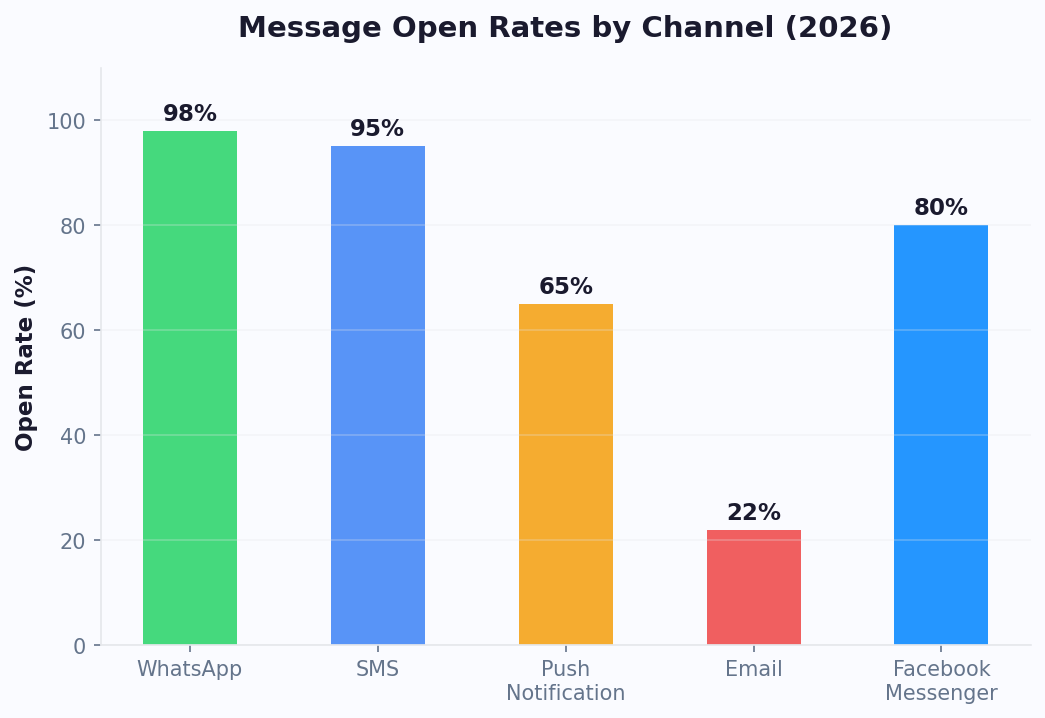
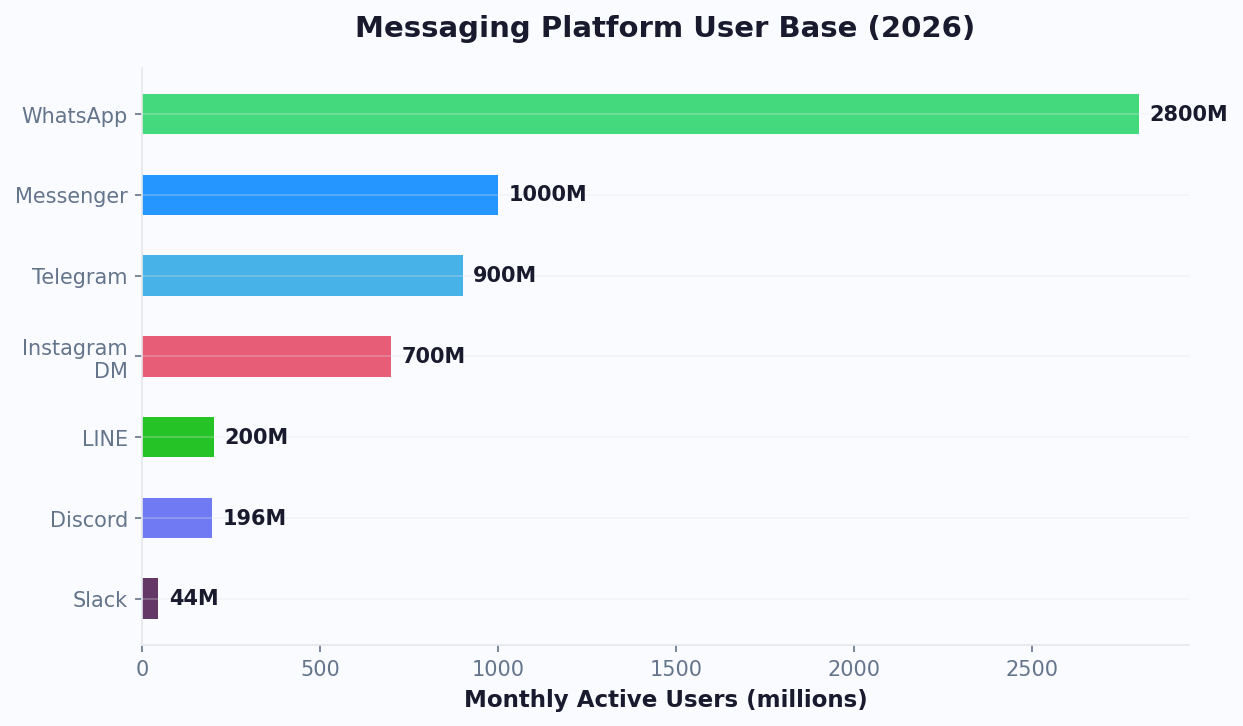
Facebook Messenger remains one of the most powerful customer engagement channels available to businesses today. With over 1.3 billion monthly active users worldwide, Messenger offers direct, personal access to customers in a space they already use daily. Unlike email inboxes that overflow with promotions, Messenger delivers your message straight to a notification that gets opened.
The numbers speak for themselves:
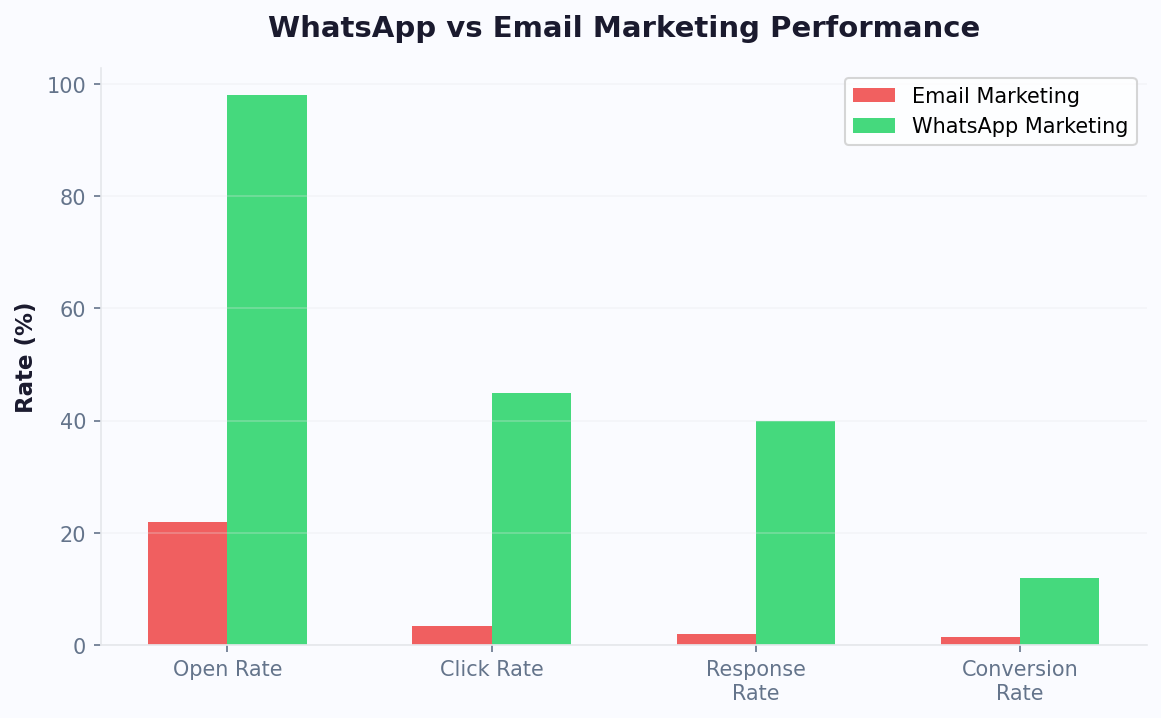
- 80% open rate for Messenger messages, compared to 20% for email
- 4.4x higher engagement than email campaigns (Hootsuite, 2025)
- 56% of consumers prefer messaging a business over calling (Meta Business Report, 2025)
- $7.2 billion in annual commerce facilitated through Messenger conversations
A Messenger chatbot transforms this passive channel into an active revenue driver. Instead of waiting for agents to respond, your chatbot answers instantly, guiding customers through product discovery, purchase decisions, and post-sale support without human intervention.
The business case is compelling. According to Gartner's customer engagement research, companies deploying Messenger chatbots report a 35% reduction in support ticket volume, a 28% increase in lead capture rates, and 3x faster response times. For ecommerce brands, Messenger bots drive an average 20% uplift in conversion rates by engaging shoppers at the moment of intent.
What makes Messenger particularly powerful is its integration with the broader Meta ecosystem. You can run click-to-Messenger ads on Facebook and Instagram, funneling paid traffic directly into automated chatbot conversations. This eliminates the traditional landing-page-to-form friction and captures leads in a conversational format that feels natural to users.
In 2026, Messenger chatbots aren't a novelty — they're a core component of any omnichannel customer engagement strategy.
Messenger Platform Capabilities and Features
The Messenger Platform has evolved significantly, offering a rich set of tools that go far beyond simple text exchanges. Understanding these capabilities is critical to building a chatbot that fully leverages the channel.
Core Messaging Features
| Feature | Description | Best Use Case |
|---|---|---|
| Text Messages | Standard text with links and formatting | FAQs, quick answers |
| Quick Replies | Tappable buttons below a message (up to 13) | Multiple-choice responses |
| Generic Templates | Cards with image, title, subtitle, and buttons | Product showcases |
| Carousel Templates | Horizontally scrollable cards | Product catalogs, listings |
| Receipt Templates | Structured order confirmation | Post-purchase confirmation |
| Media Messages | Images, videos, audio, and files | Tutorials, brochures |
| Persistent Menu | Always-visible menu at the bottom of chat | Navigation, quick access |
| Webview | Embedded web content inside Messenger | Forms, payment, custom UI |
Automation and AI Tools
Messenger supports several automation layers that make chatbots more intelligent:
- Ice Breakers: Pre-set conversation starters displayed to new users, guiding them into specific flows
- NLP Built-In: Meta's Wit.ai integration detects intents and entities from free-text messages automatically
- Handover Protocol: Seamlessly transfer conversations between the bot and live agents using the handover protocol API
- One-Time Notifications: Request permission to send a single follow-up message after the 24-hour messaging window closes
- Recurring Notifications: Opt users into daily, weekly, or monthly updates (requires user consent)
Commerce Features
Messenger has become a full-fledged commerce channel:
- Product Catalogs: Display your Facebook Shop products directly in chat
- In-Chat Payments: Accept payments without leaving the conversation (available in select regions)
- Order Updates: Send shipping notifications and delivery tracking via automated templates
With Conferbot's AI chatbot builder, you can leverage all of these features without writing a single line of code. The visual flow editor maps directly to Messenger's template types, making it easy to create rich, interactive experiences.
How to Set Up Your Messenger Chatbot Step by Step
Getting a Messenger chatbot live takes less than an hour with the right platform. Here's a step-by-step walkthrough using Conferbot's no-code builder.
Step 1: Create a Facebook Page
Every Messenger chatbot is connected to a Facebook Business Page. If you don't have one, create it at business.facebook.com. Ensure your page has:
- A complete business profile (name, category, description, contact info)
- A profile picture and cover photo
- Admin access for the person setting up the chatbot
Step 2: Connect Your Page to Conferbot
- Log into your Conferbot dashboard and navigate to Channels > Messenger
- Click "Connect Facebook Page"
- Authorize Conferbot via Facebook Login — grant the required permissions (pages_messaging, pages_manage_metadata)
- Select the Facebook Page you want to connect
- Your page now appears as a connected channel in the dashboard
Step 3: Build Your Conversation Flow
Design your chatbot using the visual flow builder:
- Create a Welcome Message — this is the first thing users see when they open a conversation
- Set up Ice Breakers — these appear as suggested conversation starters (e.g., "View Products," "Get Support," "Book Appointment")
- Build response flows for each ice breaker using cards, carousels, quick replies, and text
- Add input collection nodes to capture lead information (name, email, phone)
- Configure conditional logic to route users based on their responses
- Set up a fallback flow for unrecognized inputs
Step 4: Configure the Persistent Menu
The persistent menu sits at the bottom of every conversation and provides always-accessible navigation:
- Add 1-3 top-level menu items (e.g., "Main Menu," "Talk to Human," "Visit Website")
- Each item can trigger a bot flow, open a URL, or initiate a handoff
Step 5: Test and Publish
Use Conferbot's simulator to test every flow end-to-end. Check that carousels render correctly, buttons trigger the right flows, and fallbacks handle unexpected inputs gracefully. Once testing is complete, publish your bot. It goes live immediately on your Facebook Page's Messenger.
Your Messenger chatbot is now ready to engage every visitor to your Facebook Page, respond to ad clicks, and handle customer conversations around the clock.
Messenger Marketing Strategies That Drive Revenue
Messenger chatbots aren't just support tools — they're powerful marketing engines. Here are proven strategies that businesses use to generate revenue through Messenger automation.
1. Click-to-Messenger Ads
According to Sprout Social's 2025 benchmarks, click-to-Messenger ads achieve 3-5x higher conversion rates than standard landing page campaigns. This is the highest-ROI strategy for Messenger marketing. Instead of sending Facebook ad traffic to a landing page, you send them directly into a Messenger conversation with your bot.
- Why it works: The conversion funnel is shorter — no form fills, no page loads, just a conversation
- Average results: 3-5x higher conversion rates vs. landing page ads, 50-70% lower cost per lead
- Best for: Lead generation, product launches, event registrations, free trial signups
Our detailed Messenger chatbot Facebook ads guide covers campaign setup and optimization. Pair click-to-Messenger ads on both Facebook and Instagram for maximum reach. Your chatbot qualifies the lead immediately and routes hot prospects to your sales team.
2. Sponsored Messages
Re-engage users who have previously interacted with your bot. Sponsored messages appear directly in the user's inbox:
- Promote flash sales to engaged subscribers
- Re-engage users who abandoned a product browsing flow
- Drive attendance to webinars or events
3. Comment-to-Messenger Automation
Automatically send a Messenger message to anyone who comments on your Facebook posts:
- Post a product photo with the caption: "Comment 'DEAL' to get 20% off"
- Your chatbot detects the comment keyword and sends a personalized coupon via Messenger
- This generates massive engagement on your posts while building your Messenger subscriber list
4. Drip Campaigns via Recurring Notifications
With user consent, send ongoing value-driven content:
- Educational series: 5-day email-style courses delivered via Messenger (2-3x higher completion rates than email)
- Product drops: Notify subscribers about new arrivals or restocks
- Content distribution: Share blog posts, videos, and guides directly in Messenger
5. Lead Qualification Funnels
Replace static web forms with conversational qualification:
- Ask 3-5 qualifying questions using quick replies (budget, timeline, company size, use case)
- Score the lead based on responses
- Hot leads: route to sales rep via live handoff
- Warm leads: nurture with automated follow-up sequences
- Cold leads: add to a low-touch drip campaign
For advanced Messenger marketing strategies including drip sequences and re-engagement campaigns, see our Messenger chatbot marketing guide. Track campaign performance through Conferbot's analytics dashboard to measure open rates, click-through rates, conversion rates, and revenue per conversation. Continuously optimize your messaging based on data, not guesswork.
Automating Customer Support on Messenger
Customer support is where Messenger chatbots deliver the fastest return on investment. By automating repetitive inquiries, you free your human agents to focus on complex, high-value interactions.
The 80/20 Rule of Support Automation
Most businesses find that 80% of support queries fall into 15-20 repetitive categories. These are perfect for chatbot automation:
- Store hours and locations
- Shipping and delivery timelines
- Return and refund policies
- Order status inquiries
- Product availability and pricing
- Account management (password resets, profile updates)
- Warranty and guarantee information
For a broader look at conversational lead strategies, check our chatbot lead qualification guide. Automating these queries with a Messenger chatbot typically reduces support ticket volume by 40-60% within the first month.
Building an Effective Support Bot
Structure your support chatbot around a topic-based menu system:
- Main Menu: "Order Help," "Product Questions," "Account Issues," "Talk to Agent"
- Sub-Menus: Each category branches into specific topics (e.g., Order Help → Track Order, Return Item, Cancel Order)
- Resolution Flows: Step-by-step guided resolution for each topic
- Escalation Paths: Automatic handoff to human agents when the bot cannot resolve the issue
Smart Escalation with Handover Protocol
Messenger's Handover Protocol enables seamless bot-to-human transitions:
- The bot collects all relevant context (order number, issue description, customer details) before handing off
- The agent sees the full conversation history — no repetition needed
- When the agent resolves the issue, they pass control back to the bot for CSAT collection
Measuring Support Performance
| Metric | Bot Benchmark | Without Bot |
|---|---|---|
| First Response Time | Under 3 seconds | 4-8 hours |
| Resolution Rate (automated) | 65-80% | N/A |
| CSAT Score | 4.2-4.5 / 5 | 3.5-4.0 / 5 |
| Cost per Interaction | $0.10-0.25 | $5-12 |
| Availability | 24/7/365 | Business hours only |
The key to high CSAT scores is knowing when not to automate. Emotional or complex issues should always route to a human agent. Use sentiment detection and keyword triggers to identify escalation-worthy conversations early. A well-designed support bot doesn't replace your team — it amplifies them, ensuring every customer gets an instant first response while humans handle the cases that require empathy and judgment.
Messenger vs. Other Chatbot Channels: A Comparison
Choosing the right channel for your chatbot depends on where your customers are and what you want to achieve. Here's how Messenger compares to other popular chatbot channels.
| Feature | Messenger | Instagram DM | Website Widget | |
|---|---|---|---|---|
| Monthly Active Users | 1.3B | 2.7B | 2B | Varies by site |
| Rich Media Support | Excellent (carousels, cards, webview) | Good (lists, buttons, media) | Good (quick replies, stories) | Excellent (fully customizable) |
| Commerce Features | Product catalog, in-chat payments | Product messages, cart | Product tags, shopping | Full ecommerce integration |
| Ad Integration | Click-to-Messenger ads | Click-to-WhatsApp ads | Click-to-Instagram DM ads | Landing page CTAs |
| Messaging Window | 24 hours (standard), extended with tags | 24 hours (strict) | 24 hours | No restrictions |
| Recurring Notifications | Yes (with opt-in) | Yes (with templates) | Limited | Push notifications |
| NLP Support | Wit.ai built-in | Via platform | Via platform | Via platform |
| Best For | Marketing, commerce, lead gen | Support, notifications, global reach | Brand engagement, visual products | General support, lead capture |
When to Choose Messenger
Messenger is the best choice when:
- Your audience is primarily on Facebook (strong in North America, Europe, Australia)
- You want to run paid advertising campaigns that funnel directly into chatbot conversations
- You need rich media experiences like carousels and webviews for product showcase
- You're focused on lead generation and want to replace web forms with conversational funnels
Multi-Channel Strategy
The best approach for most businesses is to deploy chatbots across multiple channels simultaneously. With Conferbot, you build your chatbot logic once and deploy it to Messenger, Instagram, WhatsApp, and your website from a single dashboard. This omnichannel approach ensures you meet customers wherever they prefer to communicate.
The key insight is that different channels attract different customer segments and intents. For the Instagram-specific implementation, see our Instagram DM automation guide. Messenger excels at discovery and marketing; WhatsApp dominates for transactional support; Instagram thrives for visual product engagement. A unified chatbot platform like Conferbot lets you tailor the experience per channel without duplicating effort.
Advanced Messenger Bot Features: NLP, Payments, and Integrations
Once your basic Messenger chatbot is live and handling routine conversations, it's time to unlock advanced features that dramatically increase its effectiveness.
NLP-Powered Conversations
Basic chatbots rely on button taps and keyword matching. Advanced bots understand natural language, allowing users to type freely:
- "I need to return my order" → triggers return flow
- "What's your best deal right now?" → shows current promotions
- "I ordered 3 days ago and haven't received anything" → identifies intent (order tracking) and sentiment (frustrated)
Conferbot's NLP engine supports intent classification, entity extraction, and sentiment analysis out of the box. Train it with just 10-15 example phrases per intent, and it generalizes to handle the many ways customers phrase the same request.
CRM and API Integrations
Connect your Messenger chatbot to your business tools via API integrations:
- CRM (Salesforce, HubSpot): Sync lead data, update contact records, trigger sales workflows via the integrations hub
- Help Desk (Zendesk, Freshdesk): Create and update support tickets automatically
- Ecommerce (Shopify, WooCommerce): Pull order data, product inventory, and customer purchase history
- Calendar (Google Calendar, Calendly): Book appointments and send confirmations
- Payment (Stripe, PayPal): Process transactions directly within the chat flow
Webview for Custom Experiences
Messenger's Webview feature lets you embed custom web pages inside the chat window. Use it for:
- Complex forms that don't work well as chat messages
- Interactive product configurators
- Payment processing with a custom checkout flow
- Survey and feedback collection with rich UI elements
Analytics and Optimization
Use Conferbot's analytics to track every aspect of your Messenger bot's performance:
| Metric Category | Key Metrics |
|---|---|
| Engagement | Open rate, response rate, session duration |
| Conversion | Lead capture rate, purchase rate, booking rate |
| Support | Resolution rate, escalation rate, CSAT |
| Growth | New subscribers, retention rate, churn rate |
Set up weekly performance reviews and use A/B testing to optimize message copy, flow structures, and call-to-action placement. The best Messenger chatbots improve continuously based on real user behavior data, not assumptions.
E-commerce Revenue Strategies for Messenger Chatbots
E-commerce brands represent the largest adopter segment for Messenger chatbots, and for good reason — the platform's rich media capabilities, direct ad integration, and conversational commerce features create a complete sales channel within the messaging experience.
Product Discovery and Recommendation Engine
Unlike a static product catalog, a Messenger chatbot acts as a personal shopping assistant. Through conversational questions about preferences, budget, occasion, and style, the bot narrows thousands of products to 3-5 personalized recommendations. This guided discovery experience converts at 4-6x the rate of standard product listing pages because it mimics the in-store personal shopping experience that drives high ticket sizes.
Implementation is straightforward with Messenger's product catalog integration. Connect your Facebook Shop catalog to the chatbot, define 3-5 qualifying questions ("What's the occasion?", "What's your budget range?", "Any color preferences?"), and map answer combinations to product recommendations displayed as rich carousels with images, pricing, and "Buy Now" buttons.
Abandoned Cart Recovery via Messenger
Messenger-based cart recovery outperforms email by 3-5x in conversion rate. The flow is simple but powerful:
- Customer adds items to cart but leaves without purchasing
- Within 1 hour, the chatbot sends a Messenger reminder with product images: "Still thinking about the Blue Leather Jacket? It's still in your cart."
- If no action in 24 hours, follow up with urgency: "Only 3 left in your size!"
- If still no action, offer an incentive: "Here's 10% off to complete your order. Code: SAVE10"
Brands using this three-step Messenger recovery sequence achieve 25-35% cart recovery rates compared to 5-10% for email-only recovery. The key is timing and personalization — generic messages underperform by 60% compared to product-specific reminders with images.
Post-Purchase Engagement and Repeat Sales
The sale is just the beginning of the Messenger relationship. Post-purchase chatbot flows drive repeat business:
- Shipping updates: Automated tracking notifications keep customers informed without them asking
- Delivery confirmation + review request: 2 days after delivery, ask for feedback and direct satisfied customers to leave reviews
- Product care tips: 1 week post-purchase, send usage tips that increase product satisfaction and reduce returns
- Replenishment reminders: For consumable products, remind customers when they're likely running low
- Cross-sell recommendations: Based on purchase history, suggest complementary products at optimal timing
According to Sprout Social research, customers who receive post-purchase engagement via Messenger have a 48% higher repeat purchase rate and 35% higher lifetime value compared to those who only receive email communications. The personal nature of messaging creates stronger brand relationships than any other digital channel. For comprehensive abandoned cart strategies, see our abandoned cart recovery chatbot guide.
Messenger Policies, Limitations, and Compliance in 2026
Building an effective Messenger chatbot requires understanding and working within Meta's platform policies. Violations can result in temporary messaging blocks, reduced reach, or permanent page restrictions. Here is what you need to know to stay compliant in 2026.
The Messaging Window Rules Explained
Meta's messaging policies center around the 24-hour standard messaging window. When a user messages your page, you have 24 hours to respond with any content type. After this window closes, your options become limited:
| Message Type | When Available | Cost | Content Restrictions |
|---|---|---|---|
| Standard Messages | Within 24h of user message | Free | Any content |
| Message Tags | Anytime (specific events) | Free | Strictly transactional only |
| Sponsored Messages | Anytime (to existing contacts) | Paid (ad rates) | Promotional content allowed |
| Recurring Notifications | Anytime (with opt-in) | Free | Content must match opt-in topic |
Message Tags: What You Can and Cannot Do
Message tags allow you to send messages outside the 24-hour window for specific, approved use cases:
- CONFIRMED_EVENT_UPDATE: Updates to confirmed event registrations (date changes, cancellations, venue changes). Cannot be used for promotional event announcements.
- POST_PURCHASE_UPDATE: Order confirmations, shipping updates, delivery notifications. Cannot include upsell offers or promotional content.
- ACCOUNT_UPDATE: Payment status, account security alerts, profile changes. Cannot be used for marketing any products.
- HUMAN_AGENT: Enables human agents to respond outside the 24-hour window. Only available when an automated system has already been unable to resolve the issue.
Meta actively monitors message tag usage and penalizes misuse. The Messenger Platform documentation provides detailed examples of approved and prohibited use cases for each tag. When in doubt, err on the side of caution — a temporary messaging restriction is far more damaging than one missed marketing message.
Recurring Notifications Best Practices
Recurring notifications are the compliant way to maintain ongoing messaging outside the 24-hour window. Users must explicitly opt in through a dedicated permission request, and you must specify the topic and frequency. Best practices for maintaining high opt-in rates and low opt-out rates:
- Clearly state the value proposition: "Get weekly style tips and exclusive early access to sales"
- Offer frequency choice: daily, weekly, or monthly
- Deliver genuine value in every notification — pure promotional blasts drive opt-outs
- Include an easy one-tap unsubscribe option in every message
- Monitor your opt-out rate weekly — if it exceeds 3%, reconsider your content strategy
Data Privacy and Compliance
Beyond Meta's platform policies, ensure your Messenger chatbot complies with data protection regulations applicable to your audience. Under GDPR, CCPA, and similar frameworks, you must disclose what data you collect through chatbot conversations, provide access and deletion mechanisms, and maintain clear consent records. The Meta Business Suite provides data management tools, but ultimate compliance responsibility lies with you as the data controller.
Best Practices for Messenger Chatbot Success
Building a Messenger chatbot is the easy part. Making it effective requires thoughtful design and ongoing optimization. Here are the best practices that separate high-performing bots from mediocre ones.
1. Nail the First Impression
Your welcome message sets the tone for the entire experience. A great welcome message should:
- Greet the user by name (Messenger provides first name automatically)
- Clearly state what the bot can do in one sentence
- Offer 2-3 immediate action paths via quick reply buttons
- Feel warm and human, not corporate or robotic
Example: "Hi Sarah! I'm the [Brand] assistant. I can help you find products, track orders, or answer questions. What would you like to do?"
2. Follow Meta's Platform Policies
Messenger has strict policies that can get your bot suspended if violated:
- 24-Hour Rule: You can only send free-form messages within 24 hours of the user's last message. After that, use approved message tags or sponsored messages.
- No Promotional Content in Message Tags: Tags like CONFIRMED_EVENT_UPDATE and POST_PURCHASE_UPDATE are for transactional messages only, not promotions.
- Opt-In for Recurring Notifications: Users must explicitly opt in to receive recurring messages.
- Transparent Bot Identification: Make it clear that users are chatting with a bot, not a human.
3. Design for Mobile First
Over 90% of Messenger usage happens on mobile devices. Design accordingly:
- Keep messages under 200 characters
- Use quick replies instead of asking users to type
- Test carousels and images on small screens
- Avoid long forms — collect information one field at a time
4. Build Personality Into Your Bot
Your chatbot represents your brand. Give it a consistent personality:
- Define a tone (friendly, professional, playful, authoritative)
- Use the same voice across all messages
- Add appropriate humor where it fits your brand
- Use emojis thoughtfully — they increase engagement by 15-20% when used sparingly
5. Plan for Failure Gracefully
Every chatbot encounters messages it can't handle. Plan for graceful failures:
- After 1 failed attempt: rephrase with clearer options
- After 2 failed attempts: offer a "Talk to Human" button
- Never loop endlessly — always provide an exit path
- Log all unhandled messages to improve your bot's knowledge base over time
6. Measure What Matters
Focus on metrics that tie directly to business outcomes:
- Revenue per conversation — not just volume
- Resolution rate — not just response speed
- Subscriber growth — net new, accounting for opt-outs
- CSAT after bot interactions — compare with human agent CSAT
Review performance weekly, identify drop-off points, test improvements, and iterate. The best Messenger chatbots are never "done" — they're constantly evolving based on real customer behavior. For additional guidance on designing effective conversation flows, read our chatbot conversation flow templates guide. And for the complete picture on analytics and optimization, see our chatbot analytics metrics to track resource.
Was this article helpful?
Build and deploy in 10 minutes. No coding needed.
Facebook Messenger Chatbot for Business FAQ
Everything you need to know about chatbots for facebook messenger chatbot for business.
About the Author
Deepak is the founder of Conferbot and writes about building, deploying, and improving AI chatbots.
View all articles