What Is the Best AI Chatbot for WooCommerce in 2026?
The best AI chatbot for WooCommerce in 2026 is not a simple FAQ widget. It is a connected shopping assistant that understands your product catalog, answers pre-purchase questions, looks up orders, recovers abandoned carts, escalates complex issues to a human, and reports revenue impact inside your analytics workflow.
For most WooCommerce stores, Conferbot is the strongest fit because it combines AI answers, no-code flow building, knowledge base training, omnichannel deployment, WhatsApp automation, and live chat handoff without forcing merchants to stitch together multiple WordPress plugins.
WooCommerce stores have a different challenge from pure SaaS websites. A visitor may ask about sizing, stock, delivery time, compatibility, ingredients, warranties, returns, coupon codes, bulk discounts, order status, or a failed payment. A strong WooCommerce AI chatbot needs to answer those questions from store-specific data, not generic AI guesses. The official WooCommerce platform powers over 5 million active stores, making it the most popular open-source ecommerce solution on the web.
The Shortlist Criteria
| Capability | Why It Matters for WooCommerce | What to Look For |
|---|---|---|
| Product question answering | Reduces hesitation before checkout | Catalog sync, product pages, FAQs, policy training |
| Order lookup | Deflects the highest-volume support request | Secure order number or email verification and status retrieval |
| Cart recovery | Turns abandoned sessions into revenue | Exit intent, return-visit prompts, WhatsApp/email follow-up |
| Product recommendations | Increases average order value | Guided selling, cross-sells, upsells, inventory-aware suggestions |
| Human handoff | Protects experience for complex issues | Conversation history, sentiment triggers, VIP routing |
| Performance | WooCommerce SEO depends on speed | Async widget loading, low script weight, mobile-safe placement |
| Analytics | Proves ROI beyond conversation volume | Recovered revenue, assisted revenue, deflection rate, CSAT |
If you are still comparing WordPress-specific options, start with our WordPress chatbot plugin comparison. This guide goes deeper on the WooCommerce use cases that decide revenue: product questions, order lookup, and cart recovery.
WooCommerce powers over 5 million online stores globally, and the platform's open-source flexibility makes it an ideal foundation for advanced chatbot integration. Unlike hosted e-commerce platforms that restrict third-party code, WooCommerce gives store owners complete control over how chatbots interact with product data, customer accounts, order management, and payment processing — enabling deeper automation than any other e-commerce platform.
Why WooCommerce Stores Need an AI Chatbot Now
WooCommerce gives merchants flexibility, ownership, and deep WordPress control. That flexibility also creates operational complexity. Many stores run custom themes, variable products, page builders, subscription extensions, multilingual plugins, shipping plugins, payment plugins, and separate support tools. Customers do not care about that stack. They expect instant answers.
The commercial impact is direct. When shoppers cannot confirm compatibility, sizing, shipping cost, delivery time, return policy, or trust signals, they pause. Pauses become abandoned carts. According to Baymard Institute research, the average online cart abandonment rate sits near 70%, with unexpected costs and complicated checkout being the top reasons. When existing customers cannot find tracking information, they open support tickets. Support queues grow, response time slows, and the same team that should be merchandising, optimizing campaigns, or improving retention spends hours answering repetitive questions.
Where AI Chatbots Create WooCommerce ROI
- Pre-purchase conversion: The chatbot answers product and policy questions on product pages, category pages, and cart pages before doubt turns into exit.
- Average order value: Guided recommendations help customers choose bundles, accessories, refills, or premium variants.
- Cart recovery: On-site prompts and follow-up messages recover shoppers who abandon before checkout.
- Support deflection: Order status, delivery timelines, returns, exchanges, warranty questions, and store policies are resolved instantly.
- Customer data capture: Conversations reveal objections, product gaps, common confusion, and high-intent segments that static analytics miss.
For a WooCommerce store with $75,000 in monthly revenue, a chatbot does not need heroic performance to matter. Recovering 8% of abandoned carts, lifting AOV by 8%, and deflecting 35% of repetitive tickets can create thousands of dollars in monthly value. Use the chatbot ROI calculator to model your own traffic, order value, and support volume.
Related: Recover Abandoned Carts With a Chatbot: Timing, Channels, and Conversion Playbook
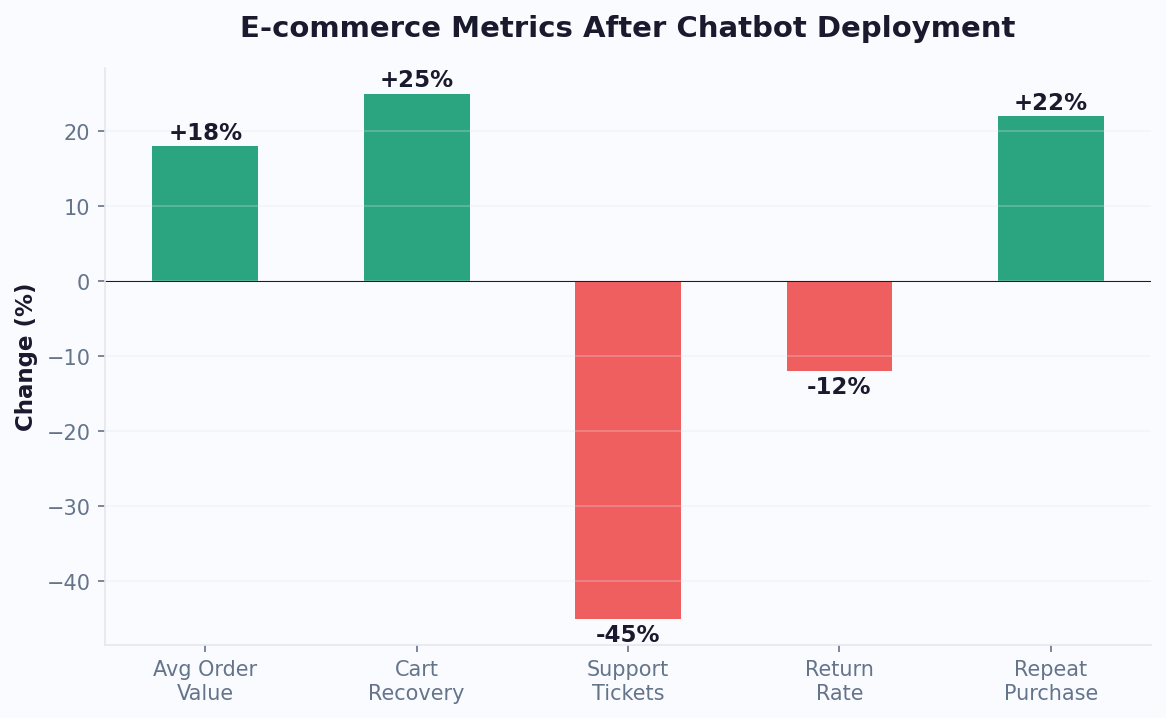
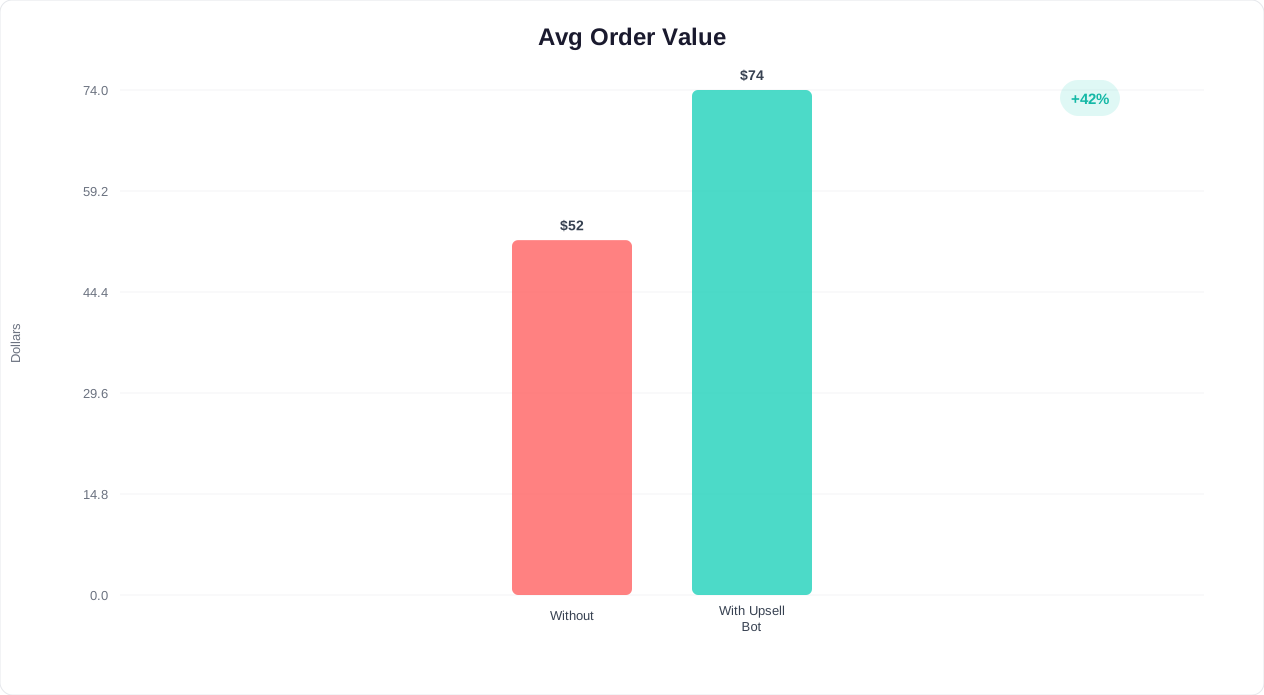
Store owners who configure product recommendation logic within their chatbot typically see average order values increase by 15-25% compared to customers who browse without chatbot assistance.
Product Questions: Turning Browse Sessions Into Confident Purchases
Product questions are the highest-leverage conversations in WooCommerce because they happen before revenue is won or lost. A shopper asking about size, compatibility, materials, ingredients, warranty, shipping, or returns is not a casual visitor. They are often one good answer away from buying.
A strong WooCommerce chatbot should use three layers of knowledge:
- Product catalog data: Titles, descriptions, attributes, categories, tags, variations, prices, sale status, stock status, images, and linked products.
- Store policy data: Shipping rates, return windows, exchange rules, payment methods, warranties, taxes, subscription terms, and international delivery limits.
- Brand and support content: FAQs, blog buying guides, size charts, ingredient pages, comparison pages, and support macros.
With these layers connected, the chatbot can answer questions like: Does this work with iPhone 15?, Which size should I choose if I am between sizes?, Is this product vegan?, Can I get it by Friday?, or What is the difference between the standard and pro version?
Best Practice: Answer, Then Move the Shopper Forward
The best product answer is not just accurate. It is useful commercially. A weak bot says, Yes, this item comes in medium. A better bot says, Yes, medium is in stock in black and navy. Based on the fit notes, choose medium for a regular fit or large if you prefer room through the shoulders. Want me to show the two colors side by side?
That answer resolves uncertainty and creates a next step. Use rich media cards for product images, variant buttons, pricing, and add-to-cart actions where supported. For larger catalogs, build guided selling flows with the same no-code principles covered in our chatbot building guide.
Product Question Flows by Store Type
| WooCommerce Store Type | High-Intent Questions | Recommended Chatbot Flow |
|---|---|---|
| Fashion and apparel | Size, fit, fabric, returns | Size finder plus return reassurance |
| Beauty and skincare | Skin type, ingredients, routine order | Consultation quiz plus routine bundle |
| Electronics and accessories | Compatibility, warranty, specs | Compatibility checker plus accessory upsell |
| Supplements and wellness | Usage, allergens, subscriptions | Goal-based recommendation plus disclaimer and handoff |
| Home and furniture | Dimensions, delivery, materials | Room/use-case finder plus delivery estimate |
| B2B products | Bulk pricing, lead time, quotes | Qualification flow plus sales handoff |
Related: How to Add an AI Chatbot to Webflow: Designer-Friendly Setup, Styling, and Lead Capture
Order Lookup: Automating WooCommerce WISMO Support
For many WooCommerce stores, the most common support question is still Where is my order? These WISMO requests are repetitive, time-sensitive, and frustrating for both customers and support teams. A WooCommerce order lookup chatbot can resolve them in seconds.
How Order Lookup Should Work
- The customer asks for order status or taps a Track order quick reply.
- The chatbot asks for an order number and email address, or another verification field configured by the store.
- The bot checks WooCommerce order status and, when available, shipment tracking data from the shipping extension or fulfillment platform.
- The bot replies with a clear status: payment received, processing, packed, shipped, in transit, out for delivery, delivered, delayed, refunded, or cancelled.
- If the order has a carrier tracking link, the bot displays it. If the shipment is delayed or the customer reports a problem, the bot routes to a human with full context.
The customer gets an answer without waiting. The support team avoids a low-value ticket. The business improves post-purchase trust.
Order Lookup Guardrails
Order lookup needs stricter design than general FAQs because it touches customer data. Do not expose order details from only a name. Require an order number plus billing email, phone, or another verification field. Avoid displaying sensitive payment details. Log lookup events for auditability. Escalate payment disputes, fraud concerns, address changes after fulfillment, and chargeback language to a human agent. For developers building custom integrations, the WooCommerce REST API documentation covers authentication and order endpoints.
Conferbot can sit in the front end as a website chatbot and pass verified requests into your connected systems through the integrations hub or API workflows. If your store already uses helpdesk tools, route unresolved order conversations with transcript, order ID, customer email, and topic so agents do not ask customers to repeat themselves.
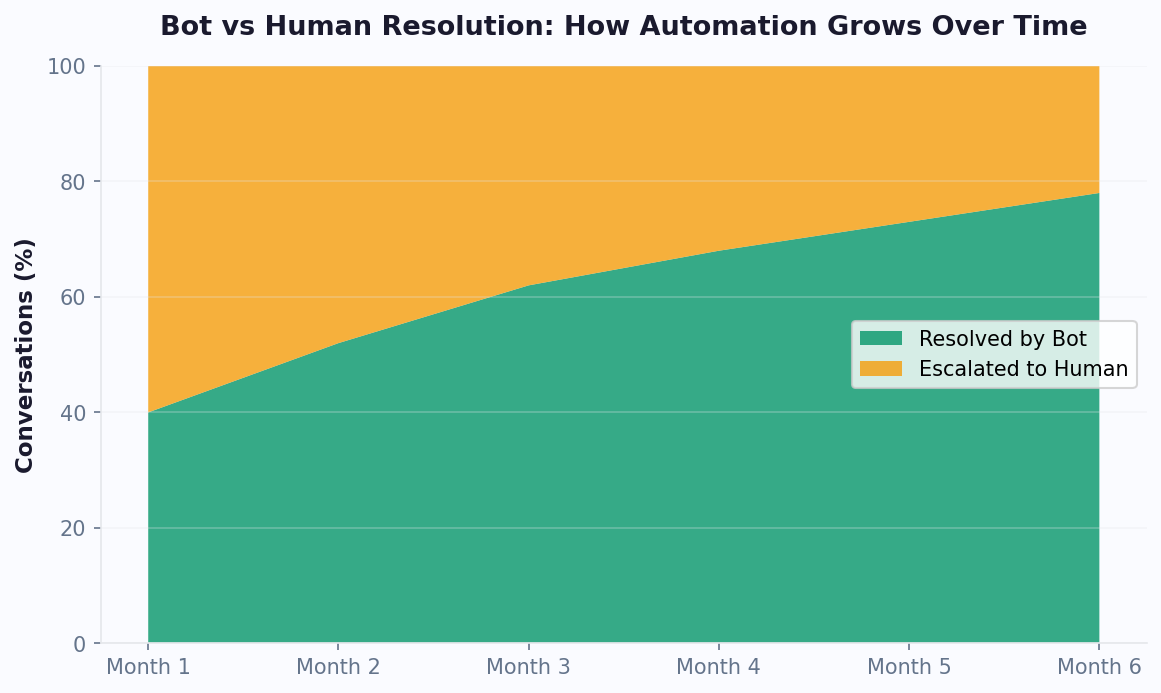
Order Support Automation Matrix
| Request Type | Automation Level | Recommended Response |
|---|---|---|
| Order status | Fully automated | Verify customer and show current status |
| Tracking link | Fully automated | Show carrier, tracking number, and ETA |
| Return eligibility | Mostly automated | Check date and policy, then collect reason |
| Exchange request | Partially automated | Collect desired variant and create support task |
| Address change | Conditional | Automate only before fulfillment begins |
| Payment dispute | Human required | Escalate with urgency and context |
| Lost package | Human-assisted | Collect facts, show carrier steps, escalate |
Related: How to Add an AI Chatbot to Wix in 5 Minutes: No-Code Setup and Lead Capture Guide
Cart Recovery: Recovering WooCommerce Revenue Before and After Abandonment
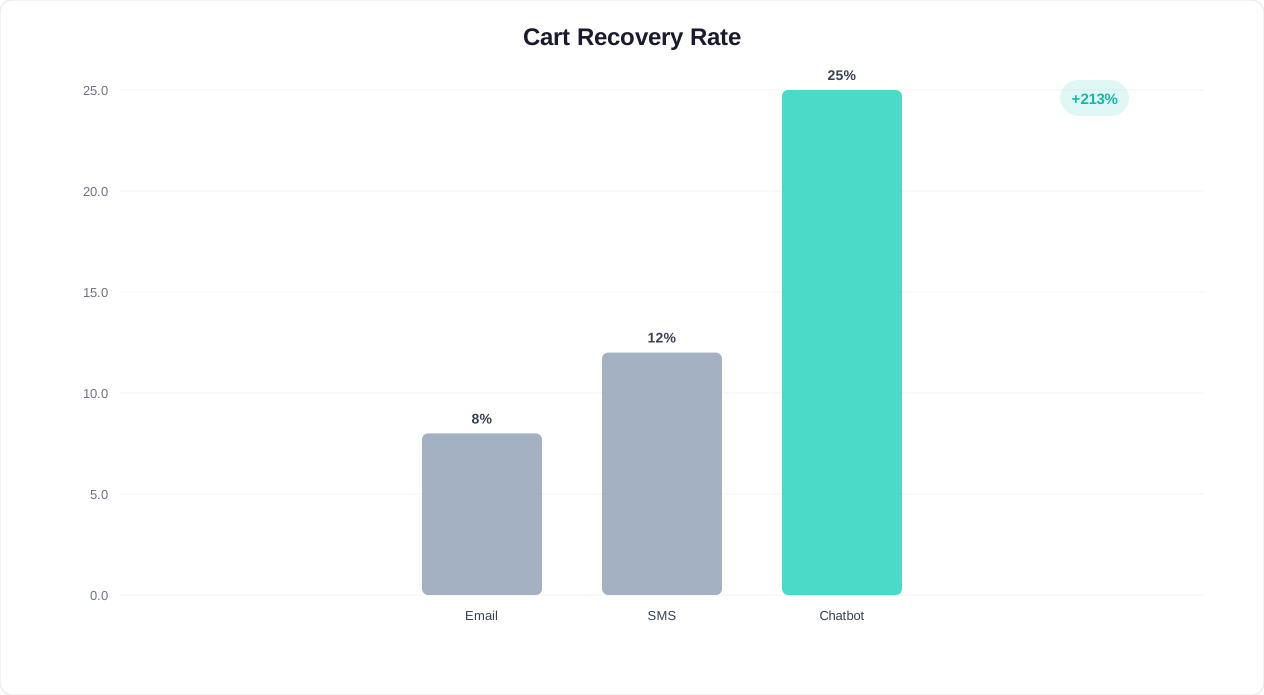
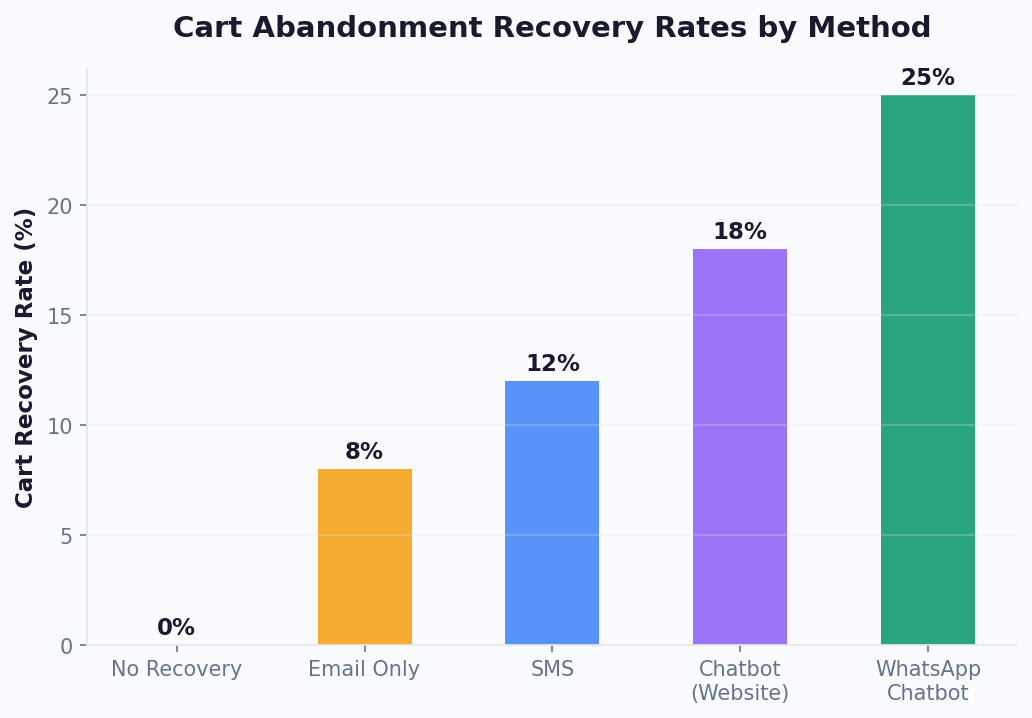
WooCommerce cart abandonment is not solved by one email. The highest-performing recovery systems combine on-site intervention, return-visit recognition, and messaging-channel follow-up. A chatbot is valuable because it can ask why the shopper is hesitating and resolve the objection in real time.
For a deep standalone strategy, read our abandoned cart recovery chatbot guide. The WooCommerce-specific version should cover three moments.
1. Before the Cart Is Abandoned
Trigger the chatbot when a shopper has cart items and shows hesitation: long idle time on cart, repeated shipping page visits, coupon field behavior, exit intent, or navigation away from checkout. The bot should ask a helpful question, not push a discount immediately.
Example: Still deciding? I can help with shipping, returns, sizing, or checkout questions before you go.
2. After the Shopper Leaves
If the shopper is known and opted in, send a recovery message through the best available channel. WhatsApp is especially strong for time-sensitive recovery because customers read messages quickly and can reply with objections. Email remains useful as a fallback. Messenger and Instagram can work well for stores with active social audiences.
3. When the Shopper Returns
When a returning visitor still has cart context, the chatbot should resume the journey: Welcome back. Your cart is still saved. Want help comparing these two items or checking delivery time? This feels more useful than a generic welcome message.
WooCommerce Cart Recovery Timing
| Timing | Channel | Message Goal | Offer Strategy |
|---|---|---|---|
| On-site, before exit | Website chatbot | Answer objection | No discount first |
| 30-60 minutes | WhatsApp or email | Remind with cart link | Free shipping only if needed |
| 24 hours | WhatsApp/email | Create reason to return | Small incentive or social proof |
| 48-72 hours | Email/SMS fallback | Final recovery attempt | Time-limited discount for margin-safe carts |
The best WooCommerce chatbot for cart recovery should integrate with cart events, segment shoppers by cart value, avoid discounting low-margin products, and report recovered revenue in chatbot analytics. For more on optimizing the WooCommerce checkout experience alongside chatbot recovery, the WooCommerce Checkout documentation covers the latest block-based checkout improvements.
Related: How to Calculate Chatbot ROI: Formula, Benchmarks, and Free Calculator
Product Recommendations and AOV: The Revenue Upside Beyond Support
A WooCommerce chatbot should not only reduce support load. It should help shoppers buy better. Guided product recommendations can increase average order value by matching the customer to the right product, then suggesting useful add-ons, bundles, subscriptions, or premium variants.
Recommendation Patterns That Work
- Guided finder: Ask 3-5 questions and recommend a short list instead of forcing customers through dozens of filters.
- Compatibility checker: For parts, accessories, electronics, and replacement items, confirm fit before purchase.
- Bundle builder: Recommend complementary products that solve the complete job, not just the first item.
- Replenishment assistant: For consumables, suggest subscriptions or reorder timing.
- Gift finder: Ask recipient, occasion, budget, and preference to recommend gift-ready products.
- Comparison assistant: Explain tradeoffs between similar variants, packages, or price tiers.
The commercial rule is simple: recommendations should feel like service. A chatbot that pushes random upsells damages trust. A chatbot that says, This filter fits your machine, and most customers also replace the gasket at the same time because it wears at a similar rate, creates value and lifts AOV.
AOV Plays by WooCommerce Extension Type
| Store Setup | Chatbot AOV Play | Example |
|---|---|---|
| Variable products | Variant guidance | Help choose size, color, capacity, or pack quantity |
| Subscriptions | Subscribe-and-save education | Compare one-time price with monthly savings |
| Product bundles | Bundle completion | Suggest a kit based on the customer's goal |
| Memberships | Member benefits | Show member pricing or exclusive items |
| Wholesale/B2B | Quote qualification | Collect quantity, delivery region, and timeline |
Conferbot's e-commerce chatbot templates provide a starting point for these flows. Customize them with your catalog, margin rules, and brand voice so recommendations match your actual merchandising strategy.
How to Set Up a WooCommerce AI Chatbot
You can launch a useful WooCommerce chatbot in phases. Start with the flows that deliver immediate value, then add deeper integrations once the conversation data shows what customers actually need.
Phase 1: Install the Website Chatbot
- Create your chatbot in Conferbot and choose an ecommerce template.
- Add the widget to WordPress using a plugin, tag manager, or embed code. The WordPress install guide covers the site-wide setup.
- Set the widget to load asynchronously and test mobile placement on product, cart, and checkout pages.
- Configure brand colors, welcome message, quick replies, and escalation options.
Phase 2: Train the AI on Store Content
- Add product FAQs, shipping policy, return policy, warranty terms, size guides, and buying guides to the AI knowledge base.
- Connect or import your most important product data, including attributes and variations.
- Mark sensitive topics that require escalation, such as medical claims, payment disputes, fraud, or legal questions.
- Test the chatbot with real customer questions from support tickets and search logs.
Phase 3: Connect WooCommerce Events
- Track add-to-cart, cart value, checkout start, and abandonment events.
- Connect order lookup through a secure API workflow or supported integration.
- Pass customer context to live agents when handoff happens.
- Configure analytics for recovered carts, assisted conversions, and resolved support conversations.
Phase 4: Add Omnichannel Recovery
Once the on-site chatbot is stable, extend high-value flows to WhatsApp, Messenger, Instagram, or email. For WooCommerce stores with mobile-heavy traffic, WhatsApp can be the difference between a missed cart and a recovered purchase. See our WhatsApp chatbot for ecommerce guide for channel-specific workflows.
Pre-Launch QA Checklist
- Ask 25 real product questions and verify answer quality.
- Test out-of-stock, low-stock, sale item, and variable product scenarios.
- Place a test order and verify order lookup with the right security checks.
- Abandon a test cart and confirm trigger timing.
- Test on mobile product, cart, and checkout pages.
- Confirm live handoff includes transcript and customer context.
- Check page speed before and after widget deployment.
If you have implemented Shopify automations before, the logic will feel familiar. Our Shopify chatbot installation guide is useful for comparing ecommerce flow patterns even though the WooCommerce integration layer is different.
Feature Checklist: Best WooCommerce Chatbot vs Basic Live Chat
Many WooCommerce stores start with live chat and later discover that live chat alone does not solve the underlying workload problem. Live chat still requires a human to answer every conversation. A chatbot handles repetitive work automatically and routes only the conversations that deserve human attention.
WooCommerce Chatbot Feature Checklist
| Feature | Basic Live Chat | AI WooCommerce Chatbot | Business Impact |
|---|---|---|---|
| 24/7 product answers | No, unless staffed | Yes | Captures after-hours buying intent |
| Order lookup | Manual | Automated with verification | Reduces WISMO tickets |
| Cart recovery | Manual or absent | Automated triggers and follow-up | Recovers lost sales |
| Guided selling | Agent-dependent | Consistent recommendation flows | Improves conversion and AOV |
| WhatsApp automation | Usually separate tool | Same flow across channels | Higher recovery engagement |
| Support handoff | Native | Native plus transcript context | Better agent productivity |
| Analytics | Chat volume and response time | Revenue, deflection, recovery, CSAT | Clearer ROI measurement |
The right model is not chatbot versus human. It is chatbot plus human. Use automation for repetitive questions and transactional lookups. Use live chat for exceptions, VIP customers, angry customers, edge cases, sales negotiation, and high-value consultative buying.
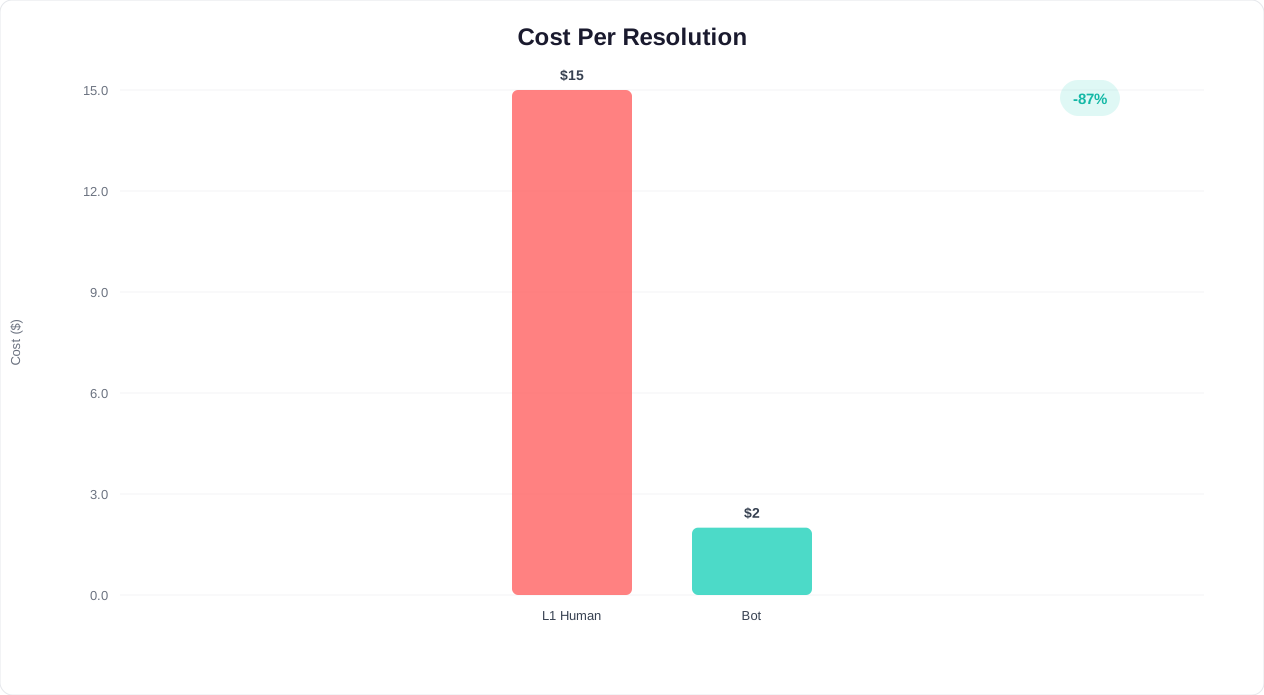
SEO, Speed, and Conversion Considerations for WordPress Stores
WooCommerce stores depend on organic traffic, paid landing pages, and product-page conversion. A chatbot should improve revenue without hurting Core Web Vitals, mobile usability, or crawlable content.
Performance Rules
- Load asynchronously: The chatbot script should not block product images, checkout scripts, or critical CSS.
- Use sensible triggers: Do not auto-open the chat immediately on every page. Trigger based on intent, time, scroll depth, or cart behavior.
- Protect mobile CTAs: Test sticky add-to-cart bars, cookie banners, chat bubbles, and checkout buttons together.
- Keep answers grounded: Train on your own policies and product content. Do not let AI invent delivery claims, refund promises, or product capabilities.
- Use analytics, not guesswork: Review unanswered questions weekly and add missing content to the knowledge base.
SEO Benefit: Better Engagement Signals and Content Insights
A chatbot does not directly replace SEO content, but it helps you find content gaps. If customers repeatedly ask whether a product is compatible with a specific model, that belongs on the product page. If shoppers ask the same shipping question on every high-traffic category page, add a visible shipping block. If the bot reveals that buyers compare two product lines, build a comparison article and link it from product pages. Google's Core Web Vitals documentation explains the performance thresholds that affect ranking, so test your pages with and without the chatbot widget loaded.
That feedback loop helps your WooCommerce site rank and convert. Combine chatbot insights with product-page SEO, internal links, schema, faster templates, and better category content. For general website setup, see how to add a chatbot to a website and AI chatbot for website.
Compliance and Trust
WooCommerce stores selling internationally should also consider consent, privacy, and data retention. Make it clear when customers are chatting with AI. Avoid collecting unnecessary sensitive information. For WhatsApp and marketing follow-ups, collect opt-in and respect message template rules. For more on privacy posture, read the chatbot GDPR compliance guide.
WooCommerce Chatbot Metrics That Actually Matter
Do not judge a WooCommerce chatbot by conversation count alone. A high number of chats can mean useful engagement, but it can also mean confusing product pages. Measure the business outcome behind the conversations.
Revenue Metrics
- Recovered cart revenue: Orders completed after a chatbot cart recovery interaction.
- Chatbot-assisted revenue: Orders where the shopper interacted with the chatbot before purchase.
- AOV lift: Average order value for chatbot-assisted buyers compared with non-chat buyers.
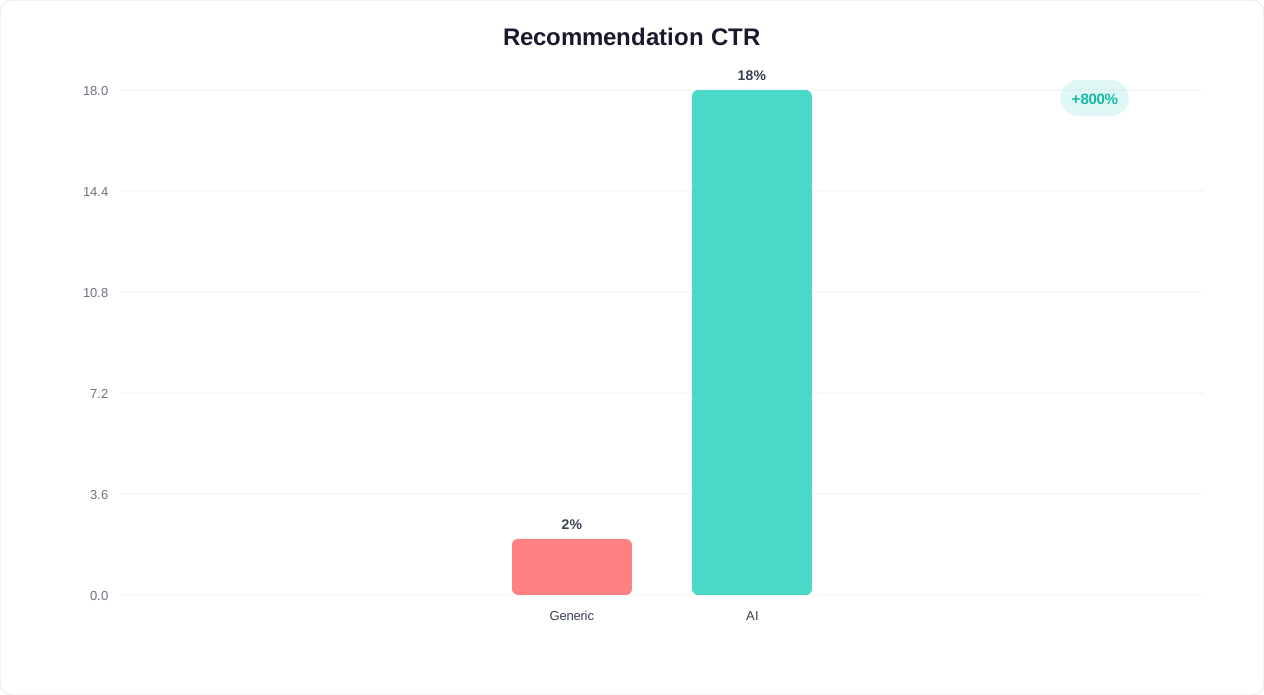
- Recommendation conversion: Clicks and purchases from product cards or guided flows.
Support Metrics
- Deflection rate: Conversations resolved without a human agent.
- Order lookup completion: Percentage of order status requests completed automatically.
- Escalation quality: Percentage of handoffs that include enough context for the agent to resolve quickly.
- Cost per resolution: Chatbot platform cost divided by automated resolutions, compared with human ticket cost.
Experience Metrics
- Engagement rate by page type: Product page, category page, cart, checkout, help center, and blog.
- Unanswered question rate: Queries where the bot was not confident or escalated unnecessarily.
- CSAT after chat: Satisfaction for automated and human-assisted conversations.
- Mobile interaction quality: Completion and drop-off rates on mobile conversations.
Track these inside Conferbot analytics and review them weekly for the first month. The first 30 days should focus on fixing missing answers, bad triggers, and high-friction handoffs. The next 60 days should focus on revenue optimization: cart recovery timing, product recommendation flows, bundles, and WhatsApp follow-up.
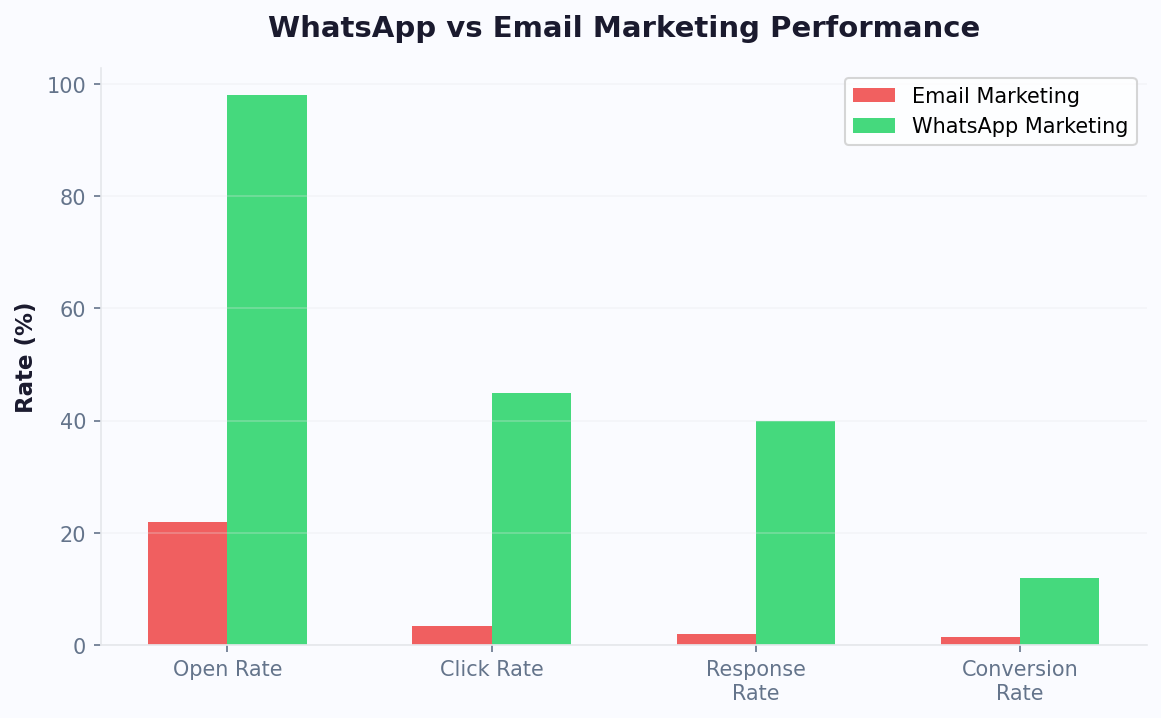
Final Recommendation: The Best WooCommerce AI Chatbot Setup
The best WooCommerce chatbot setup in 2026 is a focused revenue and support system, not a pile of disconnected widgets. Start with the three workflows that create the most value:
- Product question answering on product and category pages, trained on your catalog, policies, FAQs, and buying guides.
- Order lookup automation with secure verification, tracking links, delivery status, and smart escalation.
- Cart recovery using on-site triggers first, then WhatsApp and email follow-up for opted-in customers.
After those are working, add guided product recommendations, replenishment flows, VIP routing, returns automation, review requests, and win-back campaigns. That sequence keeps implementation practical while compounding value over time.
For WooCommerce merchants who want a no-code path, Conferbot is the strongest all-around choice because it combines AI chatbot building, knowledge base training, integrations, analytics, human handoff, and omnichannel messaging in one platform. It is also flexible enough for stores that outgrow a simple WordPress plugin.
Next steps: audit your last 100 support tickets, export your top product questions, identify your highest-abandonment products, and launch a WooCommerce chatbot around those facts. You will build a better bot in one week from real customer data than in one month from assumptions.
WooCommerce Chatbot Advanced Analytics
Beyond basic conversation metrics, WooCommerce store owners should configure their chatbot analytics to track e-commerce-specific KPIs that demonstrate direct revenue impact. The most important metrics include chatbot-influenced revenue (total order value from customers who interacted with the chatbot before purchasing), cart recovery rate (percentage of abandoned carts saved through chatbot intervention), average order value lift (comparing AOV for chatbot-engaged versus non-engaged customers), and product recommendation conversion rate (how often chatbot-suggested products are added to cart).
Configure Google Analytics 4 events or your preferred analytics platform to attribute revenue to chatbot interactions. This typically involves firing a custom event when the chatbot surfaces a product recommendation or recovers an abandoned cart, then tracking whether that session results in a completed purchase. Most WooCommerce chatbot integrations support this attribution natively through JavaScript event triggers that connect chatbot actions to your analytics pipeline.
Monthly performance reviews should compare chatbot ROI against other customer acquisition and retention channels. WooCommerce stores typically find that chatbot cost-per-acquisition is 60-80% lower than paid advertising and that chatbot-engaged customers have 20-30% higher lifetime value due to improved satisfaction and repeat purchase rates.
Was this article helpful?
Best AI Chatbot for WooCommerce in 2026 FAQ
Everything you need to know about chatbots for best ai chatbot for woocommerce in 2026.
About the Author

Conferbot Team specializes in conversational AI, chatbot strategy, and customer engagement automation. With deep expertise in building AI-powered chatbots, they help businesses deliver exceptional customer experiences across every channel.
View all articles