
Why WhatsApp Is the Most Powerful Ecommerce Channel You Are Not Using
WhatsApp has over 2.7 billion active users globally according to Statista, making it the most-used messaging platform on the planet. Yet most ecommerce businesses still rely on email and SMS for customer communication - channels with declining engagement rates and rising costs.
The Numbers That Should Change Your Strategy
Consider the engagement gap between WhatsApp and traditional ecommerce channels:
| Channel | Open Rate | Click-Through Rate | Response Rate |
|---|---|---|---|
| 20-25% | 2-3% | 1-2% | |
| SMS | 90-95% | 6-8% | 10-15% |
| 98% | 15-25% | 40-60% |
A 98% open rate means virtually every message you send is read. Compare that to email where 75-80% of your messages are never opened. The click-through rate is far higher than email, and the response rate - critical for conversational commerce - is far higher.
Why WhatsApp Outperforms Every Other Channel
1. It lives in the customer's personal space. WhatsApp is where people talk to friends and family. Messages from businesses in WhatsApp carry the same intimacy and urgency as personal messages. Email sits in a folder that gets checked twice a day. WhatsApp messages get checked within minutes.
2. Conversations, not broadcasts. Unlike email which is one-directional, WhatsApp enables real-time two-way conversation. A customer who receives a cart recovery message can immediately ask "What colors does this come in?" or "Can I get free shipping?" - and the WhatsApp chatbot responds instantly with answers, product images, and a direct checkout link.
3. Rich media native. WhatsApp supports images, videos, PDFs, location sharing, and interactive buttons natively. You can send a product carousel with images, descriptions, and "Buy Now" buttons - creating a shopping experience inside the chat window itself. With rich media chatbot capabilities, the entire purchase journey happens without the customer leaving WhatsApp.
4. Trust and verification. WhatsApp Business API provides verified business profiles with a green checkmark, building trust that email and SMS cannot match. Customers know the message is legitimately from your brand, not a phishing attempt.
According to HubSpot's marketing research, businesses using conversational commerce channels see significantly higher engagement than traditional outbound methods. The ecommerce businesses that have adopted WhatsApp chatbots are seeing revenue increases of 25-45% within the first 90 days - primarily from cart recovery, repeat purchases, and higher customer lifetime value from conversational engagement.
WhatsApp has evolved from a personal messaging app into one of the most powerful e-commerce channels on the planet. With 2 billion monthly active users, 98% message open rates, and growing support for in-app commerce features, WhatsApp represents an untapped revenue channel for most e-commerce businesses. The brands capturing this opportunity in 2026 are using AI chatbots to transform WhatsApp conversations into seamless shopping experiences.
Abandoned Cart Recovery Flows: The 30-Minute, 2-Hour, and 24-Hour Strategy
Cart abandonment is the single biggest revenue leak in ecommerce. 70% of online shopping carts are abandoned before checkout. For a store doing $100,000/month in revenue, that represents approximately $233,000 in potential sales left on the table every month.
WhatsApp cart recovery dramatically outperforms email recovery because of its 98% open rate. While email recovery campaigns typically recover many abandoned carts, WhatsApp recovery flows achieve high recovery rates - a substantial improvement.
The Three-Touch Recovery Sequence
Touch 1: The Gentle Reminder (30 minutes after abandonment)
Timing: 30 minutes post-abandonment. The customer is likely still browsing or got distracted. This is not a hard sell - it is a helpful nudge.
Message structure:
- Personalized greeting using the customer's name
- Mention the specific product(s) left in cart with an image
- Friendly, conversational tone: "Hey [Name], looks like you left something behind! Your [Product Name] is still waiting for you."
- Interactive button: "Complete My Order" that deep-links to checkout with the cart pre-loaded
- Second button: "I Have a Question" that routes to the chatbot for live Q&A
Recovery rate at this stage: 10-15%. Many customers just got distracted and the reminder is all they need.
Touch 2: The Value Add (2 hours after abandonment)
Timing: 2 hours post-abandonment. Customers who did not convert from Touch 1 likely have an objection - price, shipping, uncertainty about the product.
Message structure:
- Acknowledge they are still deciding: "Still thinking about [Product Name]? Totally get it - here is some info that might help."
- Address the top 3 objections proactively: free shipping threshold, return policy, customer reviews
- Include a social proof element: "[X] people bought this in the last 24 hours" or a customer review quote
- Optional: small incentive like free shipping or 5% off (use sparingly to protect margins)
- Interactive buttons: "Buy Now" and "See Reviews"
Recovery rate at this stage: 8-12% additional conversions.
Touch 3: The Last Chance (24 hours after abandonment)
Timing: 24 hours post-abandonment. This is the final attempt. After 24 hours, cart recovery rates drop sharply.
Message structure:
- Create gentle urgency: "Your cart expires soon" or "Only [X] left in stock"
- Strongest incentive (if using): 10% off, free shipping, bonus item
- Clear CTA with time-limited offer: "Use code SAVE10 in the next 4 hours"
- Alternative suggestion: "Not sure about [Product]? You might also like [Related Product]" with the chatbot offering to show alternatives
Recovery rate at this stage: 5-8% additional conversions.
Combined Impact
The three-touch sequence recovers many abandoned carts in total. For that $100,000/month store with $233,000 in abandoned cart value, recovering 25% means $58,250 in recovered monthly revenue - or $699,000 annually. All from automated WhatsApp messages that cost pennies to send.
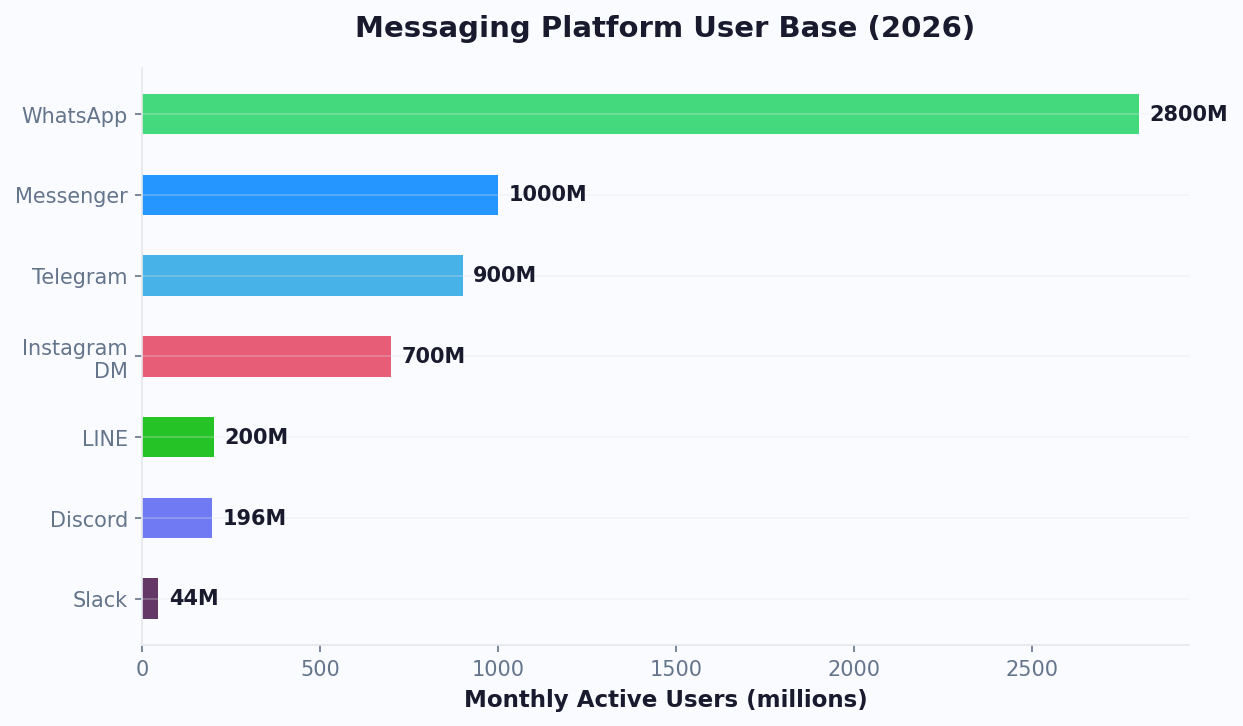
The combination of high engagement rates and low acquisition costs makes WhatsApp one of the most efficient channels for driving repeat purchases and building long-term customer loyalty in e-commerce.
Product Catalog Browsing via WhatsApp: Turn Chats into Shopping Sessions
WhatsApp is not just a communication channel - it is a full shopping experience. The WhatsApp Business API supports interactive product catalogs, making it possible for customers to browse, compare, and purchase products entirely within the chat.
How Catalog Browsing Works
A customer messages your WhatsApp chatbot: "Show me running shoes." The chatbot responds with a product carousel displaying 4-6 running shoes with images, names, prices, and "View Details" buttons. The customer taps a product, sees full details including sizes and colors, selects their preferences, and taps "Add to Cart" - all without leaving WhatsApp.
This conversational commerce approach converts at far higher rates than traditional e-commerce browsing because:
- Reduced friction: No website navigation, no page loads, no form filling. The entire journey is tap-based within a familiar interface.
- Guided discovery: Instead of browsing through hundreds of products, the chatbot asks what the customer is looking for and surfaces relevant options. "What is your budget?" "Are you looking for road running or trail running?" This guided approach mimics an in-store shopping assistant.
- Instant answers: When a customer asks "Does this shoe come in wide?" or "What is the return policy?" the chatbot answers immediately - no searching for FAQ pages or waiting for support.
Setting Up Your WhatsApp Product Catalog
To enable catalog browsing, you need:
- Product feed integration: Connect your product database (Shopify, WooCommerce, or custom) to the WhatsApp Business API. Products sync automatically so inventory, prices, and availability are always current.
- Category structure: Organize products into browsable categories that work in a chat context. Instead of deep category trees, use 5-8 top-level categories with AI-driven filtering within each.
- Product cards: Each product needs a high-quality image (minimum 500x500px), short description (under 100 characters for the preview), full description, price, and available variants (size, color, material).
- Conversational search: The chatbot should understand natural language queries like "red dress under $50" or "birthday gift for my mom" and return relevant products. This requires AI-powered natural language processing that maps casual language to product attributes.
Advanced Catalog Features
Personalized recommendations: Use purchase history and browsing behavior to recommend products. "Based on your last order, you might like these new arrivals." Personalized recommendations in WhatsApp convert at higher rates than generic product suggestions. For strategies on how to personalize these interactions at scale, explore our chatbot personalization guide.
Comparison mode: When a customer is deciding between products, the chatbot generates a side-by-side comparison showing key specifications, reviews, and prices.
Wishlist management: Customers can say "Save this for later" and the chatbot maintains a wishlist that can trigger re-engagement messages when items go on sale or are low in stock.
Group shopping: Customers share product links in WhatsApp group chats for opinions from friends and family, creating organic social proof and viral product discovery.
Order Confirmation, Tracking, and Customer Support on WhatsApp
Post-purchase communication on WhatsApp transforms one-time buyers into repeat customers. Instead of transactional emails that get buried in promotions tabs, order updates on WhatsApp arrive instantly with 98% visibility.
Order Confirmation Flow
The moment a customer completes checkout, the WhatsApp chatbot sends a confirmation message containing:
- Order number and summary (products, quantities, prices)
- Estimated delivery date
- Payment confirmation
- Interactive button: "Track My Order" (activates real-time tracking)
- Interactive button: "Change My Order" (routes to modification flow or agent)
This immediate confirmation reduces "Where is my order?" (WISMO) inquiries by 40-50% because customers have all the information they need in a channel they actually check.
Shipping and Delivery Updates
Automated notifications at each shipping milestone keep the customer informed without them having to proactively check:
- Order processed: "Your order #1234 is confirmed and being prepared for shipment."
- Shipped: "Your order is on its way! Track it here: [tracking link]. Estimated delivery: Thursday, April 10."
- Out for delivery: "Your order is out for delivery today! You can expect it between 2-6 PM."
- Delivered: "Your order has been delivered! We hope you love it. Tap below to leave a review or get help with your order."
Each notification includes an interactive button for "Track in Real Time" that opens a map view or tracking page, plus a "Need Help" button that routes to the chatbot for immediate support.
Customer Support Automation
Post-purchase support queries are highly predictable and perfect for automation. The WhatsApp chatbot handles the most common post-purchase issues:
Returns and exchanges: The chatbot guides the customer through the return process - reason selection, return label generation (sent as a PDF in chat), pickup scheduling, and refund tracking. This alone deflects many support tickets.
Size/fit issues: For fashion and footwear, the chatbot offers size exchange with one-tap reordering in the correct size. "Your replacement in size M is on the way. Your current item will be picked up when the replacement arrives."
Product questions: Post-purchase questions about care instructions, assembly, compatibility, or usage are answered from the product knowledge base. For complex queries, the chatbot escalates to a specialist with full order context.
Complaints and escalation: When sentiment analysis detects an unhappy customer, the chatbot acknowledges the issue, offers immediate resolution options (refund, replacement, discount on next order), and escalates to a human agent if needed - with full conversation context passed through the integration hub.
The Revenue Impact of Post-Purchase WhatsApp
Businesses using WhatsApp for post-purchase communication see 23% higher repeat purchase rates compared to email-only communication. The delivered notification is a natural re-engagement touchpoint: "Love your new running shoes? Check out our matching sports socks - 15% off for you." This post-delivery cross-sell converts at 8-12% because the customer just had a positive experience and is still engaged.
WhatsApp Broadcast Campaigns: Promotions, Launches, and Re-engagement
WhatsApp broadcast campaigns are the ecommerce marketer's most underutilized weapon. With high open rates and 15-25% click-through rates, broadcast campaigns on WhatsApp outperform every other channel for promotional messaging.
Types of Broadcast Campaigns
1. Flash Sales and Limited-Time Offers
WhatsApp is the ideal channel for time-sensitive promotions because messages are seen within minutes. A flash sale announcement at 10 AM reaches 98% of your audience by 10:30 AM - compared to email where 50% of opens happen over 6-12 hours.
Best practices: Include a product image, the discount amount, an urgency element ("Next 4 hours only" or "While stock lasts"), and a direct "Shop Now" button that opens the product page or starts a chat-based purchase flow.
2. New Product Launches
Build anticipation with a three-message sequence: teaser (3 days before), reveal (launch day), and reminder (1 day after). Early WhatsApp access ("You are getting this 24 hours before everyone else") creates exclusivity that drives higher conversion than general launch announcements.
3. Back-in-Stock Alerts
When a customer inquires about an out-of-stock item, the chatbot adds them to a back-in-stock alert list. When inventory is replenished, an automated broadcast notifies interested customers. These alerts convert at 35-45% because the customer has already expressed purchase intent - they just need to know it is available.
4. Seasonal and Holiday Campaigns
Holiday shopping campaigns on WhatsApp perform exceptionally well because they feel personal, not promotional. A message like "Hey [Name], we picked some gift ideas based on what you have browsed - want to take a look?" with a curated product carousel feels like a helpful suggestion, not an advertisement.
5. Re-engagement Campaigns
Customers who have not purchased in 30-90 days receive a personalized re-engagement message. Reference their last purchase: "It has been a while since you got your [Last Product]! Here is what is new this season." Include a small incentive (10-15% off) to trigger the return visit. Re-engagement campaigns on WhatsApp recover many dormant customers vs. 2-5% via email.
Broadcast Campaign Best Practices
WhatsApp has strict anti-spam policies as outlined in WhatsApp's Business Messaging Policy. Violating them risks getting your business account banned. Follow these rules:
- Opt-in required: Only message customers who have explicitly opted in to WhatsApp communications. Collect opt-in during checkout, on your website, or via a WhatsApp click-to-chat link.
- Frequency cap: Limit broadcast messages to 4-8 per month. More than that and unsubscribe rates spike. Quality over quantity.
- Segmentation: Never blast your entire list with the same message. Segment by purchase history, browsing behavior, location, and engagement level. Relevant messages get far higher engagement than generic blasts.
- Two-way ready: Every broadcast should be backed by a chatbot ready to handle responses. When a customer replies "Tell me more" or "What sizes do you have?" the chatbot must respond instantly. A broadcast without response handling wastes the highest-engagement touchpoint in your marketing stack.
Track campaign performance through analytics dashboards that show delivery rates, open rates, click-through rates, and attributed revenue per campaign.
Shopify and WooCommerce Integration: Connecting Your Store to WhatsApp
The technical backbone of a WhatsApp ecommerce chatbot is its integration with your store platform. Here is how to connect Shopify and WooCommerce to WhatsApp for a seamless commerce experience.
Shopify Integration
Connecting Shopify to a WhatsApp chatbot requires three components:
1. Product catalog sync: Your Shopify product database - including titles, descriptions, images, prices, variants, and inventory levels - syncs to the WhatsApp chatbot. This should be a real-time or near-real-time sync (every 5-15 minutes) so the chatbot never shows out-of-stock items or incorrect prices.
2. Cart and checkout integration: When a customer builds a cart in WhatsApp, the chatbot creates a corresponding Shopify checkout. The customer receives a checkout link that pre-fills their cart, and if they are a returning customer, pre-fills their shipping and payment information. One-tap checkout reduces abandonment at the payment stage.
3. Order webhook integration: Shopify webhooks trigger WhatsApp notifications for order events - confirmation, fulfillment, shipment, delivery, and refund. Each webhook fires a corresponding WhatsApp message template through the integration hub.
The Shopify API documentation covers custom integrations that take 1-2 weeks of developer time.
WooCommerce Integration
WooCommerce integration follows a similar pattern with WordPress-specific considerations:
1. WooCommerce REST API connection: The chatbot connects to WooCommerce via its REST API for product data, cart management, and order processing. Authentication uses consumer key/secret pairs generated in WooCommerce settings.
2. Product sync plugin: A WordPress plugin or scheduled API sync keeps the chatbot's product catalog updated. For stores with 500+ products, incremental sync (only changed products) is essential to avoid performance issues.
3. Order event hooks: WooCommerce action hooks (woocommerce_order_status_changed, woocommerce_payment_complete) trigger WhatsApp messages. A lightweight plugin listens for these hooks and sends data to the chatbot platform's API.
Setup time: 3-6 hours for basic integration. Custom WooCommerce setups with non-standard plugins or custom post types may require additional development.
Essential Data Flows
Regardless of platform, these data flows must work reliably:
| Event | Direction | Data |
|---|---|---|
| Customer browses catalog | Store → WhatsApp | Product data, images, prices, stock levels |
| Customer adds to cart | WhatsApp → Store | Product ID, variant, quantity |
| Customer completes checkout | WhatsApp → Store | Cart data, customer info, payment method |
| Order confirmed | Store → WhatsApp | Order ID, items, total, ETA |
| Order shipped | Store → WhatsApp | Tracking number, carrier, ETA |
| Cart abandoned | Store → WhatsApp | Cart contents, customer ID, timestamp |
Payment Processing in WhatsApp
WhatsApp Pay is available in select markets (India, Brazil, with expansion planned). In other markets, the chatbot generates a secure checkout link that opens a mobile-optimized payment page. Support for major payment gateways - Stripe, PayPal, Razorpay, Adyen - ensures customers can pay with their preferred method.
For high-trust scenarios, customers can even place orders via WhatsApp and pay cash on delivery, with the chatbot confirming the COD order and sending a receipt upon delivery confirmation.
Measuring WhatsApp Ecommerce ROI: Metrics and Benchmarks
To justify and optimize your WhatsApp ecommerce investment, you need to track the right metrics with the right benchmarks.
Revenue Metrics
Cart recovery revenue: Total revenue from orders completed after a cart abandonment message. Benchmark: if your abandoned cart value is $100,000/month, a well-optimized WhatsApp recovery flow should recover $15,000-35,000/month (15-35% recovery rate).
Conversational commerce revenue: Revenue from orders placed entirely through WhatsApp chat (catalog browsing → cart → checkout). Track separately from website revenue to measure the incremental value of the WhatsApp channel.
Broadcast campaign revenue: Attributed revenue from promotional broadcasts. Calculate as total revenue from customers who clicked a broadcast message within 72 hours of receipt. Benchmark: $0.50-2.00 revenue per message sent for well-segmented campaigns.
Cross-sell and upsell revenue: Revenue from post-purchase product recommendations sent via WhatsApp. Benchmark: 8-12% conversion rate on post-delivery cross-sell messages.
Engagement Metrics
Message open rate: Should be 95-98%. If below 90%, check for deliverability issues or customer opt-out rates.
Response rate: Percentage of customers who reply to your messages. Benchmark: 40-60% for conversational messages, 15-25% for broadcast campaigns. Higher response rates indicate your messaging is engaging and relevant.
Chatbot resolution rate: Percentage of customer queries fully resolved by the chatbot without human intervention. Benchmark: 70-80% for ecommerce support queries. Track using Conferbot analytics.
Opt-out rate: Percentage of customers who unsubscribe from WhatsApp communications. Benchmark: under 2% per month. Above 3% means you are messaging too frequently or with irrelevant content.
Cost Metrics
Cost per conversation: WhatsApp Business API charges per conversation (24-hour window). Rates vary by country: $0.005-0.08 per business-initiated conversation, $0.00-0.03 per customer-initiated conversation. Total cost per cart recovery: typically $0.05-0.20 for the three-touch sequence.
Cost per recovered cart: Total WhatsApp costs / number of recovered carts. Benchmark: $0.50-3.00 per recovered cart - far below the $5-15 cost per recovered cart via retargeting ads.
ROI calculation: (Revenue from WhatsApp channel - WhatsApp costs) / WhatsApp costs x 100. Healthy WhatsApp ecommerce deployments achieve 800-2,000% ROI because message costs are minimal ($0.01-0.08 per message) while revenue per recovered cart or conversational sale is $30-100+.
Setting Up Attribution
Accurate attribution requires:
- UTM parameters: Tag all links sent via WhatsApp with UTM parameters (source=whatsapp, medium=chatbot, campaign=cart_recovery_touch1) so Google Analytics tracks the traffic source correctly.
- Conversation ID tracking: Map WhatsApp conversation IDs to customer IDs in your CRM for lifecycle attribution. This connects the WhatsApp interaction to the eventual purchase, even if the customer completes checkout on the website days later.
- A/B testing framework: Test message copy, timing, incentive levels, and product recommendations systematically. Send variant A to 50% of abandoned cart customers and variant B to the other 50%. Measure recovery rate and revenue per message for each variant.
With proper tracking, you will have a clear, data-driven picture of exactly how much revenue WhatsApp generates for your ecommerce business - and where to optimize for even better results. For detailed guidance on setting up the WhatsApp Business API infrastructure, see our WhatsApp Business API setup guide. And to understand how WhatsApp fits into a broader messaging strategy, review our omnichannel customer service strategy.
WhatsApp Commerce Future-Proofing
Meta continues to expand WhatsApp's commerce capabilities, with in-app checkout, product catalogs, and payment integration becoming increasingly sophisticated through 2026. E-commerce businesses investing in WhatsApp chatbot infrastructure today are positioning themselves to leverage these emerging capabilities as they mature. The businesses that build robust WhatsApp customer relationships now will have the audience, conversation history, and operational workflows in place to immediately adopt new commerce features as Meta releases them.
WhatsApp's 2 billion monthly active users represent the largest captive commerce audience outside of traditional e-commerce platforms. As the platform evolves from a messaging app into a full commerce ecosystem, early adopters gain disproportionate advantages in customer reach, engagement, and conversion. The cost of building WhatsApp chatbot infrastructure is modest today - but the opportunity cost of waiting grows with every month as competitors establish their WhatsApp presence and claim customer attention in a channel that will only become more competitive over time.
E-commerce brands should also monitor WhatsApp's expansion of Business API features, including richer media message types, interactive list messages for product browsing, and multi-product message formats that enable catalog-style shopping experiences entirely within the WhatsApp interface.
Was this article helpful?
Build and deploy in 10 minutes. No coding needed.
WhatsApp Chatbot for Ecommerce FAQ
Everything you need to know about chatbots for whatsapp chatbot for ecommerce.
About the Author
The Conferbot team writes about building, deploying, and improving AI chatbots.
View all articlesRelated Articles


From the reference shelf
Fact-checked reference pages and free tools for the platform this article covers.