Why Every Website Needs an AI Chatbot in 2026
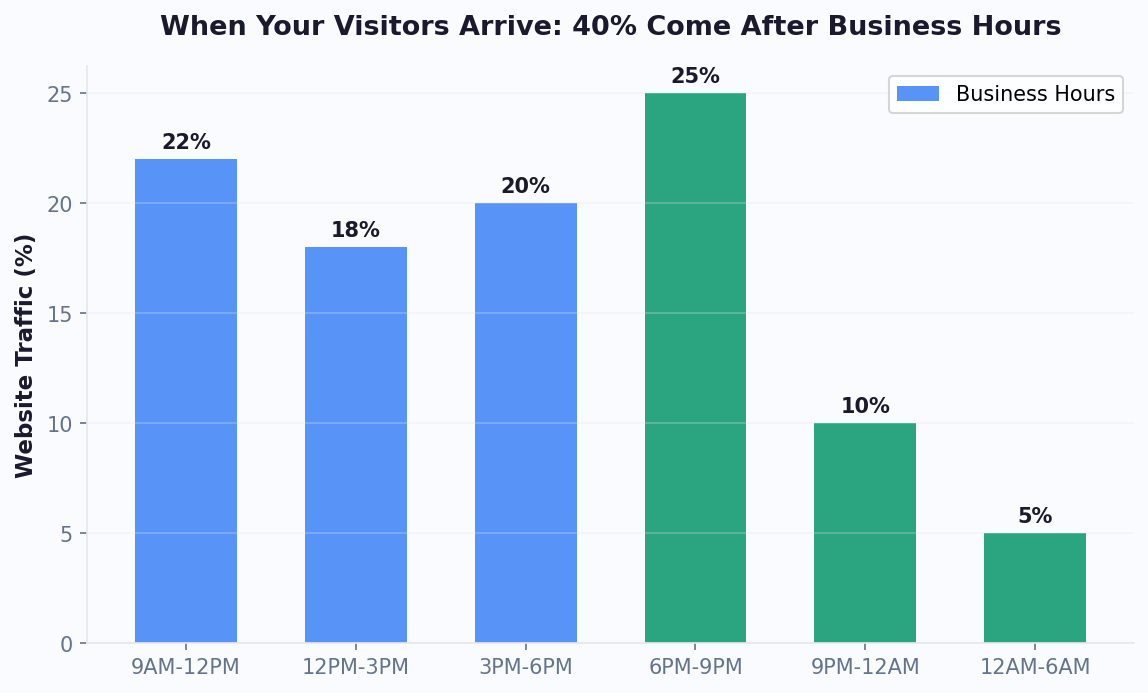
Your website is your most important sales and support channel. It runs 24 hours a day, 7 days a week, and handles more customer interactions than your phone, email, and social media combined. Yet most websites still operate like digital brochures: they present information passively and hope visitors take action.
An AI chatbot transforms your website from a passive brochure into an active sales and support agent. It engages visitors in real time, answers questions instantly, qualifies leads, books appointments, and resolves support issues — all without human intervention.
The numbers make the case clearly:
- 79% of consumers prefer live chat over any other support channel (Kayako, 2026)
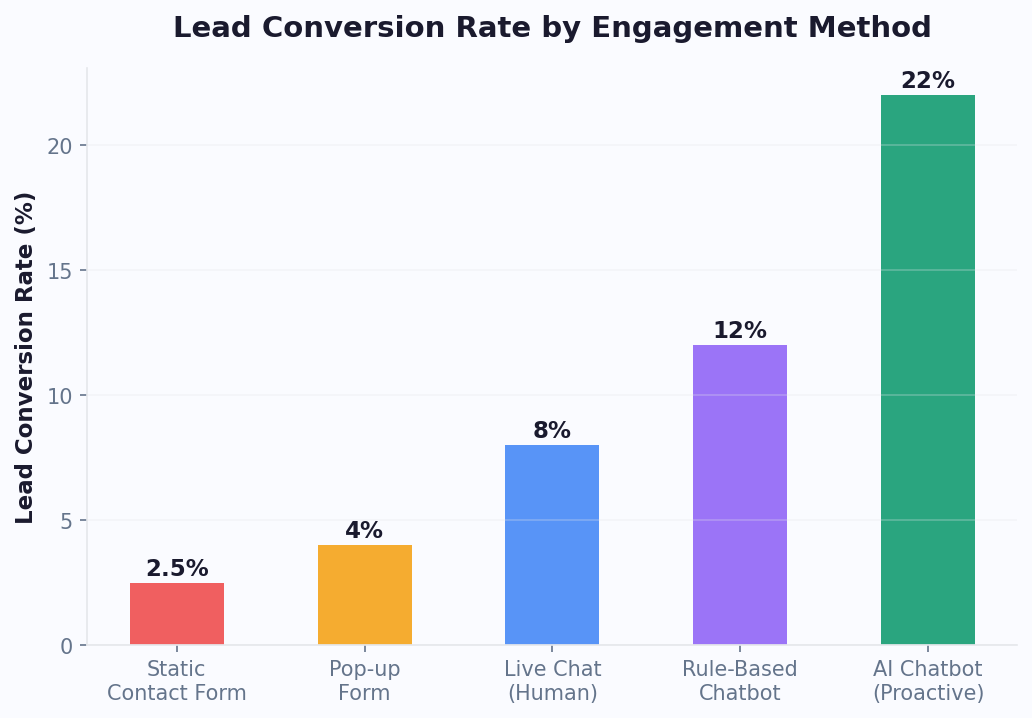
- Websites with chatbots see 3-4x higher lead conversion rates than those relying on forms alone (HubSpot)
- AI chatbots resolve 60-80% of routine inquiries without human involvement (Gartner)
- Businesses using chatbots report $10,000-$50,000/month in savings on support labor and lead qualification (Forrester)
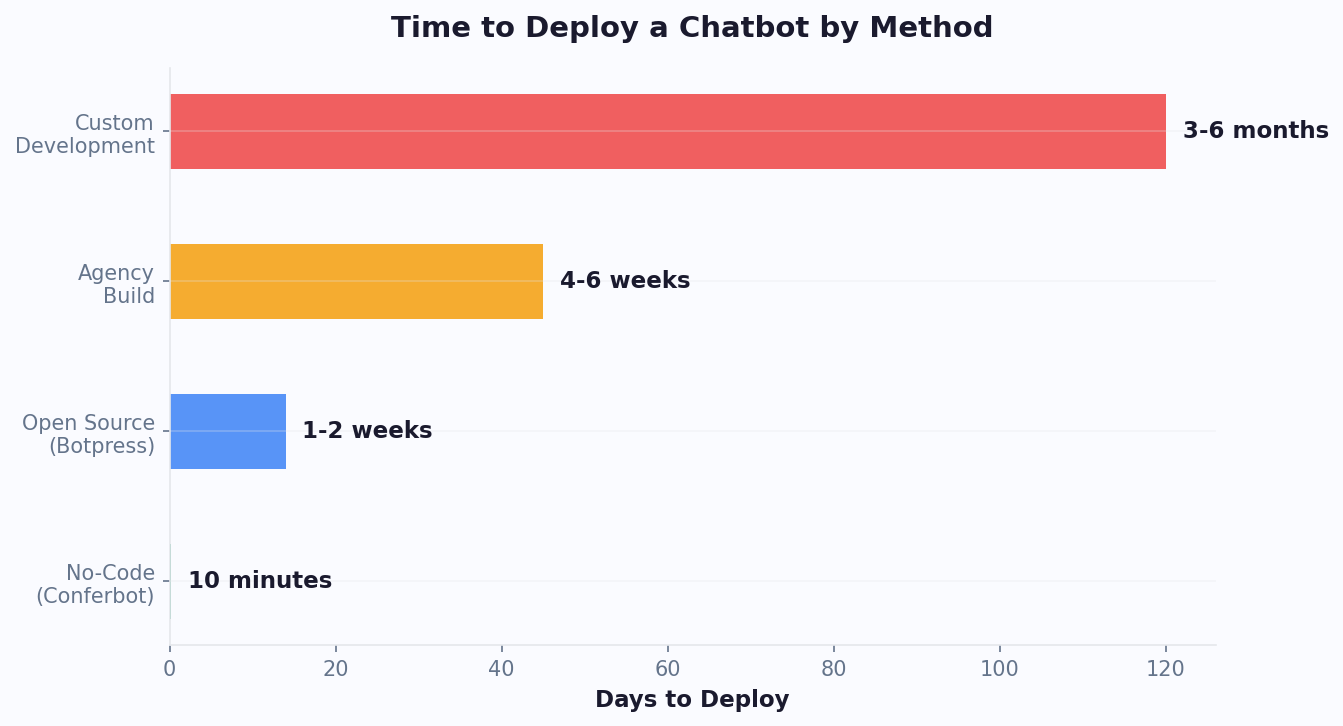
According to G2's chatbot category reviews, customer satisfaction with AI chatbot platforms has increased 34% year-over-year as capabilities have matured. In 2026, AI chatbots powered by large language models (LLMs) have crossed the threshold from "impressive demo" to "reliable business tool." They understand context, handle nuanced questions, maintain conversation memory, and escalate intelligently when they reach their limits. The technology is mature, the pricing is accessible, and the implementation is no longer a multi-month IT project.
This guide walks you through the complete process: choosing the right platform, setting up your chatbot, optimizing it for your specific goals, and avoiding the mistakes that derail most implementations. Whether you want to generate more leads, reduce support tickets, or provide 24/7 service, this guide covers it. Start with our step-by-step how to add a chatbot to your website tutorial, explore our small business chatbot guide for SMB-specific strategies, read the AI vs rule-based chatbot comparison to choose the right type, and check our lead qualification guide for advanced conversion tactics.
Types of AI Chatbots for Websites: Which One Do You Need?
Not all chatbots are created equal. Understanding the different types helps you choose the right solution for your specific use case.
Type 1: Rule-Based Chatbots
Rule-based chatbots follow pre-defined conversation flows using decision trees. When a user clicks a button or types a keyword, the bot follows a scripted path. They are predictable, easy to build, and work well for simple use cases like FAQ answers and basic lead capture.
Best for: Simple FAQ pages, basic lead qualification, appointment scheduling
Limitations: Cannot handle unexpected questions, no natural language understanding, feels robotic
Type 2: AI-Powered Chatbots (NLP/LLM)
AI chatbots use natural language processing to understand user intent, even when questions are phrased in unexpected ways. Modern versions powered by LLMs can hold genuinely helpful conversations, draw from knowledge bases, and learn from interactions.
Best for: Customer support, complex lead qualification, product recommendations, knowledge-heavy industries
Limitations: Requires quality training data or knowledge base, can occasionally produce incorrect answers
Type 3: Hybrid Chatbots
Hybrid chatbots combine rule-based flows with AI capabilities. They use structured flows for high-stakes interactions (lead qualification, appointment booking) and AI for open-ended conversations (support questions, product inquiries). This is what most businesses actually need.
Best for: Most business websites. Combines predictability with flexibility.
Comparison Table
| Feature | Rule-Based | AI-Powered | Hybrid |
|---|---|---|---|
| Natural language understanding | None | Advanced | Advanced |
| Setup time | 1-2 hours | 2-4 hours | 2-4 hours |
| Handles unexpected questions | No | Yes | Yes |
| Predictable conversation paths | Yes | Variable | Yes (for structured flows) |
| Knowledge base integration | Limited | Full | Full |
| Best use case | Simple FAQ | Complex support | Lead gen + support |
| Monthly cost range | $0-50 | $50-500 | $50-300 |
For most businesses, a hybrid chatbot built on a platform like Conferbot delivers the best results. You get structured flows for lead qualification and appointment booking combined with AI-powered responses for support questions and knowledge base queries. For a deeper comparison of rule-based vs. AI approaches, see our detailed analysis.
How to Choose the Right AI Chatbot Platform
The chatbot platform market is crowded, with over 100 options ranging from free open-source tools to enterprise solutions costing thousands per month. Here are the criteria that actually matter when evaluating platforms for your website.
Must-Have Features
- No-code builder: You should be able to create and modify chatbot flows without writing code. Drag-and-drop visual builders save weeks of development time and allow non-technical team members to manage the chatbot.
- AI/NLP capabilities: The chatbot must understand natural language, not just keyword matching. Look for platforms with knowledge base integration that can train the AI on your specific content.
- Multi-channel support: Your website chatbot should extend to WhatsApp, Messenger, Instagram, and other channels from a single platform. Building separate bots for each channel is wasteful.
- Live chat handoff: When the AI cannot resolve an issue, it must seamlessly transfer the conversation to a human agent with full context.
- Analytics dashboard: Conversation volume, resolution rates, lead capture rates, drop-off points, and satisfaction scores. You cannot optimize what you cannot measure.
- Integrations: CRM, email marketing, calendar, help desk, and ecommerce platform connections. The chatbot must fit into your existing tech stack.
Platform Comparison
| Criteria | Conferbot | Drift | Intercom | Tidio |
|---|---|---|---|---|
| No-code builder | Yes (visual) | Yes | Yes | Yes |
| AI knowledge base | Yes | Yes | Yes | Limited |
| Multi-channel | 8+ channels | Web + email | Web + email | Web + social |
| Live chat handoff | Yes | Yes | Yes | Yes |
| Calendar booking | Built-in | Built-in | Add-on | No |
| Starting price | Free tier | $2,500/mo | $39/seat/mo | $29/mo |
| Per-resolution fees | No | Yes | Yes ($0.99/each) | No |
For a comprehensive platform comparison with detailed pricing analysis, see our chatbot builder comparison guide and comparison page. Pricing transparency matters: some platforms charge per resolution or per conversation, which can make costs unpredictable as your chatbot usage grows.
Set Up Your AI Website Chatbot in 30 Minutes
Here is the step-by-step process to get an AI chatbot running on your website. This assumes you are using a no-code platform — the process takes under 30 minutes from start to finish.
Step 1: Define Your Primary Goal (5 Minutes)
Choose one primary objective for your chatbot. Trying to do everything at once leads to a diluted experience. Pick one:
- Lead generation: Capture visitor information and qualify leads for sales
- Customer support: Answer common questions and reduce support ticket volume
- Appointment scheduling: Book meetings, demos, or consultations automatically
- Product guidance: Help visitors find the right product or plan
You can expand to additional goals after the initial deployment is optimized.
Step 2: Build Your Core Flow (10 Minutes)
Using the visual chatbot builder, create your primary conversation flow:
For lead generation:
- Greeting: "Hi! What brings you to [Company] today?" with 3-4 quick-reply options
- Discovery: 2-3 questions about the visitor's needs
- Value delivery: Provide a relevant recommendation or resource
- Lead capture: Request name and email in exchange for the value delivered
- Qualification: 2-3 business questions (budget, timeline, company size)
- Next step: Book a meeting, connect with sales, or deliver a resource
For customer support:
- Greeting: "How can I help you today?" with top FAQ categories
- Train the AI on your knowledge base: help articles, documentation, FAQs
- Set up escalation rules: when to transfer to live chat
- Add satisfaction survey at the end of resolved conversations
Step 3: Configure Integrations (5 Minutes)
Connect the chatbot to your business tools via the integrations hub:
- CRM (HubSpot, Salesforce, Pipedrive) for lead data sync
- Calendar (Google Calendar, Calendly) for appointment booking
- Help desk (Zendesk, Freshdesk) for ticket creation on escalation
- Email marketing (Mailchimp, ActiveCampaign) for lead nurture sequences
Step 4: Customize Appearance (3 Minutes)
Match the chatbot widget to your brand: colors, logo, welcome message, and position (bottom-right is standard). Set the chat bubble text and the initial proactive message timing (recommend 5-10 seconds after page load).
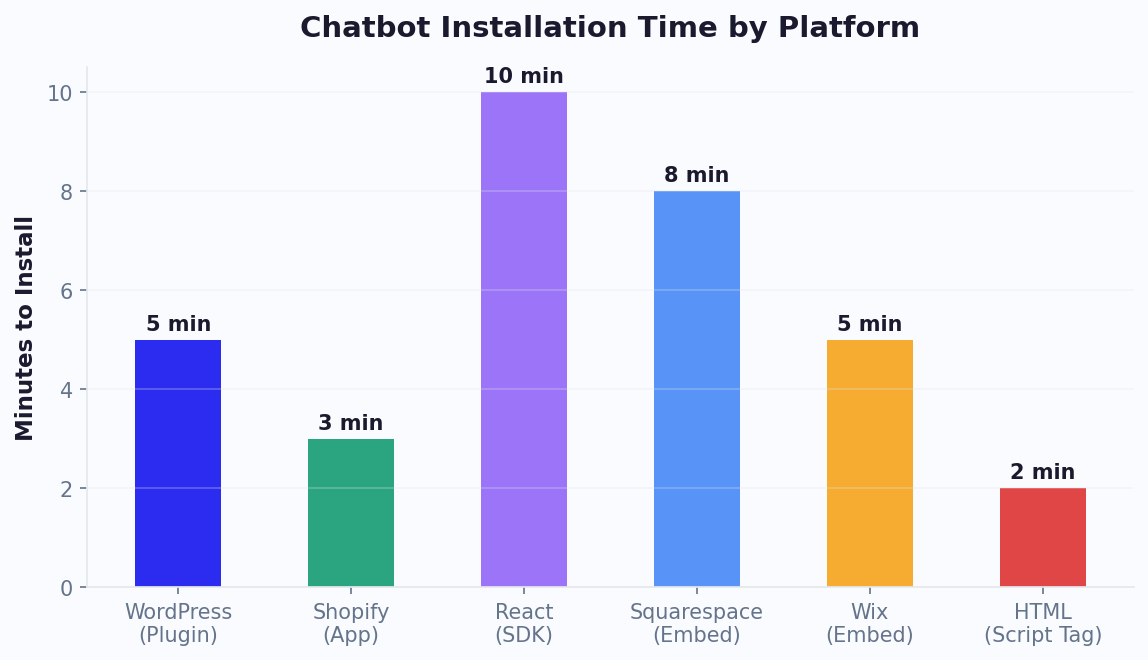
Step 5: Install on Your Website (5 Minutes)
Installation depends on your platform:
- WordPress: Install the plugin and activate. No code needed.
- Shopify: Add the app from the Shopify App Store or paste one snippet into your theme.
- Custom site: Add a single JavaScript snippet before the closing
</body>tag.
Test the complete flow on desktop and mobile before going live. Check that integrations are syncing correctly by submitting a test lead and verifying it appears in your CRM.
Optimization Strategies That Double Your Chatbot's Performance
Deploying a chatbot is step one. Optimizing it is where the real value emerges. These strategies are drawn from data across thousands of chatbot deployments and can double your chatbot's conversion rate, resolution rate, or both.
Strategy 1: Context-Aware Greetings
The single highest-impact optimization is tailoring the chatbot's greeting to the page the visitor is on. Generic greetings ("Hi, how can I help?") convert at 8-12%. Page-specific greetings convert at 18-25%. Examples:
- Pricing page: "Comparing plans? I can help you choose the right one for your team size and needs."
- Product page: "Have questions about [Product Name]? I can walk you through features and pricing."
- Blog post: "Enjoying this article? Want to see how [topic] works in practice with a quick demo?"
- Checkout page: "Need help completing your order? I can assist with sizing, shipping, or payment questions."
Strategy 2: Progressive Lead Capture
Do not ask for contact information upfront. Provide value first, then request information. The ideal sequence:
- Engage with a helpful question or offer (no info required)
- Deliver a useful answer, recommendation, or insight
- Request email (positioned as "I can send you a summary" or "Want me to save this for you?")
- Continue the conversation with qualification questions
This approach increases lead capture rates by 40-60% compared to upfront form-style questioning.
Strategy 3: Smart Escalation Timing
Not every conversation needs human involvement. Configure your chatbot to escalate based on signals, not just failure:
- High-value leads: Budget above threshold or enterprise company size → route to sales immediately
- Frustrated users: Negative sentiment detected or same question asked 3+ times → offer live agent
- Complex issues: Multi-step troubleshooting or account-specific problems → create ticket with context
- Routine queries: FAQ, hours, pricing, basic how-to → let the bot handle completely
Strategy 4: A/B Test Your Flows
Test different greeting messages, question orders, and call-to-action options. Even small changes can have outsized impact. Common tests that yield results:
| Element to Test | Variation A | Variation B | Typical Winner |
|---|---|---|---|
| Greeting style | Formal ("Welcome to...") | Casual ("Hey! Quick question...") | Casual (+15-25% engagement) |
| First question | Open-ended ("How can I help?") | Multiple choice (3 options) | Multiple choice (+30% response) |
| Lead capture timing | After 1 exchange | After 3 exchanges | After 3 exchanges (+40% capture) |
| CTA | "Book a demo" | "Get a personalized plan" | Personalized (+20% bookings) |
Use chatbot analytics to measure each test's impact on your primary KPI. Run each test for at least 1,000 conversations before drawing conclusions.
7 Common Mistakes That Kill Website Chatbot Performance
After analyzing thousands of chatbot deployments, these are the seven mistakes that most commonly sabotage results. Avoid them and you will outperform 80% of chatbot implementations.
Mistake 1: Auto-Opening the Chat Window
Forcing the chat window open on page load is the fastest way to annoy visitors. It interrupts their browsing, obscures content on mobile, and trains users to immediately close the widget. Instead: Use a subtle chat bubble with a brief text preview ("Need help?") that visitors click voluntarily. Engagement rates are paradoxically higher with voluntary opening because engaged visitors are more likely to convert.
Mistake 2: Asking for Information Before Providing Value
"Before we start, what is your name and email?" kills conversations. Visitors have no incentive to share personal information with a bot that has not helped them yet. Instead: Answer their first question, provide a useful recommendation, or deliver a quick insight. Then request their email positioned as a way to save or continue the conversation.
Mistake 3: Building a Bot That Cannot Escalate
A chatbot without a human handoff path is a dead end. When the bot cannot help and there is no way to reach a human, you lose the customer entirely. Instead: Configure clear escalation triggers and ensure human agents receive full conversation context. The handoff guide covers best practices.
Mistake 4: Ignoring Mobile Experience
Over 60% of website traffic is mobile. If your chatbot widget covers the entire mobile screen, loads slowly, or has tiny tap targets, mobile users will not engage. Instead: Test your chatbot on multiple mobile devices. Ensure the widget is thumb-friendly, the conversation is readable, and the chat does not block critical page elements.
Mistake 5: No Analytics or Optimization
Deploying a chatbot and never reviewing analytics is like running ads without checking results. Instead: Review conversation logs weekly. Identify the top 5 questions the bot cannot answer and add those to your knowledge base. Track drop-off points and simplify flows where users abandon.
Mistake 6: Trying to Automate Everything on Day One
Scope creep kills chatbot projects. Teams try to build a bot that handles support, sales, scheduling, onboarding, and feedback collection simultaneously. Instead: Launch with one primary use case, optimize it to peak performance, then add the next use case. Each expansion should build on proven flows.
Mistake 7: Generic Responses That Do Not Match Your Brand
Default bot responses feel impersonal and erode trust. If your brand voice is warm and casual, but your chatbot sounds like a corporate FAQ page, visitors notice the disconnect. Instead: Write chatbot messages in your brand voice. Review every response for tone, clarity, and helpfulness. A chatbot is a brand representative — treat its copy with the same care as your website copy. The window's layout matters as much as its copy: our chat window UI design guide covers the sizing, placement and mobile decisions that quietly affect engagement.
Measuring Success: KPIs for Your Website Chatbot
You cannot improve what you do not measure. Here are the key performance indicators to track for each chatbot use case, along with benchmarks to gauge your performance.
Lead Generation KPIs
| KPI | What It Measures | Good Benchmark | Great Benchmark |
|---|---|---|---|
| Engagement rate | % of visitors who open chat | 15-20% | 25%+ |
| Lead capture rate | % of engaged visitors who become leads | 25-35% | 40%+ |
| SQL rate | % of leads that are sales-qualified | 20-30% | 35%+ |
| Meeting booked rate | % of SQLs who book a meeting | 30-40% | 50%+ |
Customer Support KPIs
| KPI | What It Measures | Good Benchmark | Great Benchmark |
|---|---|---|---|
| Containment rate | % of conversations resolved without human | 50-60% | 70%+ |
| First response time | Time to first bot reply | < 10 seconds | < 5 seconds |
| Resolution time | Average conversation duration to resolution | < 5 minutes | < 3 minutes |
| CSAT (bot-handled) | Satisfaction for bot-resolved conversations | 3.8/5 | 4.2/5+ |
| Escalation rate | % of conversations requiring human agent | 30-40% | < 25% |
Setting Up Your Dashboard
Most chatbot platforms include a built-in analytics dashboard. At minimum, review these metrics weekly:
- Daily: Total conversations, leads captured, escalation volume (for staffing)
- Weekly: Conversion rates, top unanswered questions, drop-off points
- Monthly: ROI calculation (leads generated x conversion value - platform cost), trend analysis
For the ROI calculation, use our chatbot ROI calculator to model your specific economics. Input your average deal value, current conversion rate, and chatbot metrics to see your projected return.
The most important habit is reviewing unanswered questions weekly and adding answers to your knowledge base. Each new answer you add improves the containment rate and reduces escalations. Over 3-6 months, this iterative improvement compounds dramatically — the best chatbots improve their resolution rate by 2-3 percentage points every month through this process.
Getting Started: Your Next Steps
Adding an AI chatbot to your website is the single highest-impact change you can make for lead generation and customer support in 2026. The technology is proven, the setup is straightforward, and the ROI timeline is measured in days, not months.
If You Are Starting From Scratch
- Start with a template: Browse our chatbot template library for pre-built flows tailored to your industry and use case. Templates give you a working chatbot in minutes that you can customize.
- Install on your site: Follow the platform-specific guide for WordPress or Shopify, or add the JavaScript snippet to any custom site.
- Connect your tools: Use the integrations hub to sync leads with your CRM and appointments with your calendar.
- Monitor and optimize: Review analytics weekly and add new knowledge base content for unanswered questions.
If You Already Have a Basic Chatbot
- Upgrade to AI: If you are using a rule-based chatbot, consider upgrading to a platform with AI knowledge base capabilities. The difference in containment rate is typically 30-50 percentage points.
- Add channels: Extend your chatbot to WhatsApp, Messenger, or Instagram to meet customers where they communicate.
- Implement context-aware greetings: Customize the greeting for each major page on your site. This single change typically increases engagement by 40-80%.
Recommended Reading
- How to Build a Chatbot Without Coding — step-by-step building guide
- Best No-Code Chatbot Builders Compared — platform comparison
- Customer Support Chatbot Guide — deep dive on support automation
- 10 Chatbot Case Studies With Real ROI — proven results from real businesses
The best time to add an AI chatbot to your website was yesterday. The second best time is today. Every day without one is a day you are losing leads, making customers wait, and paying humans to do work that AI handles better, faster, and cheaper.
Security and Privacy Considerations for Website Chatbots
Before deploying a chatbot on your website, address security and privacy requirements. Chatbots collect personal information - names, emails, phone numbers, and sometimes payment details - which makes them subject to data protection regulations and security best practices.
GDPR and Privacy Compliance
If you serve customers in the European Union (or California under CCPA), your chatbot must comply with data protection regulations. Key requirements include:
- Consent disclosure: Inform users that the chatbot collects personal data and explain how it will be used. A brief privacy notice in the chatbot's welcome message or a link to your privacy policy satisfies this requirement.
- Data minimization: Only collect information you actually need. If your chatbot captures name, email, phone, company, budget, and timeline, ask whether you truly need all six data points to serve the customer. Each field reduces completion rates by 3-5%.
- Right to erasure: Users must be able to request deletion of their chatbot conversation data. Ensure your platform supports this capability.
- Data residency: Some regulations require personal data to be stored in specific geographic regions. Verify your chatbot platform's data center locations.
Security Best Practices
Protect the data your chatbot collects with these measures:
- Encryption: Verify that your chatbot platform encrypts data both in transit (TLS 1.3) and at rest (AES-256).
- Authentication: If the chatbot accesses account-specific data (order history, account balance), require identity verification before displaying sensitive information.
- Payment handling: Never collect credit card numbers directly in chat. Use payment links (Stripe, Square) that redirect to a secure checkout page.
- Access controls: Limit who on your team can view chatbot conversation logs and collected data. Role-based access prevents unauthorized exposure.
Building Trust Through Transparency
Customers are increasingly privacy-conscious. A chatbot that is upfront about data handling actually builds trust and increases engagement. Include a brief disclosure in your welcome flow: "Your privacy matters to us. This conversation is encrypted and your data is never shared with third parties. See our privacy policy for details." Businesses that include a privacy notice in the chatbot welcome message see 12-18% higher lead capture rates compared to those that do not - transparency signals legitimacy.
How a Website Chatbot Impacts Your SEO and Page Performance
A common concern among website owners is whether adding a chatbot will hurt their search engine rankings or page performance. The short answer: a well-implemented chatbot has zero negative impact on SEO and can actually improve key ranking signals.
Page Speed and Core Web Vitals
Modern chatbot widgets load asynchronously - they do not block your page from rendering or affect your Largest Contentful Paint (LCP) score. The chatbot script typically loads after your main content, adds less than 50KB to total page weight, and has no measurable impact on First Input Delay (FID) or Cumulative Layout Shift (CLS). Google's Core Web Vitals framework specifically accounts for asynchronous third-party resources. To verify, run a PageSpeed Insights test before and after installing the chatbot widget - you should see identical scores.
Engagement Metrics That Help SEO
Google uses engagement signals as indirect ranking factors. A chatbot improves several of these metrics:
- Time on site: Visitors who engage with a chatbot spend 2-4x longer on your website compared to those who do not.
- Bounce rate: Chatbot engagement reduces bounce rate by 15-25% because visitors who receive helpful answers continue browsing rather than leaving.
- Pages per session: Chatbots that recommend related content or guide visitors to relevant pages increase pages per session by 20-35%.
Structured Data Opportunities
If your chatbot answers common customer questions, consider adding those Q&A pairs as FAQ schema markup on the corresponding pages. This creates rich snippet opportunities in Google search results and reinforces the topical authority of your pages - a win for both SEO and user experience.
Avoiding SEO Pitfalls
Two things to avoid: do not render chatbot content as crawlable HTML in the page body (it should be contained within the widget iframe), and do not use the chatbot as a replacement for on-page content that search engines need to index. The chatbot complements your content - it does not replace it.
Mobile-First Chatbot SEO Considerations
With Google prioritizing mobile-first indexing, your chatbot widget must perform flawlessly on mobile devices. Ensure the chat bubble does not obscure critical page elements like navigation menus, add-to-cart buttons, or form submit buttons. Position the widget at bottom-right with adequate spacing from other floating elements. On mobile viewports below 768px, the widget should collapse to a small icon that expands only when tapped, preserving the full-screen reading experience that Google rewards with higher mobile usability scores.
Was this article helpful?
Build and deploy in 10 minutes. No coding needed.
AI Chatbot for Website FAQ
Everything you need to know about chatbots for ai chatbot for website.
About the Author
The Conferbot team writes about building, deploying, and improving AI chatbots.
View all articles