
The Answer Up Front: Top 10 WordPress Chatbot Plugins Compared (2026)
Short on time? This table is the whole article in one screen. We installed, configured, and tested each plugin on an identical WordPress 6.7 site with WooCommerce - detailed reviews, install steps for WordPress chatbots, and performance benchmarks follow below.
Last verified: 2026-08-20. Third-party prices below were re-checked against each vendor's published pricing page on that date; vendors change plans often, so confirm before you buy.
| Plugin | Best For | AI Quality | Free Plan | Paid From | Channels | Rating |
|---|---|---|---|---|---|---|
| Conferbot | All-in-one AI chatbot | ★★★★★ | Yes | $19/mo | Web, WhatsApp, Messenger, Instagram, Telegram | 9.5/10 |
| Tidio | Live chat + basic bot | ★★★☆☆ | Yes | $29/mo | Web, Messenger, Email | 7.8/10 |
| ChatBot.com | Visual flow builder | ★★★★☆ | Trial only | $52/mo | Web, Messenger, Slack | 7.5/10 |
| Drift (Salesloft) | Enterprise B2B sales | ★★★★☆ | No | Custom (via Salesloft) | Web, Email | 7.2/10 |
| Intercom | SaaS support teams | ★★★★☆ | No | $29/seat/mo | Web, Mobile, Email | 7.6/10 |
| WPBot (QuantumCloud) | Free WordPress-native | ★★☆☆☆ | Yes | $49/yr | Web only | 6.0/10 |
| Collect.chat | Survey-style lead gen | ★★☆☆☆ | Yes | $24/mo | Web only | 6.5/10 |
| Zendesk Chat | Zendesk ecosystem | ★★★☆☆ | No | $55/agent/mo | Web, Mobile | 7.0/10 |
| Freshchat | Freshworks ecosystem | ★★★☆☆ | Yes (limited) | $19/agent/mo | Web, Mobile, WhatsApp | 7.1/10 |
| HubSpot Chat | HubSpot CRM users | ★★★☆☆ | Yes | $20/mo | Web, Email | 7.3/10 |
Now let us break down each option in detail.
Why WordPress Sites Specifically Benefit From a Chatbot
WordPress powers roughly 43% of all websites (W3Techs, 2026). Yet fewer than 4% of those sites use any form of live chat or chatbot. That gap represents a massive opportunity for site owners willing to add one simple plugin.
The Numbers Behind the Gap
Visitors who engage with a chatbot are more likely to convert than those who browse passively. For a WordPress site averaging 5,000 monthly visitors, adding a chatbot typically produces 40-120 additional leads per month - without spending a cent more on advertising.
Here is why WordPress sites, specifically, benefit:
- Content-heavy sites (blogs, publishers): Chatbots guide readers to relevant articles, increase pages-per-session, and capture email subscribers at 3-5x the rate of static pop-ups.
- WooCommerce stores: Product recommendation bots lift average order value. Abandoned-cart recovery bots reclaim 12-18% of lost sales. Cart recovery chatbots alone can justify the cost.
- Service businesses: Appointment booking bots capture leads 24/7, even when you are asleep. 40% of booking requests arrive outside business hours.
- Membership and course sites: Chatbots handle enrollment questions, reduce support tickets, and guide users through onboarding.
What Makes a Good WordPress Chatbot Plugin?
Not all plugins are equal. The best WordPress chatbot plugins share these traits:
- Easy installation: Install in under 5 minutes without touching code
- AI-powered responses: Trained on your content, not generic templates
- Omnichannel: Works on your site and extends to WhatsApp, Messenger, and more
- Analytics: Conversation analytics to measure what is working
- Performance: Does not slow your PageSpeed score (critical for SEO)
We tested every major option against these criteria. Here are the results.
WordPress powers over 40% of all websites globally, making it the single largest platform for chatbot deployment. The combination of WordPress's flexibility and a modern AI chatbot creates a powerful engagement layer that converts passive visitors into active leads. Whether you run a small business site, a membership community, or a high-traffic WooCommerce store, the right chatbot plugin can transform your WordPress site's ability to capture, qualify, and convert visitors around the clock.
Detailed Reviews: Pros, Cons & Best Use Cases
1. Conferbot - Best Overall WordPress Chatbot
Conferbot is our own product, so weigh this entry accordingly. It combines AI answers from your own content (OpenAI, Claude, Gemini and other models) with a no-code builder, the same bot on WhatsApp, Messenger and other channels, and a WordPress plugin that installs from GitHub.
Pros:
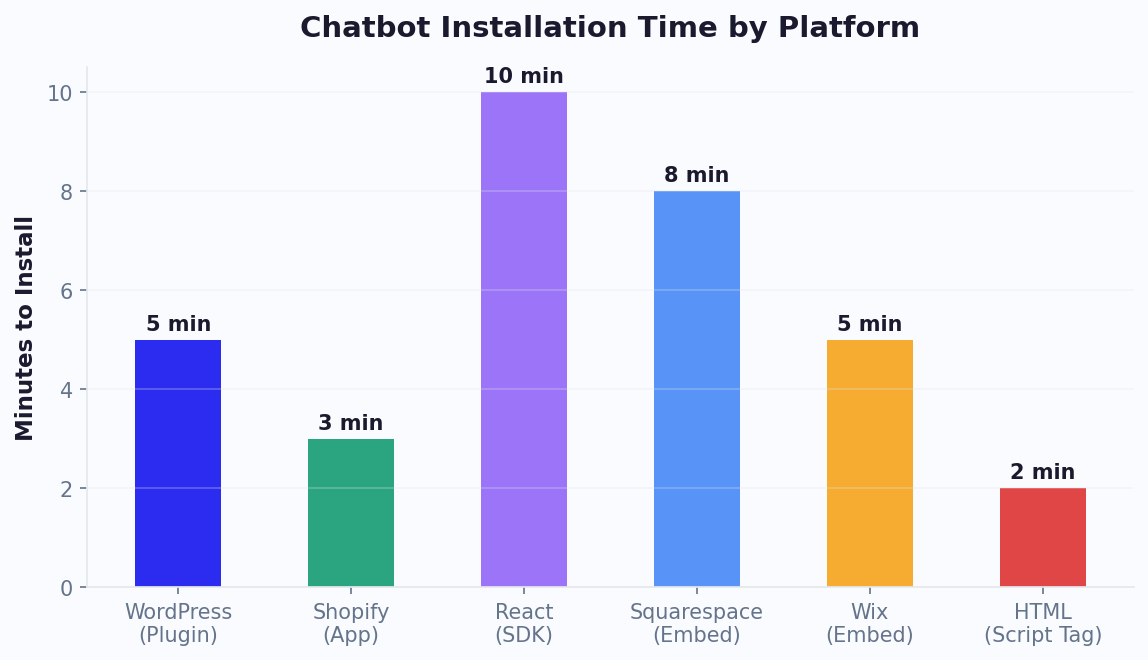
- Install via embed code or WordPress plugin in under 3 minutes - see the WordPress install guide
- AI trained on your website content automatically via AI knowledge base
- Works on website plus WhatsApp, Messenger, Instagram, and Telegram
- Built-in calendar booking, lead capture, and live chat handoff
- Free plan available - start free, no credit card
Cons: Advanced analytics require a paid plan. No native WooCommerce product-sync yet (use Zapier).
Best for: Any WordPress site that wants a complete AI chatbot solution without stitching together multiple plugins.
2. Tidio - Best for Live Chat With Basic Automation
Tidio combines live chat with rule-based chatbot flows. The free tier is generous, but AI quality lags behind dedicated AI platforms.
Pros: Good free plan (50 live-chat conversations), visual chatbot builder, WooCommerce integration for order status.
Cons: AI responses are template-based, not generative. The Lyro AI add-on starts at $32.50/month extra (per Tidio's pricing page, August 2026). Limited to 3 channels. Gets expensive at scale - see our full Tidio comparison.
Best for: Small shops that need live chat first and basic automation second.
3. ChatBot.com - Best Visual Flow Builder
If you love dragging and dropping conversation flows, ChatBot.com has the most polished visual editor. But it lacks a free plan.
Pros: Beautiful drag-and-drop builder, good integrations with LiveChat and HelpDesk, decent AI via OpenAI integration.
Cons: No free plan ($52/mo minimum). Per-chat pricing can spike unpredictably. Limited channel support.
Best for: Teams that want precise control over every conversation branch and can invest $50+/month.
4. Drift (Salesloft) - Best for Enterprise B2B
Drift pioneered conversational marketing and remains the go-to for large B2B sales teams - at enterprise prices. Read our Drift alternative analysis.
Pros: Excellent lead routing, ABM features, Salesforce integration, revenue attribution.
Cons: No published pricing since the Salesloft acquisition - plans are custom, quoted through Salesloft sales (historically $2,500+/month). WordPress plugin can slow page load by 400-800ms. Overkill for SMBs.
Best for: B2B companies with $10M+ revenue and dedicated sales teams.
5. Intercom - Best for SaaS Support
Intercom excels at in-app messaging and support workflows. Its Fin AI agent handles complex queries well. See our Intercom comparison.
Pros: Excellent AI (Fin), strong help-center integration, great for SaaS onboarding.
Cons: Per-seat pricing stacks up - $29/seat/month (Essential) to $132/seat/month (Expert, billed annually) plus $0.99 per Fin AI resolution, verified August 2026. WordPress is a secondary channel - features are app-first. Complex setup.
Best for: SaaS companies that need in-app support and have budget for per-resolution pricing.
Reviews Continued: Budget & Ecosystem Options
6. WPBot (QuantumCloud) - Best Free WordPress-Native Option
WPBot is built specifically for WordPress and lives in the WordPress plugin directory. It is free to start but limited in AI capability.
Pros: Truly WordPress-native, free core plugin, supports DialogFlow integration, searches your site content.
Cons: Dated UI, no real AI without a DialogFlow/OpenAI add-on ($49/year extra), no omnichannel support, limited analytics.
Best for: Budget-constrained WordPress sites that want a basic FAQ bot and nothing more.
7. Collect.chat - Best for Survey-Style Lead Capture
Collect.chat specializes in conversational forms - think Typeform in a chat widget. It is not a true chatbot but works well for lead generation.
Pros: Gorgeous conversational forms, good WordPress plugin, easy A/B testing, affordable.
Cons: No AI - every response path must be pre-built. Cannot answer free-form questions. Limited to web only.
Best for: Sites that need a guided lead-capture form, not a conversational AI.
8. Zendesk Chat - Best for Existing Zendesk Users
If you already use Zendesk for support tickets, their chat widget integrates tightly. Otherwise, it is expensive and limited. Compare Zendesk alternatives.
Pros: Deep Zendesk integration, solid ticketing workflow, good reporting.
Cons: $55/agent/month, AI features require Suite Professional ($115/agent/month), slow WordPress widget, no WhatsApp on lower tiers.
Best for: Teams already paying for Zendesk Suite who want chat added.
9. Freshchat - Best Budget Omnichannel Option
Freshchat from Freshworks offers decent functionality at lower prices than Zendesk or Intercom, especially if you use other Freshworks products.
Pros: $19/agent/month starting price, WhatsApp support, Freddy AI assistant, free plan for up to 10 agents.
Cons: AI is mediocre compared to dedicated platforms, WordPress plugin occasionally conflicts with caching plugins, limited customization.
Best for: Budget-conscious teams that need multi-agent support with basic automation.
10. HubSpot Chat - Best for HubSpot CRM Users
HubSpot offers a free chatbot builder as part of its CRM platform. If you are already in the HubSpot ecosystem, it is a natural add-on.
Pros: Free with HubSpot CRM, excellent contact management, good for lead qualification, native WordPress plugin.
Cons: Bot is rule-based (no generative AI on free plan), limited customization, conversations capped on free tier, AI features need Marketing Hub Professional ($800/mo billed annually, plus a one-time $3,000 onboarding fee, per HubSpot's pricing page, August 2026).
Best for: Companies already using HubSpot CRM that want basic chat and lead routing.
How to Install a Chatbot on WordPress (Step-by-Step)
Installing a chatbot on WordPress takes under 5 minutes regardless of which plugin you choose. Here are the two main methods:
Method 1: WordPress Plugin (Easiest)
- Go to Plugins → Add New in your WordPress dashboard (this searches the official WordPress.org plugin directory)
- Search for your chosen chatbot (e.g., "Conferbot", "Tidio", "HubSpot")
- Click Install Now → Activate
- Connect your account - most plugins redirect you to create or link an account
- Configure - set your welcome message, colors, and position
- Done - the chat widget appears on all pages automatically
Method 2: Embed Code (Works With Any Chatbot)
If your chatbot provider does not have a WordPress plugin, you can add the embed code directly. This method works for Conferbot and any other platform - full WordPress install guide here.
- Copy the embed code from your chatbot platform
- In WordPress, go to Appearance → Theme Editor → footer.php (or use Insert Headers & Footers plugin)
- Paste the code just before the closing
</body>tag - Save - the widget is now live
Method 3: Page Builders (Elementor, Divi, WPBakery)
If you use a page builder:
- Elementor: Add an HTML widget, paste the embed code
- Divi: Use the Code module in your footer template
- WPBakery: Add a Raw HTML element
Performance Tip: Lazy-Load Your Chatbot
Chatbot scripts can add 200-500ms to page load time if loaded immediately. For best Core Web Vitals scores:
- Use
deferorasyncon the script tag - Load the chatbot only after the page is interactive (most good plugins do this automatically)
- Test with Google PageSpeed Insights before and after installation
Conferbot's widget loads asynchronously by default, so it should not block your page from rendering; check the effect on your own site with PageSpeed Insights.
How to Choose the Right WordPress Chatbot Plugin
The best plugin depends on your specific situation. Use this decision framework:
Decision Matrix by Business Type
| Your Situation | Best Choice | Why |
|---|---|---|
| Small business, first chatbot | Conferbot | Free plan, easy setup, AI trained on your content, scales with you |
| WooCommerce store | Conferbot or Tidio | Both offer cart recovery and product recommendations |
| Already use HubSpot CRM | HubSpot Chat | Native CRM integration, free with existing plan |
| Already use Zendesk | Zendesk Chat | Unified ticketing and chat |
| Enterprise B2B sales | Drift | ABM, lead routing, revenue attribution |
| SaaS with in-app support | Intercom | Best in-app messaging + AI resolution |
| Tight budget, basic FAQ only | WPBot | Free, WordPress-native, handles simple FAQs |
| Need conversational forms | Collect.chat | Best survey-style lead capture UX |
Key Questions to Ask Before Choosing
- What is your primary goal? Lead generation → Conferbot, HubSpot. Customer support → Conferbot, Intercom, Zendesk. Sales → Drift, Conferbot.
- Do you need omnichannel? If you want WhatsApp or Instagram, only Conferbot and Freshchat offer affordable multi-channel from a WordPress plugin.
- What is your budget? Free: Conferbot, WPBot, HubSpot, Tidio (see Conferbot's pricing for what each tier includes). Under $50/mo: Conferbot, Collect.chat, Freshchat. Enterprise: Drift, Intercom, Zendesk.
- Do you need real AI? If you want the chatbot to answer questions it was not explicitly programmed for, you need GPT-level AI: Conferbot, Intercom (Fin), or ChatBot.com with OpenAI.
Still not sure? The WordPress chatbot page covers the Conferbot setup end to end, Our full chatbot builder comparison covers 10 platforms in even more depth, and our ROI calculator helps you estimate the financial impact for your specific traffic numbers. You might also benefit from our small business chatbot guide for strategy fundamentals, or check the latest chatbot statistics for 2026 to understand the market landscape.
WordPress Multisite: Managing Chatbots Across Multiple Sites
WordPress Multisite powers agency networks, franchise websites, university departments, and multi-brand portfolios - often managing 10 to 500+ sites from a single dashboard. Deploying and managing chatbots across a Multisite network presents unique challenges that single-site guides do not address. Here is how to do it right.
The Multisite Chatbot Challenge
On a standard WordPress site, you install one chatbot plugin and configure it once. On Multisite, you face decisions at every level:
- Network-wide vs per-site activation: Should every site in the network get the chatbot automatically, or should individual site admins opt in?
- Shared vs separate bot identities: Should all sites use the same bot (consistent brand experience) or separate bots (site-specific knowledge)?
- Centralized vs distributed knowledge base: Should the AI draw from a single knowledge base or site-specific content?
- Unified vs separate analytics: Do you need a network-level dashboard or per-site analytics?
Deployment Architecture Options
| Architecture | How It Works | Best For | Complexity |
|---|---|---|---|
| Network-activated plugin | Plugin activated at network level, same config everywhere | Franchise sites with identical branding and services | Low |
| Network-activated, per-site config | Plugin active everywhere, each site admin customizes flows | University departments, agency client sites | Medium |
| Per-site activation with shared bot | Individual sites opt in, connect to one centralized bot | Multi-brand portfolios needing unified support | Medium |
| Per-site activation with separate bots | Each site has its own independent bot instance | Agencies managing unrelated client sites | High |
Implementation: Network-Level Embed Code
For most Multisite networks, the simplest approach is embedding the chatbot script at the network level rather than installing a per-site plugin:
- Create a must-use (MU) plugin. Place a PHP file in
wp-content/mu-plugins/that enqueues the chatbot script on all sites. MU plugins cannot be deactivated by individual site admins, ensuring consistent deployment. - Pass site-specific variables. The script should dynamically inject the current site's URL, name, and language as data attributes. Your chatbot platform uses these to load the correct knowledge base and branding for each site.
- Allow per-site overrides. Add a simple settings page where site admins can customize the welcome message, bot color, and active flows without affecting the network-wide configuration.
Knowledge Base Strategy for Multisite
The most effective approach is a layered knowledge base: a shared global layer (company policies, brand information, general FAQs) plus a site-specific layer (local services, location-specific details, site-specific products). When a visitor asks a question, the bot checks the site-specific layer first and falls back to the global layer. This prevents knowledge duplication while ensuring every site delivers accurate, localized responses.
Analytics and Reporting Across the Network
Use your chatbot platform's API to build a network-level dashboard that aggregates key metrics: total conversations, deflection rate, leads captured, and top unanswered questions - sliced by site. This gives network administrators visibility into which sites are underperforming and where knowledge gaps exist. Conferbot's integrations hub supports multi-site reporting out of the box through API-based data aggregation.
Performance Considerations for Multisite
Multisite networks are often resource-constrained because they share a database and server. Chatbot performance best practices are even more critical:
- Always use asynchronous script loading to prevent the bot from affecting any site's page speed
- Serve the chatbot script from the platform's CDN, not from your WordPress server
- Avoid plugins that create per-site database tables - they bloat the shared database at scale
- Test chatbot load impact on your busiest site during peak traffic before rolling out network-wide
Agencies managing client Multisite networks find that a centralized chatbot deployment reduces per-client setup time from hours to minutes and ensures consistent quality across the portfolio. For single-site WordPress chatbot setup, refer to the installation guide above. For platform selection guidance, see our chatbot builders comparison or calculate your expected returns with the ROI calculator.
7 Common Mistakes When Adding a Chatbot to WordPress
After helping thousands of WordPress sites deploy chatbots, we see the same mistakes repeatedly. Avoid these:
Mistake 1: Loading the Chatbot Synchronously
Adding the script without async or defer blocks page rendering. Your PageSpeed score drops, bounce rate rises. Always use asynchronous loading.
Mistake 2: Not Training on Your Own Content
A chatbot that gives generic answers is worse than no chatbot. Use a platform with AI knowledge base that ingests your website content, FAQs, and product data. Visitors expect the bot to know your business.
Mistake 3: No Human Handoff
Even the best AI cannot handle every query. Without live chat handoff, frustrated visitors leave. Configure automatic escalation for: complex complaints, pricing negotiations, and technical issues the AI cannot resolve.
Mistake 4: Ignoring Mobile
Over 60% of WordPress traffic is mobile. Test your chatbot on iPhone and Android. Ensure the widget does not cover critical page elements (especially the "Add to Cart" button on WooCommerce). Position it in the bottom-right corner with proper spacing.
Mistake 5: Too Aggressive Popups
Auto-opening the chatbot on every page load annoys visitors. Best practice: show a small bubble, open the chat only when clicked, or trigger it after 30+ seconds on high-intent pages (pricing, contact).
Mistake 6: Not Connecting Analytics
If you are not tracking chatbot performance, you are flying blind. Connect chatbot analytics to measure: conversations started, leads captured, common questions, drop-off points, and resolution rate. Review weekly and optimize.
Mistake 7: Choosing Based on Price Alone
A free chatbot that converts a small share of visitors generates less revenue than a $49/month bot that converts 4%. Calculate the true cost of not having an effective chatbot before making a decision based solely on price.
How to Measure a Chatbot Plugin's Speed Impact
Every chat widget adds some JavaScript to your pages, and the effect depends on your theme, host, caching and other plugins as much as on the widget itself, so measure it on your own site rather than trusting anyone's chart, including ours.
- Take a baseline. Run PageSpeed Insights on your home page and one key landing page, and note Largest Contentful Paint, Interaction to Next Paint and Cumulative Layout Shift for mobile.
- Install one chatbot at a time. Testing two widgets together makes it impossible to tell which one costs what.
- Re-run the same pages a few times and compare the median, since single runs vary.
- Check your optimisation plugins. Script deferral and minification in tools such as WP Rocket or Cloudflare Rocket Loader can delay or break a chat widget; if the bubble is late or missing, exclude the widget script from those settings.
- Look at layout shift. A widget should float over the page as a fixed overlay. If content jumps when it loads, the widget is being inserted into the page flow.
Conferbot's widget loads asynchronously after your content as a fixed overlay, which keeps its effect small on most sites, but the only number that matters is the one you measure on yours.
WordPress + WooCommerce: Chatbot Features That Drive Sales
If you run a WooCommerce store, your chatbot can directly increase revenue through these proven features:
Abandoned Cart Recovery
67% of online shopping carts are abandoned. A chatbot that detects exit intent and offers help ("Still deciding? I can answer any questions about this product") recovers many of those carts. For a store doing $50,000/month in sales, that is $6,000-9,000 in recovered revenue monthly. Full cart recovery chatbot guide.
Product Recommendations
"Not sure which size to choose?" or "Customers who bought this also loved..." - AI-powered product recommendations through chat increase average order value by 15-25%. The conversational format feels helpful, not pushy.
Order Tracking
"Where is my order?" accounts for 35-50% of all e-commerce support tickets. A chatbot that integrates with WooCommerce order data answers this instantly, reducing support load by a third. E-commerce chatbot strategies cover this in depth.
Size and Fit Guidance
For fashion and apparel stores, a chatbot that asks height, weight, and fit preference and recommends the right size reduces returns by 20-30%. Returns cost e-commerce businesses an average of $33 per item in shipping and restocking.
WooCommerce Setup Checklist
- Install chatbot plugin and connect WooCommerce via integrations hub or API
- Sync product catalog so the bot can search and recommend products
- Set up abandoned cart triggers (exit intent + 1 hour follow-up email/WhatsApp)
- Configure order tracking integration (WooCommerce order status API)
- Add product-specific FAQs (shipping times, return policy, sizing)
- Test on mobile - ensure chat widget does not overlap cart/checkout buttons
For a complete walkthrough, see our Shopify install guide (the WooCommerce process is nearly identical) or the WordPress-specific install guide.
WordPress Chatbot Performance Optimization
WordPress sites often run dozens of plugins simultaneously, making performance optimization critical when adding a chatbot. Follow these best practices to ensure your chatbot enhances rather than hinders site performance. First, choose a chatbot that loads asynchronously - the widget script should not block page rendering or delay your Largest Contentful Paint (LCP) metric. Second, implement lazy loading so the chatbot initializes only when the visitor scrolls to a point where the widget is visible or after a configurable time delay. Third, minimize third-party requests by choosing a chatbot platform that consolidates its resources into as few HTTP requests as possible.
For WordPress sites using page caching (WP Super Cache, W3 Total Cache, or host-level caching), ensure the chatbot widget is excluded from cache rules if it displays personalized content. However, the chatbot's JavaScript itself can be cached aggressively since it typically does not change between page loads. Monitor your Core Web Vitals before and after chatbot installation using Google's PageSpeed Insights tool - a well-optimized chatbot should add no more than 50-100ms to your Total Blocking Time and have zero impact on Cumulative Layout Shift.
WordPress multisite installations present additional considerations: configure the chatbot plugin at the network level to ensure consistent deployment across all sites while allowing individual site administrators to customize greeting messages and bot behavior for their specific audience segments.
Was this article helpful?
Build and deploy in 10 minutes. No coding needed.
Best WordPress Chatbot Plugins 2026 FAQ
Everything you need to know about chatbots for best wordpress chatbot plugins 2026.
About the Author
The Conferbot team writes about building, deploying, and improving AI chatbots.
View all articles
