
Why Coaches Lose 70% of Website Visitors Before They Book
Coaching is a $20 billion global industry growing at roughly 15% per year, according to the International Coaching Federation's 2024 Global Coaching Study. Life coaches, executive coaches, health coaches, career coaches, and business coaches are building thriving practices -- and increasingly, they are also creating digital products such as online courses, group programs, and membership communities. Yet despite this growth, most coaching websites are stunningly inefficient at converting the traffic they receive.
The data is sobering. Research from HubSpot's marketing benchmark data and industry analyses confirm that 70% of visitors to a typical coaching website leave without taking any action -- no booking, no email signup, no purchase. For a coach spending $2,000-5,000 per month on advertising, content marketing, or social media to drive traffic, that means the vast majority of their marketing investment produces zero return. A coach who gets 3,000 monthly website visitors and converts at the industry average of 2-3% is booking roughly 60-90 discovery calls per month. But those same 3,000 visitors represent a potential pool of 300-450 qualified prospects (assuming 10-15% are genuinely interested) -- meaning 200-350 potential clients are slipping through the cracks every month.
Why does this happen? The coaching website experience has a fundamental structural problem. A visitor lands on the page, reads about the coach's methodology and credentials, browses testimonials, and then faces a binary choice: book a discovery call or leave. There is no middle ground. No conversation. No personalized guidance. The visitor who is interested but unsure, who has a question about pricing or program fit, who is browsing at 10 PM on a Sunday -- that visitor has no way to get the information they need to take the next step.
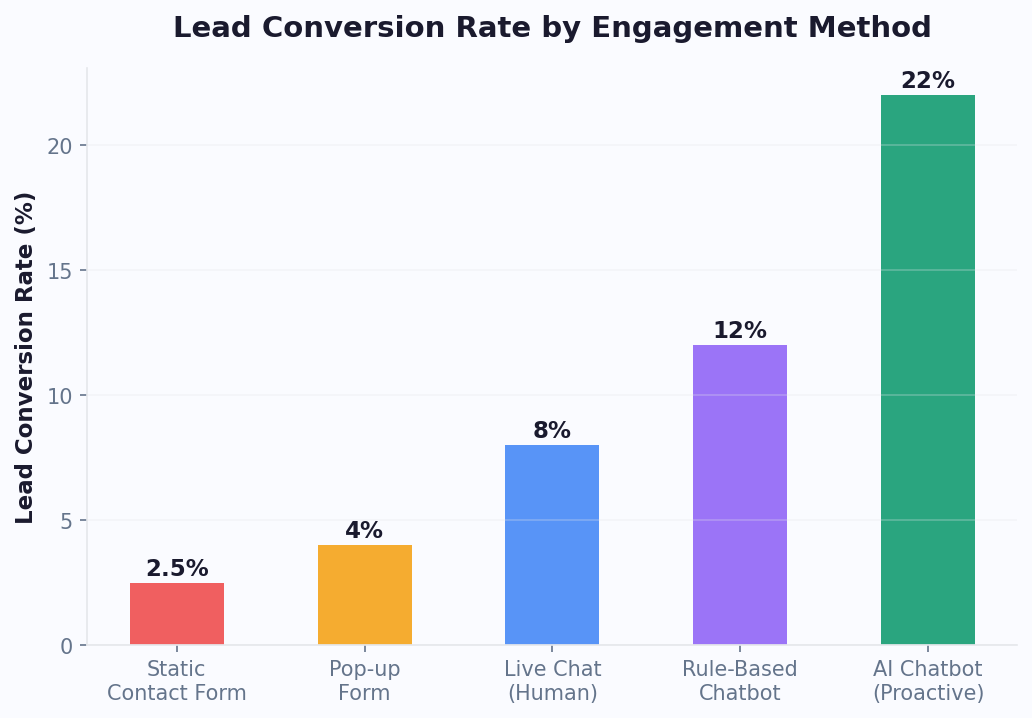
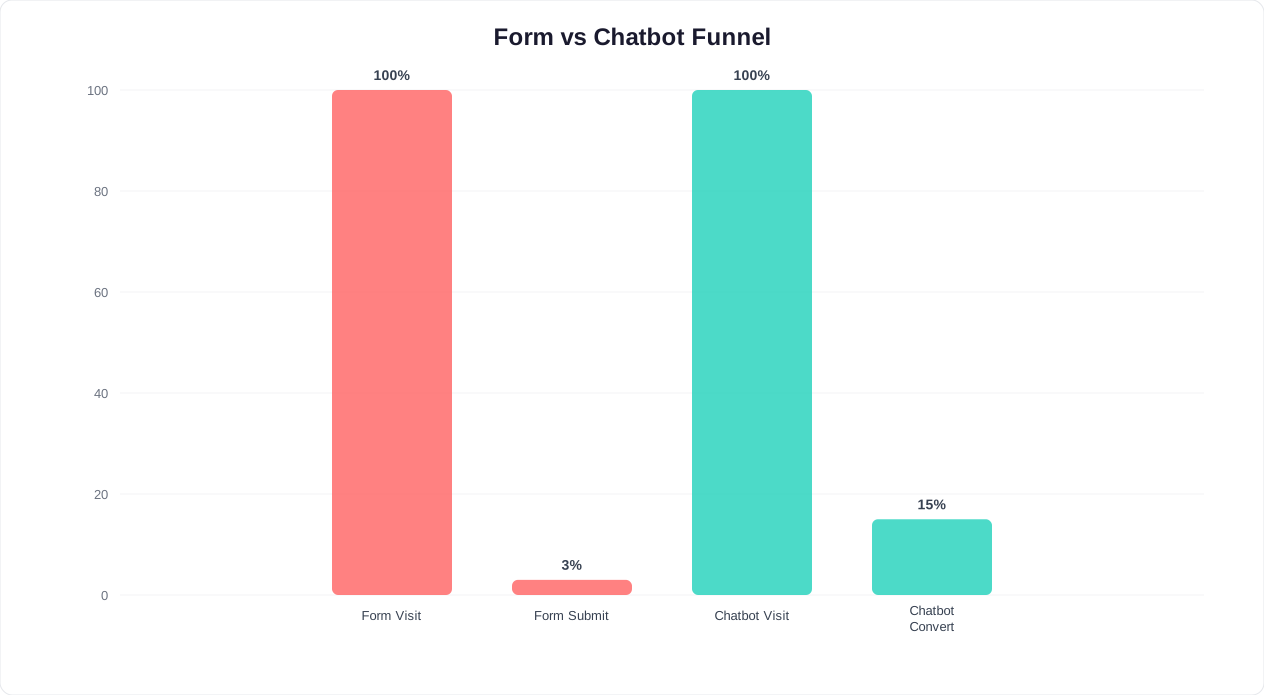
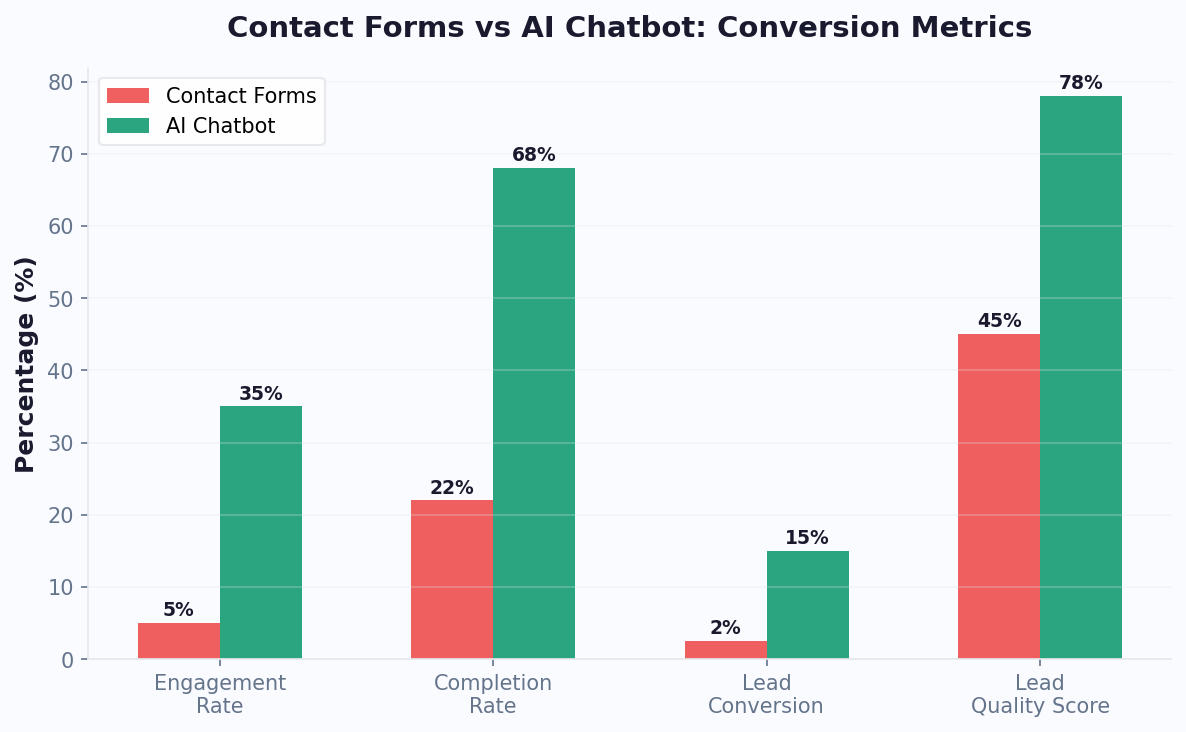
Contact forms are the worst offenders. According to Gartner's digital markets research, the average contact form on a coaching website has a 3-5% completion rate, and of those who submit, only 40-60% actually show up to the call they eventually book. The entire funnel leaks at every stage. Compare this to a conversational experience: chatbots on service-based websites consistently achieve 15-25% engagement rates with visitors, and engaged visitors convert at 3-5x the rate of those who only browse static pages.
The problem is not traffic. The problem is that coaching websites are built like brochures when they should be built like conversations. A coaching chatbot transforms your website from a passive information display into an active, intelligent guide that engages every visitor, answers their specific questions, qualifies their fit for your programs, and moves them toward the right next step -- whether that is booking a discovery call, enrolling in a course, or joining your email list for future nurturing.
This guide walks through exactly how to build that experience. We will cover qualification, course recommendation, FAQ automation, integration with your existing tools, upselling strategy, and a ready-to-use chatbot template for coaching websites. By the end, you will have a practical blueprint for recovering the visitors your coaching business is currently losing.
The 3 Jobs Your Coaching Chatbot Should Do
A coaching chatbot is not a customer support tool. It is a sales and client experience system that performs three distinct jobs, each of which maps to a stage in your client acquisition funnel. Understanding these three jobs -- and building dedicated conversational flows for each -- is the difference between a chatbot that generates revenue and one that just answers questions.
Job 1: Qualify Leads and Pre-Screen for Discovery Calls
Not every visitor to your coaching website is a good fit for your services. Some are browsing casually. Some cannot afford your programs. Some have needs that fall outside your expertise. And some are ready to invest right now but need validation that you are the right coach for them. Your chatbot's first job is to sort these visitors into the right buckets -- quickly, conversationally, and without making anyone feel rejected.
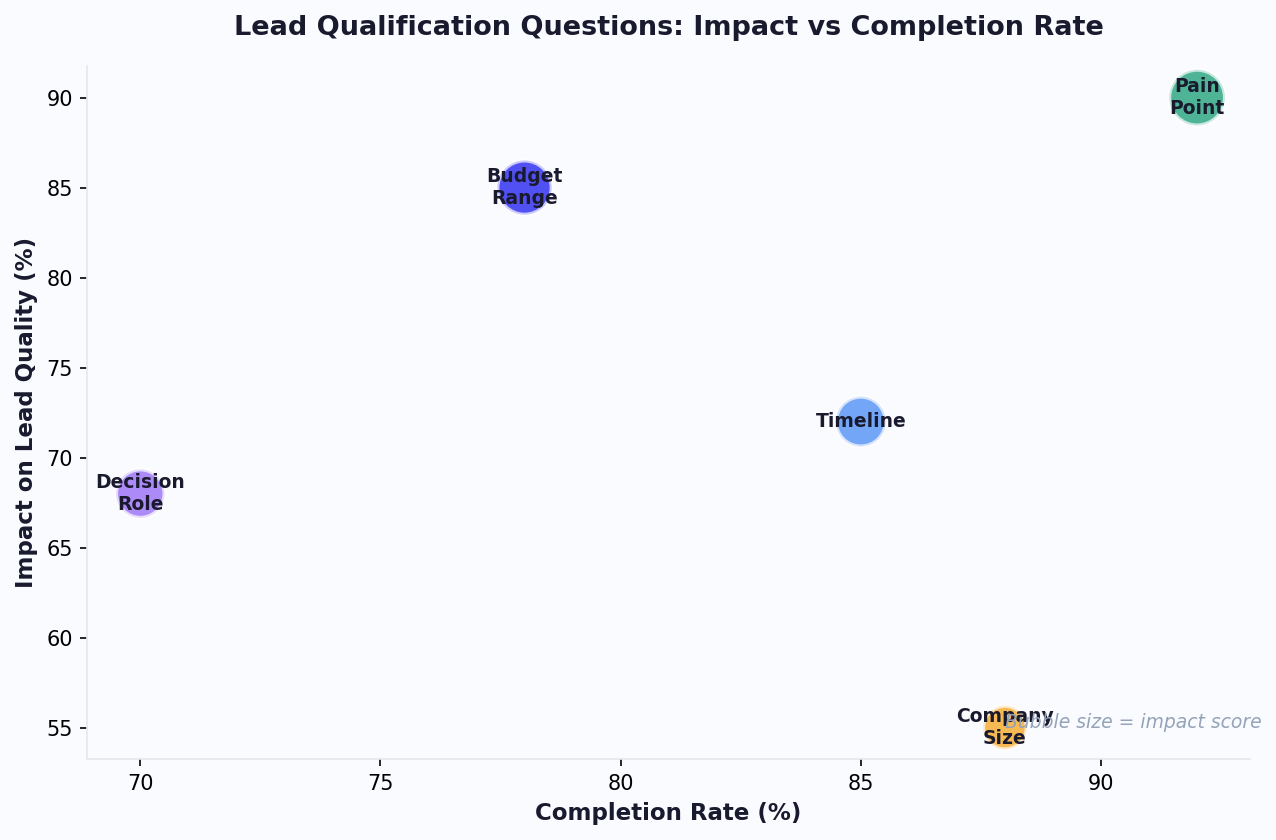
The qualification process should feel like a helpful conversation, not an interrogation. The chatbot asks 3-5 questions that mirror the opening minutes of a discovery call: What are you looking for help with? Have you worked with a coach before? What timeline are you working with? What is your budget range? Based on the answers, the chatbot routes the visitor to the appropriate next step -- a discovery call for high-intent prospects, a course recommendation for mid-intent visitors, or a lead magnet for early-stage browsers.
Job 2: Recommend the Right Program or Course
Most coaches offer multiple programs at different price points: a self-paced online course ($97-497), a group coaching program ($500-2,000), and one-on-one coaching ($2,000-10,000+). Visitors often do not know which option is right for them, and if they have to figure it out by reading through multiple sales pages, many will give up and leave. The chatbot's second job is to act as a personalized program advisor -- asking about the visitor's goals, experience level, budget, and preferred learning style, then recommending the program that best fits their needs.
This is where the chatbot directly drives revenue. A visitor who was going to bounce now gets a tailored recommendation with a clear explanation of why that program is right for them. The chatbot can present pricing, share relevant testimonials, answer objections, and provide a direct enrollment link -- all within the same conversation.
Job 3: Answer Questions That Block the Sale
Before booking a call or purchasing a course, most prospects have questions. How long is the program? Do you offer payment plans? What is your refund policy? Can I talk to a past client? What results can I expect? Every unanswered question is friction that reduces conversion. Your chatbot's third job is to provide instant, accurate answers to these common questions so that the visitor can make a confident decision without waiting for a reply to an email or a callback that may never come.
These three jobs work together as a conversion engine. Qualification identifies the right prospects and routes them efficiently. Recommendation matches prospects to the right offer. FAQ automation removes the friction that prevents purchase decisions. Together, they transform a static coaching website into an active sales machine that works around the clock.
The rest of this guide breaks down each job in detail with specific conversation flows, integration strategies, and a complete template you can deploy on your own coaching website using Conferbot's no-code chatbot builder.
Qualifying Leads: The Automated Discovery Call Pre-Screen
Discovery calls are the lifeblood of a coaching business, but they are also the biggest bottleneck. The typical coach spends 30-60 minutes per discovery call, including preparation and follow-up. If 40% of those calls are with prospects who are not a good fit -- wrong budget, wrong timing, or wrong problem -- that is hours of wasted time every week. A chatbot-based pre-screening system eliminates unqualified calls and ensures that every prospect who reaches your calendar is genuinely ready to explore working with you.
The Pre-Screening Conversation Flow
The qualification conversation should take the visitor 2-3 minutes and consist of 4-6 well-designed questions. Here is a proven flow for coaching businesses:
Step 1: Opening and intent detection
"Welcome! I am here to help you find the right path forward. Are you looking for one-on-one coaching support, exploring our online programs, or just learning more about what we offer?"
This single question segments your traffic immediately. One-on-one seekers enter the full qualification flow. Program explorers get routed to the course recommendation engine. Casual browsers get offered a lead magnet or newsletter signup.
Step 2: Problem and goal identification
"What is the primary challenge you are working on right now?" Present 4-6 options that map to your coaching specialties: Career transition, leadership development, business growth, work-life balance, confidence and mindset, relationship challenges. The visitor's selection determines which qualifying questions come next and which testimonials and case studies the chatbot references later in the conversation.
Step 3: Experience and readiness assessment
"Have you worked with a coach before?" and "On a scale of 1-10, how ready are you to invest time and energy into making a change right now?" These questions gauge readiness. A prospect who has worked with a coach before and rates their readiness at 8+ is a very different lead than someone who is exploring the idea for the first time and rates themselves at 4.
Step 4: Budget qualification
"Our coaching programs range from self-paced courses at $297 to comprehensive one-on-one packages. To help me point you in the right direction, what level of investment feels comfortable for you?" Present ranges rather than exact numbers: under $500, $500-2,000, $2,000-5,000, $5,000+. This qualifies budget without feeling transactional.
Step 5: Routing
Based on the combined answers, the chatbot assigns a lead score and routes accordingly:
- High-intent, qualified: Direct to calendar booking for a discovery call. "Based on what you have shared, I think a discovery call with [Coach Name] would be a great next step. Here are available times this week."
- Mid-intent, budget-constrained: Recommend a self-paced course or group program. "For where you are right now, our [Program Name] would be a perfect starting point. It covers exactly what you described, and you can work through it at your own pace."
- Low-intent, early-stage: Offer a lead magnet. "It sounds like you are still exploring. I have a free guide on [topic] that covers exactly what we discussed. Can I send it to your email?"
What to Collect Before the Call
For prospects who book a discovery call, the chatbot should capture: full name, email address, phone number (optional), the challenge they described, their readiness score, and their budget range. This information is delivered to the coach before the call -- either through email, a CRM integration, or directly within the Conferbot analytics dashboard. When the coach opens the discovery call already knowing the prospect's situation, budget, and readiness level, the conversation starts at a much higher level. Coaches who use chatbot pre-screening report that discovery call duration drops by 15-20 minutes because the exploratory phase is already complete, and close rates increase by 20-35% because every call is with a qualified, informed prospect.
Related: Chatbot Lead Qualification: Score, Route, and Convert Leads Automatically
Course Recommendations: Matching Visitors to Your Offers
For coaches who sell digital products -- online courses, group programs, masterclasses, memberships -- the chatbot becomes a personal shopping assistant for transformation. Most coaching websites list programs on a sales page and hope visitors will figure out which one is right for them. That approach fails because it places the burden of decision-making on the prospect, who often does not have enough context to choose confidently. The chatbot removes that burden by guiding the visitor through a short recommendation flow and presenting a personalized suggestion.
Building the Recommendation Engine
The recommendation flow is a decision tree that maps visitor attributes to your product catalog. Here is how to structure it for a coaching business with multiple offers:
Attribute 1: Goal alignment
What does the visitor want to achieve? Map each answer to the programs that address that goal. A business coach might have: start a business (maps to Foundations course), grow revenue (maps to Scaling program), build a team (maps to Leadership coaching), exit or sell (maps to one-on-one advisory).
Attribute 2: Experience level
Is the visitor a beginner, intermediate, or advanced? This filters out programs that are too basic or too advanced for the prospect. A beginner who selects "grow revenue" should be recommended the Foundations course first, not the advanced Scaling program.
Attribute 3: Learning preference
"How do you learn best? Self-paced with video lessons, live group sessions with other professionals, or direct one-on-one attention?" This maps to your delivery format: self-paced courses, group coaching cohorts, or private coaching packages.
Attribute 4: Investment readiness
If not already captured in the qualification flow, ask about budget comfort level. This ensures you recommend a program the visitor can actually purchase, which avoids the frustration of falling in love with an offer they cannot afford.
Presenting the Recommendation
Once the chatbot has enough information, it presents a personalized recommendation with conviction:
"Based on your goal to grow your business revenue and your preference for live learning, I would recommend our 12-Week Scaling Accelerator. Here is why it is the right fit:
- It is specifically designed for business owners doing $100K-500K who want to reach $1M+
- You will get weekly live group coaching calls with [Coach Name] plus a private community
- The last cohort averaged a 40% revenue increase within 6 months
- Investment: $1,997 or 4 monthly payments of $549
- Next cohort starts June 15th -- 4 spots remaining"
The recommendation includes social proof (results from past clients), urgency (limited spots or start dates), pricing with payment plan options, and a direct call to action. Use rich media within the chatbot to display program images, video testimonials, or curriculum outlines that reinforce the recommendation.
Handling Objections in Real Time
After presenting a recommendation, the chatbot should anticipate and address common objections:
- "What if I fall behind?" -- Explain your catch-up policy, recorded sessions, or flexible pacing
- "Is there a guarantee?" -- Present your refund or satisfaction guarantee clearly
- "I need to think about it" -- Offer to send a detailed program guide by email and schedule a follow-up: "Totally understand. Can I send you the full program details to review? I can also check in with you in a few days to answer any questions that come up."
- "It is more than I expected" -- Pivot to a lower-tier option: "I hear you. Our self-paced course covers the same core strategies at $297. Many of our Accelerator members actually started with the self-paced course first. Would you like to learn more about that option?"
This real-time objection handling recovers prospects who would otherwise leave the website undecided. Coaches using recommendation chatbots on platforms like Thinkific and Teachable report 25-40% increases in course enrollment from website traffic compared to static sales pages alone. When prospects receive a personalized recommendation with clear reasoning, they convert at significantly higher rates than when they browse a catalog and self-select.
Related: How to Automate Appointment Reminders With a Chatbot and Cut No-Shows by 50%
FAQ Automation: Pricing, Scheduling, and Program Details
Every coaching business has a set of questions that come up repeatedly -- in DMs, on discovery calls, in email inquiries. These questions are predictable, and every hour a coach spends answering them manually is an hour not spent coaching clients, creating content, or developing new programs. A chatbot loaded with your FAQ content provides instant answers to these repetitive questions, freeing your time while improving the prospect experience.
The Core FAQ Categories for Coaching Businesses
Based on analysis of thousands of coaching website inquiries, the most common question categories are:
Pricing and payment
- "How much does coaching cost?" -- Present your pricing tiers clearly. Many coaches hesitate to share pricing upfront, but transparency accelerates decisions. Prospects who discover pricing in conversation with the chatbot are more likely to book a call than those who have to ask on the call itself.
- "Do you offer payment plans?" -- Detail available installment options with specific amounts and timelines.
- "Do you accept insurance?" -- Common for health and wellness coaches. Provide a clear answer and, if applicable, information about HSA/FSA eligibility or superbill documentation.
- "What is your refund policy?" -- A clear, confident refund policy builds trust. The chatbot should present it without hedging.
Scheduling and logistics
- "What days and times do you coach?" -- Present your availability windows and timezone. Link to your calendar booking tool for real-time availability.
- "How long are coaching sessions?" -- Session durations by program type (e.g., discovery calls are 30 minutes, coaching sessions are 60 minutes, VIP days are 4 hours).
- "Do you work with clients in my timezone?" -- Especially important for online coaches with international audiences. Specify which timezones you serve and whether sessions are recorded for asynchronous review.
- "What happens if I need to reschedule?" -- Present your cancellation and rescheduling policy with specific timeframes.
Program details and outcomes
- "How long is the program?" -- Duration, number of sessions, and expected time commitment per week.
- "What results can I expect?" -- Share specific outcomes from past clients (with permission). "Our clients typically see [specific measurable outcome] within [timeframe]. For example, [Client Name] achieved [result] in [duration]."
- "What is included?" -- Detailed breakdown of deliverables: sessions, recordings, workbooks, community access, email support, etc.
- "What is the difference between your group program and one-on-one?" -- A comparison that helps the prospect self-select the right level of support.
Credentials and trust
- "What are your qualifications?" -- Certifications (ICF, NBC-HWC, etc.), years of experience, number of clients served, and relevant background.
- "Do you have testimonials?" -- Surface relevant testimonials based on the prospect's stated goal or challenge. A prospect interested in career change should see career-change testimonials, not business-growth stories.
- "Can I talk to a past client?" -- If you offer reference calls, the chatbot can facilitate the request. If not, provide detailed case studies or video testimonials.
Building Your FAQ Knowledge Base
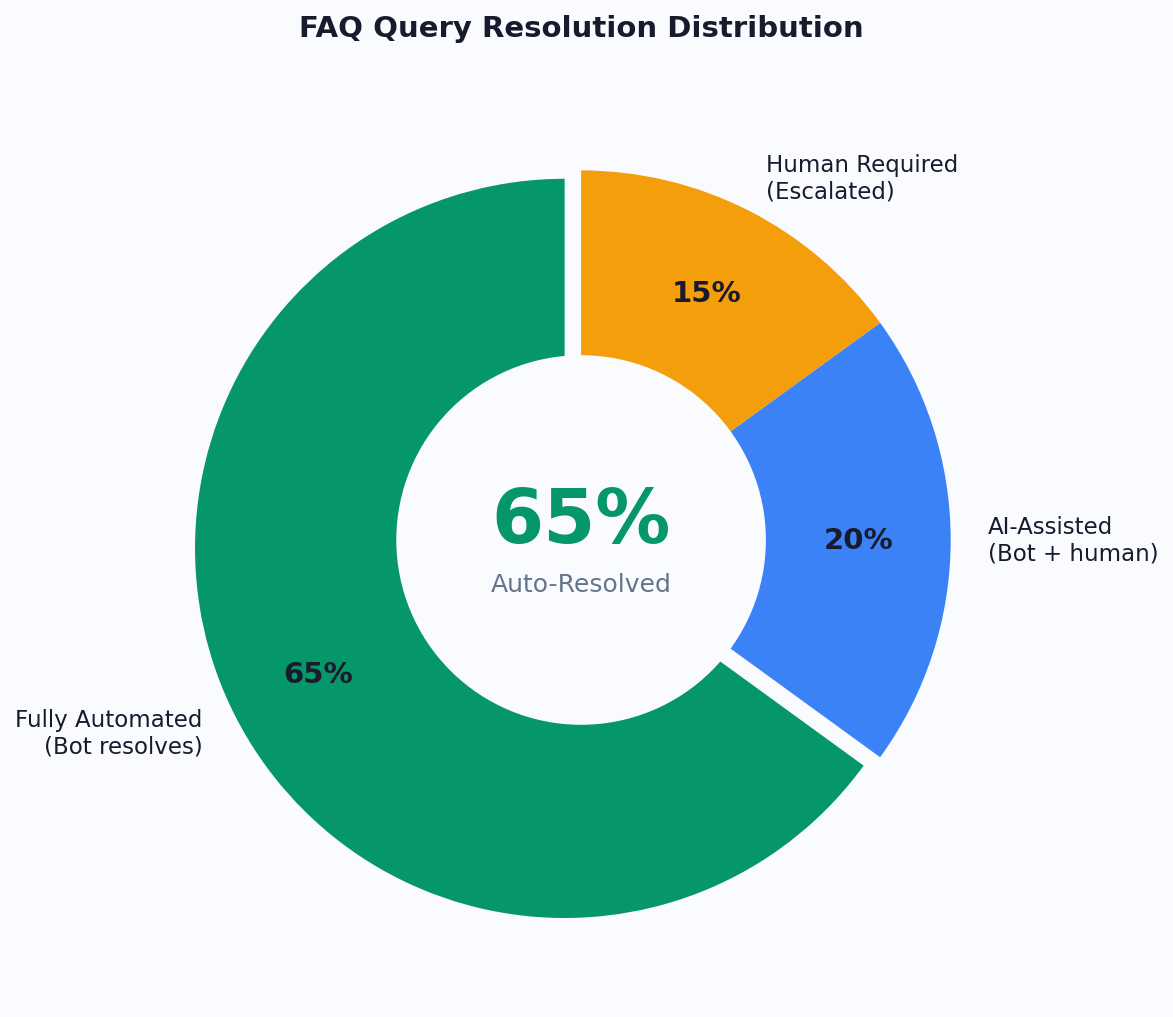
Compile your FAQ content into Conferbot's knowledge base. Start with the 20-30 most common questions -- you can identify these by reviewing your email inbox, DM history, and discovery call recordings. For each question, write a clear, conversational answer that matches your brand voice. The AI knowledge base will handle variations of these questions naturally, so you do not need to anticipate every possible phrasing.
The FAQ chatbot also serves as a data collection tool. Questions that the chatbot cannot answer reveal gaps in your website content and sales copy. If multiple visitors ask "Do you work with beginners?" and that information is not on your sales page, that is a signal to update your copy. Use the analytics dashboard to monitor unanswered questions and continuously improve your knowledge base coverage.
Coaches who automate their FAQ handling report saving 5-10 hours per week on repetitive communication -- time that can be reinvested into client work, content creation, or business development. For a coach billing $200-500 per hour for their time, that represents $1,000-5,000 per week in recaptured productivity.
Related: How to Calculate Chatbot ROI: Formula, Benchmarks, and Free Calculator
Connecting to Calendly, Stripe, and Your Course Platform
A coaching chatbot delivers maximum value when it connects to the tools you already use. The conversation should flow seamlessly from qualification to booking to payment without the prospect ever leaving the experience. Here is how to integrate the key systems in a coaching tech stack.
Calendar Integration: Calendly, Acuity, and Google Calendar
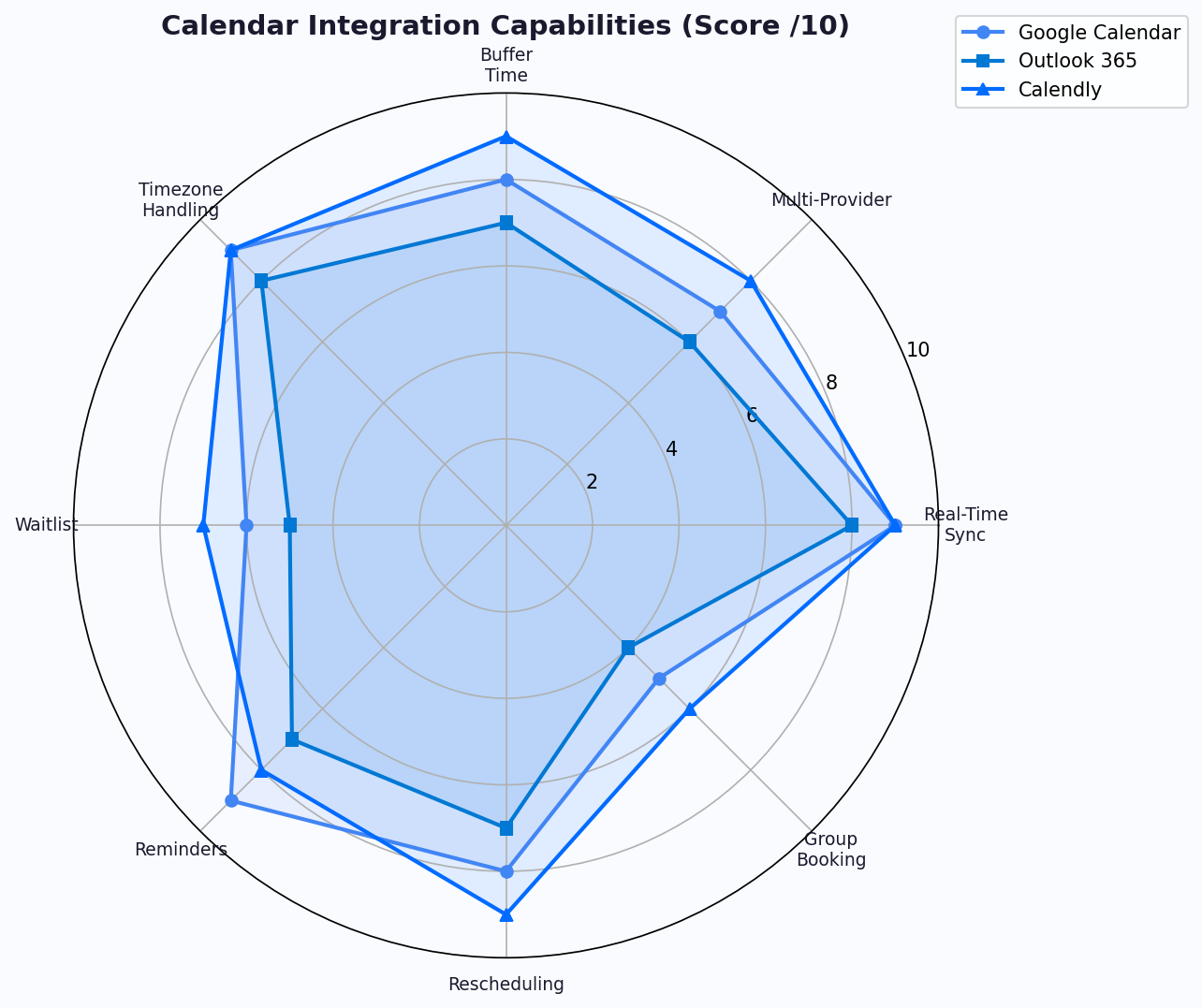
Discovery call booking is the single most important conversion event for high-ticket coaching services. The chatbot must be able to present real-time availability and book directly into your calendar. Conferbot's calendar booking feature integrates with Calendly's API, Acuity Scheduling, and Google Calendar to display available time slots within the chat conversation.
The flow works like this:
- The chatbot qualifies the prospect and determines they are ready for a discovery call
- Available time slots are presented directly in the chat: "Here are [Coach Name]'s available times this week for a 30-minute discovery call. Which works best for you?"
- The prospect selects a slot and confirms with their name and email
- The booking is created in your calendar with the prospect's qualification data attached as notes
- Automated confirmation and reminder sequences are triggered
This in-chat booking eliminates the drop-off that occurs when you redirect prospects to an external scheduling page. Studies show that each additional step in a booking process reduces completion by 10-20%. By keeping the booking inside the conversation, you remove at least one step and maintain the momentum of the engagement.
For coaches with complex scheduling needs -- multiple session types, different durations, varying availability by day -- the chatbot handles the complexity invisibly. The prospect simply states what they need, and the chatbot shows the right availability. Read our full guide on automating appointment reminders to reduce no-shows for strategies to ensure booked prospects actually show up.
Payment Integration: Stripe and PayPal
For course sales and program enrollments, the chatbot should be able to initiate payment directly. Through Conferbot's integrations hub, you can connect Stripe to generate payment links within the conversation:
"Ready to join the Scaling Accelerator? Here is your enrollment link with the 4-payment plan option. You will get instant access to the welcome materials as soon as your payment is confirmed."
The chatbot can also apply discount codes, reference active promotions, and handle payment plan questions -- all within the same conversation thread. For prospects who express interest but do not complete payment, the chatbot can follow up with a gentle reminder after 24-48 hours.
Course Platform Integration: Teachable, Thinkific, Kajabi
If you host your courses on Teachable, Thinkific, Kajabi, or another course platform, the chatbot can pull course information (pricing, availability, curriculum details) directly from your platform and present it conversationally. After purchase, the chatbot sends the enrollment link and onboarding instructions automatically.
For coaches using Conferbot's API integration capabilities, deeper integrations are possible: checking whether a visitor is already enrolled in a course (to avoid recommending something they already own), displaying progress data for current students, and triggering platform-specific actions like granting access to bonus modules.
CRM and Email Integration
Every chatbot conversation generates valuable lead data. Connect your chatbot to your CRM (HubSpot, ActiveCampaign, ConvertKit, or others) to automatically:
- Create or update contact records with qualification data
- Tag contacts based on their interests, budget range, and readiness score
- Trigger email nurture sequences for leads who are not yet ready to buy
- Notify you or your team when a high-value lead engages
The CRM integration ensures that no lead falls through the cracks. A visitor who engages with your chatbot at 11 PM on a Saturday, answers qualification questions, but does not book a call is not lost -- they are captured in your CRM with full context, tagged for follow-up, and entered into a nurture sequence that keeps your coaching brand top of mind until they are ready to take the next step.
Webhook Automation: Zapier and Make
For custom workflows, Conferbot supports webhook triggers that connect to Zapier and Make (formerly Integromat). This enables automations such as: send a Slack notification when a high-scoring lead books a call, add a new course enrollee to a private Facebook group, create a Trello card for client onboarding tasks, or update a Google Sheet with daily lead metrics. The integrations hub provides step-by-step setup guides for each connection.
Related: Collect Customer Feedback With a Chatbot: NPS, CSAT, and Survey Guide
Upselling: From Free Content to Paid Programs
The coaching business model is built on an ascension ladder: free content attracts attention, low-ticket offers build trust, and high-ticket programs deliver transformation. Most coaches are good at creating content for each rung of the ladder but struggle with moving people up it. The chatbot solves this by acting as a persistent, intelligent upgrade advisor that identifies when a prospect or client is ready for the next level and presents the right offer at the right moment.
The Coaching Ascension Ladder
A typical coaching business has 4-5 tiers:
| Tier | Offer Type | Price Range | Chatbot Role |
|---|---|---|---|
| Free | Lead magnet, blog, podcast | $0 | Capture email, segment interest |
| Low-ticket | Mini-course, workshop, ebook | $27-97 | Recommend as entry point |
| Mid-ticket | Self-paced course, membership | $197-997 | Recommend after qualification |
| High-ticket | Group coaching cohort | $1,000-5,000 | Book discovery call, nurture |
| Premium | One-on-one coaching, VIP day | $3,000-25,000+ | Qualify and route to sales call |
Upsell Trigger Points
The chatbot monitors engagement signals and triggers upsell conversations at strategic moments:
After lead magnet download: When a visitor downloads your free guide, the chatbot follows up within the same conversation: "Great, your guide is on its way to your inbox. While you are here -- many people who download this guide are also interested in our [Course Name], which goes deeper into everything the guide covers. Would you like a quick overview?" This immediate upsell captures the visitor at peak interest, before they leave your website and potentially never return.
After course completion: For students who finish a self-paced course, the chatbot initiates the next-level conversation: "Congratulations on completing [Course Name]! Based on the progress you have made, you would be an ideal candidate for our [Group Program]. It builds directly on what you learned and adds live coaching support. The next cohort starts [date]."
After engagement milestones: If a visitor returns to your website multiple times, views your coaching page, or spends significant time on your sales page without purchasing, the chatbot can offer help: "I noticed you have been exploring our coaching programs. Is there anything I can help you with or any questions I can answer?" This proactive engagement converts research-mode visitors into conversations.
During live events: If you run webinars or workshops, the chatbot on your website can engage attendees who visit after the event: "Were you at today's workshop on [topic]? The special enrollment offer is available until midnight. Would you like me to walk you through the program details?"
Calculating Upsell Revenue Impact
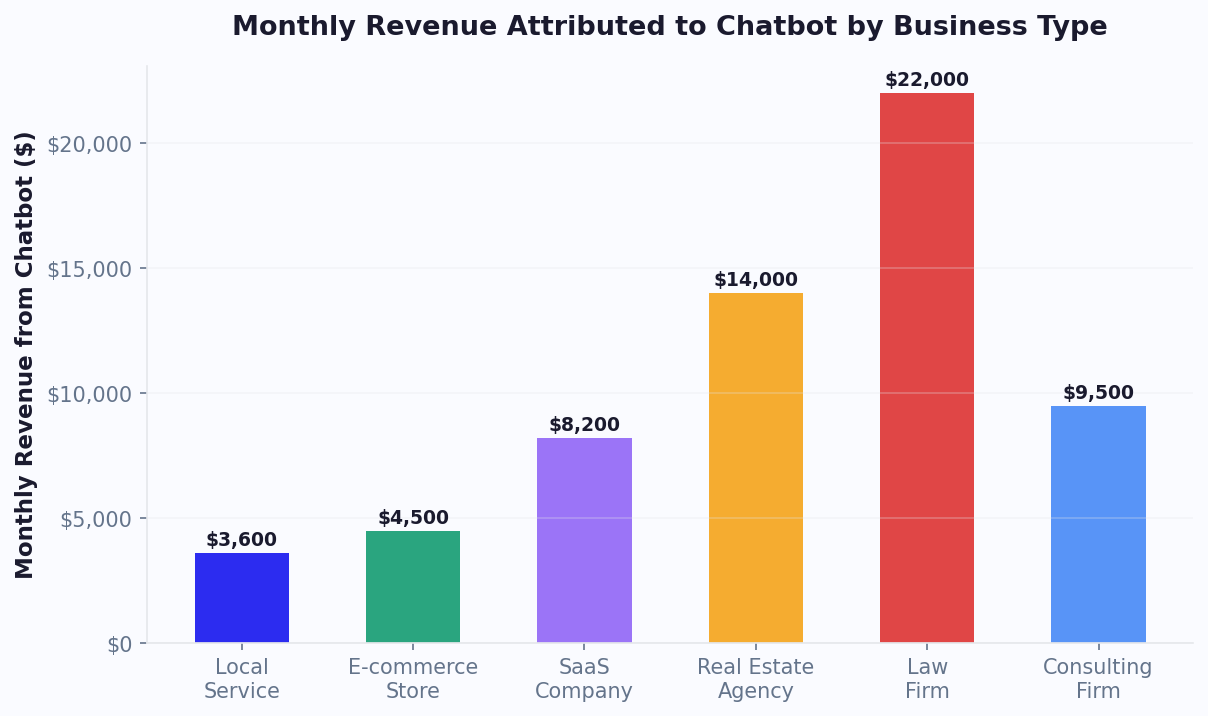
Consider a coach with 500 monthly website visitors. Without a chatbot, perhaps 15 book discovery calls (3% conversion) and 10 purchase the self-paced course (2% direct purchase). With a chatbot handling qualification, recommendation, and upselling:
- Chatbot engagement rate: 20% (100 conversations)
- Discovery call bookings: 25 (from qualified high-intent visitors) -- a 67% increase
- Course purchases: 20 (from mid-intent visitors who receive personalized recommendations) -- a 100% increase
- Lead magnet captures: 30 (from low-intent visitors who would have bounced) -- net new leads
If the coach's discovery call close rate is 40% at an average package value of $3,000, the additional 10 discovery calls generate $12,000 in additional monthly revenue. The additional 10 course sales at $497 add $4,970. And the 30 new email leads enter a nurture funnel that converts at 5-10% over 90 days, adding another $3,000-6,000 per quarter. For a detailed breakdown of these calculations, see our guide on how to calculate chatbot ROI.
Template: Coaching Website Chatbot Flow
Below is a complete, ready-to-implement chatbot flow template for coaching websites. You can build this entire flow in Conferbot's no-code chatbot builder in under an hour, customize the language to match your brand voice, and deploy it on your website, WhatsApp, and Instagram.
Welcome Message
"Hi there! Welcome to [Coach/Brand Name]. I am here to help you find the right next step -- whether that is booking a call, finding the right program, or just getting your questions answered. What brings you here today?"
Present three options as buttons:
- "I want to work with a coach" -- Routes to qualification flow
- "Help me find the right course" -- Routes to recommendation flow
- "I have a question" -- Routes to FAQ knowledge base
Branch 1: Coaching Qualification Flow
This branch is for visitors interested in one-on-one or group coaching. The flow collects qualification data and routes to a discovery call booking or alternative offer.
Q1: "What area are you looking for coaching support in?" [Present 4-6 specialty areas as buttons]
Q2: "What is the biggest challenge you are facing in this area right now?" [Open text response]
Q3: "Have you invested in coaching or a similar program before?" [Yes, this would be my first time, Not sure what coaching involves]
Q4: "How soon are you looking to get started?" [This week, This month, In the next few months, Just exploring]
Q5: "Our coaching programs range from $997 to $10,000 depending on the level of support. What investment range feels right for where you are?" [Under $1,000, $1,000-3,000, $3,000-5,000, $5,000+, Not sure yet]
Routing logic:
- Timeline = This week/This month AND Budget >= $1,000 AND Previous coaching = Yes: Book discovery call
- Timeline = This week/This month AND Budget < $1,000: Recommend mid-ticket course
- Timeline = In the next few months OR Budget = Not sure: Offer free resource + email capture
- Timeline = Just exploring: Offer newsletter signup + blog content
Branch 2: Course Recommendation Flow
Q1: "What is your primary goal?" [Present 3-5 goal options mapped to your courses]
Q2: "How would you describe your experience level with [topic]?" [Beginner, Intermediate, Advanced]
Q3: "How do you prefer to learn?" [Self-paced video, Live group sessions, A mix of both]
Recommendation output: Based on the answers, present one primary recommendation and one alternative:
"Based on what you have shared, I would recommend [Program Name]. Here is why it is a great fit for you: [2-3 personalized reasons based on their answers]. The investment is [price] with a [payment plan] option available. [Enrollment link]"
"If you prefer something more [self-paced/affordable/intensive], [Alternative Program] might also be a good option. [Brief description and price]."
Branch 3: FAQ Automation
Connect your knowledge base with answers to your top 20-30 questions organized by category. The chatbot uses natural language processing to match visitor questions to the right answers. Include these essential categories:
- Pricing and payment plans
- Session scheduling and availability
- Program duration and format
- Results and testimonials
- Credentials and methodology
- Refund and cancellation policies
- Technical requirements (for online programs)
After answering any FAQ, the chatbot should always offer a next step: "Does that answer your question? Would you like to book a call to discuss further, or is there anything else I can help with?"
Follow-Up Sequences
Configure these automated follow-up messages for visitors who engaged but did not convert:
- 24 hours after conversation (no booking): "Hi [Name], just following up on our conversation yesterday. You mentioned you were interested in [topic]. I wanted to make sure you have everything you need to take the next step. Any questions I can help with?"
- 3 days after lead magnet download: "How are you enjoying the [Guide Name]? One of the most common questions people have after reading it is [common question]. Here is a quick answer: [answer]. If you want to go deeper, our [Program Name] covers this in detail."
- 24 hours before discovery call: "Looking forward to your call with [Coach Name] tomorrow at [time]. Here is what to expect: a 30-minute conversation about your goals and how we might be able to help. No pressure, no hard sell -- just an honest conversation about fit. See you then!"
Deployment Checklist
Before launching your coaching chatbot, verify the following:
- All program names, prices, and descriptions are current
- Calendar booking is connected and showing correct availability
- Payment links are active and tested
- FAQ knowledge base covers your top 20 questions
- Follow-up sequences are configured with correct timing
- The chatbot tone matches your coaching brand voice
- Human handoff is configured for complex questions the bot cannot answer
- Analytics tracking is enabled to measure engagement and conversion
Launch with a soft rollout -- enable the chatbot and monitor conversations for the first week. Review transcripts daily to identify questions the chatbot handles poorly, flows where visitors drop off, and opportunities to improve the conversation. Most coaching chatbots reach optimal performance within 2-3 weeks of iterative refinement.
For coaches looking to get started quickly, Conferbot provides pre-built coaching templates that you can customize with your specific programs, pricing, and brand voice. Explore the full range of small business chatbot strategies and client feedback collection approaches to round out your coaching chatbot strategy. If you are new to chatbot building, start with our step-by-step guide to building a chatbot without coding.
Was this article helpful?
Build and deploy in 10 minutes. No coding needed.
AI Chatbot for Coaches FAQ
Everything you need to know about chatbots for ai chatbot for coaches.
About the Author
Deepak is the founder of Conferbot and writes about building, deploying, and improving AI chatbots.
View all articles

