
iOS SDK チャットボットビルダー
SwiftUIとUIKitサポートを備えたネイティブiOS SDK。Apple Human Interface Guidelinesに準拠、iOS 13以降に対応、美しいネイティブアニメーションを搭載。
iOS チャットボット機能
強力な自動会話を構築するために必要なすべて
SwiftUIネイティブビュー
UIKit互換性
Apple HIG準拠
プッシュ通知(APNs)
ダークモードサポート
Dynamic Typeサポート
VoiceOverアクセシビリティ
iOS 13以降サポート
何を 構築できますか?
開始する 7つの簡単なステップで
このガイドに従ってiOSチャットボットを接続します
Swift Package ManagerまたはCocoaPodsで追加
SwiftファイルでConferbotSDKをインポート
AppDelegateでボットIDを使用して初期化
ChatViewControllerを表示またはChatView(SwiftUI)を使用
ConferbotThemeで外観をカスタマイズ
プッシュ通知を設定(オプション)
iOSチャットボットの準備完了!
Introduction
iOS users are among the most valuable customers in the mobile ecosystem. With over 1.5 billion active Apple devices and an audience that spends significantly more on in-app purchases and subscriptions than any other platform, delivering an exceptional in-app experience on iOS is critical for revenue and retention.
Apple users also have the highest expectations. They notice when an interface does not follow the Human Interface Guidelines, when animations stutter, when dark mode is not supported, or when accessibility features are missing. A chatbot that looks and feels like a native iOS experience is not optional — it is the baseline for user acceptance.
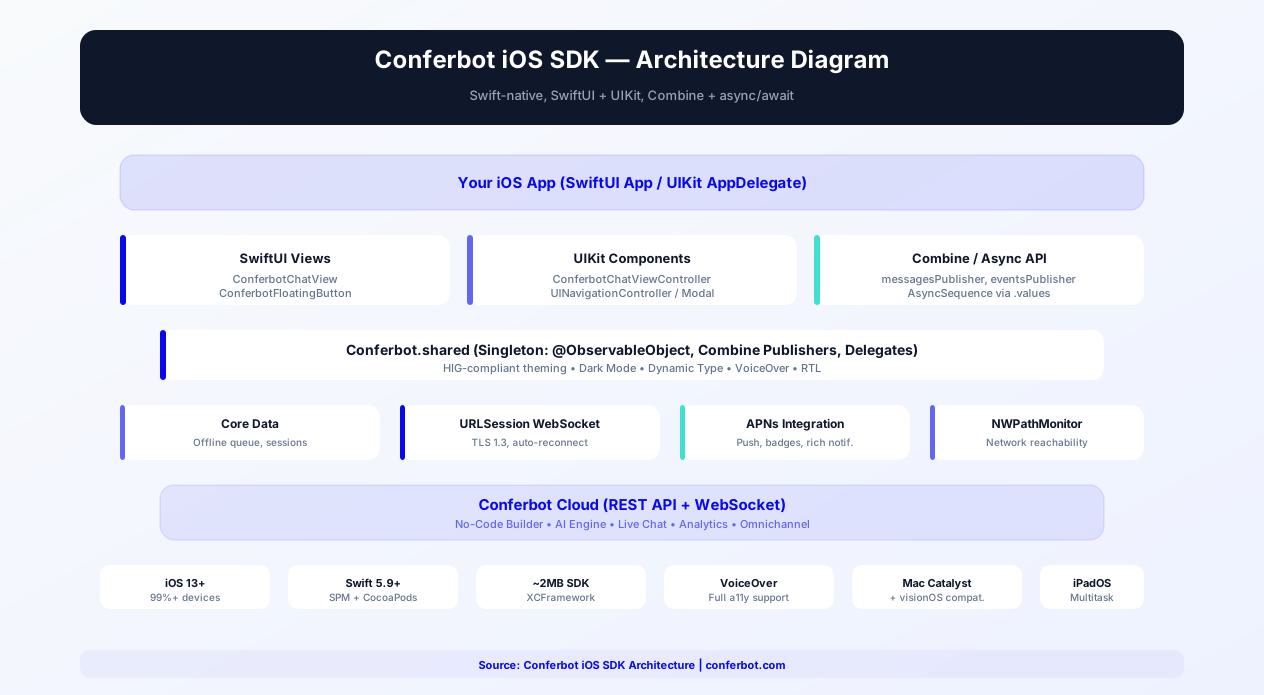
The Conferbot iOS SDK is built from the ground up for Apple's ecosystem. It offers native SwiftUI views and UIKit compatibility, follows the Apple Human Interface Guidelines, supports iOS 13+, and includes accessibility features like VoiceOver, Dynamic Type, and full dark mode support. The result is a chatbot that feels like it was built by your iOS team — because the SDK components integrate seamlessly with your existing Swift codebase.
Behind the native interface, the SDK connects to the same no-code chatbot builder, AI engine, and live chat system that powers all Conferbot channels. Build your conversational flows once, and the iOS SDK renders them with Apple-native polish. This guide covers installation, SwiftUI and UIKit integration, accessibility, App Clips, privacy compliance, Siri Shortcuts, and best practices for 2026.
New to chatbot building? Start with our complete guide to building a chatbot without coding. The same chatbot works on Android, your website, WhatsApp, and Messenger. Browse our template library for pre-built in-app chatbot flows. For cross-platform alternatives, see the Flutter SDK and React Native SDK guides.
Source code & documentation: conferbot-ios on GitHub | Available on CocoaPods / SPM | Apple Developer Docs | Human Interface Guidelines
Installation Guide
The Conferbot iOS SDK supports both Swift Package Manager and CocoaPods, integrating into your Xcode project through standard dependency management workflows.
Option A: Swift Package Manager (Recommended)
- In Xcode, go to File → Add Package Dependencies
- Enter the repository URL:
https://github.com/Conferbot/conferbot-ios - Select the version rule (e.g., "Up to Next Major Version")
- Click "Add Package" and select the ConferbotSDK library
Option B: CocoaPods
Add to your Podfile:
pod 'ConferbotSDK', '~> 1.0'
Then run:
pod install
Step 2: Initialize the SDK
In your AppDelegate or App struct:
import ConferbotSDK
Conferbot.initialize(botId: "YOUR_BOT_ID")
Step 3: Add the Chat View
SwiftUI:
Use ConferbotChatView directly in your SwiftUI hierarchy:
ConferbotChatView()
Or use the floating button overlay:
ConferbotFloatingButton()
UIKit:
Present the chat as a view controller:
let chatVC = ConferbotChatViewController()
navigationController?.pushViewController(chatVC, animated: true)
Or present modally:
present(chatVC, animated: true)
Step 4: Configure Push Notifications (Optional)
- Enable Push Notifications capability in your Xcode project
- Configure APNs certificates or keys in your Apple Developer account
- Upload the APNs authentication key to the Conferbot dashboard
- Pass the device token to the SDK:
Conferbot.shared.setDeviceToken(deviceToken)
Basic integration takes approximately 15 minutes. The SDK supports iOS 13+, covering 99%+ of active iPhone and iPad devices.
Key SDK Features
The Conferbot iOS SDK is designed to meet Apple's quality bar and integrate naturally with the iOS development ecosystem.
SwiftUI Native Views
The SDK provides native SwiftUI views that compose naturally with your existing SwiftUI code. ConferbotChatView, ConferbotFloatingButton, and ConferbotMessageBubble are standard SwiftUI views that support modifiers, environment values, and SwiftUI's declarative animation system. For SwiftUI apps, the recommended pattern is embedding ConferbotChatView within your NavigationStack or TabView hierarchy. The view reads SwiftUI environment values for colorScheme, dynamicTypeSize, and layoutDirection automatically, inheriting your app's appearance settings without extra configuration. Use the .overlay modifier with ConferbotFloatingButton for a floating chat bubble, or present the chat as a .sheet or .fullScreenCover. The SDK's views are compatible with SwiftUI's withAnimation and matchedGeometryEffect for polished custom transitions.
UIKit Compatibility
For apps built with UIKit (or those in the process of migrating to SwiftUI), the SDK provides ConferbotChatViewController — a full-featured UIViewController subclass that works with UINavigationController, tab bars, and modal presentations. You can also embed SwiftUI chat views in UIKit using UIHostingController, or wrap ConferbotChatViewController in SwiftUI using UIViewControllerRepresentable for hybrid architectures.
Combine Reactive State Management
The SDK exposes its internal state through Combine publishers for reactive programming. Key publishers include: Conferbot.shared.messagesPublisher (a CurrentValueSubject emitting the message list on every update), Conferbot.shared.connectionStatePublisher (connected, disconnected, or reconnecting), Conferbot.shared.unreadCountPublisher (for badge updates on tab bars and app icons), and Conferbot.shared.eventsPublisher (a PassthroughSubject emitting ChatEvent values for message received, conversation ended, handoff requested, and data captured). For Swift concurrency, all publishers are also available as AsyncSequence via the .values property, enabling use with async/await and structured concurrency. Subscribe to unreadCountPublisher to drive badge updates, or observe eventsPublisher to trigger in-app analytics when specific chatbot interactions occur.
Apple Human Interface Guidelines Compliance
Every visual element follows the HIG. Navigation patterns, button sizes, spacing, typography, and interaction patterns match what iOS users expect. The SDK uses system fonts (SF Pro) by default, respects safe areas, and follows iOS conventions for sheet presentations and gesture-based dismissal.
Dark Mode
Full dark mode support using iOS's semantic colors and adaptive color system. The chat UI automatically adapts when the user toggles between light and dark appearance, matching your app's dark mode implementation. No separate configuration needed — it works out of the box.
Dynamic Type
All text in the chat UI scales with the user's preferred text size setting. Whether the user has set their text to the smallest or largest accessibility size, message text, buttons, and headers adapt correctly. This is not just good practice — it is an App Store requirement for many categories.
VoiceOver Accessibility
Every interactive element in the chat has proper accessibility labels, traits, and hints for VoiceOver users. Message bubbles are announced with sender context, buttons describe their action, and the overall chat flow is navigable with VoiceOver gestures. Full Accessibility Inspector validated.
Push Notifications via APNs
When the bot sends a message while the app is backgrounded, users receive a native iOS push notification via Apple Push Notification service. Tapping the notification opens the chat directly. Badge count management is handled automatically.
Offline Support
Messages sent while offline are queued locally and delivered when connectivity returns. The SDK uses NWPathMonitor for reliable network state detection and Core Data for local message persistence.
SwiftUI Integration Deep Dive
The SDK's SwiftUI views are built as standard View conforming structs that compose naturally within your SwiftUI view hierarchy. ConferbotChatView supports ViewModifiers, environment values, and SwiftUI's built-in animation system. You can embed it in NavigationStack, TabView, or present it as a sheet. The floating button composable (ConferbotFloatingButton) uses SwiftUI's overlay system and supports custom positioning through alignment guides. For advanced use cases, the SDK provides ViewBuilder-based customization: pass custom views for the message bubble, input bar, header, quick replies, and empty state using trailing closure syntax that mirrors SwiftUI's native API patterns.
UIKit Compatibility Details
For apps still using UIKit (or migrating incrementally to SwiftUI), the SDK provides ConferbotChatViewController -- a fully featured UIViewController subclass that works with UINavigationController push/pop, UITabBarController tabs, and modal presentations (both sheet and fullscreen). The view controller respects UIAppearance proxies, supports trait collection changes for dark mode, and handles keyboard avoidance using UIKit's standard keyboard notification system. You can also embed SwiftUI chat views in UIKit using UIHostingController for a hybrid approach during migration.
App Store Review Guidelines
Apple's App Store review team evaluates chatbot integrations against specific guidelines. The Conferbot iOS SDK is designed to pass review smoothly:
- Guideline 4.0 (Design) — The SDK follows Apple's Human Interface Guidelines for layout, typography, and interaction patterns
- Guideline 2.5.1 (Software Requirements) — The SDK uses only public Apple APIs, no private frameworks
- Guideline 5.1.1 (Privacy) — The SDK does not collect personal data beyond what is needed for the conversation. Include chatbot data collection in your app's privacy nutrition label
- Guideline 4.2 (Minimum Functionality) — The chatbot enhances your app's primary function; it should not be the only feature
- Guideline 2.1 (App Completeness) — Ensure the chatbot responds correctly in review and is not in a broken or placeholder state
If your app targets regulated industries (health, finance), ensure your chatbot flows comply with the additional category-specific guidelines. The SDK itself has been validated against Apple's current review criteria and is actively maintained to stay compliant with guideline updates.
APNs Push Notification Configuration
Setting up push notifications for the iOS SDK involves three steps: (1) Enable the Push Notifications capability in your Xcode project's Signing & Capabilities tab, (2) Generate an APNs Authentication Key (p8 file) in your Apple Developer account under Certificates, Identifiers & Profiles > Keys, and (3) Upload the p8 key to the Conferbot dashboard under Settings > Push Notifications. The SDK handles token registration, notification display, and deep linking to the chat screen automatically. For apps that already use push notifications, the SDK provides a method to check if an incoming notification belongs to Conferbot: Conferbot.shared.canHandle(notification). This lets you route Conferbot notifications to the chat while passing other notifications to your existing handler.
SwiftUI Chatbot Integration
SwiftUI is Apple's modern declarative UI framework and the future of iOS development. The Conferbot iOS SDK provides native SwiftUI views with property wrappers, async/await support, and Combine integration designed for modern Swift codebases.
SwiftUI Property Wrappers
The SDK leverages Swift's property wrapper system for seamless SwiftUI integration:
- @StateObject — Use
@StateObject private var chatModel = ConferbotChatModel()in your view's lifecycle to own the chat state. The model manages message loading, connection state, and unread counts - @ObservedObject — Pass the chat model to child views with
@ObservedObject var chatModel: ConferbotChatModelfor shared state across a view hierarchy - @EnvironmentObject — Inject the chat model into the environment with
.environmentObject(chatModel)for deep view hierarchy access without prop drilling
Async/Await API
All SDK operations support Swift concurrency with async/await:
await Conferbot.shared.sendMessage("Hello")— Send a message and await delivery confirmationfor await message in Conferbot.shared.messageStream— Iterate over incoming messages as an AsyncSequencelet history = try await Conferbot.shared.loadHistory(limit: 50)— Load conversation history with structured concurrencytry await Conferbot.shared.connect()— Establish WebSocket connection with await
All async methods support cooperative cancellation via Swift's Task system. When a view disappears, cancelling the task cleanly cancels any in-flight network operations.
Combine Integration
For teams using the Combine framework, the SDK provides publishers for all observable state:
messagesPublisher: CurrentValueSubject<[ChatMessage], Never>— Real-time message list updatesunreadCountPublisher: CurrentValueSubject<Int, Never>— Badge count for TabView or app iconconnectionStatePublisher: CurrentValueSubject<ConnectionState, Never>— Network connection statuseventsPublisher: PassthroughSubject<ChatEvent, Never>— Lifecycle events (message received, handoff, lead captured)
Combine publishers integrate naturally with SwiftUI's .onReceive modifier: .onReceive(Conferbot.shared.unreadCountPublisher) { count in badgeCount = count }. For apps using the Observation framework (iOS 17+), the SDK also provides @Observable compatible models.
NavigationStack and TabView Integration
Embed the chat view in your app's navigation hierarchy:
- NavigationStack — Use
NavigationLinkor programmatic navigation with.navigationDestinationto present ConferbotChatView as a pushed screen - TabView — Add ConferbotChatView as a tab with a badge:
.badge(chatModel.unreadCount) - .sheet / .fullScreenCover — Present the chat modally with gesture-based dismissal
- .overlay — Use ConferbotFloatingButton as a persistent overlay across all screens
ViewBuilder Customization
The SDK uses SwiftUI's @ViewBuilder pattern for component-level customization:
messageBubble: (ChatMessage) -> some View— Custom message bubble with full message datainputBar: (Binding<String>, @escaping () -> Void) -> some View— Custom input with text binding and send actionheader: () -> some View— Custom chat headerquickReplies: ([QuickReply]) -> some View— Custom quick reply chip layoutemptyState: () -> some View— Custom empty state when no messages exist
Custom views receive typed parameters with full SwiftUI lifecycle support. Combine with environment values, animation, and accessibility modifiers for a fully custom chat experience that still uses the SDK's messaging engine.
iOS App Clips with Chatbot
App Clips are lightweight versions of your iOS app that users can access instantly without downloading the full app — from QR codes, NFC tags, Safari links, or Messages. Integrating a chatbot into an App Clip creates a powerful instant-support experience for businesses with physical locations, events, or products.
App Clip Chatbot Use Cases
- Restaurant ordering — Scan a QR code on the table, and an App Clip opens with a chatbot that takes your order, handles modifications, and processes payment. No app download required
- Hotel concierge — NFC tag in the hotel room launches an App Clip with a chatbot for room service, housekeeping requests, restaurant reservations, and local recommendations
- Retail support — Product QR codes launch an App Clip chatbot for size guides, compatibility checks, warranty registration, and purchase assistance
- Event help desk — Conference badges with NFC trigger an App Clip chatbot for schedule inquiries, speaker info, venue navigation, and networking
- Service booking — A shared link or Safari banner opens an App Clip chatbot for appointment scheduling, service selection, and cost estimates
Technical Integration
Adding the Conferbot SDK to an App Clip target requires minimal configuration:
- Add a new App Clip target to your Xcode project (File > New > Target > App Clip)
- Add the ConferbotSDK package to the App Clip target (same SPM dependency, just check the App Clip target)
- Initialize the SDK in the App Clip's entry point with the same bot ID as your main app
- Add ConferbotChatView as the App Clip's primary interface
App Clip Size Constraints
App Clips must be under 15MB to download instantly. The Conferbot SDK adds approximately 2MB to the App Clip size, well within the budget. To minimize size further: use only the core SDK (skip optional modules like rich media handlers if not needed), strip unused architectures with STRIP_SWIFT_SYMBOLS = YES, and use asset catalogs with on-demand resources for any images.
Context Transfer to Full App
When a user transitions from the App Clip to the full app (via the App Store banner), conversation context should transfer seamlessly. The SDK stores the session ID in the shared App Group container (group.com.yourapp.conferbot). When the full app launches, it reads the session ID and resumes the conversation exactly where the App Clip left off. Configure the shared container with ConferbotConfig.appGroupIdentifier = "group.com.yourapp.conferbot" in both targets.
App Clip Invocation URLs
Configure your App Clip experience in App Store Connect with invocation URLs that include context parameters. For example, https://yourapp.com/chat?location=lobby&topic=checkin passes the location and topic to the chatbot, enabling location-specific greetings and pre-configured bot flows. The SDK reads URL parameters automatically and passes them as context to the chatbot, enabling personalized experiences based on how the user invoked the App Clip.
For businesses with physical locations, App Clip chatbots replace the need for dedicated support staff at every touchpoint. A single chatbot handles inquiries across all locations while the App Clip removes the friction of app downloads. Explore hospitality chatbot solutions and retail chatbot solutions for industry-specific flows.
iOS Privacy, ATT & Chatbot Data Collection
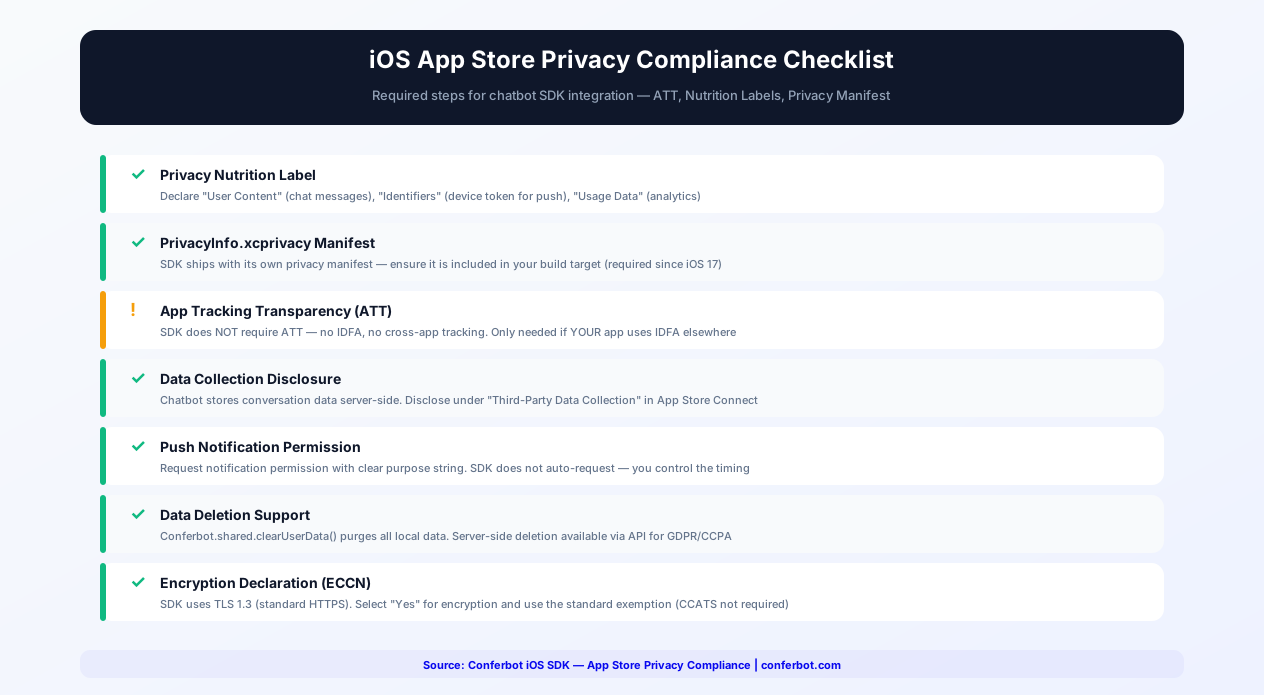
Apple's privacy framework is the most stringent in the mobile industry. iOS apps must comply with App Tracking Transparency (ATT), privacy nutrition labels, privacy manifests, and data minimization principles. The Conferbot SDK is designed for full compliance with minimal developer effort.
App Tracking Transparency (ATT)
The Conferbot SDK does not require App Tracking Transparency permission. It does not access the IDFA (Identifier for Advertisers), does not track users across apps or websites owned by other companies, and does not share data with data brokers. If your app uses ATT for other purposes (advertising SDKs, analytics), the chatbot SDK operates independently and is not affected by the user's ATT choice.
Privacy Nutrition Labels
When completing the App Store privacy nutrition label in App Store Connect, declare the following for the Conferbot SDK:
| Data Type | Collection | Linked to Identity | Used for Tracking | Purpose |
|---|---|---|---|---|
| User Content (chat messages) | Yes | Optional (if user provides name/email) | No | App Functionality |
| Identifiers (device token) | Optional (only if push enabled) | No | No | Push Notifications |
| Usage Data (chat interactions) | Yes | No | No | Analytics, Product Improvement |
The SDK does not collect: precise location, coarse location, contacts, photos/videos, audio, browsing history, search history, health data, fitness data, financial data, email address (unless user provides it in chat), phone number (unless user provides it in chat), or advertising data.
Privacy Manifest (PrivacyInfo.xcprivacy)
Starting with iOS 17, Apple requires a privacy manifest for all SDKs that access certain APIs. The Conferbot SDK ships with its own PrivacyInfo.xcprivacy file that declares:
- NSPrivacyAccessedAPITypes — UserDefaults (for session persistence), URL session (for API communication). No required reason APIs (no file timestamps, no disk space, no active keyboards)
- NSPrivacyCollectedDataTypes — Matches the nutrition label declarations above
- NSPrivacyTracking — Set to
false. The SDK does not track users
The privacy manifest is bundled in the XCFramework and automatically included in your app's archive when you submit to the App Store. No manual configuration needed.
Data Minimization
The SDK follows Apple's data minimization principles:
- Chat messages are transmitted to Conferbot's servers for processing but the SDK stores minimal data locally (session ID, pending messages, device token)
- Local data is stored in the app's sandbox and encrypted when
ConferbotConfig.encryptLocalStorage = trueis enabled - No data is shared with third parties beyond Conferbot's own servers for processing the conversation
Conferbot.shared.clearUserData()purges all locally stored data on demand (for GDPR/CCPA "right to deletion" requests)
GDPR and CCPA Compliance
For apps serving EU (GDPR) or California (CCPA) users, the SDK provides the compliance controls required:
- Data deletion —
Conferbot.shared.clearUserData()deletes all local data. Server-side deletion is available through Conferbot's API - Data export — Conversation history export is available through the Conferbot dashboard
- Consent management — The SDK does not initialize until you call
Conferbot.initialize(), so you can gate initialization behind a consent dialog - Data processing agreement — Available for business plans. See our data security guide
Apple's review team increasingly scrutinizes privacy claims. The Conferbot SDK's clean privacy posture — no IDFA, no tracking, minimal data collection, bundled privacy manifest — ensures your app passes privacy-related review checks without delays.
Siri Shortcuts + Chatbot Integration
Siri Shortcuts enable users to trigger actions in your app using voice commands or the Shortcuts app. Integrating Siri Shortcuts with the Conferbot SDK creates a voice-activated chatbot experience — users can start a conversation, ask a question, or check on a previous interaction using just their voice.
Shortcut Actions
The SDK provides pre-built INIntent definitions for common chatbot interactions:
- "Open Chat" — Opens the chatbot screen in your app. Users can configure this as a Siri phrase: "Hey Siri, open support chat in [YourApp]"
- "Ask a Question" — Sends a message to the chatbot and returns the response via Siri. The user speaks their question, the SDK sends it to the bot, and Siri reads the response aloud. Ideal for hands-free scenarios like driving or cooking
- "Check Last Message" — Reads the most recent bot message aloud. Useful for checking on pending support conversations without opening the app
- "Quick Action" — Triggers a specific bot flow (e.g., "Check my order status"). Configure the flow ID in the shortcut parameters
Integration Steps
- Add Siri capability — Enable the Siri capability in your Xcode project's Signing & Capabilities tab
- Register intents — Import the SDK's intent definitions:
import ConferbotIntents. The SDK registers its intents automatically on initialization - Donate interactions — When the user performs a chatbot action (opens chat, sends a message), the SDK donates the interaction to Siri's prediction engine. Siri uses these donations to suggest relevant shortcuts on the lock screen, in Search, and on the Siri watch face
- Handle intent responses — The SDK handles intent execution automatically. For custom flows, implement the
ConferbotIntentHandlingprotocol to customize the response format
Shortcuts App Integration
Users can find your chatbot shortcuts in the Shortcuts app and combine them with other actions. Example automations:
- "When I arrive at work, open the IT support chat" — Combines location trigger with chatbot open action
- "Every morning at 9am, ask the chatbot for today's schedule" — Combines time trigger with question action
- "When I open [YourApp], check for unread chat messages" — Combines app open trigger with status check
Voice-First Design Considerations
When designing chatbot flows for Siri integration, consider that the interaction is voice-first:
- Keep bot responses concise (under 40 words) so Siri's speech feels natural
- Avoid responses that require visual elements (images, buttons, forms) — provide a text summary with an option to "open in app" for visual content
- Use the bot's conditional logic to detect Siri-originated conversations and adapt the response style
- Test with VoiceOver enabled — Siri Shortcuts and VoiceOver share accessibility infrastructure
Siri Shortcuts make your chatbot accessible beyond the app interface. For businesses in healthcare (voice-activated appointment scheduling), e-commerce (hands-free order status), and hospitality (voice concierge), Siri integration adds a premium engagement channel that differentiates your app.
Customization and Theming
The SDK provides extensive customization while maintaining Apple design consistency.
ConferbotTheme
Configure the visual appearance through a theme object:
- accentColor — Primary color for send button, links, and interactive elements (Color type)
- userBubbleColor / botBubbleColor — Separate bubble colors supporting light/dark mode variants
- backgroundColor — Chat screen background (defaults to system background)
- font — Custom font family (defaults to SF Pro for native feel)
- cornerRadius — Message bubble corner radius
- botAvatar — Custom image (UIImage, Image, or remote URL)
- showTimestamps — Toggle message timestamps visibility
SwiftUI Environment Integration
The SDK reads SwiftUI environment values for colorScheme, dynamicTypeSize, and layoutDirection. Your app's environment settings flow through to the chat UI automatically, ensuring consistent behavior without extra configuration.
Custom View Builders
Replace default views with your own SwiftUI implementations:
- messageBubbleBuilder — Custom message bubble view
- inputBarBuilder — Custom text input and send button area
- quickReplyBuilder — Custom quick reply button style
- headerBuilder — Custom chat header view
- emptyStateBuilder — Custom view when there are no messages
Delegate Callbacks
Implement the ConferbotDelegate protocol for event handling:
- conferbotDidReceiveMessage(_:) — Bot message received
- conferbotDidCompleteConversation(_:) — Conversation flow completed
- conferbotDidRequestHandoff(_:) — User requested human agent
- conferbotDidCaptureData(_:) — Contact or form data collected
- conferbotDidEncounterError(_:) — SDK error occurred
For SwiftUI, these are also available as Combine publishers and async/await APIs.
In-App Chatbot Use Cases
iOS users have the highest lifetime value in mobile. Keeping them engaged and supported within your app directly impacts revenue and retention.
Premium Customer Support
iOS users expect premium experiences. An in-app chatbot provides instant, branded support without the jarring context switch of leaving the app for email or a website. The bot handles routine questions while seamlessly escalating to live agents for complex issues. Apps with in-app support see 40% fewer App Store complaints about customer service.
Subscription Management
Help users understand subscription tiers, manage their plans, troubleshoot payment issues, and handle cancellation requests. For subscription-based iOS apps, proactive chatbot engagement during the trial period can increase conversion by 15-20%. The chatbot can explain features, offer personalized onboarding, and present upgrade options at optimal moments.
Concierge and Personalization
Luxury brands, travel apps, and premium services use the chatbot as a digital concierge. Personalized recommendations, preference management, exclusive access coordination, and VIP support create the white-glove experience that premium iOS users expect and are willing to pay for. Explore hospitality chatbot solutions.
Health and Wellness
Appointment scheduling, health data inquiries, medication reminders, and symptom assessment. Healthcare apps on iOS must balance helpful automation with medical accuracy and privacy compliance. The chatbot handles administrative tasks while directing clinical questions to qualified professionals.
Educational Assistance
Course navigation, study material recommendations, deadline reminders, and interactive learning exercises. Education apps with in-app chatbots report 30% higher daily active usage as students engage with conversational content more frequently than traditional menus.
In-App Commerce
Product recommendations, order tracking, returns, and personalized promotions. For iOS e-commerce apps, the chatbot bridges the gap between browsing and buying with personalized, conversational guidance that converts browsers into buyers.
Getting Started
The Conferbot iOS SDK brings AI-powered chatbot capabilities to your iOS app with a native experience that meets Apple's quality standards. Here is your integration path.
Quick Start
- Design your chatbot in the Conferbot visual builder — the same bot powers your app, website, and messaging channels
- Add the SDK via Swift Package Manager or CocoaPods
- Initialize with your bot ID in AppDelegate or App struct
- Add the chat view — ConferbotChatView (SwiftUI) or ConferbotChatViewController (UIKit)
- Customize the theme to match your app's design language
- Test accessibility — Verify VoiceOver, Dynamic Type, and dark mode
- Configure push notifications for background messaging
Accessibility Checklist
Apple requires and expects accessibility support. The SDK handles most of this automatically, but verify these items before App Store submission:
- VoiceOver navigates through all chat elements correctly
- Dynamic Type scales text to all sizes including accessibility sizes
- Dark mode renders all elements with proper contrast
- The chat interface works in landscape orientation on iPad
- Keyboard avoidance works correctly on all screen sizes
Conferbot iOS SDK vs Intercom vs Zendesk
Choosing an in-app chat SDK for iOS involves evaluating multiple factors beyond feature lists. Here is how Conferbot compares to the two most popular alternatives:
| Criteria | Conferbot iOS SDK | Intercom iOS SDK | Zendesk iOS SDK |
|---|---|---|---|
| SwiftUI Support | Native SwiftUI views | UIKit with SwiftUI wrapper | UIKit only |
| No-Code Bot Builder | Full visual builder with AI | Limited flow builder | Basic answer bot |
| AI Capabilities | OpenAI + custom knowledge base | Fin AI (proprietary, add-on cost) | AI-assisted answers (limited) |
| SDK Size Impact | ~2MB | ~12MB | ~8MB |
| Minimum iOS Version | iOS 13+ | iOS 15+ | iOS 14+ |
| Dynamic Type Support | Full (all accessibility sizes) | Partial | Partial |
| VoiceOver Support | Full (Accessibility Inspector validated) | Basic labels | Basic labels |
| Offline Message Queue | Core Data backed | Yes | Yes |
| App Clips Support | Yes (~2MB footprint) | No (too large) | No (too large) |
| Siri Shortcuts | Built-in intent definitions | Not available | Not available |
| Omnichannel Deployment | Website, WhatsApp, Messenger, Android, Flutter, React Native | Website, Android, some channels | Website, Android, email |
| Pricing (Starter) | Free tier available | $74/seat/month | $55/agent/month |
| Calendar Booking | Built-in | Third-party integration | Not available |
| Custom View Builders | Full SwiftUI ViewBuilder API | Limited customization | Theme-based only |
Conferbot's key advantage is the combination of a powerful AI chatbot builder with a lightweight, fully native iOS SDK. While Intercom and Zendesk are established support platforms, they carry larger SDK footprints, higher per-seat pricing, and less flexible bot building capabilities. For businesses that want to deploy the same chatbot across iOS, Android, website, and messaging channels like WhatsApp and Messenger — all from one visual builder — Conferbot delivers the most complete omnichannel solution at the most accessible price point. See pricing details for a full plan comparison.
Omnichannel Integration
Your iOS chatbot is part of Conferbot's omnichannel platform. The same bot powers your Android app, website, WhatsApp, and other channels. Build the conversational logic once and reach users on every device and platform they use. Conversations persist across channels — a user who starts in your iOS app can continue on WhatsApp or your website.
Why Conferbot iOS SDK
- Apple-native experience — SwiftUI and UIKit views following Human Interface Guidelines
- Full accessibility — VoiceOver, Dynamic Type, and high-contrast support built in
- Dark mode — Automatic light/dark adaptation using iOS semantic colors
- App Store ready — Designed to pass Apple's review guidelines without issues
- App Clips support — 2MB footprint enables instant chatbot experiences
- Siri Shortcuts — Voice-activated chatbot interactions
- Privacy first — No IDFA, no tracking, bundled privacy manifest
- APNs push — Native push notifications with badge management
- Offline support — Core Data message queuing with NWPathMonitor
- AI-powered — AI knowledge base and OpenAI for intelligent in-app support
- Omnichannel — Same bot on Android, website, WhatsApp, and more
- Analytics — Track in-app engagement with built-in analytics
The iOS SDK is included in Pro plans and above. View pricing for details, or start building your chatbot flows today with the visual builder and add iOS integration when your app is ready. See how Conferbot compares to other chatbot platforms for mobile SDK capabilities.
SwiftUI vs UIKit: Which to Use
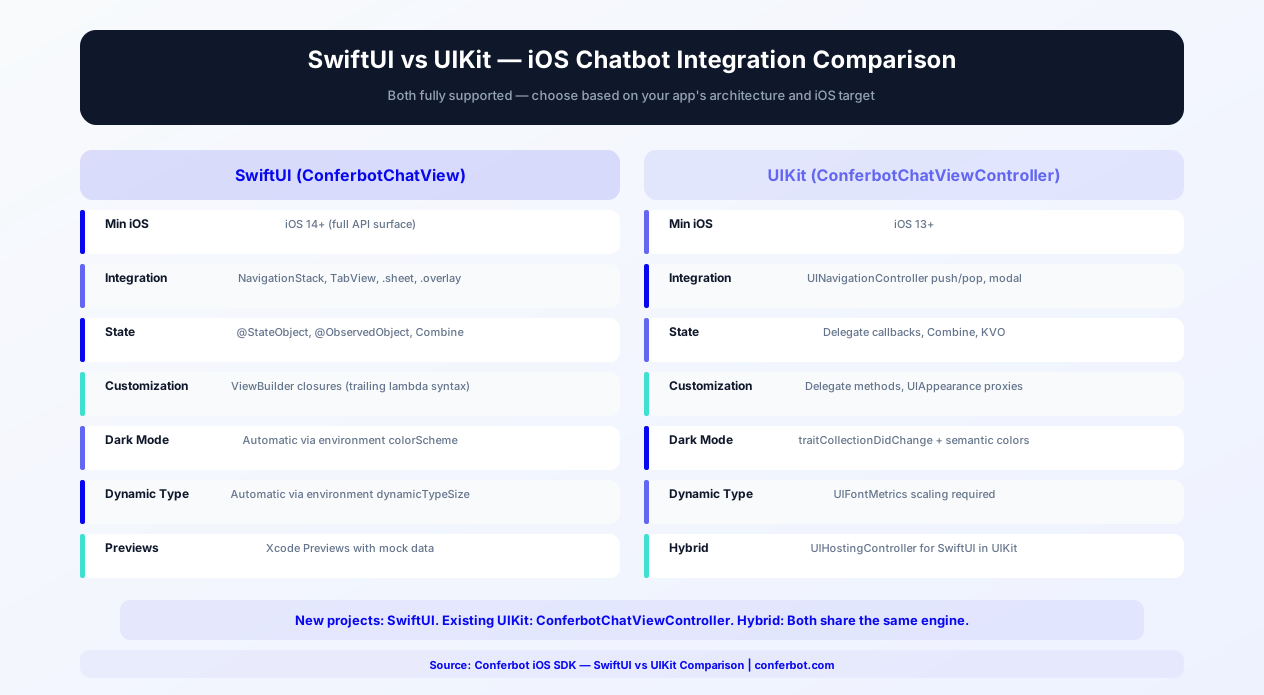
Choosing between SwiftUI and UIKit for your Conferbot integration depends on your project's architecture, minimum deployment target, and team expertise. The Conferbot iOS SDK supports both approaches fully, so the choice is about what works best for your codebase.
Comparison Table
| Criteria | SwiftUI (ConferbotChatView) | UIKit (ConferbotChatViewController) |
|---|---|---|
| Minimum iOS Version | iOS 14+ (full API surface) | iOS 13+ |
| Integration Approach | SwiftUI View in NavigationStack, TabView, or sheet | UIViewController in UINavigationController or modal |
| Customization Model | ViewBuilder closures (trailing lambda syntax) | Delegate methods and UIAppearance proxies |
| Dark Mode | Automatic via environment colorScheme | Automatic via traitCollectionDidChange |
| Dynamic Type | Automatic via environment dynamicTypeSize | Requires UIFontMetrics scaling |
| Animation | withAnimation, matchedGeometryEffect | UIView.animate, CAAnimation |
| State Management | @StateObject, @ObservedObject, Combine | Delegate callbacks, Combine, KVO |
| Navigation Integration | NavigationStack, NavigationLink | UINavigationController push/pop |
| Floating Button | ConferbotFloatingButton as overlay | Programmatic UIButton with constraints |
| Preview Support | Xcode Previews with mock data | Limited (requires UIViewControllerRepresentable) |
| Hybrid Apps | Use UIViewControllerRepresentable for UIKit screens | Use UIHostingController for SwiftUI screens |
Migration Path: UIKit to SwiftUI
If your app is migrating incrementally from UIKit to SwiftUI, the SDK supports a smooth transition. Start by wrapping ConferbotChatViewController in SwiftUI using UIViewControllerRepresentable for screens that are already SwiftUI. As you migrate more screens, switch to the native ConferbotChatView composable. Both approaches use the same underlying messaging engine and share conversation state, so switching UI layers does not affect ongoing conversations. For apps using UIHostingController to embed SwiftUI views in UIKit, the SDK's SwiftUI views work correctly inside hosting controllers — environment values propagate as expected.
Recommendation by Project Type
New projects: Use SwiftUI with ConferbotChatView. Apple's direction is clear — SwiftUI is the future of iOS UI development. The Conferbot SDK's SwiftUI views are purpose-built with ViewBuilder customization, Combine publishers, and async/await support. Existing UIKit projects: Use ConferbotChatViewController for immediate integration. When your team begins adopting SwiftUI for new screens, the native SwiftUI chat view is ready without re-integration work. Hybrid projects: Either approach works. Choose based on which framework the screen hosting the chatbot uses. The SDK handles both seamlessly.
For detailed integration examples, see the iOS SDK documentation on GitHub. Browse our template library for chatbot flows optimized for mobile in-app experiences.
App Store Optimization with In-App Chat
Adding a chatbot to your iOS app can significantly improve your App Store metrics, but it must be implemented correctly to pass Apple's review process. This section covers App Store guidelines, common rejection reasons, and optimization strategies.
Apple Review Guidelines for Chat SDKs
Apple's review team evaluates chat SDK integrations against several specific guidelines. Understanding these upfront prevents rejection delays:
- Guideline 4.0 (Design) — The SDK must follow Apple's Human Interface Guidelines. Conferbot's SDK uses SF Pro system fonts, SF Symbols for icons, standard iOS navigation patterns, and Apple's semantic color system — meeting HIG requirements out of the box
- Guideline 2.5.1 (Software Requirements) — Only public APIs are permitted. The Conferbot SDK uses exclusively public Apple frameworks (UIKit, SwiftUI, Combine, Network, CoreData, UserNotifications) with no private API calls
- Guideline 5.1.1 (Data Collection and Storage) — You must accurately disclose the chatbot's data collection in your App Store privacy nutrition label. The Conferbot SDK collects: user-provided content (chat messages), device identifier (for push notifications if enabled), and usage data (conversation analytics). Include these categories in your privacy manifest
- Guideline 4.2 (Minimum Functionality) — The chatbot should enhance your app's primary function, not be the sole feature. Apple rejects "thin wrapper" apps where a chatbot is the only content
- Guideline 2.1 (App Completeness) — Ensure the chatbot responds correctly during review. Apple's reviewers will test the chatbot — if it returns errors, shows placeholder content, or is clearly non-functional, the app will be rejected
Common Rejection Reasons and How to Avoid Them
| Rejection Reason | Guideline | How to Avoid |
|---|---|---|
| Chatbot returns errors during review | 2.1 | Test thoroughly before submission. Ensure bot flows handle all inputs gracefully |
| Privacy label does not include chat data | 5.1.1 | Add "User Content" and "Identifiers" categories to your privacy nutrition label |
| Chat UI does not match iOS design patterns | 4.0 | Use the SDK's default UI (HIG-compliant) or follow HIG when customizing |
| Missing privacy manifest (PrivacyInfo.xcprivacy) | 5.1.1 | The SDK ships with its own privacy manifest; ensure it is included in your build |
| Push notifications without clear user benefit | 5.6 | Only send notifications for messages the user is expecting (bot replies, agent responses) |
App Store Metric Improvements
Apps with well-implemented in-app chat support see measurable improvements in App Store performance: 30-40% fewer 1-star reviews related to unresolved support issues (users resolve problems in-app instead of leaving negative reviews), 15-20% higher average rating within the first 90 days of chatbot deployment, 25% improvement in Day 7 retention (users who get help during onboarding are more likely to keep the app), and 40% faster response to App Store review complaints (the chatbot handles the same questions users raise in reviews). Include "24/7 in-app support" and "instant chat assistance" in your App Store description to improve discoverability for support-related searches. Use the Keywords field to add terms like "customer support," "chat help," and "live assistance" relevant to your category.
For detailed analytics on how your chatbot impacts app performance, use Conferbot's analytics dashboard. Track user satisfaction scores, resolution rates, and correlation with your App Store rating over time.
Push Notifications with APNs
Push notifications are essential for re-engaging iOS users with their chatbot conversations. The Conferbot iOS SDK integrates with Apple Push Notification service (APNs) for reliable, native notification delivery.
Certificate vs Key-Based Authentication
Apple supports two methods for authenticating push notification requests. The Conferbot dashboard supports both:
| Method | APNs Authentication Key (p8) | APNs Certificate (p12) |
|---|---|---|
| Recommended | Yes (Apple's preferred method) | Legacy — still supported |
| Expiration | Never expires | Expires annually (requires renewal) |
| Scope | Works for all apps under your team | One certificate per app + environment |
| Setup Complexity | Simple (one key, one upload) | Complex (separate dev/prod certs) |
| Environment Support | Both sandbox and production | Separate certificates needed |
| Where to Generate | Apple Developer > Keys | Apple Developer > Certificates |
Recommendation: Use the APNs Authentication Key (p8). It never expires, works across all your apps, and covers both sandbox and production environments with a single key. Generate it at Apple Developer > Keys > Create a Key > Enable "Apple Push Notifications service (APNs)." Download the .p8 file (Apple only lets you download it once), note your Key ID and Team ID, and upload all three to the Conferbot dashboard under Settings > Push Notifications > iOS.
Notification Categories and Actionable Notifications
iOS supports notification categories with custom actions that users can take directly from the notification without opening the app. The Conferbot SDK registers two default categories:
- CONFERBOT_MESSAGE — Standard message notification with "Reply" (opens the chat) and "Mark as Read" (dismisses and clears badge) actions
- CONFERBOT_HANDOFF — Agent handoff notification with "Accept" (opens chat) and "Snooze" (reminds in 15 minutes) actions
For iOS 15+, the SDK supports notification summary grouping, Focus filter compatibility, and time-sensitive delivery for urgent messages (such as live agent responses). Time-sensitive notifications can break through Focus modes and scheduled delivery summaries, ensuring critical support messages reach users promptly.
Rich Notifications
The SDK includes a Notification Service Extension that enables rich push notifications with image previews, custom thumbnails, and expandable content. When the bot sends a message containing an image or product card, the push notification displays a preview of the image alongside the message text. This increases notification tap rates by 20-30% compared to text-only notifications. To enable rich notifications, add the ConferbotNotificationService extension target to your Xcode project and include it in your provisioning profile.
Badge Management
The SDK manages the app icon badge count automatically. When new messages arrive while the app is backgrounded, the badge increments. When the user opens the chat screen, the badge resets to zero. For apps that use the badge for other purposes (e.g., pending orders), the SDK provides Conferbot.shared.unreadCount so you can combine it with your own badge logic. Badge updates use silent push notifications on iOS, keeping the badge accurate even when the user has not opened the app in days.
Notification Privacy
By default, notification previews show the first 100 characters of the bot's message on the lock screen. For apps handling sensitive information (healthcare, finance), configure ConferbotNotificationConfig.showPreviewOnLockScreen = false to display "New message" instead of the actual content. Users can still see previews by authenticating with Face ID or Touch ID. This behavior aligns with iOS's built-in "Show Previews: When Unlocked" setting and respects the user's global preference.
For the complete mobile engagement strategy, see our engagement optimization guide. Compare iOS push capabilities with Android FCM and other channels on the platform comparison page.
How Conferbot Compares for iOS
Most platforms charge per message, per seat, or limit channels by tier. Here's how Conferbot is different.
| Feature | Conferbot | Typical Competitor |
|---|---|---|
| Channels included | 13+ (all plans) | 3-6 (varies by tier) |
| Pricing model | Flat rate from $19/mo | Per-seat or per-message |
| AI chatbot builder | Yes (plain English) | No or limited |
| Native mobile SDKs | 4 (Android, iOS, Flutter, RN) | None (WebView only) |
| Knowledge base AI | Included | Add-on ($30-99/mo) |
| Live chat handoff | Included | Higher tiers only |
| Calendar booking | Built-in | Third-party required |
| Setup time | Under 10 minutes | Hours to days |
iOS FAQ
Everything you need to know about chatbots for ios.
Continue Exploring
Explore features, connect third-party tools, and browse ready-made templates.