What Is an AI Receptionist for a Small Business?
An AI receptionist for small business is a conversational automation system that greets prospects, answers common questions, captures contact details, books appointments, routes urgent requests, and hands off complex conversations to your team. Unlike a traditional virtual receptionist, it can work across your website, phone line, live chat, messaging channels, and CRM without waiting for a human to become available.
For a small business, the job is not to replace every human conversation. The job is to protect the front door of the business. A good AI receptionist makes sure buyers are answered quickly, qualified leads are not lost after hours, routine questions do not interrupt staff, and customers who need a person still get routed to the right person with context.
The phrase AI receptionist usually describes one of three setups:
- Website chatbot: A text-based chat widget that answers visitors, recommends services, collects lead details, books meetings, and escalates to live chat.
- Voice bot: A spoken AI phone agent that answers calls, understands natural language, confirms details, and routes or schedules callers.
- Hybrid receptionist: A connected website chatbot plus voice bot that shares one knowledge base, one routing policy, and one reporting dashboard.
Most small businesses should not start by asking, "Which technology is most advanced?" A better question is: Where are we losing the most revenue because people wait, leave, or never get a response? If that leakage happens on your website, start with a website chatbot. If it happens on your phone line, start with a voice bot. If both channels are busy, connect them into a hybrid AI receptionist.
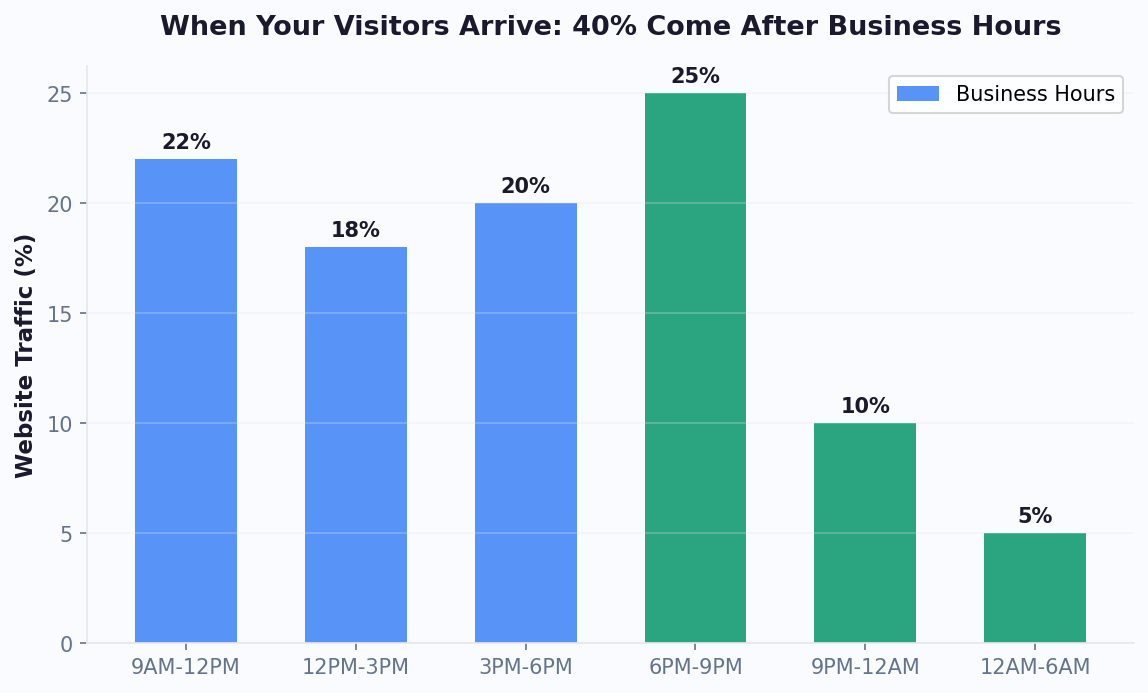
For small business owners operating without dedicated reception staff, an AI receptionist is the single highest-impact technology investment available — delivering immediate, measurable returns from day one of deployment.
Why Small Businesses Are Adopting AI Receptionists
Small businesses have the same customer expectations as large brands but without large staffing budgets. Research from HubSpot shows that businesses responding within 5 minutes are 21x more likely to qualify a lead. A G2 analysis of chatbot platforms found that small businesses using AI assistants report 45% higher lead conversion rates within the first 90 days. A prospect who is comparing plumbers, clinics, accountants, salons, agencies, or consultants will usually contact more than one provider. The business that responds first often wins the conversation before the others even see the inquiry.
An AI receptionist solves four common small business bottlenecks:
- Missed calls and chats: Staff are serving customers, driving to jobs, teaching classes, or handling appointments. The AI receptionist answers immediately instead of sending the buyer to voicemail.
- After-hours demand: People research and book outside office hours. An always-on customer service chatbot keeps the business responsive when the team is offline.
- Repetitive questions: Hours, pricing ranges, service areas, availability, insurance, return policies, and appointment rules can be handled from a trusted AI knowledge base.
- Weak lead qualification: Instead of a generic form, the AI receptionist asks the right follow-up questions and sends a complete lead record to sales, reception, or operations.
The operational value is especially strong for owner-led businesses. Every routine call that does not require the owner is time returned to paid work. Every qualified after-hours lead is revenue that would otherwise go to a competitor. Every automatically booked appointment is one less phone tag loop. According to the U.S. Small Business Administration, small businesses with fewer than 20 employees make up the vast majority of U.S. firms, and most lack dedicated front-desk staff.
AI receptionists also create better data. With chatbot analytics, you can see which questions drive conversions, which pages create confusion, where calls or chats escalate, and which services generate the most demand. That turns the front desk from a cost center into a measurable growth channel.
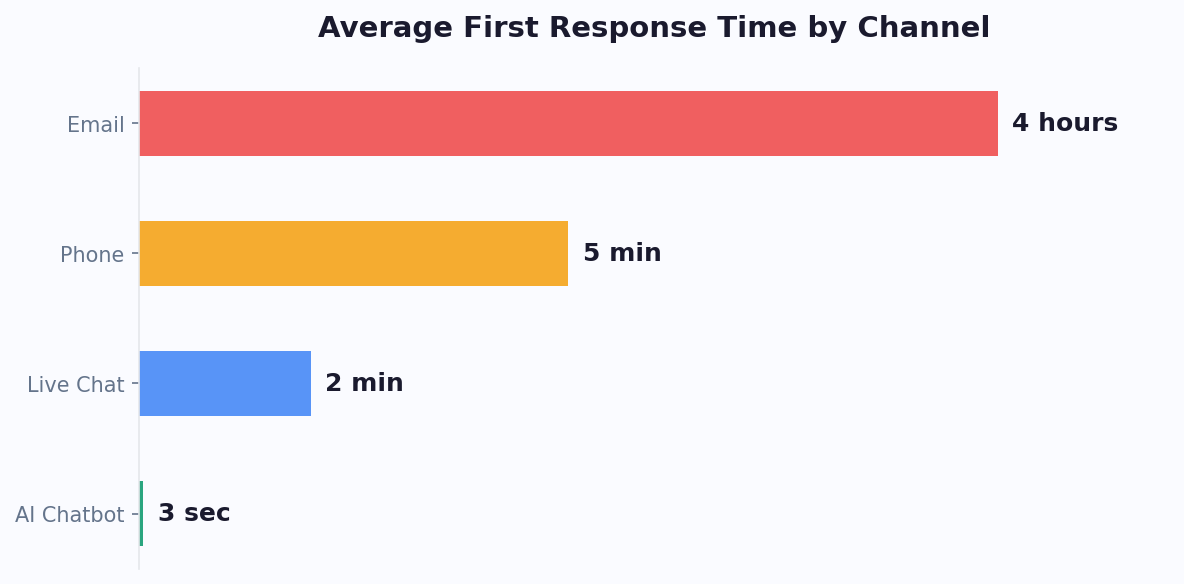
Related: After-Hours Customer Support: How to Set Up a Chatbot That Works While You Sleep
The accessibility of modern no-code chatbot platforms means that even non-technical small business owners can configure a professional AI receptionist in a single afternoon.
Option 1: Website Chatbot as Your AI Receptionist
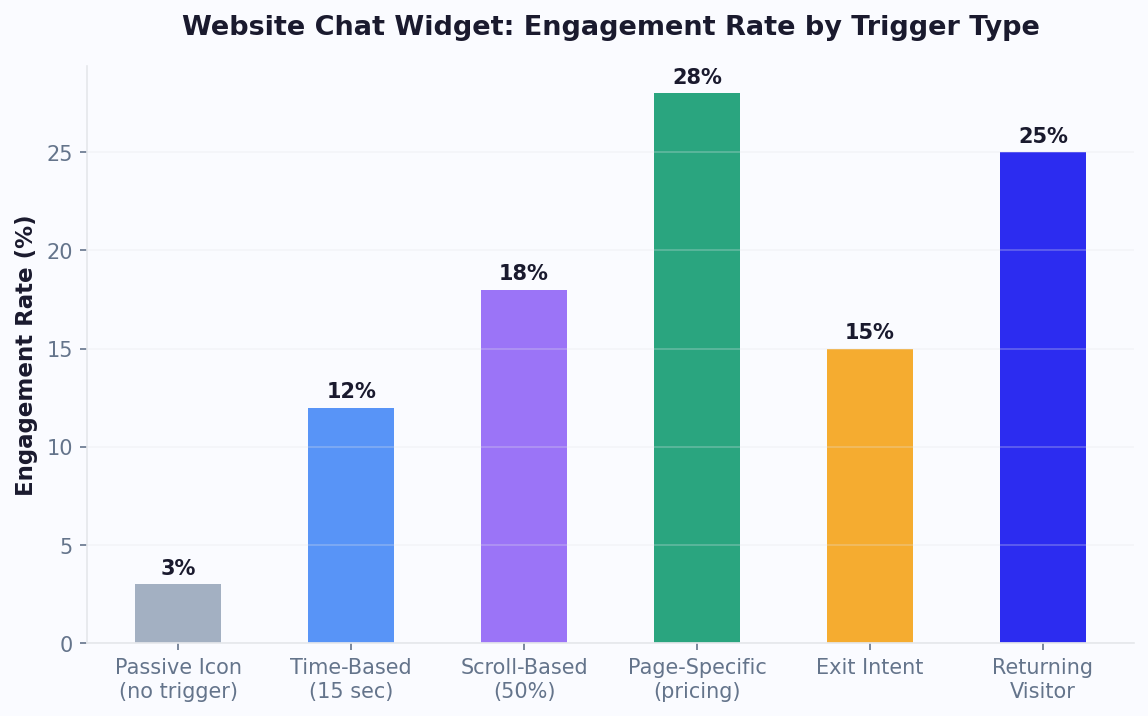
A website chatbot is the best first AI receptionist for businesses that get meaningful traffic from search, ads, social profiles, directories, or referrals. It sits on your site and turns passive browsing into a guided conversation.
The strongest website chatbot use cases are:
- Lead capture: Ask what the visitor needs, collect name, email, phone, location, budget, timeline, and service type.
- Service matching: Recommend the right service, plan, location, or team based on answers.
- Appointment booking: Show available times and book directly with calendar booking.
- FAQ deflection: Answer common questions from your website, help docs, policy pages, menus, or service descriptions.
- Human handoff: Route high-intent visitors to live chat or create a callback task when staff are offline.
A website chatbot usually wins on cost, speed, and flexibility. It can show buttons, forms, calendars, images, links, product cards, and summaries. It is also easier for customers who are in public, at work, or comparing options quietly. For many small businesses, this is the highest-return starting point because it improves the channel they already own: the website.
Start with a chatbot when your main problem sounds like this:
- "People visit our site but do not fill out the form."
- "We get the same questions before every booking."
- "Our ads drive clicks, but leads are not qualified."
- "Customers want prices, availability, or service-area answers before they call."
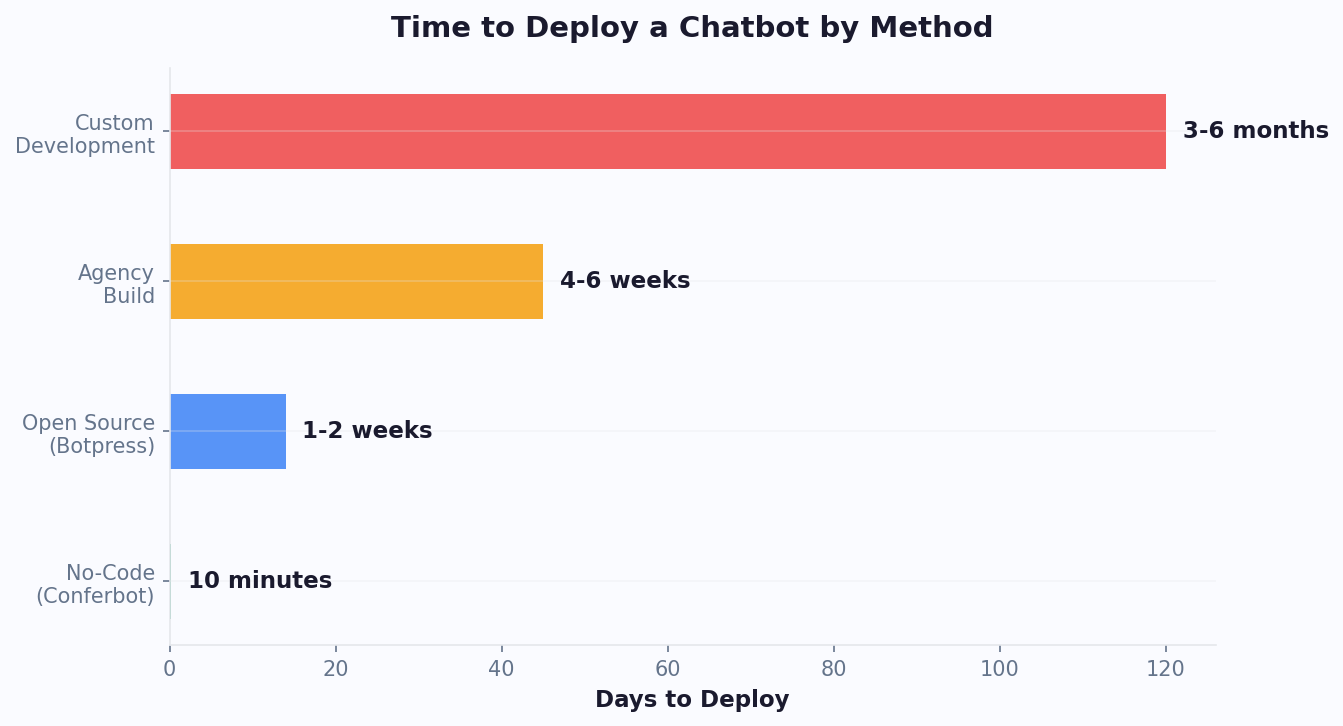
For setup details, see the full AI chatbot for website guide and the website chatbot widget setup guide. If your team has never built automation before, a no-code workflow from Conferbot's AI chatbot builder is typically faster than custom development.
Option 2: Voice Bot as Your AI Phone Receptionist
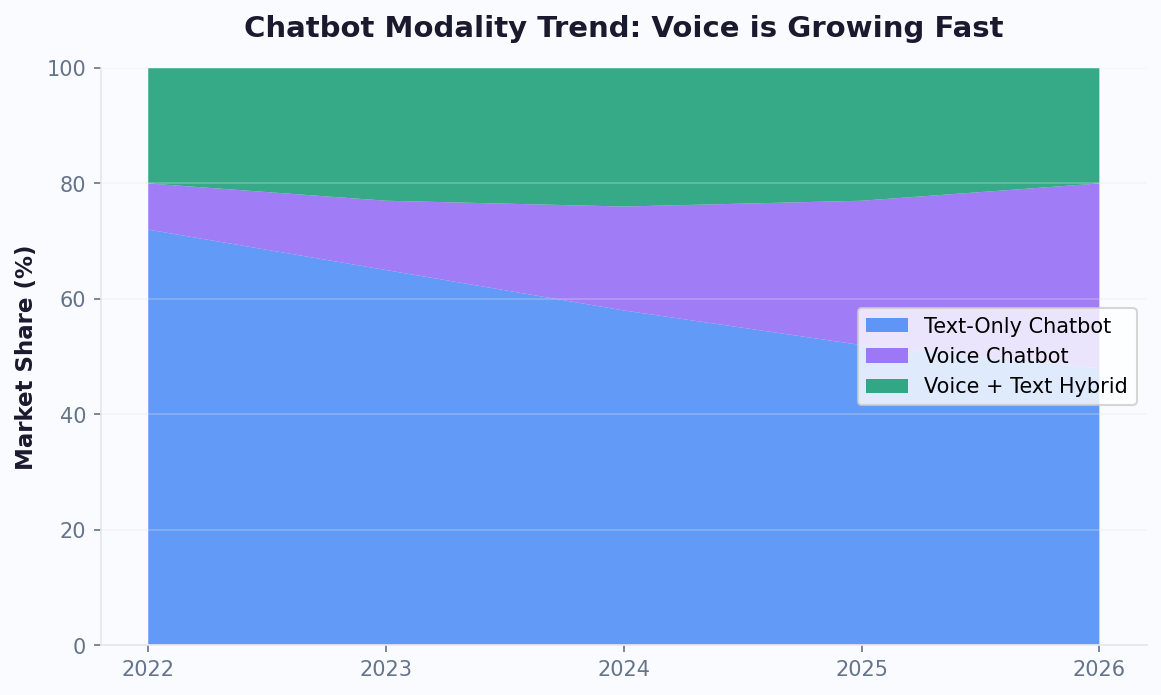
A voice bot is the right AI receptionist when the phone is still your highest-intent channel. That is common in home services, healthcare, dental, legal, automotive, hospitality, local services, senior care, restaurants, and appointment-based businesses. The caller already has intent. The risk is that no one answers, the caller reaches voicemail, or the call lands with the wrong person.
A voice AI receptionist can:
- Answer inbound calls with a natural greeting.
- Identify caller intent, such as booking, pricing, emergency service, order status, directions, or billing.
- Collect structured information like name, phone, address, preferred time, service type, and urgency.
- Book appointments or send booking links when calendar access is available.
- Route urgent calls to the right person and summarize the call context.
- Send missed-call follow-ups by SMS or email.
The advantage of voice is immediacy. Customers do not need to type, navigate a website, or wait for a callback. That matters when the request is urgent, local, emotional, or complicated to describe in a form. A homeowner with a leaking pipe, a patient trying to reschedule, or a buyer calling from a car dealership listing may prefer to talk.
The tradeoff is cost and complexity. Voice bots require speech recognition, text-to-speech, telephony, latency management, call recording rules, and more testing across accents and noisy environments. For a deeper technical and cost breakdown, read the voice chatbot for business guide.
Start with a voice bot when your main problem sounds like this:
- "We miss calls during appointments, jobs, lunch, or evenings."
- "Most serious leads still call us."
- "Voicemail messages are incomplete and hard to prioritize."
- "Reception is overloaded by routine calls."
Related: How to Automate Appointment Reminders With a Chatbot and Cut No-Shows by 50%
Website Chatbot vs Voice Bot: Side-by-Side Comparison
The right AI receptionist depends on customer behavior, not preference. Use this comparison to choose the first channel to automate.
| Decision Factor | Website Chatbot | Voice Bot |
|---|---|---|
| Best starting point when | Your website gets traffic but under-converts | Your phone rings often or missed calls cost revenue |
| Customer context | Browsing, comparing, researching, reading | Calling with intent, urgency, or hands-free need |
| Information format | Great for links, forms, calendars, images, tables, and step-by-step guidance | Great for short spoken answers, routing, intake, and quick scheduling |
| Setup complexity | Low to moderate | Moderate to high |
| Typical small business cost | Lower monthly platform cost | Higher due to telephony and speech processing |
| Best metrics | Engagement rate, lead capture rate, booking rate, containment rate | Answer rate, missed-call recovery, call containment, booked appointments |
| Escalation path | Live chat, ticket, email, callback, CRM task | Warm transfer, callback, SMS follow-up, voicemail replacement |
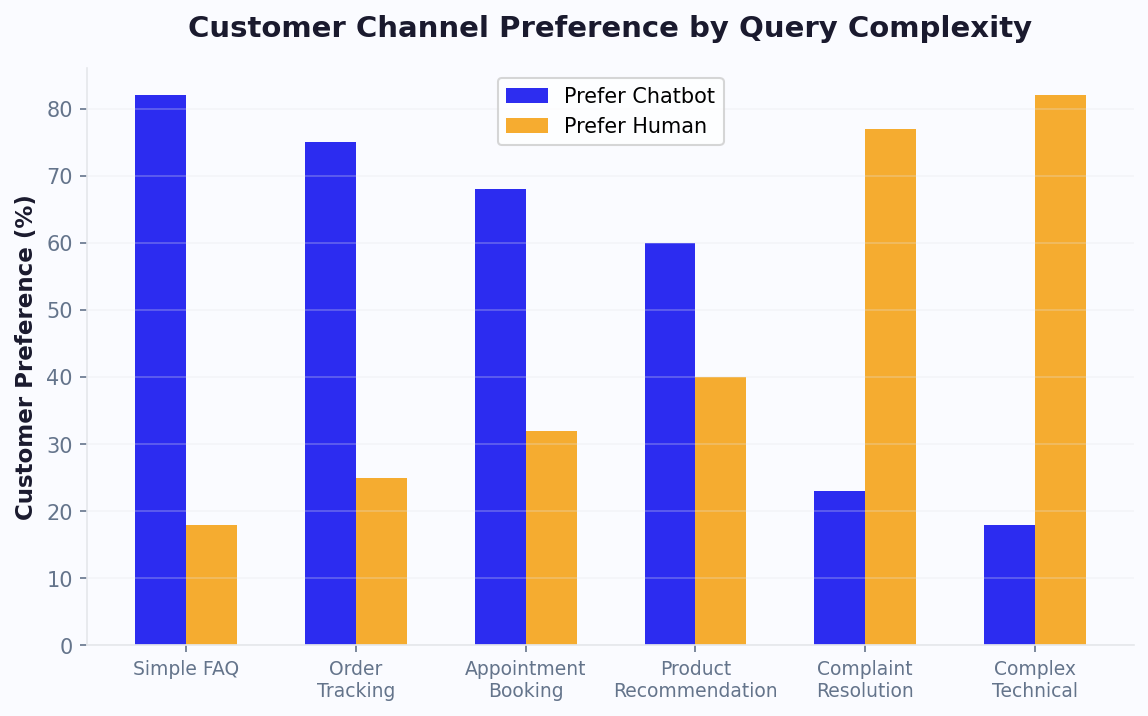
A website chatbot is usually the better first move when you need affordable, visible improvement within days. A voice bot is usually the better first move when missed calls are the obvious constraint. If you cannot tell which channel leaks more revenue, review the last 30 days: website sessions, form submissions, chat inquiries, call volume, missed calls, voicemail quality, and booked appointments.
One important point: this is not the same as chatbot vs live chat. A receptionist workflow often needs both automation and people. The automation handles intake, FAQs, and routing; humans handle judgment, exceptions, negotiation, and relationship-sensitive moments.
Related: How to Calculate Chatbot ROI: Formula, Benchmarks, and Free Calculator
When You Need Both: The Hybrid AI Receptionist
The strongest AI receptionist for a growing small business is often hybrid: website chatbot plus voice bot, connected to the same knowledge base, routing rules, CRM, calendar, and analytics. This prevents channel silos. A customer can ask a question on the website, call later, and still receive a consistent answer.
Use both when:
- You have meaningful volume in both channels. Website leads and phone calls each contribute revenue.
- Your customer journey crosses channels. Prospects research online, then call before booking or buying.
- You sell appointment-based services. Chat can qualify and show options; voice can capture callers who want immediate help.
- You operate outside standard hours. Chat handles browsers; voice handles callers; both create next-day follow-up tasks.
- You need better staffing control. AI answers routine requests while escalating only high-value or complex conversations.
The hybrid model works best when it has one source of truth. Your business hours, service areas, pricing rules, refund policies, appointment logic, and escalation rules should live in one governed knowledge base. If the website chatbot says one thing and the phone bot says another, trust drops fast.
Example Hybrid Workflow
- A visitor lands on a service page and asks whether your business serves their ZIP code.
- The website chatbot confirms coverage, asks the service type, and offers available appointment windows.
- The visitor leaves without booking but shares a phone number for a quote.
- The AI receptionist sends the lead to your CRM and triggers a callback task.
- If the visitor calls later, the voice bot recognizes the number, sees the open inquiry, and routes the call with context.
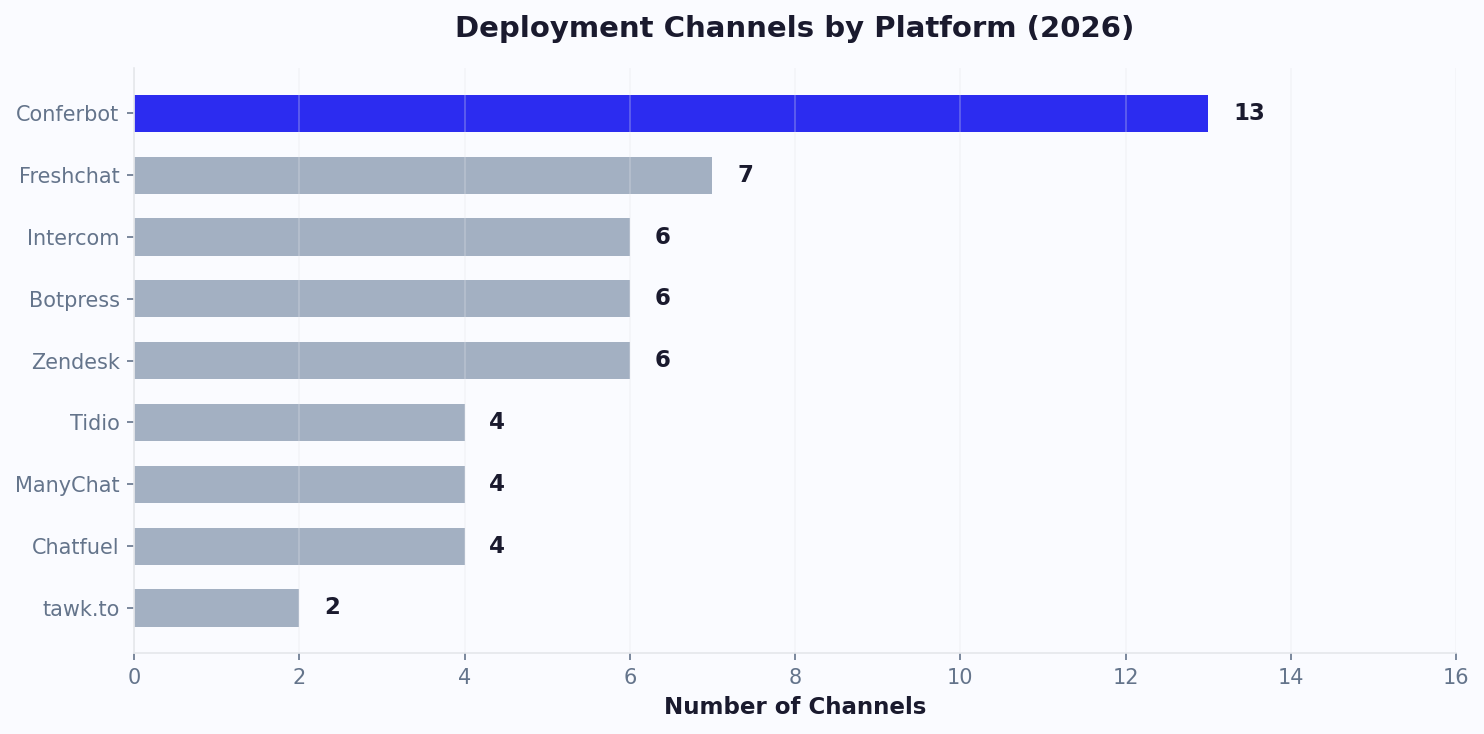
This is where AI reception becomes more than a chat widget. It becomes a front-office system. Conferbot supports this style of connected routing through integrations, booking workflows, and analytics that help you see what is happening across conversations.
Decision Framework: What Should You Launch First?
Use this practical framework to choose your first AI receptionist channel.
Launch a website chatbot first if:
- Your website gets at least a few hundred relevant visits per month.
- Your contact form conversion rate is low or unknown.
- Prospects ask repetitive pre-sales questions before booking.
- You run paid ads and want to improve landing-page conversion.
- Your team can answer phone calls but struggles with web inquiries.
Launch a voice bot first if:
- You miss calls daily or weekly.
- Your highest-value leads usually call.
- Calls interrupt billable work or customer-facing appointments.
- Voicemail creates delays, incomplete details, or poor prioritization.
- You need urgent routing for emergencies, cancellations, or same-day requests.
Launch both if:
- More than one channel regularly creates revenue.
- After-hours demand is visible in both website analytics and call logs.
- You have multiple locations, services, staff calendars, or routing rules.
- You are already paying for reception, live chat, answering services, or manual call handling and need a more scalable layer.
If the data is unclear, run a 30-day pilot. Put a website chatbot on your highest-intent pages and measure conversations, leads, bookings, and unanswered questions. In parallel, audit phone data: call volume, answer rate, missed calls, voicemail outcomes, and bookings from calls. The channel with the clearest revenue leakage should get the next investment.
| Business Type | Recommended First Channel | Why |
|---|---|---|
| Local home service | Voice bot or hybrid | Phone leads are urgent, but website quote requests also matter |
| Consultant or agency | Website chatbot | Prospects research services before booking a call |
| Salon, clinic, or studio | Hybrid | Booking and rescheduling happen through web and phone |
| Ecommerce store | Website chatbot | Customers need product, shipping, return, and order help while browsing |
| Restaurant or hospitality | Voice bot or hybrid | Calls for hours, reservations, directions, and availability remain common |
Implementation Roadmap: Build an AI Receptionist in 30 Days
A small business AI receptionist should be launched in stages. The goal is to get value quickly, then improve based on real conversations.
Week 1: Map the Front Desk
- List the top 25 questions customers ask before buying, booking, or visiting.
- Export recent form submissions, live chat logs, emails, call notes, and voicemail summaries.
- Define escalation rules: urgent, high-value, complex, billing, complaint, existing customer, new lead.
- Choose success metrics: lead capture rate, booked appointments, missed-call recovery, ticket deflection, response time, or revenue from leads.
Week 2: Build the First Reception Flow
- Create the greeting and menu around customer intent, not internal departments.
- Write short answers for common questions and connect the knowledge base.
- Add lead capture fields only after the bot has provided useful help.
- Connect calendar, CRM, email, or help desk integrations through the integrations hub.
Week 3: Add Handoff and Safeguards
- Configure human handoff for sensitive, complex, or frustrated users.
- Create fallback responses that admit uncertainty and offer a next step.
- Test mobile behavior, widget placement, form validation, booking links, and CRM sync.
- Train staff on how to read AI summaries and follow up quickly.
Week 4: Launch, Measure, and Tune
- Launch on high-intent pages or during defined phone coverage hours.
- Review unresolved questions every day for the first week.
- Add missing answers, tighten qualification questions, and remove unnecessary steps.
- Report results weekly: conversations, leads, bookings, escalations, and estimated time saved.
Teams that want a faster start can begin from chatbot templates, then customize the content for their industry. The most important rule is to keep the first version narrow. A receptionist that reliably handles ten common tasks beats one that vaguely attempts fifty.
Conversation Design: Scripts Your AI Receptionist Should Use
The best AI receptionist sounds useful, concise, and clear about what happens next. It should not pretend to be human, trap users in loops, or ask for personal details before earning trust.
Website Greeting
Hi, I can help with pricing, availability, services, and booking. What are you looking for today?
Use quick replies such as Book an appointment, Ask about pricing, Check service area, and Talk to the team. This creates momentum without forcing the visitor to type.
Lead Qualification
I can help with that. To point you in the right direction, what service do you need and when are you hoping to get started?
Ask only the questions your team actually uses to prioritize or quote. For many small businesses, that means name, phone or email, location, service type, urgency, budget range, and preferred appointment time.
Phone Greeting
Thanks for calling [Business Name]. I can help with appointments, pricing questions, service details, and urgent requests. How can I help today?
For voice, keep prompts shorter than web chat messages. Spoken menus should be simple because callers cannot scan a list.
Escalation
This looks like something our team should handle directly. I can send them a summary and ask someone to follow up. What is the best phone number or email to reach you?
Good escalation is a conversion feature. It tells customers they are not stuck with automation. For higher-stakes workflows, use the principles in the chatbot human handoff guide.
After-Hours Capture
Our team is offline right now, but I can still collect the details and get this to the right person. What do you need help with?
This turns closed hours into a lead capture window. Pair it with clear expectations: when the team will respond, what information was recorded, and whether urgent requests should use another route.
AI Receptionist Cost and ROI for Small Business
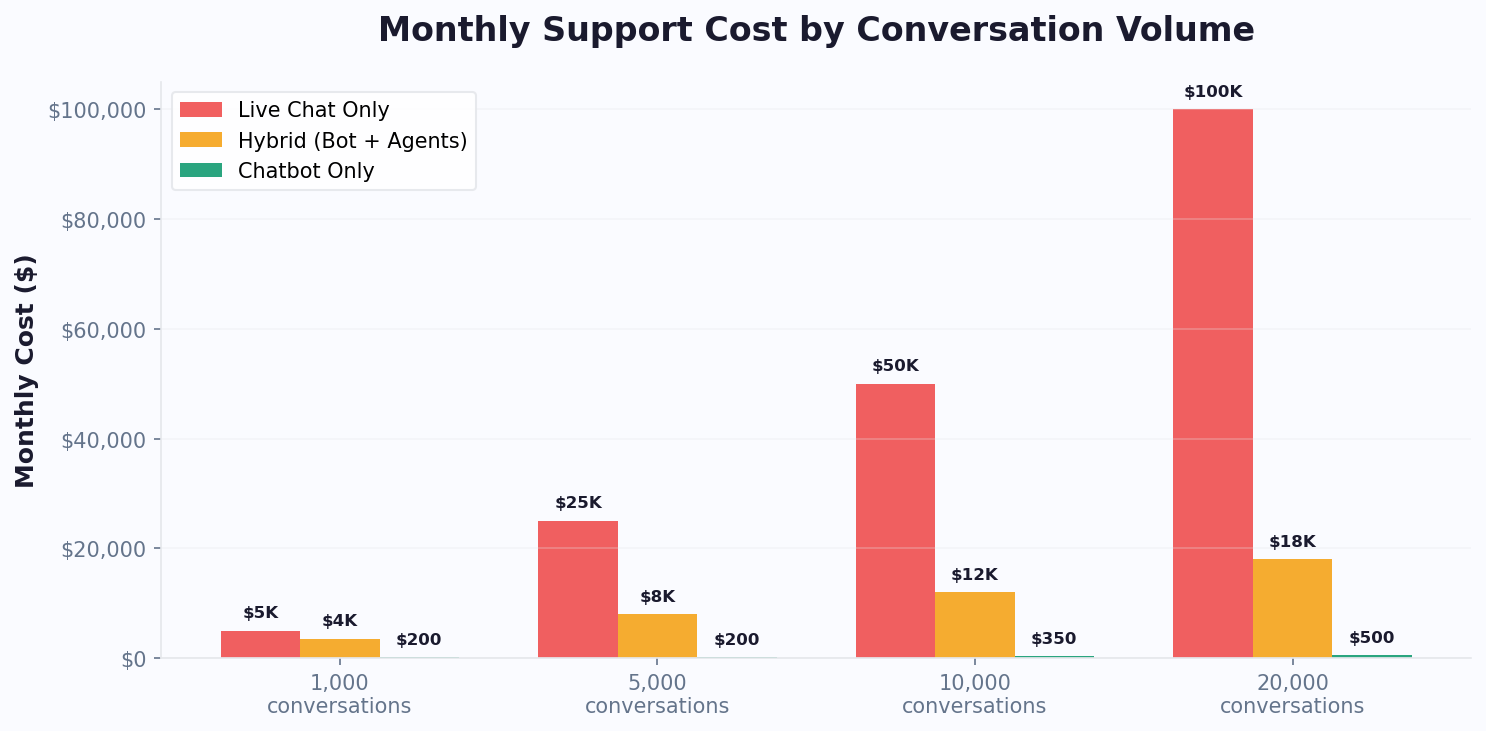
AI receptionist pricing depends on channels, volume, AI features, integrations, and whether you use a no-code platform or custom development. For most small businesses, a website chatbot is the lower-cost first step. Voice automation costs more because it adds phone infrastructure and speech processing.
| Cost Area | Website Chatbot | Voice Bot | Hybrid |
|---|---|---|---|
| Typical setup effort | Hours to days | Days to weeks | One to four weeks depending on integrations |
| Ongoing variable cost | Usually conversation or AI usage based | Often minute, call, and speech processing based | Both conversation and telephony usage |
| Main ROI source | More leads, fewer repetitive questions, more bookings | Missed-call recovery, call deflection, faster routing | Full front-desk coverage and better cross-channel conversion |
| Best first KPI | Lead capture or booking rate | Answered-call or missed-call recovery rate | Revenue from assisted conversations |
To estimate ROI, calculate value from three buckets:
- Recovered revenue: Leads or bookings that would have been missed after hours, during busy periods, or because forms were too passive.
- Labor savings: Routine calls, chats, and FAQs handled without staff involvement.
- Conversion lift: More visitors taking the next step because the AI receptionist answers objections in real time.
Example: if your business recovers 20 additional qualified inquiries per month, 25% become customers, and each customer is worth $600, the AI receptionist creates $3,000 in monthly gross revenue before labor savings. Even a modest lift can justify the system if it protects high-intent conversations. A McKinsey report on generative AI estimates that customer operations is one of the business functions with the highest automation potential, reinforcing the case for AI-assisted front desks.
For a deeper model, compare your assumptions with the small business chatbot guide, the appointment scheduling chatbot guide, and current Conferbot pricing.
Common AI Receptionist Mistakes to Avoid
AI reception fails when businesses treat it like a novelty instead of an operational workflow. Avoid these mistakes:
- Automating without a handoff. Every AI receptionist needs a clear path to a human for complex, emotional, regulated, or high-value situations.
- Asking too many questions upfront. Collect the minimum information needed for the next step. Long intake forms reduce completion.
- Using generic answers. Train the system on your actual services, policies, tone, prices, locations, and availability rules.
- Ignoring after-hours expectations. If the team will respond tomorrow, say that. Do not imply instant human follow-up when none exists.
- Failing to measure outcomes. Track leads, bookings, escalations, missed-call recovery, unanswered questions, and revenue attribution.
- Launching on every page at once. Start with high-intent pages: home, pricing, services, contact, booking, product, or location pages.
- Letting channel answers drift apart. Website, voice, and messaging reception should use one knowledge source wherever possible.
Compliance also matters. If you collect health, financial, legal, or sensitive customer information, define what the AI can and cannot answer. Add consent where needed, protect stored transcripts, and route regulated advice to qualified staff. The Gartner AI resource center tracks emerging governance frameworks that apply to customer-facing AI systems. A small business AI receptionist should be helpful and bounded, not overconfident.
Final Recommendation: Chatbot, Voice Bot, or Both?
For most small businesses, the best first AI receptionist is a website chatbot. It is faster to launch, easier to tune, less expensive, and directly improves the pages customers already visit before they buy or book. It is especially strong for lead capture, FAQs, qualification, appointment booking, and after-hours web inquiries.
Choose a voice bot first if your phone line is the clear revenue bottleneck. If missed calls, voicemail delays, or routine phone interruptions are costing money every week, voice automation should move up the priority list.
Choose both when the business has real demand across web and phone. The hybrid model gives customers a choice, keeps answers consistent, and turns reception into a measurable system instead of a collection of disconnected tasks.
The practical path is simple: launch the channel with the biggest leak, measure the result for 30 days, then expand. Conferbot can help you start with a website chatbot, add booking automation, connect your tools, and use analytics to decide when the next channel is worth adding.
Measuring Your AI Receptionist ROI
Small business owners should track specific metrics monthly to quantify the return from their AI receptionist investment. The most meaningful metrics include total conversations handled (multiply by your estimated cost per phone call to calculate savings), after-hours leads captured (multiply by your average customer lifetime value and conversion rate to estimate revenue impact), appointment no-show reduction (compare pre-chatbot and post-chatbot no-show rates), and customer satisfaction trends based on post-interaction feedback or reviews mentioning quick response times.
A typical small business deploying an AI receptionist saves 15-25 hours per week in administrative time that was previously spent answering routine phone calls and scheduling appointments. At an average administrative labor cost of $18-25 per hour, this represents $1,080-2,500 in monthly savings — often exceeding the total cost of the chatbot platform. When you add the revenue from after-hours leads that would have otherwise gone to voicemail (and then to competitors), the total ROI frequently exceeds 500% within the first six months.
The intangible benefits are equally important: reduced owner stress from being chained to the phone, ability to focus on high-value work instead of administrative tasks, and the professional image projected by instant, consistent responses regardless of how busy the business is at any given moment.
Was this article helpful?
Build and deploy in 10 minutes. No coding needed.
AI Receptionist for Small Business FAQ
Everything you need to know about chatbots for ai receptionist for small business.
About the Author
Deepak is the founder of Conferbot and writes about building, deploying, and improving AI chatbots.
View all articles