
Tax Season Chaos: Why Accounting Firms Lose Leads Every Year
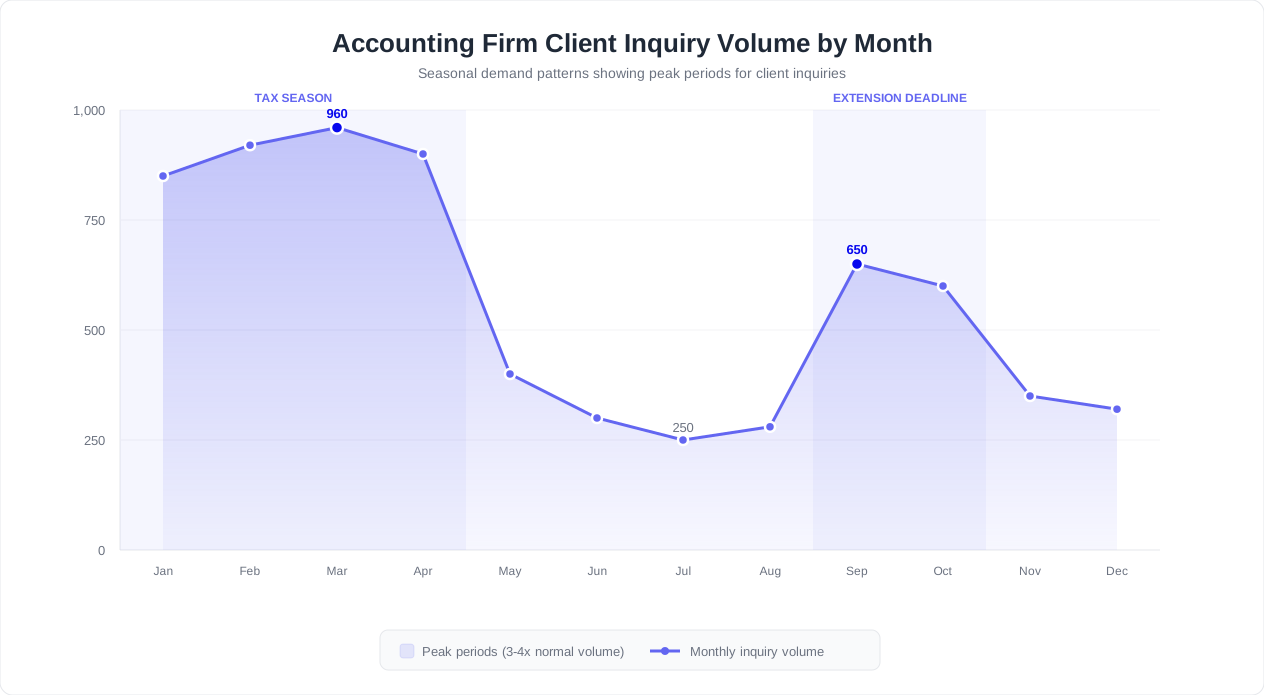
Every January through April, accounting firms face an operational paradox: the period when demand is highest is also the period when service quality drops the most. Tax season creates an increase in client inquiries compared to the rest of the year, flooding phone lines, burying email inboxes, and leaving front-desk staff scrambling to triage a relentless stream of questions about deadlines, documents, and filing status.
The consequences extend far beyond stressed employees. Fewer professionals handling more clients means every minute spent on a routine phone call is a minute stolen from complex, revenue-generating advisory work.
The Lead Leakage Problem
The financial damage is not limited to inefficiency. During tax season, prospective clients visit your website at peak rates, looking for a firm to handle their returns. If they land on your site at 8 PM on a Tuesday and find no way to get an immediate answer, most leave and never return. Research across professional services firms shows that many prospects choose the first firm that responds to their inquiry. When your team is buried in existing client work and cannot respond for 24 to 48 hours, those leads are going to the competitor who answered first.
CPA firms that deploy AI chatbots on their websites capture more qualified leads during tax season compared to firms relying solely on contact forms and phone calls. The chatbot engages every visitor instantly, qualifies their needs, collects their information, and books a consultation -- all without a single staff member lifting a finger.
The Real Cost of Missed Opportunities
Consider a mid-size CPA firm with 600 active clients. During tax season, the firm's website receives roughly 1,200 unique visitors per month from people searching for tax preparation help. Without a chatbot, the typical conversion rate on a contact form is 2 to 3%, yielding 24 to 36 leads per month. With an AI chatbot that proactively engages visitors and answers their questions in real time, conversion rates jump to 8 to 12%, yielding 96 to 144 leads per month.
At an average client lifetime value of $3,000 for individual tax clients and $8,000 or more for business clients, even a modest improvement in lead capture translates directly to significant revenue growth. The math is not theoretical -- it is the lived experience of firms that have moved from passive web forms to conversational AI on their websites.
| Metric | Without Chatbot | With AI Chatbot |
|---|---|---|
| Website visitor-to-lead conversion | 2-3% | 8-12% |
| Average response time to new inquiry | 24-48 hours | Under 10 seconds |
| After-hours lead capture | Contact form only | Full qualification and booking |
| Staff hours on routine inquiries (per week) | 25-40 hours | 8-12 hours |
| Client satisfaction with responsiveness | 3.2 / 5.0 | 4.6 / 5.0 |
The talent shortage is not going away. Client expectations for instant, digital-first service are only increasing. Firms that continue relying on voicemail and email queues during peak season are not just inefficient -- they are actively losing revenue to competitors who have embraced automation.
5 Client Questions Your Chatbot Should Handle Automatically
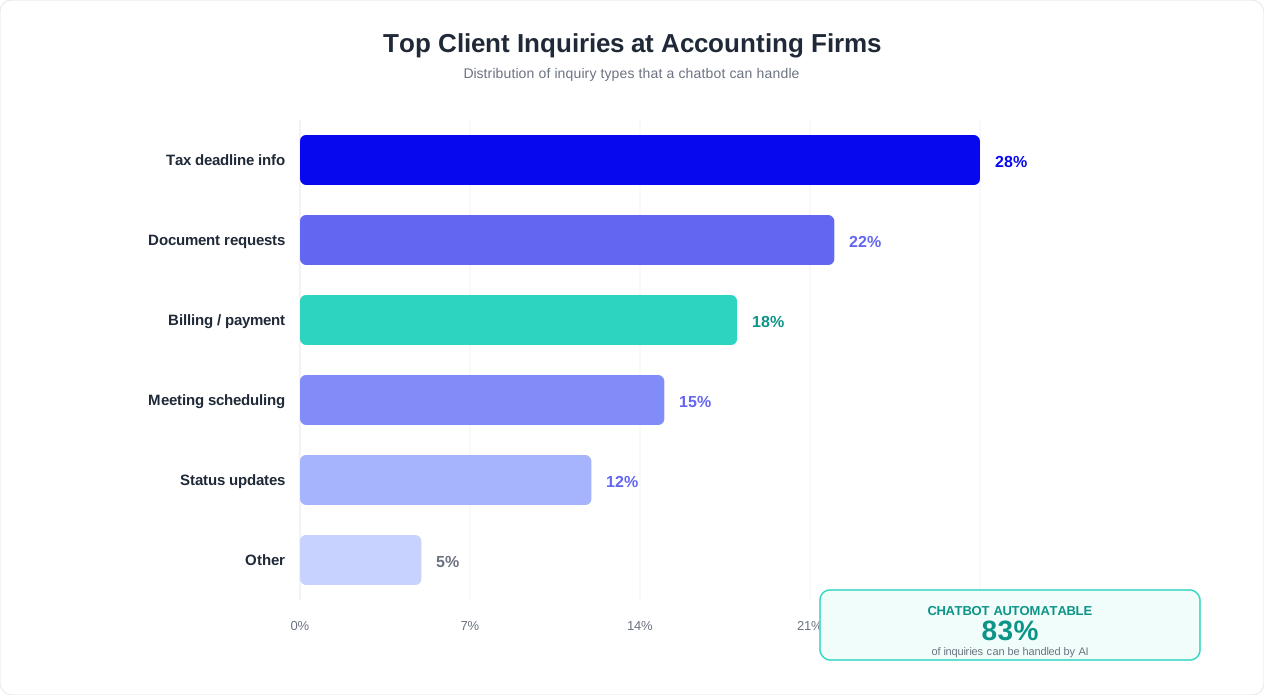
Analysis of client communications at CPA firms reveals that the vast majority of tax season inquiries fall into a small number of categories. By training your AI knowledge base to handle these five question types, you can deflect 60 to 70% of all routine client communications without any human involvement.
1. Tax Deadlines and Extension Questions
"When is the filing deadline?" "Can I file an extension?" "What happens if I miss the deadline?" These questions account for roughly 25% of all client inquiries during tax season. Your chatbot should provide current-year deadlines for individual returns (typically April 15), business entities (March 15 for S-Corps and partnerships), estimated tax payment dates, and extension filing procedures. Reference the IRS filing guidelines to keep your knowledge base accurate, and update it each year as deadlines shift.
A well-configured chatbot does not just recite dates. It asks follow-up questions to personalize the response: "Are you filing as an individual or a business? What type of entity?" This way a sole proprietor gets the April 15 deadline while an S-Corp owner is reminded about the March 15 pass-through deadline -- without the client needing to know which question to ask.
2. Document Requirements and Checklists
"What documents do I need to send you?" "Do I need my 1099 from my broker?" "Where do I find my mortgage interest statement?" Document questions represent about 20% of inquiries. The chatbot should generate dynamic, personalized checklists based on the client's filing type, employment status, and financial situation. When a client mentions rental income, the chatbot automatically adds Schedule E documentation to the list. When they mention a home purchase, it adds settlement statements and mortgage documents.
3. Return Status and Filing Updates
"Has my return been filed?" "When will I get my refund?" "Is my return still being reviewed?" Status inquiries are the most frustrating category for staff because each one requires looking up the client's file, checking the current workflow stage, and relaying that information. This wastes 5 to 8 minutes per inquiry. A chatbot integrated with your practice management system can provide instant, real-time status updates: "Your 2025 federal return is currently in the review stage. Your CPA expects to finalize it by March 20th. We will notify you when it is ready for your electronic signature."
4. Fee and Billing Questions
"How much will my return cost?" "Do you charge extra for rental property schedules?" "Can I set up a payment plan?" Fee questions account for roughly 15% of inquiries. The chatbot can present fee ranges based on the complexity of the return (individual vs. business, number of states, special schedules) and explain what is included. This transparency actually increases conversion rates because prospects get clear pricing information instead of the dreaded "it depends" response that drives them to the next search result.
5. General Service and Availability Questions
"Do you handle small business taxes?" "Can you help with IRS audit representation?" "Do you offer bookkeeping services?" These questions, representing about 10% of the volume, are pure lead qualification opportunities. The chatbot captures the prospect's needs, matches them against your firm's service offerings, and either schedules a consultation via calendar booking or routes the inquiry to the appropriate partner.
Building Your Knowledge Base
The key to effective FAQ automation is specificity. A generic chatbot that gives the same answer to every question about deadlines will frustrate clients. Conferbot's AI knowledge base allows you to upload your firm's specific policies, fee schedules, engagement procedures, and practice areas. The AI then synthesizes this information into natural, conversational responses tailored to each client's question -- not canned scripts, but genuinely helpful answers grounded in your firm's actual practices.
Start by reviewing your email inbox and call log from the last two tax seasons. Identify the top 50 questions by frequency. You will likely find that 20 to 30 distinct questions cover more than 80% of all routine inquiries. Upload the answers to your knowledge base, and your chatbot handles the rest. Use analytics to track which questions come up most often and refine your responses continuously throughout the season.
Document Collection: Automating the Tax Prep Intake Process
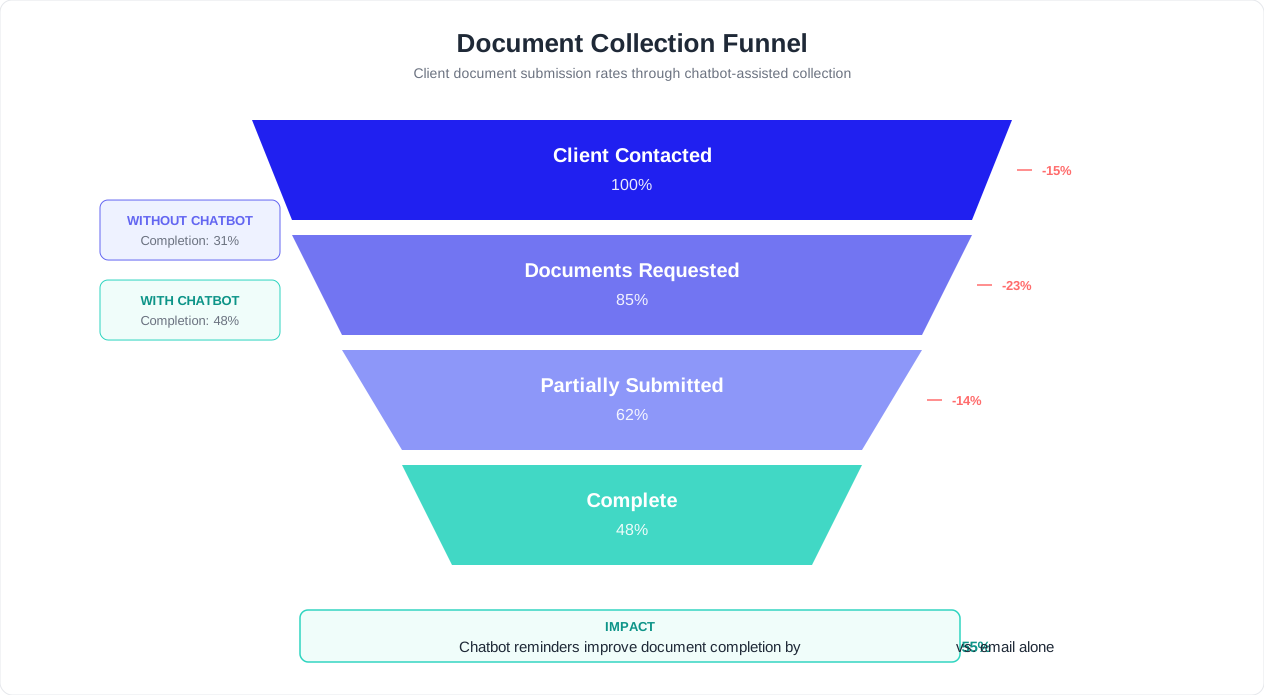
Document collection is the single largest bottleneck in accounting firm workflows. A 2025 survey by Accounting Today found that the average tax return is delayed 12 days due to missing client documents, and staff spend an average of 3.2 hours per client on follow-up across the engagement. Multiply that by 400 clients and you have 1,280 hours -- the equivalent of more than 30 full-time work weeks -- consumed by chasing missing paperwork.
An AI chatbot transforms this painful, manual process into a self-service experience that clients can complete on their own schedule, from their phone, without a single follow-up email from your team.
How Automated Document Collection Works
The chatbot walks each client through a personalized intake flow based on their specific tax situation:
- Profile assessment: The chatbot asks a series of qualifying questions -- filing status, employment type, income sources, life changes (marriage, home purchase, new business) -- to build a complete picture of the client's situation.
- Dynamic checklist generation: Based on the profile, the chatbot generates a personalized document list. An individual W-2 employee might see 8 items. A self-employed client with rental properties might see 22 items. Each item includes a plain-language explanation of what it is and where to find it.
- Guided upload: Clients upload documents directly through the chat interface using rich media capabilities. They can photograph physical documents with their phone camera, and the chatbot uses OCR to verify the document type matches what was requested.
- Progress tracking: Both the client and the firm see a real-time checklist of what has been submitted and what remains outstanding. The chatbot displays a progress bar: "You have uploaded 6 of 11 required documents."
- Smart reminders: For missing items, the chatbot sends automated reminders through the client's preferred channel -- WhatsApp, email, or SMS -- at configurable intervals.
Automated Reminder Sequences That Work
The difference between manual follow-up and chatbot-driven reminders is consistency and persistence without annoyance:
| Timing | Reminder Type | Content |
|---|---|---|
| Day 0 | Initial request | Full personalized checklist with upload links and explanations |
| Day 3 | Friendly follow-up | "You still need 4 documents. Here is exactly what is missing." |
| Day 7 | Urgency reminder | "To meet the March 15 filing deadline, we need your documents by March 1." |
| Day 10 | Escalation offer | "Having trouble locating a document? Reply here or schedule a call with our team." |
| Day 14 | Final notice | "Missing documents may delay your filing. Please submit or contact us for an extension." |
Firms using chatbot-driven document collection report that many clients submit all required documents within the first reminder cycle, compared to 45% with traditional email-only approaches. The remaining 20% typically need one additional touchpoint, often the day-7 reminder that introduces deadline urgency.
Integration with Practice Management
The most effective document collection chatbots do not operate in isolation. When a client uploads their W-2 through the chat interface, it should automatically appear in their client folder in your practice management system -- Karbon, Canopy, TaxDome, or whichever platform your firm uses. Conferbot's integrations hub connects your chatbot to your existing tech stack so that uploaded documents are routed, tagged, and associated with the correct client engagement without manual data entry.
This end-to-end automation eliminates the three most time-consuming aspects of document collection: sending the initial request, chasing missing items, and organizing received documents into the right folders. Your team opens the client's file and everything is already there, ready for preparation.
Appointment Booking for Consultations and Reviews
Scheduling is one of those deceptively expensive administrative tasks. It seems simple -- find a time that works -- but the reality at most accounting firms involves multiple rounds of phone tag, email back-and-forth, calendar conflicts, last-minute reschedules, and no-shows that waste valuable CPA time. During tax season, when every hour of a CPA's calendar carries significant revenue potential, scheduling inefficiency is directly costly.
Conversational Scheduling Through Your Chatbot
A chatbot with calendar booking integration eliminates scheduling friction entirely. The conversation flows naturally:
- Service identification: The chatbot determines what the client needs -- initial consultation, document review, tax planning session, return signing, or quarterly review.
- Provider matching: Based on the service type and client profile, the chatbot identifies the right team member. Individual tax returns go to staff accountants. Complex business tax consultations go to senior CPAs. Advisory sessions go to partners.
- Availability display: The chatbot presents available time slots from the provider's actual calendar, filtered by service type and duration. A 15-minute return signing appointment shows different slots than a 60-minute tax planning consultation.
- Confirmation and preparation: Once booked, the chatbot sends a confirmation with date, time, provider name, meeting location or video link, and a list of items the client should bring or complete before the appointment.
- Automated reminders: The chatbot sends reminders at 48 hours and 2 hours before the appointment, reducing no-shows.
Reducing No-Shows and Cancellations
No-shows are a persistent problem for accounting firms, with industry averages ranging from 15 to 25% of scheduled appointments. Each no-show represents wasted CPA time that could have been allocated to billable work or another client. Chatbot-driven scheduling reduces no-shows through three mechanisms:
- Immediate booking: When a client requests an appointment and books it within the same conversation, commitment is higher than when scheduling happens days later through a separate channel.
- Multi-channel reminders: The chatbot sends reminders via the channel the client is most responsive to -- WhatsApp push notifications have significantly higher open rates than email reminders.
- Easy rescheduling: Instead of calling to reschedule, clients reply to the reminder message with "reschedule" and the chatbot presents alternative times instantly. This converts cancellations into rescheduled appointments rather than lost appointments.
For a deeper dive into reducing missed appointments, see our guide on how to automate appointment reminders and reduce no-shows.
Booking as Lead Qualification
For prospective clients, the booking flow doubles as a lead qualification process. The chatbot collects the prospect's name, contact information, business type, service needs, and estimated annual revenue before presenting available consultation times. By the time the CPA sits down for the meeting, they already have a complete profile of the prospect and can prepare accordingly. This transforms cold consultations into warm, informed conversations that close at higher rates.
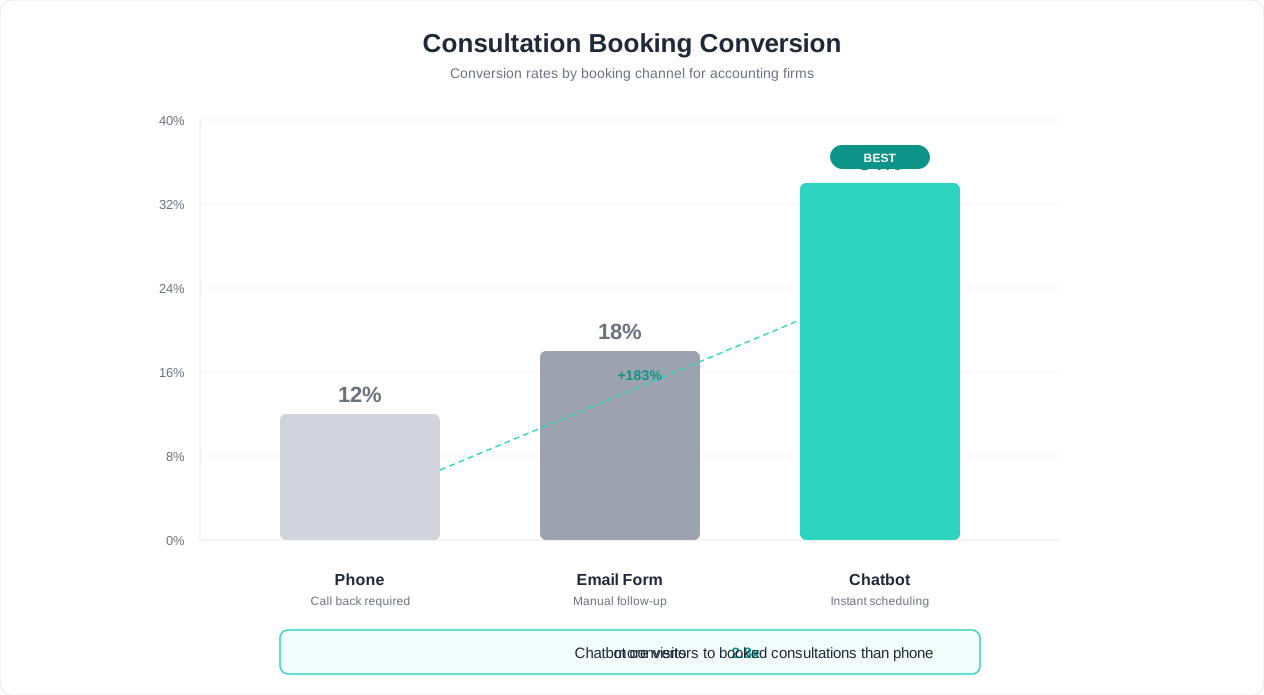
Track all booking metrics -- conversion rates, no-show rates, rescheduling patterns, and popular time slots -- through Conferbot's analytics dashboard. Use this data to optimize your scheduling strategy, such as adding more availability during high-demand windows or adjusting reminder timing based on no-show patterns.
Compliance and Data Security for Financial Data
Accounting firms handle some of the most sensitive personal and financial data that exists -- Social Security numbers, bank account details, income records, tax identification numbers, and complete financial histories. Any chatbot deployment must meet stringent security and compliance requirements, not only to satisfy regulators but to maintain the trust that is foundational to the client-accountant relationship.
Regulatory Landscape for Accounting Chatbots
CPA firms are subject to multiple overlapping regulatory frameworks that govern how client data must be collected, stored, and transmitted. The IRS Publication 4557 (Safeguarding Taxpayer Data) requires all tax preparers to maintain a written information security plan that includes encryption, access controls, and employee training. The FTC Safeguards Rule imposes similar requirements on financial institutions, and the AICPA Code of Professional Conduct mandates that CPAs exercise due care in protecting client confidentiality.
| Regulation | Key Requirement | Chatbot Implementation |
|---|---|---|
| IRS Publication 4557 | Written information security plan for tax preparers | Encrypted data transmission, access logging, data retention policies |
| FTC Safeguards Rule | Comprehensive security program for financial data | Risk assessments, multi-factor authentication, vendor oversight |
| AICPA Code of Conduct | Client confidentiality and due care | Consent mechanisms, data minimization, staff training on chatbot data handling |
| State privacy laws (CCPA, SHIELD Act) | Consumer data rights and breach notification | Data access/deletion capabilities, breach response procedures |
| SOC 2 Type II | Ongoing security, availability, confidentiality controls | Platform-level compliance certification |
Security Architecture Best Practices
When deploying a chatbot that collects sensitive financial information, implement these non-negotiable safeguards:
- End-to-end encryption: All data transmitted between the client and the chatbot must be encrypted using TLS 1.2 or higher in transit. Stored data must use AES-256 encryption at rest. This applies to chat messages, uploaded documents, and any personally identifiable information.
- Multi-factor authentication: Before the chatbot provides any client-specific information -- return status, balance due, financial details -- verify the client's identity through multi-factor authentication. Never rely solely on name and date of birth.
- Data minimization: Only collect information strictly necessary for the chatbot's function. Social Security numbers should be collected through secure, tokenized input fields -- never as plain text in the chat conversation.
- Automatic data purging: Configure retention policies that automatically delete sensitive information from chat logs after a defined period. Most firms should purge chat transcripts containing PII within 90 days of engagement completion.
- Role-based access controls: Not every staff member needs access to every client's chatbot conversations. Implement role-based permissions so that only the assigned CPA and authorized administrators can view specific client interactions.
- Comprehensive audit logging: Maintain detailed logs of all chatbot interactions involving sensitive data, including timestamps, data accessed, and actions taken. These logs are essential for regulatory compliance and incident response.
Secure Document Upload vs. Email Attachments
One of the most compelling security arguments for chatbot-based document collection is that it replaces the dangerously common practice of clients emailing sensitive documents as unencrypted attachments. A chatbot with secure upload capabilities routes documents through encrypted channels directly into your document management system, bypassing the security vulnerabilities inherent in standard email. This alone can justify the chatbot deployment from a risk management perspective.
Conferbot does not currently hold SOC 2 or ISO 27001 certification; data is encrypted in transit and access is controlled by workspace roles. For detailed guidance on chatbot data protection, see our chatbot GDPR compliance guide, which covers principles applicable across all data protection frameworks.
Year-Round Use Cases Beyond Tax Season
One of the biggest mistakes accounting firms make with chatbot technology is treating it as a tax-season-only tool. The firms that extract the most value deploy their chatbot across the full calendar year, supporting bookkeeping clients, payroll services, advisory engagements, and proactive tax planning. A chatbot that only works four months a year delivers a fraction of its potential ROI.
Monthly Bookkeeping and Financial Reporting
For firms that provide bookkeeping services, the chatbot becomes a continuous client communication channel:
- Monthly document collection: The chatbot sends automated monthly requests for bank statements, credit card statements, receipts, and invoices. Clients upload directly through chat instead of accumulating paper for months.
- Financial report delivery: When monthly financials are ready, the chatbot notifies the client and presents key metrics -- revenue, expenses, net income -- in a conversational summary before linking to the full report.
- Question handling: Clients ask about specific transactions, expense categorizations, or financial trends. The chatbot handles routine inquiries and escalates complex questions to the assigned bookkeeper.
- Deadline reminders: Sales tax filing dates, payroll tax deadlines, quarterly estimated payments -- the chatbot ensures clients never miss a deadline by sending timely, channel-specific reminders.
Payroll Support and Compliance
Payroll clients generate a steady stream of time-sensitive questions throughout the year:
- Pay schedule questions: "When is the next payroll run?" "What is the cutoff date for timesheet submissions?"
- New hire onboarding: The chatbot collects W-4 information, direct deposit details, and state withholding elections from new employees, routing the data directly into the payroll system.
- Tax deposit confirmations: After each payroll run, the chatbot confirms that federal and state tax deposits have been made, giving business owners peace of mind.
- Year-end preparation: Starting in November, the chatbot guides clients through W-2 and 1099 preparation requirements, collecting updated employee and contractor information.
Advisory and Tax Planning
The highest-value year-round use case is supporting the shift from compliance to advisory services -- the transformation that every forward-thinking CPA firm is pursuing:
- Estimated tax payment reminders: Quarterly reminders with payment amounts calculated from the prior year, links to payment portals, and offers to schedule a tax planning review if circumstances have changed.
- Retirement contribution optimization: Mid-year prompts about maximizing 401(k), SEP-IRA, or SIMPLE IRA contributions while there is still time to adjust.
- Entity structure reviews: For business clients, annual prompts to review whether their current entity structure (sole proprietorship, LLC, S-Corp) remains optimal as revenue grows.
- Year-end tax planning: Starting in October, the chatbot initiates proactive outreach about charitable giving strategies, capital gains harvesting, equipment purchases under Section 179, and other year-end planning opportunities.
Year-Round Engagement Calendar
| Month | Chatbot Activity | Client Value |
|---|---|---|
| January - April | Tax document collection, status updates, deadline reminders | Stress-free tax season experience |
| April - May | Extension filing support, Q1 estimated tax reminders | Post-season compliance support |
| June | Q2 estimated tax reminders, mid-year check-in | Proactive tax management |
| July - August | Bookkeeping review prompts, retirement contribution reminders | Financial health monitoring |
| September | Q3 estimated tax reminders, extended return completion | Deadline compliance |
| October - November | Year-end tax planning outreach, entity structure reviews | Tax optimization opportunities |
| December | Final year-end strategies, Q4 estimated tax reminders, holiday closures | Last-chance tax savings |
This year-round engagement keeps your firm top-of-mind and positions you as a proactive advisor rather than a reactive tax preparer. Clients who hear from their accountant 12 months a year are significantly more likely to purchase additional services, refer colleagues, and remain loyal long-term. Build these automated touchpoints using Conferbot's visual builder and schedule them to trigger automatically throughout the year.
ROI Case Study: How Chatbots Transform CPA Firm Operations
The business case for accounting firm chatbots is built on hard numbers. Below is a composite case study based on performance data from CPA firms with 300 to 800 active clients that have deployed AI chatbots for client communication. These figures represent realistic, achievable outcomes for firms that follow the implementation approach outlined in this guide.
Baseline: A 500-Client CPA Firm Before Chatbot Deployment
| Metric | Pre-Chatbot Value |
|---|---|
| Active clients during tax season | 500 |
| Average routine inquiries per client (Jan-Apr) | 4.2 |
| Total routine inquiries during tax season | 2,100 |
| Average staff time per routine inquiry | 7 minutes |
| Total staff hours on routine inquiries | 245 hours |
| Website visitors during tax season (monthly) | 900 |
| Contact form conversion rate | 2.8% |
| New client leads captured per month | 25 |
| Average document collection time per client | 16 days |
| No-show rate for scheduled appointments | 22% |
After 6 Months of Chatbot Operation
| Metric | Post-Chatbot Value | Improvement |
|---|---|---|
| Routine inquiries handled by chatbot | 1,365 (65%) | 245 hours reclaimed |
| Staff hours on routine inquiries | 86 hours | 65% reduction |
| Website conversion rate | 9.4% | 3.4x increase |
| New client leads captured per month | 85 | 3.4x increase |
| Average document collection time | 5 days | 69% faster |
| No-show rate | 11% | 50% reduction |
| Client satisfaction score | 4.5 / 5.0 | Up from 3.2 |
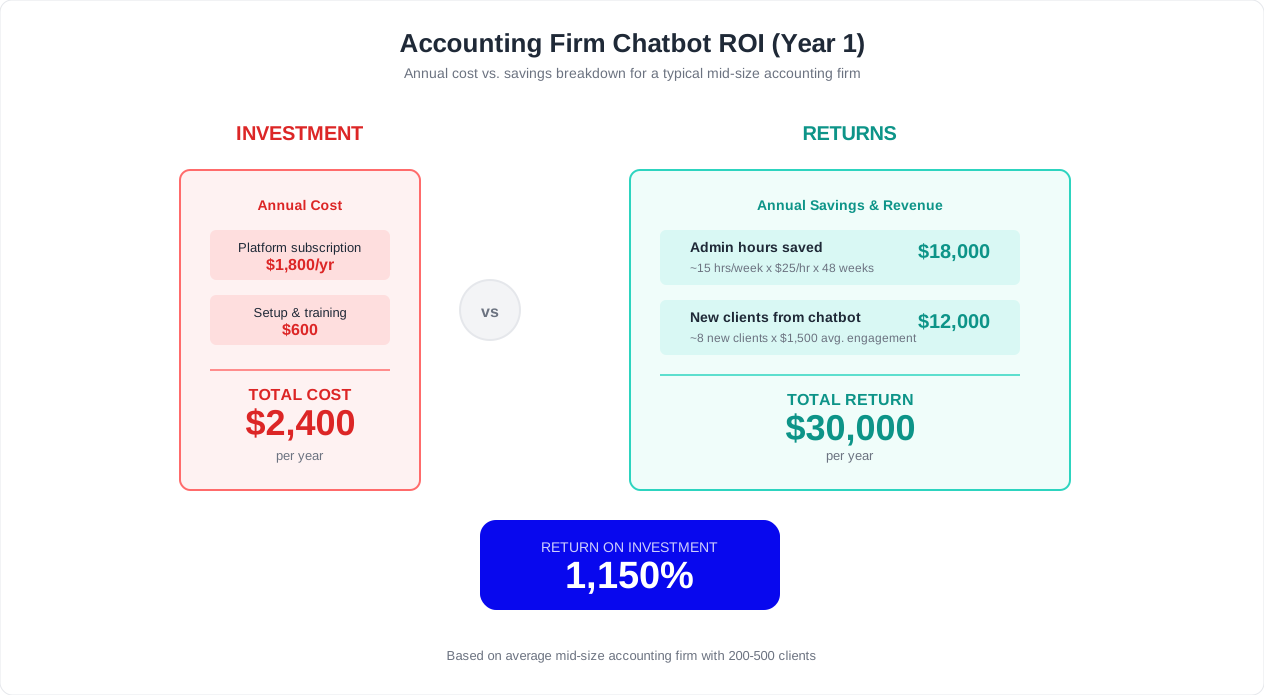
Financial Impact Calculation
Translating operational improvements into dollars:
- Staff time reclaimed: 159 hours during tax season at an average fully loaded cost of $45/hour = $7,155 in direct labor savings.
- Incremental revenue from new leads: 60 additional qualified leads per month over 4 months = 240 leads. At a 30% close rate and $2,500 average first-year revenue per new client = $180,000 in new revenue potential.
- Reduced no-show costs: 55 fewer no-shows per tax season at an estimated $150 per wasted appointment slot = $8,250 recovered.
- Faster document collection: Completing returns 11 days faster means the firm can handle more returns within the same tax season without adding staff. Estimated additional capacity: 40-60 returns.
The total first-year financial impact for this 500-client firm exceeds $195,000 in combined savings and new revenue, against a chatbot platform cost of $2,000 to $6,000 per year. That is a return on investment north of 30:1. For a detailed framework to calculate your own firm's ROI, see our guide on how to calculate chatbot ROI.
The Compounding Effect
These numbers improve over time. As your chatbot's knowledge base grows from real client interactions, its deflection rate increases. As more clients experience the convenience of chatbot-driven communication, adoption rates climb. And as your firm captures more leads and grows its client base, the chatbot scales effortlessly -- handling 800 clients with the same infrastructure that handled 500. This scalability without proportional staff increases is the fundamental economic advantage of AI-powered client communication.
Setup Guide: Launch Your Accounting Chatbot in Under an Hour
Deploying a chatbot for your accounting firm does not require a technology background, a development team, or weeks of implementation. With Conferbot's no-code chatbot builder, most firms can have a fully functional chatbot live on their website within an hour. Here is the step-by-step process.
Step 1: Choose Your Template (5 Minutes)
Start with Conferbot's accounting and financial services chatbot template, which comes pre-configured with:
- Common tax and accounting FAQ responses
- Client intake conversation flows
- Document collection workflows
- Appointment booking integration
- Lead qualification logic
The template provides a working foundation that you customize to match your firm's specific services, policies, and voice.
Step 2: Build Your Knowledge Base (20 Minutes)
Upload your firm-specific content to the AI knowledge base:
- Service descriptions: What your firm offers -- individual tax, business tax, bookkeeping, payroll, advisory, audit representation.
- Fee information: Fee ranges by service type, what is included, payment terms.
- Document requirements: Checklists for each service type. Pull these from your existing client communication templates.
- Firm policies: Engagement procedures, communication preferences, turnaround times, extension policies.
- Team information: Partner and staff bios, specializations, and availability for appointment routing.
The AI processes your uploaded content and generates natural, conversational responses. You do not need to write individual chatbot scripts -- the AI handles the conversation flow automatically based on the knowledge you provide.
Step 3: Configure Integrations (15 Minutes)
Connect the chatbot to your existing tools through a webhook or Zapier:
- Calendar: Connect Google Calendar (other calendars such as Outlook or Calendly via Zapier) for appointment booking. Set availability by team member, service type, and duration.
- Practice management: If you use Karbon, Canopy, TaxDome, or similar platforms, configure the integration so that new client information and uploaded documents flow directly into your system.
- Accounting software: For firms using QuickBooks or Xero, connect via API to enable the chatbot to answer client-specific questions about invoices, payments, and financial reports.
- Communication channels: Enable WhatsApp for clients who prefer messaging, and configure email notifications for your team when the chatbot escalates a conversation.
Step 4: Customize Appearance and Behavior (10 Minutes)
Match the chatbot to your firm's brand:
- Upload your firm logo and set brand colors
- Write a custom welcome message that reflects your firm's voice
- Configure operating hours and after-hours behavior
- Set escalation rules -- which questions should always be routed to a human
- Enable or disable specific features (document upload, appointment booking, lead capture)
Step 5: Test and Deploy (10 Minutes)
Before going live:
- Test the chatbot yourself by asking the 10 most common questions your clients ask. Verify the responses are accurate and helpful.
- Have a colleague play the role of a new prospect and walk through the lead qualification and booking flow.
- Upload a test document to verify the document collection workflow.
- Test the escalation path to confirm that conversations requiring human intervention are routed correctly.
Once testing is complete, deploy the chatbot to your website with a single line of embed code. The chatbot appears as a widget in the corner of your site, ready to engage every visitor.
Post-Launch Optimization
The first two weeks after launch are critical for optimization. Monitor your analytics dashboard daily to identify:
- Unanswered questions: Queries the chatbot could not resolve indicate gaps in your knowledge base. Add the missing information and the chatbot handles similar questions going forward.
- Drop-off points: If clients abandon the document upload flow at a specific step, simplify that step or add additional guidance.
- Popular topics: The questions clients ask most frequently should have the most detailed, polished responses. Invest time in refining these.
- Escalation patterns: If the chatbot is escalating too many conversations, review the escalation triggers and expand the knowledge base to handle more scenarios autonomously.
Most firms reach optimal chatbot performance -- 60 to 70% deflection rate with high client satisfaction -- within 4 to 6 weeks of launch. The chatbot continuously improves as it learns from real client interactions and as you refine the knowledge base based on analytics data.
Ready to get started? Explore Conferbot's pricing plans to find the tier that matches your firm's client volume, or start with a free trial to experience the platform firsthand.
Was this article helpful?
Build and deploy in 10 minutes. No coding needed.
AI Chatbot for Accounting Firms FAQ
Everything you need to know about chatbots for ai chatbot for accounting firms.
About the Author
The Conferbot team writes about building, deploying, and improving AI chatbots.
View all articles

