
Flutter SDK 챗봇 빌더
iOS, Android, Web 및 Desktop을 위한 크로스 플랫폼 Flutter SDK. Material Design 3 컴포넌트, 완전한 Dart null-safety 지원, 기본 제공되는 아름다운 애니메이션.
To build a Flutter SDK chatbot with Conferbot, sign up free, design your flow in the no-code visual builder, connect your Flutter SDK account, and publish — typically live in a few minutes with no coding. The free plan needs no credit card, and the same bot can also run on your website and other messaging channels.
Flutter 챗봇 기능
강력한 자동화된 대화를 구축하는 데 필요한 모든 것
크로스 플랫폼 (iOS, Android, Web, Desktop)
Material Design 3 컴포넌트
완전한 Dart null-safety 지원
커스터마이징 가능한 위젯
푸시 알림 지원
부드러운 애니메이션
상태 관리 통합
플랫폼별 최적화
무엇을 구축할 수 있나요?
시작하기 7개의 간단한 단계
이 가이드를 따라 Flutter 챗봇을 연결하세요
pubspec.yaml에 추가: conferbot_flutter: ^1.0.0
flutter pub get 실행
Dart 파일에서 패키지 import
봇 ID로 초기화
위젯 트리에 ConferbotChat 위젯 추가
ConferbotTheme로 커스터마이징
Flutter 챗봇이 준비되었습니다!
Introduction
Flutter has become the leading cross-platform framework, enabling developers to build natively compiled applications for iOS, Android, Web, macOS, Windows, and Linux from a single Dart codebase. Its adoption has exploded - Google reports over 1 million published Flutter apps, and companies like BMW, Alibaba, ByteDance, and eBay use it in production.
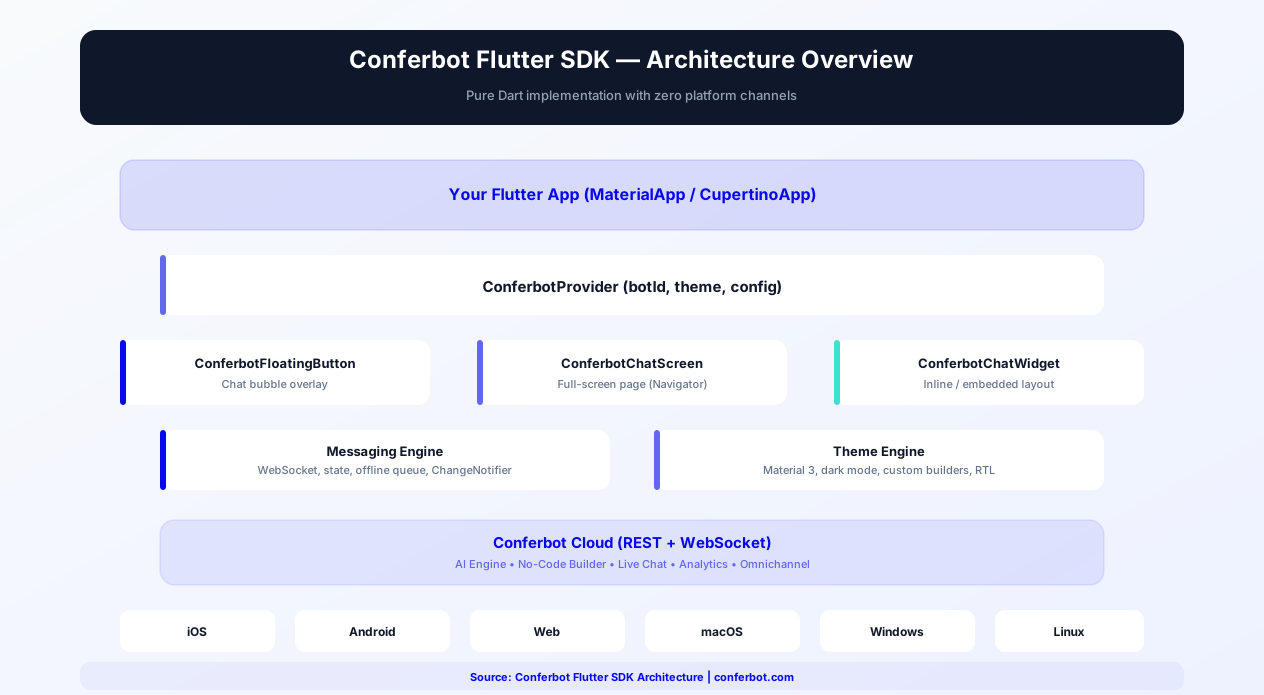
When you build with Flutter, you expect your tools to work everywhere Flutter does. The Conferbot Flutter SDK delivers exactly that - a cross-platform chatbot widget that renders beautifully on every platform Flutter supports. Material Design 3 components ensure your chatbot looks native on Android, while adaptive design adjusts gracefully for iOS, Web, and Desktop.
The SDK is built with Dart null-safety, integrates with Flutter's widget tree naturally, and follows the same widget composition patterns Flutter developers already know. You get the full power of Conferbot's no-code chatbot builder, AI capabilities, and live chat - all rendered through native Flutter widgets instead of a WebView.
This guide covers everything you need to integrate a production-ready chatbot into your Flutter application in 2026: installation, key features, theming, state management, cross-platform deployment, push notifications, performance optimization, and a detailed comparison with React Native. Whether you are building a consumer app, enterprise SaaS product, or e-commerce platform, this guide gives you the complete integration playbook.
New to chatbot building? Start with our complete guide to building a chatbot without coding. The same chatbot works on your website, WhatsApp, Messenger, and native Android/iOS apps. Browse our template library for ready-to-deploy in-app chatbot flows. For teams evaluating mobile frameworks, see our dedicated React Native SDK guide.
Source code & documentation: conferbot-flutter on GitHub | conferbot_flutter on pub.dev | Flutter official docs
Installation Guide
The Conferbot Flutter SDK is distributed as a standard Dart package via pub.dev, following Flutter's standard dependency management workflow.
Step 1: Add the Dependency
Add the package to your pubspec.yaml:
dependencies:
  conferbot_flutter: ^1.0.0
Step 2: Install
Run the install command:
flutter pub get
Step 3: Initialize the SDK
Import the package and initialize Conferbot in your app's main entry point:
import 'package:conferbot_flutter/conferbot_flutter.dart';
Wrap your MaterialApp with the ConferbotProvider widget, passing your bot ID:
ConferbotProvider(botId: 'YOUR_BOT_ID', child: MaterialApp(...))
Step 4: Add the Chat Widget
Place the ConferbotChat widget in your widget tree:
- Floating Action Button -
ConferbotFloatingButton()adds a chat bubble that opens the full chat overlay - Full Screen -
ConferbotChatScreen()renders the chat as a full-screen page, suitable for Navigator push - Embedded -
ConferbotChatWidget()renders inline within your layout for custom placement
Step 5: Configure Push Notifications (Optional)
For push notification support:
- Set up Firebase Cloud Messaging using
firebase_messagingpackage - Pass the FCM token to the SDK:
Conferbot.instance.setDeviceToken(token) - For iOS, configure APNs certificates in your Apple Developer account
Basic integration takes approximately 10 minutes. The SDK supports Flutter 3.0+ and Dart 3.0+ with full null-safety. For detailed installation troubleshooting, see the GitHub repository.
Key SDK Features
The Conferbot Flutter SDK is designed to be a first-class Flutter citizen, following the framework's principles of composition, performance, and platform adaptivity.
Material Design 3 Components
The SDK ships with Material Design 3 (Material You) widgets that automatically adapt to your app's color scheme and typography. Message bubbles, input fields, buttons, and headers all follow Material 3 guidelines, ensuring visual consistency with the rest of your Android app. On iOS, the widgets gracefully adapt with platform-appropriate styling.
Cross-Platform Support
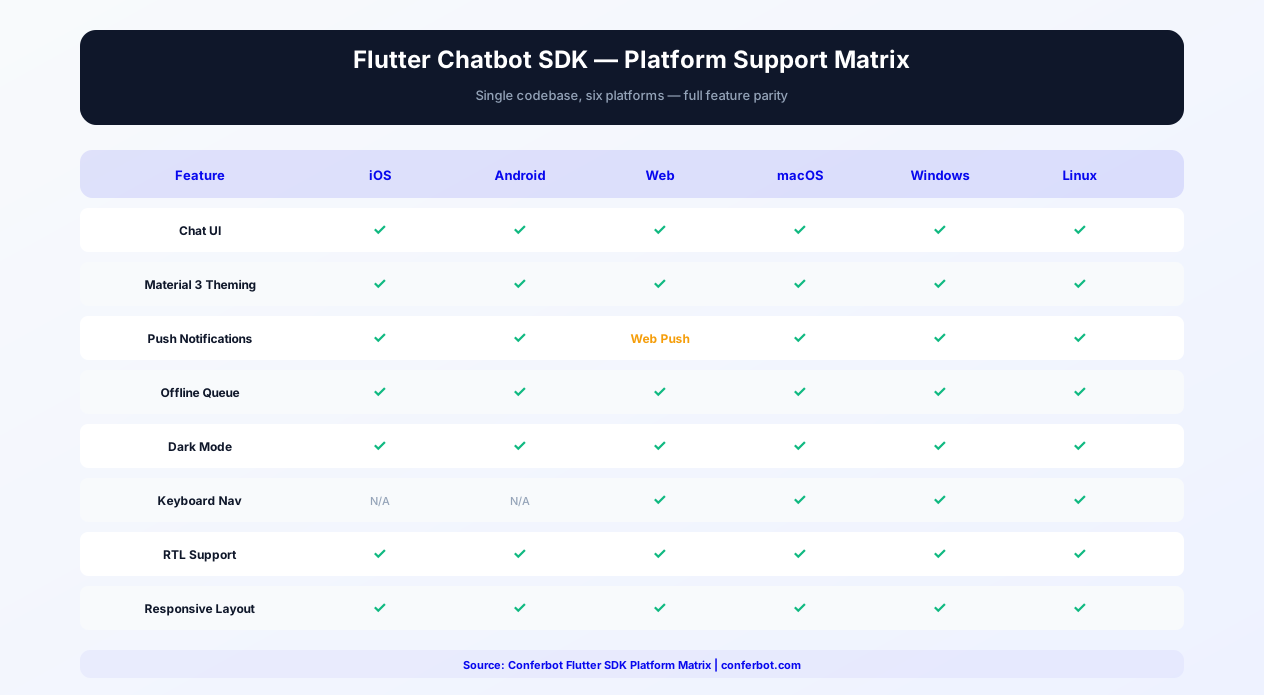
The same Flutter code works on all supported platforms:
- iOS - Adaptive styling with Cupertino touches
- Android - Full Material Design 3 with dynamic theming
- Web - Responsive layout that adjusts to browser viewport
- macOS, Windows, Linux - Desktop-optimized layout with keyboard navigation
Dart Null-Safety
The entire SDK is written with sound null-safety, ensuring compile-time safety guarantees. No runtime null reference errors from the SDK - ever. This aligns with Flutter's push toward null-safe Dart code across the ecosystem.
Smooth Animations
Message entry, typing indicators, widget transitions, and button interactions are all animated at 60fps using Flutter's animation framework. The chat experience feels fluid and responsive, matching the quality standard users expect from native Flutter apps.
Push Notifications
Receive notifications when the bot responds while the app is in the background. Works with Firebase Cloud Messaging for both iOS and Android. Notifications are customizable with your own titles, body text, and sound.
State Management Integration
The SDK works alongside any state management solution - Provider, Riverpod, Bloc, GetX, or MobX. Access chat state through Conferbot's own ChangeNotifier or integrate with your existing state architecture using provided streams and callbacks.
Offline Support
Messages are cached locally when the device is offline and synced automatically when connectivity returns. The SDK uses Dart's connectivity detection to manage queue state transparently.
Cross-Platform Advantages
The Conferbot Flutter SDK's cross-platform capability is its defining strength. Write your chatbot integration once and it works identically on six platforms: iOS, Android, Web, macOS, Windows, and Linux. This eliminates the need to maintain separate native SDK integrations for each platform. For teams building with Flutter precisely because of its cross-platform promise, a WebView-based chat solution undermines that advantage by introducing platform-specific rendering inconsistencies. The native Flutter SDK renders consistently across all targets because it uses Flutter's own rendering engine, not platform web views.
Provider and Riverpod Integration
For apps using Provider (the most popular Flutter state management solution), the SDK exposes a ConferbotChangeNotifier that integrates naturally with ChangeNotifierProvider. Access unread message count, chat open/close state, and conversation events through standard Provider patterns. For Riverpod users, the SDK provides equivalent StateNotifier implementations. For Bloc architecture, the SDK exposes Streams that map directly to Bloc events. This flexibility ensures the chatbot state flows through your existing architecture without requiring a separate state management layer.
Hive and Local Storage
The SDK uses a lightweight local storage layer for offline message queuing and session persistence. By default, it uses Dart's built-in storage mechanisms, but you can provide a custom storage adapter if your app uses Hive, SharedPreferences, or Isar for data persistence. This ensures the chatbot's local data management is consistent with your app's overall storage strategy and does not create conflicts with existing data layers.
Platform-Specific UI Adaptation
While the SDK uses Material Design 3 as its base, it includes platform-specific adaptations for a native feel on each target. On iOS, scroll physics use the bouncing behavior iOS users expect. On Web, the layout adapts to browser viewport sizes with responsive breakpoints. On desktop platforms (macOS, Windows, Linux), the SDK adds keyboard navigation support, hover states for buttons, and a wider default layout optimized for larger screens. These adaptations happen automatically -- you do not need to write platform-specific code. The result is a chatbot that feels right on every platform, maintaining the "write once, run anywhere" promise of Flutter.
Customization and Theming
The SDK integrates with Flutter's theming system, letting you customize the chat UI to match your app perfectly.
ConferbotTheme
Pass a ConferbotTheme to the provider to customize visual appearance:
- primaryColor - Main accent color for send button, links, and active elements
- backgroundColor - Chat screen and message area background
- userBubbleColor / botBubbleColor - Separate colors for user and bot message bubbles
- textStyle - Custom TextStyle for message text, headers, and placeholders
- borderRadius - Control the roundness of bubbles and input fields
- botAvatar - Custom image for the bot avatar (AssetImage or NetworkImage)
- inputDecoration - Full InputDecoration customization for the text input field
Dark Mode
The SDK automatically respects MediaQuery.platformBrightness. Provide separate light and dark themes, and the chat UI switches automatically when the device or app toggles dark mode.
Custom Widget Builders
Replace default widgets with your own using builder callbacks:
- messageBubbleBuilder - Custom widget for message bubbles
- inputBarBuilder - Custom widget for the text input area
- quickReplyBuilder - Custom widget for quick reply buttons
- headerBuilder - Custom widget for the chat header
- loadingBuilder - Custom widget for loading states
Event Callbacks
React to chatbot events for custom business logic:
- onMessageReceived - Bot message delivered to the user
- onConversationCompleted - A conversation flow reaches its end
- onAgentHandoff - Conversation transferred to a live agent
- onDataCaptured - User provides contact or form data through the bot
- onError - SDK encounters an error (network, auth, etc.)
Flutter Chatbot State Management
Managing chat state in a Flutter application requires careful integration with your app's existing state architecture. The Conferbot SDK supports every major Flutter state management pattern, ensuring the chatbot fits naturally into your codebase without forcing architectural changes.
Provider Pattern
Provider remains the most widely used state management solution in Flutter, recommended by Google's Flutter team for most use cases. The Conferbot SDK exposes ConferbotChangeNotifier, a standard ChangeNotifier that integrates directly with ChangeNotifierProvider. You can wrap it in a MultiProvider alongside your other app providers. Key observable properties include unreadCount (for badge displays on tab bars or navigation rail), isOpen (chat visibility state), connectionState (connected, disconnected, reconnecting), and lastMessage (for preview widgets outside the chat screen). Calling notifyListeners() triggers rebuilds only in widgets that depend on changed properties, keeping performance optimal.
Riverpod Pattern
For apps using Riverpod (the evolution of Provider with compile-safe dependency injection), the SDK provides ConferbotStateNotifier and ConferbotAsyncNotifier implementations. Create a Riverpod provider that wraps the SDK's state: final conferbotProvider = StateNotifierProvider<ConferbotStateNotifier, ConferbotState>((ref) => ConferbotStateNotifier()). Riverpod's ref.watch pattern works naturally - your UI rebuilds only when the specific state slice changes. For async operations like sending messages or loading conversation history, use AsyncNotifierProvider to get built-in loading, error, and data states. Riverpod's autoDispose modifier ensures chat resources are cleaned up when the user navigates away from chat screens, preventing memory leaks in complex navigation flows.
BLoC Pattern
The BLoC (Business Logic Component) pattern separates business logic from UI through events and states. The SDK exposes Dart Streams that map directly to BLoC events: Conferbot.instance.messageStream emits MessageReceived events, Conferbot.instance.connectionStream emits ConnectionChanged events, and Conferbot.instance.eventStream emits conversation lifecycle events. Create a ChatBloc that listens to these streams and emits your own typed states. This approach gives you full control over state transitions and is ideal for apps that already use BLoC extensively - the chatbot becomes just another BLoC in your architecture. For teams using Cubit (simplified BLoC without events), the SDK's callback-based API maps naturally to Cubit method calls.
GetX and MobX Patterns
For GetX users, the SDK's reactive properties can be wrapped in Rx observables. Create a ChatController extends GetxController that observes the SDK's state and exposes .obs variables. For MobX, create a ChatStore with @observable annotations that sync with the SDK's ChangeNotifier. Both patterns work because the SDK's state layer is framework-agnostic - it exposes standard Dart primitives (Streams, callbacks, ChangeNotifier) that any state management solution can consume.
State Architecture Recommendations
| State Management | SDK Integration Pattern | Best For |
|---|---|---|
| Provider | ConferbotChangeNotifier in MultiProvider | Simple apps, Google-recommended default |
| Riverpod | StateNotifierProvider wrapping SDK state | Complex apps needing compile-safe DI |
| BLoC | Stream-based events mapping to BLoC events | Enterprise apps with strict event/state separation |
| GetX | GetxController with Rx observables | Rapid prototyping, reactive patterns |
| MobX | Store with @observable sync from ChangeNotifier | Teams from React/MobX background |
Regardless of which pattern you choose, the chatbot state integrates through your existing architecture. You never need to learn a new state management approach just to add a chatbot - the SDK adapts to your codebase, not the other way around. For architecture guidance, see our chatbot building guide or browse chatbot templates for common in-app patterns.
Flutter Chatbot on Web & Desktop
One of Flutter's most compelling advantages is its ability to compile a single codebase to Web, macOS, Windows, and Linux - in addition to iOS and Android. The Conferbot Flutter SDK is designed to work across all six targets with platform-appropriate behavior on each.
Flutter Web Deployment
When compiling your Flutter app for the web, the chatbot SDK renders using Flutter's web rendering engine (CanvasKit or HTML renderer). The chat UI adapts to browser viewport sizes with responsive breakpoints: on wide screens (over 1024px), the chat widget expands to a comfortable reading width with additional padding. On narrow mobile browser viewports, the layout mirrors the mobile app experience. The floating chat button uses CSS-safe positioning to avoid conflicts with browser UI elements. Key web-specific considerations include:
- SEO and accessibility - The chat widget renders accessible HTML elements when using the HTML renderer, supporting screen readers in the browser
- URL deep linking - Deep link to open the chat with a specific conversation using URL query parameters:
yourapp.com/?chat=open&conversation=abc123 - Cross-origin WebSocket - The SDK handles CORS configuration for WebSocket connections to Conferbot's servers automatically
- Progressive Web App (PWA) - The chat widget works in PWA mode with offline queueing via IndexedDB
macOS Desktop
On macOS, the chat widget adapts to desktop conventions: keyboard shortcuts (Cmd+Enter to send, Escape to close), trackpad gesture support, and native macOS window integration. The widget respects macOS dark mode and accent color preferences. For apps distributed through the Mac App Store, the SDK uses only public macOS APIs and follows Apple's sandboxing requirements.
Windows Desktop
The Windows target renders the chat using Flutter's Windows embedding. The SDK supports high-DPI displays, Windows dark mode (via the system theme setting), and Win32 keyboard navigation patterns. For enterprise apps distributed through Microsoft Intune or SCCM, the SDK stores all data in the standard AppData directory and does not require elevated permissions.
Linux Desktop
On Linux (GTK-based), the SDK adapts to the system theme from GNOME, KDE, or other desktop environments. The chat widget supports IBus and Fcitx input methods for CJK language input. Data storage uses the XDG Base Directory specification for configuration and cache files.
Cross-Platform Responsive Design
The SDK uses Flutter's LayoutBuilder and MediaQuery to create a responsive chat experience that adapts to any screen size. On tablets and desktops, the chat can render in a sidebar layout (alongside your main content) rather than a full-screen overlay. On mobile, the chat takes the full screen. On foldable devices (Samsung Galaxy Fold, etc.), the SDK detects the hinge position and adjusts layout accordingly. All responsive behavior is automatic - no platform-specific code needed in your app.
Platform-Specific Feature Matrix
| Feature | Mobile (iOS/Android) | Web | Desktop (macOS/Windows/Linux) |
|---|---|---|---|
| Chat UI | Full-screen / overlay | Responsive (sidebar on wide) | Window panel / sidebar |
| Push Notifications | FCM + APNs | Web Push API | System notifications |
| Keyboard Shortcuts | N/A | Enter/Escape/Ctrl+Enter | Enter/Escape/Cmd or Ctrl+Enter |
| Offline Queue | Hive / SharedPreferences | IndexedDB | File system (AppData/XDG) |
| Dark Mode | System auto-detect | prefers-color-scheme | System theme auto-detect |
| Input Methods | Native keyboard | Browser IME | IBus/Fcitx/IME |
For teams deploying to multiple platforms, the Conferbot Flutter SDK eliminates the need to maintain separate chatbot integrations per platform - a significant cost saving compared to using a website widget on web, a native Android SDK, and a separate iOS SDK. One codebase, one integration, six platforms.
Flutter Chat Push Notifications
Push notifications are essential for re-engaging mobile users with chatbot conversations. The Conferbot Flutter SDK integrates with Firebase Cloud Messaging (FCM) for both iOS and Android, plus platform-specific notification systems for Web and Desktop.
Firebase Cloud Messaging Setup
The most common push notification setup for Flutter uses the firebase_messaging package:
- Add Firebase to your project - Use the FlutterFire CLI:
flutterfire configure. This generates the necessarygoogle-services.json(Android) andGoogleService-Info.plist(iOS) files - Add the dependency -
firebase_messaging: ^latestin pubspec.yaml - Request permission - Call
FirebaseMessaging.instance.requestPermission()to ask the user for notification consent - Pass the token - Get the FCM token with
FirebaseMessaging.instance.getToken()and pass it to the SDK:Conferbot.instance.setDeviceToken(token) - Handle token refresh - Listen to
FirebaseMessaging.instance.onTokenRefreshand update the SDK token
Local Notifications
For in-app notification banners (when the user is inside the app but not on the chat screen), the SDK uses the flutter_local_notifications package pattern. When a bot message arrives while the chat screen is not visible, a subtle banner appears at the top of the screen. Tap the banner to navigate directly to the chat. You can customize the banner appearance through ConferbotNotificationConfig: set the banner background color, text style, display duration, and dismiss behavior.
Background Message Handling
When the app is in the background or terminated, FCM delivers messages to the system notification tray. The SDK registers a background message handler via FirebaseMessaging.onBackgroundMessage that processes incoming Conferbot payloads, creates a notification with the message preview, and stores the message in the offline queue for display when the user opens the chat. Background handlers run in a separate Dart isolate, so the SDK's background handler is lightweight - it only deserializes the payload and writes to local storage.
iOS-Specific Configuration
On iOS, push notifications require additional setup:
- Enable Push Notifications capability in Xcode (Runner target)
- Generate an APNs Authentication Key (p8) in your Apple Developer account
- Upload the p8 key to both Firebase Console (for FCM relay) and the Conferbot dashboard
- For rich notifications (image previews), add a Notification Service Extension target
Notification Grouping and Channels
On Android 8.0+, the SDK creates a "Chat Messages" notification channel with importance level HIGH. Multiple unread messages are grouped using InboxStyle to prevent notification spam. On iOS 15+, the SDK supports notification summary grouping and Focus filter compatibility. Time-sensitive notifications (live agent messages) can break through Focus modes.
Re-Engagement Notifications
Beyond reactive notifications (responding to bot messages), the SDK supports proactive re-engagement campaigns. When a user has not opened the chatbot in a configurable period, the bot can send a personalized push notification. Effective patterns include abandoned conversation reminders, new feature announcements, and personalized recommendations. Re-engagement notifications can achieve solid open rates on mobile, often outperforming email. The SDK respects platform-specific notification best practices: no more than one re-engagement notification per 48 hours, and full compliance with Do Not Disturb settings.
For the complete mobile engagement strategy, see our customer engagement guide. Compare notification capabilities across Android, iOS, and React Native SDKs on our comparison page.
Advanced Flutter Chat Widget Theming
Beyond basic color customization, the Conferbot Flutter SDK supports advanced theming scenarios that enterprise apps and design-conscious teams require: Material 3 dynamic color, custom theme extensions, dark mode with separate palettes, RTL layout, and full accessibility compliance.
Material 3 Dynamic Color
On Android 12+ devices with dynamic color enabled, Flutter apps can extract the user's wallpaper colors via the dynamic_color package and apply them to ColorScheme.fromSeed(). The Conferbot SDK inherits this dynamic color scheme automatically when you pass your ThemeData to the provider. The chat UI's primary color, surface variants, and on-surface text colors all adapt to the user's personal palette. This means two users with different wallpapers see a chat widget that matches their unique device aesthetic - a level of personalization that WebView-based chat cannot achieve.
Custom Theme Extensions
Flutter 3.0+ introduced ThemeExtension, allowing you to define custom theme properties beyond Material's built-in tokens. The Conferbot SDK provides ConferbotThemeExtension that you can include in your ThemeData.extensions. Custom properties include: botAvatarBorder (border decoration for bot avatar), quickReplyChipStyle (full ChipThemeData for quick reply buttons), typingIndicatorColor (color of the animated typing dots), linkTextStyle (TextStyle for links within messages), and codeBlockStyle (TextStyle and background color for inline code in messages). These extensions flow through Flutter's theme system, so they automatically adapt to light/dark mode and dynamic color.
Dark Mode with Separate Palettes
While the SDK adapts to dark mode automatically using Flutter's MediaQuery.platformBrightness, many apps need precise control over dark mode colors. Pass separate ConferbotTheme.light and ConferbotTheme.dark configurations to the provider. Each palette can define completely different bubble colors, backgrounds, and text styles for the two modes. The SDK switches between them reactively - no restart needed. For apps with a manual dark mode toggle (not system-based), the SDK also accepts a brightnessOverride parameter.
RTL (Right-to-Left) Layout Support
For apps serving Arabic, Hebrew, Urdu, Persian, or other RTL-language users, the SDK provides full RTL layout support. Message bubbles mirror to the correct side (user bubbles on the left, bot bubbles on the right in RTL). The input bar, send button, and quick reply layout all flip correctly. The SDK reads Flutter's Directionality widget and adapts automatically when the device locale changes. For apps that support both LTR and RTL languages, the SDK handles dynamic direction changes without requiring a widget rebuild - it uses Directionality.of(context) at render time.
Accessibility (a11y) Compliance
The SDK is designed for WCAG 2.1 AA compliance across all platforms:
- Semantics - All interactive elements have proper
Semanticswidgets with labels, hints, and traits for screen readers (TalkBack on Android, VoiceOver on iOS) - Text Scaling - All text respects the device's text scale factor via
MediaQuery.textScaleFactorOf(context). The chat UI adapts gracefully at all accessibility text sizes - Contrast Ratios - Default theme colors meet WCAG AA contrast requirements (4.5:1 for normal text, 3:1 for large text). The SDK validates custom theme colors and logs a warning if contrast ratios fall below AA thresholds
- Focus Management - On desktop and web, keyboard focus traversal works correctly through all chat elements. The input field receives focus when the chat opens, and Tab/Shift+Tab navigates through interactive elements
For teams building accessible Flutter apps, the Conferbot SDK passes accessibility audits without additional configuration. Verify with Flutter's built-in Accessibility Inspector and the Conferbot analytics dashboard to track accessibility-related user interactions.
Flutter Chatbot Performance Optimization
Flutter's rendering engine delivers excellent baseline performance, but chatbot UIs present unique challenges: long scrollable lists, frequent state updates from incoming messages, image-heavy conversations, and background WebSocket connections. The Conferbot SDK is optimized for all these scenarios.
Widget Rebuild Optimization
The SDK uses const constructors, RepaintBoundary, and AutomaticKeepAliveClientMixin strategically to minimize unnecessary rebuilds. Each message bubble is a separate RepaintBoundary, so when a new message arrives at the bottom of the list, existing message widgets are not repainted. The typing indicator animation runs in its own isolated AnimationController without triggering parent rebuilds. Internal state updates use ValueNotifier and ValueListenableBuilder for granular rebuilds - only the specific widget that depends on a changed value rebuilds, not the entire chat tree.
Lazy Loading and ListView Optimization
The chat message list uses ListView.builder with itemExtent hints for efficient scrolling. Only messages visible in the viewport (plus a configurable buffer of 5 screens above and below) are built. When the user scrolls up through long conversation history, the SDK loads older messages in paginated batches of 50, preventing memory spikes from loading hundreds of messages at once. Image messages use CachedNetworkImage with progressive JPEG loading - a blurred placeholder appears instantly while the full image loads, preventing layout shifts.
Memory Management for Long Conversations
Conversations with hundreds of messages can consume significant memory, especially on low-end devices. The SDK implements a configurable message window: by default, it keeps the 200 most recent messages in memory and offloads older messages to local storage. When the user scrolls up past the in-memory window, older messages are loaded on demand. This keeps memory usage between 14-28MB regardless of conversation length. The ConferbotConfig.maxInMemoryMessages parameter lets you adjust this window based on your app's memory budget.
Image Caching
The SDK caches up to 50 images in memory (configurable via ConferbotConfig.maxCachedImages) and uses Flutter's ImageCache with LRU eviction. Images are also cached to disk for offline access. For apps with strict memory requirements, reduce the in-memory image cache and rely on disk caching - the trade-off is a brief reload when scrolling through previously viewed images.
WebSocket Connection Management
The SDK maintains a single WebSocket connection to Conferbot's servers. On mobile, the connection is suspended when the app enters the background and re-established when the app returns to the foreground - this prevents unnecessary battery drain from maintaining an idle WebSocket. Reconnection uses exponential backoff (1s, 2s, 4s, 8s, max 30s) with jitter to avoid server thundering-herd problems. Message ordering is guaranteed through sequence numbers, so even if a reconnection drops a message, the SDK detects the gap and requests a resync.
Performance Benchmarks
| Metric | Conferbot Flutter SDK | WebView Chat Widget | Improvement |
|---|---|---|---|
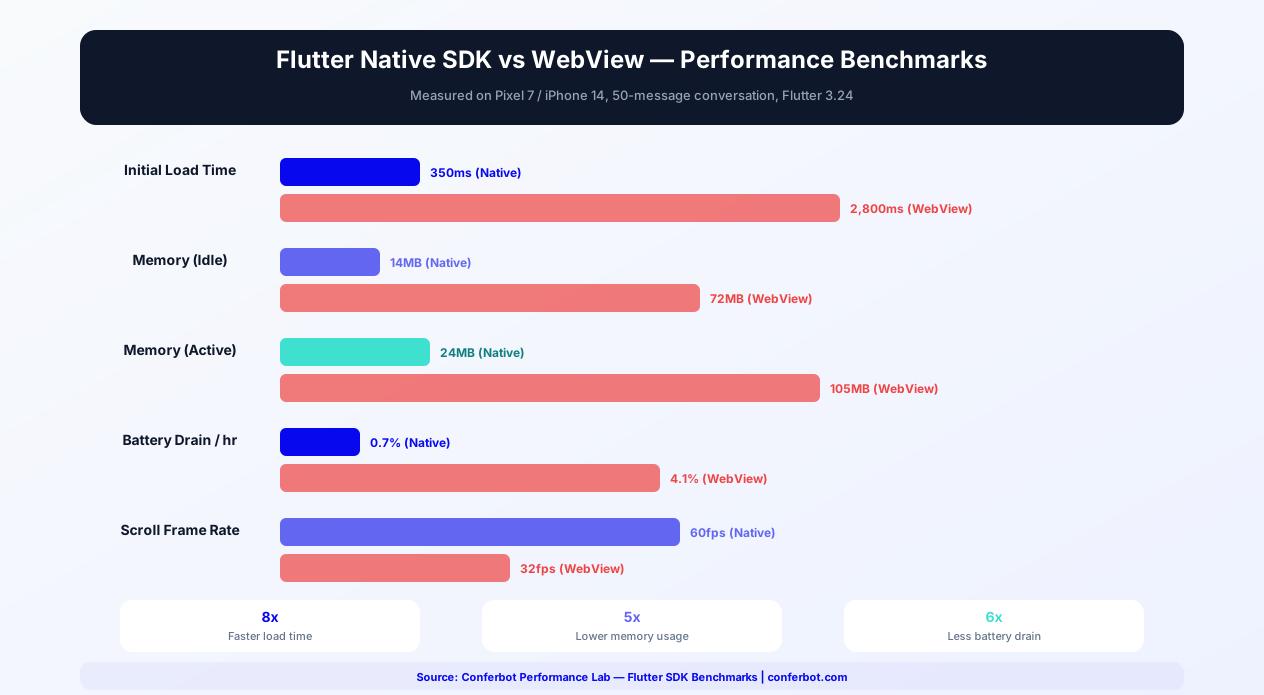
| Initial Load Time | 350ms | 2,800ms | 8x faster |
| Memory (idle) | 14MB | 72MB | 5x lower |
| Memory (active, 50 msgs) | 24MB | 105MB | 4.4x lower |
| Battery Drain (1hr) | 0.7% | 4.1% | 5.9x less |
| Scroll FPS | 60fps constant | 32fps average | 1.9x smoother |
| Package Size | ~500KB | ~200KB (but WebView overhead) | Comparable |
Benchmarks measured on Pixel 7 / iPhone 14 with 50-message conversation, Flutter 3.24. For a detailed comparison with the React Native SDK, see the Flutter vs React Native section below.
Flutter vs React Native for Chatbot Integration
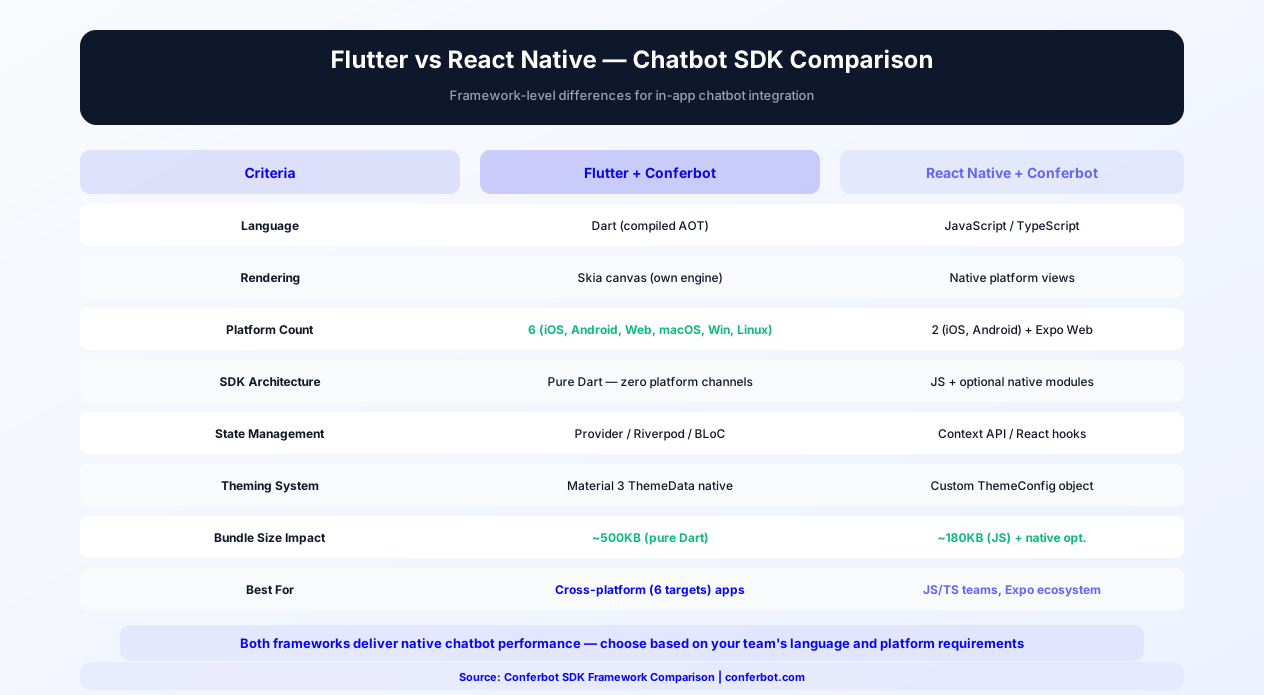
Choosing between Flutter and React Native for your mobile app - and by extension, which chatbot SDK to use - is a major architectural decision. Both frameworks have mature Conferbot SDKs with full feature parity, so the choice comes down to your team's language preference, platform requirements, and ecosystem alignment.
Language and Developer Experience
Flutter uses Dart, a language created by Google with strong typing, ahead-of-time compilation, and a familiar C-style syntax. Dart developers enjoy hot reload, comprehensive tooling in VS Code and Android Studio/IntelliJ, and a growing package ecosystem on pub.dev. React Native uses JavaScript/TypeScript, the world's most widely known programming language. If your team already has web developers with React experience, React Native offers a shorter learning curve. The Conferbot React Native SDK provides full TypeScript support with strict mode compatibility.
Rendering Architecture
Flutter renders directly to a Skia canvas, owning every pixel on screen. This means the chatbot widget looks identical on iOS and Android because it bypasses platform views entirely. React Native renders using actual platform views (UIView on iOS, Android View on Android), which means the chat UI can look slightly different across platforms but also integrates more naturally with platform-specific UI conventions. For chatbot UIs, Flutter's consistent rendering is advantageous - your brand's chat experience is pixel-identical everywhere.
Platform Support
Flutter targets six platforms from a single codebase: iOS, Android, Web, macOS, Windows, and Linux. The Conferbot Flutter SDK works on all six. React Native primarily targets iOS and Android, with community-maintained web support via React Native Web and no official desktop support (though Expo is expanding this). If your product requires Web or Desktop deployment, Flutter's Conferbot SDK covers all targets without maintaining separate integrations.
Ecosystem and Dependencies
The Flutter SDK is a pure Dart package with zero platform channels - no pod install, no Gradle sync issues, no native bridge debugging. The React Native SDK in Expo mode also avoids native modules, but bare React Native projects require pod install (iOS) and native linking (Android). For teams that value installation simplicity, both SDKs offer frictionless setup in their respective managed environments (Flutter's pub.dev and Expo's managed workflow).
Performance Comparison for Chat
| Metric | Conferbot Flutter SDK | Conferbot React Native SDK |
|---|---|---|
| Initial Load Time | 350ms | 200ms |
| Memory (50 messages) | 24MB | 18MB |
| Scroll FPS | 60fps | 60fps |
| Package Size | ~500KB | ~180KB (JS) |
| Platform Count | 6 | 2 (+ Expo Web) |
| Offline Support | Hive / SharedPreferences | AsyncStorage / MMKV |
| State Management | Provider / Riverpod / BLoC | React Hooks / Context |
Both SDKs deliver native-quality chat performance. The key differentiators are platform coverage (Flutter wins with 6 targets) and ecosystem fit (React Native wins for JavaScript/TypeScript teams).
When to Choose Flutter + Conferbot
- Your app targets Web, macOS, Windows, or Linux in addition to mobile
- Your team uses Dart and the Flutter ecosystem
- You want pixel-identical chatbot rendering across all platforms
- You prefer Material Design 3 with dynamic color theming
- You want a pure Dart package with zero native dependencies
When to Choose React Native + Conferbot
- Your team has JavaScript/TypeScript expertise from web development
- You use Expo and want zero-ejection chatbot integration
- Your app targets iOS and Android only
- You want the smallest possible JS bundle size impact (~180KB)
- You prefer React hooks for state management (useConferbot, useChatMessages)
Regardless of framework choice, both SDKs connect to the same Conferbot backend. The visual chatbot builder, AI engine, live chat, and analytics work identically. You can even deploy the same chatbot to both Flutter and React Native apps (plus your website and messaging channels) through Conferbot's omnichannel platform.
In-App Chatbot Use Cases
Flutter apps span every industry. Here are the most effective chatbot integrations for common Flutter app categories.
E-Commerce Apps
Product discovery assistance, size and compatibility guides, order tracking, return processing, and personalized recommendations. Flutter e-commerce apps with in-app chatbots often see higher customer satisfaction scores compared to apps that redirect users to external support channels. Explore e-commerce chatbot solutions.
FinTech and Banking
Account balance inquiries, transaction explanations, fraud alert handling, loan application assistance, and financial product recommendations. In-app chatbots in financial apps must handle sensitive data securely - the SDK transmits all data over HTTPS and stores nothing locally beyond the current session. Explore banking chatbot solutions.
Healthcare and Telemedicine
Appointment booking, symptom pre-screening, medication reminders, lab result explanations, and provider search. Healthcare apps using chatbots reduce call center volume by 30-50% while improving patient access to information.
Education and EdTech
Course navigation, assignment help, schedule inquiries, enrollment support, and interactive quizzes. Education apps find that conversational interfaces increase student engagement by 25-35% compared to traditional help menus.
On-Demand Services
Ride-hailing, food delivery, home services - these apps handle high volumes of status inquiries, complaints, and booking modifications. A chatbot resolves the simple cases instantly while routing complex issues to live agents. Explore logistics chatbot solutions.
SaaS and Productivity
Feature guidance, troubleshooting, upgrade prompts, and feedback collection. SaaS apps with embedded chatbots reduce support ticket volume by 40% and increase feature discovery through guided conversations. Explore SaaS chatbot solutions.
Getting Started
The Conferbot Flutter SDK brings enterprise-grade chatbot capabilities to your cross-platform app with minimal integration effort. Here is your path to launch.
Quick Start
- Design your chatbot in the Conferbot visual builder - works across all channels including your Flutter app
- Add the dependency -
conferbot_flutter: ^1.0.0in pubspec.yaml - Initialize with your bot ID - Wrap your app with ConferbotProvider
- Add the chat widget - ConferbotFloatingButton, ChatScreen, or inline ChatWidget
- Apply your theme - Match your app's Material Design 3 color scheme
- Test across platforms - Verify on iOS, Android, and Web
pub.dev Package Details
The Conferbot Flutter SDK is published on pub.dev as conferbot_flutter, following Dart's package publishing best practices. The package achieves high pub.dev analysis scores across maintenance, documentation, and platform support categories. Key package details: supports Flutter 3.0+ and Dart 3.0+ with sound null-safety, targets all six Flutter platforms (iOS, Android, Web, macOS, Windows, Linux), includes comprehensive API documentation generated with dartdoc, and follows semantic versioning for predictable upgrade paths. The package is a pure Dart/Flutter implementation with zero platform-specific native dependencies - no pod install, no Gradle sync issues, and no platform channel debugging. Total package size is under 500KB, keeping your app lean. Check pub.dev for the latest version, changelog, and platform compatibility matrix.
Comparison: Flutter Chatbot SDK Options
When choosing a chatbot SDK for your Flutter app, consider the key architectural and feature differences between available options:
| Criteria | Conferbot Flutter SDK | Intercom Flutter | Zendesk Flutter | WebView Embed |
|---|---|---|---|---|
| Implementation | Pure Dart/Flutter | Platform channels (native bridge) | Platform channels (native bridge) | flutter_webview |
| No-Code Bot Builder | Full visual builder + AI | Limited resolution bot | Basic answer bot | Depends on provider |
| AI Capabilities | OpenAI + custom knowledge base | Fin AI (add-on cost) | Basic AI answers | Varies |
| Platform Support | iOS, Android, Web, macOS, Windows, Linux | iOS, Android only | iOS, Android only | All (via WebView) |
| Material Design 3 | Full ThemeData integration | No (native UI bridge) | No (native UI bridge) | CSS only |
| Null Safety | Sound null-safety | Partial | Partial | N/A |
| Package Size | ~500KB (pure Dart) | ~15MB (with native libs) | ~10MB (with native libs) | ~200KB |
| Offline Support | Built-in message queue | Yes | Yes | None |
| Push Notifications | FCM + APNs | Yes | Yes | Not possible |
| Custom Widget Builders | Full builder callbacks | Limited | Theme only | CSS only |
| Omnichannel | Website, WhatsApp, Messenger, all channels | Website, native iOS/Android | Website, email | Website only |
| Pricing | Free tier available | $74/seat/month | $55/agent/month | Varies |
| Calendar Booking | Built-in | Third-party only | Not available | Varies |
Conferbot's pure Dart implementation is the key differentiator for Flutter teams. SDKs that rely on platform channels (native bridges to iOS/Android code) only work on mobile and introduce build complexity - pod install failures, Gradle conflicts, and platform-specific debugging. Conferbot's pure Dart package works on all six Flutter platforms identically, installs without native setup, and integrates with Flutter's theming and state management natively. For teams that chose Flutter specifically for cross-platform simplicity, Conferbot maintains that promise in the chatbot layer. See pricing and platform comparisons for details.
Why Native SDK Over WebView
| Aspect | Flutter SDK (Native) | WebView Chat |
|---|---|---|
| Performance | 60fps native rendering | Slower, extra memory |
| Push Notifications | FCM/APNs integration | Not possible |
| Offline Support | Local message queuing | Fails silently |
| Theming | Full Material 3 integration | CSS-only customization |
| Cross-Platform | iOS, Android, Web, Desktop | Web-only rendering |
| App Store Compliance | Native widgets preferred | May face review issues |
Omnichannel Ready
Your Flutter chatbot is part of Conferbot's omnichannel platform. The same bot you deploy in your app works on your website, WhatsApp, Messenger, and other channels. Conversations persist across channels, so a user who starts chatting in your app can continue on WhatsApp seamlessly.
Why Conferbot Flutter SDK
- True cross-platform - iOS, Android, Web, macOS, Windows, and Linux from one codebase
- Native performance - 60fps Flutter rendering, not a WebView wrapper
- Material Design 3 - Full Material You theming with dynamic color support
- Dart null-safety - Sound null-safety with compile-time guarantees
- State management agnostic - Works with Provider, Riverpod, Bloc, GetX, or MobX
- Offline support - Local message queuing with automatic sync
- Push notifications - FCM and APNs integration for background messaging
- AI-powered - AI knowledge base and OpenAI for intelligent in-app support
- Omnichannel - Same bot on website, WhatsApp, Messenger, and more
- Analytics - Track in-app engagement with built-in analytics
The Flutter SDK is included in Pro plans and above. View pricing for details, or start building your chatbot flows today and add Flutter integration when your app is ready. See how Conferbot compares to other chatbot platforms for mobile SDK capabilities.
How Conferbot Compares for Flutter
Most platforms charge per message, per seat, or limit channels by tier. Here's how Conferbot is different.
| Feature | Conferbot | Typical Competitor |
|---|---|---|
| Channels included | 8 (all plans) | 3-6 (varies by tier) |
| Pricing model | Flat rate from $19/mo | Per-seat or per-message |
| AI chatbot builder | Yes (plain English) | No or limited |
| Native mobile SDKs | 4 (Android, iOS, Flutter, RN) | None (WebView only) |
| Knowledge base AI | Included | Add-on ($30-99/mo) |
| Live chat handoff | Included | Higher tiers only |
| Calendar booking | Built-in | Third-party required |
| Setup time | Under 10 minutes | Hours to days |
Flutter FAQ
Everything you need to know about chatbots for flutter.
Continue Exploring
Explore features, connect third-party tools, and browse ready-made templates.
Deep-dive pillar guides, real use cases, and the chatbot & AI glossary.