
The 24/7 Customer Expectation Is No Longer Optional
Customer expectations have fundamentally changed. A 2026 study by Salesforce found that 83% of customers expect an immediate response when they contact a business — and "immediate" means within minutes, not hours. This expectation does not turn off at 5 PM. Whether it is 2 PM on a Tuesday or 11 PM on a Saturday, customers want answers now.
The Business Impact of Unavailability
When customers cannot get help, the consequences are real and measurable:
- 52% of customers will switch to a competitor after a single bad support experience (Zendesk, 2025)
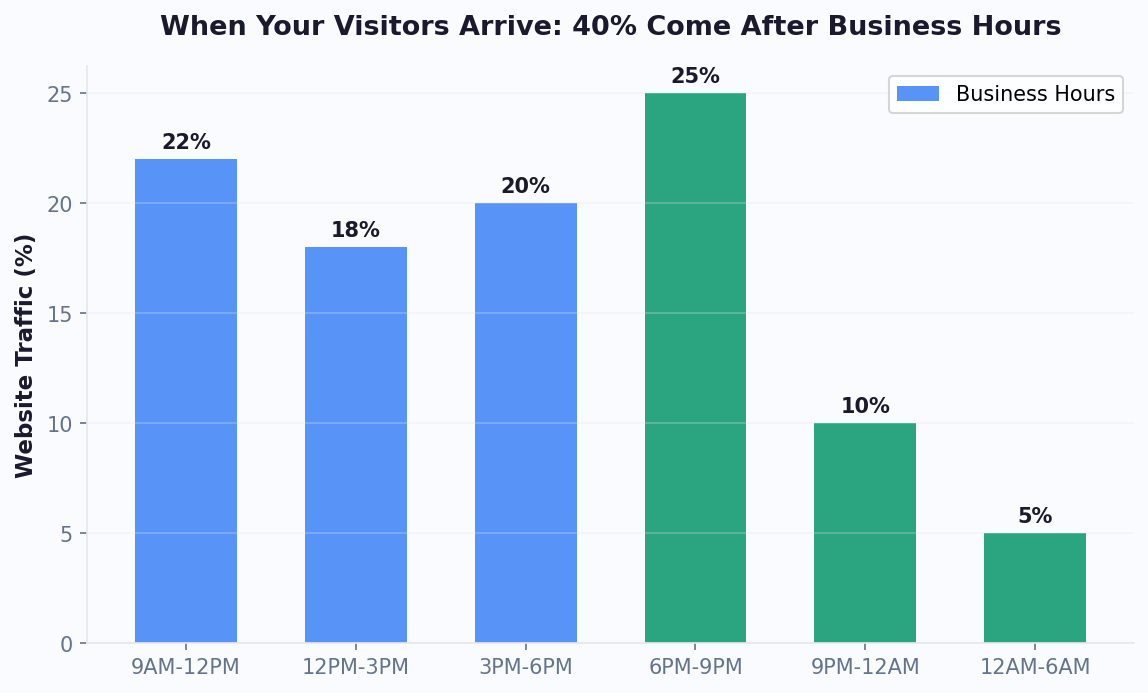
- After-hours inquiries account for 35-40% of total support volume for most businesses
- Unanswered questions cost e-commerce businesses an average of $4,200/month in abandoned carts and lost sales
- First-response time is the single strongest predictor of customer satisfaction, above resolution quality
The Traditional Solutions (And Their Problems)
Historically, businesses had three options for 24/7 coverage:
1. Night shift hiring. Adding evening and overnight support agents costs $35,000-55,000 per agent annually in salary alone, plus benefits, training, management, and workspace. For a small business, hiring 2-3 overnight agents can cost $100,000-165,000 per year — often more than the revenue those hours generate.
2. Outsourced call centers. Outsourcing after-hours support to a BPO provider costs $8-15 per contact on average. Quality is inconsistent, brand voice is difficult to maintain, and agents lack deep product knowledge. Customers often have worse experiences with outsourced support, negating the availability benefit.
3. Delayed responses. Many businesses simply let inquiries queue up overnight and respond the next business day. This is the cheapest option but also the most damaging: those 8-12 hour response times drive customers to competitors who respond immediately.
None of these options deliver what modern customers expect: instant, high-quality support at any hour, at a sustainable cost. This is where AI chatbots have become the definitive solution for businesses of all sizes.
A well-configured AI agent on platforms like Conferbot can handle 60-80% of after-hours inquiries without any human involvement — at a cost of under $150/month rather than $100,000+ per year for human agents.
What a 24/7 Chatbot Can (and Cannot) Handle
Setting realistic expectations is critical to a successful 24/7 chatbot strategy. AI chatbots excel at certain types of support interactions and struggle with others. Understanding this distinction helps you design a chatbot that genuinely resolves issues rather than frustrating customers.
What Chatbots Handle Excellently
FAQ and Knowledge Base Queries (Resolution Rate: 85-95%)
Questions like "What are your business hours?", "What is your return policy?", and "Do you ship internationally?" are perfect for AI chatbots. These questions have definitive answers that can be drawn from your knowledge base. An AI-powered chatbot understands variations in phrasing thanks to advanced NLP capabilities and provides accurate answers from your content.
Order Status and Tracking (Resolution Rate: 90-98%)
Connected to your order management system via API, a chatbot can look up order status, provide tracking numbers, and show estimated delivery dates. This is one of the highest-volume support topics and one of the easiest to automate completely.
Account Information (Resolution Rate: 80-90%)
Password resets, account balance checks, subscription status, billing date inquiries, and profile updates can all be handled by chatbots with proper system integration.
Product Information (Resolution Rate: 75-85%)
Questions about product features, specifications, pricing, availability, and comparisons are handled well when the chatbot is trained on your product catalog and documentation.
Appointment Scheduling (Resolution Rate: 90-95%)
With calendar booking integration, chatbots can show available time slots, book appointments, send confirmations, and handle rescheduling — all without human involvement.
What Chatbots Should Escalate to Humans
- Complex complaints: Emotional, multi-issue complaints need human empathy and judgment
- Billing disputes: Refund decisions and payment issues often require authority and discretion
- Technical troubleshooting: Multi-step debugging with hardware or complex software needs human expertise
- High-value customer situations: VIP customers or large accounts benefit from personal human attention
- Sensitive issues: Privacy concerns, security incidents, and legal matters need human handling
The 80/20 Rule of Chatbot Support
For most businesses, 80% of support inquiries fall into 20% of topic categories. A chatbot trained via your knowledge base on those top categories — product info, order status, returns, pricing, hours — can resolve the vast majority of after-hours interactions. The remaining 20% of complex queries can be queued for the next business day with a promise of follow-up, or escalated to an on-call agent for urgent issues.
This hybrid approach — chatbot for common queries, human for complex ones — delivers the best customer experience while keeping costs manageable.
How to Set Up 24/7 Chatbot Support: Step by Step
Implementing 24/7 chatbot support is more straightforward than most businesses expect. Here is a practical implementation guide based on what works for businesses deploying on Conferbot.
Step 1: Audit Your Support Data (1-2 Days)
Before building anything, analyze your existing support interactions to understand what your chatbot needs to handle:
- Export the last 3 months of support tickets and chat transcripts
- Categorize by topic: Group inquiries into categories (order status, returns, pricing, product info, etc.)
- Identify your top 10 topics: These likely account for 70-80% of total volume
- Note the after-hours breakdown: What percentage of inquiries arrive outside business hours? What topics are most common after hours?
- Document resolution patterns: For each top topic, what information does the agent provide? What systems do they access?
Step 2: Prepare Your Knowledge Base (2-3 Days)
Your chatbot is only as good as the information it has access to. Compile:
- FAQ document with answers to your top 50 questions
- Product catalog with descriptions, pricing, and specifications
- Policy documents (returns, shipping, warranty, privacy)
- Troubleshooting guides for common issues
- Business information (hours, locations, contact methods)
Step 3: Build Your Chatbot (1-2 Days)
Using a platform like Conferbot's no-code builder:
- Create a welcome flow: Greet visitors and present main topic categories
- Build flows for your top 5 topics: Focus on the highest-volume categories first or start from pre-built templates
- Configure AI responses: Upload your knowledge base and enable AI-powered answers for natural language questions
- Set up escalation paths: Define when and how the chatbot hands off to a human (email ticket, callback request, or live agent if available)
- Configure after-hours behavior: Set up specific messaging for after-hours interactions ("Our team is away, but I can help with most questions. For urgent issues, I will create a priority ticket for morning follow-up.")
Step 4: Integrate With Your Systems (1-2 Days)
Connect the chatbot to your business tools through the integrations hub:
- Order management: Enable order status lookups via API integration
- CRM: Log conversations and update customer records automatically
- Email/ticketing: Create tickets for issues the chatbot cannot resolve
- Calendar: Enable appointment booking if applicable
Step 5: Test and Deploy (2-3 Days)
- Test every flow as a customer would — use natural language, try edge cases
- Test the after-hours experience specifically: verify escalation messages, ticket creation, and callback scheduling work correctly
- Deploy on a low-traffic page first, then expand to your full site
- Deploy on additional channels: WhatsApp, Messenger, etc.
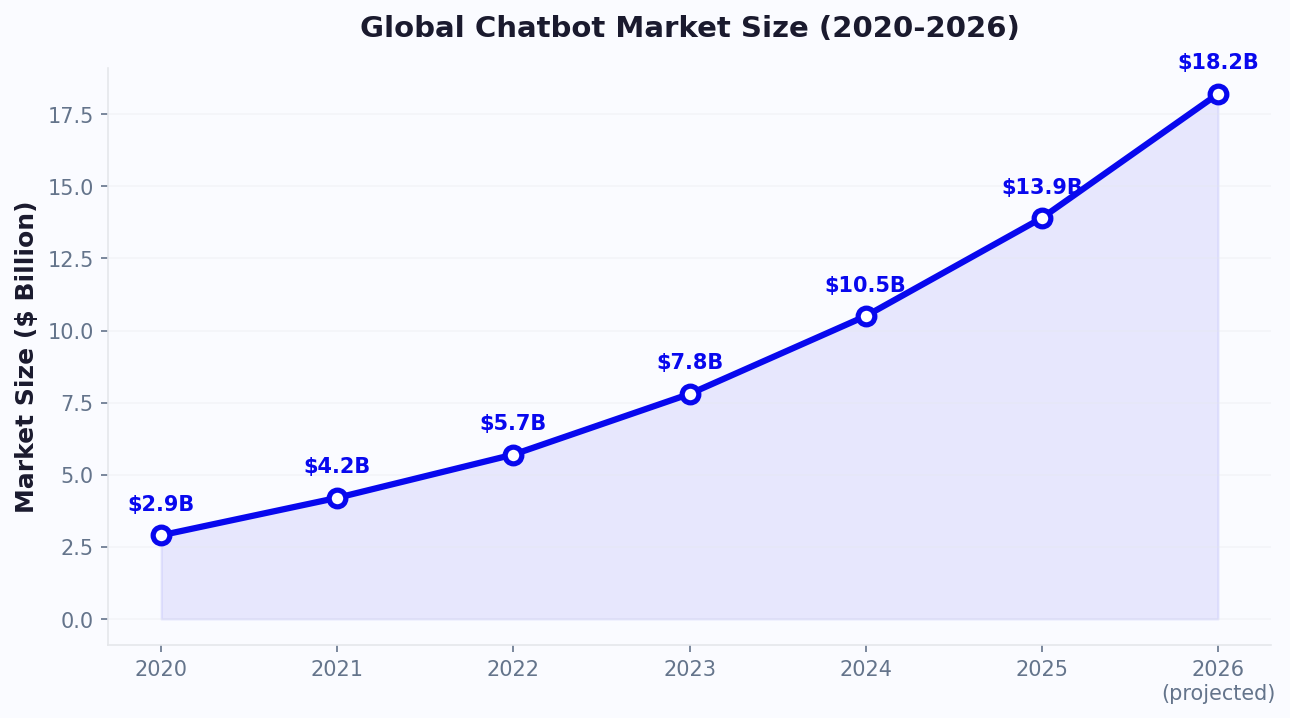
Total implementation time: 7-12 business days. Most businesses are live with 24/7 chatbot support within two weeks, without hiring a single additional agent. Gartner predicts that by 2027, chatbots will be the primary customer service channel for 25% of organizations.
Cost Savings Analysis: Chatbot vs. Human After-Hours Support
The financial case for 24/7 chatbot support is compelling. Let us run detailed numbers for a typical small-to-mid-size business.
Scenario: E-Commerce Business
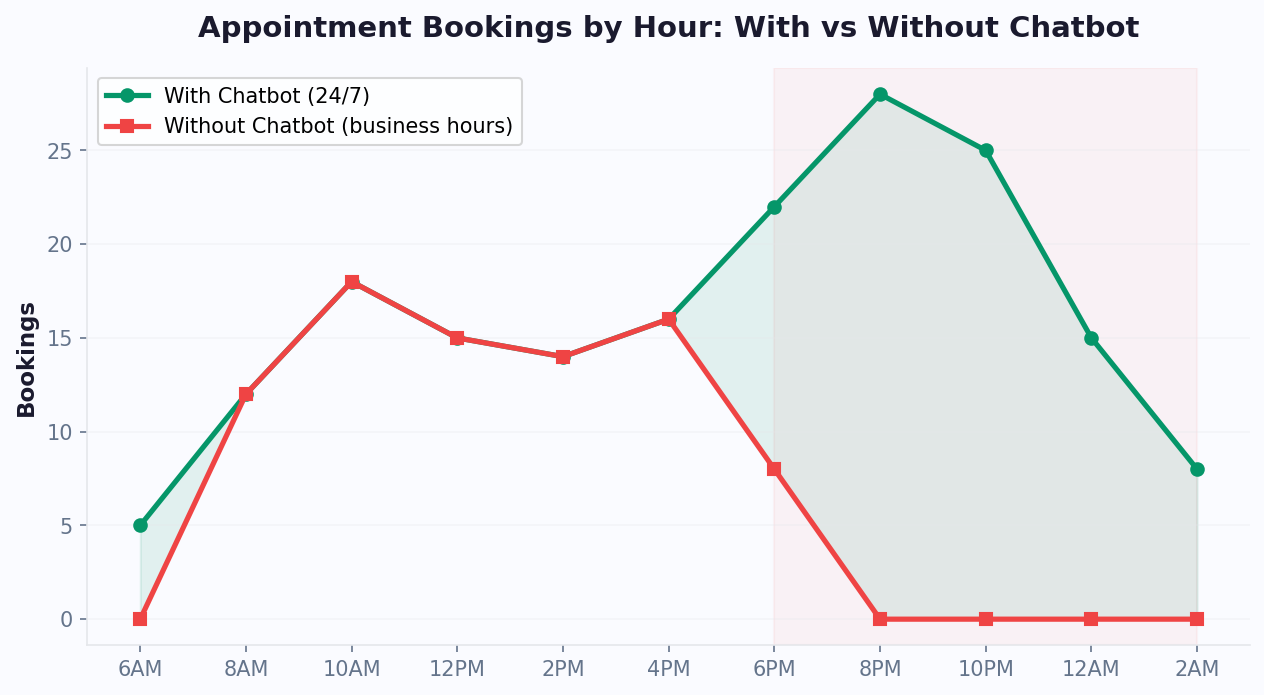
An online store receiving 150 support inquiries per day, with 40% (60 inquiries) arriving outside business hours (evenings, weekends, holidays).
| Cost Category | Night Shift Agents (2) | Outsourced BPO | AI Chatbot |
|---|---|---|---|
| Monthly cost | $8,500 | $6,000 | $149 |
| Annual cost | $102,000 | $72,000 | $1,788 |
| Resolution quality | High | Medium | High (for automated) |
| Response time | 2-5 minutes | 3-8 minutes | Instant |
| Scalability | Limited by headcount | Moderate | Unlimited |
| Training time | 2-4 weeks | 1-2 weeks | 1-2 days |
| Consistency | Agent-dependent | Low | 100% consistent |
The ROI Calculation
Assuming the chatbot resolves 70% of after-hours inquiries (42 out of 60 daily) without human involvement:
- Annual chatbot cost: $1,788 (Conferbot paid plan)
- Annual savings vs. night shifts: $100,212
- Annual savings vs. BPO: $70,212
- Cost per resolution (chatbot): $0.12
- Cost per resolution (human): $4.72
The chatbot pays for itself within the first week. Even accounting for the 30% of inquiries that need human follow-up the next morning, the total cost (chatbot + morning follow-up time) is dramatically lower than any human-staffed after-hours solution.
Beyond Direct Savings
The financial benefits extend beyond agent cost reduction:
- Recovered revenue: Instant after-hours responses to purchase questions reduce cart abandonment. Even recovering 5% of after-hours abandoned carts can add thousands in monthly revenue.
- Reduced churn: Customers who get immediate help are less likely to switch to competitors. A 1% improvement in retention can be worth tens of thousands annually.
- Improved CSAT scores: Faster response times directly correlate with higher customer satisfaction, which impacts reviews, referrals, and lifetime value. Research from HubSpot's State of Service report confirms that response time is the single biggest driver of customer loyalty.
- Agent productivity: When morning agents arrive, the chatbot has already resolved 70% of overnight inquiries and created organized tickets for the remaining 30%. With team management tools, agents start their day with a manageable, prioritized queue instead of a backlog.
For most businesses, the question is not whether 24/7 chatbot support is worth the investment. At under $150/month, it is one of the highest-ROI investments a business can make in customer experience.
Best Practices for 24/7 Chatbot Support
A 24/7 chatbot that frustrates customers is worse than no chatbot at all. Follow these best practices to ensure your always-on support actually helps.
1. Be Transparent About What the Bot Can Do
Never pretend the chatbot is a human. Start interactions with clear messaging: "Hi! I am Conferbot's AI assistant, available 24/7. I can help with order status, product questions, returns, and more. For complex issues, I will connect you with our team during business hours." Setting expectations prevents frustration when the bot reaches its limits.
2. Design After-Hours Escalation Thoughtfully
When the chatbot cannot resolve an issue after hours, the escalation experience matters enormously. Best practices include:
- Create a priority ticket via your ticket system with the full conversation context so the morning agent does not ask the customer to repeat themselves
- Provide a specific follow-up time: "Our team will respond by 9:30 AM EST tomorrow" (not vague "as soon as possible")
- Offer a callback option for urgent issues
- Send an email confirmation with a ticket number so the customer has a reference
3. Maintain Your Knowledge Base
An outdated knowledge base is the fastest way to erode trust in your chatbot. Establish a monthly review process:
- Check that product information, pricing, and policies are current
- Add answers for new questions the chatbot could not handle
- Remove or update seasonal information (holiday hours, promotions)
- Review chatbot analytics to identify knowledge gaps
4. Monitor After-Hours Performance Separately
Track after-hours chatbot metrics separately from daytime metrics. After-hours interactions have different patterns: more urgent, more emotional, different topic mix. Use chatbot analytics to identify:
- After-hours resolution rate (aim for 65-80%)
- Most common after-hours topics (optimize these first)
- Escalation rate and reasons (reduce over time)
- Customer satisfaction for after-hours interactions
5. Create Urgency Tiers
Not all after-hours issues are equal. Configure your chatbot to assess urgency:
- Critical (site down, security issue, order problem for same-day delivery): Immediate notification to on-call team member
- High (billing error, account access issue): Priority ticket for morning, email confirmation to customer
- Medium (product question, general inquiry): Standard ticket, next business day response
- Low (feature request, feedback): Logged for review, no urgent follow-up needed
6. Personalize When Possible
If your chatbot is connected to your CRM, use customer data to personalize after-hours interactions. Greeting returning customers by name, referencing their recent orders, and knowing their support history makes the automated experience feel more human and relevant.
These best practices ensure your 24/7 chatbot actually improves the customer experience rather than creating a new source of frustration. The goal is not just availability — it is helpful availability.
Which Channels to Cover With 24/7 Chatbot Support
24/7 support is not just about your website. Customers reach out through multiple channels at all hours, and your chatbot strategy should cover the channels that matter most to your audience.
Website Chat — The Foundation
Your website is the starting point for 24/7 chatbot support. It captures visitors who are browsing products, reading help articles, or attempting to complete a purchase. Website chatbots can proactively engage visitors showing exit intent, offer help on pricing pages, and assist with checkout issues — all critical after-hours scenarios.
WhatsApp — The Global Channel
WhatsApp has over 2 billion users globally and is the preferred communication channel in many markets. A 24/7 WhatsApp chatbot lets customers reach you through the app they already use daily. After-hours WhatsApp messages are extremely common — people message businesses when it is convenient for them, not during business hours.
Facebook Messenger — Social Support
Messenger handles a significant volume of customer inquiries for businesses with an active Facebook presence. Customers often message via Messenger after seeing a product on social media — frequently during evenings and weekends when social media usage peaks.
The Omnichannel Advantage
The power of deploying 24/7 chatbot support across multiple channels simultaneously is the unified experience. With a platform like Conferbot, you build your chatbot once with the AI chatbot builder and deploy it across all channels from a single dashboard. Customer conversations from any channel appear in the same inbox, and when agents arrive in the morning, they have a unified view of all overnight interactions regardless of channel.
This omnichannel approach also means customers can start a conversation on one channel and continue on another. A customer who messages via WhatsApp at 10 PM can follow up on website chat the next morning, and the conversation context is preserved.
Prioritizing Channels
Start with your highest-volume channel (usually website chat) and expand based on where your customers actually reach out. Analyze your current support data:
- What percentage of inquiries come from each channel?
- Which channels have the highest after-hours volume?
- Where do your customers prefer to communicate?
For most businesses, a three-channel deployment — website, WhatsApp, and Messenger — covers 90%+ of customer touchpoints. As your chatbot matures, expand to additional channels based on customer demand and usage patterns.
The goal is to be where your customers are, at the time they need help. With Conferbot's channel-inclusive pricing, adding new channels does not increase your costs — making omnichannel 24/7 support accessible to businesses of any size.
Measuring the Success of Your 24/7 Chatbot
Deploying a 24/7 chatbot is step one. Measuring its impact and continuously improving is what separates good chatbot implementations from great ones. Here are the metrics that matter and the benchmarks to target.
Primary Metrics
1. After-Hours Resolution Rate
The percentage of after-hours conversations resolved by the chatbot without human follow-up. This is your most important metric.
- Good: 50-60% (first month)
- Great: 65-75% (after 3 months of optimization)
- Excellent: 75-85% (mature chatbot with comprehensive knowledge base)
2. First Response Time
How quickly the chatbot responds to the first customer message. For AI chatbots, this should be near-instant.
- Target: Under 3 seconds for initial response
- Benchmark: Average human response time is 3-5 minutes (daytime) to 8+ hours (after-hours without chatbot)
3. Customer Satisfaction (CSAT) Score
Measure satisfaction for chatbot interactions separately from human interactions. Use a simple post-chat survey.
- Target: 75%+ satisfaction for chatbot interactions
- Benchmark: Industry average for chatbot CSAT is 70-72%
4. Escalation Rate
The percentage of conversations the chatbot escalates to a human agent. Lower is better, but too low may indicate the bot is not offering escalation when it should.
- Target: 20-35% for after-hours interactions
- Red flag: Below 10% (bot may be failing silently) or above 50% (bot is not resolving enough)
Secondary Metrics
5. Conversation Volume by Hour
Track when after-hours conversations peak. This helps you decide whether to extend human coverage for specific high-volume windows (e.g., Sunday evenings) and optimize chatbot flows for common after-hours topics.
6. Topic Resolution Rates
Break down resolution rates by topic. You may find that order status has 95% resolution while billing disputes have 15%. Use this data to prioritize knowledge base improvements for underperforming topics.
7. Returned Customers
Track how many customers who interact with the chatbot after-hours return to make a purchase or resolve their issue without additional human contact. This measures the chatbot's impact on customer retention and revenue.
Setting Up Measurement
Use Conferbot's analytics dashboard to track these metrics. Set up weekly reviews for the first month, then monthly reviews once performance stabilizes. Create a simple dashboard that shows after-hours performance trends and highlights areas needing improvement.
The most important habit is reviewing conversations where the chatbot failed — questions it could not answer, escalations it should have handled, and interactions where customers expressed frustration. Each failed interaction is an opportunity to improve the knowledge base and chatbot flows for future customers.
Scaling 24/7 Support: From Basic Bot to AI-Powered Customer Experience
A basic 24/7 chatbot is just the starting point. As your business grows and you accumulate conversation data, you can evolve your after-hours support chatbot into a sophisticated AI-powered customer experience that rivals — and often exceeds — human agent performance.
Maturity Model: Four Stages of 24/7 Chatbot Support
| Stage | Capability | Resolution Rate | Typical Timeline |
|---|---|---|---|
| Stage 1: Basic FAQ Bot | Answers top 10-20 questions, collects contact info | 30-45% | Week 1-2 |
| Stage 2: Smart Support Bot | AI-powered responses, system integrations, ticket creation | 50-65% | Month 1-2 |
| Stage 3: Predictive Support | Proactive engagement, sentiment detection, personalized routing | 65-80% | Month 3-6 |
| Stage 4: Autonomous Agent | Takes actions on behalf of customers, handles complex multi-step processes | 75-90% | Month 6-12 |
Moving From Stage 1 to Stage 2: Adding Intelligence
The jump from basic to smart is where most businesses see the biggest improvement in resolution rate. Key upgrades include:
- Connect your order management system: Let the chatbot pull real-time order status, tracking info, and delivery estimates. This alone deflects 20-30% of all support inquiries.
- Enable AI responses beyond scripted flows: Upload your full help center, product documentation, and policy documents to the knowledge base. AI can then answer questions you never explicitly programmed.
- Add smart routing: Use customer data (order history, account value, previous interactions) to route high-value customers to priority human agents and standard queries to the bot.
Moving From Stage 2 to Stage 3: Proactive and Predictive
At this stage, the chatbot stops waiting for customers to ask questions and starts anticipating their needs. For insights on when phone support makes more sense than chat, see our chatbot vs phone support comparison:
- Proactive shipping alerts: When a delivery is delayed, notify the customer before they check. "Your order will arrive 1 day later than expected — sorry about that! New ETA: Friday. Want me to expedite it?"
- Sentiment-based escalation: Detect frustration in language ("this is ridiculous," "I've been waiting forever") and escalate to a human before the customer asks. Proactive escalation improves satisfaction by 40% compared to reactive escalation.
- Personalized product support: If a customer bought a new device last week, proactively check in: "How's your new [product] working? I can help with setup questions."
Calculating the ROI of Scaling
Each maturity stage delivers measurable returns. Here's what the progression looks like for a business handling 3,000 support interactions per month, tracking chatbot ROI properly:
| Stage | Monthly Chatbot Cost | Monthly Human Agent Cost | Net Monthly Savings |
|---|---|---|---|
| No chatbot (baseline) | $0 | $24,000 (4 agents) | $0 |
| Stage 1 (40% resolution) | $99 | $16,800 (2.8 agents) | $7,101 |
| Stage 2 (60% resolution) | $199 | $12,000 (2 agents) | $11,801 |
| Stage 3 (75% resolution) | $299 | $7,200 (1.2 agents) | $16,501 |
| Stage 4 (85% resolution) | $499 | $4,800 (0.8 agents) | $18,701 |
The investment in chatbot maturity is minimal compared to the support cost savings at each stage. Even at Stage 4 costs ($499/month), you're saving $18,701 monthly compared to a fully human-staffed support operation. The key is treating your chatbot as an evolving system rather than a one-time deployment — continuously feeding it new knowledge, optimizing flows based on handoff analytics, and expanding its capabilities quarter by quarter.
Building a Culture of Continuous Improvement
The most successful 24/7 chatbot deployments share a common operational discipline: weekly conversation reviews where the support team identifies the top five unanswered questions and adds them to the knowledge base, monthly A/B tests on greeting messages and escalation thresholds, and quarterly capability expansions that gradually shift more complex queries from human agents to automated resolution. Assign a chatbot owner — someone who monitors deflection rates, reviews customer satisfaction scores for bot-handled conversations, and coordinates with product or operations teams when new information needs to surface in the chatbot. This role typically requires 2-3 hours per week but delivers outsized returns: teams with dedicated chatbot owners see 30-40% higher resolution rates within six months compared to unmanaged deployments. For practical tips on handling the human-AI boundary effectively, review our handoff best practices guide, and for the financial framework to justify ongoing investment, see our cost savings case studies. Remember that the true value of a dedicated chatbot owner compounds over time — each improvement cycle reduces escalation rates, increases customer satisfaction, and builds institutional knowledge about your customers' evolving needs and communication preferences across all supported channels. This virtuous cycle transforms your chatbot from a cost-saving tool into a genuine competitive moat that improves with every customer interaction.
Was this article helpful?
Build and deploy in 10 minutes. No coding needed.
24/7 Customer Service Without Hiring FAQ
Everything you need to know about chatbots for 24/7 customer service without hiring.
About the Author
Deepak is the founder of Conferbot and writes about building, deploying, and improving AI chatbots.
View all articles

