The Shopify Market Opportunity: Why AI Chatbots Are Non-Negotiable in 2026
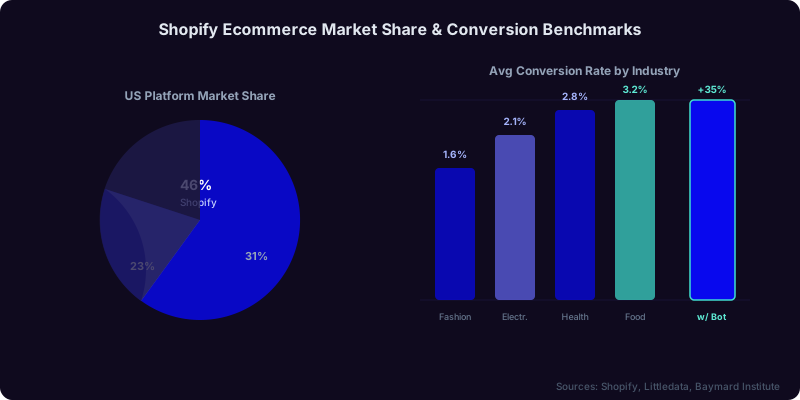
Shopify commands a dominant position in ecommerce. According to Shopify's own data, the platform powers over 4.8 million active stores worldwide and processes more than $235 billion in annual gross merchandise volume. With roughly 46% of the US ecommerce platform market share, Shopify is the backbone of online retail for businesses of every size, from solo founders to enterprise brands on Shopify Plus.
But that dominance comes with fierce competition. When nearly half of all ecommerce stores run on the same platform, the differentiator is no longer the technology stack -- it is the customer experience. And in 2026, the customer experience bar is set by AI.
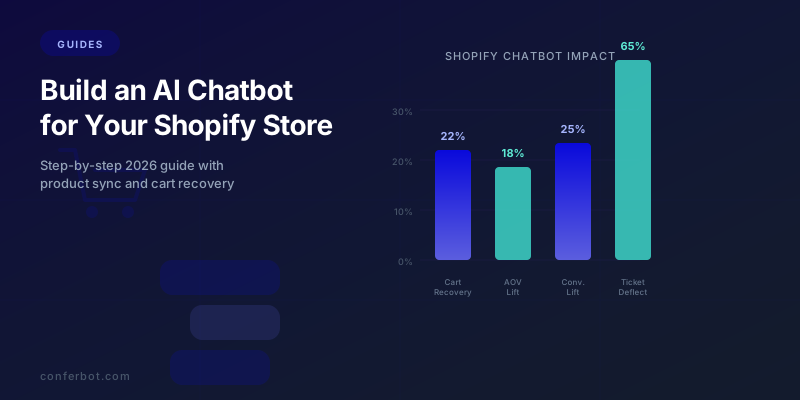
Consider the conversion data. The average Shopify store converts at 1.4% to 3.2% depending on industry, according to Littledata's ecommerce benchmarks. That means 97-99% of visitors leave without purchasing. Meanwhile, stores that deploy AI chatbots report conversion lifts of 15-35% on engaged visitors, because the chatbot addresses the three biggest friction points in real time: unanswered product questions, shipping and return uncertainty, and checkout hesitation.
The Baymard Institute's 2026 cart abandonment research reveals that 70.19% of online shopping carts are abandoned before checkout. The top reasons are predictable: unexpected costs (48%), forced account creation (26%), complicated checkout (22%), and inability to find answers quickly (17%). An AI chatbot directly addresses three of those four reasons by surfacing shipping costs proactively, enabling guest checkout guidance, and answering questions instantly.
For a Shopify store generating $100,000 per month in revenue with a 70% abandonment rate, recovering just 15% of abandoned carts translates to an additional $10,500 in monthly revenue. That is $126,000 per year from a single chatbot automation flow. When you add product discovery, upselling, and support deflection on top, the total impact compounds dramatically.
This guide walks you through every step of building, configuring, and optimizing an AI chatbot for your Shopify store. Whether you are running a single-product brand or a 10,000-SKU catalog, the principles and implementation steps are the same. By the end, you will have a fully functional AI shopping assistant that drives revenue 24/7.
If you are new to chatbots entirely, start with our no-code chatbot building guide for foundational concepts. For stores already running a basic chatbot, skip ahead to the product catalog sync or Shopify Flow integration sections for advanced techniques.
Step-by-Step Setup: From Zero to Live Chatbot in 15 Minutes
Setting up an AI chatbot on Shopify does not require a developer, custom code modifications, or any changes to your store's theme. The entire process uses your Shopify admin panel and the chatbot platform's visual builder. Here is the complete walkthrough using Conferbot as the reference platform.
Step 1: Create Your Bot and Select the Shopify Template (2 Minutes)
Sign up on the Conferbot platform and navigate to the bot creation wizard. Select "Ecommerce -- Shopify" from the template library. This template comes pre-loaded with:
- Product search and recommendation flows
- Cart abandonment detection and recovery sequences
- Order tracking via Shopify API integration
- FAQ handling for shipping, returns, sizing, and payments
- Upselling and cross-selling logic based on cart contents
Name your bot, select your store's primary language, and proceed to configuration.
Step 2: Install the Embed Code on Shopify (3 Minutes)
From the Conferbot dashboard, copy your unique JavaScript embed snippet. It looks like this:
<script src="https://widget.conferbot.com/v3/YOUR_BOT_ID.js" async></script>
In your Shopify admin, navigate to Online Store > Themes > Actions > Edit Code. Open the theme.liquid file and paste the embed snippet just before the closing </body> tag. Click Save. The chatbot widget now loads on every page of your store.
For stores using Shopify's Online Store 2.0 themes, you can alternatively use the App Embed method: go to Online Store > Themes > Customize > App Embeds, and toggle on the Conferbot widget. This method requires no code editing at all.
Step 3: Configure Widget Appearance (2 Minutes)
Back in the Conferbot dashboard, customize the widget to match your brand identity:
| Setting | Recommendation | Why It Matters |
|---|---|---|
| Primary color | Match your Shopify theme accent color | Visual consistency builds trust |
| Widget position | Bottom-right corner | Standard ecommerce convention, 78% of users expect it there |
| Chat bubble text | "Need help finding the right product?" | Question-based CTAs get 2.3x more clicks than generic text |
| Display trigger | After 8 seconds or 30% scroll | Gives visitors time to orient before engaging |
| Mobile behavior | Collapsed icon only, expand on tap | Preserves mobile screen real estate |
Step 4: Connect Your Shopify Store API (3 Minutes)
Navigate to Conferbot's integrations panel and select Shopify. You will be prompted to authorize the connection through Shopify's OAuth flow. Grant the required permissions:
- read_products -- allows the chatbot to search and display your product catalog
- read_orders -- enables order status tracking for customers
- read_inventory -- lets the bot show real-time stock availability
- read_customers -- enables personalized interactions based on purchase history
Once authorized, the platform begins syncing your catalog. For stores with fewer than 5,000 products, the initial sync completes in under 60 seconds. Larger catalogs may take 2-3 minutes. After the initial sync, updates happen automatically every 15 minutes via webhooks.
Step 5: Test and Launch (5 Minutes)
Use the preview mode to test every core flow:
- Search for a product by name -- verify correct results appear with images and prices
- Ask about shipping costs -- confirm the bot returns accurate information
- Request order tracking -- enter a test order number and verify status retrieval
- Trigger cart recovery -- add items to cart, wait for the abandonment message
- Test mobile responsiveness -- verify the widget works smoothly on phone-sized screens
Once all tests pass, toggle the bot to Live mode. Your AI chatbot is now active across your entire Shopify store.

For a more detailed walkthrough of the initial installation process, including troubleshooting common embed code issues, see our dedicated add chatbot to Shopify guide.
Product Catalog Sync: Turning Your Bot Into an AI Shopping Assistant
The difference between a generic chatbot and an AI shopping assistant is product knowledge. When your chatbot has full access to your Shopify product catalog, it can answer the question every shopper is really asking: "Which product is right for me?"
What Gets Synced
The Shopify API connection pulls your complete catalog into the chatbot's knowledge base:
- Product titles, descriptions, and tags: The AI indexes these for natural language search. A customer who asks "do you have something for sensitive skin" will receive relevant results even if no product title contains those exact words.
- Variants and options: Size, color, material, and custom options are fully indexed. The bot can ask clarifying questions: "The Classic Tee comes in S, M, L, and XL. What size do you need?"
- Pricing tiers: Regular price, compare-at price, and active Shopify discount codes are all accessible. The bot can highlight savings: "This item is currently 30% off -- was $89, now $62.30."
- Inventory levels: Real-time stock data enables urgency messaging: "Only 4 left in your size" and prevents the frustration of recommending out-of-stock items.
- Product images: The bot displays rich product cards with images, prices, and direct add-to-cart buttons inside the chat window. Visual product cards increase click-through rates by 35-40% compared to text-only responses.
- Collections and categories: The bot understands your catalog structure, so it can guide shoppers through categories: "We have 3 collections that might interest you: Summer Essentials, Workout Gear, and Accessories."
Building Guided Selling Flows
The most effective ecommerce chatbots do not wait for customers to know what they want. They use guided selling -- a structured series of questions that narrows down the ideal product. Here is how to build a guided selling flow for a Shopify store:
Flow structure:
- Intent capture: "What are you shopping for today?" with quick-reply buttons for your top categories
- Need qualification: 2-3 questions specific to the category (budget range, use case, preferences)
- Product presentation: 2-4 best-match products displayed as rich cards with images, prices, and ratings
- Comparison assistance: "Want me to compare these two options side by side?"
- Purchase nudge: "Ready to add the [Product] to your cart? I can also check if we have a discount code for you."
Stores with guided selling flows report 28% higher average order values compared to unassisted browsing, because the bot naturally suggests products at the right price point rather than leaving customers to find the cheapest option themselves.
Handling Edge Cases
Configure your catalog sync to handle these common scenarios gracefully:
| Scenario | Bot Behavior | Conversion Impact |
|---|---|---|
| Product out of stock | Suggest 2-3 similar alternatives + offer back-in-stock notification | Saves 40-60% of potential lost sales |
| Product not found | Ask clarifying questions, suggest popular items in related categories | Prevents dead-end conversations |
| Price question on variant | Show all variant prices in a comparison table | Reduces back-and-forth by 70% |
| Bulk order inquiry | Route to wholesale flow or live agent | Captures high-value B2B leads |
For stores with large catalogs (1,000+ SKUs), implement semantic search rather than keyword matching. Semantic search understands intent -- a query like "something warm for winter hiking" matches insulated jackets even when no product title contains those words. Conferbot's AI engine uses vector embeddings for this kind of natural language product matching, which dramatically improves search relevance compared to traditional keyword-based approaches. Learn more about how this technology works in our knowledge base training guide.
Abandoned Cart Recovery: The Highest-ROI Chatbot Automation for Shopify
Cart abandonment is not a problem to eliminate -- it is a revenue stream to capture. With a 70.19% abandonment rate across ecommerce (Baymard Institute, 2026), every Shopify store leaves significant money on the table. The question is how much of it you can recover.
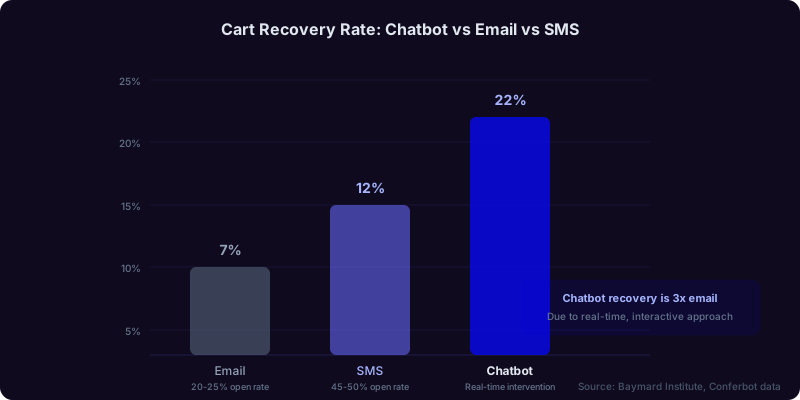
Email-based cart recovery campaigns achieve 5-8% recovery rates. Chatbot-based recovery achieves 15-25%. The difference comes down to timing, context, and interactivity. An email arrives hours later and competes with a cluttered inbox. A chatbot intervenes in real time, at the exact moment of hesitation, with the ability to have a two-way conversation about whatever is causing the abandonment.
Setting Up Real-Time Abandonment Detection
Configure your chatbot to detect abandonment signals before the shopper actually leaves:
- Exit intent (desktop): When the cursor moves toward the browser's close button or address bar, the chatbot activates with a retention message. This is the highest-converting trigger point.
- Inactivity timeout: If a shopper has items in cart and is idle on the cart or checkout page for 60-90 seconds, the bot offers assistance: "Stuck on anything? I can help with sizing, shipping, or payment questions."
- Back navigation: When a shopper navigates from checkout back to product pages, the bot gently re-engages: "I noticed you were about to check out. Anything I can help with before you go?"
- Tab switching (mobile): On mobile, when the browser tab loses focus with items in cart, queue a message for when the shopper returns: "Welcome back! Your cart with [Product Name] is still here."
The 4-Message Recovery Sequence
The most effective cart recovery chatbot flow follows this proven four-message structure:
Message 1 -- Acknowledge (immediate): "I see you have the [Product Name] in your cart -- great choice! Is there anything I can help with before you check out?"
Message 2 -- Address objections (after 30 seconds of no response): "Just so you know: we offer free shipping on orders over $75, easy 30-day returns, and secure checkout with Apple Pay, Google Pay, and all major cards."
Message 3 -- Create urgency (after 60 seconds): "The [Product Name] has been selling fast -- we only have [X] left in [variant]. I'd hate for you to miss out."
Message 4 -- Incentivize (after 90 seconds): "Here's something special: use code SAVE10 for 10% off your order. Want me to apply it for you?"
Not every shopper needs all four messages. Many convert after Message 1 or 2. The sequence is designed to escalate gently, addressing the most common abandonment reasons in order of frequency.
Multi-Channel Follow-Up
For shoppers who leave despite the on-site recovery attempt, extend the sequence across channels. If the customer has opted in to WhatsApp or Messenger notifications, send a follow-up message 1 hour after abandonment. These messaging channels achieve 80-90% open rates versus 20-25% for email, making them dramatically more effective.
Connect your chatbot to Conferbot's integrations hub to orchestrate these multi-channel recovery sequences from a single dashboard. The system automatically de-duplicates -- if a customer recovers their cart on-site, the follow-up messages are canceled.
For a deep dive into cart recovery strategies specifically, including advanced timing optimization and incentive laddering, see our abandoned cart recovery chatbot playbook.
Measuring Cart Recovery Performance
Track these metrics weekly to optimize your recovery flows:
| Metric | What It Measures | Target Benchmark |
|---|---|---|
| Recovery rate | % of abandoned carts recovered by the chatbot | 15-25% |
| Recovered revenue | Total revenue from recovered carts this period | Track monthly trend |
| Average recovered order value | Mean cart value of recovered orders | Should be within 10% of overall AOV |
| Discount usage rate | % of recoveries that used a discount code | Below 40% (otherwise you are over-incentivizing) |
| Message-to-recovery latency | Time between chatbot intervention and purchase | Under 5 minutes (on-site), under 2 hours (messaging) |
Order Tracking and Post-Purchase Automation
"Where is my order?" is the single most common customer support query in ecommerce, accounting for 40-50% of all inbound tickets. For a Shopify store handling 500 orders per month, that translates to 200-250 WISMO (Where Is My Order) inquiries. At an average support cost of $8-12 per ticket, you are spending $1,600-$3,000 monthly just telling people their package is on the way.
An AI chatbot eliminates this cost entirely while giving customers a better experience -- instant answers instead of 4-24 hour email response times.
Configuring Order Lookup
The chatbot connects to Shopify's Orders API to provide real-time order status. The flow works as follows:
- Customer triggers order tracking: They type "Where is my order?", "Track my package", or click the "Track Order" quick-reply button.
- Identity verification: The bot asks for their order number (format: #1234) or the email address used at checkout.
- Status retrieval: The bot queries the Shopify API and returns the current status along with relevant details.
- Contextual follow-up: Based on the status, the bot offers appropriate next actions.
Here is what the bot returns at each fulfillment stage:
| Order Status | Bot Response | Follow-Up Action |
|---|---|---|
| Processing | "Your order #1234 is being prepared. Estimated ship date: [date]." | Offer to modify order if needed |
| Shipped | "Your order shipped via [carrier] on [date]. Tracking: [link]" | Direct link to carrier tracking page |
| In transit | "Your package is in transit. Last scan: [location] on [date]." | Estimated delivery date + delivery instructions |
| Out for delivery | "Your package is out for delivery today!" | Delivery preference options (leave at door, etc.) |
| Delivered | "Your order was delivered on [date] at [time]." | Satisfaction check + review request + reorder suggestion |
Proactive Shipping Notifications
Do not wait for customers to ask. Send proactive status updates at key milestones:
- Order confirmed: Immediate confirmation with order summary and estimated delivery
- Shipped: Carrier name, tracking number, and tracking link
- Out for delivery: Same-day delivery notification
- Delivered: Delivery confirmation with satisfaction check
Proactive notifications reduce inbound WISMO queries by 65-75%. The chatbot sends these via the customer's preferred channel -- on-site widget, WhatsApp, or Messenger. This is where omnichannel integration becomes critical: the customer receives updates on the same channel where they interact with your brand.
Handling Returns and Exchanges
The second-most-common post-purchase query is return and exchange requests. Configure your chatbot to handle these end-to-end:
- Eligibility check: The bot verifies the order is within the return window and the item category is eligible
- Reason collection: "Why would you like to return this item?" with options like wrong size, not as described, changed mind, defective
- Resolution routing: Based on the reason, the bot either initiates a return label, suggests an exchange, or offers store credit
- Label generation: For eligible returns, the bot generates a prepaid shipping label via your returns provider API
- Confirmation: The bot confirms the return, provides instructions, and sets expectations on refund timing
Automating returns saves an average of $6-10 per return interaction while reducing return processing time from 48 hours to under 5 minutes. For more on this automation, see our ecommerce chatbot strategies guide.
AI-Powered Upselling and Cross-Selling Strategies
Upselling and cross-selling through an AI chatbot is fundamentally different from the static "Customers also bought" widgets on product pages. The chatbot uses conversational context -- what the customer asked about, what is in their cart, their price sensitivity signals, their browsing history -- to make recommendations that feel helpful rather than pushy.
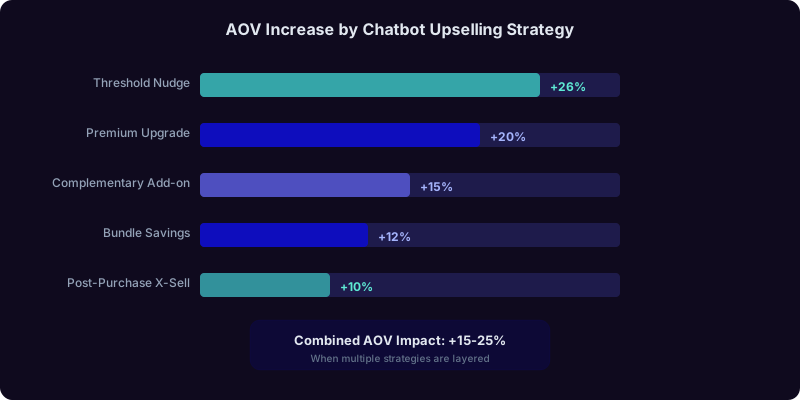
Shopify stores that implement chatbot-driven upselling see a 15-25% increase in average order value (AOV), according to ecommerce conversion data from stores using AI-powered product recommendations.
Types of Chatbot Upselling
1. Cart-based upselling: When a customer has items in their cart, the bot suggests premium alternatives or add-ons:
- "You have the Standard Plan coffee maker in your cart. The Pro model includes a built-in grinder and milk frother for just $40 more -- would you like to see a comparison?"
- "Great choice on the running shoes! Most customers add our moisture-wicking socks ($14.99) for a complete setup. Want me to add them?"
2. Threshold-based upselling: When a cart is close to a free shipping or discount threshold, the bot nudges the customer over:
- "Your cart is at $67. Add just $8 more to qualify for free shipping. Here are some bestsellers under $15 that pair well with your items."
3. Bundle recommendations: The bot suggests pre-configured bundles that offer better value:
- "The items in your cart are part of our Starter Kit bundle, which also includes [Product] and saves you 20%. Want to switch to the bundle?"
4. Post-purchase cross-selling: 3-7 days after delivery, the bot reaches out with complementary product suggestions:
- "How are you enjoying your new espresso machine? Customers who bought it love our single-origin bean sampler pack -- here's 15% off to try it."
Upselling Rules Engine
Configure your chatbot's upselling logic with these rules:
| Trigger Condition | Upsell Type | Recommendation Logic | Expected AOV Lift |
|---|---|---|---|
| Single item in cart | Complementary add-on | Top 3 frequently-bought-together items | +12-18% |
| Cart value within $15 of free shipping | Threshold nudge | Bestsellers under the gap amount | +22-30% |
| Standard variant selected | Premium upgrade | Next tier product with comparison | +15-25% |
| 3+ items in cart | Bundle savings | Matching bundle at discount | +10-15% + higher satisfaction |
| Post-delivery (day 3-7) | Replenishment/complementary | Based on purchase category | +8-15% repeat rate |
Avoiding Upsell Fatigue
The key to effective chatbot upselling is restraint. Follow these rules:
- One upsell per conversation: Never stack multiple upsell attempts. Pick the highest-value opportunity and present it once.
- Respect "no": If the customer declines, do not re-offer. Move on to completing the purchase.
- Value-first framing: Always frame recommendations in terms of customer benefit, not revenue. "Save 20% with the bundle" beats "Add more to your order."
- Price sensitivity awareness: If the customer used a discount code or asked about sales, do not upsell to premium products. Suggest value-oriented add-ons instead.
For a comprehensive guide to chatbot-driven revenue growth, read our upselling and cross-selling with AI chatbots article.
Shopify Flow Integration: Advanced Automation Workflows
Shopify Flow is Shopify's built-in automation platform (available on Shopify Plus, Advanced, and Basic plans with limitations). When connected to your AI chatbot, Shopify Flow unlocks workflow automations that neither tool could achieve alone. The chatbot handles the conversational interface; Shopify Flow handles the backend business logic.
How the Integration Works
The chatbot and Shopify Flow communicate through webhooks and custom triggers. When the chatbot detects a specific event (customer asks about wholesale pricing, high-value cart detected, VIP customer identified), it sends a webhook to Shopify Flow. Shopify Flow then executes the configured workflow -- tagging the customer, updating inventory, sending internal notifications, or triggering email sequences.
Conversely, Shopify Flow can trigger chatbot actions. When an order status changes, a product goes out of stock, or a customer tag is applied in Shopify, the flow sends a webhook to the chatbot, which then sends the appropriate message to the customer.
High-Impact Shopify Flow + Chatbot Workflows
Workflow 1: VIP Customer Detection and Routing
Trigger: Chatbot detects customer with lifetime spend exceeding $500 (via Shopify customer data).
Action: Shopify Flow applies the "VIP" tag. Chatbot routes the customer to priority support with a personalized greeting: "Welcome back, [Name]! As a VIP customer, you have priority access to our team. How can I help you today?"
Workflow 2: Inventory-Based Urgency Automation
Trigger: Shopify Flow detects a product variant dropping below 10 units.
Action: The chatbot updates its product card for that item to include urgency messaging: "Only [X] left in stock!" This creates authentic scarcity without artificial manipulation.
Workflow 3: High-Value Order Concierge
Trigger: Chatbot detects a cart value exceeding $300.
Action: Shopify Flow tags the session as "high-value." The chatbot proactively offers premium support: "I see you're building a great order! Want me to check for any available discounts or bundle deals that could save you money?"
Workflow 4: Fraud Signal Escalation
Trigger: Chatbot detects unusual patterns (rapid address changes, multiple failed payment attempts, questions about stolen card acceptance).
Action: Shopify Flow flags the order for manual review and applies a "fraud-risk" tag. The chatbot continues the conversation normally to avoid tipping off potential fraudsters while the review team is notified internally.
Workflow 5: Post-Delivery Review Collection
Trigger: Shopify marks an order as delivered.
Action: After a 3-day delay, the chatbot sends a personalized message via the customer's preferred channel: "Hi [Name], your [Product] was delivered 3 days ago. How do you like it? Leave a quick review and get 10% off your next order." This flow achieves 25-35% review submission rates, compared to 5-10% for email-based review requests.
Setting Up the Connection
In your Shopify admin, go to Settings > Notifications > Webhooks. Add the webhook URL provided by your chatbot platform for each event type you want to trigger. Common webhook events to configure:
orders/create-- triggers order confirmation chatbot messageorders/fulfilled-- triggers shipping notificationproducts/update-- syncs product changes to chatbot catalogcustomers/update-- syncs customer tag changes for personalization
For stores on Shopify Plus, you also have access to Shopify Scripts and Shopify Functions, which can create custom discount logic that your chatbot applies dynamically during conversations. This enables advanced scenarios like "Buy 2 of any product, get 15% off the third" applied directly through the chat interface.
Customer Support Deflection: Reducing Tickets by 60-70%
Beyond revenue generation, your Shopify chatbot should handle the repetitive support queries that consume your team's time. The average Shopify store receives 8-15 support tickets per 100 orders, with the majority falling into a handful of predictable categories. An AI chatbot resolves 60-70% of these without human intervention.
Top Support Query Categories and Automation Strategies
| Query Category | % of Total Tickets | Chatbot Resolution Strategy | Automation Rate |
|---|---|---|---|
| Order status / tracking | 35-40% | API-powered order lookup (covered above) | 95%+ |
| Shipping information | 15-20% | Policy-based FAQ with dynamic rates | 90%+ |
| Returns and exchanges | 10-15% | Guided return flow with label generation | 75-85% |
| Product questions | 10-15% | Catalog-powered answers with comparisons | 80-90% |
| Payment issues | 5-8% | Troubleshooting guide + escalation | 50-60% |
| Account and login | 3-5% | Password reset link + instructions | 85-90% |
| Complex complaints | 5-10% | Empathetic acknowledgment + human handoff | 0% (always escalate) |
Building Your Knowledge Base
Your chatbot's support quality depends on the knowledge base you provide. For Shopify stores, build your knowledge base around these content areas:
- Shipping policies: Domestic and international rates, delivery timeframes by region, expedited options, and cutoff times for same-day shipping
- Return and exchange policies: Eligibility windows, condition requirements, refund methods (original payment vs. store credit), and exchange processes
- Product-specific FAQs: Sizing guides, material care instructions, compatibility information, and warranty details
- Payment and checkout: Accepted payment methods, installment plan options (Shop Pay, Klarna, Afterpay), tax handling, and currency support
- Account management: Creating an account, resetting passwords, managing subscriptions, and updating payment methods
Upload these as structured documents to your chatbot platform. Conferbot's RAG (Retrieval Augmented Generation) engine indexes the content and retrieves relevant answers in real time, ensuring accuracy even as policies change. Simply update the knowledge base document, and the bot's answers update immediately.
Human Handoff Configuration
No chatbot should handle everything. Configure escalation triggers for scenarios that require human judgment:
- Negative sentiment detection: When the AI detects frustration, anger, or repeated "I want to talk to a person" signals, it immediately offers human handoff
- Complex complaints: Order disputes, product defect claims, and multi-issue conversations route to human agents with full context
- High-value customer requests: VIP customers always have the option for immediate human support
- Regulatory inquiries: Questions about compliance, legal matters, or formal complaints go straight to a human
When the chatbot hands off, it passes the complete conversation transcript, customer profile, order history, and detected issue category to the human agent. The customer never has to repeat themselves. For detailed handoff configuration, see our chatbot to human handoff guide.
Measuring Performance: The Shopify Chatbot Analytics Dashboard
You cannot optimize what you do not measure. Your Shopify chatbot generates a wealth of performance data that should be reviewed weekly to identify optimization opportunities. Use Conferbot's analytics dashboard to track these key metrics across four categories.
Revenue Metrics
| Metric | Definition | Target Benchmark |
|---|---|---|
| Chatbot-attributed revenue | Total revenue from orders where the customer interacted with the chatbot | Track monthly growth trend |
| Recovered cart revenue | Revenue from chatbot-recovered abandoned carts | $X per $100K in monthly revenue |
| Upsell revenue | Additional revenue from chatbot upsell/cross-sell conversions | 10-15% of chatbot-attributed revenue |
| AOV lift | AOV of chatbot-assisted orders vs. unassisted orders | +15-25% lift |
Engagement Metrics
| Metric | Definition | Target Benchmark |
|---|---|---|
| Engagement rate | % of store visitors who interact with the chatbot | 8-15% |
| Conversations per session | Average messages exchanged per conversation | 4-8 messages (more = deeper engagement) |
| Product views from chatbot | Product pages visited after chatbot recommendation | Track click-through rate on product cards |
| Add-to-cart from chatbot | Items added to cart directly from chatbot product cards | 15-25% of product card views |
Support Metrics
| Metric | Definition | Target Benchmark |
|---|---|---|
| Resolution rate | % of conversations resolved without human intervention | 65-80% |
| Ticket deflection rate | Reduction in human support tickets after chatbot deployment | 50-70% reduction |
| CSAT score | Customer satisfaction rating after chatbot interactions | 4.0+ out of 5.0 |
| Escalation rate | % of conversations escalated to human agents | 15-25% (lower is better, but 0% means over-automation) |
Optimization Cycle
Implement a weekly optimization cycle:
- Monday: Review last week's metrics against benchmarks. Flag any metric that dropped more than 10%.
- Tuesday-Wednesday: Analyze conversation logs for the flagged metrics. Identify specific failure points -- questions the bot could not answer, product recommendations that were rejected, upsell attempts that backfired.
- Thursday: Update knowledge base content, adjust flow logic, or modify upsell rules based on findings.
- Friday: Deploy A/B tests for any significant changes. Let them run for a full week before evaluating.
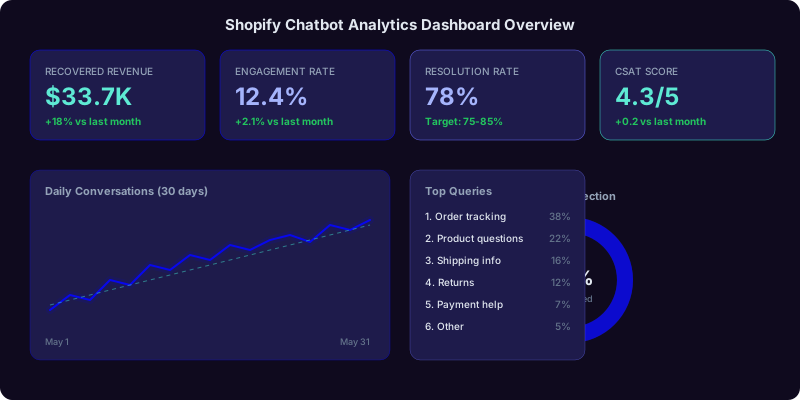
Stores that follow this weekly optimization cycle see 30-50% performance improvements over the first 6 months compared to a set-and-forget approach. For a comprehensive metrics guide, read our chatbot analytics metrics guide.
Pricing and ROI: What a Shopify Chatbot Costs vs. What It Returns
The financial case for a Shopify chatbot is straightforward. Let us build a realistic ROI model for a mid-size Shopify store.
Assumptions
- Monthly revenue: $80,000
- Monthly orders: 1,200
- Average order value: $67
- Cart abandonment rate: 70%
- Monthly support tickets: 150
- Cost per support ticket (human): $10
ROI Calculation
| Revenue Source | Calculation | Monthly Impact |
|---|---|---|
| Cart recovery (18% recovery rate) | 2,800 abandoned carts x 18% x $67 AOV | +$33,768 |
| Upselling (20% AOV lift on 10% of orders) | 120 orders x $13.40 AOV lift | +$1,608 |
| Support ticket deflection (65%) | 97 tickets x $10 per ticket | +$975 savings |
| Reduced agent hours | ~40 hours saved x $22/hour | +$880 savings |
Total monthly impact: ~$37,231
Chatbot cost: $49-199/month (depending on plan and message volume)
ROI: 186x to 760x
Even with conservative assumptions -- cutting the cart recovery rate in half to 9%, reducing the AOV lift to 10%, and lowering deflection to 50% -- the chatbot still generates over $18,000 in monthly value against a sub-$200 monthly cost. The payback period is less than one day.
Conferbot Pricing for Shopify Stores
Conferbot offers plans designed for ecommerce businesses at every scale. Visit our pricing page for current plan details, including:
- Free plan: Basic chatbot with limited conversations -- ideal for testing and proof of concept
- Growth plan: Full product catalog sync, cart recovery, order tracking, and analytics
- Scale plan: Multi-channel deployment (website + WhatsApp + Messenger), Shopify Flow integration, advanced AI, and priority support
- Enterprise plan: Custom SLAs, dedicated account manager, custom integrations, and unlimited conversations
For a detailed ROI framework you can apply to your own numbers, use our chatbot ROI calculator guide.
Advanced Tips and Common Mistakes to Avoid
After deploying chatbots on thousands of Shopify stores, we have identified the patterns that separate high-performing implementations from underperforming ones. Here are the advanced tips that make the biggest difference, plus the mistakes that sabotage results.
Advanced Tips
1. Segment your welcome message by traffic source. Visitors from Google Shopping ads have different intent than visitors from Instagram. Configure your chatbot to detect the UTM source and tailor the opening message. Google Shopping visitors get: "Looking for more details on [product they clicked]?" Social media visitors get: "Welcome! Want to see what's trending this week?"
2. Use the chatbot for pre-launch and waitlist campaigns. Before launching a new product, update your chatbot to tease the upcoming release and collect waitlist sign-ups. "We're launching something exciting next week. Want early access? Drop your email and I'll notify you first." This builds anticipation and creates a day-one buyer list.
3. Leverage Shopify metafields for hyper-personalization. Store custom data in Shopify customer metafields (birthday, preferences, VIP tier) and pull it into chatbot conversations. A birthday greeting with a personal discount code has a 45-55% redemption rate.
4. Implement seasonal chatbot modes. Create pre-configured chatbot modes for Black Friday, Holiday, Back-to-School, and other seasonal events. Each mode adjusts the welcome message, product recommendations, urgency triggers, and discount logic. Switch between modes with one click rather than reconfiguring everything manually. Our seasonal ecommerce chatbot strategy guide covers this in detail.
5. Use conversation data for product development. Your chatbot captures what customers want that you do not currently offer. Analyze queries like "do you have X in [color/size/feature]" to identify product gaps and inform your buying or development decisions.
Common Mistakes
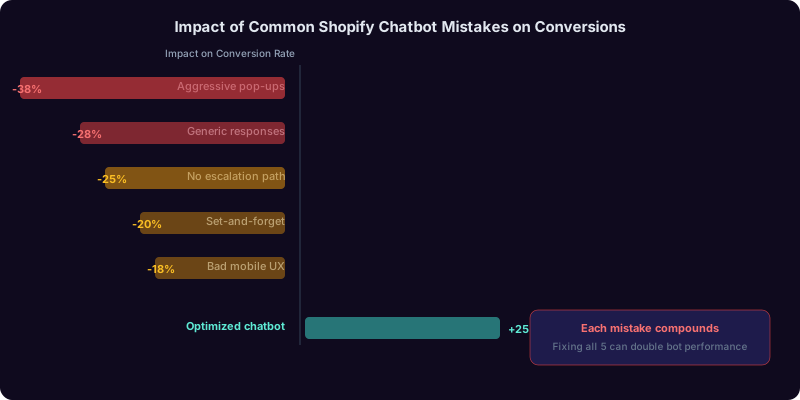
Mistake 1: Over-aggressive pop-ups. If the chatbot fires a full-screen takeover the moment someone lands on your store, you will drive visitors away. Use subtle entry points -- a bubble with a question, not a modal that blocks the page.
Mistake 2: Generic responses. "I'm sorry, I don't understand. Can you rephrase?" is the fastest way to lose a customer. Configure fallback responses that are specific and helpful: "I'm not sure about that one, but I can help you with product questions, order tracking, or shipping info. Which would you like?"
Mistake 3: No escalation path. Some stores disable human handoff entirely, trapping frustrated customers in a bot loop. Always provide a clear path to a human agent, even if it is "Leave your email and our team will get back to you within 2 hours."
Mistake 4: Set-and-forget deployment. A chatbot that has not been updated in 3 months is answering questions with stale information. Schedule monthly audits to update product knowledge, seasonal messaging, and FAQ content.
Mistake 5: Ignoring mobile UX. Over 70% of Shopify traffic is mobile. If your chatbot widget covers the add-to-cart button on mobile, you are losing sales. Test the mobile experience thoroughly and adjust widget sizing and positioning. For mobile-specific considerations, see our chatbot UI design best practices.
Was this article helpful?
How to Build an AI Chatbot for Your Shopify Store (Step-by-Step 2026 Guide) FAQ
Everything you need to know about chatbots for how to build an ai chatbot for your shopify store (step-by-step 2026 guide).
About the Author

Conferbot Team specializes in conversational AI, chatbot strategy, and customer engagement automation. With deep expertise in building AI-powered chatbots, they help businesses deliver exceptional customer experiences across every channel.
View all articles